





Tips to Get Most of Google Workspace and Make Hybrid Work Efficient and Effective!

3748
Of your peers have already read this article.
1:30 Minutes
The most insightful time you'll spend today!
In response to the pandemic, an overwhelming 92% of the U.S. workforce is now interested in working in a hybrid or fully remote capacity1. All employers, including government leaders, are now critically focused on finding the right tools and techniques to foster engagement, improve productivity, and strengthen relationships – in-person and virtually – or risk losing and/or retaining top talent.
Creating a positive work environment starts with having the right technology that can provide a variety of meeting tools to make work easier and more productive from any location. Google Workspace enables agency leaders to support their workforce with capabilities to address a variety of needs, from virtual training and learning, to mobilizing emergency response and critical service delivery. Below we’ve highlighted some of our top tips for getting the most out of Google Workspace to make hybrid work more efficient and effective.
Capture meeting agendas in a Google Doc
Create more effective, engaging meetings by attaching an agenda doc to your Google Calendar event and invite your attendees in to comment and review ahead of time. Google Docs, Google Slides, and Google Sheets allow collaborators to leave color-coded comments that can be incorporated into a live video meeting or a face-to-face roundtable meeting.
Engage attendees with interactive features in Google Meet
We’ve added new features to make meetings more interactive and inclusive throughout 2022. New in-meeting reactions, livestream Q&A and polls, and streaming meetings directly to YouTube, and client-side encryption are all coming to Google Meet soon. We’re incorporating Meet directly into Docs, Sheets, and Slides to make it easier to coordinate on projects.
Knowing how to include everyone into a meeting, even while some folks are remote and some are in the office, will be critical to bringing cohesion to the work experience. Government leaders can foster a culture that helps workers be more productive, satisfied, and perhaps even happier with their work lives.
Add focus time to your calendar and see how time is spent
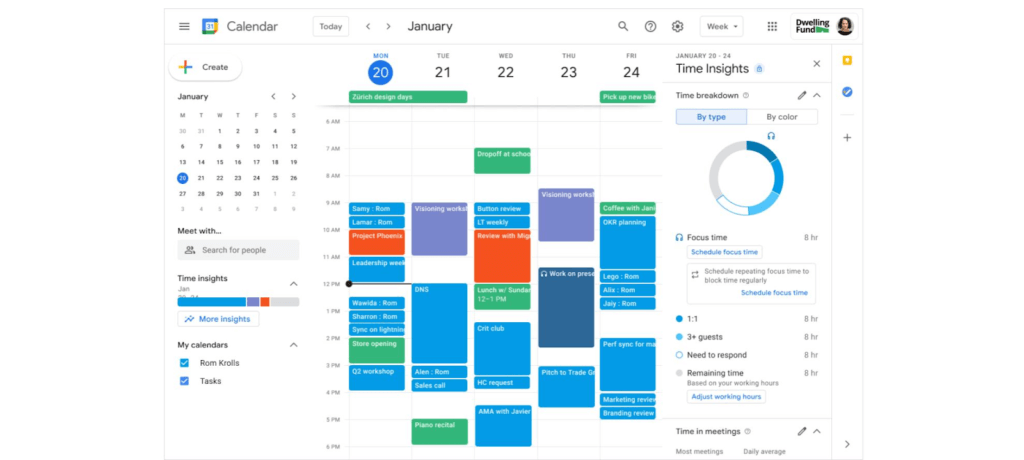
Google Workspace has also introduced product features to promote wellness. This includes focus time on Google Calendar, out of office and do not disturb statuses on Google Chat, or even backgrounds and noise cancellation on Google Meet that allow individuals to separate their home from work. Allowing employees to set boundaries or notify others of working times can help combat work fatigue. Time Insights in Calendar provide individuals with personalized analytics to see how time is spent across meetings and collaborators throughout a week. A secure cloud environment further brings these tools together to create systems of collaboration.
Creating positive outcomes with a culture focused on integrated work environments
The shift to hybrid work has already started leading to more meaningful engagements among all employees. Video calls have connected the new, tech savvy generation of workers with more experienced workers. In a Fedscoop Radio podcast on embracing hybrid-work strategies and tools, Gary Dannoff, Global Google Workspace Strategic Alliance Leader, noted that multigenerational teams with a 25-year age gap between team members are 75% more likely to have positive outcomes than teams with a smaller age span or none. As we return to the office, let’s engage with and support this new culture of cross-cultural, cross-generational, and cross-geographic collaborative environments created by the challenges we all adapted to during the pandemic.
Google Workspace supports a shift toward future-ready workplace cultures while providing the empathy and confidence needed for returning employees. Danoff also explains that to create a “future-proof” culture, you need to shift your mindset towards building a workplace that is future-ready. Using modern technology to foster collaboration in an evolving work environment helps organizations transform how work is done.
Collaborative technology facilitates productivity and constituent engagement
Agencies around the country are embracing the new era of hybrid work. The State of Arizona migrated 36,000 employees to Google Workspace with little disruption to the way people did their jobs. Now, Arizona is planning to expand their platform to support even more departments that require highly regulated data.
To help constituents get back to work, states like Rhode Island and Wisconsin have created Virtual Career Centers that leverage Google Cloud solutions, which includes Google Workspace, where constituents can schedule meetings and video conferences with career coaches, develop and collaborate on resumes using cloud-based document storage, communicate directly with job recruiters, attend virtual job fairs, and apply to open positions.
For more ideas on how to bring a collaborative, innovative culture into the workplace, catch up on content from the Google Workspace Summit.
1 Source: https://www.pwc.com/us/en/library/covid-19/us-remote-work-survey.html#content-free-1-0f39
6435
Of your peers have already watched this video.
1:40 Minutes
The most insightful time you'll spend today!
How Haydenshapes Expanded its Business to 70 Countries With Real-Time Collaboration
Hayden Cox was only 15 years old when he broke his surfboard. And he was only 15 years old when he decided to make one.
That’s how Haydenshapes, Cox’s surfboard manufacturing company, took form. That was five years ago. Today, the company has manufacturing units in Los Angeles, Sydney, and Thailand and is selling surfboards in 70 countries around the world.
One of the major enablers that ensured Haydenshapes expanded its reach across continents—in just five years—is collaboration. For any company wanting to spread its wings and expand quickly to reach more customers, real-time collaboration is imperative.
That’s why Haydenshapes turned to Google Cloud’s G Suite to ensure its teams in Los Angeles, Sydney, and Thailand are working together towards the same goal in real-time. Its marketing, sales, and other business teams collaborated on Google Docs, Slides and Sheets to help the business grow across the world.
This, in turn, ensured that Cox could dedicate a significant amount of time in coming up with the next big idea and getting more products out to market quickly and cost-effectively.
How MobileOne Expanded its Stores by 340% in Just Three Years

4830
Of your peers have already read this article.
7:30 Minutes
The most insightful time you'll spend today!
The mobile industry is extremely fast-paced. New smartphones arrive at rapid speed. Smartphone OS updates regularly add new features and capabilities. And by the end of 2018, 5G wireless, the game-changing successor to 4G, will begin to be available in some markets.
With more than 125 T-Mobile premium retail stores across the United States, MobileOne is at the forefront of the mobile industry’s constant, rapid-fire changes. The company is growing quickly, too, expanding its number of stores by 340% in just 3 years.
In this high-growth, non-stop environment, MobileOne’s mission is to keep frontline employees trained, informed, and updated at all times so that they, in turn, can serve as trusted experts to customers. Ultimately, the end game is to stay competitive by delivering the kind of positive experience that encourages customers to return, and to recommend MobileOne to friends.
But fulfilling this mission had become a major operational challenge for MobileOne. Information was typically created in the company’s productivity software suite and shared in emailed file attachments through the company’s on-premises email system. The method was slow and inefficient, and it could introduce errors if an outdated file was emailed.
In addition, there were no central, shared, easily accessible repositories of company knowledge. Thus, to find information shared a few months ago, team members might have to search their email archives for the appropriate file, and the search capabilities of MobileOne’s legacy email system were far from robust. Worse, a file that one employee suddenly needed may exist only on the hard drive of another employee who might be away on vacation.
“Without G Suite, I can’t imagine how we could keep up with everything.”
– Revel Stark, Director of Recruiting and Marketing, MobileOne LLC
MobileOne leaders recognized that a digital workforce transformation was needed to help the company stay focused on delivering excellent customer service. In response, the company began moving all employees to G Suite with the help of Suitebriar, a Google Cloud – G Suite Premier partner.
Sharing docs in seconds
G Suite applications help MobileOne team members collaborate, share information, and receive the latest training. G Suite also helps MobileOne move at an accelerated pace. For example, on a recent Sunday, Revel Stark, Director of Recruiting and Marketing at MobileOne, was on his way to the beach with his family when someone in the company needed a document from him right away.
“It took just seconds to launch the Google Drive smartphone app, do a quick search, and share the requested document,” says Revel. “Before G Suite, I’d have to start up my laptop, assuming I even had it with me, and search for the file. If the file wasn’t on my laptop’s drive, it might be Monday before I could have found and shared it. That just doesn’t work for us. Without G Suite, I can’t imagine how we could keep up with everything.”
Creating central repositories
“Now, with Drive and Sheets, everyone has access to the most recent, business-critical information at the same time. Having live spreadsheets helps us ensure that no important information gets lost, despite the rapid pace in which we work.”
– Revel Stark, Director of Recruiting and Marketing, MobileOne LLC
Drive, coupled with G Suite apps such as Docs and Sheets, streamlines document sharing at MobileOne by enabling the company to create central repositories of information that are easily accessible and, with Google search technology, easily searchable.
For example, the company used to track operations, growth metrics, and performance in its legacy productivity suite’s spreadsheet application. The spreadsheet files were shared via email. But given MobileOne’s rapid growth, the information in those spreadsheet files could become outdated quickly. And there was confusion at times about which file was the most recent version.
“Now, with Drive and Sheets, everyone has access to the most recent, business-critical information at the same time,” Revel says. “Having live spreadsheets helps us ensure that no important information gets lost, despite the rapid pace in which we work.”
MobileOne has set up a Team Drive for each of the company’s departments, too. “With Team Drives, department heads can make sure their department’s documents are well organized, up to date, and easy to find,” Revel says. “And they can give access only to the people who need it.”
Streamlining interview schedules
The thousands of apps in the G Suite Marketplace enable businesses to add even more functionality to the G Suite apps that their employees use every day. MobileOne uses a third-party scheduling app that integrates with Calendar to streamline the scheduling of job applicant interviews. “Job applicants can look at our calendar and pick an open slot to schedule their interview,” says Revel. “It speeds up the process by not having to go back and forth in email, trying to find a time that’s mutually agreeable.”
Simplifying admin duties
“Before G Suite, it was time-consuming to add a new user to our email system,” Revel says. “I’d have to ask our service provider, then wait for them to do it. But with the easy-to-use G Suite admin panel, we can add someone to Gmail ourselves in a minute or two.”
Receiving personalized service
To support the rollout, MobileOne worked with Suitebriar, a Google Cloud – G Suite Premier Partner. Suitebriar efficiently set up MobileOne on G Suite and now provides webinars and on-going support to help MobileOne users get more out of G Suite. “Suitebriar is incredibly responsive,” says Revel. “They know our business, they give us personalized service, and they get back to me quickly when I have questions, sometimes in as soon as 30 seconds.”
Driving new business with Forms
MobileOne uses Forms to help it organize public events and, in combination with Sheets, to measure the success of those events.
Last year MobileOne held 200 events across the company’s 125 stores and is planning to hold up to 400 events this year. The events are designed to connect MobileOne associates with local residents and bring people into its stores who might not otherwise visit.
“We developed a pre-event form that stores use to communicate with our corporate office about what’s needed to set up their event,” Revel explains. “And we have a post-event form that stores can fill out to capture what worked and what didn’t work at the event. The information in that form gets dropped into a Sheets spreadsheet, so we can track the success of events across all stores. It helps us focus on the events that drive the most traffic into stores, where we can connect with locals and show them how we can help them.”
Using Hangouts to train — and applaud
“When a team member in the field does something fantastic, we can gather a bunch of people in a conference room, get that team member into Hangouts, and give him or her a round of applause. It’s a great way to give someone a pat on the back.”
– Revel Stark, Director of Recruiting and Marketing, MobileOne LLC
At MobileOne, Hangouts is among the most used G Suite app. The company uses Hangouts to bring executives together in different locations for a weekly briefing. “Hangouts breaks down the barriers that geographical distances create, so that everyone gets quality time together,” Revel says.
Training is another key Hangouts use case. “Because keeping our people well informed is so important, we use Hangouts frequently to train team members,” says Revel. “We’re currently using Hangouts with a Hangouts Meet hardware in our corporate office for training, and we’re considering expanding that by adding 20 to 30 Hangouts Meet hardware in training rooms across all seven states where we operate.”
MobileOne uses Slides for training presentations, which are often scheduled using Calendar and presented in Hangouts. “Calendar makes it easy to set up training events and to see the availability of people you want to invite,” Revel says. When people find a time that works, they simply add a Hangouts link to the calendar event. Then during the Hangouts session, a presenter can launch a Slides presentation, and attendees can ask questions with Hangouts chat. All of this is easy to set up and the training happens in real-time, which gives it more of an impact.
The company is also leveraging Hangouts in a less conventional way. “When a team member in the field does something fantastic, we can gather a bunch of people in a conference room, get that team member into Hangouts, and give him or her a round of applause,” says Revel. “It’s a great way to give someone a pat on the back.
Google Workspace Makes Hybrid Model Palatable for Teams of All Sizes
3815
Of your peers have already read this article.
4:00 Minutes
The most insightful time you'll spend today!
One of the hopeful signs of a return to normalcy is seeing many of our customers make plans to come back into their offices. And they’re asking for strategies that will make hybrid work a more equitable and productive experience for everyone. At Google, we’re also beginning our own transition to hybrid work in early April. As we gear up for that, it feels like a time of optimism for new ways of working together and the potential for hybrid models to become the sustainable norm. When designed well, a hybrid model gives employees the flexibility to deliver their best from anywhere, while bringing them together thoughtfully for the power of in-person collaboration.
Today, Google Workspace is announcing new features that can help teams of all sizes stay better connected and engaged, whether they’re working from home, the office, or anywhere in between.
More inclusive and secure hybrid meetings
For most companies working in a hybrid model, meetings typically include in-person and remote attendees, and it’s essential that each hybrid meeting experience is unified and productive for all. In light of this, we continue to make enhancements to Google Meet to help ensure that all video meetings are secure and inclusive no matter the location or device preference.
Coming next month, in-meeting reactions will let attendees visually express themselves with 👍 ❤️ 😆 and more, bringing energy into the meeting and giving immediate feedback to speakers and other attendees. These reactions will appear in a participant’s video tile, or overflow alongside their name if their video tile isn’t visible.

Being able to see and hear each other during hybrid collaboration is essential. To address this, we’re bringing Meet directly to Docs, Sheets, and Slides in the coming weeks. Users will be able to quickly start a meeting and bring it to a document, spreadsheet, or presentation, and they can present this content to all the meeting attendees. This enables everyone in the meeting to collaborate in real-time while having a conversation—all from the same tab.
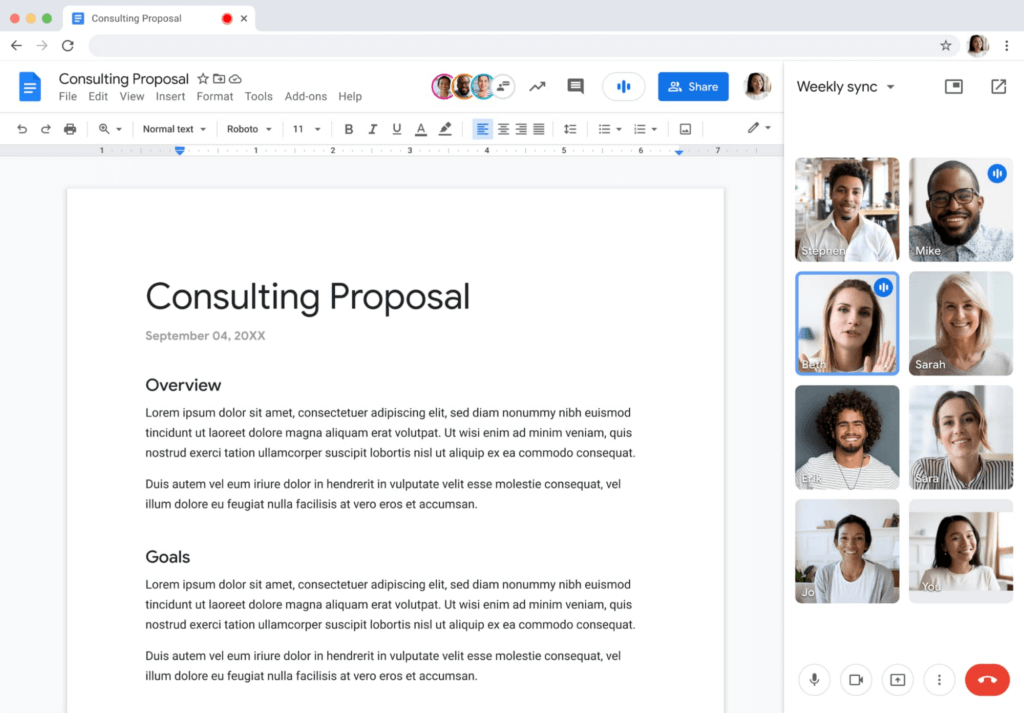
Additionally, to help presenters and multitaskers see their audience while navigating different tabs and windows, we’re bringing picture-in-picture to Meet running on Chrome browsers. Next month, you’ll be able to see up to four video tiles of meeting attendees in a floating window on top of other applications as you share content or send a message in Gmail. Clicking on picture-in-picture quickly takes you back to the full Meet session.

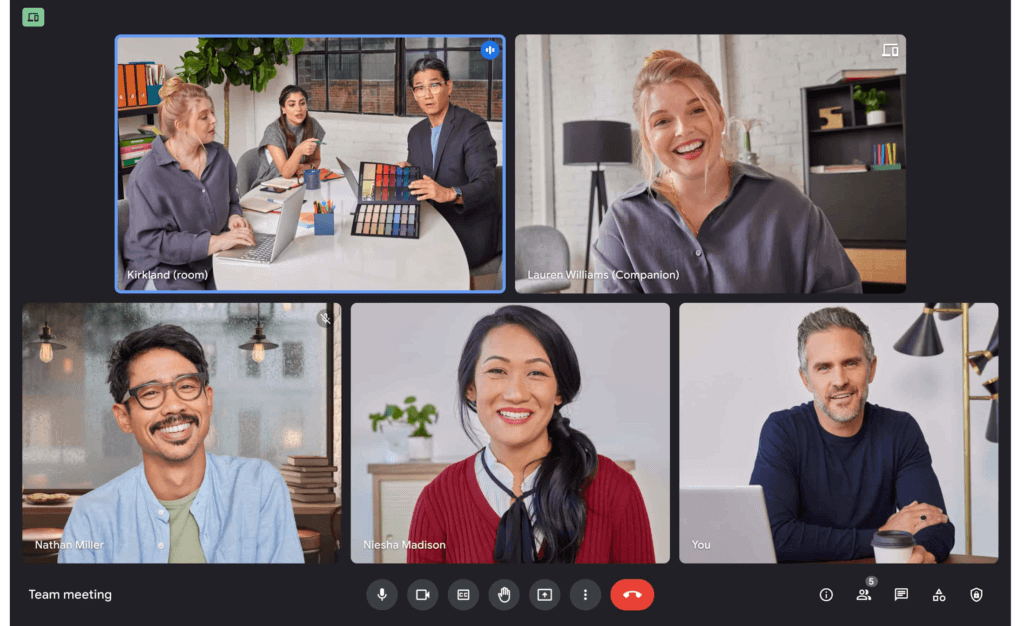
With our recent rollout of Companion mode for Meet, we gave in-room meeting attendees a way to stay engaged using their personal devices while leveraging in-room audio and video. To improve the in-room experience, we’ve started rolling out automatic noise cancellation on all Google Meet hardware, including Logitech, Acer and Asus hardware.* This will help remove background noises—from loud typing in a conference room to the neighbor’s lawn mower. In the coming months, people in conference rooms will also be able to add their own personal video tile from Companion mode and their laptop camera, making it easier for other attendees to see their expressions and gestures.
We’re also improving the livestream experience, strengthening an organization’s ability to broadcast a message and deepening its engagement with audiences. Today, Google Meet users can host meetings of up to 500 active attendees with the ability to livestream to audiences of up to 100,000 across trusted Google Workspace domains. Coming later this year, livestream attendees will be able to participate in Q&A and polls, matching the experience that Meet attendees enjoy today. Customers have also requested the ability to reach a broader audience by livestreaming through other platforms. Later this year we’ll enable meeting hosts to do just that by streaming meetings directly to YouTube from the Meet activities tab. Our integration with YouTube means a Google account can be used for authentication, simplifying the livestreaming process.
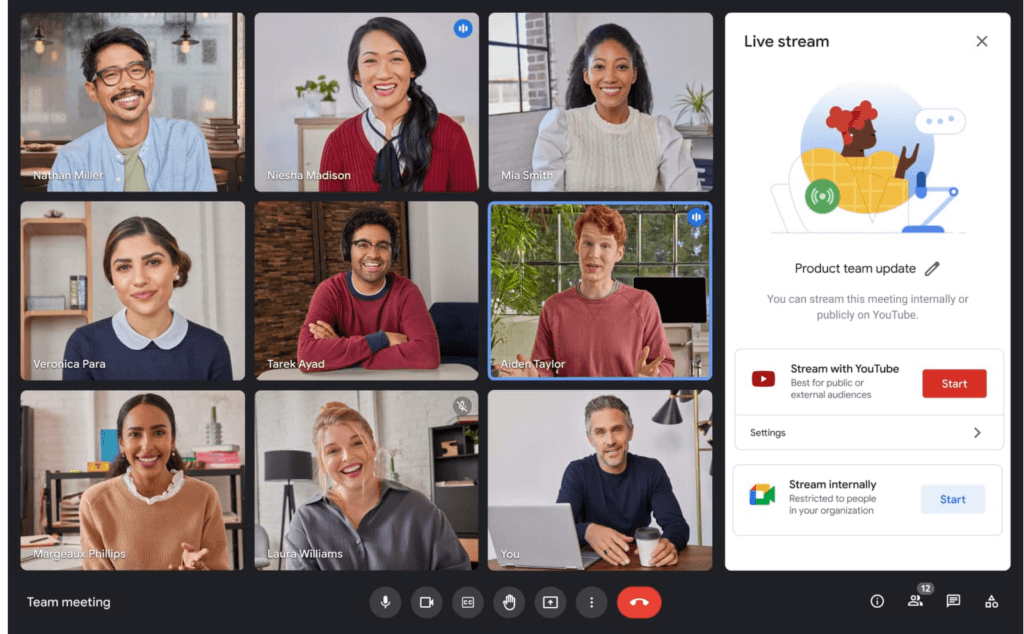
Lastly, to help keep your most sensitive communications protected and private, in May we’re rolling out optional client-side encryption in Google Meet (currently in beta). This feature gives our customers direct control of the encryption keys and identity provider used to access those keys. And later this year we’ll introduce optional end-to-end encryption for all meetings.
Together, these enhancements strengthen the foundation of security that help make secure, hybrid collaboration happen at scale.
Anytime collaboration for teams large and small
While live meetings can be a great way to collaborate and make decisions in real time as a team, most communication and information sharing doesn’t need to happen in real time. How do high performing teams stay connected with the right information, at the right time, without the need for the back-to-back meetings that were a hallmark for many during the pandemic?
Spaces in Google Workspace offers an integrated, effective solution for anytime collaboration, where teams can share ideas and knowledge, discuss topics, collaborate on documents, and manage tasks within a single, persistent location.
We are improving how conversations are displayed in Spaces with inline threading, a top request from enterprise customers. With inline threading, members of a space will be able to respond to specific comments and create side conversations, while keeping the dialogue organized and contextual. Every teammate can easily browse a space and catch up on topics that are important to them, at a time that works for their schedule.
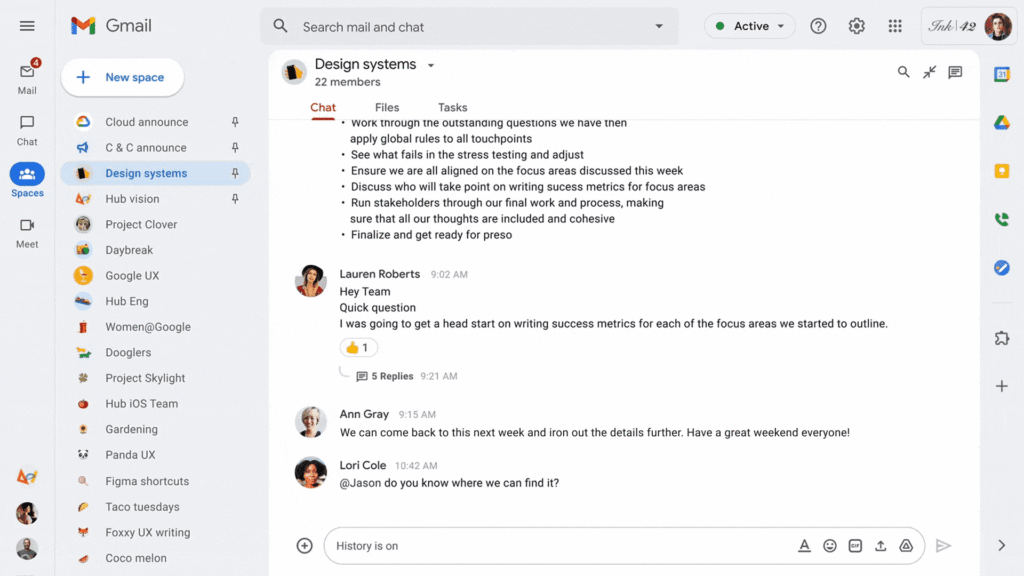
To further support collaboration and transparency, last week we enabled users to invite others to join a Space via a shared link, and later this year we will enable users to search and join Spaces across an organization. We’re also improving search within Chat and Spaces to surface the most relevant files and conversations, and bringing filter chips to chat search results later this year.
And to bring the power of Spaces to organizations of all sizes, we are increasing team size limits to 8,000, and we’ll increase this to 25,000 by the end of this year to support communities as they grow. This will improve knowledge sharing and collaboration in larger organizations and unlock key scenarios, including team, department and organizational announcements.
Strong team cultures are built on trust and psychological safety. That’s why we’re adding features that improve content moderation, the ability to designate managers and guidelines for specific Spaces, and new admin capabilities to delete Spaces.
Bringing Google Voice to more customers
With the move to a hybrid workplace, we’ve seen renewed interest in cloud-based phone systems that untether people from legacy deskphones. Google Voice keeps colleagues and customers connected with an intuitive calling experience across devices (web, mobile, and certified deskphones) while leveraging Google’s AI to help save time by blocking spam, transcribing voicemails, and guiding callers. Google Voice has over a decade of cloud telephony experience and seamlessly integrates with Google Workspace.
To help our European customers adopt Google Voice, we recently announced that calls from European Google Voice numbers to mobile and landline numbers in many European countries will be included in their Google Voice license. Later this year, we’ll introduce SIP link, which will allow customers to connect SIP trunks from their chosen telecommunications carrier via certified session border controllers from Audiocodes, Cisco, Oracle, and Ribbon. This will enable customers with operations outside our current coverage areas to move holistically to Google Voice. Admins will be able to easily manage these carrier-provided numbers alongside Google-provisioned numbers directly in the Google Admin Console.
We’ll also begin rolling out on-demand call recording to Google Voice Standard and Premier subscribers next month. Premier subscribers will have the additional benefit of automated call recordings, which is a top request from customers in regulated industries. We encourage you to learn more about Google Voice and talk with your Google account rep about trying it today.
Benefits of a modern hybrid work strategy
As work continues to evolve, Google Workspace will continuously look for ways to help your teams better connect, create, and collaborate, no matter where and how they work together. By bringing together Google Workspace innovations in voice, video meetings, and the collaboration spaces that support hybrid work, your organization can benefit from a strategy that removes friction, streamlines costs, and reduces the security risks associated with maintaining multiple platforms. With a unified approach to communications and collaboration, you can build a sustainable hybrid work model that gives employees the ability to deliver their best from anywhere.
Learn best practices from Google in our hybrid work handbook.
Swiggy: Delivering Local Food Within 40 Minutes

8828
Of your peers have already read this article.
1:30 Minutes
The most insightful time you'll spend today!
Founded in 2014, Swiggy started small, delivering food to a few neighborhoods in Bengaluru, India. As the company grew, the team wanted a mapping technology that could help expand the service throughout India.
Swiggy needed a scalable mapping platform that covered a wide geographic area and offered tools to help the company to build an efficient mobile app and website for customers and delivery staff.
Customers find restaurants and order from them using the Android app, iOS app, or the website. Swiggy worked with Google Maps Partner Media Agility and used a variety of Google Maps Platform APIs to develop web and mobile apps that incorporate relevant local restaurant details.
Google Maps Platform Results
- Built a hyper-local delivery service that is growing throughout India at a rate of 25 percent per month
- Deliveries are made quickly, resulting in higher customer satisfaction and retention—users have been so satisfied that nearly 80 percent of its orders are from repeat customers
- Drivers seamlessly handle tens of thousands of orders per day
In order to guarantee fast food delivery, Swiggy returns only restaurants within four to five kilometers of the customer’s location. The Directions API is used by drivers to easily route to restaurants and customers. The customer can track the progress of the delivery and estimated arrival time using a mobile app or the website.
“Google Maps provides the most accurate and reliable data, which is crucial for us because maps and location are central to our business. We also knew Google’s intuitive interface would provide a great customer experience with little to no learning curve… Google Maps’ ability to provide customer location and the distances of nearby restaurants is the backbone of our success, because it ensures a reliable, consistent customer experience,” said Aman Jain, Senior Product Manager, Swiggy.
How Randstad Creates Assessment Reports in Five Minutes with G Suite
4343
Of your peers have already read this article.
7:34 Minutes
The most insightful time you'll spend today!
For over five decades, Randstad has matched businesses worldwide with millions of temporary and permanent workers, creating long-lasting, successful working relationships. Today, the company operates a vast multinational recruitment network, with 35,000 employees applying HR expertise in markets from Norway to Malaysia, and more than 37 countries in-between.
To give staff a more mobile, low-maintenance alternative to their previous communications solution, Randstad offered G Suite to its staff in 2012, giving them the option to switch. All of Randstad’s workforce made that choice, assisted by a Randstad “Transformation Kit” containing everything a team needs for a successful migration. Now Randstad’s global community of G Suite users are looking to unleash the full potential of the platform, moving beyond Gmail and Calendar to engineer major efficiencies across the organization.
“Technology gives us more time to be in contact with people,” says Senne Beckers, Senior Accounts Specialist at Randstad. “It means we can give more attention to the people we outsource, our colleagues, and our customers. Our administrative ability is what makes Randstad successful, and G Suite makes all our processes more efficient.”
Sharing tips worldwide to make the most of G Suite tools
“In Sheets, I can create a pivot table and then I can drop Sheets visualizations directly into Slides for presentations. In the past, we would need visual designers to do that, but now I can do it in a matter of minutes.”
– Frank van der Bijl, Business Analyst IT, Randstad
Using Google+, Randstad workers share their ideas for applying G Suite to their work. “We share tips and tricks with each other from all over the world,” says Frank van der Bijl, Business Analyst IT at Randstad. “There’s always someone you can learn from or educate, and that’s an innovation in and of itself. In the past, when we wanted to share information like this, we would contact the internal communications team for them to put something on the company intranet. Now we go straight to Google+ and post it directly.” Randstad calls this project “Google to the Max”, and the boost in collaboration and efficiency helps its staff around the globe be more productive.
Those tips range from saving time by using Calendar to book meeting rooms and check colleague availability, to minimizing unnecessary travel by replacing meetings with Google Hangouts Meet. As an HR company, Randstad handles, optimizes, and edits thousands of résumés every day. By using Google Forms to collect data for résumés and Google Docs to edit them, Randstad teams streamline that core process. “Rather than send résumés back and forth with corrections and suggestions, we work on them all together, directly in Docs,” says Frank. “It’s a collaboration, like how we centralize information in Google Sheets to give everyone on a team a single, up-to-the-minute overview on customers and candidates, maximizing the chances of a successful match.”
Many of the innovations tackle processes that used to create bottlenecks by requiring specialist knowledge. “In Sheets, I can create a pivot table,” says Frank, “then I can drop Sheets visualizations directly into Google Slides for presentations. In the past, we would need visual designers to do that, but now I can do it in a matter of minutes.”
Streamlining annual assessments with Forms and Sheets
“We have more than 1,000 people working for a global airline through Randstad, and because G Suite is so open, the airline, like other clients, uses Google tools to send us information.”
– Senne Beckers, Senior Accounts Specialist, Randstad
In addition to improving internal processes, the innovations directly benefit Randstad clients, as Senne explains: “We have more than 1,000 people working for a global airline through Randstad, and because G Suite is so open, the airline, like other clients, uses Google tools to send us information, even though they work with a different communication platform.”
That flexibility allows Senne and her team to apply G Suite technology to problems outside of Randstad. “We used to have a very old-fashioned way of collecting annual assessments on each of the people we have with the airline,” says Senne. “We would email a document to an airline shift leader, who had to go to his or her computer to receive it, print it, fill out the document, scan it, save it, and then email it back. At one point, the workload was so high that we had to stop taking feedback altogether.”
To simplify the process, Senne implemented Forms, as a fast, mobile way for shift leaders to send their assessments. “With Forms, shift leaders can be inside a plane or out on the runway, and when they want to comment on an employee they can give us instant feedback that goes directly into our system,” explains Senne. Back at the Randstad office, HR then pulls all the data they need directly from Sheets, without having to reference the CRM, chase clients, or search emails.
As a result, it now takes five minutes to create an annual assessment, instead of one hour. Because there are 1,000 employees, a task that took 1,000 hours a year, or 140 working days, can be finished in two and a half weeks.
“Because Sheets translates information directly into graphs as it arrives, we can track the situation at a glance,” says Senne. “Streamlining the creation of annual assessments with Forms doesn’t just make the process more efficient, it also means we can spend more time properly discussing feedback with employees. That’s good for them and great for the airline’s management, which now wants to roll out this approach to more business units.”
Bringing teams together with Google Keep
“Everyone has their own approach, and we’re all sharing our experiences through Google+ and helping colleagues. Every day we find a new feature, which helps us be more efficient, and all we need to implement it is an internet connection.”
– Frank van der Bijl, Business Analyst IT, Randstad
As HR specialists, Randstad employees know that solving individual work issues is only part of the story. For teams to work effectively, solutions need to be brought together in a single place, where they can feed into each other. To make that happen, staff across Randstad use Google Keep to communicate.
“Keep really helps me to structure workflows and share my ideas directly with my team,” says Senne. “I have a lot of ideas all of the time, and Keep means I can make them known to the people I work with, at the same moment as I jot them down during a meeting. It brings Docs, Forms, and Sheets together in one place where we can arrange things intuitively and set priorities. With our to-do lists visible on that central hub, we can all check in on each other and track progress in a transparent way.”
For Senne, that functionality couples neatly with Google Cloud Search. “As a senior account specialist, it’s my responsibility to know what is happening in our teams, and Google Cloud Search helps me keep all of the information at my fingertips, ready for me to share. It’s the home screen on my Chrome browser.”
Recognizing that this agile, fast-paced way of working may be unfamiliar to new employees, Frank uses Google Keep to introduce people to the G Suite tools. “When people are new to a company, they’re sometimes nervous about asking for advice, such as how to ask for a day off,” says Frank. “To help them, I’ve created a four-step checklist of ‘Things you should do when you join Randstad’, which directs them to the information they need to on-board. With Keep I can see where they are in the process and follow up with them if I think they might need help.”
Embracing the interconnected environment
In each of the 39 countries where Randstad is active, operations are moving at their own pace towards greater G Suite integration. And though each is at a different stage in the process, the direction of travel is clear.
“Across the company, the next step will be Chromebooks, so that we fully embrace the interconnected app environment,” says Frank. “Some countries have already fully switched to Chromebooks, and some are migrating all of their data to the cloud. Everyone has their own approach, and we’re all sharing our experiences through Google+ and helping colleagues. Every day we find a new feature, which helps us be more efficient, and all we need to implement it is an internet connection.”
More Relevant Stories for Your Company

How Machine Learning in G Suite Helps Employees of Dalmia Bharat Discover the Next Big Idea
Creating expense reports, Email management, formatting documents: Your time is caught in the quicksand of formatting, tracking, analysis or other mundane tasks. These are just some of the time-sinks that can affect your—and your employees’—productivity at work. At Google Cloud, this is referred to as “overhead”—time spent working on tasks
Stay on Top of Your Cloud Monitoring with Google’s Mobile App
We are pleased to announce the availability of Google Cloud Monitoring uptime checks in the Google Cloud mobile app. The uptime check capability offered by Cloud Monitoring is a simple yet powerful observability tool to monitor an application's availability and performance on URLs provided by customers. The primary purpose of an uptime check is to
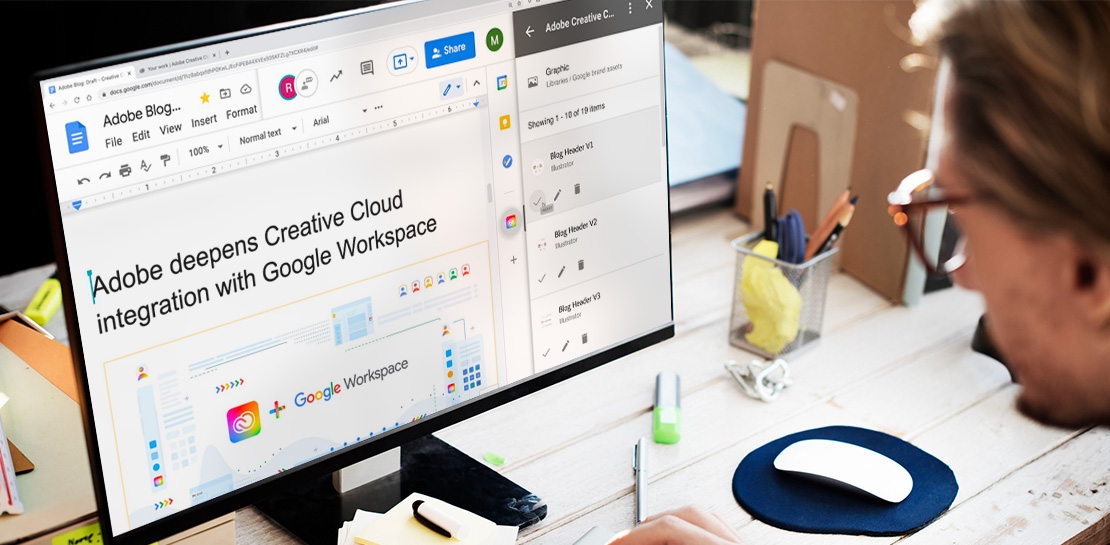
Google Workspace Now has Adobe Add-on!
Every day, individual people and creative teams combine Google Workspace with Adobe Creative Cloud to bring their best ideas to life and delight their customers or friends, across photography, design, video, 3D design, and more. In fact, Adobe’s add-on for Google Workspace has had over a million installs and counting. By partnering

Workspace’s Collaboration Equity Integral for Delivering the ‘Promise of Hybrid Workplace’
Like many businesses around the world, Google is trying to combine on-site and off-site work into an efficient hybrid model. And like most businesses, we’re also figuring out how to get it right. As we grow our vision for the best possible hybrid workplace, one theme consistently emerges: the need for
