





The Unintended Consequences of Scale

3520
Of your peers have already read this article.
3:00 Minutes
The most insightful time you'll spend today!
Cloud infrastructure offers so many advantages: on-demand scalability, built-in security, and a bevy of tooling to scale your business at the speed of the Internet.
It enables companies to pursue “blitzscaling,” as Reid Hoffman calls it. Capital expenses that take years or decades to pay off are no longer required to establish global networking, compute capacity, storage resources, and application enablement tooling. By renting these assets from cloud providers, you can translate capital costs to operational costs, help your company to manage resources efficiently, keep expenses aligned with growth trajectory, and develop a portfolio of business-driving technology assets faster than would have previously been possible.
Certainly, this is the message from many founders and venture capitalists: move to the cloud, build a ton of software, scale like crazy, and win. Sounds great, right?
But history has shown us that the process is not quite this simple. Scale can be great and is a prerequisite to many of today’s most exciting business opportunities — but scale also frequently produces unintended consequences. You need to be able not only to achieve scale but also to manage it.
When scale produces bloat
To understand how unforeseen impacts can ripple out from a rapidly-scaled technology, consider the first mass-produced vehicle, the Model T. The first production model was produced in 1908, and less than two decades later, Ford had produced 15 million. This rapid growth profoundly affected urban living for decades.
Thanks to cars, fewer workers needed to live near cities or along major public transportation lines. The ease-of-access to personal transportation led to suburban population centers and, ultimately, urban sprawl. “Sub-cities” extricated homeowners from the density of urban population centers but also created a complex web of unintended consequences: new and often duplicative administrative bodies, new taxes, new zoning laws, and more intricate infrastructure projects. We are arguably still dealing with this fallout today as communities grapple with antiquated zoning laws and, in their attempts to find ways forward, often produce only more sprawl.
If your technology is in the cloud, you may be challenged with similar issues. For example, when developers build software in the cloud, many of the barriers to building software are removed. As a result, developers build a lot of software — but often without a lot of intentional design. This in turn results in companies building a large number of disparate systems and overwhelming app sprawl.
The cloud can help you proliferate technologies so quickly, in other words, that effective management and re-use of resources becomes incredibly tough.
Managing scale
Software assets are often seen as comprising the “brains” of a company — but to effectively grow, you should consider not only brains but also the digital nervous system. You need systems that connect the brains to all of the other important limbs that have to coordinate in order for your company to drive value.
One way of creating this nervous system and managing this complexity is to leverage the facade design pattern: applying an API layer that abstracts the underlying complexity of multiple systems into an elegant, reliable interface that encourages discovery and re-use of applications, functions, and other technology artifacts such as build and deployment pipelines.
For example, too many enterprises build a new digital “road” for each application that needs to authenticate or authorize users. Instead, you can leverage a facade pattern to help establish one “main road” for these purposes, encourage reuse of the road for new projects, and — with API management — monitor and control all traffic along the road. For tasks such as aligning risk and compliance operations or unifying developer onboarding functions, the distinction between reusing elegant roads and continually building new complicated ones could not be more important.
API management tools mean you can establish a single-pane-of-glass view into your network of digital roads and destinations or, if you prefer the biology metaphor, into the nervous system routes connecting your company’s software brains. This view becomes a point at which suspicious API usage patterns can be detected, reported, and handled and through which business-driving insights from legitimate traffic can be gleaned. Rather than dealing with IT sprawl, you can maintain visibility over your assets, control how they are used, roll out experimental digital products and get immediate feedback on adoption, and generate analytics to help you effectively divest from and invest in opportunities as the market demands.
More is not always better
More is not always better, and, in fact, it is sometimes worse.
It’s a time-worn sales axiom that would-be customers are more likely to make a choice when presented with two or three options rather than fifty, for example, and virtually all of us can relate to moments of “analysis paralysis” triggered by too many choices. These dynamics of choice are such that the diminishing marginal utility of each choice can detract from each option: with each choice comes a little stress, and as these stresses accumulate, customer satisfaction suffers. IT systems are no different; if developers building new connected experiences are left to their own designs, rather than encouraged with standardized resources and best practices, their work may add to complexity and customer dissatisfaction.
One need look only at the various open air markets around the world to see this point in action. They may offer many things to see but the experience is anything but efficient. The multitude of shops selling similar and duplicate items, the zigzag layout, and the expected friction from bargaining with each vendor all mean concepts such as market-wide product discovery and product inventory go out the window. If your developer experience mirrors these marketplaces, your efforts to scale are more likely to tangle up your operations than to satisfy customers.
Contrast this experience with luxury retail experiences where product areas are clearly demarcated in different retail spaces, product explanations accompany showcase items, inventory is available locally or ready to ship, clear pricing is readily available, and similar stores are intentionally anchored to strategic physical areas to encourage customer flow among them. The developer programs that cloud efforts are often meant to enable require a similar focus on luxurious experiences.
If your growth strategy creates bloat, internal developers will not use resources efficiently and your ability to share resources with external partners will likely be hamstrung. Applying API facades helps to ensure that your growing software portfolio is not a complicated maze to be navigated but rather a series of technology products for developers to leverage.
Indeed, you should think of the API itself as a product, not just a way of surfacing or connecting technology. The better the product, the more easily it can be managed, the better the experience developers will have using it, and the more control you’ll have harnessing the cloud to extend your business’s footprint.
3344
Of your peers have already watched this video.
25:30 Minutes
The most insightful time you'll spend today!
How to Build a Platform on Google Cloud from the Ground Up
Building distributed applications is hard! Building globally scalable distributed applications is harder. Maintaining and growing these services as your business grows is even harder.
Watch this video to know how to create a globally scalable platform for your business on Google Cloud using service meshes. It shows how to build a platform on Google Cloud from the ground up.
This content is agreed upon and a combined effort between SA, Anthos PM (specifically Istio and Anthos Service Mesh), and Anthos engineering.
Join Ameer Abbas, Solutions Architect at Google Cloud, as he goes through (design opinions and reasonings for) project hierarchy in a Google Cloud org, setting up global networking and GKE cluster, service mesh (Istio and ASM), observability, and, common tools and golden signals. After watching this video, you will be able to learn how to think about SLOs, SLAs, security and how to secure traffic between services (mTLS) or from an end user to a service running in your mesh. You will also learn routing and other multicluster routing considerations and, other common operational tasks like adding or migrating an application to the mesh, rolling out new versions of applications, DR and other hybrid or multi-cloud considerations.
What You Need to Know About Compute Engines

6548
Of your peers have already read this article.
1:30 Minutes
The most insightful time you'll spend today!
Compute Engine is a customizable compute service that lets you create and run virtual machines on Google’s infrastructure. You can create a Virtual Machine (VM) that fits your needs. Predefined machine types are pre-built and ready-to-go configurations of VMs with specific amounts of vCPU and memory to start running apps quickly. With Custom Machine Types, you can create virtual machines with the optimal amount of CPU and memory for your workloads. This allows you to tailor your infrastructure to your workload. If requirements change, using the stop/start feature you can move your workload to a smaller or larger Custom Machine Type instance, or to a predefined configuration.
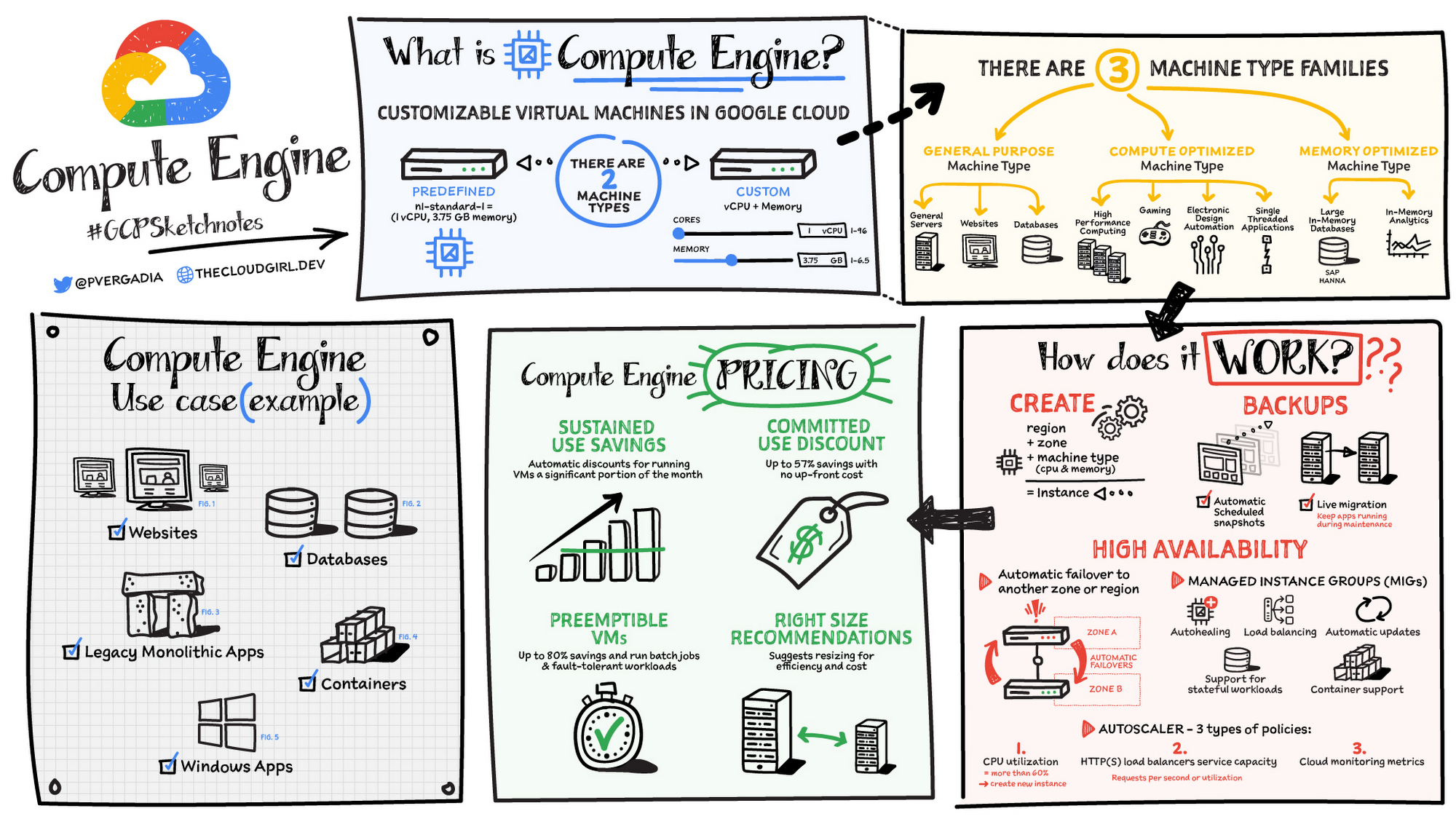
Machine types
In Compute Engine, machine types are grouped and curated by families for different workloads. You can choose from general-purpose, memory-optimized, compute-optimized and accelerator-optimized families.
- General-purpose machines are used for Day-to-day computing at a lower cost and for balanced price/performance across a wide range of VM shapes. The use cases that best fit here are web serving, app serving, back office applications, databases, cache, media-streaming, microservices, virtual desktops, development environments.
- Memory-Optimized machine are recommended for ultra high-memory workloads such as in-memory analytics and large in-memory databases such as SAP HANA
- Compute-Optimized machines are recommended for ultra high performance workloads such as High Performance Computing (HPC), Electronic Design Automation (EDA), gaming, video transcoding, single-threaded applications.
- Accelerator-Optimized machines are optimized for high performance computing workloads such as Machine learning (ML), Massive parallelized computations and High Performance Computing (HPC)
How does it work?
You can create a VM instance using a boot disk image, a boot disk snapshot, or a container image. The image can be a public operating system (OS) image or a custom one. Depending on where your users are you can define the zone you want the virtual machine to be created in. By default all traffic from the internet is blocked by the firewall and you can enable the HTTP(s) traffic if needed.
Use snapshot schedules (hourly, daily, or weekly) as a best practice to back up your Compute Engine workloads. Compute Engine offers live migration by default to keep your virtual machine instances running even when software or hardware update occurs. Your running instances are migrated to another host in the same zone instead of requiring your VMs to be rebooted.
Availability
For High Availability (HA) Compute Engine offers automatic failover to other regions or zones in event of a failure. Managed instance groups (MIGs) help keep the instances running by automatically replicating instances from a predefined image. They also provide application based autohealing health checks. If an application is not responding on a VM, the auto healer automatically recreates that VM for you. Regional MIGs let you spread app load across multiple zones. This replication protects against zonal failures. MIGs work with load balancing services to distribute traffic across all of the instances in the group.
Compute Engine offers autoscaling to automatically add or remove VM instances from a managed instance group based on increases or decreases in load. Autoscaling lets your apps gracefully handle increases in traffic, and it reduces cost when the need for resources is lower. You define the autoscaling policy for automatic scaling based on the measured load, CPU utilization, requests per second or other metrics.
Active Assist’s new feature, predictive autoscaling, helps improve response times for your applications–When you enable predictive autoscaling, Compute Engine forecasts future load based on your Managed Instance Group’s (MIG) history and scales it out in advance of predicted load, so that new instances are ready to serve when the load arrives. Without predictive autoscaling, an autoscaler can only scale a group reactively, based on observed changes in load in real time. With predictive autoscaling enabled, the autoscaler works with real-time data as well as with historical data to cover both the current and forecasted load. That makes predictive autoscaling ideal for those apps with long initialization times and whose workloads vary predictably with daily or weekly cycles. For more information, see How predictive autoscaling works or check if predictive autoscaling is suitable for your workload, and to learn more about other intelligent features, check out Active Assist.
Pricing
You pay for what you use. But you can save cost by taking advantage of some discounts! Sustained use saving are automatic discounts applied for running instances for a significant portion of the month. If you know your usage upfront, you can take advantage of committed use discounts which can lead up to significant savings without any upfront cost. And by using short lived preemptive instances you can save up to 80%, they are great for batch jobs and fault tolerant workloads. You can also optimize resource utilization with automatic recommendations. For example if you are using a bigger instance for a workload that can run on a smaller instance you can save costs applying these recommendations.
Security
Compute Engine provides you default hardware security. Using Identity and Access Management (IAM) you just have to ensure that proper permissions are given to control access to your VM resources. All the other basic security principles apply, if the resources are not related and don’t require network communication amongst themselves, consider hosting them on different VPC networks. By default, users in a project can create persistent disks or copy images using any of the public images or any images that project members can access through IAM roles. You may want to restrict your project members so that they can create boot disks only from images that contain approved software that meet your policy or security requirements. You can define an organization policy that only allows Compute Engine VMs to be created from approved images. This can be done by using the Trusted Images Policy to enforce images that can be used in your organization.
By default all VM families are Shielded VMs. Shielded VMs are virtual machine instances that are hardened with a set of easily configurable security features to ensure that when your VM boots, it’s running a verified bootloader and kernel — is the default for everyone using Compute Engine, at no additional charge. For more details on Shielded VMs refer to the documentation here.
For additional security, you also have the option to use Confidential VM to encrypt your data in use, while it’s being processed in Compute Engine. For more details on Confidential VM refer to the documentation here.
Use cases
There are many use cases Compute Engine can serve in addition to running websites and databases. You can also migrate your existing systems onto Google Cloud, with Migrate for Compute Engine, enabling you to run stateful workloads in the cloud within minutes rather than days or weeks. Windows, Oracle or VMware applications have solution sets enabling a smooth transition to Google Cloud. To run windows applications either bring your own license leveraging Sole-tenant nodes or using the included licenced images.
Conclusion
Whatever your application use case may be, from legacy enterprise applications to digital native applications, Compute Engine’s families will fit it. For a more in-depth look into Compute Engine check out the documentation.
For more #GCPSketchnote, follow the GitHub repo. For similar cloud content follow me on Twitter @pvergadia and keep an eye out on thecloudgirl.dev
6 Common Errors to Sidestep in RESTful API Design

3205
Of your peers have already read this article.
2:30 Minutes
The most insightful time you'll spend today!
Imagine ordering a “ready-to-assemble” table online, only to find that the delivery package did not include the assembly instructions. You know what the end product looks like, but have little to no clue how to start assembling the individual pieces to get there. A poorly designed API tends to create a similar experience for a consumer developer. Well designed APIs make it easy for consumer developers to find, explore, access, and use them. In some cases, good quality APIs even spark new ideas and open up new use cases for consumer developers.
There are methods to improve API design — like following RESTful practices. But time and again we are seeing customers unknowingly program minor inconveniences into their APIs. To help you avoid these pitfalls, here are six of the most common mistakes we have seen developers make while creating the API — and guidance on how to get it right.
#1 Thinking inside-out vs outside-in
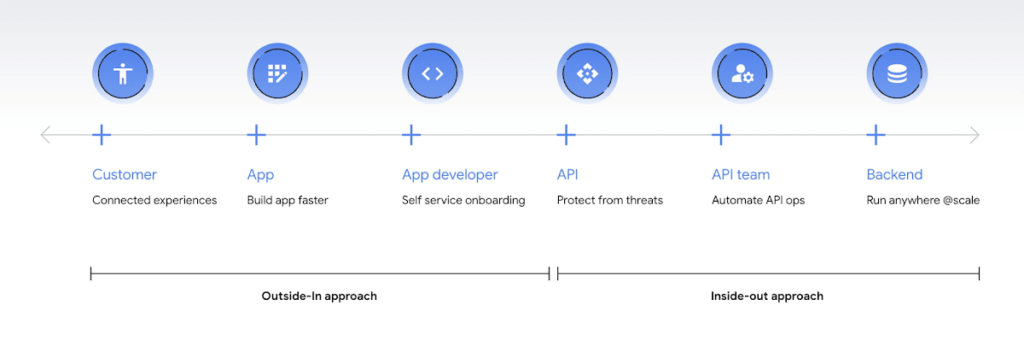
Being everything for everybody often means that nothing you do is the best it could be, and that is just as true for APIs. When customers turn to APIs, they are looking for specific solutions to make their work easier and more productive. If there is an API that better works to their needs, they will choose that one over yours. This is why it’s so important to know what your customers need to do their work better, and then building to fill those needs. In other words, start thinking Outside-in as opposed to Inside-Out. Specifically,
- Inside-out refers to designing APIs around internal systems or services you would like to expose.
- Outside-in refers to designing APIs around customer experiences you want to create. Read more about the Outside-in perspective in the API product mindset.
The first step to this is learning from your customers — be it internal consumer developers or external customers — and their use cases. Ask them about the apps they are building, their pain points, and what would help streamline or simplify their development. Write down their most significant use cases and create a sample API response that only gives them the exact data they need for each case. As you test this, look for overlap between payloads and adapt your designs to genericize them across common or similar use cases.
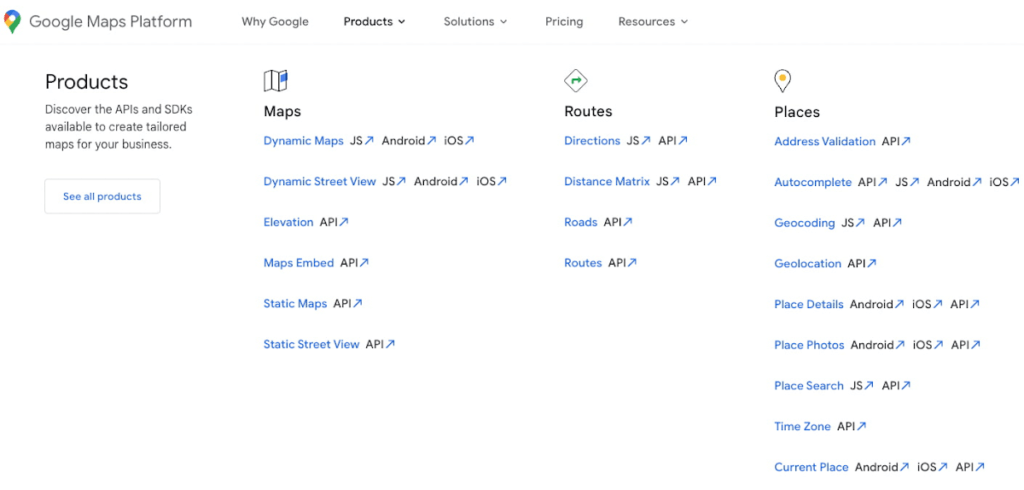
If you can’t connect with your customers — because you don’t have direct access, they don’t have time, or they just don’t know what they want — the best approach is to imagine what you would build with your APIs. Think big and think creatively. While you don’t want to design your APIs for vaporware, thinking about the big picture can make it easier to build non-breaking changes in the future. For example the image below showcases APIs offered by Google Maps. Even without diving into the documentation, looking at the names like “Autocomplete” or “Address Validation” clearly outlines the purposes and potential fit for a customer’s use case.
#2 Making your APIs too complex for users
Customers turn to APIs to bypass complicated programming challenges so they can get to the part they know how to do well. If they feel like using your API means learning a whole new system or language, then it isn’t fitting their needs and they will likely look for something else. It’s up to your team to make an API that is strong and smart enough to do what your customer wants, but also simple enough to hide how complicated the tasks your API solves for really are. For example if you know your customers are using your APIs to present information about recently open restaurants and highly rated pizzeria to their consumers, providing them with a simple API call as below would be of great help:
GET /restaurants?location=Austin&category=Pizzeria&open=true&sort=-priority,created_atTo see if your API design is simple enough, pretend you are building the whole system from scratch — or if you have a trusted customer who is willing to help, ask them to test it and report their results. If you can complete the workflow without having to stop to figure something out, then you’re good to go. On the other hand, if you catch rough edges caused by trying to code around system complexity issues, then keep trying to refactor. The API will be ready when you can say that nothing is confusing and that it either meets your customers’ needs or can easily be updated as needs change.
#3 Creating “chatty” APIs with too many calls
Multiple network calls slow down the process and creates higher connection overhead — which means higher operational costs. This is why it’s so important to minimize the number of API calls.
The key to this is outside-in design: simplify. Look for ways to reduce the number of API calls a customer must make in their application’s workflow. If your customers are building mobile applications, for example, they often need to minimize their network traffic to reduce battery drain, and requiring a couple calls instead of a dozen can make a big difference.
Rather than deciding between building distinct, data-driven microservices and streamlining API usage, consider offering both: fine-grained APIs for specific data types, and “experience APIs” (APIs that are designed to power user experiences. Here is a further theoretical discussion on Experience APIs) around common or customer-specific user interfaces. These experience APIs compose multiple smaller domains into a single endpoint; making it much simpler for your customers — especially those building user interfaces — to render their screens easily and quickly.
Another option here is to use something like GraphQL to allow for this type of customizability. Generally you should avoid building a unique endpoint for every possible screen, but common screens like home pages and user account information can make a world of difference to your API consumers.
#4 Not allowing for flexibility
Even if you’ve followed all of the steps above, you may find that there are edge cases that do not fit under your beautifully designed payloads. Maybe your customer needs more data in a single page of results than usual, or the payload has way more data than their app requires. You can’t create a one-size-fits-all solution, but you also don’t want a reputation for building APIs that are limiting. Here are 3 simple options to make your endpoints more flexible.
Filter out response properties: You can either use query parameters for sorting and pagination, or use GraphQL which provides these types of details natively. By giving customers the option to request only the properties they need, it guarantees that they won’t have to sort through tons of unnecessary data to get what they need. For example, if some of your customers only need the title, author, and bestseller ranking, give them the ability to retrieve only that data with a query string parameter.
GET /books?fields=title,author,ranking- Ability to sort with pagination. Generally, you don’t want to guarantee the order of objects in an API response because minor changes in logic or peculiarities in your data source might change the sort order at some point. In some cases, however, your customers may want to sort by a particular field. Giving them that option, combined with a pagination option, will give them a highly efficient API when they only want the top few results. For example Spotify API utilizes a simple offset and limit parameter set to allow pagination. A sample endpoint as shown in the documentation would look like this
$ curl https://api.spotify.com/v1/artists/1vCWHaC5f2uS3yhpwWbIA6/albums?album_type=SINGLE&offset=20&limit=10- Use mature compositions like GraphQL: Since customer data needs can differ, giving them on-the-fly composites lets them build to the combinations of data they need, rather than being restricted to a single data type or a pre-set combination of data fields. Using GraphQL can even bypass the need to build experience APIs, but when this isn’t an option, you can use query string parameter options like “expand” to create these more complex queries. Here is a sample response that demonstrates a collection of company resources with embedded properties included
"data": [
{
"CompanyUid": "27e9cf71-fca4",
"name": "ABCCo",
"status": "Active",
"_embedded": {
"organization": {
"CompanyUid": "27e9cf71-fca4",
"name": "ABCCo",
"type": "Company",
"taxId": "0123",
"city": "Portland",
"notes": ""
}
}
}
]
#5 Making design unreadable to humans
“K”eep “I”t “S”imply “S”tupid when you are designing your API. While APIs are meant for computer-to-computer interaction, the first client of an API is always a human, and the API contract is the first piece of documentation. Developers are more apt to study your payload design before they dig into your docs. Observation studies suggest that developers spend more than 51% of their time in editor and client as compared to ~18% on reference.
For example, if you skim through the payload below it takes some time to understand because instead of property names it includes an “id”. Even the property name “data” does not suggest anything meaningful aside from just being an artifact of the JSON design. A few extra bytes in the payload can save a lot of early confusion and accelerate adoption of your API. Notice how user-ids appearing on the left of the colon (in the position where other examples of JSON ideally have property names) creates confusion in reading the payload.
"{id-a}":
{ "data":
[
{
"AirportCode": "LAX",
"AirportName": "Los Angeles",
"From": "LAX",
"To": "Austin",
"departure": "2014-07-15T15:11:25+0000",
"arrival": "2014-07-15T16:31:25+0000"
}
… // More data
]
},
We think that JSON like this is more difficult to learn. If you want to eliminate any ambiguity in the words you choose to describe the data, keep the payload simple and if any of those labels could be interpreted in more than one way, adjust them to be more clear. Here is a sample response from Airlines endpoint of aviationstack API. Notice how the property names clearly explain the expected result while maintaining a simple JSON structure.
"data": [
{
"airline_name": "American Airlines",
"iata_code": "AA",
"iata_prefix_accounting": "1",
"icao_code": "AAL",
"callsign": "AMERICAN",
"type": "scheduled",
"status": "active",
"fleet_size": "963",
"fleet_average_age": "10.9",
"date_founded": "1934",
"hub_code": "DFW",
"country_name": "United States",
"country_iso2": "US"
},
[…]
]
#6 Know when you can break the RESTful rules
Being true to the RESTful basics — such as using the correct HTTP verbs, status codes, and stateless resource-based interfaces — can make your customers’ lives easier because they don’t need to learn an all new lexicon, but remember that the goal is just to help them get their job done. If you put RESTful design first over user experience, then it doesn’t really serve its purpose.
Your goal should be helping your customers be successful with your data, as quickly and easily as possible. Occasionally, that may mean breaking some “rules” of REST to offer simpler and more elegant interfaces. Just be consistent in your design choices across all of your APIs, and be very clear in your documentation about anything that might be peculiar or nonstandard.
Conclusion
Beyond these common pitfalls, we have also created a comprehensive guide packaging up our rich experience designing and managing APIs at incredible scale with Google Cloud’s API management product, Apigee.
Apigee — Google Cloud’s native API management platform — helps you build, manage, and secure APIs — for any use case, scale or environment. Get started with Apigee today or check out our documentation for additional information.

4060
Of your peers have already downloaded this article
4:30 Minutes
The most insightful time you'll spend today!
Customer and developer expectations are increasingly driving enterprise IT to employ new approaches to serving the needs of a diverse mix of users and experiences.
That’s where application programming interfaces (APIs) come into play. They are the foundation which digital business is built, allowing app developers to create apps that can serve the needs of a specific segment of users.
APIs are not new in many industries, but with the explosion of apps and experiences required in the digital world, and new customer-centric IT organizations, companies across industries need better solutions than ever to manage their APIs and API-driven businesses. API management enables you to create, manage, secure, analyze, and scale APIs.
An API management solution needs to include at least the following capabilities:
- Developer portal to attract and engage application developers, enabling them to discover, explore, purchase (or profit from), and test APIs and register to access and use the APIs
- API gateway to secure and mediate the traffic between clients and backends, and between a company’s APIs and the developers, customers, partners, and employees who use the APIs.
- API lifecycle management to manage the process of designing, developing, publishing, deploying, and versioning APIs.
More sophisticated API management provides additional capabilities including:
- An analytics engine that provides insights for business owners, operational administrators, and application developers enabling them to manage all aspects of a company’s APIs and API programs
- API monetization to enable API providers to package, price, and publish their APIs so that partners and developers can purchase access or take part in revenue sharing.
- It is typical for API management capabilities to be delivered in the cloud as a SaaS (Software as a Service) solution or on premises in a private cloud, or sometimes using a hybrid approach.
Download the full guide to understand how APIs can help your business become more user-centric.
Streamlining Workflow Executions: Using Cloud Tasks in Google Cloud

900
Of your peers have already read this article.
3:30 Minutes
The most insightful time you'll spend today!
Introduction
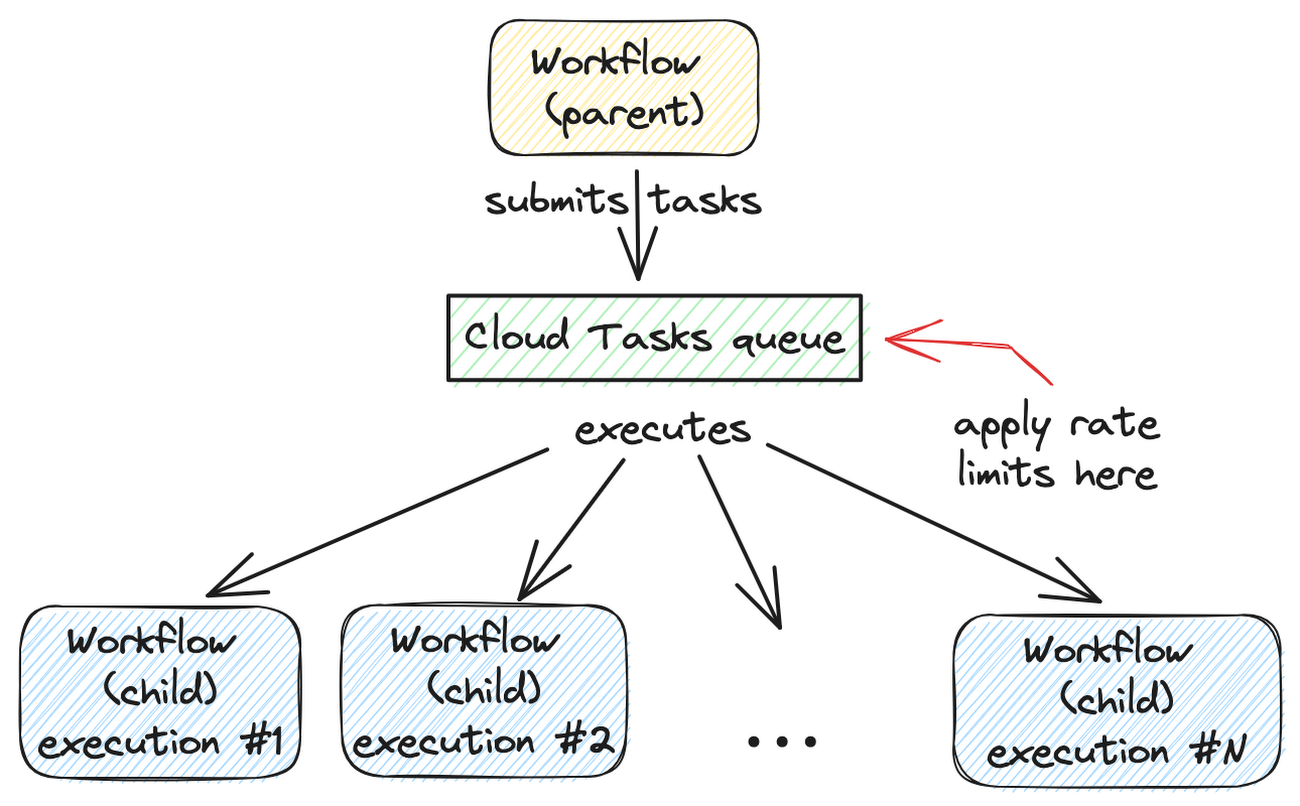
In my previous post, I talked about how you can use a parent workflow to execute child workflows in parallel for faster overall processing time and easier detection of errors. Another useful pattern is to use a Cloud Tasks queue to create Workflows executions and that’s the topic of this post.
When your application experiences a sudden surge of traffic, it’s natural to want to handle the increased load by creating a high number of concurrent workflow executions. However, Google Cloud’s Workflows enforces quotas to prevent abuse and ensure fair resource allocation. These quotas limit the maximum number of concurrent workflow executions per region, per project, for example, Workflows currently enforces a maximum of 2000 concurrent executions by default. Once this limit is reached, any new executions beyond the quota will fail with an HTTP 429 error.
A Cloud Tasks queue can help. Rather than creating Workflow executions directly, you can add Workflows execution tasks to the Cloud Tasks queue and let Cloud Tasks drain the queue at a rate that you define. This allows for better utilization of your workflow quota and ensures the smooth execution of workflows.
Let’s dive into how to set this up.
Create a Cloud Tasks queue
We’ll start by creating a Cloud Tasks queue. The Cloud Tasks queue acts as a buffer between the parent workflow and the child workflows, allowing us to regulate the rate of executions.
Create the Cloud Tasks queue (initially with no dispatch rate limits) with the desired name and location:
QUEUE=queue-workflow-child
LOCATION=us-central1

gcloud tasks queues create $QUEUE --location=$LOCATION
Now that we have our queue in place, let’s proceed to set up the child workflow.
Create and deploy a child workflow
The child workflow performs a specific task and returns a result to the parent workflow.
Create workflow-child.yaml to define the child workflow:
main:

  params: [args]

  steps:

    - init:

        assign:

          - iteration: ${args.iteration}

    - wait:

        call: sys.sleep

        args:

            seconds: 10

    - return_message:

        return: ${"Hello world" + iteration}
In this example, the child workflow receives an iteration argument from the parent workflow, simulates work by waiting for 10 seconds, and returns a string as the result.
Deploy the child workflow:
gcloud workflows deploy workflow-child --source=workflow-child.yaml --location=$LOCATION
Create and deploy a parent workflow
Next, create a parent workflow in workflow-parent.yaml.
The workflow assigns some constants first. Note that it’s referring to the child workflow and the queue name between the parent and child workflows:
main:
  steps:
    - init:
        assign:
          - project_id: ${sys.get_env("GOOGLE_CLOUD_PROJECT_ID")}
          - project_number: ${sys.get_env("GOOGLE_CLOUD_PROJECT_NUMBER")}
          - location: ${sys.get_env("GOOGLE_CLOUD_LOCATION")}
          - workflow_child_name: "workflow-child"
          - queue_name: "queue-workflow-child"
In the next step, Workflows creates and adds a high number of tasks (whose body is an HTTP request to execute the child workflow) to the Cloud Tasks queue:
- enqueue_tasks_to_execute_child_workflow:
        for:
          value: iteration
          range: [1, 100]
          steps:
              - iterate:
                  assign:
                    - data:
                        iteration: ${iteration}
                    - exec:
                        # Need to wrap into argument for Workflows args.
                        argument: ${json.encode_to_string(data)}
              - create_task_to_execute_child_workflow:
                  call: googleapis.cloudtasks.v2.projects.locations.queues.tasks.create
                  args:
                      parent: ${"projects/" + project_id + "/locations/" + location + "/queues/" + queue_name}
                      body:
                        task:
                          httpRequest:
                            body: ${base64.encode(json.encode(exec))}
                            url: ${"https://workflowexecutions.googleapis.com/v1/projects/" + project_id + "/locations/" + location + "/workflows/" + workflow_child_name + "/executions"}
                            oauthToken:
                              serviceAccountEmail: ${project_number + "-compute@developer.gserviceaccount.com"}
Note that task creation is a non-blocking call in Workflows. Cloud Tasks takes care of running those tasks to execute child workflows asynchronously.
Deploy the parent workflow:
gcloud workflows deploy workflow-parent --source=workflow-parent.yaml --location=$LOCATION
Execute the parent workflow with no dispatch rate limits
Time to execute the parent workflow:
gcloud workflows run workflow-parent --location=$LOCATION
As the parent workflow is running, you can see parallel executions of the child workflow, all executed roughly around the same:
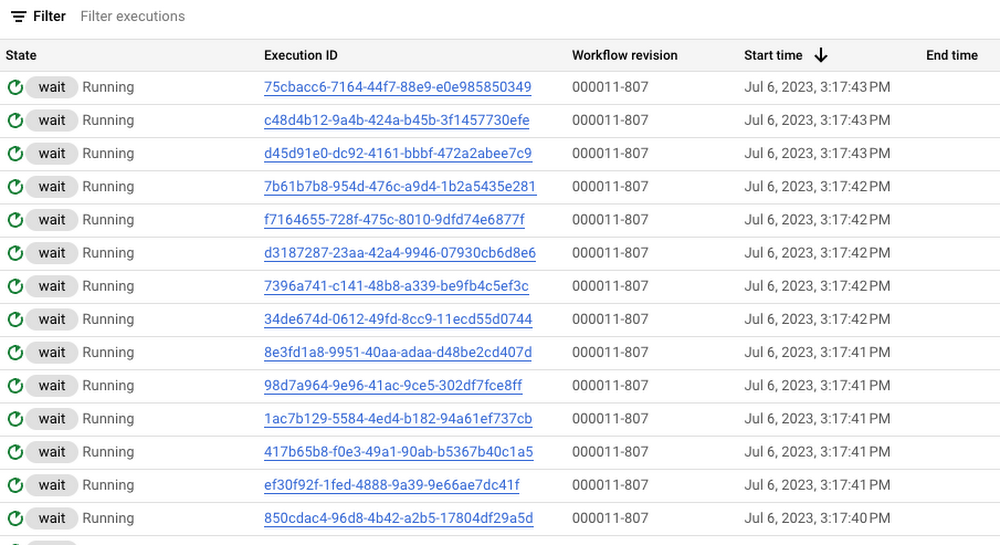
In this case, 100 executions is a well under the concurrency limit for Workflows. Quota issues may arise if you submit 1000s of executions all at once. This is when Cloud Tasks queue and its rate limits become useful.
Execute the parent workflow with dispatch rate limits
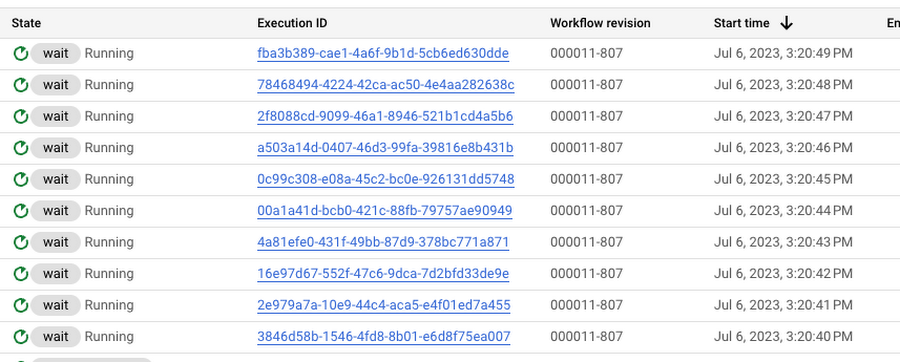
Let’s now apply a rate limit to the Cloud Tasks queue. In this case, 1 dispatch per second:
gcloud tasks queues update $QUEUE --max-dispatches-per-second=1 --location=$LOCATION
Execute the parent workflow again:
gcloud workflows run workflow-parent --location=$LOCATION
This time, you see a more smooth execution rate (1 execution request per second):
Summary
By introducing a Cloud Tasks queue before executing a workflow and playing with different dispatch rates and concurrency settings, you can better utilize your Workflows quota and stay below the limits without triggering unnecessary quota related failures.
Check out the Buffer HTTP requests with Cloud Tasks codelab, if you want to get more hands-on experience with Cloud Tasks. As always, feel free to contact me on Twitter @meteatamel for any questions or feedback.
More Relevant Stories for Your Company

The Modernization Imperative (TMI): The Beauty in Boring
You have something in your pocket right now that possesses more computing power than spacecraft fifteen billion miles away from Earth. No, not your mobile phone — the key fob for your car! Voyager 1 and Voyager 2 launched in 1977, and forty five years later, these little rascals still work and send data




Google Cloud’s ML-based Image Classification App: A Key to Global Wildlife Conservation
Wildlife provides critical benefits to support nature and people. Unfortunately, wildlife is slowly but surely disappearing from our planet and we lack reliable and up-to-date information to understand and prevent this loss. By harnessing the power of technology and science, we can unite millions of photos from [motion sensored cameras]

Plainsight Vision AI Available for Google Cloud Customers to Unlock Accurate, Actionable Insights
Data-savvy businesses increasingly rely on images and videos for critical functions, and yet are challenged by the sheer mass of information—more than 3.2 billion images and 720,000 hours of video are created daily. This explosion in visual data has paved the way for the growth of computer vision, a form of

Cloud and AI Paves the Future of Finance: Excerpts from FIA Boca 2022
Financial markets were among the first to adopt new technologies, and that has certainly been true of the derivatives markets, which were early adopters of electronic trading. Going forward, new capabilities will transform the way industry participants communicate, analyze, and trade. I sat down with Google Cloud’s Phil Moyer and
