





The Ultimate Guide to VPC Service Controls: Strengthening Your Security Posture

2510
Of your peers have already read this article.
2:30 Minutes
The most insightful time you'll spend today!
While cloud security skeptics might believe that data in the cloud is just one access configuration mistake away from a breach, the reality is that a well-designed set of defense in depth controls can help minimize the risk of configuration mistakes and other security issues. Our Virtual Private Cloud (VPC) Service Controls can play a vital role in creating an additional layer of security while also making it easier to manage your data in a way that most cloud services can’t do today.
Organizations across industries and business models use cloud services for activities such as processing their data, performing analytics, and deploying systems. VPC Service Controls can empower an organization when deciding how users and data can cross the perimeter of the supported cloud services, if at all. While VPC Service Controls are designed to help stop attackers, they can also enable contextual trusted data sharing (similar to how Zero Trust allows contextual access).
What are VPC Service Controls
VPC Service Controls help administrators define a security perimeter around Google-managed services, which can control communication to and between those services. The Service Controls isolate your Google Cloud resources from unauthorized networks, including the internet. For example, this can help you keep a clear separation between services that are allowed to run in production and services that are not.
VPC Service Controls can help you prevent mistakes that lead to costly data breaches because they control access to your data at a granular level. They add context-aware access controls on these services, and can help you achieve your organization’s Zero Trust access goals.
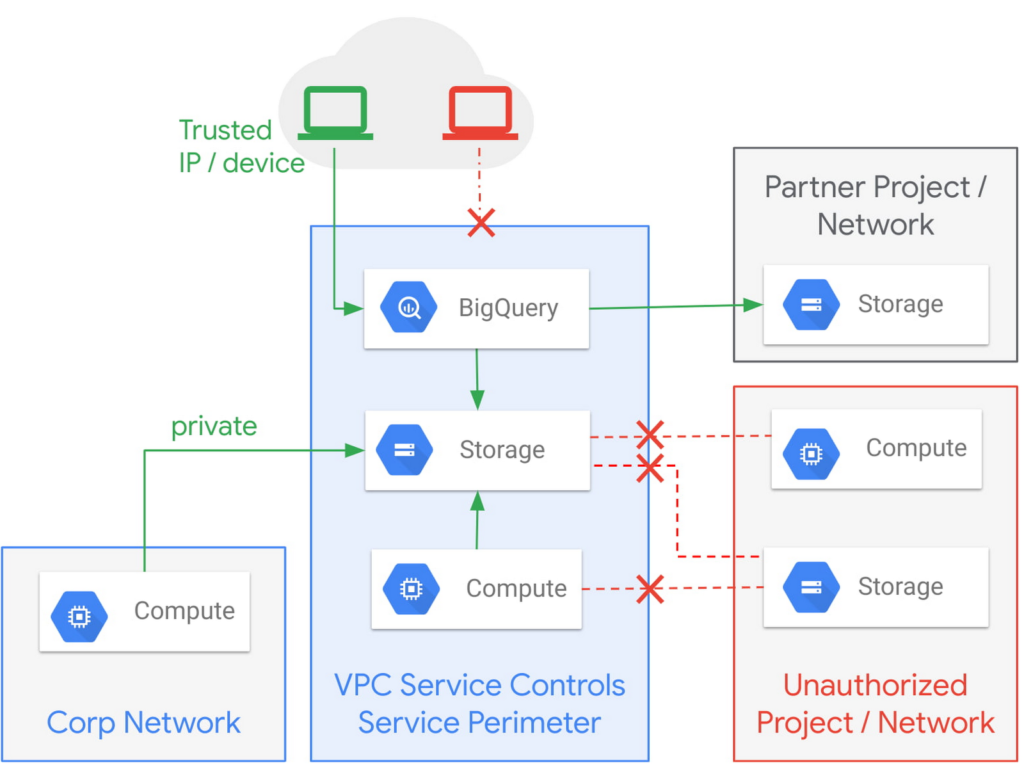
Example of the fine-grained policies based on access context that can be implemented with VPC Service Controls.
Like wearing two layers of clothing made from different fabrics to protect you from winter weather, VPC Service Controls may appear similar to Identity and Access Management (IAM) but they come from a different approach to implementing security. IAM enables granular identity based access control; VPC Service Controls create a security perimeter that protects your cloud resources and sets up private connectivity to Google Cloud’s APIs and services. While it’s recommended to use both, VPC Service Controls have an added bonus: They can support blocking data theft during a breach.
The additional layer of security that VPC Service Controls offer customers is challenging to achieve with on-premise systems or even with other cloud providers. You can think of it as an firewall for APIs that also adds a logical security control around three paths that data can take:
- From the public internet to your resources
- Inside your VPC and the cloud service perimeter
- For service-to-service communication (for example, denying access to someone who wants to load data to BigQuery or exfiltrate data from a BigQuery instance.)
How VPC Service Controls can help stop attackers
VPC Service Controls are used to enforce a security perimeter. They can help isolate resources of multi-tenant Google Cloud services, which can help reduce the risk of data exfiltration or a data breach.
For example, a bank that migrated financial data processing to Google Cloud can use VPC Service Controls to isolate their processing pipeline from public access (or any unauthorized access) by defining a trusted service perimeter.
How VPC Service Controls can enable trusted sharing
VPC Service Controls are used to securely share data across service perimeters with full control over what resource can connect to other resources, or outside the perimeter. This can help mitigate data exfiltration risks stemming from stolen identities, IAM policy misconfigurations, some insider threats, and compromised virtual machines.
Returning to our bank example, that same bank using VPC Service Controls may securely share or access data across Service Perimeters and Organizations. They may allow access to specific partners and for specific operations.
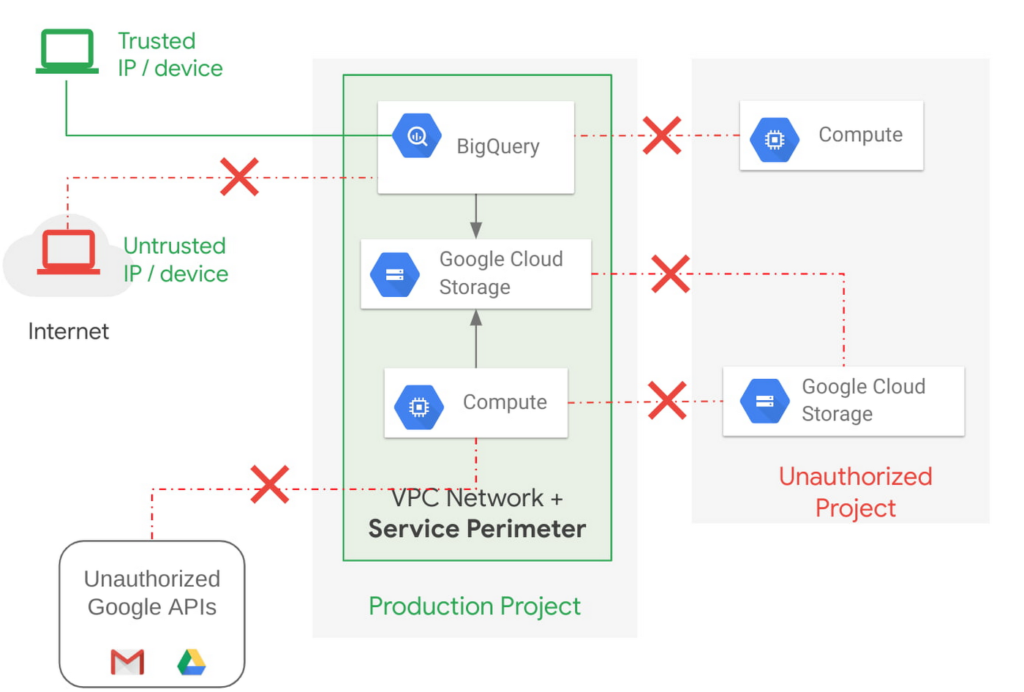
Example of allowing an authorized device plus authorized access.
How VPC Service Controls support Zero Trust access
VPC Service Controls deliver Zero Trust access to multi-tenant Google Cloud services. Clients can restrict access to authorized IPs, client context, user identity, and device parameters while connecting to multi-tenant services from the internet and other services.
A bank can use moving its services to the public cloud as an opportunity to abandon outdated access management approaches and adopt Zero Trust access. VPC Service Controls let them create granular access control policies in Access Context Manager based on attributes such as user location and IP address. For example, it would allow an analyst to only access Big Query from a corporate device on the corporate network during business hours. These policies can help ensure the appropriate security controls are in place when granting access to cloud resources from the Internet.
Next steps with VPC
Check out these pages to learn more about VPC Service Controls for your sensitive cloud deployments, especially for regulated workloads. This blog is the third in our Best Kept Security Secrets series, which includes how to tap into the power of Organization Policy Service and how Cloud EKM can help resolve the cloud trust paradox.
Enable high quality curated detections in Chronicle SecOps Suite

2835
Of your peers have already read this article.
2:30 Minutes
The most insightful time you'll spend today!
A critical component of any security operations team’s job is to deliver high-fidelity detections of potential threats across the breadth of adversary tactics. But increasingly sophisticated threat actors, an expanding attack surface, and an ever-present cybersecurity talent shortage make this task more challenging than ever.
Google keeps more people safe online than anyone else. Individuals, businesses and governments globally depend on our products that are secure-by-design and secure-by-default. Part of the “magic” behind Google’s security is the sheer scale of threat intelligence we are able to derive from our billions of users, browsers, and devices.
Today, we are putting the power of Google’s intelligence in the hands of security operations teams. We are thrilled to announce the general availability of curated detections as part of our Chronicle SecOps Suite. These detections are built by our Google Cloud Threat Intelligence (GCTI) team, and are actively maintained to reduce manual toil in your team.
Our detections provide security teams with high quality, actionable, out-of-the-box threat detection content curated, built and maintained by Google Cloud Threat Intelligence (GCTI) researchers. Our scale, and depth of intelligence, gained by securing billions of users everyday, gives us a unique vantage point to craft effective and targeted detections. These native detection sets cover a wide variety of threats for cloud and beyond, including Windows-based attacks like ransomware, remote-access tools (RAT), infostealers, data exfiltration, suspicious activity, and weakened configurations.
With this launch, security teams can smoothly leverage Google’s expertise and unique visibility into the threat landscape. This release helps understaffed and overstressed security teams keep up with an ever evolving threat landscape, quickly identify threats, and drive effective investigation and response. With this new release, security teams can:
- Enable high quality curated detections with a single click from within the Chronicle console.
- Operationalize data with high-fidelity threat detections, stitched with context available from authoritative sources (such as IAM and CMDB).
- Accelerate investigation and response by finding anomalistic assets and domains with prevalence visualization for the detections triggered.
- Map detection coverage to the MITRE ATT&CK framework to better understand adversary tactics and techniques and uncover potential gaps in defenses.
Detections are constantly updated and refined by GCTI researchers based on the evolving threat landscape. The first release of curated detections includes two categories that cover a broad range of threats, including:
- Windows-based threats: Coverage for several classes of threats including infostealers, ransomware, RATs, misused software, and crypto activity.
- Cloud attacks and cloud misconfigurations: Secure cloud workloads with additional coverage around exfiltration of data, suspicious behavior, and additional vectors.
Let’s look at an example of how you can put curated detections to work within the Chronicle dashboard, monitor coverage, and map to MITRE ATT&CK®.
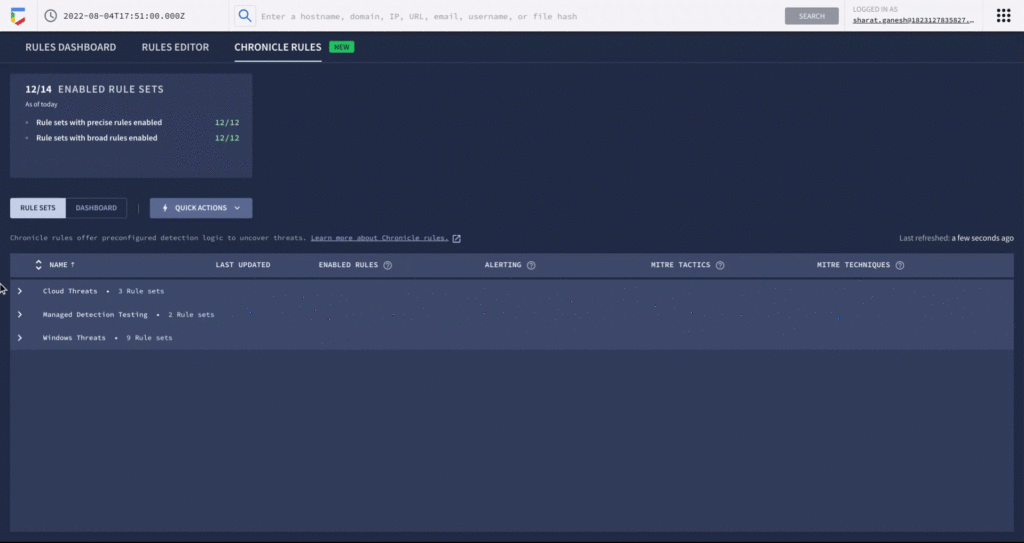
An analyst can learn more details around specific detections and understand how they map to the MITRE ATT&CK framework. There are customized settings to configure deployment and alerting, and specify exceptions via reference lists.
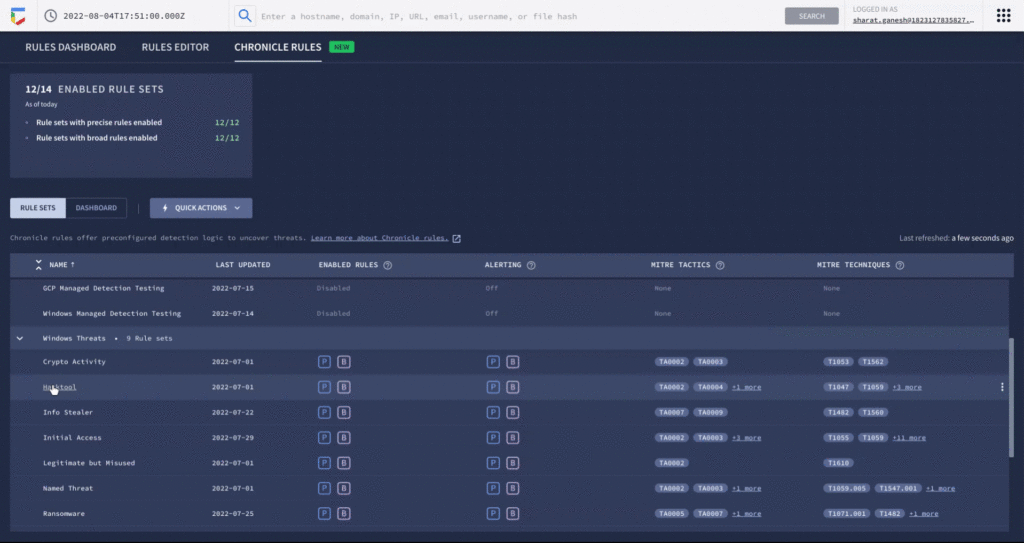
You can see each rule which has generated a detection against your log data in the Chronicle rules dashboard. You can observe detections associated with the rule and pivot to investigative views. For example, here is the detection view from the timeline of an Empire Powershell Stager launch triggered by the Windows RAT rule set. You can also easily pivot to associated information and investigate the asset on which it was triggered.
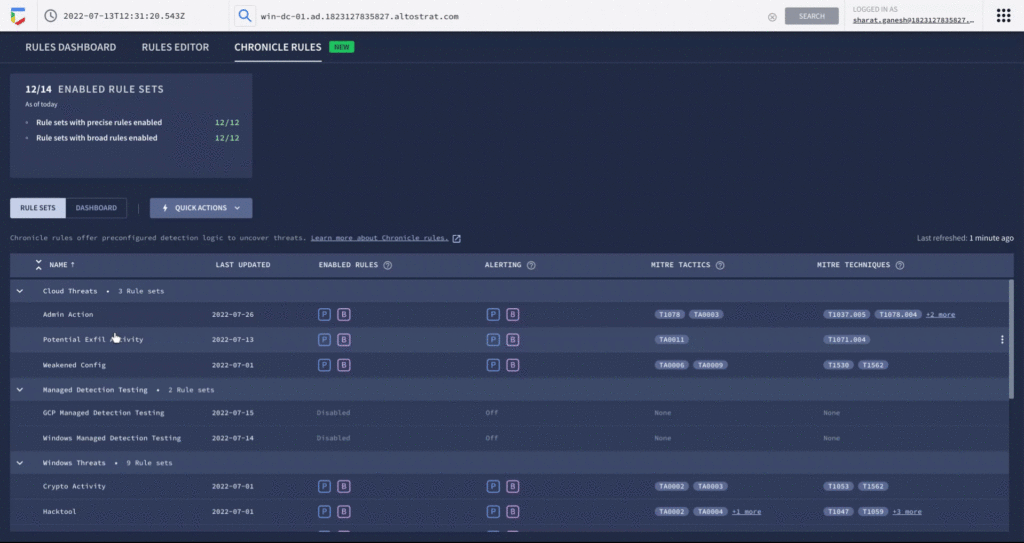
By surfacing impactful, high-efficacy detections, Chronicle can enable analysts to spend time responding to actual threats and reduce alert fatigue. Our customers who used curated detections during our public preview were able to detect malicious activity and take actions to prevent threats earlier in their lifecycle. And there’s more to come. We will be delivering a steady release of new detection categories covering a wide variety of threats, community-driven content, and other out-of-the-box analytics.
Ready to put Google’s intelligence to work in your Security Operations Center? Contact Google Cloud sales or your customer success CSM team. You can also learn more about all these new capabilities in Google Chronicle in our product documentation.
Using Google Cloud’s Backup and DR Service with Logging and Monitoring Tools

1106
Of your peers have already read this article.
2:30 Minutes
The most insightful time you'll spend today!
Backup and DR data is a valuable business asset, and ensuring that it’s safe and accessible is essential. In particular, you want to be able to monitor your backups to ensure that the data is indeed protected and that you can quickly recover it in the event of a disaster, user error, or failed upgrade.
Users of Google Cloud’s Backup and DR service often ask:
- What are the best practices for monitoring my backup and recovery jobs?
- How can I proactively identify issues and troubleshoot?
- How can I create alerts and be notified about important events?
The good news is that Google Cloud Backup and DR now integrates with Cloud Logging and Cloud Monitoring tools. Now, you can monitor backup events, jobs, appliance health, resource consumption and user actions in the same way you monitor other Google Cloud workloads and services.
With this integration, you can now:
- Monitor events related to backup and restore – With detailed Google Cloud Backup and DR service event logs in Cloud Logging, you can now use log based alerts to create a customisable notification, in near-real time. This lets you monitor important events such as backup job failures, jobs that did not run, local backup storage saturation, and network failures.
- Configure fine grained alerting – You can write custom event queries on a wide variety of dimensions such as event severity, application type, application name, job type, job name, error message and many more. This gives a lot of flexibility to define alerts for specific events or conditions within a system, thus reducing noise and helping you identify and fix issues easily.
- Get notified on your preferred notification channel – Google Cloud offers seven pre-built notification channels that let you receive customisable notifications directly over email, SMS, Slack or the Google Cloud mobile app. Alternatively, you can integrate with your own monitoring and event management tools using webhooks or Pub/Sub.
- Derive useful insights to troubleshoot issues – With Log Analytics, you can use BigQuery to query your data using SQL queries and generate operational insights, which can help you reduce time spent troubleshooting. For example, you can analyze the key reasons that backup and restore jobs fail for a given application or application type.
The integration also lets you proactively discover deeper issues related to backup and recovery, such as capacity-related issues or certain job failures that happen periodically, by monitoring recurring events in the logs over time. With log-based metrics, you can:
- Create trend charts to track important metrics such as the number of backup or restore jobs that failed during a day/week/month
- Receive a notification when the number of occurrences crosses a threshold, for example receive a notification if a snapshot pool saturates more than five times a week
- Monitor trends in data, such as latency values in logs, and receive a notification if the values change in an unacceptable way.
Getting started
The time to learn that your backup failed should never be when you go to restore. By integrating our Backup and DR service with Cloud Monitoring and Cloud Logging, you can get valuable assurances about the health of your backup and business continuity processes with the same tools that you use to manage other Google Cloud workloads. To get started, check out the Backup and DR event logs page. You can also watch a video that shows you how to set up and use the service and configure some custom alerts.
Supercharging Security with Generative AI

1511
Of your peers have already read this article.
3:30 Minutes
The most insightful time you'll spend today!
At Google Cloud, we continue to invest in key technologies to progress towards our true north star on invisible security: making strong security pervasive and simple for everyone. Our investments are based on insights from our world-class threat intelligence teams and experience helping customers respond to the most sophisticated cyberattacks. Customers can tap into these capabilities to gain perspective and visibility on the most dangerous threat actors that no one else has.
Recent advances in artificial intelligence (AI), particularly large language models (LLMs), accelerate our ability to help the people who are responsible for keeping their organizations safe. These new models not only give people a more natural and creative way to understand and manage security, they give people access to AI-powered expertise to go beyond what they could do alone.
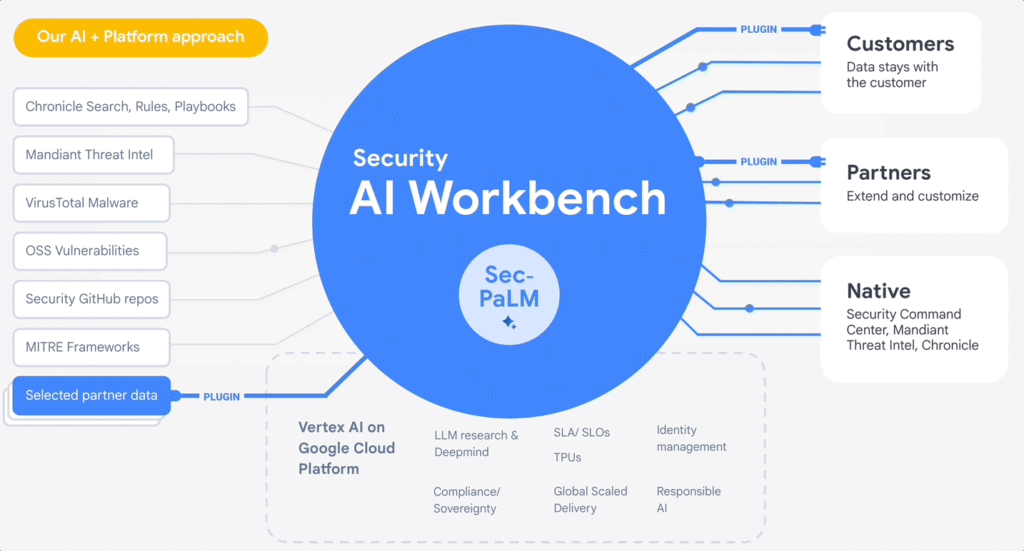
At the RSA Conference 2023, we are excited to announce Google Cloud Security AI Workbench, an industry-first extensible platform powered by a specialized, security LLM, Sec-PaLM. This new security model is fine-tuned for security use cases, incorporating our unsurpassed security intelligence such as Google’s visibility into the threat landscape and Mandiant’s frontline intelligence on vulnerabilities, malware, threat indicators, and behavioral threat actor profiles.
Google Cloud Security AI Workbench powers new offerings that can now uniquely address three top security challenges: threat overload, toilsome tools, and the talent gap. It will also feature partner plug-in integrations to bring threat intelligence, workflow, and other critical security functionality to customers, with Accenture being the first partner to utilize Security AI Workbench.
The platform will also let customers make their private data available to the platform at inference time; ensuring we honor all our data privacy commitments to customers. Because Security AI Workbench is built on Google Cloud’s Vertex AI infrastructure, customers control their data with enterprise-grade capabilities such as data isolation, data protection, sovereignty, and compliance support.
Preventing threats from spreading beyond the first infection
We already provide best-in-class capabilities to help organizations immediately respond to threats. But what if we could not just identify and contain initial infections, but also help prevent them from happening anywhere else? With our AI advances, we can now combine world class threat intelligence with point-in-time incident analysis and novel AI-based detections and analytics to help prevent new infections. These advances are critical to help counter a potential surge in adversarial attacks that use machine learning and generative AI systems. That’s why we’re excited to introduce:
- VirusTotal Code Insight uses Sec-PaLM to help analyze and explain the behavior of potentially malicious scripts, and will be able to better detect which scripts are actually threats.
- Mandiant Breach Analytics for Chronicle leverages Google Cloud and Mandiant Threat Intelligence to automatically alert you to active breaches in your environment. It will use Sec-PaLM to help contextualize and respond instantly to these critical findings.
These new updates build on the existing AI in Google’s industry-leading solutions. For example, Chronicle Security Operations already uses frontline intelligence, integrated reasoning, and machine learning to identify initial infections, prioritize impact, and contain threats. Another example is reCAPTCHA Enterprise, which uses image noising capabilities to help protect your site from adversaries that leverage novel AI advances, greatly enhancing our defenses against bots.
Adding intelligence to reduce toil
At Google Cloud, we help organizations modernize security wherever they are, in part by simplifying their security tools and controls whenever possible. Advances in generative AI can help reduce the number of tools organizations need to secure their vast attack surface areas and ultimately, empower systems to secure themselves. This will minimize the toil it takes to manage multiple environments, to generate security design and capabilities, and to generate security controls. Today, we’re announcing:
- Assured OSS will use LLMs to help us add even more open-source software (OSS) packages to our OSS vulnerability management solution, which offers the same curated and vulnerability-tested packages that we use at Google.
- Mandiant Threat Intelligence AI, built on top of Mandiant’s massive threat graph, will leverage Sec-PaLM to quickly find, summarize, and act on threats relevant to your organization.
These announcements build on existing capabilities that help customers centralize visibility and control, detect targets, and improve security across their platform. For example, Security Command Center (SCC) uses always-on machine learning to detect malicious scripts executing in the customer container environment and immediately alert the customer. In addition, Cloud Data Loss Prevention leverages machine learning to find and classify data, and with Confidential Computing you can collaborate on, train, and deploy sensitive and regulated AI models in the cloud, all while preserving confidentiality.
Evolving how practitioners do security to close the talent gap
At Google, we believe that to truly democratize security, we need to first acknowledge that AI will soon usher in a new era for security expertise that will profoundly impact how practitioners “do” security. Most people who are responsible for security — developers, system administrators, SRE, even junior analysts — are not security specialists by training.
Imagine a world where novices and security experts are paired with AI expertise to free themselves from repetition and burnout, and accomplish tasks that seem impossible to us today. To help power this evolution, we’re embedding Sec-PaLM-based features that can make security more understandable while helping to improve effectiveness with exciting new capabilities in two of our solutions:
- Chronicle AI: Chronicle customers will be able to search billions of security events and interact conversationally with the results, ask follow-up questions, and quickly generate detections, all without learning a new syntax or schema.
- Security Command Center AI: Security Command Center will translate complex attack graphs to human-readable explanations of attack exposure, including impacted assets and recommended mitigations. It will also provide AI-powered risk summaries for security, compliance, and privacy findings for Google Cloud.
These new releases bolster our existing efforts to tackle these issues through capabilities like IAM Recommender, which suggests permissions better suited to actual usage patterns. We will soon be augmenting this capability to cover organizational policies, further enabling the administrator to help improve the security posture of their organization. In addition, Mandiant Automated Defense applies machine learning to help reduce the repetitive Tier 1 alert triage problem and address alert fatigue.
Offering availability
VirusTotal Code Insight, available now in Preview, is our first example of putting Security AI Workbench to work for our customers. We will be rolling out other offerings to trusted testers in coming months, and they will be available in Preview more broadly this summer. Click here for the demo.
Security AI Workbench, including Sec-PaLM and partner integrations, in addition to the product innovations described in our demo, are all building blocks for a larger effort to elevate security across the ecosystem. So far, that effort:
- Provides assistive functions to rapidly develop IT generalist talent to Tier 1 security operator status in a way that wasn’t previously feasible. Security Command Center now can summarize threat intelligence insights and findings for Google Cloud, and Chronicle can quickly generate YARA-L rules or other detections.
- Provides advanced functions such as iterative query and multivariate detection generation, conversational filtering and interaction with results, and smart case awareness to empower advanced Tier 2 and 3 security operators to focus on threat analysis instead of struggling with process and toil. Mandiant Threat Intelligence users now can elevate their core competencies to hunt, investigate, and remediate threats — using the same tools our own Mandiant experts use.
- Fuses threat intelligence and AI-based analytic capabilities, which are unsurpassed in the market. VirusTotal Code Insight enables security teams to help gain insights and identify threats in suspicious code. This can significantly enhance their ability to detect and mitigate potential attacks.
However, this is just an initial step. We’ll continue to iterate and innovate, and we encourage customers and partners to leverage Security AI Workbench in new and exciting ways. Moving forward, we anticipate many new use cases to emerge over time.
Building a safer future
While generative AI has recently captured the imagination, Sec-PaLM is based on years of foundational AI research by Google and DeepMind, and the deep expertise of our security teams. This work includes new efforts to expand our partner ecosystem to provide businesses with security capabilities at every layer of the cybersecurity stack. We have only just begun to realize the power of applying generative AI to security, and we look forward to continuing to leverage this expertise for our customers and drive advancements across the security community.
Macy’s Migration to Cloud: How Google Cloud NAT Upheld Security
920
Of your peers have already read this article.
2:30 Minutes
The most insightful time you'll spend today!
Macy’s is well known for its high-end fashion worldwide. What is not as well known are the strong measures it takes to ensure its customers’ data remains secure. When Macy’s decided to move its infrastructure from on-premises to Google Cloud, it required the move be done without sacrificing security or degrading the user experience.
Migrating from on-premises to the cloud isn’t always a simple feat, especially when one of Macy’s key requirements was a managed solution that could secure their workloads’ internet access without impacting throughput and latency.
Implementing Cloud NAT at scale
Applying security safeguards without creating additional friction can be difficult, especially for Macy’s and its more than 40 million active users. Macy’s needed a way to perform network address translation to ensure its clusters could create outbound connections to the internet without needing public IP addresses. Every use case led back to Cloud NAT.
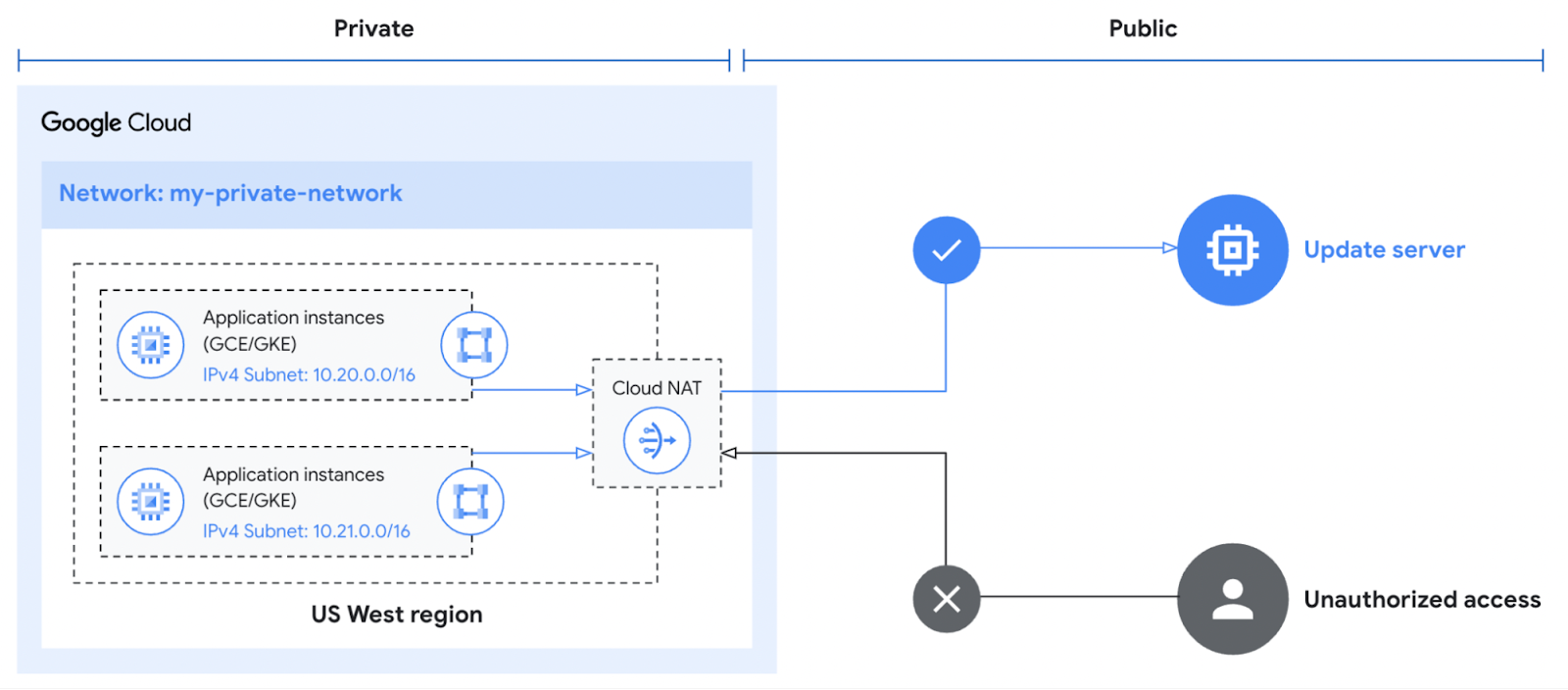
Cloud NAT is a distributed, cloud-first service that provides network address translation for workloads without external IP addresses. These workloads typically access the internet to download updates or interact with SaaS services.
Cloud NAT provided a means for Macy’s workloads to initiate outbound connections by translating the associated private IP addresses to one or more shared public IP addresses. This enabled Macy’s to reach the outside world while preventing the outside world from initiating a connection to it. What was even better for Macy’s was that Cloud NAT simplified the configuration and maintenance with no additional networking, forwarding, or routing configuration required.
Ensuring continued high performance
The software-defined networking that underpins Cloud NAT equipped Macy’s with more than just the benefit of simplified management. High availability is built into the product since it doesn’t depend on any virtual machine or physical gateway device, and it is available across different regions if a zone goes down. With an uptime SLA of 99.99%, Macy’s could feel confident that their operations would run without disruption.
Cloud NAT can also be configured to automatically scale the number of NAT IP addresses used. The proxyless architecture enables a chokepoint-free NAT operation so that workloads’ throughput and latency are minimally impacted. The myriad of benefits associated with using Cloud NAT over a traditional proxy are depicted below.
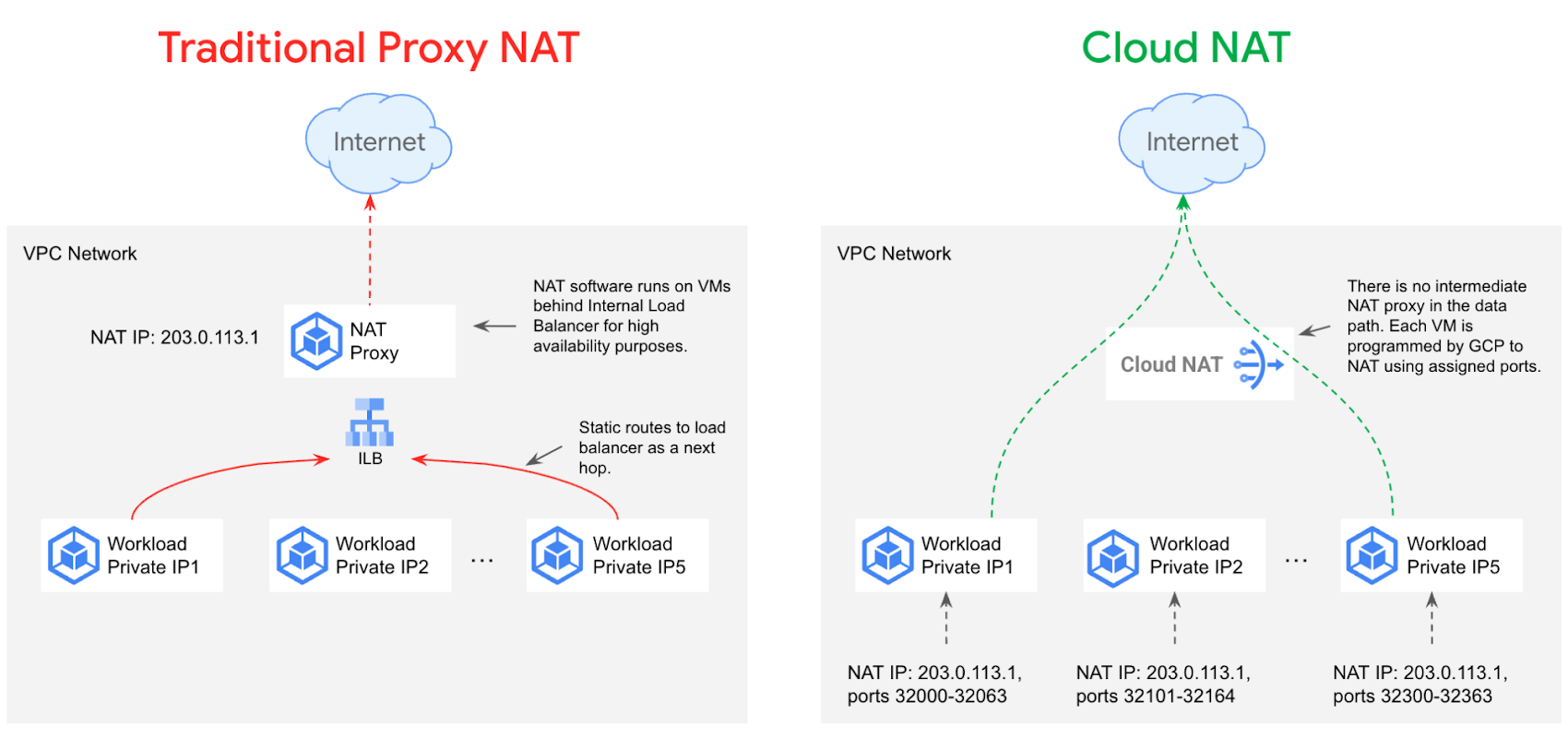
Lastly, Cloud NAT works with Google Compute Engine, Google Kubernetes Engine, and Serverless VPC Access connectors to support Cloud Functions, Cloud Run, and Google App Engine Standard. The built-in cloud integrations helped give Macy’s the confidence to deploy Cloud NAT knowing it met all the predefined requirements.
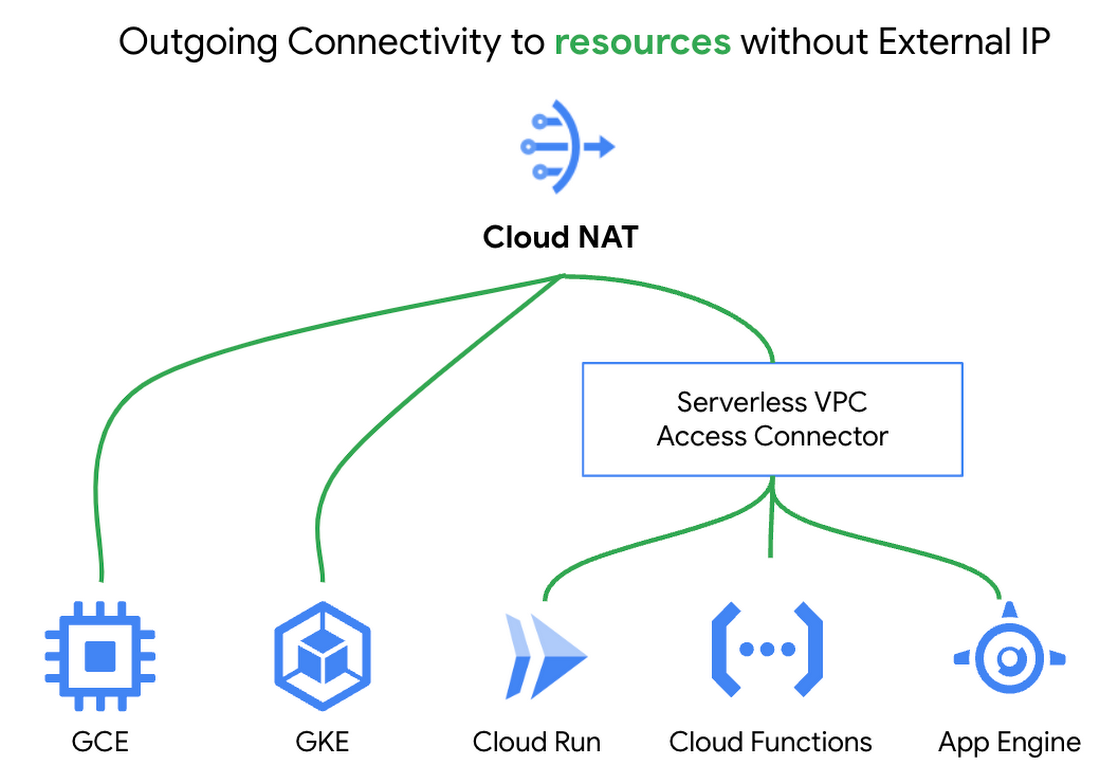
Upholding the highest security standards
Macy’s took advantage of Cloud NAT’s built-in logging and monitoring capabilities. NAT logs are automatically forwarded to a SIEM tool for transformation and analysis. This innate functionality provides greater insight into Macy’s environment and allows the security team to take action if any anomalous behavior is detected.
Cloud NAT’s inherent security and extensive benefits made it a straightforward decision for Macy’s. However, Cloud NAT is only one component of Macy’s defense-in-depth strategy, as illustrated below. It works with the existing Cloud Firewall rules to ensure only appropriate traffic is entering and exiting workloads.
None of the Cloud Firewall rules previously established needed to be reconfigured since Cloud NAT sits in front of the firewall. Existing egress firewall rules are evaluated for each packet before it hits the NAT, and ingress firewalls rules are evaluated after the packet hits the NAT. Cloud NAT does not permit any unsolicited inbound requests from the internet even if firewall rules would otherwise permit those requests.
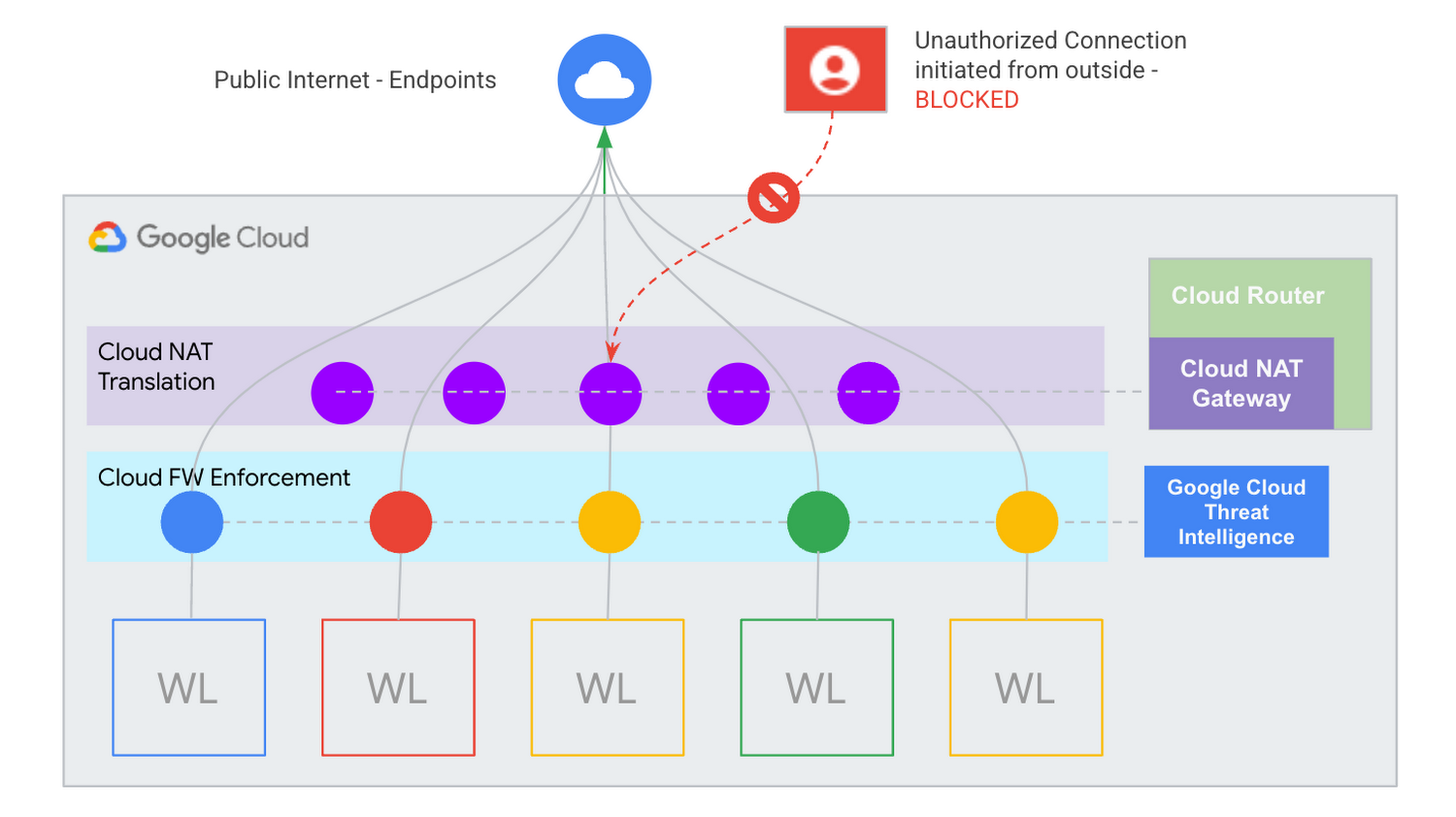
Macy’s continues to prove that security will never go out of style.
Learn more about Cloud NAT
Cloud NAT provides a path to help ensure your private resources stay private. Please watch this video on protecting your network with Cloud NAT to learn more about how it can help secure your environment. You can also get started using our quick start guide.
4898
Of your peers have already watched this video.
4:00 Minutes
The most insightful time you'll spend today!
Application Development with Kpt
Learn how to create and customize configuration packages with Kpt to build applications and adhere to configuration-as-data philosophy.
More Relevant Stories for Your Company



Modernize Your Security Posture for Cloud-Native Applications with Anthos
Modern security approaches have moved beyond a traditional perimeter-based security model. As many organizations seek to adopt cloud-native architectures and are deploying applications in hybrid and multi-cloud environments they demand a more flexible and extensible approach towards security. Learn how to address security issues as early in the development and

The SolarWinds Attack: A Case Study in Supply Chain Threats
Our quarterly Security Talks series brings together experts from Google Cloud Security teams and the industry to share information on our latest security products, innovations and best practices. Below is an introduction to Mandiant’s Security Talks presentation on Dec. 7, Mandiant Tales from the Front Lines: Activate Cyber Defenses Against
Google Cloud’s Invisible Security Vision: Key Highlights
Yesterday we held our final Google Cloud Security Talks event of 2021. Our event focused on zero trust and covered everything from Google’s history with BeyondCorp to our strategic thinking when it comes to applying zero trust principles to production environments. We shared product updates across the portfolio and talked about how

Confidential Computing: Google Cloud Security, Project Zero and AMD Come Together to Secure Sensitive Workloads
At Google Cloud, we believe that the protection of our customers’ sensitive data is paramount, and encryption is a powerful mechanism to help achieve this goal. For years, we have supported encryption in transit when our customers ingest their data to bring it to the cloud. We’ve also long supported
