





The Power of Two: Best Practices for Mergers & Acquisitions on Google Cloud

3389
Of your peers have already read this article.
3:00 Minutes
The most insightful time you'll spend today!
Congratulations! Your company just acquired or merged with another organization, beginning an important new chapter in its history. But like with many business deals, the devil is in the details — particularly when it comes to integrating the two companies’ cloud domains and organizations. In this blog post, we look at how to approach mergers and acquisitions (M&A) from the perspective of Google Cloud. These are the best practices that your Google Cloud Technical Account Managers follow — or that we recommend you follow if you plan to perform the integration yourself.
Although there are various M&A scenarios, here are the two most common ones we will focus on:
- Both entities engaged in the M&A have some presence on Google Cloud and are looking for some level of integration
- Only one of the entities has a presence on Google Cloud, and is looking at best ways to work together
Depending on your situation, your approach to integrating the two companies will vary substantially.
When both companies have a Google Cloud presence
In the first scenario, let’s assume company A is acquiring company B. Prior to the M&A, both companies have their own Google Cloud Organizations — the top level structures in the Google Cloud resource hierarchy — and have one or more billing accounts associated with them. There are also various Folders and Projects below each Google Cloud Organization. In this scenario, here are the key questions to ask:
- How do you plan to integrate/consolidate two distinct Google Cloud Organizations?
- How do you plan to organize the billing structure?
- How do you handle Projects under the two Organizations?
- What is the identity management strategy for the two Organizations?
For each of these key questions, go ahead and formulate a detailed plan of action. If you have access to the Technical Account Manager service through Google Cloud Premium Support, you can reach out to them to further develop this plan.
Understanding Google Cloud Organizations
From an organizational integration standpoint, when each entity in an M&A has its own Google Cloud Organization, you have various options: no integration, partial, or full.
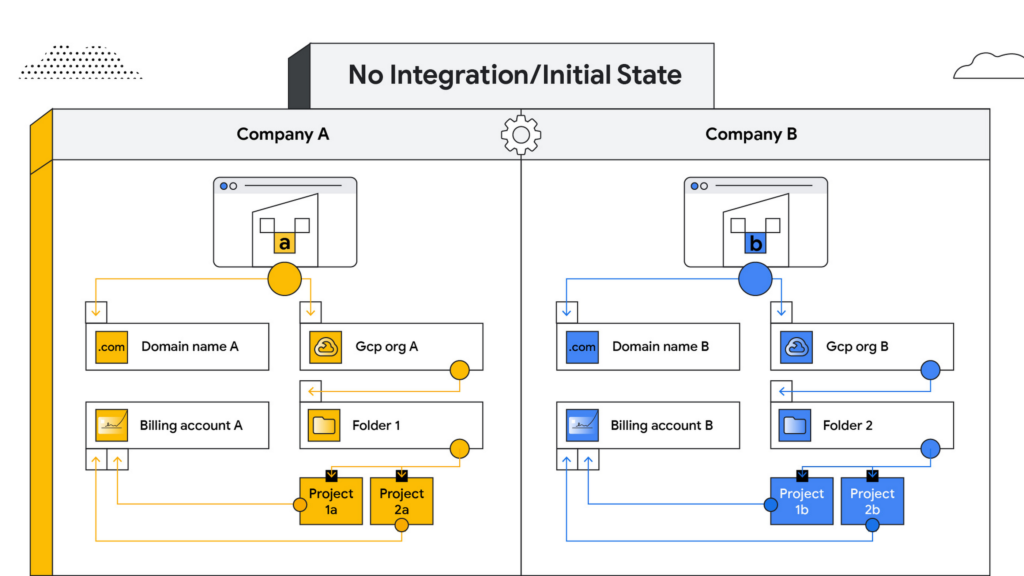
No integration – When company B operates as an independent entity from company A, no migration is required. One caveat is if company A has negotiated better pricing terms/discounts and support packages with Google Cloud. In that case, you can sign an affiliate addendum by working with your Google Cloud account team to help unlock the same benefits for company B.
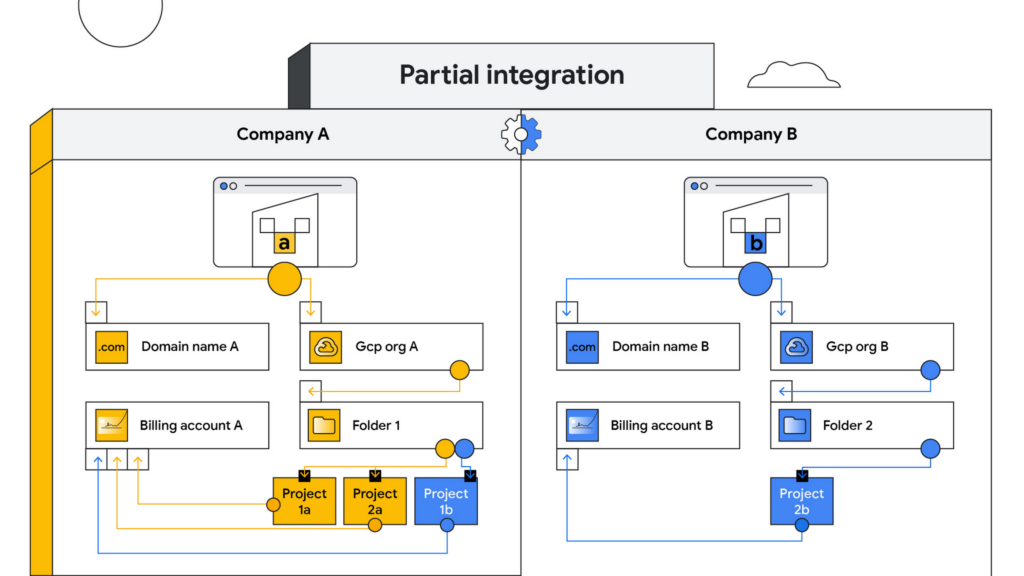
Partial integration – Some projects move over to company A from company B and others stay with Company B. There can be some shared access between the two companies and each of the organizations can continue to use their existing identity providers. This can be a self-serve or a paid services engagement with Google Cloud depending on the complexity of the two companies and how many project migrations need to take place between them.
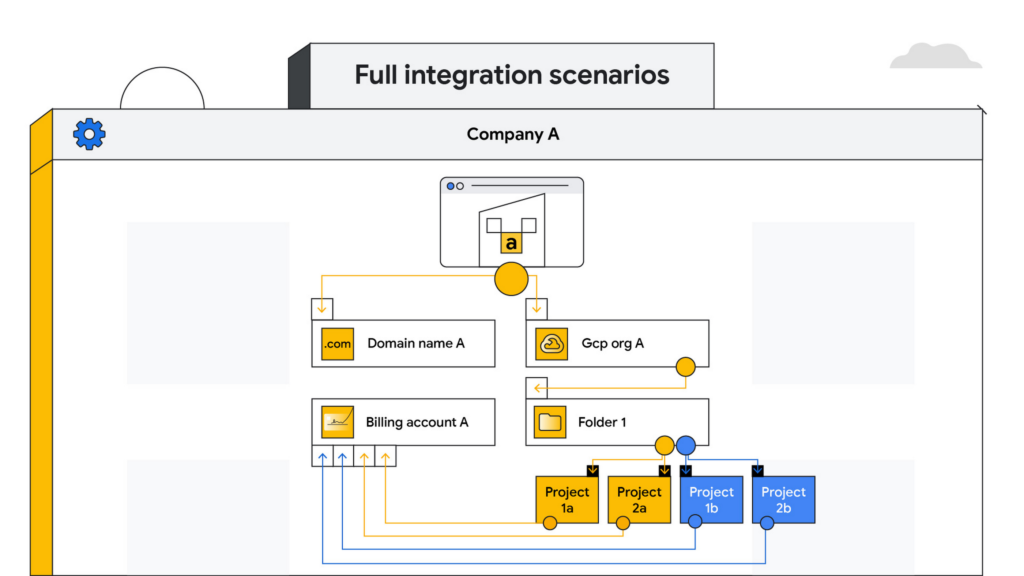
Full integration – Company B is fully incorporated into company A. This means you go through a full billing, Google Workspace identity and project migration from company B into company A. This can be a complex process and we highly recommend engaging your Google Cloud account teams to scope out a paid services engagement to go through this transition.
Planning your project migration
No matter what you want your end state to look like, project migration requires careful planning. Again, if you have an assigned Technical Account Manager, please reach out to them to ensure that you have a conversation around best practices before starting this migration.
If you’re taking a self-service approach, at a high level, we recommend leveraging the Resource Manager API to manage your project migrations. Do keep in mind that there are several prerequisites and required permissions documented here that need to be assigned before going down this path.
In addition, please be sure to read the billing and identity management considerations below to ensure that you are covering all of the bases associated with such a migration, as your choices can fundamentally alter your Google Cloud footprint.
Billing considerations
When deciding how to structure your Organizations and billing accounts, our recommendation is to always limit the number of Organization nodes and use the Folder structure to manage departments/teams within it. Creating additional Organization nodes is only advised in cases where you require a level of isolation for certain Projects from central administration for a specific business reason, for example, if the company being acquired already has their own Organization node and there is a business justification to let it operate as a standalone entity.
Warning: If you have multiple Organization nodes, be aware that you will not have central visibility across all your organizational resources, and that policy management across different Organization nodes can be cumbersome. You will also have to manage multiple Workspace accounts and manage identities across them, which can be difficult, especially when operating at scale.
From a billing account management perspective, our recommendation is to create one central billing account that lives within the Organization node with tags and labels incorporated for additional granularity. However, there are a few business cases which warrant the creation of additional billing accounts such as:
- You need to split charges for legal or accounting purposes
- Invoices are paid in multiple currencies
- You need to segregate usage to draw down on a Google Cloud promotional credit
- Subsidiaries need their own invoice
Keep in mind that committed-use and spend-based discounts and promotional credits cannot be shared across billing accounts and are provisioned on a per-billing-account basis. As such, more billing accounts can make it harder to leverage these discounts and credits.
Identity management
As you might expect, merging two entities has identity management implications. Cloud Identity is the solution leveraged by Google Cloud to help you manage your user and group identities. Even if the acquired company only uses the productivity products that are part of Google Workspace, the identities would still be managed by Cloud Identity.
Google Workspace considerations
To move large amounts of content into a Google Workspace domain, we recommend one of three options, depending on your end goal and data complexity:
- For general migrations: Leverage Google Workspace Migrate to move data into your Workspace domain from either another Workspace domain or a third-party productivity solution
- For manual migrations: Use the Export tool to move your organization’s data to a Cloud Storage archive so you can selectively download exported data by user and service
- For complex Google Workspace scenarios: Speak with your Google Cloud Technical Account Manager about the possibility of using a custom scoped engagement to merge two Google Workspace environments without business interruption
When only one company is on Google Cloud
Now, let’s consider the scenario where only company A has a presence on Google Cloud but company B does not. The approach you take to integrate the two organizations largely depends on your desired end state — full, partial or no integration.
If the plan is to eventually integrate company B into company A, your approach here will have a lot of similarities with the ‘full integration’ option mentioned above — just at a later point in time.
You may also run into a scenario where company B has a presence on an alternative cloud platform and you need to migrate resources into or out of Google Cloud. Again, similar to the partial integration option called out above, a paid engagement or a self-service exercise would be a good fit depending on the complexity of the desired end state.
Here to help
A merger or acquisition is an exciting milestone for any company, but one that needs to be managed carefully. Once you carefully review these considerations, develop a plan of action for your organization. You can also engage Google’s Professional Services for a paid engagement or Google’s Technical Account Management Service for a self-managed process to achieve the desired results.
If you are going through or considering going through M&A at your organization and have a different scenario than what we have discussed, please feel free to reach out to your account teams for guidance or contact us at https://cloud.google.com/contact.
Google Introduces Cloud Career Jump Start Certification for the U.S. Underrepresented Communities

3236
Of your peers have already read this article.
3:00 Minutes
The most insightful time you'll spend today!
It’s no question that the cloud computing industry is booming and cloud experts are in high demand. In 2020, 67 percent of organizations surveyed in the IDG Cloud Computing Report added new cloud roles and functions (source).
So there are plenty of cloud jobs out there, but if you don’t have years of experience, you might find it difficult to get one. This is especially true for members of underrepresented communities, who face other kinds of systemic barriers in education and employment.
To help meet this demand and democratize opportunity, Google Cloud is introducing its first virtual Certification Journey Learning program for underrepresented communities across the United States—Cloud Career Jump Start. The program is free of charge for participants, and includes technical and professional skill development and resources with an aim to provide a readiness path to certification via the Google Cloud Associate Cloud Engineer Exam.
Google Cloud’s Certification Journey Learning Program
The program offers free access to the Google Cloud Associate Cloud Engineer training, which provides support preparations for the Certification Exam. This industry-recognized certification helps job applicants validate their cloud expertise, elevate their career, and transform businesses with Google Cloud technology. Learn more about the exam by watching the Certification Prep: Associate Cloud Engineer webinar.
Designed specifically for Computer Science or Information Systems-related majors (or relevant experience), the 12-week program offers:
- Exclusive free access to Google Cloud Associate Cloud Engineer-related training to support preparations for the Certification Exam.
- Guided progress through the certification prep training on Qwiklabs.
- Office hours hosted by Google Cloud technical experts.
- Technical workshops, including sessions with Googlers who earned cloud industry certifications and have built impactful careers in cloud tech, such as Google Cloud’s Kelsey Hightower (a Principal Developer Advocate) and Jewel Langevine (a Solution Engineer).
Earn your Associate Cloud Engineer Certification
Curious if you qualify to apply for the program? We’ve put together a guide below to help:
- What does an associate cloud engineer do? Associate Cloud Engineers deploy applications, monitor operations, and manage enterprise solutions. They also use the Google Cloud Console and the command-line interface to perform common platform-based tasks, to maintain one or more deployed solutions that leverage Google-managed or self-managed services on Google Cloud.
- Who’s eligible? We are encouraging applicants from groups that have been historically underrepresented in tech including Black, Latinx, Native American & Indigenous communities. Applicants should have six or more months of hands-on experience in a Computer Information Systems-related major, and/or relevant experience through online courses, boot camps, hackathons or internships. Although the ability to program is not required, familiarity with the following IT concepts is highly recommended: virtual machines, operating systems, storage and file systems, networking, databases, programming, and working with Linux at the command line.
How do you know if you are ready for the program?
To get an idea of what the program will cover:
- Watch the Certification Prep: Associate Cloud Engineer webinar
- Complete the Skill IQ Assessment via Pluralsight
- Review the Associate Cloud Engineer Certification Exam Guide
- Take the Associate Cloud Engineer Practice Exam
Jump start a career in cloud infrastructure and technology
Following the hands-on training, Google Cloud will offer an additional 9 months of career development resources and activities. This includes an online support community, mentoring with Googlers & partners including SADA, EPAM Systems Inc., and Slalom, resume and interviewing support from Google Recruiting & Staffing, and additional career workshops. We are also partnering with a number of Black-owned and -operated, nonprofit and cloud training organizations like Kura Labs.
Cloud certifications open doors
Want to hear more about this program from two Googlers who completed it? We asked Kelsey and Jewel to share more on how certifications helped them launch their careers in the cloud industry:
- “IT certifications introduced me to the game; opportunities and hard work helped me change it.” – Kelsey Hightower, Staff Developer Advocate, Google Cloud Platform
- “Becoming certified as a cloud computing professional combined with prayer, networking, and practice has kept me moving on my purposeful and rewarding career path as an engineer.” – Jewel Langevine, Solution Engineer, Google Cloud Solutions Studio
Kelsey and Jewel’s wisdom doesn’t end there. They play a central role in the program, sharing more about how they navigated certifications and leveraged them for success.
Apply today to Cloud Career Jump Start
The program is now live in the United States, with plans to expand to other regions in the coming months. It is completely virtual, and all training is on-demand so that participants can access their coursework anytime, anywhere via the web or mobile device. To determine whether you (or someone you know) would be a great fit for the Cloud Career Jump Start, check out our guidelines and apply.
4862
Of your peers have already watched this video.
3:00 Minutes
The most insightful time you'll spend today!
A Winner’s Story of Optimizing IT Operations for Informed Business Decisions with Google Cloud
An award-winning leader in the enterprise software industry, Broadcom Software is known for modernizing, securing and optimizing the most complex and largest hybrid environments. It’s broad portfolio of industry-leading, enterprise infrastructure and security software built on different tech stack and vision of tech leaders, are run on on-prem, private and public cloud and operated differently. To have a unified standard platform to run their wide range of products, Broadcom Software needed infrastructure as a service and Kubernetes orchestration layer, standard DevOps and security practices as well as common set of DevSecOps tools. Although the company knew there was no common ground to run all their products, migrating products into container-based architecture, they discovered many common strands that they could leverage for efficiency. Watch to learn the role played by Google Cloud in the Broadcom’s transformation!
5579
Of your peers have already watched this video.
1:30 Minutes
The most insightful time you'll spend today!
A Quick Guide to Cloud Monitoring
Cloud Monitoring is a tool that allows you to gain visibility into the performance, availability, and health of your applications and infrastructure. In this video, we show you what Cloud Monitoring is and how you can use it to custom define service-level objectives (SLOs), monitor application metrics, and the overall health of your applications infrastructure. Watch to learn how you can use Cloud Monitoring!
Simplify Your Modernization Journey from Windows

4278
Of your peers have already read this article.
1:30 Minutes
The most insightful time you'll spend today!
Microsoft and Windows on Google Cloud provides a first-class experience for Windows workloads. You can self-manage workloads or leverage managed services and use license-included images or bring your own licenses. Now, easily migrate, optimize, and modernize your Windows workloads for agility and scalability.
Start with migration
Migrate to increase IT agility and reduce on-premises footprint. Tools like Migrate for Compute and Migrate for Anthos can help migrate and upgrade.
Optimize license usage to reduce cost
Optimize VM usage. Managed SQL Server and Active Directory reduce total cost of ownership. Move .NET to .NET core. Move SQL Server to Linux.
Modernize to reduce single-vendor dependency
Create an open path to modernization—containerization of Windows server, cloud-native development, and multi-cloud readiness with Anthos.
Drive a strategy for migration, optimization, and modernization
Plan for the future while reducing your Microsoft licensing dependency. Get all you need to migrate, optimize, and modernize your legacy platform.
Bring your own licenses
In addition to on-demand licenses, Google Cloud provides you with flexibility for bringing your existing licenses and running them on Compute Engine. Use Sole-Tenant Nodes to run on dedicated hardware with configurable maintenance policies to support your on-premises licenses while maintaining workload uptime and security through host-level live migration.
License-included VM images
You can deploy your Windows applications (including SQL Server) on our fully tested images with bundled licenses on Compute Engine and take advantage of many benefits available to virtual machine instances such as reliable storage options, the speed of the Google network, and autoscaling.
Fully managed SQL Server and Active Directory
Use an easy-to-manage and compatible relational database service in the cloud to reduce operational overhead. Use a highly available, hardened service to manage authentication and authorization for your AD-dependent workloads, automate AD server maintenance and security configuration, and connect your on-premises AD domain to the cloud.
Windows on Kubernetes
Running your Windows Server containers on GKE can save you on licensing costs, as you can pack many Windows Server containers on each Windows node.
Mrs. T’s Pierogies Moves SAP Systems to Google Cloud for Faster Analytics Capabilities for its SAP Data

6857
Of your peers have already read this article.
1:30 Minutes
The most insightful time you'll spend today!
Pierogies might just be the ultimate comfort food. But when Mrs. T’s Pierogies — the leading manufacturer of frozen pierogies in the US — learned it needed to transition its existing on-premises SAP ECC to S/4HANA, the company sought a little comfort for itself.
Founded in 1952, Mrs. T’s Pierogies now produces more than 650 million pierogies a year. Moving that many pierogies requires a powerful ERP system — and an equally powerful IT infrastructure on which to run it. Mrs. T’s realized that the SAP-mandated transition of its ERP solution to SAP S/4HANA was an opportunity to move its SAP systems to Google Cloud and gain real-time analytics capabilities for faster sales forecasting, more effective trade promotions, and more sophisticated planning.
From necessity to opportunity
Mrs. T’s successfully ran its SAP ECC solution on its own on-premises servers for years. But after SAP decided to sunset the product, Mrs. T’s realized that it faced multiple challenges, including:
- Migrating its SAP ECC 6.0 system from an on-premises leagcy OS to a cloud-based Linux environment
- Moving data from its SAP DB2 database to HANA
- Transitioning from ECC to SAP S/4HANA
That complex transition needed to take place with little or no downtime, since nearly all of the company’s invoices, warehouse movements, and transfer orders used the Electronic Data Interchange (EDI) protocol. Missing even a few hours of EDI transactions would put significant revenue at stake. Adding to the challenge: Some Mrs. T’s customers would not accept an invoice past five days, which left little room for error. Mrs. T’s chose Rackspace Technology, a longtime Google Cloud partner, to oversee the move.
Mrs. T’s could have chosen to run S/4HANA on its legacy hardware but saw migration to Google Cloud as an opportunity to improve key aspects of its business, in particular data analytics. Historically, sales planning and forecasting involved time-consuming manual processes. But the speed, availability, and scalability of Google Cloud meant that Mrs. T’s could take advantage of S/4HANA’s embedded analytics capabilities. Migrating could also open the door to leveraging Google Cloud’s native integration of SAP data to power Google tools such as BigQuery, Google Cloud AI Building Blocks, and more.
The move to Google Cloud also gave Mrs. T’s an opportunity to update its disaster recovery process. Previously, the company backed up to tape. So, if its SAP systems went down, a member of the IT department would have to drive the most recent tape backups an hour to its cold site, where the disaster recovery partner would load the SAP backup tape, boot the system up, switch network connections to that site, and cross their fingers. Not only would downtime be significant, but restored data would be limited to the periodic tape backup.
“Everything just worked”
Once Mrs. T’s decided to migrate to Google Cloud, the company worked with Rackspace Technology to implement the system. The first phase focused on moving the SAP production environment from on-premises infrastructure to Google Cloud and updating its database to HANA, which took place over 12 weeks. The switchover occurred over a weekend and was all but invisible to users. “We came in on Monday and everything just worked,” recalls Timothy Coyle, Director of Information Systems & Technology. In a second four-month phase, the company transitioned from ECC to S/4.
The move to Google Cloud paid dividends immediately. Batch transactions occurred twice as fast and on-screen end-user transactions rendered instantly. The upgrade also gave the finance team access to embedded analytics and monitoring for the first time. With everything now in the cloud, disaster recovery could be dynamic and nearly instantaneous, with a worst-case scenario of just 5 to 10 minutes of downtime.
“Mrs. T’s needed a skilled and experienced partner that could move its SAP environment to Google Cloud with no negative impacts to its business. We knew this migration was a key initiative in Mrs. T’s digital transformation journey,” says Chuck Britton, Google Partner Development Manager at Rackspace. “We also knew that running SAP on Google Cloud would give the business the fast and flexible analytical capabilities it needed for its SAP data.”
From ideation to production, Mrs. T’s migrated from its legacy on-premises infrastructure to a modern SAP S/4HANA solution on Google Cloud in only seven months, with minimal downtime and zero disruptions. Now that the migration is complete, Mrs. T’s has a flexible, highly scalable environment to run the SAP applications and data that fuel the business. Says Coyle, “Our strategic intent for IT is to make processes simpler, people more productive, and infrastructure more secure. This project fits right square in the middle of that strategic philosophy.”
Learn more about ways in which Google Cloud can transform your SAP experience and about Rackspace Google Cloud solutions for SAP customers.
More Relevant Stories for Your Company

AgroStar: Small farms in India getting big help from the cloud
AgroStar has launched a cloud-based mobile app that is helping to boost crop yields and encourage best practices for small farmers in India. Launched as an on-premises ecommerce platform selling farm tools in 2008, the firm turned to Google Cloud Platform (GCP) to expand its offering. It now uses cloud-based analytics and is

Scope for Tech Adoption and Advancements in Healthcare are Still High: Google Cloud Research
Since the start of the COVID-19 pandemic, there’s been a rapid acceleration of digital transformation across the entire healthcare industry. Telehealth has become a more mainstream and safe way for patients and caregivers to connect. Machine learning modeling has helped speed up innovation and drug discovery. And new levels of



HSBC Looks to Google Cloud to Transform Banking
HSBC, a global bank that is a central part of global commerce with a presence in 67 countries, serving 38 million customers ranging from individuals to small businesses to corporations and governments, and having over $2.5 trillion assets in its balance sheet, had a vision of being a cloud first

ATB Financial Focuses on Customer Experience with the Speed it Gains in the Cloud
As senior vice president and head of technology enablement for ATB Financial, Barry Hensch has a mission: creating a seamless experience for the Alberta, Canada-based bank’s nearly 800,000 customers by leveraging the latest digital technology. ATB is a purpose-driven financial institution owned and operated by Alberta’s provincial government, with about
