





The Latest in Spring Cloud GCP: Upgrading the Sample Bank of Anthos App

1408
Of your peers have already read this article.
3:30 Minutes
The most insightful time you'll spend today!
We’re excited to announce that Spring Cloud GCP version 4.0 is now generally available! In this post, we’ll be describing what the new major version has to offer, and demonstrating the process of using the migration guide on one of our reference architectures, Bank of Anthos.
What’s new?
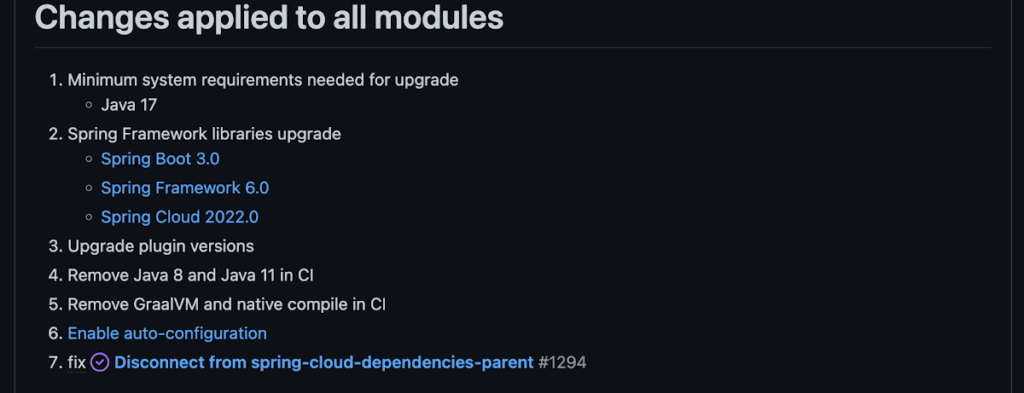
With this release, Spring Cloud GCP officially supports Spring Boot 3.x. However, this migration involves a number of breaking changes as outlined in the migration guide. The full list of changes made is available on Github, but the one of the most significant differences is that Java 17 is now a minimum requirement.
Another notable feature of this release is the addition of starter artifacts – Spring Boot starters for Google Cloud – that provide dependencies and auto-configurations for 80+ Google Client libraries. Just as the name suggests, these starters can serve as helpful starting points when working with a new client library. For now, they’re in preview.
These starters are not included in the BOM by default and need to be added as a dependency to your project before they can be used. For example, if you wanted to get started with Cloud Text-to-Speech, you would include the following:
<dependency>
    <groupId>com.google.cloud</groupId>
    <artifactId>google-cloud-texttospeech-spring-starter</artifactId>
    <version>4.0.0-preview</version>
  </dependency>
The upgrade process
We prepared a migration guide to help answer any questions involved with moving from 3.x to 4.x. Let’s follow those instructions to migrate Bank of Anthos.
We’ll start by cloning and building the application before the upgrade, according to the quickstart and development guide:
PROJECT_ID=<YOUR-PROJECT-ID>
gcloud services enable container --project ${PROJECT_ID}

git clone https://github.com/GoogleCloudPlatform/bank-of-anthos.git
cd bank-of-anthos/

gcloud services enable container.googleapis.com monitoring.googleapis.com \
  --project ${PROJECT_ID}

REGION=us-central1
gcloud container clusters create-auto bank-of-anthos \
  --project=${PROJECT_ID} --region=${REGION}

gcloud container clusters get-credentials bank-of-anthos \
  --project=${PROJECT_ID} --region=${REGION}

skaffold run --default-repo=gcr.io/${PROJECT_ID}/bank-of-anthos
At the end of this, you should see a “deployment stabilized” message:
Deployments stabilized in 9.657 secondsWith the environment set up for development, we’re ready to move on to the actual migration. The migration is already complete at time of writing, but here’s the full list of changes made:
- We began by checking the current Java, Spring Boot and Spring Cloud GCP versions.
- Our Java version is okay, but the other two are out of date, and will need to be updated.
We can also add the Spring Cloud GCP BOM to manage our versions going forward while we’re here.
- Our Java version is okay, but the other two are out of date, and will need to be updated.
- Then, in no particular order, we can make the following code changes:
- Remove the explicit type declarations from our ResponseEntity instantiations.
- Replace all javax.* imports with Jakarta.* counterparts, since Spring 3.0 makes use of Jakarta EE 9.0
With those changes in place, the app is upgraded and ready to re-deploy!
Live example
For a finished example of this migration, check out the Bank of Anthos repository on Github. It’s an excellent sample application that showcases a polyglot Java & Python app, served on Kubernetes and Google Cloud. All CI/CD and configurations are open source, so it may be instructive as you approach this migration.
Thanks for reading, and feel free to provide comments or feedback on Twitter, or in the issues section of the repository.
3 Ways To Reduce App Downtime With Google Cloud’s API Monitoring Tools

3081
Of your peers have already read this article.
2:30 Minutes
The most insightful time you'll spend today!
How many times have you closed an application when you encounter the “spinning wheel of death” (a melodramatic way of saying an application that is taking too long to load)? In today’s digital economy where many organizations rely on applications as a primary source of revenue, that spinning wheel of death (or poor application performance) can mean lost users or revenue. And just about every modern application relies on APIs as the nervous system across distributed systems, third-party services and microservice architectures. While meeting the need for rapid release cycles and frequent API updates, it is also imperative for IT teams to ensure that your APIs are meeting SLOs, performance requirements, and proactively mitigating issues.
Why are synthetic monitoring tools not enough?
When thousands or even millions of users are making multiple requests to your APIs, just relying on synthetic monitoring tools (that rely on sampling or limited API availability information) is not enough for precision diagnoses or useful forensics. At the same time, monitoring every single aspect just increases your overhead and mean time to diagnosis. Apropos, API monitoring has become absolutely critical — and a fusion of art and science — for operations teams to make sure all APIs are running and performing as intended. If you are worried about monitoring blind spots or overheads, let us look at 3 key practices you can follow to stop dreading your sev1 alerts.
#1 Prioritize alerts for critical events requiring immediate investigation
- Ask any engineer on-call for a critical service and they will tell you about the overheads created by incorrectly prioritized alerts. For example let us imagine a distributed application with 20 APIs. Even if you set up basic alert monitors across latency, error, and traffic for these APIs, you end up monitoring and maintaining 60 alert definitions – which is a lot. To balance avoiding monitoring blindspots and alert fatigue at the same time, operations teams must develop a clear understanding of all events and prioritize configuring alerts for events supporting critical traffic.
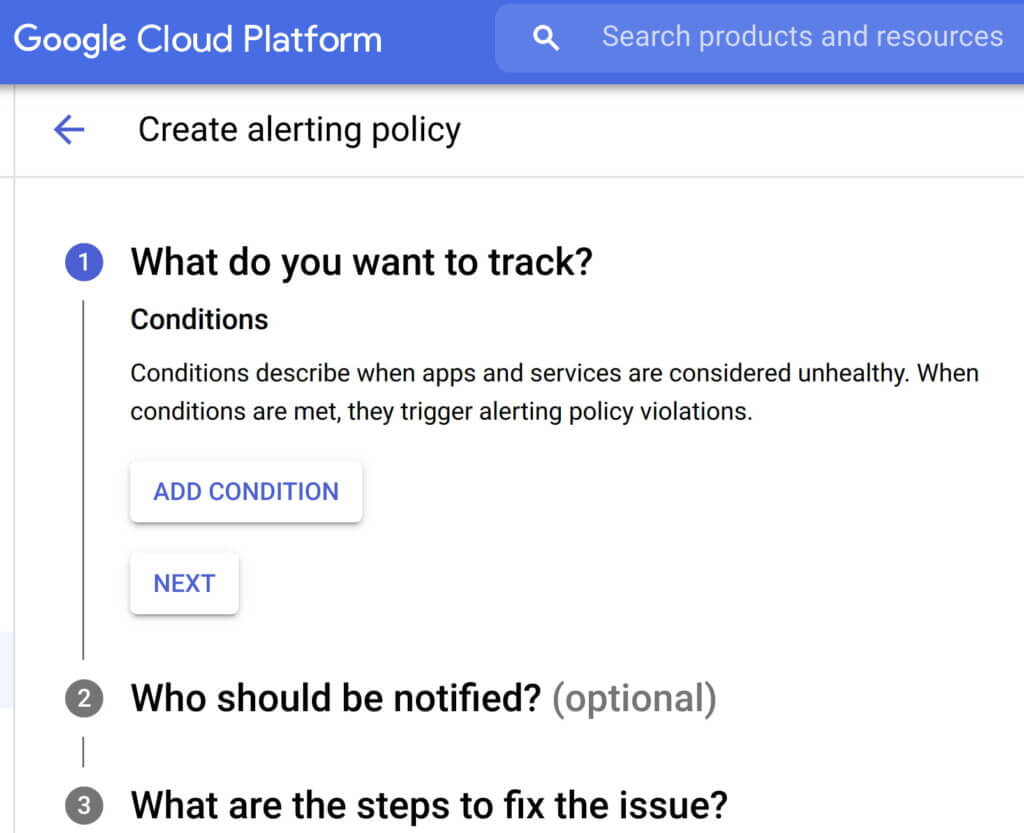
- Consider quality over quantity while defining new alert conditions where each new condition is urgent, actionable, and actively or imminently user-visible. Every alert condition created should also contain intelligence that requires active engagement from a user as opposed to a mere robotic response. Apigee’s API monitoring allows creation of alert conditions based on metrics or logs while providing actionable information (Ex: status code, rate etc.,) and playbooks for diagnosi
- In today’s multilayered systems, one team’s symptom (“what’s broken?”) is another downstream system’s cause (“Why?”). Even if some events are not suitable for actionable alerts, a failure needs to create an informational broadcast to a downstream system to mitigate the impact of the upstream dependency. In such cases, investing in automating alerts, grouping multiple incidents in notification channels, and incident tracking. For example, Apigee lets you integrate and group your alert notifications in channels like Slack, Pagerduty, webhooks etc.,
- Modern production systems are ever-evolving where an alert that’s currently rare might become frequent and automatable. Analogous to ticket backlog grooming, alert policies need to be reviewed periodically to make sure new conditions are identified and existing alerts are refined with new thresholds, prioritization and correlation. Controls like Advanced API Ops leverage AI and ML to detect anomalous traffic differentiated from random fluctuations to help define accurate alert definitions
Check out some examples of alerts here
#2 Isolate problem areas quickly with dashboards
Google’s Site Reliability Engineering book presents the case for efficient diagnosis by building dashboards that answer basic questions about every service, normally including some form of the four golden signals — latency, traffic, errors and saturation. But at the same time, capturing just these golden metrics at different levels of granularity can quickly add up. Like all software systems, monitoring can become an endless pit of complexity, complicated to change and a burden to maintain. In the same book, the most effective direction to create a well-functioning standalone system is to collect and aggregate basic metrics, paired with alerting and dashboards.
If you are running a large scale API program with a dedicated team to monitor your APIs, you can leverage the out-of-the-box monitoring dashboards in your API Management solution (like Apigee’s API monitoring) to gather real-time insights into your API performance, availability, latency, and errors. In other cases, you can use solutions like Cloud Monitoring that can provide visibility across your full application stack where individual metrics, events, and metadata can be visualized in a rich query language for rapid analysis. Leveraging a single system for your application stack provides observability in context and can reduce your time spent navigating between systems (Apigee customers can use Cloud Monitoring by default or integrate with other systems using Cloud Monitoring API)
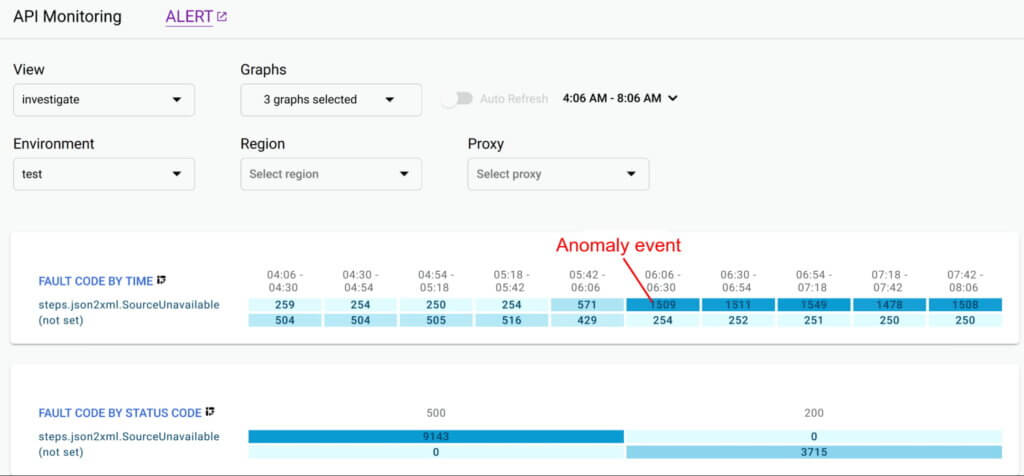
Even after you collect and aggregate the metrics, it is important to have impactful data visualizations to quickly understand the issue and identify correlations during diagnosis. In data visualizations as well, focusing on too many dashboards creates a steep learning curve and increases mean time for every diagnosis. For example, Apigee API Monitoring provides the following visualizations as a standard to balance simplicity and efficiency:
- Timeline view to diagnose traffic (in 1 min intervals), error rates (4xx and 5xx across traffic) and latencies (50th, 90th, 95th and 99th percentiles)
- Pivot tables of metrics and attributes for all API traffic, to help compare activity across different metrics
- Treemaps of recent API traffic by proxy to get a snapshot of incidents, error rates and latencies
#3 Incorporate distributed tracing into your end to end observability strategy
Modern application development accelerated the adoption of technologies and practices like cloud, containers, APIs, microservice architectures, DevOps, SRE etc. While this increases release velocity, it also introduces complexity and more points of failure in an application stack. For example, a slow response to a customer request spans across multiple micro services owned (and monitored) by various teams who might not observe any individual performance issues. Without an end-to-end contextual view of a request, it is nearly impossible to isolate the point of high latency.
In such cases, distributed tracing is the best way for DevOps, Operations and SREs to get answers to questions such as service health, root cause of defects, or performance bottlenecks in a distributed system. Organizations should invest in instrumenting their distributed applications using open source standards such as OpenCensus and Zipkin. Using tools like Cloud Trace with a broad platform, language and environment support can help easily ingest data from any source — open instrumentation or proprietary agents.
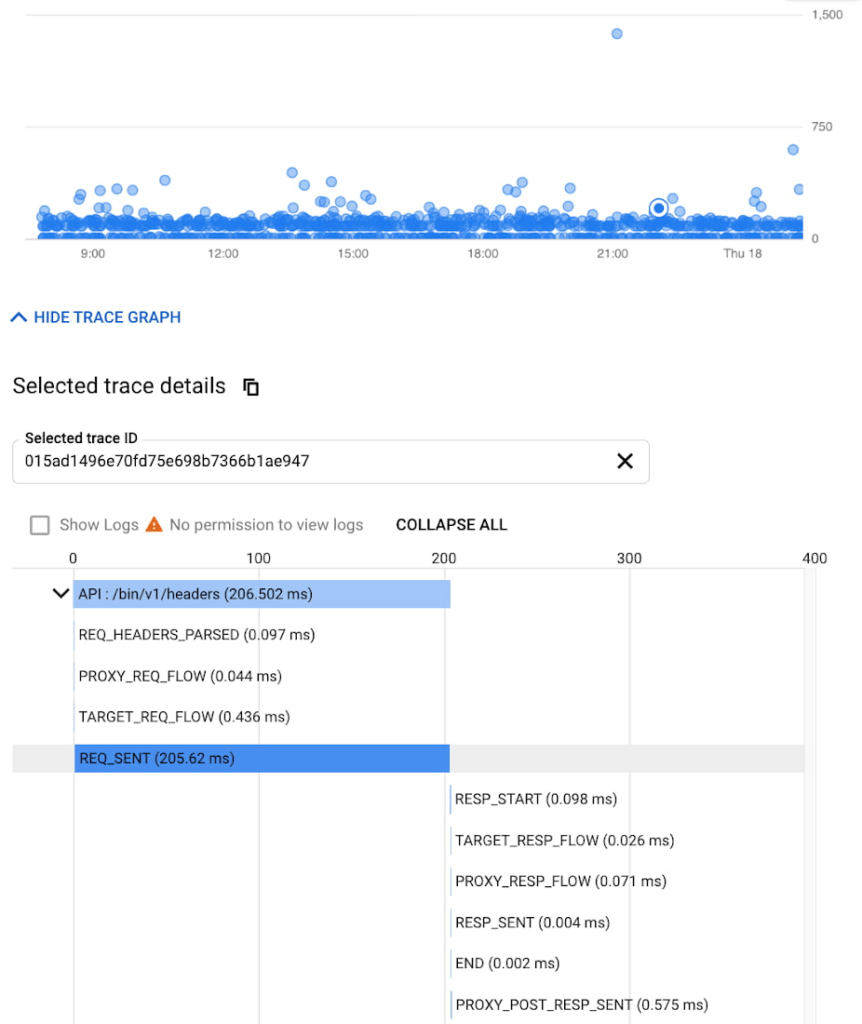
While distributed tracing helps in narrowing the issue to a given service, in some cases you might need further context to pinpoint the root cause. For example: Even if you have isolated the source of a performance issue to an API proxy, it is still a tedious process to identify the right bottleneck among multiple policies being executed. Tools like Apigee Debug enable you to zoom into an API proxy flow and probe the details of each step to see internal details like policy executions, performance issues, and routing etc.,
As soon as a request starts to span across a handful of microservices, tools like distributed tracing and Debug will become crucial elements of your monitoring strategy. When every service in a distributed system emits a trace, the amount of data can quickly become overwhelming leading to the classic “needle in the haystack” problem. In such scenarios, it becomes vital to ask the right questions and choose between head-based sampling (randomly selecting which traces will be sampled for analysis) and tail-based sampling (observe all trace information and sample the traces with unusual latency or errors) based on application complexity
Implement effective API monitoring in Apigee
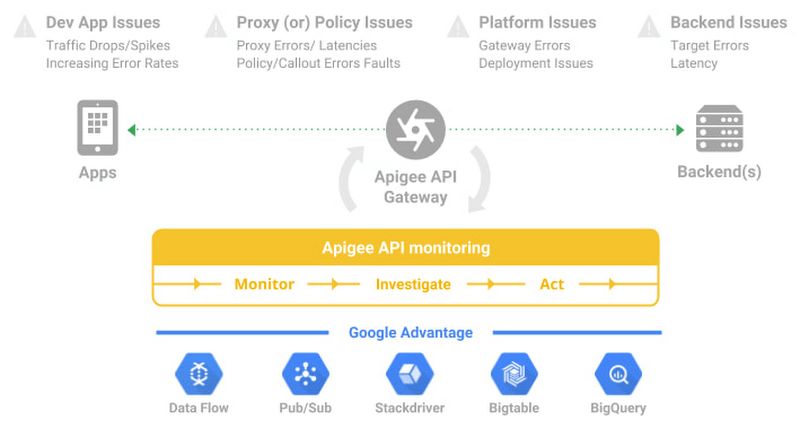
Apigee’s API monitoring (based on metrics exposed by the internals of the system) capabilities work with your existing monitoring infrastructure to help reduce mean time to diagnosis and increase application resiliency. Specifically, operations teams can leverage
- Monitoring dashboards to gain in-depth insights into API availability and performance metrics.
- Debug to precisely diagnose with deeper insights into an API proxy flow without toggling multiple tools.
- Alerts and notifications to gather contextual Insights, facilitate customization, and grouping with first class integrations to various tools (like Slack, PagerDuty, email and support for webhooks).
- Best of Google technologies such as Data Flow, Pub/Sub, Stackdriver, Bigtable and BigQuery to handle massive volumes and complex metrics at scale
Using Apigee’s API monitoring will help you maintain high application resiliency with comprehensive controls to reduce mean time to diagnosis and resolution. Get started with Apigee today or explore Apigee’s API monitoring for free here. Check out our documentation for additional information on API monitoring.
How APIs Help Financial Services Firms Enhance Digital CX and Increase Revenue

3477
Of your peers have already read this article.
2:00 Minutes
The most insightful time you'll spend today!
Faced with changing customer behaviors and demands, tightening margins, and increasing threat from digital competitors, financial services institutions (FSIs) will need to meet customers where they are, open up their services, and establish new ways to monetize their products. Doing so will also enable them to build a better profile of their customers, and deliver more personalized user experiences and fast, convenient banking and payment services. Cloud technology plays a big role in this shift toward digital FSIs.
In Asia, bank branches now account for just 12% to 21% of monthly transactions in the region, with customers turning to digital channels for routine transactions such as peer-to-peer transfers and bill payments, according to McKinsey&Company. Overall customer engagement has climbed from an average 12.7 to 14.9 transactions a month in Asia’s developed markets, and from 6 to 8.1 in emerging markets.1
Fueled by growing smartphone adoption, the evolving customer behavior and momentum toward digital platforms have enabled digital-first players to snag a growing piece of the banking pie.
McKinsey estimates that digital banking penetration has grown an average of 97% in Asia’s developed markets, and 52% in emerging markets, with between 30% and 50% of those that have yet to use digital banking likely to do so.
Consumers now are more than ready to make the switch to neobanks, or digital banks. In Singapore, 63% are open to banking with digital-only players, according to a Visa study. On what will entice them to do so, 63% point to bill payments while 56% will use neobank services to make payments at retail outlets. Furthermore, 54% prefer digital banks for the convenience they offer while 52% like the faster service.
Among those who are open to digital banks, 60% will move some services from their current bank to these new players even if the latter have no prior banking experience. One in five of respondents say they are willing to switch all services to a neobank.
The same is true for small and midsize businesses (SMBs) in Singapore. According to a separate survey by Visa, 88% of these companies will consider moving some services to digital banks.
Driven to do so by their frustration over a lack of quality corporate products and control of their banking experience, 55% of SMBs believe neobanks will help bring down overall banking costs. Another 54% say digital banks offer greater convenience, while 53% point to greater ease in paying bills online.
These stats should worry even established FSIs, especially those that have not done quite enough to open up their service ecosystems and drive innovation through APIs.
An API toward new revenue
While most banks have active APIs, the services that some of them currently provide are just functional; they’re the means to an end for partners to obtain their targeted products and services. Without knowing, consumers use these types of APIs indirectly by using their favorite applications every day—a payment processing API will enable them to purchase their lunch, while a loan application API will get them that dream home.
But while banks do not always own the customer journey, they still can find opportunities to sell their products via partners. Many leading banks are leveraging key technologies, such as API management, artificial intelligence (AI), and data analytics to embed digital banking into consumers’ everyday lives, including groceries, travel, entertainment, healthcare, and food delivery.
When traditional banks open up their APIs to third parties offering broader services that pull in unique services into their own apps, they then become plugged into the broader customer journey. This helps boost usage of their services and embeds them in the overall customer experience. It also provides aggregated data that will help banks build richer consumer profiles, and deliver more personalized products and services.
APIs also create equal opportunities for smaller participants to be involved in the financial services ecosystem, potentially creating micro-segments that previously may not have existed. With insufficient demand within a closed system, to justify the provision of such services, some customers in these micro-segments have previously been left unserved. The APIs, which facilitate collaboration between the different micro-segments so they can be commercially viable, help assuage this problem.
Some banks are also opening up APIs to allow access to datasets that enable businesses to trigger automated workflows and enhance their operational efficiencies. Others, such as Bank Rakyat Indonesia (Bank BRI) have generated new revenue by leveraging Google Cloud’s Apigee to manage their API lifecycle and identify new revenue opportunities.
Apigee’s monetization feature has helped Bank BRI realize $50 million in revenue and enabled the bank to define its pricing based on API calls and automatically bill based on usage.
In addition, the Indonesian bank uses the data analysis alongside Google Maps Platform to score its customer base of 75.5 million, and identify those who can be recruited as BRILink agents for underbanked areas. These agents are customers who maintain a minimum balance of $800 USD and score high on reliability.
The appointment of branchless agents via the Agent BRILink app has pushed the loan volume from the bank’s branchless business to $26 billion in 2018, up from $15 billion the year before.
How banks can get started with APIs
Clearly, there are new revenue opportunities for banks to leverage the data they already have. Here are some tips to help FSIs kickstart their API journey:
- Align with internal leadership growth initiatives. Leverage executive key performance indicators around growth and cost savings to foster a culture that offers APIs to micro-segmented markets with an eye on cultivating a healthy financial services ecosystem.
- Productize APIs with a strong value proposition. Starting with an API-first approach, stock the shelves of your API shop with new services and a strong inventory of APIs that will entice third parties (i.e., retailers, telcos, etc.) to start using them. This customer-first, outside-in approach will serve as a strong base to build on and enable the addition of more APIs as adoption grows.
- Actively nurture a developer community. A properly trained API manager will ensure constant contact with the developer community, and that partners are provided with case studies to help them identify viable use cases for your APIs.
- Leverage security as a strategic enabler. Security is a key enabler of the API economy, and most API security postures are defensive. By leveraging deep security tooling together with strong identification of developers, banks can better track information and data usage offensively.
FSIs also need to avoid some common pitfalls, such as overlooking the need to continuously improve their APIs. If no one is using it, the API clearly is failing to provide any real value to third-party developers.
In addition, efforts should be made to market the APIs and let developers know what is available. A common mistake FSIs make is assuming their work is done once their APIs are released and neglecting the need to carry out community outreach and marketing to generate awareness about the APIs.
If you are interested in learning more about this topic, don’t miss our session at the Google Cloud Financial Services Summit on Embedded Finance: The Future of Banking.
1. McKinsey & Company. “Asia’s digital banking race: Giving customers what they want.” Global Banking Practice. April 2018.
3362
Of your peers have already watched this video.
24:40 Minutes
The most insightful time you'll spend today!
A Guide to Anthos: the App Modernization Platform for Hybrid and Multi-cloud Deployments
Anthos gives you a consistent platform for all your application deployments, both legacy as well as cloud native, while offering a service-centric view of all your environments.
You can build enterprise-grade containerized applications faster with managed Kubernetes on cloud and on-premises environments. Create a fast, scalable software delivery pipeline with cloud-native tooling and guidance.
It also helps leverage a programmatic, outcome-focused approach to managing policies for apps across environments, and enable greater awareness and control with a unified view of your services’ health and performance.
Tune in to this brief explainer video for an overview of Anthos, deployment examples, and explore options to get started illustrated through a demo with Bradley Wong, Product Manager at Google Cloud. Learn to make the best first step in your journey of application modernization and gain a clear understanding of the value of Anthos for your hybrid and multi-cloud workloads.
How Macquarie Democratized Digital Banking with APIs

3649
Of your peers have already read this article.
2:30 Minutes
The most insightful time you'll spend today!
Google Cloud Results
- Enables the speed and agility required to build open APIs
- Connects over 1 million customers through Apigee digital touch points
- Helps enable a range of digital banking and commercial partnerships
- 1billion API requests served annually
In 2016, Macquarie launched a new digital banking experience that was based on empowering customers, creating personalized experiences, and developing intuitive technology. Macquarie had the opportunity to build its digital environment from the ground up and looked beyond financial services to digital companies leading in customer experiences.
Following the launch of its digital banking platform in 2016, Macquarie saw providing customers with a secure way to manage their own data as the logical next step. Macquarie looked to transform its existing technology capabilities into a modern architecture that complements the speed and agility demanded of its digital platform. The Apigee API Management Platform plays an important role in helping Macquarie deliver a highly secure and open digital platform.
“The capability to connect to various platforms with a digital, responsive, technology-agnostic platform is vital. As new digital services emerge, it’s important that our digital banking services are future compatible. The most important part of our approach isn’t what we are doing now but what our platform architecture will allow us to do in the future by creating more human experiences with technology that go beyond just banking,” says Rajay Rai, head of Digital Engineering & Applied Innovation, for Macquarie’s Banking and Financial Services group.
Because Macquarie’s banking platform is based on an open API architecture, it is able to grant controlled access to its business services, enabling others to use, innovate, and build on top of them while increasing the prospects of widespread adoption and developer stickiness.
Empowering the developer
“Macquarie’s strategy has been API-first as it has built and improved its digital capabilities, but it won’t be too long until this approach is superseded by citizen-developers-first,” Rajay says. “We believe that co-creation of value is essential because in the future, we won’t be owning the channels for distribution and engagement. In building a leading digital banking platform it’s important that developers are able to open the front door.”
Macquarie’s API strategy grants internal and external developers with access to its rich repository of APIs exposed via the new developer platform, Macquarie devXchange. With Macquarie devXchange, developers have readily available samples, a sandbox, and simplified connections to all of the bank’s services. Developers are able to test APIs and services through the Apigee platform.
“Not only does the platform provide frictionless access, but it’s also poised to modernize and simplify the way we engage the community beyond our own perimeters,” Rajay says. “The Apigee developer portal is helping us seize new opportunities; access has been democratized and it wouldn’t have been possible without APIs.”
Cloud migration
In order to meet future demand for computing capabilities, Macquarie decided to move to the cloud in order to enable an infrastructure with various configurations on demand. This has cut the provisioning time for Macquarie from months to minutes.
Macquarie has created full end-to-end environments on Kubernetes and can flow traffic to a whole new environment in seconds, encouraging experimentation and learning. This was made possible through the flexibility of APIs.
“APIs and microservices are a great match. Microservices with Apigee provide a powerful, agile ecosystem to form various services topologies and evolve services in an isolated manner. This helps us respond to the fast pace of digital innovation today,” Rajay says.
Empowering consumers
Macquarie’s approach is about delivering customers more personalized banking experiences that are driven by how they want to use their information.
“APIs have enabled us to co-create value with our partners, customers, and developers. You can’t live in isolation; open source tells you that,” Rajay says. “APIs have been vital for us and what we can deliver for our customers as we’ve built our leading digital platform.”
Seven Steps to Making DevOps a Reality

3923
Of your peers have already read this article.
2:30 Minutes
The most insightful time you'll spend today!
When it comes to creating a business that can thrive in the digital age, the benefits of DevOps are clear. In a recent survey sponsored by Google Cloud, Harvard Business Review Analytic Services found that about two-thirds of the respondents who use DevOps have seen benefits that impact their bottom line, including increased speed to market (identified by 70% of the respondents), productivity (67%), customer relevance (67%), innovation (66%) and product/service quality (64%). Not only do these factors deliver profitability, but they’re precisely what cements a winning reputation among customers – the ultimate payoff.
We’ve seen these benefits within Google where DevOps helped us build secure products used and loved by billions of people across the world. However, as head of DevOps practices at Google, I know firsthand how daunting implementing a new model can be, even if it’s worthwhile. Intrigued but unsure of where to begin, customers constantly ask me: “How can I make DevOps a reality?”
Implementing DevOps can be really hard. Getting people to work differently doesn’t happen overnight. From our own journey toward embracing what are now known as DevOps practices, we learned seven critical lessons essential to adopting a DevOps model:
1. Pilot a small project. This provides a low-stakes opportunity to master key DevOps capabilities, such as building small, diverse teams with shared goal. A few small wins will provide evidence to the rest of organization that DevOps works. Soon others will want to follow suit.
2. Be an open-source player. Leveraging open-source tools and engaging in the community keeps you up-to-date on the best solutions and practices and attracts top talent. It also flattens your company’s learning curve and speeds up release cycles. According to a recent DORA study, 58% of businesses made extensive use of open source.
3. Embed security within software development process. By addressing potential security issues as early as possible, you’ll avoid pushing those issues out to production. Over half of participants in the Harvard Business Review Analytic Services survey look for holistic approaches to improve security while automating the DevOps toolchain. In addition, the recent DORA study also found that top performers who build security into software development conduct security reviews and complete changes in just days.
4. Apply DevOps best practices. Use Site Reliability Engineering (SRE) principles to help build collaboration, reduce waste, and increase efficiency. Also look for ways to implement end-to-end automation. Not only does automation enable higher productivity, it frees organizations up to focus on what really matters: delivering value and driving performance.
5. Provide immersive training. People will only commit to organizational change when they understand its premise and are given the resources and opportunity to put new tech to work. That’s why three-quarters of the top-performing DevOps teams in the Harvard Business Review Analytic Services survey, as well as Google, provide immersive, hands-on DevOps coaching and training, such as code labs and quick-start projects.
6. Establish a no-blame culture. By running blameless post-mortem meetings in a safe environment built on trust, we learn from our mistakes. Because let’s face it, defects and coding errors happen when building software. By presenting mistakes as opportunities, you enable people to relate to one another and solve problems together, while ensuring that the same mistake won’t happen again. That’s how the DevOps model can evolve faster.
7. Build a culture that supports DevOps. I’m underlining this because the rest is worthless without it. When people feel like they have each other’s backs, they’re more likely to take smart risks; more likely to create; more likely to move faster. Trust comes down to these principles:
- Data-driven decisions: Look at data from code, logs, and traces, and use that data to arrive at decisions.
- Transparency: Choose sharing over secrecy and siloing. Everyone sees the same data means everyone feels comfortable and confident.
- Shared goals: Constantly collaborate so developers and operators are working toward a common goal.
Those are the basics. Reading the Harvard Business Review Analytic Services survey in its entirety will help flesh out the details. The report is full of proven tactics used by the most successful DevOps-based businesses, as well as statistics that demonstrate why it’s a worthy investment. After you’ve digested those facts and figures, consider my own intangible observation: there’s something magical about understanding what makes people productive, collaborating with them, and then empowering them to deliver value. Hope you get as much out of this transformation as we did.
More Relevant Stories for Your Company

Accelerate Developer Productivity with Google Workspace
The software development process requires complex, cross-functional collaboration while continuously improving products and services. Our customers who build software say that they value Google Workspace for its ability to drive innovation and collaboration throughout the entire software development life cycle. Developers can hold standups and scrums in Google Chat, Meet,

Google Cloud expands availability of enterprise-ready generative AI
Generative AI continues to develop at a blistering pace, making it more important than ever that organizations have access to enterprise-ready capabilities to help them leverage this disruptive technology. Harnessing the power of decades of Google’s research, innovation, and investment in AI, Google Cloud continues to make generative AI available




A Headless Ecommerce on Google Cloud
Headless commerce helps marketing teams gain flexibility to alter frontend elements to run marketing campaigns and promotions and create the most superior customer experience on frontend devices. Watch the video to learn the basics of building a headless commerce application on Google Cloud. Meaning you will learn to have the

Custom Voice Feature Can Help Brands Tweak IVR for Better Customer Experiences
With the rise of digital assistants and conversational interfaces, people have grown accustomed to hearing and speaking to synthetic voices. But what do those voices sound like? Often, pretty repetitive. We’re all familiar with the Google Assistant voice, for example. That’s why we are excited to announce the general availability
