





The Future of Language Processing: Google Cloud’s Enhanced NLP Models

1339
Of your peers have already read this article.
1:30 Minutes
The most insightful time you'll spend today!
Natural language understanding (NLU) is getting increasingly better at solving complex problems and these language breakthroughs are creating big waves in Artificial Intelligence. For example, new language models are enabling Everyday Robots to create more helpful robots that can break down user instructions and have even enabled people to generate imaginative visuals from complex text prompts.
These leaps in NLU are powered by neural networks trained to understand human language. This technology has greatly advanced since the introduction of Google’s Transformer architecture in 2017 with the introduction of large models trained on massive amounts of data like GPT-3 and, even more recently, with GLaM, LaMDA, and PaLM. This latest generation of models are called Large Language Models (LLMs) because of their sheer size and the vast volumes of data on which they are trained, and they can be applied to a range of tasks to create more powerful digital assistants, generate better search results and product recommendations, enforce smarter platform curation and safety features, and much more.
For these reasons, we’re pleased to announce we’ve updated the Google Cloud Natural Language (NL) API with a new LLM-based model for Content Classification.
With an expansive pre-trained classification taxonomy, the newest version of Content Classification from the Natural Language API leverages the latest Google research to improve customer use cases spanning actionable insights on user trends, to ad targeting, to content-based filtering. In this article, we’ll explore the NL API’s new capabilities, which are the first of many efforts we’ll be making to bring the power of LLMs to Google Cloud.
How LLMs help machines understand human language
As Google Cloud VP and General Manager of AI and Industry Solutions, Andrew Moore has argued, if computer systems become more conversant with natural human languages, they become a foundation for more sophisticated use cases, able to not only understand user intent but also create complex bespoke solutions. Google has been a leading research force in this space, with LLM projects like LaMDA, PaLM and T5 contributing to the Cloud NL API’s improved v2 classification model.
Parsing language is a difficult AI task for machines due in part to the contextual and individual interpretation of words or phrases. The word “server,” for example, could refer to a computer, a restaurant employee, or a tennis player. To understand the word, a model needs to be trained around not only a basic definition but also the context and positioning of the word within a sentence or conversation and its evolving connotations. Because they process voluminous training data via Transformers, LLMs are well-suited to this type of work.
Thanks to the integration of Google’s latest language modeling technology, and an updated and expanded training data set, the next generation of the Content Classification API not only has over 1,000 labels (up from around 600 previously), but now also supports 11 languages (with Chinese, French, German, Italian, Japanese, Korean, Portuguese, Russia, Spanish, and Dutch joining previously-available English)—and does so with improved accuracy.
AI raises questions about the best way to build fairness, interpretability, privacy, and security into these new systems in order to benefit people and society. At Google, we prioritize the responsible development of AI and take steps to offer products where a responsible approach is built in by design. For Content Classification, we limited use of sensitive labels and conducted performance evaluations. See our Responsible AI page for more information about our commitments to responsible innovation.
Get Started
Today’s announcement is just the first step in bringing LLM capabilities to Google Cloud AI products, and we’re excited to see how our more powerful Natural Language API helps developers, analysts and data scientists generate insights and offer superior experiences. Our early adopters are implementing the API to improve user recommendations, display ad targeting, and insights about new trends.
If you’re ready to get started with this major leap in Google Cloud language services, visit our NL API documentation, and to learn more about Google Cloud’s AI services, visit our AI and machine learning products page.
3149
Of your peers have already watched this video.
11:30 Minutes
The most insightful time you'll spend today!
Transitioning Kagglers to TPU with TF 2.x
Kaggle has, historically, become synonymous with machine learning competitions but it’s much more than that. Kaggle is a data science platform. Over 5 million data scientists from all over the world come to Kaggle to not only not only participate in machine learning competitions but to learn data science build their skills, polish their portfolios and share data sets and code.
Earlier on Kaggle introduced TPU support through its competition platform. In this video, Addison Howard, Program Manager, Google Cloud and Phil Culliton, Kaggle Data Scientist, Google Cloud talk about how Kaggler competitors transition from GPU to TPU use – first in Colab, and then in Kaggle notebooks.
Unlocking the Power of Computer Vision: Vision AI Made Easy with Spring Boot and Java

1194
Of your peers have already read this article.
1:30 Minutes
The most insightful time you'll spend today!
In today’s era of data-driven applications, leveraging advanced machine learning and artificial intelligence services like computer vision has become increasingly important. One such service is the Vision API, which provides powerful image analysis capabilities. In this blog, we will explore how to create a Computer Vision application using Spring Boot and Java, enabling you to unlock the potential of image recognition and analysis in your projects. The application UI will accept as input, public URLs of images that contain written or printed text, extract the text, detect the language and if it is one of the supported languages, it will generate the English translation of that text.
Spring Boot and Google Cloud
Spring Boot is a powerful open-source framework for creating Spring-based applications. It simplifies development by providing auto-configuration, starter dependencies, and embedded servers. It also offers production-ready features like metrics and health checks. With Spring Boot, you can focus on writing code and deploying efficient applications without worrying about complex configuration or dependencies. Apart from the well-known features that make it an ideal choice for enterprise apps, a new exciting development is the official support for Native Image Builder using GraalVM, enabling the creation of native standalone executables without the need for a Java Runtime and are leaner and offer a super fast startup experience. Try Spring Native on Google Cloud.
The Spring Cloud GCP library makes it easy for Spring Boot applications to use Google Cloud services. It provides Spring Boot APIs for over a dozen Google Cloud services. This means you can take advantage of the benefits of Google Cloud services without having to learn separate Google Cloud client libraries. It is very easy to migrate or create a new Spring Boot application in Google Cloud. With just one command, you can bootstrap your production-ready Spring Boot project structure and start making code changes for your requirement. Refer to the documentation for a full list of features.
Prerequisites
Before diving into the development process, make sure you have the following prerequisites in place:
- A Google Cloud account with a project created and billing enabled
- Vision API, Translation, Cloud Run, and Artifact Registry APIs enabled
- Cloud Shell activated
- Cloud Storage API enabled with a bucket created and images with text or handwriting in local supported languages uploaded (or you can use the sample image links provided in this blog)
Refer to the documentation for steps on how to enable Google Cloud APIs.
Bootstrapping a Spring Boot project
To get started, create a new Spring Boot project using your preferred IDE or Spring Initializr. Include the necessary dependencies, such as Spring Web, Spring Cloud GCP, and Vision AI, in your project’s configuration. Alternatively, you can use Spring Initializr from Cloud Shell using the below steps to bootstrap your Spring Boot application easily:
1. Open a Cloud Shell terminal and make sure it is pointing to the correct project and that you are authorized (if not you can use the command below to set the right project):
gcloud config set project <PROJECT_ID>
2. Run the following command to create your Spring Boot project:
curl https://start.spring.io/starter.tgz -d packaging=jar -d dependencies=cloud-gcp,web,lombok -d baseDir=spring-vision -d type=maven-project -d bootVersion=3.0.1.RELEASE | tar -xzvf -spring-vision is the name of your project, change it per your requirement.
bootVersion is the version of Spring Boot, make sure to update it if required at the time of your implementation.
type is the version of project build tool type, you can change it to gradle if preferred.
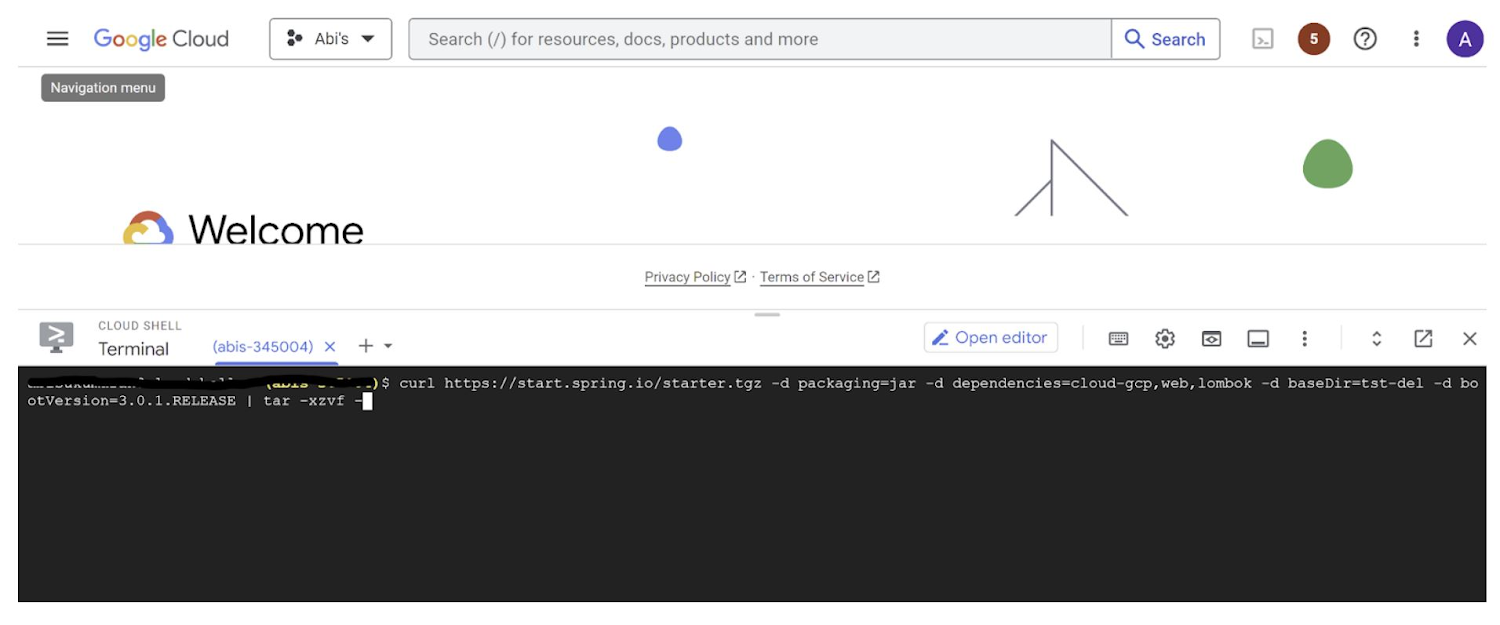
This creates a project structure under “spring-vision” as below:
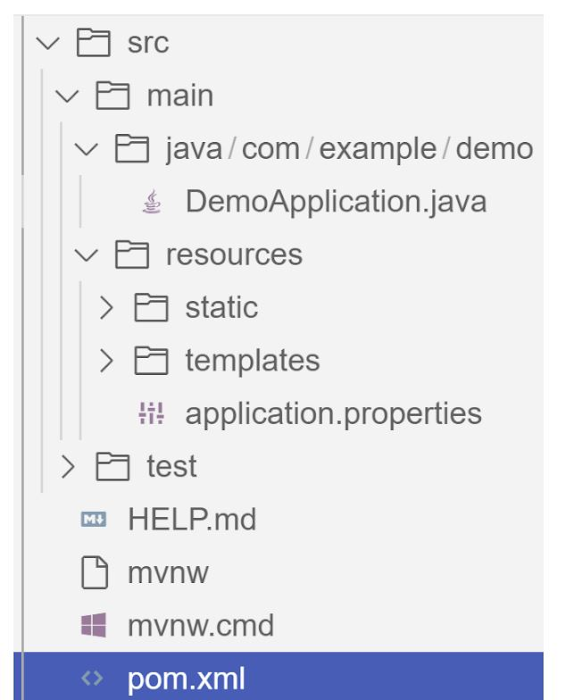
pom.xml contains all the dependencies for the project (dependencies you configured using this command are already added in your pom.xml).src/main/java/com/example/demo has the source classes .java files.resources contain the images, XML, text files and the static content the project uses that are maintained independently.application.properties enable you to maintain the admin features to define profile specific properties of the application.
Configuring the Vision API
Once you have the Vision API enabled, you have the option to configure the API credentials in your application. You can optionally use Application Default Credentials for setting up authentication. In this demo implementation however I have not implemented the use of credentials.
Implementing the vision and translation services
Create a service class that interacts with the Vision API. Inject the necessary dependencies and use the Vision API client to send image analysis requests. You can implement methods to perform tasks like image labeling, face detection, recognition, and more, based on your application’s requirements. In this demo, we will use handwriting extraction and translation methods. For this make sure you include the following dependencies in pom.xml
<dependency>
      <groupId>org.springframework.cloud</groupId>
      <artifactId>spring-cloud-gcp-starter-vision</artifactId>
</dependency>
<dependency>
<groupId>com.google.cloud</groupId>
<artifactId>google-cloud-translate</artifactId>
</dependency>Clone / Replace the following files from the repo and add them to the respective folders / path in the project structure:
Application.java(/src/main/java/com/example/demo)TranslateText.java(/src/main/java/com/example/demo)VisionController.java(/src/main/java/com/example/demo)index.html(/src/main/resources/static)result.html(/src/main/resources/templates)pom.xml
The method extractTextFromImage in the service org.springframework.cloud.gcp.vision.CloudVisionTemplate lets you extract text from your image input. The method getTranslatedText from the service com.google.cloud.translate.v3 lets you pass the extracted text from your image and get the translated text in the desired target language as response (if the source is in one of the supported languages list).
Building the REST API
Design and implement the REST endpoints that will expose the Vision API functionalities. Create controllers that handle incoming requests and utilize the Vision API service to process the images and return the analysis results.
In this demo, our VisionController class implements the endpoint, handles the incoming request, invokes the Vision API and Cloud Translation services and returns the result to the view layer. Implementation of the GET method for the REST endpoint is as follows:
@GetMapping("/extractText")
  public String extractText(String imageUrl) throws IOException {
    String textFromImage =
   this.cloudVisionTemplate.extractTextFromImage(this.resourceLoader.getResource(imageUrl));


    TranslateText translateText = new TranslateText();
    String result = translateText.translateText(textFromImage);
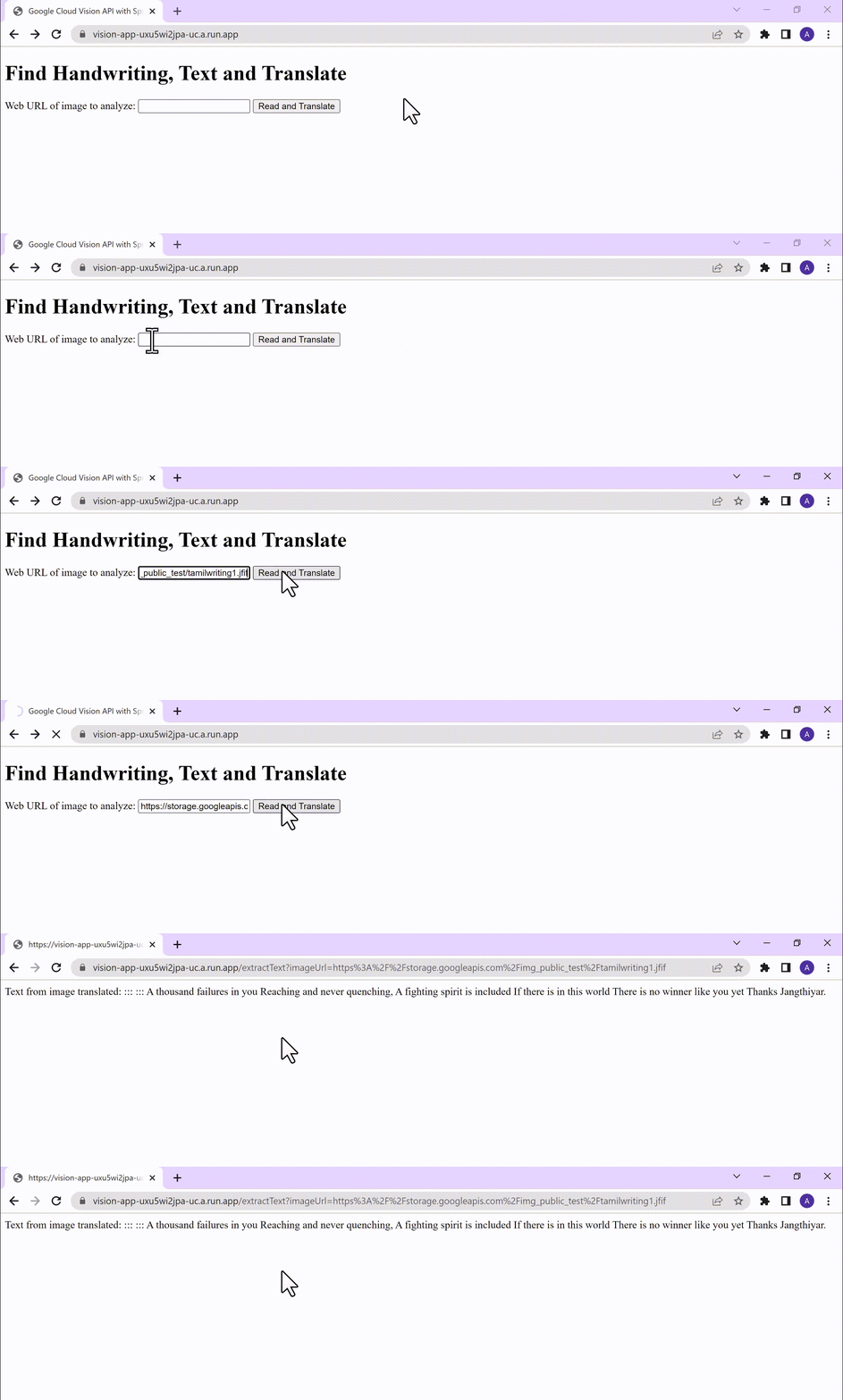
    return "Text from image translated: " + result;
  }
The TranslateText class in the above implementation has the method that invokes the Cloud Translation service:
String targetLanguage = "en";
 TranslateTextRequest request =
         TranslateTextRequest.newBuilder()
             .setParent(parent.toString())
             .setMimeType("text/plain")
             .setTargetLanguageCode(targetLanguage)
             .addContents(text)
             .build();
     TranslateTextResponse response = client.translateText(request);
     // Display the translation for each input text provided
     for (Translation translation : response.getTranslationsList()) {
       res = res + " ::: " + translation.getTranslatedText();
        System.out.printf("Translated text : %s\n", res);
     }
With the VisionController class, we have the GET method for the REST implemented.
Integrating Thymeleaf for frontend development
When building an application with Spring Boot, one popular choice for frontend development is to leverage the power of Thymeleaf. Thymeleaf is a server-side Java template engine that allows you to seamlessly integrate dynamic content into your HTML pages. Thymeleaf provides a smooth development experience by allowing you to create HTML templates with embedded server-side expressions. These expressions can be used to dynamically render data from your Spring Boot backend, making it easier to display the results of image analysis performed by the Vision API service.
To get started, ensure that you have the necessary dependencies for Thymeleaf in your Spring Boot project. You can include the Thymeleaf Starter dependency in your pom.xml:
<dependency>
<groupId>org.springframework.boot</groupId>
<artifactId>spring-boot-starter-thymeleaf</artifactId>
</dependency>
In your controller method, retrieve the analysis result from the Vision API service and add it to the model. The model represents the data that will be used by Thymeleaf to render the HTML template. Once the model is populated, return the name of the Thymeleaf template that you want to render. Thymeleaf will take care of processing the template, substituting the server-side expressions with the actual data, and generating the final HTML that will be sent to the client’s browser. Example:
return new ModelAndView("result", <<YOUR RESULT>>);In the case of the extractText method in VisionController, we have returned the result as a String to and not added to the model. But we have invoked the GET method extractText method on the index.html on page submit.
<form action="/extractText">

        Web URL of image to analyze:

        <input type="text"

               name="imageUrl"

               value=""

        <input type="submit" value="Read and Translate" />

</form>
With Thymeleaf, you can create a seamless user experience, where users can upload images, trigger Vision API analyses, and view the results in real-time. Unlock the full potential of your Vision AI application by harnessing the power of Thymeleaf for frontend development.
Deploying your Spring Boot application with Cloud Run
Write unit tests for your service and controller classes to ensure proper functionality under the /src/test/java/com/example folder. Once you’re confident in its stability, package it into a deployable artifact, such as a JAR file, and deploy it to Cloud Run, a serverless compute platform on Google Cloud. In this step, we will focus on deploying your containerized Spring Boot application using Cloud Run.
a. Package your application by executing the following steps from Cloud Shell(make sure the terminal is prompting at the project root folder)
Build:
./mvnw package
Once the build is successful, run locally to test:
./mvnw spring-boot:run
b. Containerize your Spring Boot Application with Jib:
Instead of manually creating a Dockerfile and building the container image, you can use the Jib utility to simplify the containerization process. Jib is a plugin that integrates directly with your build tool (such as Maven or Gradle) and allows you to build optimized container images without writing a Dockerfile. Before proceeding, you need to enable the Artifact Registry API (Use of Artifact Registry is encouraged over container registry). Then Run Jib to build a Docker image and publish to the Registry:
$ ./mvnw com.google.cloud.tools:jib-maven-plugin:3.1.1:build -Dimage=gcr.io/$GOOGLE_CLOUD_PROJECT/vision-jib
Note: In this experiment, we did not configure the Jib Maven plugin in pom.xml, but for advanced usage, it is possible to add it in pom.xml with more configuration options
c. Deploy the container (that we pushed to Artifact Registry in the previous step) to Cloud Run. This is again a one-command step:
gcloud run deploy vision-app --image gcr.io/$GOOGLE_CLOUD_PROJECT/vision-jib --platform managed --region us-central1 --allow-unauthenticated --update-env-vars
You can alternatively do this from the UI as well. Navigate to the Google Cloud Console and locate the Cloud Run service. Click on “Create Service” and follow the on-screen instructions. Specify the container image you previously pushed to the registry, configure the desired deployment settings (such as CPU allocation and autoscaling), and choose the appropriate region for deployment. You can set environment variables specific to your application. These variables can include authentication credentials (API keys etc.), database connection strings, or any other configuration needed for your Vision AI application to function correctly. When the deployment is completed successfully, you should get an endpoint to your application.
For our demo, the endpoint Cloud Run created for us is: https://vision-app-********-uc.a.run.app
Playing with your Vision AI app
For demo purposes, you can use the image URL below for your app to read and translate:
https://storage.googleapis.com/img_public_test/tamilwriting1.jfif
Conclusion
Congratulations! You have successfully created a Vision AI application using Spring Boot and Java. With the power of Vision AI, your application can now perform sophisticated image analysis, including labeling, face detection, and more. The integration of Spring Boot provides a solid foundation for building scalable and robust Google Cloud Native applications. Continue exploring the vast capabilities of Vision AI, Cloud Run, Cloud Translation and more to enhance your application with additional features and functionalities. To learn more, check out the Vision API, Cloud Translation, and GCP Spring docs. Try out the same experiment with the Spring Native option!! Also as a sneak-peak to Gen-AI world, checkout how this API shows up in Model Garden.
Making Your Pictures Worth a Thousand Labels! (with Cloud Vision API)
1203
Of your peers have already read this article.
2:30 Minutes
The most insightful time you'll spend today!
In this post, I’ll be showing some amazing ways the Vision API can extract meaning from your images – keep reading, or jump directly into a tutorial using Python, Node.js, Go, or Java! This tutorial can be completed at no cost within the Google Cloud Free Tier.
They say a picture is worth a thousand words. But how do you make those words available and useful? Around the world, we are generating more images than ever before, and it’s no surprise that businesses are turning to image recognition technology to help meet the immense opportunities created with this growing set of data.
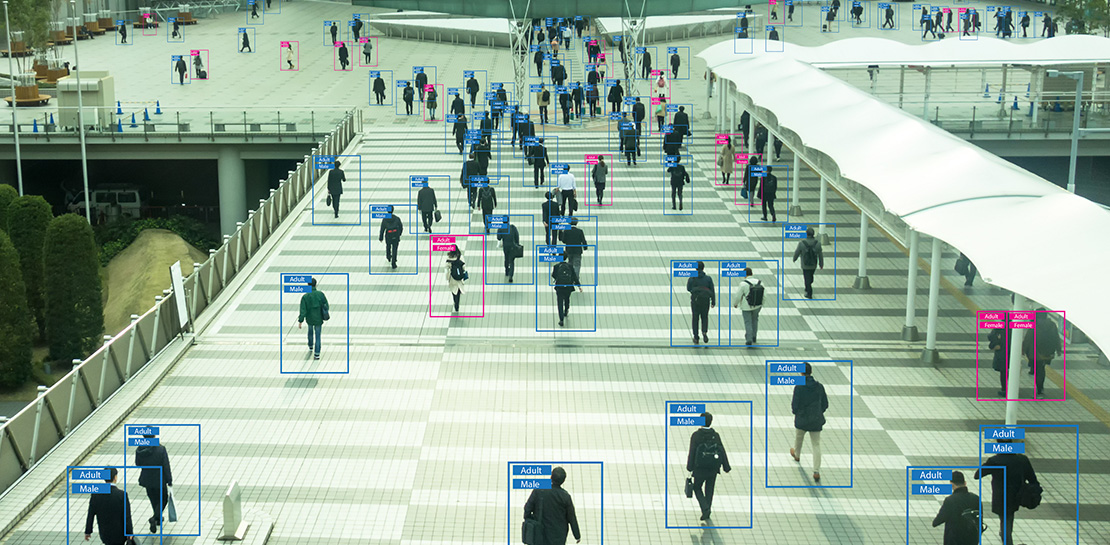
Cloud Vision API is a powerful tool that enables you to perform a variety of tasks including label detection, text recognition, and object tracking on your image data. Whether it’s identifying products in a retail store, analyzing social media posts for brand mentions, or scanning through millions of images to find a specific object, the Cloud Vision API can help businesses automate their image analysis workflows and gain valuable insights from their visual data. To protect privacy, and help you build responsibly, the Cloud Vision API offers features to limit personal identification, such as person blur, which hides identifiable features.
Let’s explore a few of the key features of the Cloud Vision API.
Detect famous landmarks
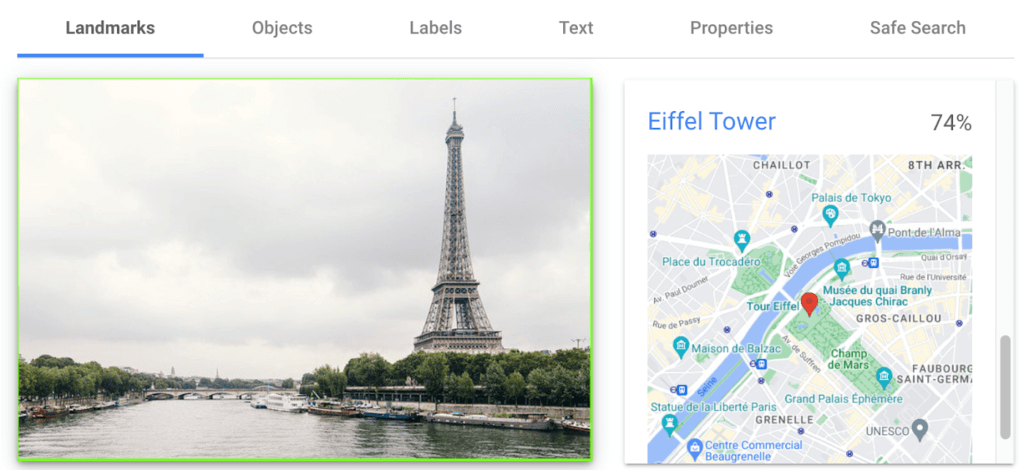
Landmark detection allows you to analyze images to identify specific landmarks such as buildings, natural features, and other recognizable locations. Cloud Vision API recognizes landmarks and provides information about them, including their name, location, and other relevant details. Perhaps you are trying to identify the landmarks in images shared by customers as part of social campaigns, or want to build a mobile app that provides information to tourists on famous landmarks.
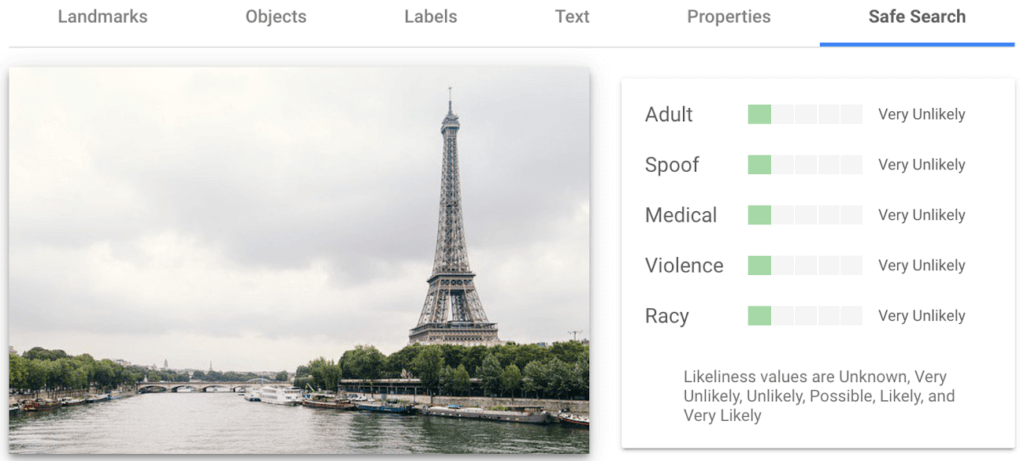
In the below left-hand side image, Cloud Vision API has detected the Eiffel Tower, shown in the visualized response. Not shown in this visualization here, but also detected, were Pont de Bir-Hakeim (the bridge) and Champs de Mars (the park in front of the Eiffel Tower).
Detect objects and label images
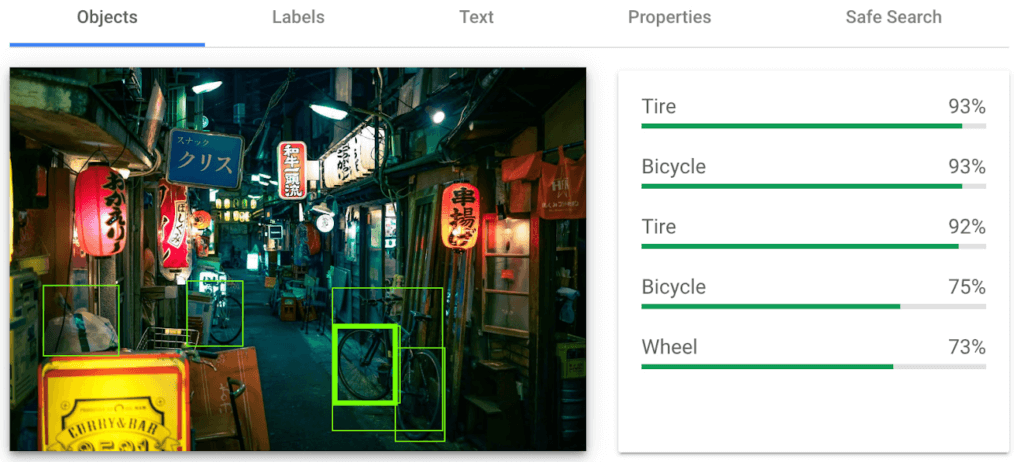
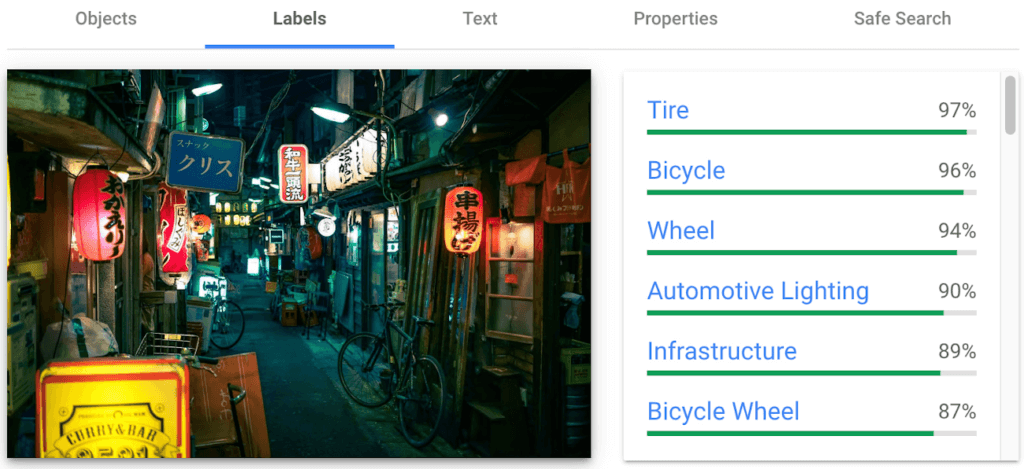
Object detection and labels are two related features that enable you to identify and classify objects within an image. Object detection detects and locates objects within an image, and provides information such as the position, size, and orientation of each object. Labels, on the other hand, provide a general classification of the content within an image.
Object detection has practical applications in many industries such as self-driving vehicles (where it’s critical), retail, manufacturing and more, while labels can be used to help classify and organize large collections of images, or to categorize and filter content.
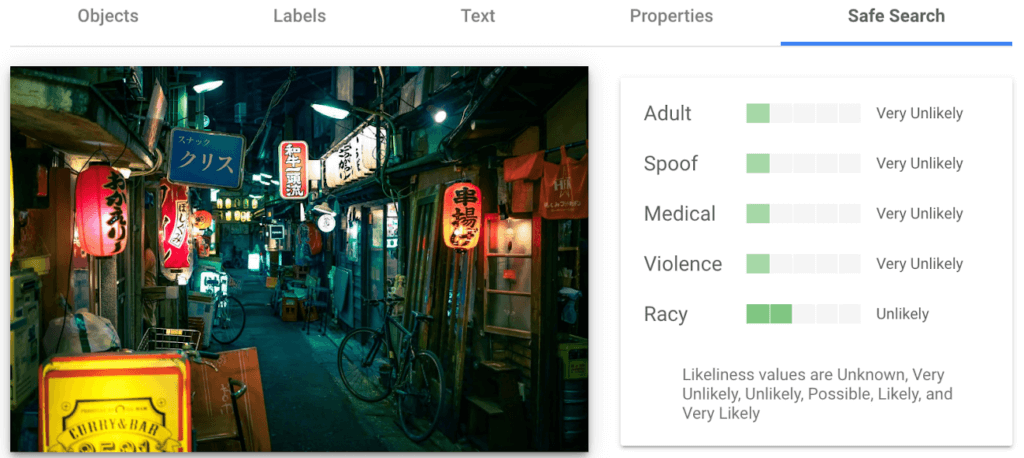
You can see the similarities and differences in the responses provided by the object detection and labeling features in this image taken in Setagaya.
Detect text
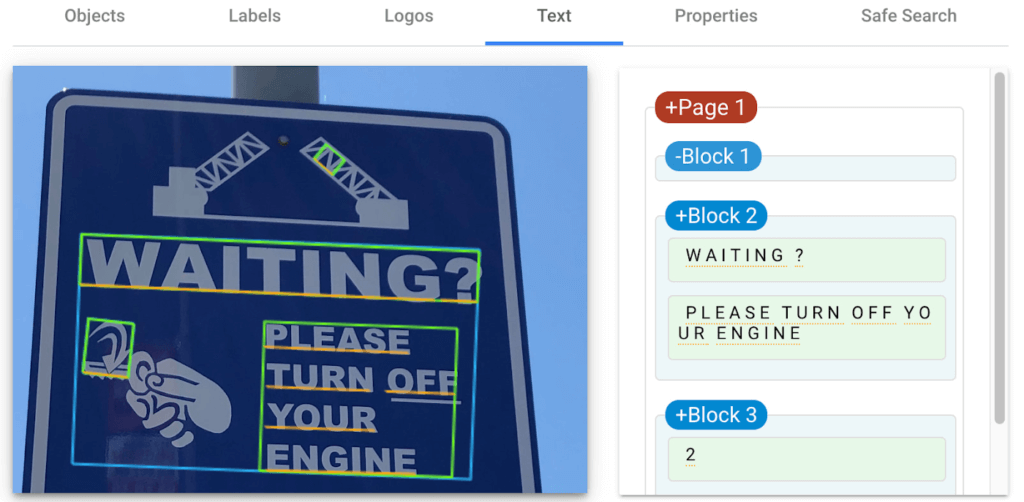
Cloud Vision API detects and extracts text from any image, even if it’s handwritten or in different languages. Once it detects text, the API can provide information about the position, orientation, and size of each text element, as well as individual words, and their bounding boxes.
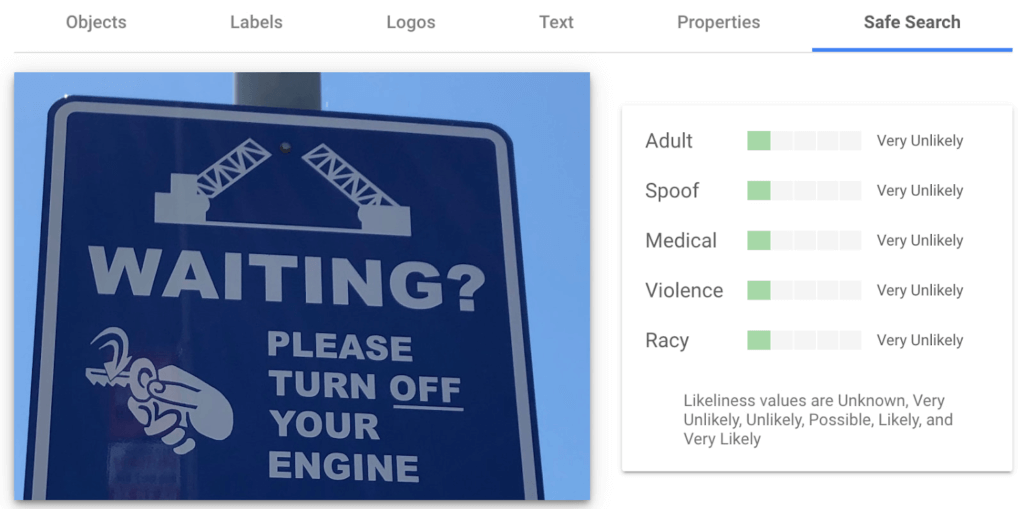
In this image of a traffic sign, Cloud Vision API has detected the text and provided it in the response.
Detect explicit content
Cloud Vision API can automatically identify and flag explicit or inappropriate content within an image using five categories: adult, spoof, medical, violence, and racy. The API provides a score that indicates the likelihood for each category in the image, which you can use to set thresholds in your application and decide how to handle those that exceed them. This feature is particularly useful for filtering or moderating user-generated content.
Luckily for the images I shared here, each category has been deemed “very unlikely” to be present. Phew!
Next Steps
These are just a few features of the Cloud Vision API and how it can help your business with automating image analysis workflows and gaining valuable insights from your visual data.
Head to the interactive walkthrough tutorials in Python, Node.js, Go, and Java to see step-by-step how to access the API and learn more about all the features that you can integrate into your own applications! Again, this tutorial can be completed at no cost within the Google Cloud Free Tier.
Make Your Data Useful with Google Cloud Products and Services

3232
Of your peers have already read this article.
1:30 Minutes
The most insightful time you'll spend today!
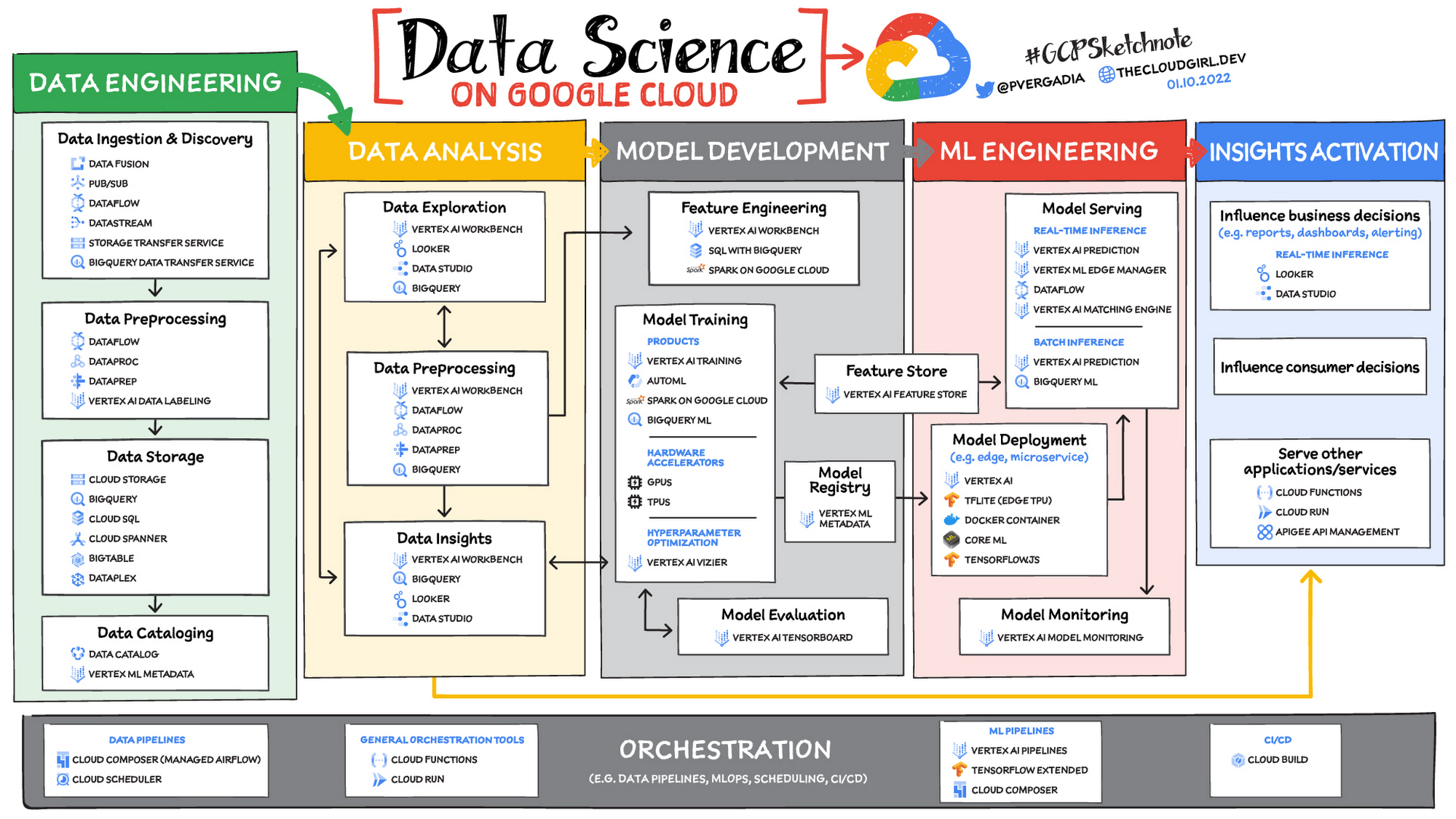
While you likely know that data science is the practice of making data useful, you may not have a clear landscape around the tools that can aid each stage of the data science workflow as you use machine learning to tackle your challenges.
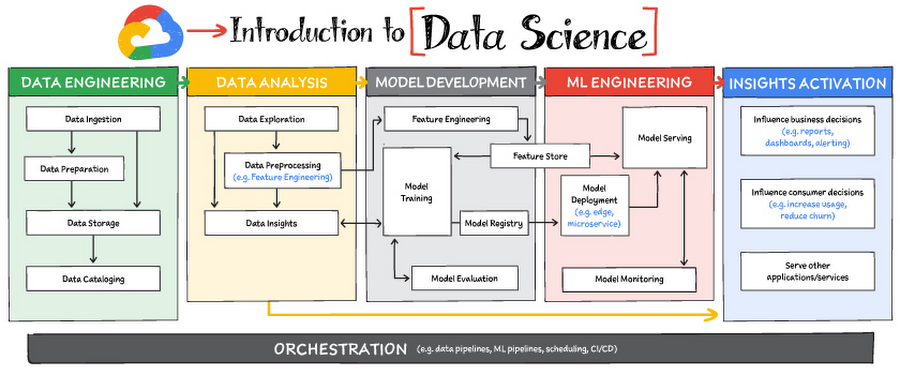
Read on to discover the six broad areas that are critical to the process of making data useful, and some corresponding Google Cloud products and services for those areas.
https://youtube.com/watch?v=EQvLUMjz-g4%3Fenablejsapi%3D1%26
Data engineering
Perhaps the greatest missed opportunities in data science stem from data that exists somewhere, but hasn’t been made accessible for use in further analysis. Laying the critical foundation for downstream systems, data engineering involves the transporting, shaping, and enriching of data for the purposes of making it available and accessible.
Data ingestion and data preprocessing on Google Cloud
Here we consider data ingestion as moving data from one place to another, and data preparation the process of transformation, augmentation, or enrichment prior to consumption. Global scalability, high throughput, real-time access, and robustness are common challenges in this stage. For scalable, real-time, and batch data processing, look into building data ingestion and preprocessing pipelines with Dataflow, a managed Apache Beam service. There’s a reason why Dataflow is called the backbone of analytics on Google Cloud.
If you’re looking for a scalable messaging system to help you ingest data, consider Cloud Pub/Sub, a global, horizontally scalable messaging infrastructure. Cloud Pub/Sub was built using the same infrastructure component that enabled Google products, including Ads, Search, and Gmail, to handle hundreds of millions of events per second.
If you want an easy way to automate data movement to BigQuery, a serverless data warehouse on Google Cloud, look into the BigQuery Data Transfer Service. For transferring data to Cloud Storage, take a look at the Storage Transfer Service. Or, for a no-code data ingestion and transformation tool, check out Data Fusion, which has over 150 preconfigured connectors and transformations. In addition to Dataflow and Data Fusion for data preparation, Spark users may want to look at related products and features for Spark on Google Cloud.
Data storage and data cataloging on Google Cloud
For structured data, consider a data warehouse like BigQuery, or any of the Cloud Databases (relational ones like Cloud SQL and NoSQL ones like Cloud BigTable and Cloud Firestore). For unstructured data, you can always use Cloud Storage. You may also want to consider a data lake. For data discovery, cataloging, and metadata management, consider Data Catalog. For a unified solution, take a look at Dataplex, which integrates a unified data management solution with an integrated analytics experience.
Learn more about data engineering on Google Cloud
- Explore the data engineering learning path
- Discover reference patterns
- Get certified by Google Cloud as a Professional Data Engineer
Data Analysis
From descriptive statistics to visualizations, data analysis is where the value of data starts to appear.
Data exploration, data preprocessing, and data insights
Data exploration, a highly iterative process, involves slicing and dicing data via data preprocessing before data insights can start to manifest through visualizations or simply via simple group-by, order-by operations. One hallmark of this phase is that the data scientist may not yet know which questions to ask about the data. In this somewhat ephemeral phase, a data analyst or scientist has likely uncovered some aha-moments, but hasn’t shared them yet. Once insights are shared, the flow enters the Insights Activation stage, where those insights become used to guide business decisions, influence consumer choices, or become embedded in other applications or services.
On Google Cloud, there are many ways to explore, preprocess, and uncover insights in your data. If you are looking for a notebook-based end-to-end data science environment, check out Vertex AI Workbench, which enables you to access, analyze, and visualize your entire data estate: from structured data at the petabyte-scale in SQL with BigQuery, to processing data with Spark on Google Cloud and its serverless, auto-scaling, and GPU acceleration capabilities. As a unified data science environment, Vertex AI Workbench also makes it easy to do machine learning with TensorFlow, PyTorch, and Spark, with built-in MLOps capabilities.
Finally, if your focus is on analyzing structured data from data warehouses and insight activation for business intelligence, you may want to also consider using Looker, with its rich interactive analytics, visualizations, dashboarding tools, and Looker Blocks to help you accelerate your time-to-insight.
Learn more about data analysis on Google Cloud
- Learn about Vertex AI Workbench for a Jupyter-based fully managed notebook environment
- Learn about how you can use BigQuery for petabyte-scale data analysis
- Learn about Spark on Google Cloud
- Discover the data analyst learning path
- Explore reference patterns for common analytics use cases
Model development
From linear regression to XGBoost, from TensorFlow to PyTorch, the model development stage is where machine learning starts to provide new ways of unlocking value from your data. Experimentation is a strong theme here, with data scientists looking to accelerate iteration speed between models without worrying about infrastructure overhead or context-switching between tools for data analysis and tools for productionizing models with MLOps.
To solve these challenges, once again, as a Jupyter-based fully managed, scalable, and enterprise-ready environment, Vertex AI Workbench makes it easy as the one-stop-shop for data science, combining analytics and machine learning, including Vertex AI services. Apache Spark, XGBoost, TensorFlow, and PyTorch are just some of the frameworks supported on Vertex AI Workbench. Vertex AI Workbench makes managing the underlying compute infrastructure needed for model training easy with the ability to scale vertically and horizontally, and with idle timeouts and auto shutdown capabilities to reduce unnecessary costs. Notebooks themselves can be used for distributed training and hyperparameter optimization, and they include Git integration for version control. Due to the significant reduction in context switching required, data scientists can build and train models 5x faster using Vertex AI Workbench than when using traditional notebooks.
With Vertex AI, custom models can be trained and deployed using containers. You can take advantage of pre-built containers or custom containers to train and deploy your models.
For low-code model development, data analysts and data scientists can use SQL with BigQuery ML to train and deploy models (including XGBoost, deep neural networks, and PCA), directly using BigQuery’s built-in serverless, autoscaling capabilities. Behind-the-scenes, BigQuery ML leverages Vertex AI to enable automated hyperparameter tuning, and explainable AI. For no-code model development, Vertex AI Training provides a point-and-click interface to train powerful models using AutoML, which comes in multiple flavors: AutoML Tables, AutoML Image, AutoML Text, AutoML Video, and AutoML Translation.
Learn more about model development on Google Cloud
- Learn about Vertex AI Workbench for a Jupyter-based fully managed notebook environment
- Learn more about Vertex AI
ML engineering
Once a satisfactory model is developed, the next step is to incorporate all the activities of a well-engineered application lifecycle, including testing, deployment, and monitoring. And all of those activities should be as automated and robust as possible.
Managed datasets and Feature Store on Vertex AI provide shared repositories for datasets and engineered features, respectively, which provide a single source of truth for data and promote reuse and collaboration within and across teams. Vertex AI’s model serving capability enables deployment of models with multiple versions, automatic capacity scaling, and user-specified load balancing. Finally, Vertex AI Model Monitoring provides the ability to monitor prediction requests flowing into a deployed model and automatically alert model owners whenever the production traffic deviates beyond user-defined thresholds and previous historical prediction requests.
MLOps is the industry term for modern, well engineered ML services, with scalability, monitoring, reliability, automated CI/CD, and many other characteristics and functions that are now taken for granted in the application domain. The ML engineering features provided by Vertex AI are informed by Google’s extensive experience deploying and operating internal ML services. Our goal with Vertex AI is to provide everyone with easy access to essential MLOps services and best practices.
Learn more about ML engineering and MLOps on Google Cloud
- Follow the guides, tutorials and documentation for Vertex AI
- Watch this video to learn more about Vertex AI
- Discover the data scientist/machine learning engineer learning path
- Get certified as a Professional ML Engineer
Insights activation
The insights activation stage is where your data has now become useful to other teams and processes. You can use Looker and Data Studio to enable use cases in which data is used to influence business decisions with charts, reports, and alerts.
Data can also influence customer decisions and as a result increase usage or decrease churn, for example. Finally, the data can also be used by other services to drive insights; these services can run outside Google Cloud, inside Google Cloud on Cloud Run or Cloud Functions, and/or using Apigee API Management as an interface.
Learn more about insights activation on Google Cloud
- Watch this video to learn about building interactive ML apps using Looker and Vertex AI
- Learn about Looker, and Looker solutions for eCommerce, Digital Media and more
- Discover a gallery of interactive dashboards created with Data Studio
- Watch this video to understand the difference between Cloud Run and Cloud Functions
Orchestration
All of the capabilities discussed above provide the key building blocks to a modern data science solution, but a practical application of those capabilities requires orchestration to automatically manage the flow of data from one service to another. This is where a combination of data pipelines, ML pipelines, and MLOps comes into play. Effective orchestration reduces the amount of time that it takes to reliably go from data ingestion to deploying your model in production, in a way that lets you monitor and understand your ML system.
For data pipeline orchestration, Cloud Composer and Cloud Scheduler are both used to kick off and maintain the pipeline.
For ML pipeline orchestration, Vertex AI Pipelines is a managed machine learning service that enables you to increase the pace at which you experiment with and develop machine learning models and the pace at which you transition those models to production. Vertex Pipelines is serverless, which means that you don’t need to deal with managing an underlying GKE cluster or infrastructure. It scales up when you need it to, and you pay only for what you use. In short, it lets you just focus on building your data science pipelines.
Learn more about orchestration on Google Cloud
- Read more about Cloud Composer for Airflow-based pipelines
- Try some example notebooks on Github with Vertex AI Pipelines
- Learn different ways to trigger Vertex AI Pipeline runs
- Read the whitepaper on Practitioners Guide to MLOps: A framework for continuous delivery and automation of machine learning
Summary
Google Cloud offers a complete suite of data management, analytics, and machine learning tools to generate insights from data. Want to learn more? Check out the following resources:
Special thanks to the following contributors to this blogpost: Alok Pattani, Brad Miro, Saeed Aghabozorgi, Diptiman Raichaudhuri, Reza Rokni.
Supercharging Security with Generative AI

1506
Of your peers have already read this article.
3:30 Minutes
The most insightful time you'll spend today!
At Google Cloud, we continue to invest in key technologies to progress towards our true north star on invisible security: making strong security pervasive and simple for everyone. Our investments are based on insights from our world-class threat intelligence teams and experience helping customers respond to the most sophisticated cyberattacks. Customers can tap into these capabilities to gain perspective and visibility on the most dangerous threat actors that no one else has.
Recent advances in artificial intelligence (AI), particularly large language models (LLMs), accelerate our ability to help the people who are responsible for keeping their organizations safe. These new models not only give people a more natural and creative way to understand and manage security, they give people access to AI-powered expertise to go beyond what they could do alone.
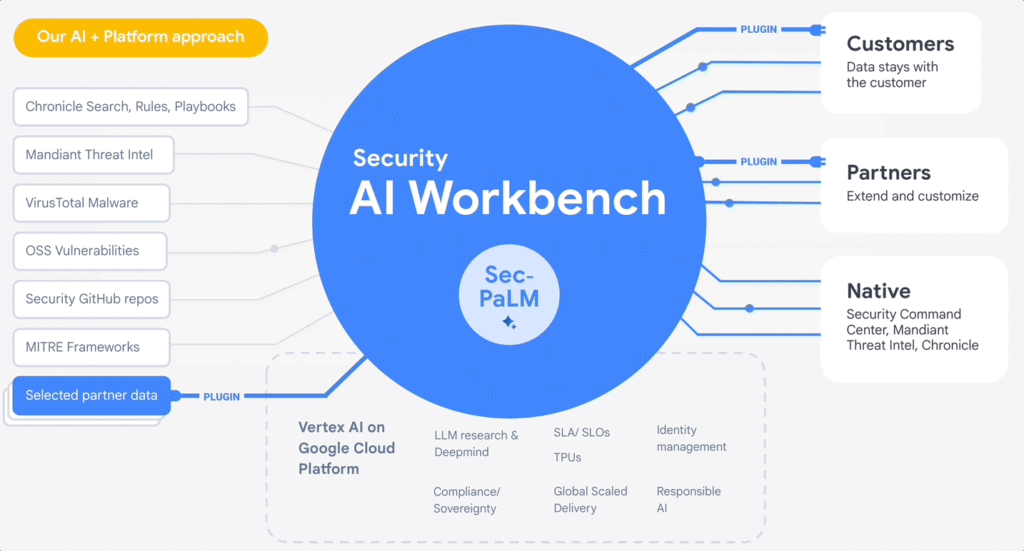
At the RSA Conference 2023, we are excited to announce Google Cloud Security AI Workbench, an industry-first extensible platform powered by a specialized, security LLM, Sec-PaLM. This new security model is fine-tuned for security use cases, incorporating our unsurpassed security intelligence such as Google’s visibility into the threat landscape and Mandiant’s frontline intelligence on vulnerabilities, malware, threat indicators, and behavioral threat actor profiles.
Google Cloud Security AI Workbench powers new offerings that can now uniquely address three top security challenges: threat overload, toilsome tools, and the talent gap. It will also feature partner plug-in integrations to bring threat intelligence, workflow, and other critical security functionality to customers, with Accenture being the first partner to utilize Security AI Workbench.
The platform will also let customers make their private data available to the platform at inference time; ensuring we honor all our data privacy commitments to customers. Because Security AI Workbench is built on Google Cloud’s Vertex AI infrastructure, customers control their data with enterprise-grade capabilities such as data isolation, data protection, sovereignty, and compliance support.
Preventing threats from spreading beyond the first infection
We already provide best-in-class capabilities to help organizations immediately respond to threats. But what if we could not just identify and contain initial infections, but also help prevent them from happening anywhere else? With our AI advances, we can now combine world class threat intelligence with point-in-time incident analysis and novel AI-based detections and analytics to help prevent new infections. These advances are critical to help counter a potential surge in adversarial attacks that use machine learning and generative AI systems. That’s why we’re excited to introduce:
- VirusTotal Code Insight uses Sec-PaLM to help analyze and explain the behavior of potentially malicious scripts, and will be able to better detect which scripts are actually threats.
- Mandiant Breach Analytics for Chronicle leverages Google Cloud and Mandiant Threat Intelligence to automatically alert you to active breaches in your environment. It will use Sec-PaLM to help contextualize and respond instantly to these critical findings.
These new updates build on the existing AI in Google’s industry-leading solutions. For example, Chronicle Security Operations already uses frontline intelligence, integrated reasoning, and machine learning to identify initial infections, prioritize impact, and contain threats. Another example is reCAPTCHA Enterprise, which uses image noising capabilities to help protect your site from adversaries that leverage novel AI advances, greatly enhancing our defenses against bots.
Adding intelligence to reduce toil
At Google Cloud, we help organizations modernize security wherever they are, in part by simplifying their security tools and controls whenever possible. Advances in generative AI can help reduce the number of tools organizations need to secure their vast attack surface areas and ultimately, empower systems to secure themselves. This will minimize the toil it takes to manage multiple environments, to generate security design and capabilities, and to generate security controls. Today, we’re announcing:
- Assured OSS will use LLMs to help us add even more open-source software (OSS) packages to our OSS vulnerability management solution, which offers the same curated and vulnerability-tested packages that we use at Google.
- Mandiant Threat Intelligence AI, built on top of Mandiant’s massive threat graph, will leverage Sec-PaLM to quickly find, summarize, and act on threats relevant to your organization.
These announcements build on existing capabilities that help customers centralize visibility and control, detect targets, and improve security across their platform. For example, Security Command Center (SCC) uses always-on machine learning to detect malicious scripts executing in the customer container environment and immediately alert the customer. In addition, Cloud Data Loss Prevention leverages machine learning to find and classify data, and with Confidential Computing you can collaborate on, train, and deploy sensitive and regulated AI models in the cloud, all while preserving confidentiality.
Evolving how practitioners do security to close the talent gap
At Google, we believe that to truly democratize security, we need to first acknowledge that AI will soon usher in a new era for security expertise that will profoundly impact how practitioners “do” security. Most people who are responsible for security — developers, system administrators, SRE, even junior analysts — are not security specialists by training.
Imagine a world where novices and security experts are paired with AI expertise to free themselves from repetition and burnout, and accomplish tasks that seem impossible to us today. To help power this evolution, we’re embedding Sec-PaLM-based features that can make security more understandable while helping to improve effectiveness with exciting new capabilities in two of our solutions:
- Chronicle AI: Chronicle customers will be able to search billions of security events and interact conversationally with the results, ask follow-up questions, and quickly generate detections, all without learning a new syntax or schema.
- Security Command Center AI: Security Command Center will translate complex attack graphs to human-readable explanations of attack exposure, including impacted assets and recommended mitigations. It will also provide AI-powered risk summaries for security, compliance, and privacy findings for Google Cloud.
These new releases bolster our existing efforts to tackle these issues through capabilities like IAM Recommender, which suggests permissions better suited to actual usage patterns. We will soon be augmenting this capability to cover organizational policies, further enabling the administrator to help improve the security posture of their organization. In addition, Mandiant Automated Defense applies machine learning to help reduce the repetitive Tier 1 alert triage problem and address alert fatigue.
Offering availability
VirusTotal Code Insight, available now in Preview, is our first example of putting Security AI Workbench to work for our customers. We will be rolling out other offerings to trusted testers in coming months, and they will be available in Preview more broadly this summer. Click here for the demo.
Security AI Workbench, including Sec-PaLM and partner integrations, in addition to the product innovations described in our demo, are all building blocks for a larger effort to elevate security across the ecosystem. So far, that effort:
- Provides assistive functions to rapidly develop IT generalist talent to Tier 1 security operator status in a way that wasn’t previously feasible. Security Command Center now can summarize threat intelligence insights and findings for Google Cloud, and Chronicle can quickly generate YARA-L rules or other detections.
- Provides advanced functions such as iterative query and multivariate detection generation, conversational filtering and interaction with results, and smart case awareness to empower advanced Tier 2 and 3 security operators to focus on threat analysis instead of struggling with process and toil. Mandiant Threat Intelligence users now can elevate their core competencies to hunt, investigate, and remediate threats — using the same tools our own Mandiant experts use.
- Fuses threat intelligence and AI-based analytic capabilities, which are unsurpassed in the market. VirusTotal Code Insight enables security teams to help gain insights and identify threats in suspicious code. This can significantly enhance their ability to detect and mitigate potential attacks.
However, this is just an initial step. We’ll continue to iterate and innovate, and we encourage customers and partners to leverage Security AI Workbench in new and exciting ways. Moving forward, we anticipate many new use cases to emerge over time.
Building a safer future
While generative AI has recently captured the imagination, Sec-PaLM is based on years of foundational AI research by Google and DeepMind, and the deep expertise of our security teams. This work includes new efforts to expand our partner ecosystem to provide businesses with security capabilities at every layer of the cybersecurity stack. We have only just begun to realize the power of applying generative AI to security, and we look forward to continuing to leverage this expertise for our customers and drive advancements across the security community.
More Relevant Stories for Your Company

What’s New in Retail: Bits from Google Cloud’s Retail & Consumer Goods Summit
Today we’re hosting our Retail & Consumer Goods Summit, a digital event dedicated to helping leading retailers and brands digitally transform their business. For me, this is a personally exciting moment, as I see tremendous opportunities for those companies that choose to focus on their customers and leverage technology to elevate




How e-Com Firm Bukalapak Achieved 5X ROAS With Machine Learning
In 2018, Indonesia accounted for 94% of SEA’s $23 billion e-commerce industry. Today, the country’s massive e-commerce sector continues to grow, along with the number of brands looking for innovative ways to compete for a piece of the pie. As one of the largest e-commerce companies in the region, Bukalapak receives a high

Volkswagen + Google Cloud: Using Machine Learning to Drive Smarter with Energy Efficient Cars
Volkswagen strives to design beautiful, performant, and energy efficient vehicles. This entails an iterative process where designers go through many design drafts, evaluating each, integrating the feedback, and refining. For example, a vehicle’s drag coefficient—its resistance to air—is one of the most important factors of energy efficiency. Thus, getting estimates

Experts’ Guideline for Personalizing Platforms with the Right Recommendation System on Google Cloud
Over the past two decades, consumers have become accustomed to receiving personalized recommendations in all facets of their online life. Whether that be recommended products while shopping on Amazon, a curated list of apps in the Google Play store, or relevant videos to watch next on YouTube. In fact, in
