





Streamline Your Business Processes with Google Cloud’s Custom Document Splitter
926
Of your peers have already read this article.
3:30 Minutes
The most insightful time you'll spend today!
Businesses rely on processing an inflow of documents to drive processes and make decisions. Many such documents are combined into a single file. For example, a loan application may have a driver’s license, paystub, W2, bank statement, and other document types within a single file. The complexity of handling many document types within a single file makes it difficult for businesses to manage at scale.
At Google Cloud, we’re committed to solving these challenges with continued investment in our Document AI solutions suite which offers machine learning products for document processing and insights. Document AI Workbench helps users quickly build ML models with world-class accuracy, trained for their specific use cases. In February 2023, we launched the Custom Document Extractor (CDE) in General Availability (GA) to help users extract structured data from documents in production use cases. In March 2023, we launched the Custom Document Classifier (CDC) in GA to help automatically classify document types. Today, we announce the newest feature of Document AI Workbench, Custom Document Splitter (CDS) in GA to help users automatically split and classify multiple documents within a single file.
CDS provides tangible business value to customers by helping them sort and classify documents. For example, businesses can validate if they have all the needed documents from an applicant. Furthermore, individually classified documents enable businesses to better automate downstream processes, including selecting the proper storage, analysis, or processing steps based on the document type. The efficiencies enabled by CDS helps businesses lower their document processing time and cost.
Benefits of splitting and classification models in Document AI Workbench
Document AI Workbench can save time and money by simplifying model training, from dataset management, to testing, to deployment. CDS helps businesses achieve higher automation rates to scale processes while lowering costs.
Sean Earley, VP of Delivery Services at Zencore said, “We completed a project for a large bank using Document AI Workbench to split, classify, and extract data from documents to automate Home Mortgage Disclosure Act reporting. Given the accuracy of the models we built, our client estimated increasing loan reporting coverage from 20% to 100% while eliminating thousands of errors per year, drastically reducing the operational cost of the bank’s compliance reporting procedures.”
Fabian Beckmann, Manager Artificial Intelligence & Data at Deloitte Consulting GmbH said, “By leveraging Document AI’s Custom Document Splitter, our client, Commerzbank, a large european bank, can effortlessly segment customer submissions tailored to their back-office requirements, significantly diminishing the need for extra manual sorting or routing. This integration paves the way towards seamless automation within the Document AI pipeline, delivering substantial business benefits.“
According to Kaïs Albichari – ML Tribe Tech Lead, G Cloud at IT services firm Devoteam, “Custom Document Splitter (CDS) has helped one of our clients in the financial services industry save significant time and improve data accuracy. By identifying which parts of documents they can discard and which they retain for entity extraction, CDS has helped the company automate its document processing tasks. The implementation resulted in a more efficient and streamlined workflow, freeing employees to focus on other tasks. Devoteam’s G Cloud team helped the company implement CDS and achieve these benefits.”
Frank Neugebauer, a Google Cloud Insurance Solutions Consultant, worked with a Fortune 100 insurance company and used CDS to create a model to split and classify millions of insurance documents with up to 98% accuracy. With this information, the insurer can better understand the nature of their unstructured data to inform business strategy, including volume for specific document types to inform extraction work. The customer considers this level of insight unprecedented in their 200+ year history.
How to use Custom Document Splitter
You can leverage a simple interface in the Google Cloud Console and a set of public APIs to prepare training data, create and evaluate models, deploy a model into production, and call an API endpoint to split and classify document types. You can follow the documentation for instructions to create, train, evaluate, deploy, and run predictions with models.
Import and prepare training data
To get started, import and label documents to train and evaluate an ML model.
To quickly build a training dataset, import single documents, one document per file, and bulk label them with the relevant document type. You can import one folder or multiple folders at once and choose the correct document type per folder. As shown in the next image, one import could have a folder with 200 bank statements, another folder with 200 W2s, another folder with 200 paystubs, etc., all of which are labeled at once while imported. Up to 30,000 documents and 100,000 pages can be inputted for training. This way, you can build a training dataset with hundreds of labeled documents per class in minutes. As always, if documents are already labeled using other tools, simply import labels with JSON in the Document format.
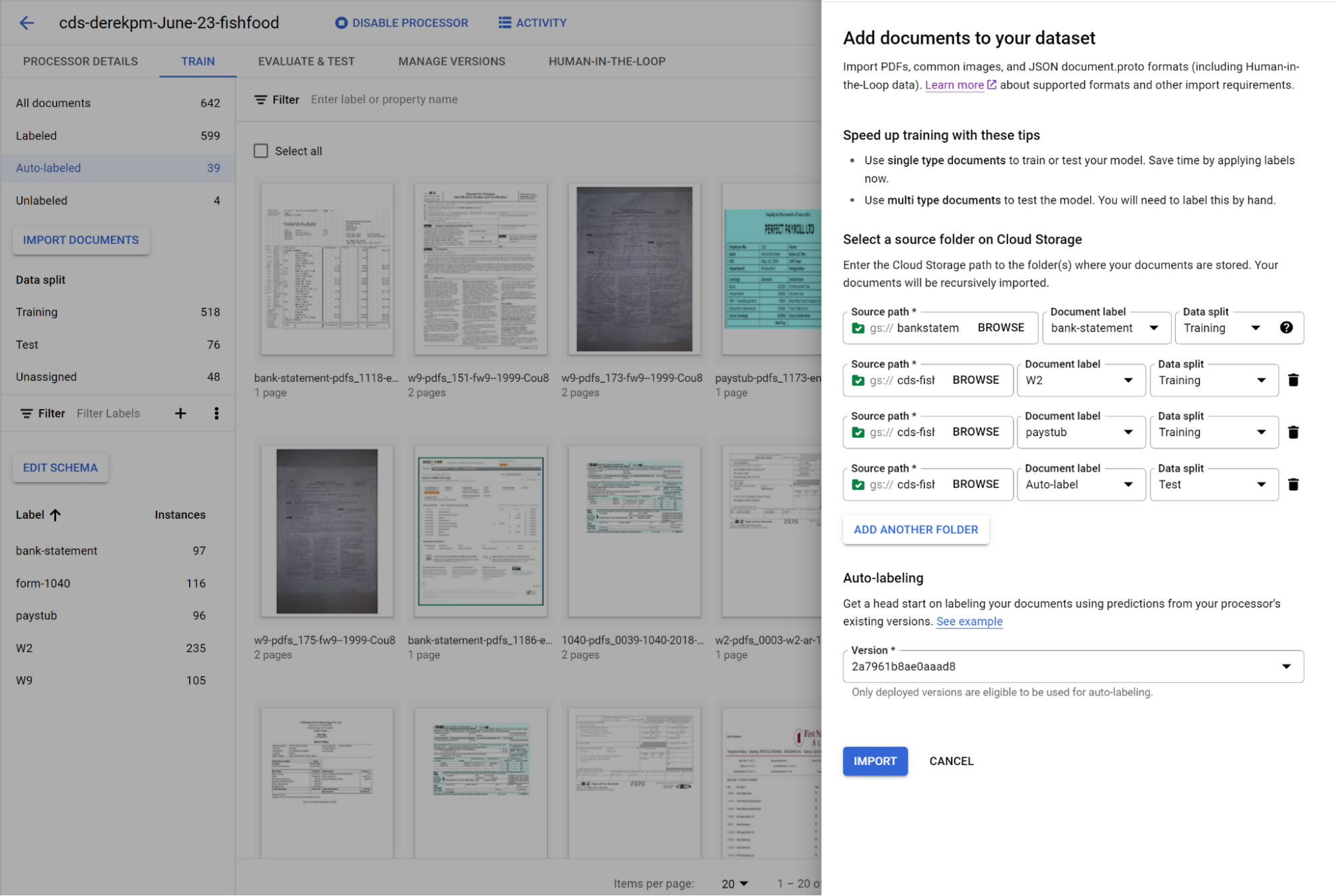
You can initiate training with a click of a button. Once you have trained a model, you can use it to automatically label documents added to your dataset, letting you quickly build robust test and training datasets to evaluate and improve model performance.
To accurately evaluate a CDS model, import files which contain multiple document types within the same file and assign them to the test dataset. Then, use a simple interface to define document boundaries and types.
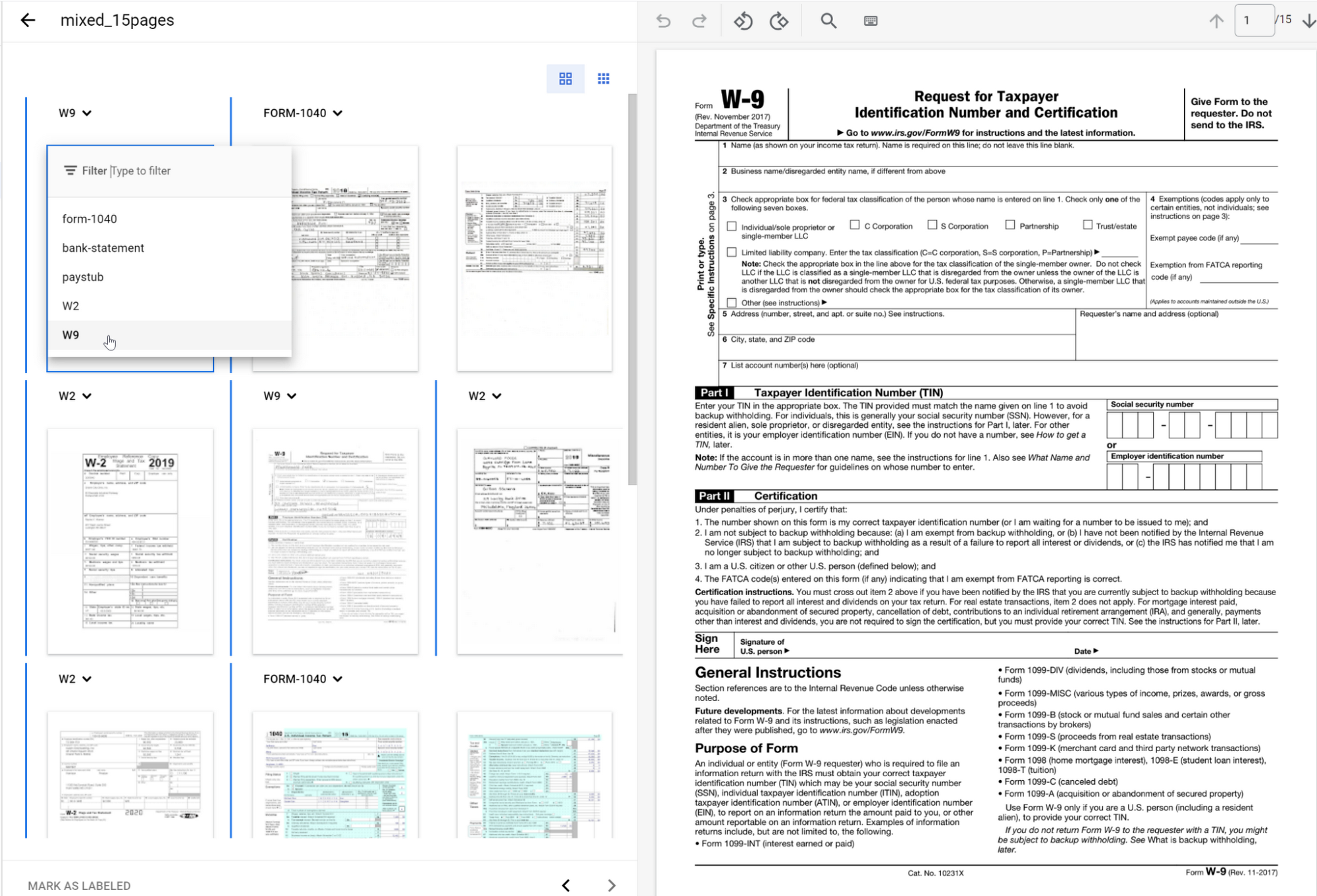
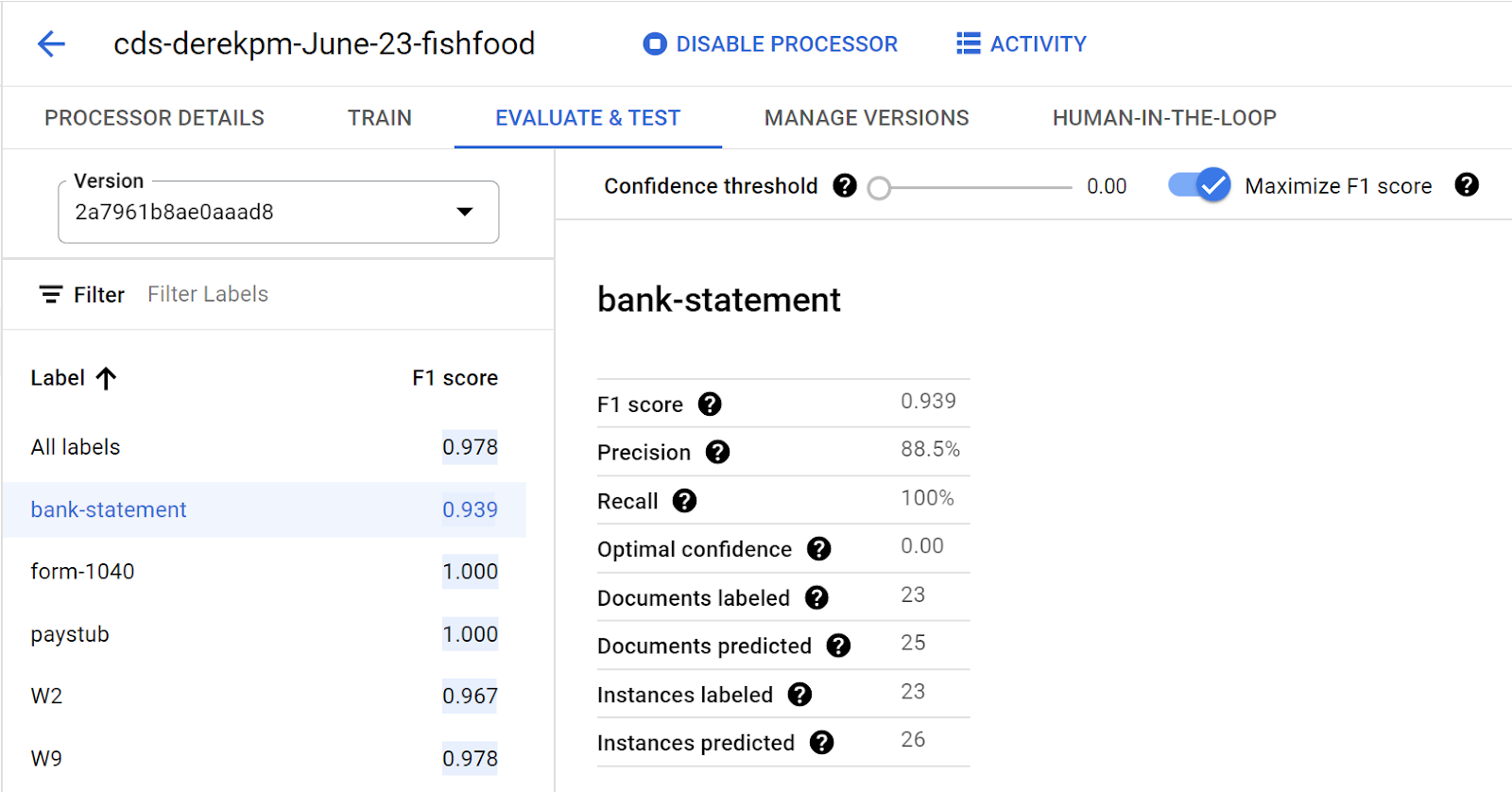
The ground truth you label in the test dataset is used to evaluate splitting and classification predictions from the CDS model.
Going into production
Once a model meets accuracy targets, it’s time to deploy into production and call the API endpoint to split and classify document types.
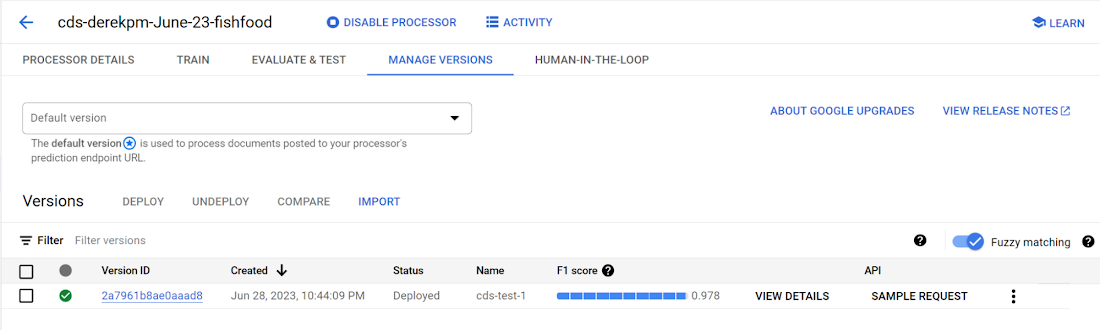
Getting started with Document AI Workbench
Custom Document Splitter is publicly available in GA and ready to help customers automate document splitting and classification. Learn more via our Document AI Workbench web page, Document AI Workbench documentation or try it out in the Google Cloud Console.
Conversational AI drives better customer experiences

3361
Of your peers have already read this article.
3:30 Minutes
The most insightful time you'll spend today!
Conversational AI is opening up a new world of possibilities in areas like customer experience, user engagement, and access to content.
In Cloud AI, we’ve taken Google’s groundbreaking machine learning models in speech and natural language processing and applied them to the contact center space, radically improving the customer experience while also driving down operational costs. It’s shifting the focus of contact centers from the backroom, out of sight (and mind) to the boardroom and the strategic heart of the business.
Our solution, called Contact Center AI (CCAI), is an accelerator of digital transformation as organizations all over the world figure out how to support their customers during these challenging times. One customer that’s redefined the possibilities of AI-powered conversation using CCAI, is Verizon.
Whether through voice calls or chat, Verizon customers will no longer need to go through menu prompts or option trees; they simply say or type their question, and CCAI’s natural-language recognition feature finds the best way to assist them. No stilted speech or robot-like commands.
“These customer service enhancements, powered by the Verizon collaboration with Google Cloud, offer a faster and more personalized digital experience for our customers while empowering our customer support agents to provide a higher level of service,” said Shankar Arumugavelu, SVP & CIO at Verizon.
CCAI is also driving cost savings without cutting corners on customer service. In the past, to improve customer satisfaction (CSAT), you had to hire more agents, increasing operating costs. Conversely, if you reduced the number of agents, your CSAT scores went down. Contact Center AI (CCAI) lets you have both.
CCAI does this by expediting customer requests using virtual agents, assisting live agents, and providing insights on customer interactions to drive improvements back into the system. The result is a better experience for your customers—they get answers faster—and you get lower operating costs. It allows human agents to focus on higher value tasks in their customer interactions.
New products and features add richer customer experience
We are continuing to invest in CCAI and today we are excited to announce the following new capabilities:
Dialogflow CX is the latest version of Dialogflow, a development suite used by over a million developers for building natural, rich conversational experiences into mobile and web applications, smart devices, bots, interactive voice response systems, popular messaging platforms and more. This new version of Dialogflow is optimized for large contact centers that deal with complex (multi-turn) conversations and it is truly omnichannel – you build it once and deploy it everywhere – in your contact centers and digital channels. Dialogflow CX features a new visual builder to create, build and manage virtual agents. It’s available now, in beta.
Lukasz Rewerenda
Dialogflow CX brings conversation state management to a whole new level
Principal Solutions Architect, Randstad (Netherlands)
Agent Assist for Chat is a new module for Agent Assist that provides agents with continuous support over “chat” in addition to voice calls, by identifying intent and providing real-time, step-by-step assistance. Agent Assist enables agents to be more agile and efficient and spend more time on difficult conversations, giving both the customer and the agent a better experience. It transcribes calls in real time, identifies customer intent, provides real-time, step by step assistance (recommended articles, workflows, etc.), and automates call dispositions.
For customers in regulated industries, Agent Assist can remove the risk of agents providing inaccurate information (which can happen due to high agent turnover and limited training). Agent Assist can also surface the latest discount information, deals and special offers, which can be hard for agents to keep track of as this information changes frequently.
Custom Voice, available in beta, is a new capability for CCAI and our Text-to-Speech API that lets you create a unique voice to represent your brand across all your customer touchpoints, instead of using a common voice shared with other organizations. By taking advantage of the custom Text-to-Speech model created with Custom Voice, you can define and choose the voice profile that suits your business and adjust to changes without scheduling studio time with voice actors to record new phrases.
At Google Cloud, we are committed to ensuring that our products and features are in alignment with our AI Principles. If you are interested in Custom Voice, there is a review process to ensure that your use case is aligned with our AI principles. Learn more about Custom Voice and how to sign up here.
Bring Google’s groundbreaking speech models on-prem
For many customers, an all-in approach to public cloud is not an option, which is why we’re extending our AI capabilities to run on-prem. Last week we announced Speech-to-Text On-Prem, the first of our hybrid AI offerings, now generally available. Speech-to-Text On-Prem gives you full control over speech data and since it runs in your own data center, it’s easy to comply with your data residency and compliance requirements. At the same time, Speech-to-Text On-Prem uses state-of-the-art speech models from Google researchers that are more accurate, smaller, and require less computing resources to run than existing solutions.
Take a look at how businesses saved costs and improved customer experience with CCAI in the new commissioned study conducted by Forrester Consulting: “New Technology: The Projected Total Economic Impact™ Of Google Cloud Contact Center AI.” To learn more about CCAI and conversational AI, see how our customers are using the solution and check out these sessions at Next OnAir:

7514
Of your peers have already downloaded this article
15:52 Minutes
The most insightful time you'll spend today!
Breakthroughs in artificial intelligence (AI) have captured the imaginations of business and technical leaders alike. The AI techniques underlying these breakthroughs are finding diverse application across every industry. Early adopters are seeing results, particularly encouraging is that AI is starting to transform processes in established industries, from retail to financial services to manufacturing.
However, an organization’s effectiveness in applying these breakthroughs is anchored in the basics: A disciplined foundation in capturing, preparing and analyzing data.
Data scientists spend up to 80% of their time on the “data wrangling,” “data munging” and “data janitor” work required well before the predictive capabilities promised by AI can be realized.
Capturing, preparing and analyzing data creates the foundation for successful AI initiatives. To help business and IT leaders create this virtuous cycle, Google Cloud has prepared a CIO’s guide to data analytics and machine learning that outlines key enabling technologies at each step. Crucially, the guide illustrates how managed cloud services greatly simplify the journey—regardless of an organization’s maturity in handling big data.
This is important because, for many companies, the more fundamental levels of data management present a larger challenge than new capabilities like AI. “Management teams often assume they can leapfrog best practices for basic data analytics by going directly to adopting artificial intelligence and other advanced technologies,” noted Oliver Wyman consultants Nick Harrison and Deborah O’Neill in a recent Harvard Business Review article (aptly titled If Your Company Isn’t Good at Analytics, It’s Not Ready for AI). “Like it or not, you can’t afford to skip the basics.
Building on new research and Google Cloud’s own contributions to big data since the beginning, this guide walks readers through each step in the data management cycle, illustrating what’s possible alongside examples.
Specifically, the CIO’s guide to data analytics and machine learning is designed to help business and IT leaders address some of the essential questions companies face in modernizing data strategy:
- For my most important business processes, how can I capture raw data to ensure a proper foundation for future business questions? How can I do this cost-effectively?
- What about unstructured data outside of my operational/transactional databases: raw files, documents, images, system logs, chat and support transcripts, social media?
- How can I tap the same base of raw data I’ve collected to quickly get answers as new business questions arise?
- Rather than processing historical data in batch, what about processes where I need a real-time view of the business? How can I easily handle data streaming in real time?
- How can I unify the scattered silos of data across my organization to provide a current, end-to-end view? What about data stored off-premises in the multiple cloud and SaaS providers I work with?
- How can I disseminate this capability across my organization—especially to business users, not just developers and data scientists?
Because managed cloud services deal with an organization’s sensitive data, security is a top consideration at each step of the data management cycle. From data ingestion into the cloud, followed by storage, preparation and ongoing analysis as additional data flows in, techniques like data encryption and the ability to connect your network directly to the Google Cloud must reflect data security best practices that keep data assets safe as they yield insights.
Wherever your company is on its path to data maturity, Google Cloud is here to help. We welcome the opportunity to learn more about your challenges and how we can help you unlock the transformational potential of data.
How Google Cloud & NGIS’ Partnership Powers Sustainability & Responsible Sourcing for Consumer Brands

6190
Of your peers have already read this article.
2:00 Minutes
The most insightful time you'll spend today!
In the competitive world of consumer goods, sustainability matters more than ever. In recent Google survey, 82% of consumers said sustainability is more top of mind now than it was before COVID-191 and 78% said that big businesses have a role to play in helping to fight climate change.2 As well as delivering on customers’ heightened expectations, sustainable business practices can help organizations reduce waste and lower operational costs and even help attract top talent.
Not only is sustainability good for business performance and the bottom line, it’s great for the planet, too. And it’s something we care deeply about at Google. Since our earliest days, we have focused on developing services that significantly improve the lives of billions of people while operating our business in an environmentally sustainable way. In 2007, we were the first major company to become carbon neutral, and in 2017 we were the first to achieve 100% renewable energy. Today, we proudly operate the cleanest cloud in the industry. We’ve also been powering humanitarian, scientific, and environmental initiatives studying geospatial information and making it available for analysis via Google Earth Engine.
Powering the future of responsible sourcing
How does all this relate to CPG supply chains? The world relies on raw materials like palm oil, soy, and cocoa to produce the items we consume every day—such as coffee, chocolate, frozen foods, shampoo, toothpaste, cosmetics, and even household cleaning products. Yet as demand for these materials continues to grow, forests are under threat. Change is needed.
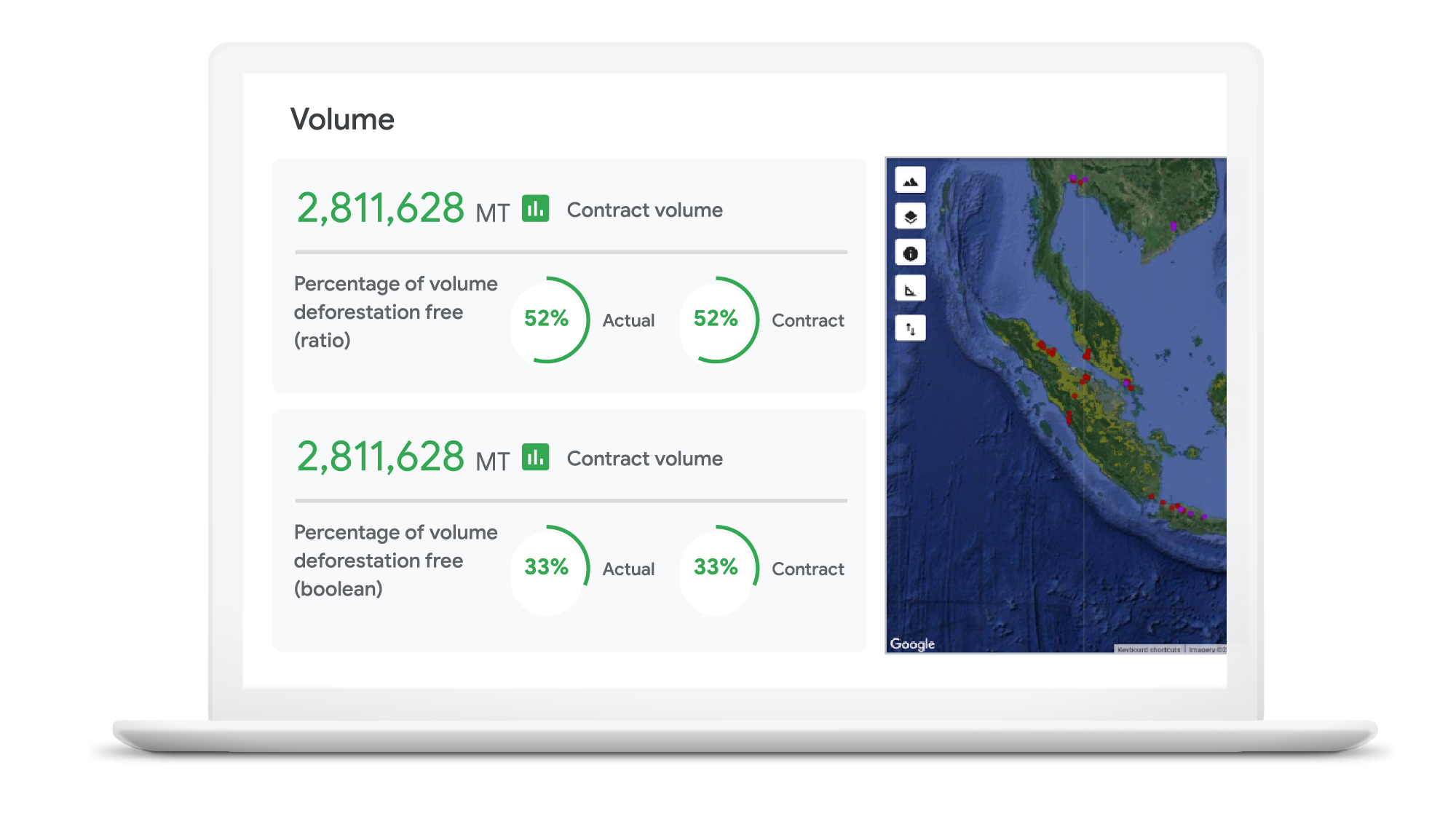
As sustainability moves further into the spotlight, in-demand crops face increased supplier scrutiny. Environmentally conscious companies want to know what percentage of their raw materials is sourced from deforestation-free suppliers—and how they can improve that number. Until recently, many CPG brands have found it hard to get real-time, reliable visibility into operations at a local supplier level, globally.
Google Cloud, in partnership with NGIS, is helping brands gain a deeper understanding of raw material sourcing practices across supplier networks, so they can improve supplier performance and compliance in the fight against deforestation. The TraceMark solution, developed by NGIS, uses Google Earth Engine and BigQuery to analyze and visualize how suppliers behave over time.
Google Earth Engine is the world’s largest archive of open Earth data. It combines a multi-petabyte catalog of satellite imagery and geospatial datasets with planetary-scale analysis capabilities to help people detect changes, map trends, and quantify differences on the Earth’s surface.With Earth Engine, organizations can analyze the potential social, and environmental impacts of the decision they make.
Together, TraceMark, Google Earth Engine and BigQuery help companies visualize, monitor, and measure the impact of suppliers’ farming practices. The process starts with Earth Engine, which aggregates and harmonizes planetary data into images that it has been collecting for decades. Then, boundary maps for different suppliers are created and NGIS applies climate data science and machine learning to turn pixels into insights. Finally, BigQuery and Vertex AI -Google Cloud’s unified artificial intelligence platform are used to produce supplier scoring, which is integrated into downstream ERP and procurement systems to support more informed decision-making.
These efforts support the responsible sourcing of raw materials by making supply chains more agile, transparent and traceable.
“NGIS is thrilled to work with Google Cloud and its partners to enable business accountability for sustainable practices at all levels of their supply chain,” said Nathan Eaton, Executive Director, NGIS. “Google Earth Engine provides unique geospatial capability that [gives] leaders visibility and control over their environmental footprint and that of their suppliers in a way that was not previously possible.”
Unilever commits to working towards a deforestation-free supply chain
Unilever is a great example of a company committed to using technology in the quest to become more sustainable. Since 2020, Unilever has partnered with Google Cloud to use data for eco-friendly decision-making, particularly when it comes to sustainable commodity sourcing.
By combining the power of cloud computing with satellite imagery and AI, we’re helping Unilever build a more holistic view of the forests, water cycles, and biodiversity that intersect its supply chain. By gaining a complete picture of these ecosystems, Unilever can detect deforestation while simultaneously prioritizing critical areas of forest and habitats in need of protection.
The cleanest cloud for your sustainable transformation
We are excited to bring Google Earth Engine and NGIS to our CPG customers to help them meet their sustainability goals. Looking ahead, we’re committed to furthering our own ambitious sustainability goals and empowering CPG brands with the technology to do more for our environment and our shared future.
Contact your cloud seller to learn more about Tracemark sustainable sourcing solutions and how Google Cloud can help you advance your sustainability initiatives.
Explore TraceMark on the Google Cloud Marketplace
To know more about how we are helping CPGs transform digitally read this ebook
1. Google/C Space, BR, FR, DE, IN, MX, U.K., U.S., qualitative survey activity, n = 528, Nov. 24–Nov. 26, 2020.
2. Google/Ipsos, Google Sustainability, BR, FR, DE, IN, JP, U.K., U.S., n=16,959 online population 18–70, July 2021.
How Google Cloud’s PSO Supports Customers’ Migration Goals

5014
Of your peers have already read this article.
2:00 Minutes
The most insightful time you'll spend today!
Google Cloud’s Professional Services Organization (PSO) engages with customers to ensure effective and efficient operations in the cloud, from the time they begin considering how cloud can help them overcome their operational, business or technical challenges, to the time they’re looking to optimize their cloud workloads.
We know that all parts of the cloud journey are important and can be complex. In this blog post, we want to focus specifically on the migration process and how PSO engages in a myriad of activities to ensure a successful migration.
As a team of trusted technical advisors, PSO will approach migrations in three phases:
- Pre-Migration Planning
- Cutover Activities
- Post-Migration Operations
While this post will not cover in detail all of the steps required for a migration, it will focus on how PSO engages in specific activities to meet customer objectives, manage risk, and deliver value. We will discuss the assets, processes and tools that we leverage to ensure success.
Pre-Migration Planning
Assess Scope
Before the migration happens, you will need to understand and clarify the future state that you’re working towards. From a logistical perspective, PSO will be helping you with capacity planning to ensure sufficient resources are available for your envisioned future state.
While migration into the cloud does allow you to eliminate many of the considerations for the physical, logistical, and financial concerns of traditional data centers and co-locations, it does not remove the need for active management of quotas, preparation for large migrations, and forecasting. PSO will help you forecast your needs in advance and work with the capacity team to adjust quotas, manage resources, and ensure availability.
Once the future state has been determined, PSO will also work with the product teams to determine any gaps in functionality. PSO captures feature requests across Google Cloud services and makes sure they are understood, logged, tracked, and prioritized appropriately with the relevant product teams. From there, they work closely with the customer to determine any interim workarounds that can be leveraged while waiting for the feature to land, as well as providing updates on the upcoming roadmap.
Develop Migration Approach and Tooling
Within Google Cloud, we have a library of assets and tools we use to assist in the migration process. We have seen these assets help us successfully complete migrations for other customers efficiently and effectively.
Based on the scoping requirements and tooling available to assist in the migration, PSO will help recommend a migration approach. We understand that enterprises have specific needs; differing levels of complexity and scale; regulatory, operational, or organization challenges that will need to be factored into the migration. PSO will help customers think through the different migration options and how all of the considerations will play out.
PSO will work with the customer team to determine the best migration approach for moving servers from on-prem to Google Cloud. PSO will walk customers through different migration approaches, such as refactoring, lift-shift, or new installs. From there, the customer can determine the best fit for their migration. PSO will provide guidance on best practices and use cases from other customers with similar use cases.
Google offers a variety of cloud native tools that can assist with asset discovery, the migration itself, and post-migration optimization. PSO, as one example, will help work with project managers to determine the best tooling that accommodates the customer’s requirements for migrating servers. PSO will also engage Google product team to ensure the customer fully understands the capabilities of each tool and the best fit for the use case. Google understands from a tooling perspective, one size does not fit all, thus PSO will work with the customer on determining the best migration approach and tooling for different requirements.
Cutover Activities
Once all of the planning activities have been completed, PSO will assist in making sure the cutover is successful.
During and leading up to critical customer events, PSO can provide proactive event management services which deliver increased support and readiness for key workloads. Beyond having a solid architecture and infrastructure on the platform, support for this infrastructure is essential and TAMs will help ensure that there are additional resources to support and unblock the customer where challenges arise.
As part of event management activities, PSO liaises with the Google Cloud Support Organization to ensure quick remediation and high resilience for situations where challenges arise. A war room is usually created to facilitate quick communication about the critical activities and roadblocks that arise. These war rooms can give customers a direct line to the support and engineering teams that will triage and resolve their issues.
Post-Migration Activities
Once cutover is complete, PSO will continue to provide support in areas such incident management, capacity planning, continuous operational support, and optimization to ensure the customer is successful from start to finish.
PSO will serve as the liaison between the customer and Google engineers. If support cases need to be escalated, PSO will ensure the appropriate parties are involved and work to get the case resolved in a timely manner. Through operational rigor, PSO will work with the customer in determining if certain Google Cloud services will be beneficial to the customer objectives. If services will add value to the customer, PSO will help enable the services so it aligns with the customer’s goal and current cloud architecture. In cases where there are missing gaps in services, PSO will proactively work with the customer and Google engineering teams to close the gaps by enabling additional functionality in the services.
PSO will continue to work with the engineering teams to consistently review and provide recommendations on the customer’s cloud architecture in ensuring the most optimal and cost efficient design along with adhering to Google’s best practices guidelines.
Aside from migrations, PSO is also responsible for providing continuous training of Google Cloud to customers. To ensure consistent development of Google Cloud, PSO will work with the customer to jointly develop a learning roadmap to ensure the customer has the necessary skills to succeed in delivering successful projects in Google Cloud.
Conclusion
Google PSO will be actively engaged throughout the customer’s cloud journey to ensure the necessary guidance, methodology, and tools are presented to the customer. PSO will engage in a series of activities from pre-migration planning to post migration in key areas such as capacity planning to ensure sufficient resources are allocated for future workloads to providing support on technical cases for troubleshooting. PSO will serve as a long-term trusted advisor who will be the voice of the customer and provide the reliability and stability of the customer’s Google Cloud environment.
Click here if you’d like to engage with our PSO team on your migration. Or, you can also get started with a free discovery and assessment of your current IT landscape.
Measuring Deforestation in Extractive Supply Chains With ML

2561
Of your peers have already read this article.
2:30 Minutes
The most insightful time you'll spend today!
Introduction
In my experience, I have observed that it’s common in machine learning to surrender to the process of experimenting with many different algorithms in a trial and error fashion, until you get the desired result. My peers and I at Google have a People and Planet AI YouTube series where we talk about how to train and host a model for environmental purposes using Google Cloud and Google Earth Engine. Our focus is inspiring people to use deep learning, and if we could rename the series, we would call it AI for Minimalists since we would recommend artificial neural networks for most of our use cases. And so in this episode we give an overview of what deep learning is and how you can use it for tracking deforestation in supply chains. I also included a summary of the architecture and products you can use in this blog that I presented at the 2022 Geo For Good Summit. For those of you interested in diving even deeper into code, please visit our end-to-end sample (click “open in colab” at the bottom of the screen to view this tutorial in a notebook format).
What’s included in this article
- What is Deep Learning?
- Measuring deforestation in extractive supply chains with ML
- When to build a custom model outside of Earth Engine?
- How to build a model with Google Cloud & Earth Engine?
- Try it out!
What is Deep Learning?
Out of the many ML algorithms out there, I’m happy to share that deep learning or artificial neural networks is a technique that can be used for almost any supervised learning job.
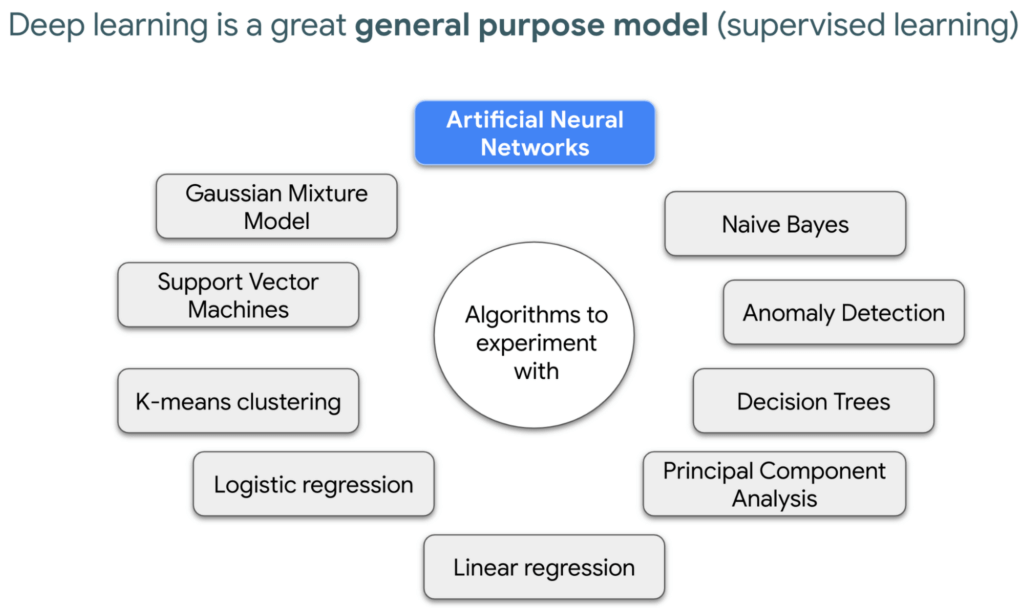
In supervised learning, you tell a computer the right answers to look for, through examples. Deep learning is very flexible, and is a great go-to algorithm. Especially for images, audio, or video files which are types of multidimensional data. This is because each of these data types have one or more dimensions with specific values for each point.
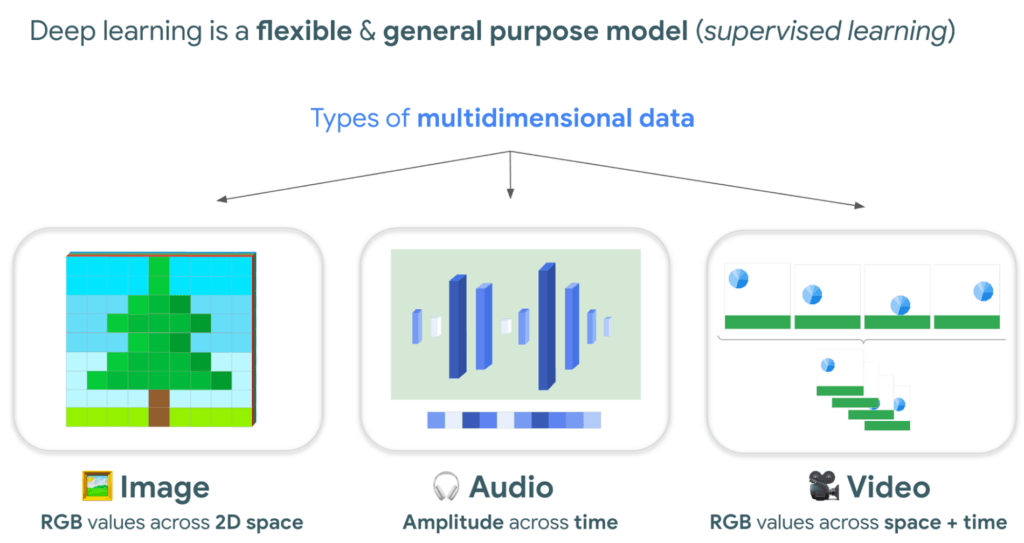
And training a model to classify tree species using satellite images is kind of like an image segmentation problem, where every pixel in the image is classified.
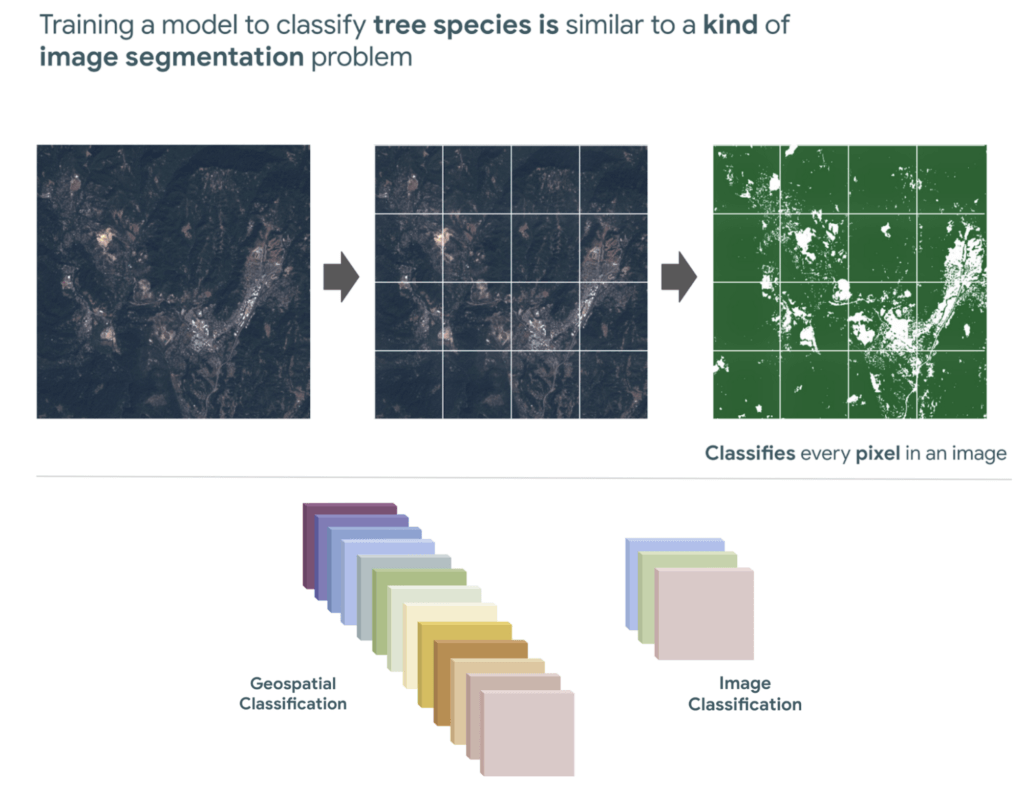
“Deep learning approaches problems differently”
David Cavazos, Developer Programs Engineer
There’s no writing a function with explicit & sequential steps that reviews every single pixel one by one for every image, as traditional software development does. Let’s say you wish to build a model that classifies tree species. You don’t spend time coding all the instructions, but instead give a computer examples of images with tree species labels, and let it learn from these examples. And when you want to add more species, it’s as simple as adding new images of that species to retrain the model.
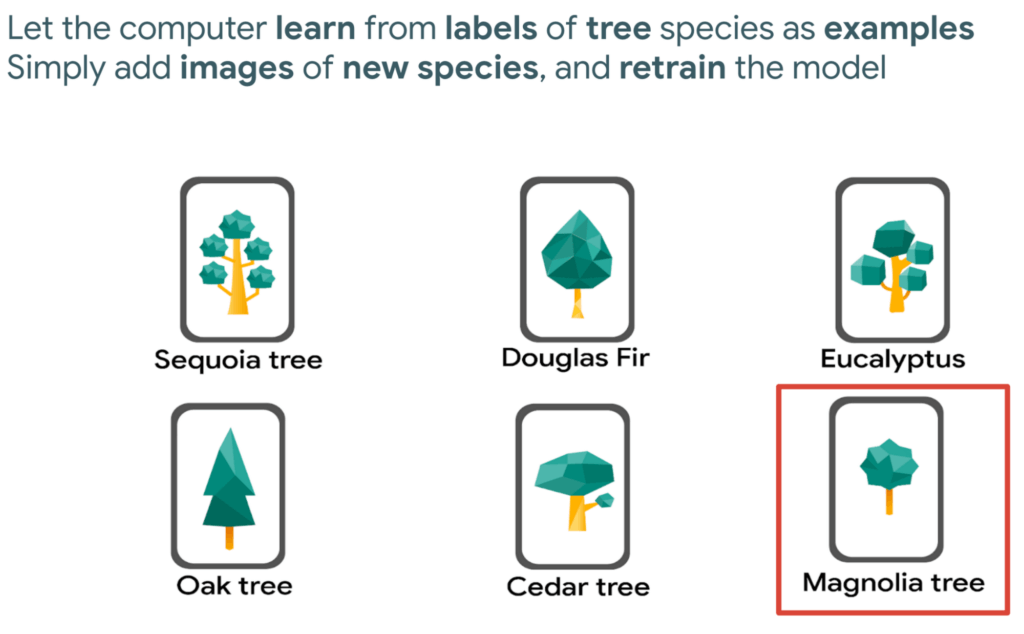
Measuring deforestation in extractive supply chains with ML
So let’s say we would like to measure deforestation using deep learning; to get started with building a model we first need a dataset that includes satellite images with an even amount of labels marking where there are trees and where there aren’t. Next, we choose a goal, here are a few common ones. In our case, we simply want to know if there are trees or not for every pixel, and so this would be a binary semantic segmentation problem.
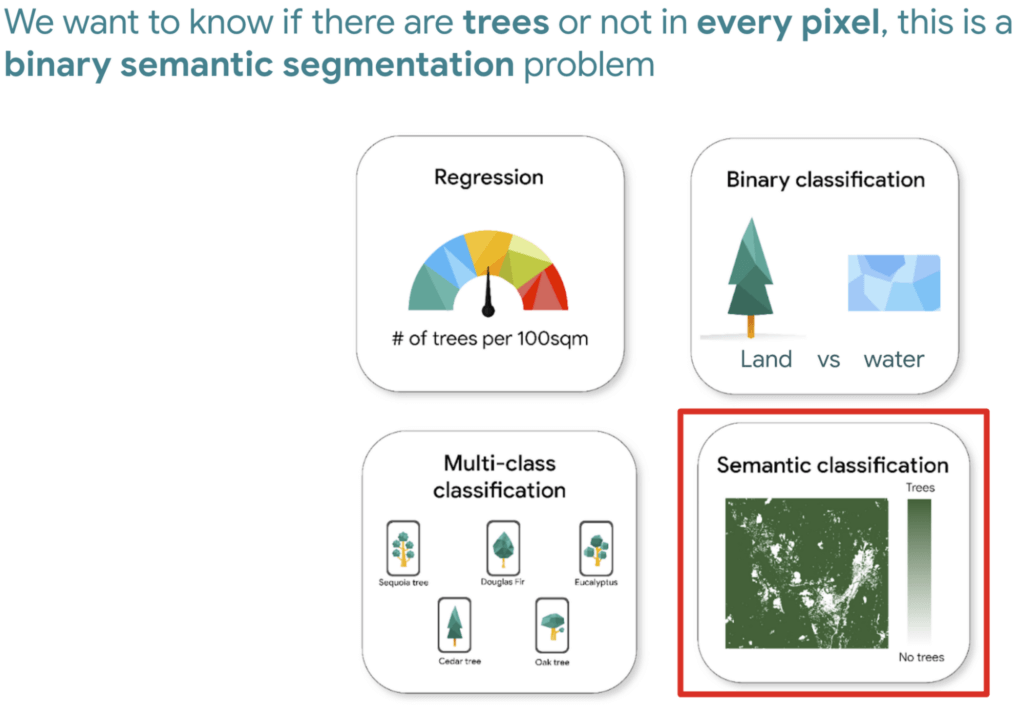
And based on this goal, we expect the outputs to be the percentage of trees for every pixel; as a number between 0 and 1. Zero represents no trees, and one represents a high confidence there are trees.
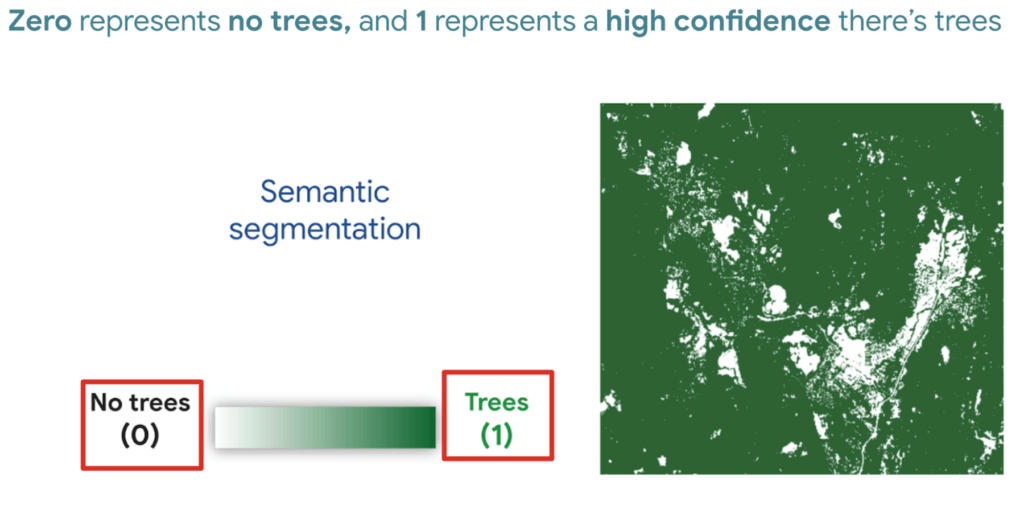
But how do we go from input images into probabilities of trees? Well think about it this way…there are many ways to approach this problem, here are 3 common ways of doing so. My peers and I prefer using Fully convolutional networks when building a map with ML predictions
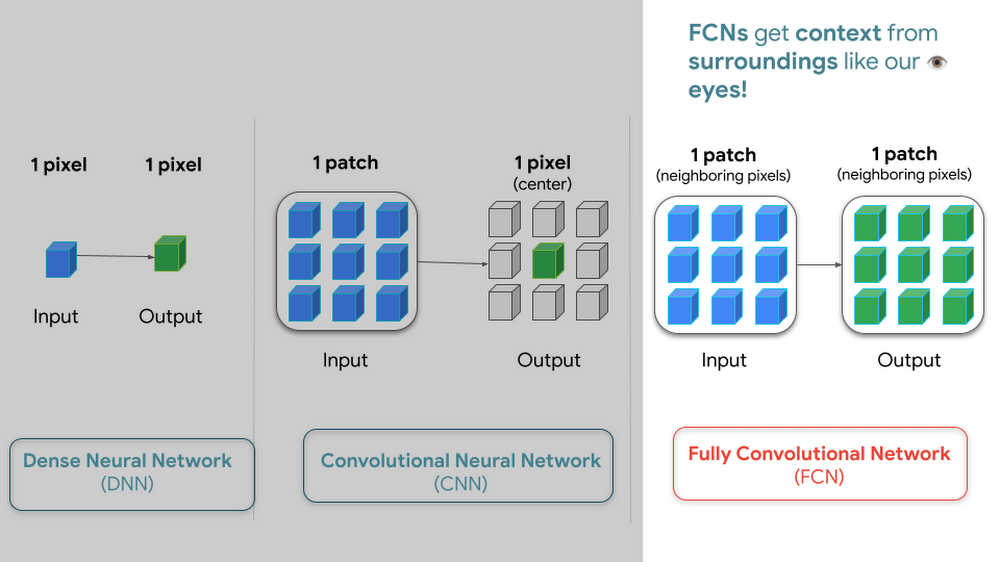
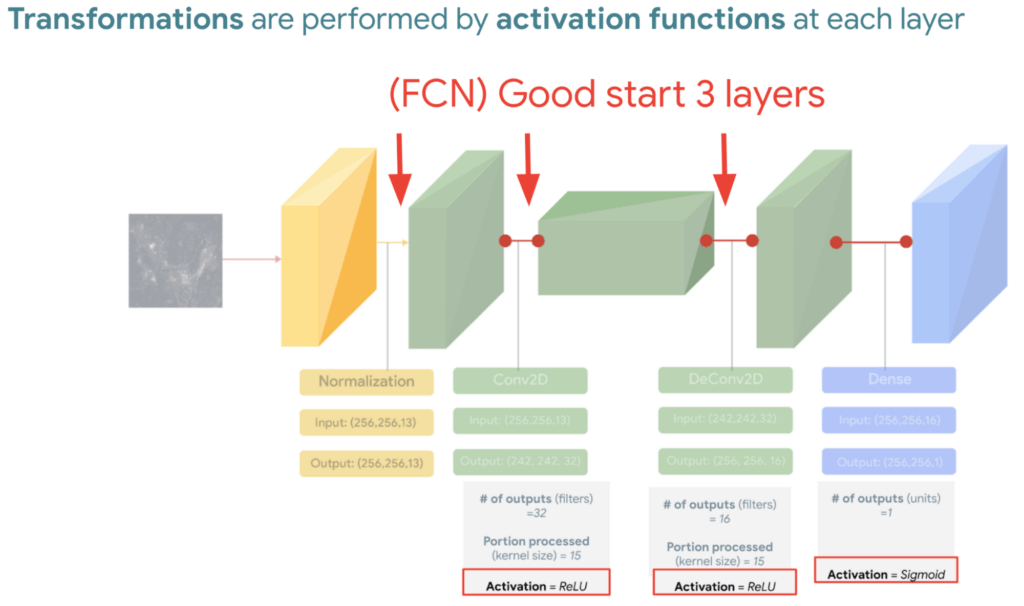
And since a model is a collection of interconnected layers, we must come up with an arrangement of layers that transforms our data inputs based on our desired outputs. Each layer by the way has something called an activation function, which performs the transformations of each layer before it passes them to the next layer.
FYI Below is a handy dandy table, with our recommended activation and loss functions to choose from based on your goal. We hope this saves you time.
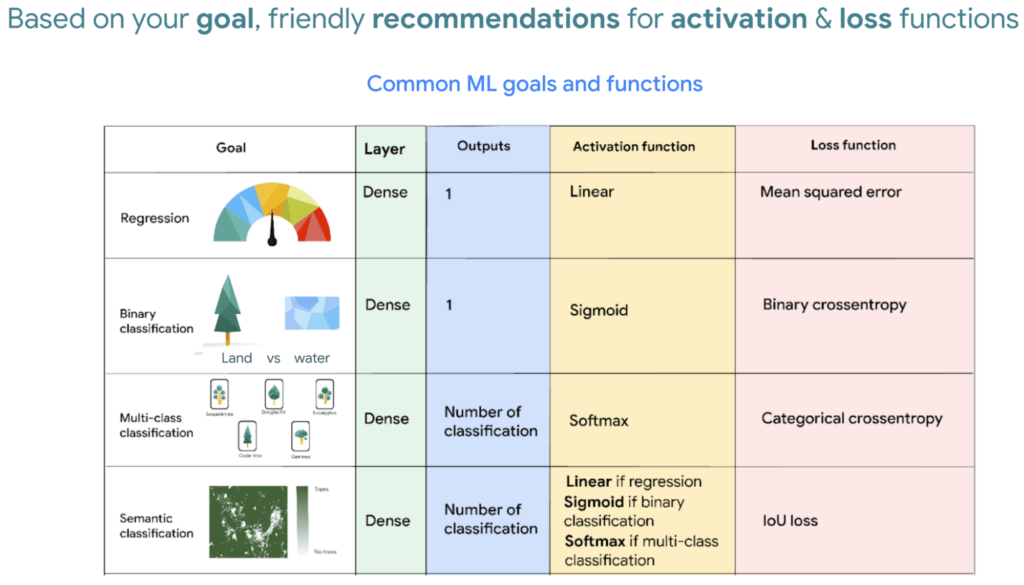
We then reach the fourth and last layer. Depending on our goals at the beginning, we also choose an appropriate loss function that helps us score how well the model did during training.
After choosing layers and functions you will split your data into training and validation datasets. Just remember that all of this work is about experimenting repeatedly until you reach desired results. Our 8min episode gives this overview more in detail.
When to build a custom model outside of Earth Engine
So now that we covered what is deep learning, the next step is understanding which tools to use to build our deforestation model. For starters it’s important to call out that Google Earth Engine is a wonderful tool that helps organizations of all sizes find insights about changes on the planet, in order to make a climate positive impact. It has built-in machine learning algorithms (classifiers) that let users quickly spin them up, with just a basic machine learning background. This is fantastic place to start when using ML on geospatial data, however there are multiple situations where you will want to opt to build a custom model such as:
- You want to use a popular ML library such as TensorFlow Keras.
- You wish to build a state of the art model to build a global and accurate land cover map product such as Google’s Dynamic World.
- Or because you generally have too much data to process that you can’t execute it in just one task in Earth Engine (and are trying to figure out hacky ways to export your data).
Whenever you identify with any of these options, you will want to roll up your sleeves and dive into building a custom model, which does require expertise and of course working with multiple products. But I have good news, using deep learning is a great go-to algorithm.
How to build a model with Google Cloud & Earth Engine?
To get started, you will need an account with Google Earth Engine which is free for non-commercial entities and Google Cloud account which has a free tier if you are just getting started for all users. I have broken up the products you would use by function.
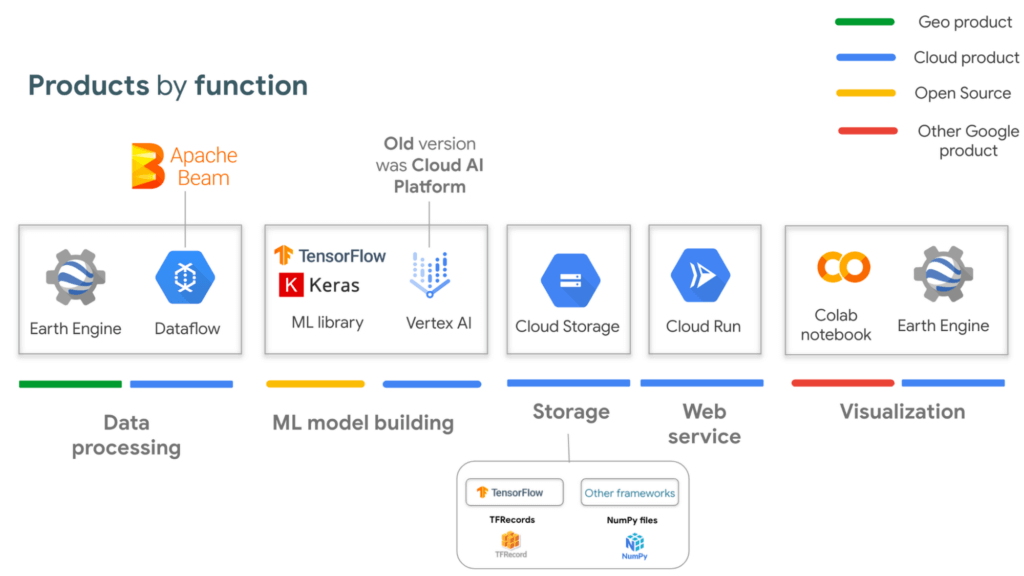
If you are interested in looking deeper into this overview, visit our slides here starting from slide 53 and read the speaker notes. Our code sample also walks through how to integrate with all of these projects end to end (just scroll down and click “open in colab”). But here is a quick visual summary. The main place to start is to identify which are the inputs and which are the outputs.
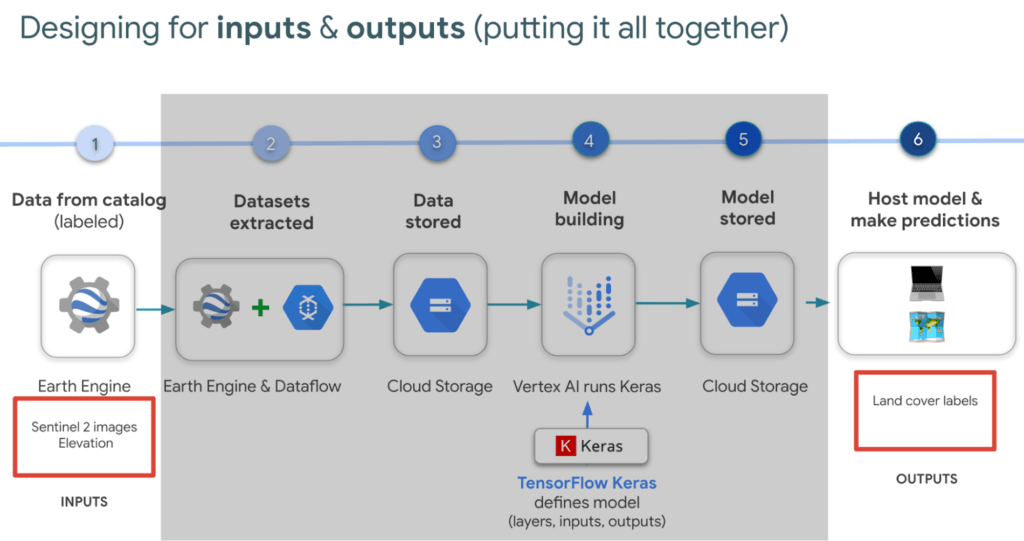
In our latest episodes for our People and Planet AI YouTube series, we walk through how to train a model and then host it in a relatively inexpensive web hosting platform called Cloud Run in episodes of less than 10mins.
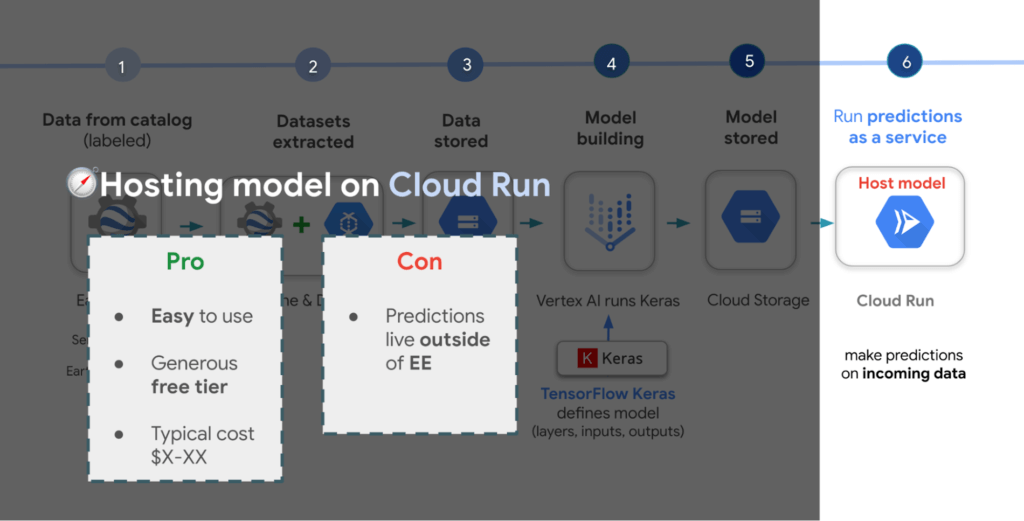
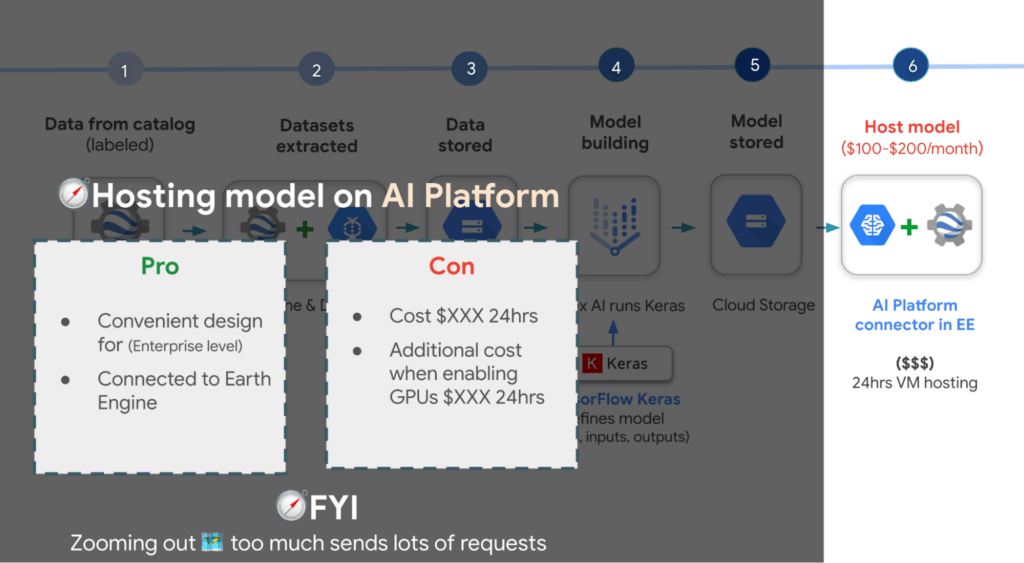
There are a few options presented in the slides, however the current best practice is to train a model using Vertex AI. Do note though that Google Earth Engine is currently not integrated with Vertex AI (we are working on this), but it is with the older (ML predecessor) called Cloud AI Platform (which is the recommended ML platform to use moving forward). As such, if you would like to import your model for detecting deforestation back into Earth Engine after training it in Vertex AI for example, you can host the model in Cloud AI Platform and get predictions. Just note that it’s a 24 hour paid service and so it can cost upwards of $100 or more a month to host your model to stream predictions. It also currently supports the following model building platforms if you don’t wish to use TensorFlow.
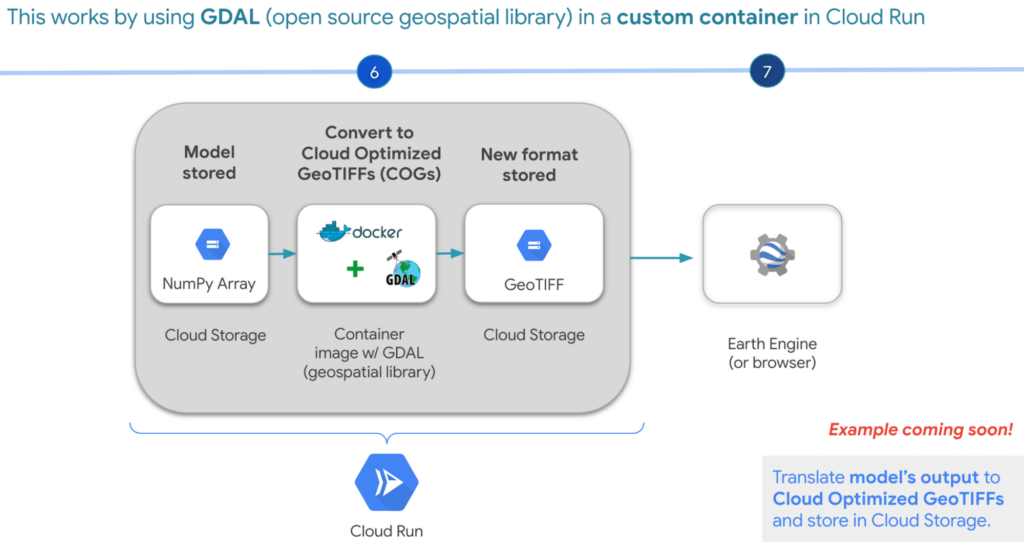
A cheaper alternative but without the convenience AI Platform offers is to manually translate the model’s output, which is NumPy Arrays into Cloud Optimized GeoTIFFs in order to load it back into Earth Engine using Cloud Run. Within this web service you would store the NumPy arrays into a Cloud Storage bucket, then spin up a container image with GDAL, an open source geospatial library in order to convert them into Cloud Optimized GeoTIFF files into Cloud Storage. This way you can view predictions from your browser or Earth Engine.
Try it out
This was a quick overview of deep learning and what Cloud products you can use to solve meaningful environmental challenges like detecting deforestation in extractive supply chains. If you would like to try it out, check out our code sample here (click “open in colab” at the bottom of the screen to view the tutorial in our notebook format or click this shortcut here).
More Relevant Stories for Your Company
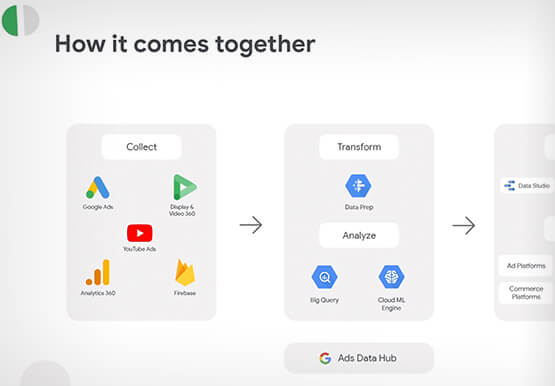
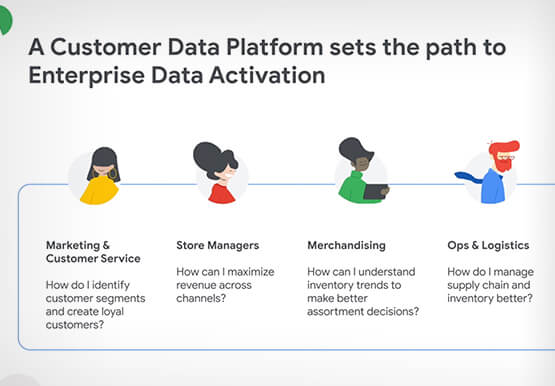


How Google’s Customer Data Platform Helps Retail Brands Offer Data-driven , Personalized CX
Retail companies need customer insights to deliver personalized experiences that impact revenue generation and cost savings. Watch how Google Cloud's customer data platform helps brands integrate and build holistic view of data in silos to drive marketing and customer service success.

Google Products Helps HMH’s Healthcare Staff Work from Anywhere Efficiently and Securely!
Hackensack Meridian Health (HMH) executive Mark Eimer explains how an ambitiously-timed rollout of a comprehensive suite of Google products helped the entire organization—from doctors to IT staff—achieve better security, cultivate a more equitable work environment, and ultimately, improve patient outcomes. How does a recently merged, 17-hospital healthcare system fast-track a platform migration

How Domino’s Increased Monthly Revenue By 6% with Google’s Analytical Tools
Pizza purveyor Domino’s is dominating delivery sales around the world. Today, Domino’s is the most popular pizza delivery chain operating in the U.K., the Republic of Ireland, Germany, and Switzerland—and sales just keep growing. In these regions in 2014, Domino’s sold 76 million pizzas and generated £766.6 million (1.02 billion

Embedded Intelligence Helps Businesses Prepare for the Unknown
The disruptions of 2020 elevated the importance of having the right data and insights to pivot quickly when necessary. Here’s a look at how businesses can use embedded intelligence to prepare for uncertainty and meet ever-changing customer expectations. We can never predict the future—but we can prepare for unpredictability by
