





Start Delivering Business Results with the Three AI Agents

2426
Of your peers have already read this article.
2:30 Minutes
The most insightful time you'll spend today!
When it comes to the adoption of artificial intelligence (AI), we have reached a tipping point. Technologies that were once accessible to only a few are now broadly available. This has led to an explosion in AI investment. However, according to research firm McKinsey, for AI to make a sizable contribution to a company’s bottom line, they “must scale the technology across the organization, infusing it in core business processes” — and based on conversations with our customers, we couldn’t agree more.
While investments in pure data science continue to be essential for many, widespread adoption of AI increasingly involves a category of applications and services that we call AI agents. These are technologies that let customers apply the best of AI to common business challenges, with limited technical expertise required by employees, and include Google Cloud products like Document AI and Contact Center AI. Today, at Google Cloud Next ‘22, we’re announcing new features to our existing AI agents and a brand new one with Translation Hub.
“AI is becoming a key investment for many companies’ long term success. However, most companies are still in the experimental phases with AI and haven’t fully put the technology into production because of long deployment timelines, IT staffing needs, and more,” said Ritu Jyoti, group vice president, worldwide AI and automation research practice global AI research lead, at IDC. “Organizations need AI products that can be immediately applied to automate processes and solve business problems. Google Cloud is answering this problem by providing fully managed, scalable AI agents that can be deployed fast and deliver immediate results.”
Translation Hub: An enterprise-scale translation AI agent
At I/O this year, we announced the addition of 24 new languages to Google Translate to allow consumers in more locations, especially those whose languages aren’t represented in most technology, to help reduce communication barriers through the power of translation. Businesses strive for the same goals, but unfortunately it is often out of reach due to the high costs that come with scaling translation.
That’s why today, we are announcing Translation Hub, our AI agent that provides customers with self-service document translation. With 135 languages, Translation Hub can create impactful, inclusive, and cost-effective global communications in a few clicks.
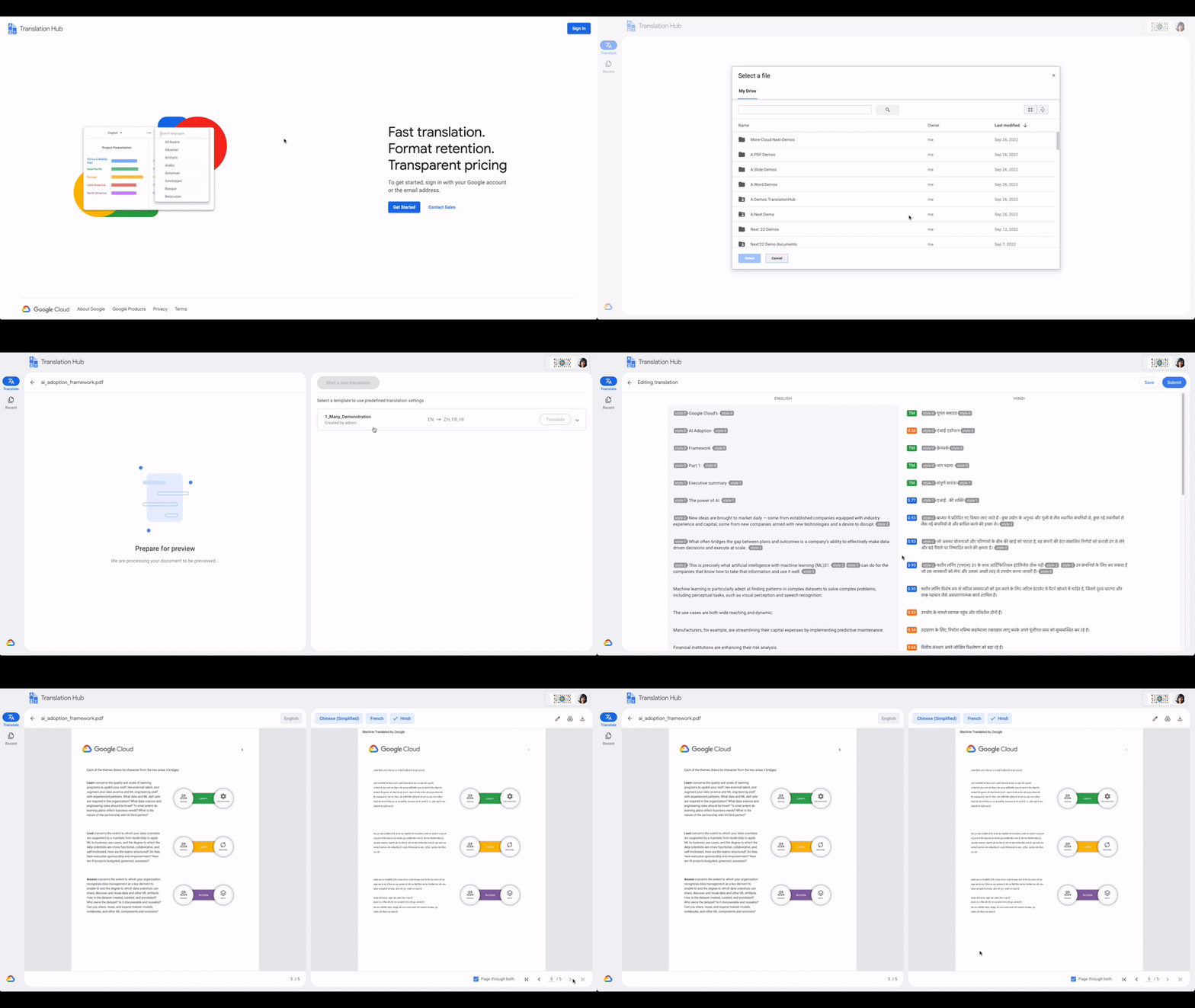
With Translation Hub, now researchers are able to share their findings instantly across the world, goods and services providers can reach underserved markets, and public sector administrators can reach more members of their communities in a language they understand — all of which ultimately help make for a more connected, inclusive world.
Translation Hub brings together Google Cloud AI technology, like Neural Machine Translation and AutoML, to help make it easy to ingest and translate content from the most common enterprise document types, including Google Docs and Slides, PDFs, and Microsoft Word. It not only preserves layouts and formatting, but also provides granular management controls such as support for post-editing human-in-the-loop feedback and document review.
“In just three months of using Translation Hub and AutoML translation models, we saw our translated page count go up by 700% and translation cost reduced by 90%,” said Murali Nathan, digital innovation and employee experience lead, at materials science company Avery Dennison. “Beyond numbers, Google’s enterprise translation technology is driving a feeling of inclusion among our employees. Every Avery Dennison employee has access to on-demand, general purpose, and company-specific translations. English language fluency is no longer a barrier, and our employees are beginning to broadly express themselves right in their native language.”
Document AI: A document processing AI agent to automate workflows
Every organization needs to process documents, understand their content, and make them available to the appropriate people. Whether it’s during procurement cycles involving invoices and receipts, contract processes to close deals, or for general increases in efficiency, Document AI simplifies and automates various document processing. With two new features launching today, Document AI can allow employees to focus on higher impact tasks and better serve their own customers.
For example, payments provider Libeo used Document AI to uptrain an invoice parser with 1,600 documents and increase its testing accuracy from 75.6% to 83.9%. “Thanks to uptraining, the Document AI results now beat the results of a competitor and will help Libeo save ~20% on the overall cost for model training over the long run,” said Libeo chief technology officer, Pierre-Antoine Glandier.
Today, we’re announcing these new features to our existing Document AI agent:
- Document AI Workbench can remove the barriers around building custom document parsers, helping organizations extract fields of interest that are specific to their business needs. Relative to more traditional development approaches, it requires less training data and offers a simple interface for both labeling data and one-click model training.
- Document AI Warehouse can eliminate the challenges that many enterprises face when tagging and extracting data in documents by bringing Google’s Search technologies to Document AI. This feature can make it simpler and easier to search for and manage documents like workflow controls to accommodate invoice processing, contracts, approvals, and custom workflows.
Contact Center AI: A contact center AI agent to improve customer experiences
Scaling call center support can be expensive and difficult, especially when implementing AI technologies to support representatives. Contact Center AI is an AI agent for virtually all contact center needs, from intelligently routing customers, to facilitating handoffs between virtual and human customer support representatives, to analyzing call center transcripts for trends and much more.
Just days ago, we announced that Contact Center AI Platform is now generally available to provide additional deployment choice and flexibility. With this addition to Contact Center AI, we are furthering our commitment to providing an AI agent that can assist organizations to quickly scale their contact centers to improve customer experiences and create value via data-driven decisions.
Dean Kontul, division chief information officer at KeyBank, had this to say about powering their contact center with Contact Center AI from Google Cloud: “With Google Cloud and Contact Center AI, we will quickly move our contact center to the Cloud, supporting both our customers and agents with industry-leading customer experience innovations, all while streamlining operations through more efficient customer care operations.”
Start delivering business results with AI agents, today!
If you’re ready to get started with Translation Hub, this Next ‘22 session has the details, including a deeper dive into Avery Dennison’s use of the AI agent.
To learn more about our Document AI announcements, check out our session with Commerzbank, “Improve document efficiency with AI,” as well as “Transform digital experiences with Google AI powered search and recommendations.”
And, to explore Contact Center AI Platform, watch “Delight customers in every interaction with Contact Center AI,” featuring more insight into KeyBank’s use case.
Make Meaningful Analysis with Geo Boundary Public Datasets on BigQuery

6363
Of your peers have already read this article.
4:00 Minutes
The most insightful time you'll spend today!
Geospatial data is a critical component for a comprehensive analytics strategy. Whether you are trying to visualize data using geospatial parameters or do deeper analysis or modeling on customer distribution or proximity, most organizations have some type of geospatial data they would like to use – whether it be customer zipcodes, store locations, or shipping addresses. However, converting geographic data into the correct format for analysis and aggregation at different levels can be difficult. In this post, we’ll walk through some examples of how you can leverage the Google Cloud platform alongside Google Cloud Public Datasets to perform robust analytics on geographic data. The full queries can be accessed from this notebook here.
Public US Geo Boundaries dataset
BigQuery hosts a slew of public datasets for you to access and integrate into your analytics. Google pays for the storage of these datasets and provides public access to the data via the bigquery-public-data project. You only pay for queries against the data. Plus, the first 1 TB per month is free! These public datasets are valuable on their own, but when joined against your own data they can unlock new analytics use cases and save the team a lot of time.
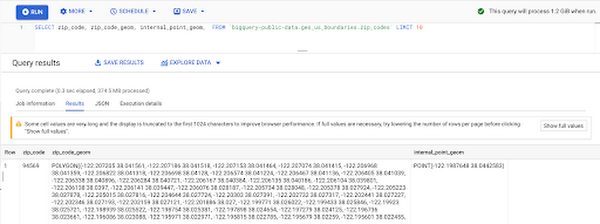
Within the Google Cloud Public Datasets Program there are several geographic datasets. Here, we’ll work with the geo_us_boundaries dataset, which contains a set of tables that have the boundaries of different geospatial areas as polygons and coordinates based on the center point (GEOGRAPHY column type in BigQuery), published by the US Census Bureau.
Mapping geospatial points to hierarchical areas
Many times you will find yourself in situations where you have a string representing an address. However, most tools require lat/long coordinates to actually plot points. Using the Google Maps Geocoding API we can convert an address into a lat/long and then store the results in the BigQuery table.
With a lat/long representation of our point, we can join our initial dataset back onto any of the tables here using the ST_WITHIN function. This allows us to check and see if a point is within the specified polygon.
ST_WITHIN(geography_1, geography_2)
This can be helpful for ensuring standard nomenclature; for example, metropolitan areas that might be named differently. The query below maps each customers’ address to a given metropolitan area name.
SELECTcust.id as customer_id,metro.name as metro_nameFROM `looker-private-demo.retail.customers` as cust,`bigquery-public-data.geo_us_boundaries.metropolitan_divisions` as metroWHERE ST_WITHIN(ST_GEOGPOINT(cust.longitude, cust.latitude),metro.metdiv_geom)
It can also be useful for converting to designated market area (DMA), which is often used in creating targeted digital marketing campaigns.
SELECTcust.id as customer_id,dma.dma_nameFROM `looker-private-demo.retail.customers` as cust,`bigquery-public-data.geo_us_boundaries.designated_market_area` as dmaWHERE ST_WITHIN(ST_GEOGPOINT(cust.longitude, cust.latitude),dma.dma_geom)
Or for filling in missing information; for example, some addresses may be missing zip code which results in incorrect calculations when aggregating up to the zipcode level. By joining onto the zip_codes table we can ensure all coordinates are mapped appropriately and aggregate up from there.
SELECTzip.zip_code,count(distinct cust.id) as unique_customersFROM `looker-private-demo.retail.customers` as cust,`bigquery-public-data.geo_us_boundaries.zip_codes` as zipWHERE ST_WITHIN(ST_GEOGPOINT(cust.longitude, cust.latitude),zip.zip_code_geom)GROUP BY 1
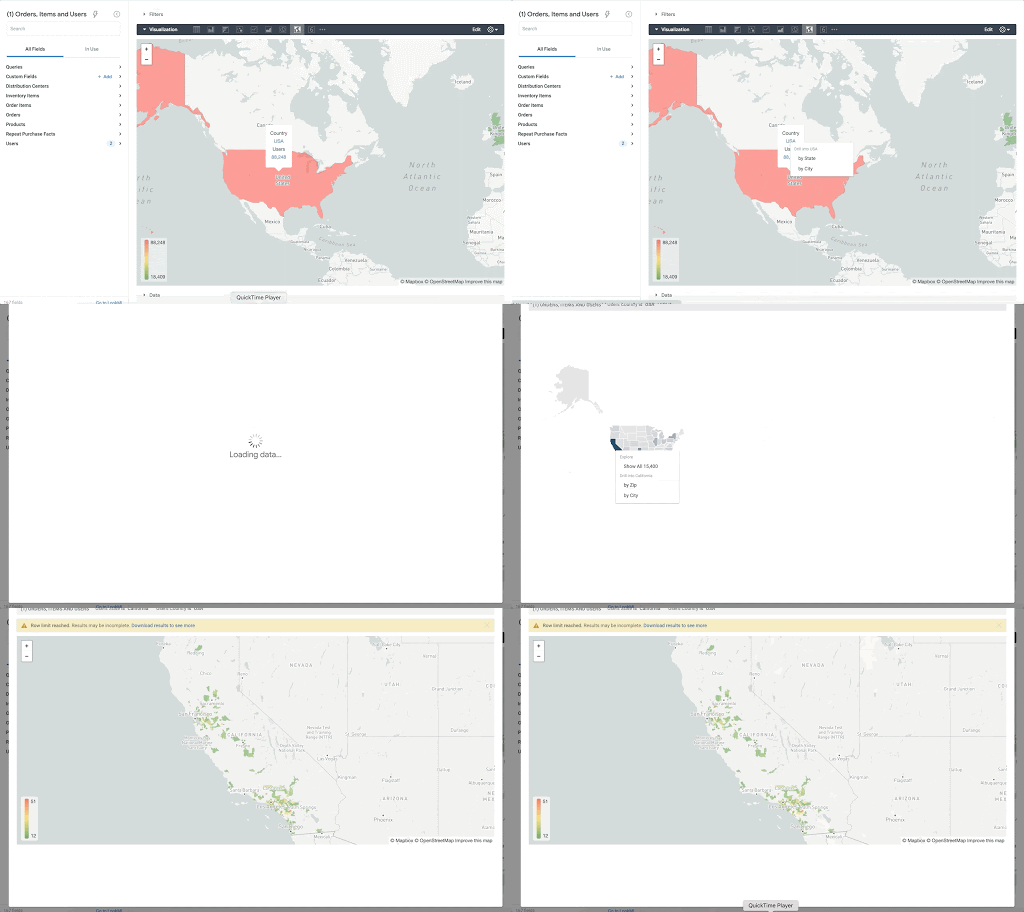
Note that the zip code table isn’t a comprehensive list of all US zip codes, they are zip code tabulation areas (ZCTAs). Details about the differences can be found here. Additionally, the zip code table gives us hierarchical information, which allows us to perform more meaningful analytics. One example is leveraging hierarchical drilling in Looker. I can aggregate my total sales up to the country level, and then drill down to state, city and zipcode to identify where sales are highest. You can also use the BigQuery GeoViz tool to visualize geospatial data!
Aside from simply checking if a point is within an area, we can also use ST_DISTANCE to do something like find the closest city using the centerpoint for the metropolitan area table.
SELECTcust.id as customer_id,ARRAY_AGG(metro.name order by ST_DISTANCE(ST_GEOGPOINT(cust.longitude, cust.latitude),metro.internal_point_geom) asc limit 1)[offset(0)] as metro_nameFROM`looker-private-demo.retail.customers` as cust,`bigquery-public-data.geo_us_boundaries.metropolitan_divisions` as metroGROUP BY cust.id
This concept doesn’t just hold true for points, we can also leverage other GIS functions to see if a geospatial area is contained within areas that are listed in the boundaries datasets. If your data comes into BigQuery as a GeoJSON string, we can convert it to a GEOGRAPHY type using the ST_GEOGFROMGEOJSON function. Once our data is in a GEOGRAPHY type we can do things like check to see what urban area the geo is within – using either ST_WITHIN or ST_INTERSECTS to account for partial coverage. Here, I am using the customer’s zip code to find all metropolitan divisions where the zip code polygon and the metropolitan polygon intersect. I am then selecting the metropolitan area that has the most overlap (or the intersection has the largest area) to be the customer’s metro that we use for reporting.
SELECTcust.id as customer_id,ARRAY_AGG(metro.name order by ST_AREA(ST_INTERSECTION(zip.zip_code_geom,metro.metdiv_geom)) desc limit 1)[offset(0)] as metro_nameFROM`looker-private-demo.retail.customers` as custJOIN `bigquery-public-data.geo_us_boundaries.zip_codes` as zip on cust.zip=zip.zip_code,`bigquery-public-data.geo_us_boundaries.metropolitan_divisions` as metroWHERE ST_INTERSECTS(zip.zip_code_geom,metro.metdiv_geom)GROUP BY cust.id
The same ideas can be applied to the other tables in the dataset including the county, urban areas and National Weather Service forecast regions (which can also be useful if you want to join your datasets onto weather data).
Correcting for data discrepancy
One problem that we may run into when working with geospatial data is that different data sources may have different representations of the same information. For example, you might have one system that records state as a two letter abbreviation and another using the full name. Here, we can use the state table to join the different datasets.
SELECTst.state_name,sum(ab.sales+fn.sales) as total_salesFROM `bigquery-public-data.geo_us_boundaries.states` as stLEFT JOIN abbreviated_table as ab on ab.state = st.stateLEFT JOIN fullname_table as fn on fn.state = st.state_nameWHERE COALESCE(ab.state, fn.state) IS NOT NULLGROUP BY 1
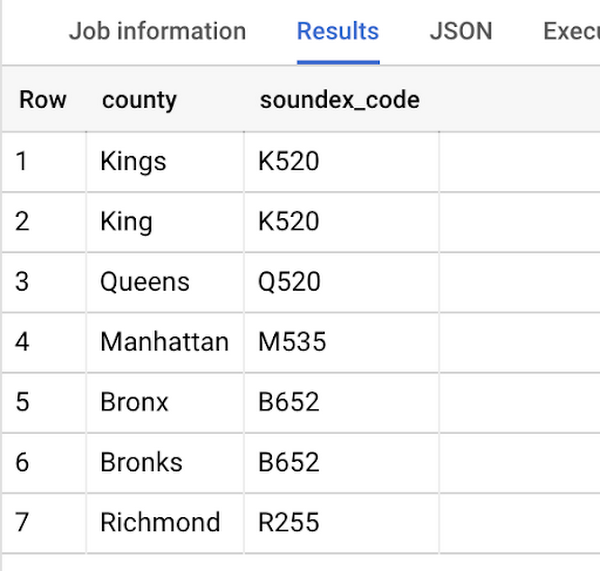
Another example might be using the tables as a source of truth for fuzzy matching. If the address is a manually entered field somewhere in your application, there is a good chance that things will be misspelled. Different representations of the same name may prevent tables from joining with each other or lead to duplicate entries when performing aggregations. Here, I use a simple Soundex algorithm to generate a code for each county name, using helper functions from this blog post. We can see that even though some are misspelled they have the same Soundex code.
Next, we can join back onto our counties table so we make sure to use the correct spelling of the county name. Then, we can simply aggregate our data for more accurate reporting.
SELECTc.county_name,sum(sales) as total_salesFROMtableJOIN `bigquery-public-data.geo_us_boundaries.counties` as con testing.dq_fm_Soundex(table.county) = testing.dq_fm_Soundex(c.county_name)WHERE c.state_fips_code = cast(36 as string)GROUP BY 1
Note that fuzzy matching definitely isn’t perfect and you might need to try different methods or apply certain filters for it to work best depending on the specifics of your data.
The US Geo Boundary datasets allow you to perform meaningful geographic analysis without needing to worry about extracting, transforming or loading additional datasets into BigQuery. These datasets, along with all the other Google Cloud Public Datasets, will be available in the Analytics Hub. Please sign up for the Analytics Hub preview, which is scheduled to be available in the third quarter of 2021, by going to g.co/cloud/analytics-hub.
3446
Of your peers have already watched this video.
38:26 Minutes
The most insightful time you'll spend today!
The Secret to Accelerated ML Model Training
As an infrastructure or a data science professional, it’s more critical than ever to keep abreast of the changes taking place to the infrastructure powering machine learning.
If we take a step back, we will realize that there’s been a tremendous amount of progress in machine learning in the last few years, resulting in multiple benefits including higher accuracy in speech and image recognition, for instance. This progress is in part due to the advances in the systems to train models.
One of these advances comes in the type of processors being leveraged to power ML. There’s been an evolution—from CPUs to GPUs to TPUs—each of which bring additional computational power.
Google Cloud TPUs allow data scientists to train their models at lightning speed on Google Cloud’s latest ML hardware.
In this video, you will see how to use your raw data to create different ML applications. More importantly, Zak Stone, Product Manager For TensorFlow and Cloud TPUs, Google Brain, will show you how to accelerate ML model training on TPUs using Google Cloud’s optimized, TensorFlow image classification code. Each step will be explained in detail.
Quick Recap on Google Cloud: Latest News, Launches, Updates, Events and More

12944
Of your peers have already read this article.
2:00 Minutes
The most insightful time you'll spend today!
Want to know the latest from Google Cloud? Find it here in one handy location. Check back regularly for our newest updates, announcements, resources, events, learning opportunities, and more.
Tip: Not sure where to find what you’re looking for on the Google Cloud blog? Start here: Google Cloud blog 101: Full list of topics, links, and resources.
Week of May 24-May 28 2021
- Google Cloud for financial services: driving your transformation cloud journey–As we welcome the industry to our Financial Services Summit, we’re sharing more on how Google Cloud accelerates a financial organization’s digital transformation through app and infrastructure modernization, data democratization, people connections, and trusted transactions. Read more or watch the summit on demand.
- Introducing Datashare solution for financial services–We announced the general availability of Datashare for financial services, a new Google Cloud solution that brings together the entire capital markets ecosystem—data publishers and data consumers—to exchange market data securely and easily. Read more.
- Announcing Datastream in Preview–Datastream, a serverless change data capture (CDC) and replication service, allows enterprises to synchronize data across heterogeneous databases, storage systems, and applications reliably and with minimal latency to support real-time analytics, database replication, and event-driven architectures. Read more.
- Introducing Dataplex: An intelligent data fabric for analytics at scale–Dataplex provides a way to centrally manage, monitor, and govern your data across data lakes, data warehouses and data marts, and make this data securely accessible to a variety of analytics and data science tools. Read more.
- Announcing Dataflow Prime–Available in Preview in Q3 2021, Dataflow Prime is a new platform based on a serverless, no-ops, auto-tuning architecture built to bring unparalleled resource utilization and radical operational simplicity to big data processing. Dataflow Prime builds on Dataflow and brings new user benefits with innovations in resource utilization and distributed diagnostics. The new capabilities in Dataflow significantly reduce the time spent on infrastructure sizing and tuning tasks, as well as time spent diagnosing data freshness problems. Read more.
- Secure and scalable sharing for data and analytics with Analytics Hub–With Analytics Hub, available in Preview in Q3, organizations get a rich data ecosystem by publishing and subscribing to analytics-ready datasets; control and monitoring over how their data is being used; a self-service way to access valuable and trusted data assets; and an easy way to monetize their data assets without the overhead of building and managing the infrastructure. Read more.
- Cloud Spanner trims entry cost by 90%–Coming soon to Preview, granular instance sizing in Spanner lets organizations run workloads at as low as 1/10th the cost of regular instances, equating to approximately $65/month. Read more.
- Cloud Bigtable lifts SLA and adds new security features for regulated industries–Bigtable instances with a multi-cluster routing policy across 3 or more regions are now covered by a 99.999% monthly uptime percentage under the new SLA. In addition, new Data Access audit logs can help determine whether sensitive customer information has been accessed in the event of a security incident, and if so, when, and by whom. Read more.
- Build a no-code journaling app–In honor of Mental Health Awareness Month, Google Cloud’s no-code application development platform, AppSheet, demonstrates how you can build a journaling app complete with titles, time stamps, mood entries, and more. Learn how with this blog and video here.
- New features in Security Command Center—On May 24th, Security Command Center Premium launched the general availability of granular access controls at project- and folder-level and Center for Internet Security (CIS) 1.1 benchmarks for Google Cloud Platform Foundation. These new capabilities enable organizations to improve their security posture and efficiently manage risk for their Google Cloud environment. Learn more.
- Simplified API operations with AI–Google Cloud’s API management platform Apigee applies Google’s industry leading ML and AI to your API metadata. Understand how it works with anomaly detection here.
- This week: Data Cloud and Financial Services Summits–Our Google Cloud Summit series begins this week with the Data Cloud Summit on Wednesday May 26 (Global). At this half-day event, you’ll learn how leading companies like PayPal, Workday, Equifax, and many others are driving competitive differentiation using Google Cloud technologies to build their data clouds and transform data into value that drives innovation. The following day, Thursday May 27 (Global & EMEA) at the Financial Services Summit, discover how Google Cloud is helping financial institutions such as PayPal, Global Payments, HSBC, Credit Suisse, AXA Switzerland and more unlock new possibilities and accelerate business through innovation. Read more and explore the entire summit series.
- Announcing the Google for Games Developer Summit 2021 on July 12th-13th–With a surge of new gamers and an increase in time spent playing games in the last year, it’s more important than ever for game developers to delight and engage players. To help developers with this opportunity, the games teams at Google are back to announce the return of the Google for Games Developer Summit 2021 on July 12th-13th. Hear from experts across Google about new game solutions they’re building to make it easier for you to continue creating great games, connecting with players and scaling your business. Registration is free and open to all game developers. Register for the free online event at g.co/gamedevsummit to get more details in the coming weeks. We can’t wait to share our latest innovations with the developer community. Learn more.
Apollo24|7 partnered with Google Cloud to build the Clinical Decision Support System (CDSS) together

2747
Of your peers have already read this article.
4:30 Minutes
The most insightful time you'll spend today!
Clinical Decision Support System (CDSS) is an important technology for the healthcare industry that analyzes data to help healthcare professionals make decisions related to patient care. The market size for the global clinical decision support system appears poised for expansion, with one study predicting a compound annual growth rate (CAGR) of 10.4%, from 2022 to 2030, to $10.7 billion.
For any health organization that wants to build a CDSS system, one key block is to locate and extract the medical entities that are present in the clinical notes, medical journals, discharge summaries, etc. Along with entity extraction, the other key components of the CDSS system are capturing the temporal relationships, subjects, and certainty assessments.
At Google Cloud, we know how critical it is for the healthcare industry to build CDSS systems, so we worked with Apollo 24|7, the largest multi-channel digital healthcare platform in India, to build the key blocks of their CDSS solution.
We helped them to parse the discharge summaries and prescriptions to extract the medical entities. These entities can then be used to build a recommendation engine that would help doctors with the “Next Best Action” recommendation for medicines, lab tests, etc.
Let’s take a sneak peek at Apollo 24|7’s entity extraction solutions, and the various Google AI technologies that were tested to form the technology stack.
Datasets Used
To perform our experiments on entity extraction, we used two types of datasets.
- i2b2 Dataset – i2b2 is an open-source clinical data warehousing and analytics research platform that provides annotated deidentified patient discharge summaries made available to the community for research purposes. This dataset was primarily used for training and validation of the models.
- Apollo 24|7’s Dataset – De-identified doctor’s notes from Apollo24|7 were used for testing. Doctors annotated them to label the entities and offset values.
Experimentation and choosing the right approach — Four models put to test
For entity extraction, both Google Cloud products and open-source approaches were explored. Below are the details:
- Healthcare Natural Language API: This is a no-code approach that provides machine learning solutions for deriving insights from medical text. Using this, we parsed unstructured medical text and then generated a structured data representation of the medical knowledge entities stored in the data for downstream analysis and automation. The process includes:
- Extract information about medical concepts like diseases, medications, medical devices, procedures, and their clinically relevant attributes;
- Map medical concepts to standard medical vocabularies such as RxNorm, ICD-10, MeSH, and SNOMED CT (US users only);
- Derive medical insights from text and integrate them with data analytics products in Google Cloud.
The advantage of using this approach is that it not only extracts a wide range of entity types like MED_DOSE, MED_DURATION, LAB_UNIT, LAB_VALUE, etc, but also captures functional features such as temporal relationships, subjects, and certainty assessments, along with the confidence scores. Since it is available on Google Cloud, this offers long-term product support. It is also the only fully-managed NLP service among all the approaches tested and hence, it requires the least effort to implement and manage.
But one thing to keep in mind is that since the Healthcare NL API offers natural language models that are pre-trained, it currently cannot be used for custom entity extraction models trained using custom annotated medical text or to extract custom entities. This has to be done via AutoML Entity Extraction for Healthcare, another Google Cloud service for custom model development. Custom model development is important for adapting the pre-trained models to new languages or region-specific natural language processing, such as medical terms whose use may be more prevalent in India than in other regions
- Vertex AutoML Entity Extraction for Healthcare: This is a low-code approach that’s already available on Google Cloud. We used AutoML Entity Extraction to build and deploy custom machine learning models that analyzed documents, categorized them, and identified entities within them. This custom machine learning model was trained on the annotated dataset provided by the Apollo 24|7 team.
The advantage of AutoML Entity Extraction is that it gives the option to train on a new dataset. However, one of the prerequisites to keep in mind is that it needs a little pre-processing to capture the input data in the required JSONL format. Since this is an AutoML model just for Entity Extraction, it does not extract relationships, certainty assessments, etc.
- BERT-based Models on Vertex AI: Vertex AI is Google Cloud’s fully managed unified AI platform to build, deploy, and scale ML models faster, with pre-trained and custom tooling. We experimented with multiple custom approaches based on pre-trained BERT-based models, which have shown state-of-the-art performance in many natural language tasks. To gain better contextual understanding of medical terms and procedures, these BERT-based approaches are explicitly trained on medical domain data. Our experiments were based on BioClinical BERT, BioLink BERT, Blue BERT trained on Pubmed dataset, and Blue BERT trained on Pubmed + MIMIC datasets.
The major advantage of these BERT-based models is that they can be finetuned on any Entity Recognition task with minimal efforts.
However, since this is a custom approach, it requires some technical expertise. Additionally, it does not extract relationships, certainty assessments, etc. This is one of the main limitations of using BERT-based models.
- ScispaCy on Vertex AI: We used Vertex AI to perform experiments based on ScispaCy, which is a Python package containing spaCy models for processing biomedical, scientific or clinical text.
Along with Entity Extraction, Scispacy on Vertex AI provides additional components like Abbreviation Detector, Entity Linking, etc. However, when compared to other models, it was less precise, with too many junk phrases, like “Admission Date,” captured as entities.
“Exploring multiple approaches and understanding the pros/cons of each approach helped us to decide the one that would fit our business requirements.” according to Abdussamad M, Engineering Lead at Apollo 24|7.
Evaluation Strategy
In order to match the parsed entity with the test data labels, we used extensive matching logic that comprised of the below four methods:
- Exact Match – Exact match captures entities where the model output and the entities in the test dataset match. Here, the offset values of the entities have also been considered. For example, the entity “gastrointestinal infection” that is present as-is in both the model output and the test label will be considered an “Exact Match.”
- Match-Score Logic – We used a scoring logic for matching the entities. For each word in the test data labels, every word in the model output is matched along with the offset. A score is calculated between the entities and based on the threshold, it is considered as a match.
- Partial Match – In this matching logic, entities like “hypertension” and “hypertensive” are matched based on the Fuzzy logic.
- UMLS Abbreviation Lookup – We also observed that the medical text had some abbreviations, like AP meaning abdominal pain. These were first expanded by doing a lookup on the respective UMLS (Unified Medical Language System) tables and then passed to the individual entity extraction models.
Performance Metrics
We used precision and recall metrics to compare the outcomes of different models/experiments.
Precision (also called positive predictive value) is the fraction of relevant instances among the retrieved instances, while recall (also known as sensitivity) is the fraction of relevant instances that were retrieved.
The below example shows how to calculate these metrics for a given sample.
Example sample: “Krish has fever, headache and feels uncomfortable”
Expected Entities: [“fever”, “headache”]
Model Output: [“fever”, “feels”, “uncomfortable”]
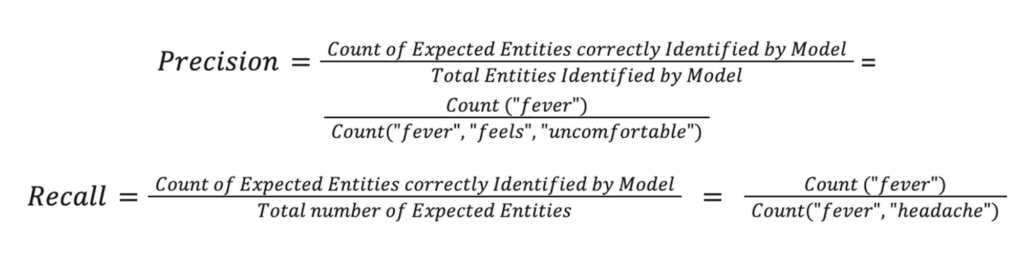
Thus,

Experimentation Results
The following table captures the results of the above experiments on Apollo24|7’s internal datasets.
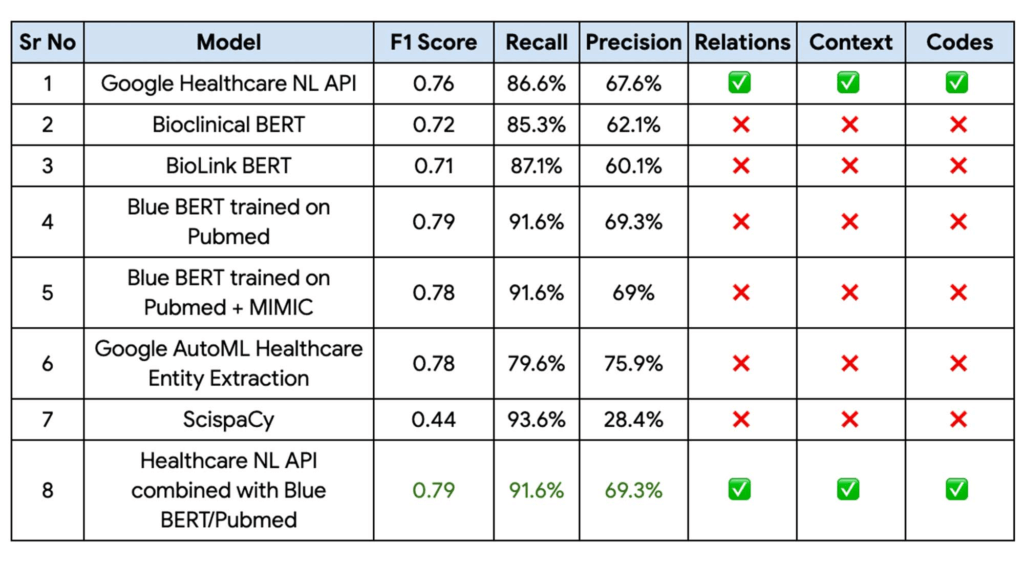
Finally, the Blue BERT model trained on the Pubmed dataset had the best performance metrics with a 81% improvement on Apollo 24|7’s baseline mode with the Healthcare Natural Language API providing the context, relationships, and codes. This performance could be further improved by implementing an ensemble of these two models.
“With the Blue BERT model giving the best performance for entity extraction on Vertex AI and the Healthcare NL API being able to extract the relationships, certainty assessments etc, we finally decided to go with an ensemble of these 2 approaches,“ Abdussamad added.
Fast track end-to-end deployment with Google Cloud AI Services (AIS)
Google AIS (Professional Services Organization) helped Apollo24|7 to build the key blocks of the CDSS system.
The partnership between Google Cloud and Apollo 24|7 is just one of the latest examples of how we’re providing AI-powered solutions to solve complex problems to help organizations drive the desired outcomes. To learn more about Google Cloud’s AI services, visit our AI & ML Products page, and to learn more about Google Cloud solutions for health care, explore our Google Cloud Healthcare Data Engine page.
Acknowledgements
We’d like to give special thanks to Nitin Aggarwal, Gopala Dhar and Kartik Chaudhary for their support and guidance throughout the project. We are also thankful to Manisha Yadav, Santosh Gadgei and Vasantha Kumar for implementing the GCP infrastructure. We are grateful to the Apollo team (Chaitanya Bharadwaj, Abdussamad GM, Lavish M, Dinesh Singamsetty, Anmol Singh and Prithwiraj) and our partner team from HCL/Wipro (Durga Tulluru and Praful Turanur) who partnered with us in delivering this successful project. Special thanks to the Cloud Healthcare NLP API team (Donny Cheung, Amirhossein Simjour, and Kalyan Pamarthy).
VCP Peering and Private Endpoints on Vertex AI to Better Security and Predictions in Near Real-time
4499
Of your peers have already read this article.
2:00 Minutes
The most insightful time you'll spend today!
One of the biggest challenges when serving machine learning models is delivering predictions in near real-time. Whether you’re a retailer generating recommendations for users shopping on your site, or a food service company estimating delivery time, being able to serve results with low latency is crucial. That’s why we’re excited to announce Private Endpoints on Vertex AI, a new feature in Vertex Predictions. Through VPC Peering, you can set up a private connection to talk to your endpoint without your data ever traversing the public internet, resulting in increased security and lower latency for online predictions.
Configuring VPC Network Peering
Before you make use of a Private Endpoint, you’ll first need to create connections between your VPC (Virtual Private Cloud) network and Vertex AI. A VPC network is a global resource that consists of regional virtual subnetworks, known as subnets, in data centers, all connected by a global network. You can think of a VPC network the same way you’d think of a physical network, except that it’s virtualized within GCP. If you’re new to cloud networking and would like to learn more, check out this introductory video on VPCs.
With VPC Network Peering, you can connect internal IP addresses across two VPC networks, regardless of whether they belong to the same project or the same organization. As a result, all traffic stays within Google’s network.
Deploying Models with Vertex Predictions
Vertex Predictions is a serverless way to serve machine learning models. You can host your model in the cloud and make predictions through a REST API. If your use case requires online predictions, you’ll need to deploy your model to an endpoint. Deploying a model to an endpoint associates physical resources with the model so it can serve predictions with low latency.
When deploying a model to an endpoint, you can specify details such as the machine type, and parameters for autoscaling. Additionally, you now have the option to create a Private Endpoint. Because your data never traverses the public internet, Private Endpoints offer security benefits in addition to reducing the time your system takes to serve the prediction when it receives the request. The overhead introduced by Private Endpoints is minimal, achieving performance nearly identical to DIY serving on GKE or GCE. There is also no payload size limit for models deployed on the private endpoint.
Creating a Private Endpoint on Vertex AI is simple.
In the Models section of the Cloud console, select the model resource you want to deploy.
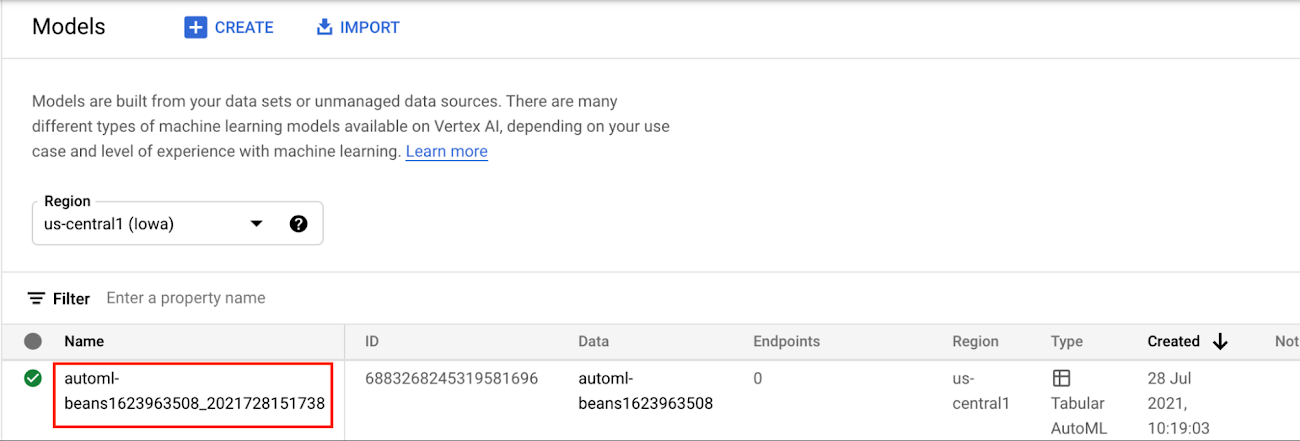
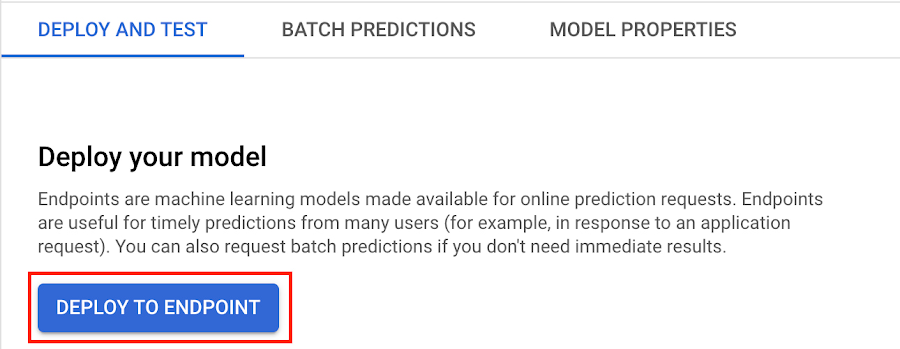
Next, select DEPLOY TO ENDPOINT
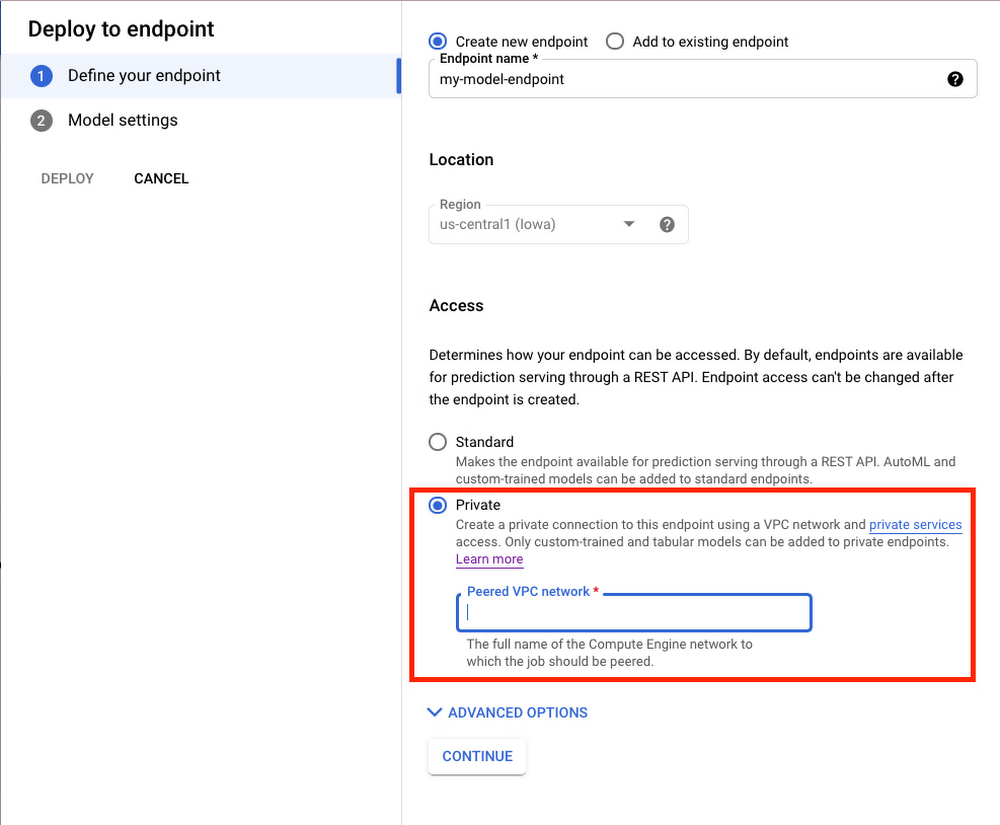
In the window on the right hand side of the console, navigate to the Access section and select Private. You’ll need to add the full name of the VPC network for which your deployment should be peered.
Note that many other managed services on GCP support VPC peering, such as Vertex Training, Cloud SQL, and Firestore. Endpoints is the latest to join that list.
What’s Next?
Now you know the basics of VPC Peering and how to use Private Endpoints on Vertex AI. If you want to learn more about configuring VPCs, check out this overview guide. And if you’re interested to learn more about how to use Vertex AI to support your ML workflow, check out this introductory video. Now it’s time for you to deploy your own ML model to a Private Endpoint for super speedy predictions!
More Relevant Stories for Your Company

Geospatial Data for Business Apps Drive Sustainable and Accurate Decision-making
Organizations that collect geospatial data can use that information to understand their operations, help make better business decisions, and power innovation. Traditionally, organizations have required deep GIS expertise and tooling in order to deliver geospatial insights. In this post, we outline some ways that geospatial data can be used in

AI-powered Business Messages for Timely, Engaging and Helpful Conversations with Customers
Over the last two years, we’ve seen a significant uptick in the number of people using messaging to connect with businesses. Whether it was checking hours of operation, verifying what was in stock, or scheduling a pick-up, the pandemic caused a significant shift in consumer behavior. 45% of users are


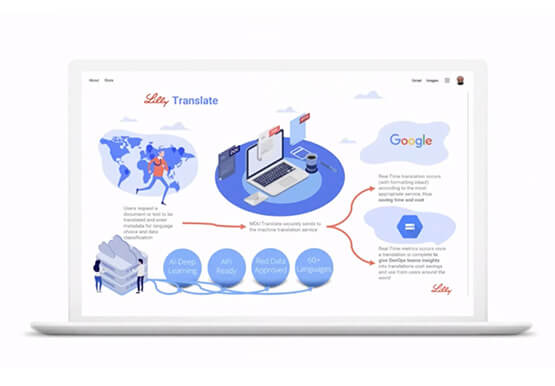

Eli Lilly’s Custom-built Translation Service Leverages Google’s Translation Engine
Eli Lilly leverages Google Cloud's machine translation to globalize content to serve their multilingual employees. Watch the video to learn how the healthcare company built an in-house solution powered by Google Cloud APIs to address the challenge of translating multilingual content at scale. Also explore Google's innovations and investments into
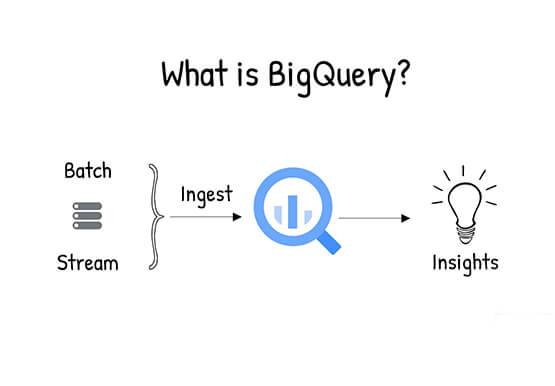
What is BigQuery?
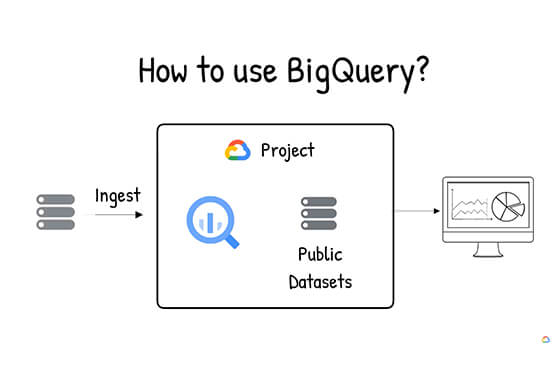
BigQuery is Google Cloud's enterprise data warehouse designed to help you ingest, store, analyze, and visualize big data with ease. Organizations rely on data warehouses to aggregate data from disparate sources, process it, and make it readily available for data analysis that supports their strategic decision-making. You can ingest data
