





Speeding up migrations to Google Cloud with migVisor by EPAM

3099
Of your peers have already read this article.
2:30 Minutes
The most insightful time you'll spend today!
Application modernization is quickly becoming one of the pillars of successful digital transformation and cloud migration initiatives. Many organizations are becoming aware of the dramatic benefits that can be achieved by moving legacy, on-premises apps and databases into cloud native infrastructure and services, such as reduced Total Cost of Ownership (TCO), elimination of expensive commercial software licenses, and improved performance, scalability, security and availability.
The complexity of applications and databases to a cloud-centric architecture requires a rapid, accurate, and customized assessment of modernization potential and identification of challenges. Addressing business and functional drivers, TCO calculations, uncovering technological challenges and cross-platform incompatibilities, preparation of migration, and rollback plans can be essential to the success and outcome of the migration.
These cloud migration initiatives are often divided into three high-level phases:
- Discovery: identifying and cataloging the source inventory. Output is usually an inventory of source apps, databases, servers, networking, storage, etc. The discovery of existing assets within a data center is usually straightforward and can often be highly automated.
- Pre-migration readiness: the planning phase. This includes the analysis of the current portfolio of the databases and applications for migration readiness, determining the target architecture, identifying technological challenges or incompatibilities, calculating TCO, and preparing detailed migration plans.
- Migration execution: where the rubber hits the road. During this phase of the migration process, database schemas are actively converted, the application data access layer is refactored, data is replicated from source to target, often in real-time, and the application is deployed in its determined compute platform(s).
Successful evaluation and planning phase as part of the pre-migration readiness phase can bolster confidence in investment towards modernization. Skipping or inaccurately completing the pre-migration phase can lead to a costly and sub-optimal result. Relying on manual pre-migration assessments can lead to long migration timelines, reduced success rates and poor confidence in the post-migration state, increased risk and total migration cost.
Some of the commonly asked question during pre-migration include:
- How compatible are my source databases, which are often commercial and proprietary in nature, with their open-source cloud-native alternatives? For example, how compatible are my Oracle workloads and usage patterns with Cloud SQL for PostgreSQL?
- What’s my degree of vendor lock-in with my current technology stack? Are proprietary features and capabilities being used that are incompatible with open-source database technologies?
- How tightly-coupled are my applications with my current database engine technology? Can my applications be deployed as-is, refactored for cloud readiness with ease, or will it be a big undertaking?
- How much effort will my migration require? How expensive will it be? What will be my run-rate in Google Cloud post-migration and my ROI?
- Can we identify quick-win applications and databases to start with?
There is a direct association between the accuracy and speed of the pre-migration phase and the outcome of the migration itself. The faster and more accurately organizations complete the required pre-migration analysis, the more cost efficient and successful the migration itself will usually be.
EPAM Systems, Inc., a leader in digital transformation, worked with Google Cloud as a preferred partner to accelerate cloud migrations beginning with pre-migration assessments. Leveraging EPAM’s migVisor for Google Cloud—a unique pre-migration accelerator that automates the pre-migration process—and EPAM’s consulting and support services, organizations can quickly generate a cloud migration roadmap for rapid and systematic pre-migration analysis. This approach has resulted in the completion of thousands of database assessments for hundreds of customers.
migVisor is agentless, non-intrusive, and hosted in the EPAM cloud. migVisor seamlessly connects to your source databases and runs SQL queries to ascertain the database configuration, code, schema objects and infrastructure setup. Scanning of source databases is done rapidly and without interruption to production workloads.
migVisor prepares customers to land applications in Google Cloud and its managed suite of databases services and platforms such as Cloud SQL, bare metal hosting, Spanner and Cloud Bigtable. migVisor supports re-hosting (lift-and-shift), re-platforming, and re-factoring.
“EPAM’s recent application assessment update to its migration tooling system, migVisor, will bring a new level of transparency to the entire application and database modernization process”, said Dan Sandlin, Google Cloud Data GTM Director at Google Cloud. “This enables organizations to make the most of digital technologies and provides a clear IT ecosystem transformation that allows our customers to build a flexible foundation for future innovation.”
Previously, migVisor focused on assessments of the source databases and the compatibility of customers’ existing database portfolio with cloud-centric database technologies. Coming this quarter, migVisor adds support for application assessments, augmenting its existing and class-leading capabilities in the database space.
The addition of application modernization assessment functionality in migVisor, combined with EPAM’s certification and specialization in Google Cloud Data Management and hands-on engineering experience, strengthens EPAM’s position as a leader for large-scale digital transformation projects and migVisor as a trusted product for cloud migration assessments to Google Cloud customers. EPAM provides customers an end-to-end solution for faster and more cost-effective migrations. Assessments that used to take weeks can now be completed in mere days.
Within minutes of registering for an account, anyone can start using migVisor by EPAM to automatically assess applications and application code. Visit the migVisor page to learn more and sign up for your account.
Bigbasket: Delivering Groceries Across 25 Cities in India

7332
Of your peers have already read this article.
1:30 Minutes
The most insightful time you'll spend today!
When Bigbasket was founded in December 2011, it guaranteed to deliver goods within a one-hour delivery slot of its customers’ choosing or it would refund them 10 percent of their orders. The company also introduced an express service, delivering groceries within 90 minutes of an order being placed.
Bigbasket needed a mapping platform that could help it meet its delivery times, and offer a familiar interface to customers. MediaAgility, a digital consulting company, recommended Google Maps Platform to Bigbasket.
When customers use the Bigbasket mobile app to place orders, they select their locations on a Google Map. The prices and availability of groceries varies according to location, so a customer’s location determines the cost of the order and what can be ordered.
Google Maps Platform Results
- Bigbasket handles more than one million orders per month, and delivers in more than two dozen cities in India
- Bigbasket now has more than four million customers
- Orders are delivered on time, increasing customer loyalty
It is also used to determine driver routes. Bigbasket used the Maps Javascript API to build a web-based app for the company’s backend that tracks all orders and delivery progress. Dispatchers use the Directions API to match drivers with orders and customers, and the Distance Matrix API to get estimate the time of arrival for deliveries. As dispatchers track the progress of deliveries on the map, they can tweak routes as necessary.
“We’ve built Bigbasket from the ground up using Google Maps Platform. It makes sure we have the right customer locations and deliver to them on time. We couldn’t have started Bigbasket without Google Maps. It helps us to be fast and efficient, and make sure our customers get what they’ve ordered quickly,” said Pramod Jajoo, Chief Technology Officer, Bigbasket
How Eventrac and Workflows Integration Helps Implement Hybrid Architecture in Google Cloud

6562
Of your peers have already read this article.
3:00 Minutes
The most insightful time you'll spend today!
I previously talked about Eventarc for choreographed (event-driven) Cloud Run services and introduced Workflows for orchestrated services.
Eventarc and Workflows are very useful in strictly choreographed or orchestrated architectures. However, you sometimes need a hybrid architecture that combines choreography and orchestration.
For example, imagine a use case where a message to a Pub/Sub topic triggers an automated infrastructure workflow or where a file upload to a Cloud Storage bucket triggers an image processing workflow. In these use cases, the trigger is an event but the actual work is done as an orchestrated workflow.
How do you implement these hybrid architectures in Google Cloud? The answer lies in Eventarc and Workflows integration.
Eventarc triggers
To recap, an Eventarc trigger enables you to read events from Google Cloud sources via Audit Logs and custom sources via Pub/Sub and direct them to Cloud Run services:

One limitation of Eventarc is that it currently only supports Cloud Run as targets. This will change in the future with more supported event targets. It’d be nice to have a future Eventarc trigger to route events from different sources to Workflows directly.
In absence of such a Workflows enabled trigger today, you need to do a little bit of work to connect Eventarc to Workflows. Specifically, you need to use a Cloud Run service as a proxy in the middle to execute the workflow.
Let’s take a look at a couple of concrete examples.
Eventarc Pub/Sub + Workflows integration
In the first example, imagine you want a Pub/Sub message to trigger a workflow.
Define and deploy a workflow
First, define a workflow that you want to execute. Here’s a sample workflows.yaml that simply decodes and logs the Pub/Sub message body:
main:params: [args]steps:- init:assign:- headers: ${args.headers}- body: ${args.body}...- pubSubMessageStep:call: sys.logargs:text: ${"Decoded Pub/Sub message data is " + text.decode(base64.decode(args.body.message.data))}severity: INFODeploy the workflow with a single command:gcloud workflows deploy ${WORKFLOW_NAME} --source=workflow.yaml --location=${REGION}
Deploy a Cloud Run service to execute the workflow
Next, you need a Cloud Run service to execute this workflow. Workflows has an execution API and client libraries that you can use for your favorite language. Here’s an example of the execution code from a Node app.js file. It simply passes the received HTTP request headers and body to the workflow and executes it:
const execResponse = await client.createExecution({parent: client.workflowPath(GOOGLE_CLOUD_PROJECT, WORKFLOW_REGION, WORKFLOW_NAME),execution: {argument: JSON.stringify({headers: req.headers, body: req.body})}});
Deploy the Cloud Run service with the Workflows name and region passed as environment variables:
gcloud run deploy ${SERVICE_NAME} \--image gcr.io/${PROJECT_ID}/${SERVICE_NAME} \--region=${REGION} \--allow-unauthenticated \--update-env-vars GOOGLE_CLOUD_PROJECT=${PROJECT_ID},WORKFLOW_REGION=${REGION},WORKFLOW_NAME=${WORKFLOW_NAME}
Connect a Pub/Sub topic to the Cloud Run service
With Cloud Run and Workflows connected, the next step is to connect a Pub/Sub topic to the Cloud Run service by creating an Eventarc Pub/Sub trigger:
gcloud eventarc triggers create ${SERVICE_NAME} \--destination-run-service=${SERVICE_NAME} \--destination-run-region=${REGION} \--location=${REGION} \--event-filters="type=google.cloud.pubsub.topic.v1.messagePublished"
This creates a Pub/Sub topic under the covers that you can access with:
export TOPIC_ID=$(basename $(gcloud eventarc triggers describe ${SERVICE_NAME} --format='value(transport.pubsub.topic)'))
Trigger the workflow
Now that all the wiring is done, you can trigger the workflow by simply sending a Pub/Sub message to the topic created by Eventarc:
gcloud pubsub topics publish ${TOPIC_ID} --message="Hello there"
In a few seconds, you should see the message in Workflows logs, confirming that the Pub/Sub message triggered the execution of the workflow:

Eventarc Audit Log-Storage + Workflows integration
In the second example, imagine you want a file creation event in a Cloud Storage bucket to trigger a workflow. The steps are similar to the Pub/Sub example with a few differences.
Define and deploy a workflow
As an example, you can use this workflow.yaml that logs the bucket and file names:
main:params: [args]steps:...- log:call: sys.logargs:text: ${"Workflows received event from bucket " + bucket + " for file " + file}severity: INFO
Deploy a Cloud Run service to execute the workflow
In the Cloud Run service, you read the CloudEvent from Eventarc and extract the bucket and file name in app.js using the CloudEvent SDK and the Google Event library:
const cloudEvent = HTTP.toEvent({ headers: req.headers, body: req.body });//"protoPayload" : {"resourceName":"projects/_/buckets/events-atamel-images-input/objects/atamel.jpg}";const logEntryData = toLogEntryData(cloudEvent.data);const tokens = logEntryData.protoPayload.resourceName.split('/');const bucket = tokens[3]
Executing the workflow is similar to the Pub/Sub example, except you don’t pass in the whole HTTP request but rather just the bucket and file name to the workflow:
const execResponse = await client.createExecution({parent: client.workflowPath(GOOGLE_CLOUD_PROJECT, WORKFLOW_REGION, WORKFLOW_NAME),execution: {argument: JSON.stringify({bucket: bucket, file: file})}});
Connect Cloud Storage events to the Cloud Run service
To connect Cloud Storage events to the Cloud Run service, create an Eventarc Audit Logs trigger with the service and method names for Cloud Storage:
gcloud eventarc triggers create ${SERVICE_NAME} \--destination-run-service=${SERVICE_NAME} \--destination-run-region=${REGION} \--location=${REGION} \--event-filters="type=google.cloud.audit.log.v1.written" \--event-filters="serviceName=storage.googleapis.com" \--event-filters="methodName=storage.objects.create" \--service-account=${PROJECT_NUMBER}-compute@developer.gserviceaccount.com
Trigger the workflow
Finally, you can trigger the workflow by creating and uploading a file to the bucket:
echo "Hello World" > random.txtgsutil cp random.txt gs://${BUCKET}/random.txt
In a few seconds, you should see the workflow log the bucket and object name.
Conclusion
In this blog post, I showed you how to trigger a workflow with two different event types from Eventarc. It’s certainly possible to do the opposite, namely, trigger a Cloud Run service via Eventarc with a Pub/Sub message (see connector_publish_pubsub.workflows.yaml) from Workflows or a file upload to a bucket from Workflows.
All the code mentioned in this blog post is in eventarc-workflows-integration. Feel free to reach out to me on Twitter @meteatamel for any questions or feedback.
Transforming Businesses with Google Distributed Cloud Edge Appliance: A Look at Real-World Use Cases

2543
Of your peers have already read this article.
4:30 Minutes
The most insightful time you'll spend today!
While many organizations are driving digital transformation by migrating to the cloud, there are some industries, geographies, and use cases that require a different approach to cloud modernization. Regulated industries such as healthcare, insurance, pharmaceutical, energy, telecommunication, and banking have stringent data residency and sovereignty requirements. Other industries need to meet local data processing requirements, while others require real-time data processing with sub-millisecond latencies, for example to detect defects on manufacturing lines. These use cases demand a combination of edge, on-premises and cloud services for their infrastructure.
With these requirements in mind, Google Cloud launched Google Distributed Cloud powered by Anthos to extend the power of Google Cloud infrastructure and services to the edge (or closer). The underlying infrastructure for this service comes in two variants: a 42U rack filled with compute, storage, and networking devices called Google Distributed Cloud Edge Rack and a 1U appliance called Google Distributed Cloud Edge Appliance.
In this blog post, we discuss the Google Distributed Cloud Edge Appliance and how manufacturing, retail, and automotive industry verticals can use it to address common use cases.
How the appliance works
But first, let’s talk about the Google Distributed Cloud Edge Appliance itself.
Google Distributed Cloud Edge Appliances comprises two components: (1) Distributed Cloud Edge infrastructure and (2) the Distributed Cloud Edge service.
The Google Distributed Cloud Edge service runs on Google Cloud and serves as a control plane for the nodes and clusters running on your appliance. In order to perform remote management of the appliance and to collect metrics, the Distributed Cloud Edge service must be connected to Google Cloud at all times, allowing you to manage your workloads on the edge hardware through the Google Cloud Console. For customers who can’t be connected at all times for data residency or sovereignty reasons, we highly recommend that the appliance be connected to the cloud at least once a month to allow for needed security patches and updates.
Google Distributed Cloud Edge Appliances come with built-in network ports that provide connectivity to the control plane via the internet, Cloud VPN, or Dedicated Interconnect, and to your on-prem network. Each Google Distributed Cloud Edge Appliance is homed to a specific Google Cloud region but it is designed to also use any public Google Cloud endpoint to communicate with the control plane in Google Cloud, allowing you to move these appliances between different geographic locations.
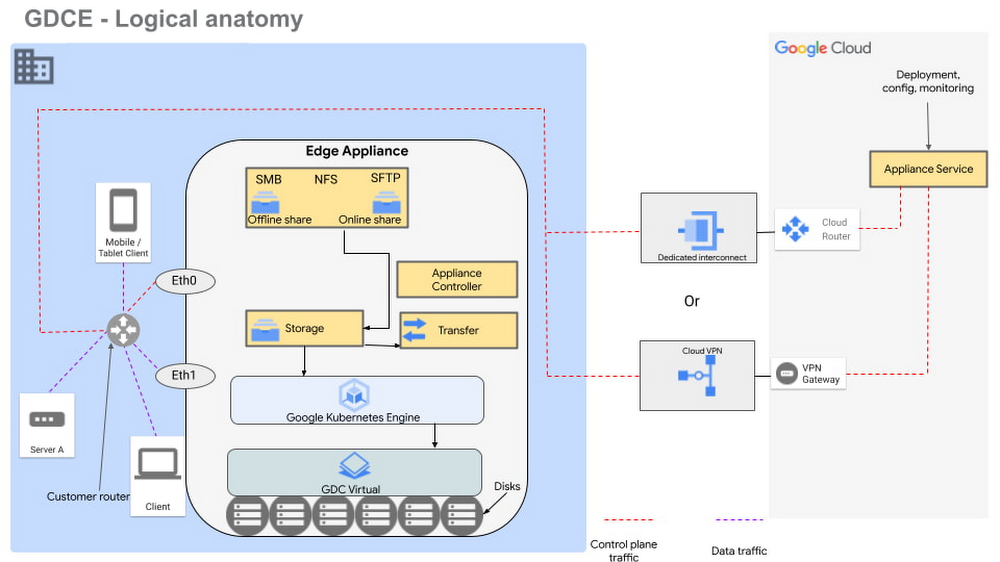
Figure 1 – Logical design of Google Distributed Cloud Edge Appliance
There are two NFS shares on each appliance; one is offline, meaning it does not transfer data to Google Cloud, and the other is online, meaning data saved to that share is synced to Cloud Storage on Google Cloud for further processing. The appliance supports Server Message Block (SMB) and Secure File Transfer Protocols (SFTP) for communication.
Each Google Distributed Cloud Edge Appliance runs Google Distributed Cloud Virtual, enabling you to build a single-node Kubernetes cluster with access to the underlying file system of the appliance. This allows you to build containerized applications on the underlying appliance hardware to address use cases in the following verticals.
Vertical use cases
Now that you understand how Google Cloud Edge Appliance is configured, let’s consider some of the industry use cases where it can provide unique value.
Manufacturing
In the manufacturing industry, quality control and safety is a crucial factor. Businesses need to ensure products are manufactured to the highest standards to remain competitive in their markets, to retain customers, and to keep factory workers safe. To do this, manufacturers need real-time data about the products being manufactured on the production lines, ensuring quality control and gaining a real-time view of where people are on the factory floor.
In manufacturing environments, Google Distributed Cloud Edge Appliance can be used to detect hazards or manufacturing defects in real-time. Figure 1 is a reference architecture for a hazard detection solution running off a Google Distributed Cloud Edge Appliance on a factory floor.
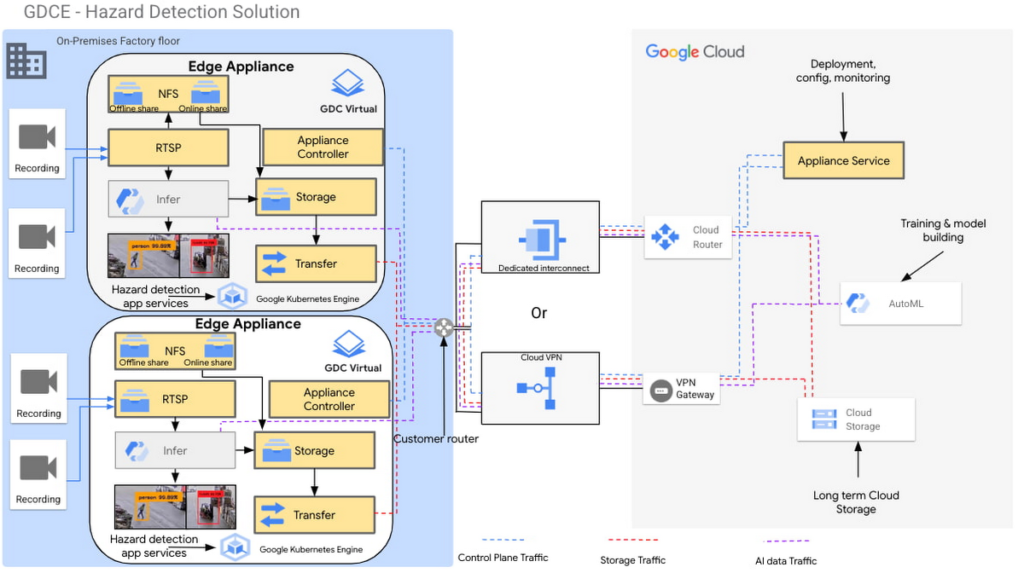
Figure 2 – Hazard detection architecture using Google Distributed Cloud Edge Appliance
In this architecture, cameras on the factory floor stream live video into the Google Distributed Cloud Edge Appliance. Depending on the number of cameras and appliances, cameras could be split or mapped to different appliances. This architecture makes it possible to initially transfer video data to Google Cloud using an online NFS share. Once in Google Cloud, you can use AutoML to train and build models that can be used as part of the hazard detection solution.
With these trained models, the cameras can stream video data into the appliance using the real-time streaming protocol (RTSP). You can then use AutoML inference to analyze the real-time video streaming data.
For example, in this reference architecture, if an individual comes too close to the fork lift, a function is triggered by the microservices running on the edge appliance that pushes a notification either to a messaging service, or to an enterprise resource planning tool. This alerts factory managers to factory floor hazards in real time so they can take corrective action.
You can also review messages and videos later on for preventive planning purposes, or push streamed videos to Cloud Storage for archive, to use the appliance’s storage space more efficiently.
Data transfers to Google Cloud can be done over Google Cloud Dedicated Interconnect, or VPN between the region and your site. This connectivity also allows you to send the appliance’s control-plane network traffic to the region.
You could also use the reference architecture in figure 2 for a product anomaly detection solution running off a Google Distributed Cloud Edge Appliance on a factory floor or manufacturing line. In this instance, machine learning models are trained to detect anomalies on finished products before final packaging.
Retail
In the retail industry, the Google Distributed Cloud Edge Appliance reference architecture in Figure 2 enables a number of transformative capabilities for retail operations, including:
- contactless checkout
- product scans
- mobile-scan-bag
- cashierless checkout
- unattended retail shops
- visual check-out monitoring
It does all this within a retailer’s facilities with the low latency and high throughput you need to process data locally, so you can obtain actionable insights from your data.
Or, you could use Google Distributed Cloud Edge Appliance at the edge to overhaul store management operations, for example, monitoring store occupancy, queue depth and wait times, detecting slips and falls and out-of-stock items, or monitoring inventory compliance.
Automotive
Advanced Driver Assistance Systems (ADAS) are becoming standard in modern automobiles. To successfully build and roll out continued improvements around ADAS, the automotive industry continues to run extensive tests on ADAS systems that are built into the vehicles they manufacture. Automotive companies can use Google Distributed Cloud Edge Appliance to modernize and transform how they collect data for the ADAS systems they’re developing. For example, test vehicles contain several different sensors that generate data, which can be quickly offloaded to an in-vehicle edge appliance.
Then, within the appliance, you can deploy containerized workloads to transform sensor data, infer videos and images and detect events. This alleviates the need for operators to label all events and allows development teams to quickly gather insights from the tests.
If you want to focus on a subset of information, you can transfer specific data or the entire data payload into Transfer Appliances when vehicles return to the development center. All these systems, i.e., transfer appliances and edge appliances, work in tandem to reduce local system administration and operational costs through a cloud-based control plane.
This approach allows you to deploy, track, monitor and configure services that are running in data centers or at edge locations from the cloud. From the factories, the data can be moved offline or online into Google Cloud where you can use different storage classes and processing capabilities to further process or store the data. You can also deploy newly trained models and business rules back to the edge appliances. In all this, data transfers between the cloud and the appliance are performed using end-to-end encryption, to give you control over your data.
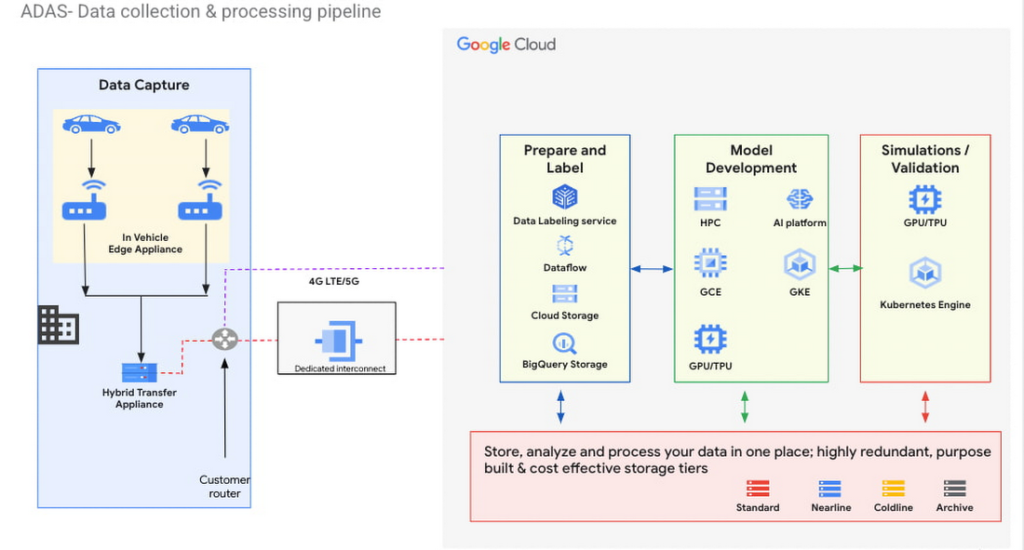
Figure 3 – ADAS implementation with a Google Distributed Cloud Edge Appliance
The reference architecture in Figure 3 shows an ADAS implementation where Google Distributed Cloud Edge Appliance is being used to gather, process and transform data at the edge in the automotive industry. It could also be applied to data capture and processing use cases in manned and unmanned vehicles. Notice how the Distributed Edge Appliance extends to the cloud by sending data there, or using other cloud-based services.
We’re just getting started
These are just a few of the use cases where organizations in the manufacturing, retail and automotive industries are using Google Distributed Cloud Edge Appliance with modern and containerized applications that are powered by Google Cloud. If you’re interested in bringing the power of Google Cloud to the edge using Google Distributed Cloud Edge Appliances to transform your business, reach out to us or any of our accredited partners.
3132
Of your peers have already watched this video.
12:00 Minutes
The most insightful time you'll spend today!
How Google Cloud Helps Banks and FinTech Create Cutting-edge, Digital Banking Products
Today’s customers demand sophisticated and secure banking platforms to keep up with the digital era. Banking and financial institutions spend time and investments either modernizing traditional banking products and solutions or building new cutting-edge products from the scratch. Money transfer solutions, bill payments and rewards, credit cards facilities, retail payments, loans services and more, banking products have a huge potential for leveraging Banking-as-a-service model which is a modular, cloud-native digital banking architecture that offers financial products and services via APIs and micro services. So, what typically goes under the sheets of a modern banking app that can easily build and adapt features in a matter of days and not months to keep up with the demand?
Watch the video to understand the role played by Google Cloud and its secure and scalable architecture for building digital banking products and services for today’s customers!
Announcing reCAPTCHA Enterprise’s Mobile SDK to Help Protect iOS, Android apps

4218
Of your peers have already read this article.
2:30 Minutes
The most insightful time you'll spend today!
reCAPTCHA Enterprise is Google’s online fraud detection service that leverages more than a decade of experience defending the internet. reCAPTCHA Enterprise can be used to prevent fraud and attacks perpetrated by scripts, bot software, and humans. When installed inside a mobile app at the point of action, such as login, purchase, or account creation, reCAPTCHA Enterprise can block fake users and bots while allowing legitimate users to proceed.
To provide more complete coverage for native mobile iOS and Android applications, we’re announcing the general availability of the reCAPTCHA Enterprise Mobile SDK. Designed with digital-first and mobile-first organizations in mind, the new Mobile SDK fully integrates reCAPTCHA Enterprise’s frictionless experience on end-users’ mobile devices.
Why should I use the Mobile SDK?
Unlike most web applications, iOS and Android apps run on physical devices that can provide a wealth of device telemetry to help identify fraud and bot activity. By combining both device and network signals, the new mobile SDK can better protect native mobile applications from bot attacks while unlocking the full potential of reCAPTCHA Enterprise. It provides:
- Frictionless customer experience — no picking fire hydrants from a grid
- Easy integration to your native mobile app with support for popular frameworks like Cocoa Pods and Swift Package Manager
- A regularly-updated device threat model to help stay ahead of attack evolution
Protecting against fraud across all your channels
Customers will be able to leverage the new mobile SDK to implement native iOS and Android protection against the OWASP Top 10 automated attacks common on the internet, which include fraudulent account creation, financial hijacking, and credential stuffing. This is particularly important for mobile workforces and end users who use a mobile app to access products and services. Since mobile traffic surpasses web traffic in many industries, it’s even more important to implement a comprehensive mobile app protection strategy to protect against the most prevalent attacks.
Integrating the new Mobile SDK
If you’re interested in learning more about how to integrate the new Mobile SDK, check out the documentation for iOS and Android. Mobile and Web integrations leverage the same easy to understand pricing for Assessments, found here.
More Relevant Stories for Your Company
Google Cloud Helps LiveRamp Capture, Manage, Process and Visualize Data at Scale
Editor’s note: Today we’re hearing from Sagar Batchu, Director of Engineering at LiveRamp. He shares how Google Cloud helped LiveRamp modernize its data analytics infrastructure to simplify its operations, lower support and infrastructure costs and enable its customers to connect, control, and activate customer data safely and securely. LiveRamp is a data

Google Maps Platform Helps BungkusIT Fulfil its Promise of Deliveries in One Hour!
Editor’s note: Today's post is written by Hatim M, Chief Commercial Officer at BungkusIT. The on-demand delivery service delivers packages within the hour for one million customers across Malaysia and uses Google Maps Platform to create a seamless end-to-end delivery experience for its customers. Imagine it's the end of a

GKE Feature Guide: 5 Ways to Optimize Your Kubernetes Clusters
In this post, we'll be discussing 5 features in GKE you can use to optimize your clusters today. To get started with testing these in GKE, check out our interactive tutorials for getting started with standard and autopilot clusters. If you find value from running workloads on Kubernetes clusters in your organization, chances are

Building Unique Customer Experiences with Speed & Scale: Sprinklr & Google Cloud
Enterprises are increasingly seeking out technologies that help them create unique experiences for customers with speed and at scale. At the same time, customers want flexibility when deciding where to manage their enterprise data, particularly when it comes to business-critical applications. That’s why I’m thrilled that Sprinklr, the unified customer
