





Speeding Up Digital Transformation with Industry Solutions

2658
Of your peers have already read this article.
2:30 Minutes
The most insightful time you'll spend today!
Most large enterprises started with their own data centers and developed in-house solutions to meet their specific business needs, regulations, and industry specifications. These solutions were based on traditional applications from legacy vendors like Oracle and Microsoft — or even mainframes — and from key technology providers like SAP and VMware. During the last decade, organizations started their digital transformation journey by migrating their IT infrastructure, applications, and data to the cloud to reduce operating costs and gain efficiencies as their needs scaled.
The next step in the journey was to take advantage of cloud-based data analytics, services and scalability to drive business growth and revenue. Rather than offer generic “industry clouds” which require multi-year IT deployments and significant customization, Google Cloud has responded to customer needs by developing production-ready industry solutions that address specific use cases with repeatability across organizations.
These industry solutions are grounded in Google Cloud’s differentiated capabilities, including AI, ML, and data analytics. With these, you can dramatically reduce implementation time and realize value from the cloud more quickly with deep insights into your customers and more efficient interactions with your suppliers and partners.
Here are some highlights from the That Digital Show Podcast where Umesh Vemuri, VP of Global Strategic Customers and Industries at Google Cloud, discusses his industry strategy.
Why Google Cloud solutions?
“We are uniquely positioned to help enterprises with solutions based on our deep understanding of customer needs that are supported by our technologies. There are three examples that come to mind.
The first is our understanding of the consumer from the standpoint of running an ecommerce platform. We have the solutions to run digital platforms at a very large scale, including the engineering practices we bring to support organizations during important high traffic events like Black Friday and Cyber Monday.
The second example deals with media and entertainment as a whole. We operate the world’s largest streaming service and support the largest digital platforms currently out there. That means that whatever problems our media customers are experiencing, there’s a good chance we’ve already seen them and know how to deal with them.
Finally, there is our experience with AI and big data. Our leadership in deploying our AI and big data healthcare technologies has given us the experience to solve complex problems — such as techniques to support evidence-based selection, drug therapy, and molecular profiling.”
B to B to C
“Google is a B to B organization, I always like to add that we are also B to B to C, because the concern the consumer ultimately has is their experiences and the journey that they’re on. Connecting the dots between the business and the consumer experience is really critical and a real big differentiator in how we could better serve our customers.
For example, take Ford Motors. Really think about the challenges they have — traditional problems around manufacturing, core I. T. modernization and information, and how to remove costs. But then when you really think about the core of the business, how do you actually make this incredible experience for drivers of Ford vehicles? What do you want to do from an infotainment perspective? What do you want to do in speech-to-text conversion?
And suddenly your business is really a direct-to-consumer experience. Ultimately, all the infrastructure and technology is designed to provide the consumer — who’s ultimately buying that vehicle — with an amazing experience that will maintain their loyalty.
From this example, we can see this kind of linkage in every industry: from retail and e-commerce, media, and direct streaming to healthcare with direct telehealth.”
Solutions that transform the consumer experience
“The consumer’s expectations are constantly shifting and we have to be able to provide the technologies, the structure, and the solutions to our customers to be able to meet those changing expectations at that consumer level.
So first, we want to be very clear on the industry segments that we’re going to focus on and what we believe our clear differentiation will be. So we’ve focussed on ten industries including: retail, financial services, manufacturing, telecommunications, media and entertainment, healthcare and life sciences, education, government, supply chain and logistics and gaming.
Second, we really have to be very prescriptive about the solution pillars in the areas where our customers tell us we have challenges. We want to build solutions that solve not only today’s issues, but the problems of the future.
And third, in those pillars, we have to be very clear on what are the specific use cases that we think have high value for our customers. Then make these available as a catalog of actual products and production-ready solutions that we and our partners in the ecosystem provide.”
Google Cloud industry solutions focus on our top ten industries where we can provide differentiated value to organizations. Whether it’s discovery in retail, AI-enabled call centers, or automotive tools for connected cars, we are delivering production-ready solutions that are ready to implement with minimum customization.

Customer Voices: How Firms from Across Industries Leverage Google Cloud
DOWNLOAD CASE STUDY14098
Of your peers have already downloaded this article
1:30 Minutes
The most insightful time you'll spend today!
From powering everyday operations and accelerating application innovation, to providing tools for specific business needs and executing on big ideas, to advancing the security of technology solutions, companies from across industries have leveraged Google Cloud for business benefits.
Companies from across industries have turned to Google Cloud for transforming their business, modernizing their infrastructure, and gleaning intelligence from data. For instance:
- Johnson & Johnson achieved a 41% increase in search results from high-quality job applicants, significantly improving the company’s ability to quickly hire top talent.
- Sony Network Communications now processes 10 billion monthly queries faster, which advances data analysis.
- University College Dublin saw significant 6-figure savings by eliminating legacy hardware, software, and maintenance.
And there are many such examples. Read the collection of case studies to find out how companies from across industries and geographies leveraged Google Cloud for measurable business benefits and for solving complex problems.
The Unintended Consequences of Scale
3515
Of your peers have already read this article.
3:00 Minutes
The most insightful time you'll spend today!
Cloud infrastructure offers so many advantages: on-demand scalability, built-in security, and a bevy of tooling to scale your business at the speed of the Internet.
It enables companies to pursue “blitzscaling,” as Reid Hoffman calls it. Capital expenses that take years or decades to pay off are no longer required to establish global networking, compute capacity, storage resources, and application enablement tooling. By renting these assets from cloud providers, you can translate capital costs to operational costs, help your company to manage resources efficiently, keep expenses aligned with growth trajectory, and develop a portfolio of business-driving technology assets faster than would have previously been possible.
Certainly, this is the message from many founders and venture capitalists: move to the cloud, build a ton of software, scale like crazy, and win. Sounds great, right?
But history has shown us that the process is not quite this simple. Scale can be great and is a prerequisite to many of today’s most exciting business opportunities — but scale also frequently produces unintended consequences. You need to be able not only to achieve scale but also to manage it.
When scale produces bloat
To understand how unforeseen impacts can ripple out from a rapidly-scaled technology, consider the first mass-produced vehicle, the Model T. The first production model was produced in 1908, and less than two decades later, Ford had produced 15 million. This rapid growth profoundly affected urban living for decades.
Thanks to cars, fewer workers needed to live near cities or along major public transportation lines. The ease-of-access to personal transportation led to suburban population centers and, ultimately, urban sprawl. “Sub-cities” extricated homeowners from the density of urban population centers but also created a complex web of unintended consequences: new and often duplicative administrative bodies, new taxes, new zoning laws, and more intricate infrastructure projects. We are arguably still dealing with this fallout today as communities grapple with antiquated zoning laws and, in their attempts to find ways forward, often produce only more sprawl.
If your technology is in the cloud, you may be challenged with similar issues. For example, when developers build software in the cloud, many of the barriers to building software are removed. As a result, developers build a lot of software — but often without a lot of intentional design. This in turn results in companies building a large number of disparate systems and overwhelming app sprawl.
The cloud can help you proliferate technologies so quickly, in other words, that effective management and re-use of resources becomes incredibly tough.
Managing scale
Software assets are often seen as comprising the “brains” of a company — but to effectively grow, you should consider not only brains but also the digital nervous system. You need systems that connect the brains to all of the other important limbs that have to coordinate in order for your company to drive value.
One way of creating this nervous system and managing this complexity is to leverage the facade design pattern: applying an API layer that abstracts the underlying complexity of multiple systems into an elegant, reliable interface that encourages discovery and re-use of applications, functions, and other technology artifacts such as build and deployment pipelines.
For example, too many enterprises build a new digital “road” for each application that needs to authenticate or authorize users. Instead, you can leverage a facade pattern to help establish one “main road” for these purposes, encourage reuse of the road for new projects, and — with API management — monitor and control all traffic along the road. For tasks such as aligning risk and compliance operations or unifying developer onboarding functions, the distinction between reusing elegant roads and continually building new complicated ones could not be more important.
API management tools mean you can establish a single-pane-of-glass view into your network of digital roads and destinations or, if you prefer the biology metaphor, into the nervous system routes connecting your company’s software brains. This view becomes a point at which suspicious API usage patterns can be detected, reported, and handled and through which business-driving insights from legitimate traffic can be gleaned. Rather than dealing with IT sprawl, you can maintain visibility over your assets, control how they are used, roll out experimental digital products and get immediate feedback on adoption, and generate analytics to help you effectively divest from and invest in opportunities as the market demands.
More is not always better
More is not always better, and, in fact, it is sometimes worse.
It’s a time-worn sales axiom that would-be customers are more likely to make a choice when presented with two or three options rather than fifty, for example, and virtually all of us can relate to moments of “analysis paralysis” triggered by too many choices. These dynamics of choice are such that the diminishing marginal utility of each choice can detract from each option: with each choice comes a little stress, and as these stresses accumulate, customer satisfaction suffers. IT systems are no different; if developers building new connected experiences are left to their own designs, rather than encouraged with standardized resources and best practices, their work may add to complexity and customer dissatisfaction.
One need look only at the various open air markets around the world to see this point in action. They may offer many things to see but the experience is anything but efficient. The multitude of shops selling similar and duplicate items, the zigzag layout, and the expected friction from bargaining with each vendor all mean concepts such as market-wide product discovery and product inventory go out the window. If your developer experience mirrors these marketplaces, your efforts to scale are more likely to tangle up your operations than to satisfy customers.
Contrast this experience with luxury retail experiences where product areas are clearly demarcated in different retail spaces, product explanations accompany showcase items, inventory is available locally or ready to ship, clear pricing is readily available, and similar stores are intentionally anchored to strategic physical areas to encourage customer flow among them. The developer programs that cloud efforts are often meant to enable require a similar focus on luxurious experiences.
If your growth strategy creates bloat, internal developers will not use resources efficiently and your ability to share resources with external partners will likely be hamstrung. Applying API facades helps to ensure that your growing software portfolio is not a complicated maze to be navigated but rather a series of technology products for developers to leverage.
Indeed, you should think of the API itself as a product, not just a way of surfacing or connecting technology. The better the product, the more easily it can be managed, the better the experience developers will have using it, and the more control you’ll have harnessing the cloud to extend your business’s footprint.
WebGL-powered Features to Build Next-generation Mapping Experience

3458
Of your peers have already read this article.
3:00 Minutes
The most insightful time you'll spend today!
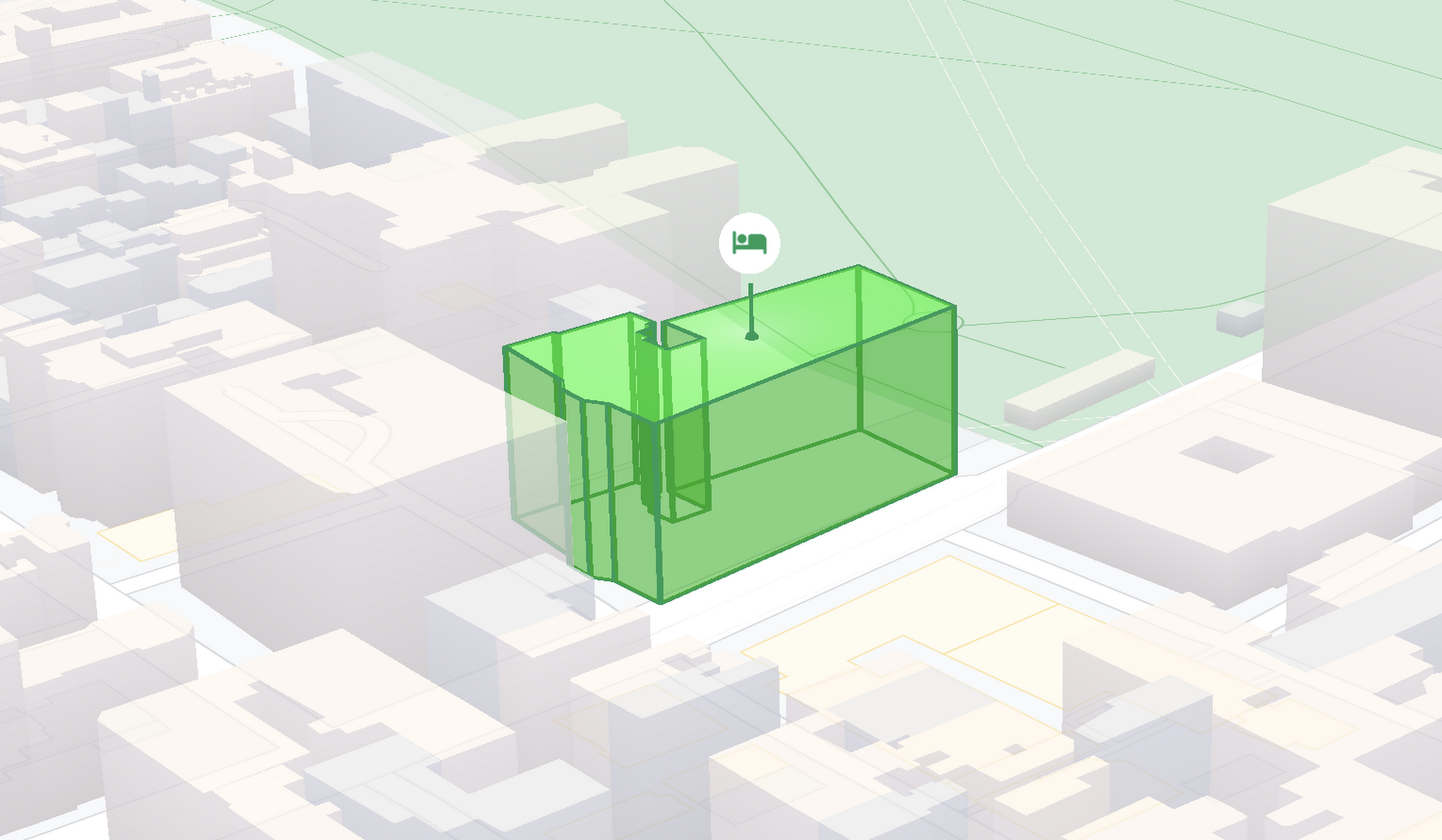
At Google I/O 2021, we announced the beta release of Tilt and Rotation, and Webgl Overlay View, which give you a fundamentally new way to build mapping experiences. You may be familiar with the existing Overlay View feature of the Maps JavaScript API that lets you render in a transparent layer that sits on top of the map. For years, developers have been using Overlay View to draw in two dimensions over the top of the map, but for as much as you can do with Overlay View, it only allows you to render on a transparent layer that effectively floats above the map.
In contrast, WebGL Overlay View gives you direct hooks into the lifecycle of the exact same WebGL rendering context we use to render the vector basemap. This means that for the first time ever, you can performantly render two and three dimensional objects directly on the map, enabling you to build experiences that were previously impossible with the Maps JavaScript API.https://www.youtube.com/embed/9eycQLef6iU?enablejsapi=1&
Today, we’re going to give you a quick overview of the new WebGL-powered features of the Maps JavaScript API, so that you have all the knowledge you need to get started creating next generation mapping experiences.
What is WebGL?
WebGL is a low-level browser API, originally authored by the Mozilla Foundation, that gives you access to the rendering and processing power of the graphics processing unit (GPU) on client devices, such as mobile phones and computers, in your web apps. On its own, the browser is not able to handle the heavy computation needed to render objects in 3D space, but using WebGL it is able to pass those processes off to be handled by the GPU, which is purpose built to handle such computations.
To learn more about WebGL, check out the documentation from the Khronos Group, the designers and maintainers of WebGL.
Requirements
To use WebGL Overlay View, you’ll need a Map ID with the vector map enabled. It’s also strongly recommended that you enable Tilt and Rotation when you create your Map ID, otherwise your map will be constrained to the default top-down view – in short, you won’t be able to move your map in three-dimensions.
To learn more about using Map IDs and the vector map, see the documentation.
Setting Tilt and Rotation
To load your map with a set tilt and rotation, you can provide a value for the `tilt` and `heading` properties when you create the map:
const mapOptions = {mapId: "15431d2b469f209e",tilt: 0,heading: 0,zoom: 17,center: {lat: -33.86957547870852,lng: 151.20832318199652}}const mapDiv = document.getElementById("map");const map = new google.maps.Map(mapDiv, mapOptions);
Tilt is specified as a number or float in degrees between 0 and 67.5, with 0 degrees being the default straight down view and 67.5 being the maximum tilt. The available maximum tilt also varies by zoom level.
The rotation is set in the heading property as a number or float between 0 and 360 degrees, where 0 is true north.
You can also change the tilt and rotation programmatically at runtime whenever you want by calling `setTilt` and `setHeading` directly on the map object. This is useful if you want to change the orientation of the map in response to events like user interactions.
map.setTilt(45);map.setHeading(180);
In addition, your users can manually control the tilt and rotation of the map by holding the <shift> key and dragging with the mouse or using the arrow keys.
For more information on Tilt and Rotation, see the documentation.
Adding WebGL Overlay View to the Map
WebGL Overlay View is made available in the Maps JavaScript API by creating an instance of `google.maps.WebglOverlayView`. Once an instance of the overlay is created, you simply need to call `setMap` on the instance to apply it to the map.
const webglOverlayView = new google.maps.WebglOverlayView;webglOverlayView.setMap(map);
To give you access to the WebGL rendering context of the map and handle any objects you want to render there, WebGL Overlay View exposes a set of five hooks into the lifecycle of the WebGL rendering context of the vector basemap.
Here’s a quick rundown:
- `onAdd` is where most of your pre-processing should be done, like fetching and creating intermediate data structures to eventually pass to the overlay. The reason to do all of that here is to ensure you don’t bog down the rendering of the map.
- `onRemove` is where you’ll want to destroy all intermediate objects, though it would be nice if you did it sooner.
- `onContextRestored` is called before the map is rendered and is where you should initialize, bind, reinitialize or rebind any WebGL state, such as shaders, GL buffer objects, etc.
- `onDraw` is where we actually render the map, as well as anything that you specify in this hook. You should try to execute the minimal set of draw calls to render your scene. If you try to do too much here you’ll bog down both the rendering of the basemap and anything you’re trying to do with WebGL, and trust me, no one wants that.
- `onContextLost` is where you’ll want to clean up any state associated with pre-existing GL state, since at this point the WebGL context will have been destroyed, so it’ll be garbage.
To implement these hooks, set them to a function, which the Maps JavaScript API will execute at the appropriate time in the WebGL rendering context lifecycle. For example:
webglOverlayView.onDraw = (gl,coordinateTransformer) => { //do somerendering }
For more information on using WebGL Overlay View and its lifecycle hooks, check out the documentation.
Creating Camera Animations
As part of the beta release of WebGL Overlay View, we’re also introducing `moveCamera`, a new integrated camera control that you can use to set the position, tilt, rotation, and zoom of the camera position simultaneously. Like `setTilt` and `setHeading`, `moveCamera` is called directly on the `Map` object.
By making successive calls to `moveCamera` in an animation loop you can also create smooth animations between camera positions. For example, here we are using the browser’s `requestAnimationFrame` API to change the tilt and rotation each frame:
const cameraOptions = {tilt: 0,heading: 0}function animateCamera () {cameraOptions.tilt += 1;cameraOptions.heading += 1;map.moveCamera(cameraOptions);}requestAnimationFrame(animateCamera);
Plus, all of these adjustments, including zoom, support floats, which means not only can you control the camera like never before, you can also do it with a high degree of precision.
For more information on `moveCamera`, see the documentation.
Give it a tryYou can try the new WebGL-powered features of the Maps JavaScript API right now by loading the API from the beta channel. We’ve got a new codelab, and documentation with all the details, as well as sample code and end-to-end example apps to help you get started. Also, be sure to check out our feature tour and travel demos to learn more and play with a real implementation of these features.
And let us know what you think by reporting through our issue tracker. We need your bug reports, your feature requests, and your feedback to help us test and improve the new WebGL-based map features.
Have fun building with the map in 3D—we can’t wait to see the amazing things you’ll build.
For more information on Google Maps Platform, visit our website.
Introducing a strong alternative to CentOS: Rocky Linux Optimized for Google Cloud

3342
Of your peers have already read this article.
3:30 Minutes
The most insightful time you'll spend today!
As CentOS 7 reaches end of life, many enterprises are considering their options for an enterprise-grade, downstream Linux distribution on which to run their production applications. Rocky Linux has emerged as a strong alternative that, like CentOS, is 100% compatible with Red Hat Enterprise Linux.
In April 2022, we announced a customer support partnership with CIQ, the official support and services partner and sponsor of Rocky Linux, as the first step in providing a best-in-class enterprise-grade supported experience for Rocky Linux on Google Cloud. Today we’re excited to announce the general availability of Rocky Linux Optimized for Google Cloud. We developed this collection of Compute Engine virtual machine images in close collaboration with CIQ so that you get optimal performance when using Rocky Linux on Compute Engine to run your CentOS workloads.
These new images contain customized variants of the Rocky Linux kernel and modules that optimize networking performance on Compute Engine infrastructure, while retaining bug-for-bug compatibility with Community Rocky Linux and Red Hat Enterprise Linux. The high bandwidth networking enabled by these customizations will be beneficial to virtually any workload, and are especially valuable for clustered workloads such as HPC (see this page for more details on configuring a VM with high bandwidth).
Going forward, we’ll collaborate with CIQ to publish both the community and Optimized for Google Cloud editions of Rocky Linux for every major release, and both sets of images will receive the latest kernel and security updates provided by CIQ and the Rocky Linux community. And of course, we’ll offer support with CIQ for both these images, per our partnership.
Rocky Linux Optimized for Google Cloud lets you take advantage of everything Compute Engine has to offer, including day-one support for our latest VM families, GPUs, and high-bandwidth networking. And for customers building for a multi-cloud deployment environment, the community Rocky images have you covered.
Starting today, Rocky Linux 8 Optimized for Google Cloud is available for all x86-based Compute Engine VM families (and soon for the new Arm-based Tau T2A), with version 9 soon to follow. Give it a try and let us know what you think.
Neo4J & Google Cloud: Graph Data in Cloud to Address Challenges in FinServ Industry

6899
Of your peers have already read this article.
3:00 Minutes
The most insightful time you'll spend today!
Over the last decade, financial service organizations have been adopting a cloud-first mindset. According to InformationWeek, lower costs and enhanced scalability were the biggest drivers for cloud adoption in financial services, and cloud-native applications allow access to the latest technology and talent, enabling adopters to rebuild transaction processing systems capable of supporting very high volumes and low latency.
Both Neo4j and Google Cloud have been using relationship-based data representations since the beginning, and we’re dedicated to using this technology to help financial services customers drive business transformation. We are excited about the prospects of financial services (FinServ) cloud systems and believe that graph data in the cloud can help solve significant challenges in the industry.
Data Challenge #1: Risk Management and Compliance
First among the top concerns for any CIO moving to the cloud is risk management and compliance. Disconnected, uncontextualized, or stale data create opportunities for fraud and financial crimes to occur. The fact is when it comes to FinServ, the question is not “if” but rather how often an attack will occur. Unfortunately, incidents have been trending upward over the last decade, and COVID has only exacerbated this reality. Financial crimes affect the bottom line both in the remediation of these crimes and in intangibles like brand value.
Add to this the complexity of international banking, which makes “compliance” a moving target. Penalties due to noncompliance are a constant concern to any FinServ organization.
The tabular representation of information with a fixed number of columns that never change prevents a description of an ever changing world with changing characteristics. Relational databases are great if the world you describe does not move fast but have limitations when data structures are highly interlinked and not homogeneous.
Neo4j Aura on Google Cloud provides a foundation for creating dynamic, futureproof, scalable applications that adhere to the security standards and protocols today’s financial services organizations require to meet the challenges of finding and preventing bad actors. This also includes enterprise scalability; reaching over 1 Billion nodes and relationships to streamline queries and provide solutions that meet regulatory and privacy compliance across geographies. Neo4j has helped some organizations save billions of USD in fraud in the first year of deployment alone.
What makes graph technology the best choice for fraud detection use cases is that the relationships between the data-points are as important as the data-points themselves. Let’s take as an example, one John Smith approaches a multi-national banking institution to manage the primary account for his new holding corporation.
While no one has any record of John R Smith Holdings LLC, the bank’s application built on graph technology understands that there are several well-known entities owned by John Smith Holdings. The application also identifies several well-known board members who bank with this institution. Due to this relationship-driven approach, the bank now understands John R Smith is not “John Smith,” who previously attempted to open an account for his holding corporation, which had no information associated with it prior to two months ago.
Data Challenge #2 Manual Processes and Inefficiencies
The ubiquity of the cloud offers an opportunity to deploy automation at unprecedented levels to tackle the errors and inefficiencies that manual processing allows to creep into processes. When data comes from disparate, perhaps legacy systems – which may have become siloed and “untouchable” over the years – further complexity arises. As an example, if someone in sales types “John Smith” into a CRM system not knowing that John R Smith is the spelling in the customer data master, it may result in two separate and potentially conflicting records. Being able to join those records together in a mastered view helps to solve this problem. In addition, low data quality equates to an increase in risk, costs, and implementation times for new systems.
Neo4j Aura on Google Cloud provides automation and artificial intelligence (AI) that reduces manual processes and the errors that accompany them. In this graph architecture each node, which can represent a person, will have labels, relationships, and properties associated with it. This allows for the use of AI which can easily understand that John Smith in the CRM is the same John R Smith in the customer master. The information contained in Neo4j can be connected bi-directionally to ensure consistency across applications and data sources.
One of the benefits of this approach is that linking information allows organizations to keep the full value of the data, rather than forcing the data into predetermined tabular representations, with the risk of losing valuable information and insights.
Data Challenge #3: Customer Engagement and Insight
Another significant concern is the high expectations today’s customers have for every interaction. End users are accustomed to predictable experiences on their digital devices, and FinServ apps are no exception. Added to this, the “Covid economy” has driven digital adoption significantly across demographics; even among customers who might traditionally have used in-person services. This also equates to increased expectations for personalized, predictable experiences with every digital interaction. We know that latency has always been a key consideration for financial trading, but a recent ComputerWeekly study showed that every financial organization should ensure their visible latency is at 10 milliseconds or less. Customers no longer accept their broadband is at fault.
Finally, blind spots in the customer journey often result in dissatisfaction, which ultimately leads to increased churn. Without gaining actionable insights from your customers, there is no room to innovate and iterate on what they are looking for in your products and services. And this translates to losing market share and competitive advantage.
The NoSQL architecture, specifically the dynamic schema and structure of Neo4j Aura gives you the ability to take charge of your data and make changes according to your development cycles or newer data models. This equates to faster builds, more comprehensive releases and a wider, richer data-set that can be contextualized and understood instantly. Graph technology is the logical choice for building a Customer 360 application. Under this approach organizations not only get valuable insight into the individual client’s behavior and patterns, but also those of their family, friends and colleagues. This allows for stronger personalization, targeted campaigns and successful execution, resulting in increased customer satisfaction and retention levels.
Graph Technology on Google Cloud

Neo4j is a recognized leader in graph database technology and the only fully integrated graph solution on Google Cloud, helping to fill a common need for Google Cloud customers. Both Neo4j and Google Cloud are invested in continuing to grow our partnership and mutual product direction.
You can find and deploy the Neo4j graph database straight from the Google Cloud marketplace, whether you want to download the software for an on-premises deployment, use the virtual machine image, or use the hosted solution, Aura on Google Cloud, the graph database-as-a-service. In any deployment, you get the same enterprise-grade scalability, reliability, and connectivity along with successful, repeatable use cases you can rely on to resolve your particular challenges and integrated billing.
For a real-world example of how graph technology can optimize financial services, you can read our Case Study with fintech Current. Current, a leading U.S. financial technology platform with over three million members, used Neo4j Aura on Google Cloud to create a personalization engine based on client relationships.
To learn more about Neo4j Aura on Google Cloud for FinServ organizations, register for our webinar on Thursday, December 16 with Jim Webber, Chief Scientist, CTO Field Ops at Neo4j and Antoine Larmanjat, Technical Director, Office of the CTO, Google Cloud.
More Relevant Stories for Your Company

Apigee Helps Bank BRI Rewrite its Digital Future and Achieve Financial Inclusion
About Bank BRI Bank Rakyat Indonesia is one of the largest banks in Indonesia and is committed to increasing financial inclusions among un-banked Indonesians. Bank BRI specializes in using modern digital banking to facilitate microfinance lending across its network of over 10,000 branches and thousands of branchless agents. Google Cloud

Quick Recap on Google Cloud: Latest News, Launches, Updates, Events and More
Want to know the latest from Google Cloud? Find it here in one handy location. Check back regularly for our newest updates, announcements, resources, events, learning opportunities, and more. Tip: Not sure where to find what you’re looking for on the Google Cloud blog? Start here: Google Cloud blog 101: Full list

Why America’s Leading Mortgage Technology Provider Runs its Business on Apigee
Black Knight is a leading provider of technology, data, and analytics to the mortgage industry, catering to both large and mid-tier banks in the United States. Over the past few decades, we tended to manage customer integrations on a case-by-case basis. Whenever a bank needed to connect with a Black Knight

Consent is a Key Component for a Successful Embedded Financial Solution: Read Why
When banks and other financial institutions make their products available via non-banks, we call that Embedded Finance. Think, for example, of a retailer offering financing for people buying goods; or a budgeting app gathering bank transactions to help you categorize and understand your spending patterns. The finance - the money
