





Recent Updates on Google Cloud EKM to Meet Customers’ Cloud Data Security

3224
Of your peers have already read this article.
2:00 Minutes
The most insightful time you'll spend today!
Google Cloud External Key Manager (Cloud EKM) lets you protect your cloud data with encryption keys that are stored and managed in a third-party key management system outside Google Cloud’s infrastructure. This allows you to achieve full separation between your encryption keys and your data stored in the cloud, making you the ultimate arbiter of access to your data. We are continuously innovating and developing the functionality of Cloud EKM, so let’s explore some recent updates we’ve made.
New functionality
Available today, we have added several much-anticipated features to Cloud EKM to help meet customer requirements:
Cloud EKM over VPC
Many customers want to incorporate an additional layer of security and reliability when connecting their key manager to the cloud. To help meet this need, we are introducing Cloud EKM support for Virtual Private Cloud (VPC) networks. This support allows Cloud EKM to connect via a secured private network, giving customers stricter control over network access to their external key manager. For more information, see Using Cloud EKM with VPC.
Support for asymmetric keys
In addition to symmetric encryption keys, Cloud EKM now recognizes both RSA as well as Elliptic Curve asymmetric keys created in a supported external key manager. With support for asymmetric keys, you can sign approvals granted via Access Approval. Asymmetric keys can add a layer of assurance when granting administrative access to customer data. You can also use the external asymmetric keys to sign data just as you would a cloud native key. For more information, see Asymmetric signing keys.
Protection level organization policy
We’ve made a new organization policy available for Cloud KMS that allows for fine-grained control over what types of keys are used. By using this org policy, you can specify that only specified KMS key types, for example EXTERNAL or EXTERNAL_VPC, may be created. This function can help meet specific requirements for separation of data or data sovereignty, ensuring only externally-managed keys are used with certain workloads. For more information, see Organization policy constraints.
Cloud EKM supports the Google Cloud services which typically store customers’ most sensitive data assets, and we are constantly adding support for more services. For example, we recently added Cloud EKM support for Cloud Storage, allowing customers to leverage Google-scale storage while adhering to local regulations and holding their keys in their own key manager. For a complete list, see our currently supported services, and if you’re interested in using Cloud EKM with a GCP service that is not yet supported, you can make feature suggestions here.
Best practices for Cloud EKM
The newly published Reference architectures for reliable deployment of Cloud EKM services guide provides recommendations for running a highly available and reliable external key manager integrated with Cloud EKM. These recommendations answer some of the most common questions and concerns we’ve heard from customers. The recommendations are aimed at operators of an external key manager, meaning that if a supported partner operates your EKM, you might share some of these responsibilities with a partner, depending on the design of their product and how it integrates with Cloud EKM.
Take encryption into your own hands
Being deliberate about encryption is critical for securing your sensitive data on Google Cloud. We’re always evolving our encryption products to meet your needs and help you achieve your business goals, and we hope that the additional features mentioned in this blog will allow you to make better use of your key management infrastructure. To get started with Cloud EKM, check out our documentation to learn more or try it for yourself in the GCP console.
Register to Watch July’s Security Summit

2907
Of your peers have already read this article.
1:30 Minutes
The most insightful time you'll spend today!
Together we can solve for the future of cloud security. Join us to learn how you can stay ahead of the next generation of threats with Google Cloud – whether you need to keep your organization secure in the cloud, on-premises, or in a hybrid environment. Get fresh insights from industry leaders and engage in interactive sessions that can help you solve your most critical security challenges.
Our digital event has ended, but you can still explore our sessions on demand.
The Security Summit is part of our digital Google Cloud Summit series. Check out the other events in the series to explore Google Cloud technology applications in various industries and dive into our latest digital innovations.Original air date:20 July 2021 21:30 Register to watch on demand.
How Google Meet Keeps Your Video Conferences Secure

6807
Of your peers have already read this article.
4:30 Minutes
The most insightful time you'll spend today!
All over the world, businesses, schools and users depend on G Suite to help them stay connected and get work done. Google designs, builds, and operates our products on a secure foundation, aimed at thwarting attacks and providing the protections needed to keep you safe. G Suite and Google Meet are no exception.
Google Meet’s security controls are turned on by default, so that in most cases, organizations and users won’t have to do a thing to ensure the right protections are in place. Here, we’ll summarize the key capabilities of Google Meet that help protect you.
Proactive protections to combat abuse and block hijacking attempts
Google Meet employs an array of counter-abuse protections to keep your meetings safe. These include anti-hijacking measures for both web meetings and dial-ins.
Google Meet makes it difficult to programatically brute force meeting IDs (this is when a malicious individual attempts to guess the ID of a meeting and make an unauthorized attempt to join it) by using codes that are 10 characters long, with 25 characters in the set. We limit the ability of external participants to join a meeting more than 15 minutes in advance, reducing the window in which a brute force attack can even be attempted. External participants cannot join meetings unless they’re on the calendar invite or have been invited by in-domain participants. Otherwise, they must request to join the meeting, and their request must be accepted by a member of the host organization.
In addition, we’re rolling out several features to help schools keep meetings safe and improve the remote learning experiences for teachers and students, including:
- Only meeting creators and calendar owners can mute or remove other participants. This ensures that instructors can’t be removed or muted by student participants.
- Only meeting creators and calendar owners can approve requests to join made by external participants. This means that students can’t allow external participants to join via video, and that external participants can’t join before the instructor.
- Meeting participants can’t rejoin nicknamed meetings once the final participant has left. This means if the instructor is the last person to leave a nicknamed meeting, students can’t join later without the instructor present.

Secure deployment and access controls for admins and end-users
To limit the attack surface and eliminate the need to push out frequent security patches, Google Meet works entirely in your browser. This means we do not require or ask for any plugins or software to be installed if you use Chrome, Firefox, Safari, or Microsoft Edge. On mobile, we recommend that you install the Google Meet app.
To help ensure that only authorized users administer and access Meet services, we support multiple 2-Step Verification options for accounts that are secure and convenient. These include hardware and phone-based security keys and Google prompt. Additionally, Google Meet users can enroll their account in our Advanced Protection Program (APP), which provides our strongest protections available against phishing and account hijacking and is specifically designed for the highest-risk accounts.
For G Suite Enterprise and G Suite for Education customers, we offer Access Transparency, which logs any Google access to Google Meet recordings stored in Drive, along with the reason for the access (support team actions that you might have requested, for example). Customers can also use data regions functionality to store select/covered data of Google Meet recordings in specific regions (i.e. US or Europe).
Secure, compliant, and reliable meeting infrastructure
In Google Meet, all data is encrypted in transit by default between the client and Google for video meetings on a web browser, on the Android and iOS apps, and in meeting rooms with Google meeting room hardware. Meet adheres to IETF security standards for Datagram Transport Layer Security (DTLS) and Secure Real-time Transport Protocol (SRTP). For every person and for every meeting, Meet generates a unique encryption key, which only lives as long as the meeting, is never stored to disk, and is transmitted in an encrypted and secured RPC (remote procedure call) during the meeting setup.
Security is an integral part of all our operations at Google. Our team of full-time security and privacy professionals supports our software engineering and operations to ensure that security is always a part of how we build and run our services. All of our Google Cloud and G Suite customers benefit from these capabilities, including:
- Secure-by-design infrastructure: Google Meet benefits from Google Cloud’s defense-in-depth approach to security, which utilizes the built-in protections and global-private network that Google uses to secure your information and safeguard your privacy.
- Compliance certifications: Our Google Cloud products, including Google Meet, regularly undergo independent verification of their security, privacy, and compliance controls, including validation against standards such as SOC, ISO/IEC 27001/17/18, HITRUST, and FedRAMP. We support your compliance requirements around regulations such as GDPR and HIPAA, as well as COPPA and FERPA for education.
- Incident management: We have a rigorous process for managing data and security incidents that specifies actions, escalations, mitigation, resolution, and notification of any potential incidents impacting customer data.
- Reliability: Google’s network is engineered to accommodate peak demand and handle future growth. Our network is resilient and engineered to accommodate the increased activity we’ve seen on Google Meet.
- Transparency: At Google Cloud, we’re clear about our commitments regarding customer data: we process customer data according to your instructions; we never use customer data for advertising purposes; and we publish the locations of our Google data centers, which are highly available, resilient, and secure.
During COVID-19 and beyond, we will continue to protect Google Meet users and their data, and keep innovating with new features to make our tools helpful, secure, and safe.
Introducing New Capabilities for Secure Transformations

2747
Of your peers have already read this article.
2:30 Minutes
The most insightful time you'll spend today!
Organizations large and small are realizing that digital transformation and the changing threat landscape require a grounds up effort to transform security. At Google Cloud, we continue to invest in our vision of invisible security where advanced capabilities are engineered into our platforms, operations are simplified, and stronger security outcomes can be achieved.
We made five major security announcements at Google Cloud Next:
- Introducing Chronicle Security Operations, to help detect, investigate, and respond to cyberthreats with the speed, scale, and intelligence of Google
- Introducing Confidential Space, to help unlock the value of secure data collaboration
- Advancing digital sovereignty on Europe’s terms, to address growing demand for cloud solutions with high levels of control, transparency, and sovereignty
- Introducing Software Delivery Shield, to help improve software supply chain security
- New and expanded Google Cloud partnerships with leaders across the security ecosystem
Today at Next ‘22, we’re introducing additional new security products, partnerships, and solutions across security analytics, anti-fraud measures, device security, Zero Trust, and open source software security to help our customers around the world address their most pressing security challenges.
Our Assured Open Source Software service, which we announced earlier this year, is now available in Preview. Assured OSS enables enterprise and public sector users of open source software to easily incorporate the same trusted OSS packages that Google uses into their own developer workflows. You can sign up for the Preview of Assured OSS here.
Security teams must continually measure and manage risk in their cloud environments. Earlier this year we acquired Foreseeti, a startup focused on attack simulation and risk quantification. We’re excited to announce that the integration of Foreseeti’s groundbreaking technology, which can help teams understand their exposure and prioritize contextualized vulnerability findings, will be coming to Security Command Center in Preview in Q4. Security Command Center will use Forseeti’s advanced attack path simulations to help you apply targeted remediations before attackers can take advantage of high-risk vulnerabilities.
To help organizations better manage risks in their online channels, reCAPTCHA Enterprise and Signifyd will partner to bring to market a joint anti-fraud and abuse solution. This solution will combine the behavioral analysis capabilities of reCAPTCHA Enterprise with the anti-fraud capabilities of Signifyd to help enterprises reduce abuse, account takeovers, and payment fraud.
We continue to invest in new initiatives with our BeyondCorp Alliance partners. Palo Alto Networks customers can now pair Prisma Access with BeyondCorp Enterprise Essentials to help secure private and SaaS app access while mitigating internet threats across managed and unmanaged devices with a secure enterprise browsing experience.
We now package best practices and implementation experience for our customers in Zero Trust Advisory solutions. Our Cybersecurity Action Team and select partners can help guide you through the Zero Trust journey with exploratory workshops, architecture reviews, customized recommendations, and implementation support.
Google Cloud Armor, which was instrumental in stopping the largest Layer 7 DDoS attack to date, was named a Strong Performer in The Forrester Wave™: Web Application Firewalls, Q3 2022. This is our debut in the WAF Wave, and it’s encouraging to see the recognition for the product in this market segment.
Google Workspace has received several security updates and advances. They bring data loss prevention (DLP) to Google Chat to help prevent sensitive information leaks, new Trust rules for Google Drive for more granular control of internal and external sharing, and Client-side encryption (CSE) in Gmail and Google Calendar to help address a broad range of data sovereignty and compliance requirements. You can learn more in our Workspace blog.
Learn more at Google Cloud Next
Our growing team at Google Cloud Security remains focused on delivering solutions that can make governments and enterprises safer with Google, in our trusted cloud and through products that bring our security capabilities to on-premises environments and other clouds. Learn more about these announcements and capabilities by attending the Security sessions at Google Cloud Next all this week and on-demand soon after.
Monitoring and defending threats in the cloud

2804
Of your peers have already read this article.
3:00 Minutes
The most insightful time you'll spend today!
As your organization transitions from on-premises to hybrid cloud or pure cloud, how you think about threat detection must evolve as well—especially when confronting threats across many cloud environments. A new foundational framework for thinking about threat detection in public cloud computing is needed to better secure digital transformations.
Because these terms have had different meanings over time, here’s what we mean by threat detection and detection and response. A balanced security strategy covers all three elements of a security triad: prevention, detection, and response. Prevention can improve, but never becomes perfect. Despite preventative controls, we still need to be on the lookout for threats that penetrate our defenses. Finding and confirming malicious activities, and automatically responding to them or presenting them to the security team constitutes detection and response.
Vital changes impact the transition from the traditional environment to the cloud and affect three key areas:
- Threat landscapes
- IT environment
- Detection methods
First, threat landscapes change. This means new threats evolve, old threats disappear, and the importance of many threats changes. If you perform a threat assessment on your environment and then migrate the entire environment to the public cloud, even if you use the lift and shift approach, the threat assessment will look very different. MITRE ATT&CK Cloud can help us understand how some threat activities apply to public cloud computing.
Second, the entire technology environment around you changes. This applies to the types of systems and applications you as a defender would encounter, but also to technologies and operational practices. Essentially, cloud as a realm where you have to detect threats is different —this applies to the assets being threatened and technologies doing the detecting. Sometimes cloud looks to traditional “blue teams” as some alien landscape where they would have only challenges. In reality, cloud does bring a lot of new opportunities for detection. The main theme here is change, some for the worse and some for the better.
After all, cloud is
- Usually distributed—running over many regions and data centers
- Often immutable—utilizes systems that are replaced, rather than updated
- Ephemeral uses workloads often created for the task and then removed
- API driven—enabled by pervasive APIs
- Centered on identity layer—mostly uses identities and not just network perimeter to separate workloads
- Automatically scalable—able to expand with the increasing workload
- Shared with the provider
Sometimes the combination of Distributed, Immutable, and Ephemeral cloud properties is called a DIE triad. All these affect detection for the cloud environment.
Third, telemetry sources and detection methods also change. While this may seem like it’s derived from the previous point we made, that’s not entirely true. For some cloud services, and definitely for SaaS, a popular approach of using an agent such as EDR would not work. However, new and rich sources of telemetry may be available—Cloud Audit Logs are a great example here.
Similarly, the expectation that you can sniff traffic on the perimeter, and that you even will have a perimeter, may not be entirely correct. Pervasive encryption hampers Layer 7 traffic analysis, while public APIs rewrite the rules on what a perimeter is. Finally, detection sources and methods are also inherently shared with the cloud provider, with some under cloud service provider control while others are under cloud user control.
This leads to several domains where we can and should detect threats in the cloud.
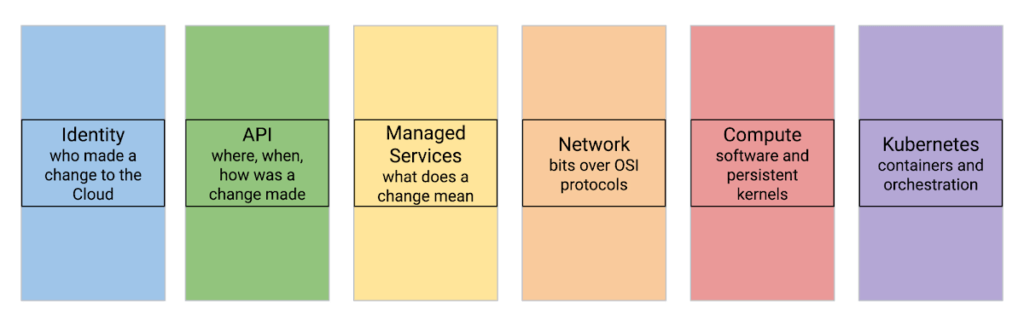
Let’s review a few cloud threat detection scenarios.
Everybody highlights the role of identity in cloud security. Naturally, it matters in threat detection as well—and it matters a lot. While we don’t want to repeat the cliche that in a public cloud you are one IAM mistake away from a data breach, we know that cloud security missteps can be costly. To help protect organizations, Google Cloud offers services that automatically and in real-time analyze every IAM grant to detect outsiders being added—even indirectly.
Detecting threats inside compute instances such as virtual machines (VM) using agents seems to be about the past. After all, VMs are just servers, right? However, this is an area where cloud brings new opportunities. For example, VM Threat Detection allows security teams to do completely agentless YARA rule execution against their entire compute fleet.
Finally, products like BigQuery require new ways of thinking about detecting data exfiltration. Security Command Center Premium detects queries and backups in BigQuery that would copy data to different Google Cloud organizations.
Naturally, some things stay the same in the cloud. These include broad threat categories such as insiders or outsiders; steps in the cyber exploit chain such as coarse-grained stages of an attack; and the MITRE ATT&CK Tactics are largely unchanged. It is also likely that broad detection use cases stay the same.
What does that mean for the defenders?
When you move to the cloud, your threats and your IT change—and change a lot.
This means that using on-premises detection technology and approaches as a foundation for future development may not work well.
This also means that merely copying all your on-premise detection tools and their threat detection content is not optimal.
Instead, moving to Google Cloud is an opportunity to transform how you can achieve your continued goals of confidentiality, integrity, and availability with the new opportunities created by the technology and process of cloud.
Call to action:
- Listen to “Threat Models and Cloud Security” (ep12)
- Listen to “What Does Good Detection and Response Look Like in the Cloud? Insights from Expel MDR” (ep72)
- Listen to “Cloud Threats and How to Observe Them” (ep69) and read the related blog “How to think about cloud threats today”
- Review how to test cloud detections
- Read the guidance on cloud threat investigation with SCC and Chronicle
Fully-managed-zero-trust Security Solution, Traffic Director Integrated with CA Service

4967
Of your peers have already read this article.
1:30 Minutes
The most insightful time you'll spend today!
We created Traffic Director to bring to you a fully managed service mesh product that includes load balancing, traffic management and service discovery. And now, we’re happy to announce the availability of a fully-managed zero-trust security solution using Traffic Director with Google Kubernetes Engine (GKE) and Certificate Authority (CA) Service.
When platform administrators and security professionals think about modernizing their applications with a forward-looking security posture, they look for “zero-trust” security. This security posture is based on few fundamental blocks:
- A means of allocating and asserting service identity (for example, using X.509 certificates)
- Mutual authentication (mTLS) or server authentication (TLS)
- Encryption for all traffic flows (TLS encryption)
- Authorization checks and minimal privileges
- Infrastructure to make all of the above manageable and reliable
Traffic Director does this by integrating with CA Service, a highly available private CA which issues private certificates expressing service identities, and provides a managed mTLS certificate infrastructure with full certificate lifecycle management. Together, these solve both certificate issuance and CA rotation complexities.
With Traffic Director managing your service-to-service security, you can now enjoy end-to-end encryption, service-level authentication and granular authorization policies for your service mesh.

With this new capability, you can now:
- Implement mutual TLS (mTLS) and TLS between your services, including certificate lifecycle management. Communications within your mesh are authenticated and encrypted.
- Enable identity-based authorization, as well as authorization based on other parameters (such as the request method). These concepts underpin role-based access controls (RBAC) and enable you to take a “least privileges” stance where only authorized services can communicate with each other based on ALLOW/DENY rules.
mTLS is supported whether you’re using Envoy or proxyless gRPC for your service mesh. Authorization support for proxyless gRPC is coming later this year. Check out our documentation to learn more and get started with Envoy or proxyless gRPC.
More Relevant Stories for Your Company

Create and Protect Admin Accounts
Setting up your new cloud infrastructure is scary. Extra scary when you realize that someone (is it gonna be you?) gets to have phenomenal cosmic power over the whole thing. Yes, I'm talking about the admin account, and today we'll dig into why they are important, dangerous and different. When

Groupe Dauphinoise Grows it Customer Base with G Suite and Google Cloud Platform
As a leading French agricultural cooperative, Groupe Dauphinoise places collaboration at the heart of its philosophy. Working with farmers in the Rhone-Alpes region, Groupe Dauphinoise takes on a diverse range of activities from agricultural production to research and development to running retail outlets. As its operations expanded and strained its

Building Effective Visibility into Technology Assets Used in Healthcare
When technology just works, it's easy to trust. But too often, we place our trust in technology that doesn’t deserve it. When we do this with technology to provide healthcare, we put the safety of patients and the security and reliability of our global healthcare system at risk. The institutions

Workforce Identity Federation: A Seamless Experience for Users
At Google Cloud, we’re focused on giving customers new ways to strengthen their security posture. Managing identities and authorization is a core security control that underpins interactions inside and collaboration outside the organization. To address fraud, identity theft, and other security challenges associated with the proliferation of online accounts, many
