





Over 700 SaaS Companies Trust Google’s Data Cloud to Build Intelligent Apps!

3498
Of your peers have already read this article.
5:00 Minutes
The most insightful time you'll spend today!
Today, a typical enterprise uses over 100 SaaS applications while large organizations commonly use over 400 apps. These applications contain valuable data on customers, suppliers, employees, products and more, offering the potential for valuable insights and powerful workflows. However, in the past, this data has often remained siloed and underutilized, even within an application.
Customer demand is driving an unprecedented wave of innovation across the SaaS industry, with providers building intelligence into their applications through rich analytical and AI/ML capabilities, and enabling their customers’ data ecosystems through real time data sharing. The data cloud platform powering these applications is a critical factor in companies’ ability to innovate and optimize efficiency, while keeping its customer’s data secure.
Today, over 700 tech companies including Zoominfo, Equifax, Exabeam, Bloomreach, and Quantum Metric power their products and businesses using Google’s data cloud. This week at the Data Cloud Summit, we announced the Built with BigQuery initiative which helps ISVs get started building applications using data and machine learning products. By providing dedicated access to technology, expertise and go to market programs, this initiative allows tech companies to accelerate, optimize and amplify their success.
“Enabling customers to gain superior insights and intelligence from data is core to the ZoomInfo strategy,” ZoomInfo CEO Henry Schuck says. “We are excited about the innovation Google Cloud is bringing to market and how it is creating a differentiated ecosystem that allows customers to gain insights from their data securely, at scale, and without having to move data around. Working with the Built with BigQuery initiative team enables us to rapidly gain deep insight into the opportunities available and accelerate our speed to market.”
Building intelligent SaaS applications with a unified data platform
Google’s data cloud provides a complete platform for building data-driven applications, from simplified data ingestion, processing and storage to powerful analytics, AI/ML and data sharing capabilities, all seamlessly integrated with Google Cloud’s open, secure, sustainable platform. With a huge partner ecosystem and support for multicloud, open source tools and APIs, we provide technology companies the portability and extensibility they need to avoid data lock-in.
Through the Built with BigQuery initiative, we are helping tech companies to build the next-gen SaaS applications on Google’s data cloud with simplified access to technology, dedicated engineering support and joint go to market programs.
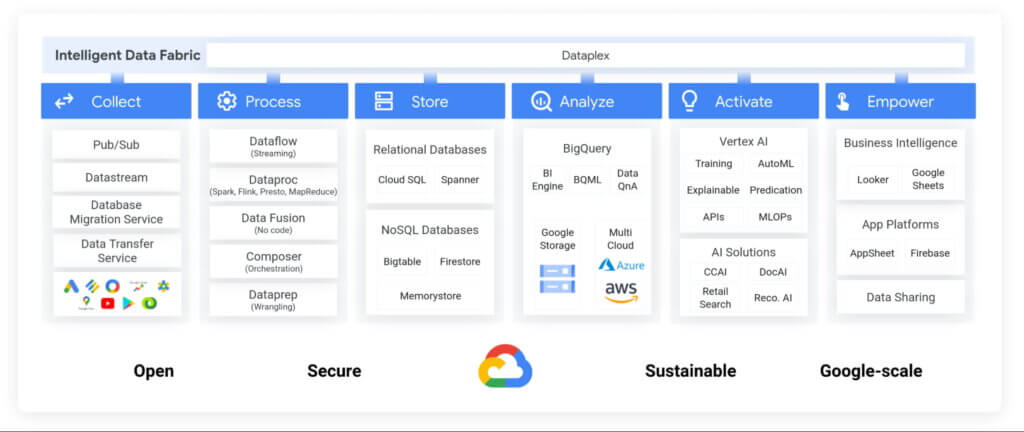
Exabeam, a next generation cybersecurity solution, is a great example. The company leverages Google’s data cloud to provide their customers with a “limitless-scale” cybersecurity solution.
“Built with Google’s data cloud, Exabeam’s limitless-scale cybersecurity platform helps enterprises respond to security threats faster and more accurately” said Sanjay Chaudhary, VP of Products at Exabeam. “We are able to ingest data from over 500 security vendors, convert unstructured data into security events, and create a common platform to store them in a cost effective way. The scale and power of Google’s data cloud enables our customers to search multi-year data and detect threats in seconds.”
Foster innovation and unlock new business models through data sharing
Data becomes even more valuable when shared. According to research, the global data monetization market size is growing at a CAGR of 47.9% and is projected to reach $11.7 Billion by 2026. It’s a compelling proposition for SaaS companies as it enables them to deliver increased value for their customers while expanding their own partner ecosystem, increasing stickiness and unlocking new revenue streams.
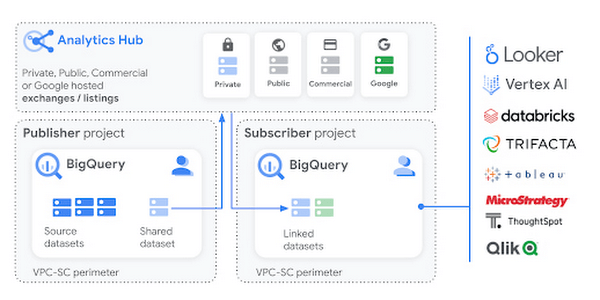
Google Cloud’s strategy for data sharing encompasses three key areas: secure data sharing in BigQuery, the ability to create private and public exchanges alongside commercial and public datasets in Analytics Hub, and a robust ecosystem of premier partner and Google data.
Through the real-time data sharing capabilities of BigQuery, SaaS companies are enabling their customers to combine their data with the customer’s own proprietary data, and other third-party data sources, to derive 360-degree insights. Over 4,500 organizations share more than 250 Petabytes of data weekly in BigQuery, not accounting for intra-organizational data sharing*.
For example, manufacturers can get real-time visibility into their entire supply chain by combining datasets from ISVs, such as supply chain innovator, Blume Global, and data publishers.
“Our partnership with Google Cloud is helping us achieve our mission to build the next-generation supply chain operating system. Blume Maps, our digital twin of the supply chain world built with Google’s data cloud, allows our customers to generate accurate lead times, real-time shipment location and ETAs” said Blume Global CEO Pervinder Johar. “We apply the power of Google Cloud’s data and analytics capabilities to our growing database of over 1.5 million global data points to feed our lead time and dynamic ETA engine. We are also able to create data twins of unique logistics data and share with users around the globe.”
Google Cloud’s Analytics Hub is a fully-managed service built on BigQuery that allows organizations to efficiently and securely exchange valuable data and analytics assets across any organizational boundary. With unique datasets that are always-synchronized and bi-directional sharing, you can create a rich and trusted data ecosystem between business units or partnerships–one in which everyone gains value immediately.
“As external data becomes more critical to organizations across industries, the need for a unified experience between data integration and analytics has never been more important. We are proud to be working with Google Cloud to power the launch of Analytics Hub, feeding hundreds of pre-engineered data pipelines from hundreds of external datasets,” said Dan Lynn, SVP Product at Crux. “The sharing capabilities that Analytics Hub delivers will significantly enhance the data mobility requirements of practitioners, and the Crux data integration platform stands ready to quickly integrate any external data source and deliver on behalf of Google Cloud and its clients.”
Innovate, optimize and amplify with Google Cloud
The Built with BigQuery initiative provides access to technology, expertise and go-to-market:.
- Access to Technology: Get started fast with a Google-funded, pre-configured sandbox. Access Cloud Credits to fund your, and your customer’s, POCs and apply for innovative pricing models designed for ISVs.
- Access to Expertise: Accelerate and optimize product design and architecture with access to designated experts in building data-driven SaaS applications from the ISV Center of Excellence, providing insight into key use cases, architectural patterns and best practices. Access experts from across Google to enable co-innovation with products such as Earth Engine and Google Marketing Platform.
- Access to Go-to-market: Amplify your success with joint marketing programs to drive awareness, generate demand and increase adoption.
Get Started
Start building your applications on Google Cloud with $300 in free credits or apply for the Built with BigQuery initiative.
*As of November, 2021, within a typical 7 day period in BigQuery, and not accounting for intra-organizational data sharing.
Firestore Cheatsheet to Unlock Application Innovation

3742
Of your peers have already read this article.
2:00 Minutes
The most insightful time you'll spend today!
Your product teams might ask – “Why does it take so long to build a feature or application?” Building applications is a heavy lift due to the technical complexity, which includes the complexity of backend services that are used to manage and store data. Every moment focused on this technical complexity is a distraction from delivering on core business value. Firestore alters this by having Google Cloud manage your backend complexity through a complete backend-as-a-service!
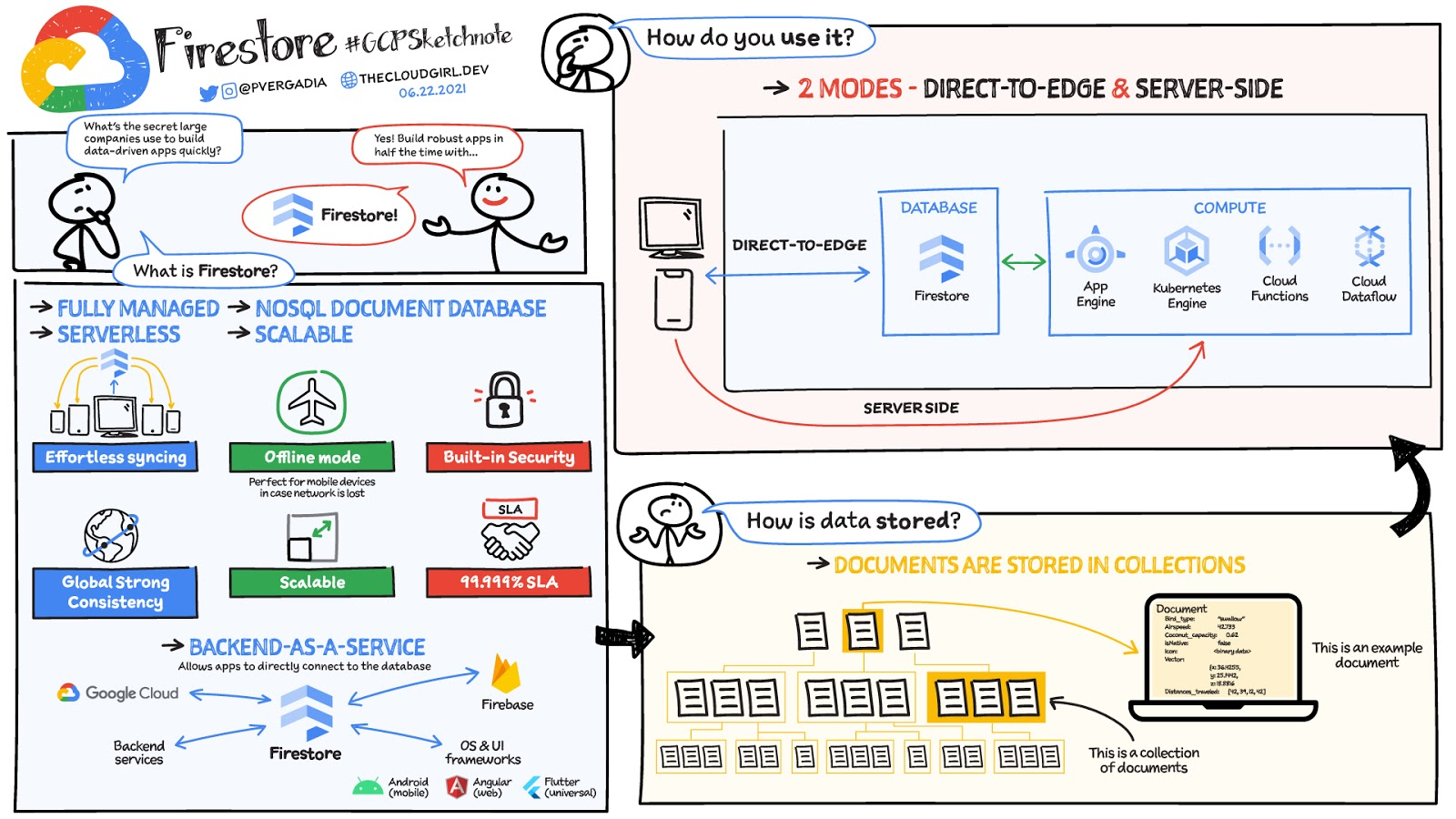
Firestore is a serverless, NoSQL document database that unlocks application innovation with simplicity, speed and confidence.
It acts as a glue that intelligently brings together the complete Google Cloud backend ecosystem, in-app services from Firebase and core UI frameworks & OS from Google.
What is Firestore?
Firestore is a serverless, fully managed NoSQL document database that scales from zero to global scale without configuration or downtime. Here’s what makes Firestore unique:
- Ideal for rapid, flexible and scalable web and mobile development with direct connectivity to the database.
- Supports effortless real time data synchronization with changes in your database as they happen.
- Robust support for offline mode, so your users can keep interacting with your app even when the internet isn’t available or is unreliable.
- Fully customizable security and data validation rules to ensure the data is always protected
- Built-in strong consistency, elastic scaling, high performance & best in class 99.999% availability
- Integration with Firebase and Google Cloud services like Cloud Functions and BigQuery, serverless data warehouse.
- In addition to a rich set of Google Cloud service integrations, Firestore also offers deep one-click integrations with a growing set of 3rd party partners via Firebase Extensions to help you even more rapidly build applications.
Document-model database

Firestore is a Document-model database. All of your data is stored in “documents” and then “collections”. You can think of a document as a JSON object. It’s a dictionary with a set of key-value mappings, where the values can be several different supported data types including strings, numbers or binary values..
These documents are stored in collections. Documents can’t directly contain other documents, but they can point to subcollections that contain other documents, which can point to subcollections, and so on. This structure brings with it a number of advantages. For starters, all queries that you make are shallow, meaning that you can grab a document without worrying about grabbing all the data underneath it. And this means that you can structure your data hierarchically in a way that makes sense to you logically, without having to worry about grabbing tons of unnecessary data.
How to use Firestore?
Firestore can be used in two modes:
- Firestore in Native Mode: This mode is differentiated by its ability to directly connect your web & mobile app to Firestore. Native Mode supports up to 10K writes per second, and over a million connections.
- Firestore in Datastore Mode: This mode supports only server-side usage of Firestore, but supports unlimited scaling, including writes.
Conclusion
Whatever your application use case may be, if you want to build a feature or an application quickly using Firestore backend-as-a-service. For a more in-depth look into Firestore check out the documentation. https://www.youtube.com/embed/moglAjmwmUQ?enablejsapi=1&
For more #GCPSketchnote, follow the GitHub repo. For similar cloud content follow me on Twitter @pvergadia and keep an eye out on thecloudgirl.dev.
Using Google Cloud’s Backup and DR Service with Logging and Monitoring Tools

1112
Of your peers have already read this article.
2:30 Minutes
The most insightful time you'll spend today!
Backup and DR data is a valuable business asset, and ensuring that it’s safe and accessible is essential. In particular, you want to be able to monitor your backups to ensure that the data is indeed protected and that you can quickly recover it in the event of a disaster, user error, or failed upgrade.
Users of Google Cloud’s Backup and DR service often ask:
- What are the best practices for monitoring my backup and recovery jobs?
- How can I proactively identify issues and troubleshoot?
- How can I create alerts and be notified about important events?
The good news is that Google Cloud Backup and DR now integrates with Cloud Logging and Cloud Monitoring tools. Now, you can monitor backup events, jobs, appliance health, resource consumption and user actions in the same way you monitor other Google Cloud workloads and services.
With this integration, you can now:
- Monitor events related to backup and restore – With detailed Google Cloud Backup and DR service event logs in Cloud Logging, you can now use log based alerts to create a customisable notification, in near-real time. This lets you monitor important events such as backup job failures, jobs that did not run, local backup storage saturation, and network failures.
- Configure fine grained alerting – You can write custom event queries on a wide variety of dimensions such as event severity, application type, application name, job type, job name, error message and many more. This gives a lot of flexibility to define alerts for specific events or conditions within a system, thus reducing noise and helping you identify and fix issues easily.
- Get notified on your preferred notification channel – Google Cloud offers seven pre-built notification channels that let you receive customisable notifications directly over email, SMS, Slack or the Google Cloud mobile app. Alternatively, you can integrate with your own monitoring and event management tools using webhooks or Pub/Sub.
- Derive useful insights to troubleshoot issues – With Log Analytics, you can use BigQuery to query your data using SQL queries and generate operational insights, which can help you reduce time spent troubleshooting. For example, you can analyze the key reasons that backup and restore jobs fail for a given application or application type.
The integration also lets you proactively discover deeper issues related to backup and recovery, such as capacity-related issues or certain job failures that happen periodically, by monitoring recurring events in the logs over time. With log-based metrics, you can:
- Create trend charts to track important metrics such as the number of backup or restore jobs that failed during a day/week/month
- Receive a notification when the number of occurrences crosses a threshold, for example receive a notification if a snapshot pool saturates more than five times a week
- Monitor trends in data, such as latency values in logs, and receive a notification if the values change in an unacceptable way.
Getting started
The time to learn that your backup failed should never be when you go to restore. By integrating our Backup and DR service with Cloud Monitoring and Cloud Logging, you can get valuable assurances about the health of your backup and business continuity processes with the same tools that you use to manage other Google Cloud workloads. To get started, check out the Backup and DR event logs page. You can also watch a video that shows you how to set up and use the service and configure some custom alerts.
BURGER KING Germany: Serving Up Marketing Insights and Supply Chain Visibility Easily

13988
Of your peers have already read this article.
8:30 Minutes
The most insightful time you'll spend today!
Do hamburgers really come from Hamburg? This may still be a matter of debate, but the popularity of American-style burger joints not just in Hamburg but all over Germany, is clear. Germany’s top two fast food companies are both burger chains. One of them is BURGER KING®, a global brand that welcomes more than 11 million customers worldwide every day. The company arrived in Germany in 1976, when its first restaurant opened in Berlin. It now operates more than 100 restaurants across Germany, with franchisees operating more than 600 restaurants of their own.
“In the fast food industry, being able to move quickly is very important. That means delivering the right promotion to our app or launching a viral campaign within days. To do that across more than 700 restaurants, we need the support of the right technology.”
—Oliver Mielentz, IT Manager, BURGER KING® Deutschland GmbH
Previously a subsidiary of the U.S. business, BURGER KING® Germany became an independent company in 2015. As a result, it needed to develop its own IT infrastructure, and the changeover needed to happen fast. “We had to put in place systems that would work for the entire network of franchisees and enable us to easily roll out campaigns,” explains Oliver Mielentz, IT Manager at BURGER KING® Deutschland GmbH.
With the help of Google Cloud Premier partner Cloudwürdig, BURGER KING® Germany chose Google Cloud and G Suite as the right combination to suit its needs.
“In the fast food industry, being able to move quickly is very important,” says Oliver. “That means delivering the right promotion to our app or launching a viral campaign within days. To do that across more than 700 restaurants, we need the support of the right technology.”
Building a franchisee platform in just three months
When a business has multiple franchisees, it’s important to make sure everyone is on the same page, especially in the fast-paced fast food environment. “We have to collate data from all our franchisees and produce reports quickly in order to react to changes in customer behavior,” explains Oliver. “That means processing every transaction that takes place in our restaurants.” Following the restructure, BURGER KING® Germany also needed to build a secure invoicing system with data storage and optimize its communication channels.
“Using Tableau with BigQuery, we’re able to produce reports very quickly. Previously, it took much longer, as data had to be fetched manually. Our reaction time is now almost a business day faster.”
—Oliver Mielentz, IT Manager, BURGER KING® Deutschland GmbH
With support from Witter-IT, BURGER KING® Germany chose Cloudwürdig to build its BKD Connect internal platform on Google Cloud. Thanks to the ready-to-go tools on Google Cloud, it was able to put its invoicing system and data warehouse in place in just three months.
For the BURGER KING® Germany data warehouse, Cloudwürdig built an ETL pipeline that channels ticket data for every sale into BigQuery. “Data is gathered from the restaurants,” says Oliver, “and using Tableau with BigQuery, we’re able to produce reports very quickly. Previously, it took much longer, as data had to be fetched manually. Our reaction time is now almost a business day faster.”
As the ticket data for every transaction is stored in BigQuery, the marketing team can easily see exactly which products are selling well. That’s crucial for tweaking promotions as well as monitoring the supply chain to make sure enough produce is delivered to restaurants in response to changes in demand.
“Thanks to BigQuery, we have a speedy data pipeline that enables us to react on the same day to changes in the market and eliminate bottlenecks in production,” says Oliver.
Switching to G Suite to improve communication
To enable franchisees to sign in to its BKD Connect Platform, BURGER KING® Germany needed a secure authentication system. To solve that problem, it chose to provide franchisees with G Suite accounts. “It’s really easy to set up a new franchisee on the platform. I just create a new G Suite account and Drive folder for it, and it’s ready to go,” says Oliver. G Suite also helps the franchise network to run efficiently, as daily reports are automatically saved to Drive and shared to the appropriate regional network. “Thanks to that system, it’s much easier for any team at headquarters to access the information it needs,” Oliver explains.
BURGER KING® Germany also recently extended its use of G Suite across the whole company. “Following an evaluation of our previous email and productivity software, I made the decision to switch solely to G Suite,” says Oliver. BURGER KING® Germany employees now use Gmail, Calendar, and Drive for their day-to-day productivity needs. “We only just completed the migration, but already, everyone’s happy,” says Oliver. “It’s so easy to share a file using Drive or set up a meeting on Calendar.”
“We’re big fans of Hangouts Meet, and we have two rooms here at our Hanover headquarters equipped with Hangouts Meet hardware,” Oliver adds. “The speech quality is good, and it’s helpful to be able to see every participant, especially when you’re running a meeting with multiple franchisees.”
Optimizing infrastructure to power innovative campaigns
The BURGER KING® app, available for iOS and Android, helps the company to deliver a great customer experience. Through their MyBK accounts, guests can access coupons and special promotions. “We had a really interesting campaign for Easter: guests used the app to hunt for virtual Easter eggs,” explains Oliver. “We knew it was going to be big, and our previous back end wouldn’t have been able to handle the traffic.”
To enable the marketing campaign to go ahead, BURGER KING® Germany moved the back end of the app, along with its website, to Google Cloud. For developing and running its web and app back ends, it now uses App Engine and virtual machines on Compute Engine, as well as Memorystore and Cloud Functions. For monitoring and logging, it uses Stackdriver, and Cloud CDN and Cloud DNS to easily handle its traffic.
“We ran the campaign without any performance issues, even though we were receiving several million hits a day,” says Oliver. Since migrating the back end to Google Cloud, the marketing team also launched the popular “Escape the Clown” campaign. “That campaign blew our minds!” says Oliver. “It wouldn’t have been possible without Google Cloud, because it required a lot of back end capacity.”
To develop the app infrastructure it needs, BURGER KING® Germany relies on Cloudwürdig. “Working with Cloudwürdig is great because the team has the same agile mindset as us,” says Oliver. “When we have a new idea, we just set up a meeting, and in a couple of days the new infrastructure is in place. For Escape the Clown, it only took a few weeks to get everything ready to launch.”
Leveraging integrated tools to grow the business
Using Google Cloud together with G Suite enables BURGER KING® Germany to run its franchise network efficiently, while keeping its IT team lean. “Google Cloud and G Suite are the perfect fit for the way of working at BURGER KING® Germany,” says Oliver. “Many of the company’s operatives are often on the road, visiting restaurants and franchisees. With these tools, they can work flexibly and react quickly to the situation on the ground.”
“In order to grow the business, we need to use the data we receive every day to understand exactly what is happening in our restaurants. With the tools provided by Google Cloud, we can get more guests through the door and offer them a better experience.”
—Oliver Mielentz, IT Manager, BURGER KING® Deutschland GmbH
It also helps to keep infrastructure costs under control. “With Google Cloud, we only pay for what we use, which is really important for us,” Oliver explains. “It means we can scale up quickly if we see an opportunity to react to a trend in customer behavior and launch a new marketing campaign that resonates with the moment. When it’s finished, we can then scale down again, and that definitely saves us money.”
BURGER KING® is now working with Cloudwürdig to add more functionality to the BURGER KING® app using Google Kubernetes Engine. “We like to work with customers long-term to support their digital transformation. BURGER KING® Germany is a great example of how one project can develop into a great collaboration,” says Benny Woletz, Managing Director of Cloudwürdig.
BURGER KING® also plans to expand its presence in Germany and gain a greater market share by further tailoring both its marketing and the way it runs its restaurants to answer its guests’ needs. “In order to grow the business, we need to use the data we receive every day to understand exactly what is happening in our restaurants,” says Oliver. “With the tools provided by Google Cloud, we can get more guests through the door and offer them a better experience.”
Google Cloud Announces General Availability of BigQuery Row-level Security

6625
Of your peers have already read this article.
3:00 Minutes
The most insightful time you'll spend today!
Data security is an ongoing concern for anyone managing a data warehouse. Organizations need to control access to data, down to the granular level, for secure access to data both internally and externally. With the complexity of data platforms increasing day by day, it’s become even more critical to identify and monitor access to sensitive data. In many cases, sensitive data is co-mingled with non-sensitive data, and access restrictions to sensitive data need to be enabled based on factors like data location or presence of financial information. There may also be nuances where data is sensitive for some groups of users, while for others, it is not.
Today, we’re pleased to announce the general availability of BigQuery row-level security, which gives customers a way to control access to subsets of data in the same table for different groups of users. Row-level security (RLS) extends the principle of least privilege access and enables fine-grained access control policies in BigQuery tables. BigQuery currently supports access controls at the project-, dataset-, table- and column-level. Adding RLS to the portfolio of access controls now enables customers to filter and define access to specific rows in a table based on qualifying user conditions—providing much needed peace of mind for data professionals.
“Our digital transformation and migration of data to the cloud magnifies the business value we can extract from our information assets. However, granular data access control is essential to comply with international regulatory and contractual requirements. BigQuery row-level security helps us comply with data residency and export restrictions,” says Jarrett Garcia, Iron Mountain’s Enterprise Data Platform Senior Director. “It enables us to manage fine-grained access controls without replicating data. What used to take months for approval and access provisioning can now be done more efficiently and effectively. We are looking forward to implementing additional data security capabilities on the BigQuery roadmap to address other critical business use cases.”
How BigQuery row-level security works
Row-level security in BigQuery enables different user personas access to subsets of data in the same table. Customers who are currently using authorized views to enable these use cases can leverage RLS for ease of management. To express the concept of RLS, we have introduced a new entity in BigQuery called row access policy. Row access policies map a group of user principals to the rows that they can see, defined by a SQL filter predicate.
Secure logic rules created by data owners and administrators determines which user can see which rows through the creation of a row-level access policy. The row-level access policies created on a target table by administrators or data owners are applied when a query is run on the table. One table can have multiple policies applied to it.
Below is an example, where row-level access policies have been created to filter data based on users’ “region”.

In the illustrated scenario above, row-level access policies have been created to verify a querying user’s region and to give them access only to the subset of data relevant to that region. Access policies are granted to a grantee list which support all types of IAM principles such as individual users, groups, domains or service accounts. In this example, when a user queries the table, row-level access policies are evaluated to assess which, if any, policies are applicable to that user. The group ‘sales-apac’ is granted access to view a subset of rows where region = ‘APAC’ whereas the group ‘sales-us’ is granted access to view a subset of rows where the region = ’US’. Likewise, users in both groups will see rows in both regions, and users in neither group will not see any rows.
Row-level access policies can also be created using the SESSION_USER() function to restrict access only to rows that belong to the user running the query. If none of the row access policies are applicable to the querying user, the user will have no access to the data in the table.
When a user queries a table with a row-level access policy, BigQuery displays a banner notice indicating that their results may be filtered by a row-level access policy. This notice displays even if the user is a member of the `grantee_list`.

When to put BigQuery row-level security to work
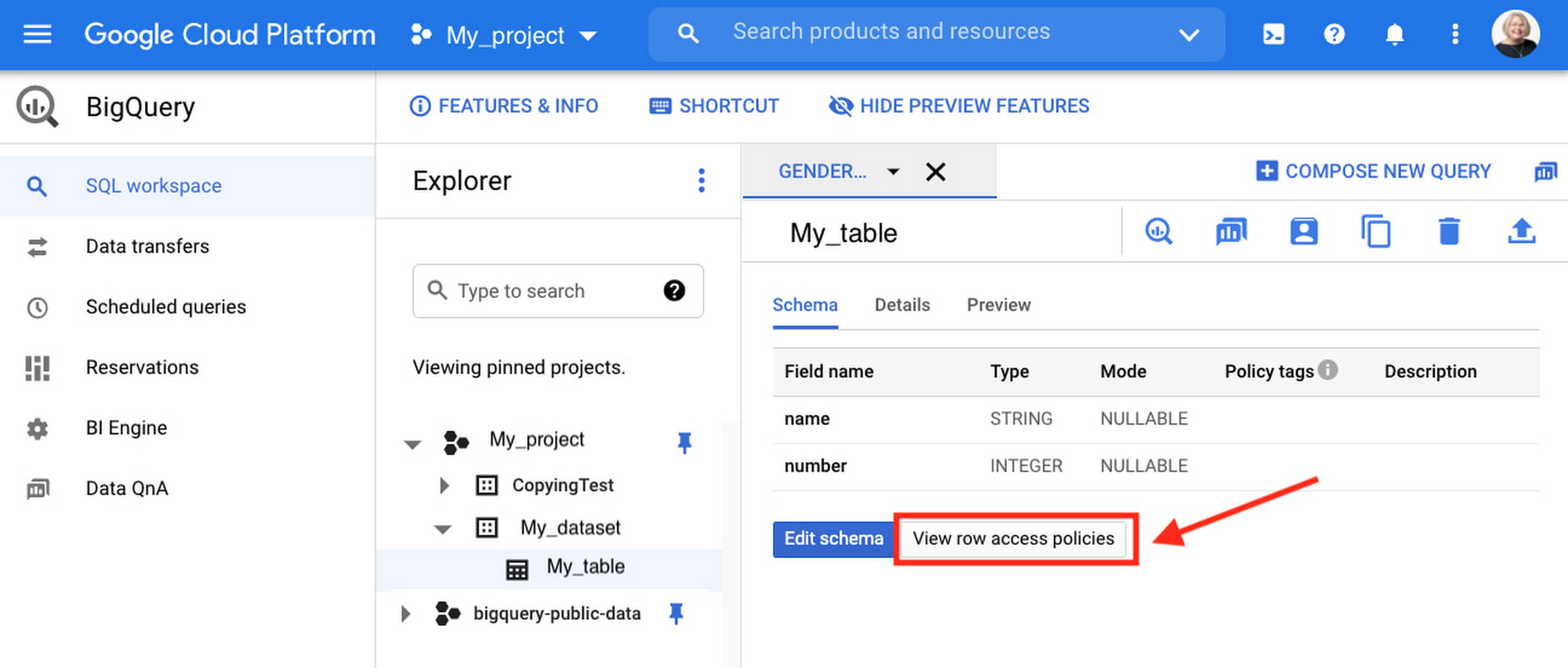
Row-level access policies are useful when you have a need to limit access to data based on filter conditions. The row-access policies’ filter predicate supports arbitrary SQL, and is conceptually similar to the WHERE clause of a SQL query. Filter predicates support the SESSION_USER() function to restrict access only to rows that belong to the user running the query. If none of the row access policies are applicable to the querying user, the user will have no access to the data in the table. Currently, the column used for filtering must be in the table, but we anticipate adding support for subqueries in the filter expression, opening up access to use cases where data is filtered based on lookup tables and calculated values. Row-level access policies can be created, updated and dropped using DDL statements. You will be able to see the list of row-level access policies applied to a table using the BigQuery schema pane in the Cloud Console, which simplifies the management of policies per table, or by using the bq command-line tool.
Row-level security is compatible with other BigQuery security features, and can be used along with column-level security for further granularity. Since row-level access policies are applied on the source tables, any actions performed on the table will inherit the table’s associated access policies, to ensure access to secure data is protected. Row-level access policies are applicable to every method used to access BigQuery data (API, Views, etc).
Try it out
We’re always working to enhance BigQuery’s (and Google Cloud’s) data governance capabilities, to provide more controls around managing your data. With row-level security, we are adding deeper protections for your data. You can learn more about BigQuery row-level security in our documentation and best practices.
PaGaLGuY Turns to Google Cloud Platform to Power Leading India Education Network

8166
Of your peers have already read this article.
2:30 Minutes
The most insightful time you'll spend today!
Founded in 2006, PaGaLGuY started as a forum that enabled students, typically aged between 20 and 30 to discuss and seek advice on academic issues. By 2011, PaGaLGuY had increased its traffic to about 250,000 page views per month. The business is now one of India’s largest education networks and provides an app that users can download to their Android and iOS devices.
Over the past six years, PaGaLGuY has extended its service to include video advice from experts on education topics and grown the number of views of its pages to 1.5 million per day. As Head of Technology for the business, Sandeep Kalidindi has played a key role in ensuring PaGaLGuY is as engaging as possible to users. “Because the product is advertising based, the greater the user engagement, the greater the advertising revenue,” Kalidindi explains.
Google Cloud Platform Results
- Supported growth to 1.5 million page views per day and demand spikes that see requests increase from about 90 per second to about 1,200 per second
- Reduced API latency from about 1 second to about 40 milliseconds
- Reduced system administration time from three to four days per week to 30 minutes every two weeks
In 2015, PaGaLGuY’s senior management team decided to deliver an even more relevant experience for users of the education network. “The core thing we had to do was personalise the experience for each and every student that visited PaGaLGuY,” Kalidindi says. “So we had to capture each student’s data to customise what they see when they open the site.”
The business also found traffic to the network was straining its infrastructure. During demand peaks, created by exams involving as many as 5 million students, PaGaLGuY would be inaccessible for periods of 30 minutes to one hour. Furthermore, average API latency had climbed to an unacceptable 1 second, compromising performance.
PaGaLGuY needed to access extensive compute resources to undertake its planned change. Had the business relied on a physical technology architecture to undertake the transformation, it would have had to purchase capacity equivalent to 16 new servers. “There was no way with a small team we could grow to that extent in a short time,” Kalidindi says. “This was the right moment for us to explore cloud services.”
The business established two primary requirements the selected cloud service needed to meet. First, PaGaLGuY had to be able to scale the platform with costs rising only in proportion to the increase in resources consumed. Accordingly, the business would have to minimise the number of employees required to manage the cloud environment. Second, the platform had to give PaGaLGuY easy access to student data and the ability to undertake prompt, granular analysis.
PaGaLGuY reviewed available public cloud services and determined that Google Cloud Platform (GCP) was the best fit for its business. “Google Cloud Platform was considerably more mature than the alternatives, with a high degree of automation and a suite of managed services,” Kalidindi says. PaGaLGuY management then discussed with Google how to optimise cost, performance and availability of its personalised education network on GCP.
With assistance from Google and business transformation specialists Searce, PaGaLGuY was able to deliver the platform into production on GCP in 10 months. “Searce was very proactive in ensuring the environment met our needs and allowing us to gain priority access to Google services in development,” Kalidindi says. “Their team was integral to the success of the migration.”
PaGaLGuY has been running in production in GCP for two years. The education network’s GCP architecture comprises a scalable back-end built on Google App Engine; a managed environment for its containerised applications in Google Kubernetes Engine; messaging-oriented middleware through Google Cloud Pub/Sub; a relational database in Google Cloud SQL; a managed data analytics warehouse running in Google BigQuery; stream and batch data processing through Google Cloud Dataflow; and object storage in Google Cloud Storage.
PaGaLGuY has leveraged GCP services to break down its platform application from a monolithic build to a series of microservices running in Google App Engine that enable independent deployment cycles, minimise test and quality assurance overheads and provide clearer monitoring and logging.
Running on GCP has enabled PaGaLGuY to add new personalisation features and grow fourfold without having to add any new engineers or administrators to accommodate the increased traffic. The business has also used the platform to seamlessly collect and aggregate students’ data for analysis, reporting and delivering a more targeted user experience. Furthermore, PaGaLGuY has been able to provide its management team with direct access to Google BigQuery to scrutinise data rather than require them to wait at least a day to view reports created by the product or technology teams.
Support demand peaks of 1,200 requests per second
“Thanks to Google Cloud Platform, we can easily support demand peaks that see requests per second rise from an average 90 per second to about 1,200 per second for as long as 45 minutes,” Kalidindi says. Due to GCP’s scalability, PaGaLGuY can ensure its education network remains available and performance remains consistent during those periods.
Latency cut to 40 milliseconds
The business has also reduced average API latency from 1 second to about 40 milliseconds. Furthermore, using GCP has enabled PaGaLGuY to automate most of its processes and reduce system administration requirements from three to four days a week across its team members to about half an hour per week.
The performance of GCP has transformed PaGaLGuY’s culture and processes. “Once our team was exposed to Google Cloud Platform and understood the superiority of the platform, our mindset changed from ‘let us do everything on our own’ to ‘let us do what we do best’ and delegate the remainder,” Kalidindi says. The quality of the service provided by GCP means PaGaLGuY effectively considers the cloud provider as part of its team. “We are always eager to see what new services are being launched and are extremely excited about what Google Cloud Platform can provide as part of its roadmap.” he concludes.
More Relevant Stories for Your Company

Home Depot’s Interconnected Retail Experience by Virtue of Google Cloud Migration for SAP Applications
With nearly 2,300 stores, The Home Depot is the world’s largest home-improvement chain — a brand that professional contractors and DIYers alike have come to depend on. The home improvement industry continues to experience unprecedented demand and dramatic increases in online ordering accompanied by expanding consumer expectations for things like

Datashare for Financial Services: Securing the Publishers and Consumers’ Access to Market Data
Access to the cloud has advanced the distribution and consumption of financial information on a global scale. In parallel, the global financial data landscape has been transformed by an influx of alternative data sources, including social media, meteorological data, satellite imagery, and other data. Exchanges and market data providers now


Quick Tips to Get the Most Out of Cloud Spanner
Today, IT Admins and DBAs are inundated with thankless tasks. But they no longer have to deal with that. With Cloud Spanner, they can focus on value-add and innovation instead of maintenance. Creating or scaling a globally replicated database for mission-critical apps now takes a handful of clicks. Industry-leading high-availability

What Differences in Functionalities Can I Expect Between Google Cloud’s SQL Database and Standard MySQL?
In general, the MySQL functionality provided by a Google Cloud’s SQL Database (Cloud SQL) instance is the same as the functionality provided by a locally-hosted MySQL instance. However, there are a few differences between a standard MySQL instance and a Cloud SQL for MySQL instance. Unsupported Features User defined functionsInnoDB
