





No-code Development Platforms Help Employees Reclaim their Time and Talent

3892
Of your peers have already read this article.
4:00 Minutes
The most insightful time you'll spend today!
As offices reopen, businesses aren’t keeping to a single formula. Many are embracing hybrid models, with employees splitting time between home and the office. Some are staying 100% remote. Others are returning the full workforce to offices with a greater focus on digitization.
Regardless of their model, one thing is certain: technology is more central than ever to organizations’ ability to work smarter and more effectively. In particular, organizations need technology that can be tailored to specific business needs. For example, a retail store manager may need a way to ensure improved sanitation practices, or office workers may need to create an app to manage desk reservations.
Google Workspace can help by bringing together everything you need to get things done, all in one place—including the ability to build custom apps and automations with AppSheet. AppSheet, Google Cloud’s no-code development platform, lets employees–even those with no programming experience–reclaim their time and talent by building custom apps and automations.
Building solutions with AppSheet is often easier and faster than traditional coding, as AppSheet leverages Google’s machine learning expertise to help you quickly go from idea to solution, helping your business to match the pace and agility that today’s landscape requires. In this article, we’ll explore how you can use AppSheet to create custom solutions that will help your business adapt to shifting business needs. To illustrate, we’ll focus on a use case many businesses face: reservation and management of meeting rooms and other office resources, but this process can easily be adapted for a wide variety of use cases, from apps for retail pickup to incident reporting and more.
Simplify and centralize with apps
The first thing to consider is whether your solution would be best managed via a custom interface. If you’re trying to simplify a process for someone, such as inspections or inventory tracking, or centralize information, such as resource portals or events calendars, creating a custom app is the way to go.
For this example app, we created a simple Google Sheet to hold our backend data. Sheets are ideal backend data sources when we know the amount of data will not grow exponentially, especially when piloting to a first office or group of users. We can switch our data seamlessly at any time to a scalable Google Cloud SQL database or other database if needed.
The example app has several worksheets to manage the different buildings, rooms, checkpoints and people (including their roles).

We can build an app in AppSheet directly from our Sheet by selecting Tools > AppSheet > Create an App.
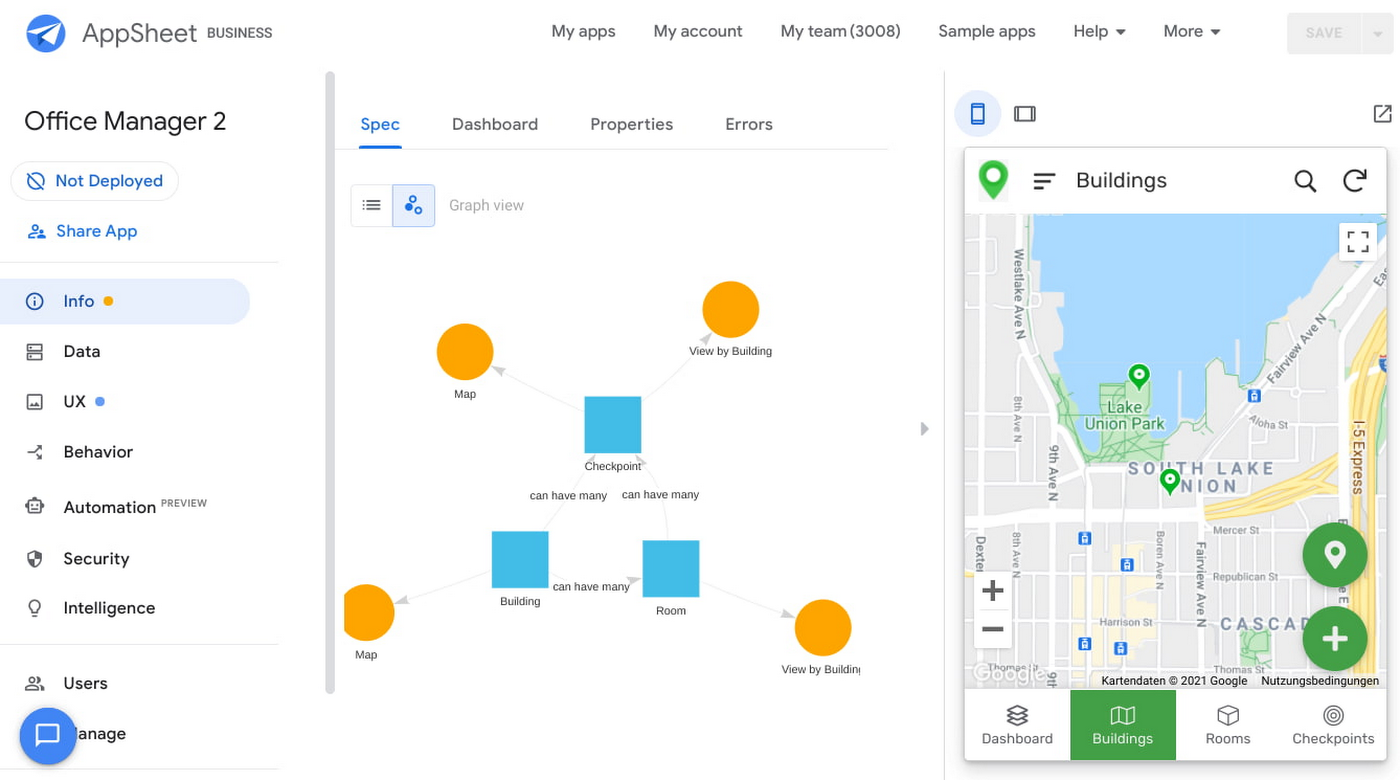
After creating our app, we see an overview of the data that we’ve connected, how pieces of data relate to each other, the views that are presented to the user, and a live interactive preview of the app. Refining the app is intuitive. When you input keywords, for instance, AppSheet surfaces appropriate functionality options that can be further customized. If we have address or location data, it’s automatically turned into a map view that we can further customize.
Our office management app will offer building managers and cleaners administrative features for managing equipment, disinfection schedules, and maintenance information, and it will also offer views for employees to check occupancy and safely reserve desks and equipment.
Opening an office and then a room in the app gives us an overview of both the floorplan and the occupancy and reservations for spaces and equipment in the room.
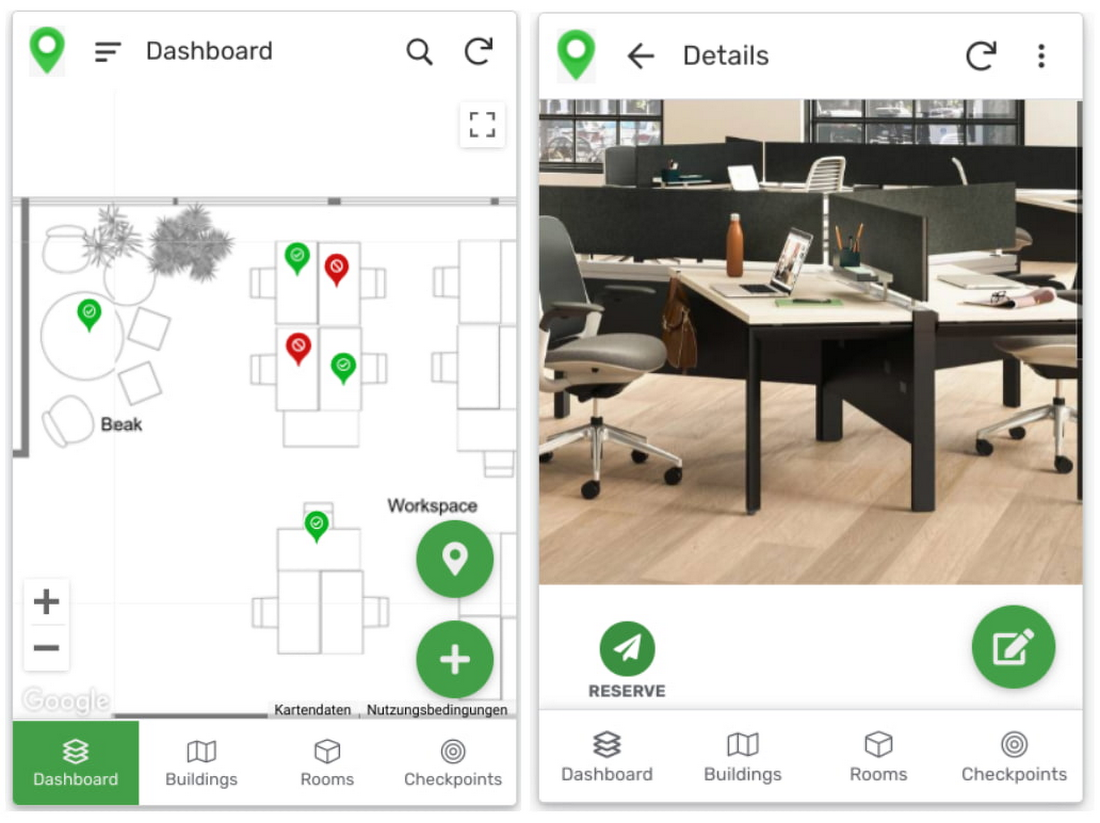
Users can then reserve spaces and equipment in the app, without having to first search for a form or page in the intranet, or even log onto their work computer. The reservation is an automation routine in AppSheet, which performs pre-configured actions when triggered.
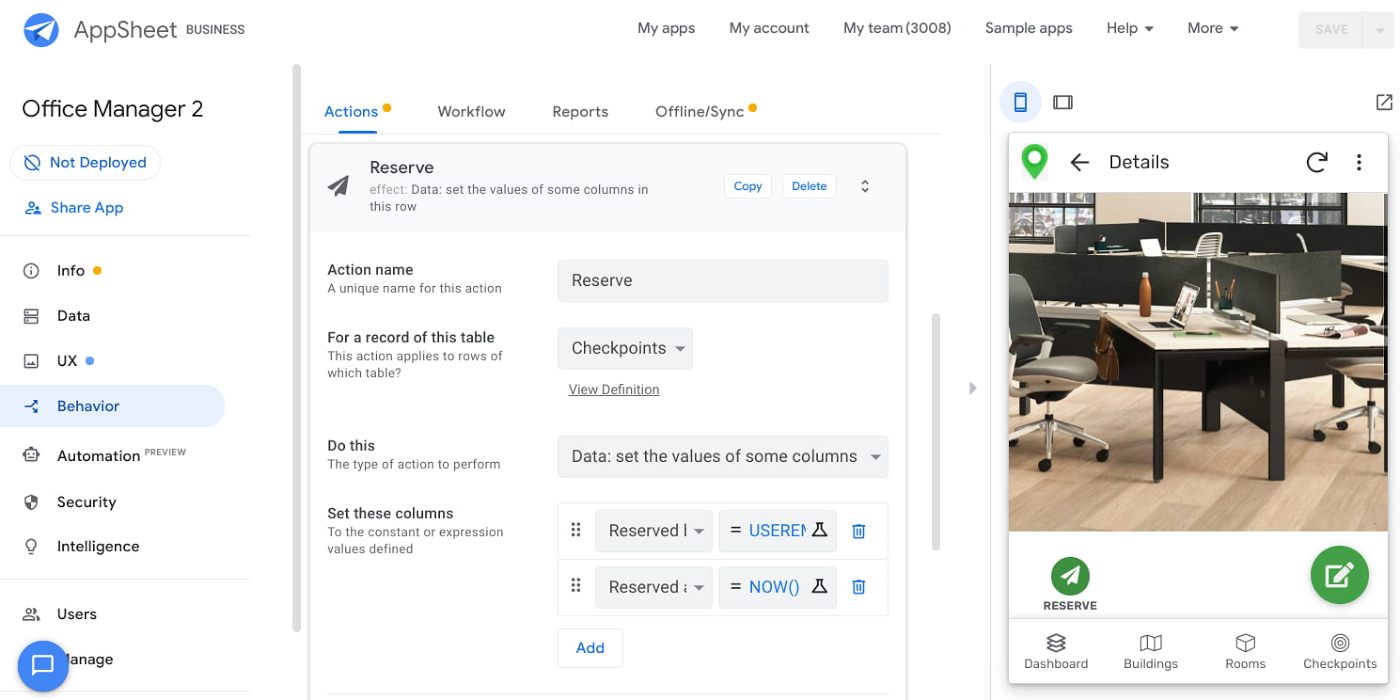
As illustrated in the screenshot above, when the action is triggered either by pressing a button in the app, scanning a QR code, or tapping an RFC tag, the action simply sets the “Reserved by” and “Reserved at” columns to the current user and timestamp.
Streamline with automations
AppSheet Automation, which was recently made generally available, makes it possible to reduce repetitive tasks and streamline processes even further.
In this example, one challenge you may encounter is that users often forget to release a desk or resource when they’re finished, which means those reservations stay blocked until an administrator releases all blocked reservations. However, it’s also important that resources aren’t immediately released, as they first need to be cleaned and disinfected before being made available to new users.
AppSheet Automation can solve this challenge by periodically checking all resources that have been reserved for longer than four hours, then alerting the user to either re-reserve them or release them to be cleaned. If there is no answer, the automation can trigger the resources to be cleaned, then released.

We can configure this as a recurring event, and create a bot that sends the notifications and triggers actions based on the user input (or lack of input).
Optimize for multiple roles
Creating an app for one user is one thing–creating an app that fits the needs of multiple types of users is another. AppSheet has you covered for this kind of complexity because it lets you build multiple roles into a single app.
In our office management app, for example, the office manager can have a particular view and dashboard, and workers in the office can have their own views and functionalities front and center. This makes it possible to automate tasks for all types of users with a single app.
Likewise, AppSheet Automation lets you easily react to real-time changes in data, send notifications to groups of users, and initiate additional workflows using data shared between the app and the users. If a group needs to reserve a conference space for an important late-breaking meeting, for example, there might be ripple effects across a number of user groups. The ability to automate all these updates and interactions can ultimately save a lot of time and effort.
AppSheet also supports advanced features such as QR codes, NFC, and bluetooth sensor integration. This could help users check into locations or workspaces, further streamlining the task of helping people safely navigate and collaborate within the office.
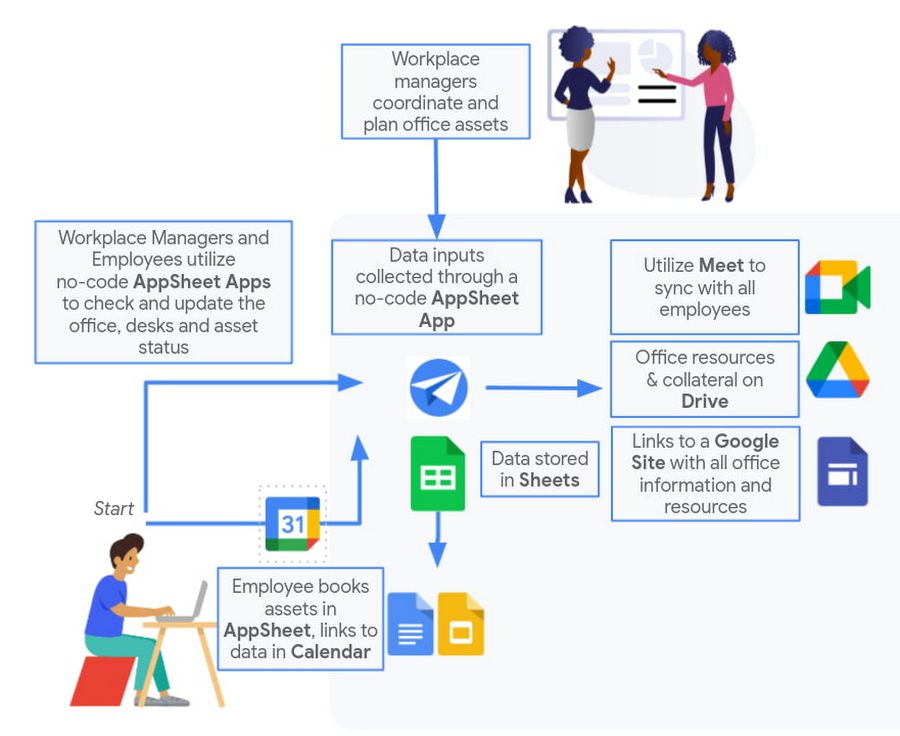
Mission critical solutions, faster than ever
In the past, the type of app explored in this article would have required a central data store, distribution to specific groups of users, management and dashboard capabilities, as well as smartphone sensor integration for NFC and image capturing. This would have necessitated a mammoth implementation project and a team of professional coders.
But with no-code, you can effectively design and implement these requirements in hours and days rather than months and years. Changes can be made on the fly in any browser, including pushing out new versions to users. Though AppSheet opens up app building and digital automations to any knowledge worker, it also includes robust security and governance controls, ensuring that as you manage getting employees back into office, you don’t neglect IT security.
Try out your own back-to-the-office app for free today at AppSheet.com, or explore and copy our sample app.
Anthos for Manufacturing: Tackle DevOps Complexities and Drive Digital Transformation
DOWNLOAD E-BOOK6264
Of your peers have already downloaded this article
2:00 Minutes
The most insightful time you'll spend today!
Deploying Ray on GKE: Distributed Computing Made Easy

962
Of your peers have already read this article.
3:30 Minutes
The most insightful time you'll spend today!
The rapidly evolving landscape of distributed computing demands efficient and scalable frameworks. Ray.io is an open-source framework to easily scale up Python applications across multiple nodes in a cluster. Ray provides a simple API for building distributed, parallelized applications, especially for deep learning applications.
Google Kubernetes Engine (GKE) is a managed container orchestration service that makes it easy to deploy and manage containerized applications. GKE provides a scalable and flexible platform that abstracts away the underlying infrastructure.
KubeRay enables Ray to be deployed on Kubernetes. You get the wonderful Pythonic unified experience delivered by Ray, and the enterprise reliability and scale of GKE managed Kubernetes. Together, they offer scalability, fault tolerance, and ease of use for building, deploying, and managing distributed applications.
In this blog post, we share a solution template to get you started easily with Ray on GKE. We discuss the components of the solution and showcase an inference example using Ray Serve for Stable Diffusion.
Overview of the Solution
In this solution template we use KubeRay, an OSS solution for managing Ray clusters on Kubernetes, as the operator for provisioning our workloads. Follow the step-by-step instructions in the README file to get started. The solution contains two groups of resources: platform-level and user-level.
Platform-level resources are expected to be deployed once for each development environment by the system administrator. These include the common infrastructure and GCP service integrations that are shared by all users.
- GKE cluster and node pool. Configurations can be changed in the main.tf file. This module deploys a GKE cluster with a GPU node pool, including required Nvidia drivers for GPUs. You can replace these with other machine types.
- Kubernetes system namespace and service accounts, along with the necessary IAM policy bindings. This allows the platform administrator to provide fine-grained user access control and quota policies for Ray cluster resources.
- KubeRay operator. The operator is responsible for watching for changes in KubeRay resources and reconciling the state of the KubeRay clusters.
- Logging. The `logging_config` section enables logs from system components and workloads to write logs to Cloud logging.
- Monitoring. The `monitoring_config` section enables Managed Prometheus integration. This allows the deployment to automatically scrape system-level metrics and writes them to the managed metrics service.
- Workload identity. This enables your workloads to authenticate with other GCP services using Google IAM service accounts.
User-level resources are expected to be deployed once by each user in the development environment.
- KubeRay cluster. This is the actual Ray cluster that we will be used for your workloads. It is configured to use a Workload Identity pool and a IAM-binded service account that provides fine-grained access to GCP services. You can customize the Ray cluster settings by editing the kuberay-values.yaml file.
- Logging. The solution adds a side car container deployed alongside each KubeRay worker node. This uses fluentbit to forward Ray logs from the head node to Cloud logging. You can edit the fluentbit-config file to change how the logging container filters and flushes logs.
- Monitoring. This module provides a PodMonitoring resource that scrapes metrics from the user’s Ray cluster and uploads data points to Google Managed Prometheus. An optional installation for Grafana dashboard is included and can be accessed through a web browser.
- JupyterHub server. This module installs a JupyterHub notebook server in the user namespace, enabling users to interact directly with their Ray clusters.
Run a Workload on Your Ray Cluster
Let’s try running the provided example with Ray Serve to deploy Stable Diffusion. This example was originally taken from the Ray Serve documentations here. To open the example in Jupyter notebook, go to the external IP for proxy-public in your browser (instructions to get the IP). And then click on File -> Open from URL, and input the raw URL of the notebook to open it.
Since the notebook runs in the same Kubernetes cluster as the Ray cluster, it is able to talk directly to the latter using its cluster-internal service endpoint – thus there is no need to expose the Ray cluster to public internet traffic. For production workloads, you should secure your endpoints with GCP account credentials. Google Cloud Identity Aware Proxy (IAP) can be used to enable fine-grained access control to user resources, such as our Ray cluster, to protect your GCP resources from unnecessary exposure. A full tutorial on how to enable IAP on your GKE cluster can be found here.
The notebook contains code for deploying a pre-trained model to a live endpoint. The last cell makes a call to the created service endpoint:prompt = “a cute cat is dancing on the grass.”input = “%20″.join(prompt.split(” “))resp = requests.get(f”http://example-cluster-kuberay-head-svc:8000/imagine?prompt={input}”)with open(“output.png”, ‘wb’) as f: f.write(resp.content)
Executing the notebook will generate a file with a unique picture of a cute cat. Here is an example we got:

Congratulations! You have now deployed a large model for image generation on GKE.
Logging and Monitoring
As mentioned earlier, this solution enables logging and monitoring automatically. Let’s find those logs.
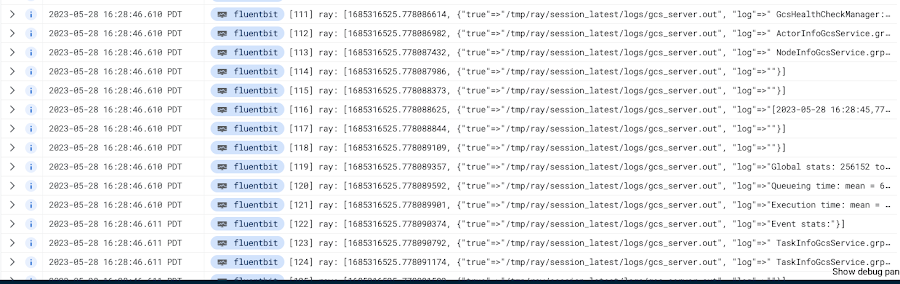
In your Cloud Console, open up Logging -> Log Explorer. In the query text box, enter the following:resource.type=”k8s_container”resource.labels.cluster_name=%CLUSTER_NAME%resource.labels.pod_name=%RAY_HEAD_POD_NAME%resource.labels.container_name=”fluentbit”
You should see the Ray logs from your cluster forwarded here.
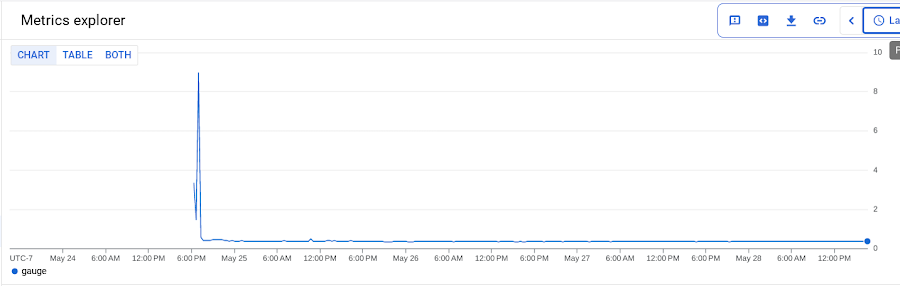
To see your monitoring metrics, go to Metrics Explorer in the Cloud Console. Under the menu for “Target”, select “Prometheus Target” and then “Ray”. Select the metric that you want to see, for instance `prometheus/ray_component_cpu_percentage/gauge`:
The deployment also comes with a Grafana deployment. Follow this guide to open it up and view your Ray cluster’s metrics.
Conclusion
The combination of Ray and GKE offers a simple and powerful solution for building, deploying, and managing distributed applications. Ray’s simplicity makes it an attractive choice for data and model developers while GKE’s scalability and reliability is the defacto choice for enterprise platforms. The solution template presented in this blog post offers a convenient way to get started quickly with KubeRay, the recommended approach to deploy Ray on GKE.
If you have any questions for building Ray on Kubernetes and GKE, you can contact us directly at ray-on-gke@google.com or comment in GitHub. Learn more about building AI Platforms with GKE by visiting our User Guide.
Smart Home Appliances Start-up Chooses Google Cloud to Wow European Customers

3451
Of your peers have already read this article.
2:00 Minutes
The most insightful time you'll spend today!
The internet of things is everywhere now. Almost everyone has at least one connected device at home, likely a virtual assistant and perhaps a smart programmable thermostat. Nearly all new televisions come preinstalled with streaming apps. Even electric vehicles send drivers communications when tire pressure is low or other problems come up.
Smart home appliances aren’t quite as common just yet, but the market is growing rapidly worldwide. And at TecPal, we are helping lead the way.
I’ve had the privilege to work around the world, in Hamburg, Bangkok, and Beijing, and I’ve been in the amazing city of Hong Kong for the past five years. It’s an ideal location for a startup like ours.
I collaborated with a friend from a previous job in mainland China to come up with the idea to start our new venture. He owns a factory that manufactures all kinds of small kitchen appliances and sells them mostly to European retailers. When more and more of his customers started asking about smart appliances, he called me because he knew about my background in IT.
That’s where our idea was born for a more specialized developer of software for smart appliances. Given my friend’s manufacturing expertise and my software experience, we were really more than halfway there before even getting started. That was just four years ago, and today we employ more than 50 people.
We started by adding smart technology to the products his factory produces but realized that what we’re doing could be so much bigger. Why produce smart technology for just a handful of clients when the global market is growing? So now we’re transitioning from creating a customized solution for his products to a software-as-a-service model that can be used in all kinds of smart appliances.
Rapid delivery of custom apps
At TecPal, we started with kitchen appliances, but our software also works in washing machines, ovens, vacuum cleaners, and more. We put everything together in an end-to-end service: hardware integration, cloud services and consumer-facing apps. And the IoT management platform can roll out updates, manage the devices, and ensure their security. Manufacturers and retailers don’t need to know about software development, embedded systems development, cloud development, or mobile development. We can handle that for them so they can stay focused on their core areas of expertise.
Today we have appliances that come preloaded with recipes that are optimized for the appliance so you don’t have to worry about the time, the temperature, and other details. Everything is preset.
We launched multiple IoT products with a major European retailer in 2021 that includes not only preloaded recipes but also user-generated content geared to specific appliances. The Monsieur Cuisine Smart is an advanced multi-cooker utilizing TecPal’s IoT solution. The mobile companion app allows users to control the appliances remotely. They can check the remaining cooking time or stop one of the many cooking programs like kneading, steaming, frying from the living room or from their office across town. The ability to embed content in an appliance is valuable, and so is the ability to control the appliance remotely, but we double down on value by offering both.
Winning with best-in-class IoT technology
Companies in Northeast Asia generally shop around for technology partners based mostly on price, but that’s not us. We chose Google Cloud for the quality of its technology, especially its IoT Core fully managed services. We’re using almost everything in Google Cloud IoT Core, but we’re particularly reliant on the environment for its highly secure two-way device connection and management. We set up some clusters in Google Kubernetes Engine (GKE) and are using that as the underlying virtualization architecture because it allows us to quickly and cost-effectively scale up and down to meet changing customer demands.
We also use Google Cloud Pub/Sub as our message broker to update app statuses automatically and reliably in our back end, for our ETL processes, and for our data pipeline. At the same time, Google Cloud Dataflow is key because it’s a fast, efficient way to funnel all data from different devices and events into BigQuery for data collection, storage, and analytics. BigQuery is a great choice for us because most developers are already familiar with it as a relational database that supports advanced data analytics. We can expand our use of BigQuery without worrying about dimensions, and our new developers can come up to speed quickly on it.
We only end up checking in with a Google Cloud support team once a month, if that. If we don’t find what we’re looking for in documentation, we can just drop them an email. Their response time is excellent.
Beyond the immediate technology advantages we’ve realized by standardizing on Google Cloud, we’re also finding that it helps us win business with big clients in Europe. Google Cloud is an environment that other big businesses know and trust.
We’re still just getting started
We’re already seeing double-digit growth in our market, up to about 25 percent annually. More importantly, there’s a lot of runway in front of us before our growth is expected to plateau.
The market for smart consumer appliances is increasing every day, and there’s a lot of room to reach new regions with new products. Most countertop food processors and slow cookers are still old-fashioned, for instance, but they probably won’t stay that way—especially now that two out of three homeowners say their next appliance purchase will be a smart one.
Together with Google Cloud, we are committed to meeting that demand and exceeding expectations as people embrace new at-home technologies that will make their everyday lives easier.
If you want to learn more about how Google Cloud can help your startup, visit our page here to get more information about our program, and sign up for our communications to get a look at our community activities, digital events, special offers, and more.
Master AI Prompt Engineering with 6 Proven Tips

1047
Of your peers have already read this article.
2:30 Minutes
The most insightful time you'll spend today!
As AI-powered tools become increasingly prevalent, prompt engineering is becoming a skill that developers need to master. Large language models (LLMs) and other generative foundation models require contextual, specific, and tailored natural language instructions to generate the desired output. This means that developers need to write prompts that are clear, concise, and informative.
In this blog, we will explore six best practices that will make you a more efficient prompt engineer. By following our advice, you can begin creating more personalized, accurate, and contextually aware applications. So let’s get started!
Tip #1: Know the model’s strengths and weaknesses
As AI models evolve and become more complex, it is essential for developers to comprehend their capabilities and limitations. Understanding these strengths and weaknesses can help you, as a developer, avoid making mistakes and create safer, more reliable applications.
For example, an AI model that is trained to recognize images of blueberries may not be able to recognize images of strawberries. Why? Because the model was only trained on a dataset of blueberry images. If a developer uses this model to build an application that is supposed to recognize both blueberries and strawberries, the application would likely make mistakes, leading to an ineffective outcome, and poor user experience.
It’s important to note that AI models have the ability to be biased. This is due to AI models being trained on data that is collected from the real world, and so it can reflect the inequitable power dynamics inherently rooted in our social hierarchy. If the data that is used to train an AI model is biased, then the model will also be biased. This can lead to problems if the model is used to make decisions that affect people by reinforcing societal biases. Addressing these biases is important to ensure that data is fair, promoting equality, and ensuring the responsibility of AI technology. Prompt engineers should be aware of training limitations or biases so they can craft prompts more effectively and understand what kind of prompting is even possible for a given model.
Tip #2: Be as specific as possible
AI models have the ability to comprehend a variety of prompts. For instance Google’s PaLM 2 can understand natural language prompts, multilingual text, and even programming codes like Python and JavaScript. Although AI models can be very knowledgeable, they are still imperfect, and have the ability to misinterpret prompts that are not specific enough. In order for AI models to navigate ambiguity, it is important to tailor your prompts specifically to your desired outcome.
Let’s say you would like your AI model to generate a recipe for 50 vegan blueberry muffins. If you prompt the model with “what is a recipe for blueberry muffins?”, the model does not know that you need to make 50 muffins. It is thus unlikely to list the larger volume of ingredients you’ll need or include tips to help you more efficiently bake such a large number of muffins. The model can only go off the context that is provided. A more effective prompt would be “I am hosting 50 guests. Generate a recipe for 50 blueberry muffins.” The model is more likely to generate a response that is relevant to your request and meets your specific requirements.
Tip #3: Utilize contextual prompts
Utilize contextual information in your prompts to help the model gain an in-depth understanding of your requests. Contextual prompts can include the specific task you want the model to perform, a replica of the output you’re looking for, or a persona to emulate, from a marketer or engineer to a high school teacher. Defining a tone and perspective for an AI model gives it a blueprint of the tone, style, and focused expertise you’re looking for to improve the quality, relevance, and effectiveness of your output.
In the case of the blueberry muffins, it is important to prompt the model using the context of the situation. The model might need more context than generating a recipe for 50 people. If it needs to be aware that the recipe must be vegan friendly, you might prompt the model by asking it to answer by emulating a skilled vegan chef.
By providing contextual prompts, you can help ensure that your AI interactions are as seamless and efficient as possible. The model will be able to more quickly understand your request and it will be able to generate more accurate and relevant responses.
Tip #4: Provide AI models with examples
When creating prompts for AI models, it is helpful to provide examples. This is because prompts act as instructions for the model, and examples can help the model to understand what you are asking for. Providing a prompt with an example looks something like this: “here are several recipes I like – create a new recipe based on the ones I provided.” The model can now understand the your ability and needs in order to make this pastry,
Tip #5: Experiment with prompts and personas
The way you construct your prompt impacts the model’s output. By creatively exploring different requests, you will soon have an understanding of how the model weighs its answers, and what happens when you interfuse your domain knowledge, expertise, and lived experience with the power of a multi-billion parameter large language model.
Try experimenting with different keywords, sentence structures, and prompt lengths to discover the perfect formula. Allow yourself to step into the shoes of various personas, from work personas such as “product engineer” or “customer service representatives,” to parental figures or celebrities such as your grandmother, a celebrity chef, and explore everything from cooking to coding!
By crafting unique, and innovative, requests replete with your expertise and experience, you can learn which prompts provide you with your ideal output. Further refining your prompts, known as ‘tuning,’ allows the model to have a greater understanding and framework for your next output.
Tip #6: Try chain-of-thought prompting
Chain of thought prompting is a technique for improving the reasoning capabilities of large language models (LLMs). It works by breaking down a complex problem into smaller steps, and then prompting the LLM to provide intermediate reasoning for each step. This helps the LLM to understand the problem more deeply, and to generate more accurate and informative answers. This will help you to understand the answer better and to make sure that the LLM is actually understanding the problem.
Conclusion
Prompt engineering is a skill that all workers, across industries and organizations, will need as AI-powered tools are becoming more prevalent. Remember to incorporate these five essential tips the next time you communicate with an AI model, so you can generate the accurate outputs that you desire. AI will forever continue to develop, constantly refining itself as we use it, so I encourage you to remember that learning, for mind and machine, is a never ending journey. Happy Prompting!

1107
Of your peers have already downloaded this article
4:30 Minutes
The most insightful time you'll spend today!
Learn about the benefits of a Google Cloud multicloud solution and how Google will partner with you to succeed, regardless of where your data resides or where your applications run.
More Relevant Stories for Your Company
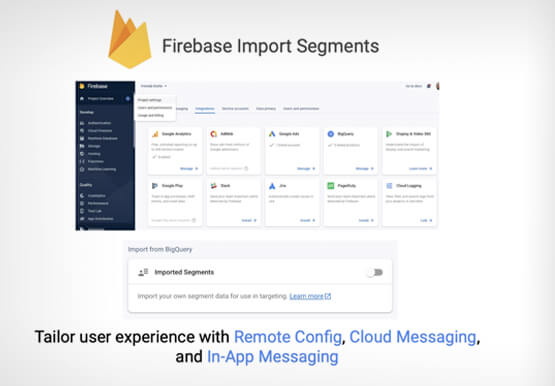
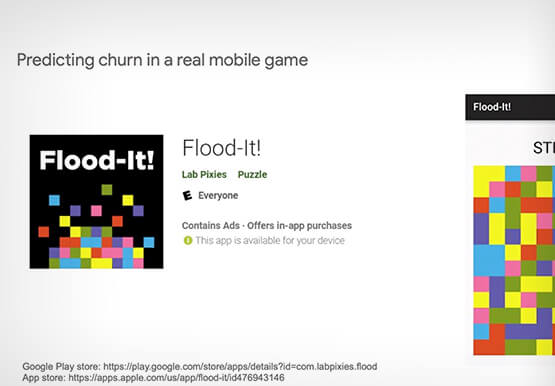

Predict User Churn on Gaming Apps with Google Analytics Data using BigQuery ML
User retention can be a major challenge for mobile game developers. According to the Mobile Gaming Industry Analysis in 2019, most mobile games only see a 25% retention rate for users after the first day. To retain a larger percentage of users after their first use of an app, developers can

How APIs Helped PWC Open New Revenue Streams Using Existing Data
PwC, one of the “Big Four” accounting firms, is well-known for professional services structured around auditing, insurance, tax, legal, and traditional management consulting. In Australia, the PwC Innovation and Ventures group has taken the global lead in building new, technology-based, turnkey lines of business outside of PwC’s traditional service areas.

Application Rationalization: Your App Development Team is Gonna Love It!
On April 6th, 2022, Google Cloud established a new partnership with CAST, to help accelerate the migration and application modernization programs of customers worldwide, complementing the Google capabilities already available through the Google Cloud Application Modernization Program (CAMP). Application Rationalization (App Rat) is the first step towards a cloud adoption

Lower risk, greater return: Public sector organizations are focusing on multicloud adoption
Government organizations are starting to realize that no single cloud can meet their wide range of needs. According to the Nutanix 2022 Enterprise Cloud Index1, 75% of public sector organizations agree that multicloud is ideal, and more public sector organizations than average have adopted multicloud as a primary IT operating
