





New Map Customization Features for Enhanced User Experiences

5564
Of your peers have already read this article.
1:30 Minutes
The most insightful time you'll spend today!
A customized map can be key to delivering a frictionless experience that engages users and sets you apart in users’ minds–whether you’re a real estate company fine-tuning points of interest (POIs) on a map to help buyers decide where to live, or a regional pharmacy styling a map to ensure your locations stand out from the competition. That’s why we’ve focused on empowering you with these capabilities through features like POI density and POI filtering controls, zoom level customization, and even industry-optimized map styles. But we’re not done helping you take your map to the next level. Today, we’re making two updates generally available—a new Maps SDK for Android and the extension of Cloud-based maps styling features to our Android and iOS SDKs. Together they enhance the native mobile map experience and make it easier for you to deliver consistent, optimized maps across all your platforms. We’ll also give you an early look at additional features that we’re working on.
Update your Maps SDKs for Android for an enhanced user experience
Developers around the world depend on the Maps SDK for Android to power critical experiences like helping drivers make a delivery or helping retailers visually confirm an order’s shipping address. With consumers spending an increasing amount of time in apps, it’s more important than ever that mobile experiences meet the high consumer expectations that come with essential, everyday use.
Today we released version 18.0.0 of the Maps SDK for Android, which delivers an enhanced map experience to app users, thanks to a new renderer. The new renderer introduces optimizations to our tile serving and rendering architecture, reducing payload size. This can help to reduce network load, on-device processing, and memory consumption for a more stable and smoother end-user experience. You’ll also see specific improvements with map labels. Now more fluid and clearly positioned, they pave the way for future marker management features. We’ve also enhanced overall gesture handling for better animations and smoother panning and zooming.
Because the Maps SDK for Android continues to be distributed as part of the Google Play services SDK, you can upgrade to v18.0.0 along with all its improvements with no increase to your APK size.
A consistent cross-platform maps experience with Cloud-based maps styling for mobile
Earlier this year at Google I/O, we announced the general availability of Cloud-based maps styling for JavaScript. Since then customers have used the richer customization capabilities and efficient cloud-enhanced deployment workflow to power millions of mapping experiences, from a curated interactive map of Munich to fun virtual Easter egg hunts hosted by Cadbury. Starting today, Cloud-based maps styling features are supported in the GA versions of our Maps SDK for Android (v18+) and Maps SDK for iOS (V5.0+).
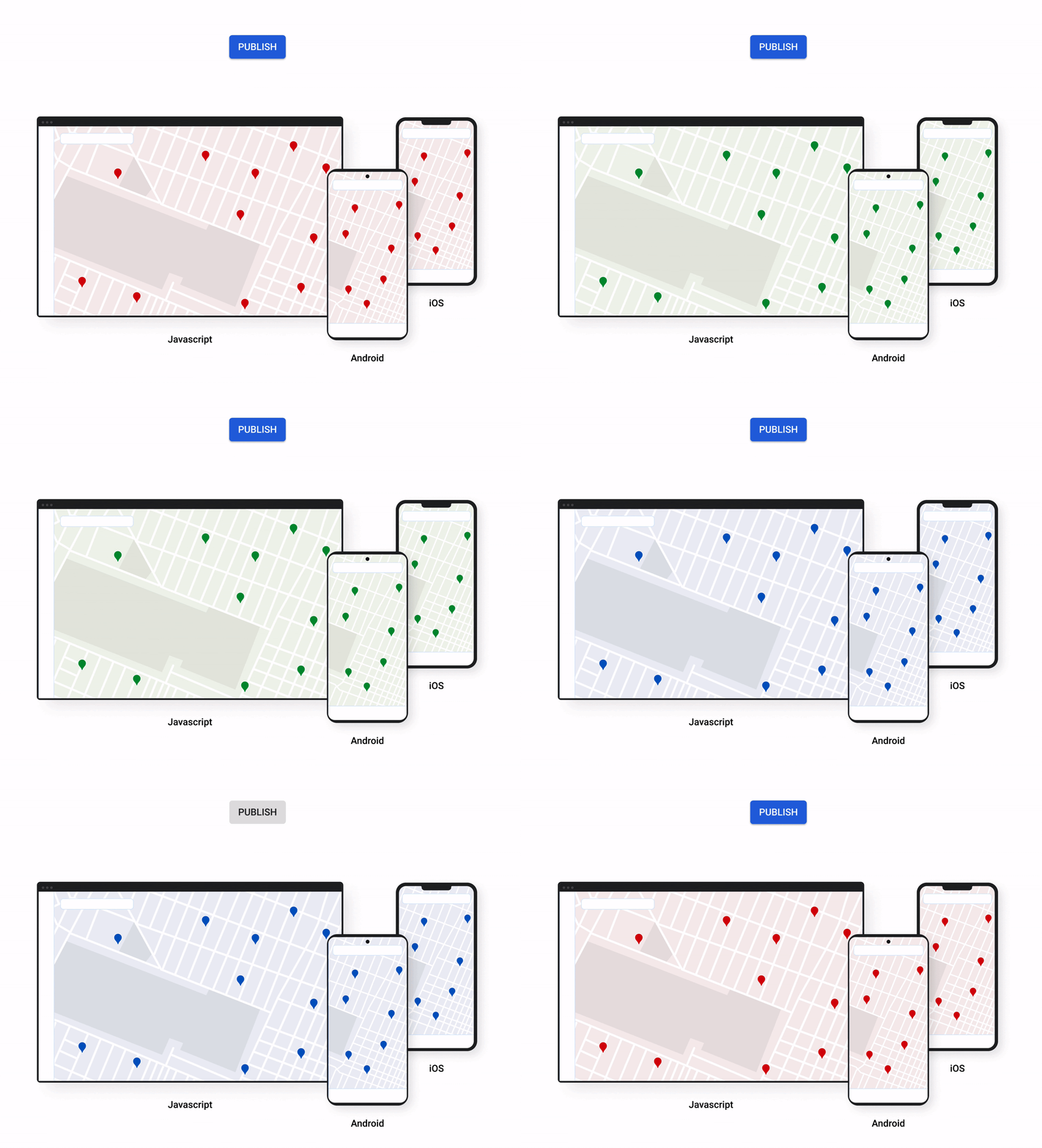
Cloud-based maps styling moves map customization code off the client and into the cloud–where it can be easily modified to use new features or test new configurations. This decoupling of client code and customization code makes it easy to manage a single branded and optimized style across any number of apps across all supported platforms. It also makes it possible to simultaneously publish changes to a map style across platforms and install bases with the click of a button. Cloud-based maps styling is the foundation for a growing set of new customization features including POI filtering and POI boosting, zoom level customization, landmarks, and commercial corridor styling.
Mobile developers can now take advantage of Cloud-based maps styling features and simple cross-platform customizations for their Dynamic Maps by creating a MapID in Google Cloud Console and using it within their Maps SDK for Android or Maps SDK for iOS. Dynamic maps loaded with a Map ID via our Maps SDK for Android or Maps SDK for iOS will be billed to the same SKU as Maps JavaScript API (Dynamic Maps) and covered under the same $200 monthly credit and volume pricing. Developers can upgrade to the new Maps SDK for Android and continue using client-styled maps for no charge as they always have.
Additional capabilities we’re working on¹
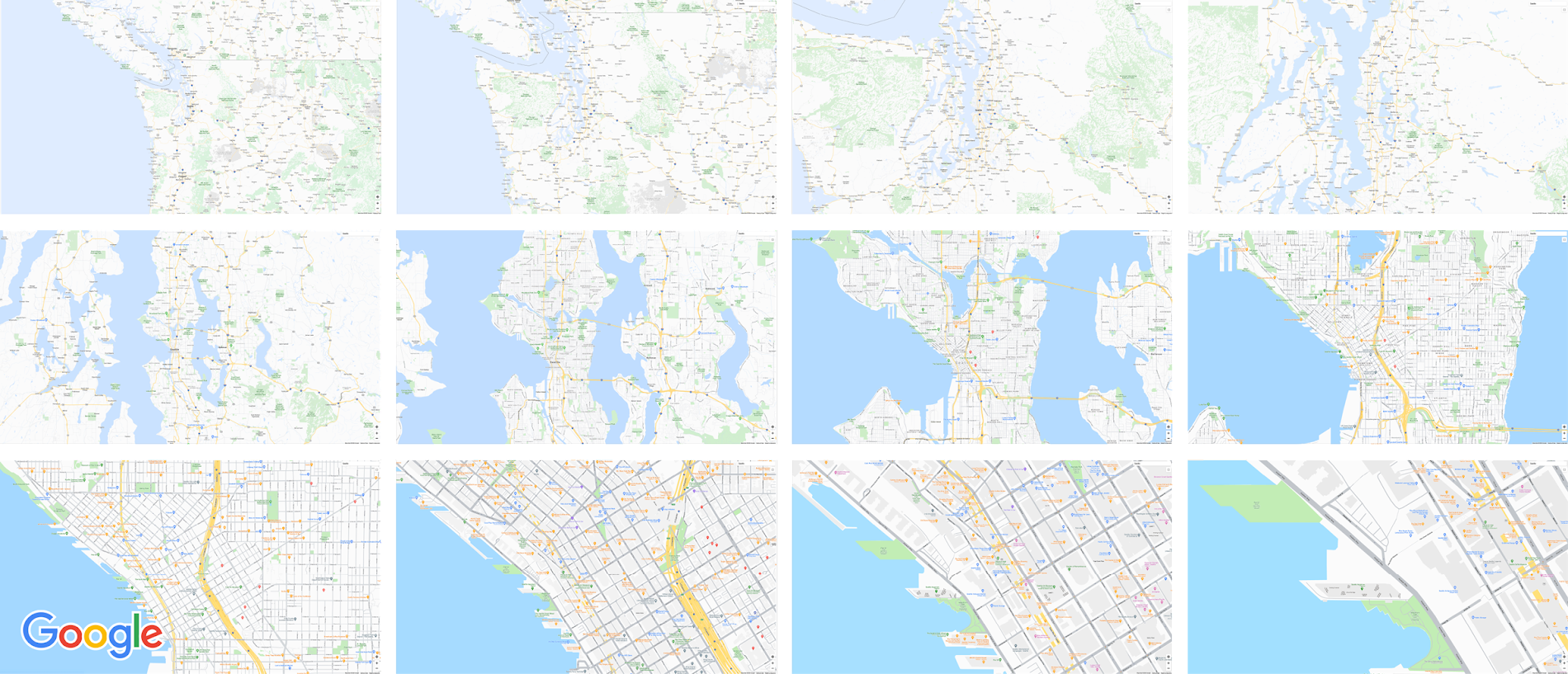
We know you have a range of map customization needs to engage your users with differentiated experiences. We’re working on developing more Cloud-based maps styling features–focused on marker capabilities, map elements, and data-driven styling–to help you do just that. We’re working on a new set of markers capabilities, easier pin customizations, marker collision management, performance optimizations, and the ability to build custom marker elements that you can use to quickly deploy deeply customized, highly optimized marker-driven experiences. For those seeking greater detail in their maps, we’re working on expanding the availability and customization of detailed street maps to even more cities. We’re also working on features to make it easier to programmatically style map elements by exposing new APIs to enable things like the simple creation of choropleths by styling Google geographical boundaries based on your data.
This is just a peek into what we’re excited to be building for our developer community. While we’re working hard to bring these additional features to life, visit our website to learn more and our developer documentation to start customizing and enhancing your mobile maps.
¹Product capabilities, timeframes, and features are subject to change.
WebGL-powered Features to Build Next-generation Mapping Experience

3462
Of your peers have already read this article.
3:00 Minutes
The most insightful time you'll spend today!
At Google I/O 2021, we announced the beta release of Tilt and Rotation, and Webgl Overlay View, which give you a fundamentally new way to build mapping experiences. You may be familiar with the existing Overlay View feature of the Maps JavaScript API that lets you render in a transparent layer that sits on top of the map. For years, developers have been using Overlay View to draw in two dimensions over the top of the map, but for as much as you can do with Overlay View, it only allows you to render on a transparent layer that effectively floats above the map.
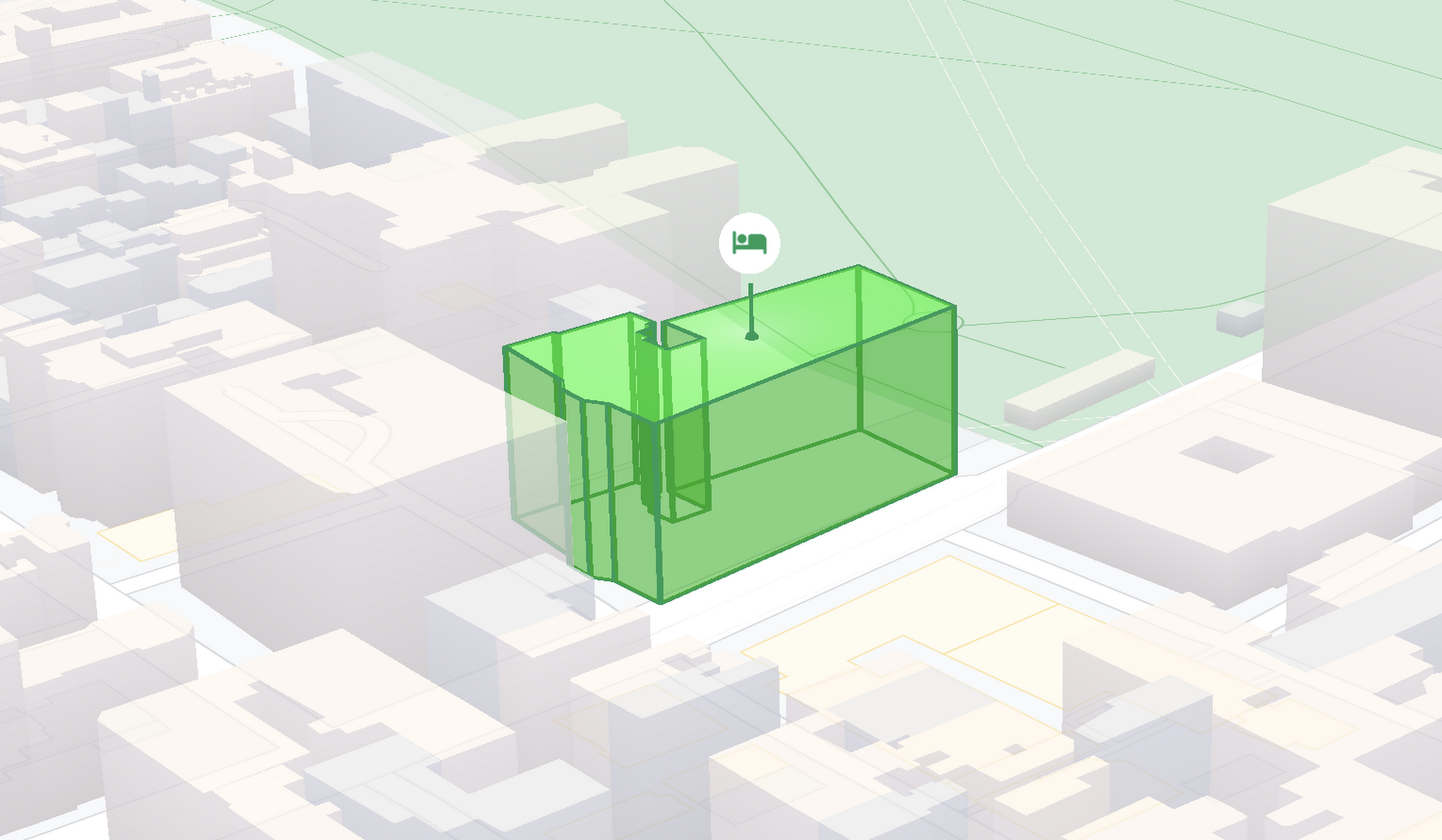
In contrast, WebGL Overlay View gives you direct hooks into the lifecycle of the exact same WebGL rendering context we use to render the vector basemap. This means that for the first time ever, you can performantly render two and three dimensional objects directly on the map, enabling you to build experiences that were previously impossible with the Maps JavaScript API.https://www.youtube.com/embed/9eycQLef6iU?enablejsapi=1&
Today, we’re going to give you a quick overview of the new WebGL-powered features of the Maps JavaScript API, so that you have all the knowledge you need to get started creating next generation mapping experiences.
What is WebGL?
WebGL is a low-level browser API, originally authored by the Mozilla Foundation, that gives you access to the rendering and processing power of the graphics processing unit (GPU) on client devices, such as mobile phones and computers, in your web apps. On its own, the browser is not able to handle the heavy computation needed to render objects in 3D space, but using WebGL it is able to pass those processes off to be handled by the GPU, which is purpose built to handle such computations.
To learn more about WebGL, check out the documentation from the Khronos Group, the designers and maintainers of WebGL.
Requirements
To use WebGL Overlay View, you’ll need a Map ID with the vector map enabled. It’s also strongly recommended that you enable Tilt and Rotation when you create your Map ID, otherwise your map will be constrained to the default top-down view – in short, you won’t be able to move your map in three-dimensions.
To learn more about using Map IDs and the vector map, see the documentation.
Setting Tilt and Rotation
To load your map with a set tilt and rotation, you can provide a value for the `tilt` and `heading` properties when you create the map:
const mapOptions = {mapId: "15431d2b469f209e",tilt: 0,heading: 0,zoom: 17,center: {lat: -33.86957547870852,lng: 151.20832318199652}}const mapDiv = document.getElementById("map");const map = new google.maps.Map(mapDiv, mapOptions);
Tilt is specified as a number or float in degrees between 0 and 67.5, with 0 degrees being the default straight down view and 67.5 being the maximum tilt. The available maximum tilt also varies by zoom level.
The rotation is set in the heading property as a number or float between 0 and 360 degrees, where 0 is true north.
You can also change the tilt and rotation programmatically at runtime whenever you want by calling `setTilt` and `setHeading` directly on the map object. This is useful if you want to change the orientation of the map in response to events like user interactions.
map.setTilt(45);map.setHeading(180);
In addition, your users can manually control the tilt and rotation of the map by holding the <shift> key and dragging with the mouse or using the arrow keys.
For more information on Tilt and Rotation, see the documentation.
Adding WebGL Overlay View to the Map
WebGL Overlay View is made available in the Maps JavaScript API by creating an instance of `google.maps.WebglOverlayView`. Once an instance of the overlay is created, you simply need to call `setMap` on the instance to apply it to the map.
const webglOverlayView = new google.maps.WebglOverlayView;webglOverlayView.setMap(map);
To give you access to the WebGL rendering context of the map and handle any objects you want to render there, WebGL Overlay View exposes a set of five hooks into the lifecycle of the WebGL rendering context of the vector basemap.
Here’s a quick rundown:
- `onAdd` is where most of your pre-processing should be done, like fetching and creating intermediate data structures to eventually pass to the overlay. The reason to do all of that here is to ensure you don’t bog down the rendering of the map.
- `onRemove` is where you’ll want to destroy all intermediate objects, though it would be nice if you did it sooner.
- `onContextRestored` is called before the map is rendered and is where you should initialize, bind, reinitialize or rebind any WebGL state, such as shaders, GL buffer objects, etc.
- `onDraw` is where we actually render the map, as well as anything that you specify in this hook. You should try to execute the minimal set of draw calls to render your scene. If you try to do too much here you’ll bog down both the rendering of the basemap and anything you’re trying to do with WebGL, and trust me, no one wants that.
- `onContextLost` is where you’ll want to clean up any state associated with pre-existing GL state, since at this point the WebGL context will have been destroyed, so it’ll be garbage.
To implement these hooks, set them to a function, which the Maps JavaScript API will execute at the appropriate time in the WebGL rendering context lifecycle. For example:
webglOverlayView.onDraw = (gl,coordinateTransformer) => { //do somerendering }
For more information on using WebGL Overlay View and its lifecycle hooks, check out the documentation.
Creating Camera Animations
As part of the beta release of WebGL Overlay View, we’re also introducing `moveCamera`, a new integrated camera control that you can use to set the position, tilt, rotation, and zoom of the camera position simultaneously. Like `setTilt` and `setHeading`, `moveCamera` is called directly on the `Map` object.
By making successive calls to `moveCamera` in an animation loop you can also create smooth animations between camera positions. For example, here we are using the browser’s `requestAnimationFrame` API to change the tilt and rotation each frame:
const cameraOptions = {tilt: 0,heading: 0}function animateCamera () {cameraOptions.tilt += 1;cameraOptions.heading += 1;map.moveCamera(cameraOptions);}requestAnimationFrame(animateCamera);
Plus, all of these adjustments, including zoom, support floats, which means not only can you control the camera like never before, you can also do it with a high degree of precision.
For more information on `moveCamera`, see the documentation.
Give it a tryYou can try the new WebGL-powered features of the Maps JavaScript API right now by loading the API from the beta channel. We’ve got a new codelab, and documentation with all the details, as well as sample code and end-to-end example apps to help you get started. Also, be sure to check out our feature tour and travel demos to learn more and play with a real implementation of these features.
And let us know what you think by reporting through our issue tracker. We need your bug reports, your feature requests, and your feedback to help us test and improve the new WebGL-based map features.
Have fun building with the map in 3D—we can’t wait to see the amazing things you’ll build.
For more information on Google Maps Platform, visit our website.
Report on API-led Digital Transformations in 2020 and the Future

6810
Of your peers have already read this article.
1:30 Minutes
The most insightful time you'll spend today!
In 2020, many businesses across industries turned their focus and investments towards digital strategies. APIs being an integral part of every organization’s digital disruption, will grow in relevance throughout 2021. Read the report to gain more insights on driving API-led digital transformations and in-depth analysis of Google Cloud’s Apigee API Management Platform usage data, case studies and third-party surveys conducted with tech leaders.
SoFi Stadium Personalizes Fan Experiences with Game-changing App Built on Google Cloud and Deloitte

3204
Of your peers have already read this article.
2:00 Minutes
The most insightful time you'll spend today!
Editor’s note: Engineers from SoFi Stadium, Google Cloud, and Deloitte built a fan-ready Personal Concierge app that uses advanced analytics to tailor game-day experiences for every visitor. SoFi’s 10-year partnership with Google Cloud not only pumps up the fans. Advanced analytics also enable stadium employees to securely store, analyze, and action analytics data, and seamlessly collaborate through tools and services included in Google Cloud Workspace.
SoFi Stadium, an industry-leading, outdoor-indoor events facility and home of the Los Angeles Rams and Los Angeles Chargers, is the centerpiece of Hollywood Park, a near 300-acre sports and entertainment destination. With the capacity to host up to 100,000 spectators across a range of luxury and premium seating options, the 3.1 million square-foot SoFi Stadium is the largest in the NFL. Completed in September 2020, it has already secured a global reputation—scheduled to host Super Bowl LVI in 2022, the College Football National Championship Game in 2023, and the Opening and Closing Ceremonies of the Olympic Games in 2028. Under the same roof canopy as the stadium is the 2.5-acre American Airlines Plaza and the 6,000-seat performance venue, YouTube Theater.
Through a long-term partnership with Google Cloud, SoFi Stadium is personalizing fan experiences, enabling a more fulfilling, collaborative, and productive work experience for employees, and delivering game-changing technology to the event space.
Personalizing the experience for every fan
Sports fans are known for their fierce loyalty and camaraderie. While they come to game day ready to cheer with fellow fans, each spectator has a different vision for what will make for a memorable event. SoFi Stadium is helping customers choose their game day flow by extending a personalized, streamlined experience to every stadium goer through several new digital innovations powered by Google Cloud.
First there’s the Personal Concierge App. Powered by Google Cloud and built by Deloitte, this personalized navigation and security tool may be the game day MVP that sports fans have always dreamed of. Hours of precious viewing time can be lost navigating a stadium campus for seating, parking, food, access, and amenities. This application enables fans to quickly locate available parking locations, select the ideal transportation for game day through real-time Google Maps routing, and discover SoFi Stadium events all from their mobile device. Event-goers can also receive digital credentials through the app, enabling them to bypass lines and accelerate their access to luxury viewing suites.
The advanced data analytics accrued from multiple sources and processed through Google Cloud products such as Cloud Scheduler, App Engine, Dataflow, BigQuery, Looker, Firebase, and more, enable SoFi Stadium to anticipate spectator tastes. These Google Cloud tools can remember preferences and provide attendees with real-time personal recommendations around the clock.
Performing at the top of their game with Workspace
Advanced data analytics enhance employee experiences, too. Credentialed team members can securely store and analyze data from multiple sources, create operational dashboards with real-time data, track key performance indicators after events, and better forecast attendance, revenue by product, and other important business metrics.
In addition to deploying a number of Google Cloud solutions including Compute Engine, Kubernetes Engine, Cloud CDN, BigQuery, and others to power the Personal Concierge App, SoFi Stadium is empowering its employees by fully migrating to Google Cloud’s Workspace. Workspace streamlines the stadium’s business operations by fostering fast and seamless access to collaboration and performance tools. Built-in software—including Gmail for business, Docs, Drive, Calendar, and Meet—will help employees work smarter and meet securely from anywhere.
“We couldn’t have picked a better partner to help manage our technology needs,” said Skarpi Hedinsson, Chief Technology Officer, SoFi Stadium and Hollywood Park. “Incorporating Google’s solutions into critical areas of our business ensures we can usher in a new era of innovation in sports and entertainment, raising the bar on what the ultimate fan experience looks like globally.”
Making the big-game even bigger
As Hollywood Park combines the expertise of its team and Google Cloud engineers to power the future of sports and live events, SoFi Stadium prepares to welcome a product of this collaboration with the Infinity Screen by Samsung, the largest video board in sports. With 80 million pixels, weighing 2.2 million pounds, and boasting 120-yards in length, the Infinity Screen by Samsung leverages Google Cloud-based media workflows and optimization technology to power its game-changing screen.
Through its partnership with Google Cloud, SoFi Stadium is actively developing new media streaming and high-speed wireless solutions. In addition, SoFi Stadium has the world’s first 4K/HDR live production facility. These digital innovations are powering a new standard for sports fans and opening a path to redefine what can take game day from good to great.
Custom Voice Feature Can Help Brands Tweak IVR for Better Customer Experiences

5137
Of your peers have already read this article.
1:30 Minutes
The most insightful time you'll spend today!
With the rise of digital assistants and conversational interfaces, people have grown accustomed to hearing and speaking to synthetic voices. But what do those voices sound like? Often, pretty repetitive. We’re all familiar with the Google Assistant voice, for example.
That’s why we are excited to announce the general availability of Custom Voice in our Cloud Text-to-Speech (TTS) API, a new feature that lets you train custom voice models with your own audio recordings to create unique experiences.
For businesses looking to build a strong brand identity, establishing a unique voice can help turn mobile app interactions or customer service based on interactive voice responses (IVR) into differentiated customer experiences. Our TTS API has included a speech synthesis service with a static list of voices for some time, but now, with Custom Voice, moving beyond these predefined options is easier than ever.
Custom Voice lets you simply submit your audio recordings to get access to the new voice directly in the TTS API. Custom Voice TTS includes guidance on the audio requirements to help make sure you generate a high quality custom TTS voice model. Once this new model is trained, all you have to do to start using the newly trained voice is reference the model ID in your calls to the Cloud TTS API.
At Google, we are committed to building safe and accountable AI products, not only because it’s the right thing to do, but because it is a critical step in ensuring successful use in production. As part of Google Cloud’s Responsible AI governance process, we conducted a deep ethical evaluation of Custom Voice TTS, and its relation to synthetic media, in order to surface and mitigate potential harms that it may create. If you are interested in Custom Voice TTS, there is a review process to help ensure each use case is aligned with our AI Principles and adequate voice actor consent is given.
Additionally, to verify that voice actors are actually the ones producing the audio, you will need to submit an audio file producing a sentence that Google Cloud chooses (for example: “I agree that my voice will be used to create a synthetic custom Text-to-Speech voice).
We’re looking forward to seeing this API help businesses solve problems in an easy, fast, and scalable way. TTS Custom Voice is now GA in these languages:
English (US)
English (AU)
English (UK)
Spanish (US)
Spanish (Spain)
French (France)
French (Canada)
Italian (Italy)
German (Germany)
Portugues (Brazil)
Japanese (Japan)
We plan to continue expanding this lineup in order to meet your needs. Ready to try for yourself? Contact your seller to get started on your use case evaluation today!
ANZ Bank Trusts Apigee to Deliver Secure and Compliant API Strategy

3045
Of your peers have already read this article.
3:30 Minutes
The most insightful time you'll spend today!
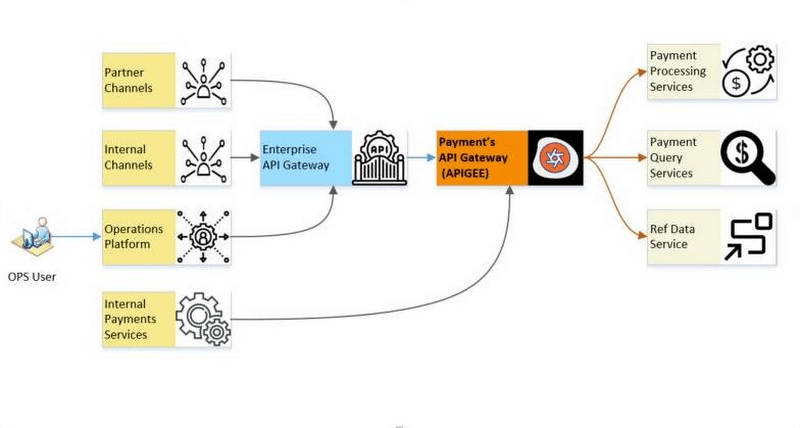
ANZ Bank is one of Australia’s top four banks and the largest bank in New Zealand by market capitalization. Headquartered in Melbourne, Victoria, we operate in more than 32 markets across Australia, New Zealand, Asia, Pacific, Europe, America and the Middle East. Our Payment team deals with all payment transaction types by providing highly secure, mission critical payment services to retail, institutional and international customers. The core payment platform is based on microservices architecture to support discreet payment processing requirements such as continuous volume growth, industry service level agreement (SLA) and complex payment orchestration and more. The API platform leverages APIs to perform specific business functions under the payment orchestration layer, which need to be resilient, scalable and heavy on security controls.
Simplifying our technology landscape
At ANZ, our mission is to improve the financial wellbeing and sustainability of our customers through reliable payment services. Over the past 12 months, we looked to simplify our technology landscape, to free up time so we could focus on implementing more customer-focused banking services. We needed an API management solution that would align to our API-first strategy, while also maintaining our high performance, security, and regulatory standards.
Specifically, the solution needed to:
- Simplify channel interactions with our platform;
- Improve developer experience and enable self-service;
- Ensure resilient fault tolerance;
- Improve our payment API security posture;
- Enable API-first digital enablement for both our internal and external payments customers;
- Have a scalable and transparent pricing model that ensured sustainable API programme growth.
Core focus on security and compliance
To meet our security and regulatory compliance standards an API solution would need to offer functionality including:
- Providing coarse-grained and fine-grained authorization and domain specific entitlements for API requests;
- Bundling APIs based on the nature of the channel;
- Integrating easily with established identity providers;
- Establishing patterns for connecting trusted upstream and downstream systems;
- Providing support for the industry standard OAuth 2.0 authorization protocol as per enterprise security standards.
We reviewed Apigee against other API management solutions and gateways, and determined it was the best fit for our needs. Not only did Apigee deliver on all our mission-critical requirements, but it also provided strong ease of use, feature-completeness and support for multiple coding languages.
Enabling smooth developer onboarding, processes and troubleshooting
Using Apigee has greatly improved developer onboarding and reduced the tedious steps involved in knowledge transfer and upskilling. The platform is easy for developers to use, and is backed by great documentation and video resources. These resources provide clear guidance about how to execute certain processes and troubleshoot as needed.
Overall, Apigee has delivered the features we need to manage the publication and consumption of APIs efficiently. We are now running eighteen APIs in production, including two APIs that enable payments through connection to our transaction database, and others that enable supporting services in the payment services platform team.
Our engineers and testers have found it easy to use the interface and Apigee API Management to deploy and test proxies. In addition, out of the box policies allow for fine-grained access control to handle and build proxies of varying degrees of complexity. These policies allow us to control security, manage traffic, mediate transformations and implement custom functionality via scripts.
We can now implement our fine-grained entitlement-based access control requirements, onboard new customers to the cloud and streamline payment channel onboarding. With Apigee, we are also integrating with other API management tools at the bank, in part to enable self-service for API providers and consumers by building a developer portal.
Thanks to Apigee, we are well positioned to adopt a decentralized API team model that will see different teams within payments and beyond create APIs, and ramp up to full production of our API-centric model in the near future. This is a key component of the bank’s broader cloud and API-first strategy that is designed to help ANZ become a more agile and adaptive technology organization. With the right components in place, can we help ANZ create opportunities and propositions that colleagues and customers love, ultimately helping ANZ realize its vision across Australia, New Zealand and international markets.
More Relevant Stories for Your Company

5 Ways You Need to Know to Reduce Costs with Containers
“Cloud Wisdom Weekly: for tech companies and startups” is a new blog series we’re running this fall to answer common questions our tech and startup customers ask us about how to build apps faster, smarter, and cheaper. In this installment, Google Cloud Product Manager Rachel Tsao explores how to save

Can Your Company Use Video AI? You’d Be Surprised at the Answer
Video AI is a powerful way to enable content discovery and engaging video experiences. Here, try it out right now! Google Cloud's easy-to-access video AI solutions can accomplish a bunch of things. Here are a few: Precise video analysis: Video Intelligence API automatically recognizes more than 20,000 objects, places, and

PaGaLGuY Turns to Google Cloud Platform to Power Leading India Education Network
Founded in 2006, PaGaLGuY started as a forum that enabled students, typically aged between 20 and 30 to discuss and seek advice on academic issues. By 2011, PaGaLGuY had increased its traffic to about 250,000 page views per month. The business is now one of India’s largest education networks and

Amadeus: Shaping the Future of Travel with Apigee
If you’ve taken a trip in the past 30 years, then you’ve probably used Amadeus technology. Our solutions connect over 1.5 billion travellers every year to the journeys they want, linking them via travel agents, search engines, and tour operators to over 700 airlines, 110 airports, 580,000 hotel properties, 40
