





New Certificate Manager Helps Leverage Google’s Network Security and Performance

3041
Of your peers have already read this article.
2:00 Minutes
The most insightful time you'll spend today!
We’re excited to announce the public preview of Certificate Manager and its integration with External HTTPS Load Balancing. Certificate Manager enables you to use External HTTPS Load Balancing with as many certificates or domains as you need. You can bring your own TLS certificates and keys if you have an existing certificate lifecycle management solution you’d like to use with Google Cloud, or enjoy the convenience of our fully Managed TLS offerings.
Extend the security and performance of the Google network to your customers
Certificate Manager brings support for multiple certificates per customer. When coupled with our global anycast load balancing solution with automated autoscaling and failover, you now have a powerful platform for building robust SaaS and PaaS offerings. This enables custom domain support for your customers with the lowest latency and the highest level of availability.
Alon Kochba, the head of web performance at website-building service Wix, explained how the new features lighten their workload.
“As a SaaS product, we need to terminate SSL for millions of custom domains and certificates. GCP’s Certificate Manager and External HTTPS Load Balancing lets us do this at the edge, close to the clients, without having to rely on our own custom solution for terminating SSL,” Kochba said.
Customers who switch to External HTTPS Load Balancing can also now protect their SaaS users from denial of service attacks, OWASP Top 10 risks, and other common Web attacks by adopting Cloud Armor.
DNS authorization
This release also now enables you to provision your Google-managed certificates with DNS-based authorizations and have them ready to use before your load-balancing production environment is fully set up. This will help streamline the migration process to Google Cloud, for example. To create a DNS authorization, use the following command:
gcloud beta certificate-manager dns-authorizations create example-authorization --domain="example.com"
This command returns the CNAME record for _acme-challenge.example.com that you must add to your DNS configuration in the DNS zone of the target domain. This CNAME record points to a special Google Cloud domain, e.g.: “534959-1a8a-40cf-90b6-b1f5f8d22517.2.authorize.certificatemanager.goog” that is used to verify domain ownership.
When you request a certificate based on the above authorization, Cloud Certificate Manager will work with the Certificate Authority automatically to get and later renew your certificate for that domain.
Wildcard support
This DNS-based domain control authorization also allows us to bring you support for wildcard certificates. To configure the use of wildcard certificates you first must configure the DNS authorization as we’ve indicated above. Once that has been completed, you can configure the use of a wildcard certificate using the following command. Our example below is for a top-level registered domain and its wildcard subdomains.
gcloud beta certificate-manager certificates create example-wildcard-certificate --domains="example.com,*.example.com" --dns-authorizations="example-authorization"
Monitoring for Certificate Expiration
Another new feature that will be enabled with this product is the ability to monitor certificate expiration with Google Cloud Logging. Cloud Logging creates a record of certificate expiration, uses the `certificatemanager.googleapis.com/Project` monitored resource, and is represented by the following message:
message CertificatesExpiry {// Expiration state of the certificate.enum State {// Unspecified state, should never be reported.STATE_UNSPECIFIED = 0;// Certificate will expire soon.CLOSE_TO_EXPIRY = 1;// Certificate is expired.EXPIRED = 2;}// Number of reported certificates.int64 count;// Names of reported certificates. If there are too many, the list is sampled.repeated string certificates = 2;// State of reported certificates.State state = 3;// Approximate expiration time of reported certificates.// Multiple certificates with close expiration time are batched// together in a single log, so the timestamp is not precise.google.protobuf.Timestamp expire_time = 4;}
The log message is delivered every hour and contains a sample of the certificates being close to expiry or already expired.
Pricing
The best part is that there’s no additional charge to use the Certificate Manager for the first 100 certificates. To use more than 100 certificates with the management tools, we will charge on a per-certificate, per-month pricing structure. This empowers you to scale up to as many certificates as you need, and as cost-effectively as possible. The pricing will be enabled when the solution goes to General Availability.
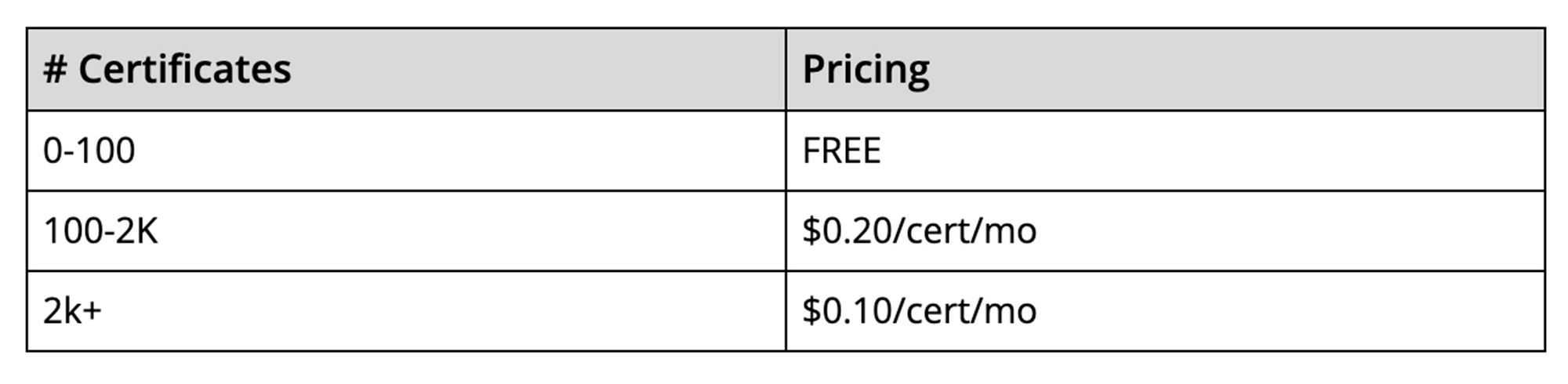
It is our hope that these new features, combined with the programmability offered by Certificate Manager, will enable you to simplify the way you deploy HTTPS and offer a more scalable and secure service to your customers.
Embracing Confidential Computing: Secure Your Data in the Cloud

1227
Of your peers have already read this article.
1:30 Minutes
The most insightful time you'll spend today!
As one of the most trusted cloud platform providers, Google is committed to providing our clients secure and reliable environments for their workloads. Google believes the future of computing will increasingly shift to private, encrypted services where users can be confident that their data is not being exposed to cloud providers or their own insiders. Confidential Computing helps make this future possible by keeping data encrypted in memory, and elsewhere outside the CPU, while it is being processed.
Since our first Confidential Computing offering in 2018, Google has been a pioneer in making the technology widely available through our cloud, while also constantly adding new features that allow a wide range of organizations to benefit from it.
Expanding the Confidential Computing portfolio
Today at the RSA Conference 2023, we are announcing several exciting updates to our Confidential Computing portfolio.
We are expanding our portfolio with the next generation of our Confidential Computing VM instances that utilize AMD Infinity Guard technology, specifically AMD SEV-SNP (Secure Encrypted Virtualization-Secure Nested Paging). SEV-SNP adds additional new hardware-based security protections such as strong memory integrity protection and hardware rooted attestation. Confidential VMs on general purpose N2D VMs with SEV-SNP enabled are now in Private Preview. Learn more in our deep dive here.
“Advanced, hardware-based security features – such as AMD Infinity Guard built into AMD EPYC processors – are a crucial part of cloud offerings and the further expansion of cloud computing,” said Ram Peddibhotla, corporate vice president, Cloud Business, AMD. “Our work with Google Cloud delivers on the leadership security features our joint customers demand with nearly effortless implementation and minimal performance impact as more mission critical and business critical workloads move to the cloud.”
Google is committed to ensuring Confidential Computing technology is as secure as possible before releasing products to customers. We constantly evaluate various attack vectors to make certain that Google Cloud Confidential Computing environments are protected against a wide range of attacks.
Throughout last year, Google and Intel collaborated on a research project to identify potential security vulnerabilities in Intel’s new Confidential Computing technology, Trust Domain Extensions (TDX). We’ve recently released the full report and made it available in our blog here.
“We want to make it such that people don’t worry about the security and trustworthiness of their data,” said Anil Rao, vice president and general manager of systems architecture and engineering in the Office of the CTO at Intel. “Organizations use confidential computing to control their data and provide access to trusted parties in a manner that is verifiable, revocable and time sensitive – we have an obligation to make sure the technology is secure. Our early effort with Google solidifies our commitment to perform thorough analysis to address all potential vulnerabilities.”
Confidential Space is now in general availability. Confidential Space builds on Confidential Computing and provides a secure enclave, also known as a Trusted Execution Environment (TEE). Google Cloud customers can leverage the TEE for various privacy-focused use cases such as joint data analysis and machine learning (ML) model training, with trust guarantees that data can stay protected — including hardened protection against cloud service provider access.
Confidential Space allows for new privacy-preserving technologies to take shape, and one such technology is The Privacy Sandbox. This is a crucial step forward as Privacy Sandbox for the Web will phase out third-party cookies and limit covert tracking. By supporting a choice of trusted execution environments, including Confidential Space, the Privacy Sandbox will provide ad-techs with safer alternatives to existing technology, so they can continue building digital businesses while keeping user data private.
“Trusted Execution Environments (TEEs) are already in use across industries such as digital advertising to enable privacy preserving analytics, and we are excited to leverage Google Cloud’s built-in TEE called Confidential Space,” said Gaurav Bhaya, vice president and general manager, Google Ads Measurement.
Building on our history of innovation with Confidential Computing
Google has worked diligently with internal and external partners to validate, audit and publish the security assessment of the hardware, firmware, and software that underpins Confidential Computing.
Last year, a joint security effort between Google Project Zero, Google Cloud, and AMD led to more secure technology for the entire industry, regardless of what service provider you choose for your Confidential Computing deployment. You can learn more in our full report here.
Since then, we have continued to expand the portfolio of Confidential Computing products and services, including Confidential Virtual Machines (CVMs), Confidential GKE, Confidential Dataproc, and Confidential Space. These offerings give our customers more choice in their deployments.
Currently, our Confidential Computing services are widely available across 80% of Google Cloud regions and growing, and we recently added support for Compute-Optimized C2D VMs for Confidential GKE.
Organizations are now leveraging Confidential Computing for joint data analysis and machine learning (ML) model training with trust guarantees that the data they own stays protected and across various other industries by organizations, including AstraZeneca, Bullish, HashiCorp, Matrixx Software, MonetaGo and Yellowdog.
Confidential Computing has also proven to be a helpful additional control for organizations implementing digital sovereignty strategies, providing an encryption capability, and protection for data-in-use where encryption keys are not accessible by the cloud provider.
We can’t wait to see the possibilities this technology will open up for your organization. Check out our Confidential Computing page to learn more.
One Goal for Google: Get PQC Ready

2902
Of your peers have already read this article.
3:30 Minutes
The most insightful time you'll spend today!
The National Institute of Standards and Technology (NIST) on Tuesday announced the completion of the third round of the Post-Quantum Cryptography (PQC) standardization process, and we are pleased to share that a submission (SPHINCS+) with Google’s involvement was selected for standardization. Two submissions (Classic McEliece, BIKE) are being considered for the next round.
We want to congratulate the Googlers involved in the submissions (Stefan Kölbl, Rafael Misoczki, and Christiane Peters) and thank Sophie Schmieg for moving PQC efforts forward at Google. We would also like to congratulate all the participants and thank NIST for their dedication to advancing these important issues for the entire ecosystem.
This work is incredibly important as we continue to advance quantum computing. Large-scale quantum computers will be powerful enough to break most public-key cryptosystems currently in use and compromise digital communications on the Internet and elsewhere. The goal of PQC is to develop cryptographic systems that safeguard against these potential threats, and NIST’s announcement is a critical step toward that goal. Governments in particular are in a race to secure information because foreign adversaries can harvest sensitive information now and decrypt it later.
At Google, our work on PQC is focused on four areas: 1) driving industry contributions to standards bodies; 2) moving the ecosystem beyond theory and into practice (primarily through testing PQC algorithms); 3) taking action to ensure that Google is PQC ready; and 4) helping customers manage the transition to PQC.
Driving industry contributions to a range of standards bodies
In addition to our work with NIST, we continue to drive industry contributions to international standards bodies to help advance PQC standards. This includes ISO 14888-4, where Googlers are the editors for a standard on stateful hash-based signatures. More recently, we also contributed to the IETF proposal on data formats, which will define JSON and CBOR serialization formats for PQC digital signature schemes. These standards, collectively, will enable large organizations to build PQC solutions that are compatible and ease the transition globally.
Moving the ecosystem beyond theory and into practice: Testing PQC algorithms
We’ve been working with the security community for over a decade to explore options for PQC algorithms beyond theoretical implementations. We announced in 2016 an experiment in Chrome where a small fraction of connections between desktop Chrome and Google’s servers used a post-quantum key-exchange algorithm, in addition to the elliptic-curve key-exchange algorithm that would typically be used. By adding a post-quantum algorithm in a hybrid mode with the existing key-exchange, we were able to test its implementation without affecting user security.
We took this work further in 2019 and announced a wide-scale post-quantum experiment with Cloudflare. We worked together to implement two post-quantum key exchanges, integrated them into Cloudflare’s TLS stack, and deployed the implementation on edge servers and in Chrome Canary clients. Through this work, we learned more about the performance and feasibility of deployment in TLS of two post-quantum key agreements, and have continued to integrate these learnings into our technology roadmap.
In 2021, we tested broader deployment of post-quantum confidentiality in TLS and discovered a range of network products that were incompatible with post-quantum TLS. We were able to work with the vendor so that the issue was fixed in future firmware updates. By experimenting early, we resolved this issue for future deployments.
Taking action to ensure that Google is PQC ready
At Google, we’re well into a multi-year effort to migrate to post-quantum cryptography that is designed to address both immediate and long-term risks to protect sensitive information. We have one goal: ensure that Google is PQC ready. Internally, this effort has several key priorities, including securing asymmetric encryption, in particular encryption in transit. This means using ALTS, for which we are using a hybrid key-exchange, to secure internal traffic; and using TLS (consistent with NIST standards) for external traffic. A second priority is securing signatures in the case of hard-to-change public keys or keys with a long lifetime, in particular focusing on hardware, especially hardware deployed outside of Google’s control.
We’re also focused on sharing the information we learn to help others address PQC challenges. For example, we recently published a paper that includes PQC transition timelines, leading strategies to protect systems against quantum attacks, and approaches for combining pre-quantum cryptography with PQC to minimize transition risks. The paper also suggests standards to start experimenting with now and provides a series of other recommendations to allow organizations to achieve a smooth and timely PQC transition.
Helping customers manage the transition to PQC
At Google Cloud, we are working with many large enterprises to ensure they are crypto-agile and to help them prepare for the PQC transition. We fully expect customers to turn to us for post-quantum cloud capabilities, and we will be ready. We are committed to supporting their PQC transition with a range of Google products, services, and infrastructure. As we make progress, we will continue to provide more PQC updates on Google core, cloud, and other services, and updates will also come from Android, Chrome and other teams. We will further support our customers with Google Cloud transformation partners like the Google Cybersecurity Action Team to help provide deep technical expertise on PQC topics.
What Users and System Designers Must Learn from Google’s Best Practices for Password Management

5285
Of your peers have already read this article.
3:00 Minutes
The most insightful time you'll spend today!
Updated for 2021: This post includes updated best practices including the latest from Google’s Best Practices for Password Management whitepapers for both users and system designers.
Account management, authentication and password management can be tricky. Often, account management is a dark corner that isn’t a top priority for developers or product managers. The resulting experience often falls short of what some of your users would expect for data security and user experience.
Fortunately, Google Cloud brings several tools to help you make good decisions around the creation, secure handling and authentication of user accounts (in this context, anyone who identifies themselves to your system—customers or internal users). Whether you’re responsible for a website hosted in Google Kubernetes Engine, an API on Apigee, an app using Firebase, or other service with authenticated users, this post lays out the best practices to follow to ensure you have a safe, scalable, usable account authentication system.
1. Hash those passwords
My most important rule for account management is to safely store sensitive user information, including their password. You must treat this data as sacred and handle it appropriately.
Do not store plaintext passwords under any circumstances. Your service should instead store a cryptographically strong hash of the password that cannot be reversed—created with Argon2id, or Scrypt. The hash should be salted with a value unique to that specific login credential. Do not use deprecated hashing technologies such as MD5, SHA1 and under no circumstances should you use reversible encryption or try to invent your own hashing algorithm. Use a pepper that is not stored in the database to further protect the data in case of a breach. Consider the advantages of iteratively re-hashing the password multiple times.
Design your system assuming it will be compromised eventually. Ask yourself “If my database were exfiltrated today, would my users’ safety and security be in peril on my service or other services they use?” As well as “What can we do to mitigate the potential for damage in the event of a leak?”
Another point: If you could possibly produce a user’s password in plaintext at any time outside of immediately after them providing it to you, there’s a problem with your implementation.
If your system requires detection of near-duplicate passwords, such as changing “Password” to “pAssword1”, save the hashes of common variants you wish to ban with all letters normalized and converted to lowercase. This can be done when a password is created or upon successful login for pre-existing accounts. When the user creates a new password, generate the same type of variants and compare the hashes to those from the previous passwords. Use the same level of hashing security as with the actual password.
2. Allow for third-party identity providers if possible
Third-party identity providers enable you to rely on a trusted external service to authenticate a user’s identity. Google, Facebook, and Twitter are commonly used providers.
You can implement external identity providers alongside your existing internal authentication system using a platform such as Identity Platform. There are a number of benefits that come with Identity Platform, including simpler administration, a smaller attack surface, and a multi-platform SDK. We’ll touch on more benefits throughout this list.
3. Separate the concept of user identity and user account
Your users are not an email address. They’re not a phone number. They’re not even a unique username. Any of these authentication factors should be mutable without changing the content or personally identifiable information (PII) in the account. Your users are the multi-dimensional culmination of their unique, personalized data and experience within your service, not the sum of their credentials. A well-designed user management system has low coupling and high cohesion between different parts of a user’s profile.
Keeping the concepts of user account and credentials separate will greatly simplify the process of implementing third-party identity providers, allowing users to change their username, and linking multiple identities to a single user account. In practical terms, it may be helpful to have an abstract internal global identifier for every user and associate their profile and one or more sets of authentication datavia that ID as opposed to piling it all in a single record.
4. Allow multiple identities to link to a single user account
A user who authenticates to your service using their username and password one week might choose Google Sign-In the next without understanding that this could create a duplicate account. Similarly, a user may have very good reason to link multiple email addresses to your service. If you’ve properly separated user identity and authentication, it will be a simple process to link several authentication methods to a single user.
Your backend will need to account for the possibility that a user gets part or all the way through the signup process before they realize they’re using a new third-party identity not linked to their existing account in your system. This is most simply achieved by asking the user to provide a common identifying detail, such as email address, phone, or username. If that data matches an existing user in your system, require them to also authenticate with a known identity provider and link the new ID to their existing account.
5. Don’t block long or complex passwords
NIST publishes guidelines on password complexity and strength. Since you are (or will be very soon) using a strong cryptographic hash for password storage, a lot of problems are solved for you. Hashes will always produce a fixed-length output no matter the input length, so your users should be able to use passwords as long as they like. If you must cap password length, do so based on the limits of your infrastructure; often this is a matter of memory usage (memory used per login operation * potential concurrent logins per machine), or more likely—the maximum POST size allowable by your servers. We’re talking numbers from hundreds of KB to over 1MB. Seriously. Your application should already be hardened to prevent abuse from large inputs. This doesn’t create new opportunities for abuse if you employ controls to prevent credential stuffing and hash the input as soon as possible to free up memory.
Your hashed passwords will likely already consist of a small set of ASCII characters. If not, you can easily convert a binary hash to Base64. With that in mind, you should allow your users to use literally any characters they wish in their password. If someone wants a password made of Klingon, Emoji, and ASCII art with whitespace on both ends, you should have no technical reason to deny them. Just make sure to perform Unicode normalization to ensure cross-platform compatibility. See our system designers whitepaper (PDF) for more information on Unicode and supported characters in passwords.
Any user attempting to use an extreme password is probably following password best practices (PDF) including using a password manager, which allows the entry of complex passwords even on limited mobile device keyboards. If a user can input the string in the first place (i.e., the HTML specification for password input disallows line feed and carriage return), the password should be acceptable.
6. Don’t impose unreasonable rules for usernames
It’s not unreasonable for a site or service to require usernames longer than two or three characters, block hidden characters, and prevent whitespace at the beginning and end of a username. However, some sites go overboard with requirements such as a minimum length of eight characters or by blocking any characters outside of 7-bit ASCII letters and numbers.
A site with tight restrictions on usernames may offer some shortcuts to developers, but it does so at the expense of users and extreme cases will deter some users.
There are some cases where the best approach is to assign usernames. If that’s the case for your service, ensure the assigned username is user-friendly insofar as they need to recall and communicate it. Alphanumeric generated IDs should avoid visually ambiguous symbols such as “Il1O0.” You’re also advised to perform a dictionary scan on any randomly generated string to ensure there are no unintended messages embedded in the username. These same guidelines apply to auto-generated passwords.
7. Validate the user’s identity
If you ask a user for contact information, you should validate that contact as soon as possible. Send a validation code or link to the email address or phone number. Otherwise, users may make a typo in their contact info and then spend considerable time using your service only to find there is no account matching their info the next time they attempt login. These accounts are often orphaned and unrecoverable without manual intervention. Worse still, the contact info may belong to someone else, handing full control of the account to a third party.
8. Allow users to change their username
It’s surprisingly common in legacy systems or any platform that provides email accounts not to allow users to change their username. There are very good reasons not to automatically release usernames for reuse, but long-term users of your system will eventually come up with significant reasons to use a different username and they likely won’t want to create a new account.
You can honor your users’ desire to change their usernames by allowing aliases and letting your users choose the primary alias. You can apply any business rules you need on top of this functionality. Some orgs might limit the number of username changes per year or prevent a user from displaying or being contacted via anything but their primary username. Email address providers are advised to never re-issue email addresses, but they could alias an old email address to a new one. A progressive email address provider might even allow users to bring their own domain name and have any address they wish.
If you are working with a legacy architecture, this best practice can be very difficult to meet. Even companies like Google have technical hurdles that make this more difficult than it would seem. When designing new systems, make every effort to separate the concept of user identity and user account and allow multiple identities to link to a single user account and this will be a much smaller problem. Whether you are working on existing or greenfield code, choose the right rules for your organization with an emphasis on allowing your users to grow and change over time.
9. Let your users delete their accounts
A surprising number of services have no self-service means for a user to delete their account and associated PII. Depending on the nature of your service, this may or may not include public content they created such as posts and uploads. There are a number of good reasons for a user to close an account permanently and delete all their PII . These concerns need to be balanced against your user experience, security, and compliance needs. Many if not most systems operate under some sort of regulatory control (such as PCI or GDPR), which provides specific guidelines on data retention for at least some user data. A common solution to avoid compliance concerns and limit data breach potential is to let users schedule their account for automatic future deletion.
In some circumstances, you may be legally required to comply with a user’s request to delete their PII in a timely manner. You also greatly increase your exposure in the event of a data breach where the data from “closed” accounts is leaked.
10. Make a conscious decision on session length
An often overlooked aspect of security and authentication is session length. Google puts a lot of effort into ensuring users are who they say they are and will double-check based on certain events or behaviors. Users can take steps to increase their security even further.
Your service may have good reason to keep a session open indefinitely for non-critical analytics purposes, but there should be thresholds after which you ask for password, 2nd factor, or other user verification.
Consider how long a user should be able to be inactive before re-authenticating. Verify user identity in all active sessions if someone performs a password reset. Prompt for authentication or 2nd factor if a user changes core aspects of their profile or when they’re performing a sensitive action. Re-authenticate if the user’s location changes significantly in a short period of time. Consider whether it makes sense to disallow logging in from more than one device or location at a time.
When your service does expire a user session or requires re-authentication, prompt the user in real time or provide a mechanism to preserve any activity they have not saved since they were last authenticated. It’s very frustrating for a user to take a long time to fill out a form, only to find all their input has been lost and they must log in again.
11. Use 2-Step Verification
Consider the practical impact on a user of having their account stolen when choosing 2-Step Verification (also known as two-factor authentication, MFA, or 2FA) methods. Time-based one-time passwords (TOTP), email verification codes, or “magic links” are consumer-friendly and relatively secure. SMS 2FA auth has been deprecated by NIST due to multiple weaknesses, but it may be the most secure option your users will accept for what they consider a trivial service.
Offer the most secure 2FA auth you reasonably can. Hardware 2FA such as the Titan Security Key are ideal if feasible for your application. Even if a TOTP library is unavailable for your application, email verification or 2FA provided by third-party identity providers is a simple means to boost your security without great expense or effort. Just remember that your user accounts are only as secure as the weakest 2FA or account recovery method.
12. Make user IDs case-insensitive
Your users don’t care and may not even remember the exact case of their username. Usernames should be fully case-insensitive. It’s trivial to store usernames and email addresses in all lowercase and transform any input to lowercase before comparing. Make sure to specify a locale or employ Unicode normalization on any transformations.
Smartphones represent an ever-increasing percentage of user devices. Most of them offer autocorrect and automatic capitalization of plain-text fields. Preventing this behavior at the UI level might not be desirable or completely effective, and your service should be robust enough to handle an email address or username that was unintentionally auto-capitalized.
13. Build a secure auth system
If you’re using a service like Identity Platform, a lot of security concerns are handled for you automatically. However, your service will always need to be engineered properly to prevent abuse. Core considerations include implementing a password reset instead of password retrieval, detailed account activity logging, rate-limiting login attempts to prevent credential stuffing, locking out accounts after too many unsuccessful login attempts, and requiring two-factor authentication for unrecognized devices or accounts that have been idle for extended periods. There are many more aspects to a secure authentication system, so please see the further reading section below for links to more information.
Further reading
There are a number of excellent resources available to guide you through the process of developing, updating, or migrating your account and authentication management system. I recommend the following as a starting place:
- Our Modern Password Security for System Designers whitepaper (PDF)
- The related Modern password security for users whitepaper (PDF)
- NIST 800-063B covers Authentication and Lifecycle Management
- OWASP continually updates their Password Storage Cheat Sheet
- OWASP goes into even more detail with the Authentication Cheat Sheet
- Google Cloud Identity Platform is a multi-protocol customer identity and access management solution, with robust authentication features
- Google’s Firebase Authentication site has a rich library of guides, reference materials and sample code
5327
Of your peers have already watched this video.
1:30 Minutes
The most insightful time you'll spend today!
Why Enterprises Should Choose Google Cloud for their SAP Workloads
Change is a constant for SAP customers. Now more than ever, SAP customers need solutions that provide them business agility, rock solid availability and security and true economic value.
Learn how Google Cloud can guide your SAP journey to the cloud with simple and no cost migrations, powerful infrastructure and innovation technologies that you can take advantage of today.
Hear from SAP customers who have deployed on Google Cloud and the game changing results they are realizing.
Announcement: Merger of Google’s Data Processing Terms into CDPA

2903
Of your peers have already read this article.
1:30 Minutes
The most insightful time you'll spend today!
At Google, we are constantly looking to improve our products, services, and contracts so that we can better serve our customers. To this end, we are pleased to announce that we have updated and merged our data processing terms for Google Cloud, Google Workspace (including Workspace for Education), and Cloud Identity (when purchased separately) into one combined Cloud Data Processing Addendum (the “CDPA”).
The CDPA maintains the benefits of the previously separate Data Processing and Security Terms for Google Cloud customers and Data Processing Amendment for Google Workspace and Cloud Identity customers, while streamlining and strengthening Google’s data processing commitments. A corresponding new CDPA (Partners) offers equivalent commitments to Google Cloud partners.
As part of this update, we have also incorporated the new international data transfer addendum issued by the U.K. Information Commissioner (“U.K. Addendum”). The U.K. Addendum allows the EU Standard Contractual Clauses (“SCCs”) to be used for transfers of personal data under the U.K. GDPR, replacing the separate U.K. SCCs that previously formed part of our terms. For an overview of the European legal rules for data transfers and our approach to implementing the EU SCCs and U.K. Addendum, please see our updated whitepaper. You can view our SCCs here.
While our data processing terms have been renamed, consolidated, and updated, our commitment to protecting the data of all Google Cloud, Workspace and Cloud Identity customers and all Google Cloud partners, and to enabling their compliance with data transfer and other regulatory requirements, remains unchanged.
For more information about our privacy commitments for Google Cloud, Google Workspace, and Cloud Identity, please see our Privacy Resource Center.
More Relevant Stories for Your Company

Create and Protect Admin Accounts
Setting up your new cloud infrastructure is scary. Extra scary when you realize that someone (is it gonna be you?) gets to have phenomenal cosmic power over the whole thing. Yes, I'm talking about the admin account, and today we'll dig into why they are important, dangerous and different. When

How to Detect and Eliminate New Cloud Security Threats: Tips for Your Security Teams
Why do we keep talking about security all the time? Why hasn’t anyone just gone and fixed it? You’ve probably heard these questions, whether from your leadership, or a board member or just from friends. Then you labor at explaining why security in the cloud is so complex and challenging,

End Security Risks with the Unattended Projects Recommender Feature
In fast-moving organizations, it's not uncommon for cloud resources, including entire projects, to occasionally be forgotten about. Not only such unattended resources can be difficult to identify, but they also tend to create a lot of headaches for product teams down the road, including unnecessary waste and security risks. To

Data Security Excellence: Google Takes the Lead in Forrester’s Wave Report
To help organizations confidently move their sensitive data to the cloud, Google Cloud works diligently to earn and maintain customer trust. Our Trusted Cloud is committed to giving you a secure foundation that you can verify and independently control. Discovery and protection of sensitive data are integral parts of Google
