





Move over Myths! Here’s What You Need to Know about Cloud Spanner

3535
Of your peers have already read this article.
3:00 Minutes
The most insightful time you'll spend today!
Intro to Cloud Spanner
Cloud Spanner is an enterprise-grade, globally distributed, externally consistent database that offers unlimited scalability and industry-leading 99.999% availability. It requires no maintenance windows and offers a familiar PostgreSQL interface. It combines the benefits of relational databases with the unmatched scalability and availability of non-relational databases.
As organizations modernize and simplify their tech stack, Spanner provides a unique opportunity to transform the way they think about and use databases as part of building new applications and customer experiences.
But choosing a database for your workload can be challenging; there are so many options in the market and each one has a different onboarding and operating experience. At Google Cloud we know it’s hard to navigate this choice and are here to help you. In this blog post, I want to bust the seven most common misconceptions that I regularly hear about Spanner so that you can confidently make your decision.
Myth #1 Only use Spanner if you have a massive workload
The truth is that Spanner powers Google’s most popular, globally available products, like YouTube, Drive, and Gmail, and has enabled many large scale transformations including that of Uber, Niantic and Sharechat. It is also true that Spanner processes more than 1 Billion queries per second at peak.
At the same time, many customers also use Spanner for their smaller workloads (both in terms of transactions per second and storage size) for availability and scalability reasons. For example, Google Password Manager has small workloads that run on Spanner. These customers cannot tolerate downtime, require high availability to power their applications and seek scale insurance for future growth scenarios.
Limitless scalability with the highest availability is critical in many industry verticals such as gaming and retail, especially when a newly launched game goes viral and becomes an overnight success or when a retailer has to handle a sudden surge in traffic due to a Black Friday/Cyber Monday sale.
Regardless of workload size, every customer on the journey to the cloud wants the benefits of scalability and availability while reducing the operational burden and the costs associated with patching, upgrades and other maintenance.
Myth #2 Spanner is too expensive
The truth is, when looking at the cost of a database, it is better to consider Total Cost of Ownership (TCO) and the value it offers rather than the raw list price. We deliver significant value to our customers starting at this price including critical things like availability, price performance, and reduced operational costs.
- Availability: Spanner provides high availability and reliability by synchronously replicating data. When it comes to Disaster Recovery, Spanner offers 0-RPO and 0-RTO for zonal failures in case of a regional instance and regional failure in case of multi-regional instances. Less downtime, more revenue!
- Price-performance: Spanner offers one of the industry’s leading price-performance ratios which makes it a great choice if you are running a demanding, performance sensitive application. Great customer experiences require consistent, optimal latencies!
- Reduced operational cost: With Spanner, customers enjoy zero downtime upgrades and schema changes, and no maintenance windows. Sharding is automatically handled so the challenges associated with scaling up traditional databases don’t exist. Spend more time innovating, and less time administering!
- Security & Compliance: By default, Spanner already offers encryption for data-in-transit via its client libraries and for data-at-rest using Google-managed encryption keys. CMEK support for Spanner lets you now have complete control of the encryption keys. Spanner also provides VPC Service Controls support and has compliance certifications and necessary approvals so that it can be used for workloads requiring ISO 27001, 27017, 27018, PCI DSS, SOC1|2|3, HIPAA and FedRAMP.
With Spanner, you have peace of mind knowing that your data’s security, availability and reliability won’t be compromised.
And best of all, with the introduction of Granular Instance Sizing, you can now get started for as little as $65/month and unlock the tremendous value spanner offers.
Pro tip : Use the auto-scaler to right size your Spanner instances. Take advantage of TTL to reduce the amount of data stored.
Myth #3 You have to make a trade off between scale, consistency, and latency
The truth is, depending on the use case and instance configuration, users can use Spanner such that they don’t have to pick between consistency, latency and scale.
To provide strong data consistency, Spanner uses a synchronous, Paxos-based replication scheme, in which replicas acknowledge every write request. A write is committed when a majority of the replicas (e.g 2 out of 3), called a quorum, agree to commit the write. In the case of regional instances, the replicas are within the region and hence the writes are faster than in the case of multi-region instances, where the replicas are distributed across multiple regions. In the latter case, forming a quorum on writes can result in slightly higher latency. Nevertheless, Spanner multi-regions are carefully designed in geographical configurations that ensure that the replicas can communicate fast enough and write latencies are acceptably low.
A read can be served strong (by default) or stale. A strong read is a read at a current timestamp and is guaranteed to see all the data that has been committed up until the start of the read. A stale read is a read executed at a timestamp in the past. In case of a strong read, the serving replica will guarantee that you will see all data that has been committed up until the start of the read. In some cases, this means that the serving replica has to contact the leader to ensure that it has the latest data. In case of a multi-region instance where the read is served from a non-leader replica, this would mean that read latency can be slightly higher than if it was served from a leader region. Stale reads are performed over data that was committed at a timestamp in the past and can, therefore, be served at very low latencies by the closest replica that is caught up until that timestamp. If your application is latency sensitive, stale reads may be a good option and we recommend using a stale read value of 15 seconds.
Myth #4 Spanner does not have a familiar interface
The truth is that Spanner offers the flexibility to interact with the database via a SQL dialect based on ANSI 2011 standard as well as via a REST or gRPC API interface, which are optimized for performance and ease-of-use. In addition to Spanner’s interface, we recently introduced a PostgreSQL interface for Spanner, that leverages the ubiquity of PostgreSQL to meet development teams using an interface that they are familiar with. The PostgreSQL interface provides a rich subset of the open-source PostgreSQL SQL dialect, including common query syntax, functions, and operators. It supports a core collection of open-source PostgreSQL data types, DDL syntax, and information schema views. You get the PostgreSQL familiarity, and relational semantics at Spanner scale.
Learn more about our PostgreSQL interface here.
Myth #5 The only way to get observability data is via the Spanner Console
The truth is that Spanner client libraries support OpenCensus Tracing and Metrics, which gives insight into the client internals and aids in debugging production issues. For instance, client-side traces and metrics include sessions and transactions related information.
Spanner also supports the OpenTelemetery receiver, which provides an easy way for you to process and visualize metrics from Cloud Spanner System tables, and export these to the Application Monitoring (APM) tool of your choice. This could be either an open source combination of a time-series database like Prometheus coupled with a Grafana dashboard, or it could be a commercial offering like Splunk, Datadog, Dynatrace, NewRelic or AppDynamics. We’ve also published reference Grafana dashboards, so that you can debug the most common user journeys such as “Why is my tail latency high” or “Why do I see a CPU spike when my workload did not change”. Here is a sample docker service, to show how the Cloud Spanner receiver can work with Prometheus exporter and Grafana dashboards.
We are continuing to embrace open standards, and continuing to integrate with our partner ecosystem. We also continue to evolve the observability experience offered by the Google console so that our customers get the best experience wherever they are.
Myth #6 Spanner is only for global workloads requiring copies in multiple regions
The truth is that, while Spanner offers a range of multi-region instance configurations, it also offers regional configuration in each GCP region. Each regional node is replicated in 3 zones within the region, while a multi-regional node is replicated at least 5 times across multiple regions. A regional configuration offers 4 nines of availability and protection against zonal failures.
Typically, multi-regional instance configurations are indicated if your application runs workloads in multiple geographical locations or your business needs 99.999% of availability and protection against regional failures. Learn more here.
Myth #7 Spanner schema changes require expensive locks
The truth is that Spanner never has table level locks. Spanner uses a multi-version concurrency control architecture to manage concurrent versions of schema and data allowing ad-hoc and online qualified schema changes that do not require any downtime, additional tools, migration pipelines or complex rollback/backup plans. When issuing a schema update you can continue writing and reading from the database without interruption while Spanner backfills the update, whether you have 10 rows or 10 billion rows in your table.
The same mechanism can be used for Point-in-time recovery (PITR) and snapshot queries using stale reads to restore both schema and the state of data at a given query-condition and timestamp up to a maximum of seven days.
Now that we’ve learned the truth about Cloud Spanner, I invite you to get started – visit our website.
Maximizing Storage Efficiency: A Guide to Reducing Point-in-Time Recovery Impact

1465
Of your peers have already read this article.
1:30 Minutes
The most insightful time you'll spend today!
Point-In-Time Recovery (PITR) is a critical capability for enterprise applications. It allows database administrators to recover from accidental data deletion by restoring their production databases to a time before the incident.
Cloud SQL for PostgreSQL launched support for PITR in July 2020, allowing you to recover from disasters like data corruption or accidental deletion by restoring your Cloud SQL instance to a previous time. We’re excited to announce an additional enhancement to PITR for Cloud SQL for PostgreSQL that makes enabling PITR an even easier decision: for instances with Point-in-Time Recovery newly-enabled, the write-ahead logs being stored for PITR operations (which are the transaction logs that are used to go back in time) will no longer consume disk storage space. Instead, when you enable PITR for new instances, Cloud SQL will store transaction logs collected during the retention window in Google Cloud Storage, and retrieve them when you perform a restore. Because transaction logs can grow rapidly when your database experiences a burst of activity, this move will help reduce the impact these bursts have on your provisioned disk storage. These logs will be stored for up to seven days in the same Google Cloud region as your instance at no additional cost to you.
PITR is enabled by default when you create a new Cloud SQL for PostgreSQL instance from the Google Cloud console, and transaction logs will no longer be stored on the instance for instances that have PITR newly enabled. If you have already enabled PITR on your PostgreSQL instances, this enhancement will be rolled out to your instances at a later point. If you want to take advantage of this change sooner, you can first disable and then re-enable PITR on your instance (which will reset your ability to perform a point-in-time restore to the time at which PITR was re-enabled). On instances with this feature enabled, you’ll notice that consumed storage on your instance will reduce relative to the volume of write-ahead logs (WAL) generated by your instance. The actual amount of storage your logs consume will vary by instance and by database activity – during busy times for your database, log size may shrink or grow. However, these logs will now only be stored on your instance long enough to successfully replicate to any replicas of the instance and to ensure that they are safely written to Cloud Storage; afterwards, they will be removed from your instance.
We’re excited to continue to enhance Cloud SQL for PostgreSQL to ensure that disaster recovery is easy to enable, cost effective, and seamless to use. Learn more about this change in our documentation.
Move over Myths! Here’s What You Need to Know about Cloud Spanner
3536
Of your peers have already read this article.
3:00 Minutes
The most insightful time you'll spend today!
Intro to Cloud Spanner
Cloud Spanner is an enterprise-grade, globally distributed, externally consistent database that offers unlimited scalability and industry-leading 99.999% availability. It requires no maintenance windows and offers a familiar PostgreSQL interface. It combines the benefits of relational databases with the unmatched scalability and availability of non-relational databases.
As organizations modernize and simplify their tech stack, Spanner provides a unique opportunity to transform the way they think about and use databases as part of building new applications and customer experiences.
But choosing a database for your workload can be challenging; there are so many options in the market and each one has a different onboarding and operating experience. At Google Cloud we know it’s hard to navigate this choice and are here to help you. In this blog post, I want to bust the seven most common misconceptions that I regularly hear about Spanner so that you can confidently make your decision.
Myth #1 Only use Spanner if you have a massive workload
The truth is that Spanner powers Google’s most popular, globally available products, like YouTube, Drive, and Gmail, and has enabled many large scale transformations including that of Uber, Niantic and Sharechat. It is also true that Spanner processes more than 1 Billion queries per second at peak.
At the same time, many customers also use Spanner for their smaller workloads (both in terms of transactions per second and storage size) for availability and scalability reasons. For example, Google Password Manager has small workloads that run on Spanner. These customers cannot tolerate downtime, require high availability to power their applications and seek scale insurance for future growth scenarios.
Limitless scalability with the highest availability is critical in many industry verticals such as gaming and retail, especially when a newly launched game goes viral and becomes an overnight success or when a retailer has to handle a sudden surge in traffic due to a Black Friday/Cyber Monday sale.
Regardless of workload size, every customer on the journey to the cloud wants the benefits of scalability and availability while reducing the operational burden and the costs associated with patching, upgrades and other maintenance.
Myth #2 Spanner is too expensive
The truth is, when looking at the cost of a database, it is better to consider Total Cost of Ownership (TCO) and the value it offers rather than the raw list price. We deliver significant value to our customers starting at this price including critical things like availability, price performance, and reduced operational costs.
- Availability: Spanner provides high availability and reliability by synchronously replicating data. When it comes to Disaster Recovery, Spanner offers 0-RPO and 0-RTO for zonal failures in case of a regional instance and regional failure in case of multi-regional instances. Less downtime, more revenue!
- Price-performance: Spanner offers one of the industry’s leading price-performance ratios which makes it a great choice if you are running a demanding, performance sensitive application. Great customer experiences require consistent, optimal latencies!
- Reduced operational cost: With Spanner, customers enjoy zero downtime upgrades and schema changes, and no maintenance windows. Sharding is automatically handled so the challenges associated with scaling up traditional databases don’t exist. Spend more time innovating, and less time administering!
- Security & Compliance: By default, Spanner already offers encryption for data-in-transit via its client libraries and for data-at-rest using Google-managed encryption keys. CMEK support for Spanner lets you now have complete control of the encryption keys. Spanner also provides VPC Service Controls support and has compliance certifications and necessary approvals so that it can be used for workloads requiring ISO 27001, 27017, 27018, PCI DSS, SOC1|2|3, HIPAA and FedRAMP.
With Spanner, you have peace of mind knowing that your data’s security, availability and reliability won’t be compromised.
And best of all, with the introduction of Granular Instance Sizing, you can now get started for as little as $65/month and unlock the tremendous value spanner offers.
Pro tip : Use the auto-scaler to right size your Spanner instances. Take advantage of TTL to reduce the amount of data stored.
Myth #3 You have to make a trade off between scale, consistency, and latency
The truth is, depending on the use case and instance configuration, users can use Spanner such that they don’t have to pick between consistency, latency and scale.
To provide strong data consistency, Spanner uses a synchronous, Paxos-based replication scheme, in which replicas acknowledge every write request. A write is committed when a majority of the replicas (e.g 2 out of 3), called a quorum, agree to commit the write. In the case of regional instances, the replicas are within the region and hence the writes are faster than in the case of multi-region instances, where the replicas are distributed across multiple regions. In the latter case, forming a quorum on writes can result in slightly higher latency. Nevertheless, Spanner multi-regions are carefully designed in geographical configurations that ensure that the replicas can communicate fast enough and write latencies are acceptably low.
A read can be served strong (by default) or stale. A strong read is a read at a current timestamp and is guaranteed to see all the data that has been committed up until the start of the read. A stale read is a read executed at a timestamp in the past. In case of a strong read, the serving replica will guarantee that you will see all data that has been committed up until the start of the read. In some cases, this means that the serving replica has to contact the leader to ensure that it has the latest data. In case of a multi-region instance where the read is served from a non-leader replica, this would mean that read latency can be slightly higher than if it was served from a leader region. Stale reads are performed over data that was committed at a timestamp in the past and can, therefore, be served at very low latencies by the closest replica that is caught up until that timestamp. If your application is latency sensitive, stale reads may be a good option and we recommend using a stale read value of 15 seconds.
Myth #4 Spanner does not have a familiar interface
The truth is that Spanner offers the flexibility to interact with the database via a SQL dialect based on ANSI 2011 standard as well as via a REST or gRPC API interface, which are optimized for performance and ease-of-use. In addition to Spanner’s interface, we recently introduced a PostgreSQL interface for Spanner, that leverages the ubiquity of PostgreSQL to meet development teams using an interface that they are familiar with. The PostgreSQL interface provides a rich subset of the open-source PostgreSQL SQL dialect, including common query syntax, functions, and operators. It supports a core collection of open-source PostgreSQL data types, DDL syntax, and information schema views. You get the PostgreSQL familiarity, and relational semantics at Spanner scale.
Learn more about our PostgreSQL interface here.
Myth #5 The only way to get observability data is via the Spanner Console
The truth is that Spanner client libraries support OpenCensus Tracing and Metrics, which gives insight into the client internals and aids in debugging production issues. For instance, client-side traces and metrics include sessions and transactions related information.
Spanner also supports the OpenTelemetery receiver, which provides an easy way for you to process and visualize metrics from Cloud Spanner System tables, and export these to the Application Monitoring (APM) tool of your choice. This could be either an open source combination of a time-series database like Prometheus coupled with a Grafana dashboard, or it could be a commercial offering like Splunk, Datadog, Dynatrace, NewRelic or AppDynamics. We’ve also published reference Grafana dashboards, so that you can debug the most common user journeys such as “Why is my tail latency high” or “Why do I see a CPU spike when my workload did not change”. Here is a sample docker service, to show how the Cloud Spanner receiver can work with Prometheus exporter and Grafana dashboards.
We are continuing to embrace open standards, and continuing to integrate with our partner ecosystem. We also continue to evolve the observability experience offered by the Google console so that our customers get the best experience wherever they are.
Myth #6 Spanner is only for global workloads requiring copies in multiple regions
The truth is that, while Spanner offers a range of multi-region instance configurations, it also offers regional configuration in each GCP region. Each regional node is replicated in 3 zones within the region, while a multi-regional node is replicated at least 5 times across multiple regions. A regional configuration offers 4 nines of availability and protection against zonal failures.
Typically, multi-regional instance configurations are indicated if your application runs workloads in multiple geographical locations or your business needs 99.999% of availability and protection against regional failures. Learn more here.
Myth #7 Spanner schema changes require expensive locks
The truth is that Spanner never has table level locks. Spanner uses a multi-version concurrency control architecture to manage concurrent versions of schema and data allowing ad-hoc and online qualified schema changes that do not require any downtime, additional tools, migration pipelines or complex rollback/backup plans. When issuing a schema update you can continue writing and reading from the database without interruption while Spanner backfills the update, whether you have 10 rows or 10 billion rows in your table.
The same mechanism can be used for Point-in-time recovery (PITR) and snapshot queries using stale reads to restore both schema and the state of data at a given query-condition and timestamp up to a maximum of seven days.
Now that we’ve learned the truth about Cloud Spanner, I invite you to get started – visit our website.
BigQuery Now Supports Multi-statement Transactions

3765
Of your peers have already read this article.
3:00 Minutes
The most insightful time you'll spend today!
Mercury, the Roman god of commerce, is often depicted carrying a purse, symbolic of business transactions, wearing winged sandals, illustrating his abilities to move at great speeds. Transactions power the world’s business systems today, ranging from millions of packages moving worldwide tracked in real time by logistics companies to global payments from personal loans to securities trading to intergovernmental transactions, keeping goods and services flowing worldwide. Today, we are very pleased to announce the public preview of multi-statement transactions in BigQuery.
BigQuery has long supported single-statement transactions through DML statements such as INSERT, UPDATE, DELETE, MERGE and TRUNCATE, applied to one table per transaction. Multi-statement transactions expand on this scope by supporting multiple SQL statements, including DML, spanning multiple tables in a single transaction. This means that the changes to data across multiple tables associated with all statements in a given transaction are committed atomically (all at once) if successful or all rolled back atomically in the event of a failure. These new multi-statement transaction capabilities now bridge the gap between online transaction processing (OLTP) systems and BigQuery through tighter and faster integration, just as Mercury’s speed enabled him to travel rapidly between the mortal and divine worlds.
Overview
A transaction is a set of tasks carried out against a database or a data warehouse representing a business unit of work. For example, an order expedite action may result in a series of changes to multiple tables, e.g., updating delivery dates on the order, adding new shipment lines on a shipment to create expedited delivery shipments and canceling (updating) prior normal delivery shipment lines. Correspondingly, when a batch job execute an ETL process in a data warehouse, it may perform data wrangling and data cleansing operations by transforming and saving the data in multiple tables. In both of these cases, if a failure occurs, then the entire transaction must be rolled back so that the system of record does not have partial data saved putting the dataset in an inconsistent state.
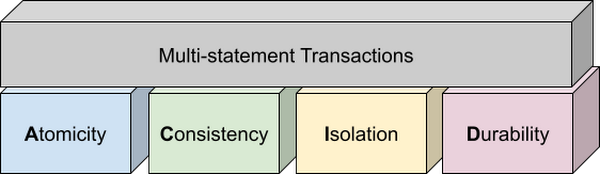
Transactions are known for their atomicity, consistency, isolation, and durability (ACID) properties. Atomicity indicates that all data changes (including metadata changes) are applied or reverted in a single operation, e.g. when a set of rows are added to a table with enrichment and the corresponding set of rows deleted, both operations happen together. Consistency refers to the consistency of data before and after the transaction has completed. When data is added to or updated in a table, the changes to data in tables are consistent with the constraints specified on the table or its columns, e.g. ensuring that the NOT NULL constraint is complied with when data gets added or modified in a table. Isolation indicates that multiple transactions can make changes to the table concurrently as long as the changes don’t conflict with each other, e.g. two transactions loading data into tables from different business units can proceed concurrently. Durability is the last and possibly the most important property of transactions which guarantees that in the event of a failure (after completing the transaction), all the changes committed by the transaction are saved for future transactions or queries.
Isolation level
All transactions in BigQuery including multi-statement transactions support snapshot isolation. At this isolation level, all statements in a transaction see a consistent snapshot of the database, as of the start of the transaction. BigQuery achieves this due to its multi-version property where it maintains the history of mutations to the database for a certain period. Transactions do not see any changes, committed or uncommitted, from other concurrent transactions while the transaction is in progress. BigQuery supports read-your-own-writes, where statements in a transaction can see all the changes applied by prior statements in the same transaction.
Example
Let’s run through an example to demonstrate how BigQuery supports the concept of multi-statement transactions with multiple sets of changes across multiple tables in one operation. In this example, we will set up this demo by creating 10 tables each with 100 partitions
Language: SQL
DECLARE num_tables DEFAULT 10;DECLARE x INT64 DEFAULT 0;# replace "demo" with your preferred dataset nameDECLARE ds STRING default "`00jathreya`";DECLARE prefix STRING DEFAULT "mst_demo";DECLARE table_name STRING;DECLARE pre_table_name STRING;/*Sets up 10 tables, with schema (partition_id:integer,value:timestamp).Each table has 100 partitions, with partition key 0, 10, 20, ..., 990.*/SET x = 0;WHILE x < num_tables DOSET table_name = format("%s.%s_%d", ds, prefix, x);EXECUTE IMMEDIATE format("""DROP TABLE IF EXISTS %s""", table_name);EXECUTE IMMEDIATE format("""CREATE OR REPLACE TABLE %s (partition_id INT64, value TIMESTAMP)PARTITION BY RANGE_BUCKET(partition_id, GENERATE_ARRAY(0, 1000, 10))AS SELECT partition_id, CURRENT_TIMESTAMP() AS value FROM UNNEST(GENERATE_ARRAY(0, 990, 10)) AS partition_id""", table_name);SET x = x + 1;END WHILE;# Verify the partitioned tables created and the timestampexecute immediate format("""select table_schema, table_name, count(partition_id), sum(total_rows), max(last_modified_time) from %s.INFORMATION_SCHEMA.PARTITIONSwhere starts_with(table_name,'%s')group by table_schema, table_name""", ds, prefix);# Verify data in table 9 based on the timestampEXECUTE IMMEDIATE format("""SELECT * FROM %s ORDER BY partition_id""", table_name);
Next, we will show how the new COMMIT and ROLLBACK commands in BigQuery allow you to save or reverse the changes in a transaction spanning multiple tables.
Language: SQL
DECLARE num_tables DEFAULT 10;DECLARE x INT64 DEFAULT 0;# Replace `mydataset` with your preferred dataset nameDECLARE ds STRING DEFAULT "`mydataset`";DECLARE prefix STRING DEFAULT "mst_demo";DECLARE table_name STRING;DECLARE pre_table_name STRING;/*Steps of the transaction:1. For table 0, updates the timestamp to CURRENT_TIMESTAMP.2. FOR table 1 to 9, merge table x using data from table x-1. All MERGE shouldsee the updated data in table x-1, so as a result the change in table 0 should bepropagated all the way to table 9.3. A total of 1000 partition changes on 10 tables.*/BEGIN TRANSACTION;SET x = 0;WHILE x < num_tables DOSET table_name = format("%s.%s_%d", ds, prefix, x);IF x = 0 THENEXECUTE IMMEDIATE format("""UPDATE %s SET value = CURRENT_TIMESTAMP WHERE true""", table_name);ELSESET pre_table_name = format("%s.%s_%d", ds, prefix, x-1);EXECUTE IMMEDIATE format("""MERGE %s t2 USING %s t1 ON t2.partition_id = t1.partition_idWHEN MATCHED THEN UPDATE SET value = t1.value""", table_name, pre_table_name);END IF;SET x = x + 1;END WHILE;# Verify data in table 9 inside transaction shows recently updated dataSET table_name = format("%s.%s_%d", ds, prefix, num_tables-1);EXECUTE IMMEDIATE format("""SELECT * FROM %s ORDER BY partition_id""", table_name);IF x = 9 THENCOMMIT TRANSACTION;ELSEROLLBACK TRANSACTION;END IF;# Verify data in table 9 outside transaction shows timestamp of original dataEXECUTE IMMEDIATE format("""SELECT * FROM %s ORDER BY partition_id""", table_name);
Monitoring and Management
Unlike single-statement transactions which map to a single DML command, multi-statement transactions are complex spanning multiple DML operations across multiple tables. To monitor these complex jobs, the BigQuery JOBS INFORMATION_SCHEMA views have been expanded to add a new column, TRANSACTION_ID, which contains a unique identifier for each transaction in BigQuery. You can query transactions that are in progress or the ones that have completed by querying these views.
Language: SQL
#Returns the list of transactions running under a parent job ID .;SELECTDISTINCT transaction_idFROM `region-us`.INFORMATION_SCHEMA.JOBS_BY_PROJECTWHERE parent_job_id = "job_id" AND state = "RUNNING";# Returns the active transactions and parent job id that are running and affect a named table.;WITHrunning_transactions AS (SELECT DISTINCT transaction_idFROM `region-us`.INFORMATION_SCHEMA.JOBS_BY_PROJECTWHERE state = "RUNNING")SELECTtransaction_id, parent_job_id, queryFROM `region-us`.INFORMATION_SCHEMA.JOBS_BY_PROJECT, running_transactionsWHERE destination_table = "mytable"AND transaction_id = running_transactions.transaction_id;# Returns all successfully committed transactionsSELECTtransaction_id, parent_job_id, queryFROM `region-us`.INFORMATION_SCHEMA.JOBS_BY_PROJECTWHERE statement_type = "COMMIT_TRANSACTION" AND error_result IS NULL;# Returns all rolled back transactionsSELECTtransaction_id, parent_job_id, queryFROM `region-us`.INFORMATION_SCHEMA.JOBS_BY_PROJECTWHERE statement_type = "ROLLBACK_TRANSACTION" AND error_result IS NULL;
To terminate a transaction, you will need to terminate the parent job under which the transaction is running by passing the parent job ID of the script containing the transaction to the BQ.JOBS.CANCEL system procedure.
Conclusion
As enterprises accelerate towards more real time insight-driven decisions, multi-statement transactions are a key enabler towards bringing transaction data into analytical data warehouses, such as BigQuery. With strong ACID properties, full transaction support for commit and rollback, and rich monitoring and management APIs built on proven transaction processing backbone, we are very pleased to help our BigQuery customers unlock the value of transactions through these new capabilities.
Blue Apron: Offering a better recipe for modern analytics

1654
Of your peers have already read this article.
5:30 Minutes
The most insightful time you'll spend today!
When Blue Apron had issues running its data warehouse on another cloud provider, it built an analytics platform using Looker and Google BigQuery to enable faster business decisions about food inventory.
Blue Apron’s mission is to make incredible home cooking accessible to everyone. Launched in 2012, Blue Apron is reimagining the way that food is produced, distributed, and consumed.

Google Cloud Results
- Enables near real-time business decisions to better manage food inventory and delivery by reducing query times exponentially
- Helps improve customer service and optimize business processes with faster insights
- Reduces costs while reclaiming up to a week per month of engineering
The popularity of meal kit delivery services has surged in recent years as consumer attitudes toward home cooking and grocery shopping have shifted. As a pioneer in the category, Blue Apron helps its customers create incredible home cooking experiences by sending culinary-driven recipes with high-quality ingredients and step-by-step instructions straight to customers’ doors. Blue Apron also offers a monthly wine subscription service and a la carte culinary tools and products through its marketplace.
If that sounds simple, it isn’t. Ingredients for the meal kits must be sourced at the right time, quality, and price. Orders must be packed efficiently and in exactly the right proportions. Most importantly, meal kits must be delivered to the customer fresh and on time.
To meet these criteria and make data meaningful and intuitive to its managers, one of the tools Blue Apron relies on is Looker, an analytics platform that lets business users explore data and ask sophisticated questions using familiar terms.
A Google Cloud partner and winner of the 2016 Google Cloud Global Partner Award for Solution Innovation, Looker integrates its solution with Google Cloud Platform to help customers modernize their analytics.
Blue Apron previously used Looker with a single database instance hosted on another cloud provider. As data volumes grew and queries became more complex, it became difficult to scale. Blue Apron’s only options were choosing ever-larger server classes and increasing storage throughput by purchasing a higher number of provisioned IOPS. To improve speed, scalability, and cost efficiency, Blue Apron moved its data warehouse to Google BigQuery.
“The combination of Looker and Google BigQuery is powerful, allowing us to get data-hungry analysts essential information much faster,” says Sam Chase, Tech Lead, Data Operations at Blue Apron. “Because we choose to pay by the query, it’s also flexible and cost effective—plus storage is cheap, so we can just put data in and query what we need.”
The analytics platform of the future
When you’re making business decisions about a customer’s dinner, speed matters. Looker takes full advantage of the power of Google BigQuery, making it easy to build a data exploration platform. Blue Apron’s applications publish event data to Kafka—approximately 140 million events per day—and data is then streamed into Google BigQuery, which performs lightning-fast queries on both streamed and static data. Now, business users and analytics teams can make decisions based on near real-time information in Looker, instead of waiting until the next business day for results.
“After we moved to Google BigQuery, query time was reduced exponentially. It’s an astonishing difference, allowing us to run 300 queries per day,” says Sam.
Previously, Blue Apron spent up to a week out of every month optimizing its data warehouse to attempt to improve query performance. With Google BigQuery, all maintenance is handled by Google, reclaiming 25% of up to two engineers’ time. Even when multiple people are using Looker concurrently, query performance never degrades and storage never runs out.
“Because Google BigQuery is architected as a giant, shared cluster, growth is smooth,” says Lloyd Tabb, Founder and CTO of Looker. “Like a race car going from 0 to 120 mph, there are no shift points, just smooth acceleration. To us, it looks like the future.”
An empowering, integrated toolset
Looker takes advantage of aggressive caching and support for date-based table partitioning in Google BigQuery to increase performance, simplify the load process, and improve data manageability. By partitioning data by time, Blue Apron can also take advantage of better long-term storage pricing without sacrificing query performance. When using Google BigQuery with Looker, analysts can easily see how much data is going to be scanned before each query is run.
Blue Apron is also using Looker for Google BigQuery Data Transfer Service to provide actionable analytics for all of the company’s Google marketing data from Google AdWords and DoubleClick by Google in one place to understand campaign performance across channels, saving its data operations team months of work. Using Looker Blocks, marketers can quickly make sense of the data with reports and dashboards, and set alerts when campaign performance hits certain thresholds.
Looker Blocks for Google AdWords and DoubleClick by Google provide all the analysis you’d get straight from the Google console, plus additional value-add analysis that’s impossible to replicate without SQL. Complex metrics such as ROI on ad spend, flexible multi-touch attribution, and predictive lifetime value empower marketers with a better understanding of their customers and where to spend their next dollar.
In addition to these turnkey dashboards and pieces of analysis, marketers can customize views to meet their unique needs and workflows. These capabilities help the Blue Apron marketing team make decisions regarding the allocation of spend to maximize customer acquisition and retention.
“Everyone at Blue Apron is excited about using Google BigQuery with Looker,” says Sam. “Business users and marketers are more empowered to look for answers, instead of waiting for analytics teams. Because users know they can get results rapidly, our business processes are evolving and improving.”
For data cleansing and transformation, Blue Apron uses Google Cloud Dataproc to run fully managed Apache Spark clusters on Google Cloud Platform. It’s also leveraging Google BigQuery integration with Google Workspace to bring data into Google Sheets for further distribution and analysis.
“Transferring data between Google tools is fast because it all happens on the Google network,” says Sam. “We can pull data from Google BigQuery, run transformations with Spark, and then write it back to Google BigQuery. That’s very helpful in providing our business users and data analysts with the richest, most current data.”
A perfect match for better insights
As Blue Apron seeks to expand its reach and deepen its engagement with customers, it is making Google BigQuery and Looker available to more users, providing a high-quality interactive analytics experience. “Our ability to pull a lot of data in and compute fast results affects everyone in our company,” says Sam. “Using Google BigQuery and Looker to iterate quickly and build new models to make our operations more efficient will directly impact our customers.”
For Looker, Google BigQuery represents the next step in data warehouse evolution. “Google BigQuery is a perfect match for Looker, combining easy setup with near infinite scale-out and elasticity,” says Lloyd. “People can make smarter decisions faster that directly benefit their business and customers.”
Transform Your Customer Experience with Latest Database Innovations

2985
Of your peers have already read this article.
2:30 Minutes
The most insightful time you'll spend today!
We’re all accustomed to Google magic in our daily lives. When we need information like the time a store closes, the best route to a destination, help cooking a favorite recipe — we just ask Google. Google is known for providing useful information everywhere, wherever you are.
But for business, it isn’t so easy to get answers to important questions. In a recent study by HBR, only 30% of respondents report having a well-articulated data strategy and, at most, 24% of respondents said they thought their organization was data-driven. If you asked, most of these executives would probably tell you they’re drowning in data, so how come they’re struggling to be data-driven?
Data’s journey begins in operational databases, where the data is born as users and systems interact with applications. Operational databases are the backbone of applications and are essential ingredients for building innovative customer experiences. At Google Cloud, we have been focused on building a unified and open platform that provides you the easiest and fastest way to innovate with data. Google’s data cloud enables data teams to manage each stage of the data lifecycle from operational transactions in databases to analytical applications across data warehouses, lakes, data marts, and to rich data-driven experiences.
For example, Merpay, a mobile payment service in Japan, wanted to build its experience on a database that delivered on requirements around availability, scalability and performance. By using Cloud Spanner, Merpay was able to reduce overhead costs and ultimately devote engineering resources to developing new tools and solutions for their customers.
If you’re looking to bring the same kinds of transformation to your organization, let’s dive into the latest database announcements and how they can help you do that:
Tap into transformative database capabilities
Google’s data cloud allows organizations to build transformative applications quickly with our one-of-a-kind databases such as Cloud Spanner, Google Cloud’s fully managed relational database with global scale, strong consistency, and industry leading 99.999% availability. Leading businesses across industries such as Sabre, Vimeo, Uber, ShareChat, Niantic, and Macy‘s use Spanner to power their mission-critical applications and delight customers. Recent innovations in Spanner such as granular instance sizing and PostgreSQL interface lower the barrier to entry for Spanner, thus making it accessible for any developer and for any application, big or small.
In that effort, we are excited to announce Spanner free trial instances to give developers an easy way to explore Spanner at no cost. The new free trial for Spanner provides a zero-cost, hands–on experience to try out Spanner and comes with guided tutorials and a sample database. The Spanner free trial provides a Spanner instance with 10GB storage for 90 days. Customers can upgrade to a paid instance anytime during the 90-day period to continue exploring Spanner and unlock the full capabilities of Spanner, such as unlimited scaling and multi-region deployments. To learn more about the new free trial, you can read this blog and watch this short video. Start your free trial today in the Google Cloud console.
We’re also excited to announce the preview of fine-grained access control for Spanner that lets you authorize access to Spanner data at the table and column level. Spanner already provides access control with Identity and Access Management (IAM) which enables a simple and consistent access control interface for all Google Cloud services. With fine-grained access control, it’s now easier than ever to protect your transactional data in Spanner and ensure appropriate security controls are in place when granting access to data. Learn more about fine-grained access control in this blog.
Generate exponential value from data with a unified data cloud
Google’s common infrastructure for data management has many advantages. Thanks to our highly durable distributed file systems, disaggregated compute and storage at every layer, and high-performance Google-owned global networking, we’re able to provide best-in-class, tightly integrated operational and analytical data services with superior availability and scale at the best price- performance and operational efficiency.
In that effort, today we’re excited to announce Datastream for BigQuery, now in preview. Developed in close partnership with the BigQuery team, Datastream for BigQuery delivers a unique, truly seamless and easy-to-use experience that enables real-time insights in BigQuery with just a few steps.
Datastream efficiently replicates updates directly from source systems into BigQuery tables in real-time by using BigQuery’s newly developed Change Data Capture (CDC) and Storage Write API’s UPSERT functionality. You no longer have to waste valuable resources building and managing complex data pipelines, self-managing staging tables, tricky DML merge logic, or manual conversion from database-specific data types into BigQuery data types. Just configure your source database, connection type, and destination in BigQuery and you’re all set.
Klook, a Hong Kong-based travel company, is one industry-leading enterprise using Datastream for BigQuery to help drive better business decisions. “Prior to adopting Datastream, we had a team of data engineers dedicated to the task of ingesting data into BigQuery, and we spent a lot of time and effort making sure that the data was accurate,” said Stacy Zhu, senior manager for data at Klook. “With Datastream, our data analysts can have accurate data readily available to them in BigQuery with a simple click. We enjoy Datastream’s ease of use and its performance helps us achieve large scale ELT data processing.”
Achievers, an award-winning employee engagement software and platform, recently adopted Datastream, as well. “Achievers had been heavily using Google Cloud VMs (GCE), and Google Kubernetes Engine (GKE)” says Daljeet Saini, lead data architect at Achievers. “With the help of Datastream, Achievers will be streaming data into BigQuery and enabling our analysts and data scientists to start using BigQuery for smart analytics, helping us take the data warehouse to the next level.”
To make it easier to stream database changes to BigQuery and other destinations, Datastream is also adding support for PostgreSQL databases as a source, also in preview. Datastream sources now include MySQL, PostgreSQL, AlloyDB for PostgreSQL, and Oracle databases, which can be hosted on premises, on Google Cloud services such as Cloud SQL or Bare Metal Solution for Oracle, or anywhere else on any cloud.
Key use cases for Datastream include real-time analytics, database replication via continuous change data capture, and enablement of event-driven application architectures. In real-world terms, real-time insights can help a call center provide better service by measuring call wait times continuously, rather than retrospectively at the end of the week or month. And retailers or logistics companies that do inventory management based on real-time data can become far less wasteful than if it were based on periodic reports.
Accelerate your modernization journey to the cloud
In recent years, application developers and IT decision makers have increasingly adopted open-source databases to ensure application portability and extensibility and prevent lock-in. They’re no longer willing to tolerate the opaque costs or the overpriced and restrictive licensing of legacy database vendors.
In particular, PostgreSQL has become the emerging standard for cloud-based enterprise applications. Many organizations are choosing to standardize on PostgreSQL to reduce the learning curve for their teams and avoid the lock-in from the previous generation of databases. Google’s data cloud offers several PostgreSQL database options including AlloyDB for PostgreSQL, a PostgreSQL-compatible database that provides a powerful option for migrating, modernizing, or building commercial-grade workloads
To help developers and data engineers modernize and migrate their applications and databases to the cloud, we’re pleased to announce, in preview, that our Database Migration Service (DMS) now supports PostgreSQL migrations to AlloyDB. DMS makes the journey from PostgreSQL to AlloyDB easier and faster, with a serverless migration you can set up in just a few clicks. Together with Oracle to PostgreSQL data and schema migration support, also in preview, DMS gives you a way to modernize legacy databases and adopt a modern, open technology platform. Learn more about PostgreSQL to AlloyDB migration with DMS in this blog.
Among organizations adopting PostgreSQL is SenseData. A platform created to improve the relationship between companies and customers, SenseData is a market leader in Latin America in the field of Customer Success.
“At Sensedata, we’ve built our customer success platform on PostgreSQL, and are looking to increase our platform performance and scale for the next phase of our growth,” said Paulo Souza, co-founder and CTO of SenseData. “We have a mixed database workload, requiring both fast transactional performance and powerful analytical processing capabilities, and our initial testing of AlloyDB for PostgreSQL has given impressive results, with more than a 350% performance improvement in our initial workload, without any application changes. We’re looking forward to using Database Migration Service for an easy migration of multiple terabytes of data to AlloyDB.”
CURA Grupo is one of Brazil’s largest medical diagnostics conglomerates with over 1,600 employees, 500 qualified physicians, and 6 million examinations conducted every year. With more than 30,000 examinations performed every day, storing the database on premises was becoming increasingly unfeasible. CURA Grupo used Database Migration Service to migrate to Google Cloud, along with synchronization between their on-prem server’s database and the cloud. The result was an easy transition with just around 20 minutes of downtime.
To learn more about these exciting innovations and more, join us at Next 22 happening on October 11-13. You will also hear from customers such as PLAID, Major League Baseball, DaVita, CERC, Credit Karma, Box, and Forbes who are all innovating faster with Google Cloud databases.
More Relevant Stories for Your Company

Why More DB Admins Love Google Cloud Spanner, Its Best Uses Cases—and What it Costs
Cloud Spanner is the first scalable, enterprise-grade, globally-distributed, and strongly consistent database service built for the cloud specifically to combine the benefits of relational database structure with non-relational horizontal scale. This combination delivers high-performance transactions and strong consistency across rows, regions, and continents with an industry-leading 99.999% availability SLA, no

Unlocking the Potential of Advanced Analytics with BigQuery and Connected Vehicle Data
As software-defined vehicles continue to advance and the quantity of digital services grows to meet consumer demand, the data required to provide these services continue to grow as well. This makes automotive manufacturers and suppliers look for capabilities to log and analyze data, update applications, and extend commands to in-vehicle

Meesho’s Zero Downtime Success: Cloud CDN Migration Made Easy
Meesho is an Indian online marketplace that serves millions of customers every day. Recently, the company decided to adopt a multi-cloud strategy, leveraging Google Cloud’s scalable and reliable infrastructure to drive operational efficiency, modernize and scale for growth. To do so, they needed to migrate billions of static files and images

World’s Largest Online-only Grocery Retailer Uses AI to Figure Which Customers Need Most Attention
In the United Kingdom, the popularity of online grocery shopping is expected to surge from about 6% of the market today to 9% by 2021, according to market research firm Mintel. One of the pioneers of online-only grocery retailing is Ocado, based in Hatfield, Hertfordshire in the U.K. Since starting commercial deliveries
