





Leave the Tax Filing to ML: Lending Doc AI’s Automation Classifying and Parsing IT Documents

2979
Of your peers have already read this article.
3:00 Minutes
The most insightful time you'll spend today!
In the United States, Tax Season descends upon the country every April, requiring millions of Americans to spend hours deciphering cryptic documents and performing complex math just to figure out what they owe. Wouldn’t it be grand if there was a way for a computer to take all the relevant documents and extract out exactly what the IRS is looking for? Lending Document AI from Google Cloud supports common document types used for Income Tax Filing, such as W-2s and 1099s. These advancements in machine learning technology now makes it possible to alleviate some anxiety leading up to April 15th.
Lending Document AI is a Document Understanding solution that allows for classification and parsing of documents commonly used in the mortgage lending industry. The data in these unstructured files is then converted into a structured format, which can be stored in a database or used for analysis and calculations. You can read more about the product in the announcement blog post. For this tax filing use case, we will focus on automatically classifying and parsing the 2020 editions of the following forms:
W-2
1099-DIV
1099-INT
1099-MISC
1099-NEC
This sample application creates an automated pipeline where the user can bulk upload a collection of PDFs, the Lending Document Splitter & Classifier will classify each document and send each PDF to the appropriate specialized parser to extract the data, which can then be used to calculate an individual tax return and fill out a 1040 Form.
Overview
Let’s explore how this application works. You can check out the sample code in this GitHub Repository.
Here is an outline of the architecture of this application. As you can see, it utilizes Cloud Run and Firestore in Native Mode for the web application in addition to Document AI.
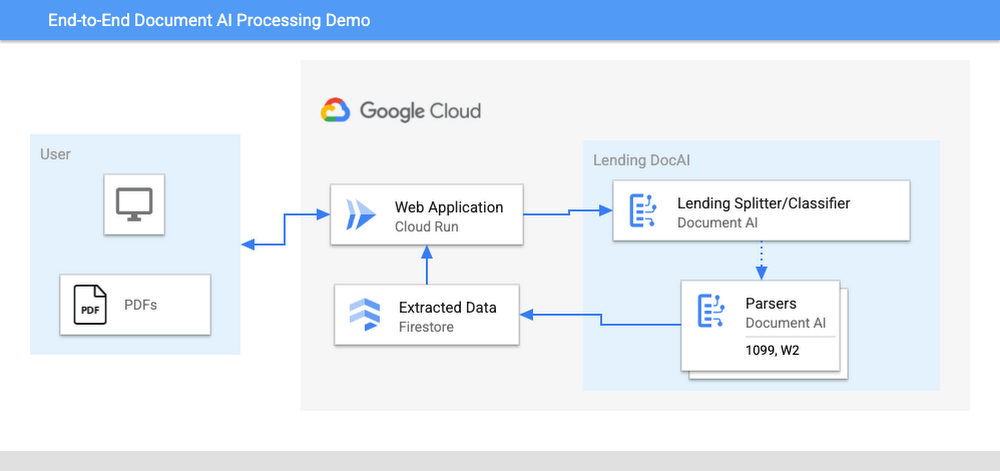
The User uploads multiple PDF files to the web application, hosted on Cloud Run.
An API call is made to the Lending Document Splitter & Classifier for each PDF file.
The output of the classifier (e.g. W-2, 1099-MISC, etc.) is then mapped to an appropriate specialized parser in the Google Cloud Project.
Each document file is sent to the appropriate specialized parser that matches the document type.
The entities are extracted by the parser processor and the data is written to Firestore.
The raw data is now retrieved from Firestore and displayed to the User showing the file classification and extracted values from each form.
The data values from all the forms are used together to calculate an individual income tax return.
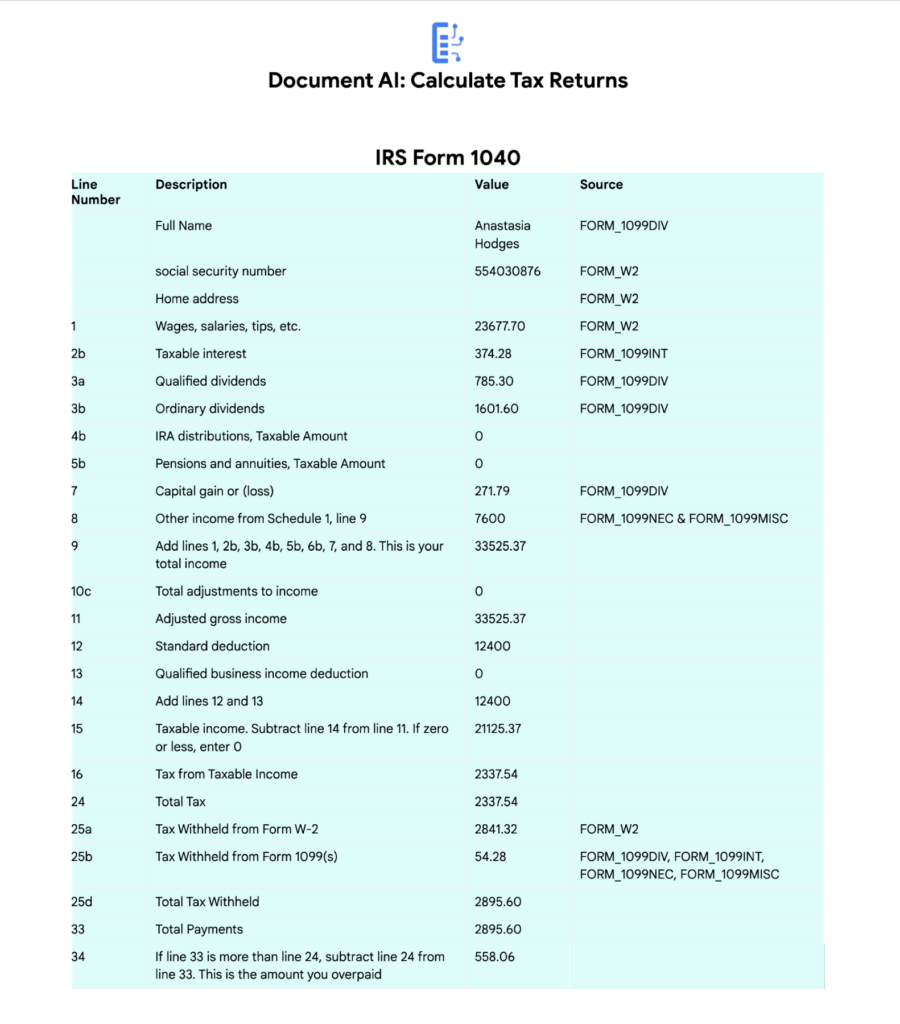
The Calculated Tax Rates/Incomes/Deductions are displayed to the User in a Tabular Format matching the IRS Form 1040. The app also displays which form data was used for each field. (Some output fields use values from multiple forms, such as line 25b.)
Step-by-Step directions
Want to try this out for yourself? Here’s how you can deploy and run this application using a Google Cloud Project. You can run this in Cloud Shell (Quickstart) or on your local machine.
NOTE: The Lending Processors in this Demo are in Limited GA as of March 2022. If you have a business use case for these processors, you can fill out and submit the Document AI limited access customer request form.
Install dependencies
- Clone the GitHub Repository to get the sample code.
git clone https://github.com/GoogleCloudPlatform/document-ai-samples.git
- Enter the directory for the tax pipeline demo
cd document-ai-samples/tax-processing-pipeline-python
- Install Python and the Google Cloud SDK if they aren’t already installed.
- Install the python libraries:
pip install -r requirements.txt
- Create a new Google Cloud project, and enable billing if you don’t already have one.
- Enable the Document AI API:
gcloud services enable documentai.googleapis.com
- Setup application default credentials:
gcloud auth application-default login
Deploy demo application
- Edit the config.yaml file, adding your own Project Details docai_processor_location: us # Document AI Processor Location (us OR eu)
docai_project_id: YOUR_PROJECT_ID # Project ID for Document AI Processors
firestore:
collection: tax_demo_documents # Set with your preferred Firestore Collection Name
project_id: YOUR_PROJECT_ID # Project ID for Firestore Database - Run setup scripts to create the processors and Cloud Run app in your project. python3 setup.py
gcloud run deploy tax-demo –source . - Visit the Deployed Web Page (You should get a link from the deployment command)
Calculate Tax Returns Homepage
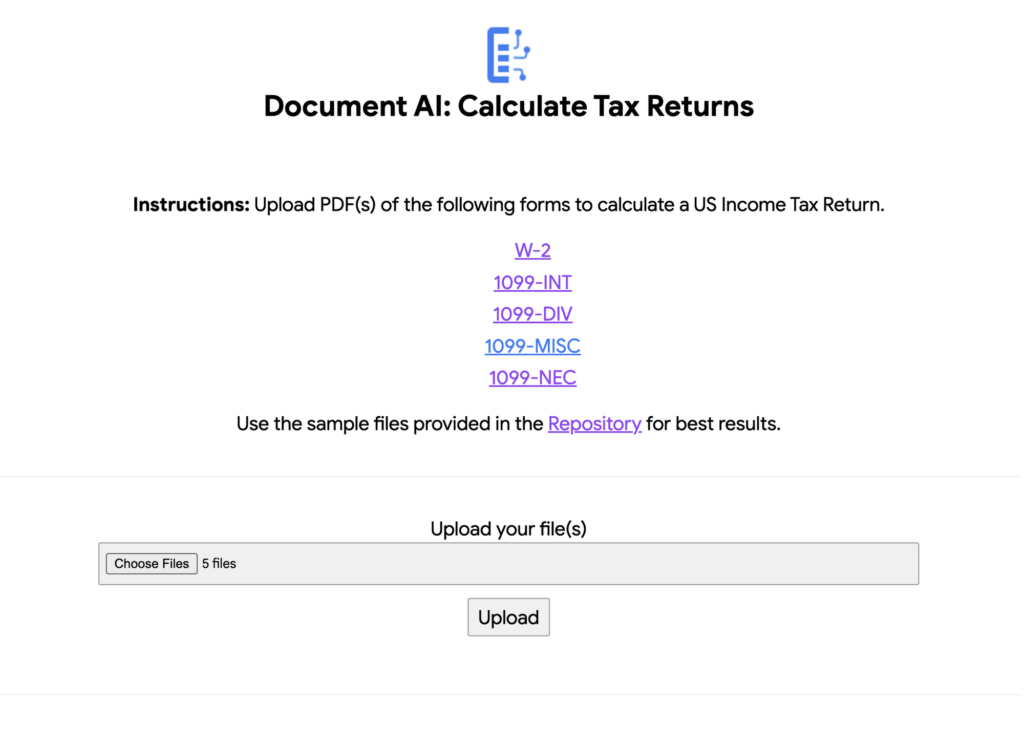
- Upload Documents. I created some sample documents you can download from the sample-docs folder of the repository.
This demo currently supports the following Document Types (2020 Editions)
W-2
1099-DIV
1099-INT
1099-MISC
1099-NEC
- Click “Upload” Button, wait for processing to complete.
The page will display the steps completed for each document file. These are also written to stdout for troubleshooting purposes.
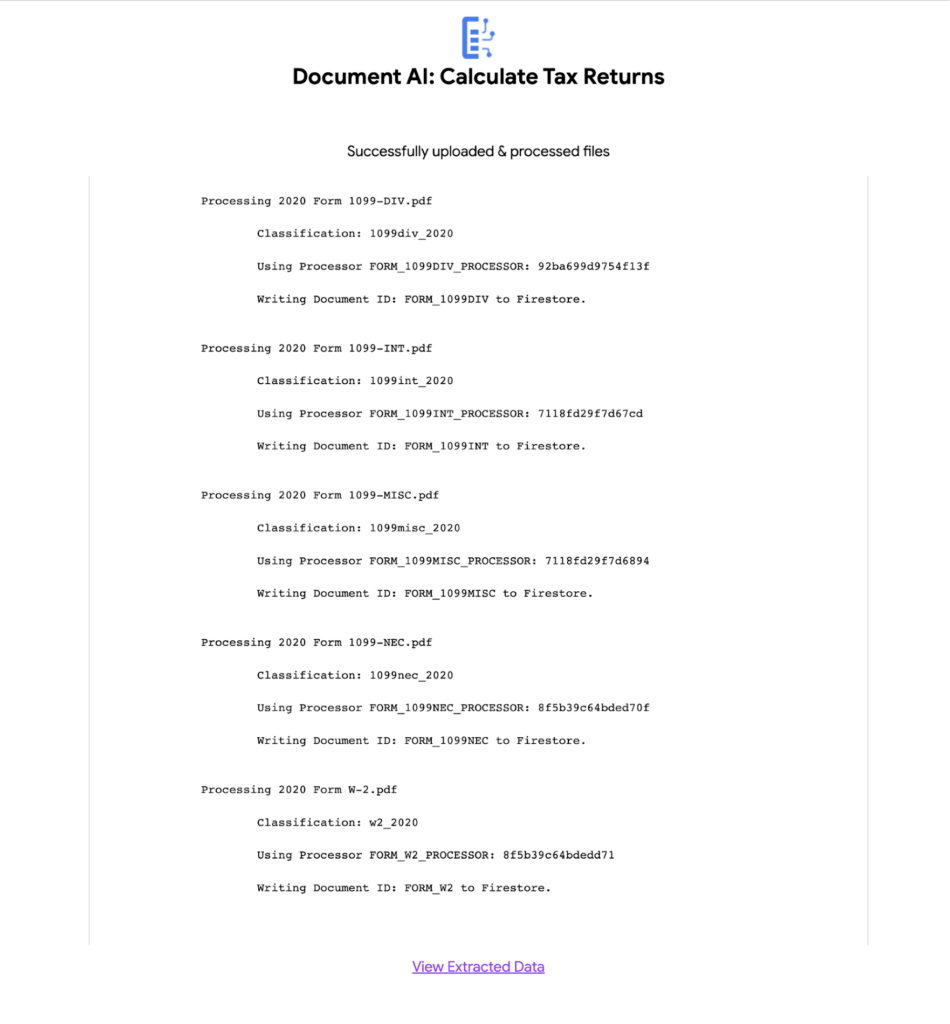
6. View the extracted values from each file.
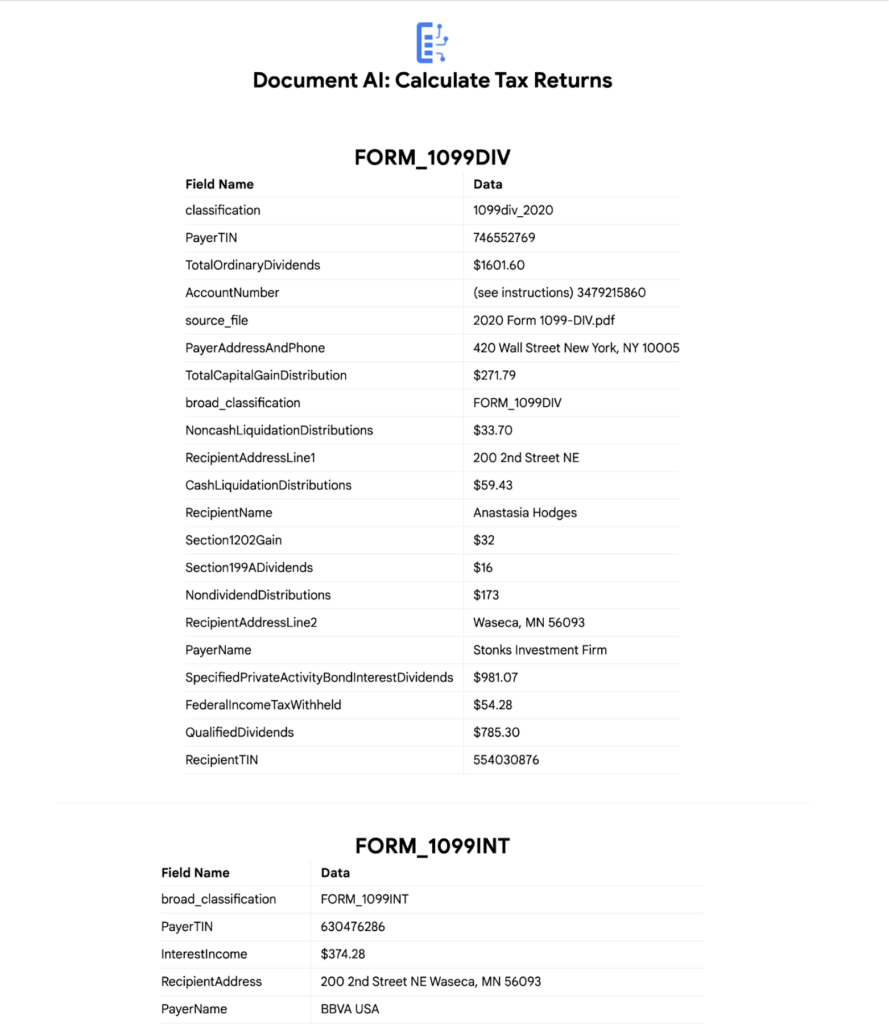
7. Click “Calculate Taxes” to see the tax calculation output
Conclusion
Warning: This is NOT financial advice, for educational purposes only.
Congratulations! You now have a fully functional tax processing application that can also be modified for use with other workflows that require data from multiple specialized documents.
The Document AI API is flexible and modular enough that most of the code in this example can be reused for any specialized processor.
Now tax returns can be filed with minimal manual effort!
If you want to learn more about Document AI, check out the Cloud Documentation and these videos:
- Getting started with the Document AI platform
- Process billions of pages and cut operational costs with DocAI
And if you want more hands-on experience, I recommend following these step-by-step codelabs to get started with the key features of Document AI:
Everything You Want to Know About Google Cloud’s AI-Enabled Talent Solution: From What It Is to How to Use it

3531
Of your peers have already read this article.
6:30 Minutes
The most insightful time you'll spend today!
First, What is Google Cloud Talent Solution?
Cloud Talent Solution is a service that brings machine learning to the job search experience, returning high quality results to job seekers far beyond the limitations of typical keyword-based methods. Once integrated with your job content, Cloud Talent Solution automatically detects and infers various kinds of data, such as related titles, seniority, and industry.
Show Me How it Works
Try it online now.
Show Me an Example of Who’s Using It
There’s a number of enterprises leveraging this service. Here are a few easy-to-watch examples
Watch how FedEx Ground Employs Google Cloud Talent Solution
Read how Johnson & Johnson is Reimagining Recruiting with Jibe and Google
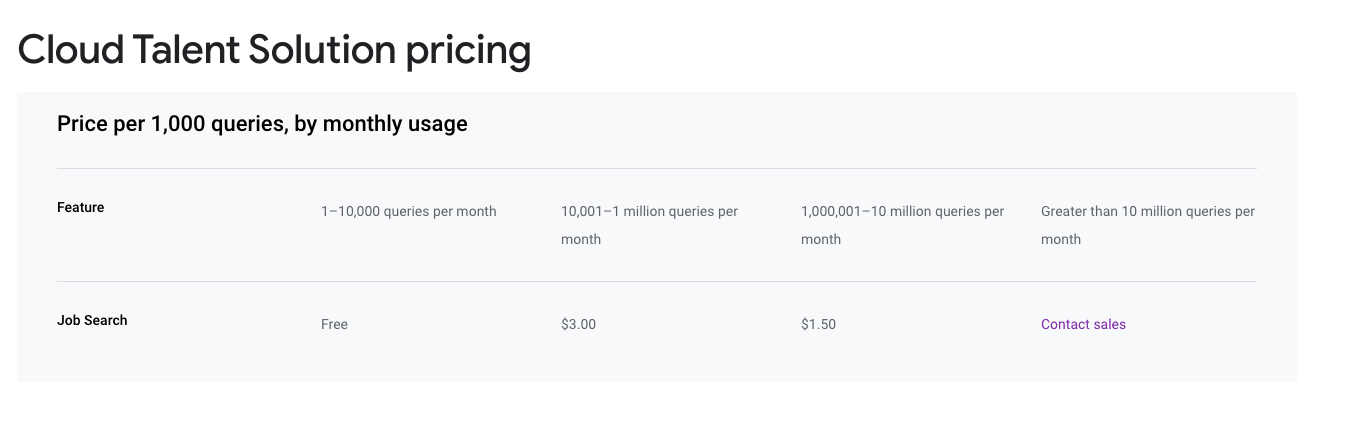
How Much Does it Cost?
Ok, Let’s See How it Works

3391
Of your peers have already listened to this podcast
30:54 Minutes
The most insightful time you'll spend today!
AI-as-a-Service is Here. It’s Really Almost Plug-and-Play
In the United States, Tax Season descends upon the country every April, requiring millions of Americans to spend hours deciphering cryptic documents and performing complex math just to figure out what they owe. Wouldn’t it be grand if there was a way for a computer to take all the relevant documents and extract out exactly what the IRS is looking for? Lending Document AI from Google Cloud supports common document types used for Income Tax Filing, such as W-2s and 1099s. These advancements in machine learning technology now makes it possible to alleviate some anxiety leading up to April 15th.
Lending Document AI is a Document Understanding solution that allows for classification and parsing of documents commonly used in the mortgage lending industry. The data in these unstructured files is then converted into a structured format, which can be stored in a database or used for analysis and calculations. You can read more about the product in the announcement blog post. For this tax filing use case, we will focus on automatically classifying and parsing the 2020 editions of the following forms:
W-2
1099-DIV
1099-INT
1099-MISC
1099-NEC
This sample application creates an automated pipeline where the user can bulk upload a collection of PDFs, the Lending Document Splitter & Classifier will classify each document and send each PDF to the appropriate specialized parser to extract the data, which can then be used to calculate an individual tax return and fill out a 1040 Form.
Overview
Let’s explore how this application works. You can check out the sample code in this GitHub Repository.
Here is an outline of the architecture of this application. As you can see, it utilizes Cloud Run and Firestore in Native Mode for the web application in addition to Document AI.
The User uploads multiple PDF files to the web application, hosted on Cloud Run.
An API call is made to the Lending Document Splitter & Classifier for each PDF file.
The output of the classifier (e.g. W-2, 1099-MISC, etc.) is then mapped to an appropriate specialized parser in the Google Cloud Project.
Each document file is sent to the appropriate specialized parser that matches the document type.
The entities are extracted by the parser processor and the data is written to Firestore.
The raw data is now retrieved from Firestore and displayed to the User showing the file classification and extracted values from each form.
The data values from all the forms are used together to calculate an individual income tax return.
The Calculated Tax Rates/Incomes/Deductions are displayed to the User in a Tabular Format matching the IRS Form 1040. The app also displays which form data was used for each field. (Some output fields use values from multiple forms, such as line 25b.)
Step-by-Step directions
Want to try this out for yourself? Here’s how you can deploy and run this application using a Google Cloud Project. You can run this in Cloud Shell (Quickstart) or on your local machine.
NOTE: The Lending Processors in this Demo are in Limited GA as of March 2022. If you have a business use case for these processors, you can fill out and submit the Document AI limited access customer request form.
Install dependencies
- Clone the GitHub Repository to get the sample code.
git clone https://github.com/GoogleCloudPlatform/document-ai-samples.git
- Enter the directory for the tax pipeline demo
cd document-ai-samples/tax-processing-pipeline-python
- Install Python and the Google Cloud SDK if they aren’t already installed.
- Install the python libraries:
pip install -r requirements.txt
- Create a new Google Cloud project, and enable billing if you don’t already have one.
- Enable the Document AI API:
gcloud services enable documentai.googleapis.com
- Setup application default credentials:
gcloud auth application-default login
Deploy demo application
- Edit the config.yaml file, adding your own Project Details docai_processor_location: us # Document AI Processor Location (us OR eu)
docai_project_id: YOUR_PROJECT_ID # Project ID for Document AI Processors
firestore:
collection: tax_demo_documents # Set with your preferred Firestore Collection Name
project_id: YOUR_PROJECT_ID # Project ID for Firestore Database - Run setup scripts to create the processors and Cloud Run app in your project. python3 setup.py
gcloud run deploy tax-demo –source . - Visit the Deployed Web Page (You should get a link from the deployment command)
Calculate Tax Returns Homepage
- Upload Documents. I created some sample documents you can download from the sample-docs folder of the repository.
This demo currently supports the following Document Types (2020 Editions)
W-2
1099-DIV
1099-INT
1099-MISC
1099-NEC
- Click “Upload” Button, wait for processing to complete.
The page will display the steps completed for each document file. These are also written to stdout for troubleshooting purposes.
6. View the extracted values from each file.
7. Click “Calculate Taxes” to see the tax calculation output
Conclusion
Warning: This is NOT financial advice, for educational purposes only.
Congratulations! You now have a fully functional tax processing application that can also be modified for use with other workflows that require data from multiple specialized documents.
The Document AI API is flexible and modular enough that most of the code in this example can be reused for any specialized processor.
Now tax returns can be filed with minimal manual effort!
If you want to learn more about Document AI, check out the Cloud Documentation and these videos:
- Getting started with the Document AI platform
- Process billions of pages and cut operational costs with DocAI
And if you want more hands-on experience, I recommend following these step-by-step codelabs to get started with the key features of Document AI:
This New Offering of Google Cloud Brings AI and Data Together!

2957
Of your peers have already read this article.
5:00 Minutes
The most insightful time you'll spend today!
Without AI, you’re not getting the most out of your data.
Without data, you risk stale, out-of-date, suboptimal models.
But most companies are still struggling with how to keep these highly interdependent technologies in sync and operationalize AI to take meaningful action from data.
We’ve learned from Google’s years of experience in AI development how to make data-to-AI workflows as cohesive as possible and as a result our data cloud is the most complete and unified data and AI solution provider in the market. By bridging data and AI, data analysts can take advantage of user-friendly, accessible ML tools, and data scientists can get the most out of their organization’s data. All of this comes together with built-in MLOps to ensure all AI work — across teams — is ready for production use.
In this blog we’ll show you how all of this works, including exciting announcements from the Data Cloud Summit:
Vertex AI Workbench is now GA bringing together Google Cloud’s data and ML systems into a single interface so that teams have a common toolset across data analytics, data science, and machine learning. With native integrations across BigQuery, Spark, Dataproc, and Dataplex data scientists can build, train and deploy ML models 5X faster than traditional notebooks.
Introducing Vertex AI Model Registry, a central repository to manage and govern the lifecycle of your ML models. Designed to work with any type of model and deployment target, including BigQuery ML, Vertex AI Model Registry makes it easy to manage and deploy models.
Use ML to get the most out of your data, no matter the format
Analyzing structured data in a data warehouse, like using SQL in BigQuery, is the bread and butter for many data analysts. Once you have data in a database, you can see trends, generate reports, and get a better sense of your business. Unfortunately, a lot of useful business data isn’t in the tidy tabular format of rows and columns. It’s often spread out over multiple locations and in different formats, frequently as so-called “unstructured data” — images, videos, audio transcripts, PDFs — can be cumbersome and difficult to work with.
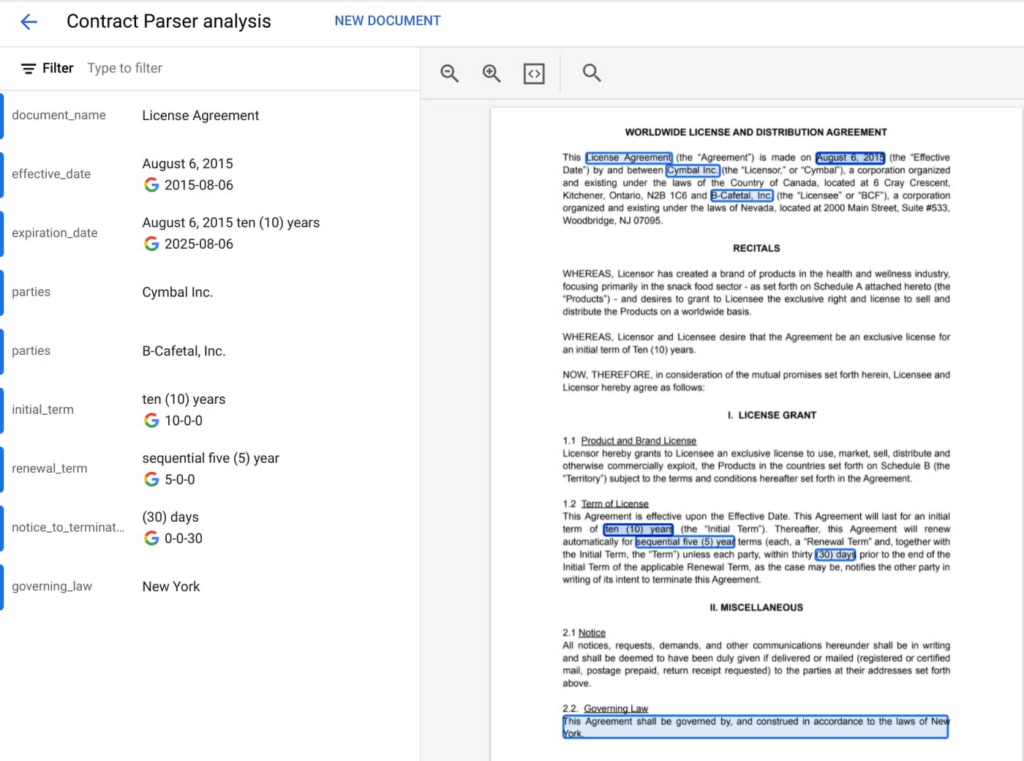
Here, AI can help. ML models can be used to transcribe audio and videos, analyze language, and extract text from images—that is, to translate elements of unstructured data into a form that can be stored and queried in a database like BigQuery. Google Cloud’s Document AI platform, for example, uses ML to understand documents like forms and contracts. Below, you can see how this platform is able to intelligently extract structured text data from an unstructured document like a resume. Once this data is extracted, it can be stored in a data warehouse like BigQuery.
Bring machine learning to data analysts via familiar tools
Today, one of the biggest barriers to ML is that the tools and frameworks needed to do ML are new and unfamiliar. But this doesn’t have to be the case. BigQuery ML, for example, allows you to train sophisticated ML models at scale using SQL code, directly from within BigQuery. Bringing ML to your data warehouse alleviates the complexities of setting up additional infrastructure and writing model code. Anyone who can write SQL code can train a ML model quickly and easily.

Easily access data with a unified notebook interface
One of the most popular ML interfaces today are notebooks: interactive environments that allow you to write code, visualize and pre-process data, train models, and a whole lot more. Data scientists often spend most of their day building models within notebook environments. It’s crucial, then, that notebook environments have access to all of the data that makes your organization run, including tools that make that data easy to work with.
Vertex AI Workbench, now generally available, is the single development environment for the entire data science workflow. Integrations across Google Cloud’s data portfolio allow you to natively analyze your data without switching between services:
Cloud Storage: access unstructured data
BigQuery: access data with SQL, take advantage of models trained with BigQuery ML
Dataproc: execute your notebook using your Dataproc cluster for control
Spark: transform and prepare data with autoscaling serverless Spark
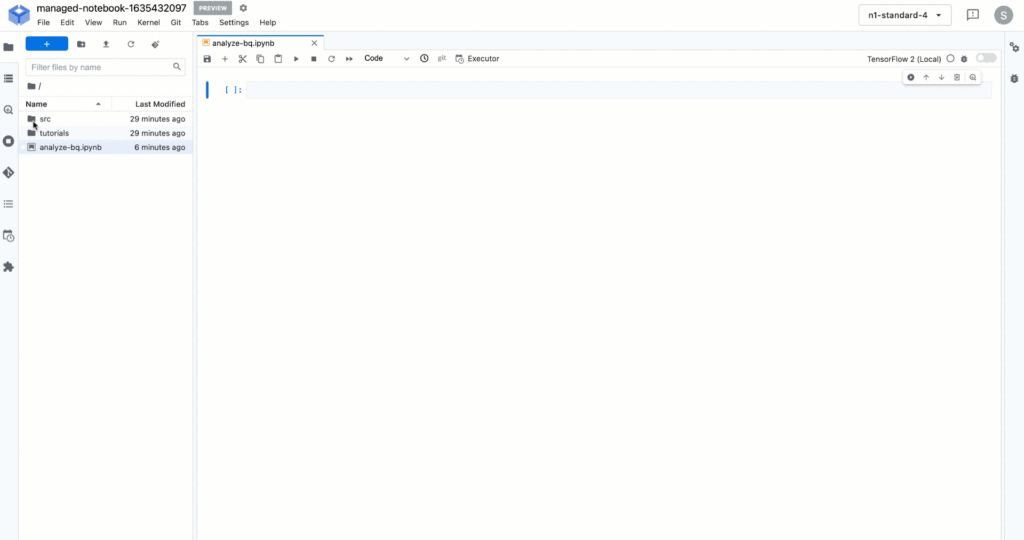
Below, you’ll see how you can easily run a SQL query on BigQuery data with Vertex AI Workbench.
But what happens after you’ve trained the model? How can both data analysts and data scientists make sure their models can be utilized by application developers and maintained over time?
Go from prototyping to production with MLOps
While training accurate models is important, getting those models to be scalable, resilient, and accurate in production is its own art, known as MLOps. MLOps allow you to:
- Know what data your models are trained on
- Monitor models in production
- Make training process repeatable
- Serve and scale model predictions
- A whole lot more! (See the “Practitioners Guide to MLOps” whitepaper for a full and detailed overview of MLOps)
Built-in MLOps tools within Vertex AI’s unified platform remove the complexity of model maintenance. Practical tools can help with everything from training and hosting ML models, managing model metadata, governance, model monitoring, and running pipelines – all critical aspects of running ML in production and at scale.
And now, we’re extending our capabilities to make MLOps accessible to anyone working with ML in your organization.
Easy handoff to MLOps with Vertex AI Model Registry
Today, we’re announcing Vertex AI Model Registry, a central repository that allows you to register, organize, track, and version trained ML models and is designed to work with any type of model and deployment target, whether that’s through BigQuery, Vertex AI, AutoML, custom deployments on GCP or even out of the cloud.
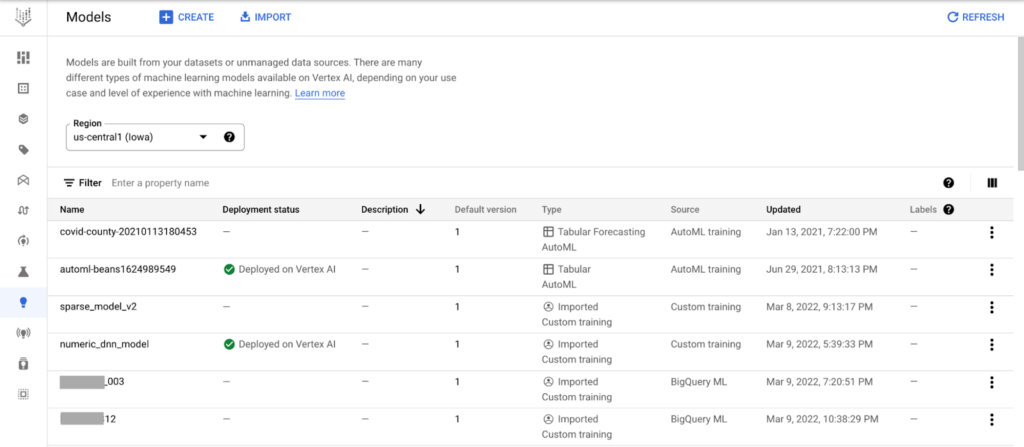
Vertex AI Model Registry is particularly beneficial for BigQuery ML. While BigQuery ML brings the powerful scalability of BigQuery for batch predictions, using a data warehouse engine for real-time predictions just isn’t practical. Furthermore, you might start to wonder how to orchestrate your ML workflows based in BigQuery. You can now discover and manage BigQuery ML models and easily deploy those models to Vertex AI for real-time predictions and MLOps tools.
End-to-End MLOps with pipelines
One of the most popular approaches to MLOps is the concept of ML pipelines: where each distinct step in your ML workflow from data preparation to model training and deployment are automated for sharing and reliably reproducing.
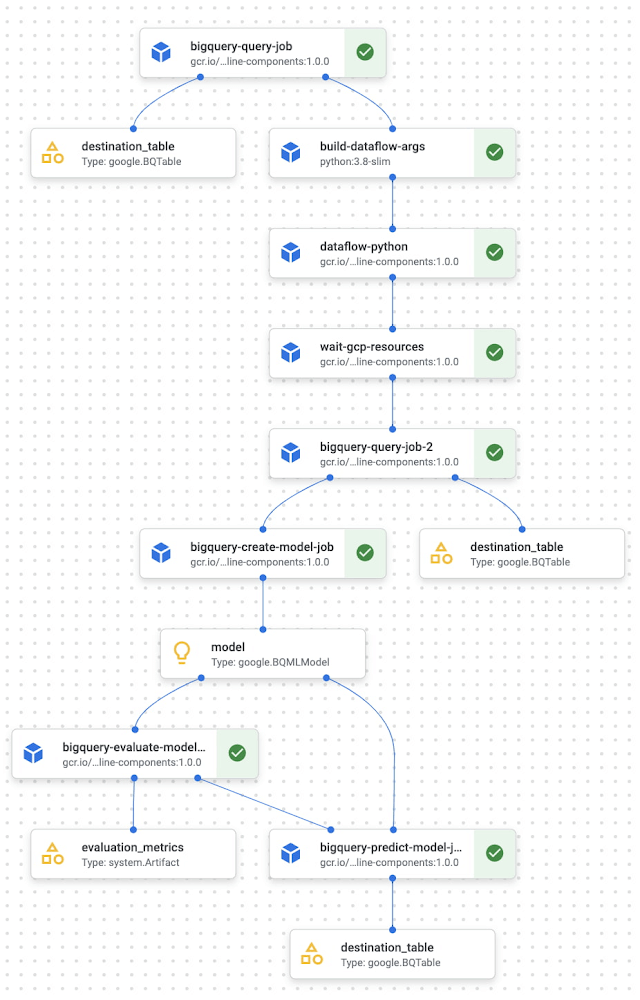
Vertex AI Pipelines is a serverless tool for orchestrating ML tasks using pre-built components or your own custom code. Now, you can easily process data and train models with BigQuery, BigQuery ML, and Dataproc directly within a pipeline. With this capability, you can combine familiar ML development within BigQuery and Dataproc into reproducible, resilient pipelines and orchestrate your ML workflows faster than ever.
See an example of how this works with the new BigQuery and BigQuery ML components.
Learn more and get started
We’re excited to share more about our unified data and AI offering today at the Data Cloud Summit. Please join us for the spotlight session on our “AI/ML strategy and product roadmap” or the “AI/ML notebooks ‘how to’ session.”
And if you’re ready to get hands on with Vertex AI, check out these resources:
Codelab: Training an AutoML model in Vertex AI
Codelab: Intro to Vertex AI Workbench
Video Series: AI Simplified: Vertex AI
GitHub: Example Notebooks
Training: Vertex AI: Qwik Start
Post-COVID: Times Driven by Data Analytics and Intelligence

4553
Of your peers have already read this article.
1:30 Minutes
The most insightful time you'll spend today!
As we think about economic recovery from COVID-19—both inside Google and outside through working with Google Cloud customers—we’ve made many important observations. Among them is the recognition that the ways software developers and IT practitioners work together will shift in the post COVID-19 world. Our economic recovery today will look different than past recoveries, and on a fundamental level, the way we innovate will be different than it’s ever been before.
Right now, we’re entering a new phase of cloud computing, where businesses have shifted from making tactical infrastructure decisions, to making larger IT decisions with an eye towards enabling transformation throughout the company. Data, and what we can do with that data, is key to this transformation. And how companies put data in the hands of every employee to help catalyze transformation and solve the most important and impactful opportunities in their industries is at the core.
A recent Google-commissioned study by IDG highlighted the role of data analytics and intelligent solutions when it comes to helping businesses separate from their competition. The survey of 2,000 IT leaders across the globe reinforced the notion that the ability to derive insights from data will go a long way towards determining which companies win in this new era.
Data analytics and intelligence were prioritized during COVID-19
The results of the IDG study show a separation amongst those organizations that embrace the capabilities of today’s data analytics and AI/ML tools and those that do not. When COVID-19 hit, many organizations cancelled IT initiatives, with 55% of respondents delaying or cancelling at least one technology project. However, 32% of respondents accelerated or introduced initiatives around building out or improving the use of data analytics and intelligence. IT leaders realize how critical data is to their future success, even when resources are scarce.
Digital-focused companies are faster to embrace advanced intelligence tools
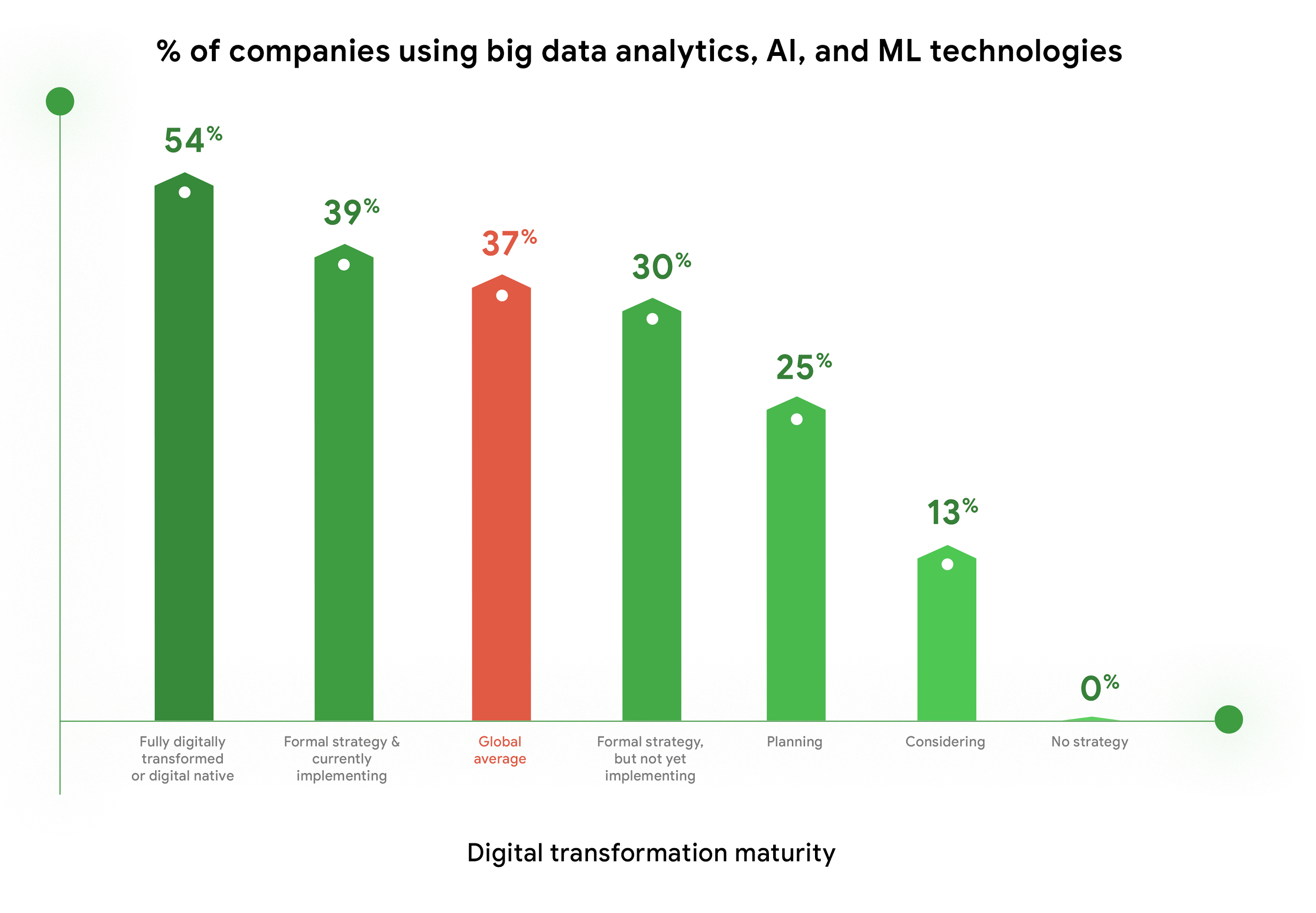
Furthermore, enthusiasm for big data analytics, AI, and ML technologies is highest among companies who are further along in their digital transformation journeys. Fifty-four percent of companies who identify as “Fully digitally transformed” or “Digital native” are using or considering using these tools, vs. the global average of 37%. And, these same organizations are embracing the promise of AI more than their peers. Forty-eight percent felt that “Embedded AI across our full stack of cloud solutions will be critical” vs 39% of digital conservatives. These companies realize these digital tools enable them to be more resilient, agile, and prepared for whatever the future brings.
Companies are turning to cloud to maximize insights from data
As companies tap into the promise of data analytics and AI/ML, they are turning to cloud for help. When considering which cloud providers to work with, 78% of respondents said big data analysis is a “must have” or a “major consideration,” which placed this capability at the top of the list of consideration factors. This is not surprising, as cloud solutions address the most common pain points and barriers to innovation. Three of the respondents’ top four areas impeding innovation are addressed by cloud: Insufficient IT & developer skill sets (1st), security risks and concerns (2nd), and legacy systems and technologies (4th). Plus, cloud makes it easier to quickly launch a project, scale up or scale down, and pay for only what you use.

COVID-19 changed the very nature of business, and of IT. It forced IT leaders to decide where to put their scarce resources and big data analytics and AI/ML were, understandably, at the top of the list. To learn more about the findings, download the IDG report “No turning back: How the pandemic reshaped digital business agendas.”
The Future of Language Processing: Google Cloud’s Enhanced NLP Models

1333
Of your peers have already read this article.
1:30 Minutes
The most insightful time you'll spend today!
Natural language understanding (NLU) is getting increasingly better at solving complex problems and these language breakthroughs are creating big waves in Artificial Intelligence. For example, new language models are enabling Everyday Robots to create more helpful robots that can break down user instructions and have even enabled people to generate imaginative visuals from complex text prompts.
These leaps in NLU are powered by neural networks trained to understand human language. This technology has greatly advanced since the introduction of Google’s Transformer architecture in 2017 with the introduction of large models trained on massive amounts of data like GPT-3 and, even more recently, with GLaM, LaMDA, and PaLM. This latest generation of models are called Large Language Models (LLMs) because of their sheer size and the vast volumes of data on which they are trained, and they can be applied to a range of tasks to create more powerful digital assistants, generate better search results and product recommendations, enforce smarter platform curation and safety features, and much more.
For these reasons, we’re pleased to announce we’ve updated the Google Cloud Natural Language (NL) API with a new LLM-based model for Content Classification.
With an expansive pre-trained classification taxonomy, the newest version of Content Classification from the Natural Language API leverages the latest Google research to improve customer use cases spanning actionable insights on user trends, to ad targeting, to content-based filtering. In this article, we’ll explore the NL API’s new capabilities, which are the first of many efforts we’ll be making to bring the power of LLMs to Google Cloud.
How LLMs help machines understand human language
As Google Cloud VP and General Manager of AI and Industry Solutions, Andrew Moore has argued, if computer systems become more conversant with natural human languages, they become a foundation for more sophisticated use cases, able to not only understand user intent but also create complex bespoke solutions. Google has been a leading research force in this space, with LLM projects like LaMDA, PaLM and T5 contributing to the Cloud NL API’s improved v2 classification model.
Parsing language is a difficult AI task for machines due in part to the contextual and individual interpretation of words or phrases. The word “server,” for example, could refer to a computer, a restaurant employee, or a tennis player. To understand the word, a model needs to be trained around not only a basic definition but also the context and positioning of the word within a sentence or conversation and its evolving connotations. Because they process voluminous training data via Transformers, LLMs are well-suited to this type of work.
Thanks to the integration of Google’s latest language modeling technology, and an updated and expanded training data set, the next generation of the Content Classification API not only has over 1,000 labels (up from around 600 previously), but now also supports 11 languages (with Chinese, French, German, Italian, Japanese, Korean, Portuguese, Russia, Spanish, and Dutch joining previously-available English)—and does so with improved accuracy.
AI raises questions about the best way to build fairness, interpretability, privacy, and security into these new systems in order to benefit people and society. At Google, we prioritize the responsible development of AI and take steps to offer products where a responsible approach is built in by design. For Content Classification, we limited use of sensitive labels and conducted performance evaluations. See our Responsible AI page for more information about our commitments to responsible innovation.
Get Started
Today’s announcement is just the first step in bringing LLM capabilities to Google Cloud AI products, and we’re excited to see how our more powerful Natural Language API helps developers, analysts and data scientists generate insights and offer superior experiences. Our early adopters are implementing the API to improve user recommendations, display ad targeting, and insights about new trends.
If you’re ready to get started with this major leap in Google Cloud language services, visit our NL API documentation, and to learn more about Google Cloud’s AI services, visit our AI and machine learning products page.
More Relevant Stories for Your Company



How Google Cloud is Fortifying the Social Safety Net
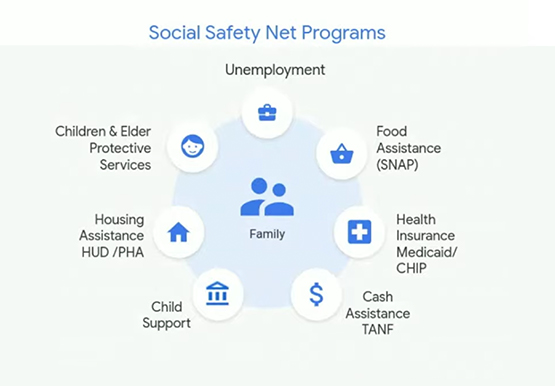
The COVID-19 crisis is triggering both immediate and longer-term challenges for state and local governments. In this video, Denise Winkler, Strategic Business Executive, Google Cloud and Jennifer Ricker, Assistant Secretary - Illinois Department of Innovation & Technology (DoIT), discuss a number of challenges and solutions around the pandemic. First, they

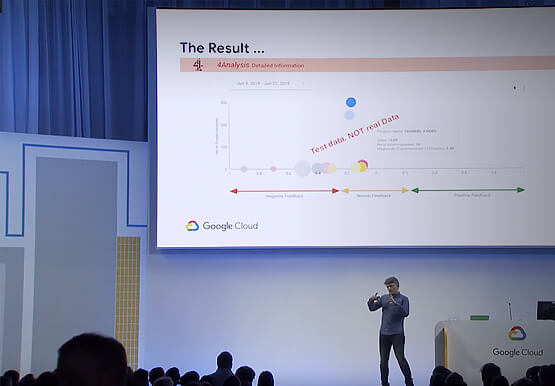
Can Your Data Warehouse Handle a 100-Trillion Row Query?
Today's enterprise demands from data go far beyond the capabilities of traditional data warehousing and for many leaders, the need to digitally transform their businesses is a key driver for data analytics spending. Businesses want to make real-time decisions from fresh information as well as make future predictions from their

Google is a Leader in the 2019 Gartner Magic Quadrant for Data Management Solutions for Analytics
As organizations continue to produce vast quantities of data, they increasingly need platforms that allow them to analyze, store, and extract meaningful insights from that data. And research from analyst firms like Gartner offer an important way for organizations to evaluate and compare cloud data warehouse providers. Earlier this year,
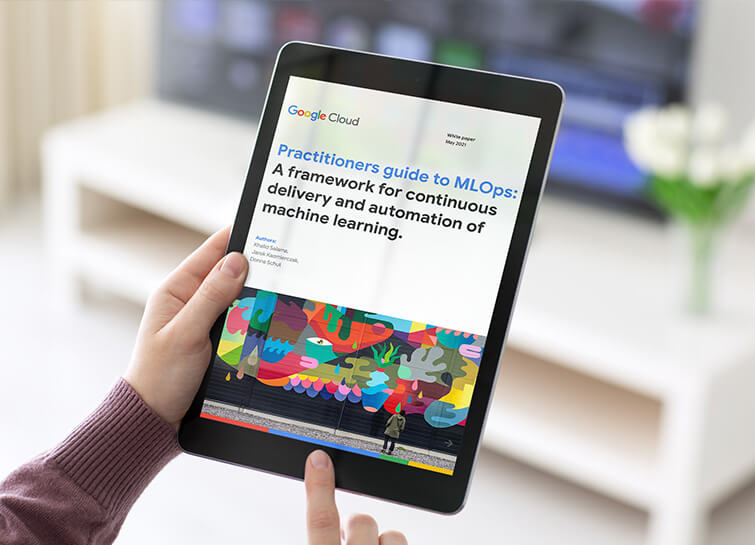
Data Science Teams: A Practitioners Guide to MLOps
Across industries, DevOps and DataOps have been widely adopted as methodologies to improve quality and reduce the time to market of software engineering and data engineering initiatives. With the rapid growth in machine learning (ML) systems, similar approaches need to be developed in the context of ML engineering, which handle
