





Learn to Deploy Custom Models on Vertex AI

3032
Of your peers have already read this article.
2:00 Minutes
The most insightful time you'll spend today!
In May we announced Vertex AI, our new unified AI platform which provides options for everything from using pre-trained models to building your models with a variety of frameworks. In this post we’ll do a deep dive on training and deploying a custom model on Vertex AI. There are many different tools provided in Vertex AI, as you can see in the diagram below. In this scenario we’ll be using the products highlighted in green:
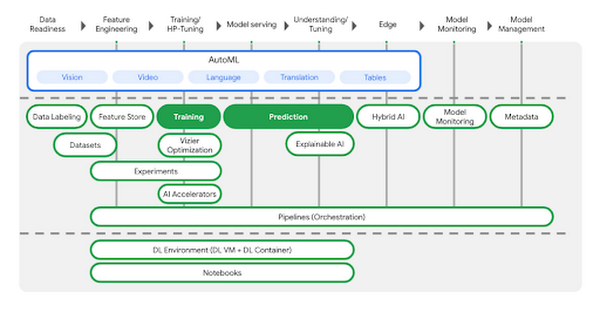
AutoML is a great choice if you don’t want to write your model code yourself, but many organizations have scenarios that require building custom models with open-source ML frameworks like TensorFlow, XGBoost, or PyTorch. In this example, we’ll build a custom TensorFlow model (built upon this tutorial) that predicts the fuel efficiency of a vehicle, using the Auto MPG dataset from Kaggle.
If you’d prefer to dive right in, check out the codelab or watch the two minute video below for a quick overview of our demo scenario: https://www.youtube.com/embed/bHoAXR26hWo?enablejsapi=1&
Environment setup
There are many options for setting up an environment to run these training and prediction steps. In the lab linked above, we use the IDE in Cloud Shell to build our model training application, and we pass our training code to Vertex AI as a Docker container. You can use whichever IDE you’re most comfortable working with, and if you’d prefer not to containerize your training code, you can create a Python package that runs on one of Vertex AI’s supported pre-built containers.
If you would like to use Pandas or another data science library to do exploratory data analysis, you can use the hosted Jupyter notebooks in Vertex AI as your IDE. For example, here we wanted to inspect the correlation between fuel efficiency and one of our data attributes, cylinders. We used Pandas to plot this relationship directly in our notebook.
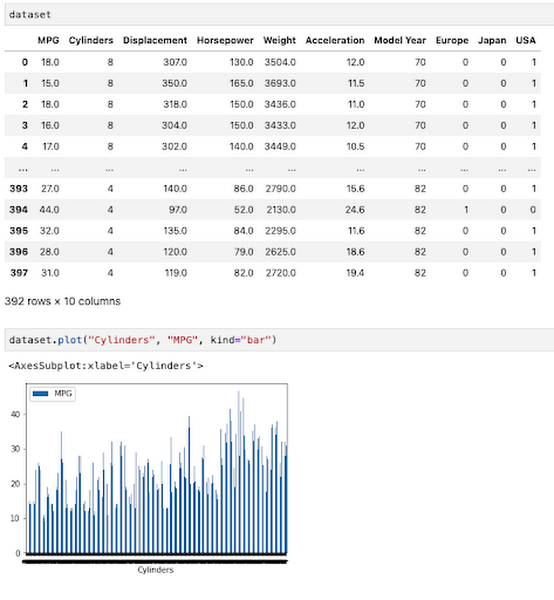
To get started, you’ll want to make sure you have a Google Cloud project with the relevant services enabled. You can enable all the products we’ll be using in one command using the gcloud SDK:
gcloud services enable compute.googleapis.com \containerregistry.googleapis.com \aiplatform.googleapis.com
Then create a Cloud Storage bucket to store our saved model assets. With that, you’re ready to start developing your model training code.
Containerizing training code
Here we’ll develop our training code as a Docker container, and deploy that container to Google Container Registry (GCR). To do that, create a directory with a Dockerfile at the root, along with a trainer subdirectory containing a train.py file. This is where you’ll write the bulk of your training code:
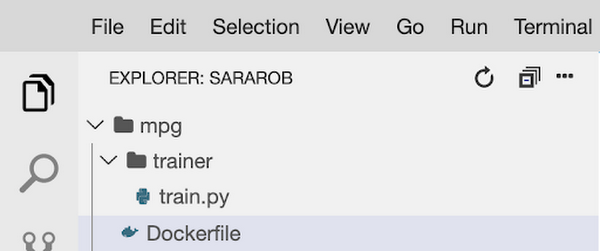
To train this model, we’ll build a deep neural network using the Keras Sequential Model API:
model = keras.Sequential([layers.Dense(64, activation='relu', input_shape=[len(train_dataset.keys())]),layers.Dense(64, activation='relu'),layers.Dense(1)])
We won’t include the full model training code here, but you can find it in this step of the codelab. Once your training code is complete, you can build and test your container locally. The IMAGE_URI in the snippet below corresponds to the location where you’ll deploy your container image in GCR. Replace $GOOGLE_CLOUD_PROJECT below with the name of your Cloud project:
IMAGE_URI="gcr.io/$GOOGLE_CLOUD_PROJECT/mpg:v1"docker build ./ -t $IMAGE_URIdocker run $IMAGE_URI
All that’s left to do is push your container to GCR by running docker push $IMAGE_URI. In the GCR section of your console, you should see your newly deployed container:
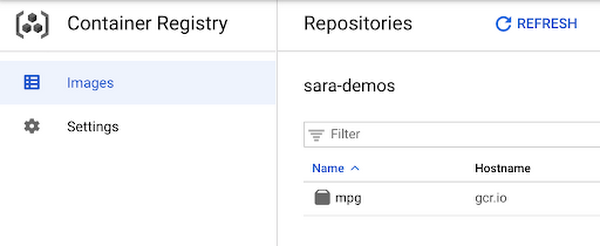
Running the training job
Now you’re ready to train your model. You can select the container you created above in the models section of the platform. You can also specify key details like the training method, compute preferences (GPUs, RAM, etc.) and hyperparameter tuning if required.
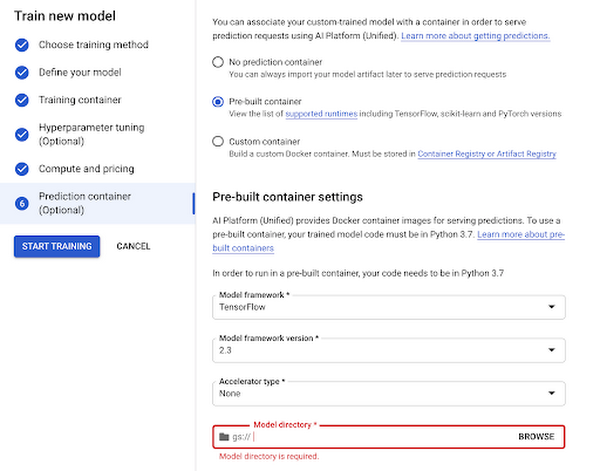
Now you can hand over training your model and let Vertex do the heavy lifting for you.
Deploy to endpoint
Next, let’s get your new model incorporated into your app or service. Once your model is done training you will see an option to create a new endpoint. You can test out your endpoint in the console during your development process. Using the client libraries, you can easily create a reference to your endpoint and get a prediction with a single line of code:
from google.cloud import aiplatformendpoint = aiplatform.Endpoint(endpoint_name="projects/YOUR-PROJECT-NUMBER/locations/us-central1/endpoints/YOUR-ENDPOINT-ID"). . .endpoint.predict(test_instances)
Start building today
Ready to start using Vertex AI? We have you covered for all your use cases spanning from simply using pre-trained models to every step of the lifecycle of a custom model.
- Use Jupyter notebooks for a development experience that combines text, code and data
- Fewer lines of code required for custom modeling
- Use MLOps to manage your data with confidence and scale
Get started today by trying out this codelab yourself or watching this one hour workshop.
3633
Of your peers have already watched this video.
8:00 Minutes
The most insightful time you'll spend today!
AutoML Vision: Among the Fastest and Easiest Way to Adopt AI for Your Enterprise
What’s among the largest impediment to the adoption of AI within enterprises? Not enough access to skills. According to 80 percent of business respondents to an EY survey, the top challenge to an enterprise AI program is the lack of requisite talent.
What companies need today is a way to facilitate—and therefore accelerate—the adoption of AI. There are a few challenges that need to be overcome. Two of the most critical challenges include the data science skills required to create customized models, and the right IT skills to power the underlying infrastructure.
Both of these skills are hard and expensive to come by.
There are ways around this problem. Google Cloud’s recently launched AutoML Vision is one such solution. It significantly lowers the amount of IT and data science heavy lifting required to start customized machine learning applications around computer vision.
That’s possibly one of the reasons why Google is the most popular cloud provider for data scientists, according to the State of Data Science.
In this short and simple-to-understand video, Yufeng Guo, Developer and Machine Learning Advocate at Google Cloud, walks you through a real use case of AutoML Vision.
5590
Of your peers have already watched this video.
1:20 Minutes
The most insightful time you'll spend today!
Nippon India Mutual Fund Re-Invents How Indians Buy with AI
Nippon India Mutual Fund, formerly Reliance Mutual Funds is changing the way Indians purchase funds making it easier and faster, with the help of Google Cloud.
In India, only 3-4 percent of the population has invested in mutual funds. There’s a sizeable market to tap into for mutual fund houses–if they can find ways to make it easier for first-time investors to take the plunge.
As the leading retail asset management company in the country, Reliance Mutual Funds, decided to use voice to facilitate transactions.
“That would create a delightful experience for the investor,” says Arpan Saha, Head of Digital Business, Nippon India Mutual Fund.
That’s exactly what the company did using the Google Cloud Platform.
Today, the company has over 10,000 interactions using the Google AI Platform.
“Today we see more consumer coming and doing more transactions with us, and we only see this going up as we make this experience razor-sharp,” says Saha.
4 Methods How AI/ML Boosts Innovation and Reduces Costs

2934
Of your peers have already read this article.
2:30 Minutes
The most insightful time you'll spend today!
“Cloud Wisdom Weekly: for tech companies and startups” is a new blog series we’re running this fall to answer common questions our tech and startup customers ask us about how to build apps faster, smarter, and cheaper. In this installment, we explore how to leverage artificial intelligence (AI) and machine learning (ML) for faster innovation and efficient operational growth.
Whether they’re trying to extract insights from data, create faster and more efficient workflows via intelligent automation, or build innovative customer experiences, leaders at today’s tech companies and startups know that proficiency in AI and ML is more important than ever.
AI and ML technologies are often expensive and time-consuming to develop, and the demand for AI and ML experts still largely outpaces the existing talent pool. These factors put pressure on tech companies and startups to allocate resources carefully when considering bringing AI/ML into their business strategy. In this article, we’ll explore four tips to help tech companies and startups accelerate innovation and reduce costs with AI and ML.
4 tips to accelerate innovation and reduces costs with AI and ML
Many of today’s most innovative companies are creating services or products that couldn’t exist without AI—but that doesn’t mean they’re building their AI and ML infrastructure and pipelines from scratch. Even for startups whose businesses don’t directly revolve around AI, injecting AI into operational processes can help manage costs as the company grows. By relying on a cloud provider for AI services, organizations can unlock opportunities to energize development, automate processes, and reduce costs.
1. Leverage pre-trained ML APIs to jumpstart product development
Tech companies and startups want their technical talent focused on proprietary projects that will make a difference to the business. This often involves the development of new applications for an AI technology, but not necessarily the development of the AI technology itself. In such scenarios, pre-trained APIs help organizations quickly and cost-effectively establish a foundation on which higher-value, more differentiated work can be layered.
For example, many companies building conversational AI into their products and services leverage Google Cloud APIs such as Speech-to-Text and Natural Language. With these APIs, developers can easily integrate capabilities like transcription, sentiment analysis, content classification, profanity filtering, speaker diarization, and more. These powerful technologies help organizations focus on creating products rather than having to build the base technologies.
See this article for examples of why tech companies and startups have chosen Google Cloud’s Speech APIs for use cases that range from deriving customer insights to giving robots empathetic personalities. For an even deeper dive, see
- our AI product page to explore other APIs, including Translation, Vision, and more;
- and the Google Cloud Skills Boost for ML APIs.
2. Use managed services to scale ML development and accelerate deployment of models to production
Pre-trained models are extremely useful, but in many cases, tech companies and startups need to create custom models to either derive insights from their own data or to apply new use cases to public data. Regardless of whether they’re building data-driven products or generating forecasting models from customer data, companies need ways to accelerate the building and deployment of models into their production environments.
A data scientist typically starts a new ML project in a notebook, experimenting with data stored on the local machine. Moving these efforts into a production environment requires additional tooling and resources, including more complicated infrastructure management. This is one reason many organizations struggle to bring models into production and burn through time and resources without moving the revenue needle.
Managed cloud platforms can help organizations transition from projects to automated experimentation at scale or the routine deployment and retraining of production models. Strong platforms offer flexible frameworks, fewer lines of code required for model training, unified environments across tools and datasets, and user-friendly infrastructure management and deployment pipelines.
At Google Cloud, we’ve seen customers with these needs embrace Vertex AI, our platform for accelerating ML development, in increasing numbers since it launched last year. Accelerating time to production by up to 80% compared to competing approaches, Vertex AI provides advanced end-to-end ML Ops capabilities so that data scientists, ML engineers, and developers can contribute to ML acceleration. It includes low-code features, like AutoML, that make it possible to train high performing models without ML expertise.
Over the first half of 2022, our performance tests found that the number of customers utilizing AI Workbench increased by 25x. It’s exciting to see the impact and value customers are gaining with Vertex AI Workbench, including seeing it help companies speed up large model training jobs by 10x and helping data science teams improve modeling precision from the 70-80% range to 98%.
If you are new to Vertex AI, check out this video series to learn how to take models from prototype to production. For deeper dives, see
- this article about Vertex AI’s role in an ambitious project to measure climate change with AI;
- BigQuery has built-in Machine Learning (ML) and Analytics that you can use to create no-code predictions using just SQL queries.
- this blog about how Vertex AI and BigQuery work together to make data analysis easier and more powerful;
- and this blog about Example-based explanations, one of our most recent updates to make model iteration more intuitive and efficient.
3. Harness the cloud to match hardware to use cases while minimizing costs and management overhead
ML infrastructure is generally expensive to build, and depending on the use case, specific hardware requirements and software integrations can make projects costly and complicated at scale. To solve for this, many tech companies and startups look to cloud services for compute and storage needs, attracted by the ability to pay only for resources they use while scaling up and down according to changing business needs.
At Google Cloud, customers share that they need the ability to optimize around a variety of infrastructure approaches for diverse ML workloads. Some use Central Processing Units (CPUs) for flexible prototyping. Others leverage our support for NVIDIA Graphics Processing Units (GPUs) for image-oriented projects and larger models, especially those with custom TensorFlow operations that must run partially on CPUs. Some choose to run on the same custom ML processors that power Google applications—Tensor Processing Units (TPUs). And many use different combinations of all of the preceding.
Beyond matching use cases to the right hardware and benefiting from the scale and operational simplicity of a managed service, tech companies and startups should explore configuration features that help further control costs. For example, Google Cloud features like time-sharing and multi-instance capabilities for GPUs — as well as features like Vertex AI Training Reduction Server — are built to optimize GPU costs and usage.
Vertex AI Workbench also integrates with the NVIDIA NGC catalog for deploying frameworks, software development kits and Jupyter Notebooks with a single click—another feature that, like Reduction Server, speaks to the ways organizations can make AI more efficient and less costly via managed services.
4. Implement AI for operations
Besides using pre-trained APIs and ML model development to develop and deliver products, startup and tech companies can improve operational efficiency, especially as they scale, by leveraging AI solutions built for specific business and operational needs, like contract processing or customer service.
Google Cloud’s DocumentAI products, for instance, apply ML to text for use cases ranging from contract lifecycle management to mortgage processing. For businesses whose customer support needs are growing, there’s Contact Center AI, which helps organizations build intelligent virtual agents, facilitate handoffs as appropriate between virtual agents and human agents, and generate insights from call center interactions. By leveraging AI to help manage operational processes, startups and tech companies can allocate more resources to innovation and growth.
Next steps toward an intelligent future
The tips in this article can help any tech company or startup find ways to save money and boost efficiency with AI and ML. You can learn more about these topics by registering for Google Cloud Next, kicking off October 11, where you’ll hear Google Cloud’s latest AI news, discussions, and perspectives—in the meantime, you can also dive into our Vertex AI quickstarts and BigQuery ML tutorials. And for the latest on our work with tech companies and startups, be sure to visit our Startups page.
3250
Of your peers have already watched this video.
38:09 Minutes
The most insightful time you'll spend today!
TensorFlow: The Show-and-Tell Data Scientists Have Been Asking For
TensorFlow is among the most popular, if not, the most popular deep learning libraries today. According to one ranking, “TensorFlow is at least two standard deviations above the mean on all calculated metrics.”
Watch as Lak Lakshmanan, Technical Lead, Machine Learning and Big Data, Google Cloud, walks through a development workflow that will make operationalization easier to execute, including the process of building a complete machine learning pipeline covering ingest, exploration, training, evaluation, deployment, and prediction.
He also talks about the need for distributed training. But what’s the benefit of distributed TensorFlow? Many machine learning frameworks can only handle “toy problems”, or problems that can be solved by input data that fits into memory. These are small data sets.
But to build effective machine learning you need big data, feature engineering, and model architectures. With large amounts of data batching and distribution are very important. That’s where distributed training comes in.
6212
Of your peers have already watched this video.
13:00 Minutes
The most insightful time you'll spend today!
Google Cloud’s 2021 Data Analytics Launches
Google Cloud announced closed to 15 services and programs spanning database, analytics, business intelligence and AI to help businesses gain value out of their data. Here’s a rundown of announcements throughout 2021 on analytics solutions and services such as Dataplex, an intelligent data fabric solution, Datastream, a serverless change data capture and replication service and Google Cloud analytics hub. Watch the video to get started with Google Cloud’s Data Analytics offerings.
More Relevant Stories for Your Company

Digital Maturity in Higher Ed Tied to Improvements in Students’ Journey: Study
Why Higher Ed Needs to Go All-in on Digital In the wake of the COVID-19 pandemic, the majority of students within the 18-24-year-old demographic now expect hybrid learning environments--even once we are beyond the pandemic. And a vast number of adult learners are seeking options that accommodate their work and

How the City of Memphis Uses Technology to Identify 75 Percent More Potholes
At 340 square miles, the City of Memphis is among the largest in the United States in terms of land area. Memphis has over 6,800 lane-miles of city streets, enough to drive back and forth to Los Angeles four times. Keeping these streets well maintained and safe for citizens and visitors is

Contact Center AI (CCAI) with Agent Assist can Lower Opex and Handle 28% More Chats
Contact Center AI (CCAI) brings Google’s innovation in conversational AI to solve the most challenging customer service needs while lowering operational costs. More than a thousand customers have deployed CCAI and are steadily turning it on to power their production contact centers. Today, we're excited to announce that we’ve made CCAI

Speak Now to Book a Flight: easyJet’s Uses AI to Improve Customer Experience
With a growing fleet of 325 aircraft that cover more than 1,000 routes across 158 airports, easyJet is one of Europe’s most popular airlines. And easyJet serves an average of 90 million passengers each year, so a helpful mobile experience for its customers is a top priority. Travellers today are
