





Conquering Hybrid API Management: Building The Perfect Team and Platform

2009
Of your peers have already read this article.
5:00 Minutes
The most insightful time you'll spend today!
Introduction
In our discussions with technology leaders from around the world for – The Digital Crunch Time: 2022 State of APIs and Applications – two themes emerged
#1 Cloud — and hybrid cloud specifically — is becoming a driving factor of success with 59% of respondents saying they were looking to increase their hybrid cloud adoption within the next 12 months.
#2 82% of organizations with a mature API strategy and higher API adoption reported increased efficiency, collaboration, and agility.
It’s clear that hybrid cloud – usually a combination of on-premise infrastructure (or private cloud) and a public cloud computing environment (like Google Cloud) – and APIs are becoming popular keys to success. The challenge now becomes – how to structure your teams and architect your platform to manage APIs at scale in hybrid environments?
In this two-part series, we’ll look at how successful organizations are managing APIs on a large scale across hybrid environments using Apigee. In this post we’ll look at how to structure the right team and set up the platform to help you thrive. In part 2 of this series, we will explore how to operate the platform with optimum clusters, scaling, and automation.
Why is it difficult to manage APIs at scale in hybrid environments?
As your business grows, it makes sense that you will need to scale and build more APIs to keep pace. This can mean thousands of APIs with tens of thousands of transactions per second. And these APIs are often operated across completely different business units with many development teams. Like with any large scale operation, building a central governance across these hundreds of APIs is extremely challenging.
Operating APIs in a hybrid environment offers a number of benefits — less latency, compliance with regulations etc., — but to get the most out of them, you need a clinical and pragmatic approach to solving the two challenges outlined below.
#1 How to structure your API teams?
One of the most successful patterns when structuring your API teams is a Center for Enablement team. This team is made up of many federated API producer teams throughout the enterprise with one central team of deep subject matter experts. This central team builds out the guardrails for the API program, develops reusable content, helps automate things like the CI/CD pipeline, and delivers best practices.
Note that the level of implementation handled by the centralized team may vary. For example, they may have a full CI/CD pipeline to maintain, or they may simply provide templates for the federated dev teams to build their own pipeline. However implementation is coordinated, having this structure ensures a consistent API model with appropriate governance and security in place across the enterprise.
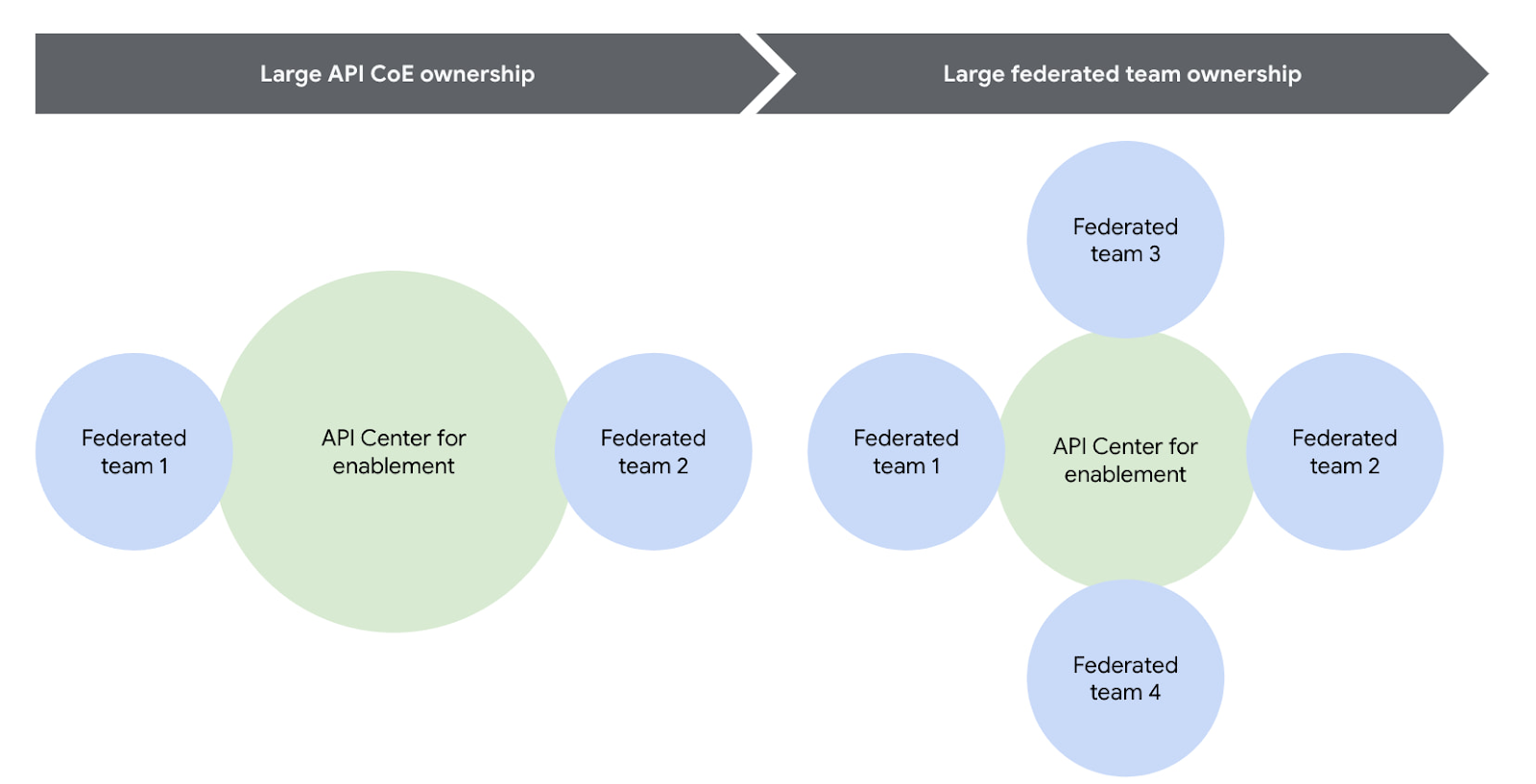
Another successful strategy is to reduce the size or redefine the role of the central teams over time. For example, one of our customers recently adopted a model where their largest business units are fully responsible for operating their own infrastructure using a GitOps model. In this case, the centralized team created the automation for installing and upgrading Apigee hybrid, but the business units themselves operated their own copy of the platform, allowing them complete autonomy. In this way, gradually increasing the autonomy for the federated teams will help avoid delivery bottlenecks while ensuring consistent governance.
You can visualize this change over time pretty easily using the following diagram.
#2 How to architect your platform?
Another challenge is designing your Apigee organizations (top-level container that contains all your API proxies and related resources) and environments (software environment for creating and deploying API proxies). To tackle this, you first need to understand the relationship between different entities within an Apigee organization. Apigee organization is the top level entity – nothing shared between Apigee organizations. Using an organization in Apigee, customers can segregate resources and manage access to these resources based on their own requirements. In practice, this means that each Apigee organization has its own apps, API keys, developers, proxies, and so on. The diagram below provides a visual representation of how different entities in an Apigee organization interact with each other.
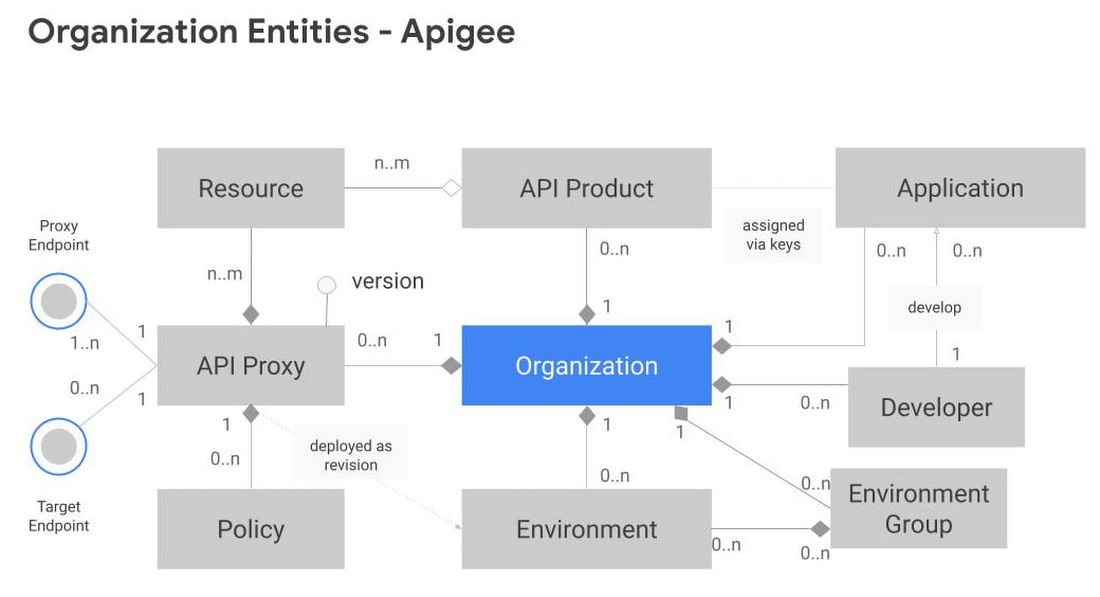
Another key factor to consider is the technical limits of the platform – designing around these limits leads to higher platform performance and stability.
In the design phase, it is vital to articulate fundamental requirements of your architecture and agree on these baseline principles with all the stakeholders involved. Some of these fundamental questions include:
- How many regions need to host runtimes?
- Host runtime instances for organizations that handle production traffic in at least 2 regions to meet aggressive uptime SLAs. During upgrades, ensure only one of these regions upgrades at a time.
- What are the steps in your Software Development Lifecycle (SDLC) and how does Apigee fit into it?
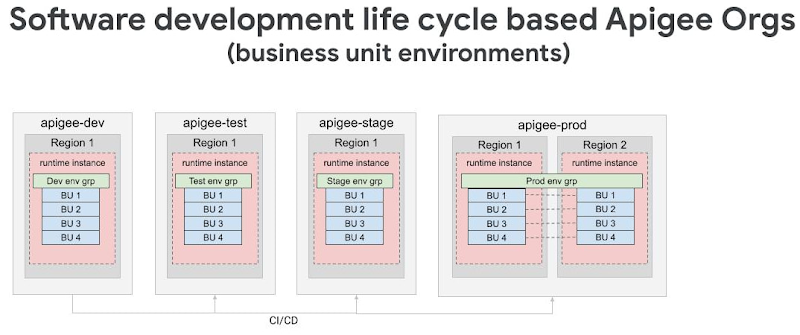
- Use Apigee organizations as the SDLC perimeter — such as a dev organization and a test organization — to give yourself the capacity for a large number of proxies. It is also common that the dev organization in this model has relatively permissive access for developers, allowing them to work more efficiently.
- What level of access or separation do you need between business units or development teams?
- Create separation between different teams by leveraging environments with conditional identity and access management to restrict access as necessary
- If your team is very large and you plan to have multiple organizations, you may want to divide the operational ownership for these different Apigee organizations among different teams in your enterprise while keeping them operating under the centralized team.
- In such a shared responsibility model, the largest consumers of the system stand up and operate their own instances. Teams with many APIs or distinct operational needs can use the automation from the central team to stand up and operate their own Apigee hybrid clusters. This reduces the burden on the centralized team while allowing business units to be self-sufficient and ensuring that the clusters are optimized to meet that team’s needs.
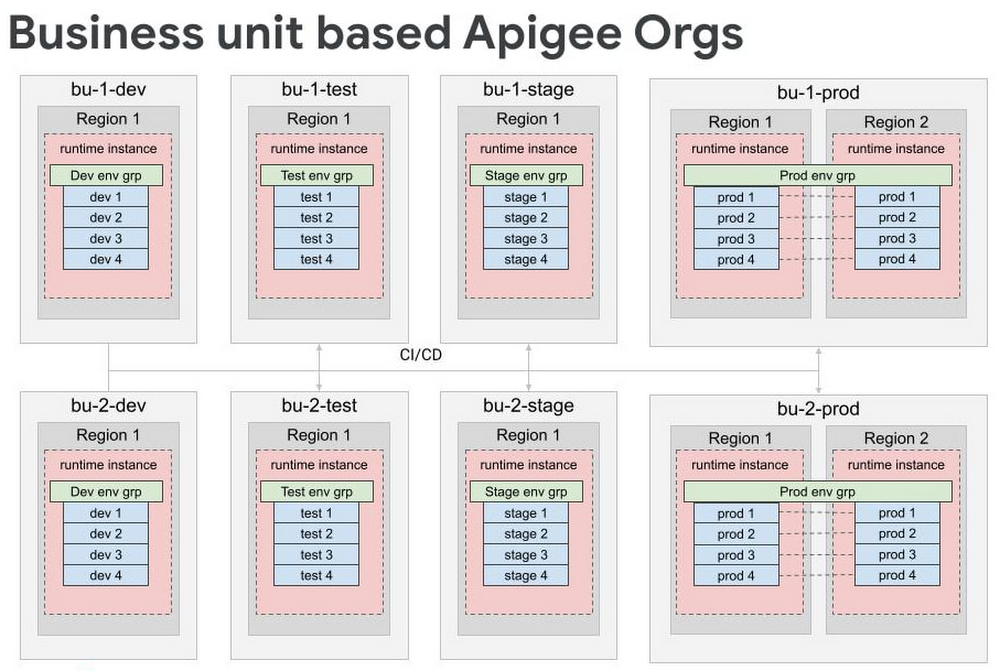
- For very large scale programs where additional separation is necessary, consider creating separate organizations for each business unit, each of which has the full complement of SDLC orgs. Some customers have this level of scale, and often it makes logical sense to divide up into different Apigee orgs because it’s rare that 5000 APIs are all related and used together.
By working off these baseline recommendations, you will come up with your own logical design of Apigee organizations and environments. Using Apigee organizations to represent your SDLC with business units — or functional areas or some other dividing mechanism — is a good way to design different environments.
For large scale deployments — involving thousands of proxies — we recommend dividing organizations into different logical business units while still following the SDLC model. In many cases, only the largest business units will need their own organizations, and it is possible to have a shared organization that contains multiple business units.
Conclusion
Like with any large scale IT project, there isn’t one“correct” way to operate APIs in a hybrid cloud environment. Finding the right approach for your enterprise starts with knowing the organizational requirements and tailoring Apigee for your use case. In the next installment of this series, we will explore how to operate Apigee with the optimal resources (clusters, automation, and monitoring etc.) for a large scale hybrid API program.
Check out our documentation to learn more or start using Apigee hybrid.
Transform ‘Dark Data’ from Documents with Document AI, Cloud Functions and Workflows

8202
Of your peers have already read this article.
2:00 Minutes
The most insightful time you'll spend today!
At enterprises across industries, documents are at the center of core business processes. Documents store a treasure trove of valuable information whether it’s a company’s invoices, HR documents, tax forms and much more. However, the unstructured nature of documents make them difficult to work with as a data source. We call this “dark data” or unstructured data that businesses collect, process and store but do not utilize for purposes such as analytics, monetization, etc. These documents in pdf or image formats, often trigger complex processes that have historically relied on fragmented technology and manual steps. With compute solutions on Google Cloud and Document AI, you can create seamless integrations and easy to use applications for your users. Document AI is a platform and a family of solutions that help businesses to transform documents into structured data backed by machine learning. In this blog post we’ll walk you through how to use Serverless technology to process documents with Cloud Functions, and with workflows of business processes orchestrating microservices, API calls, and functions, thanks to Workflows.
At Cloud Next 2021, we presented how to build easy AI-powered applications with Google Cloud. We introduced a sample application for handling incoming expense reports, analyzing expense receipts with Procurement Document AI, a DocAI solution for automating procurement data capture from forms including invoices, utility statements and more. Then organizing the logic of a report approval process with Workflows, and used Cloud Functions as glue to invoke the workflow, and do analysis of the parsed document.

We also open sourced the code on this Github repository, if you’re interested in learning more about this application.

In the above diagram, there are two user journeys: the employee submitting an expense report where multiple receipts are processed at once, and the manager validating or rejecting the expense report.
First, the employee goes to the website, powered by Vue.js for the frontend progressive JavaScript framework and Shoelace for the library of web components. The website is hosted via Firebase Hosting. The frontend invokes an HTTP function that triggers the execution of our business workflow, defined using the Workflows YAML syntax.
Workflows is able to handle long-running operations without any additional code required, in our case we are asynchronously processing a set receipt files. Here, the Document AI connector directly calls the batch processing endpoint for service. This API returns a long-running operation: if you poll the API, the operation state will be “RUNNING” until it has reached a “SUCCEEDED” or “FAILED” state. You would have to wait for its completion. However, Workflows’ connectors handle such long-running operations, without you having to poll the API multiple times till the state changes. Here’s how we call the batch processing operation of the Document AI connector:
- invoke_document_ai:call: googleapis.documentai.v1.projects.locations.processors.batchProcessargs:name: ${"projects/" + project + "/locations/eu/processors/" + processorId}location: "eu"body:inputDocuments:gcsPrefix:gcsUriPrefix: ${bucket_input + report_id}documentOutputConfig:gcsOutputConfig:gcsUri: ${bucket_output + report_id}skipHumanReview: trueresult: document_ai_response
Machine learning uses state of the art Vision and Natural Language Processing models to intelligently extract schematized data from documents with Document AI. As a developer, you don’t have to figure out how to fine tune or reframe the receipt pictures, or how to find the relevant field and information in the receipt. It’s Document AI’s job to help you here: it will return a JSON document whose fields are: line_item, currency, supplier_name, total_amount, etc. Document AI is capable of understanding standardized papers and forms, including invoices, lending documents, pay slips, driver licenses, and more.
A cloud function retrieves all the relevant fields of the receipts, and makes its own tallies, before submitting the expense report for approval to the manager. Another useful feature of Workflows is put to good use: Callbacks, that we introduced last year. In the workflow definition we create a callback endpoint, and the workflow execution will wait for the callback to be called to continue its flow, thanks to those two instructions:
- create_callback:call: events.create_callback_endpointargs:http_callback_method: "POST"result: callback_details...- await_callback:try:call: events.await_callbackargs:callback: ${callback_details}timeout: 3600result: callback_requestexcept:as: esteps:- update_status_to_error:...
In this example application, we combined the intelligent capabilities of Document AI to transform complex image documents into usable structured data, with Cloud Functions for data transformation, process triggering, and callback handling logic, and Workflows enabled us to orchestrate the underlying business process and its service call logic.
Going further
If you’re looking to make sense of your documents, turning dark data into structured information, be sure to check out what Document AI offers. You can also get your hands on a codelab to get started quickly, in which you’ll get a chance at processing handwritten forms. If you want to explore Workflows, quickstarts are available to guide you through your first steps, and likewise, another codelab explores the basics of Workflows. As mentioned earlier, for a concrete example, the source code of our smart expense application is available on Github. Don’t hesitate to reach out to us at @glaforge and @asrivas_dev to discuss smart scalable apps with us.
Amadeus: Shaping the Future of Travel with Apigee

3987
Of your peers have already read this article.
3:25 Minutes
The most insightful time you'll spend today!
If you’ve taken a trip in the past 30 years, then you’ve probably used Amadeus technology. Our solutions connect over 1.5 billion travellers every year to the journeys they want, linking them via travel agents, search engines, and tour operators to over 700 airlines, 110 airports, 580,000 hotel properties, 40 car rental companies, 90 railways, and more.
In 2016, over 595 million total travel agency bookings were processed using the Amadeus distribution platform. In addition, over 175 Amadeus airline customers processed over 1.3 billion passengers using Amadeus’ Passenger Service Systems. We combine an understanding of how people travel with the development of the most complex, trusted, critical systems our customers need.
A platform for scalability and speed
In today’s crowded travel marketplace, our customers want IT solutions that can scale up to match their complex needs—whether this includes solving the challenge of ever increasing flight search volumes, delivering flight search results in milliseconds, or enabling “pop-up” check-in and bag drop from anywhere.
Amadeus operates at large scale with hundreds of thousands of transactions processed per second to deliver mission-critical services in travel. Having a scalable and secure platform is essential to continue driving solutions for our customers, and Apigee’s API management platform fulfills this objective.
At the same time, our customers also want solutions that can adapt quickly with new features and upgrades. We’re talking days, not weeks or months. Apigee provides on-premise gateways to securely expose our APIs to our customers. These can be scaled to deliver our APIs according to our business needs. Apigee’s great capacity to create rock-solid API infrastructure gives us more freedom to focus on the architectural details of the technology we create for the travel industry.
A platform for collaboration
In the fast-paced and competitive travel industry, our customers hunger for new ways of doing things. This hunger can only be met with an open and collaborative approach across the sector.
That’s why we use an open systems architecture that offers SOAP/XML and REST/JSON formatting to be entirely platform neutral. It is totally independent of language and application frameworks, making implementation fast and efficient.
But as the number of customers using our APIs grows, so does the need to shorten the time to deploy our applications to market and evolve our API strategy.
The Apigee platform is key here. For one thing, it’s always up to date with constantly evolving industry standards, in particular with security standards like OAuth.
The platform also forms the backbone for the web app development cycle for Amadeus and our customers to jointly build applications and release them in production. Ultimately, by integrating Apigee’s control plane seamlessly with our APIs, we are able to foster fully automated operations.
A platform for visibility
Understanding how our APIs are consumed is also key for us and our customers. With Apigee we are able to see this and provide them with a detailed view of API analytics. In this big data era, knowing the number of transactions, response times on APIs, or the page travellers are spending the most time on with a mobile app could be invaluable to make the informed decisions that help us maintain an edge over competitors. This also serves as a great feedback tool to closely monitor where the industry is heading.
As a leader in travel technology, we’re committed to open systems. That’s why Amadeus also works with Kubernetes. We have a strong partnership with Red Hat through its OpenShift platform, which is based on Kubernetes. Amadeus Cloud Services works with this open-source system and enables us to use automated cloud methods to deploy our services in a flexible mix of private and public clouds.
We’re excited to collaborate with players like Google and Apigee, because together we can pave the way for technology that makes better journeys and creates value for our customers, travelers, and society.
Olivier Richaud is senior manager, API management & web services, technology platforms & engineering, at Amadeus. Xavier Gardien is head of portfolio and product management, technology platforms & engineering, at Amadeus.
Plainsight Vision AI Available for Google Cloud Customers to Unlock Accurate, Actionable Insights

4671
Of your peers have already read this article.
4:00 Minutes
The most insightful time you'll spend today!
Data-savvy businesses increasingly rely on images and videos for critical functions, and yet are challenged by the sheer mass of information—more than 3.2 billion images and 720,000 hours of video are created daily. This explosion in visual data has paved the way for the growth of computer vision, a form of artificial intelligence (AI) that enables computers to “see” the world similarly to the way people do, but with unblinking consistency, and greater accuracy.
The transformational impact and value of computer vision solutions are significant and has been a guiding objective for companies and AI developers. And yet, even as the applications for computer vision increase dramatically, architecting and implementing vision AI solutions remain highly complex. Visual data, such as images and video, are made up of thousands of pixels of information that represent millions of different patterns and meanings, which can make interpreting even a single image overwhelming from a computational perspective.
Many organizations struggle with deployments and fail to operationalize vision AI solutions due to development delays, machine learning and data science hiring challenges, inaccurate output, a lack of integration with existing infrastructure, difficulty of use, and high cost. Plainsight, with the power of Google Cloud resources, is addressing all these challenges and helping businesses by enabling the deployment of vision AI within enterprise private networks that can be managed easily and scaled economically.
Plainsight has announced availability of its vision AI platform on Google Cloud Marketplace. Businesses can now easily deploy end-to-end vision AI to private clouds to realize the full value of their video and other visual data for accurate, actionable insights across diverse use cases.
Delivering on the Promise of AI: Seeing What’s Hiding In Plain Sight
For organizations to integrate AI and machine learning into their businesses successfully, the technology must be powerful enough to solve real challenges, yet fast, easy, and accessible enough to ensure the innovation potential is realized. Plainsight on Google Cloud delivers the power of enterprise vision AI that’s quick and easy to use with Google Cloud resources that enable global scale, increased security, bolstered privacy, unified billing, and cost savings.
To streamline vision AI workflows, Plainsight facilitates the entire pipeline, from visual data ingestion and annotation, through continuous model training, deployment, and monitoring for easier innovation and faster time-to-production. Our platform accelerates vision AI development in a manner that is complete, accurate, and accessible to non-technical business leaders. We believe that AI should be available and accessible to anyone and everyone—so that teams across entire organizations can reap the benefits.
By integrating Plainsight into their private networks, companies worldwide can now leverage one intuitive platform for centralized control of streamlined vision AI model creation and training with optimized visual data handling for diverse enterprise solutions. These use cases include: social distancing monitoring, medical imaging, drug compound screening, defect detection in manufacturing processes, identifying gas leaks, or even livestock counting and crop health monitoring for agriculture, to name a few.https://www.youtube.com/embed/A7U_0UkjvEg?enablejsapi=1&
We enable customers so they can create successful solutions that enable them to clearly see their business from all angles and to take advantage of the knowledge visual data can reveal by simply and quickly operationalizing practical vision AI applications.
AI-Powered Dataset Creation, Automated Model Training & Easy Deployment Without A Single Line Of Code
For vision AI applications, success is inextricably dependent on the quality and quantity of the datasets required to train the relevant models. To aid enterprises in this vital stage, the Plainsight platform provides built-in data annotation for the fast and easy creation of datasets. This includes AI-powered features that accelerate the speed and quality of labeling such as SmartPoly, for the automated polygon masking of objects, TrackForward, to predict and automatically label objects from frame to frame in video annotations, and AutoLabel for automated object recognition and labeling based on pre-trained machine learning models, to highlight a few.

In addition, to ensure the success of AI integration, we significantly reduce time-intensive processes with Plainsight vision AI’s automated machine learning with continuous model training and easy deployment capabilities. In just a few clicks, users can leverage optimizations for the most reliable model training without endless experimentation cycles. And, models are easily deployed at scale all within one, easy-to-manage model operationalization process for the business.
Growing With Google Cloud
Plainsight is a vision AI innovation leader, developing solutions that address unmet needs for challenger brands and Fortune 500s across vertical markets. As a team recognized for succeeding where others have failed, our expanding partnership with Google Cloud provides a powerful combination that helps customers see and activate the value of their visual data with a suite of services in a secure and private manner.
Our vision AI Platform simplifies building and operationalizing AI to solve business problems enterprises are facing every day—and the demand is increasing. To accelerate our journey to faster, more accessible AI for enterprises, we knew we needed strong support to grow Plainsight and scale our backend tools to match our vision.
Google Cloud delivered everything, and more, in one program. The Startup Program by Google Cloud provided the technology and services for scale and the support we needed to maximize the value the Program provided us. The Startup Program has been a springboard for architecting Plainsight vision AI in the cloud, accelerating our goals and optimizing innovation, efficiency, and growth. The team also helped us optimize Google Ads campaigns, fueling adoption of Plainsight.
After launching the SaaS version of Plainsight Data Annotation in November 2020, we grew our user base by nearly 110x in just three short months. Google Ads has also dramatically increased website traffic, growing new users by nearly 5.75X and page views by over 5X. The Google team helped us identify where Google Cloud offerings could be leveraged instead of developing in-house solutions and offered best practices that enabled us to deliver faster on our initiatives.
Kubernetes was already the underlying component of our platform and leveraging Google Kubernetes Engine (GKE) as a managed service removed a layer of complexity. By combining GKE and Anthos, we were able to standardize our deployments, aligning to how our customers leverage Anthos for enterprise applications in their own organizations. In addition, as a fast-moving, customer-centric company we use Google Workspace to help us centralize and manage our day-to-day work internally. By leveraging multiple products across Google’s ecosystem, we take advantage of a holistic partnership that has helped our business tremendously as we scale.
Leveraging Google’s Partners for Strategic Consultation
To facilitate this expansion of our partnership with Google and to maximize our use of Google Cloud services, we are working with DoiT International, a Google Managed Services Provider and 2020 Global Reseller Partner of the Year. DoiT provides us with ongoing technical consultation for cloud-native architecture, Google Cloud Marketplace integration, production-grade Kubernetes support, Google Cloud cost optimization, and technical support. The DoiT team has been invaluable in compiling best practices, tips, and strategies from their vast experience with various cloud customers to ease our Marketplace integration and is providing input for infrastructure strategy to support our continued rapid growth.
Plainsight Delivers Enterprise Vision AI Through The Google Cloud Platform Marketplace
Plainsight vision AI is now available to Google Cloud Customers on Google Cloud Marketplace enabling organizations across industries to deploy private Plainsight instances within their own environments. Marketplace customers will benefit from Google Cloud privacy, security, scalability and unified billing through their Google Cloud account.
Combining the powerful benefits provided by Google Cloud resources with Plainsight’s vision AI Platform into private networks, enterprises worldwide can now leverage one intuitive platform for centralized control of streamlined vision AI model creation and training with optimized visual data handling for diverse enterprise solutions.
Through our Google partnership, we’re able to leverage a powerful foundation that allows us to rapidly innovate, scale and accelerate delivery on our vision AI platform capabilities. By executing on our vision to make AI easier, faster and more accessible for all users across entire enterprises, we’re helping businesses see more and by seeing more, they’ll have the power to solve more.
If you want to learn more about how Google Cloud can help your startup, visit our page here where you can apply for our Startup Program, and sign up for our monthly startup newsletter to get a peek at our community activities, digital events, special offers, and more.
Serverless for Startups, the Best Way to Succeed: Expert Says

7041
Of your peers have already read this article.
1:30 Minutes
The most insightful time you'll spend today!
As Google Cloud has become a choice for more startups, I’ve experienced an increase in founders asking how they should think about cloud services. Though each startup is different and requirements may vary across industries and regions, I’ve seen a few core best practices that help startups to succeed—as well as several traps to avoid.
For example, If you go with a public cloud provider, you’re ideally not starting from ground zero like you would running your own data center, but it’s important not to introduce similar complexity in a virtualized environment. Just because you’re using public cloud infrastructure doesn’t mean you want to manage it.
Instead, you want to leverage platforms that abstract away complexity so your team can focus on delivering value to customers. That’s where serverless comes in. Serverless platforms are fully managed by the provider, offering automatic scaling for workloads, as well as provisioning, configuring, patching, and management of servers and clusters. Freed from these resource-intensive tasks, your technical talent can focus on the things that differentiate your business, not on IT curation.
This applies to not only running stateless applications, but also managing and analyzing data. You should be collecting data points about which features are most popular on your platform, what people are buying, the types of activities that help your customers get their jobs done, and so on. This information is essential to building and executing on a product roadmap that will serve your customers. However, it’s not enough to collect this data, you need to make your data accessible, secure, and easy for your team to analyze—so where do you run and host it?
On Google Cloud, this is where options like Spanner and Cloud SQL can play a large role, as can BigQuery for analysis. You won’t have to worry about standing up infrastructure or patching servers—you can just stream your data to our data management platforms, where it’s available whenever someone needs to run a query. By leveraging a serverless architecture, your startup can be data-driven without having to invest in the traditional complexity of database administration and management—and that can significantly change your playing field.
Serverless is just one of the factors you should consider as you build out your tech stack. To hear my thoughts on a range of other topics relevant to startups — such as security, cloud credits, and the differences among managed services — check out the below video or visit our Build and Grow page.
3480
Of your peers have already watched this video.
2:00 Minutes
The most insightful time you'll spend today!
Leveraging Intelligent Behavior Detection to Protect User Sensitive APIs
Malicious actors are out there, and APIs are their new target. External threats could be attacking your APIs as you read this, and your business might not even know it.
Attacks can come in the form of software applications that run automated tasks and they are everywhere. A growing percentage of a company’s traffic is generated by bots. In some cases, they compose as much as 50 percent of an organization’s traffic.
When these are used with malicious intent these software programs can be used to trigger dangerous attacks. It can lead to information scraping and account abuse. They can also probe for API weaknesses and skew analytics. Such attacks are adaptive and can easily blend in with normal traffic. Without a dedicated API security solution, your APIs could be breached creating serious problems for your brand reputation and customer loyalty.
This is where Apigee Sense comes in. Apigee is the only solution purpose-built for APIs. It collects, analyzes, detects and mitigates API attacks. Apigee Sense algorithms are built from analyzing metadata gathered from a billion daily API calls.
Watch this two-minute video to learn how to protect your APIs against malicious actors.
More Relevant Stories for Your Company

Google Maps Platform Can Elevate FinTech Experience with Less Risks and Higher Security
The financial services industry is changing—an estimated $68 trillion in wealth transferring from baby boomers to millennials.1 This means financial service providers will have to deliver the speed, ease-of-use, technological sophistication, and tailored services that millennials have come to expect. In fact, half of all millennials are willing to switch to

How The New York Times Increased Speed of Delivery by Using Kubernetes
When New York Times decided a few years ago to move out of its data centers, its first deployments on the public cloud were smaller and less critical applications that were being managed on virtual machines. "We started building more and more tools, and at some point, we realized that

Accelerate Developer Productivity with Google Workspace
The software development process requires complex, cross-functional collaboration while continuously improving products and services. Our customers who build software say that they value Google Workspace for its ability to drive innovation and collaboration throughout the entire software development life cycle. Developers can hold standups and scrums in Google Chat, Meet,

Transforming Media Industry: Three Strategies for Media Leaders to Leverage Generative AI
The digital era turned the traditional formula for media and entertainment success on its head, ushering in new technologies that have changed how content is produced, distributed, experienced, and monetized. Audiences have more choice, flexibility, and power over what they consume, and today’s media companies have to embrace ongoing transformation
