





Know Your Org’s Carbon Emission Per Workload with Active Assist
3446
Of your peers have already read this article.
3:00 Minutes
The most insightful time you'll spend today!
Last year, we analyzed the aggregate data from all customers across Google Cloud, and found over 600,000 gross kgCO2e in seemingly idle projects that could be cleaned up or reclaimed — which would have a similar impact to planting almost 10,000 trees1. Today, we’re making it easy for you to identify if any of those idle workloads are yours, with new Active Assist sustainability recommendations.
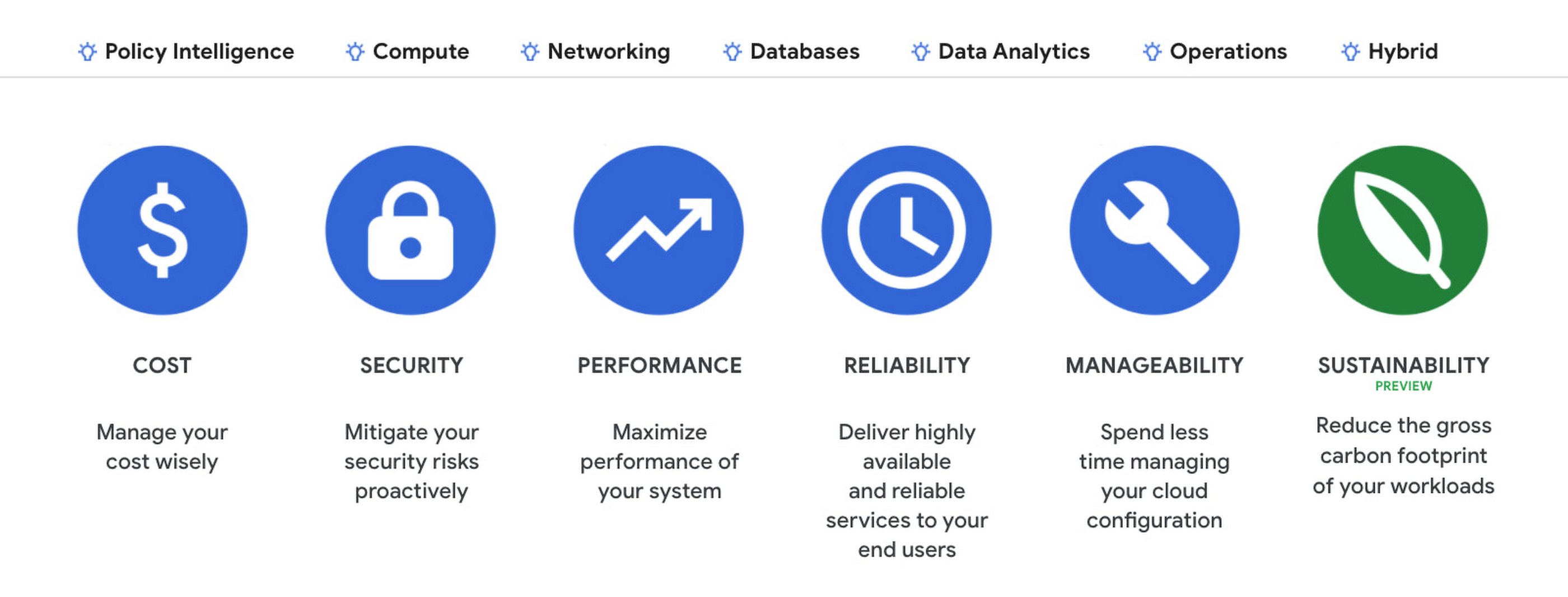
Active Assist is a part of Google Cloud’s AIOps solution that uses data, intelligence, and machine learning to reduce cloud complexity and administrative toil. Under the Active Assist portfolio, we have products and tools like Policy Intelligence, Network Intelligence Center, Predictive Autoscaler, and a collection of Recommendations for various Google Cloud services — all focused on helping you achieve your operational goals. Today, we are broadening the scope of Active Assist to help you achieve your sustainability targets and reduce the carbon footprint of your workloads.
The carbon emissions associated with your cloud infrastructure can be a big part of your overall environmental footprint. Choosing to run on Google Cloud is a great first step — we’ve matched the energy used by our data centers with 100% renewable energy since 2017, and are committed to running our operations on carbon-free energy 24/7 by 2030. But once you’re running on Google Cloud, if you want to reduce the gross carbon emissions of your workload you can take action to optimize your usage.
Assessing the gross carbon impact of unattended projects
You can now estimate the gross carbon emissions you’ll save by removing these idle projects with Active Assist Unattended Project Recommender, which provides rich utilization insights for all the projects in your organization, and uses machine learning to identify ones that are idle and most likely unattended. The data points Active Assist surfaces as a part of its utilization insights now include the carbonFootprintDailyKgCO2 field, which allows you to estimate carbon emissions associated with any given project. Recommendations also estimate the impact of removing an idle project in terms of kilograms of CO2 reduced per month. The capability is available via the Recommender API, Recommendation Hub, the Carbon Footprint dashboard, and BigQuery export of recommendations, making it easy for you to integrate with your company’s existing tools and workflows.

Introducing the Carbon Sense suite
Increasing the sustainability of digital applications and infrastructure is a priority for 90% of global IT leaders2, and we’ll be continuing to invest across a number of product areas in Google Cloud, including AIOps features like Active Assist’s recommendations, to help you make progress towards your sustainability goals. To make it easy for you to find and consume these new features, we’re bundling our existing and future product work into the Carbon Sense suite — a collection of features that makes it easy to accurately report your carbon emissions, and reduce them. Active Assist joins products like Carbon Footprint, which provides you with the ability to understand and measure the gross carbon emissions of your Google Cloud usage, and our low-carbon signals, which help users choose cleaner regions to run their workloads, in the Carbon Sense suite. Stay tuned for more updates on Carbon Sense in the coming months.
Getting started with sustainability recommendations
To get started with Active Assist sustainability recommendations, check the Carbon Footprint dashboard and Recommendation Hub to review projects that may be idle and assess the carbon emissions associated with them. See recommendations in Google Cloud Console.
To view the recommendations, you will need IAM permissions for Unattended Project Recommender itself and permissions to view resources in a given organization.
You can also automatically export the recommendations from your Organization to BigQuery and then investigate any idle projects with DataStudio or Looker. Or, you can use Connected Sheets to use Google Workspace Sheets to interact with the data stored in BigQuery without having to write SQL queries.
As with any other Recommender, you can choose to opt out of data processing for your organization or your projects at any time by disabling the appropriate data groups in the Transparency & Control tab under Privacy & Security settings.
We hope you use Unattended Project Recommender to reduce the carbon footprint associated with your idle cloud resources, and can’t wait to hear your feedback and thoughts about this feature! Please feel free to reach us at active-assist-feedback@google.com. We also invite you to sign up for our Active Assist Trusted Tester Group if you would like to get early access to new features as they are developed.
1. https://www.epa.gov/energy/greenhouse-gas-equivalencies-calculator
2. https://inthecloud.withgoogle.com/it-leaders-research-21/sustainability-dl-cd.html
How AI-powered ML Models Helps Run Unemployment Claims Verification at Scale

8398
Of your peers have already read this article.
2:00 Minutes
The most insightful time you'll spend today!
With unemployment application submissions reaching record numbers over the past year, state and local agencies in the United States have faced the challenge of processing unprecedented numbers of claims per week. The digital infrastructure most agencies have in place is unable to handle this volume, resulting in constituents waiting longer, and bad actors taking advantage of vulnerable systems. The Department of Labor Inspector General estimates that $63 billion in claims distributed is either an improper payment or fraud.
Validating claims also requires secure data sharing with other agencies for document and identity verification. Government leaders need a way to allow case adjudicators to quickly and confidently release backlogged claims, integrate with existing systems, and segment legitimate claims from potentially fraudulent ones — all within limited government budgets — securely and at scale.
Implementing a fraud detection solution on Google Cloud
States were under pressure to release payments, while also filtering out potentially fraudulent claims. SpringML and Google Cloud developed a framework to give adjudicators a reliable verification process that quickly filters potentially fraudulent claims, while processing the remaining claims so benefits reach citizens in a timely manner. SpringML and Google Cloud, applied AI-powered machine learning models to detect anomalous patterns in large datasets. Using Google Cloud tools, SpringML implemented a solution to streamline workflows, improve efficiencies, automate processes and identify potentially fraudulent claims.
SpringML used a variety of Google Cloud products to deliver a fraud detection solution, including:
- Google Cloud Storage to store and manage data
- BigQuery to store tabular data and BigQuery Machine Learning (BQML) to conduct machine learning on that data
- AutoML solutions to build predictive models and risk scoring
- Visualization tools such as Looker and Data Studio to present data and help government leaders make informed decisions.
Implementing machine learning to detect improper payments allows agencies to classify claims as “fraud” or “not fraud” based on the number of flags, as well as prioritize the most urgent claims. Deploying intelligent virtual agents to handle frequently asked questions meant that live agents could focus their time on more challenging cases.
Even once the pandemic is behind us, there will be bad actors trying to take advantage of overwhelmed or legacy systems. We’ve identified a few best practices for agencies managing enormous case loads and looking to improve improper payment analytics:
- Move your systems to the cloud. Many on-premises legacy systems can’t update their applications and scale to meet the volume of claims. Moving to a cloud environment enables rapid solution deployment and ingestion of large amounts of data without fear of overloading the system. The cloud scales with you–cost-effectively and securely.
- Understand patterns in the data. The answer is always in the data — we used deep analysis to help uncover suspicious patterns in large data sets. We implemented unsupervised machine learning to learn behaviors and create configurable rules that adjust to new information that comes into the system. We can uncover patterns that are likely associated with fraud – ones that a human might have missed.
- Use AI/ML tools to automate your existing systems and teams. These tools enable humans to work smarter and more efficiently. We automate anomaly detection and create dashboards for adjudicators to rapidly process claims. We are enabling the Wisconsin Department of Workforce Development by implementing automatic calculations and processing of recharge amounts, resulting in faster processing times and fewer human errors. Proactive fraud detection and timely calculation of recharge payment allowed DWD to ensure the benefits reached the right individuals.
- Build flexibility into your systems. We discovered that fraud patterns change over time. For instance,flags for fraud during March-May 2020 were vastly different from those we found in June-July 2020. Google Cloud tools make it easy to continually update algorithms to detect patterns and integrate external data sources.
Using Google Cloud tools, we can update digital infrastructure and incorporate machine learning best practices to help organizations efficiently process large volumes of claims and identify high probability fraudulent ones. SpringML provides consulting and implementation services and industry-specific analytics solutions that deliver high-impact business value to accelerate data-driven digital transformation. Learn more about fraud detection and how to improve improper payments analytics by watching our webinar.

Gartner Names Google Cloud a Leader in the 2019 Cloud Infrastructure as a Service Market
DOWNLOAD WHITEPAPER3544
Of your peers have already downloaded this article
2:30 Minutes
The most insightful time you'll spend today!
As increasing amount of cloud IaaS is being bought for traditional IT, with an emphasis on cost reduction, safety and security, service providers are offering a high-quality service, with excellent availability, good performance, high security and good customer support.
In its Magic Quadrant for Cloud Infrastructure as a Service (IaaS), Gartner notes that the distinctions among providers are apparent in the market for cloud IaaS in terms of worldwide enterprise adoption, capabilities and service availability. Infrastructure and operations leaders should evaluate providers with broad capabilities and a positive track record for customer success.
Download the Gartner Magic Quadrant to understand why Google is a leader in the market.
Data-first Digitization Helps Leverage the Cloud for Your Mainframe Assets

6481
Of your peers have already read this article.
2:00 Minutes
The most insightful time you'll spend today!
For many enterprises, the venerable mainframe is home to decades’ worth of data about the company’s customers, processes and operations. And it goes without saying that the business would like access to that mainframe data — to report on it, to analyze it with big data analysis tools, or to use it as the basis of new machine learning and artificial intelligence initiatives.
At Google Cloud, we are eager to work with organizations to help them transform their mainframe assets for the cloud era. Of course, we can help them modernize their mainframe applications by migrating them to the cloud. At the same time, working with partners and customers, we’ve developed another, more lightweight approach that can help them start to leverage the cloud for their mainframe assets much more quickly than performing a full-fledged migration. We call this approach data-first digitization.
In this rapidly evolving digital ecosystem, it’s imperative to understand the difference between ‘modernization’ and ‘digitization.’ With modernization you start with the current state and look forward, and rely on mainframe application migration approaches such as rehosting (emulation), refactoring (automated code transformation), reengineering — or simply replacing a custom application with a commercial package. With digitization, you start with the future state that you want to achieve, and work back to what is required to get there.
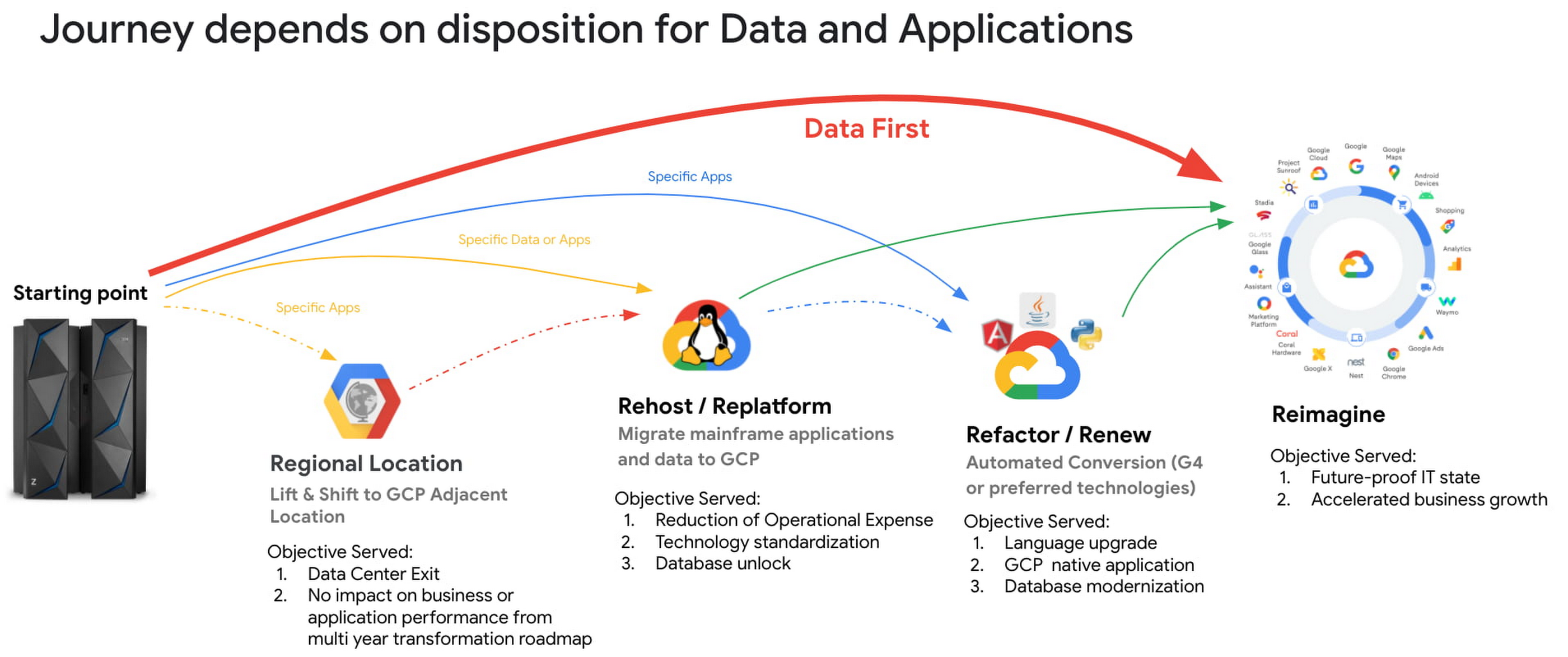
This data-first digitization approach includes a mainframe data-first integration framework comprising in-house and partner products and tools to migrate heterogeneous data sources from the mainframe to Google Cloud Storage. Once mainframe data has been copied to Cloud Storage, it can then be integrated and leveraged by Google Cloud tools such as BigQuery, AI and machine learning prodcuts and Smart and Stream analytics platforms. The integration framework covers both bulk batch data transfers and real-time data replication (change data capture).

Data-first digitization is based on the tenet that ‘applications are transient, data is permanent.’ By bringing data first to Google Cloud instead of traditional ways of modernizing applications (for example, with Gartner’s 7 options to Modernize), this allows organizations to leapfrog to new business models, use cases and innovative ways to serve end customers. For example:
- Making decisions with smart and stream analytics platforms and AI/ML engines. These tools need data to make decisions. Google is a pioneer in extracting information and value from the raw structured and unstructured data, and this approach opens up mainframe data for use by BigQuery and AI/ML models.
- Building new reporting applications. With access to mainframe data, you can use Google cloud products like Looker and Appsheet to build net-new reporting applications, expediting the process of retiring mainframe reporting applications, and accelerating your overall transformation.
In our experience, taking a data-first digitization approach to your mainframe offers a number of benefits:
- Faster time-to-business: Because data-first modernization is built on existing products, the implementation cycle is much shorter.
- Less capital investment: You spend your time integrating products, not developing applications.
- Minimized risk: Data-first integrates with existing, proven and reliable Google Cloud products.
- Faster overall mainframe transformation: When you shift your modernization center of gravity from the application to the data, you look at mainframe applications from a business perspective instead of just “keeping the lights on.” As a result, only the most business-critical applications are modernized and many support applications can be decommissioned, accelerating your transformation journey.
Taking a data-first approach to digitization is still relatively new, but we’re heartened by customers’ early successes. Watch this space for additional insights, reference architectures and technical white papers around data-first. And if you think this approach may be right for you, reach out to mainframe@google.com.
Learn more:
Pacemaker’s Automated Alerts and Alert Reporting: No More Outages for SAP Systems on Google Cloud!

3263
Of your peers have already read this article.
6:00 Minutes
The most insightful time you'll spend today!
When critical services fail, businesses risk losing revenue, productivity, and trust. That’s why Google Cloud customers running SAP applications choose to deploy high availability (HA) systems on Google Cloud.
In these deployments Linux operating system clustering provides application and guest awareness for the application state and automates recovery actions in case of failure — including cluster node, resource or node failover or failed action.
Pacemaker is the most popular software Linux administrators use to manage their HA clusters, which includes automating notifications about events — including failover fencing and node, attribute, and resource events — and reporting on events. With automated alerts and reports, Linux administrators can not only learn about events as they happen, but they can also make sure other stakeholders are alerted to take action when critical events occur. They can even discover past events to assess the overall health of their HA systems.
Here, we break down the steps to setting up automated alerts for HA cluster events and alert reporting.
How to Deploy the Alert Script
To set up event-based alerts, you’ll need to take the following steps to execute the script.
1. Download the script file ‘gcp_crm_alert.sh’ from
https://github.com/GoogleCloudPlatform/pacemaker-alerts-cloud-logging
2. Under root user, add exec flag for the script and execute deployment with:
chmod +x ./gcp_crm_alert.sh./gcp_crm_alert.sh -d
3. Confirm that the deployment runs successfully. If it does, you will see the following INFO log messages:
In the Red Hat Enterprise Linux (RHEL) system:
gcp_crm_alert.sh:2022-01-24T23:48:30+0000:INFO:'pcs alert recipient add gcp_cluster_alert value=gcp_cluster_alerts id=gcp_cluster_alert_recepient options value=/var/log/crm_alerts_log' rc=0
In the SUSE Linux Enterprise Server (SLES):
gcp_crm_alert.sh:2022-01-25T00:13:27+00:00:INFO:'crm configure alert gcp_cluster_alert /usr/share/pacemaker/alerts/gcp_crm_alert.sh meta timeout=10s timestamp-format=%Y-%m-%dT%H:%M:%S.%06NZ to { /var/log/crm_alerts_log attributes gcloud_timeout=5 gcloud_cmd=/usr/bin/gcloud }' rc=0Now, in the event of a cluster node, resource, node failover, or failed action, Pacemaker will start the alert mechanism. For further details on the alerting agent, check out the Pacemaker Explained documentation.
How to Use Cloud Logging for Alert Reporting
Alerted events are published in Cloud Logging. Below is an example of the log record payload, where the cluster alert key-value pairs get recorded in the jsonPayload node.
{
"insertId": "ktildwg1o3fbim", "jsonPayload": { "CRM_alert_recipient": "/var/log/crm_alerts_log", "CRM_alert_attribute_name": "", "CRM_alert_kind": "resource", "CRM_alert_status": "0", "CRM_alert_rsc": "STONITH-sapecc-scs", "CRM_alert_rc": "0", "CRM_alert_timestamp_usec": "", "CRM_alert_interval": "0", "CRM_alert_node_sequence": "21", "CRM_alert_task": "start", "CRM_alert_nodeid": "", "CRM_alert_timestamp": "2022-01-25T00:17:06.515313Z", "CRM_alert_timestamp_epoch": "", "CRM_alert_desc": "ok", "CRM_alert_target_rc": "0", "CRM_alert_version": "1.1.15", "CRM_alert_attribute_value": "", "CRM_alert_node": "sapecc-ers", "CRM_alert_exec_time": "" }, "resource": { "type": "global", "labels": { "project_id": "gcp-tse-sap-on-gcp-lab" } }, "timestamp": "2022-01-25T00:17:09.662557309Z", "severity": "INFO", "logName": "projects/gcp-tse-sap-on-gcp-lab/logs/sapecc-ers%2F%2Fvar%2Flog%2Fcrm_alerts_log", "receiveTimestamp": "2022-01-25T00:17:09.662557309Z" }
To get notified of a resource event — for example, when the HANA topology resource monitor fails — you can use the following filter for the alerting definition:
jsonPayload.CRM_alert_node=("hana-venus" OR "hana-mercury") -jsonPayload.CRM_alert_status="0" jsonPayload.CRM_alert_rsc="rsc_SAPHanaTopology_SBX_HDB00" jsonPayload.CRM_alert_task="monitor" To define an alert for a fencing event, your can apply this filter: jsonPayload.CRM_alert_node=("hana-venus" OR "hana-mercury") jsonPayload.CRM_alert_kind="fencing" The fencing log entry gets recorded with warning severity to give you deeper insight, and this additional information is also helpful for more specific filtering criteria: {   "insertId": "1plznskfjsxt82",   "jsonPayload": {     "CRM_alert_attribute_value": "",     "CRM_alert_recipient": "/var/log/crm_alerts_log",     "CRM_alert_rsc": "",     "CRM_alert_rc": "0",     "CRM_alert_timestamp_usec": "529261",     "CRM_alert_desc": "Operation reboot of hana-mercury by hana-venus for crmd.2361@hana-venus: OK (ref=2a9bf814-9adf-4247-af3f-94ac254fc3ca)", "CRM_alert_target_rc": "",     "CRM_alert_nodeid": "",     "CRM_alert_kind": "fencing",     "CRM_alert_node_sequence": "33",     "CRM_alert_task": "st_notify_fence",     "CRM_alert_status": "",     "CRM_alert_exec_time": "",     "CRM_alert_attribute_name": "",     "CRM_alert_timestamp_epoch": "1643072786",     "CRM_alert_version": "1.1.19",     "CRM_alert_timestamp": "2022-01-25T01:06:26.529261Z",     "CRM_alert_interval": "",     "CRM_alert_node": "hana-mercury"   },   "resource": {     "type": "global",     "labels": {       "project_id": "gcp-tse-sap-on-gcp-lab"     }   },   "timestamp": "2022-01-25T01:06:27.267017052Z",   "severity": "WARNING",   "logName": "projects/gcp-tse-sap-on-gcp-lab/logs/hana-venus%2F%2Fvar%2Flog%2Fcrm_alerts_log", "receiveTimestamp": "2022-01-25T01:06:27.267017052Z"
}
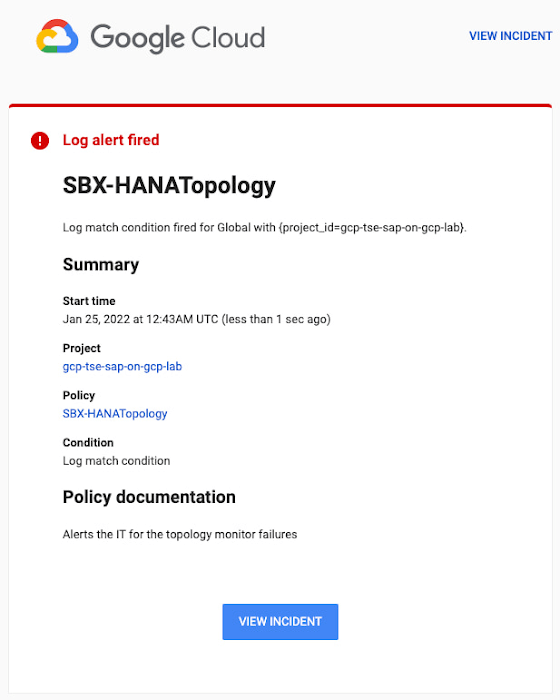
Alerts can be delivered through multiple channels, including text and email. Below is an example of an email notification for our earlier example, when we defined an alert for a HANA topology resource monitor failure:
You can write and apply filters to your log-based alerts to isolate certain types of incidents and analyze events over time. For example, the following script will surface a resource event occurring within a two-hour window on a specific date:
timestamp>="2022-01-25T00:00:00Z" timestamp<="2022-01-25T02:00:00Z"
jsonPayload.CRM_alert_kind="resource"
With the ability to analyze these logged alerts over time, determine whether event patterns warrant any action.
[SIDEBAR]
The alert script prints details in the standard output and in the log file /var/log/crm_alerts_log, and this can grow over time. We recommend that the log file is set with the Linux logrotate service in order to limit the file system space. Use the following command to create the necessary logrotate setting for the alerting log file:
cat > /etc/logrotate.d/crm_alerts_log << END-OF-FILE /var/log/crm_alerts_log { create 0660 root root rotate 7 size 10M missingok compress delaycompress copytruncate dateext dateformat -%Y%m%d-%s notifempty } END-OF-FILE [END SIDEBAR]
Tips for Troubleshooting When you first deploy your alert script, how can you tell for certain that you’ve done it correctly? Use the following commands to test it out:
In RHEL:
pcs alert show
In SLES:
sudo crm config show | grep -A3 gcp_cluster_alert
You should see the following if the script is correct:
In RHEL:
Alerts: Alert: gcp_cluster_alert (path=/usr/share/pacemaker/alerts/gcp_crm_alert.sh) Description: "Cluster alerting for hana-node-X" Options: gcloud_cmd=/usr/bin/gcloud gcloud_timeout=5 Meta options: timeout=10s timestamp-format=%Y-%m-%dT%H:%M:%S.%06NZ Recipients: Recipient: gcp_cluster_alert_recepient (value=gcp_cluster_alerts) Options: value=/var/log/crm_alerts_log In SLES:
alert gcp_cluster_alert "/usr/share/pacemaker/alerts/gcp_crm_alert.sh" \ meta timeout=10s timestamp-format="%Y-%m-%dT%H:%M:%S.%06NZ" \ to "/var/log/crm_alerts_log" attributes gcloud_timeout=5 gcloud_cmd="/usr/bin/gcloud" If the commands do not display the alerts properly, re-deploy the script.
In case there is an issue with the script, or if the Cloud Logging records are not presenting as expected, examine the script log file /var/log/crm_alerts_log. The errors and warning can be filtered with:
egrep '(ERROR|WARN)' /var/log/crm_alerts_log
Any Pacemaker alert failures will be recorded in the messages and/or Pacemaker log. To examine recent alert failures, use the following command:
egrep '(gcp_crm_alert.sh|gcp_cluster_alert)' \ /var/log/messages /var/log/pacemaker.log
Keep in mind, though, that the Pacemaker log location may be different in your system from the one in the example above.
From reactive to proactive
Your SAP applications are too critical to risk outages. The most effective way to manage high availability clusters for your SAP systems on Google Cloud is to take full advantage of Pacemaker’s alerting capabilities, so you can be proactive in ensuring your systems are healthy and available.
Learn more about running SAP on Google Cloud.
3612
Of your peers have already watched this video.
10:42 Minutes
The most insightful time you'll spend today!
The Inside Story of How PayPal Became an Innovator in a Competitive Market
PayPal is an American company operating a worldwide online payment system that supports online money transfers and serves as an electronic alternative to traditional paper methods like checks and money orders. The company enables over 29 million payments or transactions on a peak day. in over 200 markets around the world.
PayPal wanted to scale its business. It had achieved a 25% payment growth across the world. It wanted to ensure it’s available wherever its customers are and enable seamless transactions. PayPal also wanted to ensure flexibility. “There are huge variations in the amounts of payment that happen every day of the week or every week of the year. We wanted to ensure our systems are capable of keeping up with these variations,” says Sri Shivananda, SVP and CTO, PayPal.
The company also had to meet regulatory compliance needs across its 200 markets and increase its efficiency. It wanted to get rid of hardware on-premises which it wasn’t using on a regular basis. And above all, the company wanted to innovate quickly to beat the competition.
This is why PayPal turned to Google Cloud. Watch how it made the transition and reaped the benefits.
More Relevant Stories for Your Company

Taking Partnership forward: Google Cloud VMware Engine Now in VMware Cloud Universal
As the pace of digital transformation accelerates, our partnership with VMware continues to focus on helping customers successfully navigate their cloud journey and achieve their business objectives through seamless and rapid migration of business critical VMware workloads. We announced the general availability of Google Cloud VMware Engine in May 2020.
A Step-by-Step Guide to Lift-and-Shift a Line of Business Application onto Google Cloud
Want to move an existing business application to the Cloud? Want to make sure that the process is painless, easy, reliable, and provides the necessary cost benefits? Well, it’s not as complex as many technology professionals think. On the contrary, by understanding the various steps involved in the process, identifying

Developers and Practitioners’ Guide for Moving On-prem Data Warehouse to BigQuery
Data teams across companies have continuous challenges of consolidating data, processing it and making it useful. They deal with challenges such as a mixture of multiple ETL jobs, long ETL windows capacity-bound on-premise data warehouses and ever-increasing demands from users. They also need to make sure that the downstream requirements

Encryption in Transit: The Next Level in Cloud Security
Security is often a deciding factor when choosing a public cloud provider. At Google Cloud, security is of the utmost importance and the security strategy encompass authentication, integrity, and encryption, for both data at rest and in transit. Hence, Google Cloud encrypts and authenticates all data in transit at one
