





Improved TabNet on Vertex AI: High-performance, scalable Tabular Deep Learning

2517
Of your peers have already read this article.
2:30 Minutes
The most insightful time you'll spend today!
Data scientists choose models based on various tradeoffs when solving machine learning (ML) problems that involve tabular (i.e., structured) data, the most common data type within enterprises. Among such models, decision trees are popular because they are easy to interpret, fast to train, and can obtain high accuracy quickly from small-scale datasets. On the other hand, deep neural networks offer superior accuracy on larger datasets, as well as the benefits of end-to-end learning, but are black-box and difficult to interpret. TabNet, an interpretable deep learning architecture developed by Google AI, combines the best of both worlds: it is explainable, like simpler tree-based models, and can achieve the high accuracy of complex black-box models and ensembles.
We’re excited to announce that TabNet is now available in Vertex AI Tabular Workflows! Tabular Workflows provides fully managed, optimized, and scalable pipelines, making it easier to use TabNet without worrying about implementation details, and to deploy TabNet with the MLOps capabilities of Vertex. TabNet on Vertex AI Tabular Workflows is optimized for efficient scaling to massive tabular datasets. Moreover, TabNet on Vertex AI Tabular Workflows come with machine learning improvements on top of the original TabNet, yielding better accuracy for real-world data challenges.
TabNet on Vertex AI is well-suited for a wide range of tabular data tasks where model explainability is just as important as accuracy, such as financial asset price prediction, fraud/cyberattack/crime detection, retail demand forecasting, user modeling, credit/risk scoring, diagnosis from healthcare records, and product recommendations.
Overview of Tabnet
TabNet has a specially-designed architecture (overviewed in Fig. 1), based on sequential attention, that selects which model features to reason from at each step. This mechanism makes it possible to explain how the model arrives at its predictions and the thoughtful design helps with superior accuracy. TabNet not only outperforms alternative models (including neural networks and decision trees) but also provides interpretable feature attributions. More details, including results on academic benchmarks, can be found in our AAAI 2021 paper.
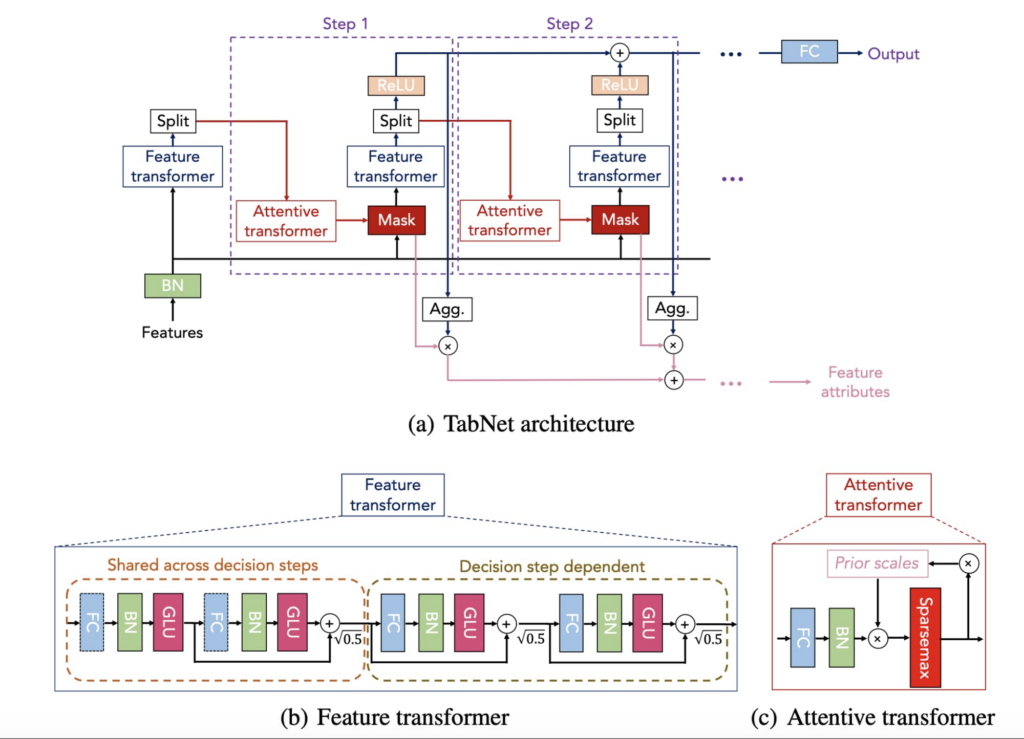
Since its publication, TabNet has received significant traction from various enterprises across different industries and a variety of high-value tabular data applications (most of which include the ones for which deep learning was not even used a priori). It has been used by numerous enterprises like Microsoft, Ludwig, Ravelin, and Determined. Given high customer interest on TabNet, we’ve worked on making it available on Vertex given the real-world deep learning development and productionization needs, as well as improving its performance and efficiency.
Highlights of TabNet on Vertex AI Tabular Workflows
Scaling to Very Large Datasets
Fueled by the advances in cloud technologies like BigQuery, enterprises are increasingly collecting more tabular data, and datasets with billions of samples and hundreds/thousands of features are becoming the norm. In general, deep learning models get better learning from more data samples, and more features, with the optimal methods as they can better learn the complex patterns that drive the predictions. The computational challenges become significant though when model development on massive datasets is considered. This results in high cost or very long model development times, constituting a bottleneck for most customers to fully take advantage of their large datasets. With TabNet on Tabular Workflows, we’re making it more efficient to scale to very large tabular datasets.
Key Implementation Aspects: The TabNet architecture has unique advantages for scaling: it is composed mainly of tensor algebra operations, it utilizes very large batch sizes, and it has high compute intensity (i.e., the architecture employs a high number of operations for each data byte transmitted). These open a path to efficient distributed training on many GPUs, utilized to scale TabNet training in our improved implementation.
In TabNet on Vertex AI Tabular Workflows, we have carefully engineered the data and training pipelines to maximize hardware utilization so that users can get the best return for their Vertex AI spending. The following features enable scale with TabNet on Tabular workflows:
- Parallel data reading with multiple CPUs in a pipeline optimized to maximize GPU utilization for distributed training, reflecting best practices from Tensorflow.
- Training on multiple GPUs that can provide significant speedups on large datasets with high compute requirements. Users can specify any available machine on GCP with multiple GPUs, and the model will automatically run on them with distributed training.
- For efficient data parallelism with distributed learning, we use Tensorflow mirrored distribution strategy to support data parallelism across many GPUs. Our results demonstrate >80% utilization with several GPUs on billion-scale datasets with 100s-1000s of features.
Standard implementations of deep learning models could yield a low GPU utilization, and thus inefficient use of resources. With our implementation, TabNet on Vertex, users can get the maximal return on their compute spend on large-scale datasets.
Examples on real-world customer data: We have benchmarked the training time specifically for enterprise use cases where large datasets are being used and fast training is crucial. In one representative example, we used 1 NVIDIA_TESLA_V100 GPU to achieve state-of-the-art performance in ~1 hour on a dataset with ~5 million samples. In another example, we used 4 NVIDIA_TESLA_V100 GPUs to achieve state-of-the-art performance in ~14 hours on a dataset with ~1.4 billion samples.
Improving Accuracy given Real-World Data Challenges
Compared to its original version, TabNet on Vertex AI Tabular Workflows has improved machine learning capabilities. We have specifically focused on the common real-world tabular data challenges. One common challenge for real-world tabular data is numerical columns having skewed distributions, for which we productionized learnable preprocessing layers (e.g. including parametrized power transform families and quantile transformations) that improve the TabNet learning. Another common challenge is the high number of categories for categorical data, for which we adopted tunable high-dimensional embeddings. Another one is imbalance of label distribution, for which we added various loss function families (e.g. focal loss and differentiable AUC variants). We have observed that such additions can provide a noticeable performance boost in some cases.
Case studies with real-world customer data: We have worked with large customers to replace legacy algorithms with TabNet for a wide range of use cases, including recommendation, rankings, fraud detection, and estimated arrival time predictions. In one representative example, TabNet was stacked against a sophisticated model ensemble for a large customer. It outperformed the ensemble in most cases, leading to a nearly 10% error reduction on some of the key tasks. This is an impressive result, given that each percentage improvement on this model resulted in multi-million savings for the customer!
Out-of-the-box Explainability
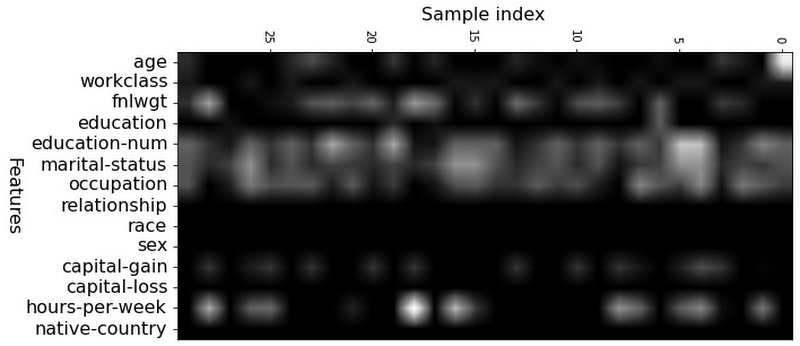
In addition to high accuracy, another core benefit of TabNet is that, unlike conventional deep neural network (DNN) models such as multi-layer perceptrons, its architecture includes explainability out of the box. This new launch on Vertex Tabular Workflows makes it very convenient to visualize explanations of the trained TabNet models, so that the users can quickly gain insights on how the TabNet models arrive at its decisions. TabNet provides feature importance output via its learned masks, which indicate whether a feature is selected at a given decision step in the model. Below is the visualization of the local and global feature importance based on the mask values. The higher the value of the mask for a particular sample, the more important the corresponding feature is for that sample. Explainability of TabNet has fundamental benefits over post-hoc methods like Shapley values that are computationally-expensive to estimate, while TabNet’s explanations are readily available from the model’s intermediate layers. Furthermore, post-hoc explanations are based on approximations to nonlinear black-box functions while TabNet’s explanations are based on what the actual decision making is based on.
Explainability example: To illustrate what is achievable with this kind of explainability, Figure 2 below shows the feature importance for the Census dataset. The figure indicates that education, occupation, and number of hours per week are the most important features to predict whether a person can earn more than $50K/year (the color of corresponding columns are lighter). The explainability capability is sample-wise, which means that we can get the feature importance for each sample separately.
Benefits as a Fully-Managed Vertex Pipeline
TabNet on Vertex Tabular Workflows makes the model development and deployments tasks much simpler – without writing any code, one can obtain the trained TabNet model, deploy it in their application, and use the MLOps capabilities enabled by Vertex Managed Pipelines! Some of these benefits are highlighted as:
- Compatibility with Vertex AI ML Ops for implementing automated ML at scale including products like Vertex AI Pipelines and Vertex AI Experiments.
- Deployment convenience: Vertex AI prediction services, both in batch and online mode, are supported out-of-the-box.
- Customizable feature engineering to enable the best utilization of the domain knowledge of users.
- Using Google’s state-of-the-art search algorithms, automatic tuning to identify the best-performing hyperparameters, with automatic selection of the appropriate hyper-parameter search space based on dataset size, prediction type, and training budget.
- Tracking the deployed model and convenient evaluation tools.
- Easiness in comparative benchmarking with other models (such as AutoML and Wide & Deep Networks) as the user journey would be unified.
- Multi-region availability to better address international workloads.
More details
If you’re interested in trying TabNet on Vertex AI on your tabular datasets, please check out Tabular Workflow on Vertex AI and fill out this form.
Acknowledgements: We’d like to thank Nate Yoder, Yihe Dong, Dawei Jia, Alex Martin, Helin Wang, Henry Tappen and Tomas Pfister for their contributions to this blog.
How to Build A Basic Image Search Utility for Natural Language Queries

4709
Of your peers have already read this article.
6:00 Minutes
The most insightful time you'll spend today!
This post shows how to build an image search utility using natural language queries. Our aim is to use different GCP services to demonstrate this. At the core of our project is OpenAI’s CLIP model. It makes use of two encoders – one for images and one for texts. Each encoder is trained to learn representations such that similar images and text embeddings are projected as close as possible.
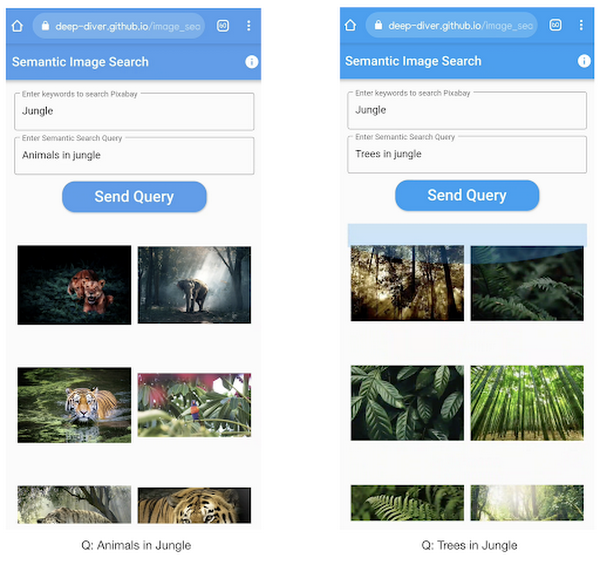
We will first create a Flask-based REST API capable of handling natural language queries and matching them against relevant images. We will then demonstrate the use of the API through a Flutter-based web and mobile application. Figure 1 shows how our final application would look like:
All the code shown in this post is available as a GitHub repository. Let’s dive in.
Application at a high-level
Our application will take two queries from the user:
- Tag or keyword query. This is needed in order to pull a set of images of interest from Pixabay. You can use any other image repositories for this purpose. But we found Pixabay’s API to be easier to work with. We will cache these images to optimize the user experience. Suppose we wanted to find images that are similar to this query: “horses amidst flowers”. For this, we’d first pull in a few “horse” images and then run another utility to find out the images that best match our query.
- Longer or semantic query that we will use to retrieve the images from the pool created in the step above. These images should be semantically similar to this query.
Note: Instead of two queries, we could have only taken a single long query and run named-entity extraction to determine the most likely important keywords to run the initial search with. For this post, we won’t be using this approach.
Figure 2 below depicts the architecture design of our application and the technical stack used for each of the components.
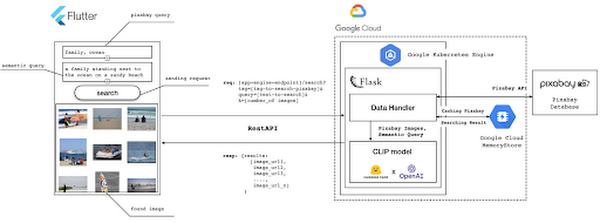
Figure 2 also presents the core logic of the API we will develop in bits and pieces in this post. We will deploy this API on a Kubernetes cluster using the Google Kubernetes Engine (GKE). The following presents a brief directory structure of our application code-base:
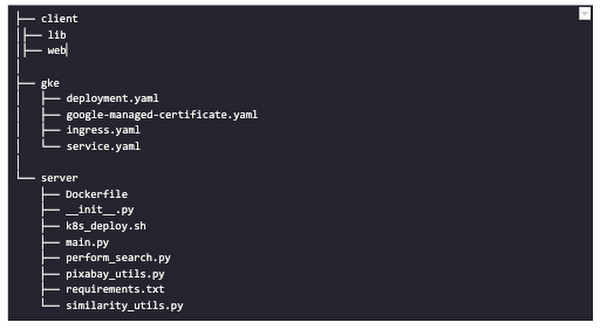
Next, we will walk through the code and other related components for building our image search API. For various machine learning-related utilities, we will be using PyTorch.
Building the backend API with Flask
First, we’d need to fetch a set of images with respect to user-provided tags/keywords before performing the natural language image search. The utility below from the pixabay_utils.py script can do this for us:
def fetch_images_tag(pixabay_search_keyword, num_images):"""Fetches images from Pixabay w.r.t a keyword.:param pixabay_search_keyword: Keyword to perform the search on Pixabay.:param num_images: Number of images to retrieve.:return: List of PIL images.:return: List of image URLs."""query = (PIXABAY_API+ "&q="+ pixabay_search_keyword.lower()+ "&image_type=photo&safesearch=true&per_page="+ str(num_images))response = requests.get(query)output = response.json()all_images = []all_image_urls = []for each in output["hits"]:imageurl = each["webformatURL"]response = requests.get(imageurl)image = Image.open(BytesIO(response.content)).convert("RGB")all_images.append(image)all_image_urls.append(imageurl)return (all_images, all_image_urls)
Note that all the API utilities are logging relevant information. But for brevity, we have omitted the lines of code responsible for that. Next, we will see how to invoke the CLIP model and select the images that would best match a given query semantically. For this, we’ll be using Hugging Face, an easy-to-use Python library offering state-of-the-art NLP capabilities. We’ll collate all the logic related to this search inside a SimilarityUtil class:
class SimilarityUtil:def __init__(self):self.model = CLIPModel.from_pretrained(CLIP_MODEL)self.processor = CLIPProcessor.from_pretrained(CLIP_PREPROCESSOR)self.device = "cuda" if torch.cuda.is_available() else "cpu"def perform_sim_search(self, images, query_phrase, top_k=3):"""Performs similarity search between the images and query.:param images: A list of PIL images initially retrieved withrespect to some entity e.g. Tiger.:param query_phrase: A list containing a single text query,e.g. "Tiger drinking water".:param top_k: Number of top images to return from `images`.:return: Top-k indices matching the query semantically andtheir similarity scores."""model = self.model.to(self.device)# Obtain the text-image similarity scoreswith torch.no_grad():inputs = self.processor(text=[query_phrase], images=images, return_tensors="pt", padding=True)inputs = inputs.to(self.device)outputs = model(**inputs)# Image-text similarity scoreslogits_per_image = outputs.logits_per_image.cpu()(top_indices, top_scores) = self.sort_scores(logits_per_image, top_k)return (top_indices, top_scores)def sort_scores(self, scores, top_k):"""Sorts the scores in a descending manner.:param scores: Scores to sort through.:param top_k: Number of top scores to return.:return: Top-k scores and their indices."""values, indices = scores.squeeze().topk(top_k)top_indices, top_scores = [], []for score, index in zip(values, indices):top_indices.append(int(index.numpy()))score = score.numpy().tolist()top_scores.append(round(score, 3))return (top_indices, top_scores)
CLIP_MODEL uses a ViT-base model to encode the images for generating meaningful embeddings with respect to the provided query. The text-based query is also encoded using A Transformers-based model for generating the embeddings. These two embeddings are matched with one another during inference. To know more about the particular methods we are using for the CLIP model please refer to this documentation from Hugging Face.
In the code above, we are first invoking the CLIP model with images and the natural language query. This gives us a vector (logits_per_image) that contains the similarity scores between each of the images and the query. We then sort the vector in a descending manner. Note that we are initializing the CLIP model while instantiating the SimilarityUtil to save us the model loading time. This is the meat of our application and we have tackled it already. If you want to interact with this utility in a live manner you can check out this Colab Notebook.
Now, we need to collate our utilities for fetching images from Pixabay and for performing the natural language image search inside a single script – perform_search.py. Following is the main class of that script:
class Searcher:def __init__(self):self.similarity_model = SimilarityUtil()def get_similar_images(self, keyword, semantic_query, pixabay_max, top_k):"""Finds semantically similar images.:param keyword: Keyword to search with on Pixabay.:param semantic_query: Query to find semantically similar images retrieved from Pixabay.:param pixabay_max: Number of maximum images to retrieve from Pixabay.:param top_k: Top-k images to return.:return: Tuple of top_k URLs and the similarity scores of the images present inside the URLs."""images_redis_key = keyword + "_images"urls_redis_key = keyword + "_urls"if redis_client.exists(images_redis_key) and redis_client.exists(urls_redis_key):keyword_images = redis_client.get(images_redis_key)keyword_image_urls = redis_client.get(urls_redis_key)else:(keyword_images, keyword_image_urls) = fetch_images_tag(keyword, pixabay_max)redis_client.set(images_redis_key, keyword_images)redis_client.set(urls_redis_key, keyword_image_urls)(top_indices, top_scores) = self.similarity_model.perform_sim_search(keyword_images, semantic_query, top_k)top_urls = [keyword_image_urls[index] for index in top_indices]return (top_urls, top_scores)
Here, we are just calling the utilities we had previously developed to return the URLs of the most similar images and their scores. What is even more important here is the caching capability. For that, we combined GCP’s MemoryStore and a Python library called direct-redis. More on setting up MemoryStore later.
MemoryStore provides a fully managed and low-cost platform for hosting Redis instances. Redis databases are in memory and light-weight making them an ideal candidate for caching. In the code above, we are caching the images fetched from Pixabay and their URLs. So, in the event of a cache hit, we won’t need to call the CLIP model and this will tremendously improve the response time of our API.
Other options for caching
We can cache other elements of our application. For example, the natural language query. When searching through the cached entries to determine if it’s a cache hit, we can compare two queries for semantic similarity and return results accordingly.
Consider that a user had entered the following natural language query: “mountains with dark skies”. After performing the search, we’d cache the embeddings of this query. Now, consider that another user entered another query: “mountains with gloomy ambiance”. We’d compute its embeddings and run a similarity search with the cached embeddings. We’d then compare the similarity scores with respect to a threshold and parse the most similar queries and their corresponding results. In case of a cache miss, we’d just call the image search utilities we developed above.
When working on real-time applications we often need to consider these different aspects and decide what enhances the user experience and maximizes business at the same time.
All that’s left now for the backend is our Flask application – main.py:
@app.route("/search", methods=["GET"])def get_images():tag = request.args.get("t").lower()query = request.args.get("s_query").lower()top_k = request.args.get("k")(top_urls, top_scores) = searcher.get_similar_images(tag, query, MAX_PIXABAY_SEARCH, int(top_k))return jsonify({"top_urls": top_urls, "top_scores": top_scores})
Here we are first parsing the query parameters from the request payload of our search API. We are then just calling the appropriate function from perform_search.py to handle the request. This Flask application is also capable of handling CORS. We do this via the flask_cors library:
cors = CORS(app,resources={r"/search/*": {"origin": "*"},r"/test/*": {"origin": "*"},},)
And this is it! Our API is now ready for deployment.
Deployment with Compute Engine and GKE
The reason why we wanted to deploy our API on Kubernetes is because of the flexibility Kubernetes offers for managing deployments. When operating at scale, auto scalability and load balancing are very important. With the comes the requirement of security — we’d not want to expose the utilities for interacting with any internal services such as databases. With Kubernetes, we can achieve all these easily and efficiently.
GKE provides secured and fully managed functionalities for operationalizing Kubernetes clusters. Here are the steps to deploy the API on GKE at a glance:
- We first build a Docker image for our API and then push it to the Google Container Registry (GCR).
- We then create a Kubernetes cluster on GKE and initialize a deployment.
- We then add scalability options.
- If any public exposure is needed for the API, we then tackle it.
We can assimilate all the above into a shell script – k8s_deploy.sh:
## Docker build and push ### We are inside the `server` directorydocker build -t gcr.io/${PROJECT_ID}/search_service .docker push gcr.io/${PROJECT_ID}/search_service## Deploy on a GKE cluster ### Configure the Docker command-line tool to authenticate to Container Registrygcloud auth configure-docker# Create a Kubernetes clustergcloud container clusters create image-search-nlp# Create a deploymentkubectl create deployment clip-search --image=gcr.io/${PROJECT_ID}/search_service# Number of worker replicaskubectl scale deployment clip-search --replicas=3# HorizontalPodAutoscaler resourcekubectl autoscale deployment clip-search --cpu-percent=80 --min=1 --max=5# Expose deploymentkubectl expose deployment clip-search --name=clip-search-service --type=LoadBalancer --port 80 --target-port 8080
These steps are well explained in this tutorial that you might want to refer to for more details. We can configure all the dependencies on our local machine and execute the shell script above. We can also use the GCP Console to execute it since a terminal on the GCP Console is pre-configured with the system-level dependencies we’d need. In reality, the Kubernetes cluster should only be created once and different deployment versions should be created under it.
After the above shell script is run successfully, we can run kubectl get service to know the external IP address of the service we just deployed:
NAME CLUSTER-IP EXTERNAL-IP PORT(S) AGEclip-search-service 10.3.251.122 203.0.113.0 80:30877/TCP 10s
We can now consume this API with the following base URI: http://203.0.113.0/. If we wanted to deal with only http-based API requests, then we are done here. But secured communication is often a requirement in order for applications to operate reliably. In the following section, we are to discuss how to configure the additional items to allow our Kubernetes cluster to allow https requests.
Configurations for handling https requests with GKE
A secure connection is almost often a must-have requirement in modern client/server applications. The front-end Flutter application would be hosted on GitHub Pages for this project, and it requires https-based connection as well. Even if configuring https connection particularly for a GKE-based cluster can be considered a chore, its setup might seem daunting at first.
There are six steps to configure https connection in the GKE environment:
- You need to have a domain name, and there are a lot of inexpensive options that you can buy. For instance, mlgde.com domain for this project is acquired via Gabia which is a Korean service provider.
- A reserved (static) external IP address has to be acquired via gcloud command or GCP console.
- You need to bind the domain name with the acquired external IP address. This is a platform-specific configuration that issued the domain name to you.
- There is a special ManagedCertificate resource which is specific to the GKE environment. ManagedCertificate resource specifies the domain that the SSL certificate will be created for, so you need this.
- An Ingress resource should be created by listing the static external IP address, ManagedCertificate resource, and the service name and port which the incoming traffic will be routed to. The Service resource could remain the same as in the above section with only changes from LoadBalancer to ClusterIP.
- Last but not least, you need to modify the existing Flask application and Deployment resource to support liveness and readiness probes which are used to check the health status of the Deployment. The Flask application side can be simply modified with the flask-healthz Python package, and you only need to add
livenessProbeandreadinessProbesections in the Deployment resource. In the code example below, thelivenessProbeandreadinessProbeare checked via/aliveand/readyendpoints respectively.
from flask_healthz import healthzfrom flask_healthz import HealthErrorapp = Flask(__name__)app.register_blueprint(healthz, url_prefix="/")def printok():print("Everything is fine")def liveness():try:printok()except Exception:raise HealthError("Can't connect to the file")def readiness():try:printok()except Exception:raise HealthError("Can't connect to the file")app.config.update(HEALTHZ = {"alive": "main.liveness","ready": "main.readiness",})
One thing to be careful of is the initialDelaySeconds attribute of the probes. It is uncommon to configure this attribute with a big number, but it could be bigger than 90 – 120 seconds depending on the size of the model to be used. For this project, it is configured in 90 seconds in order to wait until the CLIP model is fully loaded into memory (full YAML script here).
livenessProbe:httpGet:path: /aliveport: 8080initialDelaySeconds: 90periodSeconds: 10readinessProbe:httpGet:path: /readyport: 8080initialDelaySeconds: 90periodSeconds: 10
Again, these steps may seem daunting at first, but it will become clear when you have done it once. Here is the official document for Using Google-managed SSL certificates You can find all the GKE-related resources used in this project here.
Once every step is completed you should be able to see your server application running on the GKE environment. Please make sure to run kubectl apply command whenever you create Kubernetes resources such as Deployment, Service, Ingress, and ManagedCertificate, and it is important to wait for more than 10 minutes until the ManagedCertifcate provisioning is done.
You can run gcloud compute addresses list command to find out the static external IP address that you have configured.
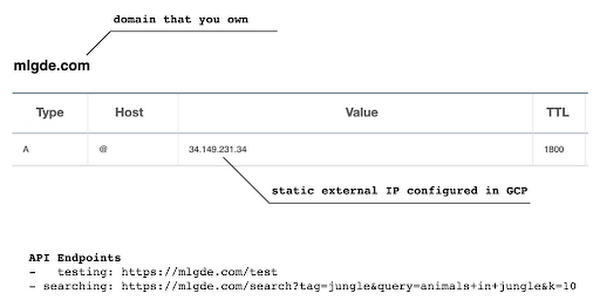
NAME ADDRESS/RANGE TYPE PURPOSE NETWORK REGION SUBNET STATUSgde 34.149.231.34 EXTERNAL IN_USE
Then, the IP address has to be mapped to the domain. Figure 3 is a screenshot of a dashboard from where we got the mlgde.com domain. It clearly shows mlgde.com is mapped to the static external IP address configured in GCP.
In case you’re wondering why we didn’t deploy this application on App Engine, well that is because of the compute needed to execute the CLIP model. App Engine instance won’t fit in that regime. We could have also incorporated compute-heavy capabilities via a VPC Connector. That is a design choice that you and your team would need to consider. In our experiments, we found the GKE deployment to be easier and suitable for our needs.
Infrastructure for the CLIP model
As mentioned earlier, at the core of our application is the CLIP model. It is computationally a bit more expensive than the regular deep learning models. This is why it makes sense to have the hardware infrastructure set up accordingly to execute it. We ran a small benchmark in order to see how a GPU-based environment could be beneficial here.
We ran the CLIP on a Tesla P100-based machine and also on a standard CPU-only machine 1000 times. The code snippet below is the meat of what we executed:
DEVICE = "cuda" if torch.cuda.is_available() else "cpu"start_time = time.time()for _ in range(1000):with torch.no_grad():model = model.to(DEVICE)inputs = processor(text=[semantic_search_phrase],images=all_images, return_tensors="pt", padding=True)inputs = inputs.to(DEVICE)outputs = model(**inputs)end_time = time.time() - start_timeprint(f"Total time: {end_time:.3f} seconds.")
As somewhat expected, with the GPU, the code took 13 minutes to complete execution. With no GPU, it took about 157 minutes.
It is uncommon to leverage GPUs for model prediction because of cost restrictions, but sometimes we have to access GPUs for deploying a big model like CLIP. We configured a GPU-based cluster on GKE and compared the performance differences with and without it. It took about 1 second to handle a request with GPU and MemoryStore cache while it took more than 4 seconds with MemoryStore only (without the GPUs).
For the purposes of this post, we used a CPU-based cluster on Kubernetes. But It is easy to configure GPU usage in a GKE cluster. This document shows you how to do so. For a short summary, there are two steps. First, a node should be configured with GPUs when creating a GKE cluster. Second, GPU drivers should be installed in GKE nodes. You don’t need to visit and manually install GPU drivers for each node by yourself. Rather you can simply apply the DaemonSet resource to GKE as described here.
Setting up MemoryStore
In this project, we first query the general concept of images to Pixabay, then we filter the images with a semantic query using CLIP. It means we can cache the initially retrieved images from Pixabay for the next specific semantic query. For instance, you may want to search with “gentleman wearing tie” at first, then you may want to retry searching for “gentleman wearing glass”. In this case, the base images remain all the same, so they could be stored in a cache server like Redis.
MemoryStore is a GCP service wrapping the Redis which is an in-memory data store, so you can simply use a standard Redis Python package for accessing it. The only thing to be careful about when provisioning a MemoryStore Redis instance is to make sure it is in the same region where your GKE cluster or Compute Engine instance is.
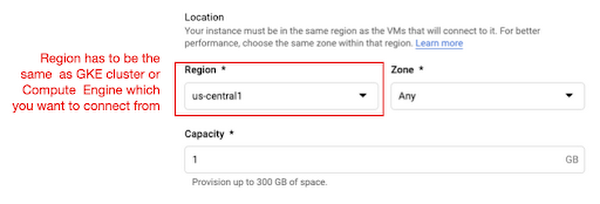
The code snippet below shows how to make a connection to the Redis instance in Python. Nothing specific to GCP, but you only need to be aware of the usage of the standard redis-py package.
# REDISHOST is the IP address to the MemoryStore instanceredis_host = os.environ.get("REDISHOST", "localhost")redis_port = int(os.environ.get("REDISPORT", 6379))redis_client = redis.StrictRedis(host=redis_host, port=redis_port)
After creating a connection, you can store and retrieve data from MemoryStore. There are more advanced use cases of Redis, but we only used exists, get, and set methods for the demonstration purpose. These methods should be very familiar if you know maps, dictionaries, or other similar data structures. For the code portion that uses Redis-related utilities, please refer to the Searcher Python class we discussed in an earlier section.
In the URLs below, you can find side-by-side comparisons of using MemoryStore:
- Without MemoryStore: https://youtu.be/7B88Eyrd-4s
- With MemoryStore (1st try): https://youtu.be/LE6xeEIRuMM
- With MemoryStore (2nd try): https://youtu.be/rRfK17sdk84
Putting everything together
All that’s left now is to collate the different components we developed in the sections above and deploy our application with a frontend. All the frontend-related code is present here.
- The front-end application is written in the Flutter development kit. The main screen contains two text fields for queries to Pixabay and CLIP model respectively. When you click the “Send Query” button, it will send out a RestAPI request to the server. After receiving the result back from the server, the retrieved images from the semantic query will be displayed at the bottom section of the screen.
- Please note that a Flutter application can be deployed to various environments including desktop, web, iOS, and Android. In order to keep as simple as possible, we chose to deploy the application to the GitHub Pages. Whenever there is any change to a client-side source directory, the GitHub Action will be triggered to build a web page and deploy the latest version to the GitHub Pages.
Our final application is deployed here and it looks like so:
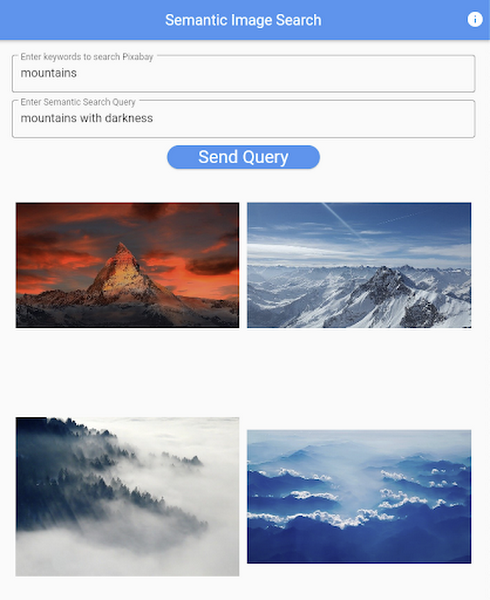
Note that due to constraints, the above-mentioned URL will only be live for one or two months.
It is also possible to redeploy the back-end application with a GitHub Action.
- The very first step is to craft a Dockerfile like below. Since Python is a scripting language, and there are lots of heavy packages that the application is dependent on, it is important to cache the steps. For instance, installing the dependencies should be separated from other commands.
FROM pytorch/pytorch:latestWORKDIR /app# install the dependenciesCOPY requirements.txt requirements.txtRUN pip install -r requirements.txtCOPY . .# set up environment variablesENV PIXABAY_API_KEY="..."ENV REDIS_IN_USE="true"ENV REDISHOST="..."# expose port that Flask app is listening onEXPOSE 8080# run the Flask appCMD [ "python3", "main.py" ]
- With the Dockerfile defined, we can use a GitHub Action like this for automatic deployment.
Edge cases
Since the CLIP model is pre-trained on a large corpus of image and text pairs it’s likely that it may not generalize well to every natural language query we throw at it. Also, because we are limiting the number of images on which the CLIP model can operate, this somehow restricts the expressivity of the model.
We may be able to improve the performance for the second situation by increasing the number of images to be pre-fetched and by indexing them into a low-cost and high-performance database like Datastore.
Costs
In this section, we wanted to provide the readers a breakdown of the costs they might incur in order to consume the various services used throughout the application.
- Frontend hosting
- The front-end application is hosted on GitHub Pages, so there is no expenditure for this.
- Compute Engine
- With an e2-standard-2 instance type without GPUs, the cost is around $48.92 per month. In case you want to add a GPU (NVIDIA K80), the cost goes up to $229.95 per month.
- MemoryStore
- The cost for MemoryStore depends on the size. With 1GB of space, the cost is around $35.77 per month, and whenever you add more GBs the cost will be doubled.
- Google Kubernetes Engine
- The monthly cost for a 3 node GKE cluster with n2-standard-2 (vCPUs: 2, RAM: 8GB without GPUs) is about $170.19. If you add one GPU (NVIDIA K80) to the cluster, the cost goes up to $835.48.
While you may think that is a lot cost-wise, it is good to know that Google gives away free $300 credits when you create a new GCP account. It is still not enough for leveraging GPUs, but it is enough to learn and experiment with GKE and MemoryStore usage.
Conclusion
In this post, we walked through the components needed to build a basic image search utility for natural language queries. We discussed how these different components are connected to each other. Our image search API is able to utilize caching and was deployed on a Kubernetes cluster using GKE. These elements are essential when building a similar service to cater to a much bigger workload. We hope this post will serve as a good starting point for that purpose. Below are some references on similar areas of work that you can explore:
- Building a real-time embeddings similarity matching system
- Detecting image similarity using Spark, LSH and TensorFlow
Acknowledgments: We are grateful to the Google Developers Experts program for supporting us with GCP credits. Thanks to Karl Weinmeister and Soonson Kwon of Google for reviewing the initial draft of this post.
3165
Of your peers have already watched this video.
2:00 Minutes
The most insightful time you'll spend today!
How Marketers Can Turn Information into Action with Machine Learning
The biggest challenge marketers face with machine learning is, “how to get starter”? Instead of getting overwhelmed, they should focus on the applied machine learning by using the algorithms that are already built.
Cassie Kozyrkov, the chief decision scientist with Google Cloud, says that marketers who are overwhelmed by everything they’re hearing about machine learning should focus on key ingredients, not building an entire kitchen.
Geospatial Data for Business Apps Drive Sustainable and Accurate Decision-making

4364
Of your peers have already read this article.
1:30 Minutes
The most insightful time you'll spend today!
Organizations that collect geospatial data can use that information to understand their operations, help make better business decisions, and power innovation. Traditionally, organizations have required deep GIS expertise and tooling in order to deliver geospatial insights. In this post, we outline some ways that geospatial data can be used in various business applications.
Assessing environmental risk
Governments and businesses involved in insurance underwriting, property management, agriculture technology, and related areas are increasingly concerned with risks posed by environmental conditions. Historical models that predict natural disasters like pollution, flooding, and wildfires are becoming less accurate as real-world conditions change. Therefore, organizations are incorporating real-time and historical data into a geospatial analytics platform and using predictive modeling to more effectively plan for risk and to forecast weather.
Selecting sites and planning expansion
Businesses that have storefronts, such as retailers and restaurants, can find the best locations for their stores by using geospatial data like population density to simulate new locations and to predict financial outcomes. Telecom providers can use geospatial data in a similar way to determine the optimal locations for cell towers. A site selection solution can combine proprietary site metrics with publicly-available data like traffic patterns and geographic mobility to help organizations make better decisions about site selection, site rationalization, and expansion strategy.
Planning logistics and transport
For freight companies, courier services, ride-hailing services, and other companies that manage fleets, it’s critical to incorporate geospatial context into business decision-making. Fleet management operations include optimizing last-mile logistics, analyzing telematics data from vehicles for self-driving cars, managing precision railroading, and improving mobility planning. Managing all of these operations relies extensively on geospatial context. Organizations can create a digital twin of their supply chain that includes geospatial data to mitigate supply chain risk, design for sustainability, and minimize their carbon footprint.
Understanding and improving soil health and yield
AgTech companies and other organizations that practice precision agriculture can use a scalable analytics platform to analyze millions of acres of land. These insights help organizations understand soil characteristics and help them analyze the interactions among variables that affect crop production. Companies can load topography data, climate data, soil biomass data, and other contextual data from public data sources. They can then combine this information with data about local conditions to make better planting and land-management decisions. Mapping this information using geospatial analytics not only lets organizations actively monitor crop health and manage crops, but it can help farmers determine the most suitable land for a given crop and to assess risk from weather conditions.
Managing sustainable development
Geospatial data can help organizations map economic, environmental, and social conditions to better understand the geographies in which they conduct business. By taking into account environmental and socio-economic phenomena like poverty, pollution, and vulnerable populations, organizations can determine focus areas for protecting and preserving the environment, such as reducing deforestation and soil erosion. Similarly, geospatial data can help organizations design data-driven health and safety interventions. Geospatial analytics can also help an organization meet its commitments to sustainability standards through sustainable and ethical sourcing. Using geospatial analytics, organizations can track, monitor, and optimize the end-to-end supply chain from the source of raw materials to the destination of the final product.
What’s next
Google Cloud provides a full suite of geospatial analytics and machine learning capabilities that can help you make more accurate and sustainable business decisions without the complexity and expense of managing traditional GIS infrastructure. Get started today by learning how you can use Google Cloud features to get insights from your geospatial data, see Geospatial analytics architecture.
Acknowledgements: We’d like to thank Chad Jennings, Lak Lakshmanan, Kannappan Sirchabesan, Mike Pope, and Michael Hao for their contributions to this blog post and the Geospatial Analytics architecture.
Siemens: What Smarter New Age Recruiting Looks Like

3177
Of your peers have already read this article.
4:30 Minutes
The most insightful time you'll spend today!
Siemens aims to shape the future—and has the scale, culture, and know-how to realize its ambitions. The Germany-headquartered industrial manufacturing business operates in more than 120 countries and focuses on electrification, automation, and digitalization. Siemens’ extensive portfolio includes industrial production digitalization and automation technologies, diagnostic and therapeutic imaging for healthcare, and building automation and management technologies.
“All our solutions are united by the fact they impact the way people live their lives,” says Stephanie Morton, Siemens’ Global Talent Acquisition Manager: Strategy, Technology & Talent Relationship Management.
“‘Engineered for life’ is one of our brand claims.”
Hiring “future makers”
Hiring thinkers, dreamers, and doers hungry to transform businesses, industries, and lives is key to Siemens’ success. The business calls its people “future makers” and employs more than 370,000 of them worldwide.
Recruiting for a workforce this size is no easy task. Siemens’ global jobs and careers website has about 5,000 open positions at any one time, and the organization receives 2 million applications to fill 35,000 positions per year.
However, by 2017, the website was experiencing problems that hampered the talent acquisition team’s efforts to fill roles promptly with the right candidates. Its standard keyword matching technology could not optimize the results provided to job seekers, frustrating potential candidates and increasing the workload for recruiters.
“With Cloud Talent Solution, we saw a 30 percent uplift in candidate conversions from search to application.”
—Stephanie Morton, Global Talent Acquisition Manager: Strategy, Technology & Talent Relationship Management, Siemens
“We found the language we used about our jobs internally was often not the same language job seekers used,” explains Morton. “For example, we may have an engineering position open for our MindSphere cloud-based IoT operating system. We would post this on our jobs and careers website as ‘MindSphere engineer.’ Unfortunately, a job seeker using more general terms such as ‘IoT engineer’ may miss this advertisement.”
In addition, without intelligence and context, the keyword matching technology could not determine job seeker search intentions from misspelled terms. This became more of a problem as job seekers increasingly used mobile devices to conduct searches.
With keyword searches also generating pages and pages of results, job seekers often succumbed to the temptation to apply for every position returned. This left the talent acquisition team drowning in messages and applications.
“We experienced issues around seniority as well—for example, people looking for senior legal roles were receiving irrelevant results for internships or junior roles,” says Morton.
Change needed
These problems could not persist for a team charged with continuously improving candidate experiences. The team opened discussions with Jibe, a recruitment platform provider that operated Siemens’ external career websites. Jibe had collaborated with Google to integrate Cloud Talent Solution—a solution that uses machine learning to better understand job content and job seeker intent—into its platform.” Jibe offered the integrated solution to Siemens as one of its most forward-thinking customers,” says Morton.
Morton’s team reviewed Cloud Talent Solution and was immediately excited by its potential to quickly make a profound difference in its recruitment activities—without requiring recruiters and other team members to invest considerable time and effort. Cloud Talent Solution could enable the website to understand the broad intent of a job seeker—including synonymous positions—and deliver considerably more relevant results.
“We can authoritatively say Cloud Talent Solution is improving the experience for job seekers; they are conducting more searches, those searches are more effective, and more of them are converting to job applications.”
—Stephanie Morton, Global Talent Acquisition Manager: Strategy, Technology & Talent Relationship Management, Siemens
After Cloud Talent Solution expanded to encompass more than 100 languages—enabling Siemens to offer a consistent experience to candidates from a range of countries and backgrounds—Morton’s team gave Jibe and Google the green light to proceed.
“We had two key issues to address during the implementation,” says Morton. “The first was to make sure Google Cloud was aware of any Siemens-specific recruitment terms. For example, we have German-language posts that include terms commonly used internally regarding internships and junior positions. We worked closely with our partners to make sure these terms were represented in the algorithm to complement the vast constellation of already-mapped job titles in Cloud Talent Solution.”
Siemens also needed to quantify Cloud Talent Solution benefits to sell the service internally within the business and win support to proceed beyond a pilot. “Because Cloud Talent Solution was effectively an invisible layer behind our website, we had to test its impact,” says Morton.
A 30 percent uplift
Working with Jibe, Siemens conducted A/B testing. Five percent of candidates in the test group used the keyword-based search experience and 95 percent of candidates the search experience powered by Cloud Talent Solution. The testing accommodated changes in candidate queries over time and context.
“With Cloud Talent Solution, we saw a 30 percent uplift in conversions from search to application,” says Morton.
“We can authoritatively say Cloud Talent Solution is improving the experience for job seekers; they are conducting more searches, those searches are more effective, and more of them are converting to job applications,” she adds. “Anecdotally, recruiters are seeing fewer applications from job seekers who have applied to long lists of positions returned from search queries.”
“Partnering with market-leading providers like Google Cloud can help us stay one step ahead of the competition over the journey.”
—Stephanie Morton, Global Talent Acquisition Manager: Strategy, Technology & Talent Relationship Management, Siemens
In the longer term, Siemens plans to monitor the impact of Cloud Talent Solution on metrics such as candidate retention rates and manager satisfaction.
With Cloud Talent Solution well established within the business, Siemens is now working with Google Cloud to add new features—including voice assistants—to enhance the candidate experience. “Helping candidates laser in on the right positions and make successful connections is something we’re doing everything we can to make happen,” says Morton.
More broadly, Cloud Talent Solution and Jibe are helping Siemens’ talent acquisition and the rest of its human resources function build its reputation and execute its strategy. “We are becoming a function driven by delivering amazing technology-based solutions to our employees and our candidates,” says Morton. “People within Siemens are very impressed to see human resources leading the way in working with Google Cloud to deliver a solution like this at a global scale.”
“The more light-touch exercises like this we can do, the fewer big, expensive, time-consuming initiatives we need to take,” she says. “Furthermore, partnering with market-leading providers like Google Cloud can help us stay one step ahead of the competition over the journey.”
An Out-of-the-box, End-to-end Solution for Contact Centers!

3588
Of your peers have already read this article.
3:00 Minutes
The most insightful time you'll spend today!
Providing best-in-class customer service is crucial for the success of your business. Contact centers are a critical touch point, as they have to balance between representing your brand and prioritizing customer care. When your customers seek help and support, they expect efficient service that is accessible through modern voice and digital channels. In short, customer expectations are increasing—and that’s a problem if your contact center infrastructure and solutions are becoming outdated.
All of these factors are why today, we’re announcing Google Cloud Contact Center AI Platform, an expansion to Contact Center AI that offers an out-of-box, end-to-end solution for the contact center. It brings together the advantages of AI, cloud scalability, multi-experience capabilities, and tight integration with customer relationship management (CRM) platforms to unify sales, marketing, and support teams around data across the customer journey.
Improving customer experiences from all angles
Google Cloud’s Contact Center AI helps you leverage AI to scale your contact center interactions while maintaining a high level of customer satisfaction. Over the last two years, we have built a large group of partners, including the largest contact center and customer experience ISVs and our system integrator ecosystem, to bring Contact Center AI to customers. Today, we are helping enterprises across industries and geographies to cost-effectively reimagine contact center experiences. For example, Marks & Spencer reduced in-store call volume by 50%, and similarly, The Home Depot improved call containment by 185%, all while significantly increasing customer self-service engagement.
Adding to our Contact Center AI capabilities, Contact Center AI Platform is purpose-built for customer relationship management, extending your ability to offer personalized customer experiences that are consistent across your brand, whether delivered through a virtual agent, a human agent, or a combination of both. It eliminates many long-running pain points, from managing data fragmentation to replacing rigid customer experience flows with more engaging, personalized, and flexible support. With this addition, Contact Center AI now lets you:
- Orchestrate the customer journey by creating modern experiences that can be embedded in their chosen channels with mobile/web software developer kits (SDKs), compatible with iOS and Android;
- Leverage CRM as a single source of insight into the customer experience, to unify content, increase personalization, and automate processing with CRM data unification;
- Manage multiple channels without pivoting across voice, SMS, and chat support;
- Predict customer needs and route calls appropriately with AI-driven routing, based on both historical CRM data and real-time interactions;
- Automate scheduling, schedule adherence monitoring, and manage employee scheduling preferences with Workforce Optimization (WFO) integration;
- Provide customers with self-service via web or mobile interfaces using Visual Interactive Voice Response (IVR).
Helping you do more with contact centers
The addition of Contact Center AI Platform provides your partners the ability to integrate with Contact Center AI, so you can enjoy a more seamless experience operating your customer service center, with a complete view of the customer in a single workspace that includes real-time AI intelligence, native agent call controls, and real-time call transcription. For example, we are expanding our partnership with Salesforce to integrate Contact Center AI with Service Cloud Voice to deliver a unified Service Cloud agent console and Customer 360.
“Customers are continually raising their service expectations, and our research tells us 79% of consumers believe the experience a company provides is as important as its products and services,” said Ryan Nichols, SVP & GM, Contact Center, for Salesforce Service Cloud. “Through intelligence, workflows, and a deeper understanding of the customer, Salesforce’s Service Cloud Voice paired with Google’s Contact Center AI will empower agents with a seamless experience to help them wow customers.”
We are also excited to partner with UJET, an innovative and experienced Contact Center as a Service (CCaaS) provider. UJET offers secure user-centric design, scalability, and mobile-focused solution, with turnkey implementation, strong omnichannel capabilities, and best-in-class user experience, making their product a natural fit into Google’s contact center vision. To learn more about the partnership, see here.
Delivering impact for customers
Contact Center AI is already making a difference for our customers such as OneUnited Bank, the largest Black-owned bank in the U.S. “OneUnited Bank has been in partnership with Google Cloud and UJET, as well as a long-standing customer of Salesforce. The expansion and enhancements of Google Cloud’s Contact Center AI, along with its deeper integration with Salesforce, means better return on investment as we drive towards evolving our contact center to deliver exceptional client experiences,” said Teri Williams, President and Chief Operating Officer at OneUnited Bank.
Fitbit, which boasts more than 29 million active users, is also reaping the benefits. “Fitbit relies on Google Cloud and UJET to provide support to our customers with a mobile-first approach. This collaboration, in combination with a strong Salesforce integration, has helped us modernize our entire customer support experience,” stated Cassandra Johnson, VP, Devices & Services Customer Care & Vendor Management Office, at Google.
According to industry analyst Sheila McGee-Smith of McGee-Smith Analytics, “Google Cloud’s Contact Center AI is already a force in the contact center industry thanks to its early focus on AI for customer experience.” She continued, “Through their partnerships with UJET and Salesforce, as well as these expanded capabilities, Google Cloud’s Contact Center AI Platform will help define the future of customer service by powering more secure, engaging, and personalized customer experiences.”
Contact Center AI Platform is supported by a host of integration partners, including Accenture, CDW, Cognizant, Deloitte, HCL, IBM, Infosys, Quantiphi, Tata Consultancy Services, and Wipro. We will also continue to partner closely with the contact center and customer experience (CX) ISVs that our customers already rely on. If you already have a contact center solution provider, you can still integrate Google Cloud’s Contact Center AI into your existing environment.
To learn more about how you can leverage the power of AI to reimagine your contact center experience, visit our Contact Center AI page.
More Relevant Stories for Your Company

Want to Code for the Cloud? Get Started with the Native App Development Track
Earlier this year, we launched the Google Cloud skills challenge, which provides 30 days of free access to training to build your cloud knowledge and an opportunity to earn skill badges that showcase your Google Cloud competencies. Today, we’re adding a Native App Development track to the skills challenge, joining the Getting Started,

OCR Engine Upgrade: Document AI Introduces 3 New Capabilities
Documents are indispensable parts of our professional and personal lives. They give us crucial insights that help us become more efficient, that organize and optimize information, and that even help us to stay competitive. But as documents become increasingly complex, and as the variety of document types continues to expand,

Predict Protein Structures with AlphaFold on Vertex AI
Today, to accelerate research in the bio-pharma space, from the creation of treatments for diseases to the production of new synthetic biomaterials, we are announcing a new Vertex AI solution that demonstrates how to use Vertex AI Pipelines to run DeepMind’s AlphaFold protein structure predictions at scale. Once a protein’s

Seven-Eleven Japan Leverages Google Cloud’s Performance and Speed for Real-time Business Insights
With the rise of technologies like smartphones, retailers have felt the pressure to meet evolving consumer needs and expectations. Seven-Eleven Japan(“SEJ”) has long been on the forefront of this thanks to the way they develop and invest in IT. However, in recent years, Japan’s leading convenience store chain has struggled
