





How to Pick a Database that is Suitable for Your Application

7019
Of your peers have already read this article.
2:30 Minutes
The most insightful time you'll spend today!
Picking the right database for your application is not easy. The choice depends heavily on your use case—transactional processing, analytical processing, in-memory database, and so on—but it also depends on other factors. This post covers the different database options available within Google Cloud across relational (SQL) and non-relational (NoSQL) databases and explains which use cases are best suited for each database option.

Relational databases
In relational databases information is stored in tables, rows and columns, which typically works best for structured data. As a result they are used for applications in which the structure of the data does not change often. SQL (Structured Query Language) is used when interacting with most relational databases. They offer ACID consistency mode for the data, which means:
- Atomic: All operations in a transaction succeed or the operation is rolled back.
- Consistent: On the completion of a transaction, the database is structurally sound.
- Isolated: Transactions do not contend with one another. Contentious access to data is moderated by the database so that transactions appear to run sequentially.
- Durable: The results of applying a transaction are permanent, even in the presence of failures.
Because of these properties, relational databases are used in applications that require high accuracy and for transactional queries such as financial and retail transactions. For example: In banking when a customer makes a funds transfer request, you want to make sure the transaction is possible and it actually happens on the most up-to-date account balance, in this case an error or resubmit request is likely fine.
There are three relational database options in Google Cloud: Cloud SQL, Cloud Spanner, and Bare Metal Solution.
Cloud SQL: Provides managed MySQL, PostgreSQL and SQL Server databases on Google Cloud. It reduces maintenance cost and automates database provisioning, storage capacity management, back ups, and out-of-the-box high availability and disaster recovery/failover. For these reasons it is best for general-purpose web frameworks, CRM, ERP, SaaS and e-commerce applications.
Cloud Spanner: Cloud Spanner is an enterprise-grade, globally-distributed, and strongly-consistent database that offers up to 99.999% availability, built specifically to combine the benefits of relational database structure with non-relational horizontal scale. It is a unique database that combines ACID transactions, SQL queries, and relational structure with the scalability that you typically associate with non-relational or NoSQL databases. As a result, Spanner is best used for applications such as gaming, payment solutions, global financial ledgers, retail banking and inventory management that require ability to scale limitlessly with strong-consistency and high-availability.
Bare Metal Solution: Provides hardware to run specialized workloads with low latency on Google Cloud. This is specifically useful if there is an Oracle database that you want to lift and shift into Google Cloud. This enables data center retirements and paves a path to modernize legacy applications.
Non-relational databases
Non-relational databases (or NoSQL databases) store compex, unstructured data in a non-tabular form such as documents. Non-relational databases are often used when large quantities of complex and diverse data need to be organized. Unlike relational databases, they perform faster because a query doesn’t have to access several tables to deliver an answer, making them ideal for storing data that may change frequently or for applications that handle many different kinds of data.
For example, an apparel store might have a database in which shirts have their own document containing all of their information, including size, brand, and color with room for adding more parameters later such as sleeve size, collars, and so on.
Qualities that make NoSQL databases fast:
- Eventual consistency: stores usually exhibit consistency at some later point (e.g., lazily at read time)
- Horizontal scaling, usually using hashed distributions
- Typically, they are optimized for a specific workload pattern (i.e., key-value, graph, wide-column)
- Typically, they don’t support cross shard transactions or flexible isolation modes.
Because of these properties, non-relational databases are used in applications that require large scale, reliability, availability, and frequent data changes.They can easily scale horizontally by adding more servers, unlike some relational databases, which scale vertically by increasing the machine size as the data grows. Although, some relations databases such as Cloud Spanner support scale-out and strict consistency.
Non-relational databases can store a variety of unstructured data such as documents, key-value, graphs, wide columns, and more. Here are your non-relational database options in Google Cloud:
- Document databases: Store information as documents (in formats such as JSON and XML). For example: Firestore
- Key-value stores: Group associated data in collections with records that are identified with unique keys for easy retrieval. Key-value stores have just enough structure to mirror the value of relational databases while still preserving the benefits of NoSQL. For example: Datastore, Bigtable, Memorystore
- In-memory database: Purpose-built database that relies primarily on memory for data storage. These are designed to attain minimal response time by eliminating the need to access disks. They are ideal for applications that require microsecond response times and can have large spikes in traffic. For example: Memorystore
- Wide-column databases: Use the tabular format but allow a wide variance in how data is named and formatted in each row, even in the same table. They have some basic structure while preserving a lot of flexibility. For example: Bigtable
- Graph databases: Use graph structures to define the relationships between stored data points; useful for identifying patterns in unstructured and semi-structured information. For example: JanusGraph
There are three non-relational databases in Google Cloud:
- Firestore: Is a serverless document database which scales on demand and acts as a backend-as-a-service. It is DBaaS that increases the speed of building applications. It is perfect for all general purpose uses cases such as ecommerce, gaming, IoT and real time dashboards. With Firestore users can interact with and collaborate on live and offline data making it great for real-time application and mobile apps.
- Cloud Bigtable: Cloud Bigtable is a sparsely populated table that can scale to billions of rows and thousands of columns, enabling you to store terabytes or even petabytes of data. It is ideal for storing very large amounts of single-keyed data with very low latency. It supports high read and write throughput at sub-millisecond latency, and it is an ideal data source for MapReduce operations. It also supports the open-source HBase API standard to easily integrate with the Apache ecosystem including HBase, Beam, Hadoop and Spark along with Google Cloud ecosystem.
- Memorystore: Memorystore is a fully managed in-memory data store service for Redis and Memcached at Google Cloud. It is best for in-memory and transient data stores and automates the complex tasks of provisioning, replication, failover, and patching so you can spend more time coding. Because it offers extremely low latency and high performance, Memorystore is great for web and mobile, gaming, leaderboard, social, chat, and news feed applications.
Conclusion
Choosing a relational or a non-relational database largely depends on the use case. Broadly, if your application requires ACID transactions and your data structure is not going to change much, select a relational database.
In Google Cloud use Cloud SQL for any general-purpose SQL database and Cloud Spanner for large-scale globally scalable, strongly consistent use cases. In general, if your data structure may change later and if scale and availability is a bigger requirement than consistency then a non-relational database is a preferable choice. Google Cloud offers Firestore, Memorystore, and Cloud Bigtable to support a variety of use cases across the document, key-value, and wide column database spectrum.
For more comparison resources on each database check out the overview. For more hands-on experience with Bigtable, check out our on-demand training here and learn about migrating databases to managed services check out this whitepaper.
https://youtube.com/watch?v=2TZXSnCTd7E%3Fenablejsapi%3D1%26
For more #GCPSketchnote, follow the GitHub repo. For similar cloud content follow me on Twitter @pvergadia and keep an eye out on thecloudgirl.dev.
Explore Google Cloud SQL’s 3 Fault Tolerance Mechanism to Ease Data Pro

5215
Of your peers have already read this article.
2:00 Minutes
The most insightful time you'll spend today!
If you’re managing a crucial application that has to be fully fault-tolerant, you need your system to be able to handle every fault, no matter the type and scope of failure, with minimal downtime and data loss. Protecting against these faults means juggling numerous variables that can impact performance as well as recovery time and cost.
Today’s managed database services take over the operational complexity that used to exist for database administrators. Growing your organization’s tolerance required adding machines, compute, and storage, plus the operational costs of IT management: performing backups, writing scripts, creating dashboards, and carrying out testing to make sure your platform is ready when problems arise–all in a secure way.
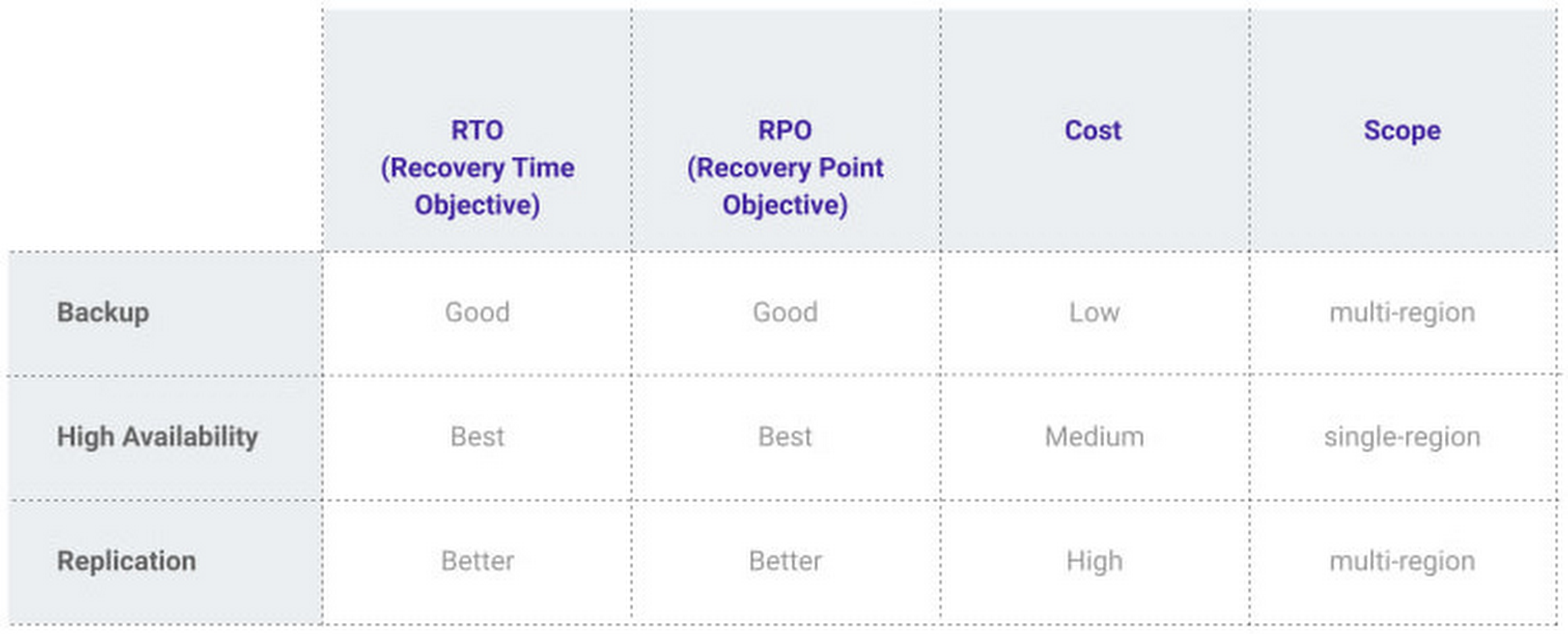
At Google, our Cloud SQL managed database service offers three fault tolerance mechanisms —backup, high availability, and replication—and there are three major factors to consider for each of them:
- RTO (recovery time objective): When a failure happens, how much time can be lost before significant harm occurs?
- RPO (recovery point objective): When a failure happens, how much data can be lost before significant harm occurs?
- Cost: How cost-effective is this solution?
We’ve heard from customers like Major League Baseball, HSBC, and Equifax that they have strict data-protection needs and require highly fault-tolerant multi-region applications—and they’ve all chosen Cloud SQL to meet those needs.
Let’s take a closer look at how the decision-making process plays out for each recovery solution.
High availability (HA)
If your application is business critical, you require minimum RTO and zero RPO— a high availability configuration ensures that you and your customers are protected. If the primary instance fails, there’s another standby instance ready to take over with no data loss. There’s an additional cost here, but doing this manually brings a great operational cost, since you have to detect and verify the fault, do the failover, and make sure it’s correct—you can’t have two primary instances or you risk data corruption—then finally connect the application to the new database.
Cloud SQL removes all that complexity. Choose high availability for a given instance and we’ll replicate the data across multiple zones, synchronously, to each zone’s persistent disk. If an HA instance has a failure, you don’t have to think about when to fail over because Cloud SQL detects the failure and automatically initiates failover, for a full recovery and no data loss within minutes. Cloud SQL also moves the IP address during failover so your application can easily reconnect. MLB, for example, uses Cloud SQL high availability to serve prediction data to live games with minimal downtime. Dev/test instances don’t need those same guarantees, but can use local backups to recover from any potential failure.
Cross-region replica
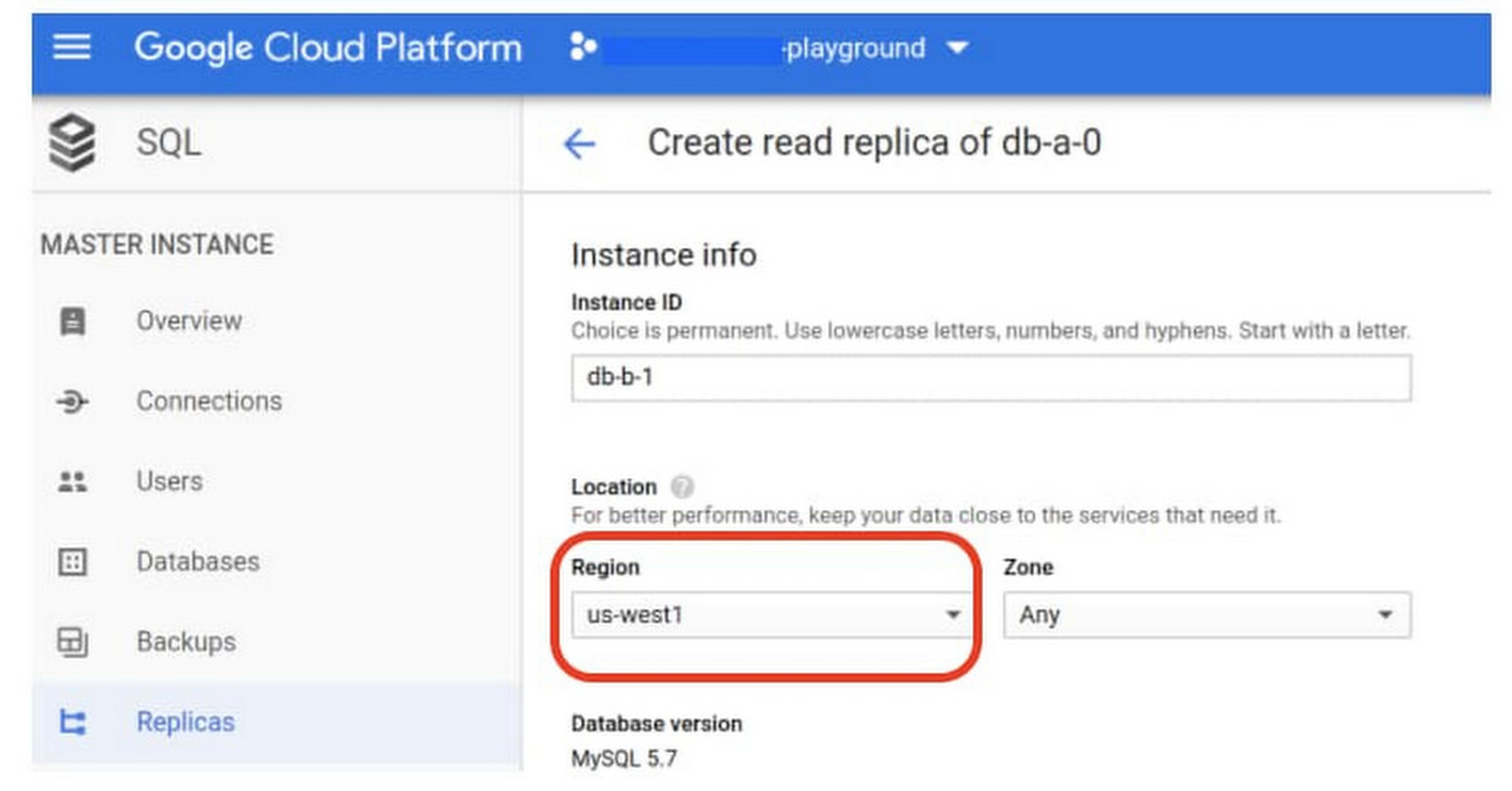
If a whole Google Cloud region goes down you still need your business to continue to run. That’s where cross-region replication comes in, a hot standby replica in another Google Cloud region provides RTO of minutes and RPO typically less than a minute . If you create a read replica in a region separate from your primary instance and you get hit with a regional outage, your application and database can start serving customers from another region within minutes. But this solution can be complex and enabling it yourself can be difficult and time-consuming. Securing cross-geography traffic demands end-to-end encryption and can bring connectivity issues too.
This is where the fully managed Cloud SQL solution shines. We offer MySQL, PostgreSQL and SQL Server database engines as a cross-region replication solution that’s easily configured and bolstered by Google’s interconnected global network. Just say, “I’m in U.S. East, I want to create a replica in U.S. West,” and it’s done, reliably and securely.
Backup
When you suffer data loss because of an operations error (for example, a bug in a script dropped your tables) or human error (for example, someone dropped the wrong table by accident), backups help you restore lost data to your Cloud SQL instance. Our low cost backup mechanism features point-in-time, granular recovery, meaning that if you accidentally delete data or something else goes wrong, you can ask for recovery of, for example, the state of that database down to the millisecond, such as Monday at 12:53pm. Your valuable data is replicated multiple times in multiple geographic locations automatically. This enables the automatic handling of failover in cases of major failure. You can always rest assured that your database is available and data is secure, even in the times of major failure crises.
Cloud SQL provides automated and on-demand backups. With automated backups, Google manages the backups so that you can easily restore them when required. Also, the scheduled backing is automatically taken by default. With on-demand backup, you can create a backup at any time. This could be useful if you are about to perform a risky operation on your database, as Cloud SQL lets you select a custom location for your backup data. When the backup is stored in multiple regions, and there’s an outage in the region that contains the source instance, you can restore a backup to a new or existing instance in a different region. This is also useful if your organization needs to comply with data residency regulations that require you to keep your backups within a specific geographic boundary.
Putting it all together
For critical workloads, MLB configures their Cloud SQL instances with backups, high availability, and cross-region replication. Doing so ensures they can recover from many failure types.
- To recover from human error (“Oops, I didn’t mean to delete that”), MLB uses backups and point-in-time recovery to recovery to a millisecond or specific database transaction
- To automatically recover from primary instance failures and zonal outages, MLB uses Cloud SQL’s high availability configuration
- To protect against regional outages, MLB uses cross-region replication
Creating a robust configuration, like MLB did, takes just a few minutes. Get started in our Console or review documentation.
Quilkin: How the Open-source UDP Proxy Enables High-performance Multiplayer Gaming

3341
Of your peers have already read this article.
4:00 Minutes
The most insightful time you'll spend today!
Traditionally, dedicated game servers for real time multiplayer games have used bespoke UDP protocols for communication and synchronization of gameplay among the players within a game. This communication is most often bundled into monolithic game servers and clients, pairing the technical functionality of communication protocols, such as custom network physics synchronisation, security, access control, telemetry and metrics, with the extremely high computational requirements of physics simulations, AI computation and more.
Developed in collaboration with Embark Studios, Quilkin is a UDP proxy, tailor-made for high performance real-time multiplayer games. Its aim is twofold:
- Pull common functionality, such as security, access control, telemetry and metrics out of monolithic dedicated game servers and clients.
- Provide this common functionality in a composable and configurable way, such that it can be reused across a wide set of multiplayer games.
This reusable foundation then allows game developers to spend more of their time focusing on building the game-specific aspects of building their multiplayer communication protocols, rather than these common aspects.
Challenges with multiplayer Game Server communication
In fast-paced, multiplayer games, the full simulation of a session of gameplay generally occurs within the memory of a monolithic dedicated game server, whose responsibility covers everything from network physics and AI simulation to communications from client back to server and more.
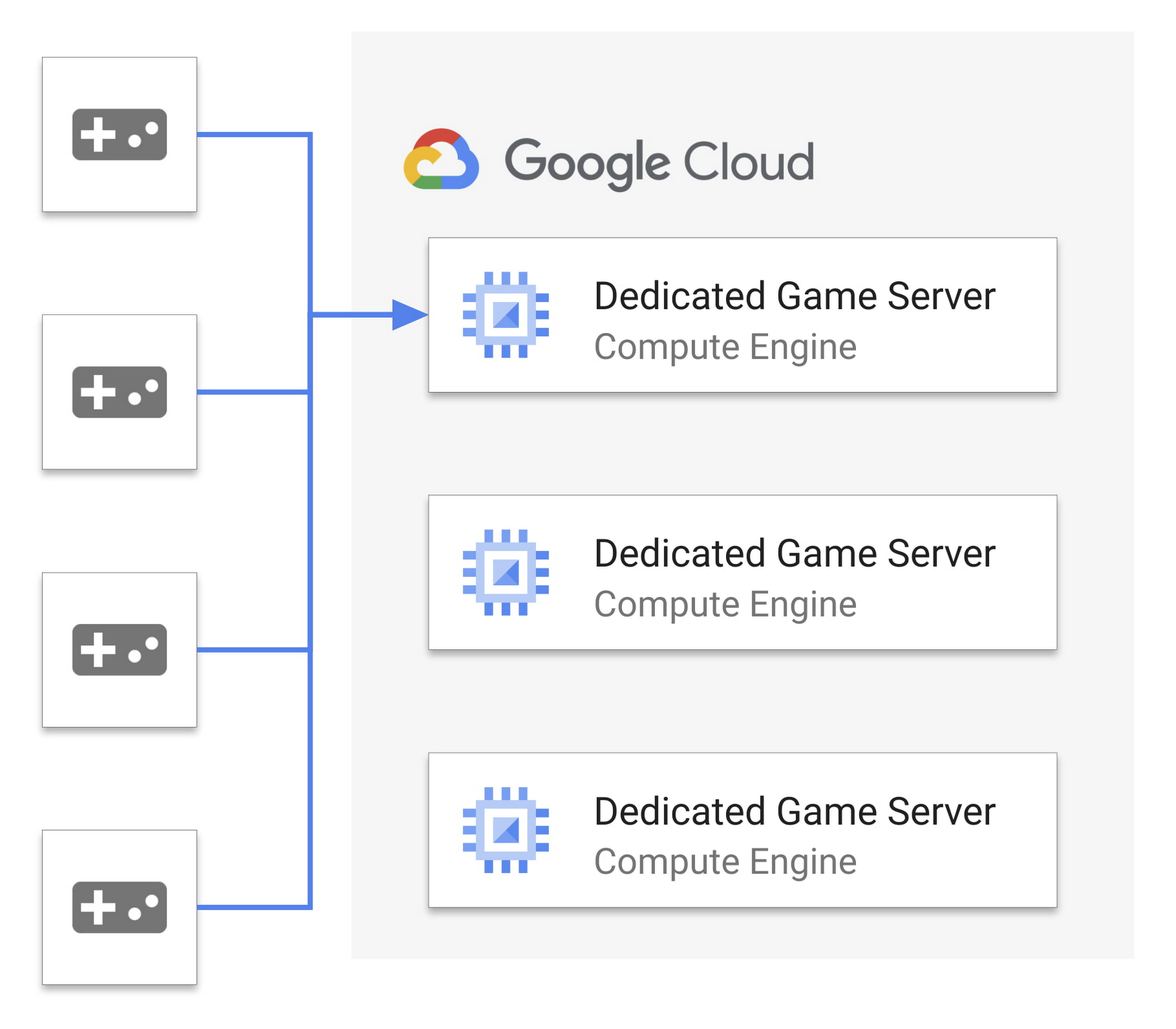
Since the entire state of the game is memory resident, each client connects directly to the dedicated game server the player is playing on, which presents several challenges:
- Each dedicated game server is a single point of failure. If it goes down, then the whole game session (or sometimes multiple sessions) fails. This makes it a target for malicious actors.
- The IP and port of connection to the game server is public, and exposed to the game client, making it easy to discover and target.
- Multiple aspects of game server simulation and network communication are tightly coupled in the same process, making reuse and modularity more difficult, and expanding risk of performance issues.
If we look at both web and mobile technologies over the past several years, some of these challenges start to look very familiar. Thankfully, one of the solutions to help drive dedicated server workloads to more redundant and distributed orchestration is the utilisation of traffic proxies!
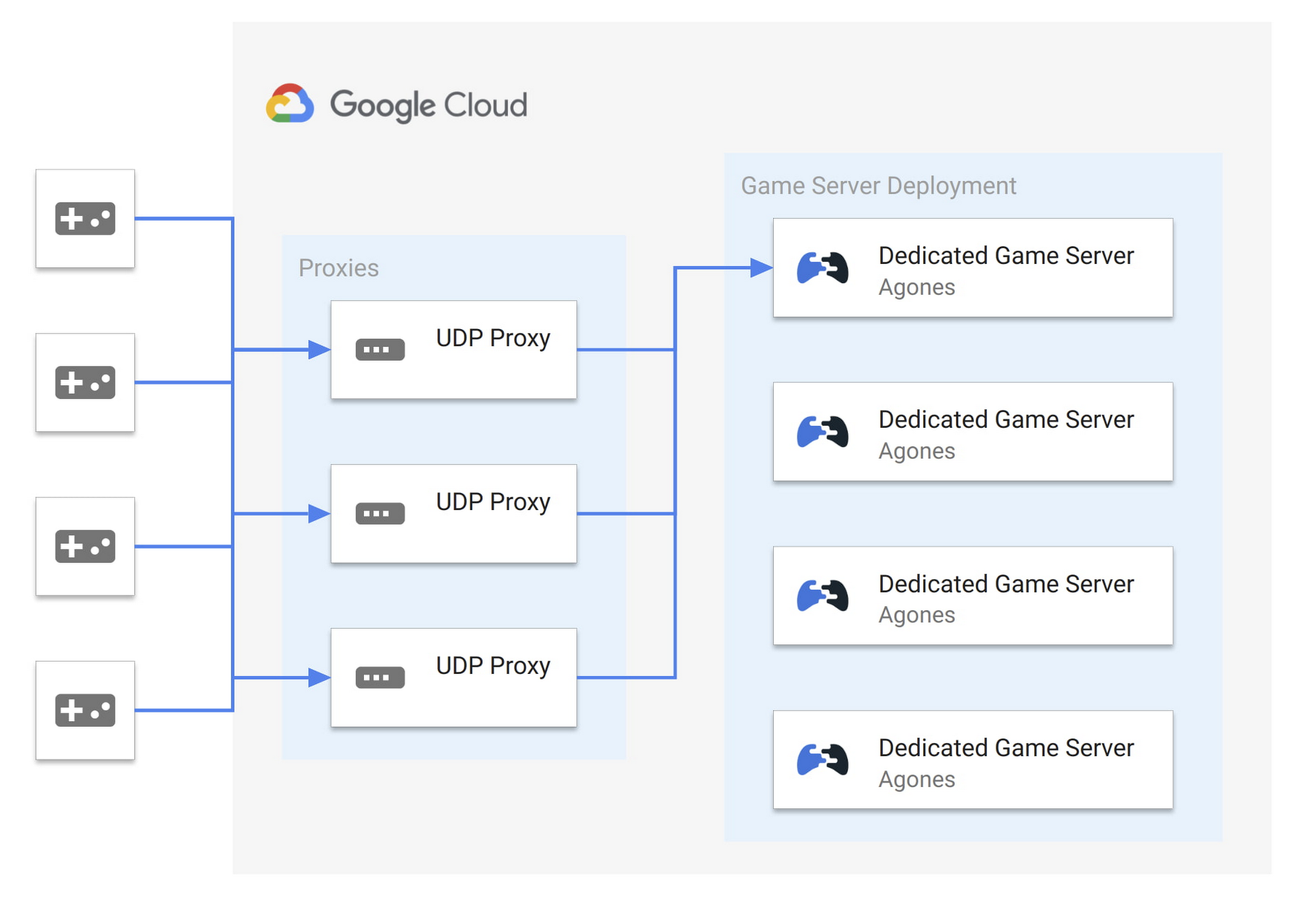
By using a proxy for multiplayer UDP traffic, in front of our dedicated games servers within a low latency network such as what is available on Google Cloud, we can address these key challenges as follows:
- Greater reliability. Proxies provide redundant points of communication entry. UDP packets can be sent to any number of proxies and routed to the dedicated game server. While a dedicated game server will still generally be a single point of failure, proxies improve redundancy and potential failover at the communication layer.
- Greater security. The IP and port of the dedicated game server is no longer public. Game clients may only have visibility into a subset of the proxy pool, limiting a potential attack surface.
- Greater scalability. We start to break apart the single process, as we can move aspects of the communication protocol, metrics, communication security and access control into the proxy. This removes the non-game specific computation out of your game server’s processing loop.
As a result, the entire system is now more resilient as proxies can be scaled independently, not only for performance reasons but also to distribute load in case of malicious actors.
Introducing Quilkin: The UDP proxy for Game Servers
Embark Studios and Google Cloud came together and built Quilkin, to provide a standard, open source solution. Based out of Stockholm, Embark Studios is a (relatively) new studio made up of seasoned industry veterans. They were the perfect collaboration partner to create Quilkin with, given their team’s experience with large scale real time multiplayer games.
Quilkin is an open-source, non-transparent UDP proxy specifically designed for use with large scale multiplayer dedicated game server deployments, to ensure security, access control, telemetry data, metrics and more.
Quilkin is designed to be used behind game clients as well as in front of dedicated game servers, and offers the following major benefits:
- Obfuscation. Non-transparent proxying of UDP data, making the internal state of your game architecture less visible to bad actors.
- Out of the box metrics. For UDP packet traffic and communication.
- Visibility. A composable set of processing filters that can be applied for routing, access control, rate limiting, and more.
- Flexibility. Ability to to be utilised as a standalone binary, with no client/server changes required or as a Rust library, depending on how deep an integration you wish for your system and/or custom processing Filters you wish to build.
- Compatibility. Can be integrated with existing C/C++ code bases via Rust FFI, if required.
- Onboarding. Multiple integration patterns, allowing you to choose the level of integration that makes sense for your architecture and existing platform.
Until now, these sorts of capabilities are only available to large game studios with resources to build their own proprietary technology.
We think leveling the playing field for everyone in the games industry is an important and worthy endeavor. That’s why we collaborated with Google Cloud and initiated this project together.
At Embark, we believe open source is the future of the games industry and that open, cross-company collaboration is the way forward, so that all studios, regardless of size, are able to achieve the same level of technical capabilities. —Luna Duclos, Tech Lead, Embark Studios
Google Cloud is excited to announce Quilkin as the latest entry in our portfolio of open-source solutions for gaming. Quilkin complements our existing OSS solutions including Agones for game servers, Open Match for matchmaking, and Open Saves for persistence. These are designed to work together as an open and integrated ecosystem for gaming. We’re proud to include Embark Studios as our latest open source collaborator for gaming along with Ubisoft, Unity, and 2K Games. Google Cloud will continue to work closely with our partners in industry and the community to offer planet-scale solutions to power the world’s largest games. —Rob Martin, Chief Architect, Google Cloud for Games
Getting started with Quilkin
While Quilkin can support more advanced deployment scenarios like above, the easiest way to get started with Quilkin is to deploy it as a sidecar to your existing dedicated game server. This may initially limit some of the benefits, but it’s an easy path to getting metrics and telemetry data about your UDP communication, with a very low barrier to entry and the ability to expand over time.
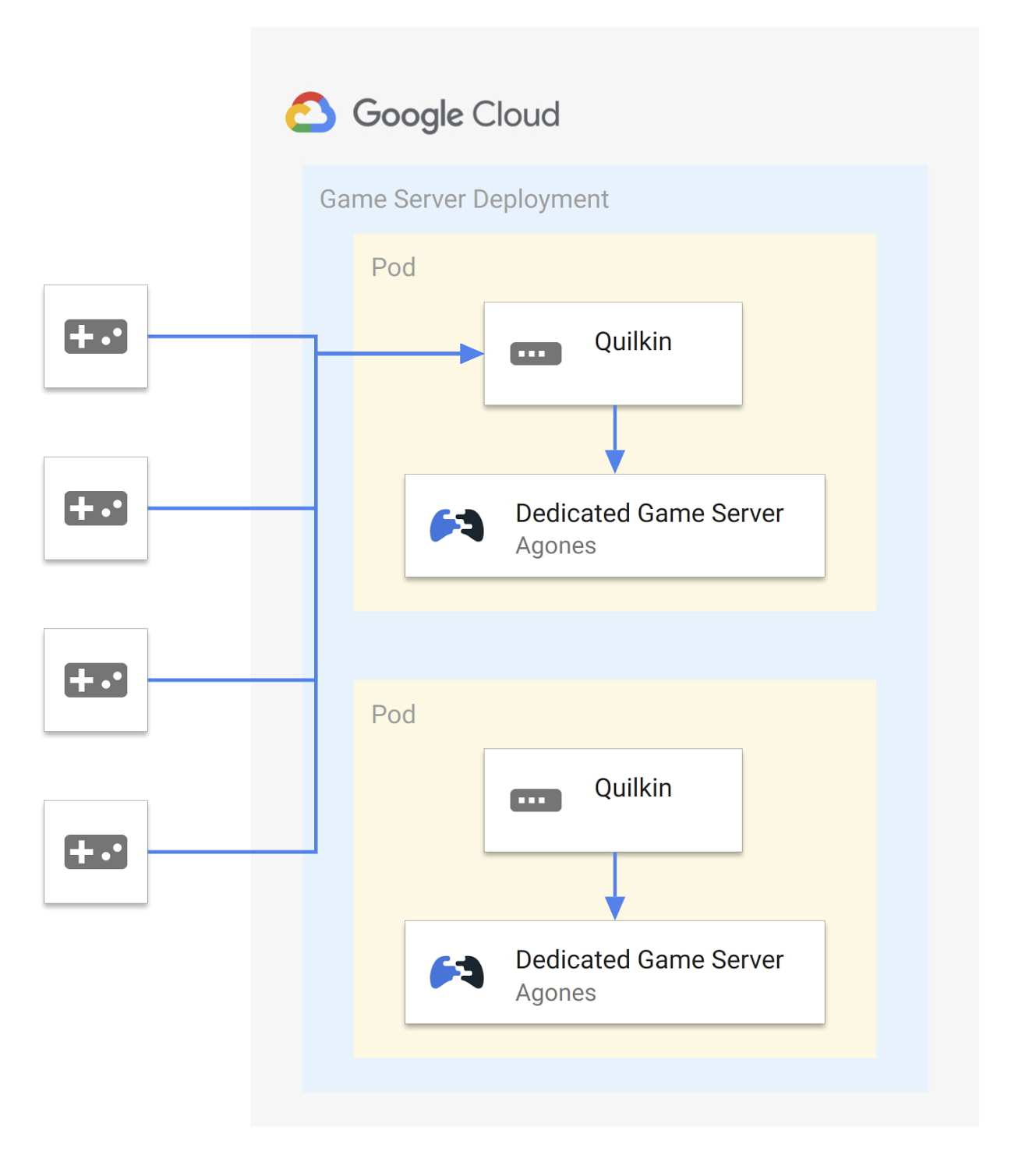
While Quilkin is released as both binaries and container images, and is not tied to any specific hosting platform, we’ll use Agones and Google Cloud Game Servers as our game server hosting platform for this example.
First we will create a ConfigMap to store the yaml for a static configuration for Quilkin that will accept connections on port 26001 and route then to the Xonotic (an open source, multiplayer FPS game) dedicated game server on port 26000:
apiVersion: v1kind: ConfigMapmetadata:name: quilkin-configdata:quilkin.yaml: | # quilkin configurationversion: v1alpha1proxy:port: 26001static:endpoints:- address: 127.0.0.1:26000
Second, we’ll take the example container that Agones provides for the Xonotic dedicated game server, and run Quilkin alongside each dedicated game server as a sidecar, in an Agones Fleet of game servers like so:
apiVersion: "agones.dev/v1"kind: Fleetmetadata:name: xonotic-sidecarspec:replicas: 2template:spec:container: xonoticports:- name: defaultcontainerPort: 26001container: quilkinhealth:initialDelaySeconds: 30periodSeconds: 60template:spec:containers:- name: xonoticimage: gcr.io/agones-images/xonotic-example:0.8- name: quilkin # quilkin sidecarimage: us-docker.pkg.dev/quilkin/release/quilkin:0.1.0volumeMounts:- name: configmountPath: "/etc/quilkin"livenessProbe:httpGet:path: /liveport: 9091initialDelaySeconds: 3periodSeconds: 2volumes:- name: configconfigMap:name: quilkin-config
Once applied, when we query the cluster for the running GameServers, everything looks the same as it would without Quilkin! Nothing else in our system needs to be aware that the traffic is being intercepted, and we can freely take advantage of the functionality of Quilkin without adjusting either client or server code.
$ kubectl get gameserversNAME STATE ADDRESS PORT NODE AGExonotic-sidecar-gdpgn-2pfkc Ready 34.95.106.201 7929 gke-0f7d8adc 25mxonotic-sidecar-gdpgn-c8bds Ready 34.95.106.201 7028 gke-0f7d8adc 25m
If this has piqued your interest, make sure to have a look at the walkthrough, where we step through this same scenario and then extend it to compress UDP packets from the game client to server, without having to change either programs.
This just scratches the surface, however: there’s even more to Quilkin, including an xDS compliant admin API, a variety of existing Filters to manipulate and route UDP packets and more.
What’s next for Quilkin
Quilkin is still in its early stages, with this 0.1.0 alpha release, but we’re very happy with the foundation that has been laid.
There are a variety of features in the roadmap, from enhanced metrics and telemetry, new filters and filter types, and more.
If you would like to try out this release, you can grab the binaries or container images from our releases page, step through our quickstarts and review different integration options with your dedicated game servers.
To get involved with the project, please:
- Check out our Github repository
- Join our Discord community
- Join the quilkin-discuss mailing list
- Follow us on Twitter
Embark Studios has also released their own announcement blog post, going deeper into the plans they have for their own production game backend infrastructure, and where Quilkin fits in.
Thanks to everyone who has been involved with this project across Google Cloud and Embark Studios, and we look forward to the future for Quilkin!
How Do You Cut Costs and Improve Staff Productivity, and Business Visibility? Ascend Money Has an Answer

10685
Of your peers have already read this article.
6:30 Minutes
The most insightful time you'll spend today!
Hundreds of millions of residents of South East Asia have only limited access to banking and finance services. However, help is at hand. One of South East Asia’s largest fintech businesses, Ascend Money is using digital technologies to realize its mission of enabling as many people as possible to access innovative financial services and live better lives.
According to Ascend Money, 60 percent of the region’s 620 million residents do not have access to a full suite of financial services. Even a relatively small proportion of this market represents a big opportunity for the business.
Ascend Money’s offerings include the TrueMoney regional payment platform for underserved and digital consumers. The TrueMoney platform supports more than 40 million consumers across six countries: Cambodia, Indonesia, Myanmar, the Philippines, Thailand, and Vietnam.
“We found, based on value, ease of use, effectiveness, and the skills and adaptability of our own team members, BigQuery and other Google Cloud Platform services were the best fit for our business.”
– Abraham Jarrett, Head of Engineering, Ascend Money
TrueMoney also provides an e-wallet app that provides easy ways to top up mobile phones, undertake online shopping, and pay for products and services; a network of 65,000 branded shops; and international remittances, initially between Thailand and Myanmar. In addition, Ascend Money offers financial products to small to medium businesses.
Ascend Money is part of the South East Asian online business Ascend Group, which also operates e-commerce, e-procurement, data centers, cloud services, fulfilment, and digital marketing services.
Cost is a key criteria
Ascend Money initially started operations using physical infrastructure and on-premises workforce productivity applications. However, as the business grew its customer base and expanded into new markets, its technology leaders began to explore options to improve value for money; reduce the maintenance load on in-house team members; improve its data management and analysis; and collaborate more effectively.
“Operating our own on-premises infrastructure entails a higher cost of ownership and maintenance, as well as requiring us to scale up our hardware as needed,” says Abraham Jarrett, Head of Engineering, Ascend Money. “We conducted an evaluation and found that moving to the cloud would deliver a range of benefits.”
G Suite and Google Cloud Platform the best fit
The business evaluated solutions available in the market and opted to move to G Suite and Google Cloud Platform.
“Moving to Google Cloud Platform was an optimization exercise, with lowering our costs our primary goal, and achieving better performance an added benefit,” says Jarrett. Google Cloud Platform monitoring, diagnostic, and analytics tools have enabled Ascend Money to reduce its infrastructure spending, becoming more efficient and cost-effective in the process.
“Managing software is a big cost for us. Through G Suite, we are significantly reducing our software deployment, licensing, and repair costs.”
– Abraham Jarrett, Head of Engineering, Ascend Money
The Ascend Money team saw Google Kubernetes Engine as enabling a seamless way of transitioning from an on-premises data center to a cloud service. “We considered industry trends such as what people were adopting and who we could hire when making our decision,” says Jarrett. “Engineering teams are focusing on using Kubernetes open source container management at scale and as a way of doing business, which was attractive to us.
“Google Kubernetes Engine presented the easiest way to manage and orchestrate our containers, and drive us away from our existing infrastructure.”
BigQuery best for cost and ease of use
Ascend Money also reviewed data infrastructure solutions, with its business intelligence and data platform teams considering a range of options. The teams quickly ruled out an on-premises solution due to the capital investment required and opted for a cloud service. Following a rigorous evaluation of Google Cloud Platform against the services offered by another cloud provider, Ascend Money opted to run on Google Cloud.
“We found, based on value, ease of use, effectiveness, and the skills and adaptability of our own team members, BigQuery and other Google Cloud Platform services were the best fit for our business,” says Jarrett. The business is now running an architecture comprising a BigQuery analytics data warehouse; Cloud Storage to store raw and archive data; Cloud Dataflow to process stream and batch data, and Cloud Pub/Sub for event ingestion and delivery.
“We’re expanding our utilization of BigQuery and other services on a daily basis,” says Jarrett.
Ascend Money is also using a range of Google Cloud Platform services for the infrastructure outside its data platform, including Stackdriver logging and monitoring; Cloud KMS to manage cryptographic keys for its cloud services, Cloud Build to undertake continuous integration, delivery, and deployment; Cloud DNS to provide domain name system services; and Cloud Functions to enable its developers to run and scale code in the cloud.
With Google Cloud Platform, Ascend Money is now processing about 12GB of batch data per day and streaming data from about 200 data marts per day in Thailand alone.
Cost effective scalability and faster to market
Google Kubernetes Engine has enabled the business to scale and deliver to market faster. “We can build on the platform, take the application and container and deploy them to scale out,” says Jarrett. “The Google Kubernetes Engine orchestration mechanism that provides containerized, elastic scalability is extremely important in allowing us to manage costs and expend our effort efficiently. Through Kubernetes, we can write once and deploy everywhere.”
With Google Cloud Platform, the business has saved 3,000,000 THB (about US$90,000) in licensing costs and, through automation tools, reduced the time to complete infrastructure activities by 50 percent.
“We don’t have as many meetings since we deployed G Suite and we can work effectively in a distributed fashion.”
– Abraham Jarrett, Head of Engineering, Ascend Money
Ascend Money’s entire workforce is now using G Suite to collaborate and operate productively. The business is achieving a range of benefits including being able to get new team members up and running more quickly and reduced cost. “Managing software is a big cost for us,” says Jarrett. “Through G Suite, we are significantly reducing our software deployment, licensing, and repair costs.” Meanwhile, the shorter time to onboard team members to G Suite is paying off with improved productivity and an accelerated ability to collaborate.
Ascend Money team members primarily use Sheets, Slides, and Docs to create internal materials, including product requirement documents in Docs and workforce and project planning spreadsheets in Sheets.
The organization also uses Hangouts Meet to collaborate when working from different locations. “We don’t have as many meetings since we deployed G Suite and we can work effectively in a distributed fashion,” says Jarrett. “People can work from home and we have five regions plus Thailand where they can collaborate live on a document, such as a slide deck for board meetings or meetings with our chief executive officer, head of engineering, or other senior managers.”
20 hours per week saved
Jarrett describes the time savings of using web browser-based productivity software and G Suite as saving them an average of 20 hours per week. This has improved productivity and the quality of life for Ascend Money’s hard-working team, increasing overall staff satisfaction.
“The ability to work remotely is a big win for us,” Jarrett says. “Our team members can keep one computer at work and one at home and access the same information, they can work in a plane while it sits on the tarmac, or update a Google Doc or a Google Sheet in real time on their phone. They can work anytime, from any location, as long as they have an internet connection. They have less dead time, meaning more uptime.”
With Google Cloud Platform and G Suite, Ascend Money is ideally positioned to support growing demand for its fintech services in South East Asia, particularly among people with limited access to banking. “We have the agility and dynamism to support rising demand and look forward to continuing to work with Google to realize our business ambitions,” says Jarrett.
Regulatory-induced Challenges Create Hurdles to Cloud Adoption for Financial Services Firms

3334
Of your peers have already read this article.
2:30 Minutes
The most insightful time you'll spend today!
The financial services industry is evolving at a rapid pace, with shifting consumer expectations, new technologies, and developing regulatory requirements. Financial services firms need the right technology to help them stay agile and prepare for the future.
The cloud is a key point of leverage for firms looking to improve performance across a broad range of activities. Moving to the public cloud can advance operational resiliency, improve staff productivity, increase regulatory compliance and enhance business model innovation.
However, there are a number of financial services companies that are still hesitant in their cloud journeys. The barriers to adoption vary, from the complexity of legacy systems, to trust and skills gaps, regulatory uncertainty, and fragmentation of compliance requirements. Although many companies have embraced the benefits of cloud technology, more robust cloud adoption—especially around core back-office functions—will require additional facilitation, including through regulatory harmonization and streamlining.
A new comprehensive study on cloud adoption in financial services
To better understand the challenges and opportunities of cloud adoption in financial services Google Cloud, together with the Harris Poll, surveyed more than 1,300 leaders from the financial services industry across the United States, Canada, France, Germany, United Kingdom, Hong Kong, Japan, Singapore and Australia.
There were five noteworthy takeaways from the study:
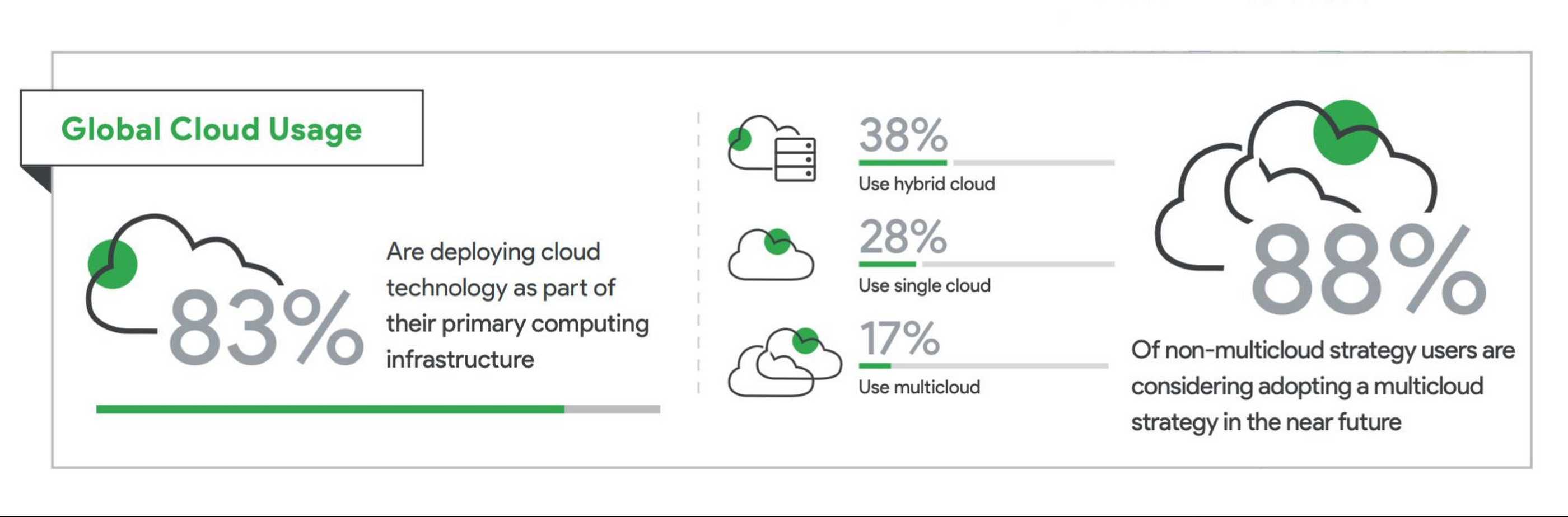
1. A vast majority of financial services companies are already using some form of public cloud. A large number of surveyed financial services companies (83%) report they are deploying cloud technology as part of their primary computing infrastructures. Of those using cloud technology, the most popular architecture of choice is hybrid cloud (38%), followed by single cloud (28%), and multicloud (17%). Notably, of respondents without a multicloud deployment, 88% reported they are considering adopting a multicloud strategy in the next 12 months.
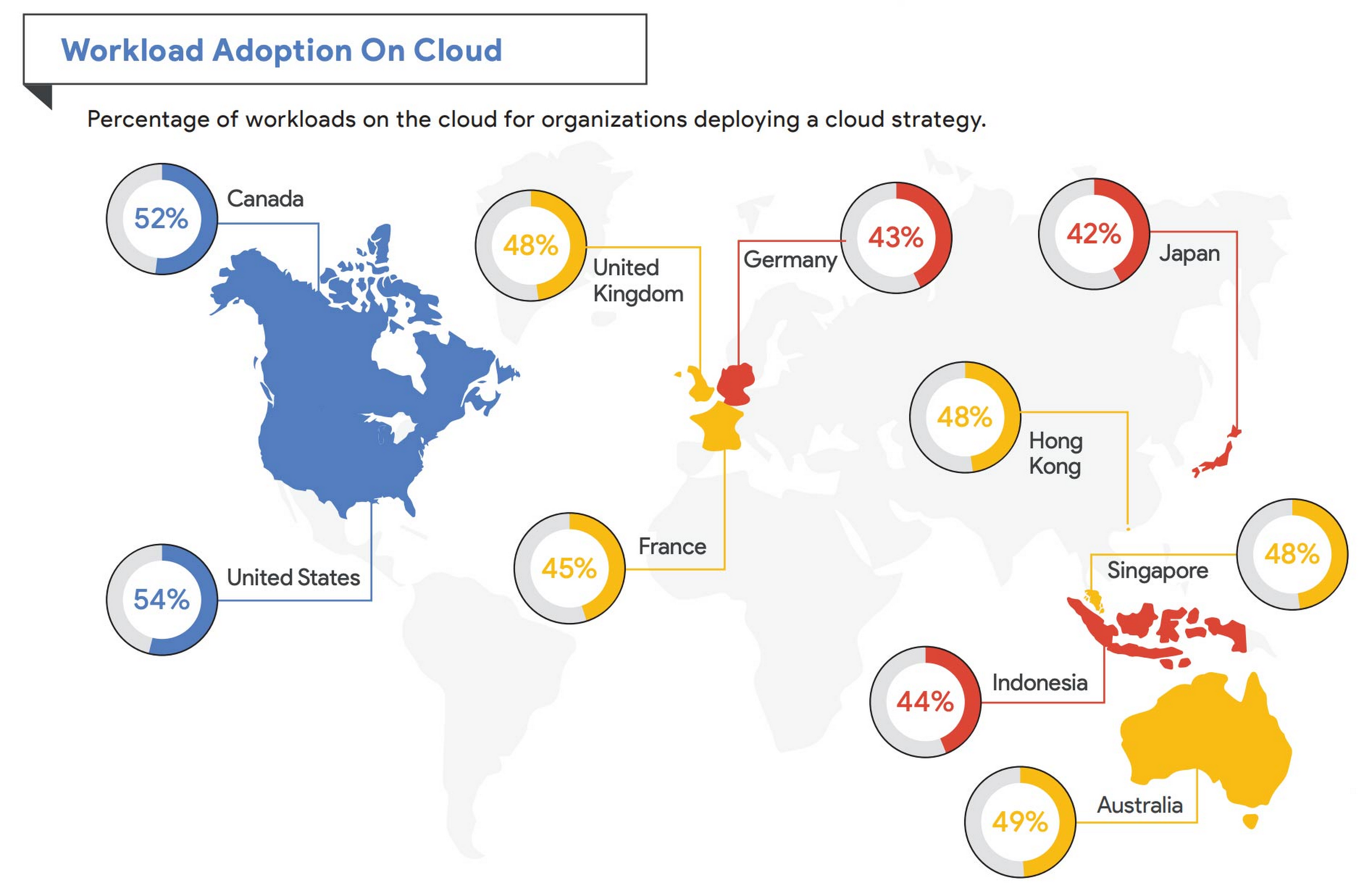
2. Financial services institutions in North America are leading in cloud adoption. Of the financial services companies who are implementing a cloud strategy, the highest levels of cloud workload adoption were reported in North America, with institutions in the U.S. (54%) and Canada (52%) leading the way. The lowest level of cloud adoption was reported in Japan (42%).
3. As financial services companies continue to use the cloud, more core functionalities can and will be migrated. While many financial services companies have migrated substantial workloads to the cloud, the industry is far from full adoption when it comes to core, back-office workloads. Of financial services companies currently using a majority cloud strategy in the United States, for example, only half (54%) of their workloads are fully deployed in the cloud. Data and IT security (74%), regulatory reporting (57%), and fraud detection and prevention (57%) rank among the highest workload adoption. Core underwriting activity (40%) and data reconciliation (48%) ranked lowest. Across Europe, cloud usage for core activities like underwriting also scored low with the UK listing only 30% adoption.
4. Among respondents, there is a very strong positive perception of the potential for cloud technology to assist in business operations and regulatory compliance. Nearly all respondents (>88%) agreed that cloud adoption can:
- help adapt to changing customer behaviors and expectations,
- enhance operational resilience,
- support the creation of innovative new products and services,
- enhance financial services institutions’ data security capabilities, and
- better connect siloed legacy software infrastructure within financial services institutions.
5. Certain regulator-induced challenges, including the complexity of sectorial compliance frameworks and fragmentation, create hurdles to cloud adoption for financial services companies. While 88% of respondents had a positive view of current regulatory efforts to provide guidance and clarity for cloud implementation, the results showed that more needs to be done to facilitate adoption. Most respondents (84%) agree that regulatory reviews and approvals take too long because of regulatory fragmentation across regulatory bodies. And 78% say that regulatory uncertainty over the use of public cloud prevents their organizations from adopting cloud technologies that would otherwise provide benefit to them. Additionally, a third of all on-premises respondents (38%) say that the large investment of resources for the regulatory approval process is a reason why they’re not using cloud services.
“While many banks have already deployed hybrid cloud environments, others are still in various stages of planning and deploying,” said Jerry Silva, research vice president for IDC Financial Insights. “Clearly, hybrid infrastructure is a reality, and financial institutions must focus not only on leveraging the modern infrastructure model to gain efficiencies, resilience and agility, but also on taking the necessary steps to manage such environments, including the security and compliance of cloud services.”
Future recommendations for financial services regulators
Financial services firms should continue to maximize the potential of technology by migrating more core workloads to the cloud, and actively considering multicloud and hybrid-cloud strategies. Such strategies enhance resiliency of existing IT infrastructure and reduce concerns over vendor lock-in.
The research also points to steps that regulators could take to provide additional clarity and guidance, such as aligning regulatory reviews across agencies to avoid fragmentation; developing regulatory “safe harbors” for cloud adopters based on adherence to accepted standards and best practices; training regulatory staff on emerging tech; and advancing data reporting requirements via cloud and related technologies.
In the past few years, many regulators across the globe have taken a robust approach to rationalizing rules and guidance to cloud adoption in the financial sector, which has helped significantly stimulate adoption. But further assurances and harmonization of best practices around supervision is needed to advance risk-based and secure digital innovation.
At Google Cloud, we’re committed to working with financial services customers and regulators to provide them with controls and assurances on risk management, data locality, transparency, and compliance. We are constantly engaging with regulators to share information, respond to their considerations and concerns, and address questions in the interest of transparency and building trust.
To learn more about these findings and more, download our infographic and our full report.
Research methodology
The survey was conducted online by the Harris Poll on behalf of Google Cloud, from December 7, 2020, to January 4, 2021, among 1,363 senior executives in France (n=113), Germany (n=178), the UK (n=192), Hong Kong (n=99), Indonesia (n=100), Japan (n=142), Singapore (n=71), Australia (n=134), Canada (134), and the United States (n=200) who are employed full-time, part-time, or self-employed whose main functional role is in risk/compliance or IT at a company in the banking, finance, or financial services industry with a title of director level or higher. The data in each country were weighted by the number of employees to bring them into line with actual company size proportions in the population. A global post-weight was applied to ensure equal weight of each country in the global total.
8 Must-Have Google Cloud Products for Startups

3177
Of your peers have already read this article.
2:30 Minutes
The most insightful time you'll spend today!
Startups worldwide turn to Google Cloud tools to build fast on a strong and easy to use platform that helps them get to market and launch products faster, all while building on the cleanest cloud in the industry. Startups leverage Google Cloud and our Google for Startups Cloud Program to go from idea to IPO, and there are a variety of products on Google Cloud that can help them.
Here are the 8 top products that startups use on Google Cloud to innovate and grow:
Firebase for app development
Speed up innovation with Firebase, a mobile development platform that’s fully integrated with Google Cloud. Work in a simpler cloud environment, easily pull in products or services, and build your apps faster.
Cloud SQL for database needs
Build your startup’s foundation with Cloud SQL, a fully managed relational database solution that integrates with Google Cloud services. Create and connect to your first database in minutes and scale with a single API call.
AI and machine learning products
Solve tough problems with AI and machine learning products, built with the best of Google’s technology. Train deep learning and machine learning models cost-effectively so you can iterate and innovate faster.
BigQuery for data analytics
Drive agility with BigQuery, a serverless, cost-effective, multi-cloud data warehouse. Query streaming data in real time, predict business outcomes with built-in machine learning, and share analytics with just a few clicks.
Google Kubernetes Engine (GKE) for containers
Unlock faster, more secure app development with GKE, the most scalable Kubernetes platform. Streamline operations with release channels that fit your business needs and leave cluster monitoring to Google engineers.
Looker for data visualization
Get more from your data to keep moving ahead of the competition with Looker, a trusted business intelligence and data platform. Generate real-time reports and get insights at the right time with proactive alerts.
Cloud Run for serverless computing
Create scalable containerized apps in any programming language on Cloud Run, a fully managed compute platform. Pair it with container tools like Cloud Build and Docker, and only pay when your code is running.
Cloud Armor for security
Protect your startup from Web attacks with Cloud Armor, a leading Distributed Denial-of-Service (DDOS) defense service. Use it with an HTTP Load Balancer for Managed Instance Groups across regions to keep your workloads highly available and secure.
To learn more about products best-suited to the unique demands of startups, check out our startups solution page. Our team is looking forward to discussing how these products can help you. If you’re not already in the program, you can get started here.
If you want to learn more about how Google Cloud can help your startup, visit our page here to get more information about our program, and sign up for our communications to get a look at our community activities, digital events, special offers, and more.
More Relevant Stories for Your Company

Demystifying FinOps on Google Cloud: Whitepaper
FinOps is a concept similar to DevOps, but with a different set of goals. Cloud FinOps is an operational framework and cultural shift that brings together technology, finance and business to drive financial accountability and accelerate business value realization. In layman terms, FinOps aims to help companies achieve most out




HSBC Leverages Google Cloud to Deliver Exceptional Cx for 37 Million Customers
HSBC is the world's largest international bank that has been in existence for 150 years. HSBC is present in 70 countries, has 37 million customers and is the number one bank in trade finance or cross-border finance. HSBC is a systemically important financial institution that is heavily regulated. Rapid growth


Confused about Cloud? Here is a Primer to get all Your Doubts Answered
When you have decided on moving workloads to the cloud, the task of choosing the right cloud platform can be a tough one with many questions looming in your mind. From which specific product to choose from the plethora of options available to how and where to store your data
App Modernization Made Easy: A Handy Guide for Technology Leaders
Organizations need to modernize their applications for a variety of reasons including the need to reduce cost and complexity, increase organizational agility, lower the barrier to innovation, and building new features. However, lifting critical business technologies off legacy implementations and refactoring them to take advantage of modern technologies and services
