





How to Modernize Your Apps with Migrate to Anthos

3386
Of your peers have already read this article.
3:10 Minutes
The most insightful time you'll spend today!
In a perfect cloud world, you would host all your applications in containers running on Kubernetes and Istio, benefitting from the portability and improved resource utilization of containers, plus a robust orchestration platform with advanced application management, networking, and security functionality. This is easy to do if you’re developing a new application, but it can be hard for existing applications to take advantage of those capabilities.
Many of the applications that you may want to move to the cloud have been around a long time, and you may not have the application-specific knowledge that would be required to rewrite them to be more cloud-native—or it would be incredibly time-consuming to do so.
Another option is to lift-and-shift to a virtual machine (VM) hosting platform like Compute Engine, but that means you still need to maintain the VMs. Even if you’re not able to fully modernize an existing app, it would still be great to get some of the benefits of containers and Kubernetes.
What is Migrate for Anthos?
Enter Migrate for Anthos, a fast and easy way to modernize your existing applications with a service that encapsulates them in a container. Moving your physical servers or existing VMs into Kubernetes containers gives you crucial portability and resource utilization benefits without having to rewrite the underlying application.
Since Migrate for Anthos is built for Google Kubernetes Engine (GKE), you also automatically capture the scaling and flexibility benefits of a managed Kubernetes environment in the cloud. Migrate for Anthos recently became generally available.
Converting an application with Migrate for Anthos happens in two phases. First, it creates a generic container wrapper around your application that makes it seem like it is still running in a full VM environment. Then, you launch Migrate for Anthos software on your Kubernetes cluster that runs the containerized application.
You can find more details about this in the documentation and in our blog post: Migrating from Compute Engine to Kubernetes Engine with Migrate for Anthos.
As the name suggests, Migrate for Anthos works with Anthos GKE. However, you can also use Migrate for Anthos with only GKE—all it requires is your application and a GKE cluster running the Migrate for Anthos software.
Getting started with Migrate for Anthos
Migrate for Anthos works with a variety of workloads, but not all. It’s particularly adept at migrating legacy applications, stand-alone applications, and monolithic applications. As you start the modernization process, here are some questions to ask to determine whether to use Migrate for Anthos with your applications:
1. Should this app be in the cloud?
By its nature, the cloud may not be able to support some characteristics of your on-prem environment, such as geography and legal compliance. The best way to find out whether the cloud will work for each of your applications is to plan out a full migration. That will allow you to identify groups of applications that can benefit from cloud offerings such as a global network and ease of resizing resources. After that, try out a proof of concept by testing the apps in the cloud to see if it fits your business needs.
2. Should this app be in Kubernetes?
Containerizing an application simplifies workload administration, improves scalability (both up and down), and increases host utilization. Kubernetes orchestrates the containers and GKE handles node upgrades, while add-ons like Istio let you manage network and security policies independently of your application.
With those advantages, it’s easy to think that containers are always the right way to go, but there are some cases where it may make sense to stick with VMs. Strict hardware requirements, specialized kernel modules, and license constraints may be harder to run with containers, negating their advantages.
3. Should this app migration use Migrate for Anthos?
Migrating your apps or workloads to the cloud isn’t just about shifting where the compute resources run; it’s also an opportunity to modernize them with containers. Using Migrate for Anthos (or Migrate for Compute Engine) gives you the ability to get your workloads in the cloud quickly, with minimal upfront downtime that’s easy to plan for.
However, even if you use the Migrate for Anthos wrapper, your application is still the same application. The benefits of the modern platform may not outweigh a legacy application and a rewrite may be the only way to meet your business needs. There are also some specific services from your VM that may not work with Migrate for Anthos, for example licensing requirements.
Migrate for Anthos can also be the first step in a larger migration effort. Once you’ve migrated the application to GKE, you can gradually break up a monolithic app into microservices by manually rewriting parts. Spreading out the migration effort gets you in the cloud sooner, giving you more time to modernize.
Next steps
A successful modernization starts with creating a full migration plan, testing the workloads, and monitoring them. You can experience the benefits of modernization with Migrate for Anthos by picking a small workload and trying it out for yourself!
The Latest in Spring Cloud GCP: Upgrading the Sample Bank of Anthos App

1396
Of your peers have already read this article.
3:30 Minutes
The most insightful time you'll spend today!
We’re excited to announce that Spring Cloud GCP version 4.0 is now generally available! In this post, we’ll be describing what the new major version has to offer, and demonstrating the process of using the migration guide on one of our reference architectures, Bank of Anthos.
What’s new?
With this release, Spring Cloud GCP officially supports Spring Boot 3.x. However, this migration involves a number of breaking changes as outlined in the migration guide. The full list of changes made is available on Github, but the one of the most significant differences is that Java 17 is now a minimum requirement.
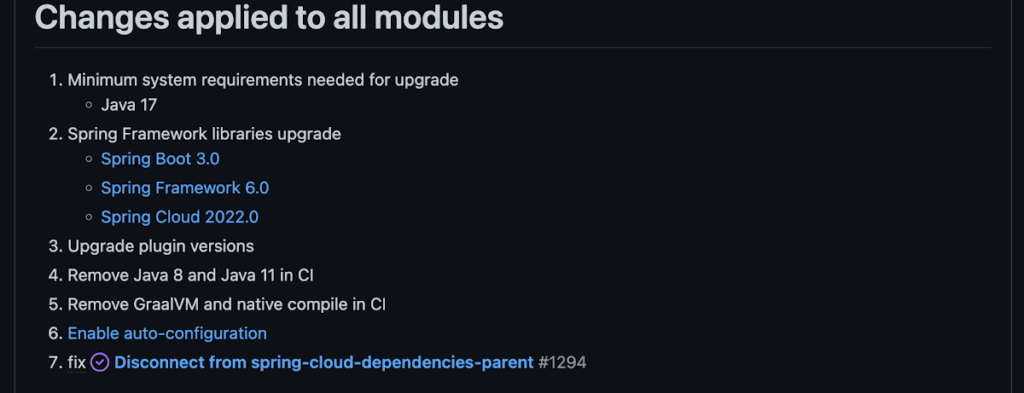
Another notable feature of this release is the addition of starter artifacts – Spring Boot starters for Google Cloud – that provide dependencies and auto-configurations for 80+ Google Client libraries. Just as the name suggests, these starters can serve as helpful starting points when working with a new client library. For now, they’re in preview.
These starters are not included in the BOM by default and need to be added as a dependency to your project before they can be used. For example, if you wanted to get started with Cloud Text-to-Speech, you would include the following:
<dependency>
    <groupId>com.google.cloud</groupId>
    <artifactId>google-cloud-texttospeech-spring-starter</artifactId>
    <version>4.0.0-preview</version>
  </dependency>
The upgrade process
We prepared a migration guide to help answer any questions involved with moving from 3.x to 4.x. Let’s follow those instructions to migrate Bank of Anthos.
We’ll start by cloning and building the application before the upgrade, according to the quickstart and development guide:
PROJECT_ID=<YOUR-PROJECT-ID>
gcloud services enable container --project ${PROJECT_ID}

git clone https://github.com/GoogleCloudPlatform/bank-of-anthos.git
cd bank-of-anthos/

gcloud services enable container.googleapis.com monitoring.googleapis.com \
  --project ${PROJECT_ID}

REGION=us-central1
gcloud container clusters create-auto bank-of-anthos \
  --project=${PROJECT_ID} --region=${REGION}

gcloud container clusters get-credentials bank-of-anthos \
  --project=${PROJECT_ID} --region=${REGION}

skaffold run --default-repo=gcr.io/${PROJECT_ID}/bank-of-anthos
At the end of this, you should see a “deployment stabilized” message:
Deployments stabilized in 9.657 secondsWith the environment set up for development, we’re ready to move on to the actual migration. The migration is already complete at time of writing, but here’s the full list of changes made:
- We began by checking the current Java, Spring Boot and Spring Cloud GCP versions.
- Our Java version is okay, but the other two are out of date, and will need to be updated.
We can also add the Spring Cloud GCP BOM to manage our versions going forward while we’re here.
- Our Java version is okay, but the other two are out of date, and will need to be updated.
- Then, in no particular order, we can make the following code changes:
- Remove the explicit type declarations from our ResponseEntity instantiations.
- Replace all javax.* imports with Jakarta.* counterparts, since Spring 3.0 makes use of Jakarta EE 9.0
With those changes in place, the app is upgraded and ready to re-deploy!
Live example
For a finished example of this migration, check out the Bank of Anthos repository on Github. It’s an excellent sample application that showcases a polyglot Java & Python app, served on Kubernetes and Google Cloud. All CI/CD and configurations are open source, so it may be instructive as you approach this migration.
Thanks for reading, and feel free to provide comments or feedback on Twitter, or in the issues section of the repository.
Conquering Hybrid API Management: Building The Perfect Team and Platform

2008
Of your peers have already read this article.
5:00 Minutes
The most insightful time you'll spend today!
Introduction
In our discussions with technology leaders from around the world for – The Digital Crunch Time: 2022 State of APIs and Applications – two themes emerged
#1 Cloud — and hybrid cloud specifically — is becoming a driving factor of success with 59% of respondents saying they were looking to increase their hybrid cloud adoption within the next 12 months.
#2 82% of organizations with a mature API strategy and higher API adoption reported increased efficiency, collaboration, and agility.
It’s clear that hybrid cloud – usually a combination of on-premise infrastructure (or private cloud) and a public cloud computing environment (like Google Cloud) – and APIs are becoming popular keys to success. The challenge now becomes – how to structure your teams and architect your platform to manage APIs at scale in hybrid environments?
In this two-part series, we’ll look at how successful organizations are managing APIs on a large scale across hybrid environments using Apigee. In this post we’ll look at how to structure the right team and set up the platform to help you thrive. In part 2 of this series, we will explore how to operate the platform with optimum clusters, scaling, and automation.
Why is it difficult to manage APIs at scale in hybrid environments?
As your business grows, it makes sense that you will need to scale and build more APIs to keep pace. This can mean thousands of APIs with tens of thousands of transactions per second. And these APIs are often operated across completely different business units with many development teams. Like with any large scale operation, building a central governance across these hundreds of APIs is extremely challenging.
Operating APIs in a hybrid environment offers a number of benefits — less latency, compliance with regulations etc., — but to get the most out of them, you need a clinical and pragmatic approach to solving the two challenges outlined below.
#1 How to structure your API teams?
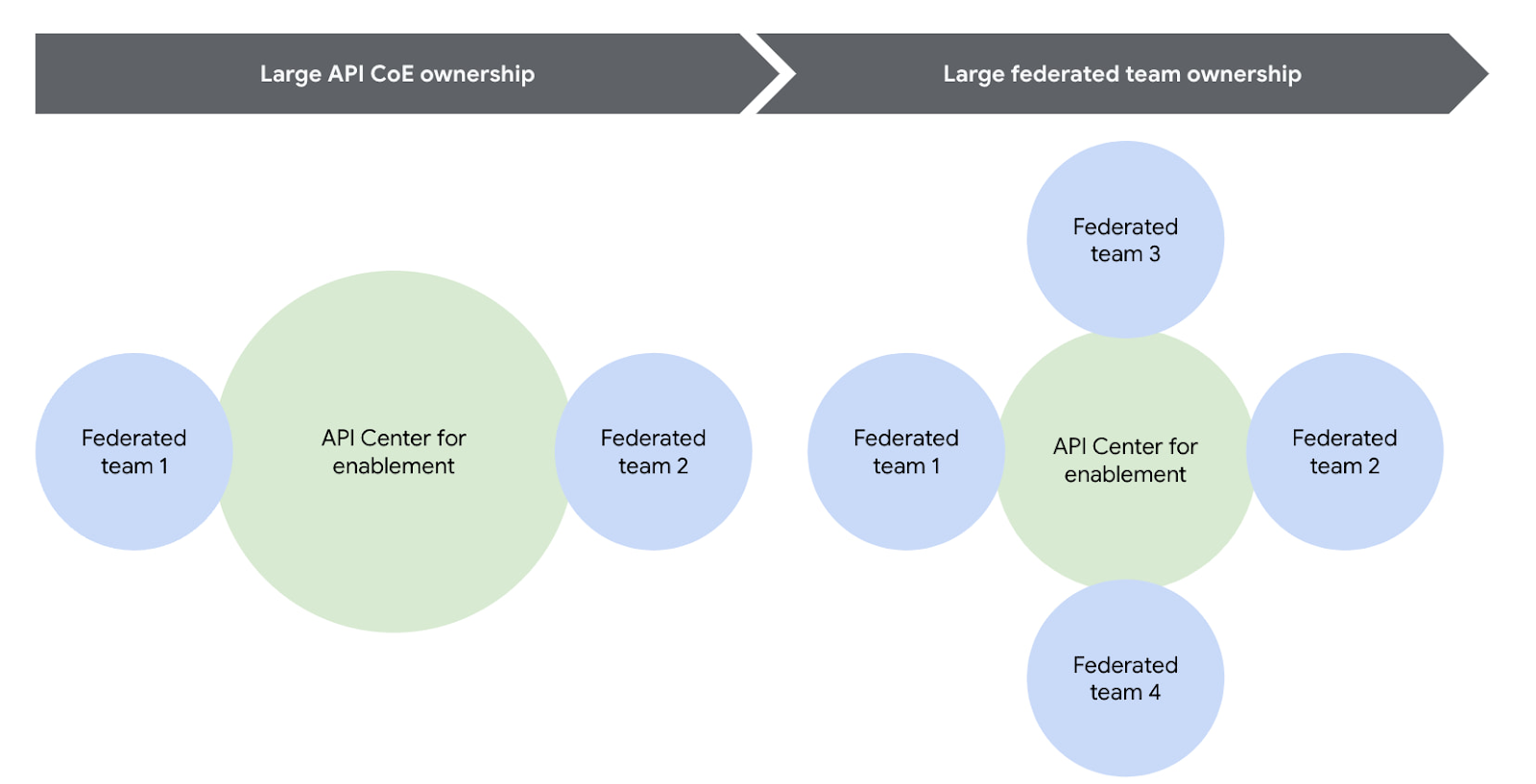
One of the most successful patterns when structuring your API teams is a Center for Enablement team. This team is made up of many federated API producer teams throughout the enterprise with one central team of deep subject matter experts. This central team builds out the guardrails for the API program, develops reusable content, helps automate things like the CI/CD pipeline, and delivers best practices.
Note that the level of implementation handled by the centralized team may vary. For example, they may have a full CI/CD pipeline to maintain, or they may simply provide templates for the federated dev teams to build their own pipeline. However implementation is coordinated, having this structure ensures a consistent API model with appropriate governance and security in place across the enterprise.
Another successful strategy is to reduce the size or redefine the role of the central teams over time. For example, one of our customers recently adopted a model where their largest business units are fully responsible for operating their own infrastructure using a GitOps model. In this case, the centralized team created the automation for installing and upgrading Apigee hybrid, but the business units themselves operated their own copy of the platform, allowing them complete autonomy. In this way, gradually increasing the autonomy for the federated teams will help avoid delivery bottlenecks while ensuring consistent governance.
You can visualize this change over time pretty easily using the following diagram.
#2 How to architect your platform?
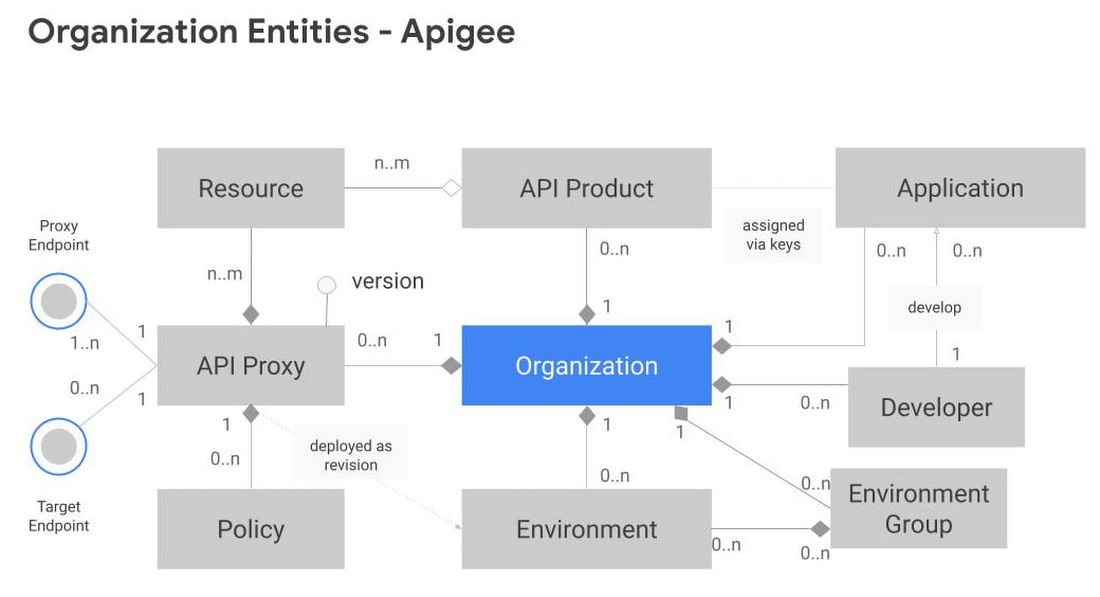
Another challenge is designing your Apigee organizations (top-level container that contains all your API proxies and related resources) and environments (software environment for creating and deploying API proxies). To tackle this, you first need to understand the relationship between different entities within an Apigee organization. Apigee organization is the top level entity – nothing shared between Apigee organizations. Using an organization in Apigee, customers can segregate resources and manage access to these resources based on their own requirements. In practice, this means that each Apigee organization has its own apps, API keys, developers, proxies, and so on. The diagram below provides a visual representation of how different entities in an Apigee organization interact with each other.
Another key factor to consider is the technical limits of the platform – designing around these limits leads to higher platform performance and stability.
In the design phase, it is vital to articulate fundamental requirements of your architecture and agree on these baseline principles with all the stakeholders involved. Some of these fundamental questions include:
- How many regions need to host runtimes?
- Host runtime instances for organizations that handle production traffic in at least 2 regions to meet aggressive uptime SLAs. During upgrades, ensure only one of these regions upgrades at a time.
- What are the steps in your Software Development Lifecycle (SDLC) and how does Apigee fit into it?
- Use Apigee organizations as the SDLC perimeter — such as a dev organization and a test organization — to give yourself the capacity for a large number of proxies. It is also common that the dev organization in this model has relatively permissive access for developers, allowing them to work more efficiently.
- What level of access or separation do you need between business units or development teams?
- Create separation between different teams by leveraging environments with conditional identity and access management to restrict access as necessary
- If your team is very large and you plan to have multiple organizations, you may want to divide the operational ownership for these different Apigee organizations among different teams in your enterprise while keeping them operating under the centralized team.
- In such a shared responsibility model, the largest consumers of the system stand up and operate their own instances. Teams with many APIs or distinct operational needs can use the automation from the central team to stand up and operate their own Apigee hybrid clusters. This reduces the burden on the centralized team while allowing business units to be self-sufficient and ensuring that the clusters are optimized to meet that team’s needs.
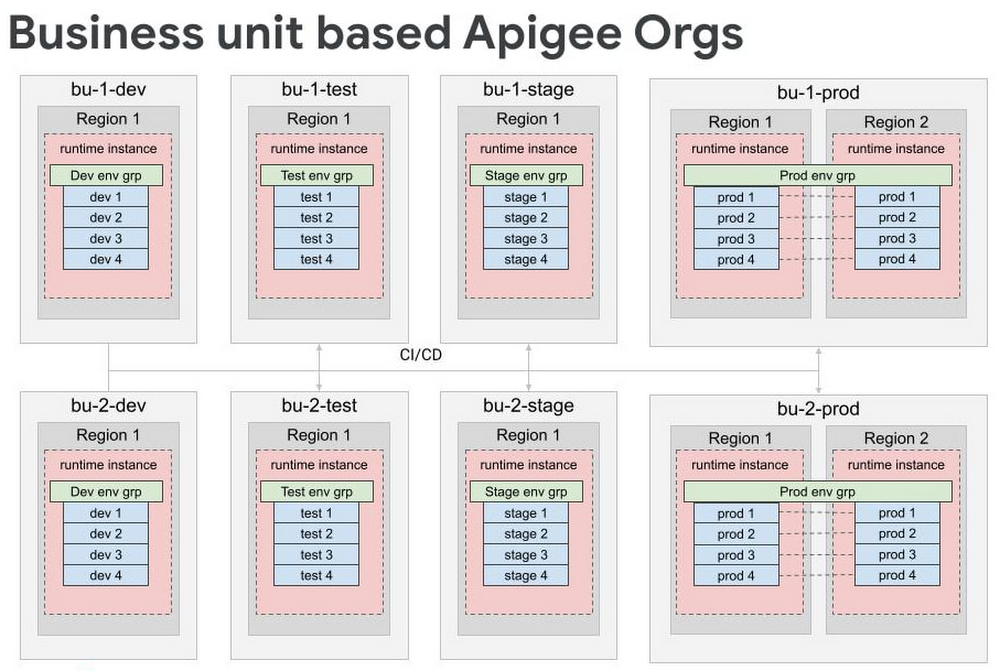
- For very large scale programs where additional separation is necessary, consider creating separate organizations for each business unit, each of which has the full complement of SDLC orgs. Some customers have this level of scale, and often it makes logical sense to divide up into different Apigee orgs because it’s rare that 5000 APIs are all related and used together.
By working off these baseline recommendations, you will come up with your own logical design of Apigee organizations and environments. Using Apigee organizations to represent your SDLC with business units — or functional areas or some other dividing mechanism — is a good way to design different environments.
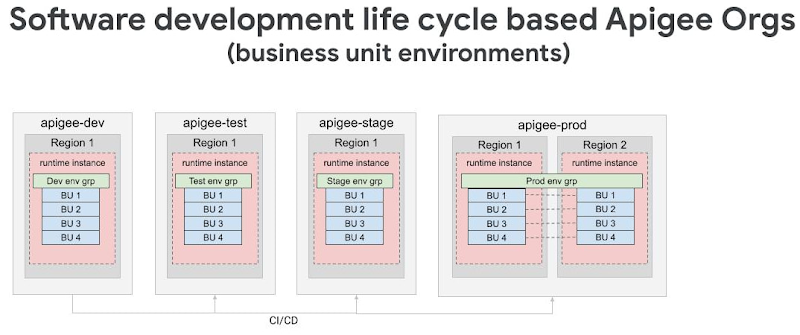
For large scale deployments — involving thousands of proxies — we recommend dividing organizations into different logical business units while still following the SDLC model. In many cases, only the largest business units will need their own organizations, and it is possible to have a shared organization that contains multiple business units.
Conclusion
Like with any large scale IT project, there isn’t one“correct” way to operate APIs in a hybrid cloud environment. Finding the right approach for your enterprise starts with knowing the organizational requirements and tailoring Apigee for your use case. In the next installment of this series, we will explore how to operate Apigee with the optimal resources (clusters, automation, and monitoring etc.) for a large scale hybrid API program.
Check out our documentation to learn more or start using Apigee hybrid.
Cadbury Worldwide Hide: How the Chocolatier Made the Hiding Eggs Ritual Possible with Google Maps

3710
Of your peers have already read this article.
3:00 Minutes
The most insightful time you'll spend today!
Editor’s note: Today’s post is a Q&A with the VCCP London and VCCP CX team. VCCP London conceived of and built the Cadbury Worldwide Hide platform using Google Maps Platform as a way to get consumers ‘hiding’ eggs and engaging with loved ones during a time when they could not be physically together.
How did the team come up with the idea for the ‘Cadbury Worldwide Hide’?
VCCP London is the agency of record for Cadbury both locally in the UK and centrally with the Global team. So, when Cadbury briefed us in May for their Easter 2021 campaign, they wanted us to come up with a creative way to encourage people to hide eggs and get consumers excited about interacting with loved ones. At the time, the pandemic was constantly changing, and it was looking like we were going to continue to be in lock-down for the foreseeable future, into the Easter season.
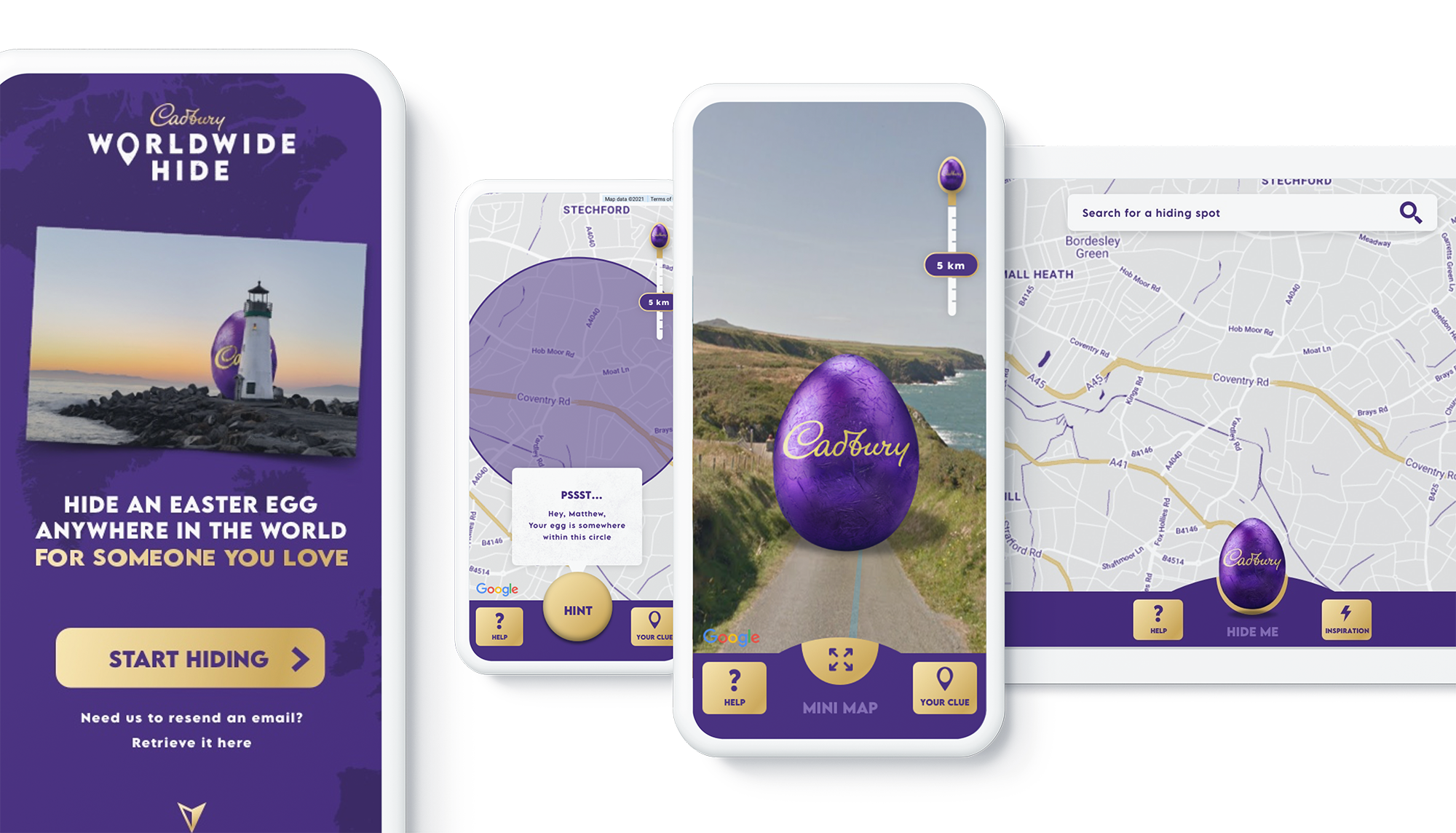
We then came up with an idea: wouldn’t it be really cool if somehow you could still hide a real Easter egg for someone you love, but do it virtually. And then once it’s found, that real egg could be delivered to the seeker’s home. With the use of some creativity and technology, we brought this idea to life. The experience we developed allowed our users to purchase a real Cadbury Easter Egg, hide it virtually on the map in a special location, then write the recipient a personalized clue for him to find the egg. Once the seeker found the egg, they would receive a real, physical egg the hider bought for her delivered to her home.
We wanted it to be a truly meaningful one-to-one connection, to bring back some lovely memories for people, and to allow a real chocolate egg to be hidden for a loved one no matter where they were.

Why was this important to Cadbury?
Generosity is at the heart of Cadbury’s brand, and Easter is our opportunity to show that ‘there’s a glass and a half in everyone’. As we enter the second year of our campaign ‘Show you care, hide it’, we are flipping the Easter ritual on its head and showing that the generous act is in hiding an egg for someone you love.
Physical connection has been restricted by the global pandemic and that’s why this year’s Easter campaign sets out to connect people across the UK through the power of generosity.
Tell us a little bit about the technical side of the project. Which Google Maps Platform products did you use to create the user experience?
The Cadbury Worldwide Hide launched across 4 markets (UK, IE, AU, NZ) simultaneously. Integration with regional e-commerce and CRM partners brought the activation into the real world with chocolate eggs being delivered throughout the campaign as seekers found them.
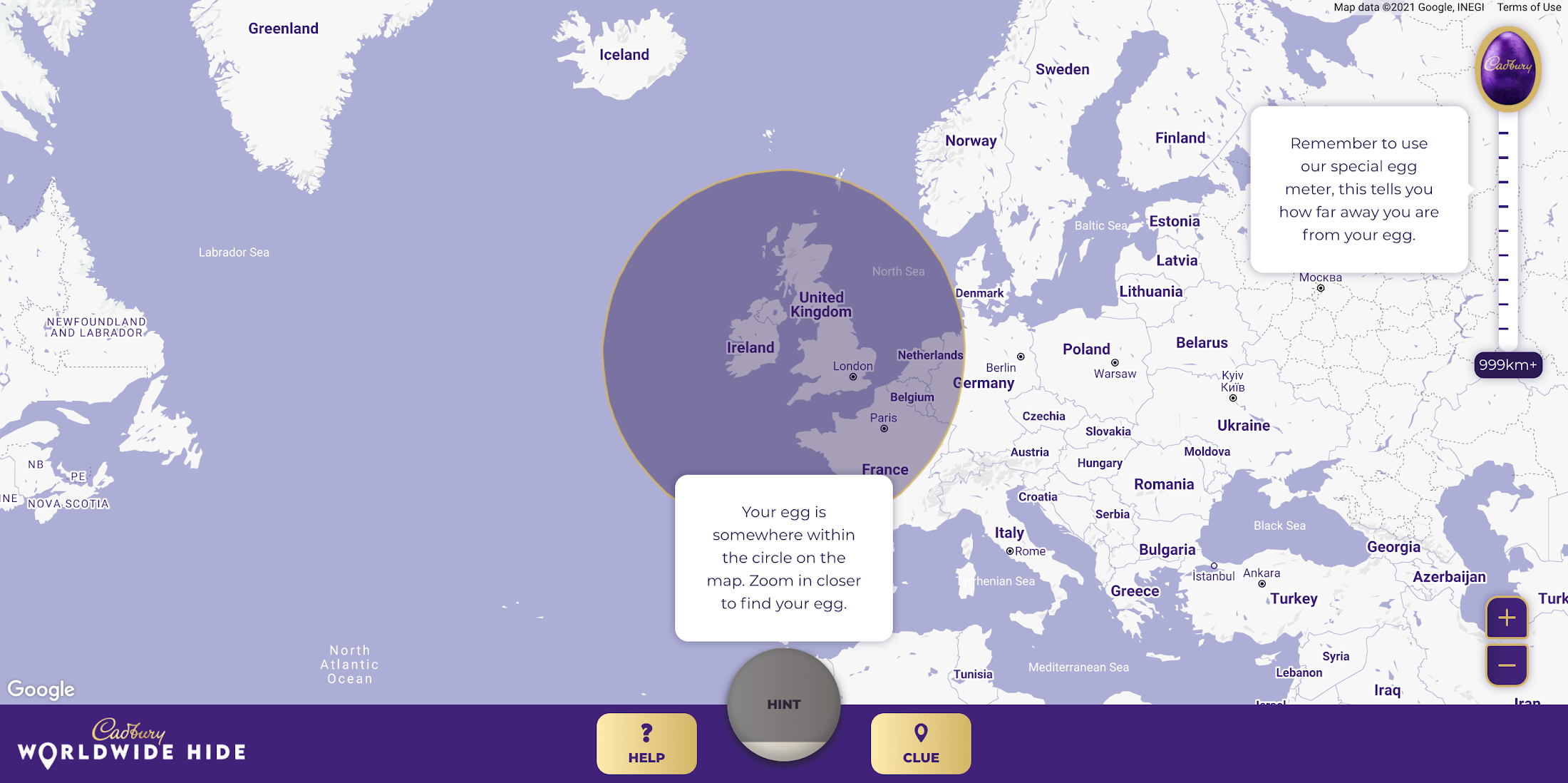
Providing an engaging map experience to our users was key to the execution and by leveraging the Google Maps interface consumers already use on a daily basis, we were able to focus on our core campaign message. We built the platform using both the Maps Javascript API to render the 2D maps and the Street View API, which allowed users to hide their egg anywhere in the world for their loved one to find. We also used Place Autocomplete powered search allowing users to search for their favorite location while contextual hints kept hiders on track. Seekers were aided with a distance meter and hints system if they got stuck. Our Design and Engineering team used Google Maps Platform Cloud-based maps styling to customize the map.
To get the campaign to as many people as possible we prioritized accessibility throughout the site, from screen-reader support and relevant tab indexes through to full keyboard shortcuts within the map experience – allowing users to hide (or find!) their egg without ever using a mouse. Real user testing was done throughout the UX, design and development process to ensure best practices were being followed.

How long did it take the VCCP team to build-out the solution?
Discovery to the roll-out of the solution took about 7 months. Our Design and Engineering team started with a 4-week discovery phase in September 2020 where we developed a service blueprint that set the foundations of the project. By visualizing the entire process of a service from start to finish, listing all the activities that happened at each stage, and the different roles, actions, processes and systems involved, the blueprint allowed all stakeholders to align on the solution.
We started iterative cycles of development in November 2020, beginning with UX (prototype for user testing), UI (look and feel and customization of Google Maps using Cloud-based Maps styling), and then kicked off front end and back end development in December. We launched the Cadbury Worldwide Hide platform in early March 2021—just in time for millions of users around the world to enjoy ahead of Easter.
Did you experience any challenges as you developed the experience?
The biggest challenge was actually around adapting to change in plans in response to the desire to launch the platform across more markets than originally intended. During the development phase, we rapidly scaled up to develop the platform for Ireland, Australia and New Zealand in addition to the UK within the same timeframe.
What results were you able to achieve and how did you measure the success of the project?
One week before Easter Sunday, we had sold out of Cadbury Worldwide Hide chocolate eggs. There were over 2.26 million site visits with an average time spent on the platform of almost five minutes. Over 809k virtual eggs were hidden in total and 14.5k real Cadbury Easter eggs bought. The Cadbury Worldwide Hide platform was the number one Mondelēz International website globally, and a couple even used the platform for a marriage proposal!

Would you recommend this type of campaign and user engagement to other B-to-C brands, if so, why?
Direct to consumer capabilities are increasingly important for brands, particularly in the FMCG (Fast Moving Consumer Goods) space. Local lockdowns and restrictions on physical retail have accelerated our adoption of ecommerce. Not only have brands had to adapt quickly, but consumers are beginning to expect direct-to-consumer capabilities from their favorite brands. Cadbury recognized this behavior shift early. What the Cadbury Worldwide Hide did well was to innovate beyond the traditional DTC and ecommerce experience by gamifying the platform and enabling moments of human connection at a time when physical connection was impossible.
What advice would you give to other agencies or brands thinking about creating user experiences with Google Maps Platform?
We learned a great deal taking on this project. Here are just a few highlights:
- Assume anything is possible.
- Our ‘Mobile First’ approach allowed consumers to access the platform from any device with consistent, engaging brand experience.
- Think big and beyond the traditional use of Google Maps and treat it as a foundation platform to build upon.
- Prototype and test early to validate your hypotheses. We created a technical proof of concept which enabled us to test using ‘real’ Google Maps and real people early in our design process.
- Don’t assume everything is accessible to everyone. You may need to build upon the ‘out the box’ functionality to ensure as many people as possible can use your solution.
For more information on Google Maps Platform, visit our website.
Maximizing Reliability, Minimizing Costs: Right-Sizing Kubernetes Workloads

939
Of your peers have already read this article.
3:30 Minutes
The most insightful time you'll spend today!
Do you know how much money you could save by adjusting workload requests to better represent their actual usage? If you’re not rightsizing your workloads, you might be overpaying for resources that your workloads aren’t even using or worse, putting your workloads at risk for reliability issues due to under provisioning.
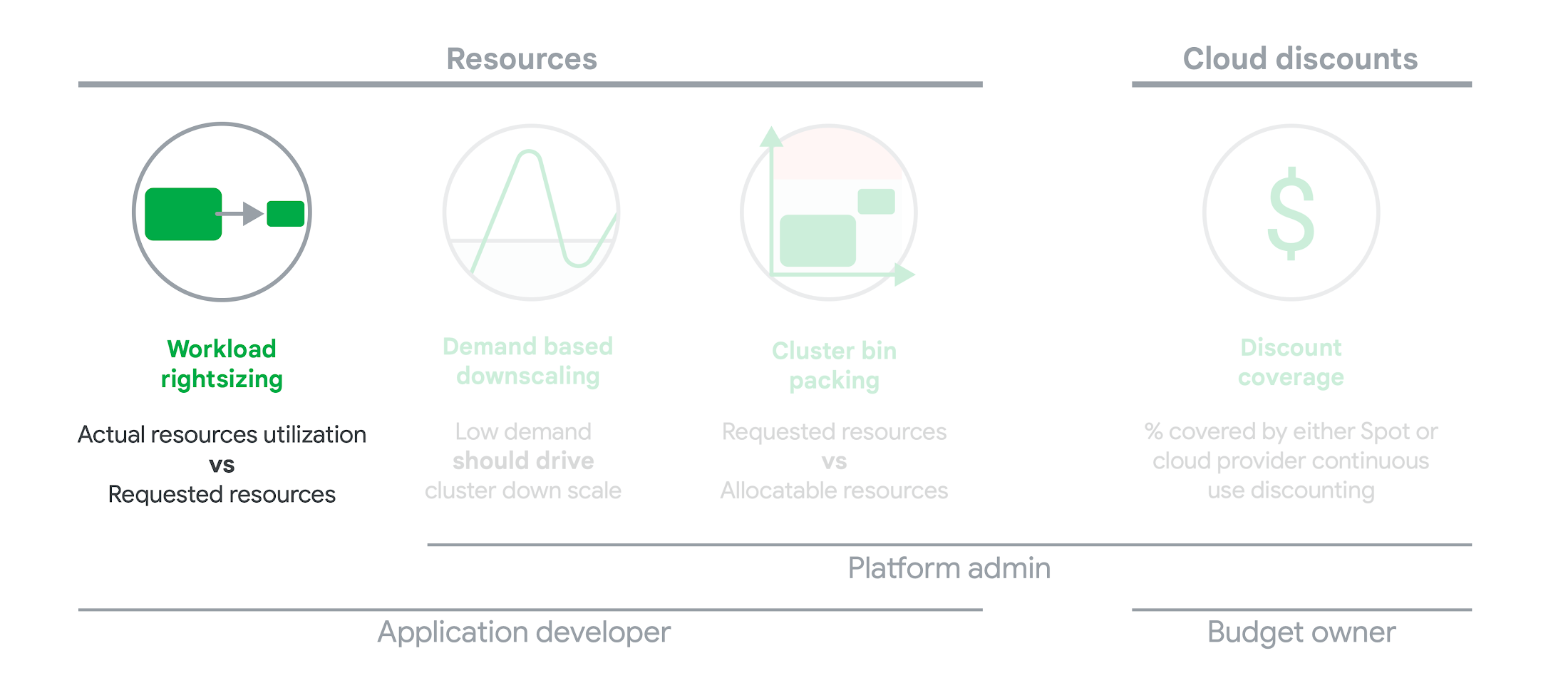
As we’ve previously discussed, setting the resources is the most important thing you can do to increase the reliability of your Kubernetes workloads. In this blog we will help you with the second key finding from the State of Kubernetes Cost Optimization report!
The research … found that workload rightsizing has the biggest opportunity to reduce resource waste.
State of Kubernetes Cost Optimization report
According to our research findings, workload rightsizing is the most important golden signal. Workload rightsizing measures the capacity of developers to properly use the CPU and memory they have requested for their applications.
Rightsizing is challenging
It can be quite difficult to predict the resource needs of your applications, which historically has not been a concern for developers in traditional data center environments.In traditional data center environments, resources were typically over-provisioned upfront to ensure capacity for peak demand and future growth, so developers didn’t need to focus on accurately predicting resource needs as they were covered by the excess capacity, whereas in cloud environments, resources are consumed on-demand. Finding a balance between efficiency and reliability can often feel like a delicate balancing act.
Tools for workload rightsizing
There are native tools in Cloud Monitoring and the GKE UI you can use to rightsize your workloads running on GKE.
Rightsizing in the console
The Workload Cost Optimization tab helps you identify workloads that can be optimized by displaying the resources used versus what’s requested.
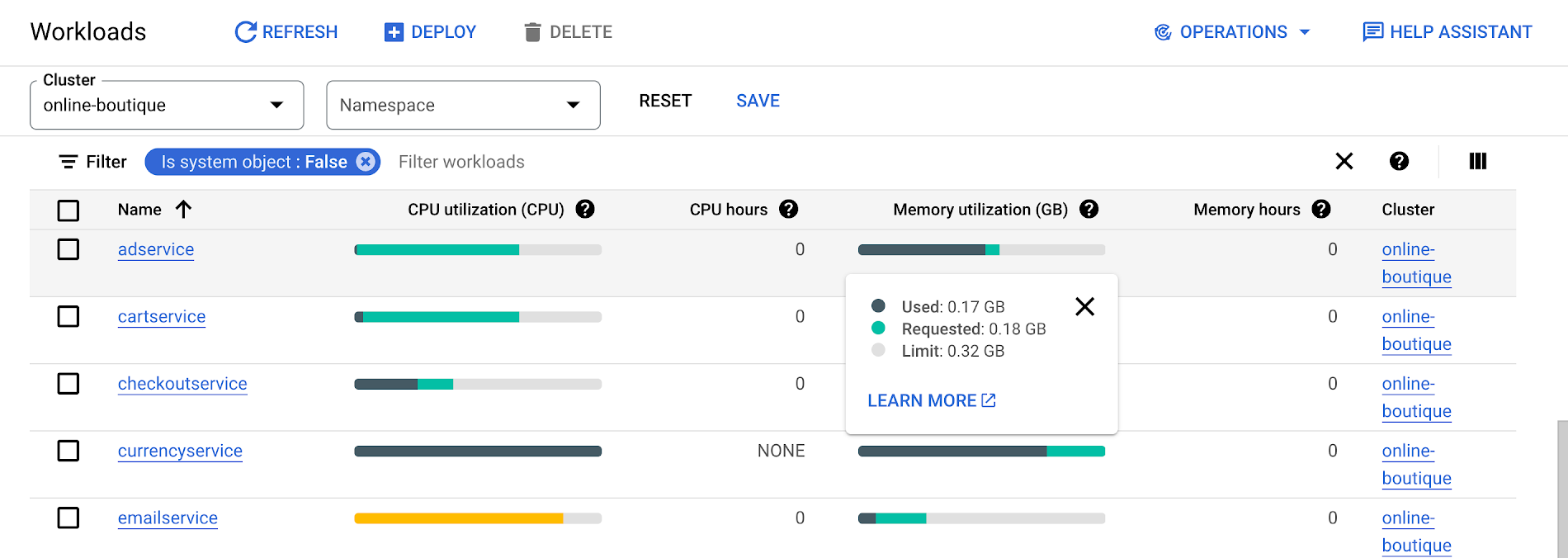
To take advantage of potential cost savings, you can drill into clusters to see workload level resource recommendations.
To view workload resource recommendations for Deployment objects only:
- In the GKE Cost Optimization.
- Select a cluster.
- Click Workloads > Cost Optimization.
- Select one Deployment workloads
- In the workload’s detail page, select Actions > Scale > Edit Resource Requests
Rightsizing with Cloud Monitoring
Cloud Monitoring provides built-in VPA scale recommendations metrics that you can use to monitor the performance of your workloads and to identify opportunities to rightsize them without the need to create VPA objects.
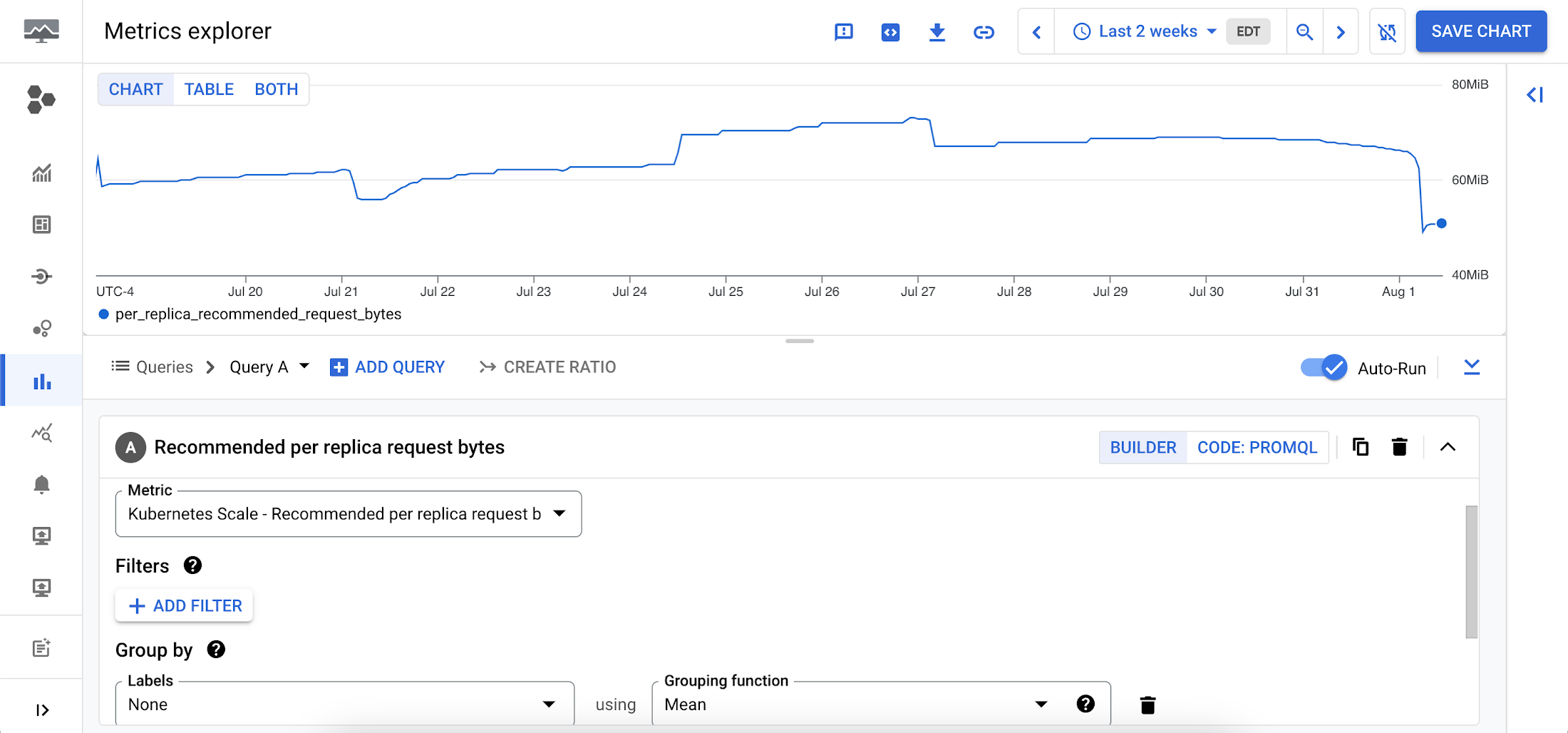
To view these metrics:
1. Go to the Cloud Monitoring > Metric Explore console.
2. In the Metric dropdown, select the metrics:
- Memory recommendations:
Kubernetes Scale > autoscaler > Recommended per replica request bytes - CPU recommendations:
Kubernetes Scale > autoscaler > Recommended per replica request cores
Rightsizing at scale
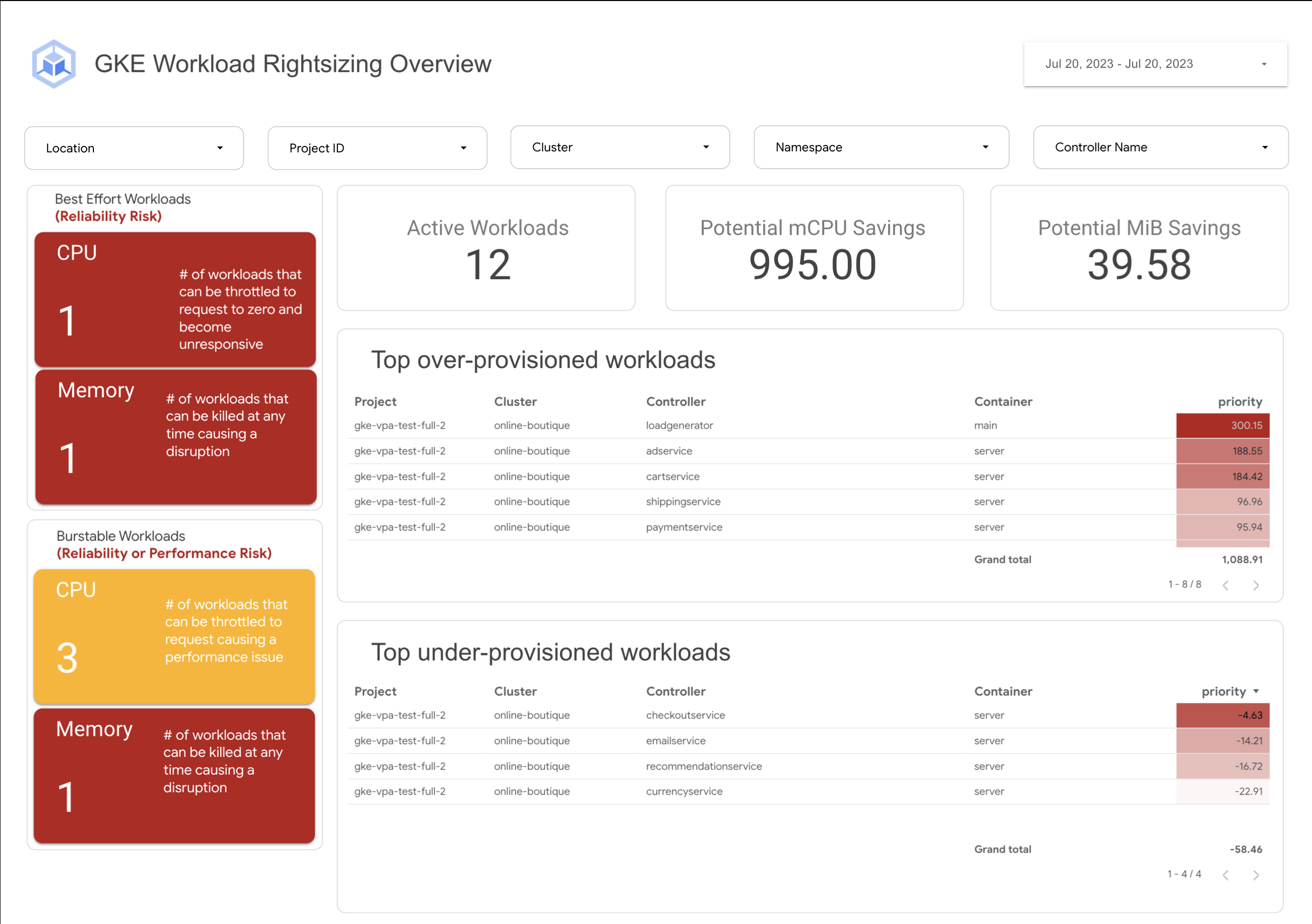
If you’re interested in viewing recommendations across clusters and projects, We’ve created a guide that you can use today to help you right-size your GKE workloads at scale. This solution leverages your actual cluster’s metric data and built-in workload recommendations provided by Cloud Monitoring. You can determine the resource requirements for all your workloads without having to create additional VPA autoscaler objects in each of your clusters. The guide walks you through deploying the solution.
In conclusion
In conclusion, rightsizing your workloads is essential for both cost savings and reliability. By following the tips in this blog, you can ensure that your workloads are using the right amount of resources, which will save you money and increase your workload’s reliability.
Links to the solution presented in this blog and other useful tools to help you optimize your cluster are listed below:
- The Right-sizing workloads at scale solution guide
- Setting resource requests: the key to Kubernetes cost optimization
- The simple kube-requests-checker tool
- An interactive tutorial to get set up in GKE with a set of sample workloads
Download the State of Kubernetes Optimization report, review the key findings, and stay tuned for our next blog post.

5623
Of your peers have already downloaded this article
1:30 Minutes
The most insightful time you'll spend today!
Even before the current crisis, IT organizations saw pressure to be more agile and innovative. Customer demographics and expectations are changing. Competition is emerging faster and from unexpected sources. Business models are being reinvented. Digital technology was at the heart of many of these challenges, and its adoption was key to every company’s response.
As a result, CIOs face a series of urgent challenges:
- How can they raise system visibility and system control over operations that are more dispersed and changing than ever?
- How can they cut costs, yet create a more agile and responsive IT system?
- How can they do more with older data, even as they understand better the data from a market that is changing every week?
- How can they help people work faster, with a minimum of change management, or set the stage for growth, while preserving capital?
In many cases the answer is a step-by-step deployment of cloud computing technology, tailored to meet the most pressing needs first.
More Relevant Stories for Your Company

Woolaroo App and Vision AI are Helping Users Explore Native Languages
One of the most vibrant elements of culture is the use of native languages and the time-honored tradition of storytelling. Anthropologists and linguists have been vocal on the role that language plays in the preservation of culture and how it contributes to the appreciation of heritage. Unfortunately, of the more

Project to Platform: Financing Digital Transformation
Financing digital transformation poses a significant problem for many enterprises we work with. It’s not because the C-suite doesn’t support it: the need to become more agile, digital, and data-driven is nearly ubiquitous in executive public pronouncements. But most large organizations look at IT investment in a way that’s ineffective

MerPay Platform Scales its Reach to Millions of Users using Cloud Spanner
Editor’s note: To launch a new mobile payment platform, Mercari needed a database solution strong on scalability, availability, and performance. Here’s how Cloud Spanner delivered those results. E-commerce companies need to connect customers to their services securely, reliably, with zero downtime. When Mercari, Inc. launched a new mobile payment platform, we chose Cloud

Apigee: Unlock Innovation by Managing APIs for SAP Workloads
Businesses migrating their SAP environments to Google Cloud do so for a number of reasons. Most cite the agility, scalability and security advantages of migrating SAP workloads to Google Cloud; many also focus on improved uptime and performance. At some point, most businesses also want to explore the idea that
