





How to Get Your Cloud Migration Journey Started Off on the Right Foot

3600
Of your peers have already read this article.
2:30 Minutes
The most insightful time you'll spend today!
When moving to the cloud, many organizations concentrate their focus on the change in technology, and overlook an area just as complex: cultural change.
At Google, we’ve spent years nurturing our culture and workforce to best operate in the cloud, and the Google Cloud Professional Services team leverages the lessons we’ve learned for the benefit of enterprise customers embarking on their own cloud journeys.
While it can be tempting to believe in a universally ‘correct’ strategy for change management, there is no one-size-fits-all answer. Every organization will have its own unique considerations. But with that said, there are some core strategies we’ve found to be relevant and useful across a broad range of businesses.
1. Define your purpose for moving to Cloud
While pockets of cloud use and experimentation can evolve independently and in parallel across an organization, it’s important to make some deliberate decisions before starting a larger migration. At this stage, we recommend having a detailed answer to two key questions to ensure a successful cloud migration:
- Where do you want to go? (Or “What’s your cloud vision?”)
- How do you plan to get there?
Start by having a conversation with leaders and those who will be key to the journey about how far you want to push your cloud vision. This alignment ensures everyone is on the same page—and will provide greater direction, allowing more deliberate action.
2. Find the change path which is right for you
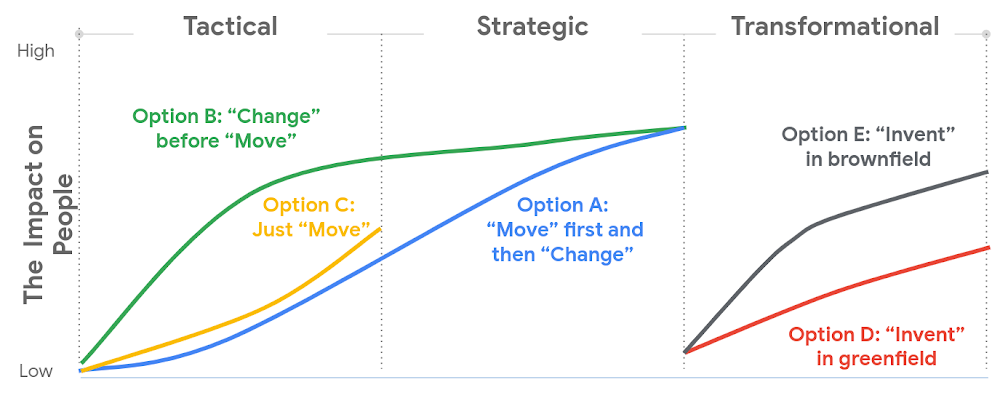
Whether a ‘lift and shift’ approach to the cloud is right for you, or a more transformative approach with a lot of re-architecting—the most important thing is to find the flavor of change which is appropriate to your context and level of ambition.This will both shape your key migration activities, but also the level of impact to be managed within your organization.
There are many ways to embark on a change journey for cloud migration (which one can find in the chart below). It is important to deeply understand the needs of your business and its people and determine what strategy makes the most sense.
3. Learn from best practices
Based on the lessons we’ve learned along our own journey, and the work we’ve done with customers, there are a number of recommendations we can share that can make a cloud migration more successful. We go into these in more detail in our new whitepaper, but below you can find the ones we think are most relevant:
- Share the vision—and measure, measure, measure. Once you’ve crystallised your cloud vision with leadership and key stakeholders, share that vision widely. Set success goals and communicate them to hold yourself accountable.
- Be clear about the capabilities you will need in the future—and where you’ll get them. For example, if your vision is to become a cloud-first, data and AI-led organization, ensuring you have the right data science skills and machine learning capabilities in your organization to achieve that vision becomes a critical step—be they home-grown or bought-in.
- Find the right balance between capabilities that should be under central control, and capabilities that should be decentralized, or agile. For example, should machine learning be something that sits centrally, or should it be spread across your organization? For every business, the solution will be a little different, and there’s no “one true answer.” There’ll be lots of different opinions about this, so the sooner the conversation starts, the better.
- Start thinking about the needed tech and non-tech skills now, and how you’ll fill the gaps. Building the tech skills will take time, and not everyone will feel comfortable with the future picture of collaboration, innovation, and agility.
To help businesses navigate their own cloud journeys, Google Cloud Professional Services has released a new whitepaper that can help guide organizations. “Managing Change in the Cloud” is closely aligned with the Google Cloud Adoption Framework and is a practical guide for organizations looking to maintain momentum in their cloud adoption. You can download the whitepaper here.
Developers and Practitioners’ Guide for Moving On-prem Data Warehouse to BigQuery
5413
Of your peers have already read this article.
3:00 Minutes
The most insightful time you'll spend today!
Data teams across companies have continuous challenges of consolidating data, processing it and making it useful. They deal with challenges such as a mixture of multiple ETL jobs, long ETL windows capacity-bound on-premise data warehouses and ever-increasing demands from users. They also need to make sure that the downstream requirements of ML, reporting and analytics are met with the data processing. And, they need to plan for the future – how will more data be handled and how new downstream teams will be supported?
Checkout how Independence Health Group is addressing their enterprise data warehouse (EDW) migration in the video above.
Why BigQuery?
On-premises data warehouses become difficult to scale so most companies’ biggest goal is to create a forward looking system to store data that is secure, scalable and cost effective. GCP’s BigQuery is serverless, highly scalable, and cost-effective and is a great technical fit for the EDW use-case. It’s a multicloud data warehouse designed for business agility. But, migrating a large, highly-integrated data warehouse from on-premise to BigQuery is not a flip-a-switch kinda migration. You need to make sure your downstream systems dont break due to inconsistent results in migrating datasets, both during and after the migration. So..you have to plan your migration.
Data warehouse migration strategy
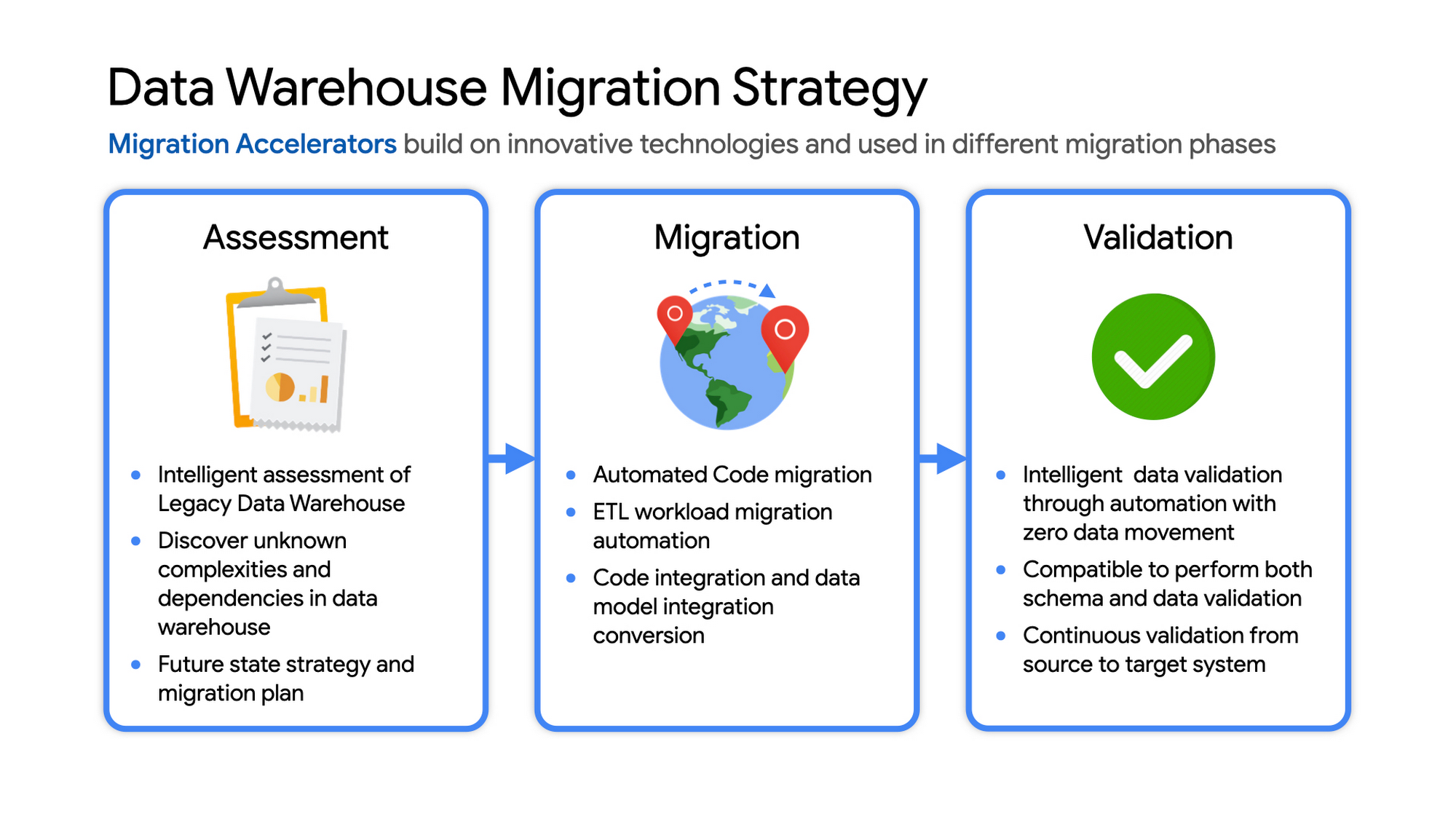
The following steps are typical for a successful migration:
- Assessment and planning: Find the scope in advance to plan the migration of the legacy data warehouse
- Identify data groupings, application access patterns and capacities
- Use tools and utilities to identify unknown complexities and dependencies
- Identify required application conversions and testing
- Determine initial processing and storage capacity for budget forecasting and capacity planning
- Consider growth and changes anticipated during the migration period
- Develop a future state strategy and vision to guide design
- Migration: Establish GCP foundation and begin migration
- As the cloud foundation is being set up, consider running focused POCs to validate data migration processes and timelines
- Look for automated utilities to help with any required code migration
- Plan to maintain data synchronization between legacy and target EDW during the duration of the migration. This becomes a critical business process to keep the project on schedule.
- Plan to integrate some enterprise tooling to help existing teams span both environments
- Consider current data access patterns among EDW user communities and how they will map to similar controls available in Big Query.
- Key scope includes code integration and data model conversions
- Expect to refine capacity forecasts and refine allocation design. In Big Query there are many options to balance cost and performance to maximize business value. For example, you can use either on-demand or flat-rate slot pricing or a combination of both.
- Validation and testing
- Look for tools to allow automated, intelligent data validation
- Scope must include both schema and data validation
- Ideally solutions will allow continuous validation from source to target system during migration
- Testing complexity and duration will be driven by number and complexity of applications consuming data from the EDW and rate of change of those applications
A key to successful migration is finding Google Cloud partners with experience migrating EDW workloads. For example, our Google Cloud partner Datametica offers services and specialized Migration Accelerators for each of these migration stages to make it more efficient to plan and execute migrations.
Data warehouse migration: Things to consider
- Financial benefits of open source: Target moving to ‘Open Source’ where none of the services have license fees. For example BigQuery uses Standard SQL; Cloud Composer is managed Apache Airflow, Dataflow is based on Apache Beam. Taking these as managed services provides the financial benefits of open source, but avoids the burden of maintaining open source platforms internally.
- Serverless: Move to “serverless” big data services. The majority of the services used in a recommended GCP data architecture scale on demand allowing more cost effective alignment with needs. Using fully managed services lets you focus engineering time on business roadmap priorities, not building and maintaining infrastructure.
- Efficiencies of a Unified platform: Any data warehouse migration involves integration with services that surround the EDW for data ingest and pre-processing and advanced analytics on the data stored in the EDW to maximize business value. A cloud provider like GCP offers a full breadth of integrated and managed ‘big data’ services with built-in machine learning. This can yield significantly reduced long-term TCO by increasing both operational and cost efficiency when compared to EDW-specific point solutions.
- Establishing a solid cloud foundation: From the beginning, take the time to design a secure foundation that will serve the business and technical needs for workloads to follow. Key features include: Scalable Resource Hierarchy, Multi-layer security, multi-tiered network and data center strategy and automation using Infrastructure-as-Code. Also allow time to integrate cloud-based services into existing enterprise systems such as CI/CD pipelines, monitoring, alerting, logging, process scheduling, and service request management.
- Unlimited expansion capacity: Moving to cloud sounds like a major step, but really look at this as adding more data centers accessible to your teams. Of course, these data centers offer many new services that are very difficult to develop in-house and provide nearly unlimited expansion capacity with minimal up-front financial commitment. .
- Patience and interim platforms: Migrating an EDW is typically a long running project. Be ready to design and operate interim platforms for data synchronization, validation and application testing. Consider the impact on up-stream and down-stream systems. It might make sense to migrate and modernize these systems concurrent with the EDW migration since they are probably data sources and sinks and may be facing similar growth challenges. Also be ready to accommodate new business requirements that develop during the migration. Take advantage of the long duration to have existing your operational teams learn new services from the partner leading the deployment so your teams are ready to take over post-migration.
- Experienced partner: An EDW migration can be a major undertaking with challenges and risks during migration, but offers tremendous opportunities to reduce costs, simplify operations and offer dramatically improved capacities to internal and external EDW users. Selecting the right partner reduces the technical and financial risks, and allows you to plan for and possibly start leveraging these long-term benefits early in the migration process.
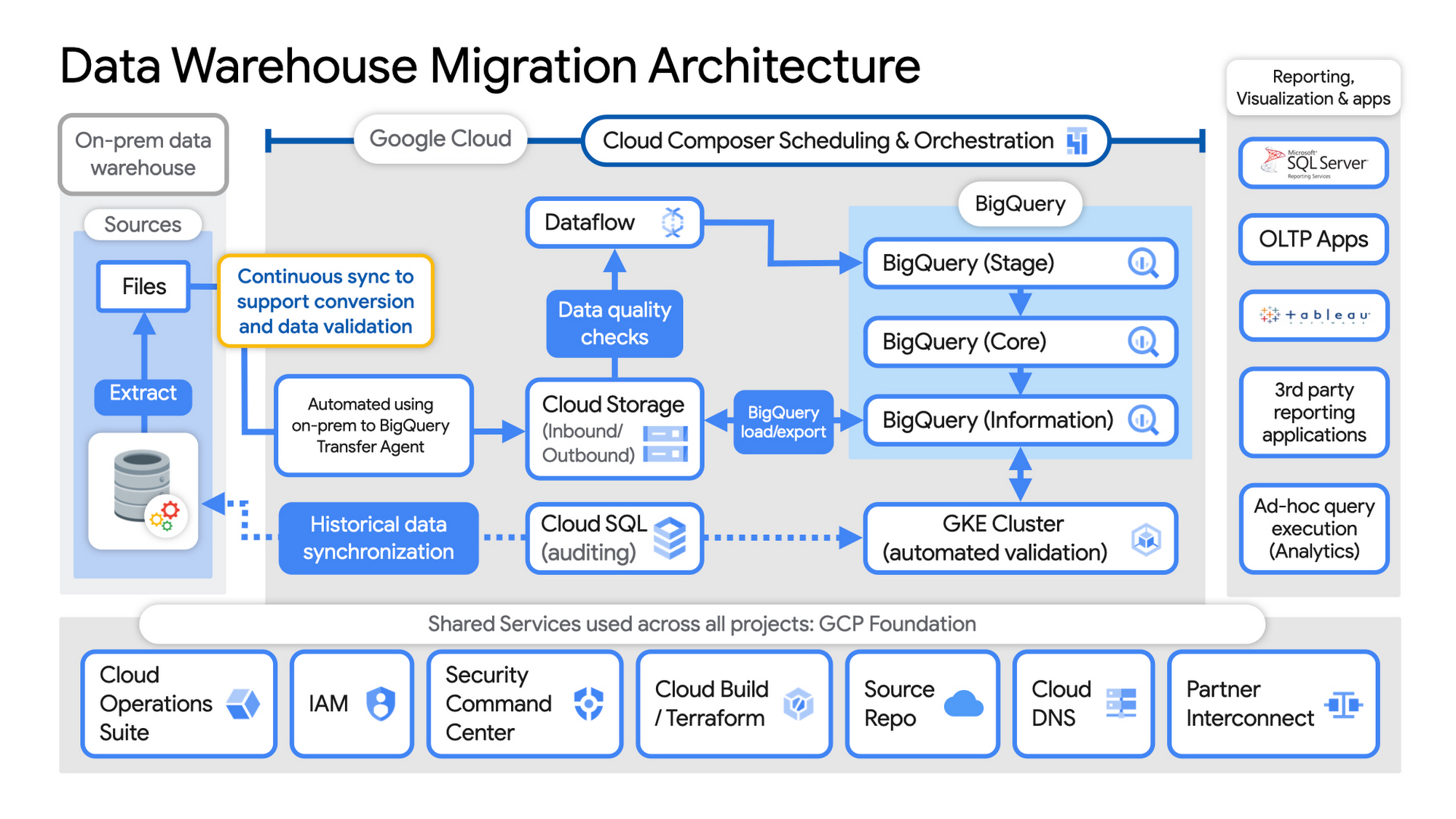
Example Data Warehouse Migration Architecture
- Setup foundational elements. In GCP these include, IAM for authorization and access, cloud resource hierarchy, billing, networking, code pipelines, Infrastructure as Code using Cloud Build with Terraform ( GCP Foundation Toolkit), Cloud DNS and a dedicated/partner Interconnect to connect to the current data centers.
- Activate monitoring and security scanning services before real user data is loaded using Cloud Operations for monitoring and logging and Security Command Center for security monitoring.
- Extract files from on-premise legacy EDW and move to Cloud Storage and establish on-going synchronization using Big Query Transfer services.
- From Cloud Storage, process the data in Dataflow and Load/Export data to BigQuery.
- Validate the export using Datametica’s validation utilities running in a GKE cluster and Cloud SQL for auditing and historical data synchronization as needed. Application teams test against the validated data sets throughout the migration process.
- Orchestrate the entire pipeline using Cloud Composer, integrated with on-prem scheduling services as needed to leverage established processes and keep legacy and new systems in sync.
- Maintain close coordination with teams/services ingesting new data into the EDW and down-streams analytics teams relying on the EDW data for on-going advanced analytics.
- Establish fine-grained access controls to data sets and start making the data in Big Query available to existing reporting, visualization and application consumption tools using BigQuery data connectors for ‘down-stream’ user access and testing.
- Incrementally increase Big Query flat-rate processing capacity to provide the most cost-effective utilization of resources during migration.
To learn more about migrating from on-premises Enterprise Data Warehouses (EDW) to Bigquery and GCP here.
3421
Of your peers have already watched this video.
1:30 Minutes
The most insightful time you'll spend today!
Google Cloud Cortex Framework: Innovate on Cloud with Less Risk, Cost and Complexity!
Google Cloud Cortex Framework is a comprehensive approach to cloud innovation that enables users to accelerate value with less risk, complexity and cost! The Cortex Framework includes a comprehensive tools and know-how to build, design and deploy cloud solutions to address business challenges and achieve desired outcomes. Watch the video to get started with Google Cloud Cortex Framework.
A Pro’s Tip on Choosing the Right Google Cloud Compute Options

5728
Of your peers have already read this article.
2:00 Minutes
The most insightful time you'll spend today!
Where should you run your workload? It depends…Choosing the right infrastructure options to run your application is critical, both for the success of your application and for the team that is managing and developing it. This post breaks down some of the most important factors that you need to consider when deciding where you should run your stuff!
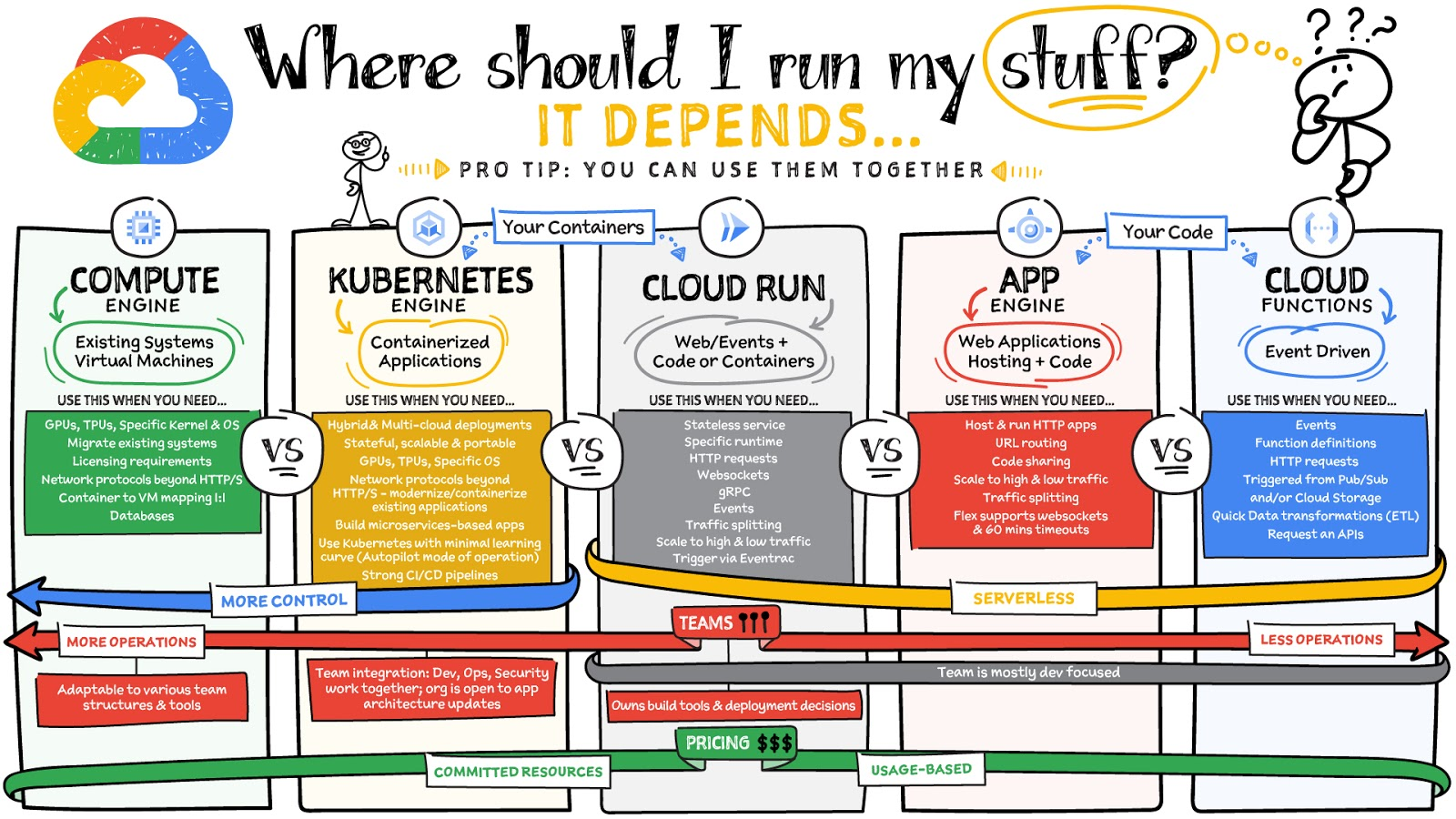
What are these services?
- Compute Engine – Virtual machines. You reserve a configuration of CPU, memory, disk, and GPUs, and decide what OS and additional software to run.
- Kubernetes Engine – Managed Kubernetes clusters. Kubernetes is an open-source system for automating deployment, scaling, and management of containerized applications. You create a cluster and configure which containers to run; Kubernetes keeps them running and manages scaling, updates and connectivity.
- Cloud Run – A fully managed serverless platform that runs individual containers. You give code or a container to Cloud Run, and it hosts and auto scales as needed to respond to web and other events.
- App Engine – A fully managed serverless platform for complete web applications. App Engine handles the networking, application scaling, and database scaling. You write a web application in one of the supported languages, deploy to App Engine, and it handles scaling, updating versions, and so on.
- Cloud Functions – Event-driven serverless functions. You write individual function code and Cloud Functions calls your function when events happen (for example, HTTP, Pub/Sub, and Cloud Storage changes, among others).
What level of abstraction do you need?
- If you need more control over the underlying infrastructure (for example, the operating system, disk images, CPU, RAM, and disk) then it makes sense to use Compute Engine. This is a typical path for legacy application migrations and existing systems that require a specific OS.
- Containers provide a way to virtualize an OS so that multiple workloads can run on a single OS instance. They are fast and lightweight, and they provide portability. If your applications are containerized then you have two main options.
- You can use Google Kubernetes Engine, or GKE, which gives you full control over the container down to the nodes with specific OS, CPU, GPU, disk, memory, and networking. GKE also offers Autopilot, when you need the flexibility and control but have limited ops and engineering support.
- If, on the other hand, you are just looking to run your application in containers without having to worry about scaling the infrastructure, then Cloud Run is the best option. You can just write your application code, package it into a container, and deploy it.
- If you just want to code up your HTTP-based application and leave the scalability and deployment of the app to Google Cloud then App Engine — a serverless, fully-managed option that is designed for hosting and running web applications — is a good option for you.
- If your code is a function and just performs an action based on an event/trigger, then deploying it with Cloud Functions makes sense.
What is your use case?
- Use Compute Engine if you are migrating a legacy application with specific licensing, OS, kernel, or networking requirements. Examples: Windows-based applications, genomics processing, SAP HANA.
- Use GKE if your application needs a specific OS or network protocols beyond HTTP/s. When you use GKE, you are using Kubernetes, which makes it easy to deploy and expand into hybrid and multi-cloud environments. Anthos is a platform specifically designed for hybrid and multi-cloud deployments. It provides single-pane-of-glass visibility across all clusters from infrastructure through to application performance and topology. Example: Microservices-based applications.
- Use Cloud Run if you just need to deploy a containerized application in a programming language of your choice with HTTP/s and websocket support. Examples: websites, APIs, data processing apps, webhooks.
- Use App Engine if you want to deploy and host a web based application (HTTP/s) in a serverless platform. Examples: web applications, mobile app backends
- Use Cloud Functions if your code is a function and just performs an action based on an event/trigger from Pub/Sub or Cloud Storage. Example: Kick off a video transcoding function as soon as a video is saved in your Cloud Storage bucket.
Need portability with open source?
If your requirement is based on portability and open-source support take a look at GKE, Cloud Run, and Cloud Functions. They are all based on open-source frameworks that help you avoid vendor lock-in and give you the freedom to expand your infrastructure into hybrid and multi-cloud environments. GKE clusters are powered by the Kubernetes open-source cluster management system, which provides the mechanisms through which you interact with your cluster. Cloud Run for Anthos is powered by Knative, an open-source project that supports serverless workloads on Kubernetes. Cloud Functions use an open-source FaaS (function as a service) framework to run functions across multiple environments.
What are your team dynamics like?
If you have a small team of developers and you want their attention focused on the code, then a serverless option such as Cloud Run or App Engine is a good choice because you won’t have to have a team managing the infrastructure, scale, and operations. If you have bigger teams, along with your own tools and processes, then Compute Engine or GKE makes more sense because it enables you to define your own process for CI/CD, security, scale, and operations.
What type of billing model do you prefer?
Compute Engine and GKE billing models are based on resources, which means you pay for the instances you have provisioned, independent of usage. You can also take advantage of sustained and committed use discounts.
Cloud Run, App Engine, and Cloud Functions are billed per request, which means you pay as you go.
Conclusion
It’s important to consider all the relevant factors that play a role in picking appropriate compute options for your application. Remember that no decision is necessarily final; you can always move from one option to another.
To explore these points in more detail, please take a look at the “Where Should I Run My Stuff?” video.
For more #GCPSketchnote, follow the GitHub repo & thecloudgirl.dev. For similar cloud content follow us on Twitter at @pvergadia and @briandorsey
10 Reasons that Make Google Cloud the Champion of IaaS

10402
Of your peers have already read this article.
5:00 Minutes
The most insightful time you'll spend today!
When you choose to run your business on Google Cloud you benefit from the same planet-scale infrastructure that powers Google’s products such as Maps, YouTube, and Workspace.
We have picked 10 ways in which Google Cloud Infrastructure services outshine alternatives in the market in how they simplify your operations, save money, and secure your data.
1. Custom Machine Types means no wasted resources
Compute Engine offers predefined machine types that you can use when you create a VM instance. A predefined machine type has a preset number of vCPUs and a preset amount of memory; each type is billed at a set price as described on the Compute Engine pricing page.
If predefined machine types don’t meet your needs, you can create a VM instance with a custom number of vCPUs and custom amount of memory, effectively building a custom machine type. Custom machine types are available only for general-purpose machine families. When you create a custom machine type, you are deploying a custom machine type from the E2, N2, N2D, or N1 machine family on GCP. No other leading cloud vendor offers custom machine types so extensively.
Custom machine types are a good idea for workloads that aren’t a good fit for the predefined machine types and for workloads that require more processing power or memory but don’t need all of the upgrades provided by the next machine type level. This translates into lower operating costs. They are also useful for controlling software licensing costs that are based on the number of underlying compute cores.
Jeremy Lloyd, Infrastructure and Application Modernization Lead at Appsbroker, a Google partner:
“Custom machine types coupled with Google’s StratoZone data center discovery tool provides Appsbroker with the flexibility we need to provide cost efficient virtual machines matched to a virtual machine’s actual utilization. As a result, we are able to keep our customers’ operating costs low while still providing the ability to scale as needed.”
2. Compute Engine Virtual Machines are optimized for scale-out workloads
For scale-out workloads, T2D, the first instance type in the Tau VM family, is based on 3rd Gen AMD EPYC processors and leapfrogs VMs for scale-out workloads of any leading public cloud provider today, both in terms of performance and price-performance. Tau VMs offer 56% higher absolute performance and 42% higher price-performance compared to general-purpose VMs from any leading public cloud vendor (source). The x86 compatibility provided by these AMD EPYC processor-based VMs gives you market-leading performance improvements and cost savings, without having to port your applications to a new processor architecture. Sign up here if you are interested in trying out T2D instances in Preview.
For SAP HANA, Google Cloud has demonstrated with SAP how we can run the world’s largest scale-out HANA system in the public cloud (96TB). With such innovation, you are covered as your business grows exponentially.
3. Largest single node GPU-enabled VM
Google is the only public cloud provider to offer up to 16 NVIDIA A100 GPUs in a single VM, making it possible to train very large AI models. Users can start with one NVIDIA A100 GPU and scale to 16 GPUs without configuring multiple VMs for single-node ML training, without crossing the VM layer.
Additionally, customers can choose smaller GPU configurations—1, 2, 4 and 8 GPUs per VM—providing the flexibility to scale their workload as needed.
The A2 VM family was designed to meet today’s most demanding applications—workloads like CUDA-enabled machine learning (ML) training and inference, for example. This family is built on the A100 GPU which offers up to 20x the compute performance compared to the previous generation GPU and comes with 40 GB of high-performance HBM2 GPU memory. To speed up multi-GPU workloads, the A2 VMs use NVIDIA’s HGX A100 systems to offer high-speed NVLink GPU-to-GPU bandwidth that delivers up to 600 GB/s. A2 VMs come with up to 96 Intel Cascade Lake vCPUs, optional Local SSD for workloads requiring faster data feeds into the GPUs and up to 100 Gbps of networking. A2 VMs provide full vNUMA transparency into the architecture of underlying GPU server platforms, enabling advanced performance tuning. Google Cloud offers these GPUs globally.
4. Non-disruptive maintenance means you worry less about planned downtime
Compute Engine offers live migration (non-disruptive maintenance) to keep your virtual machine instances running even when a host system event, such as a software or hardware update, occurs. Google’s Compute Engine live migrates your running instances to another host in the same zone without requiring your VMs to be rebooted. Live migration enables Google to perform maintenance that is integral to keeping infrastructure protected and reliable without interrupting any of your VMs. When a VM is scheduled to be live-migrated, Google provides a notification to the guest that a migration is imminent.
Live migration keeps your instances running during:
- Regular infrastructure maintenance and upgrades
- Network and power grid maintenance in the data centers
- Failed hardware such as memory, CPU, network interface cards, disks, power, and so on. This is done on a best-effort basis; if a hardware component fails completely or otherwise prevents live migration, the VM crashes and restarts automatically and a hostError is logged.
- Host OS and BIOS upgrades
- Security-related updates
- System configuration changes, including changing the size of the host root partition, for storage of the host image and packages
Live migration does not change any attributes or properties of the VM itself. The live migration process transfers a running VM from one host machine to another host machine within the same zone. All VM properties and attributes remain unchanged, including internal and external IP addresses, instance metadata, block storage data and volumes, OS and application state, network settings, network connections, and so on. This has the benefit of reducing operational and maintenance overhead, helps you build a more robust security posture where infrastructure can be consciously revamped from a known good state and minimizes risks for advanced persistent threats.
Refer to Lessons learned from a year of using live migration in production on Google Cloud from the Google engineering team.
5. Trusted Computing: Shielded VMs guard you against advanced, persistent attacks
Establishing trust in your environment is multifaceted, involving hardware and firmware, as well as host and guest operating systems. Unfortunately, threats like boot malware or firmware rootkits can stay undetected for a long time, and an infected virtual machine can continue to boot in a compromised state even after you’ve installed legitimate software.
Shielded VMs can help you protect your system from attack vectors like:
- Malicious guest OS firmware, including malicious UEFI extensions
- Boot and kernel vulnerabilities in the guest OS
- Malicious insiders within your organization
To guard against these kinds of advanced persistent attacks, Shielded VMs use:
- Unified Extensible Firmware Interface (UEFI) BIOS: Helps ensure that firmware is signed and verified
- Secure and Measured Boot: Helps ensure that a VM boots an expected, healthy kernel
- Virtual Trusted Platform Module (vTPM): Establishes root-of-trust, underpins Measured Boot, and prevents exfiltration of vTPM-sealed secrets
- Integrity Monitoring: Provides tamper-evident logging, integrated with Stackdriver, to help you quickly identify and remediate changes to a known integrity state
The Google approach allows customers to deploy Shielded VMs with only a simple click, thereby easing implementation.
6. Confidential Computing encrypts data while in use
Google Cloud was a founding member of the Confidential Computing Consortium. Along with encryption of data in transit and at rest using customer-managed encryption keys (CMEK) and customer-supplied encryption keys (CSEK), Confidential VM adds a “third pillar” to the end-to-end encryption story by encrypting data while in use. Confidential Computing uses processor-based technology that allows data to be encrypted in use while it is being processed in the public cloud. Confidential VM allows you to to encrypt memory in use on a Google Compute Engine VM by checking a single checkbox.
All Confidential VMs support the previously mentioned Shielded VM features under the covers—you can think of Shielded VM as helping to address VM integrity, while Confidential VM addresses the memory encryption aspect which relies on CPU features. With the confidential execution environments provided by Confidential VM and AMD Secure Encrypted Virtualization (SEV), Google Cloud keeps customers’ sensitive code and other data encrypted in memory during processing. Google does not have access to the encryption keys. In addition, Confidential VM can help alleviate concerns about risk related to either dependency on Google infrastructure or Google insiders’ access to customer data in the clear.
See what Google Cloud partners say about Confidential Computing here.
7. Advanced networking delivers full-stack networking and security services with fast, consistent, and scalable performance
Google Cloud’s network delivers low latency, reduces operational costs and ensures business continuity, enabling organizations to seamlessly scale up or down in any region to meet business needs. Our planet-scale network uses advanced software-defined networking and security with edge caching services to deliver fast, consistent, and scalable performance. With 28 regions, 85 zones, and 146 PoPs connected by 16 subsea fiber cables around the world, Google Cloud’s network offers a full stack of layer 1 to layer 7 services for enterprises to run their workloads anywhere. Enterprises can be assured that they have best-in-class networking and security services connecting their VMs, containers, and bare metal resources in hybrid and multi-cloud environments with simplicity, visibility, and control.
Google Cloud’s network has protected customers from one of the world’s largest DDoS attacks at 2.54 Tbps. With our multi-layer security architecture and products such as Cloud Armor, our customers ran their business with no disruptions. Furthermore, our recent integration of Cloud Armor with reCAPTCHA Enterprise adds best-in-class bot and fraud management to prevent volumetric attacks. Cloud Armor is deployed with our Cloud Load Balancer and Cloud CDN, extending the secure benefits at the network edge for traffic coming into Google Cloud so customers have security, performance, and reliability all built in. Furthermore, we are excited to offer Cloud IDS in preview, which was co-developed with security industry leader, Palo Alto Networks, to run natively in Google Cloud.
Our advanced networking capabilities also extends to GKE and Anthos networking. With the GKE Gateway controller, customers can manage internal and external HTTPS load balancing for a GKE cluster or a fleet of GKE clusters with multi-tenancy while maintaining centralized admin policy and control. Unlike other Kubernetes offerings, we offer eBPF dataplane which brings powerful tooling such as Kubernetes network policy and logging to GKE. eBPF is known to kernel engineers as a “superpower” for its unique architecture to load and unload modules in kernel space, and now this capability is built in with Google Cloud networking.
For observability and monitoring, our customers deploy Network Intelligence Center, Google Cloud’s comprehensive network monitoring, verification and optimization platform. With four key modules in Network Intelligence Center, and several more to come, we are working towards realizing our vision of proactive network operations that can predict and heal network failures, driven by AI/ML recommendations and remediation. Network Intelligence Center provides unmatched visibility into your network in the cloud along with proactive network verification. Centralized monitoring cuts down troubleshooting time and effort, increases network security and improves the overall user experience.
8. Regional Persistent Disk for High Availability
Regional Persistent Disk is a storage option that provides synchronous replication of data between two zones in a region. Regional Persistent Disks can be a great building block if you need to ensure high availability of your critical applications as they offer cost-effective durable storage and replication of data between two zones in the same region.
Regional Persistent Disks are also easy to set up within the Google Cloud Console. If you are designing robust systems or high availability services on Compute Engine, Regional Persistent Disks combined with other best practices such as backing up your data using snapshots enable you to build an infrastructure that is highly available and recoverable in a disaster. Regional Persistent Disks are also designed to work with regional managed instance groups. In the unlikely event of a zonal outage, Regional Persistent Disks allow continued I/O through failover of your workloads to another zone. Regional Persistent Disks can help meet zero RPO and near-zero RTO requirements and other stringent SLAs that your critical applications might require by maximizing application availability and protection of data during events such as host/VM failures and zonal outages.
9. Cloud Storage’s single namespace for dual-region and multi-region means managing regional replication is incredibly simple
Similar to how Persistent Disk makes data more available by replicating data across zones, Cloud Storage provides similar benefits for object storage. Cloud Storage within a region is cross-zone by definition, reducing the risk that a zonal outage would take down your application. Cloud Storage adds to this by also providing a cross-region option that can protect against a regional outage and gets your data closer to distributed users. This comes in the form of Dual-region or Multi-region settings for a bucket. These are the simplest to implement cross-region replication offerings in the industry—just a simple button or API call to enable them. In addition to being simple to implement, they offer an added advantage of using a single bucket name that spans regions.
This is unique in the industry. Competitive offerings currently require setting up and managing two distinct buckets, one in each region and they don’t offer the strong consistency properties Cloud Storage offers across regions. Operations and app development are burdened by this design. Google’s single namespace approach dramatically simplifies application development (the app runs on single region or dual/multi-region without any changes), and provides simpler application restarts and testing for DR.
10. Predictive autoscaling
Customers use predictive autoscaling to improve response times for applications with long initialization times or for applications with workloads that vary predictably with daily or weekly cycles. When you enable predictive autoscaling, Compute Engine forecasts future load based on your Managed Instance Group’s history and scales out the MIG’s in advance of predicted load, so that new instances are ready to serve when the load arrives. Without predictive autoscaling, an autoscaler can only scale a group reactively, based on observed changes in load in real time.
With predictive autoscaling enabled, the autoscaler works with real-time data as well as with historical data to cover both the current and forecasted load. Forecasts are refreshed every few minutes (faster than competing clouds) and consider daily and weekly seasonality, leading to more accurate forecasts of load patterns.
For more information, see How predictive autoscaling works and Checking if predictive autoscaling is suitable for your workload.
These are just a few examples of customer-centric innovation that set Google Cloud infrastructure apart. Bring your applications and let the platform work for you.
Get started by learning about your options for migration, or talk to our sales team to join the thousands of customers who have embarked upon this journey.
Acknowledgement
Special thanks to Dheeraj Konidena (Google) for contributing to this article.
How TapClicks’ Google Cloud Migration Makes Life Easy for Marketers

8535
Of your peers have already read this article.
2:00 Minutes
The most insightful time you'll spend today!
Editor’s note: In this blog post we learn how TapClicks migrated to Google Cloud to offer their marketing customers a unified platform for data management, operations, insights, and analysis.
TapClicks is a smart marketing cloud, powered by data, that unifies our customer’s marketing. By choosing to migrate our core applications last year to Google Cloud, we cut costs, solved data-sharing concerns for our customers, and opened our stack up to a new ecosystem of possibilities.
The core problem that we’re solving for our customers is how to manage their marketing infrastructures data and operations. Life isn’t easy for marketers now. There are 7,000 different vendors servicing this space today – creating much complexity between digital agencies, media, and brands. Marketers face challenges in navigating all of these systems, logging in and out, understanding pacing goals, and managing the flow of marketing data so they can analyze and report internally as well as to their clients at scale.
We unify omnichannel campaign data (250 API connectors and 6000 Smart Connectors ™ ) from a plethora of marketing sources on an automated data warehousing solution, creating simplicity for organizations. Over 4,000 agencies, media companies, and brands use our Marketing Operations and Data Management Platform, which imports data at scale and creates an automatic data warehouse on Google Cloud. Teams can also leverage TapClicks, like our world class Facebook connector, to import data directly into Google Data Studios. Beyond importing and storing, we also provide data exporting to other Google solutions like Google Data Studio and Google Sheets. We also create interactive dashboards that let stakeholders and clients analyze their data, as well as automated, multi-channel reports that go out to clients at specified times. So channel comparisons, optimizations, attribution, and calculations are easily performed. Some of our customers are able to generate hundreds of thousands of individual reports and dashboards for their clients.
Although we may be best known for our reporting and analytics, we also empower teams managing the marketing operations workflow from customers and internal stakeholders, especially at scale. Our user-friendly, configurable system helps manage their orders and campaigns. Through automation of this process, we deliver tremendous amounts of efficiency, time saving, cost savings, and reduction of errors. The combination of these solutions makes up our unified platform, with additional capabilities like marketing intelligence that offers competitive and brand-level analysis. This is a disruptive solution in use by all leading media companies, agencies and many brands.
Partnering for possibilities
We faced a few challenges with our original tech stack, which included a mix of the leader in web services revenue, leaders in high performance data warehousing, as well as vendors on bare metal servers.
- One challenge was around costs, which were growing.
- Second, many of our customers work with multiple brands, and are very hesitant to share their data with the leader in web services, who’s often viewed as their competitor.
- Third, these vendors are more focused on their own revenue rather than a true long term partnership that would enable their customers to enjoy similar success as they have experienced.
When looking at other cloud providers, Google Cloud emerged for us as the front runner. They were competitive on costs, and their native Kubernetes support was superior— a big selling point for our DevOps team. There’s also a movement in the marketing and advertising industry away from AWS toward Google Cloud because of the data-sharing concern. Finally, most of our customers are already using Google Cloud tools, so there’s brand recognition and familiarity there, and easier integrations with their own systems.
Migrating to Google Cloud
Our migration, which took about five months, involved moving a significant chunk of our infrastructure, including our core applications, using Google Kubernetes Engine (GKE). In our legacy architecture, each of our clients was assigned to one of our virtual machines (VMs), and there was a lot of unused capacity because we had to provision for the max usage. We appreciated GKE’s cloud native capabilities, especially autoscaling, a huge benefit for our web application. We have varying usage patterns during the day, and though our application is mostly used during business hours, there are also days in the month of higher usage, and autoscaling saves us time and costs. GKE also makes deployments much easier, and we anticipate a lot of benefits there for our developer environments. We’ve moved some of our microservices into GKE and plan to move more in the future. All in all, we were able to migrate our core products and the bulk of our AWS spend successfully to Google Cloud.
We also moved from our other vendors Relational Database Service (RDS) to running MySQL on our own VMs on Google Cloud, which gives us more flexibility in terms of settings and fine tuning. We’re still trying to find the best mix as we’re modernizing our infrastructure, and we took this opportunity to migrate from MySQL 5.7 to 8.0.
Our next stage is exploring more of the capabilities and services of Google Cloud, including BigQuery, which we’re considering for our own data warehouse. The fact that we could also run Snowflake on Google Cloud, if needed, was another selling point for our migration.
We’re especially interested in BigQuery ML’s machine learning and natural language processing capabilities, which enabled better predictive insights. Our customers want insights from their campaigns— which are working, which are paying off, where should they invest next? Using our platform, they’re looking not only to generate reporting, but also identify opportunities to improve campaign performance. We plan to use AI and ML to improve those capabilities, so that our customers can seamlessly unlock insight and intelligence from their marketing data and campaigns.
Double-clicking on Google Cloud
For us, being able to deeply leverage and partner with Google Cloud to deliver those solutions on a single stack is critical, and we think our customers will love it. We see TapClicks and Google Cloud partnering at a level beyond what you typically see in a cloud provider relationship. Already, fifty percent of our company is working with various Google Cloud solutions, and we envision TapClicks and Google Cloud as extensions of each other, providing a single, powerful platform solution.
Google Cloud understands the partnership concept, and their team was able to shine a light on their services and what they could bring to the table. Compared to our previous experiences, dealing with the Google Cloud team has been a true pleasure. Now that we’ve migrated, we’re ready to take our next steps into the services available to us in the Google Cloud ecosystem, and the problems we’ll continue to solve for our customers. Learn more about TapClicks and BigQuery ML.
More Relevant Stories for Your Company

How the Telegraph is Reimagining Media with Google Cloud
Whether they’re reading the newspaper on the way to work, or catching up on the latest headlines on their smartphones, readers expect up-to-the-minute news wherever and whenever makes the most sense for them. As a result, media companies are increasingly looking for ways to improve, expand, and simplify their offerings,

IDC Retail Insights: The Digital Pulse of Retail
Google partnered with IDC Retail Insights to conduct a survey of retailers across the globe to assess the state of transformation and develop an index of digital maturity. Learn more about the changes in digital resilience over the last year and the areas of innovation over the next 12 months.
A Step-by-Step Guide to Lift-and-Shift a Line of Business Application onto Google Cloud
Want to move an existing business application to the Cloud? Want to make sure that the process is painless, easy, reliable, and provides the necessary cost benefits? Well, it’s not as complex as many technology professionals think. On the contrary, by understanding the various steps involved in the process, identifying

Trading and Investment Companies will Increase Consumption of Cloud Services: Study Confirms
While some traditional financial services companies have more slowly transitioned to the cloud, capital markets firms have embraced cloud computing across their entire value chains — front-, middle-, and back-office. We wanted to understand the dynamics behind this rapid adoption, the most common use cases, and the types of technology
