





How This Leading Trading Company Uses APIs to Build Fintech Apps Quickly and Cost-Effectively

4611
Of your peers have already read this article.
5:10 Minutes
The most insightful time you'll spend today!
Tradier uses the Apigee API management platform from Google to abstract the legacy complexities of capital markets so that developers can build FinTech applications in an agile, nimble, and quick fashion at minimal cost. The company embodies the evolution of what cloud technology can enable in the form of an API-first business delivered as a service.
The rise of API-powered FinTech
Historically, companies that wanted to build systems, applications, or services to interact with the stock market would have to build an entire brokerage operation from scratch. This would include data infrastructure, compliance infrastructure, and storage capabilities. It could take years and massive capital expense to accomplish everything that was required to be ready to serve customers.
Tradier provides this infrastructure as an API-based service so that the same companies can launch investor applications in as little as a few weeks. This democratized access means that FinTech innovation can come from anywhere, giving the same opportunities to create new products to everyone, from enterprise customers to startups.
“Financial markets are becoming fundamentally decentralized and unbundled,” says Dan Raju, co-founder, CEO, and chairman at Tradier. “The services that large legacy banks and brokerage firms used to offer are being supplanted by Tradier’s microservices and APIs, which power innovation.”
More than 200 companies use Tradier to develop and launch new products, or to add new features and functions that they traditionally would not have offered in existing products. With a large and diverse user base, Tradier faced the challenge of managing its partners in way that helps ensure it can grant credentials, track, monitor, and report in an efficient and equitable manner.
At the same time, the company recognized the inherent value of its partners for their power to leverage Tradier APIs to innovate. Tradier’s fundamental market disruption is the partner ecosystem, where the company is engaged along with its partners to deliver value to the entire ecosystem in the form of new products and services.
Embracing an API-powered ecosystem
Tradier has moved beyond providing great APIs toward engaging its ecosystem. If a customer wants a specific dataset, the company doesn’t automatically build a new product. Instead, Tradier looks to the ecosystem to build the product. With this approach, Tradier has taken its capabilities and multiplied them by hundreds.
“The fundamental difference between thinking about an API ecosystem versus an API product is the difference between being a participant who’s enabling innovation and not just a company delivering a set of technical capabilities,” Raju says.
Tradier takes an outside-in approach toward engaging its API ecosystem. Constantly listening to participants and helping to enable and empower them to create value is fundamental to the company’s business model. Rather than simply focusing on building new capabilities on its own, Tradier listens to what functionalities customers need and facilitates development. In many cases, the ecosystem generates the requested product organically rather than Tradier needing to do it.
“I love APIs because they allow you to empower others to create value. The concept of empowering others to create value along with you is what is the most satisfying, and the most fascinating, thing about APIs,” says Raju.
Delivering value at scale
Tradier handles between 500 million to 1 billion API calls and a billion dollars in transactions a month, and all of them run through the Apigee API management platform. Apigee’s last mile forms the single layer that manages Tradier’s infrastructure, including security, analytics, developer interactions, and execution. The company also uses Apigee to comply with an array of regulatory reporting, mandated by Tradier’s status as a FINRA (Financial Industry Regulatory Authority)-regulated entity.
“Apigee is integral to the Tradier offering. They have been great partners and have always collaborated and enabled us to innovate at a pace that helped Tradier attract developers and innovative companies. We see tremendous potential in the synergy of Apigee and Google as it brings to the market a vast extended capability set based on the Google Cloud Platform.”
Tradier is an API-centric ecosystem that delivers value to an entire set of players where the nucleus is the Apigee API management suite, which helps deliver, innovate, publish, manage, monitor, and secure the ecosystem on a day-to-day basis. Simplicity combined with product evangelism is the key to success in the API space, Raju says.
Tradier’s capabilities to innovate, iterate, and travel the journey with its customers, partners, and developers has yielded many rewards. The company’s long history of working with Apigee has enabled it to assemble a set of people and resources for creating engagement, as well as to create a winning set of APIs for delivering FinTech capabilities.
Considering the transformative future
Looking toward a future in which the financial services industry will experience ongoing disruption, Raju predicts that Tradier will continue to leverage APIs to lead the way.
“I think traditional banks are under attack. They are being replaced by a set of nimble, agile players that are offering a lot of new functionality to customers. This is forcing banks to think about how they can digitize their products through APIs so that they can provide the same functionalities as newer players.”
With companies like Tradier and others offering functionality that used to be in-house and exposing it outside, traditional brokerage firms are also being forced to rethink their model. Raju believes that this line of thinking also extends to the Blockchain.
“Exposing Blockchain-like capabilities through APIs is going to be a disruptive influence, and it will be critical for companies to think about how APIs, and more importantly Blockchain, can create value for us.”
Lending DocAI Shortens Borrowers’ Journey on Roostify

11835
Of your peers have already read this article.
3:00 Minutes
The most insightful time you'll spend today!
The home lending journey entails processing an immense number of documents daily from hundreds of thousands of borrowers. Currently, home lending document processing relies on some outdated digital models and a high dependency on manual labor, resulting in slow processing times and higher origination costs. Scaling a business that sorts through millions of documents daily, while increasing efficacy and accuracy, is no small feat. When it comes to applying for a mortgage loan, consumers expect a digital experience that’s as good as the in-person one. Roostify simplifies the home lending journey for lenders and their customers.
No time to spare: Overcoming document processing challenges with AI
Roostify provides enterprise cloud applications for mortgage and home lenders. In order to empower its customers to deliver a better, more personalized lending experience, they needed to automate and scale their in-house document parsing functionality.
As a key component of its document intelligence service, Roostify is leveraging Google Cloud’s Lending DocAI machine learning platform to automate processing documents required during a home loan application process, such as tax returns or bank statements with multi-language support. This partnership delivers data capture at scale, enabling Roostify customers to automatically identify document types from the uploaded file and to extract relevant entities such as wages, tax liabilities, names, and ID numbers for further processing, and make things move faster in the cumbersome lending process.
Roostify’s solutions leverage Google Cloud’s Lending DocAI, which is built on the recently announced Document AI platform, a unified console for document processing. Customers can easily create and customize all the specialized parsers (e.g., mortgage lending documents and tax returns parsers) on the platform without the need to perform additional data mapping or training. All Google Cloud’s specialized parsers are fine-tuned to achieve industry-leading accuracy, helping customers and partners confidently unlock insights from documents with machine learning. Learn more about the solution from the GA launch blog and the overview video.
Integrating Lending DocAI’s intelligent document processing capabilities into the Roostify platform means more innovation for their customers and tangible results: faster loan processing times, fewer document intake errors, and lower origination costs. Additional support in Google Lending DAI for other languages and more documents like global Know Your Customer (KYC) documents or payroll reports is in the near future.
Full integration of AI solutions
Working together with Roostify’s platform team, we were able to help them solve their document processing challenge through integration of various GCP products such as Lending DocAI (LDAI), Data Loss Prevention (DLP) for redacting sensitive data, BigQuery for data warehousing and analytics, and Firestore for API status. To make it very safe and secure, all data was encrypted end-to-end at Rest and in Transit. LDAI won’t require any training data to process. It is an easy plug and play API.
Here is a sneak peek in the high level deployment architecture for LDAI in Roostify environment:

Here are the steps for processing data:
- Receives document processing request from the client.
- API Function directs requests to the pre-processing service. For Async requests a processing ID is generated and returned to the caller.
- Pre-processing service sends the request for further processing (Long/short PDF conversion), calling other microservices and receives back the responses. Any error in the response received is then sent to the response processing service.
- If the response is synchronous, the pre-processing service directs it to the LDAI Invoker service.
- If the response is asynchronous, the pre-processing service feeds it into the Cloud Pub/Sub service.
- Cloud Pub/Sub service feeds the response back to the LDAI Invoker service.
- LDAI Invoker service routes the request to the Google LDAI API for classification if there are multiple pages in the document.
- Document will be split based on LDAI response and then saved in a GCS bucket for temporary storage.
- LDAI entity interface for single page processing and then LDAI Invoker sends LDAI results to LDAI Response Processing
- If a request is a synchronous request the LDAI Response Processor sends results to the API Function so that it can complete the synchronous call and respond to the rConnect caller.
- If the request is an asynchronous request the LDAI Response Processor will respond to the caller’s webhook and complete the transaction.
- Finally, Data stored in the GCP bucket will be deleted.
All the responses that come from the LDAI API can optionally feed into BigQuery via the Response Processor, after parsing it through Data Loss Prevention (DLP) API to redact the PII/sensitive information. Throughout the processing of both asynchronous and synchronous requests all transactions are logged using Cloud Logging. For asynchronous transactions, the state is maintained throughout the process using Cloud Firestore.
Roostify currently uses this technology to power two different solutions: Roostify Document Intelligence and Roostify Beyond™. Roostify Document Intelligence is a real-time document capture, classification, and data extraction solution built for home lenders. It ingests documents uploaded by borrowers and loan officers, identifies the relevant documents, and extracts and classifies key information. Roostify Document Intelligence is available as a standalone API service to any home lender with any digital lending infrastructure already in place.
Roostify Beyond™ is a robust suite of AI-powered solutions that enables home lenders to create intelligent experiences from start to close. It combines powerful data, insightful analytics, and meaningful visualization to streamline the underwriting process. Roostify Beyond™ is currently available only to Roostify customers as part of an Early Adopter program and will be rolled out to the market later this year.


Through this partnership, Roostify has enabled its customers to adopt a data-first approach to their home lending processes, which will lead to improved user experiences and significantly reduced loan processing times.
Fast track end-to-end deployment with Google Cloud AI Services (AIS)
Google AIS (Professional Services Organization), in collaboration with our partner Quantiphi, helped Roostify deploy this system into production and fast-tracked the development multifold to generate the final business value.
The partnership between Google Cloud and Roostify is just one of the latest examples of how we’re providing AI-powered solutions to solve business problems.
FAQs: Everything Your Need to Know About Cloud Computing

6625
Of your peers have already read this article.
1:30 Minutes
The most insightful time you'll spend today!
There are a number of terms and concepts in cloud computing, and not everyone is familiar with all of them. To help, we’ve put together a list of common questions, and the meanings of a few of those acronyms. You can find all these, and many more, in our learning resources.
What are containers?
Containers are packages of software that contain all of the necessary elements to run in any environment. In this way, containers virtualize the operating system and run anywhere, from a private data center to the public cloud or even on a developer’s personal laptop. Containerization allows development teams to move fast, deploy software efficiently, and operate at an unprecedented scale. Read more.
Containers vs. VMs: What’s the difference?
You might already be familiar with VMs: a guest operating system such as Linux or Windows runs on top of a host operating system with access to the underlying hardware. Containers are often compared to virtual machines (VMs). Like virtual machines, containers allow you to package your application together with libraries and other dependencies, providing isolated environments for running your software services. However, the similarities end here as containers offer a far more lightweight unit for developers and IT Ops teams to work with, carrying a myriad of benefits. Containers are much more lightweight than VMs, virtualize at the OS level while VMs virtualize at the hardware level, and share the OS kernel and use a fraction of the memory VMs require. Read more.
What is Kubernetes?
With the widespread adoption of containers among organizations, Kubernetes, the container-centric management software, has become the de facto standard to deploy and operate containerized applications. Google Cloud is the birthplace of Kubernetes—originally developed at Google and released as open source in 2014. Kubernetes builds on 15 years of running Google’s containerized workloads and the valuable contributions from the open source community. Inspired by Google’s internal cluster management system, Borg, Kubernetes makes everything associated with deploying and managing your application easier. Providing automated container orchestration, Kubernetes improves your reliability and reduces the time and resources attributed to daily operations. Read more.
What is microservices architecture?
Microservices architecture (often shortened to microservices) refers to an architectural style for developing applications. Microservices allow a large application to be separated into smaller independent parts, with each part having its own realm of responsibility. To serve a single user request, a microservices-based application can call on many internal microservices to compose its response. Containers are a well-suited microservices architecture example, since they let you focus on developing the services without worrying about the dependencies. Modern cloud-native applications are usually built as microservices using containers. Read more.
What is ETL?
ETL stands for extract, transform, and load and is a traditionally accepted way for organizations to combine data from multiple systems into a single database, data store, data warehouse, or data lake. ETL can be used to store legacy data, or—as is more typical today—aggregate data to analyze and drive business decisions. Organizations have been using ETL for decades. But what’s new is that both the sources of data, as well as the target databases, are now moving to the cloud. Additionally, we’re seeing the emergence of streaming ETL pipelines, which are now unified alongside batch pipelines—that is, pipelines handling continuous streams of data in real time versus data handled in aggregate batches. Some enterprises run continuous streaming processes with batch backfill or reprocessing pipelines woven into the mix. Read more.
What is a data lake?
A data lake is a centralized repository designed to store, process, and secure large amounts of structured, semistructured, and unstructured data. It can store data in its native format and process any variety of it, ignoring size limits. Read more.
What is a data warehouse?
Data-driven companies require robust solutions for managing and analyzing large quantities of data across their organizations. These systems must be scalable, reliable, and secure enough for regulated industries, as well as flexible enough to support a wide variety of data types and use cases. The requirements go way beyond the capabilities of any traditional database. That’s where the data warehouse comes in. A data warehouse is an enterprise system used for the analysis and reporting of structured and semi-structured data from multiple sources, such as point-of-sale transactions, marketing automation, customer relationship management, and more. A data warehouse is suited for ad hoc analysis as well custom reporting and can store both current and historical data in one place. It is designed to give a long-range view of data over time, making it a primary component of business intelligence. Read more.
What is streaming analytics?
Streaming analytics is the processing and analyzing of data records continuously rather than in batches. Generally, streaming analytics is useful for the types of data sources that send data in small sizes (often in kilobytes) in a continuous flow as the data is generated. Read more.
What is machine learning (ML)?
Today’s enterprises are bombarded with data. To drive better business decisions, they have to make sense of it. But the sheer volume coupled with complexity makes data difficult to analyze using traditional tools. Building, testing, iterating, and deploying analytical models for identifying patterns and insights in data eats up employees’ time. Then after being deployed, such models also have to be monitored and continually adjusted as the market situation or the data itself changes. Machine learning is the solution. Machine learning allows businesses to enable the data to teach the system how to solve the problem at hand with machine learning algorithms—and how to get better over time. Read more.
What is natural language processing (NLP)?
Natural language processing (NLP) uses machine learning to reveal the structure and meaning of text. With natural language processing applications, organizations can analyze text and extract information about people, places, and events to better understand social media sentiment and customer conversations. Read more.
Learn more
This is just a sampling of frequently asked questions about cloud computing. To learn more, visit our resources page at cloud.google.com/learn.
3231
Of your peers have already watched this video.
2:00 Minutes
The most insightful time you'll spend today!
Simplified Document Processing with AppSheet Automation
Move over legacy, time-consuming systems and processes to update data from documents and invoices into disparate data systems. AppSheet integrates no-code development with Google Cloud’s state-of-the-art Document AI to automate the data extraction and validation from invoices, documents, receipts, etc.
You can end all ‘guesstimates’ and rely on the accuracy of the intelligent document processing feature, and set custom triggers for automation events or the way data is displayed from its unstructured source. Watch the video to understand how your business can save time and resources with automation and seamlessly manage high-volume, unstructured data.

Google Cloud named a Leader in API Management Solutions in The Forrester Wave
DOWNLOAD RESEARCH REPORTS3545
Of your peers have already downloaded this article
10:00 Minutes
The most insightful time you'll spend today!
The right API strategy is a key element of your digital business success, so choosing the best API management solution is critical – but often challenging. Organizations like yours need to address a wide range of criteria to support an effective digital business strategy, and that requires a robust API management solution that not only meets your immediate needs, but also supports your future digital initiatives.
The Forrester Wave: API Management Solutions, Q3 2020, provides an analysis of the most significant vendors that make up the API management market and explains why Google Cloud’s Apigee API management platform is a Leader. In addition to being named a Leader, Google Cloud received the highest score possible in criteria such as market presence, product vision, and planned enhancements.
Minimum Instances for Cloud Functions to Keep Performances Going for Serverless Apps

3379
Of your peers have already read this article.
2:00 Minutes
The most insightful time you'll spend today!
Cloud Functions, Google Cloud’s Function as a Service (FaaS) offering, is a lightweight compute platform for creating single-purpose, standalone functions that respond to events, without needing an administrator to manage a server or runtime environment.
Over the past year we have shipped many new important capabilities on Cloud Functions: new runtimes (Java, .NET, Ruby, PHP), new regions (now up to 22), an enhanced user and developer experience, fine-grained security, and cost and scaling controls. But as we continue to expand the capabilities of Cloud Functions, the number-one friction point of FaaS is the “startup tax,” a.k.a. cold starts: if your function has been scaled down to zero, it can take a few seconds for it to initialize and start serving requests.
Today, we’re excited to announce minimum (“min”) instances for Cloud Functions. By specifying a minimum number of instances of your application to keep online during periods of low demand, this new feature can dramatically improve performance for your serverless applications and workflows, minimizing your cold starts.
Min instances in action
Let’s take a deeper look at min instances with a popular, real-world use case: recording, transforming and serving a podcast. When you record a podcast, you need to get the audio in the right format (mp3, wav), and then make the podcast accessible so that users can easily access, download and listen to it. It’s also important to make your podcast accessible to the widest audience possible including those with trouble hearing and those who would prefer to read the transcript of the podcast.
In this post, we show a demo application that takes a recorded podcast, transcribes the audio, stores the text in Cloud Storage, and then emails an end user with a link to the transcribed file, both with and without min instances.
Approach 1: Building the application with Cloud Functions and Cloud Workflows
In this approach, we use Cloud Functions and Google Cloud Workflows to chain together three individual cloud functions. The first function (transcribe) transcribes the podcast, the second function (store-transcription) consumes the result of the first function in the workflow and stores it in Cloud Storage, and the third function (send-email) is triggered by Cloud Storage when the transcribed result is stored and sends an email to the user to inform them that the workflow is complete.

Cloud Workflows executes the functions in the right order and can be extended to add additional steps in the workflow in the future. While the architecture in this approach is simple, extensible and easy to understand, the cold start problem remains, impacting end-to-end latency.
Approach 2: Building the application with Cloud Functions, Cloud Workflows and min instances
In this approach, we follow all the same steps as in Approach 1, with a slightly modified configuration that enables a set of min instances for each of the functions in the given workflow.

This approach presents the best of both worlds. It has the simplicity and elegance of wiring up the application architecture using Cloud Workflows and Cloud Functions. Further, each of the functions in this architecture leverages a set of min instances to mitigate the cold-start problem and time to transcribe the podcast.
Comparison of cold start performance
Now consider executing the Podcast transcription workflow using Approach 1, where no min instances are set on the functions that make up the app. Here is an instance of this run with a snapshot of the log entries. The start and end timestamps are highlighted to show the execution of the run. You can see here that the total runtime in Approach 1 took 17 s.
Approach 1: Execution Time (without Min Instances)

Now consider executing the podcast transformation workflow using Approach 2, where min instances are set on the functions. Here is an instance of this run with a snapshot of the log entries. The start and end timestamps are highlighted to show the execution of the run, for a total of 6 s.
Approach 2: Execution Time (with Min Instances)
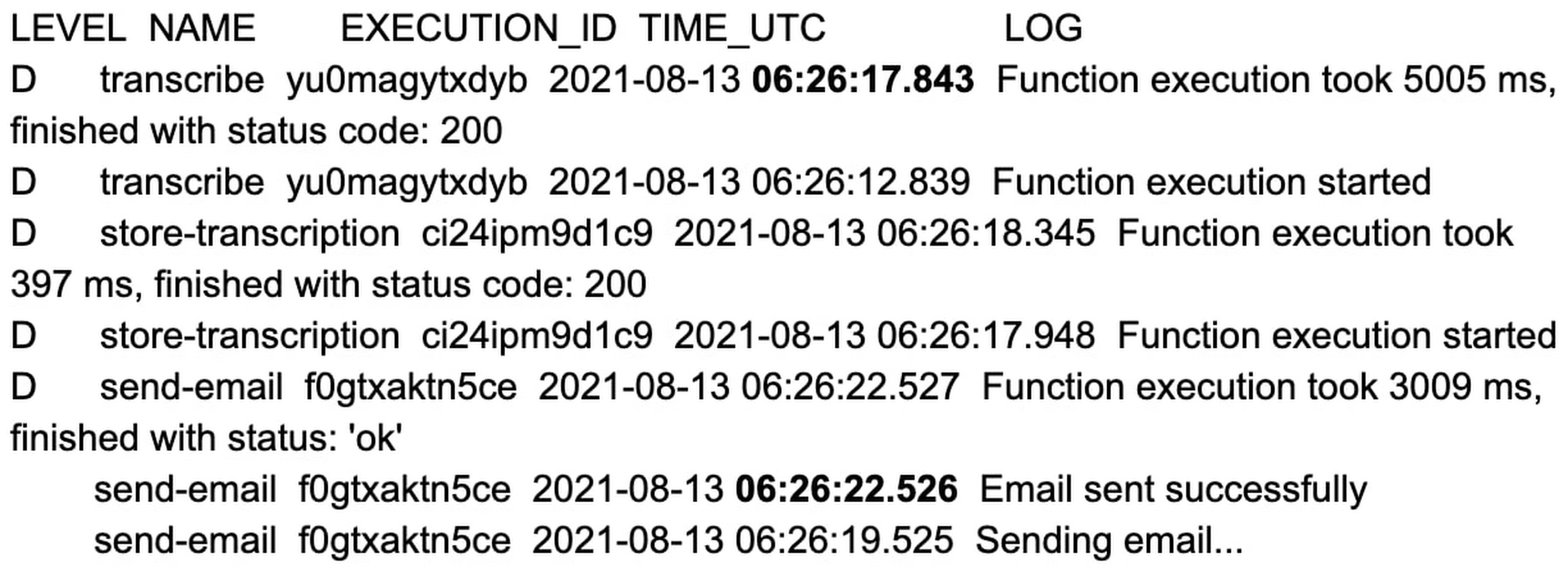
That’s an 11 second difference between the two approaches. The example set of functions are hardcoded with a 2 to 3 second sleep during function initialization, and when combined with average platform cold-start times, you can clearly see the cost of not using min instances.
You can reproduce the above experiment in your own environment using the tutorial here.
Check out min instances on Cloud Functions
We are super excited to ship min instances on Cloud Functions, which will allow you to run more latency-sensitive applications such as podcast transcription workflows in the serverless model. You can also learn more about Cloud Functions and Cloud Workflows in the following Quickstarts: Cloud Functions, Cloud Workflows.
More Relevant Stories for Your Company

Google Cloud’s Suite of DevOps Speeds Up ForgeRock’s Development
Editor’s note: Today we hear from ForgeRock, a multinational identity and access management software company with more than 1,100 enterprise customers, including a major public broadcaster. In total, customers use the ForgeRock Identity Platform to authenticate and log in over 45 million users daily, helping them manage identity, governance, and access management across

Chrome OS’s Hybrid Work Model Powers Google’s Return to Work Strategy
The pandemic continues to deeply affect our lives around the globe. In some places, new cases are surging and returning to work is the last thing on people’s minds. In other areas, conditions are improving and companies are starting to think about transitioning their workforce back to the office. Exactly

Google Cloud expands availability of enterprise-ready generative AI
Generative AI continues to develop at a blistering pace, making it more important than ever that organizations have access to enterprise-ready capabilities to help them leverage this disruptive technology. Harnessing the power of decades of Google’s research, innovation, and investment in AI, Google Cloud continues to make generative AI available

Quick Recap on Google Cloud: Latest News, Launches, Updates, Events and More
Want to know the latest from Google Cloud? Find it here in one handy location. Check back regularly for our newest updates, announcements, resources, events, learning opportunities, and more. Tip: Not sure where to find what you’re looking for on the Google Cloud blog? Start here: Google Cloud blog 101: Full list
