





How Recommendation AI Helps Retailers Optimize Click-through and Conversion Rates

7070
Of your peers have already read this article.
3:00 Minutes
The most insightful time you'll spend today!
Time to go outside again, I guess. I’ll need a sun hat. Sunscreen. Maybe some new sandals? What else?
With the Recommendations AI service, I might be reminded to grab a reusable water bottle and a swimsuit. Or some after-sun aloe lotion. Good thing, cause I’ll need it.

Recommendations AI is a solution that uses machine learning to bring product recommendations to their shoppers across any catalog or client list. This service is part of our full suite of Retail solutions. When you integrate with the Retail API, you get the benefit of Google’s Product Discovery. Integrating once to reap the benefits over and over. Recommendations is the starting point, and you can easily extend into Retail Search and Vision Product Search in the upcoming future.
The Recommendations solution is fully managed, global-scale and powered by deep learning, so you can focus on a great shopping experience and let someone else worry about the infrastructure.
Compared to baseline recommendation systems used by customers, Recommendations AI showed double digit uplift in conversion and clickthrough rates in A/B experiments controlled by the customers. You can optimize for click-through, conversion or session revenue, and fine tune the models to make sure you omit out-of-stock items or duplicates, for example.

So how does it work, and how do you get started? Read on, and we’ll walk you through the pipeline, starting with the data you already have to placement in your online store.
Formula: Data -> Model -> Placement
You start with your catalog, the list of all the things (postcards, movies, pie recipes) that you want to show your customers. Then you ingest your PII-redacted user events -this is the historic event data like home page views, add to cart events and more along with real time user events. This user event is joined with the product catalog and items that allows us to construct the sequence of shoppers’ activity, thus being able to predict what the shopper has a high propensity to purchase next. The user events can come from both online activity across devices or offline store purchases
The recommendation model will return a list of products, which are the recommendations. The brains of the operation, if you will. This model is trained using all the data that you ingest, using the latest neural network models and techniques that Google has built expertise over the years in flagship products like Youtube and News, that allows us to uncover shopper intent, so it can best predict the right recommendations to show to the right people.
Every model outputs a list of product identifiers, but where do they go? They go into placements, the spots, panels, carousels on your customer’s journey interacting with your brand that you’ve set aside to highlight recommendations. A model can send recommendations to one or more placements, but each placement only receives information from one recommendation model. Your pages will then need to render the products with the right images, text or other metadata, using the product ID that is returned by the model.
What do recommendations look like?
Let’s start by browsing our postcard-selling website, where I’ve been buying some vintage California postcards already. The recommendations algorithm has caught on to my interest, showing me other potential cards to purchase based on my history:

Put your data to work
To get started we need to bring your data into the recommendation model, so it can understand your customers, your inventory, and your sales patterns.
The model takes in the product catalog you use, and metadata about those products to better understand nuances in assortment, pricing and variables like size and style. You might already have this data stored in BigQuery or Merchant Center, and hence we provide easy integrations that you can leverage to get started even faster.
As for the user events, don’t worry if you already have systems in place to capture web and mobile activity. We make it easy to bring in your real time event logs by providing seamless integrations with Google Tag Manager, Javascript pixel, or even historic events from Cloud Storage, BigQuery or using inline API or JSON, so you can immediately train the models on this imported data. All this allows you to kickstart integrating with Recommendations AI in a matter of days.
The models then construct a sequence of activities that the user went through and joins with the products that the user engaged with. Once your data is ready to go, it takes a few days to train the model. Next onto making the data work for you.
Quickly customize your model
Setting up your own recommendations project in the console gives you the ability to choose what sort of model to train (based on what recommendations you want to generate) and your objective. Are you optimizing for click-through rate–more people click on the recommendation links or products–or for conversion rate–more people choose or buy what was suggested or revenue ?
Different models can be optimized for different optimization goals.; the GCP console explains what each one can do and how you can choose to optimize it.

Let’s unpack some of this terminology real quick.
We’ve got three model types:
- Recommended for you – Means we think these are items you’ll want to buy, based on your history; this is usually used on a home page to showcase items.
- Others you may like – Means if you’re browsing the page of a water bottle, we will recommend alternative brands of water bottles that you may like as well as a backpack, based on your engagement history.
- Frequently bought together – Means that when anyone buys sunscreen, we notice that they often also buy aloe lotion, so we will surface those items when someone adds any one of them to their cart.
And then we have three business objectives that the models optimize for:
- Click-through rate – How frequently did somebody click on a recommended item?
- Conversion rate– How frequently did somebody add a recommended item to their cart?
- Revenue per session – How much money did the recommendations generate for you?
Deliver anywhere along the journey
Now that you’re all set up in the Retail AI console, you can test out the recommendations in the console, even before you deploy to production.

You can integrate Recommendations into your frontend by calling the Predict APIt. The placements of recommendations will report data back into the dashboard and you can analyze and measure success for future iterations.
On top of that you can use the recommendations for other parts of your customer’s journey. Email promotions, storefront kiosks, display ads or follow-up notifications can include recommendations based on past activity and cart contents. The model gives you useful product recommendations for a wide variety of touchpoints and steps in the purchasing process.
More best practices, and guides, are available inside our documentation.
How to get started
Training your own models can be tedious, time-consuming, and expensive. On top of that it requires deeper data science expertise to set up. Let us do it instead!
You can see how IKEA Retail uses Recommendations AI in this recent talk and blog from the Google Cloud Retail Summit..
To get started today you’ll need to make a Cloud project and enable the Retail API, which then allows you to access all the recommendation tools in one menu. Bring in your catalog and purchasing data, define a placement or two, and you can start putting recommendations on your site in a matter of days.
4706
Of your peers have already watched this video.
10:30 Minutes
The most insightful time you'll spend today!
How Google’s Customer Data Platform Helps Retail Brands Offer Data-driven , Personalized CX
Retail companies need customer insights to deliver personalized experiences that impact revenue generation and cost savings. Watch how Google Cloud’s customer data platform helps brands integrate and build holistic view of data in silos to drive marketing and customer service success.
Woolaroo App and Vision AI are Helping Users Explore Native Languages

4828
Of your peers have already read this article.
1:30 Minutes
The most insightful time you'll spend today!
One of the most vibrant elements of culture is the use of native languages and the time-honored tradition of storytelling. Anthropologists and linguists have been vocal on the role that language plays in the preservation of culture and how it contributes to the appreciation of heritage.
Unfortunately, of the more than 7,000 languages that are spoken around the globe, nearly 3,000 are at risk of disappearing. In fact, it’s estimated that on average a language becomes extinct every fourteen days. Google Arts & Culture realized that with some creative technology and partnering with language organisations, we could help create an interactive and educational tool to help promote them.
Enter Woolaroo, an open-source photo-translation platform powered by machine learning and image recognition. The application was built on Google Cloud to encourage users to explore endangered languages around the world. Users are able to take a picture of an object in real-time, and the application returns the word in its native language, along with its pronunciation.
Woolaroo was created with the philosophy that learning languages is greatly enhanced through engagement and context. By seeing an object in its environment, it’s easier to retain the information and then use it more naturally in conversation.
With the help of Googlers, Woolaroo was launched in 10 languages, including Calabrian Greek, Louisiana Creole, Maori and Yiddish. During the conception stage of the app, teams from Partner Innovation and Google Arts & Culture put out an open call to the rest of Google to see what lesser-known languages our employees spoke. They then worked with the individuals that responded to develop dictionaries that were reviewed by partner institutions to ensure translations were correct and consistent.
Woolaroo uses Google Cloud Vision API, which derives insights from images using AutoML or pre-trained models to quickly classify images into millions of predefined categories. This makes AI accessible and useful to more people as AutoML automates the training of these machine learning models.
Our team at Google Arts & Culture creates immersive experiences for people to learn about art, history, culture and more. We are committed to supporting the preservation of heritage and cultural landmarks – including spoken language – through the use of modern technology. The magic of Woolaroo is that it is open source, which means any person or organisation can use it to build something for their own endangered language. To learn about the efforts Google Arts & Culture is involved in, download the Google Arts & Culture app or visit our blog.
Ahead of the Curve: 5 Data and AI Trends Set to Shape 2023

2269
Of your peers have already read this article.
4:00 Minutes
The most insightful time you'll spend today!
How will your organization manage this year’s data growth and business requirements? Your actions and strategies involving data and AI will improve or undermine your organization’s competitiveness in the months and years to come. Our teams at Google Cloud have an eye on the future as we evolve our strategies to protect technology choice, simplify data integration, increase AI adoption, deliver needed information on demand, and meet security requirements.
Google Cloud worked with* IDC on multiple studies involving global organizations across industries in order to explore how data leaders are successfully addressing key data and AI challenges. We compiled the results in our 2023 Data and AI Trends report. In it, you’ll find the metrics-rich research behind the top five data and AI trends, along with tips and customer examples for incorporating them into your plans.

1: Show data silos the door
Given the increasing volumes of data we’re all managing, it’s no surprise that siloed transactional databases and warehousing strategies can’t meet modern demands. Organizations want to improve how they store, manage, analyze, and govern all their data, while reducing costs. They also want to eliminate conflicting insights from replicated data and empower everyone with fresh data.
A unified data cloud enables the integration of data and insights into transformative digital experiences and better decision making.
Andi Gutmans, GM and VP of Engineering for Databases, Google Cloud
In the report, you can learn how to adopt a unified data cloud that supports every stage of the data lifecycle so that you can improve data usage, accessibility, and governance. Inform your strategy by drawing on organizations’ examples such as a data fabric that improves customer experiences by connecting more than 80 data silos, as well as other unified data clouds that save money and simplify growth.

2: Usher in the age of the open data ecosystem
Data is the key to unlocking AI, speeding up development cycles, and increasing ROI. To protect against data and technology lock-in, more organizations are adopting open source software and open APIs.
Tweet this quote
Understand how you can simplify data integration, facilitate multicloud analytics, and use the technologies you want with an open data ecosystem, as described in the report. Learn from metrics about global open source adoption and public dataset usage. And explore how global companies adopted open data ecosystems to improve patient outcomes, increase website traffic by 25%, and cut operating costs by 90%.
3: Embrace the AI tipping point
Pulling useful information out of data is easier with AI and ML. Not only can you identify patterns and answer questions faster but the technologies also make it easier to solve problems at scale.
We’ve reached the AI tipping point. Whether people realize it or not, we’re already using applications powered by AI—every day. Social media platforms, voice assistants, and driving services are easy examples.
June Yang, VP, Cloud AI and Industry Solutions, Google Cloud
Organizations share how they’re reaching their goals using AI and ML by empowering “citizen data scientists” and having them focus on small wins first. Gain tips from Yang and other experts for developing your AI strategy. And read how organizations achieve outcomes such as a reduction of 7,400 tons per year in carbon emissions and a more than 200% increase in ROI from ad spend by using pattern recognition and other AI capabilities.

4: Infuse insights everywhere
Yesterday’s BI solutions have led to outdated insights and user fatigue with the status quo, based on generic metrics and old information. Research shows that as new tools come online, expectations for BI are changing, with companies revising their strategies to improve decision making, speed up the development of new revenue streams, and increase customer acquisition and retention by providing individuals with needed information on demand.
Organizations are equipping business decision-makers with the tools they need to incorporate required insights into their everyday workflows.
Kate Wright, Senior Director, Product Management, Google Cloud
In the report, you’ll discover why and how data leaders are rethinking their BI analytics strategies and applications to improve users’ trust and use of data in automated workflows, customizable dashboards, and on-demand reports. Global companies also share how they improve decision making with self-service BI, customer experiences with IoT analysis, and threat mitigation with embedded analytics.

5: Get to know your unknown data
Increasing data volumes can make it harder to know where and what data they store, which may create risk. Case in point: If a customer unexpectedly shares personally identifiable information during a recorded customer support call or chat session, that data might require specialized governance, which the standardized storage process may not provide.
If you don’t know what data you have, you cannot know that it’s accurately secured. You also don’t know what security risks you are incurring, or what security measures you need to take.
Anton Chuvakin, Senior Staff Security Consultant, Google Cloud
Check out the report to learn about data security risks that are often overlooked and how to develop proactive governance strategies for your sensitive data. You can also read how global organizations have increased customer trust and productivity by improving how they discover, classify, and manage their structured and unstructured data.
Be ready for what’s next
What’s exciting about these trends is that they’re enabling organizations across industries to realize very different goals using their choice of technologies. And although all the trends depend on each other, research shows you can realize measurable benefits whether you adopt one or all five.
Review the report yourself and learn how you can refine your organization’s data and AI strategies by drawing on the collective insights, experiences, and successes of more than 800 global organizations.
Achieving MLOps Excellence with Google Cloud and Equinix Collaboration

1238
Of your peers have already read this article.
3:30 Minutes
The most insightful time you'll spend today!
In recent years, machine learning (ML) has gained tremendous popularity as a powerful tool for solving complex problems across various domains. However, building and deploying ML models at scale can be challenging, as it involves a range of tasks such as data preparation, feature engineering, model training, deployment, monitoring, maintenance and so on.
According to “The Art of AI maturity” report published by Accenture “87% of data science projects never make it into production.” This is where MLOps comes in – it can help to address the core challenges by providing a framework for managing the entire ML lifecycle, from data collection and preparation to model development, testing, and deployment. It also reduces the time from ML model development to production and increases the success rate of ML projects.
In Google Cloud, we understand how important MLOps is to successfully productionize ML models. So we collaborated with Equinix, the world’s digital infrastructure company™ and a leader in global colocation data center market share, with 248 data centers in 27 countries on five continents. We helped them by providing the advisory services on the MLOps best practices and architecture.
Let’s take a sneak peek at the MLOps requirements at Equinix and the final architecture that was proposed.
What does MLOps mean for Equinix?
After multiple discovery sessions with the Equinix Team, we identified the core requirements and pain points to address in their new MLOps architecture:
- Reusability: Components such as features and pipeline components should be reused across projects to reduce costs and improve efficiency.
- Foundations: The foundations of the infrastructure, such as environments, folder structure, and project hierarchy, should be well-designed to support scalability and reliability.
- Early identification of problems: Problems should be identified early by including data validation, notifications, and retry mechanisms.
- Cost optimization: Costs should be optimized by paying only for what is used.
- Enterprise CI/CD requirements: Enterprise CI/CD requirements should be met by integrating with GitHub and GitActions.
- Scaling: The infrastructure must scale to support future growth.
- Security: Enterprise security requirements should be met in terms of IAM roles, network, etc.
MLOps Architecture
Based on the above requirements from Equinix, key design considerations were made for example – using Vertex AI Feature Store instead of Big Query for online feature serving, using DataFlow for pre-processing vs using the existing python based pre-processing and so on. After carefully assessing all the alternatives, the below reference architecture for MLOps in GCP was proposed:
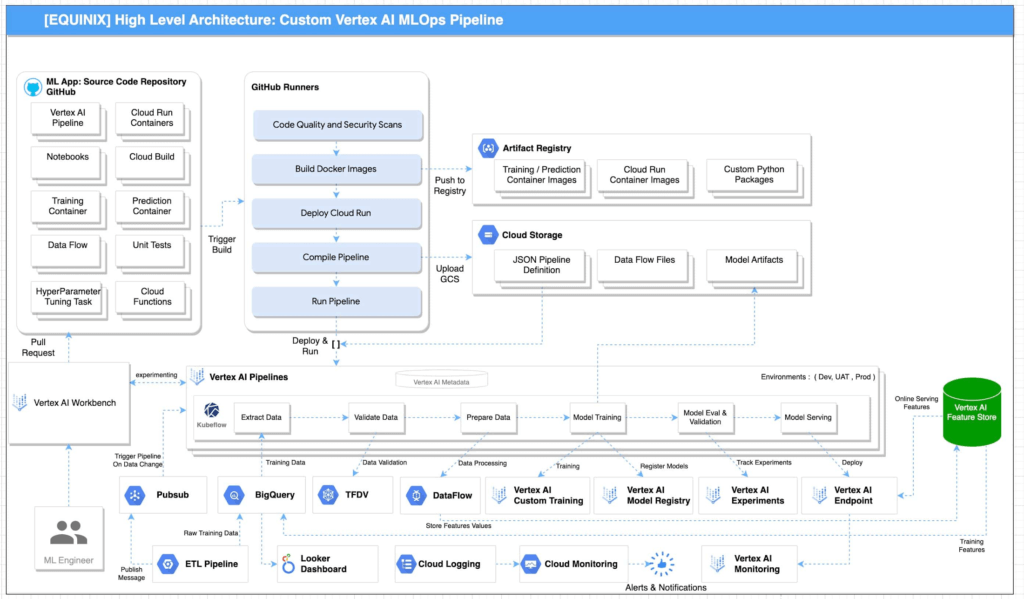
Reference architecture for MLOPs using GCP is illustrated in Figure 1. This architecture includes the following pipeline stages:
- Vertex AI Workbench enables data scientists to quickly explore new ideas and develop/experiment new models. The source code is saved in GitHub repository
- Github Actions with self-hosted runners are integrated with Github as the source code repository. This enables continuous integration of code, quality and security scans. The artifacts generated during the process are saved in Artifact Registry and Google Cloud Storage. These artifacts are deployed to implement the pipeline.
- Unit tests and integration tests can be performed during the continuous integration in Github Actions with self-hosted runners. End-to-end tests are performed on demand in the continuous integration pipeline.
- Metadata about the artifacts is generated and saved in Vertex ML Metadata.
- Automated triggers can be enabled to run pipelines. For example, one trigger is the availability of new training data. These triggers can run the model training pipeline and the new trained model can be pushed to Vertex AI Model Registry.
- To train a new ML model with new data, the deployed Vertex AI Pipeline is executed.
- To train a new ML model with new implementation, a new pipeline will be deployed through CI/CD pipeline.
“The proposed architecture design covers the requirements and scenarios that we were looking for. As our AI and ML portfolio is growing in scale and complexity, it’s important to follow a clear and up-to-date architecture if we want to keep increasing the value delivered by our solutions. As part of the process, the team also acquired the skills required to fully implement it” according to Bernardo Fernandes, Data Science Senior Manager at Equinix.
Below is the snapshot of the features before and after MLOps implementation at Equinix:
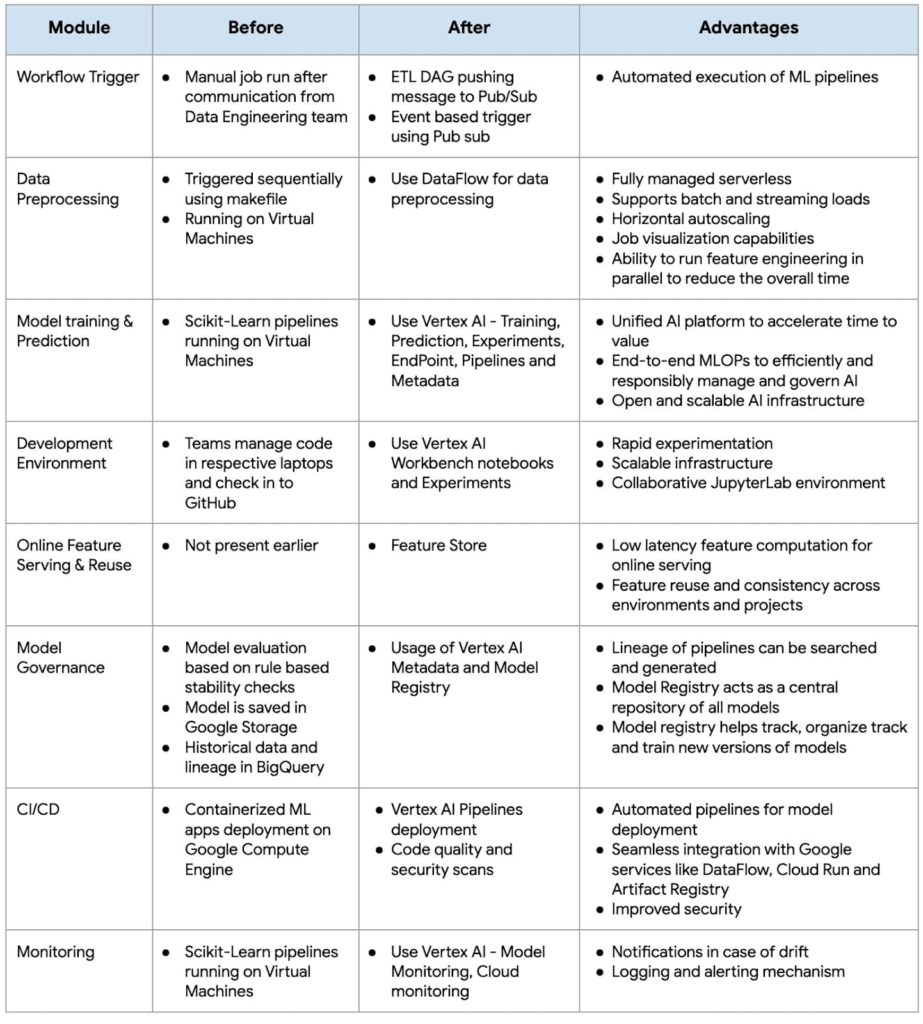
As businesses increasingly rely on machine learning to gain a competitive edge, MLOps has become a critical component of their strategy. By adopting MLOps practices, organizations can achieve faster time-to-market, better performance, and higher ROI for their machine learning initiatives.
Fast track end-to-end deployment with Google Cloud AI Services (AIS)
The partnership between Google Cloud and Equinix is just one of the latest examples of how we’re providing AI-powered solutions to solve complex problems to help organizations drive the desired outcomes. To learn more about Google Cloud’s AI services, visit our AI & ML Products page.
We’d like to give special thanks to Nitin Aggarwal, Vijay Surampudi, Parag Mhatre and Anantha Narayanan Krishnamurthy for their support and guidance throughout the project. We are also grateful to the super awesome collaboration with the Equinix Team (Ravi Pasula and Brendan Coffey, Bernardo Fernandes, Łukasz Murawski, Jakub Michałowski, Sonia Przygocka-Groszyk, Marek Opechowski, Daria Bondara, Nila Velu, Vijay Narayanan, Dharmendra Kumar, Shailesh Sukare, Arunraj Kumar Raje, Seng Cheong Lee).
Can Your Company Use Video AI? You’d Be Surprised at the Answer

5736
Of your peers have already read this article.
4:30 Minutes
The most insightful time you'll spend today!
Video AI is a powerful way to enable content discovery and engaging video experiences.
Here, try it out right now!
Google Cloud’s easy-to-access video AI solutions can accomplish a bunch of things. Here are a few:
Precise video analysis: Video Intelligence API automatically recognizes more than 20,000 objects, places, and actions in stored and streaming video. It also distinguishes scene changes and extracts rich metadata at the video, shot, or frame level. Use in combination with AutoML Video Intelligence to create your own custom entity labels to categorize content. Imagine being able to categorise hundreds of videos of customer interactions quickly to improve service training!
Recommended content: Build a content recommendation engine with labels generated by Video Intelligence API and a user’s viewing history and preferences. This will simplify content discovery for your users and guide them to the most relevant content that they want.
Simplify media management: Find value in vast archives by making media easily searchable and discoverable. Easily search your video catalog the same way you search text documents. Extract metadata that can be used to index, organize, and search your video content, as well as control and filter content for what’s most relevant.Imagine being able to locate insight in hundreds of enterprise videos to improve productivity and customer experience!
Easily create intelligent video apps: Gain insights from video in near real time using the Video Intelligence Streaming Video APIs, and trigger events based on objects detected. Build engaging customer experiences with highlight reels, recommendations, interactive videos, and more. Marketers, imagine being able to trigger a customer workflow, in real time, based on a live customer interactions.
Automate expensive workflows: Reduce time and costs associated with transcribing videos and generating closed captions, as well as flagging and filtering inappropriate content.
Content moderation: Identify when inappropriate content is being shown in a given video. You can instantly conduct content moderation across petabytes of data and more quickly and efficiently filter your content or user-generated content.
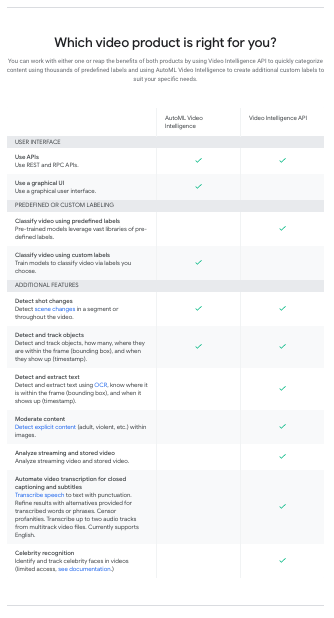
What can your organisation do with video AI?
More Relevant Stories for Your Company

Google Cloud’s Med-PaLM 2: Pioneering Ethical AI Solutions for the Medical Domain
Healthcare breakthroughs change the world and bring hope to humanity through scientific rigor, human insight, and compassion. We believe AI can contribute to this, with thoughtful collaboration between researchers, healthcare organizations and the broader ecosystem. Today, we're sharing exciting progress on these initiatives, with the announcement of limited access to

How AI is Revolutionizing Retail: Lessons for Marketers
Reach the Right Customers How can AI help you target customers who are looking for products like yours? The challenge: This customer wants to buy the best cat food for her pets. How AI Works The Result A targeted offer for a discount on luxury cat food is shown to

Elevating Voice Solutions: Google Cloud Introduces Speech-to-Text v2 API and Chirp for Businesses
As one of the most innate and ubiquitous forms of expression, speech is a fundamental pillar of human interaction. It comes as no surprise, then, that Google Cloud’s Speech API has become a crucial tool for enterprise customers, launched to general availability (GA) over six years ago and, now, processing over 1

Google’s Record-breaking Performance Tops the MLPerf Benchmark Results
The latest round of MLPerf benchmark results have been released, and Google's TPU v4 supercomputers demonstrated record-breaking performance at scale. This is a timely milestone since large-scale machine learning training has enabled many of the recent breakthroughs in AI, with the latest models encompassing billions or even trillions of parameters
