





How Notified Managed to Boost AI-driven, Dynamic Influencer Discovery and Classify its Content Using NLP

3010
Of your peers have already read this article.
2:00 Minutes
The most insightful time you'll spend today!
Notified is a leading communications cloud for events, public relations, and investor relations to drive meaningful insights and outcomes. They provide communications solutions to effectively reach and engage customers, investors, employees, and the media.
One of Notified’s Public Relations solutions is the ‘Media Contact Database’ that allows customers to discover media and influencers in a unique media database powered by AI and human-curated research.
The goal of the initiative is to expand the scope of the AI driven, dynamically discovered influencers, and analyze online news articles using AI/ML technologies to extract entities and classify content. The prior process to extract insights from news articles provided only 30-40% of the desired results, and there were accuracy and stability issues that resulted in a lot of manual intervention.
Journalist Beat
A key outcome of the AI driven process is to identify the ‘Journalist Beat’. A Journalist Beat essentially summarizes the individual’s area of focus such as a sports writer, financial journalist etc.
Three options were evaluated for the AI/ML process to generate the Journalist Beats :
Option 1: Topic ML
Unsupervised ML approach to determine the commonly used terms.
- Pro: Common approach to grouping documents and determine similar text
- Con: Unbounded list of text
Option 2: ML Classification
Build classification models (supervised) to map reference articles to ‘Beats’
- Pro: Aligns to ‘Research Analytics’ existing processes
- Con: Time to build and maintain ML models for hundreds of beats.
Option 3: GCP Context Classification
Leverage GCP’s Natural Language API for initial classification and as input to Notified single model
- Pro: Aligns to ‘Research Analytics’ without building ML models.
Ultimately the GCP Natural Language API solution was chosen because of the speed of execution and a high level of accuracy with the pretrained models. The Notified team was able to launch the product feature within a few weeks, without ever needing to do extensive data collection and train the models.
Here is the high level process that was implemented for Journalist Beats.
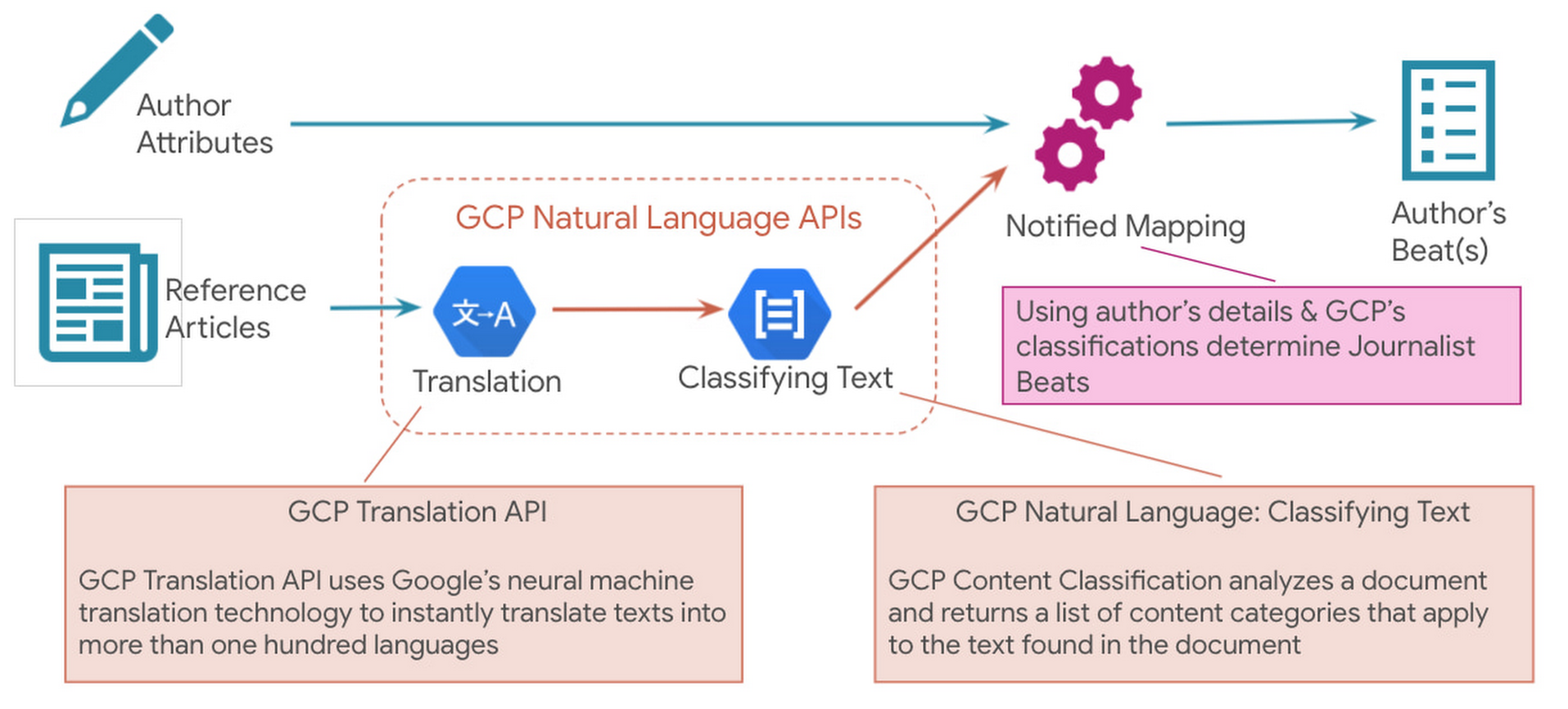
Since Notified supports curated media contacts globally, news articles were instantly translated to English using GCP Translation API. GCP Natural Language API’s solution to classify text was used to analyze the translated text and generate the list of content categories.
Solution Architecture
Here is a sample solution architecture for the ‘Discovered Journalist’ process.

Three core principles guided the above architecture – Serverless & Fully Managed, Scalability & Elasticity for flexibility and to optimize costs, API led real-time processing.
In addition to the GCP Natural Language API and Translation API below are a few serverless GCP products that were part of the automated solution:
- BigQuery is Google Cloud’s fully managed, petabyte-scale, and cost-effective analytics data warehouse that lets you run analytics over vast amounts of data in near real time.
- Cloud Run is a fully managed serverless platform that can be used to develop and deploy highly scalable containerized applications.
- Cloud Tasks is a fully managed service that allows you to manage the execution, dispatch, and delivery of a large number of distributed tasks.
The powerful pre-trained models of the Natural Language API provide a comprehensive set of features to apply natural language understanding to applications such as sentiment analysis, entity analysis, entity sentiment analysis, content classification, and syntax analysis.
Notified looks ahead to super-scaling
In an effort to even further improve its best in class ‘Media Contact Database’, Notified looks to super scale the above AI driven Influencer Discovery process to the order of 100+ million news articles per month. It plans to expand the scope of entities extracted from the news articles and provide a news exploration service for its customers by performing intelligent entity-based searches.To watch your markets evolve, see how competitors add AI insights. To actually stay in the market, make AI the main driver of your product road maps. GCP Natural Language API accelerated our ability to adopt AI at scale.
Thomas Squeo, CTO, Notified
Acknowledgments
We’d like to thank our collaborators at Google and Notified for making this blog post possible. Thanks to Arpit Agrawal at MediaAgility for contributing to this blog post.
To learn more about how Google Cloud Natural Language AI can help your enterprise, try out an interactive demo and take the next step, visit the product overview page here.
How TapClicks’ Google Cloud Migration Makes Life Easy for Marketers

8567
Of your peers have already read this article.
2:00 Minutes
The most insightful time you'll spend today!
Editor’s note: In this blog post we learn how TapClicks migrated to Google Cloud to offer their marketing customers a unified platform for data management, operations, insights, and analysis.
TapClicks is a smart marketing cloud, powered by data, that unifies our customer’s marketing. By choosing to migrate our core applications last year to Google Cloud, we cut costs, solved data-sharing concerns for our customers, and opened our stack up to a new ecosystem of possibilities.
The core problem that we’re solving for our customers is how to manage their marketing infrastructures data and operations. Life isn’t easy for marketers now. There are 7,000 different vendors servicing this space today – creating much complexity between digital agencies, media, and brands. Marketers face challenges in navigating all of these systems, logging in and out, understanding pacing goals, and managing the flow of marketing data so they can analyze and report internally as well as to their clients at scale.
We unify omnichannel campaign data (250 API connectors and 6000 Smart Connectors ™ ) from a plethora of marketing sources on an automated data warehousing solution, creating simplicity for organizations. Over 4,000 agencies, media companies, and brands use our Marketing Operations and Data Management Platform, which imports data at scale and creates an automatic data warehouse on Google Cloud. Teams can also leverage TapClicks, like our world class Facebook connector, to import data directly into Google Data Studios. Beyond importing and storing, we also provide data exporting to other Google solutions like Google Data Studio and Google Sheets. We also create interactive dashboards that let stakeholders and clients analyze their data, as well as automated, multi-channel reports that go out to clients at specified times. So channel comparisons, optimizations, attribution, and calculations are easily performed. Some of our customers are able to generate hundreds of thousands of individual reports and dashboards for their clients.
Although we may be best known for our reporting and analytics, we also empower teams managing the marketing operations workflow from customers and internal stakeholders, especially at scale. Our user-friendly, configurable system helps manage their orders and campaigns. Through automation of this process, we deliver tremendous amounts of efficiency, time saving, cost savings, and reduction of errors. The combination of these solutions makes up our unified platform, with additional capabilities like marketing intelligence that offers competitive and brand-level analysis. This is a disruptive solution in use by all leading media companies, agencies and many brands.
Partnering for possibilities
We faced a few challenges with our original tech stack, which included a mix of the leader in web services revenue, leaders in high performance data warehousing, as well as vendors on bare metal servers.
- One challenge was around costs, which were growing.
- Second, many of our customers work with multiple brands, and are very hesitant to share their data with the leader in web services, who’s often viewed as their competitor.
- Third, these vendors are more focused on their own revenue rather than a true long term partnership that would enable their customers to enjoy similar success as they have experienced.
When looking at other cloud providers, Google Cloud emerged for us as the front runner. They were competitive on costs, and their native Kubernetes support was superior— a big selling point for our DevOps team. There’s also a movement in the marketing and advertising industry away from AWS toward Google Cloud because of the data-sharing concern. Finally, most of our customers are already using Google Cloud tools, so there’s brand recognition and familiarity there, and easier integrations with their own systems.
Migrating to Google Cloud
Our migration, which took about five months, involved moving a significant chunk of our infrastructure, including our core applications, using Google Kubernetes Engine (GKE). In our legacy architecture, each of our clients was assigned to one of our virtual machines (VMs), and there was a lot of unused capacity because we had to provision for the max usage. We appreciated GKE’s cloud native capabilities, especially autoscaling, a huge benefit for our web application. We have varying usage patterns during the day, and though our application is mostly used during business hours, there are also days in the month of higher usage, and autoscaling saves us time and costs. GKE also makes deployments much easier, and we anticipate a lot of benefits there for our developer environments. We’ve moved some of our microservices into GKE and plan to move more in the future. All in all, we were able to migrate our core products and the bulk of our AWS spend successfully to Google Cloud.
We also moved from our other vendors Relational Database Service (RDS) to running MySQL on our own VMs on Google Cloud, which gives us more flexibility in terms of settings and fine tuning. We’re still trying to find the best mix as we’re modernizing our infrastructure, and we took this opportunity to migrate from MySQL 5.7 to 8.0.
Our next stage is exploring more of the capabilities and services of Google Cloud, including BigQuery, which we’re considering for our own data warehouse. The fact that we could also run Snowflake on Google Cloud, if needed, was another selling point for our migration.
We’re especially interested in BigQuery ML’s machine learning and natural language processing capabilities, which enabled better predictive insights. Our customers want insights from their campaigns— which are working, which are paying off, where should they invest next? Using our platform, they’re looking not only to generate reporting, but also identify opportunities to improve campaign performance. We plan to use AI and ML to improve those capabilities, so that our customers can seamlessly unlock insight and intelligence from their marketing data and campaigns.
Double-clicking on Google Cloud
For us, being able to deeply leverage and partner with Google Cloud to deliver those solutions on a single stack is critical, and we think our customers will love it. We see TapClicks and Google Cloud partnering at a level beyond what you typically see in a cloud provider relationship. Already, fifty percent of our company is working with various Google Cloud solutions, and we envision TapClicks and Google Cloud as extensions of each other, providing a single, powerful platform solution.
Google Cloud understands the partnership concept, and their team was able to shine a light on their services and what they could bring to the table. Compared to our previous experiences, dealing with the Google Cloud team has been a true pleasure. Now that we’ve migrated, we’re ready to take our next steps into the services available to us in the Google Cloud ecosystem, and the problems we’ll continue to solve for our customers. Learn more about TapClicks and BigQuery ML.
Contact Center AI & Automation Anywhere Help Virtual Agents Deliver Next Level CX

3044
Of your peers have already read this article.
2:30 Minutes
The most insightful time you'll spend today!
With the advent of the pandemic, contact center traffic has increased by as much as 300%, taxing center capabilities. To help handle the surge, and keep up with heightened customer demands, many customer experience providers have deployed automation in the form of virtual agents that serve as the first—and, sometimes the last—line of customer support. How effective these virtual agents are in delivering timely, complete customer service depends in large part on the contact center’s infrastructure and the power of the automation solution.
Customer support providers can now start to reimagine customer experience with Conversational AI and take advantage of the Google Cloud-Automation Anywhere partnership to modernize their operations.
Bringing together the Google Cloud Contact Center AI (CCAI) solution and the Automation Anywhere cloud-native Automation 360 platform, the partnership helps contact centers remain competitive by improving their performance metrics and customer satisfaction to exceed the continuously growing expectations.
Information here, there, anywhere—with limited access
Over the years, many contact centers have accumulated a multitude of systems, often creating a disconnected infrastructure. As a result, both human and virtual agents alike are challenged to keep up with growing customers’ expectations for timely, accurate, and complete service. Without up-to-date software and infrastructure, human agents have to perform a “swivel-chair” maneuver, logging in to the different systems, sifting through records, copying the needed information, and deciding what the next action should be. This approach is not conducive to achieving lower average handle times (or AHT), reduced processing errors, or increased customer satisfaction.
In such a siloed environment, virtual agents may not connect to all the relevant data systems and applications. That also limits what they can do to support human agents. Typically, a virtual agent can handle basic customer requests, such as providing banking customers with their account balances. For more complex requests, such as applying for a line of credit, a virtual agent still must transfer customers to human agents, and the swivel-chair maneuver begins.
Enter the RPA-assisted AI-powered virtual agent
The combination of Google Cloud Contact Center AI and Automation Anywhere’s Automation 360 RPA platform can help contact centers get the maximum benefit from utilizing virtual agents, enriching customer engagements. Further, by integrating automation, opening up APIs, and creating new processes for virtual agents, customer experience teams can help streamline operations by enabling users to quickly access the information they require. This helps minimize the need for the “swivel-chair” maneuver.
Automation 360 makes it possible for the CCAI virtual agents to access all systems and applications in both legacy and modern infrastructure, helping resolve every case quickly and easily. Not only can the virtual agents respond faster with answers, but they can complete more complex end-to-end requests. With RPA, customers are reporting 66% improved efficiency of contact center operations while exceeding their AHT reduction goals.
This video illustrates how such automation can dramatically reduce the processing time of a customer service request, and you can read more about the details of contact center automation, as well.
Additionally, a comprehensive development platform, the Google Cloud CCAI Dialogflow, powers virtual agents—chatbots and voicebots—with Conversational AI to deliver lifelike customer experiences anytime a customer reaches out to a brand. CCAI Agent Assist helps human agents with turn-by-turn guidance, ready-to-deliver answers, and ready-to-send responses. CCAI Insights identifies key metrics such as call drivers and customer sentiment for workflow optimization.
Living up to their potential
TELUS International, a leading digital customer experience provider and long-time partner of both Google Cloud and Automation Anywhere, has been leveraging virtual agents to enhance the employee and customer experience.
“We are very proud of the enormous value that we can provide our clients through combining our expertise in customer experience and digital transformation alongside the innovative solutions of our technology partners,” Jim Radzicki, CTO of TELUS International, explains. “For instance, through leveraging Google Cloud Contact Center AI and Automation Anywhere’s RPA integration, we are able to expand the capabilities of virtual agents to process a wider variety of customer requests while allowing our team members to focus on the most critical conversations and creating a meaningful connection with every customer.”
With CCAI and Automation 360, virtual agents can help contact centers deliver 24/7, comprehensive, accurate service, all of which helps eliminate wait times—even with heavy traffic. And this is just the start.
With deeper integration planned between Automation 360 and CCAI, RPA can augment CCAI Agent Assist’s abilities to help human agents by bringing untapped case-sensitive information to their fingertips. Furthermore, Automation 360 Bot Insight can complement CCAI Insights’ as well as TELUS International’s Intelligent Insights, a tool-agnostic platform to monitor and manage RPA solutions and bots, with backend data access metrics.
At Google Cloud and Automation Anywhere, we’ll continue developing our contact center solution to extend automation capabilities for better customer service and greater customer satisfaction. Instead of constantly swiveling, agents can once again be at the center of the call center action, taking their work—and the experience of their customers—to the next level.
Build A Movie Recommender System based on Reinforcement Learning (RL) with Vertex AI

3335
Of your peers have already read this article.
3:00 Minutes
The most insightful time you'll spend today!
Reinforcement learning (RL) is a form of machine learning whereby an agent takes actions in an environment to maximize a given objective (a reward) over this sequence of steps. Applications of RL include learning-based robotics, autonomous vehicles and content serving. The fundamental RL system includes many states, corresponding actions, and rewards to those actions. Translate that into a movie recommender system: The ‘state’ is the user, the ‘action’ is the movie to recommend to the user, and the ‘reward’ is the user rating of the movie. RL is a great framework for optimizing ML models, as mentioned by Spotify in the keynote in the Applied ML Summit 2021.
In this article, we’ll demonstrate an RL-based movie recommender system executed in Vertex AI and built with TF-Agents, a library for RL in TensorFlow. This demo has two parts: (1) a step-by-step guide leveraging Vertex Training, Hyperparameter Tuning, and Prediction services; (2) a MLOps guide to build end-to-end pipelines using Vertex Pipelines and other Vertex services.
TF-Agents meets Vertex AI
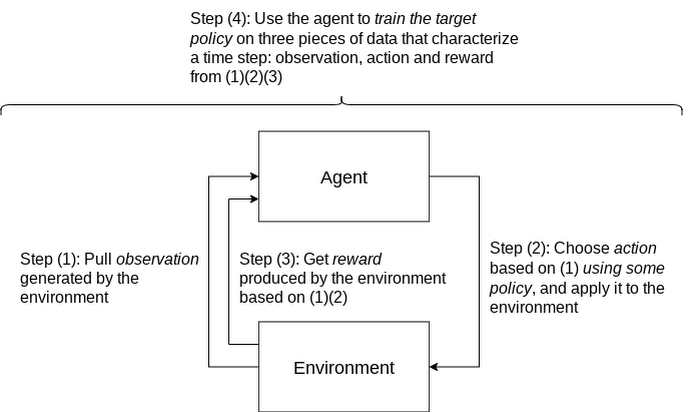
In reinforcement learning (RL), an agent takes a sequence of actions in a given environment according to some policy, with the goal of maximizing a given reward over this sequence of actions. TF-Agents is a powerful and flexible library enabling you to easily design, implement and test RL applications. It provides you with a comprehensive set of logical modules that support easy customization:
- Policy: A mapping from an environment observation to an action or a distribution over actions. It is the artifact produced from training, and the equivalent of a “Model” in a supervised learning setup.
- Action: A move or behavior that is outputted by some policy, and chosen and taken by an agent.
- Agent: An entity that encapsulates an algorithm to use one or more policies to choose and take actions, and trains the policy.
- Observations: A characterization of the environment state.
- Environment: Definition of the RL problem to solve. At each time step, the environment generates an observation, bears the effect of the agent action, and then given the action taken and the observation, the environment responds with a reward as feedback.
A typical RL training loop looks like the following:
A typical process to build, evaluate, and deploy RL applications would be:
- Frame the problem: While this blog post introduces a movie recommendation system, you can use RL to solve a wide range of problems. For instance, you can easily solve a typical classification problem with RL, where you can frame predicted classes as actions. One example would be digit classification: observations are digit images, actions are 0-9 predictions and rewards indicate whether the predictions match the ground truth digits.
- Design and implement RL simulated experiments: We will go into detail on simulated training data and prediction requests in the end-to-end pipeline demo.
- Evaluate performance of the offline experiments.
- Launch end-to-end production pipeline by replacing the simulation constituents with real-world interactions.
Now that you know how we’ll build a movie recommendation system with RL, let’s look at how we can use Vertex AI to run our RL application in the cloud. We’ll use the following Vertex AI products:
- Vertex AI training to train a RL policy (the counterpart of a model in supervised learning) at scale
- Vertex AI hyperparameter tuning to find the best hyperparameters
- Vertex AI prediction to serve trained policies at endpoints
- Vertex Pipelines to automate, monitor, and govern your RL systems by orchestrating your workflow in a serverless manner, and storing your workflow’s artifacts using Vertex ML Metadata.
Step-by-step RL demo
This step-by-step demo showcases how to build the MovieLens recommendation system using TF-Agents and Vertex AI services, primarily custom training and hyperparameter tuning, custom prediction and endpoint deployment. This demo is available on Github, including a step-by-step notebook and Python modules.
The demo first walks through the TF-Agents on-policy (which is covered in detail in the demo) training code of the RL system locally in the notebook environment. It then shows how to integrate the TF-Agents implementation with Vertex AI services: It packages the training (and hyperparameter tuning) logic in a custom training/hyperparameter tuning container and builds the container with Cloud Build. With this container, it executes remote training and hyperparameter tuning jobs using Vertex AI. It also illustrates how to utilize the best hyperparameters learned from the hyperparameter tuning job during training, as an optimization.
The demo also defines the prediction logic, which takes in observations (user vectors) from prediction requests and outputs predicted actions (movie items to recommend), in a custom prediction container and builds the container with Cloud Build. It deploys the trained policy to a Vertex AI endpoint, and uses the prediction container as the serving container for the policy at the Vertex AI endpoint.
End-to-end workflow with a closed feedback loop: Pipeline demo
Pipeline architecture
Building upon our RL demo, we’ll now show you how to scale this workflow using Vertex Pipelines. This pipeline demo showcases how to build an end-to-end MLOps pipeline for the MovieLens recommendation system, using Kubeflow Pipelines (KFP) for authoring and Vertex Pipelines for orchestration.
Highlights of this end-to-end demo include:
- RL-specific implementation that handles RL modules, training logic and trained policies as opposed to models
- Simulated training data, simulated environment for predictions and re-training
- Closing of the feedback loop from prediction results back to training
- Customizable and reproducible KFP components
An illustration of the pipeline structure is shown in the figure below.
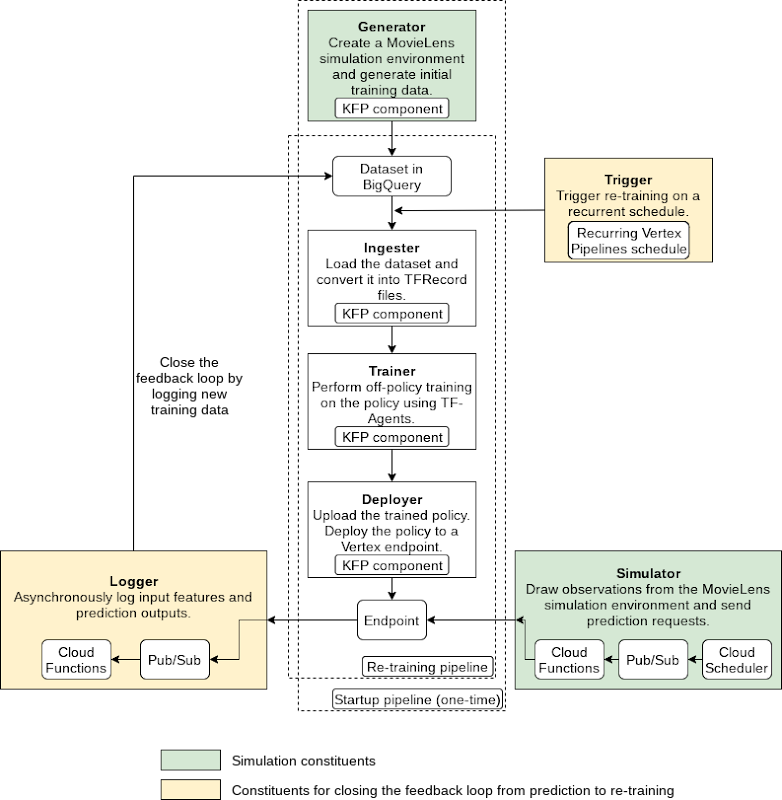
The pipeline consists of the following components:
- Generator: to generate MovieLens simulation data as the initial training dataset using a random data-collecting policy, and store in BigQuery [executed only once]
- Ingester: to ingest training data in BigQuery and output TFRecord files
- Trainer: to perform off-policy (which is covered in detail in the demo) training using the training dataset and output a trained RL policy
- Deployer: to upload the trained policy, create a Vertex AI endpoint and deploy the trained policy to the endpoint
In addition to the above pipeline, there are three components which utilize other GCP services (Cloud Functions, Cloud Scheduler, Pub/Sub):
- Simulator: to send recurring simulated MovieLens prediction requests to the endpoint
- Logger: to asynchronously log prediction inputs and results as new training data back to BigQuery, per prediction requests
- Trigger: to recurrently execute re-training on new training data
Pipeline construction with Kubeflow Pipelines (KFP)
You can author the pipeline using the individual components mentioned above:
@dsl.pipeline(pipeline_root=PIPELINE_ROOT,name=f"{PIPELINE_NAME}-startup")def pipeline(# Pipeline configsproject_id: str,raw_data_path: str,training_artifacts_dir: str,# BigQuery configsbigquery_dataset_id: str,bigquery_location: str,bigquery_table_id: str,bigquery_max_rows: int = 10000,# TF-Agents RL configsbatch_size: int = 8,rank_k: int = 20,num_actions: int = 20,driver_steps: int = 3,num_epochs: int = 5,tikhonov_weight: float = 0.01,agent_alpha: float = 10) -> None:"""Authors a RL pipeline for MovieLens movie recommendation system.Integrates the Generator, Ingester, Trainer and Deployer components. Thispipeline generates initial training data with a random policy and runs onceas the initiation of the system.Args:project_id: GCP project ID. This is required because otherwise the BigQueryclient will use the ID of the tenant GCP project created as a result ofKFP, which doesn't have proper access to BigQuery.raw_data_path: Path to MovieLens 100K's "u.data" file.training_artifacts_dir: Path to store the Trainer artifacts (trained policy).bigquery_dataset: A string of the BigQuery dataset ID in the format of"project.dataset".bigquery_location: A string of the BigQuery dataset location.bigquery_table_id: A string of the BigQuery table ID in the format of"project.dataset.table".bigquery_max_rows: Optional; maximum number of rows to ingest.batch_size: Optional; batch size of environment generated quantities eg.rewards.rank_k: Optional; rank for matrix factorization in the MovieLens environment;also the observation dimension.num_actions: Optional; number of actions (movie items) to choose from.driver_steps: Optional; number of steps to run per batch.num_epochs: Optional; number of training epochs.tikhonov_weight: Optional; LinUCB Tikhonov regularization weight of theTrainer.agent_alpha: Optional; LinUCB exploration parameter that multiplies theconfidence intervals of the Trainer."""# Run the Generator component.generate_op = create_component_from_func(func=generator_component.generate_movielens_dataset_for_bigquery,output_component_file=f"generator-{OUTPUT_COMPONENT_SPEC}",packages_to_install=["google-cloud-bigquery==2.20.0","tensorflow==2.5.0","tf-agents==0.8.0",])generate_task = generate_op(project_id=project_id,raw_data_path=raw_data_path,batch_size=batch_size,rank_k=rank_k,num_actions=num_actions,driver_steps=driver_steps,bigquery_tmp_file=BIGQUERY_TMP_FILE,bigquery_dataset_id=bigquery_dataset_id,bigquery_location=bigquery_location,bigquery_table_id=bigquery_table_id)# Run the Ingester component.ingest_op = create_component_from_func(func=ingester_component.ingest_bigquery_dataset_into_tfrecord,output_component_file=f"ingester-{OUTPUT_COMPONENT_SPEC}",packages_to_install=["google-cloud-bigquery==2.20.0","tensorflow==2.5.0",])ingest_task = ingest_op(project_id=project_id,bigquery_table_id=generate_task.outputs["bigquery_table_id"],bigquery_max_rows=bigquery_max_rows,tfrecord_file=TFRECORD_FILE)# Run the Trainer component and submit custom job to Vertex AI.train_op = create_component_from_func(func=trainer_component.training_op,output_component_file=f"trainer-{OUTPUT_COMPONENT_SPEC}",packages_to_install=["tensorflow==2.5.0","tf-agents==0.8.0",])train_task = train_op(training_artifacts_dir=training_artifacts_dir,tfrecord_file=ingest_task.outputs["tfrecord_file"],num_epochs=num_epochs,rank_k=rank_k,num_actions=num_actions,tikhonov_weight=tikhonov_weight,agent_alpha=agent_alpha)worker_pool_specs = [{"containerSpec": {"imageUri":train_task.container.image,},"replicaCount": TRAINING_REPLICA_COUNT,"machineSpec": {"machineType": TRAINING_MACHINE_TYPE,"acceleratorType": TRAINING_ACCELERATOR_TYPE,"acceleratorCount": TRAINING_ACCELERATOR_COUNT,},},]train_task.custom_job_spec = {"displayName": train_task.name,"jobSpec": {"workerPoolSpecs": worker_pool_specs,}}# Run the Deployer components.# Upload the trained policy as a model.model_upload_op = gcc_aip.ModelUploadOp(project=project_id,display_name=TRAINED_POLICY_DISPLAY_NAME,artifact_uri=training_artifacts_dir,serving_container_image_uri=f"gcr.io/{PROJECT_ID}/{PREDICTION_CONTAINER}:latest",)# Model uploading has to occur after training completes.model_upload_op.after(train_task)# Create a Vertex AI endpoint. (This operation can occur in parallel with# the Generator, Ingester, Trainer components.)endpoint_create_op = gcc_aip.EndpointCreateOp(project=project_id,display_name=ENDPOINT_DISPLAY_NAME)# Deploy the uploaded, trained policy to the created endpoint. (This operation# has to occur after both model uploading and endpoint creation complete.)model_deploy_op = gcc_aip.ModelDeployOp(project=project_id,endpoint=endpoint_create_op.outputs["endpoint"],model=model_upload_op.outputs["model"],deployed_model_display_name=TRAINED_POLICY_DISPLAY_NAME,machine_type=ENDPOINT_MACHINE_TYPE)
The execution graph of the pipeline looks like the following:
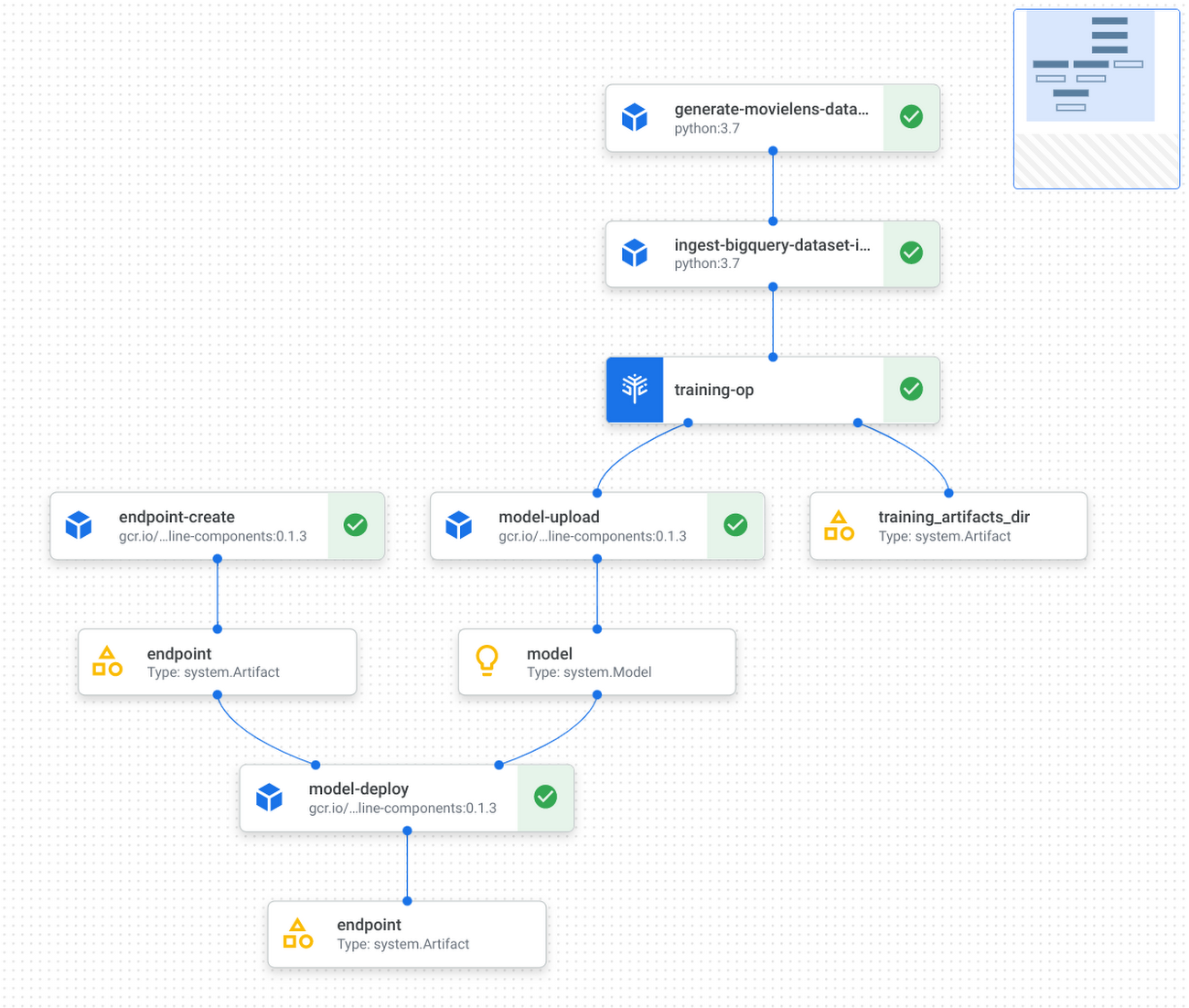
Refer to the GitHub repo for detailed instructions on how to implement and test KFP components, and how to run the pipeline with Vertex Pipelines.
Applying this demo to your own RL projects and production
You can replace the MovieLens simulation environment with a real-world environment where RL quantities like observations, actions and rewards capture relevant aspects of said real-world environment. Based on whether you can interact with the real world in real-time, you may choose either on-policy (showcased by the step-by-step demo) or off-policy (showcased by the pipeline demo) training and evaluation.
If you were to implement a real-world recommendation system, here’s what you’d do:
You would represent users as some user vectors. The individual entries in the user vectors may have actual meanings like age. Alternatively, they may be generated through a neural network as user embeddings. Similarly, you would define what an action is and what actions are possible, likely all items available on your platform; you would also define what the reward is, such as whether the user has tried the item, how long/much the user has spent on the item, user rating of the item, and so on. Again, you have the flexibility to decide on representations for framing the problem that maximize performance. During training or data pre-collection, you may randomly sample users (and build the corresponding user vectors) from the real world, use those vectors as observations to query some policy for items to recommend, and then apply that recommendation to users and obtain their feedback as rewards.
This RL demo can also be extended to ML applications other than recommendation system. For instance, if your use case is to build an image classification system, then you can frame an environment, where observations are the image pixels or embeddings, actions are the predicted classes, and rewards are feedback on the predictions’ correctness.
Conclusion
Congratulations! You have learned how to build reinforcement learning solutions using Vertex AI in a fully managed, modularized and reproducible way. There is so much you can achieve with RL, and you now have many Vertex AI as well as Google Cloud services in your toolbox to support you in your RL endeavors, be it production systems, research or cool personal projects.
Additional resources
- [Recap] step-by-step demo link: GitHub link
- [Recap] end-to-end pipeline demo: GitHub link
- TF-Agents tutorial on bandits: Introduction to Multi-Armed Bandits
- Vertex Pipelines tutorial: Intro to Vertex Pipelines
2999
Of your peers have already watched this video.
26:30 Minutes
The most insightful time you'll spend today!
What’s Next for Personalization on Google Cloud
Customer shopping behavior has changed for good. With fewer in-store shopping visits retailers have had to shore up their digital storefronts and explore new ways to meaningfully engage with their customers.
Delivering a superior customer experience has become even more of a differentiator for the early movers and personalized recommendations have emerged as one of the strongest potential drivers of revenue lift.
But as many retailers have discovered delivering recommendations at scale can actually be quite complex and time consuming.
Learn how to deliver highly-personalized product recommendations with Google Cloud Recommendations AI.
Recommendations AI is now fully open access and self-serve, with more built-in integrations with Google Shopping Merchant Center and Google Analytics, as well as more controls over how you create recommendation pipelines and manage your costs.
You will also hear how Google Cloud partners like Qubit and BigCommerce have successfully deployed Recommendations AI for their customers and made us an integral part of their solution offerings.
IKEA’s AI-driven Personalized and Real-time Recommendations Up its Conversion Rates and Average Order Value

4881
Of your peers have already read this article.
3:00 Minutes
The most insightful time you'll spend today!
Background
At IKEA we have multiple places in our customer journey in various channels where different kinds of personalization can deliver a superior customer experience. Product recommendations in the shopping basket, content recommendations in editorial sections, inspirational recommendations on product pages and more. After a while in the broader “recommendations” team there was a decision to split the team to have one sub-team focused on product recommendations. The pandemic altered customer behavior and needs as well. At that inflection point we decided to change our way of working and dive head-first into a more scientific approach to handle the operational complexities of delivering high quality product recommendations at scale. We deemed this necessary to improve our level of personalization and to have a holistic understanding of our customers.
Data Driven Decisions
The first step was to radically improve our ability to get high-quality quantitative information to understand how our ‘recommendation’ solutions affected personalization. We did this through high volume A/B testing on customer behaviour and after initial experimentation, we had a few key learnings:
- The mix of both UX and algorithms are really important for a cohesive customer experience.
- The quality of personalization can’t be measured in silos. Statistical significance can be attained by testing several groups of recommendations at once.
Once we came up with a solid framework for gathering data and acknowledged how little we knew about our customers, we were able to explore an incredible number of creative options – nothing was off the table. This was a very humbling experience, in that it opened up new perspectives for personalization, a more curious and less confined way of thinking. We learned to trust the data because it might show you things you don’t expect.
Experimentation and Learning Framework
Our teams created ways to quickly deploy experimental modifications to our existing solution. This enabled experimentation in the front-end with the user experience, including details in headings and images. This also covered tweaks in the backend with anything from detailed manual additions or removals of recommendations to mixing and matching of various algorithms both home grown and from Recommendations AI.
This flexibility came with an overhead–more complexity and cost relative to directly retrieving recommendations from Recommendations AI. However, the benefit was that we were no longer dependent on manual evaluation of what made for a good recommendation system. We aligned on a data-driven and qualitative approach to provisioning recommendations and significantly accelerated our experimentation timeline. Together with optimization of the CI/CD pipeline this enabled the team to take an idea or hypothesis from inception to A/B testing with customers in less than half an hour.
Recommendations AI Experiments
Our team’s infrastructure was already running on GCP and when we received early access to Recommendations AI, the requirements to get started were minimal and that allowed us to start with initial tests requiring minimal effort and investment.
We started with a few use-cases and identified places where our existing recommendation algorithms needed improvement or complementary recommendations. We also explored additional ways where more useful information could be presented to the customers through personalized recommendations.
Recommendations AI Model Combinations
While Recommendations AI might be considered a simple API to get a set of product recommendations, as we dove deeper into the solution it became apparent that it could be tweaked in several different ways to offer many fine tuning configurations to meet business goals. While too much fine tuning and customization could lead to subpar performance, in general we found that it was a great strategy to give us several versions of ML powered recommendations to work with. The further you personalize the experience, the more options you have to likely pick the best one for the customer.
Recommendations AI models like ‘Recommended for you’, ‘Frequently Bought Together’ and ‘Others you may like’; are coupled with business goals like optimizing for conversion rate, click through rate and revenue. We experimented with many different model combinations and custom rules. All this was easily configurable right in the GCP console. One of the simplest custom configurations we used was to only recommend items that were in stock, and when items were out of stock we looked at similar items that were available to augment the experience.
Collaboration with Google
Our collaboration with Google Cloud accelerated our learning process during experimentation. We worked closely together early in the product development. Additionally, their model provided flexibility to change direction and allow for more options than we had previously. Ultimately, this provided us a way to drastically improve our time to market with a product that produced tremendous results that we could not have accomplished on our own.
Results and Takeaways
With more personalized and real-time recommendations available we saw great success. We were able to increase the number of relevant recommendations displayed on a page by +400%. To accommodate the wider repertoire of recommendations we had to change the user experience. For example, in some places we had horizontally scrolling displays of product recommendations which were much easier for customers to use.
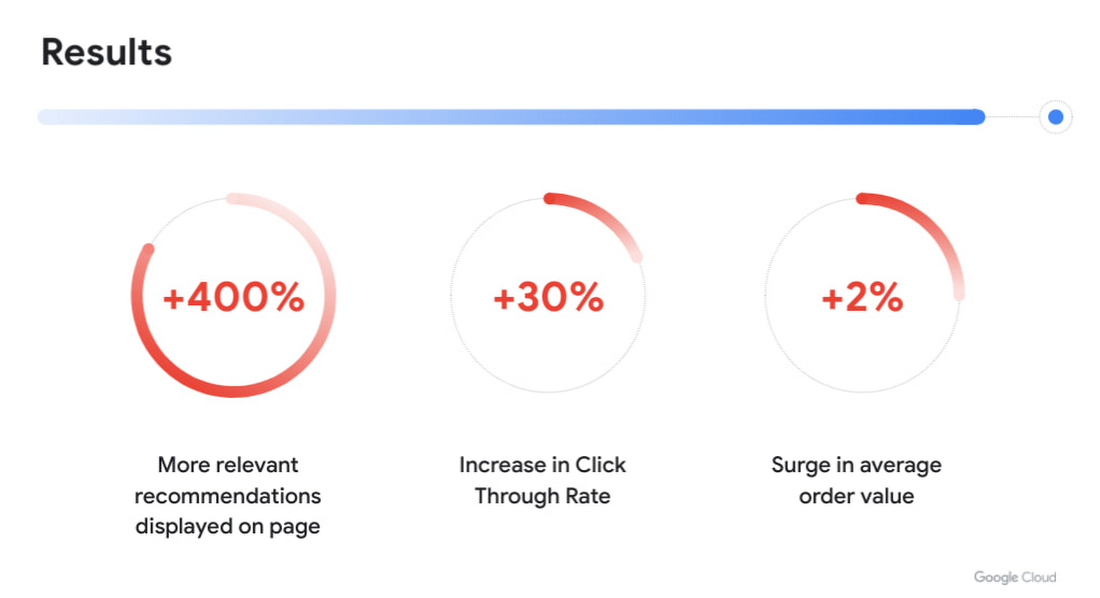
Another consequence of displaying more personalized recommendations was tangible improvement to conversion rate and average order value. Recommendations AI algorithms helped customers in two ways:
- Customers were able to find products that they liked quickly and establish their preferred choice among other options more quickly as well, giving them confidence to make a purchase through much fewer clicks. Even though we previously already had well tuned recommendations of several types, with Recommendations AI we measured +30% improvement in click through rates.
- Average order value saw a +2% surge with numerous examples of how Recommendations AI could help customers find both attractive and directly complementary products, expanding the customer purchase from a single product to an entire home furnishing solution.
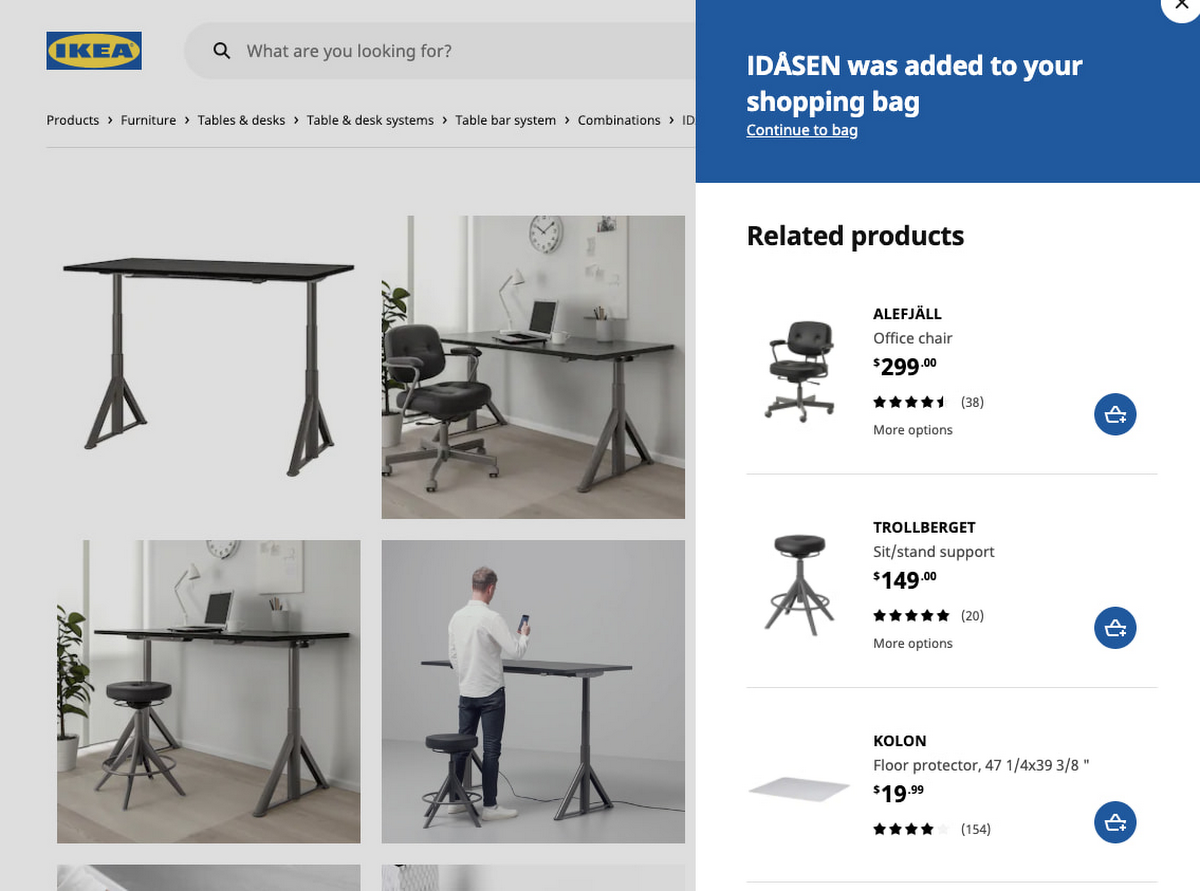
As a direct effect of having stronger business results, the team started exploring more places in the customer journey where our growing buffet of recommendations could be used. We’d start with an initial experiment to answer if displaying recommendations in the specific context made sense at all. Frequently the data that emerged from these experiments prodded us to iterate further on what additional types of recommendations would be most appropriate to show to the customer as the customer’s behaviour evolved. Today, most of IKEA’s site recommendations are powered by Recommendations AI.
One key takeaway is that for some types of personalized recommendations there are benefits to using advanced algorithms that require a lot of high level data science and engineering competence to build since they outperform simplistic approaches. In some places, simplistic approaches work very well and in others the right decision is to not have product recommendations at all. For an effective use of product recommendations you need to have all the above options and the ability to tell when to use which one.
Next steps
When working with something so tightly related to customer experience, there is a constant change in user behaviour and new learnings to observe and adapt to. Product recommendations are rarely the main stand alone experience and frequently something that is used to help and enhance an experience. We see a lot of value in having a large toolbox of possible options and a team with a relentless focus on collaboration to improve the customer experience. We’re working directly with the Recommendations AI team and experimenting with several new features that we’re excited about.
In the future we see opportunities of improving the customer journey through a more visual experience that inspires the customer rather than relying on customers to use their imagination to visualize groups of products together. Vision Product Search provides that and is something we’re looking into deploying next. We’ll be sharing more about our journey with Recommendations AI at the Google Cloud Retail Summit session ‘IKEA’s Approach to Building a Powerful Recommendations Engine’ on July 27th 2021.
Best wishes to all developers from the IKEA product recommendations team & the Google Recommendations AI team!
More Relevant Stories for Your Company


Driving Business Transformation in Retail Using AI
Retailers face numerous challenges in their business every day. Especially today. Watch this discussion of how retailers are working with Google Cloud on machine learning and AI to transform their business. This video presents an overview of the AI Platforms, products, and solutions Google Cloud is building to address those
Data Science Teams: A Practitioners Guide to MLOps
Across industries, DevOps and DataOps have been widely adopted as methodologies to improve quality and reduce the time to market of software engineering and data engineering initiatives. With the rapid growth in machine learning (ML) systems, similar approaches need to be developed in the context of ML engineering, which handle

Customer Voices: How Firms from Across Industries Leverage Google Cloud
From powering everyday operations and accelerating application innovation, to providing tools for specific business needs and executing on big ideas, to advancing the security of technology solutions, companies from across industries have leveraged Google Cloud for business benefits. Companies from across industries have turned to Google Cloud for transforming their


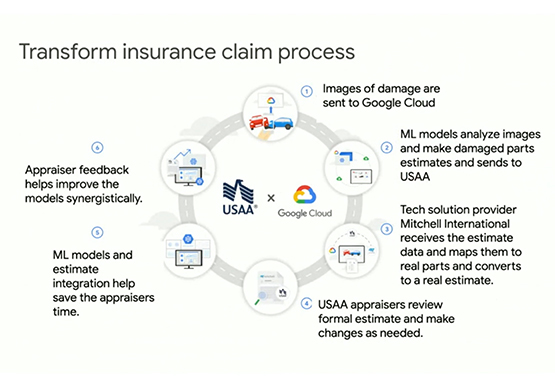
Driving Business Transformation in Financial Services Using Google Cloud and AI/ML
These are challenging times with financial services institutions navigating the pandemic. Interest rates are an all-time low, and customer expectations are changing with the shift to digital. For example, digital banking has increased from 63 in 2019 to 72 percent today. Then regulatory requirements are evolving and compliance costs are
