





Meesho’s Zero Downtime Success: Cloud CDN Migration Made Easy

1989
Of your peers have already read this article.
4:30 Minutes
The most insightful time you'll spend today!
Meesho is an Indian online marketplace that serves millions of customers every day. Recently, the company decided to adopt a multi-cloud strategy, leveraging Google Cloud’s scalable and reliable infrastructure to drive operational efficiency, modernize and scale for growth. To do so, they needed to migrate billions of static files and images to Google Cloud, to render the static content that serves their web and mobile applications. But with over a petabyte of data in their object storage system, and 10 billion requests per day, Meesho needed to perform this gigantic migration gradually, with zero downtime — a huge challenge.
In this blog post, we look at how Meesho did this using Storage Transfer Service, Cloud Storage and Cloud CDN. We also look at how it saved on storage capacity by resizing static images as needed on the fly, using Cloud Run.
CDN migration requirements
Migrating from one cloud to another isn’t easy. To pull it off, Meesho identified the following requirements:
- Petabyte-scale data transfer: Meesho needed to migrate billions of image files from their existing object storage server to Cloud Storage.
- Dynamic image resizing: To save on storage costs, Meesho wanted the ability to dynamically resize the images based on the end user platform and store the smaller images in the Cloud CDN cache.
- High-throughput data transfer: To support consumer demand, Meesho needed images to be served at a throughput of thousands of requests per second.
- Zero downtime: Since any downtime involves potential loss of revenue, Meesho needed to perform the migration without taking any systems offline.
Migration architecture
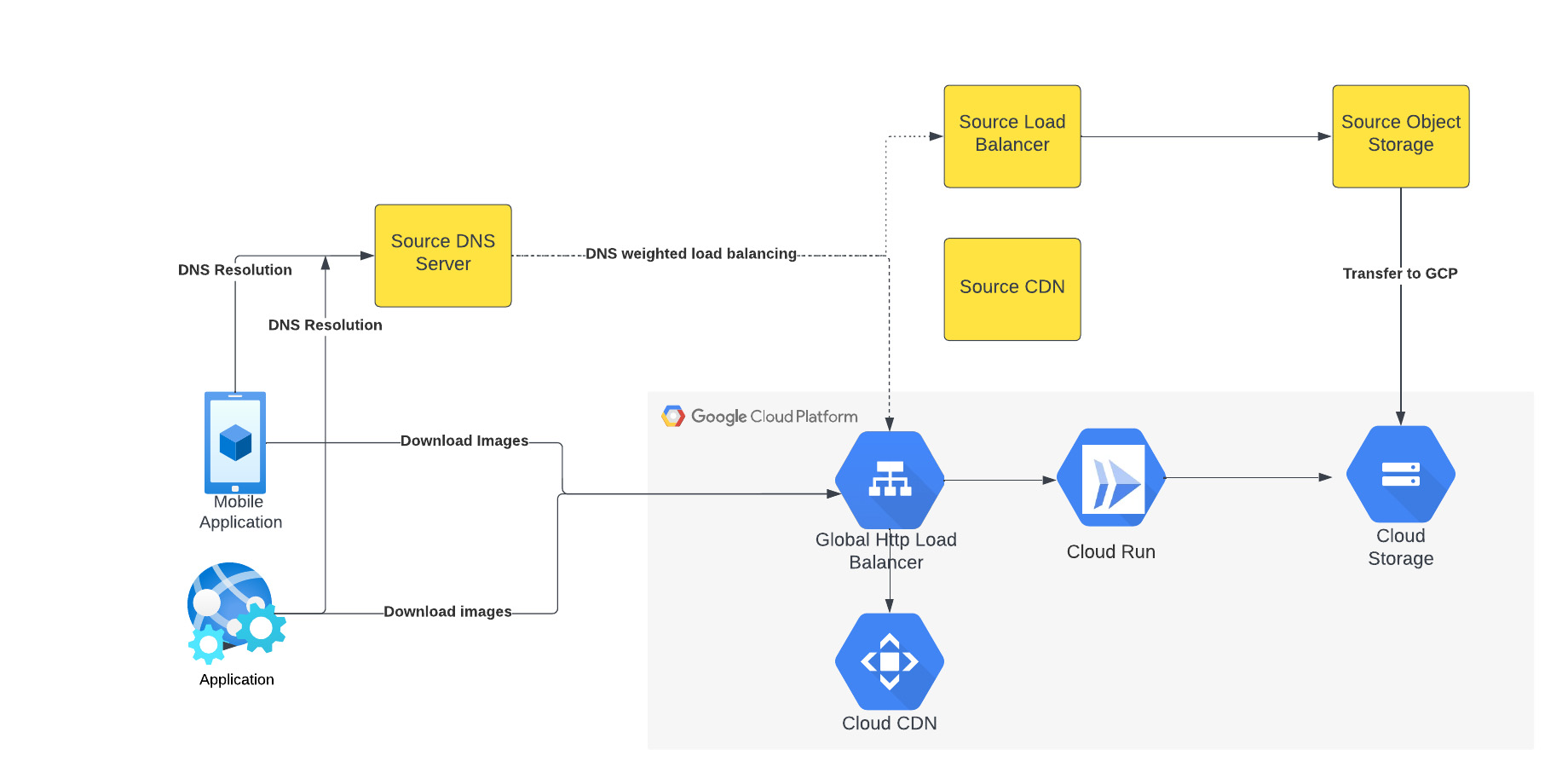
The above figure depicts the CDN migration architecture implemented in Meesho. The existing DNS server points to both the source load balancer as well as Google External HTTP Load Balancer with weighted distribution. The source load balancer points to the source object storage. Images were transferred from the source object storage to Google Cloud Storage.
The Google External HTTP Load Balancer was deployed with Cloud CDN to serve static images that are stored in the CDN cache to users. The Google Load Balancer public IP is configured as an end point on their existing DNS server. The Load Balancer is connected to Cloud Run, which talks to the Cloud Storage bucket. When a request reaches the Load Balancer in the edge, it first checks if the content is available in Cloud CDN, and returns the object from the closest edge network. If the image is not available in the Cloud CDN cache, the request is sent to Cloud Run which obtains the image from the Cloud Storage bucket and performs dynamic resizing of the image if necessary.
Data transfer
Meesho used Google Cloud’s Storage Transfer Service to transfer data from their current object storage to Cloud storage bucket over the internet. Since the number of files and total size of the data to be transferred was huge, Meesho executed multiple parallel transfers by specifying folders and subfolders as prefixes in a Storage Transfer Service job.
Dynamic image resizing
Meesho delivers static images to multiple end user platforms — mobile, laptop — at multiple resolutions. Rather than store each image at multiple image resolutions, Meesho opted to store a single high-resolution mezzanine image. It then attached Cloud Run as a serverless network endpoint group to a Cloud Load Balancer. Application requests for images specify the name of the object, the format of the image, and its resolution (for example, abc.jpeg with 750*450 resolution). If the specific image exists for the requested resolution, then it is returned from the Cloud Storage bucket to the end user and stored in the Cloud CDN cache. If an image for a specified resolution and/or format is not found, the mezzanine image (in our example, abc.jpeg) is resized to the specified resolution and format, then stored in Cloud Storage bucket and returned to the end user. The dynamic resizing and formatting is only performed the first time for a specific resolution.
In this architecture, it is important to configure Cloud Run to scale appropriately as it handles a bulk of “CDN cache-miss” requests. Meesho performed the following configuration steps:
- Configured the number of concurrent requests that a single instance of Cloud Run can handle
- Ensured a sufficient minimum of Cloud Run instances were available to serve user traffic to avoid cold-start latency
- Reviewed limits of Cloud Run maximum instance size for the region and increased the limits if necessary to handle peak load
- Set up smaller start-up times for Cloud Run containers, so that the application could quickly autoscale to handle a surge in traffic
- Optimized the memory and CPU configuration to handle processing requirements
CDN configuration
Cloud CDN was configured to ensure a high cache hit ratio > 99 %. This not only sped up the rendering of the images, but also reduced the load on Cloud Run, saving cost and improving performance.
Achieving zero downtime
Meesho followed well-established DevOps principles to achieve a zero-downtime migration:
- Metrics and alerts were configured in Cloud Monitoring to oversee the load balancer.
- The DNS server was configured to point to Cloud Load Balancer IP addresses in addition to their current load balancer, which served status assets.
- Weight-based DNS load balancing was employed to gradually shift the traffic to Google Cloud, while monitoring application performance and HTTP response codes.
- The initial migration process distributed .1% of traffic during non-peak hours. The metrics, end user performance and response codes were continuously monitored.
- Traffic was gradually incremented over a two-week period by increasing the weight of the Google Cloud Load balancer in DNS. By gradually shifting traffic, Meesho ensured a healthy cache-hit ratio, allowing Cloud Run to learn traffic patterns gradually and scale seamlessly.
Meesho learned a lot through this experience, and has the following advice for anyone undertaking a similar migration:
- While transferring data using Storage Transfer Service of Google Cloud, split the transfer process into multiple transfers.
- Ensure that applications do not pin certificates, which could create problems while migrating to the newer certificates in Google Cloud.
- Plan a gradual migration process to gradually increase the traffic to Google Cloud.
Summary
When all is said and done, Meesho considers its migration to Google Cloud a big success. After migrating the static images to Cloud CDN, Meesho held two major sales that each had three times the normal peak traffic, all with no issues. The CDN migration helped Meesho reduce its costs, improve performance and reduce load balancer errors when fetching static images. To learn more about Cloud CDN and how you can use it in your environment, check out the documentation.
Google Cloud Helps Northwell Health to Boost Caregiver Productivity and Access to Right Care Using AI

7983
Of your peers have already read this article.
2:00 Minutes
The most insightful time you'll spend today!
Lung cancer is the leading cause of cancer death in the United States and like any cancer, early detection is crucial to survival. Screening at-risk populations is an important part of reducing mortality, and if concerning nodules are found on imaging, further testing may be required. Today, we’ll share how Northwell Health uses Google Cloud products such as Cloud Healthcare APIs and BigQuery to increase caregiver productivity and deliver better care for patients with findings that indicate potential development of lung cancer.
Northwell is New York’s largest healthcare provider
Northwell Health is New York’s largest healthcare provider with 23 hospitals and nearly 800 outpatient facilities. Northwell’s nearly 4,000 doctors care for millions of patients each year, and at this scale, there is an immense amount of healthcare data to manage. To better manage and leverage this data, Northwell Health partnered with Google Cloud starting in 2018.
Enabling caregivers to spend more time with patients
Nic Lorenzen, the lead developer of Northwell Emerging Technology and Innovation team, has a mission to put together data for caregivers in a way that makes sense. It is no secret that inefficient electronic health records systems have a negative impact on a physician’s ability to deliver quality care. Traditional EHRs have information distributed across many tabs, which forces caregivers to spend considerable time at the computer trying to find information. Moreover, speed of care matters. If care is delayed, patients may have to spend more time in the hospital and may suffer worse health outcomes.
To solve this problem, Nic’s team focused on giving caregivers the most relevant pieces of data at the right time by developing an intelligent clinician rounding app. The data needed to derive these insights can depend on the caregiver’s role–a nurse cares about different things than a cardiologist. This system aggregates multiple data sources, and provides patient-specific insights to caregivers.
This system would not have been possible before with traditional EHRs and data warehouses that have proprietary data models and rarely sync data in real time. Now with data easily accessible through Google Cloud’s Healthcare solutions, Nic’s team can deliver the right clinical information to the right people instantly. These days, Nic says, “instead of spending 75% of our time dealing with architecting the underlying platforms, we spend 75% of our time focused on higher value use cases for clinicians and patients. Google Cloud’s Healthcare solutions have greatly improved our developer productivity and time to value.”
Caregivers have found this new system to be a game changer.Before the implementation of this system, caregivers would spend, on average, seven to nine minutes finding the data needed to make medical decisions for one patient. Now, that aggregated information is delivered to a caregiver’s mobile device in less than a second.
Ensuring patients get the right care with the power of AI
There are a number of reasons why patients might not get the care that they need. For example, patients today can go to multiple hospitals and clinics settings, and coordinating care across multiple facilities is complex. Regional hospitals and clinics have their own siloed view of their data, so pertinent information gathered by one clinic might not be seen by another. These gaps in clinical data lead to gaps in patient care.
When a patient gets radiologic imaging, they may have findings unrelated to the reason they initially got the imaging. For example, a chest CT for a car accident might reveal an incidental lung nodule that could be cancerous. Unfortunately, research shows that a large portion of patients do not get follow up for these incidental findings because it isn’t the primary reason why the patient is seeing a doctor. Moreover, social determinants of health are a factor that affects which patients receive follow-up care. Identifying these patients and providing the necessary follow up care prevents adverse events related to delayed detection of cancer.

With Cloud Healthcare solutions, Northwell built an AI model to identify these patients so that oncologists can appropriately follow up with patients who have findings suspicious for lung cancer. The AI model detects incidental pulmonary nodules in radiology reports so that doctors can then contact the patients that need follow-up care. Nic says his team was able to build this system in a week: “Google Cloud did a lot of heavy-lifting for us and allowed us to get to the AI applications much faster. It allowed us to build a platform that just works.”
Healthcare systems can now rapidly generate healthcare insights with one end-to-end solution, Google Cloud Healthcare Data Engine. It builds on and extends the core capabilities of the Google Cloud Healthcare API to make healthcare data more immediately useful by enabling an interoperable, longitudinal record of patient data. Northwell Health uses Google Cloud as the core of their platform, enabling their developers to create solutions to the most pressing healthcare problems.
Special thanks to Kalyan Pamarthy, Product Management Lead on Cloud Healthcare and Natural Language APIs for contributing to this blog post.
Migrating Hadoop to Dataproc by LiveRamp: Best Practices

2884
Of your peers have already read this article.
3:30 Minutes
The most insightful time you'll spend today!
Abstract
In this blog, we describe our journey to the cloud and share some lessons we learned along the way. Our hope is that you’ll find this information helpful as you go through the decision, execution, and completion of your own migration to the cloud.
Introduction
LiveRamp is a data enablement platform powered by identity, centered on privacy, integrated everywhere. Everything we do centers on making data safe and easy for businesses to use. Our Safe Haven platform powers customer intelligence, engages customers at scale, and creates breakthrough opportunities for business growth.
Businesses safely and securely bring us their data for enrichment and use the insights gained to deliver better customer experiences and generate more valuable business outcomes. Our fully interoperable and neutral infrastructure delivers end-to-end addressability for the world’s top brands, agencies, and publishers. Our platforms are designed to handle the variability and surge of the workload and guarantee service-level agreements (SLAs) to businesses.
We process petabytes of batch and streaming data daily. We ingest, process (join and enhance), and distribute this data. We receive and distribute data from thousands of partners and customers on a daily basis. We maintain the world’s largest and most accurate identity graph and work with more than 50 leading demand-side and supply-side platforms.
Our decision to migrate to Google Cloud and Dataproc
As an early adopter of Apache Hadoop, we had a single on-prem production managed Hadoop cluster that was used to store all of LiveRamp’s persistent data (HDFS) and run the Hadoop jobs that make up our data pipeline (YARN). The cluster consisted of around 2500 physical machines with a total of 30PB or raw storage, ~90,000 vcores, and ~300TB of memory. Engineering teams managed and ran multiple MapReduce jobs on these clusters.
The sheer volume of applications that LiveRamp ran on this cluster caused frequent resource contention issues, not to mention potentially widespread outages if an application was tuned improperly. Our business was scaling and we were running into constraints related to data center space and power in our on-premises environment. These constraints restricted our ability to meet our business objectives so a strategic decision was made to leverage elastic environments and migrate to the cloud. The decision required financial analysis and a detailed understanding of the available options, from do-it-yourself and vendor-managed distributions to leveraging cloud-managed services.
LiveRamp’s target architecture
We ultimately chose Google Cloud and Dataproc, a managed service for Hadoop, Spark, and other big data frameworks. During the migration we made a few fundamental changes to our Hadoop infrastructure:
Instead of 1 large persistent cluster managed by a central team, we have decentralized the cluster ownership to individual teams. This gave the teams flexibility to recreate, perform upgrades or change configurations as they see fit. This also gives us better cost attribution, less blast radius for errors, and less chance that – a rogue job from one team will impact the rest of the workloads.
Persistent data is no longer stored in HDFS on the clusters, it is in Google Cloud Storage, which, conveniently, served as a drop in replacement, as GCS is compatible with all the same APIs as HDFS. This means we can delete all the virtual machines that are part of the cluster without losing any data.
Introduced autoscaling clusters to control compute cost, and to dramatically decrease request latency. On premise you’re paying for the machines so you might as well use them. Cloud compute is elastic so you want to burst when there is demand and scale down when you can.
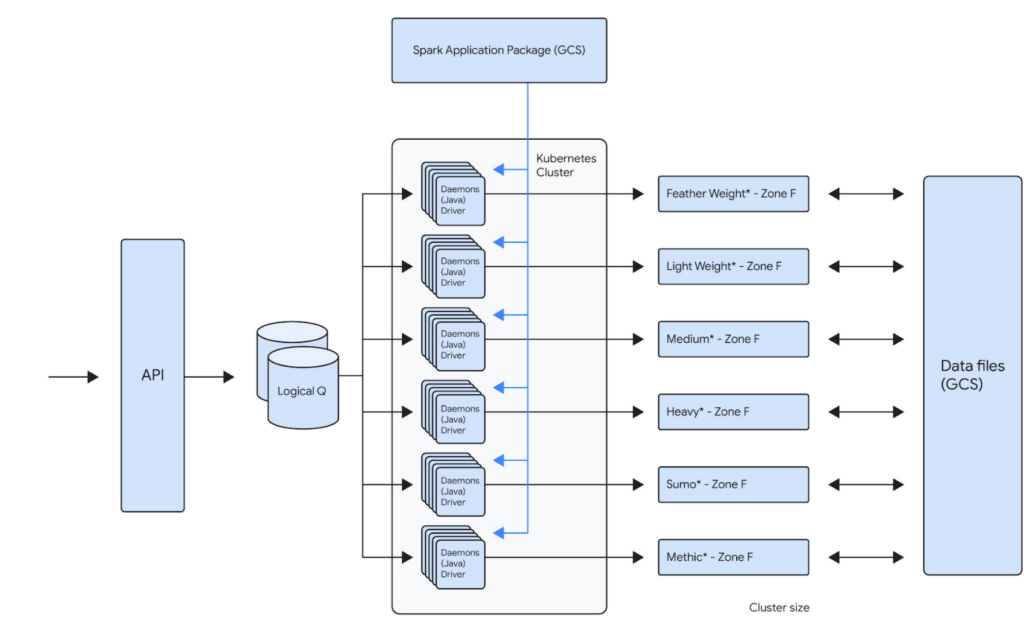
For example, one of our teams runs about 100,000 daily Spark jobs on 12 Dataproc clusters that each independently scale up to 1000 VMs. This gives that team a current peak capacity of about 256,000 cores. Because the team is bound to its own GCP Project inside of a GCP Organization, the cost attributed to that team is now very easy to report. The team uses architecture represented below to distribute the jobs across the clusters. This architecture allows them to bin similar workloads together so that they can be optimized together. Below is the logical architecture of the above workload:
Our approach
Overall migration and post migration stabilization/optimization of the largest of our workloads took us about several years to complete. We broadly broke down the migration into multiple phases.
Initial Proof-Of-Concept
When analyzing solutions for cloud-hosted big data services, any product had to meet our clear acceptance criteria:
- Cost: Dataproc is not particularly expensive compared to similar alternatives, but our discount with the existing managed Hadoop partner made it expensive. We have initially accepted that the cost would remain the same. We did see cost benefits post migration, after several rounds of optimizations.
- Features: Some key features (compared to current state) that we were looking for are built-in autoscaler, ease of creating/updating/deleting clusters, managed big data technologies etc.
- Integration with GCP: As we had already decided to move other LiveRamp-owned services to GCP, a big data platform with robust integration with GCP was a must. Basically, we’d like to be able to leverage GCP features without a lot of effort on our end (custom vms, preemptible vms, etc).
- Performance: Cluster creation, deletion, scale up, and scale down should be fast. This will allow teams to iterate and react quickly. These are some rough estimates of how fast the cluster operations should be:
- Cluster creation: <15 minutes
- Cluster Deletion: <15 minutes
- Adding 50 nodes: <20 minutes
- Removing 200 nodes: <10 minutes
- Reliability: Bug free and low downtime software that has concrete SLAs on clusters and a strong commitment to the correct functioning of all of its features.
An initial prototype to better understand Dataproc and Google Cloud helped us prove that target technologies and architecture will give us reliability and cost improvements. This also fed into our decisions around target architecture. This was then reviewed by the Google team before we embarked on the migration journey.
Overall migration
Terraform module
Our ultimate goal is to create self-service tooling that allows our data engineers to deploy infrastructure as easily and safely as possible. After defining some best practices around cluster creation and configuration, the central team’s first step was to build a terraform module that can be used by all the teams to create their own clusters. This module will create a dataproc cluster along with all supporting buckets, pods and datadog monitors:
- A dataproc cluster autoscaling policy that can be customized
- A dataproc cluster with LiveRamp defaults preconfigured
- Sidecar applications for recording job metrics from the job history server and for monitoring the cluster health
- Pre configured datadog cluster health monitors for alerting
This Terraform module is also composed of multiple supporting modules underneath. This allows users to call the supporting modules directly in your project terraform as well if such a need arises. The module can be used to create a cluster by just setting the parameters like project id, path to application source (Spark or Map/Reduce), subnet, VM instance type, auto scaling policy etc.
Workload migration
Based on our analysis of Dataproc, discussions with GCP team and the POC, we used following criteria:
- We prioritized applications that can use preemptibles to achieve cost parity to our existing workloads
- We prioritized some of our smaller workloads initially to build momentum within the organization. For example, we left the single workload that accounted for ~40% of our overall batch volume to the end, after we had gained enough experience as an organization.
- We combined the migration to Spark along with the migration to Dataproc. This has initially resulted in some extra dev work but helped reduce the effort for testing and other activities.
Our initial approach was to lift and shift from existing managed providers and Map/Reduce to Dataproc and Spark. We then later focused on optimizing the workloads for cost and reliability.
What’s working well
Cost Attribution
As is true with any business, it’s important to know where your cost centers are. Moving from a single cluster, made opaque by the number of teams loading work onto it, to GCP’s Organization/Project structure has made cost reporting very simple. The tool breaks down cost by project, but also allows us to attribute cost to a single cluster via tagging. As we sometimes deploy a single application to a cluster, this helps us to make strategic decisions on cost optimizations at an application level very easily.
Flexibility
The programmatic nature of deploying Hadoop clusters in a cloud like GCP dramatically reduces the time and effort involved in making infrastructure changes. LiveRamp’s use of a self-service Terraform module means that a data engineering team can very quickly iterate on cluster configurations. This allows a team to create a cluster that is best for their application while also adhering to our security and health monitoring standards. We also get all the benefits of infrastructure as code: highly complicated infrastructure state is version controlled and can be easily recreated and modified in a safe way.
Support
When our teams face issues with services that run on Dataproc, the GCP team is always quick to respond. They work very closely with LiveRamp to develop new features for our needs. They proactively provide LiveRamp with preview access to new features that help LiveRamp to stay ahead of the curve in the Data Industry.
Cost Savings
We have achieved around 30% cost savings in certain clusters by achieving the right balance between on-demand and PVMs. The cost savings were a result of our engineers building efficient A/B testing frameworks that helped us run the clusters/jobs in several configurations to arrive at the most reliable, maintainable and cost efficient configuration. Also, one of the applications is now 10x + faster.
Five lessons learned
Migration was a successful exercise that took about six months to complete, across all our teams and applications. While many aspects went really well, we also learned a few things along the way that we hope will help you when planning your own migration journey.
- Benchmark, benchmark, benchmark
It’s always a good idea to benchmark the current platform against the future platform to compare costs and performance. On-premises environments have a fixed capacity, while cloud platforms can scale to meet workload needs. Therefore, it’s essential to ensure that the current behavior of the key workload is clearly understood before the migration.
- Focus on one thing at a time
We initially focused on reliability while remaining cost-neutral during the migration process, and then focused on cost optimization post-migration. Google teams were very helpful and instrumental in identifying cost optimization opportunities.
- Be aware of alpha and beta products
Although there usually aren’t any guarantees of a final feature set when it comes to pre-released products, you can still get a sense of their stability and create a partnership if you have a specific use case. In our specific use case, Enhanced Flexibility Mode was in alpha stage in April 2019, beta in August 2020, and released in July 2021. Therefore, it was helpful to check in on the product offering and understand its level of stability so we could carry out risk analysis and decide when we felt comfortable adopting it.
- Think about quotas
Our Dataproc clusters could support much higher node counts than was possible with our previous vendor. This meant we often had to increase IP space and change quotas, especially as we tried out new VM and disk configurations.
- Preemptable and committed use discounts (CUDs)
CUDs make compute less expensive while preemptables make compute significantly less expensive. However, preemptibles don’t count against your CUD purchases, so make sure you understand the impact on your CUD utilization when you start to migrate to preemptables.
We hope these lessons will help you in your Data Cloud journey.
A Breakdown of Cloud-based Data Ingestion Practices

8837
Of your peers have already read this article.
3:00 Minutes
The most insightful time you'll spend today!
Businesses around the globe are realizing the benefits of replacing legacy data silos with cloud-based enterprise data warehouses, including easier collaboration across business units and access to insights within their data that were previously unseen. However, bringing data from numerous disparate data sources into a single data warehouse requires you to develop pipelines that ingest data from these various sources into your enterprise data warehouse. Historically, this has meant that data engineering teams across the organization procure and implement various tools to do so. But this adds significant complexity to managing and maintaining all these pipelines and makes it much harder to effectively scale these efforts across the organization. Developing enterprise-grade, cloud-native pipelines to bring data into your data warehouse can alleviate many of these challenges. But, if done incorrectly, these pipelines can present new challenges that your teams will have to spend their time and energy addressing.
Developing cloud-based data ingestion pipelines that replicate data from various sources into your cloud data warehouse can be a massive undertaking that requires significant investment of staffing resources. Such a large project can seem overwhelming and it can be difficult to identify where to begin planning such a project. We have defined the following principles for data pipeline planning to begin the process. These principles are intended to help you answer key business questions about your effort and begin to build data pipelines that address your business and technical needs. Each section below details a principle of data pipelines and certain factors your teams should consider as they begin developing their pipelines.
Principle 1: Clarify your objectives
The first principle to consider for pipeline development is clarify your objectives. This can be broadly defined as taking a holistic approach to pipeline development that encompasses requirements from several perspectives: technical teams, regulatory or policy requirements, desired outcomes, business goals, key timelines, available teams and their skill sets, and downstream data users. Clarifying your objectives clearly identifies and defines requirements from each key stakeholder at the beginning of the process and continually checks development against these requirements to ensure the pipelines built will meet these requirements.This is done by first clearly defining the desired end state for each project in a way that addresses a demonstrated business need of downstream data users. Remember that data pipelines are almost always the means to accomplish your end state, rather than the end state itself. An example of an effectively defined end-state is “enabling teams to gain a better understanding of our customers by providing access to our CRM data within our cloud data warehouse” rather than “move data from our CRM to our cloud data warehouse”. This may seem like a merely semantic difference, but framing the problem in terms of business needs helps your teams make technical decisions that will best meet these needs.
After clearly defining the business problem you are trying to solve, you should facilitate requirement gathering from each stakeholder and use these requirements to guide the technical development and implementation of your ingestion pipelines. We recommend gathering stakeholders from each team, including downstream data users, prior to development to gather requirements for the technical implementation of the data pipeline. These will include critical timelines, uptime requirements, data update frequency, data transformation, DevOps needs, and security, policy, or regulatory requirements by which a data pipeline must meet.
Principle 2: Build your team
The second principle to consider for pipeline development is build your team. This means ensuring you have the right people with the right skills available in the right places to develop, deploy, and maintain your data pipelines. After you have gathered your pipeline requirements, you can begin to develop a summary architecture that will be used to build and deploy your data pipelines. This will help you identify the human talent you will need to successfully build, deploy, and manage these data pipelines and identify any potential shortfalls that would require additional support from either third-party partners or new team members.
Not only do you need to ensure you have the right people and skill sets available in aggregate, but these individuals need to be effectively structured to empower them to maximize their abilities. This means developing team structures that are optimized for each team’s responsibilities and their ability to support adjacent teams as needed.
This also means developing processes that prevent blockers to technical development whenever possible, such as ensuring that teams have all of the appropriate permissions they need to move data from the original source to your cloud data warehouse without violating the concept of least privilege. Developers need access to the original data source (depending on your requirements and architecture) in addition to the destination data warehouse. Examples of this are ensuring that developers have access to develop and/or connect to a Salesforce Connected App or read access to specific Search Ads 360 data fields.
Principle 3: Minimize time to value
The third principle to consider for pipeline development is minimize time to value. This means considering the long-term maintenance burden of a data pipeline prior to developing and deploying it in addition to being able to deploy a minimum viable pipeline as quickly as possible. Generally speaking, we recommend the following approach to building data pipelines to minimize their maintenance burden: Write as little code as possible. Functionally, this can be implemented by:
1. Leveraging interface-based data ingestion products whenever possible. These products minimize the amount of code that requires ongoing maintenance and empower users who aren’t software developers to build data pipelines. They can also reduce development time for data pipelines, allowing them to be deployed and updated more quickly.
- Products like Google Data Transfer Service and Fivetran allow for managed data ingestion pipelines by any user to centralize data from SaaS applications, databases, file systems, and other tooling. With little to no code required, these managed services enable you to connect your data warehouse to your sources quickly and easily.
- For workloads managed by ETL developers and data engineers, tools like Google Cloud’s Data Fusion provide an easy-to-use visual interface for designing, managing and monitoring advanced pipelines with complex transformations.
2. Whenever interface-based products or data connectors are insufficient, use pre-existing code templates. Examples of this include templates available for Dataflow that allow users to define variables and run pipelines for common data ingestion use cases, and the Public Datasets pipeline architecture that our Datasets team uses for onboarding.
3. If neither of these options are sufficient, utilize managed services to deploy code for your pipelines. Managed services, such as Dataflow or Dataproc, eliminate the operational overhead of managing pipeline configuration by automatically scaling pipeline instances within predefined parameters.
Principle 4: Increase data trust and transparency
The fourth principle to consider for pipeline development is increase data trust and transparency. For the purposes of this document, we define this as the process of overseeing and managing data pipelines across all tools. Numerous data ingestion pipelines that each leverage different tools or are not developed under a coordinated management plan can result in “tech sprawl”, which significantly increases the management overhead of data ingestion pipelines as the quantity of data pipelines increases. This becomes especially cumbersome if you are subject to service-level agreements, or legal, regulatory, or policy requirements for overseeing data pipelines. Preventing tech sprawl is, by far, the best strategy for dealing with it by developing streamlined pipeline management processes that automate reporting. Although this can theoretically be achieved by building all of your data pipelines using a single cloud-based product, we do not recommend doing so because it prevents you from taking advantage of features and cost optimizations that come with choosing the best product for your use case.
A monitoring service such as Google Cloud Monitoring Service or Splunk that automates metrics, events, and metadata collection from various products, including those hosted in on-premise and hybrid computing environments, can help you centralize reporting and monitoring of your data pipelines. A metadata management tool such as Google Cloud’s Data Catalog or Informatica’s Enterprise Data Catalog can help you better communicate the nuances of your data so users better understand which data resources are best fit for a given use case. This significantly reduces your pipeline’s governance burden by eliminating manual reporting processes that often result in inaccuracies or lagging updates.
Principle 5: Manage costs
The fifth principle to consider for pipeline development is manage costs. This encompasses both the cost of cloud resources and the staffing costs necessary to design, develop, deploy, and maintain your cloud resources. We believe that your goal should not necessarily be to minimize cost, but rather maximizing the value of your investment. This means maximizing the impact of every dollar spent by minimizing waste in cloud resource utilization and human time. There are several factors to consider when it comes to managing costs:
- Use the right tool for the job – Different data ingestion pipelines will have different requirements for latency, uptime, transformations, etc. Similarly, different data pipeline tools have different strengths and weaknesses. Choosing the right tool for each data pipeline can help your pipelines operate significantly more efficiently. This can reduce your overall cost, free up staffing time to focus on the most impactful projects, and make your pipelines much more efficient.
- Standardize resource labeling – Implement and utilize a consistent labeling schema across all tools and platforms to have the most comprehensive view of your organization’s spending. One example is requiring all resources to be labeled by the cost center or team at time of creation. Consistent labeling allows you to monitor your spend across different teams and calculate the overall value of your cloud spending.
- Implement cost controls – If available, leverage cost controls to prevent errors that result in unexpectedly large bills.
- Capture cloud spend – Capture your spend on all cloud resource utilization for internal analysis using a cloud data warehouse and a data visualization tool. Without it, you won’t understand the context of changes in cloud spend and how they correlate with changes in business.
- Make cost management everyone’s job – Managing costs should be part of the responsibilities of everyone who can create or utilize cloud resources. To do this well, we recommend making cloud spend reporting more transparent internally and/or implementing chargebacks to internal cost centers based on utilization.
Long-term, the increased granularity in cost reporting available within Google Cloud can help you better measure your key performance indicators. You can shift from cost-based reporting (i.e. – “We spent $X on BigQuery storage last month”) to value-based reporting (i.e. – “It costs $X to serve customers who bring in $Y revenue”).
To learn more about managing costs, check out Google Cloud’s “Understanding the principles of cost optimization” white paper.
Principle 6: Leverage continually improving services
The sixth principle is leverage continually improving services. Cloud services are consistently improving their performance and stability, even if some of these improvements are not obvious to users. These improvements can help your pipelines run faster, cheaper, and more consistently over time. You can take advantage of the benefits of these improvements by:
- Automating both your pipelines and pipeline management: Not only should data pipelines be automated, but almost all aspects of managing your pipelines can also be automated. This includes pipeline/data lineage tracking, monitoring, cost management, scheduling, access management and more. This helps reduce long-term operational costs of each data pipeline that can significantly alter your value proposition and prevent any manual configurations from negating the benefits of later product improvements.
- Minimizing pipeline complexity whenever possible: While ingestion pipelines are relatively easy to develop using UI-based or managed services, they also require continued maintenance as long as they are in use. The most easily maintained data ingestion pipelines are typically the ones that minimize complexity and leverage automatic optimization capabilities. Any transformation in a data ingestion pipeline is a manual optimization of the pipeline that may struggle to adapt or scale as the underlying services improve. You can minimize the need for such transformations by building ELT (extract, load, transform) pipelines rather than ETL (extract, transform, load) pipelines. This pushes transformations down to the data warehouse that is use a specifically optimized query engine to transform your data rather than manually configured pipelines.
Next steps
If you’re looking for more information about developing your cloud-based data platform, check out our Build a modern, unified analytics data platform whitepaper. You can also visit our data integration site to learn more and find ways to get started with your data integration journey.
Once you’re ready to begin building your data ingestion pipelines, learn more about how Cloud Data Fusion and Fivetran can help you make sure your pipelines address these principles.
What is Cloud SQL for SQL Server? And What Do IT Departments Say About It?

3800
Of your peers have already read this article.
4:30 Minutes
The most insightful time you'll spend today!
At Google Cloud, we develop our database services to meet the needs of enterprise teams wherever they are in their cloud journey. That is why we announce launched Cloud SQL for SQL Server and make it available to all of our customers.
This addition to our database lineup means you can migrate your enterprise SQL Server workloads to Google Cloud easily, and take advantage of fully managed services.
Cloud SQL for SQL Server is a key component when onboarding your existing applications and infrastructure to get the benefits of a fully managed and compatible database that will reduce your operational costs and overhead.
Highlights of Cloud SQL for SQL Server
Cloud SQL for SQL Server brings some key benefits that can help you run workloads easily.
- Compatibility: Cloud SQL for SQL Server offers multiple editions of the current version of SQL Server and works with popular clients such as SQL Server Management Studio.
- Flexible backups: Schedule automatic daily backups or run them on-demand.
- Scalability: Enable the automatic storage increase configuration and Cloud SQL will add storage capacity whenever you approach your limit. Easily scale up your customized machines’ memory and processor cores as necessary.
- Built-in high availability: Cloud SQL for SQL Server has built-in high availability enabled for all editions that synchronously replicates data to each zone’s regional persistent disk.
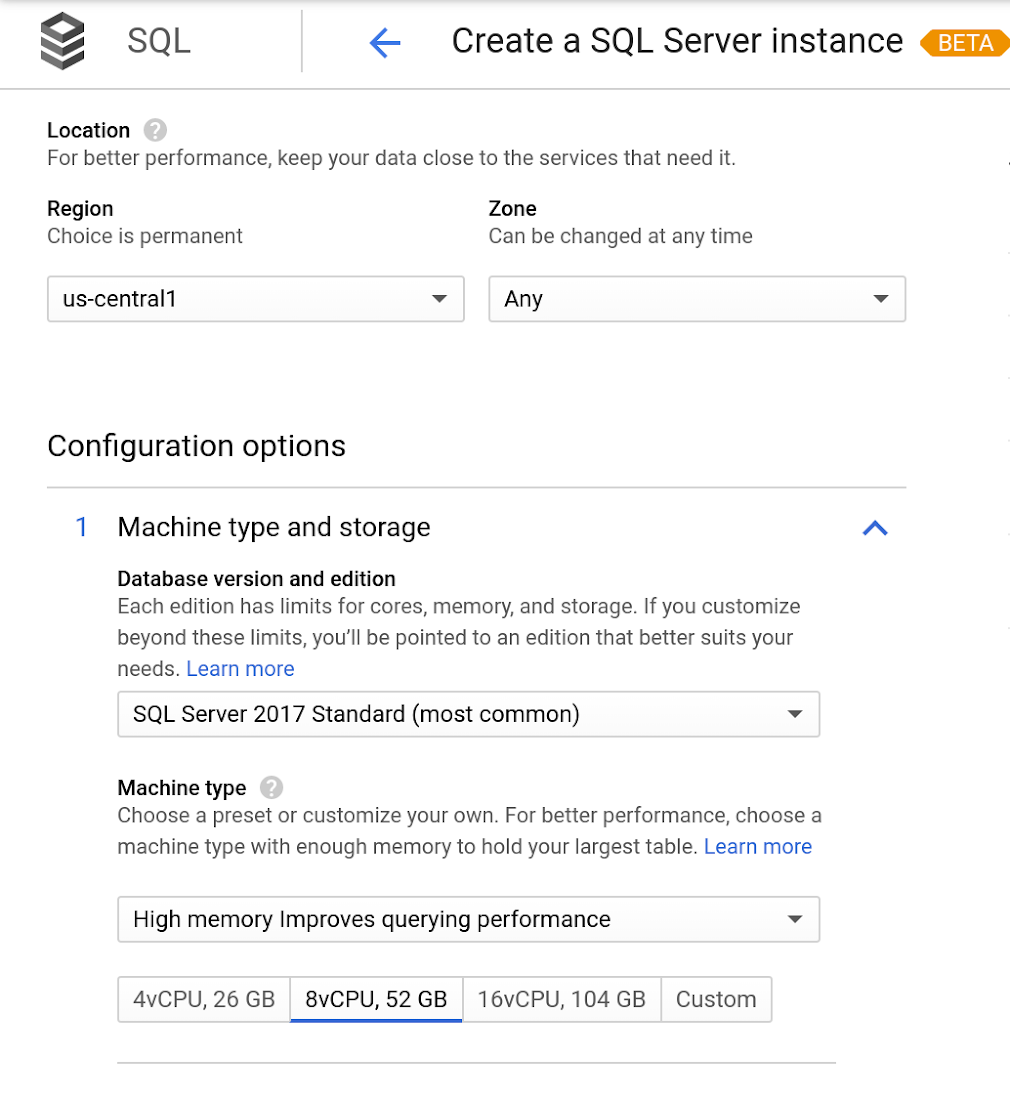
Cloud SQL for SQL Server is currently available regions and will integrate with our existing Cloud SQL functionality, such as connectivity via the Cloud SQL Proxy. Here’s a look at creating a new instance.
Early adopters of Cloud SQL for SQL Server have been using the service talk about the value for onboarding more workloads.
“Cloud SQL for SQL Server was very easy and fast to get up and going.” says Andrew P. Toi, database engineer lead at advertising management software company WideOrbit Inc. “With built-in high availability that can be used across editions, I can reduce the cost and overhead of managing databases dramatically, especially for smaller workloads”
And desktop virtualization infrastructure company Itopia had this to say. “Cloud SQL Server dramatically reduces the complexity and cost involved in deploying cloud desktop infrastructure for our customers,” says Ubaldo Don, CTO of Itopia. “It turns a bulky pillar of infrastructure into a one-click service, reducing IT service management overhead.”
How Google Cloud Solutions Help Retail Firms to ABP(Always Be Pivoting)

6415
Of your peers have already read this article.
2:00 Minutes
The most insightful time you'll spend today!
For years, retailers have been told that they must embrace a litany of new technologies, trends, and imperatives like online shopping, mobile apps, omnichannel, and digital transformation. In search of growth and stability, retailers adopted many of these, only to realize that for every box they ticked, there was another one waiting.
And then the pandemic hit, along with rising social movements and increasingly harsh weather. Some retailers were more prepared to take on these disruptions than others, which crystallized a new universal truth across the industry: the ability to adapt on the fly became the most important trait to survive and thrive.
Today’s retail landscape has surfaced both existing and new challenges for specialty and department store retailers. Approximately 88% of purchases previously occurred within a store environment. Now, it’s closer to 59%, with the remainder done online or through other omni methods.
With such constant change and upheaval, it can feel like the mantra now is ABP: always be pivoting.
The big question isn’t just how to maintain constant momentum and agility—it’s how to do it without sapping your workforce, your inventory, or your profits in the process. The pivot is now a given. What matters is how you do it.
Adapting requires a flexible base of technology that allows retailers to shift and scale seamlessly with the needs of the moment.
They need to be able to leverage real-time insights and enhance customer experiences rapidly, online and in the real world (not to mention the growing hybridization that’s AR and VR). They need to modernize their stores to power engaging consumer and associate experiences. They need to enhance operations for rapid scaling between full operations and digital-only offerings.
To help retailers achieve these goals and more, Google Cloud is honing a trio of essential innovations: demand forecasting that harnesses the power of data analytics and artificial intelligence; enhanced product discovery to improve conversion across channels; and the tools to help create the modern store experience.
In other words, here’s some of the biggest ways we’re ready to help you pivot.
Pivot point 1: Harnessing data and AI for demand forecasting with Vertex AI
One of the greatest challenges for retailers when building organizational flexibility is managing inventory and the supply chain.
We are in the midst of one of the worst global supply chain crises, stemming from soaring demand and logistics issues brought on by the pandemic. This crisis has only heightened the challenge retailers face when assessing demand and product availability. Even in normal times, mismanagement of inventory can add up to a trillion-dollar problem, according to IHL Group (costing $634 billion in lost sales worldwide each year, while overstocks result in $472 billion in lost revenues due to markdowns).
On the flipside, optimizing your supply chain can lead to greater profits. For instance, McKinsey predicts that a 10% to 20% improvement in retail supply chain forecasting accuracy is likely to produce a 5% reduction in inventory costs and a 2% to 3% increase in revenues.
Some of the challenges related to demand forecasting include:
- Low accuracy leads to excess inventory, missed sales, and pressure on fragile supply chains.
- Real drivers of product demand are not included, because large datasets are hard to model using traditional methods.
- Poor accuracy for new product launches and products that have sparse or intermittent demand.
- Complex models are hard to understand, leading to poor product allocation and low return on investment on promotions.
- Different departments use different methods, leading to miscommunication and costly reconciliation errors.
AI-based demand forecasting techniques can help. Vertex AI Forecast supports retailers in maintaining greater inventory flexibility by infusing machine learning into their existing systems. Machine learning and AI-based forecasting models like Vertex AI are able to digest large sets of disparate data, drive analytics and automatically adjust when provided with new information.
With these machine learning models, retailers can not only incorporate historical sales data, but also use close to real-time data such as marketing campaigns, web actions like a customer clicking the “add to cart” button on a website, local weather forecasts, and much more.
Pivot point 2: Enhanced product discovery through AI-powered search and recommendations
If customers can’t easily find what they are looking for, whether online or at the store, they will turn to someone else. That’s a simple statement, but one with profound impacts.
In research conducted by The Harris Poll and Google Cloud, we found that over a six month period, 95% of consumers received search results that were not relevant to what they were searching for on a retail website. And roughly 85% of consumers view a brand differently after an unsuccessful search, while 74% say they avoid websites where they’ve experienced search difficulties in the past.
Each year, retailers lose more than $300 billion dollars from search abandonment, or when a consumer searches for a product on a retailer’s website but does not find what they are looking for. Our product discovery solutions help you surface the right products, to the right customers, at the right time. These solutions include:
- Vision Product Search, which is like bringing the augmented reality of Google Lens to a retailer’s own branded mobile app experience. Both shoppers and retail store associates can search for products using an image they’ve photographed or found online and receive a ranked list of similar items.
- Recommendations AI, which enables retailers to deliver highly personalized recommendations at scale across channels.
- Retail Search, which provides Google-quality search results on a retailer’s own website and mobile applications.
All three are powered by Google Cloud, leveraging Google’s advanced understanding of user context and intent, utilizing technology to deliver a seamless experience to every shopper. With these combined capabilities, retailers are able to reduce search abandonment and improve conversions across their digital properties.
Pivot point 3: Building the modern store
Stores are no longer places for just browsing and buying. They must be flexible operation centers, ready to pivot to address changing circumstances. The modern store must be multiple things at once: a mini-fulfillment and return center, a recommendation engine, a shopping destination, a fun place to work, and more.
Just as retail companies had to embrace omnichannel, stores are now becoming omnichannel centers on their own, mixing the digital and physical into a single location. Retailers can use physical stores as a vehicle to deliver superior customer experiences. This will demand heightened levels of collaboration and cooperation between stores, digital, and tech infrastructure teams, building on the agile ways they have worked together.
In many ways, it’s about allowing our physical spaces to function more like digital ones. Google Cloud can help by bringing the scalability, security, and reliability of the cloud to the store, allowing physical locations to upgrade infrastructure and modernize their internal and customer-facing applications.
Think of it as when a new OS gets released for your phone. It’s the same small, hard box, but the experience can feel radically different. Now, extend that same idea to a digitally enabled store. With the right displays, interfaces, and tools at a given retail location, the team only needs to send an over-the-air update to create radically fresh experiences, ranging from sales displays to fulfillment or employee engagement.
Such an approach can enable streamlined experiences for both customers and store associates. For instance, when it comes to the modern store’s evolving role as a fulfillment or return center, cloud solutions can help drive efficiency in stores through automation of ordering, replenishment, and fulfillment of omnichannel order selection.
Similar tools for personalized product discovery online can be applied to customers in the store, helping them to browse and explore, or even create a tailored shopping experience.
The impact of store associates can be maximized by equipping them with technology to provide expertise that drives value-added customer service, as well as increasing productivity in stores by streamlining operations, thus lowering overhead cost. At the register, customers should be able to enjoy frictionless checkout while ensuring reliable, accurate, secure transactions.
Google Cloud can help retailers transform
The ability to adapt and pivot to meet today’s changing consumer needs requires that retailers rely on modern tools to obtain operational flexibility. We believe that every company can be a tech company. That every decision is data driven. That every store is physical and digital all at once. That every worker is a tech worker.
Google Cloud works with retailers to help them solve their most challenging problems. We have the unique ability to handle massive amounts of unstructured data, in addition to advanced capabilities in AI and ML. Our products and solutions help retailers focus on what’s most important—from improving operations to capturing digital and omnichannel revenue.
More Relevant Stories for Your Company

Accelerate Innovation with Google Cloud’s Managed Database Services
Google Cloud’s managed database services can help you innovate faster and reduce operational overhead. The migration tools and resources included in this whitepaper will help you plan your migration. This whitepaper provides guidance on: Managing services for maximum compatibility with your workloads Leveraging services that are compatible with the most

Customer Voices: How Firms from Across Industries Leverage Google Cloud
From powering everyday operations and accelerating application innovation, to providing tools for specific business needs and executing on big ideas, to advancing the security of technology solutions, companies from across industries have leveraged Google Cloud for business benefits. Companies from across industries have turned to Google Cloud for transforming their

Data Warehouse Migration Challenges and How to Meet Them
In the last blog post, we discussed why legacy data warehouses are not cutting it any more and why organizations are moving their data warehouses to cloud. At GCP, we often hear that customers feel that migration is an uphill battle because the migration strategy was not deliberately considered. Migrating to

Dataplex: Google Cloud’s Intelligent Data Fabric to Manage Data and Analytics at Scale
Enterprises are struggling to make high quality data easily discoverable and accessible for analytics, across multiple silos, to a growing number of people and tools within their organization. They are often forced to make tradeoffs—to move and duplicate data across silos to enable diverse analytics use cases or leave their
