





How Firewall Insights can Simplify Corporate Firewall Rules

3120
Of your peers have already read this article.
3:30 Minutes
The most insightful time you'll spend today!
Corporate firewalls typically include a massive number of rules, which accumulate over time as new workloads are added. When rules stack up piecemeal like this, misconfigurations occur that, at best, create headaches for security administrators, and at worst, create vulnerabilities that lead to security breaches.
To address this, we have introduced the Firewall Insights module in our Network Intelligence Center, which provides a single console for managing Google Cloud network visibility, monitoring and troubleshooting.
What are Firewall insights?
Historically, there hasn’t been an easy way to deal with the accumulation of complicated firewall rules. That was until we created Firewall Insights, which provides metrics reports and insight reports. These two reports contain information about firewall usage and the impact of various firewall rules on your VPC network. Even better, these insights and metrics are integrated into your Google Cloud Console for the VPC firewall and are also available via APIs.
You can use metrics reports to verify that firewall rules are being used appropriately and as intended. This report can uncover leftover rules from the past that are not actively used, review that the firewall rules allow or deny what is intended, perform live debugging of connections dropped, and leverage Cloud Monitoring to discover malicious attempts to access your network.
You can use insight reports to identify firewall misconfigurations, detect security attacks, and optimize and tighten your security rules.
Let’s take a look at how these reports work.
Metrics Report, a deeper dive
Metrics insights analyzes your VPC firewalls usage by tracking metrics such as firewall hit counts and last used. Let’s check this out with an example:
When you navigate to your VPC network and click on Firewall, ensure that you have selected Logs, Hit count and also Last hit in the column display options:
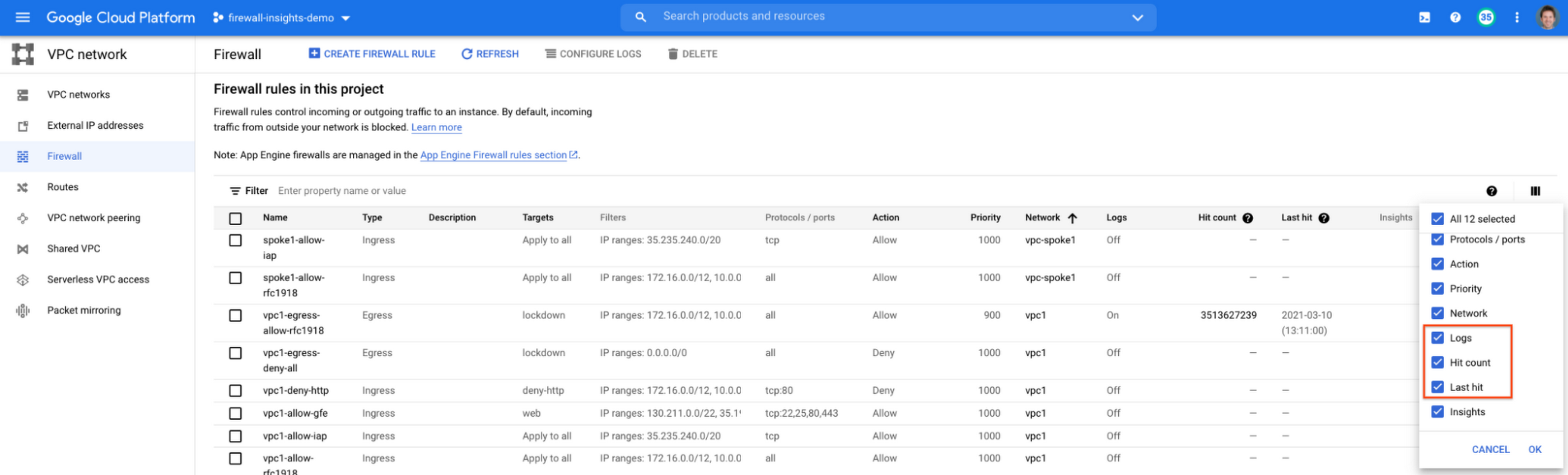
After this is enabled, now you should be able to see your VPC firewall rules with the hit count and last hit metrics. In the image below you can see that if logs are not enabled for rules, hit count and last hit metrics will not be collected. If logs are enabled, these details are collected, and shown in the VPC firewalls console.
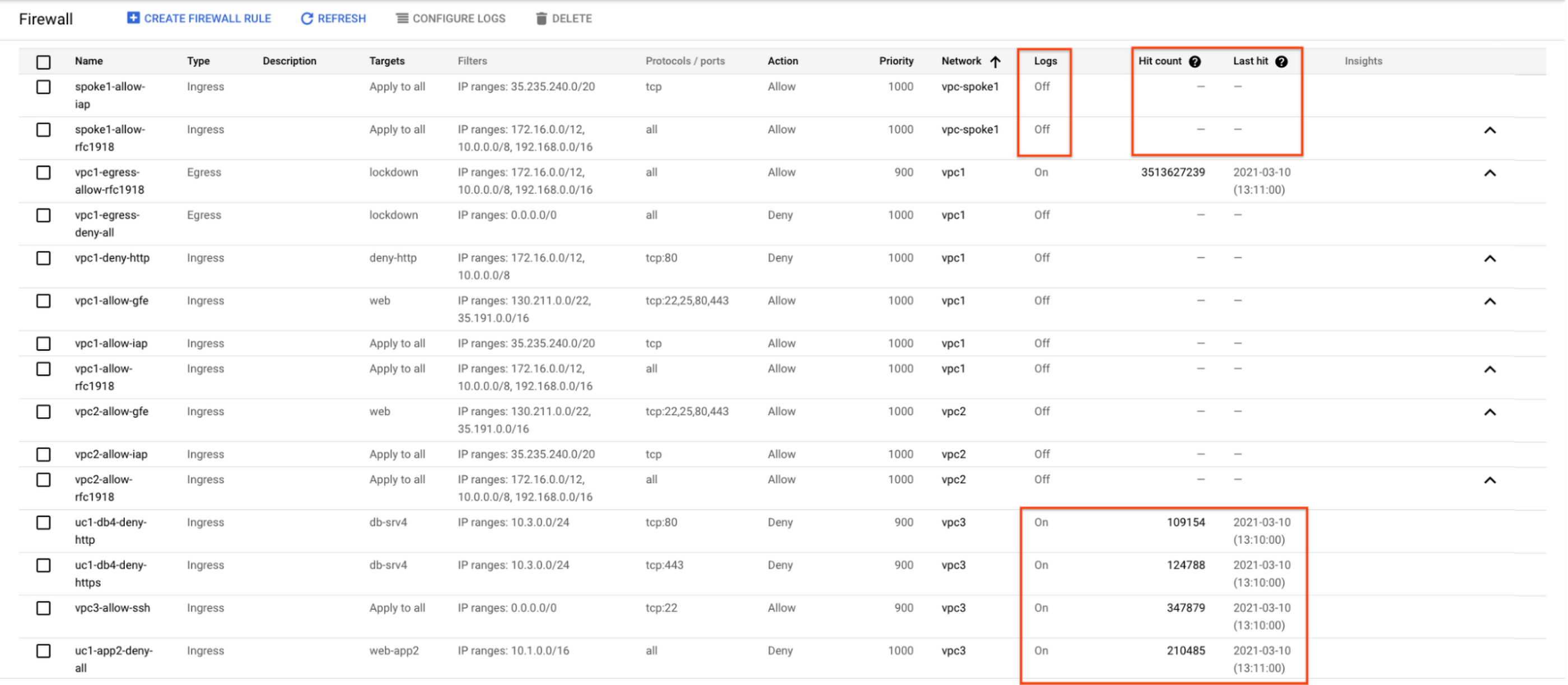
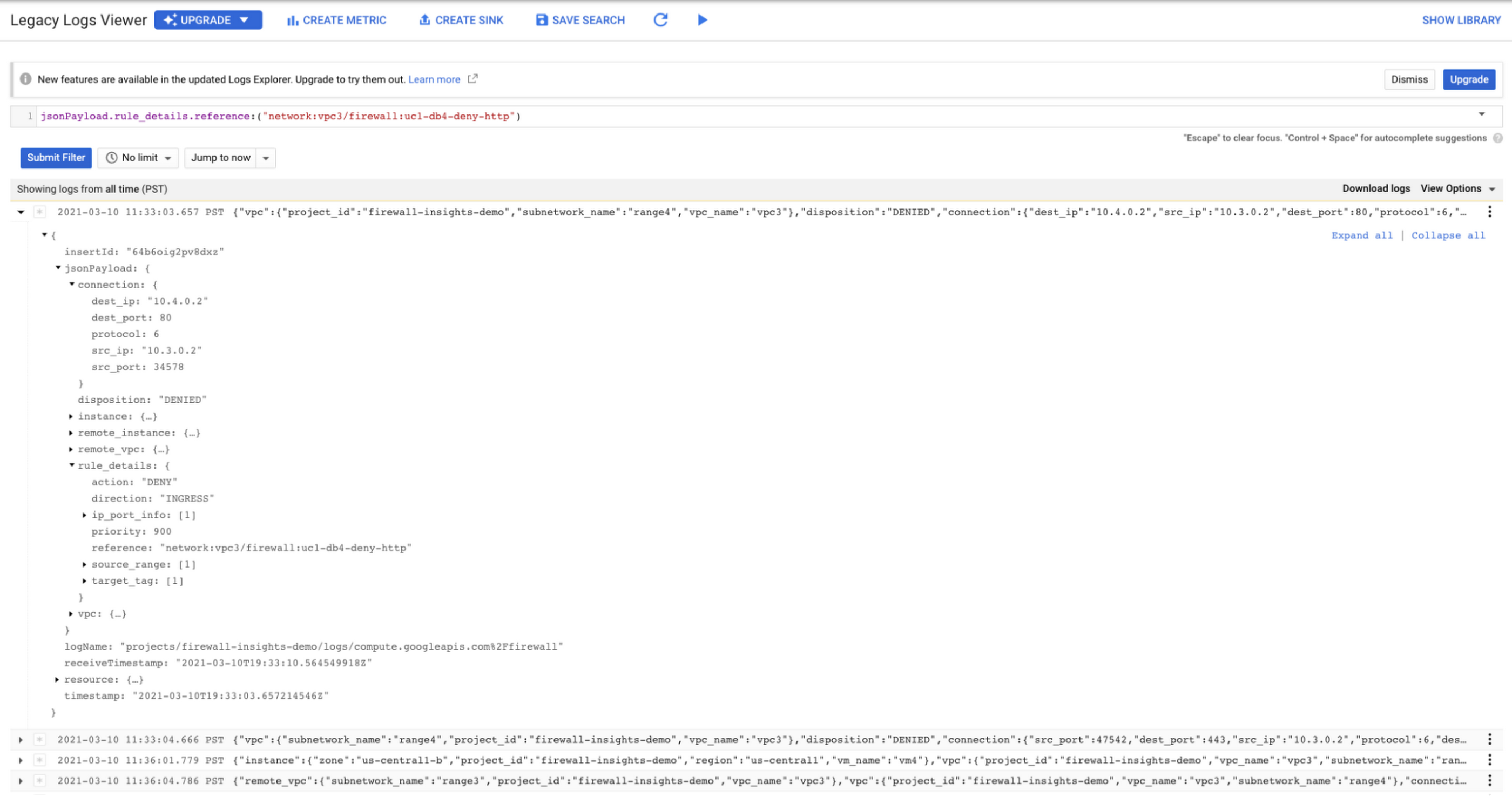
As you can see in Figure 1.2, each firewall rule which has logging enabled will show hit counts, so based on the example above, the rule “uc1-db4-deny-http” has been hit 109,154 times, the last time being 2021-03-10 (13:10:00). If you want to dive even deeper, you can click on the hit count and this will bring you to the logs viewer page where you can expand these logs and analyze all the details:
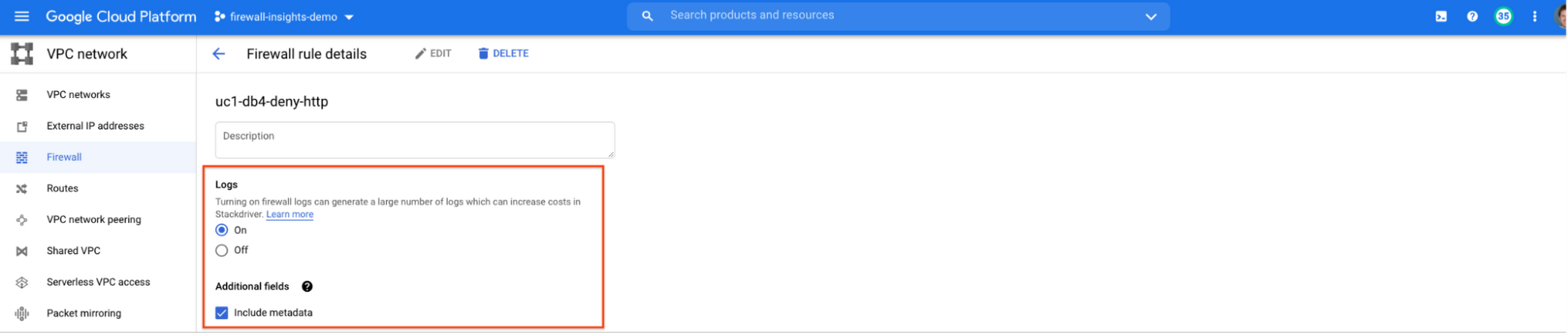
In order to enable logs for a particular firewall rule, you can edit it and turn logs on. By default, metadata is added in firewall logs. If you want to reduce the log size, you can do so by excluding these additional fields. Excluding these metadata fields will not impact the functionality of Firewall Insights.
From the “Firewall” page, you can also multi-select a group of firewall rules and turn on all logs at once.
Firewall rule usage metrics are accurate only for the period of time during which Firewall Rules Logging is enabled.
Insights Report, a deeper dive
Insights Report provides an intelligent analysis of the configuration of your firewalls. A report can contain one or more insights.
We will see examples now about the different insight reports which include:
- Shadowed firewall rules
- Allow rules with no hit in the last six weeks
- Deny rules with hits in the last 24 hours
By definition, a shadowed rule is a VPC firewall rule that is completely overshadowed by one or more firewall rules with higher or equal priority. We call that shadowing rules. Let’s see an example on how to find shadowed rules:Let’s say that you try to use ping between two VMs but it fails. Let’s take a look at the firewall rules applied to the VM:
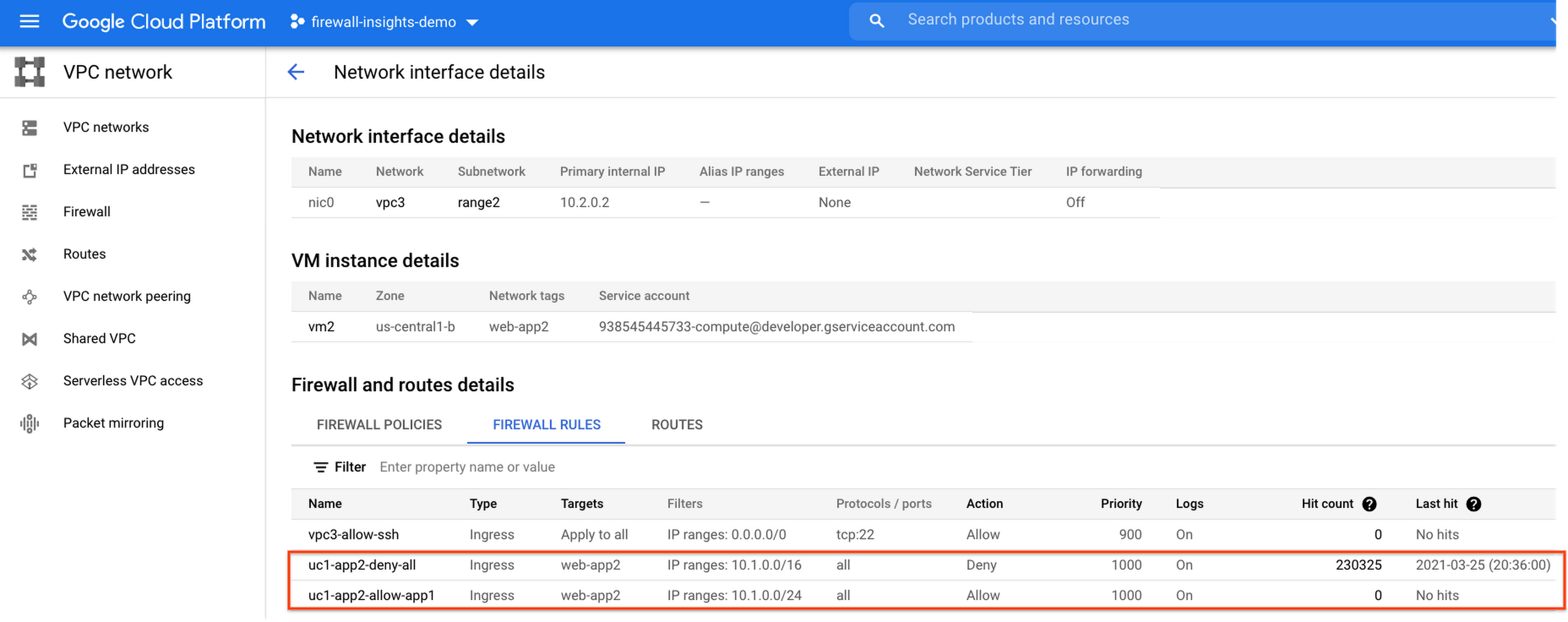
If we look closely, we can see that there are two rules with the same target tag, and those are almost identical except their source IP range. The IP range of the deny rule “uc1-app2-deny-all” includes the IP range of the rule allow “uc1-app2-allow-app1”. Therefore, we can see that “uc1-app2-allow-app1” is shadowed by “uc1-app2-deny-all”, and the ping between these VMs failed due to that.
To avoid such incidents in the future, Firewall Insights provides you with a convenient list of rules overshadowed by other firewall rules.
To see shadowed rules, you can click on the column selector, and add “Insights” to the firewall and route details:

Once this is applied, you will be able to see shadowed rules here:

Alternatively, you can navigate to Network Intelligence > Firewall Insights, where we will see the shadowed rule report:
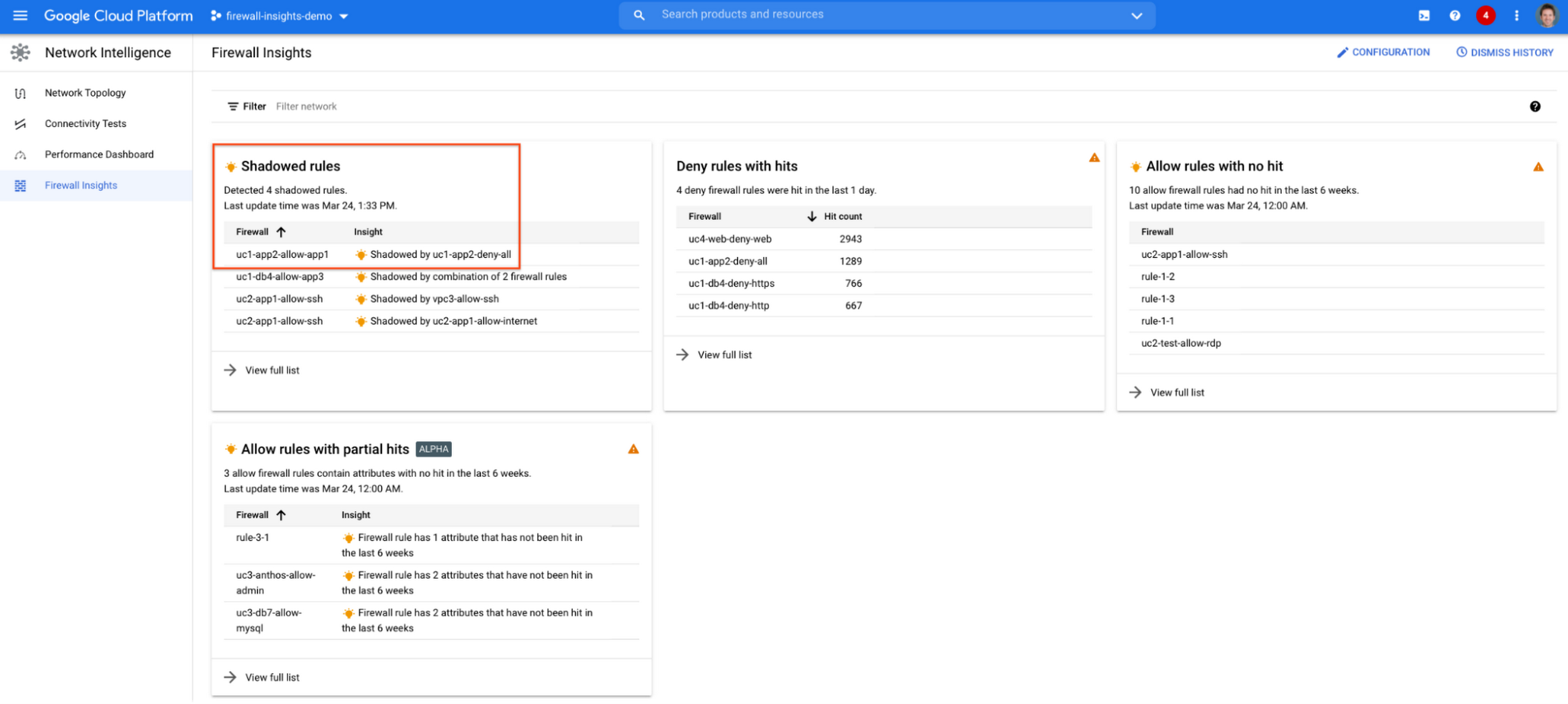
If we click on the insight we will get more details:

Going back to the firewall insights card (Figure 1.8), we can also identify that “uc1-db4-allow-app3” is shadowed by a combination of two rules and if we clicked on the insight this would provide all the details.
From the Firewall Insights dashboard, let’s move on to “allow rules with no hit”, where we can see firewall rules that have not logged any hits in the past six weeks. Such rules could be as a result of a misconfiguration, or leftover rules from past deployments. Tighten your security boundaries by identifying and removing such rules. If we go back to Network Intelligence > Firewall Insights, we can see allow rules with no hit:

We can drill down to view the full list of rules with no hit. We can see, for instance, one of the rules, the bottom one “uc2-app1-allow-internet”, might be a leftover rule to allow internet access from a past deployment, which means it has little likelihood of being hit in the future. So you may want to consider removing it from the rule set:

Click on the firewall rule to review all the details, and take a look at the prediction, which is made based on the hit pattern that we saw for similar rules in the same organization:

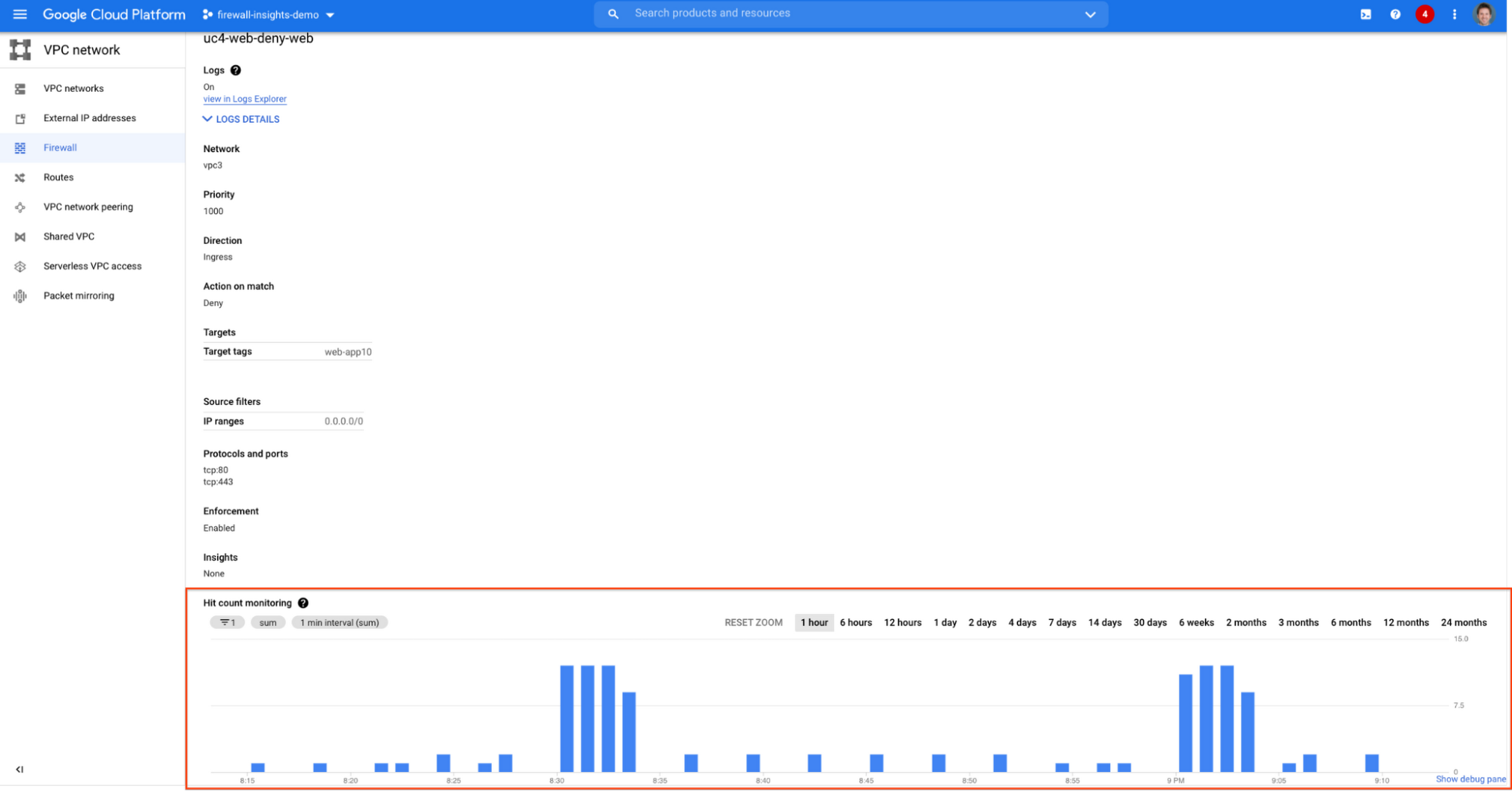
Let’s go back to the Firewall Insights dashboard and move on to the last category, “deny rules with hits in the last 24 hours”, which help you capture the traffic blocked by deny rules. These traffic types could indicate external attacks into your VPC network, or compromised VM instances attempting to send traffic out of your network. Let’s examine future hit prediction on a firewall rule. Navigate to Network Intelligence > Firewall Insights and take a look at the deny rules with hits card:

If your click on the “uc4-web-deny-web” rule, you can see the hit count monitoring, and if you click on the hit number we can dive deeper in the logs:

These tips should help you effectively leverage Firewall Insights to gain better control over a massive firewall rule set. Automate shadowed rule detection, quickly troubleshoot misconfigured rules, effortlessly pinpoint the overgranting rules hidden in the rule set, and identify the failed attempts to break into your network that were rejected by your firewall rules.
To learn more about Firewall Insights, please refer to our documentation. Additionally, to see how we’re advancing intelligent automation in network security, check our recent blog post.
Best Kept Security Secrets: How Assured Workloads Accelerates Security

1226
Of your peers have already read this article.
5:00 Minutes
The most insightful time you'll spend today!
Digital transformation is now a strategic imperative for organizations across every industry. For governments and regulated businesses, moving services to the cloud poses a unique set of challenges.
As a vital enabler of transformation, the cloud can unlock innovation and help keep pace with the accelerating pace of digital business. Unfortunately, many government agencies and firms in regulated industries don’t have the luxury of adopting new systems at will. They must deal with issues such as limited resources, lack of digital skills, and siloed operations. However, they also face cloud-specific challenges, including:
- Data sovereignty: Regulated industries and the public sector often have concerns about the location of data, how it is protected, who else can access it, and whether it is stored in a secure location.
- Compliance: Government agencies and regulated businesses must ensure that their data and cloud use are compliant with all applicable government requirements, privacy and data protection laws, and other regulations.
- Security: Compliance is a natural component of any strong approach to security. As a result, government regulations and industry standards mandate a responsibility to secure and protect data from unauthorized access or use.
- Cost: Every organization wants to ensure it’s getting good value for their money when using cloud computing, but especially government agencies that are more likely to be working with fixed budgets and fewer resources.
To address the unique requirements of governments and other highly regulated organizations, some cloud providers have built separate government clouds (“GovClouds”) that run in specialized, stand-alone data centers that make it easier to meet specific requirements around data residency, personnel controls, and other government standards. However, isolated GovCloud environments come with limitations: They can restrict the ability to integrate regulated data with data from other sources, they create siloed infrastructure that can slow down access to new features and technologies, and they usually require more resources to manage and maintain, which translates into higher costs for end-users of GovCloud services.
But what if you could get the features of a government cloud — the certifications and strict controls on data residency and personnel access — on a commercial cloud?
This is where Assured Workloads comes in. Assured Workloads is a unique Google Cloud service that allows governments and organizations from regulated industries to meet stringent compliance requirements at scale on commercial cloud infrastructure.
What is Assured Workloads?
Assured Workloads provides a set of security controls and guardrails you can apply to your cloud environments, making it easier to achieve compliance while maintaining the advantages of a full commercial cloud. It includes features like data residency controls for specific compliance types, data and personnel access controls, and real-time monitoring for compliance violations to ensure you implement and maintain the cloud controls required by your compliance regimes.
Check out our Best Kept Security Secrets series
- Tap into the power of Organization Policy Service
- How VPC Service Controls can help build defense in depth
- How Cloud EKM can help resolve the cloud trust paradox
Assured Workloads can make it easier for agencies and businesses in regulated sectors to meet compliance requirements by providing:
- A secure and compliant environment: With Assured Workloads, you can create controlled environments for your regulated workloads and automatically enforce data location and resource deployment. It’s designed for customers that need to meet strict security and compliance requirements, such as the government, healthcare, and financial services sectors.
- Broad security capabilities: Assured Workloads provides comprehensive security for your regulated workloads. Data is encrypted at rest and in transit by default and includes additional features, such as encryption key management according to your compliance regime and Identity and Access Management (IAM) for authentication, authorization, and user access management.
- Support for multiple compliance frameworks: Assured Workloads is designed to create regulated boundaries on public cloud infrastructure that support multiple compliance frameworks across sectors, including FedRAMP, IL5, PCI DSS, SOC 2, HIPAA, and HITRUST, allowing customers to segment and label their regulated data.
- Control data residency: Assured Workloads gives you the ability to control the regions where data at rest is stored.
- Assured support: Assured Workloads’ approach ensures only Google Cloud support personnel meeting specific geographical locations and personnel conditions support customers’ workloads.
Instead of having to configure, manage, and maintain the right controls and guardrails yourself, you select the regulatory framework you need to follow. Assured Workloads automatically configures and deploys the controls needed to help meet your requirements.
With these specific capabilities, governments can simplify compliance configurations and monitor for violations without missing out on Google Cloud’s innovative technologies, scalability, performance, reliability, and cost savings that are hallmarks of our commercial Cloud offering.
How it works
When you use Assured Workloads to create controlled environments in Google Cloud, you will be required to set up an Assured Workloads folder. This folder acts as the regulatory boundary to help enforce your chosen compliance framework. They are created with preconfigured platform controls, which are packaged based on the specified regulated data type, personnel controls, and data location.
Assured Workloads automatically restricts developers to using products and services that are in-scope for your selected compliance framework. Security controls are mapped to Assured Workloads folders, so any Google Cloud resources you deploy in an Assured Workloads folder inherit the same controls. This also helps ensure that only Google Cloud personnel who meet your compliance requirements have the ability to support your resources and prevents resources from being deployed outside of compliant regions.
Depending on your compliance regime, Assured Workloads supports several different options for encryption. You can use any Google key management service unless your compliance requirements mandate otherwise, including Cloud Key Management Service, Cloud External Key Manager, or customer-managed encryption keys (CMEK). You can also choose Google-managed keys, which provide on-by-default FIPS-validated encryption.
Here are a few common use cases that companies are already accomplishing with Assured Workloads:
- Iron Mountain uses Assured Workloads to serve our customers’ compliance needs
- Implementing EU Data Sovereignty
- Running CJIS workloads
However, Assured Workloads is more than a better government cloud or a tool for highly regulated businesses. Assured Workloads is a packaged solution that provides security by default and removes toil and complexity for users. Users can reduce the time and effort required to meet their compliance requirements and also improve the security of their data.
Do I need Assured Workloads?
We believe that cloud adoption for governments, government suppliers and contractors, and other strictly regulated businesses shouldn’t have to happen in a separate, isolated cloud environment that forces tradeoffs in terms of service availability, scale, and cost. Assured Workloads is a new approach to running regulated workloads that transforms the “govcloud” into a capability that cuts down on the friction of compliance without sacrificing any of the cloud-y goodness.
To learn more about Assured Workloads, please review these resources:
Request a free trial today and experience how Aside Assured Workloads helps you achieve compliance-based outcomes.
Create and Protect Admin Accounts

4868
Of your peers have already read this article.
1:30 Minutes
The most insightful time you'll spend today!
Setting up your new cloud infrastructure is scary. Extra scary when you realize that someone (is it gonna be you?) gets to have phenomenal cosmic power over the whole thing.
Yes, I’m talking about the admin account, and today we’ll dig into why they are important, dangerous and different.
When the team at pistach.io got their nuts-as-a-service business growing fruitfully, they knew they needed to think carefully about admin accounts. These people would have tremendous control over their use of Google Cloud, and they could potentially cause very big problems if any were compromised. Definitely resources that require a protective shell.

Early in pistach.io’s development, an employee named Walter Nutt wanted to play a prank by changing his co-worker’s profile photo from an almond to a peanut (pretty devious, since a peanut is actually a legume). He didn’t have access to his friend’s computer, but he did have access to the company’s Cloud Storage bucket. While searching for the profile photo in question, Wally inadvertently deleted the entire contents of the bucket!
As he searched for ways to restore its contents, Wally modified access to two other pistach.io buckets. The company was ground to a halt for a week while teams worked to crack through the permissions issues.
Time to rethink permissions a bit, so this couldn’t spoil their buttery smooth operations in the future.
Following the resource manager guide, the team made a super admin email address that wasn’t tied to a particular individual or Workspace account, and secured it with strong multi-factor authentication. This would be their backup in case an admin account were to be compromised, so they could recover and repair.
The team already uses Google Workspace, so they have an organization set up already. That creation process established initial super administrators, allowing them to create and modify all other resources inside the organization. As they looked toward using Google Cloud, the super administrators could:
- Give the admin role to people, for Cloud
- Act as a point of contact for account recovery
- Modify or delete the organization if needed
Making admin users for the organization allows other people to then flesh out the resources and policies for pistach.io, before they go nuts and give everyone all the permissions. While that would speed things up, it would make it easy for an attacker to crack through the security shell because any account compromise could give ousize access. Yikes!

Instead, the IT leads specified certain people to act as organization admins, and then gave them permissions to:
- Define Identity and Access Management policies
- Structure the Resource Hierarchy
- Delegate control of specific Cloud elements to others on the team
Once those organization admins were set up, they could give management and oversight of Compute, Storage, Networking and other resource types to the relevant leads, making sure each person had just the right amount of permission for the role they needed to perform. The organization admins don’t have permissions themselves to make these resources. They just delegate.
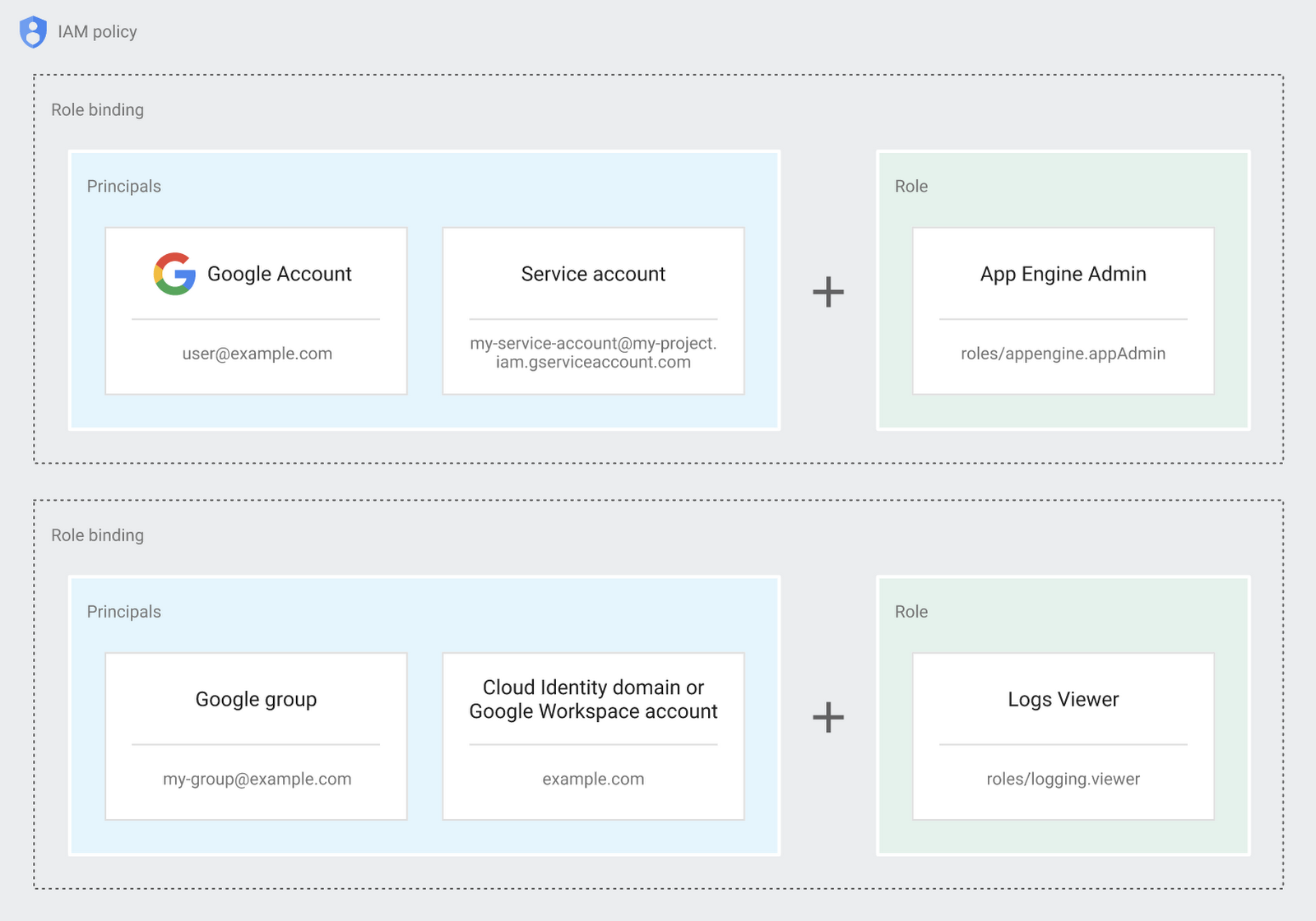
Now each person can accomplish the job they’re responsible for, but doesn’t have overly permissive access. Delegating like this keeps the entire organization safer, and limits the blast radius if someone does manage to break in.
You can go through these steps yourself with this tutorial.
By default the creation of an organization resource for the domain gives everyone the ability to create projects and billing accounts. Once they set up their Organization Admin at pistach.io they decided to remove some of these wide permissions and, in a nutshell, bring everything down to a much finer control. So people could get permissions for a folder or a project, but not the entire organization!
Remember to take care of your admin roles, as they have the power, and responsibility, to cause serious harm if not used safely. Be safe with your Identity and Access Management. And keep your data yours!
Next time we join you we’ll take a crack at creating and provisioning an app to run inside the policies and resource management frameworks created today.
Announcing New, Faster Search and Investigative Experience in Chronicle Security Operations

2934
Of your peers have already read this article.
1:30 Minutes
The most insightful time you'll spend today!
In cybersecurity, speed matters. Whether a security analyst is trying to understand the details of an alert that was triggered by an indicator of compromise (IoC), or find additional context for a suspicious asset, speed is often the critical factor that will help thwart a cyberattack before threat actors are able to inflict damage.
With speed in mind, we are pleased to announce the general availability of our new investigative experience in Chronicle Security Operations. We are continuing to deliver on our mission to bring the power of Google to security operations and are raising the bar for search and the investigative experience in the SOC.
With this release, SecOps teams will be able to harness Chronicle’s lightning-fast search across any form of structured data. Additionally, the new investigation experience can provide greater flexibility to pivot and drill-down when conducting complex, open-ended threat investigations and surface insights quickly and easily.
Our Unified Data Model (UDM) schema, with its built-in flexibility that can effectively handle a wide variety of security related events, is at the heart of Chronicle’s powerful search. We have scaled this capability by optimizing query responses across structured data. Additionally, analysts can investigate large datasets and build complex queries with a new and intuitive user experience. With user personalization enhancements, analysts can quickly access saved searches and top queries in their environment to improve routine SOC workflows.
With the new investigative experience, security teams can:
- Drive faster threat understanding with an interactive event results timeline that helps eliminate unnecessary long wait times by streaming results as they are processed to quickly begin threat analysis
- Use enhanced context and operationalize relevant data for threat analysis with one-click filter-to-query conversion
- Personalize the analyst experience with saved search and search history functions for quicker analyst knowledge recall
- Power threat investigation and hunting with a new, improved, highly performant UDM search
Let’s look at an example of how to use the reimagined investigative experience and our new broader, faster search.
In our use-case, a security analyst is investigating a curated detection alert for potentially suspicious behavior on a Windows environment. Additionally, there is a low prevalence domain from host “win-dc-01” with ip “10.166.0.3”. To investigate further, let’s open the UDM Search page and construct a query containing the host and IP information along with destination information of the domain the host was contacting (edge.microsoft.com). Over 70,000 events stream into the investigation interface providing the analyst an immediate picture of data surrounding their alert.
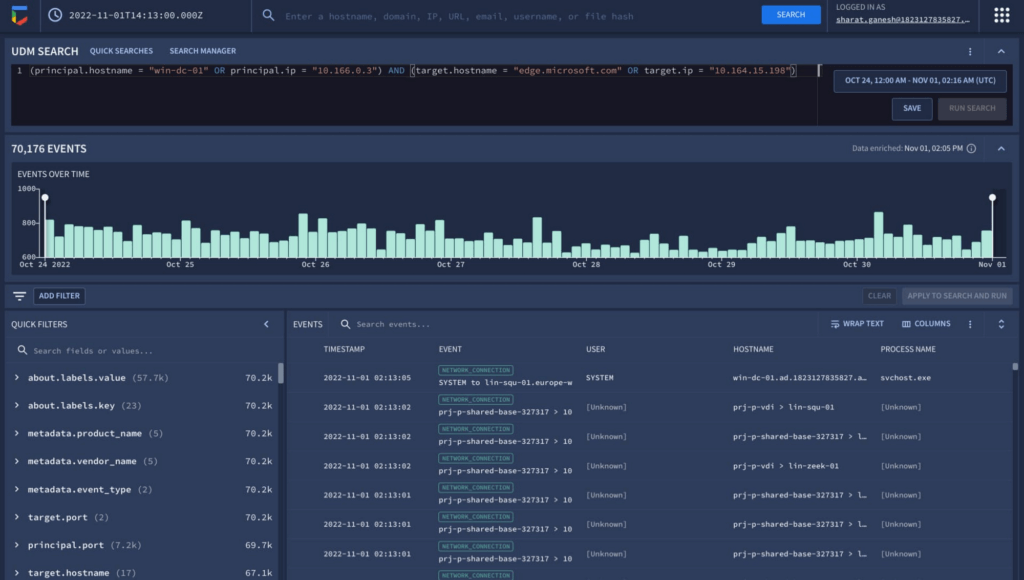
The new interactive events timeline can provide a clear picture of event trends over time with key statistical data which can be easily filtered. Additionally, with the new quick filters, the analyst is able to easily filter out hosts that are known-good to get pertinent information about the domain.
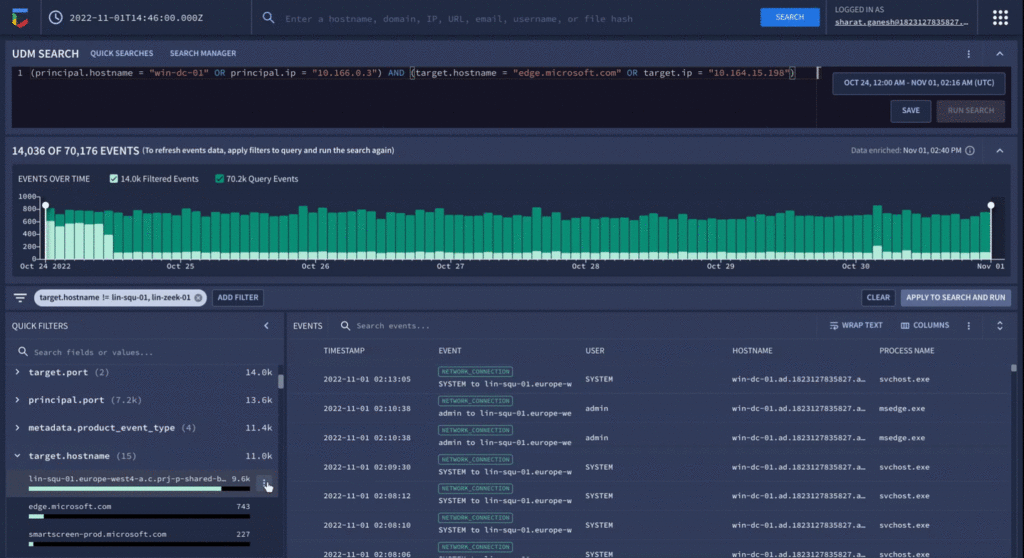
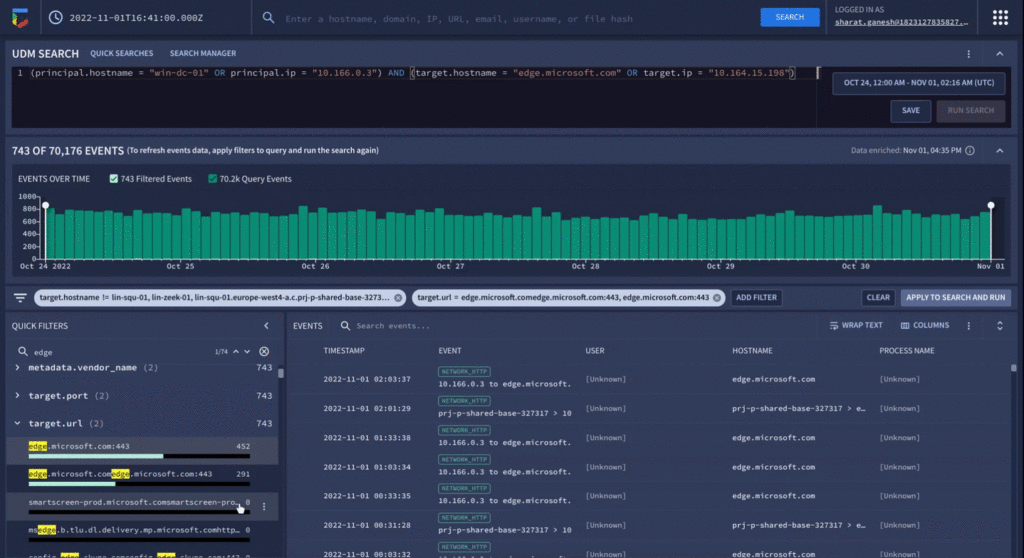
Analyzing value aggregations present in the filter panel, automatically generated by Chronicle, enables analysts to domain values of highest interest, and quickly determine that approximately 800 events were present in the last week that related to edge.microsoft.com URL. Since Microsoft Edge is disallowed in the organization, there should not be any outbound traffic to this type of destination.
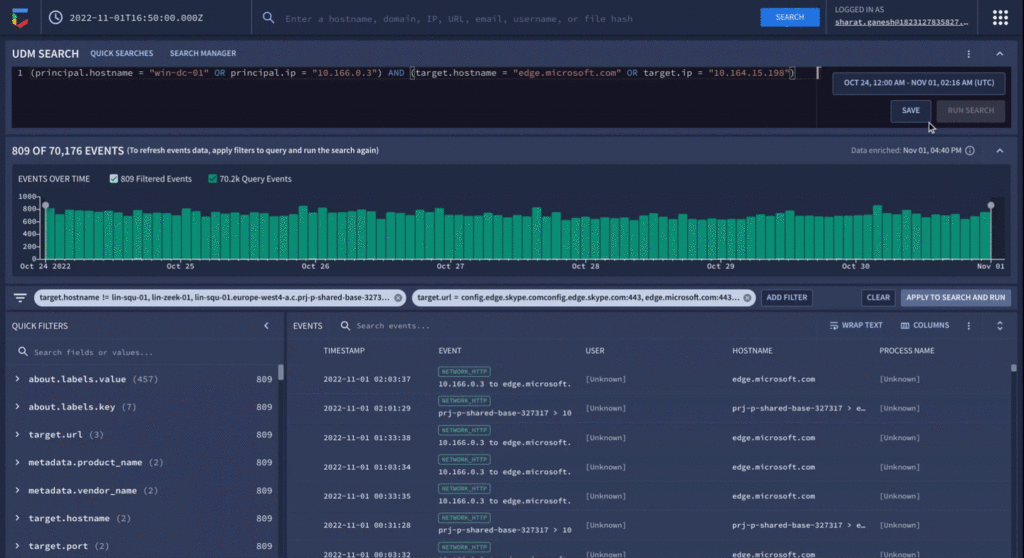
As a final step before orchestrating a response in Chronicle SOAR’s case management, the analyst can save their search to quickly recall the steps they took in the future for related investigations.
We have already seen our customers use these new capabilities in preview to build new use cases, accelerate existing threat hunting workflows, and drive faster threat response. We will continue our mission to bring Google speed, scale, and intelligence to the investigative experience, expediting “time to aha” for security analysts, and driving better, faster responses.
Ready to put Chronicle to work in your Security Operations Center? Contact Google Cloud sales or your customer success CSM team. You can also learn more about all these new capabilities in Google Chronicle in our product documentation.
Data Security Excellence: Google Takes the Lead in Forrester’s Wave Report

1295
Of your peers have already read this article.
3:30 Minutes
The most insightful time you'll spend today!
To help organizations confidently move their sensitive data to the cloud, Google Cloud works diligently to earn and maintain customer trust. Our Trusted Cloud is committed to giving you a secure foundation that you can verify and independently control. Discovery and protection of sensitive data are integral parts of Google Cloud’s strategy to safeguard customer data. With this as our longstanding approach to protecting customers, we are happy to share that Forrester Research has ranked Google Cloud a Leader in The Forrester Wave™ Data Security Platforms Q1 2023.
Relentless security innovation leveraging Google’s core strengths
Google keeps more people safe online than anyone else. The scale at which we operate allows us to pioneer approaches to cloud-native security and then bring them to commercial and public sector organizations everywhere they operate. Leveraging our data processing and novel analytics capabilities with artificial intelligence and machine learning (AI/ML) allows our technology to help protect enterprises and their end users. At the core of our data security capabilities is our data loss prevention (DLP) technology, which enables customers to discover, classify, and de-identify data in real-time, on-demand, continuously, and in event-driven workloads.
In their explanation for the ranking, Forrester noted in its report “Cloud-first, Google has notable areas of innovation focus, such as harnessing machine learning (ML) and artificial intelligence (AI), productizing internal innovations, and co-innovation with partners in areas like confidential computing, data sovereignty controls, and external cloud key management services.”
Embedded across multiple Google products
Our platform supports the discovery of corporate assets in Chrome Enterprise and Google Workspace applications including Gmail and Google Drive. We also provide support for discovering production and analytical assets such as object storage, relational databases, data warehouses, data lakes, production apps, and workloads such as migration/ETL. This technology identifies and detects various types of sensitive data using a comprehensive set of built-in infoType detectors that are ready to use out-of-the-box along with flexible custom detection options and rules. Types of sensitive data include personal identifiable information and personal health information (PII/PHI), financial identifiers, health context, multi-cloud credentials/secrets, and ML-based full document classification (including source code, SEC filings, and legal briefings).
Driven by Zero Trust principles
The Forrester Wave identified the 14 top significant data security platform providers. Forrester notes in the report that “[Google] also stands out for manageability and integrations for Zero Trust.” and “Google is a strong choice for organizations considering or currently using GCP as well as those using Google Workspace who are taking a Zero Trust approach to enabling bring your own device (BYOD) and remote work.”
Delivering value for our customers
We are honored to be a Leader in The Forrester Wave™: Data Security Platforms, Q1 2023 report. We look forward to continuing to innovate with you and make your digital transformation journey safer with our Trusted Cloud.
A copy of the full report can be viewed here.
Find the Best Kept Security Secrets to Harness the Power of Organization Policy Service

2692
Of your peers have already read this article.
2:30 Minutes
The most insightful time you'll spend today!
The canvas of cloud resources is vast, ready for an ambitious organization to craft their digital masterpiece (or perhaps just their business.) Yet before the first brush of paint is applied, a painter in the cloud needs to think about their frame: What shape should it take, what material is it made of, how will it look as a border against the canvas of their cloud service. Google Cloud’s Organization Policy Service is just such a frame, a broad set of tools for our customer’s security teams to set broad yet unbendable limits for engineers before they start working.
Google Cloud’s Organization (org) Policy Service is one of our most dramatic features but is often under-appreciated by security teams. It provides for a separation of duties by focusing on what users can do, and lets the administrator set restrictions on specific resources to determine how they can be configured. This drives defense in depth from configuration errors as well as defense in depth from attacks. An org policy lets the administrator enforce compliance and conformance at a higher level than Identity and Access Management, which focuses on which users can access specific resources.
Org policies can reduce toil and can improve security at the scale needed by today’s cloud users. Financial services provider HSBC is one of Google Cloud’s largest customers and has been using org policies for years to help it manage cloud resources across its highly-regulated enterprise environment. As the company explains in this video, HSBC’s creative use of org policies manages more than 15,000 service accounts and 40,000 IT professionals. They control 6.5 million virtual machines per year. That’s 22,500 virtual machines per day, and only 2,500 of those VMs exist for more than 24 hours
HSBC prefers org policies instead of other preventative controls because they are native to Google Cloud and can be enforced independently of how the request originated (such as from Infrastructure-as-Code, Google Cloud services interacting with each other, or a user in the UI.) Detecting resource violations is expensive for many customers, and often comes too late to prevent harm. Org Policies can be deployed to prevent violations from occurring and eliminate detection and remediation costs.
Importantly, HSBC’s custom installation is designed so that org policy violations are immediately discoverable, which can help HSBC personnel quickly understand how to quickly and accurately correct an error condition. When an action violates org policy, an error code is returned telling the resource requester which policy was violated. Corresponding logs are generated for administrators to monitor and provide further troubleshooting.
Here are two additional use cases that further illustrate the power of organization policies.
- Organizations that operate in a region with rigorous data residency requirements can configure and enable the Location org policy to help ensure that all resources created (such as VMs, clusters, and buckets) are deployed in a particular cloud region.
- Admins who want to ensure that only trusted workloads are deployed for Google Kubernetes Engine (GKE) or Cloud Run may want to restrict developers to only use verified images in their deployment processes. They can create a custom org policy that targets GKE cluster resource type and create and update methods to block the creation or update of any clusters that do not have binary authorization enforced.
How it works
Google Cloud offers more than 80 org policies that can be used to restrict and govern interactions with Google Cloud services and resources across important domains such as security, reliability, and compliance. Org policies can help:
- Restrict resource and service access to the organization domain only, secure public access to resources, or stop service account key abuse.
- Enforce use of global or regional DNS, and global or regional load balancing, to Improve service reliability and availability.
- Specify which services can access resources, in which regions, and at what times in support of compliance objectives.
- Secure Virtual Private Cloud (VPC) networks and reduce data exfiltration risk by preventing data from leaving a specific perimeter.
See the Organization Policy Service list of constraints for more about org policies and constraints.
You can also use the recently introduced Custom Organization Policies to tailor guardrails so they meet your specific compliance and security requirements. With Custom Organization Policies, security administrators can create their own constraints using Common Expression Language (CEL) to define which resource configurations are allowed or denied. Administrators can develop and deploy new policies and constraints in minutes.
With great power comes great responsibility, so with that in mind we will soon be introducing Dry Run for Custom Org Policies. It will let users put a policy in an audit-only mode to observe behavior during real operations without putting production workloads at risk.
Getting started
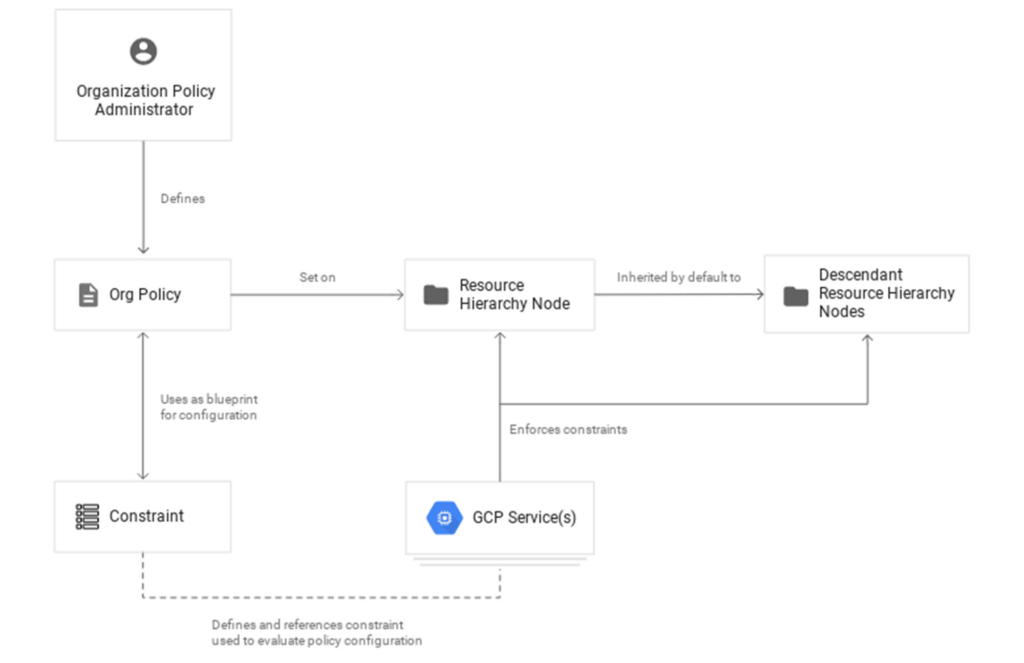
1. Setting up your first org policy is straightforward. An organization policy administrator enables a new organization policy on a Google Cloud organization, folder, or project in scope. Once set, the administrator then determines and applies the constraints. Here’s how it works:Design your constraint, which is a particular type of restriction against either a single Google Cloud service or a group of Google Cloud services. You can choose from the list of available built-in constraints by configuring desired restrictions and exceptions (based on tags) or create custom org policies.
It’s important to remember that descendants of the targeted resource hierarchy node inherit the org policy. By applying an organization policy to the root organization node, you can drive enforcement of that organization policy and configuration of restrictions across your organization.
2. Deploy the org policy to evaluate and allow or deny resource Create, Update, and Delete operations. This can be done through the Google Cloud console, gCloud, or via API.
3. Monitor audit logs and your Security Command Center Premium findings to detect and respond to policy violations.
Do I need an org policy?
Org policies can help maintain security and compliance at scale while also allowing development teams to work rapidly. Because they give you the ability to set broad guardrails, they can help ensure compliance without adding operational overhead and monitor policy violations.
To learn more about org policy, please review these resources:
- Read the Creating and Managing Organizations page to learn how to acquire an organization resource.
- Read about how to create and manage organization policies with the Google Cloud console.
- Learn how to define organization policies using constraints.
- Explore the solutions you can accomplish with organization policy constraints.
- Listen to the podcast where Vandy Ramadurai, Google Cloud’s Org Policy product manager, explains it all.
More Relevant Stories for Your Company

Know the Leaders of Google Cloud Public Sector Community
At Google Cloud, being a strategic partner is part of our DNA. Whether it’s listening closely to our customers, helping to build team skills for innovation or simply being there (since we know the cloud is 24/7), we get excited about working hands-on with customers to deliver new solutions. As

Latest Enhancements in reCAPTCHA Enterprise Helps Govts Sites Protect against Digital Frauds
Download our guidebook to learn how reCAPTCHA Enterprise can help strengthen your website security quickly. Cyber threats on the rise In 2021, the United States saw 40.5% of website attacks committed through “bad bots” on the internet, with 37.2% of government website traffic being bad bots, according to research by

Nine Interesting Google Cloud Identity and Environment Features to Know About!
I’ve been at Google Cloud just a few weeks, following years of experience as an AWS Hero and building on other clouds. So last week’s Google Cloud Next–my first!—was a bit of a culture shock. On the GCP podcast, I used the word “intentionality” to describe what I’m seeing: a thoughtful,

Google Cloud’s Accountability and Transparency Adheres to EU’s Stringent Compliance Policies
Google Cloud's industry-leading controls, contractual commitments, and accountability tools have helped organizations across Europe meet stringent data protection regulatory requirements for years. This commitment to supporting the compliance efforts of European companies has earned us the trust of businesses like retailers, manufacturers and financial services providers. As part of our
