





Deploying Ray on GKE: Distributed Computing Made Easy

955
Of your peers have already read this article.
3:30 Minutes
The most insightful time you'll spend today!
The rapidly evolving landscape of distributed computing demands efficient and scalable frameworks. Ray.io is an open-source framework to easily scale up Python applications across multiple nodes in a cluster. Ray provides a simple API for building distributed, parallelized applications, especially for deep learning applications.
Google Kubernetes Engine (GKE) is a managed container orchestration service that makes it easy to deploy and manage containerized applications. GKE provides a scalable and flexible platform that abstracts away the underlying infrastructure.
KubeRay enables Ray to be deployed on Kubernetes. You get the wonderful Pythonic unified experience delivered by Ray, and the enterprise reliability and scale of GKE managed Kubernetes. Together, they offer scalability, fault tolerance, and ease of use for building, deploying, and managing distributed applications.
In this blog post, we share a solution template to get you started easily with Ray on GKE. We discuss the components of the solution and showcase an inference example using Ray Serve for Stable Diffusion.
Overview of the Solution
In this solution template we use KubeRay, an OSS solution for managing Ray clusters on Kubernetes, as the operator for provisioning our workloads. Follow the step-by-step instructions in the README file to get started. The solution contains two groups of resources: platform-level and user-level.
Platform-level resources are expected to be deployed once for each development environment by the system administrator. These include the common infrastructure and GCP service integrations that are shared by all users.
- GKE cluster and node pool. Configurations can be changed in the main.tf file. This module deploys a GKE cluster with a GPU node pool, including required Nvidia drivers for GPUs. You can replace these with other machine types.
- Kubernetes system namespace and service accounts, along with the necessary IAM policy bindings. This allows the platform administrator to provide fine-grained user access control and quota policies for Ray cluster resources.
- KubeRay operator. The operator is responsible for watching for changes in KubeRay resources and reconciling the state of the KubeRay clusters.
- Logging. The `logging_config` section enables logs from system components and workloads to write logs to Cloud logging.
- Monitoring. The `monitoring_config` section enables Managed Prometheus integration. This allows the deployment to automatically scrape system-level metrics and writes them to the managed metrics service.
- Workload identity. This enables your workloads to authenticate with other GCP services using Google IAM service accounts.
User-level resources are expected to be deployed once by each user in the development environment.
- KubeRay cluster. This is the actual Ray cluster that we will be used for your workloads. It is configured to use a Workload Identity pool and a IAM-binded service account that provides fine-grained access to GCP services. You can customize the Ray cluster settings by editing the kuberay-values.yaml file.
- Logging. The solution adds a side car container deployed alongside each KubeRay worker node. This uses fluentbit to forward Ray logs from the head node to Cloud logging. You can edit the fluentbit-config file to change how the logging container filters and flushes logs.
- Monitoring. This module provides a PodMonitoring resource that scrapes metrics from the user’s Ray cluster and uploads data points to Google Managed Prometheus. An optional installation for Grafana dashboard is included and can be accessed through a web browser.
- JupyterHub server. This module installs a JupyterHub notebook server in the user namespace, enabling users to interact directly with their Ray clusters.
Run a Workload on Your Ray Cluster
Let’s try running the provided example with Ray Serve to deploy Stable Diffusion. This example was originally taken from the Ray Serve documentations here. To open the example in Jupyter notebook, go to the external IP for proxy-public in your browser (instructions to get the IP). And then click on File -> Open from URL, and input the raw URL of the notebook to open it.
Since the notebook runs in the same Kubernetes cluster as the Ray cluster, it is able to talk directly to the latter using its cluster-internal service endpoint – thus there is no need to expose the Ray cluster to public internet traffic. For production workloads, you should secure your endpoints with GCP account credentials. Google Cloud Identity Aware Proxy (IAP) can be used to enable fine-grained access control to user resources, such as our Ray cluster, to protect your GCP resources from unnecessary exposure. A full tutorial on how to enable IAP on your GKE cluster can be found here.
The notebook contains code for deploying a pre-trained model to a live endpoint. The last cell makes a call to the created service endpoint:prompt = “a cute cat is dancing on the grass.”input = “%20″.join(prompt.split(” “))resp = requests.get(f”http://example-cluster-kuberay-head-svc:8000/imagine?prompt={input}”)with open(“output.png”, ‘wb’) as f: f.write(resp.content)
Executing the notebook will generate a file with a unique picture of a cute cat. Here is an example we got:

Congratulations! You have now deployed a large model for image generation on GKE.
Logging and Monitoring
As mentioned earlier, this solution enables logging and monitoring automatically. Let’s find those logs.
In your Cloud Console, open up Logging -> Log Explorer. In the query text box, enter the following:resource.type=”k8s_container”resource.labels.cluster_name=%CLUSTER_NAME%resource.labels.pod_name=%RAY_HEAD_POD_NAME%resource.labels.container_name=”fluentbit”
You should see the Ray logs from your cluster forwarded here.
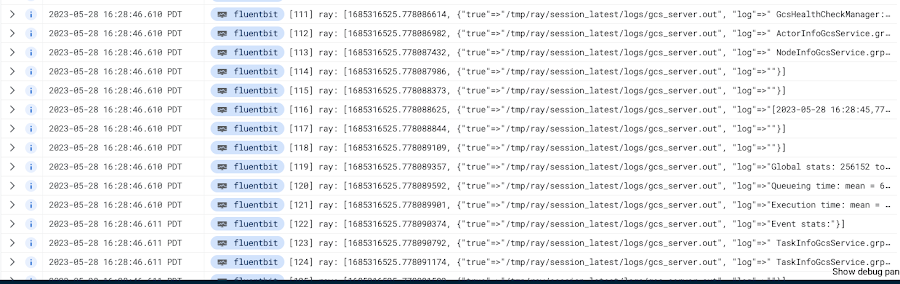
To see your monitoring metrics, go to Metrics Explorer in the Cloud Console. Under the menu for “Target”, select “Prometheus Target” and then “Ray”. Select the metric that you want to see, for instance `prometheus/ray_component_cpu_percentage/gauge`:
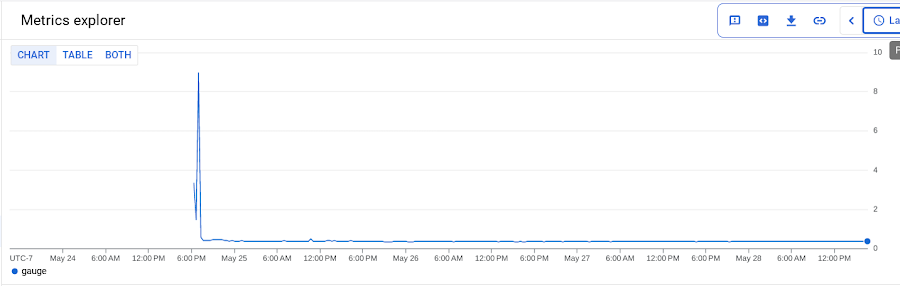
The deployment also comes with a Grafana deployment. Follow this guide to open it up and view your Ray cluster’s metrics.
Conclusion
The combination of Ray and GKE offers a simple and powerful solution for building, deploying, and managing distributed applications. Ray’s simplicity makes it an attractive choice for data and model developers while GKE’s scalability and reliability is the defacto choice for enterprise platforms. The solution template presented in this blog post offers a convenient way to get started quickly with KubeRay, the recommended approach to deploy Ray on GKE.
If you have any questions for building Ray on Kubernetes and GKE, you can contact us directly at ray-on-gke@google.com or comment in GitHub. Learn more about building AI Platforms with GKE by visiting our User Guide.
MerPay Platform Scales its Reach to Millions of Users using Cloud Spanner

5269
Of your peers have already read this article.
2:00 Minutes
The most insightful time you'll spend today!
Editor’s note: To launch a new mobile payment platform, Mercari needed a database solution strong on scalability, availability, and performance. Here’s how Cloud Spanner delivered those results.
E-commerce companies need to connect customers to their services securely, reliably, with zero downtime. When Mercari, Inc. launched a new mobile payment platform, we chose Cloud Spanner as part of our data portfolio, which provided us with easy scalability to handle millions of new users, a fully managed service that minimized overhead costs, and deep integration with other Google Cloud services.
Mercari, Inc., Japan’s largest C2C marketplace, launched its app in 2013, which allows 18.2million monthly users to easily and securely buy new and used items. Mercari expanded into the United States and in 2014 and launched Merpay, a mobile payment service that can be used through Mercari in Japan in 2017. With more than 85 million users, Merpay is now accepted at 1.8 million merchants and e-commerce sites in Japan, supporting payments via the DOCOMO ID contactless system and QR code.
Prioritizing availability and scalability
When we started building Merpay, we were looking for a new database. In the past, Mercari had used MySQL with bare metal hardware. Because of the amount of data, we required additional expertise to manage and maintain the hardware, software and MySQL implementation. Having built much of the microservices architecture for our Mercari app using Google Kubernetes Engine (GKE), it was natural to look at Google Cloud’s managed services when deciding upon our new database infrastructure for Merpay.
For the database, we were focusing especially on requirements around availability, scalability, and performance. To do a single payment transaction, there were multiple steps each with writes, requiring high-write-throughput and low-latency from the database. Needing a solution that would support reliable payment processing 24/7/365, we chose Spanner, which offers up to 99.999% availability with zero downtime for planned maintenance and schema changes.
We worked closely with Google Cloud’s Premium Support, Technical Account Management (TAM), and Strategic Cloud Engineer and Cloud Consultant teams to implement Spanner, including separating the payment processing— originally one of the functions in Mercari—as a microservice.
A nod to easier nodes and better scale
After launch, the number of Merpay users reached 2 million in only a few months. We had 45 Spanner nodes at the time of launch of Merpay and about 50 nodes four months later. Because we’d optimized the application side during those four months, we didn’t have to add many nodes to keep up with the growing traffic.
Whenever we needed to scale up the serving and storage resources in our instances, Spanner made it easy to increase nodes as needed in the Cloud Console. To optimize costs, it’s easy to add nodes during a marketing campaign and remove them afterward. Even if the traffic count is different from expected, we can change the number of nodes immediately. That’s one incredible convenience of Cloud Spanner.
Building powerful pipelines
Our data pipelines are used for KPI analytics, fraud detection, credit scoring, and customer support use cases. Because Cloud Spanner integrates so easily with other Google Cloud data services, the data in Spanner is easily accessible for analytics. From the Spanner database for each microservice, we create both batch and streaming data pipelines using Pub/Sub and Dataflow, as well as Apache Flink, and load the data into BigQuery and Google Cloud Storage. We’re able to quickly aggregate the data required for data platforms such as BigQuery and Cloud Storage. The original data is stored in Spanner and managed by microservices, but analysis through BigQuery is centrally managed by the Data Platform team. This team determines the confidentiality level of data and centrally manages BigQuery permissions using Terraform. By centrally managing data access permissions on the data platform rather than on individual microservices, we’re able to set appropriate security for individual users.
Our full data portfolio also includes Looker, which we use for product analysis, accounting analysis, test performance visualization, operation monitoring, development efficiency analysis, and HR analysis. We also use Dataproc, Cloud Composer, Data Catalog, and Data Studio. The Dataflow template created for the pipeline is also published as OSS.
With Spanner and other Google Cloud services, our Merpay platform is flexible, secure, scalable and highly available. As Spanner eliminates overhead, we can devote engineering resources to developing new tools and solutions for our customers. We’re looking ahead at providing cryptocurrency service, for example, and are now working on a project to migrate Mercari’s monolithic system that is still on premises entirely over to Google Cloud.
Read more about Mercari and Merpay. Or check out our recent blog: three reasons to consider Cloud Spanner for your next project.
SoFi Stadium Personalizes Fan Experiences with Game-changing App Built on Google Cloud and Deloitte

3200
Of your peers have already read this article.
2:00 Minutes
The most insightful time you'll spend today!
Editor’s note: Engineers from SoFi Stadium, Google Cloud, and Deloitte built a fan-ready Personal Concierge app that uses advanced analytics to tailor game-day experiences for every visitor. SoFi’s 10-year partnership with Google Cloud not only pumps up the fans. Advanced analytics also enable stadium employees to securely store, analyze, and action analytics data, and seamlessly collaborate through tools and services included in Google Cloud Workspace.
SoFi Stadium, an industry-leading, outdoor-indoor events facility and home of the Los Angeles Rams and Los Angeles Chargers, is the centerpiece of Hollywood Park, a near 300-acre sports and entertainment destination. With the capacity to host up to 100,000 spectators across a range of luxury and premium seating options, the 3.1 million square-foot SoFi Stadium is the largest in the NFL. Completed in September 2020, it has already secured a global reputation—scheduled to host Super Bowl LVI in 2022, the College Football National Championship Game in 2023, and the Opening and Closing Ceremonies of the Olympic Games in 2028. Under the same roof canopy as the stadium is the 2.5-acre American Airlines Plaza and the 6,000-seat performance venue, YouTube Theater.
Through a long-term partnership with Google Cloud, SoFi Stadium is personalizing fan experiences, enabling a more fulfilling, collaborative, and productive work experience for employees, and delivering game-changing technology to the event space.
Personalizing the experience for every fan
Sports fans are known for their fierce loyalty and camaraderie. While they come to game day ready to cheer with fellow fans, each spectator has a different vision for what will make for a memorable event. SoFi Stadium is helping customers choose their game day flow by extending a personalized, streamlined experience to every stadium goer through several new digital innovations powered by Google Cloud.
First there’s the Personal Concierge App. Powered by Google Cloud and built by Deloitte, this personalized navigation and security tool may be the game day MVP that sports fans have always dreamed of. Hours of precious viewing time can be lost navigating a stadium campus for seating, parking, food, access, and amenities. This application enables fans to quickly locate available parking locations, select the ideal transportation for game day through real-time Google Maps routing, and discover SoFi Stadium events all from their mobile device. Event-goers can also receive digital credentials through the app, enabling them to bypass lines and accelerate their access to luxury viewing suites.
The advanced data analytics accrued from multiple sources and processed through Google Cloud products such as Cloud Scheduler, App Engine, Dataflow, BigQuery, Looker, Firebase, and more, enable SoFi Stadium to anticipate spectator tastes. These Google Cloud tools can remember preferences and provide attendees with real-time personal recommendations around the clock.
Performing at the top of their game with Workspace
Advanced data analytics enhance employee experiences, too. Credentialed team members can securely store and analyze data from multiple sources, create operational dashboards with real-time data, track key performance indicators after events, and better forecast attendance, revenue by product, and other important business metrics.
In addition to deploying a number of Google Cloud solutions including Compute Engine, Kubernetes Engine, Cloud CDN, BigQuery, and others to power the Personal Concierge App, SoFi Stadium is empowering its employees by fully migrating to Google Cloud’s Workspace. Workspace streamlines the stadium’s business operations by fostering fast and seamless access to collaboration and performance tools. Built-in software—including Gmail for business, Docs, Drive, Calendar, and Meet—will help employees work smarter and meet securely from anywhere.
“We couldn’t have picked a better partner to help manage our technology needs,” said Skarpi Hedinsson, Chief Technology Officer, SoFi Stadium and Hollywood Park. “Incorporating Google’s solutions into critical areas of our business ensures we can usher in a new era of innovation in sports and entertainment, raising the bar on what the ultimate fan experience looks like globally.”
Making the big-game even bigger
As Hollywood Park combines the expertise of its team and Google Cloud engineers to power the future of sports and live events, SoFi Stadium prepares to welcome a product of this collaboration with the Infinity Screen by Samsung, the largest video board in sports. With 80 million pixels, weighing 2.2 million pounds, and boasting 120-yards in length, the Infinity Screen by Samsung leverages Google Cloud-based media workflows and optimization technology to power its game-changing screen.
Through its partnership with Google Cloud, SoFi Stadium is actively developing new media streaming and high-speed wireless solutions. In addition, SoFi Stadium has the world’s first 4K/HDR live production facility. These digital innovations are powering a new standard for sports fans and opening a path to redefine what can take game day from good to great.
3776
Of your peers have already watched this video.
8:00 Minutes
The most insightful time you'll spend today!
Target Leverages Google Cloud to Create Market-defining Online Experience
In the hyper-competitive world of online retail sales, ease-of-use and transaction speed can make or break business outcomes. However, a few years ago US Retail giant Target was going through a period of uncertainty.
While the company had over 1800 stores across the US with an estimated 85% of US consumers shopping at a Target store and over 25 million people visiting the Target website or using its app each month, it was still losing ground.
In spite of having millions of loyal customers, the company was dangerously late on digital and its technology wasn’t keeping pace with unstable systems to boot. The company faced the twin challenges of trying to operate today’s business as efficiently as possible and creating tomorrow’s business as quickly as possible. On the one hand it needed productivity and stability and on the other it wanted speed and disruption. Not an easy task to accomplish.
That’s when Target decided to use Google Cloud to solve its challenges. See how Target leveraged Google Cloud to create a market-defining online experience that has made customers happier and more loyal.
Cardinal Health Leads the Way in Healthcare App Modernization

2859
Of your peers have already read this article.
3:30 Minutes
The most insightful time you'll spend today!
Apps play a critical role in an ever-expanding range of healthcare services, as patients and providers increasingly expect streamlined, engaging digital experiences. This means that IT must become faster, more agile, and free from the constraints of everyday infrastructure management.
At Cardinal Health, we are continuously enhancing our technology to empower innovators across our organization as they strive to build connections across the continuum of care. Through our efforts, we have adopted a continuous integration and continuous delivery (CI/CD) pipeline that powers breakthroughs and drives innovation. Our CI/CID pipelines use a combination of Cloud Build for foundational elements, as well as our internal DevSecOps platform, NitroDX, to deploy our application workloads built on Google Cloud.
This CI/CD pipeline powered the development of our Pharmacy Marketing Advantage (PMA) Commerce, which was built from the ground up on Google Kubernetes Engine (GKE), to provide independent pharmacists with a digital platform that expands online shopping capabilities for patients by offering more than 11,000 over-the-counter products. We also replatformed our Order Express tool, which is a simple, reliable web ordering application for independent pharmacists, from on-prem to Google Compute Engine and GKE, which allowed us to shift from quarterly releases to weekly on-demand releases.
Our application teams work in close alignment with our product teams and handle everything from basic software updates to more advanced cloud-native app development. We place tremendous value on our ability to empower our application teams, and we invest in tools and technologies to make them as efficient and successful as possible.
As part of our efforts to optimize applications and deliver engaging digital experiences for our customers and their patients, we saw the value of rethinking our approach to storage and overall IT administration. Working with the NetApp Cloud Volume Service (CVS), a fully managed storage service, and Google Cloud, we fundamentally changed our IT capabilities.
Accelerating app development
As a cloud-first company, Cardinal Health has embraced a managed approach to IT provisioning in many areas. When we offload responsibilities like infrastructure maintenance, patching, and updates, we enable our developers to focus on continuous innovations that directly impact the quality of patient and provider experiences.
We’ve made measurable progress in automating our CI/CD pipelines to simplify provisioning Virtual Machines (VMs), managing firewall rules, launching Google Cloud projects, and more. Our NitroDx platform also significantly reduced development time from weeks to minutes, improving the software delivery process and accelerating digital transformation.
Google Cloud is our primary cloud services vendor and has removed much of the heavy lifting related to server provisioning, firmware patches, and similar tasks. We rely on a mix of Google Cloud services, including Compute Engine, GKE, BigQuery, and Vertex AI to deliver patient-centric solutions. We also work closely with partners like NetApp to improve our storage management at a much greater scale and more efficiently than we could do on our own.
By using a combination of NetApp and Google Cloud solutions, we’ve been able to decouple storage from our underlying infrastructure to make better use of our resources and accelerate app development. When running on-prem, shared storage proved to be a time and resource drain.
If an application needed shared storage in our legacy on-prem environment, we had to communicate the requirements to an engineer and create a change control. And even then, if all staff and funding were in place to support the change, it would take weeks to complete. This held up projects and delayed our time to market.
We quickly overcame this challenge with NetApp CVS. Through this tool, we can delegate permissions directly within a teams’ Google Cloud project, allowing them to administer their own shared volumes. This translates to on-demand shared storage without operational complexities or the need for dedicated teams to manage it.
We were an early adopter of NetApp CVS, and we’re happy to have made that decision. In addition to cost savings and faster time-to-market, we can now provide our staff with more professional development opportunities. The team members who made up the dedicated storage team now work across the cloud organization, focused on innovation and enablement rather than maintenance.
A stronger foundation for developers to stand on
We constantly work to fill gaps at any point in the developer experience. Containerizing our apps and deploying to GKE has been a major part of this process, driving efficiencies through consolidation and improving our processes to keep our operating systems patched, updated and maintained.
In the past, it was also difficult for us to get reproducible or CI/CD pipelines into our application spaces. Now, we make things easier for application teams as we can provide a CI/CD pipeline for the containers themselves, automating more of the underlying technology to keep developers moving forward.
As we shift more traditional virtual machine (VM) workloads into GKE and leverage NetApp CVS for shared storage, our developers can more easily plug into file-based services. This further accelerates app development and deployments and fuels a more easily managed, efficient CI/CD framework focused on value, not system maintenance.
Smart, data-driven decisions
We’ve been impressed by how quickly we can aggregate data, analyze it, and uncover insights with BigQuery, Vertex AI, and Dataproc — at a speed that would not have been possible without Google Cloud. Vertex AI pipelines helped us automate and standardize our ML operations so data scientists can focus on innovating code vs. managing deployments. This allowed us to make improvements in areas such as more accurately predicting market demand and providing more relevant product recommendations to our customers.
To date, Google Cloud has collaborated with us on many projects, giving us access to early-release products, listening to our needs, and applying our feedback to their product development. Likewise, NetApp continues to work closely with us to expand what is possible with NetApp CVS, particularly with the types of data we can store and the ability to manage it easily.
It’s an excellent partnership, and our work with Google Cloud and NetApp helps us redefine the possibilities of app modernization in healthcare. We can continue to push boundaries of speed, agility, and success of CI/CD pipelines. It’s exciting to see what we are accomplishing today and what we’ll do in the future to constantly improve our customer’s digital experience.
Learn how integrated solutions with NetApp on Google Cloud can help you unlock the full potential of your data.
Lending DocAI Shortens Borrowers’ Journey on Roostify

11774
Of your peers have already read this article.
3:00 Minutes
The most insightful time you'll spend today!
The home lending journey entails processing an immense number of documents daily from hundreds of thousands of borrowers. Currently, home lending document processing relies on some outdated digital models and a high dependency on manual labor, resulting in slow processing times and higher origination costs. Scaling a business that sorts through millions of documents daily, while increasing efficacy and accuracy, is no small feat. When it comes to applying for a mortgage loan, consumers expect a digital experience that’s as good as the in-person one. Roostify simplifies the home lending journey for lenders and their customers.
No time to spare: Overcoming document processing challenges with AI
Roostify provides enterprise cloud applications for mortgage and home lenders. In order to empower its customers to deliver a better, more personalized lending experience, they needed to automate and scale their in-house document parsing functionality.
As a key component of its document intelligence service, Roostify is leveraging Google Cloud’s Lending DocAI machine learning platform to automate processing documents required during a home loan application process, such as tax returns or bank statements with multi-language support. This partnership delivers data capture at scale, enabling Roostify customers to automatically identify document types from the uploaded file and to extract relevant entities such as wages, tax liabilities, names, and ID numbers for further processing, and make things move faster in the cumbersome lending process.
Roostify’s solutions leverage Google Cloud’s Lending DocAI, which is built on the recently announced Document AI platform, a unified console for document processing. Customers can easily create and customize all the specialized parsers (e.g., mortgage lending documents and tax returns parsers) on the platform without the need to perform additional data mapping or training. All Google Cloud’s specialized parsers are fine-tuned to achieve industry-leading accuracy, helping customers and partners confidently unlock insights from documents with machine learning. Learn more about the solution from the GA launch blog and the overview video.
Integrating Lending DocAI’s intelligent document processing capabilities into the Roostify platform means more innovation for their customers and tangible results: faster loan processing times, fewer document intake errors, and lower origination costs. Additional support in Google Lending DAI for other languages and more documents like global Know Your Customer (KYC) documents or payroll reports is in the near future.
Full integration of AI solutions
Working together with Roostify’s platform team, we were able to help them solve their document processing challenge through integration of various GCP products such as Lending DocAI (LDAI), Data Loss Prevention (DLP) for redacting sensitive data, BigQuery for data warehousing and analytics, and Firestore for API status. To make it very safe and secure, all data was encrypted end-to-end at Rest and in Transit. LDAI won’t require any training data to process. It is an easy plug and play API.
Here is a sneak peek in the high level deployment architecture for LDAI in Roostify environment:

Here are the steps for processing data:
- Receives document processing request from the client.
- API Function directs requests to the pre-processing service. For Async requests a processing ID is generated and returned to the caller.
- Pre-processing service sends the request for further processing (Long/short PDF conversion), calling other microservices and receives back the responses. Any error in the response received is then sent to the response processing service.
- If the response is synchronous, the pre-processing service directs it to the LDAI Invoker service.
- If the response is asynchronous, the pre-processing service feeds it into the Cloud Pub/Sub service.
- Cloud Pub/Sub service feeds the response back to the LDAI Invoker service.
- LDAI Invoker service routes the request to the Google LDAI API for classification if there are multiple pages in the document.
- Document will be split based on LDAI response and then saved in a GCS bucket for temporary storage.
- LDAI entity interface for single page processing and then LDAI Invoker sends LDAI results to LDAI Response Processing
- If a request is a synchronous request the LDAI Response Processor sends results to the API Function so that it can complete the synchronous call and respond to the rConnect caller.
- If the request is an asynchronous request the LDAI Response Processor will respond to the caller’s webhook and complete the transaction.
- Finally, Data stored in the GCP bucket will be deleted.
All the responses that come from the LDAI API can optionally feed into BigQuery via the Response Processor, after parsing it through Data Loss Prevention (DLP) API to redact the PII/sensitive information. Throughout the processing of both asynchronous and synchronous requests all transactions are logged using Cloud Logging. For asynchronous transactions, the state is maintained throughout the process using Cloud Firestore.
Roostify currently uses this technology to power two different solutions: Roostify Document Intelligence and Roostify Beyond™. Roostify Document Intelligence is a real-time document capture, classification, and data extraction solution built for home lenders. It ingests documents uploaded by borrowers and loan officers, identifies the relevant documents, and extracts and classifies key information. Roostify Document Intelligence is available as a standalone API service to any home lender with any digital lending infrastructure already in place.
Roostify Beyond™ is a robust suite of AI-powered solutions that enables home lenders to create intelligent experiences from start to close. It combines powerful data, insightful analytics, and meaningful visualization to streamline the underwriting process. Roostify Beyond™ is currently available only to Roostify customers as part of an Early Adopter program and will be rolled out to the market later this year.


Through this partnership, Roostify has enabled its customers to adopt a data-first approach to their home lending processes, which will lead to improved user experiences and significantly reduced loan processing times.
Fast track end-to-end deployment with Google Cloud AI Services (AIS)
Google AIS (Professional Services Organization), in collaboration with our partner Quantiphi, helped Roostify deploy this system into production and fast-tracked the development multifold to generate the final business value.
The partnership between Google Cloud and Roostify is just one of the latest examples of how we’re providing AI-powered solutions to solve business problems.
More Relevant Stories for Your Company

What Users and System Designers Must Learn from Google’s Best Practices for Password Management
Updated for 2021: This post includes updated best practices including the latest from Google's Best Practices for Password Management whitepapers for both users and system designers. Account management, authentication and password management can be tricky. Often, account management is a dark corner that isn't a top priority for developers or product managers. The resulting experience
How to Choose the Right ML Model for Your Applications
Many of our customers want to know how to choose a technology stack for solving problems with machine learning (ML). There are many choices for these solutions available, some that you can build and some that you can buy. We’ll be focusing on the build side here, exploring the various

Managing the API Lifecycle: Design, Delivery, and Everything in Between
Digital is disrupting every industry. From drugstore chains to banks to telcos, businesses are becoming software companies and adopting modern software practices. Why? If they don’t adapt to a new market reality, they will fail. As the business context is changing so is the technology stack. Enterprise application architectures are

Modernize your Windows Server Workloads using Google Cloud Platform
Application Modernization is an important enabler of Digital Transformations (DX), which fuel competitive advantage through increased productivity and business agility. Public cloud infrastructure proves to be a solid foundation for application modernization by providing Self-Service Provisioning capabilities, cloud-based & cloud-native technologies, and easier access to technology innovations such as AI/ML.
