





Google’s New Climate Innovation Challenge to Fight Energy Crisis and Build Climate Resilience

3425
Of your peers have already read this article.
1:30 Minutes
The most insightful time you'll spend today!
At Google, we believe that when it comes to solving a problem as big and urgent as climate change, we get more done when we collaborate. From beekeepers in Germany to urban foresters in Los Angeles, we support the work of nonprofits, scientists, and organizations that are working to mitigate the impact of climate change globally, and increase communities’ resilience to its effects.
To this end, we are proud to launch the Climate Innovation Challenge, which will provide Google Cloud research credits to advance a better understanding of climate resilience and promising solutions to address urgent climate challenges. I’m excited about this launch. We need to get smarter about the inevitable impact of our changing climate and how it will reshape our lives, supply chains, and business. Sustainability is a business-critical agenda, and we need intelligent technologies, leadership, and collaboration to drive industry transformations and reach a net-zero world.
The innovation and scale required to solve the toughest climate challenges will come from technology. At Google Cloud, we’re working across industries to increase climate resilience, applying cloud technology to help solve key challenges in the fight against climate change. Nonprofits, scientists, and organizations will be key in developing new research and innovations that will help us better understand how we can accelerate action on climate.
Through the new program, individual climate researchers in higher education and not-for-profit research organizations can apply for Google Cloud credit grants of up to $100,000 to accelerate their projects with Google’s state-of-the-art, data analytics and artificial intelligence (AI) cloud services, from Google Earth Engine (EE) to Google Public Datasets like the one from the National Oceanographic and Atmospheric Administration (NOAA). We will work with specialist partners in environmental organizations, agriculture, and carbon reduction to help evaluate proposals and select participants. Our first partner is the National Science Foundation (NSF) AI Institute for Research on Trustworthy AI in Weather, Climate, and Coastal Oceanography (AI2ES). Alongside the cloud credits, we will also provide researchers with access to technical training and mentoring, to help jumpstart their work.
From idea to insight to impact
In 2021, researchers at 500 universities in 47 countries received Google Cloud research credit grants. Others received funding through the Google Cloud Research Innovators Program, which promotes collaboration among a global cohort of scientists and provides them with professional opportunities and technical expertise. Here are some of the Research Innovators who have already advanced their climate research with Google Cloud:
- At CalTech Tapio Schneider and his team built Climate Machine, a next-generation open-source Earth System Model that will integrate more earth and atmospheric data than ever before.
- At UCLA, Bo Zhou uses EE for remote sensor modeling to help bureaus of land management make conservation decisions.
- At the University of New England, James Brinkhoff conducts spatial and temporal analysis for agriculture crop modeling and water use with data from EE.
- At Natural Resources Canada (NRCan), Richard Fernandes is developing the LEAF toolbox to map and assess vegetation with satellite data from EE.
- At the University of Toronto, Yuhong He uses EE to map changes occurring in natural and managed ecosystems systems using remote sensing, machine learning, and ecosystem modelings.
- At UCLA, Henry Houskeeper uses machine learning with EE’s satellite imagery to automate detection of kelp forests.
- At the University of Hawaii at Manoa, Jonghyun Lee conducts numerical modeling for water resources with Google Colab.
- At Technical University in Dublin, Santos Fernández Noguerol runs functions to collect weather data from governmental agencies, then automatically stores them in Google Cloud Storage buckets for future spatial analysis.
- At the University of Colorado at Denver, Farnoush Banaei-Kashani conducts data science projects with applications for Intelligent Transportation and Earth Sciences.
To apply for a Climate Innovation Challenge grant, click here and include “Climate Innovation Challenge” as the first line of your proposal. We will announce additional focus areas, partnerships, and recipients throughout the year. Click here to learn more about Google Cloud sustainability.
Developers and Practitioners’ Guide for Moving On-prem Data Warehouse to BigQuery
5429
Of your peers have already read this article.
3:00 Minutes
The most insightful time you'll spend today!
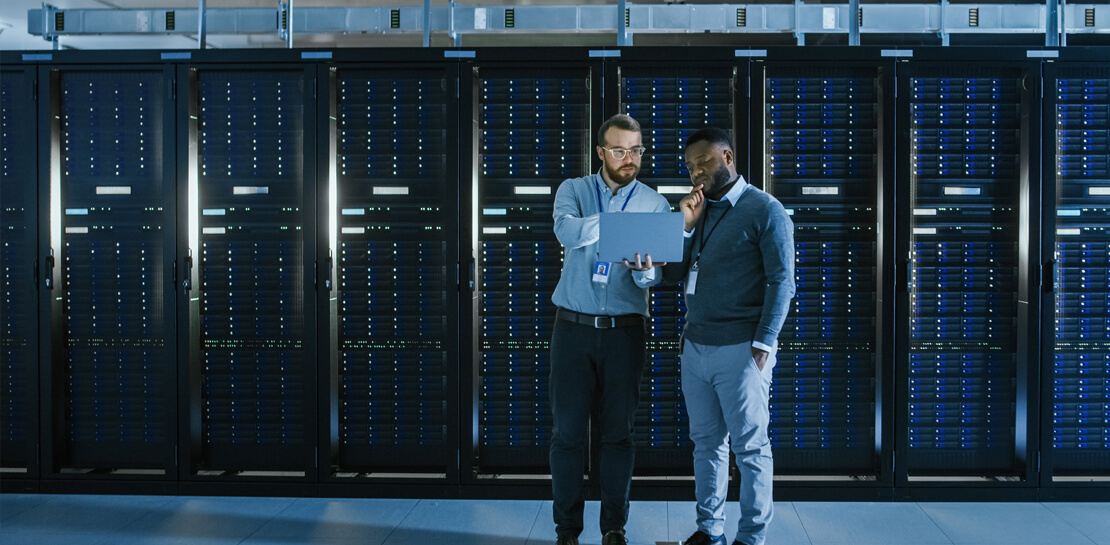
Data teams across companies have continuous challenges of consolidating data, processing it and making it useful. They deal with challenges such as a mixture of multiple ETL jobs, long ETL windows capacity-bound on-premise data warehouses and ever-increasing demands from users. They also need to make sure that the downstream requirements of ML, reporting and analytics are met with the data processing. And, they need to plan for the future – how will more data be handled and how new downstream teams will be supported?
Checkout how Independence Health Group is addressing their enterprise data warehouse (EDW) migration in the video above.
Why BigQuery?
On-premises data warehouses become difficult to scale so most companies’ biggest goal is to create a forward looking system to store data that is secure, scalable and cost effective. GCP’s BigQuery is serverless, highly scalable, and cost-effective and is a great technical fit for the EDW use-case. It’s a multicloud data warehouse designed for business agility. But, migrating a large, highly-integrated data warehouse from on-premise to BigQuery is not a flip-a-switch kinda migration. You need to make sure your downstream systems dont break due to inconsistent results in migrating datasets, both during and after the migration. So..you have to plan your migration.
Data warehouse migration strategy
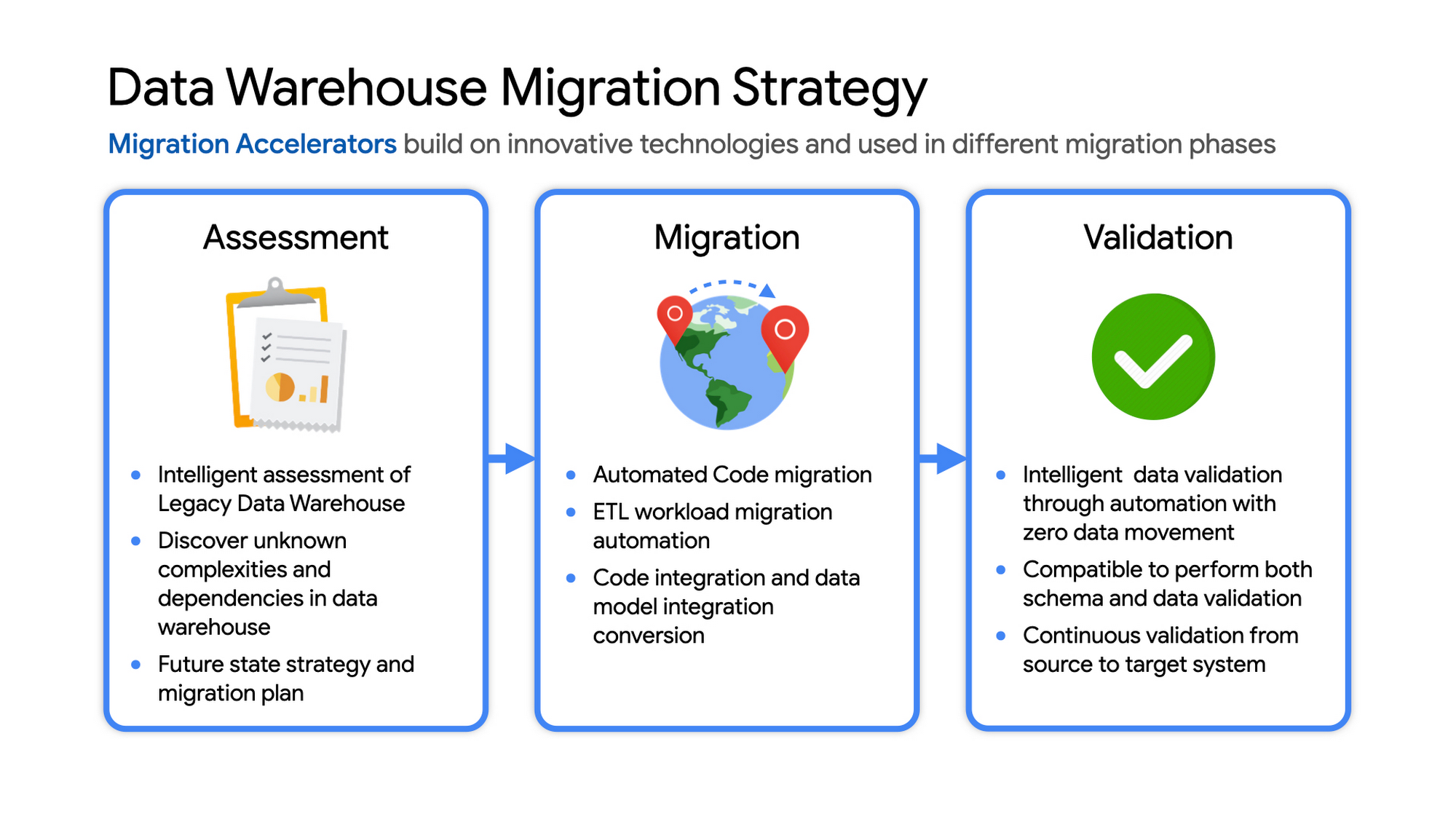
The following steps are typical for a successful migration:
- Assessment and planning: Find the scope in advance to plan the migration of the legacy data warehouse
- Identify data groupings, application access patterns and capacities
- Use tools and utilities to identify unknown complexities and dependencies
- Identify required application conversions and testing
- Determine initial processing and storage capacity for budget forecasting and capacity planning
- Consider growth and changes anticipated during the migration period
- Develop a future state strategy and vision to guide design
- Migration: Establish GCP foundation and begin migration
- As the cloud foundation is being set up, consider running focused POCs to validate data migration processes and timelines
- Look for automated utilities to help with any required code migration
- Plan to maintain data synchronization between legacy and target EDW during the duration of the migration. This becomes a critical business process to keep the project on schedule.
- Plan to integrate some enterprise tooling to help existing teams span both environments
- Consider current data access patterns among EDW user communities and how they will map to similar controls available in Big Query.
- Key scope includes code integration and data model conversions
- Expect to refine capacity forecasts and refine allocation design. In Big Query there are many options to balance cost and performance to maximize business value. For example, you can use either on-demand or flat-rate slot pricing or a combination of both.
- Validation and testing
- Look for tools to allow automated, intelligent data validation
- Scope must include both schema and data validation
- Ideally solutions will allow continuous validation from source to target system during migration
- Testing complexity and duration will be driven by number and complexity of applications consuming data from the EDW and rate of change of those applications
A key to successful migration is finding Google Cloud partners with experience migrating EDW workloads. For example, our Google Cloud partner Datametica offers services and specialized Migration Accelerators for each of these migration stages to make it more efficient to plan and execute migrations.
Data warehouse migration: Things to consider
- Financial benefits of open source: Target moving to ‘Open Source’ where none of the services have license fees. For example BigQuery uses Standard SQL; Cloud Composer is managed Apache Airflow, Dataflow is based on Apache Beam. Taking these as managed services provides the financial benefits of open source, but avoids the burden of maintaining open source platforms internally.
- Serverless: Move to “serverless” big data services. The majority of the services used in a recommended GCP data architecture scale on demand allowing more cost effective alignment with needs. Using fully managed services lets you focus engineering time on business roadmap priorities, not building and maintaining infrastructure.
- Efficiencies of a Unified platform: Any data warehouse migration involves integration with services that surround the EDW for data ingest and pre-processing and advanced analytics on the data stored in the EDW to maximize business value. A cloud provider like GCP offers a full breadth of integrated and managed ‘big data’ services with built-in machine learning. This can yield significantly reduced long-term TCO by increasing both operational and cost efficiency when compared to EDW-specific point solutions.
- Establishing a solid cloud foundation: From the beginning, take the time to design a secure foundation that will serve the business and technical needs for workloads to follow. Key features include: Scalable Resource Hierarchy, Multi-layer security, multi-tiered network and data center strategy and automation using Infrastructure-as-Code. Also allow time to integrate cloud-based services into existing enterprise systems such as CI/CD pipelines, monitoring, alerting, logging, process scheduling, and service request management.
- Unlimited expansion capacity: Moving to cloud sounds like a major step, but really look at this as adding more data centers accessible to your teams. Of course, these data centers offer many new services that are very difficult to develop in-house and provide nearly unlimited expansion capacity with minimal up-front financial commitment. .
- Patience and interim platforms: Migrating an EDW is typically a long running project. Be ready to design and operate interim platforms for data synchronization, validation and application testing. Consider the impact on up-stream and down-stream systems. It might make sense to migrate and modernize these systems concurrent with the EDW migration since they are probably data sources and sinks and may be facing similar growth challenges. Also be ready to accommodate new business requirements that develop during the migration. Take advantage of the long duration to have existing your operational teams learn new services from the partner leading the deployment so your teams are ready to take over post-migration.
- Experienced partner: An EDW migration can be a major undertaking with challenges and risks during migration, but offers tremendous opportunities to reduce costs, simplify operations and offer dramatically improved capacities to internal and external EDW users. Selecting the right partner reduces the technical and financial risks, and allows you to plan for and possibly start leveraging these long-term benefits early in the migration process.
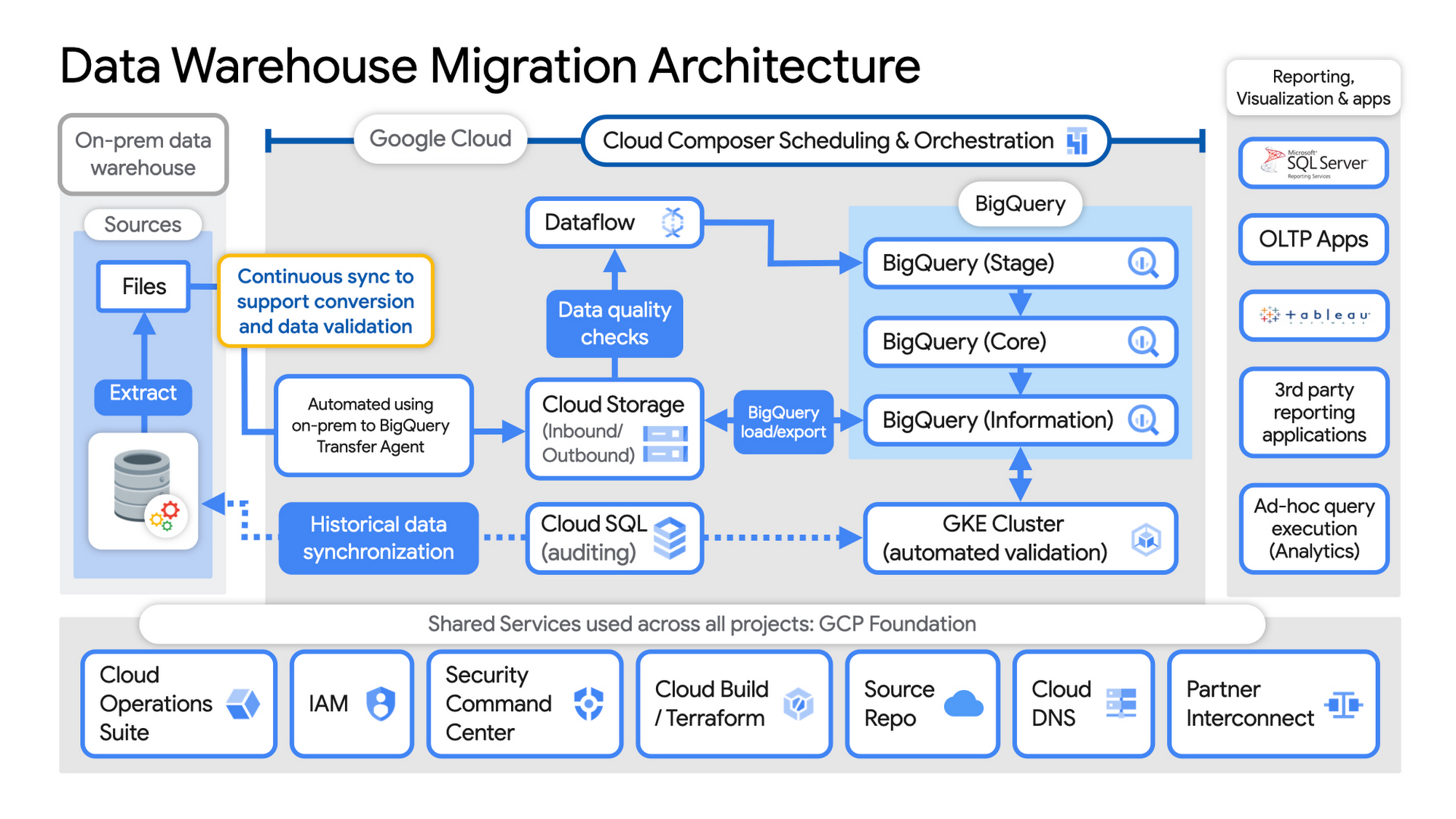
Example Data Warehouse Migration Architecture
- Setup foundational elements. In GCP these include, IAM for authorization and access, cloud resource hierarchy, billing, networking, code pipelines, Infrastructure as Code using Cloud Build with Terraform ( GCP Foundation Toolkit), Cloud DNS and a dedicated/partner Interconnect to connect to the current data centers.
- Activate monitoring and security scanning services before real user data is loaded using Cloud Operations for monitoring and logging and Security Command Center for security monitoring.
- Extract files from on-premise legacy EDW and move to Cloud Storage and establish on-going synchronization using Big Query Transfer services.
- From Cloud Storage, process the data in Dataflow and Load/Export data to BigQuery.
- Validate the export using Datametica’s validation utilities running in a GKE cluster and Cloud SQL for auditing and historical data synchronization as needed. Application teams test against the validated data sets throughout the migration process.
- Orchestrate the entire pipeline using Cloud Composer, integrated with on-prem scheduling services as needed to leverage established processes and keep legacy and new systems in sync.
- Maintain close coordination with teams/services ingesting new data into the EDW and down-streams analytics teams relying on the EDW data for on-going advanced analytics.
- Establish fine-grained access controls to data sets and start making the data in Big Query available to existing reporting, visualization and application consumption tools using BigQuery data connectors for ‘down-stream’ user access and testing.
- Incrementally increase Big Query flat-rate processing capacity to provide the most cost-effective utilization of resources during migration.
To learn more about migrating from on-premises Enterprise Data Warehouses (EDW) to Bigquery and GCP here.
How We Built a Brand New Bank on Google Cloud and Cloud Spanner: The First Scalable, Enterprise-grade, Database Service

6575
Of your peers have already read this article.
6:30 Minutes
The most insightful time you'll spend today!
Editor’s note: Technology today lets companies of any size take on entire industries simply with an innovative business model plus digital distribution. Take Shine, a French startup whose platform helps freelancers manage their finances — and their administrative commitments. Here, Raphael Simon, Shine’s CTO and co-founder, talks about why Shine built a new bank on Google Cloud Platform, and in particular Cloud Spanner.
More and more people are deciding to take the plunge and start a freelance career. Some of them by choice, others out of necessity. One of their biggest pain points is dealing with administrative tasks.
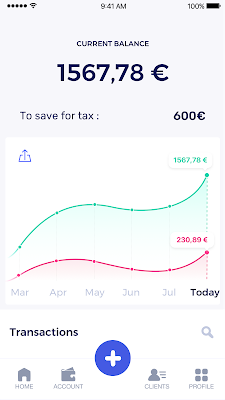
In some countries, especially in Europe, the administrative burden of being a freelancer is similar to what a company of 10 or more people deals with. A freelancer doesn’t necessarily have the time or skills to manage all this paperwork. So we are building a new bank for freelancers from the ground up that helps automate administrative tasks associated with their business.
Shine’s banking services and financial tools make it as easy to work as a freelancer as it is to work for a larger company. We deal with administrative tasks on behalf of the freelancer so that he or she can focus on their job: finding and wowing clients.

Building our infrastructure
As a new bank, we had the opportunity to build our infrastructure from the ground up. Designing an infrastructure and choosing a database presents tough decisions, especially in the financial services world. Financial institutions come under tremendous scrutiny to demonstrate stability and security. Even a tiny leak of banking data can have tremendous consequences both for the bank and its clients, and any service interruption can trigger a banking license to be suspended or a transaction to be declined.
At the same time, it’s vital for us to optimize our resources so we can maximize the time we spend developing user-facing features. In our first six months, we iterated and validated a prototype app using Firebase, and secured our seed funding round (one of the largest in Europe in 2017).
Based on our positive experience with Firebase, plus the ease-of-use and attractive pricing that Google Cloud offered, we decided to build our platform on Google Cloud Platform (GCP).
We were drawn to GCP because it has a simple, consistent interface that is easy to learn. We chose App Engine flexible environment with Google Cloud Endpoints for an auto-scaling microservices API. These helped us reduce the time, effort, and cost in terms of DevOps engineers, so we could invest more in developing features, while maintaining our agility.
We use Cloud Identity and Access Management (Cloud IAM) to help control developer access to critical parts of the application such as customer bank account data. It was quite a relief to lean on a reliable partner like Google Cloud for this.
Database decisions
Next came time to choose a database. Shine lives at the financial heart of our customers’ businesses and provides guidance on things like accounting and tax declaration. The app calculates the VAT for each invoice and forecasts the charges they must pay each quarter.
Due to the sensitivity of our customers’ data, the stakes are high. We pay careful attention to data integrity and availability and only a relational database with support for ACID transactions (Atomicity, Consistency, Isolation, Durability) can meet this requirement.
At the same time, we wanted to focus on the app and user experience, not on database administration or scalability issues. We’re trying to build the best possible product for our users, and administering a database has no direct value for our customers. In other words, we wanted a managed service.
Cloud Spanner combines a globally distributed relational database service with ACID transactions, industry-standard SQL semantics, horizontal scaling, and high availability. Cloud Spanner provided additional security, high-availability, and disaster recovery features out-of-the-box that would have taken months for us to implement on our own. Oh, and no need to worry about performance — Cloud Spanner is fast. Indeed, Cloud Spanner has been a real asset to the project, from the ease-of-use of creating an instance to scaling the database.
Cloud Spanner pro tips
We began working with Cloud Spanner and have learned a lot along the way. Here are some technical notes about our deployment and some best practices that may be useful to you down the road:
- Cloud Spanner allows us to change a schema in production without downtime. We always use a NOT NULL constraint, because we generally think that using NULL leads to more errors in application code. We always use a default value when we create an entity through our APIs and we use Cloud Dataflow to set values when we change a schema (e.g., adding a field to an entity).
- With microservices, it’s generally a good practice to make sure every service has its own database to ensure data isolation between the different services. However, we adopted a slightly different strategy to optimize our use of Cloud Spanner. We have an instance on which there are three databases — one for production, one for staging and one for testing our continuous integration (CI) pipeline. Each service has one or more interleaved tables that are isolated from others services’ tables (we do not use foreign-keys between tables from different services). This way our microservices data are not tightly “coupled”.
- We created an internal query service that performs read-only queries to Cloud Spanner to generate a dashboard or do complex queries for analytics. It is the only service where we allow joins between tables across services.
- We take advantage of Cloud Spanner’s scalability, and thus don’t delete any data that could one day be useful and/or profitable.
- We store all of our business logs on Cloud Spanner, for example connection attempts to the application. We append the ‘-Logs’ suffix to them.
- When possible, we always create an interleave.
In short, implementing Cloud Spanner has been a good choice for Shine:
- It’s saved us weeks, if not months, of coding.
- We feel we can rely on it since it’s been battle-tested by Google.
- We can focus on building a disruptive financial services product for freelancers and SMBs.
And because Cloud Spanner is fully managed and horizontally scalable, we don’t have to worry about hardware, security patches, scaling, database sharding, or the possibility of a long and risky database migration in the future. We are confident Cloud Spanner will grow with our business, particularly as we expand regionally and globally. I strongly recommend Cloud Spanner to any company looking for a complete database solution for business-critical, sensitive, and scalable data.
Three Benefits of VPC Network Peering for SAP Managed Apps
3538
Of your peers have already read this article.
3:00 Minutes
The most insightful time you'll spend today!
Over the past year, RISE with SAP has emerged as a valuable solution for SAP customers seeking a faster, simpler, and more affordable path to the cloud. RISE with SAP is a subscription-based offering that typically includes a number of fully managed cloud application options, including SAP S/4HANA Cloud and elements of the SAP Business Technology Platform. It’s a great way to migrate your business to modern cloud ERP applications, while handing off the implementation and management to SAP and freeing your own IT staff to focus on other projects.
As a strategic partner for RISE with SAP, Google Cloud works closely with SAP to ensure reliable, secure, high-performance connectivity between your SAP managed applications and your other Google Cloud applications and services. Today, we’re focusing on a Google Cloud capability that plays a big part in achieving this goal: VPC network peering. If your company uses Google Cloud to host its RISE with SAP managed applications (or any other SAP-managed offering, such as SAP Enterprise Cloud Services), it’s worth learning more about why VPC network peering is an important capability and how your network admin can implement it.
VPC network peering: The critical link for your SAP managed applications
We recently co-authored a white paper with SAP that goes into technical detail about how VPC network peering works and includes step-by-step configuration instructions. But it is useful to understand, at a higher level, why it matters for RISE with SAP subscribers.
When SAP implements your RISE with SAP managed applications on Google Cloud, it also provisions a virtual private cloud (VPC) — a virtualized network that provides the same functionality, performance, and security benefits as a dedicated physical network — for this SAP environment. In fact, a VPC actually gives you some capabilities that a physical network can’t match, such as the ability to increase IP space without downtime.
Using VPC network peering to connect your SAP managed environment with your Google Cloud applications and services gives you three key benefits:
- Network latency: Traffic that remains inside Google’s network enjoys lower latency than connectivity that uses external addresses.
- Network security: Service owners do not need to have their services exposed to the public internet and deal with its associated risks.
- Network cost: Rather than pay egress bandwidth costs for networks using external IPs to communicate, peered networks can use internal IPs to communicate, saving you money on those egress costs. Regular network pricing still applies to all traffic.
Many customers also appreciate the flexibility they get from VPC network peering: It supports the ability to peer your own VPC networks with other VPC networks that reside in different projects and even in different organizations.
Using VPC network peering to strengthen your SAP security posture
Most Google Cloud customers find VPC network peering most useful to ensure seamless connectivity between their SAP managed applications and the rest of their Google Cloud environment. But some companies also rely on VPC network peering to gain greater control over the security of their cloud environments. This can include:
- Implementing additional network security capabilities, such as advanced firewalls, intrusion detection, and network package inspection, that go above and beyond standard SAP security measures.
- Leveraging Google Cloud Interconnect to link your on-premises and Google Cloud environments, including your RISE with SAP managed applications, without sending traffic across the public internet.
Once your company has configured VPC network peering, things get even more interesting. Google Cloud offers plenty of ways to complement and enhance the value of your SAP applications: using Google BigQuery to consolidate and enrich your SAP application data; relying on Google AI/ML capabilities to sharpen your predictive analytics and real-time decision-making; or leveraging Google Kubernetes Engine to jump-start your own cloud-native application development efforts, among many other examples.
Some of the world’s biggest SAP customers, including The Home Depot, and Cardinal Health, have chosen Google Cloud to migrate their business-critical SAP applications. And we’ve seen how useful VPC network peering can be for SAP customers to unlock the full value and potential of Google Cloud. Be sure to download our white paper so you can get VPC network peering configured for your RISE with SAP managed applications, and discover for yourself just what’s possible when you run SAP applications on Google Cloud.
3473
Of your peers have already watched this video.
20:00 Minutes
The most insightful time you'll spend today!
Managing Change in an SAP World
Change is a constant for SAP customers. Now more than ever, SAP customers need solutions that provide them business agility, rock solid availability, enhanced security, and true economic value.
Learn how Google Cloud can guide your SAP journey to the cloud with simple and no cost migrations, powerful infrastructure, and innovation technologies that you can take advantage of today. Hear examples of SAP customers who have deployed on Google Cloud and the game changing results they are realizing.
How to Pick a Database that is Suitable for Your Application

7053
Of your peers have already read this article.
2:30 Minutes
The most insightful time you'll spend today!
Picking the right database for your application is not easy. The choice depends heavily on your use case—transactional processing, analytical processing, in-memory database, and so on—but it also depends on other factors. This post covers the different database options available within Google Cloud across relational (SQL) and non-relational (NoSQL) databases and explains which use cases are best suited for each database option.

Relational databases
In relational databases information is stored in tables, rows and columns, which typically works best for structured data. As a result they are used for applications in which the structure of the data does not change often. SQL (Structured Query Language) is used when interacting with most relational databases. They offer ACID consistency mode for the data, which means:
- Atomic: All operations in a transaction succeed or the operation is rolled back.
- Consistent: On the completion of a transaction, the database is structurally sound.
- Isolated: Transactions do not contend with one another. Contentious access to data is moderated by the database so that transactions appear to run sequentially.
- Durable: The results of applying a transaction are permanent, even in the presence of failures.
Because of these properties, relational databases are used in applications that require high accuracy and for transactional queries such as financial and retail transactions. For example: In banking when a customer makes a funds transfer request, you want to make sure the transaction is possible and it actually happens on the most up-to-date account balance, in this case an error or resubmit request is likely fine.
There are three relational database options in Google Cloud: Cloud SQL, Cloud Spanner, and Bare Metal Solution.
Cloud SQL: Provides managed MySQL, PostgreSQL and SQL Server databases on Google Cloud. It reduces maintenance cost and automates database provisioning, storage capacity management, back ups, and out-of-the-box high availability and disaster recovery/failover. For these reasons it is best for general-purpose web frameworks, CRM, ERP, SaaS and e-commerce applications.
Cloud Spanner: Cloud Spanner is an enterprise-grade, globally-distributed, and strongly-consistent database that offers up to 99.999% availability, built specifically to combine the benefits of relational database structure with non-relational horizontal scale. It is a unique database that combines ACID transactions, SQL queries, and relational structure with the scalability that you typically associate with non-relational or NoSQL databases. As a result, Spanner is best used for applications such as gaming, payment solutions, global financial ledgers, retail banking and inventory management that require ability to scale limitlessly with strong-consistency and high-availability.
Bare Metal Solution: Provides hardware to run specialized workloads with low latency on Google Cloud. This is specifically useful if there is an Oracle database that you want to lift and shift into Google Cloud. This enables data center retirements and paves a path to modernize legacy applications.
Non-relational databases
Non-relational databases (or NoSQL databases) store compex, unstructured data in a non-tabular form such as documents. Non-relational databases are often used when large quantities of complex and diverse data need to be organized. Unlike relational databases, they perform faster because a query doesn’t have to access several tables to deliver an answer, making them ideal for storing data that may change frequently or for applications that handle many different kinds of data.
For example, an apparel store might have a database in which shirts have their own document containing all of their information, including size, brand, and color with room for adding more parameters later such as sleeve size, collars, and so on.
Qualities that make NoSQL databases fast:
- Eventual consistency: stores usually exhibit consistency at some later point (e.g., lazily at read time)
- Horizontal scaling, usually using hashed distributions
- Typically, they are optimized for a specific workload pattern (i.e., key-value, graph, wide-column)
- Typically, they don’t support cross shard transactions or flexible isolation modes.
Because of these properties, non-relational databases are used in applications that require large scale, reliability, availability, and frequent data changes.They can easily scale horizontally by adding more servers, unlike some relational databases, which scale vertically by increasing the machine size as the data grows. Although, some relations databases such as Cloud Spanner support scale-out and strict consistency.
Non-relational databases can store a variety of unstructured data such as documents, key-value, graphs, wide columns, and more. Here are your non-relational database options in Google Cloud:
- Document databases: Store information as documents (in formats such as JSON and XML). For example: Firestore
- Key-value stores: Group associated data in collections with records that are identified with unique keys for easy retrieval. Key-value stores have just enough structure to mirror the value of relational databases while still preserving the benefits of NoSQL. For example: Datastore, Bigtable, Memorystore
- In-memory database: Purpose-built database that relies primarily on memory for data storage. These are designed to attain minimal response time by eliminating the need to access disks. They are ideal for applications that require microsecond response times and can have large spikes in traffic. For example: Memorystore
- Wide-column databases: Use the tabular format but allow a wide variance in how data is named and formatted in each row, even in the same table. They have some basic structure while preserving a lot of flexibility. For example: Bigtable
- Graph databases: Use graph structures to define the relationships between stored data points; useful for identifying patterns in unstructured and semi-structured information. For example: JanusGraph
There are three non-relational databases in Google Cloud:
- Firestore: Is a serverless document database which scales on demand and acts as a backend-as-a-service. It is DBaaS that increases the speed of building applications. It is perfect for all general purpose uses cases such as ecommerce, gaming, IoT and real time dashboards. With Firestore users can interact with and collaborate on live and offline data making it great for real-time application and mobile apps.
- Cloud Bigtable: Cloud Bigtable is a sparsely populated table that can scale to billions of rows and thousands of columns, enabling you to store terabytes or even petabytes of data. It is ideal for storing very large amounts of single-keyed data with very low latency. It supports high read and write throughput at sub-millisecond latency, and it is an ideal data source for MapReduce operations. It also supports the open-source HBase API standard to easily integrate with the Apache ecosystem including HBase, Beam, Hadoop and Spark along with Google Cloud ecosystem.
- Memorystore: Memorystore is a fully managed in-memory data store service for Redis and Memcached at Google Cloud. It is best for in-memory and transient data stores and automates the complex tasks of provisioning, replication, failover, and patching so you can spend more time coding. Because it offers extremely low latency and high performance, Memorystore is great for web and mobile, gaming, leaderboard, social, chat, and news feed applications.
Conclusion
Choosing a relational or a non-relational database largely depends on the use case. Broadly, if your application requires ACID transactions and your data structure is not going to change much, select a relational database.
In Google Cloud use Cloud SQL for any general-purpose SQL database and Cloud Spanner for large-scale globally scalable, strongly consistent use cases. In general, if your data structure may change later and if scale and availability is a bigger requirement than consistency then a non-relational database is a preferable choice. Google Cloud offers Firestore, Memorystore, and Cloud Bigtable to support a variety of use cases across the document, key-value, and wide column database spectrum.
For more comparison resources on each database check out the overview. For more hands-on experience with Bigtable, check out our on-demand training here and learn about migrating databases to managed services check out this whitepaper.
https://youtube.com/watch?v=2TZXSnCTd7E%3Fenablejsapi%3D1%26
For more #GCPSketchnote, follow the GitHub repo. For similar cloud content follow me on Twitter @pvergadia and keep an eye out on thecloudgirl.dev.
More Relevant Stories for Your Company

AI in Manufacturing Already A Mainstream: Google Cloud Study
While the promise of artificial intelligence transforming the manufacturing industry is not new, long-ongoing experimentation hasn’t yet led to widespread business benefits. Manufacturers remain in “pilot purgatory,” as Gartner reports that only 21% of companies in the industry have active AI initiatives in production. However, new research from Google Cloud reveals that the




Skincare Firm Scales 4X in Minutes with SAP on Google Cloud
As the number one skincare brand in the United States, Rodan + Fields must support its team of over 300,000 of independent contractors as well as work to ensure a really personalized experience for customers. To keep pace with the company’s growth, Rodan + Fields realized it needed a more

Freenome’s Innovative Cancer Detection Technology and Its Integration with Google Cloud
It’s incredible to see how startups across industries are using cloud technology to help address some of our most pressing, important, and life-altering challenges. Startups and high-growth technology companies are choosing Google Cloud and using technologies like Google Compute Engine (GCE), BigQuery, Looker, Firebase and more to help businesses reduce
Forrester and IDC’s Research Confirms Quantifiable Benefits of Running SAP on Google Cloud
Cloud migration is top of mind for most companies with SAP applications. While the advantages of the cloud for SAP customers is generally understood, the move itself can be complicated and disruptive. So what actually are the business benefits and cost savings? How long will it take to recoup such
