





Google Workspace to Extend Digital Sovereignity for EU Organizations in Later Part of 2022

4810
Of your peers have already read this article.
2:00 Minutes
The most insightful time you'll spend today!
European organizations are moving their operations and data to the cloud in increasing numbers to enable collaboration, drive business value, and transition to hybrid work. However, the cloud solutions that underpin these powerful capabilities must meet an organization’s critical requirements for security, privacy, and digital sovereignty. We often hear from European Union policymakers and business leaders that ensuring the sovereignty of their cloud data, through regionalization and additional controls over administrative access, is crucial in this evolving landscape.
Today, we’re announcing Sovereign Controls for Google Workspace, which will provide digital sovereignty capabilities for organizations, both in the public and private sector, to control, limit, and monitor transfers of data to and from the EU starting at the end of 2022, with additional capabilities delivered throughout 2023. This commitment builds on our existing Client-side encryption, Data regions, and Access Controls capabilities.
Offering enhanced customer controls, including Client-side encryption
Encryption is an important technical control that limits a cloud provider’s access to customer data. Google Workspace already uses the latest cryptographic standards to encrypt all data at rest and in transit between our facilities. The European Data Protection Board recommendations include encryption as part of the supplementary measures to protect data. Google Workspace is leading the way on such measures with our Client-side encryption feature that allows customers to continue benefiting from the powerful innovations of Google Cloud while retaining complete confidentiality and control over their data.
Google Workspace’s unique approach to client-side encryption provides our customers with authoritative privacy control over their data through encryption keys that they can hold on site, within a nation’s borders, or within any other boundary they define. Google never has access to the keys or key holders, which means the data is indecipherable to us and we have no technical ability to access it. We deliver this level of encryption without the need for legacy desktop clients, while maintaining the same high-quality experience for your users such as online co-authoring.
Organizations can choose to use Client-side encryption pervasively across all their users, or create rules that apply to specific users, organizational units, or shared drives. Client-side encryption is now generally available for Google Drive, Docs, Sheets, and Slides, with plans to extend the functionality to Gmail, Google Calendar, and Meet by the end of 2022.
Expanding data location controls
Data regions already allow our customers to control the storage location of their covered data at-rest. We will enhance this capability by the end of 2023 through expanded coverage of data storage and processing in-region along with an in-country copy.
As employees and organizations adopt new ways of working in a hybrid world, they need secure access to data to drive key business outcomes. But this trend, combined with complex technical architectures, presents significant challenges to retaining control over where data resides.
Our cloud-native architecture means that Google Workspace functions fully within a browser, without requiring caches or installed software on employee devices. We adopt a zero-trust approach, with built-in security that provides controls to geo-fence devices and users through Context Aware Access. Moreover, admins can set sharing boundaries and define rules that govern user communication.
In short, we empower admins with critical capabilities that can give them granular control over the flow of their data without hindering the modern collaboration capabilities that form the foundation of Google Workspace. We are enabling organizations to strike the right balance between data location and collaboration across teams, partners, and customers.
Control and transparency for administrative access
When moving to a cloud-based service, organizations need greater visibility and control over all forms of administrative access to their systems, including who has access, the nature and circumstances of that access, and the ability to specify that only certain personnel—in designated countries or regions—have access. These capabilities are core to our approach for meeting evolving digital sovereignty standards.
Building on this approach, we will implement a series of new Access Controls by the end of 2023 that will enable customers to:
- Restrict and/or approve Google support access through Access Approvals.
- Limit customer support to EU-based support staff through Access Management.
- Ensure round-the-clock support from Google Engineering staff, when needed, with remote-in virtual desktop infrastructure .
- Generate comprehensive log reports on data access and actions through Access Transparency, which is already available in GA.
Sovereign Controls for Google Workspace will deliver digital sovereignty through a comprehensive set of capabilities for organizations working in and across EU regions. In parallel, Google Cloud will continue to provide customers with legal mechanisms for international data transfer, which will include making the protections offered by the new EU data transfer framework available once it is implemented.
We remain committed to equipping our customers in Europe and across the globe with powerful technical solutions that help them adapt to, and stay on top of, a rapidly evolving regulatory landscape. We’ve designed and built Google Workspace to operate on a secure foundation, providing capabilities to keep our users safe, their data secure, and their information private. Digital sovereignty is core to our ongoing mission in Europe and elsewhere, and a guiding principle that customers can rely on now and into the future.
How 4K+ Coffee Lovers Get their Cuppa at Costa Coffee with the Help of Google Maps

3836
Of your peers have already read this article.
1:30 Minutes
The most insightful time you'll spend today!
Editor’s note: Gordon Lucas, Global Head of Digital Engineering at Costa Coffee, explains how Google Maps Platform helps direct customers to each of its 4,000 plus Costa Coffee shops across the world, as well as streamline payments, and optimize deliveries.
When brothers Sergio and Bruno Costa opened the first Costa Coffee in central London in 1971, they relied on word of mouth to grow trade. Personal recommendations encouraged people who lived and worked locally to visit the coffee shop and sample what became (and still remains) our signature blend coffee, Mocha Italia.
Fast forward 50 years and we have more than 4,000 coffee shops spread over 31 countries. To make it as easy as possible for our global customers to pick up a Mocha Italia, a Costa Americano, or any other Costa Coffee product wherever we operate, we decided to create a visual app. We wanted the app to help customers across the world find their most convenient eat-in, takeaway, drive-thru, partner store, or delivery platform, and highlight which services are available and at what times.

Enhancing the customer experience with intelligent maps
We were already using Google Maps Platform products on our website to provide our customers with a basic store locator service. So when we launched our mobile app in 2017, we added more interactive geospatial features to make our customers’ journeys quicker and easier.
We chose to enhance our existing Google Maps Platform solution because our developers enjoyed using it. Google Maps Platform offered all the capabilities we needed to boost our solutions, and we were excited to see how we’d be able to leverage geospatial data to improve the experience of our customers.
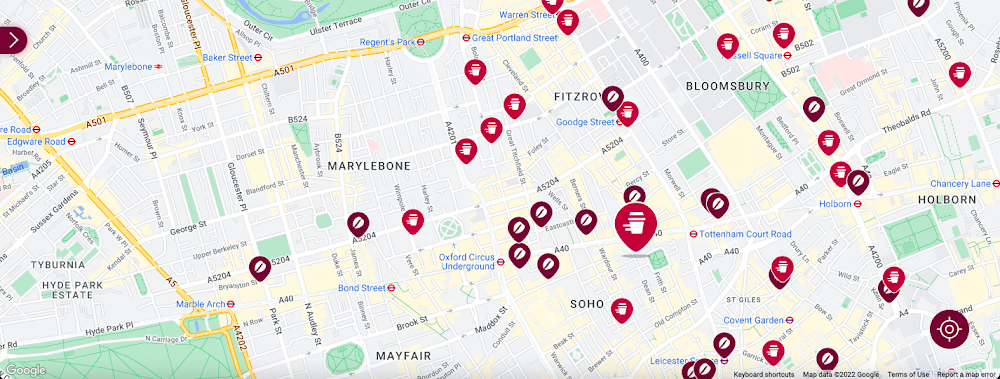
Our Google Cloud Premier Partner, Snowdrop Solutions, supported us in deploying all our requirements so the app’s new features could be rolled out globally. We wanted to direct pedestrians and vehicles to standalone Costa Coffee shops and kiosks in supermarkets and gas stations. We also wanted a dynamic map feature to highlight which locations offered click-and-collect, drive-thru, and delivery services. We then wanted to link these services to our online payments systems, seamlessly integrating our transaction process to make it as easy as possible for our customers.
To that end, we used the Maps Static API to embed maps within our app, and the Geocoding API to convert addresses into coordinates to create markers on our maps. We also use the Places API to allow customers to search for a Costa Coffee facility based on their location.
A new route for customer satisfaction
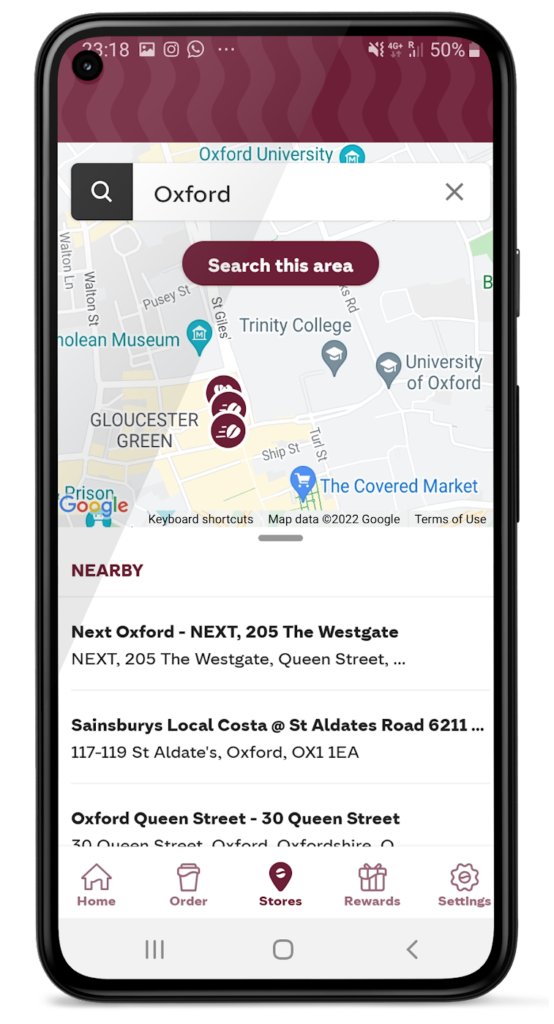
We had one issue when it came to locating Costa Coffee shops, however. We noticed that some customers were selecting the wrong store to collect orders. Fortunately, Google Maps Platform provided a quick fix that solved this issue. We updated the service to provide customers with a map of their collection point upon receipt of their order, remindIng them which store to collect from. A tweak like adding a map to a receipt improves customer satisfaction. The drop in calls to our customer service is testimony to this.
Geospatial intelligence became invaluable in the pandemic
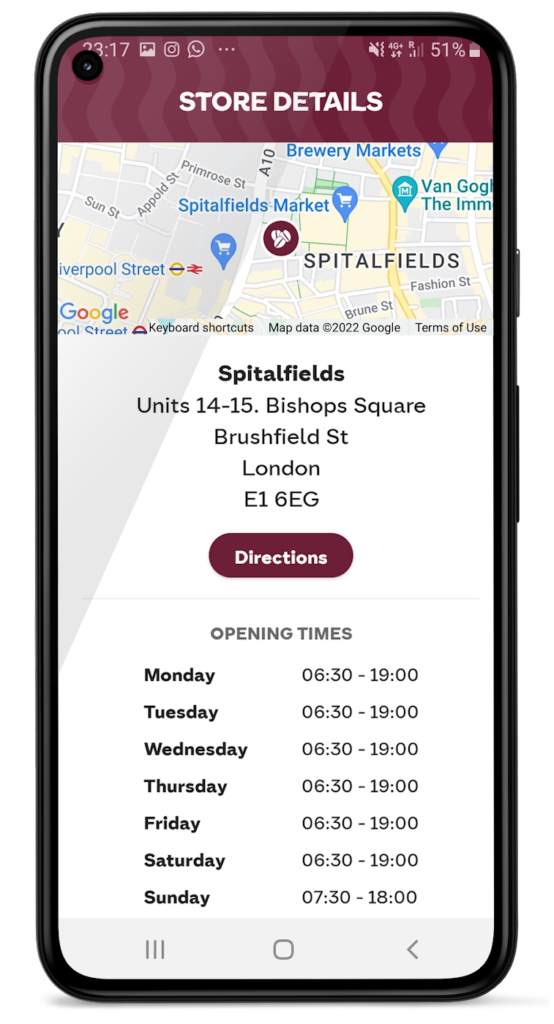
We had to adjust our service when the pandemic hit and Google Maps Platform was again instrumental in helping us. Because we had to comply with unique lockdown measures and travel restrictions across different locations, it could be challenging for our customers to stay up-to-date on the changing opening times and service guidelines of our shops. So we used Google Maps Platform Places API to show our customers which nearby stores, click-and-collect outlets, or drive-thrus were open, and when, during lockdowns.
Integrating this with our mobile ordering system also enabled us to promote COVID-safe contactless payments. Customers can locate a Costa Coffee shop, select, order, purchase, and collect their order or have it delivered to their cars without the need for any human contact. This reduces service wait times and minimizes the risk of transmission between customers and baristas. It also makes our employees feel more safe at work.
Geospatial data optimizes our entire operation
When the lockdown ended, our in-app order data showed a spike in demand, illustrating how much our customers miss their Costa Coffee experience. This data not only helps us to identify demand, it lets us track user preferences, informs where to direct supplies to meet a raised demand, and creates more accurate forecasts. This data can also help us manage costs.
Geospatial intelligence is also used to improve the experience of customers, from when they first look to order a cappuccino to when they arrive at the shop to enjoy it. We are using geomarketing to surface local offers. Say a Costa Coffee shop is trialing a new beverage, a pop-up can suggest users of our app try it next time they’re nearby.
Google Maps Platform has become integral to our digital operations. New features and capabilities of Google Maps Platform products have allowed us to continue innovating. The Costa Coffee footprint now spreads physically and digitally around the globe, and with the help of Google Maps Platform we can still offer the same tailored personal service that spurred the initial success of the Costa Brothers 50 years ago.
For more information on Google Maps Platform, visit our website.
Google AppSheet Leads the Low-code Development Platform Market for Business Developers: Forrester

5266
Of your peers have already read this article.
1:30 Minutes
The most insightful time you'll spend today!
We’re excited to share the news that leading global research and advisory firm Forrester Research has named Google AppSheet a Leader in the recently released report The Forrester Wave™: Low-code Platforms for Business Developers, Q4 2021. It’s our treasured community of business developers—those closest to the challenges that line-of-business apps can solve—who deserve credit for not only the millions of apps created with AppSheet, but also the collaborative approach to no-code development that has helped further our mission of empowering everyone to build custom solutions to reclaim their time and talent.
AppSheet received the highest marks possible in the product vision and planned enhancements criteria, with Forrester noting in the report that “AppSheet’s vision for AI-infused-and-supported citizen development is unique and particularly well suited to Google. The tech giant’s deep pockets and ecosystem give AppSheet an advantage in its path to market, market visibility, and product roadmap.”
“Features for process automation and AI are leading,” remarking that, “The platform provides a clean, intuitive modeling environment suitable for both long-running processes and triggered automations, as well as a useful range of pragmatic AI services such as document ingestion.”
Many enterprise customers including Carrefour Property – Carmila, Globe Telecom, American Electric Power, and Singapore Press Holdings (SPH) choose AppSheet as their business developer partner, along with thousands of other organizations in every industry. We are honored to serve these customers and to be a Leader in the Forrester Wave™: Low-code Platforms for Business Developers. We look forward to continuing to innovate and to helping customers on their digital transformation journey. To download the full report, visit here and enter your email address. To learn more about AppSheet, visit our website.
5146
Of your peers have already watched this video.
18:00 Minutes
The most insightful time you'll spend today!
Trusted Collaboration for Hybrid Workplace with Google Workspace
Hybrid workspace need high levels of security, data privacy, and trust for seamless collaboration across workforce. As we navigate to the new normal, your enterprise can learn about the security and privacy specific innovations Google Workspace utilizes to help customers realize powerful, trusted, cloud-native collaboration.
Learn to Easily Administer Multi-cluster Kubernetes Environs: Part 4 KRM Series

5581
Of your peers have already read this article.
4:00 Minutes
The most insightful time you'll spend today!
This is part 4 in a multi-part series about the Kubernetes Resource Model. See parts 1, 2, and 3 to learn more.
Kubernetes clusters can scale. Open-source Kubernetes supports up to 5,000 Nodes, and GKE supports up to 15,000 Nodes. But scaling out a single cluster can only get you so far: if your cluster’s control plane goes down, your entire platform goes down; if the Cloud region running your cluster has a service interruption, so does your app.
Many organizations choose, instead, to operate multiple Kubernetes clusters. Besides availability, there are lots of reasons to consider multi-cluster, such as allocating a cluster to each development team, splitting workloads between cloud and on-prem, or providing burst capability for traffic spikes.
But operating a multi-cluster platform comes with its own challenges. How to consistently administer many clusters at once? How to keep the clusters secure? How to deploy and monitor applications running across multiple clusters? How to seamlessly fail over from one region to another?
This post introduces a few tools that can help platform teams more easily administer a multi-cluster Kubernetes environment.
The platform base layer, with Config Sync
In the last post, we explored how thoughtful platform abstractions can help reduce toil for app developers- including for a multi-cluster environment, where automation such as CI/CD handles all interactions with the staging and production clusters. But equally important is the platform base layer, the Kubernetes resources and configuration that are shared across services. Your platform base layer might consist of Namespaces, role-based access control, and shared workloads like Prometheus.
Platform abstractions depend on the existence of these base-layer resources. And so does the security and stability of your platform as a whole. It’s important that these resources not only get deployed, but also stay put. CI/CD is great for deploying resources, but what about making sure resources stay deployed? What if a Kubernetes Namespace gets deleted? Or a Prometheus StatefulSet is modified?
Kubernetes’ job is to ensure that the cluster’s actual state matches the desired state. But sometimes, the “desired” state isn’t desired at all – it’s a developer who mistakenly modified a resource, or a bad actor that’s gained access into the system. For this reason, a platform base layer needs more than a one-and-done CI/CD pipeline. A tool called Config Sync can help with this.
Config Sync is a Google Cloud product that can sync Kubernetes resources from a Git repository to one or more GKE or Anthos clusters. Unlike CI/CD tools like Cloud Build, Config Sync watches your clusters constantly, making sure that the intended resource state in the cluster always matches what’s in Git. Config Sync is designed primarily for base-layer resources like namespaces and RBAC. In this way, Config Sync is complementary to, not a replacement for, CI/CD.
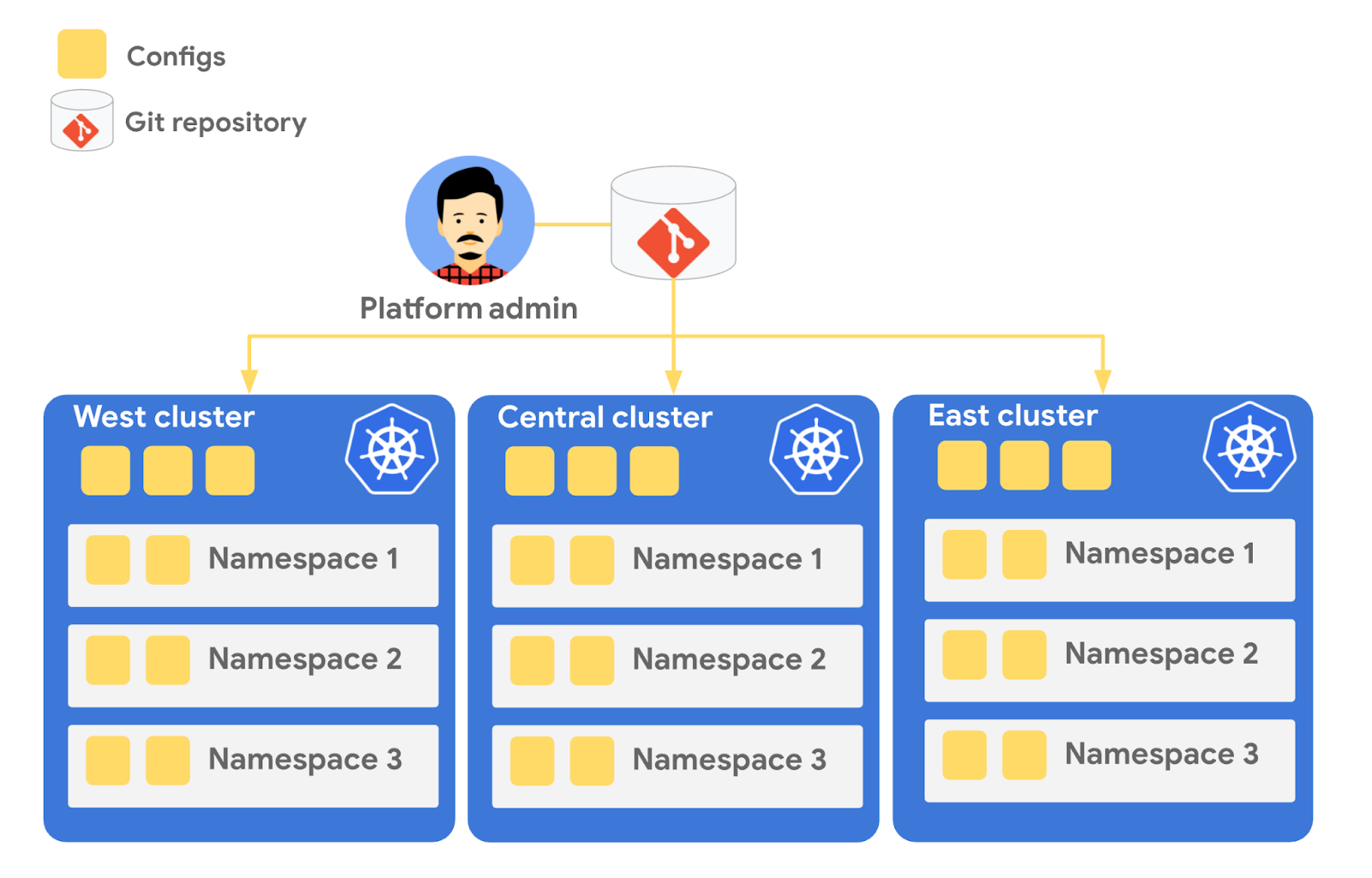
Config Sync runs in a Pod inside your Kubernetes cluster, watching your Git config repo for changes, and also watching the cluster itself for any divergence from your desired state in Git. If any configuration drift is detected from what’s stored in Git, Config Sync will update the API Server accordingly.
You can point multiple Config Sync deployments at the same Git repo, allowing you to manage the base-layer platform resources for multiple clusters using the same source of truth. And by using Git as the landing zone for config, you can benefit from some of the GitOps principles we discussed in part 2, including the ability to audit and roll back configuration changes.
Let’s walk through an example of how to manage base-layer resources with Config Sync.
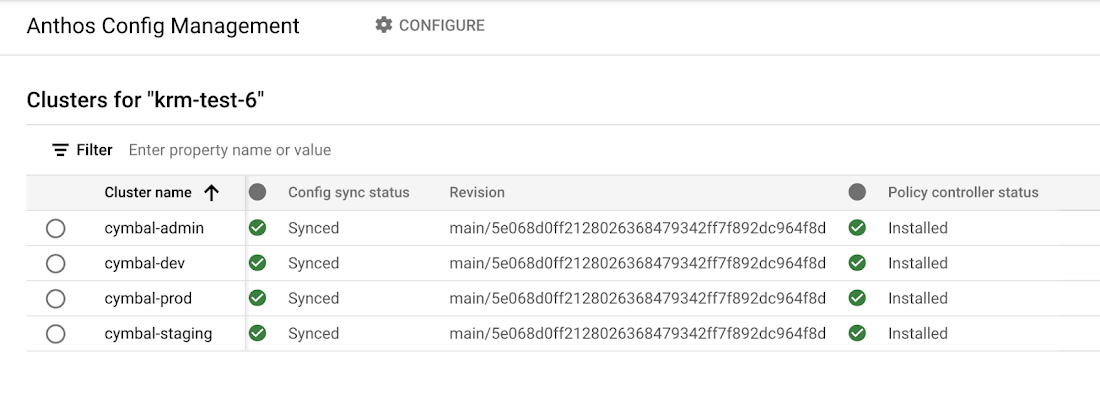
The Cymbal Bank platform consists of four GKE clusters: admin, dev, staging, and prod. We can install Config Sync on all four clusters using the gcloud tool or the Google Cloud Console, pointing all four clusters at a single Git repository, called cymbalbank-policy. Note that this repo is separate from the application source and config repos, and is managed by the platform team. From the Console, we can see that all four clusters are synced to the same commit of the cymbalbank-policy repo.
Now, let’s say that the Cymbal Bank platform team wants to limit the amount of CPU and memory resources each application team can request for their service. Kubernetes ResourceQuotas help impose these limits, and prevent unexpected Pod evictions.
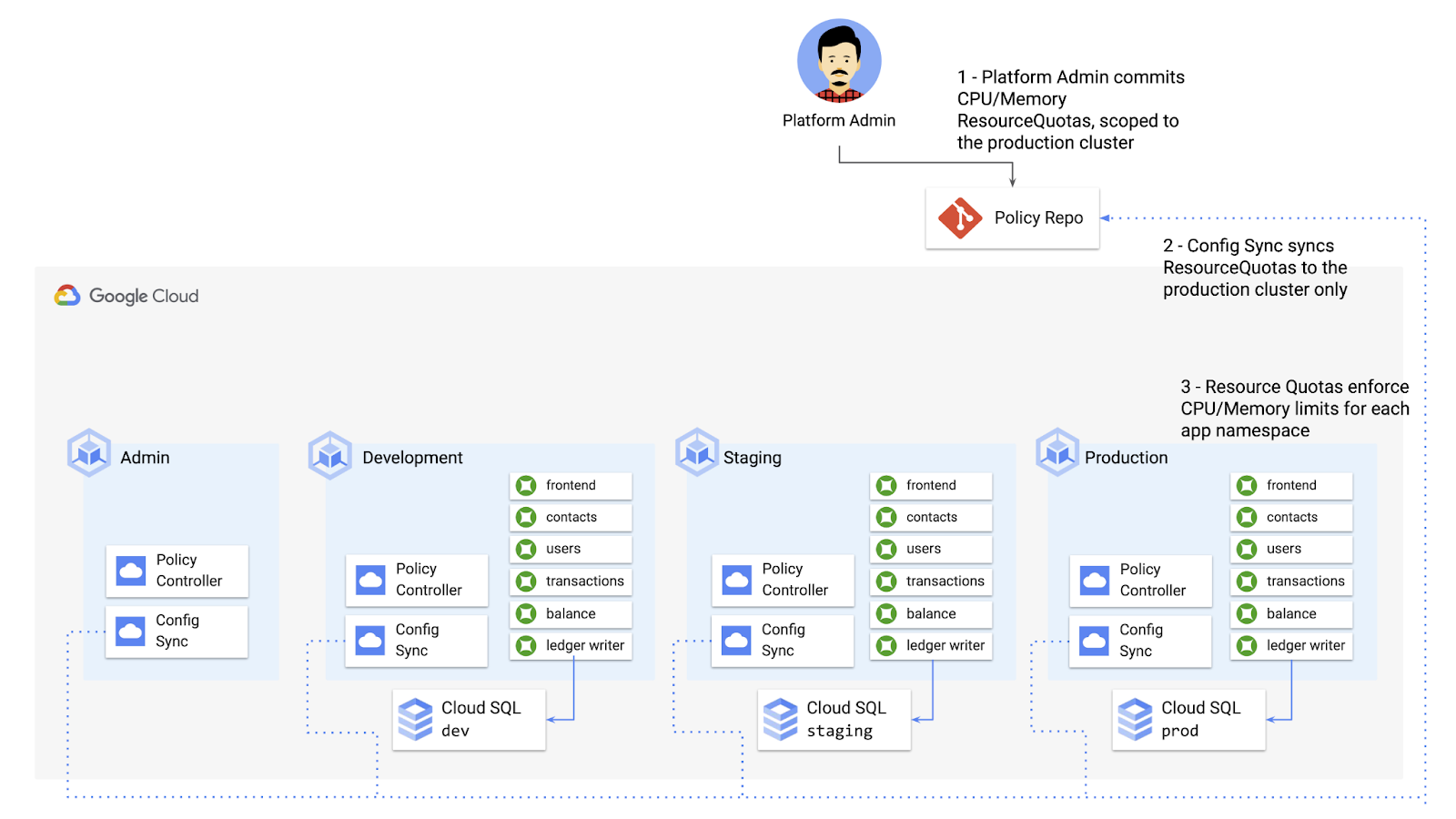
The platform team can define a set of ResourceQuotas for each application namespace. They can also scope the resources to only be applied to a subset of clusters – for instance, to the production cluster only. (If no cluster name selector is specified, Config Sync will deploy the resource to all clusters by default.)
apiVersion: v1kind: ResourceQuotametadata:name: production-quotanamespace: frontendannotations:configsync.gke.io/cluster-name-selector: cymbal-prodspec:hard:cpu: 700mmemory: 512Mi
From here, the platform team can commit the resources to the cymbalbank-policy repo, and Config Sync, always watching the policy repo, will deploy the resources to the production cluster:
NAMESPACE NAME AGE REQUEST LIMITbalancereader production-quota 6m56s cpu: 300m/700m, memory: 612Mi/512Mi
If a developer tries to delete one of the ResourceQuotas, Config Sync will block the request, helping to ensure that these base-layer resources stay put.
error: You must be logged in to the server (admission webhook "v1.admission-webhook.configsync.gke.io" denied the request: requester is not authorized to delete managed resources)
In this way, Config Sync can help platform teams ensure the stability of that platform base-layer, as well as ensure resource consistency across multiple clusters at once. This, in turn, can help organizations mitigate the complexity of adding new clusters to their environment.
Enforce policies on Kubernetes resources
Config Sync is a powerful tool on its own, and can work with any Kubernetes resource that your cluster recognizes. This includes Custom Resource Definitions (CRDs) installed with add-ons like Anthos Service Mesh.
But Config Sync, by default, doesn’t have an idea of “good or bad” Kubernetes resources. It will deploy whatever resources land in Git, even resources that might pose a security risk to your organization. Security is an essential feature of any developer platform, and when it comes to Kubernetes, it’s important to think about security from the initial software design stages, and set up your clusters with security best-practices in mind.
But it’s just as important to think about security at deploy-time. Who and what can access your clusters? What kinds of Kubernetes resources – and fields within those resources- are allowed? These decisions will depend on lots of factors, including the kinds of data your application deals with, and any industry-specific regulations.
One common security use case for KRM is the need to monitor incoming Kubernetes resources, whether they’re coming in through kubectl, CI/CD, or Config Sync. But if you have multiple clusters, your Kubernetes environment has multiple API Servers, and therefore multiple entry points.
A Google tool called Policy Controller can help automate resource monitoring across multiple clusters. Policy Controller is a Kubernetes admission controller that can accept or reject incoming resources based on custom policies you define. Policy Controller is based on the OpenPolicyAgent Gatekeeper project, and it allows you to define policies, or “Constraints,” as KRM. This means you can deploy them using Config Sync, via Git. Once deployed, Policy Controller uses your Constraints as a set of rules to evaluate all incoming KRM, rejecting resources that fall out of compliance.
Let’s walk through an example. Say that the Cymbal Bank security team wants to ensure that no code in development is accessible to the public. Kubernetes Services of type LoadBalancer expose public IP addresses by default, so the platform team wants to define a PolicyController constraint that blocks Services of that type on the development GKE cluster.
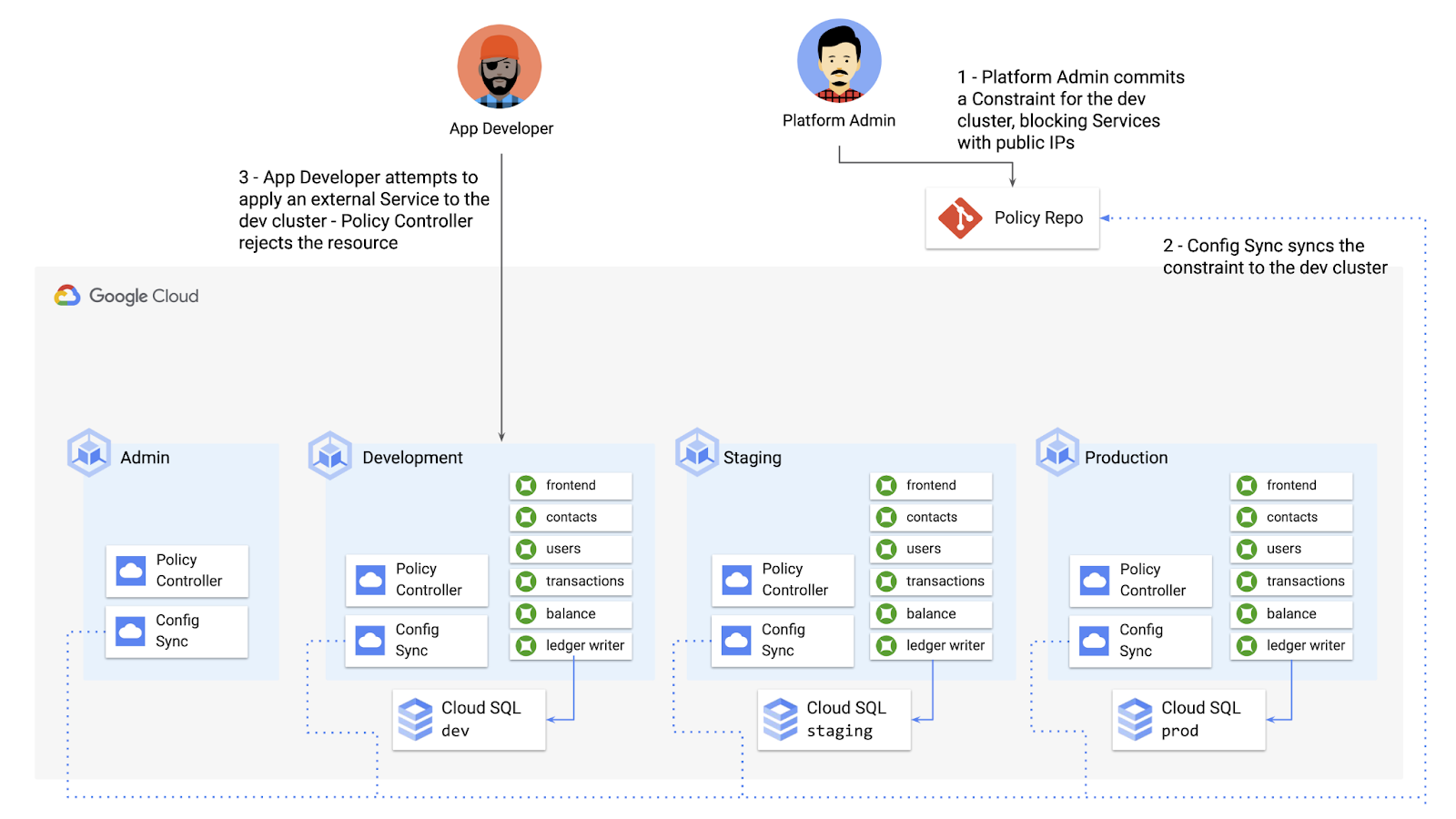
To do this, the platform team can define a Policy Controller Constraint as KRM. This Constraint uses a Constraint Template, provided through the pre-installed Constraint Template library. The ConstraintTemplate defines the logic of the policy itself, and the Constraint makes the template concrete, populating any variables needed to execute the policy logic. Here, we’re also adding a Config Sync cluster name annotation, to scope this resource to apply only to the development cluster.
apiVersion: constraints.gatekeeper.sh/v1beta1kind: K8sNoExternalServicesmetadata:name: dev-no-ext-servicesannotations:configsync.gke.io/cluster-name-selector: cymbal-devspec:internalCIDRs: []
The platform team can then commit the resource to the cymbalbank-policy repo, and Config Sync will deploy the resource to the development cluster.
From here, if an app developer tries to create an externally-accessible Kubernetes Service, Policy Controller will block the resource from being created.
for: "constraint-ext-services/contacts-svc-lb.yaml": admission webhook "validation.gatekeeper.sh" denied the request: [denied by dev-no-ext-services] Creating services of type `LoadBalancer` without Internal annotation is not allowed
The platform team can define as many of these Constraints as they want, each defining a separate policy.
Writing custom policies
The Policy Controller Constraint Template library provides a lot of functionality, from blocking privileged containers, to requiring certain resource labels, to preventing app teams from deploying into certain namespaces. But if you want to enforce custom logic on your organization’s KRM, you can do so by writing a custom Constraint Template.
Constraint Templates are written in a query language called Rego. Rego was designed for policy rule evaluation, and it can introspect Kubernetes resource fields to make a conclusion as to whether the resource is allowed or not.
For instance, let’s say that the platform team wants to limit the number of containers allowed inside a single application Pod. Too many containers per Pod can cause outage risks— when one container crashes, the entire Pod crashes.
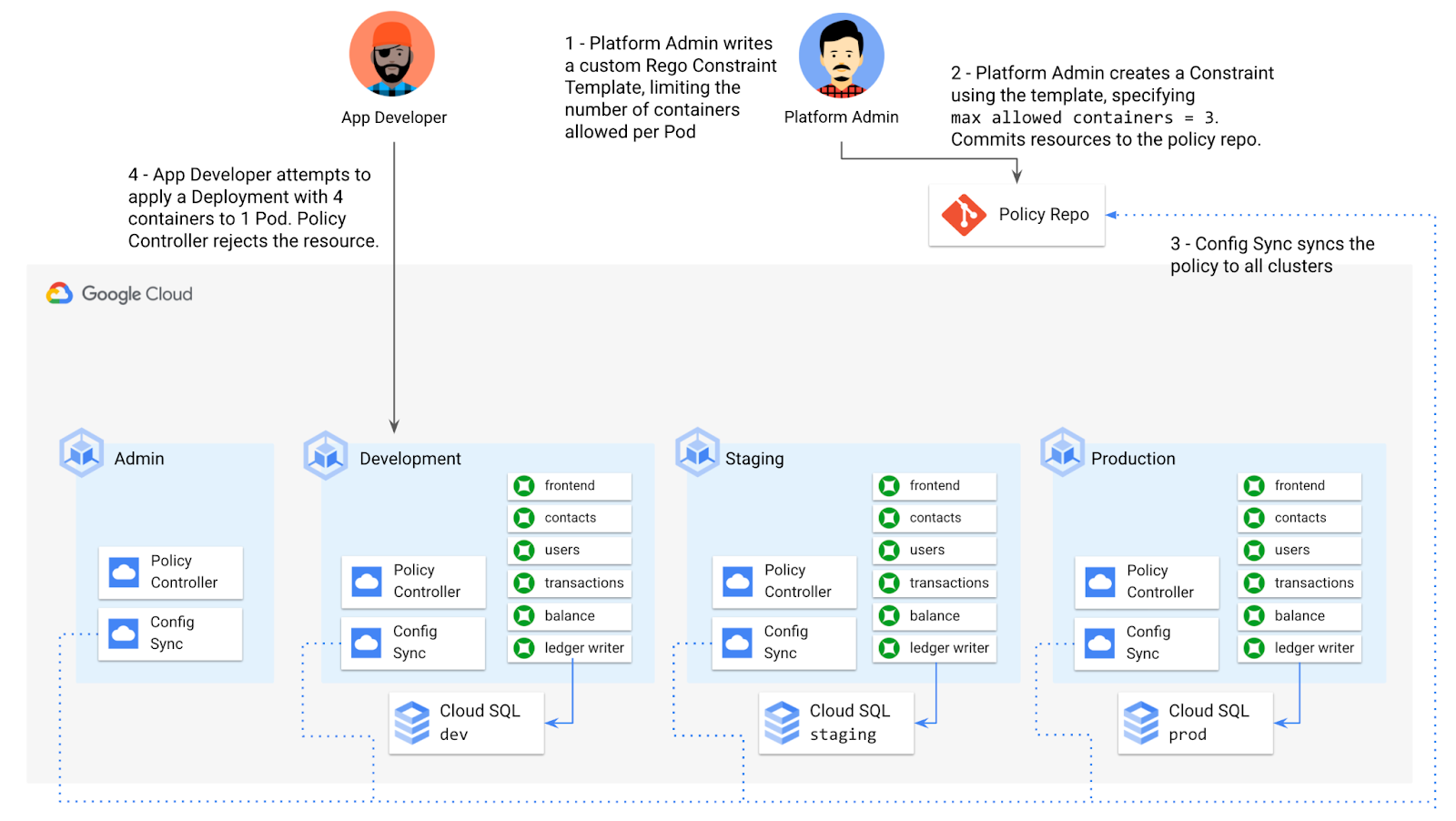
To enforce this policy, the platform team can define a Constraint Template, using the Rego language, that looks inside a resource to ensure that the number of containers per Pod is within the allowed limit:
apiVersion: templates.gatekeeper.sh/v1beta1kind: ConstraintTemplatemetadata:name: k8slimitcontainersperpodspec:crd:spec:names:kind: K8sLimitContainersPerPodvalidation:openAPIV3Schema:properties:allowedNumContainers:type: integertargets:- target: admission.k8s.gatekeeper.shrego: |package k8slimitcontainersperpodnumTemplateContainers := count(input.review.object.spec.template.spec.containers)numRunningContainers := count(input.review.object.spec.containers)containerLimit := input.parameters.allowedNumContainerstemplate_containers_over_limit = true {numTemplateContainers > containerLimit}running_containers_over_limit = true {numRunningContainers > containerLimit}violation[{"msg": msg}] {template_containers_over_limitmsg := sprintf("Number of containers in template (%v) exceeds the allowed limit (%v)", [numTemplateContainers, containerLimit])}violation[{"msg": msg}] {running_containers_over_limitmsg := sprintf("Number of running containers (%v) exceeds the allowed limit (%v)", [numRunningContainers, containerLimit])}Then, the platform team can define a concrete Constraint, using this Constraint Template, to set the number of allowed containers per Pod to 3:apiVersion: constraints.gatekeeper.sh/v1beta1kind: K8sLimitContainersPerPodmetadata:name: limit-three-containersspec:parameters:allowedNumContainers: 3
Finally, the platform team can push these resources to the cymbalbank-policy repo, and Config Sync will deploy the policy to all four clusters. If a developer tries to define a Kubernetes Deployment containing more containers per pod than what’s allowed, the resource will be blocked at deploy time:
Error from server ([limit-three-containers] Number of containers in template (4) exceeds the allowed limit (3)): error when creating "constraint-limit-containers/test-workload.yaml": admission webhook "validation.gatekeeper.sh" denied the request: [limit-three-containers] Number of containers in template (4) exceeds the allowed limit (3)
Custom Constraint Templates can give platform teams lots of flexibility in the types of policies they define and enforce in a Kubernetes environment.
Integrating policy checks into CI/CD
As we explored earlier, Config Sync and CI/CD are complementary tools. Config Sync works great for base-layer platform resources and policies, whereas CI/CD works well for application tests and deployment.
But one pitfall of having two separate KRM deployment mechanisms is that app developers may not know that their resources are out of policy until they try to deploy them into production. This is especially true if some policies are scoped only to production, as we saw with the ResourceQuota example. Ideally, the platform team has a way to empower developers and code reviewers to know ahead of time whether new or modified resources are still in compliance. We can enable this use case by integrating policy checks into the existing Cymbal Bank CI/CD.
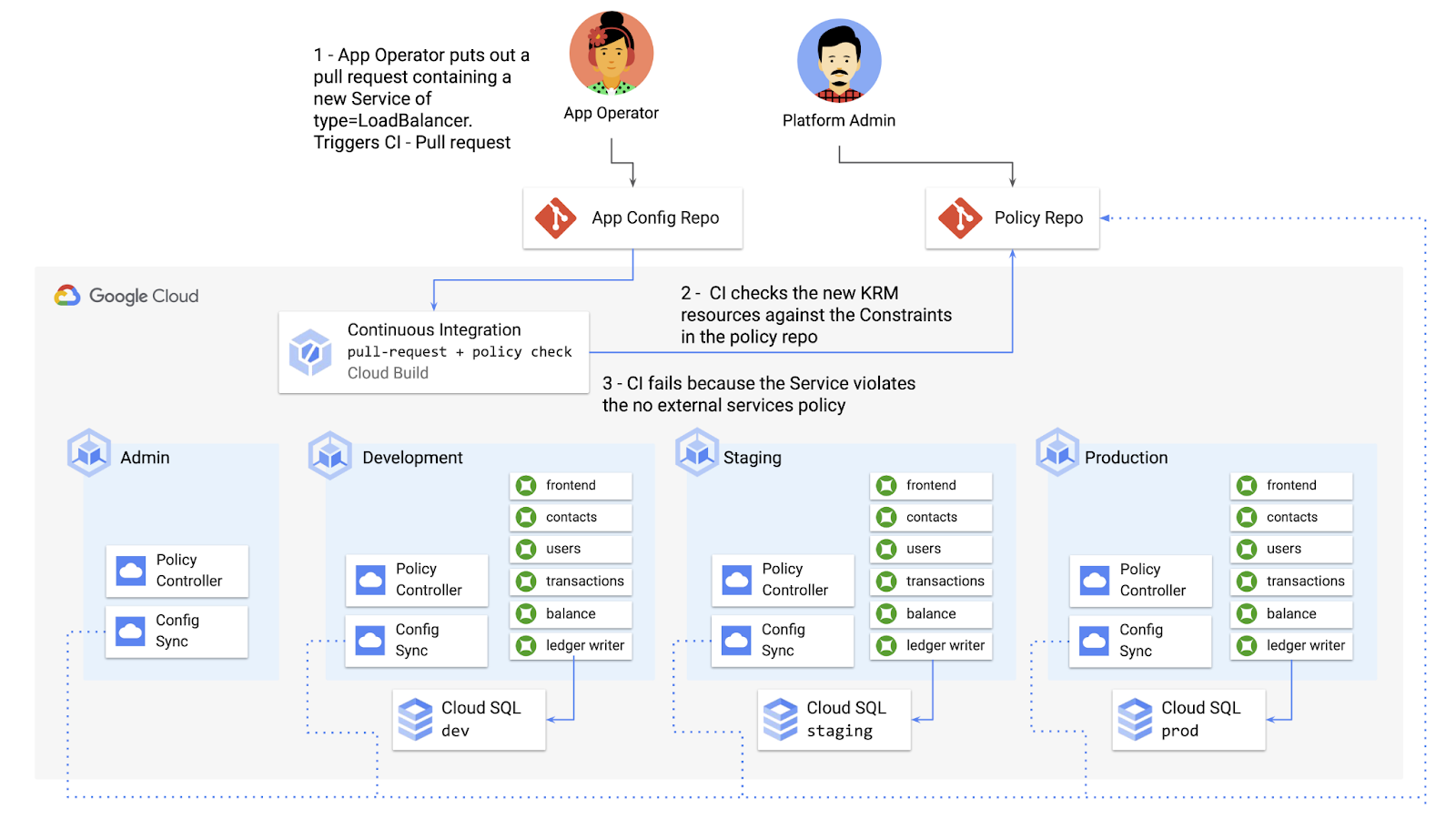
Policy Controller operates, by default, as a Kubernetes Admission Controller running inside the cluster. But Policy Controller also provides a “standalone” mode, running inside a container, that can be used outside of a cluster, such as from inside a Cloud Build pipeline.
In the example below, Cloud Build executes Policy Controller checks by getting the cymbalbank-app-config manifests, cloning the cymbalbank-policy resources, and using the “policy-controller-validate” container image to evaluate the app manifests against the policies.
steps:- id: 'Render prod manifests'name: 'gcr.io/google.com/cloudsdktool/cloud-sdk'entrypoint: '/bin/sh'args: ['-c', 'mkdir hydrated-manifests && kubectl kustomize overlays/prod > hydrated-manifests/prod.yaml']- id: 'Clone cymbalbank-policy repo'name: 'gcr.io/kpt-dev/kpt'entrypoint: '/bin/sh'args: ['-c', 'kpt pkg get https://github.com/$$GITHUB_USERNAME/cymbalbank-policy.git@main constraints&& kpt fn source constraints/ hydrated-manifests/ > hydrated-manifests/kpt-manifests.yaml']secretEnv: ['GITHUB_USERNAME']- id: 'Validate prod manifests against policies'name: 'gcr.io/config-management-release/policy-controller-validate'args: ['--input', 'hydrated-manifests/kpt-manifests.yaml']availableSecrets:secretManager:- versionName: projects/${PROJECT_ID}/secrets/github-username/versions/1env: 'GITHUB_USERNAME'timeout: '1200s' #timeout - 20 minutes
From here, an app developer or operator can know if their resources violate org-wide policies, by looking at the Cloud Build output for their Pull Request:
Status: Downloaded newer image for gcr.io/config-management-release/policy-controller-validate:latestError: Found 1 violations:[1] Number of containers in template (4) exceeds the allowed limit (3)
By integrating policy checks into CI/CD, app development teams can understand whether their resources are in compliance, and platform teams add an additional layer of policy checks to the platform.
Overall, Config Sync and Policy Controller can provide a powerful toolchain for standardizing base-layer config across a multi-cluster environment. Check out the Part 4 demo to try out each of these examples.
And stay tuned for Part 5, where we’ll learn how to use KRM to manage cloud-hosted resources.
How Kisan Network is Connecting Over 30,000 Farmers to Help them Reap Over 10% More Profits from Their Crops

5719
Of your peers have already read this article.
5:33 Minutes
The most insightful time you'll spend today!
For many people, an Ivy League education is a promise of a better future. But Aditya Agarwalla, who studied computer science at Princeton, didn’t want to limit that future to just himself. He wanted to share his good fortune and create a positive social impact in his home country of India.
When Agarwalla discovered that small farmers didn’t have ways to demand fair prices owed to them for their crops, he knew he’d found his mission. His Princeton thesis project was the basis for a solution: Kisan Network, an online marketplace that connects farmers directly to buyers for produce, eliminating middlemen and increasing farmers’ profits.
Taking a leave from Princeton, Agarwalla returned to Delhi and launched Kisan Network with his father in 2015. Agarwalla and his 70 employees—software developers as well as field employees who consult with farmers throughout India—use G Suite to record crop information from farmers, share ideas for improving Kisan Network’s Android app, and recruit new hires.
Bringing technology back to earth
“Switching to G Suite was seamless. Almost everyone is familiar with the functionality and design of it from their own personal Google accounts.” — Aditya Agarwalla, Founder, Kisan Network
Farmers in rural communities struggle to earn a living without access to information and technology. India’s independent farmers often engage in an outdated selling system involving middlemen who help set low prices that only benefit buyers. Agarwalla saw Kisan Network as a way to connect farmers directly to buyers, so that farmers could be paid fairly.
“We connect a farmer in a Northern Indian state to a buyer located in a Southern Indian state—a 1,500-mile spread,” says Agarwalla. Farmers benefit by doing business with a far broader range of produce buyers than they can reach on their own.
Talking to farmers and buyers across India demanded email and other business tools that could be accessed in a remote field, in Kisan Network’s offices just outside of Delhi, or while meeting job candidates in person. When Kisan Network started out with just four employees, Agarwalla used Microsoft Outlook for email.
“When you’re doing sales and marketing, it matters that you’re reaching out from an authorized company email address,” Agarwalla says. “It conveys a sense of professionalism and gives you validity.”
Adding email addresses with the kisannetwork.com wasn’t easy in Outlook, and once Agarwalla created the addresses, he’d still have to set up accounts and buy licenses for other productivity tools like Microsoft Word.
As Agarwalla started hiring more people, he realized that just about all of the candidates had Gmail addresses, which got him thinking about choosing G Suite for email and workplace collaboration. Since most people already knew their way around Gmail, Agarwalla wouldn’t have to teach them how to use the tools; plus, it was easier for him to manage.
“The ease of setup was important,” Agarwalla says. “Once you set up a new email address in Gmail—which only took a few minutes—that person instantly has access to everything you want them to use in G Suite. My employees needed only a single account for everything.”
Agarwalla liked the ease of creating Kisannetwork.com addresses with G Suite. Another deciding factor was that G Suite could easily integrate with other systems he and his employees used for software development and supply chain management. G Suite was also more affordable than Microsoft Office 365, finalizing Agarwalla’s decision to go with G Suite.
“Switching to G Suite was seamless,” says Agarwalla. “Almost everyone is familiar with the functionality and design of it from their own personal Google accounts.”
Filling the hiring pipeline
Agarwalla had big plans to reform the produce buying process—but he needed more people to make that vision a reality. Right out of the gate, G Suite helped streamline Kisan Network’s hiring process with secure, paper-free tools.
Every job candidate fills out a Google Form, which everyone in the hiring process can access online during interviews. Once candidates are hired, Kisan Network’s hiring team then creates email addresses for new employees through the G Suite admin console—a process that only takes a few minutes.
New hires can browse orientation materials that are shared in Docs and Sheets. The shared online documents help Kisan Network hire people quickly and get new workers up to speed on their roles.
Shrinking the distance between farms
“G Suite seamlessly flows into our everyday work, whether it’s sending emails, setting up meetings, or creating shared documents and presentations.” — Aditya Agarwalla, Founder, Kisan Network
Kisen employees travel all over India to meet with farmers, covering roughly 175,000 miles to date. “We have field presence in many rural regions,” says Agarwalla. “The employees are collecting information like land assessments when they meet farmers and explore new crops.”
Field supervisors log their deployment and destination details into Sheets for quick reference, and use Forms to record the data they collect, including photos of crops and their conditions. In rural India, home internet access is not as common as in cities, so the field supervisors access G Suite apps on their phones.
“They’re constantly working in very remote areas,” Agarwalla says. “Using G Suite on mobile devices is the only way they can do what they do.”
When field supervisors need to speak to colleagues in New Delhi about farmers and their crops, they use Hangouts Meet or Hangouts Chat. “Hangouts is a much better option than Skype for Business, as it works in a browser and can be set up directly from a Calendar event,” Agarwalla says.
Today, Kisan Network employees work across seven Indian states and more than 2,500 villages. The 30,000-plus farmers in the Kisan Network control their entire crop-selling processes through online marketing, earning at least 10 percent more profits than before.
“G Suite seamlessly flows into our everyday work,” says Agarwalla. “Whether it’s sending emails, setting up meetings, or creating shared documents and presentations, we heavily depend on G Suite for everything we do.”
More Relevant Stories for Your Company

Ease Your Migration and Modernization Journey with Microsoft and Windows on Google Cloud Demo Center
If you’re looking to migrate and modernize your Microsoft and Windows workloads, Google Cloud is your premiere destination. No matter what migration strategy you’ve selected or what value you’re looking to achieve, with Google Cloud you’re able to: simplify your migration and modernization journeyreduce your on-prem footprint and increase agilityoptimize license

An Expert’s Guide to Productivity and Well-being while Embracing WFH and Hybrid Style
Driving impact over output in a new era of work As Google’s productivity advisor, I spend a lot of time coaching executives on ways they can make the most of their work day. Over the years, people have come to me with very different ideas about what productivity is, why

Google Cloud’s Virtual Appointment Scheduling Tool (VAST) Helps State of Arizona Recover from Unemployment Situation
When the world was forced to go primarily online, state governments also faced the reality of needing to provide community services without the health risk of meeting in person. Old systems that relied on interpersonal contact could not keep up. An unprecedented number of displaced workers swamped every unemployment system.

New ways Google Workspace works with tools you already use
Looking back on 2020, it’s clear that the ways we work have rapidly transformed—from the rise of remote work and increasingly digitized processes, to balancing time across work and personal responsibilities. But one thing hasn’t changed—businesses still rely on a staggering number of applications to get work done. Working from
