





Google Products Helps HMH’s Healthcare Staff Work from Anywhere Efficiently and Securely!

10217
Of your peers have already read this article.
3:00 Minutes
The most insightful time you'll spend today!
Hackensack Meridian Health (HMH) executive Mark Eimer explains how an ambitiously-timed rollout of a comprehensive suite of Google products helped the entire organization—from doctors to IT staff—achieve better security, cultivate a more equitable work environment, and ultimately, improve patient outcomes.
How does a recently merged, 17-hospital healthcare system fast-track a platform migration and hardware rollout securely and in a way that improves work for everyone, regardless of location or role? These are the questions that kept me up at night in early 2020, when the pandemic demanded a “big bang”—something our legacy laptops and operating systems couldn’t handle.
We began our work with Google in 2020 with the adoption of Chrome as our default browser. As we migrated platforms, keeping patient data safe was of the utmost importance to us, along with providing every staff member with the tools they needed to work virtually. Our staff often experienced issues accessing our web-based applications using Internet Explorer or Edge Browser, a problem that went away when we switched to Chrome. Chrome’s versatile compatibility also made it easier for my team to migrate all of our web-based operations, and Chrome’s security and manageability were key components to making this switch a huge win for the organization.
The success of this migration led us to extend our Google partnership to patient care applications—where Google’s expertise in AI and ML helps scale the use of diagnostics tools and improve other aspects of the patient journey.

Achieving security at every step
Like so many other healthcare organizations, we’ve been concerned about ransomware attacks. This is part of why we moved to Google Workspace and distributed over 3,000 Chrome OS devices in kiosk mode in March of 2020, when many of us went remote due to the pandemic. We were very concerned about team members accessing corporate applications through home devices that were running EOL operating systems (WIN7), as well as a general lack of antivirus and encryption measures.
We were protected by the fact that Google’s software and hardware both had built-in security features that we needed to stave off sophisticated attackers. For example, Chrome OS automatically updates to the latest security update and encrypts data living outside the cloud on the hardware. These features protected us from security-related disruptions, letting us securely move a huge library of file shares and emails across thousands of accounts to Google Chrome OS in just four months.
A year later, in March 2021, we migrated the enterprise over to Google Workspace and saw an immediate reduction in spam by 30% from the inherent built-in AI/ML. This meant staff were less likely to receive (and click through) phishing attempts. My team could connect, create, and collaborate easily and securely—even as more of us were working from home and needed to access sensitive data remotely.
Leveling the playing field
As an organization, we were surprised by how many team members didn’t have personal computers at home. We quickly decided that if we needed team members to work from home, the health network would have to supply hardware. Chromebooks’ lower price tag compared to PCs—on top of their built-in security controls—allowed us to purchase, deploy, and support that initial distribution of 3,000 Chromebooks to team members in less than three weeks, providing devices to every eligible remote employee instead of just a select few. This was vital to reaching our equitable technology goal as part of our diversity and inclusion initiative: everybody has the same tools to do good work.
When all employees have what they need to do their jobs well, we get better patient outcomes. Before we began this cloud adoption journey, patient and staff experiences were different within the hospitals and outside of them.
Now it’s the same wherever our staff is, and we’ve seen efficiency and accessibility benefits extend to the patient side. For example, we built a web-based contact center that supports 80 locations that use Workspace and Chrome OS devices. Since customer service, admin, and providers are all on the same system, it has become a one-stop shop for patients.
Furthermore, through the Grow with Google program, we were able to provide another benefit to employees that drove our equity goals. Google trained 50 non-IT staff members—from environmental services, food and nutrition, and other non-tech areas who were interested in making a career change to IT—on the Google products we were using. They may not have thought about switching to a career in IT before the Grow with Google program came to our organization, but through this partnership, they now have that opportunity.
A strategic, long-term partner
With any large-scale rollout, the work doesn’t end once laptops are in employee hands. Google has shown their commitment to long-term collaboration as they continuously optimize their products for the unique needs of healthcare providers and go the extra mile in tailoring tools to our staff’s workflows.
For example, on the Chrome OS side, the Google team has helped our registration desks and document centers with device integration for hardware like credit card readers and e-signature pads. They’ve also helped us meet security and privacy requirements mandated by state and federal governments around HIPAA, Medicaid, and Medicare reimbursements. Over this next year, we’ll look at a feature roadmap with Google Cloud to deliver further enhancements, iterating on the product itself to meet our needs for the present and the future.

Delivering the future of healthcare
The benefits we’ve seen around security and usability—and the ability to provide all staff with equal access to Google’s technology—are why we’re expanding our partnership with Google to both the administrative and clinical sides of HMH. In addition to further Google rollouts with corporate, next year we’re distributing Chromebooks to all 350 of our ambulatory clinics.
We’re also working with the Google professional services team to create a custom AI model that analyzes 3D mammogram images. This AI model will enable two providers to read mammograms—which adheres to international best practices but is currently rare in the US—without requiring additional time. Conducting double readings of mammograms will yield better health outcomes for our patients, such as a lower patient recall rate and an increased accuracy in detecting breast cancer.
We’re currently building the model using a variety of Google Cloud products, including Cloud Healthcare API. Once complete, this model is expected to be trained, deployed, and maintained in Google’s Vertex AI, allowing our providers to be more productive as they make clinical decisions with AI support. As the model is proven over time, we plan to make the predictive services accessible to other healthcare organizations.
With Google, we’re able to achieve a unified architecture for storing data as well as training and deploying AI models, which enable our staff to work more efficiently and securely from anywhere. While I may not be able to predict the future as accurately as AI can, I foresee our continued partnership with Google as a key part of HMH’s improved provider and patient outcomes.
Building the future of work with Google Workspace

4398
Of your peers have already read this article.
7:30 Minutes
The most insightful time you'll spend today!
Since we launched Google Workspace last October, we’ve heard from many of our customers—from global enterprises to small businesses—about the new ways they’re connecting, creating, and collaborating, often across living rooms, time zones, and continents. This response propels us on our mission to build for the future with a solution that’s flexible, helpful, and inspires innovation. We’re proud to support the millions of customers and billions of end-users who trust Google Workspace to bring their own future visions to life.
Today, we’re excited to announce new innovations in Google Workspace that will further empower all the ways work happens—and deepen its impact—in an ever-changing world. These updates include a frontline worker solution, a set of features to help people find more time and focus, and powerful tools for strengthening collaboration.
Learning from our own transformation
At Google, like many of the organizations we support, we’ve been in a state of change, experimentation, and transformation this past year, as we reimagine what work will look like in the post-pandemic future. According to a Gartner survey, 90% of respondents plan to allow employees to work remotely at least part of the time even after the COVID-19 vaccine is widely adopted. This hybrid blend of at-home and in-office work will become the norm for many businesses.
As a company, we’ve been focused on how we can make this new hybrid work model support collaboration and innovation, and enhance inclusion and wellbeing for Google employees. We’re especially interested in what we call collaboration equity, or the ability to contribute equally, regardless of location, role, experience level, language, and device preference. We’ve been experimenting with ways to bridge the gap between the in-person and the “somewhere else” by pushing our technology and the physical spaces of our campuses to be more inclusive. We’re looking for ways to maximize participation everywhere we can—from personal desk space to conference rooms to group collaboration areas.
Google Workspace is at the nexus of Google’s own transformation. After all, Google Workspace was built in the cloud to power flexible, real-time, anywhere creation and equitable collaboration. Whether it’s with our Google Meet Series One hardware kits that enable safe, touch-free meetings and use Google AI to create immersive and inclusive experiences for all. Or the ways we help people focus their time and attention with intelligent, proactive suggestions that thoughtfully connect distributed content, people, and conversations. Or the features that promote inclusion, like live captions in multiple languages, so that everyone can participate effectively in video meetings.
It’s all part of Google Workspace’s mission to enable a hybrid work experience that enhances collaboration, strengthens human connection, and increases wellbeing for people—wherever they are and however they work.
And we’re inspired to hear how Google Workspace has been at the center of our customers’ evolving work plans, helping to forge human connection during a time of change for businesses like Sony Pictures Imageworks and Airbus.
“As we look to the next chapter in the future of work, Google Workspace will continue to keep us connected, wherever we are. Google Meet helps us build trust and relationships, not only within the studio, but with a worldwide network of talent. And Chat is our go-to for sharing ideas and feedback during production meetings in real-time. Google Workspace is how we work together to create together!”
– Mike Ford, VP, Software Development and Systems Engineering at Sony Pictures Imageworks
“Airbus has spent the past year thinking about what it actually means to return to work and we’re looking to support greater flexibility with Google Workspace in a leading role. In 2020, we held 5.6M Google Meet sessions and we now have more than 70,000 shared Drives where people collaborate. Google Workspace has changed the way people work at Airbus and that will continue as the solution empowers the hybrid work reality.”
– Andrew Plunkett, Airbus Vice President Digital Workplace
New ways to help businesses make an impact in changing times
Today, we’re announcing new tools and features to help people make the most of their time, collaborate equally, and deliver more impact. We’re also announcing new security tools with Assured Controls and expanded Data Regions coverage. Assured Controls will allow customers to make decisions about how to control provider access, while expanded Data Regions coverage helps customers choose where their data is geographically located at rest.
Enabling collaboration equity on the frontlines
From nurses to grocery store associates to warehouse employees, essential frontline workers have played a crucial and often heroic role during the pandemic. Despite their importance, those on the frontlines seldom have access to the same collaboration and communication tools that keep knowledge workers informed and connected. As a result, frontline workers often resort to their own personal devices and apps to get the information they need, when they need it.
In the coming weeks, we’ll be launching Google Workspace Frontline with these challenges in mind. This will open up communication and collaboration channels between frontline workers and corporate teams in a way that’s safe and secure. Workspace Frontline is a custom solution that includes communication and collaboration apps like Gmail, Chat, Docs, Drive, and more, as well as business-grade support and security features like advanced endpoint management that help keep a company’s data secure.
We’ve also made it easier for business teams to build custom AppSheet apps directly from Google Sheets and Drive, so that frontline workers can digitize and streamline their work, whether it’s collecting data in the field, reporting safety risks, or managing customer requests. By closing the gap between the frontline and the corporate team, we’re giving frontline workers secure access, on any device, to the information they need to be at their best.
Managing time and attention
To help people save valuable time, we’re excited to share that using Google Workspace with Google Assistant is now generally available. You can ask Google what’s next on your work calendar, to quickly join meetings, or to send a message. Google Assistant is currently available for Google Workspace on supported mobile devices and is in beta for smart speakers and Smart Displays, like Nest Hub Max. Google Workspace customers can learn how to enable this feature for their users here.
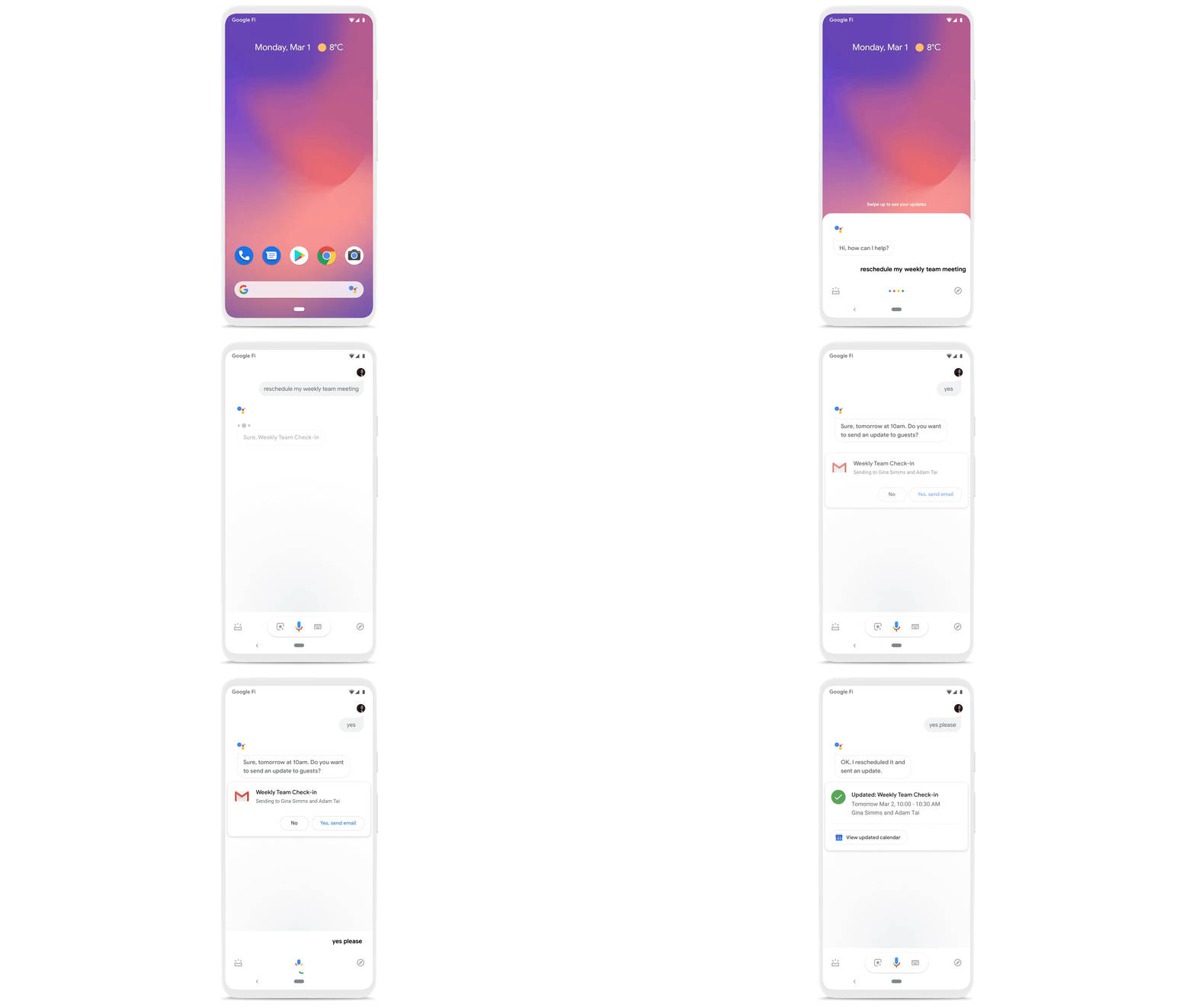
Elsewhere on the time management front, a key trend we’re seeing in today’s workforce is the juggling of professional and personal responsibilities, with many employees now working in “sprints,” like two- to four-hour blocks of time instead of the traditional workday. As more businesses embrace a flexible, hybrid model, we expect this trend to continue, and we’ll all need tools to help us achieve better work-life balance and make the best use of our time.
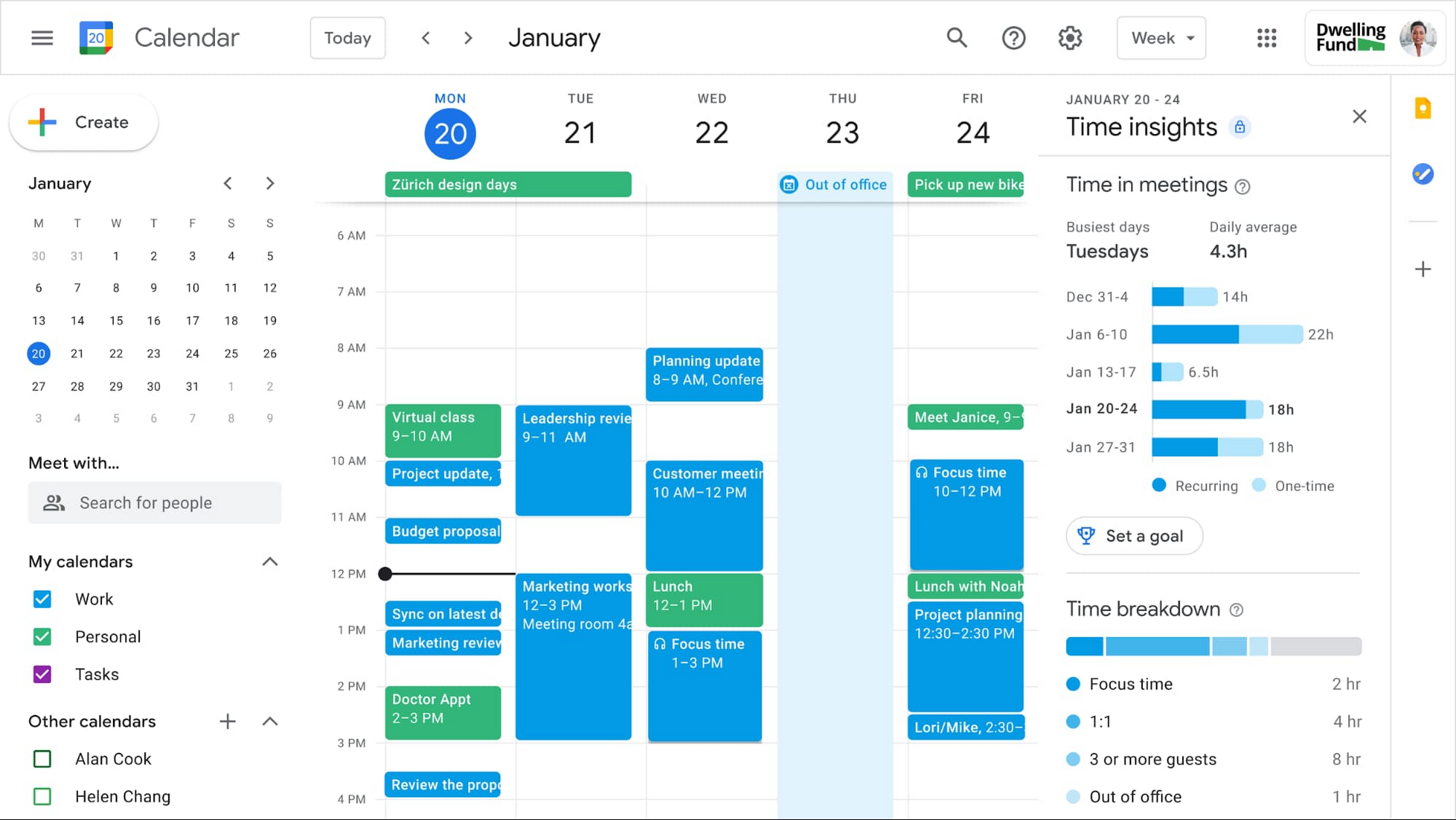
In the coming weeks, we’re releasing an integrated set of features in Google Workspace that help people easily share their work hours and location, while also finding more time to focus on what matters most. Features like segmentable working hours, recurring out-of-office entries, and location indicators let employees share their availability and location with their colleagues. Meanwhile, a new event type—Focus Time—lets people minimize distractions by limiting notifications during these event windows. All these availability and location indicators will show up seamlessly across Google Workspace, as teams engage with Calendar, Meet, Chat, and Gmail. We’ll also be delivering Time Insights to Google Workspace users (visible to the employee only, not their manager), so that employees can assess how they’re spending their time against their own priorities.
Strengthening collaboration equity for all
Ever since we pioneered real-time document editing fifteen years ago, collaboration has been a cornerstone for Google Workspace. In the coming months, we’ll make collaboration more equitable and accessible in a number of ways. First, we’re creating second-screen experiences in Google Meet for those using a mix of devices to host their meetings, like Google Meet hardware for those in conference rooms and Nest Hub Max for those at home. With new second-screen capabilities, people can present and fully participate in the Google Meet experience, including with chat, polls, and Q&As, from any device, no matter where they are.
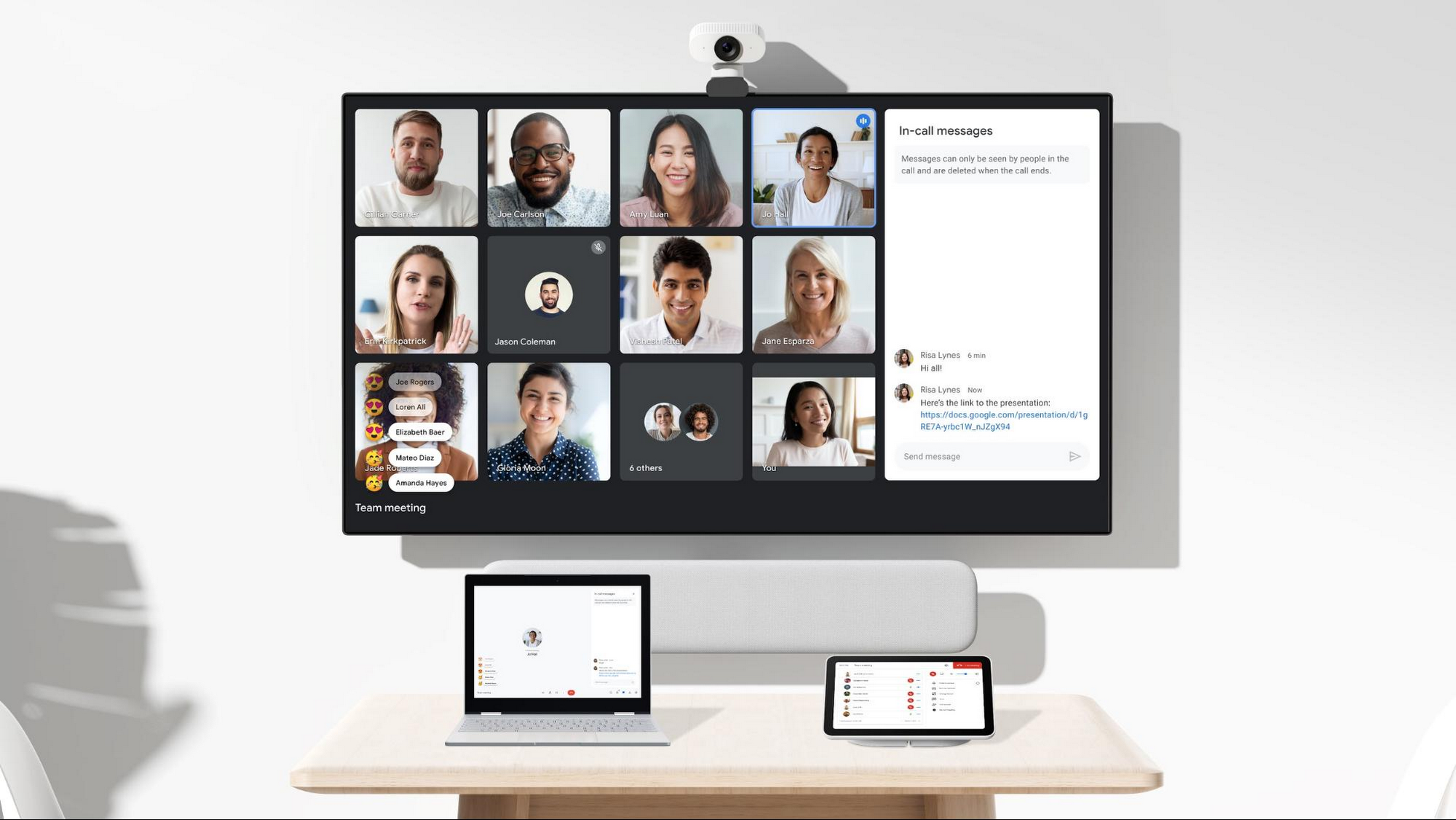
And specifically for those joining meetings from their mobile devices, we’re making it easier to have a bigger impact on a smaller screen. We’re rolling out mobile tile view so you can see more people at once, while split-screen and picture-in-picture support on Meet mobile will help you seamlessly chat or browse your Gmail without missing the visual thread of a meeting. Mobile support for background replace, Q&A, and polls will also help you stay productive and connected on the go.
Live streams will also become more powerful and inclusive in Google Workspace with the addition of Q&A, polls, and live captions (in English, Spanish, German, Portuguese, and French). And because we recognize how organizations are connecting across different groups of people, we’re also enabling live streaming across multiple Google Workspace domains within the same organization.
Finally, to give teams even more ways to connect and collaborate, we’re adding Chat, Jamboard, and Calendar to Google Workspace Essentials.
Building the future of work—together
If there’s a mantra that captures the last year of work, it might be “flexibility in the face of change.” It’s how our customers and our own employees have bridged the physical distances to continue making an impact in a rapidly changing world. As work continues to evolve for all of us, Google Workspace is committed to providing a solution that’s flexible, helpful, and that fuels innovation. We’re also committed to enabling collaboration equity wherever and however we can. At its core, this has been our mission for more than a decade and we’re excited to partner with our customers and users to continue bringing it to life.
16 Popular Chrome Insider Posts to Help You Simplify Browser Deployments

4435
Of your peers have already read this article.
1:00 Minutes
The most insightful time you'll spend today!
We launched the Chrome Insider blog in 2019 to share tips and best practices with IT admins so they could better deploy, manage, and secure Chrome browser. Since then, the series has covered everything from supporting legacy browsers to protecting enterprise credentials to simplifying deployments. To make it even easier to find and browse the series, we’ve pulled together all the posts to date here so you can read them all in one place or bookmark them for later.
Managing Chrome tips and tricks
- Understanding Policy Precedence for Chrome browser
- Protecting enterprise credentials with Password Alert
- Managing Chrome browser in a controlled environment
- Simplifying Chrome deployments on macOS
- Configuring Chrome browser in your VDI environment
- Know your options for Modern Enterprise Browser Management
- Managing policies and extensions across operating systems in Chrome Browser
Improving extension management and reporting
- Improving Chrome browser extension management through permissions
- Publishing custom extensions for the enterprise
- Enhanced extension reporting with Chrome Browser’s Takeout API
Ensuring your organization is secure
- Managing BeyondCorp Enterprise’s threat and data protection capabilities in Chrome
- A primer on enterprise private browsing modes
Increasing your organization’s productivity
- Ready, set, Chrome—Improvements and polices to make Chrome more performant
- Troubleshooting with Chrome Browser
- Preparing your enterprise for Flash deprecation
- Apps from the past? Fear not with legacy browser support in Chrome Enterprise
Although the series is 16 posts strong, there are plenty more Chrome Insider posts to come. You can read these posts and more on our Chrome Enterprise channel.
3765
Of your peers have already watched this video.
11:30 Minutes
The most insightful time you'll spend today!
Sneak peek: What’s to come in Chrome Browser for the enterprise
The Chrome Browser Cloud Management accomplishes three goals. First, it is a single destination for applying Chrome Browser policies across Windows, Mac, and Linux from one pane of glass.
Second, admins can gain easy insight into their deployment, including getting a list of extensions installed in their fleet. And third, for admins that have large organizations, it offers an easy way to delegate management to specific organizational units. We’ve also added a memory limit policy, an M79, which is super useful for admins that manage a lot of virtual machines.
This policy allows admins to limit the amount of memory that Chrome can use before tabs start being discarded. If you have large VMware or Citrix environments, we highly recommend trying out this policy.
Admins will now have more granular controls over update behavior. In addition to the version controls that already exist today, Chrome now has a policy to configure Chrome variations. Watch this video to find out what more you can do with the Chrome Browser Cloud Management solution.
How Randstad Creates Assessment Reports in Five Minutes with G Suite

4337
Of your peers have already read this article.
7:34 Minutes
The most insightful time you'll spend today!
For over five decades, Randstad has matched businesses worldwide with millions of temporary and permanent workers, creating long-lasting, successful working relationships. Today, the company operates a vast multinational recruitment network, with 35,000 employees applying HR expertise in markets from Norway to Malaysia, and more than 37 countries in-between.
To give staff a more mobile, low-maintenance alternative to their previous communications solution, Randstad offered G Suite to its staff in 2012, giving them the option to switch. All of Randstad’s workforce made that choice, assisted by a Randstad “Transformation Kit” containing everything a team needs for a successful migration. Now Randstad’s global community of G Suite users are looking to unleash the full potential of the platform, moving beyond Gmail and Calendar to engineer major efficiencies across the organization.
“Technology gives us more time to be in contact with people,” says Senne Beckers, Senior Accounts Specialist at Randstad. “It means we can give more attention to the people we outsource, our colleagues, and our customers. Our administrative ability is what makes Randstad successful, and G Suite makes all our processes more efficient.”
Sharing tips worldwide to make the most of G Suite tools
“In Sheets, I can create a pivot table and then I can drop Sheets visualizations directly into Slides for presentations. In the past, we would need visual designers to do that, but now I can do it in a matter of minutes.”
– Frank van der Bijl, Business Analyst IT, Randstad
Using Google+, Randstad workers share their ideas for applying G Suite to their work. “We share tips and tricks with each other from all over the world,” says Frank van der Bijl, Business Analyst IT at Randstad. “There’s always someone you can learn from or educate, and that’s an innovation in and of itself. In the past, when we wanted to share information like this, we would contact the internal communications team for them to put something on the company intranet. Now we go straight to Google+ and post it directly.” Randstad calls this project “Google to the Max”, and the boost in collaboration and efficiency helps its staff around the globe be more productive.
Those tips range from saving time by using Calendar to book meeting rooms and check colleague availability, to minimizing unnecessary travel by replacing meetings with Google Hangouts Meet. As an HR company, Randstad handles, optimizes, and edits thousands of résumés every day. By using Google Forms to collect data for résumés and Google Docs to edit them, Randstad teams streamline that core process. “Rather than send résumés back and forth with corrections and suggestions, we work on them all together, directly in Docs,” says Frank. “It’s a collaboration, like how we centralize information in Google Sheets to give everyone on a team a single, up-to-the-minute overview on customers and candidates, maximizing the chances of a successful match.”
Many of the innovations tackle processes that used to create bottlenecks by requiring specialist knowledge. “In Sheets, I can create a pivot table,” says Frank, “then I can drop Sheets visualizations directly into Google Slides for presentations. In the past, we would need visual designers to do that, but now I can do it in a matter of minutes.”
Streamlining annual assessments with Forms and Sheets
“We have more than 1,000 people working for a global airline through Randstad, and because G Suite is so open, the airline, like other clients, uses Google tools to send us information.”
– Senne Beckers, Senior Accounts Specialist, Randstad
In addition to improving internal processes, the innovations directly benefit Randstad clients, as Senne explains: “We have more than 1,000 people working for a global airline through Randstad, and because G Suite is so open, the airline, like other clients, uses Google tools to send us information, even though they work with a different communication platform.”
That flexibility allows Senne and her team to apply G Suite technology to problems outside of Randstad. “We used to have a very old-fashioned way of collecting annual assessments on each of the people we have with the airline,” says Senne. “We would email a document to an airline shift leader, who had to go to his or her computer to receive it, print it, fill out the document, scan it, save it, and then email it back. At one point, the workload was so high that we had to stop taking feedback altogether.”
To simplify the process, Senne implemented Forms, as a fast, mobile way for shift leaders to send their assessments. “With Forms, shift leaders can be inside a plane or out on the runway, and when they want to comment on an employee they can give us instant feedback that goes directly into our system,” explains Senne. Back at the Randstad office, HR then pulls all the data they need directly from Sheets, without having to reference the CRM, chase clients, or search emails.
As a result, it now takes five minutes to create an annual assessment, instead of one hour. Because there are 1,000 employees, a task that took 1,000 hours a year, or 140 working days, can be finished in two and a half weeks.
“Because Sheets translates information directly into graphs as it arrives, we can track the situation at a glance,” says Senne. “Streamlining the creation of annual assessments with Forms doesn’t just make the process more efficient, it also means we can spend more time properly discussing feedback with employees. That’s good for them and great for the airline’s management, which now wants to roll out this approach to more business units.”
Bringing teams together with Google Keep
“Everyone has their own approach, and we’re all sharing our experiences through Google+ and helping colleagues. Every day we find a new feature, which helps us be more efficient, and all we need to implement it is an internet connection.”
– Frank van der Bijl, Business Analyst IT, Randstad
As HR specialists, Randstad employees know that solving individual work issues is only part of the story. For teams to work effectively, solutions need to be brought together in a single place, where they can feed into each other. To make that happen, staff across Randstad use Google Keep to communicate.
“Keep really helps me to structure workflows and share my ideas directly with my team,” says Senne. “I have a lot of ideas all of the time, and Keep means I can make them known to the people I work with, at the same moment as I jot them down during a meeting. It brings Docs, Forms, and Sheets together in one place where we can arrange things intuitively and set priorities. With our to-do lists visible on that central hub, we can all check in on each other and track progress in a transparent way.”
For Senne, that functionality couples neatly with Google Cloud Search. “As a senior account specialist, it’s my responsibility to know what is happening in our teams, and Google Cloud Search helps me keep all of the information at my fingertips, ready for me to share. It’s the home screen on my Chrome browser.”
Recognizing that this agile, fast-paced way of working may be unfamiliar to new employees, Frank uses Google Keep to introduce people to the G Suite tools. “When people are new to a company, they’re sometimes nervous about asking for advice, such as how to ask for a day off,” says Frank. “To help them, I’ve created a four-step checklist of ‘Things you should do when you join Randstad’, which directs them to the information they need to on-board. With Keep I can see where they are in the process and follow up with them if I think they might need help.”
Embracing the interconnected environment
In each of the 39 countries where Randstad is active, operations are moving at their own pace towards greater G Suite integration. And though each is at a different stage in the process, the direction of travel is clear.
“Across the company, the next step will be Chromebooks, so that we fully embrace the interconnected app environment,” says Frank. “Some countries have already fully switched to Chromebooks, and some are migrating all of their data to the cloud. Everyone has their own approach, and we’re all sharing our experiences through Google+ and helping colleagues. Every day we find a new feature, which helps us be more efficient, and all we need to implement it is an internet connection.”
A Road to Possibilities: Google Maps Platform Website

7257
Of your peers have already read this article.
2:00 Minutes
The most insightful time you'll spend today!
For more than 15 years, developers have used Google Maps Platform to deliver location-based experiences to their end users and used location intelligence to optimize their businesses. Along this journey, we’ve made a variety of changes to better support our community as needs have changed and new industries and technologies have emerged. We started rolling out a new website experience, at https://mapsplatform.google.com, to help you better understand the products and solutions best suited to address your objectives. Plus, now you can directly connect to the developer documentation for each product to get started quickly, and you can visualize usage and associated costs to have a better idea of what to expect before getting started.
Getting to your solution faster
Maps, Routes, Places are building blocks that let you develop implementations for any use case. Building for specific use cases, however, typically requires using a combination of APIs and SDKs. To help you quickly understand what’s possible and what you need to build for your use case, you can now visit the solutions tab to select from a list of popular use cases or industries. Once you’ve selected a use case or industry, you’re taken to a page where you can explore relevant products, read helpful blog posts, see how other customers have deployed for similar use cases, and more.

Direct access to developer documentation
Did you know there are more than a thousand pages of developer documentation created to help you get started, unblock you when you’re stuck, and share best practices? Now when you explore a product or solution from the Google Maps Platform website, you can easily navigate back and forth between our website and documentation. Just tap on JS, iOS, Android or API under the product name to get to the documentation you need.

Budgeting for your project
To help you calculate pricing for your project, we’ve introduced a new pricing calculator. Once you find the product and API or SDK you plan to use, pull the slider to reflect your estimated number of monthly requests. This will automatically update the “monthly cost” column for each product and API or SDK you plan to use. If your estimated monthly requests exceed the slider limit, contact our sales team to learn about volume discounts that start at 20% off.

We hope our new website makes it easier to discover our products and solutions, estimate your budget, and start building with our documentation so you can deliver helpful experiences to your users and optimize your business.
For more information on Google Maps Platform, visit https://mapsplatform.google.com.
More Relevant Stories for Your Company

Enterprises can Push the Limits of Edge Even Further!
Whether with the cloud or within their own data centers, enterprises have undergone a period of remarkable consolidation and centralization of their compute resources. But with the rise of ever more powerful mobile devices, and increasingly capable cellular networks, application architects are starting to think beyond the confines of the


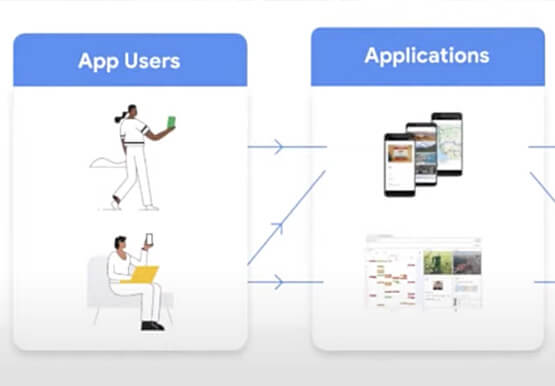

AppSheet: Reduce Shadow IT and Accelerate Development of Enterprise-grade Apps
Google Cloud findings suggest that nearly 40 percent of organizations' investments are consumed by shadow IT and can be a detractor to the adoption of cutting-edge tools and solutions. Also, about 51 percent of the surveyed executives are of the opinion that the inability to adapt to digital transformation trends

Google Maps Platform Helps BungkusIT Fulfil its Promise of Deliveries in One Hour!
Editor’s note: Today's post is written by Hatim M, Chief Commercial Officer at BungkusIT. The on-demand delivery service delivers packages within the hour for one million customers across Malaysia and uses Google Maps Platform to create a seamless end-to-end delivery experience for its customers. Imagine it's the end of a

Collaboration Helps Healthcare Firm Roche Group Focus on Saving Lives
Dr. Alan Hippe, CFO & CIO, Roche Group, shares how collaboration tools help healthcare firms like the Roche Group take timely decisions that help them focus on saving patients’ lives. For over 110 years, Roche has been pioneering the discovery, development, production and marketing of novel healthcare solutions. Our focus
