





Google Cloud to Implement European Commission’s New Privacy Clauses to Safeguard Cross-border Data Transfer
2962
Of your peers have already read this article.
1:30 Minutes
The most insightful time you'll spend today!
The European Commission (EC) has recently published new Standard Contractual Clauses (SCCs, also known as Model Contractual Clauses) to help safeguard European personal data. Following the applicable transition period, these new SCCs will replace the SCCs previously adopted by the EC. Google Cloud plans to incorporate the new SCCs into our contracts to help protect our customers’ data and meet the requirements of European privacy legislation.
Like the previous SCCs, these clauses can be used to facilitate lawful transfers of data under certain conditions. By imposing various contractual obligations, SCCs allow personal data subject to the EU’s General Data Protection Regulation (GDPR) to flow to recipients outside the European Economic Area (EEA). The GDPR is an important piece of EU privacy legislation that became applicable in 2018. It requires appropriate safeguards for EEA personal data moving from the EEA to any non-EEA countries that do not meet the EU ‘adequacy’ standard for privacy protection.
Google Cloud’s industry-leading controls, contractual commitments, and accountability tools have helped organizations across Europe meet stringent data protection regulatory requirements for years. We have provided customers with SCCs since 2012. In 2017, EU Data Protection Authorities confirmed that Google Cloud’s contractual commitments met the legal requirements for transfers of data from the EU to the rest of the world under EU Data Protection Directive 95/46/EC. Google Cloud remains committed to protecting the privacy of our customers and their users, and to helping thems address EU regulatory obligations.
To learn more about how Google Cloud can help organizations with their compliance efforts, visit our Cloud Compliance resource center.

1102
Of your peers have already downloaded this article
4:30 Minutes
The most insightful time you'll spend today!
There is no one-size-fits-all solution to cloud migration. Every approach has unique considerations, so you need to understand the trade-offs of each to execute an effective migration plan.
We’ve outlined the key things to consider when crafting your migration journey, including:
- The benefits of having your applications in the cloud.
- Finding the right migration option for your business needs.
- Getting started with your migration.
Three Typical Connectivity Use Cases to Pick the Right Option for Your Enterprise

3306
Of your peers have already read this article.
3:00 Minutes
The most insightful time you'll spend today!
Enterprises today have a very broad mix of networks — from SD-WANs, dedicated WANs such as MPLS, cloud interconnects, to VPNs. At the same time, they’re moving those WANs to the cloud to take advantage of faster turn-up, lower cost, and increased feature velocity. As workloads migrate to the cloud and multi-cloud environments, we believe that it’s critical to simplify enterprises’ networking model.
Each major cloud provider uses distinct abstraction models to configure networks or connections between your resources. Some use gateways, some use connections or links. Network Connectivity Center, launched last year, provides a simple management solution for your network connection, and is now Generally Available.
In this post, we outline the typical connectivity use cases for customers to help you select and set up the best connectivity option for your environment.
Understanding cloud network connectivity
Cloud networking refers to the ability to connect two resources together inside a cloud, across clouds and with on-premises data centers. A cloud provider needs to provide three main types of connectivity:
- Site-to-cloud – Between on-premises equipment and cloud resources
- Site-to-site – To connect on-premises resources together
- VPC-to-VPC – Connectivity between cloud resources
- Let’s take a look at each one.
Site-to-cloud connectivity
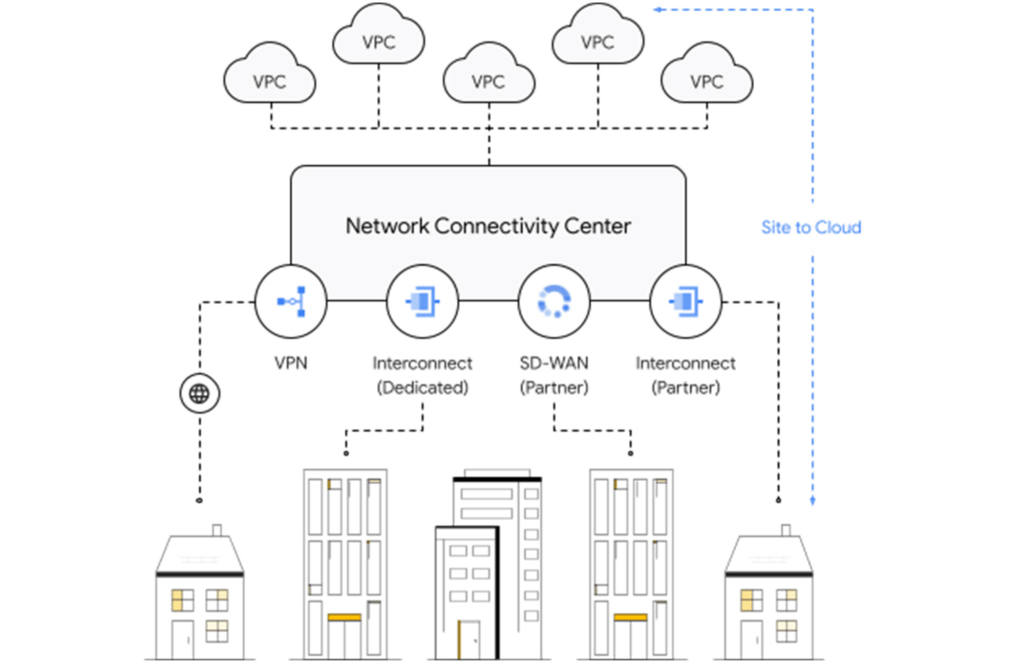
Site-to-cloud connectivity traditionally is done via a cloud interconnect or a cloud VPN. The automatic exchange of routes between on-premises and multiple VPCs can be done using a transit VPC.
A newer approach is to add cloud providers into an SD-WAN mesh using a router virtual appliance in Google Cloud. Network Connectivity Center brings the capacity to synchronize the appliance routes dynamically via BGP to Cloud Router and hence their VPCs. It enables connectivity between on-premises data centers and branch offices and their cloud workloads via SD-WAN-enabled connectivity. This capability is available globally across all 29+ Google Cloud regions. Several of our partners also support this capability in their router appliances.
Site-to-site connectivity
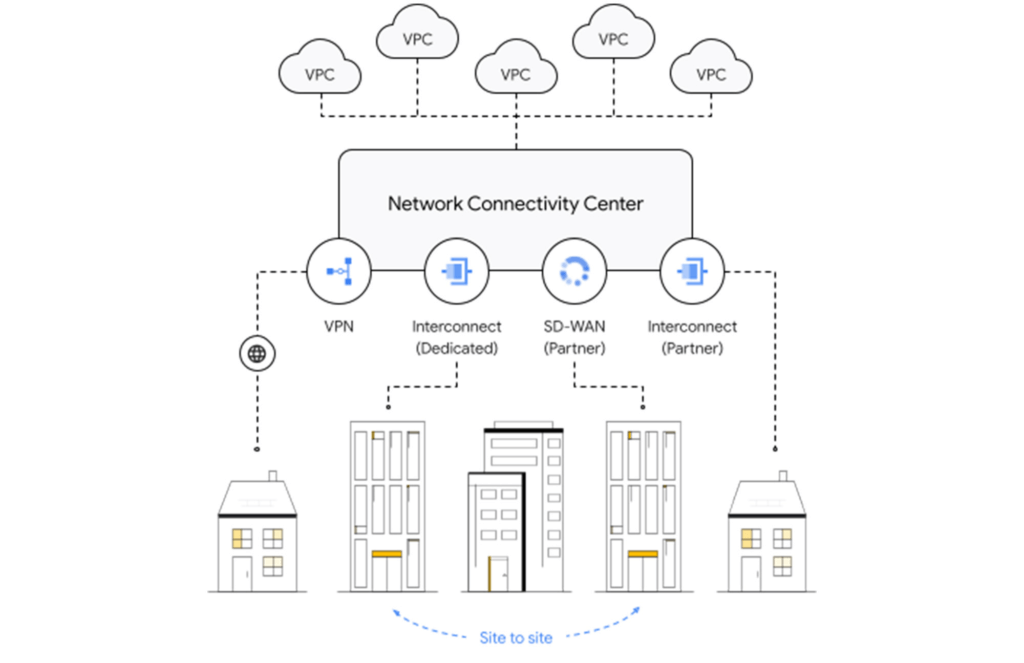
Site-to-site connectivity enables network connectivity directly between two or more hybrid connection points (VPN, Interconnect or SD-WAN). Network Connectivity Center simplifies this model by automating the routing announcements in this environment, such that all sites connected to a single global Network Connectivity Center hub are able to communicate freely in any-any fashion. You can see an example of this for a specific market vertical use case in a recent blog, Voice trading in the cloud — digital transformation of private wires.
VPC-to-VPC connectivity
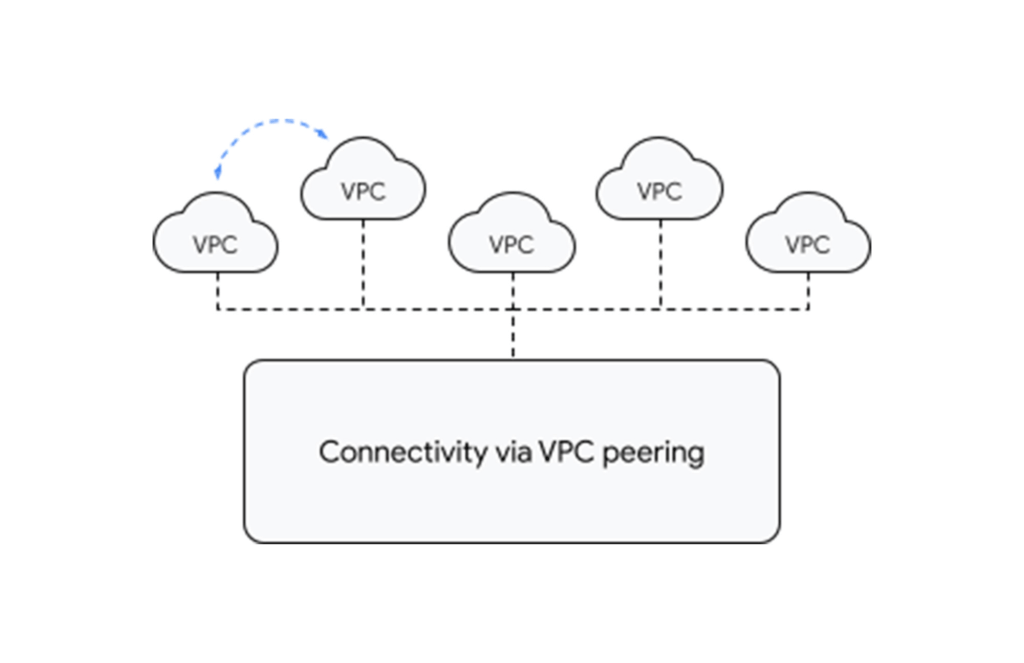
You can create a full or partial mesh of VPC connections using multiple technologies, with VPC peering being the most common. VPC peering provides highly performant, low latency, private connectivity for customer networks connected via hybrid connectivity and Network Connectivity Center to multiple VPCs containing workloads, which can be segmented via granular firewall policies as needed. Alternatively, you can use a transit VPC model to connect multiple VPCs together in a hub and spoke topology.
With tight integration with third-party router appliances as mentioned earlier, you can also leverage their third-party supported solutions such as next-generation firewalls to connect your VPCs together to meet specific compliance and segmentation requirements. Network Connectivity Center allows you to synchronize the routing tables of these appliances with your VPC’s routing table, simplifying the process of setting up redundant configurations.
What’s next for cloud networking connectivity in Google Cloud?
As enterprises continue to migrate different types of workloads to public cloud providers, networking topologies are becoming more complex. In summary, we have solutions for all connectivity needs. We aim to keep our models and solutions understandable and simple. Over time, look for Network Connectivity Center to become Google Cloud’s single point of configuration for all your connectivity needs, with capabilities to handle the most complex network.
Simplify Your Modernization Journey from Windows

4276
Of your peers have already read this article.
1:30 Minutes
The most insightful time you'll spend today!
Microsoft and Windows on Google Cloud provides a first-class experience for Windows workloads. You can self-manage workloads or leverage managed services and use license-included images or bring your own licenses. Now, easily migrate, optimize, and modernize your Windows workloads for agility and scalability.
Start with migration
Migrate to increase IT agility and reduce on-premises footprint. Tools like Migrate for Compute and Migrate for Anthos can help migrate and upgrade.
Optimize license usage to reduce cost
Optimize VM usage. Managed SQL Server and Active Directory reduce total cost of ownership. Move .NET to .NET core. Move SQL Server to Linux.
Modernize to reduce single-vendor dependency
Create an open path to modernization—containerization of Windows server, cloud-native development, and multi-cloud readiness with Anthos.
Drive a strategy for migration, optimization, and modernization
Plan for the future while reducing your Microsoft licensing dependency. Get all you need to migrate, optimize, and modernize your legacy platform.
Bring your own licenses
In addition to on-demand licenses, Google Cloud provides you with flexibility for bringing your existing licenses and running them on Compute Engine. Use Sole-Tenant Nodes to run on dedicated hardware with configurable maintenance policies to support your on-premises licenses while maintaining workload uptime and security through host-level live migration.
License-included VM images
You can deploy your Windows applications (including SQL Server) on our fully tested images with bundled licenses on Compute Engine and take advantage of many benefits available to virtual machine instances such as reliable storage options, the speed of the Google network, and autoscaling.
Fully managed SQL Server and Active Directory
Use an easy-to-manage and compatible relational database service in the cloud to reduce operational overhead. Use a highly available, hardened service to manage authentication and authorization for your AD-dependent workloads, automate AD server maintenance and security configuration, and connect your on-premises AD domain to the cloud.
Windows on Kubernetes
Running your Windows Server containers on GKE can save you on licensing costs, as you can pack many Windows Server containers on each Windows node.
Google Cloud’s 101 Illustrated References for Cloud Engineers and Architects

3389
Of your peers have already read this article.
1:30 Minutes
The most insightful time you'll spend today!
Many people are visual learners; I am definitely one of them, and judging by the tremendous response you all showed to Google Cloud Sketchnotes on LinkedIn and Twitter, you are too.
-Priyanka Vergadia, Lead Developer Advocate, Google
“A picture is worth a thousand words”
Shortly after I started creating and sharing visual explanations of Google Cloud concepts in late 2020, I began receiving overwhelmingly positive feedback from fellow cloud architects and enthusiasts. That feedback led me to think about pulling these sketches together into a reference guide — a one-stop shop for cloud learning fun. So here it is!
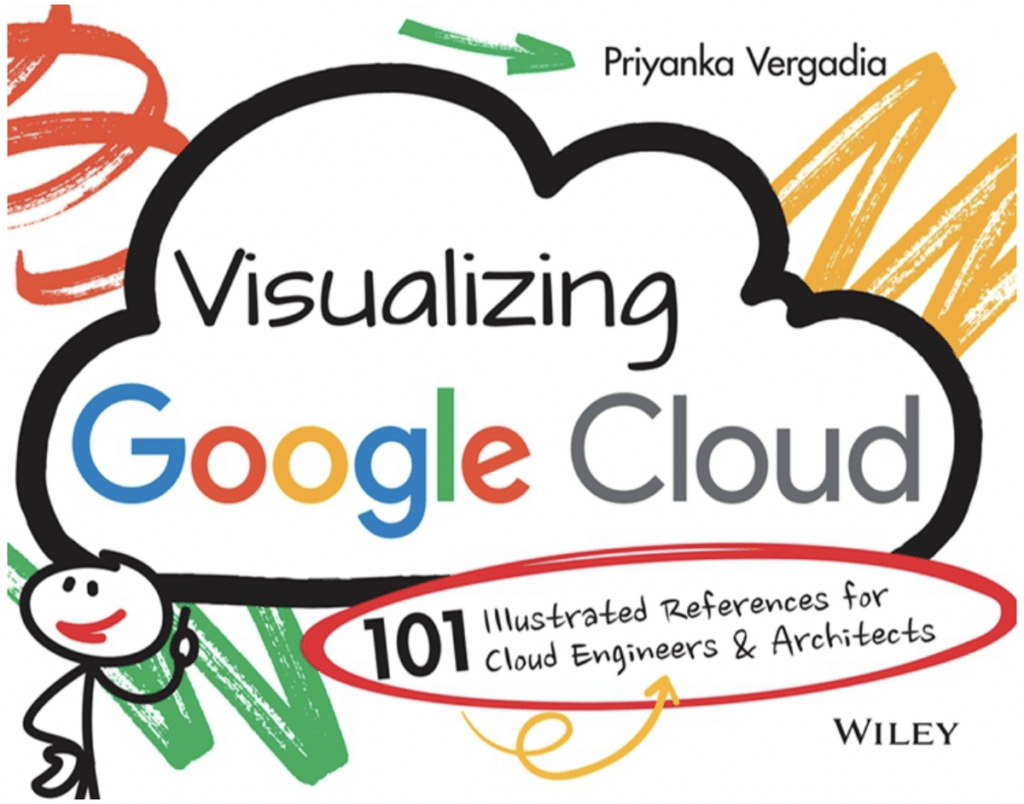
🥁 Introducing “Visualizing Google Cloud: 101 Illustrated References for Cloud Engineers and Architects”
🤔 What is this book about?
This book is my way of making Google Cloud technical concepts fun and interesting via visual storytelling. It covers Google Cloud essentials from end to end, with a visual explanation of each concept, how it works, and how you can apply it with other concepts to meet the needs of your real-world use case. After reading thousands of pages of Google Cloud documentation and experimenting with virtually every Google Cloud product, I distilled that experience down to this book of accessible, bite-sized visuals.
The sketches are spread across five broad categories:
- Infrastructure, storage, and databases: Run and scale applications seamlessly
- Data analytics and machine learning: Derive actionable insights from data
- Networking: Connect, scale, secure, modernize, and optimize your infrastructure
- Application development and modernization: Build apps using containers and microservices
- Security: Protect data, users, and applications in cloud
🙋♀️ Who is this book for?
It is for all cloud enthusiasts. It is for anyone who is planning a cloud migration or new cloud deployment, preparing for cloud certification, or looking to make the most of Google Cloud. If you are a cloud solutions architect, an IT decision-maker, or a data and machine learning engineer, you will find this book a good starting point. In short, this book is for YOU!
When you get the book you’ll not only help yourself, you’ll also help provide meals for schoolchildren who need them. All the books’ proceeds go directly to the awesome folks at Wiley and a charity that fights malnutrition and supports the right to education.
🪜 Next Steps
I hope this book helps you on your Google Cloud journey by making it both easier and more fun. Are you ready to dive in? Order here, learn more about how the idea of the book came about here and please share your thoughts with me on Twitter or LinkedIn.
Learn to Access Process Metrics for Full-visibility into Software and Infrastructure behind Your Apps

3395
Of your peers have already read this article.
2:00 Minutes
The most insightful time you'll spend today!
When you are experiencing an issue with your application or service, having deep visibility into both the infrastructure and the software powering your apps and services is critical. Most monitoring services provide insights at the Virtual Machine (VM) level, but few go further. To get a full picture of the state of your application or service, you need to know what processes are running on your infrastructure. That visibility into the processes running on your VMs is provided out of the box by the new Ops Agent and made available by default in Cloud Monitoring. Today we will cover how to access process metrics and why you should start monitoring them.
Better visibility with process metrics
The data gathered by process metrics include CPU, memory, I/O, number of threads, and more, for any running processes and services on your VMs. When the Ops Agent or the Cloud Monitoring agent is installed, these metrics are captured at 60-second intervals and sent to Cloud Monitoring so you can visualize, analyze, track, and alert on them. A single VM may run tens or hundreds of processes, while you may have tens of thousands running across your fleet of VMs.
As a developer, you may only care about seeing inside a single VM to troubleshoot and identify memory leaks or the source of performance issues.
As an operator or IT Admin, you may be interested in aggregate resource consumption, building baseline views of compute, storage, and networking usage across your VM fleet. Then, when those baseline consumption levels break normal behaviors, you will know when to investigate your systems.
Built for scale and ease of use
Cloud Monitoring is built on the same advanced backend that powers metrics across Google. This proven scalability means your metrics ingestion will be supported despite the extremely high cardinality. Additionally, our agents do not require any config file changes to turn on process metric monitoring.
Lastly, our goal is to provide you the observability and telemetry data where, and when, you need it. So, like the rest of the operations suite, we deliver process metrics in the context of your infrastructure, directly in the VM admin console.
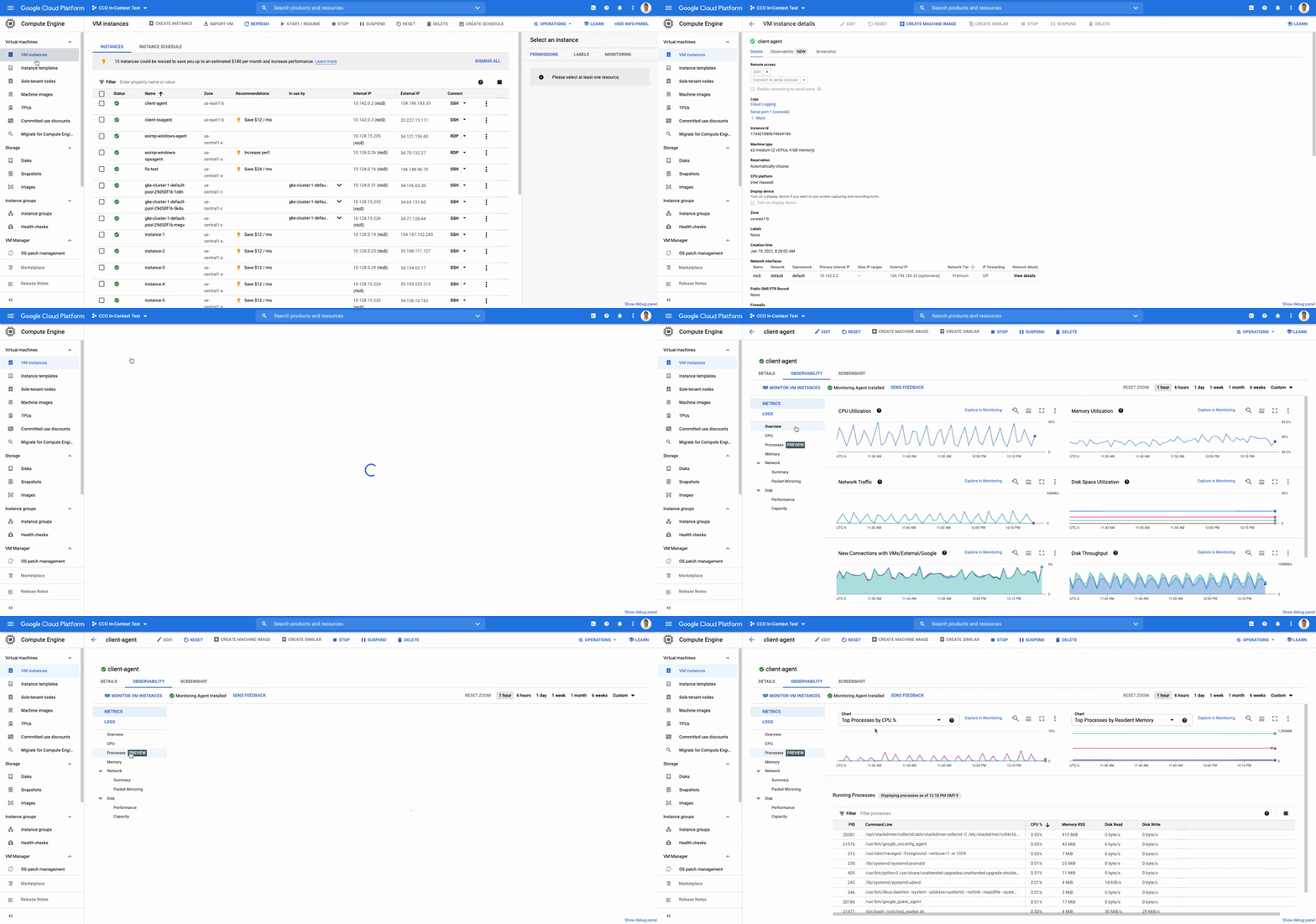
The navigation is simple. Once you have the Ops Agent or the Cloud Monitoring agent installed in your VMs:
- Go to the Compute Engine console page and click on VM Instances
- Select the VM that you want to investigate
- In the navigation menu on the top, click Observability
- Click on Metrics
- Lastly, click on Processes
In the window on the right you will see a chart and a table with all of the processes in your VM. You can also filter by time frame and sort by name or value. You do not need to do anything, other than have the agent installed, for the process to be detected and displayed.
Fleet-wide metrics monitoring
Cloud Monitoring gives you a look across your fleet of VMs so you can identify the aggregated usage of resources by processes. This level of broad, yet granular, insight can drive your decisions around which software to run or how many VMs you need to optimally power your apps and services. Admins can perform a cost-savings analysis if they determine that certain processes are slowing down the work of a large number of VMs. The larger numbers of less powerful VMs can be replaced by fewer, more capable VMs.
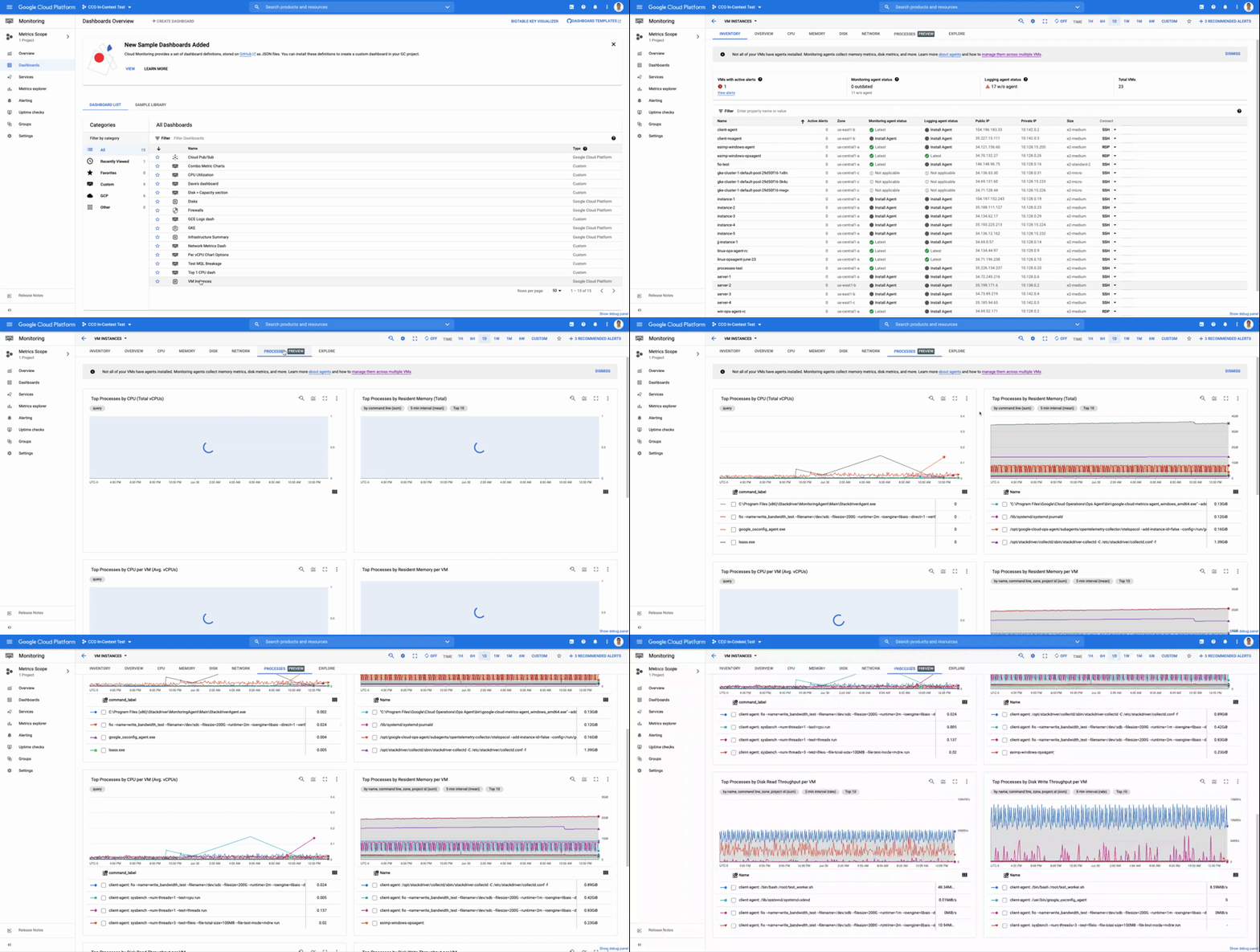
To get this fleet-wide view:
- Navigate to Cloud Monitoring
- Click Dashboards in the left menu
- In the All Dashboards list, click on VM Instances
- Towards the top of the window, click on Processes
This provides many charts detailing the processes running across your fleet of VMs.
Get started today
To start identifying and monitoring your process metrics, you must first install the Ops Agent, or have installed the legacy Cloud Monitoring agent. Once that is complete, the process metrics data will automatically be ingested into Cloud Monitoring and the VM admin console.
If you have any questions, or to join the conversation with other developers, operators, DevOps, and SREs, visit the Cloud Operations page in the Google Cloud Community.
More Relevant Stories for Your Company

Groupe Dauphinoise Grows it Customer Base with G Suite and Google Cloud Platform
As a leading French agricultural cooperative, Groupe Dauphinoise places collaboration at the heart of its philosophy. Working with farmers in the Rhone-Alpes region, Groupe Dauphinoise takes on a diverse range of activities from agricultural production to research and development to running retail outlets. As its operations expanded and strained its
Dassana: Choosing Google Workspace and Google Cloud to accelerate growth and reach goals
When Dassana co-founders Gaurav Kumar and Parth Shah, formerly founder and founding engineer at RedLock (now Prisma Cloud by Palo Alto Networks), set out on a new startup journey in 2020, they knew exactly where to start: sign up for Google Workspace. “Every startup I’ve been at, we used Google

Why Moving SAP Workloads to Google Cloud is Beneficial for the Consumer Goods Industry
Even before the COVID-19 pandemic struck, the consumer packaged goods (CPG) industry was facing disruption. Consumers have come to expect personalized and seamless experiences at every point in their relationship with a brand. Additionally, consumers are expecting CPG brands to meet rising standards for sustainability, social responsibility, and transparency. Business

Ease Your Migration and Modernization Journey with Microsoft and Windows on Google Cloud Demo Center
If you’re looking to migrate and modernize your Microsoft and Windows workloads, Google Cloud is your premiere destination. No matter what migration strategy you’ve selected or what value you’re looking to achieve, with Google Cloud you’re able to: simplify your migration and modernization journeyreduce your on-prem footprint and increase agilityoptimize license
