





Google Cloud Data Heroes Series: Honoring Data Practitioner’s Journey and Learning with GCP
4969
Of your peers have already read this article.
4:00 Minutes
The most insightful time you'll spend today!
Google Cloud Data Heroes is a series where we share stories of the everyday heroes who use our data analytics tools to do amazing things. Like any good superhero tale, we explore our Google Cloud Data Heroes’ origin stories, how they moved from data chaos to a data-driven environment, what projects and challenges they are overcoming now, and how they give back to the community.
For our first issue, we couldn’t be more excited to introduce Google Cloud Data Heroine Lynn Langit. Lynn is a seasoned business woman in Minnesota beginning her eleventh year as the Founder of her own consulting business, Lynn Langit Consulting LLC. Lynn wears many data professional hats including Cloud Architect, Developer, and Educator. If that wasn’t already a handful, she also loves riding her bike at any given season of the year (pictured on the right), which you might imagine gets a bit challenging when you have to invest in bike studded snow tires!

Tell us how you got to be a data practitioner. What was that experience like and how did this journey bring you to GCP?
I worked on the business side of tech for many years. While I enjoyed my work, I found I was intrigued by the nuanced questions practitioners could ask – and the sophisticated decisions they could make – once they unlocked value from their data. This initial intrigue developed into a strong curiosity and I ultimately made the switch from business worker to data practitioner over 15 years ago. This was a huge change in career considering I got my bachelor’s degree in Linguistics and German. And so I started small. I taught myself most everything both at the beginning and even now through online resources, courses, and materials. I began with database and data warehousing, specifically building and tuning many enterprise databases. It wasn’t until Hadoop/NoSQL became available that I pivoted to Big Data…
Back then, I supplemented my self-paced learning with Microsoft technologies, even earning all Microsoft certifications in just one year. When I noticed the industry shifting from on premise to cloud, I shifted my learning from programming to cloud, too. I have been working in the public cloud for over ten years already!
“I started with AWS, but recently I have been doing most everything in GCP. I particularly love implementing data pipelining, data ops, and machine learning.”
How did you supplement your self teachings with Google Cloud data upskilling opportunities like product deep dives and documentation, courses, skills, and certificates?
One of the first Google Cloud data analytics products I fell in love with was BigQuery. BigQuery was my gateway product into a much larger open, intelligent, and unified data platform full of products that combined data analytics, databases, AI/ML, and business intelligence.
I’ve achieved Skills Badges in BigQuery, Data Analysis, and more. I’ve also achieved Google’s Professional Data Engineer Certification, and have been a Google Developer Expert since 2012.
Most recently, I was named one of few Data Analysis Innovator Champions within the Google Cloud Innovators Program, which I’m particularly excited about because I’ve heard it’s a coveted spot for data practitioners and necessitates a Googler nomination to move from the Innovator membership to Champion title!
You’re undoubtedly a data analytics thought leader in the community. When did you know you moved from data student to data master and what data project are you most excited about?
I knew I had graduated, if you will, to the data architect realm once I was able to confidently do data work that matters, even if that work was outside of my usual domains: adTech and finTech..
For example, my work over the past few years has been around human health outcomes, including combatting the COVID-19 pandemic. I do this by supporting scientists and bioinformatic researchers with genomic-scale data pipelines. Did I know anything about genomics before I started? Not at all! I self-studied bioinformatics and recorded my learnings on GitHub. Along the way I adopted my learnings into an open source GCP course on GitHub aimed at researchers who are new to working with GCP. What’s cool about the course is that I begin from the true basics of how to set up a GCP account. Then I gradually work up to mapping out genomic-scale data workflows, pipelines, analyses, batch jobs, and more using BigQuery and a host of other Google Cloud data products.
Now, I’ve received feedback that this repository has made a positive impact on researchers’ ability to process and synthesize enormous amounts of data quickly. Plus, it achieves the greater goal of broadening accessibility to a public cloud like GCP.
In what ways do you think you uniquely bring value back to the data community? Why is it important to you to give back to the data community?
I stay busy always sharing my learnings back to the community. I record Cloud and Big data technical screencasts (demos) on Youtube, I’ve authored 25 data and cloud courses on LinkedIn Learning, and I occasionally write Medium articles on cloud technology and random thoughts I have about everyday life. I’m also the cofounder of Teaching Kids Programming, with a mission to help equip middle and high school teachers with a great programming curriculum on Java.
Begin your own hero’s journey
Ready to embark on your Google Cloud data adventure? Begin your own hero’s journey with GCP’s recommended learning path where you can achieve badges and certifications along the way. Join the Cloud Innovators program today to stay up to date on more data practitioner tips, tricks, and events.
Connect with Google’s data community at our upcoming virtual event “Latest Google Cloud data analytics innovations”. Register and save your spot now to get your data questions answered live by GCP’s top data leaders and watch demos from our latest products and features including BigQuery, Dataproc, Dataplex, Dataflow, and more. Lynn will take the main stage as an emcee for this event – you won’t want to miss!
Finally, if you think you have a good Data Hero story worth sharing, please let us know! We’d love to feature you in our series as well.
Home Depot Leverages Google Cloud’s BigQuery and DataFlow to Break Data Silos and Craft Personalized CX

5014
Of your peers have already read this article.
4:00 Minutes
The most insightful time you'll spend today!
The Home Depot, Inc., is the world’s largest home improvement retailer with annual revenue of over $151B. Delighting our customers—whether do-it-yourselfers or professionals—by providing the home improvement products, services, and equipment rentals they need, when they need them, is key to our success.
We operate more than 2,300 stores throughout the United States, Canada, and Mexico. We also have a substantial online presence through HomeDepot.com, which is one of the largest e-commerce platforms in the world in terms of revenue. The site has experienced significant growth both in traffic and revenue since the onset of Covid-19.
Because many of our customers shop at both our brick-and-mortar stores and online, we’ve embarked on a multi-year strategy to offer a shopping experience that seamlessly bridges the physical and digital worlds. To maximize value for the increasing number of online shoppers, we’ve shifted our focus from event marketing to personalized marketing, as we found it to be far more effective in improving the customer experience throughout the sales journey. This led to changing our approach to marketing content, email communications, product recommendations, and the overall website experience.
Challenge: launching a modern marketing strategy using legacy IT
For personalized marketing to be successful, we had to improve our ability to recognize a customer at the point of transaction so we could—among other things—suspend irrelevant and unnecessary advertising. Most of us have experienced the annoyance of receiving ads for something we’ve already purchased, which can degrade our perception of the brand itself. While many online retailers can identify 100% of their customer transactions due to the rich information captured during checkout, most of our transactions flow through physical stores, making this a more difficult problem to solve.
Our old legacy IT system, which ran in an on-premises data center and leveraged Hadoop, also challenged us since maintaining both the hardware and software stack required significant resources. When that system was built, personalized marketing was not a priority, so it took several days to process customer transaction data and several weeks to roll out any system changes. Further, managing and maintaining the large Hadoop cluster base presented its own set of issues in terms of quality control and reliability, as did keeping up with open-source community updates for each data processing layer.
Adopting a hybrid approach
As we worked through the challenges of our legacy system, we started thinking about what we wanted our future system to look like. Like many companies, we began with a “build vs. buy” analysis. We looked at several products on the market and determined that while each of them had their strengths, none was able to offer the complete set of features we needed.
Our project team didn’t think it made sense to build a solution from scratch, nor did we have access to the third-party data we needed. After much consideration, we decided to adopt a solution that combined a complete rewrite of the legacy system with the support of a partner to help with the customer transaction matching process.
Building the foundation on Google Cloud
We chose Google Cloud’s data platform, specifically BigQuery, Dataflow, DataProc, Cloud Storage, and Cloud Composer. Google Cloud platform empowered us to break down data silos and unify each stage of the data lifecycle from ingestion, storage, and processing to analysis and insights. Google Cloud offered best-in-class integration with open-source standards and provided the portability and extensibility we needed to make our hybrid solution work well. The open standards of BigQuery’s BQ Storage API allowed us to leverage fast BQ storage layers to be utilized with other compute platforms, e.g., DataProc.
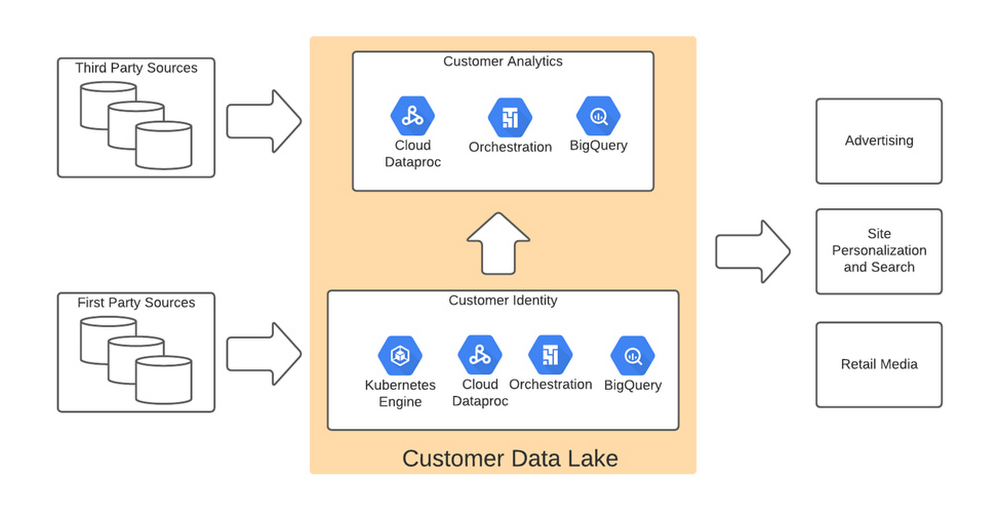
We used BigQuery combined with Dataflow to integrate our first- and third-party data into an enterprise data and analytics data lake architecture. The system then combined previously siloed data and used BigQuery ML to create complete customer profiles spanning the entire shopping experience, both in-store and online.
Understanding the customer journey with the help of Dataflow and BigQuery
The process of developing customer profiles involves aggregating a number of first- and third-party data sources to create a 360-degree view of the customer based on both their history and intent. It starts with creating a single historical customer profile through data aggregation, deduplication, and enrichment. We used several vendors to help with customer resolution and NCOA (Change of Address) updates, which allows the profile to be house-holded and transactions to be properly reconciled to both the individual and the household. This output is then matched to different customer signals to help create an understanding of where the customer is in their journey—and how we can help.
The initial implementation used Google Dataflow, Google’s streaming analytics solution, to load data from Google Cloud Storage into BigQuery and perform all necessary transformations. The Dataflow process was converted into BQML (BigQuery Machine Learning) since this significantly reduced costs and increased visibility into data jobs. We used Google Cloud Composer, a fully managed workflow orchestration service, to help orchestrate all data operations and DataProc and Google Kubernetes Engine to enable special case data integration so we could quickly pivot and test new campaigns. The architecture diagram below shows the overall structure of our solution.
Taking full advantage of cloud-native technology
In our initial migration to Google Cloud, we moved most of our legacy processes in their original form. However, we quickly learned that this approach didn’t take full advantage of the cloud-native and more improved features Google Cloud offered such as auto scaling of resources, flexibility to decouple storage from the compute layer, and a wide variety of options to choose the best tool for the job. We refactored our Hadoop-based data pipelines written in Java-based Map Reduce and our Pig Latin jobs to Dataflow and BigQuery jobs. This dramatically reduced processing time and made our data pipeline code concise and efficient.
Previously, our legacy system processes ran longer than intended, and data was not used efficiently. Optimizing our code to be cloud-native and leveraging all the capabilities of Google Cloud services resulted in reduced run times. We decreased our data processing window from 3 days to 24 hours, improved resource usage by dramatically reducing the amount of compute we used to possess this data, and built a more streamlined system. This in turn reduced cloud costs and provided better insight. For example, DataFlow offers powerful native features to monitor data pipelines, enabling us to be more agile.
Leveraging the flexibility and speed of the cloud to improve outcomes
Today, using a continuous integration/continuous delivery (CI/CD) approach, we can deploy multiple system changes each week to further improve our ability to recognize in-store transactions. Leveraging the combined capabilities of various Google Cloud systems—BigQuery, DataFlow, Cloud Composer, Dataproc, and Cloud Storage–we drastically increased our ability to recognize transactions and can now connect over 75% of all transactions to an existing household. Further, the flexible Google Cloud environment coupled with our cloud-native application makes our team more nimble and better able to respond to emerging problems or new opportunities.
Increased speed has led to better outcomes in our ability to match transactions across all sales channels to a customer and thereby improve their experience. Before moving to Google Cloud, it took 48 to 72 hours to match customers to their transactions, but now we can do it in less than 24 hours.
Making marketing more personal—and more efficient
The ability to quickly match customers to transactions has huge implications for our downstream marketing efforts in terms of both cost and effectiveness. By knowing what a customer has purchased, we can turn off ads for products they’ve already bought or offer ads for things that support what they’ve bought recently. This helps us use our marketing dollars much more efficiently and offer an improved customer experience.
Additionally, we can now apply the analytical models developed using BQML and Vertex AI to sort customers into audiences. This allows us to more quickly identify a customer’s current project, such as remodeling a kitchen or finishing a basement, and then personalize their journey by offering them information on products and services that matter most at a given point through our various marketing channels. This provides customers with a more relevant and customized shopping journey that mirrors their individual needs.
Protecting a customer’s privacy
With this ability to better understand our customers, we also have the responsibility to ensure we have good oversight and maintain their data privacy. Google’s cloud solutions provide us the security needed to help protect our customers’ data, while also being flexible enough to allow us to support state and federal regulations, like the California Customer Privacy Act. This way we can provide a customer the personalized experience they desire without having to fear how their data is being used.
With flexible Google Cloud technology in place, The Home Depot is well positioned to compete in an industry where customers have many choices. By putting our customers’ needs first, we can stay top of mind whenever the next project comes up.
New to Cloud Firestore? Here are Some Basics You Need to Know

3553
Of your peers have already read this article.
5:00 Minutes
The most insightful time you'll spend today!
Learning to use a new database can be daunting, even more so if you don’t already have technical knowledge about databases. In this article, I will break down some database basics, terms you should know, what Firestore is, how it works, how it stores data, and how to get started using it with the assumption that you don’t have any existing database knowledge.
Before we dive into what Cloud Firestore is, let’s discuss some key database terms you should know. Feel free to skip this section if you are already familiar with the basics of Relational and non-relational databases.
What is a database?
A database is software that allows you to easily access, manage, modify, update, control and organize data. The way you want to store information can impact what type of database you choose. There are two major categories of databases, Relational and non-relational.
Relational Database
A relational database can be thought of like a spreadsheet. You can store information in your spreadsheet like this:
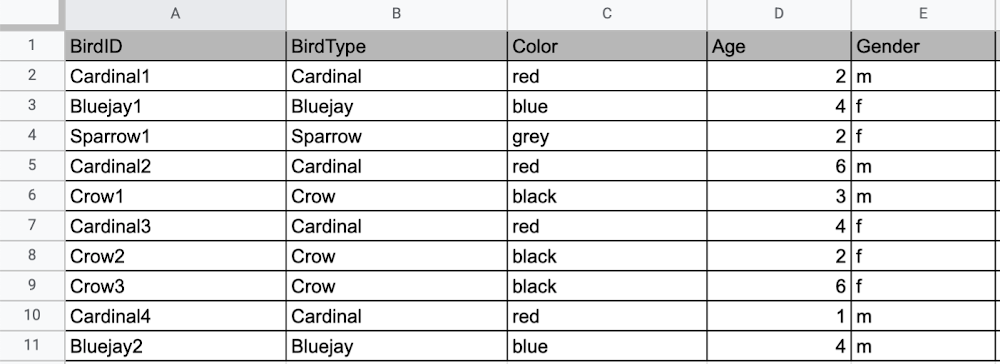
Now, what happens if I want to store information about where Sparrow1 lives, in my spreadsheet, but I don’t care about where the other birds live? I would have to add another column to my spreadsheet, called home, that would only contain data for the sparrow. That would look like this:
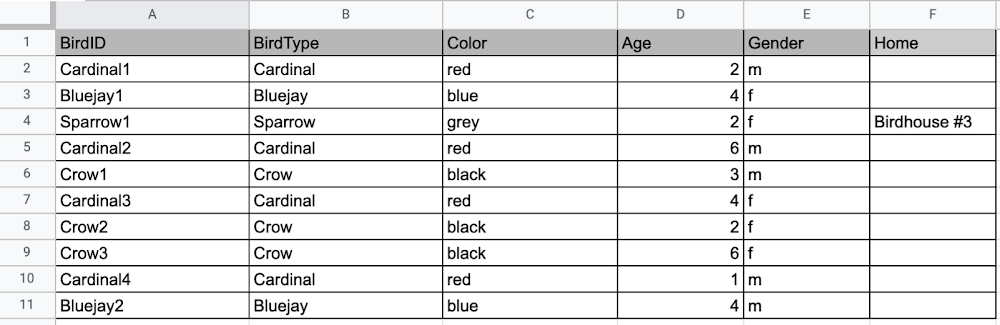
Even though I only want to know information about where the sparrow lives, I am required to have blank spaces in the column for all of the other animals. This is because in a relational database, you have a specific structure of your data called a schema. Just like in a spreadsheet, every item you are storing information on must have a place to put information about the bird’s home, even if you only want that information for one bird. This is enforced by the schema, which is essentially the column headers you put in the sheet and dictates a strict structure for the data, which has pros and cons.
The strict structure of a relational database allows your application to know what kind of data exists, to know what the data type is, and to enforce rules such as requiring data to be unique, or enforcing type of data stored etc. A schema, by design, forces the data in each row to have the same characteristics, which means it is not very flexible, unless you change the schema for the database. That means if you want to add different data that doesn’t fit your existing schema, you have to change the schema. As we discussed above, if you want to change the schema we are using to store information, such as Home, there is some information that will be stored for all rows, even if you don’t want to store anything. The amount of wasted storage is different between database engines, data types etc. Another thing to consider about Relational databases is that at scale, some traditional Relational databases will require more advanced deployments to handle the scale.
Changing the schema of a relational database can be highly disruptive, especially for busy workloads because it requires running scripts to change the schema and coordinating it carefully with the code changes in the app. Due to locking, you might even experience downtime in some cases. Now contrast that with a non-relational document database like Firestore, where you don’t have to worry about schema changes in the databases or downtime as a result of it.
Also, when you have a lot of data that you want to collect and it only applies to a few things in your database, having extra space with no information in it can become wasteful because it uses up storage space in many cases. A non-relational database can help get around this problem.
Non-relational databases
Generally speaking, a non-relational database stores information in a different format than a Relational database. There are 4 major categories of non-relational databases that you will hear most frequently.
- Column-Family
- Document (Firestore)
- Key-Value
- Graph
Since this post is focusing on Firestore, in this section we will dive into what a document database is, how it is used, and when to use it.
Document database (Firestore)
A document database can be thought of as a multi layered collection of entities, such as this:
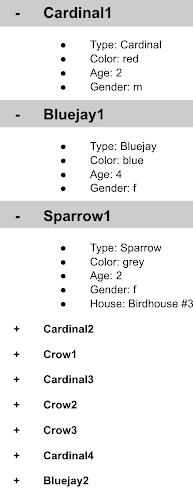
As you can see, when the list is all collapsed, you can only see the information at the top; in this case, that is the BirdID (Cardinal1, Bluejay1, Sparrow1, Cardinal2, Crow1 etc. When I open the list I see “word: word”. For example, the document ID Sparrow1, points to a document with “Type: Sparrow”. I also see “Color: grey”, “Age: 2”, “Gender: f” and “Home: Birdhouse #3”
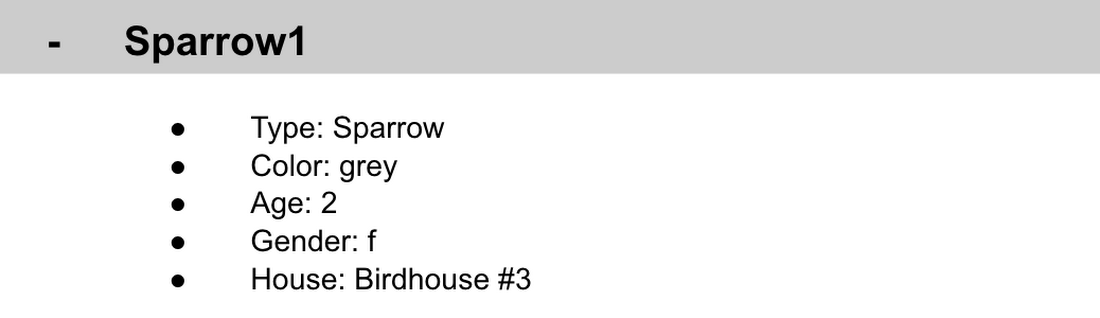
This is known as a key value pair. For “Type: Sparrow”, Type is the key and Sparrow is the value. All of the keys in the Sparrow1 document are: Type, Color, Age, Gender, House. All of the values in the Sparrow1 document are: Sparrow, grey, 2, f, Birdhouse #3.
Similarly to how the key gives you context, it allows you to ask the computer for a specific piece of information, such as the age of the bird. It is important to decide on a specific key term you will use for each piece of data you collect so your data can be easily read programmatically. This is called an implicit schema, an implied understanding of how data is stored that is not enforced by the database. Let’s go over what happens when we use an implicit schema.
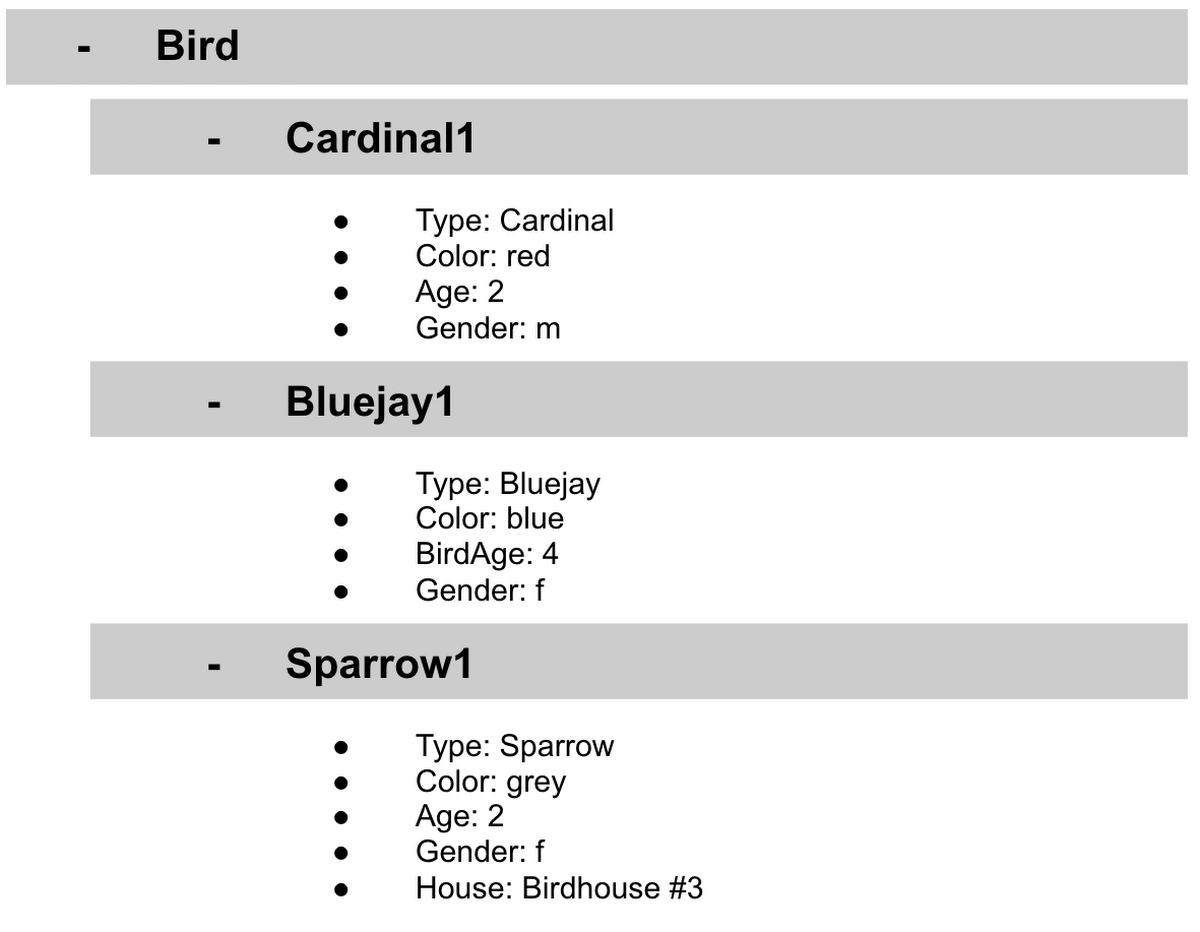
Under Cardinal1, you see Type, Color, Age, and Gender; however, under Sparrow1 you also see House. This is possible because in a non-relational database you don’t have a schema that requires you to store the same information about every bird in your database; instead, you can store the specific information that you need for each bird, regardless of what is stored for other birds. This is a great benefit in terms of flexibility, but because of this flexibility, maintaining standard naming conventions is very important.
Now, let’s discuss why using standard naming conventions is so important. In the example above, if I ask a human: “What is the age of Cardinal1?”, they would probably tell me 2. If I asked them: “What is the Age of Bluejay1?”, they would probably tell me 4. These are both correct answers, but they are only correct because a human is able to assume what Age means. A computer, on the other hand, can’t make assumptions. If I ask a computer: “What is the Age of Cardinal1?” it would say 2, but if I ask it: “What is the Age of Bluejay1?” it would not know. This is because the computer is looking for the keyword Age and it isn’t able to use any context clues to determine what other words might mean Age. However, if I asked the computer: “What is the BirdAge of Bluejay1?”, the computer would tell me 4. Why do I care that I need to tell the computer to look for BirdAge to get the age of blujay one, but to look for Age to get the age of Cardinal one? I care because it means I would have to write two entirely different sets of instructions (i.e software code) to get the age of Cardinal1 and the age of Bluejay1 if I am not careful in how I structure my data. But when I structure my data well, this is not an issue and is infact a benefit by adding added flexibility.
What we see from this example, is that even without a strict schema, we can (and should) define conventions for document formats. If conventions aren’t defined, things can get unwieldy quickly.
How information is accessed
Now, let’s discuss how the information is accessed. If I wanted to know information about which birds are blue in our drop down list example, I would need to expand every section of the list to check if the bird is blue or not. As you can imagine, once you start to get a lot of birds in your database, it becomes cumbersome to open every drop down and see if the bird is blue. Luckily, Firestore lets you run these types of queries against the data (See more here) and receive all the documents that satisfy your conditions. On the other hand, if I wanted to know all of the information about Cardinal1, I could just open the drop down for Cardinal1 and I would have all of the information about that bird.
Now let’s start using some Firestore specific terminology. For the example we just discussed:Collections
- In Firestore, your data lives in collections. You can think of collections as tabs in a spreadsheet.
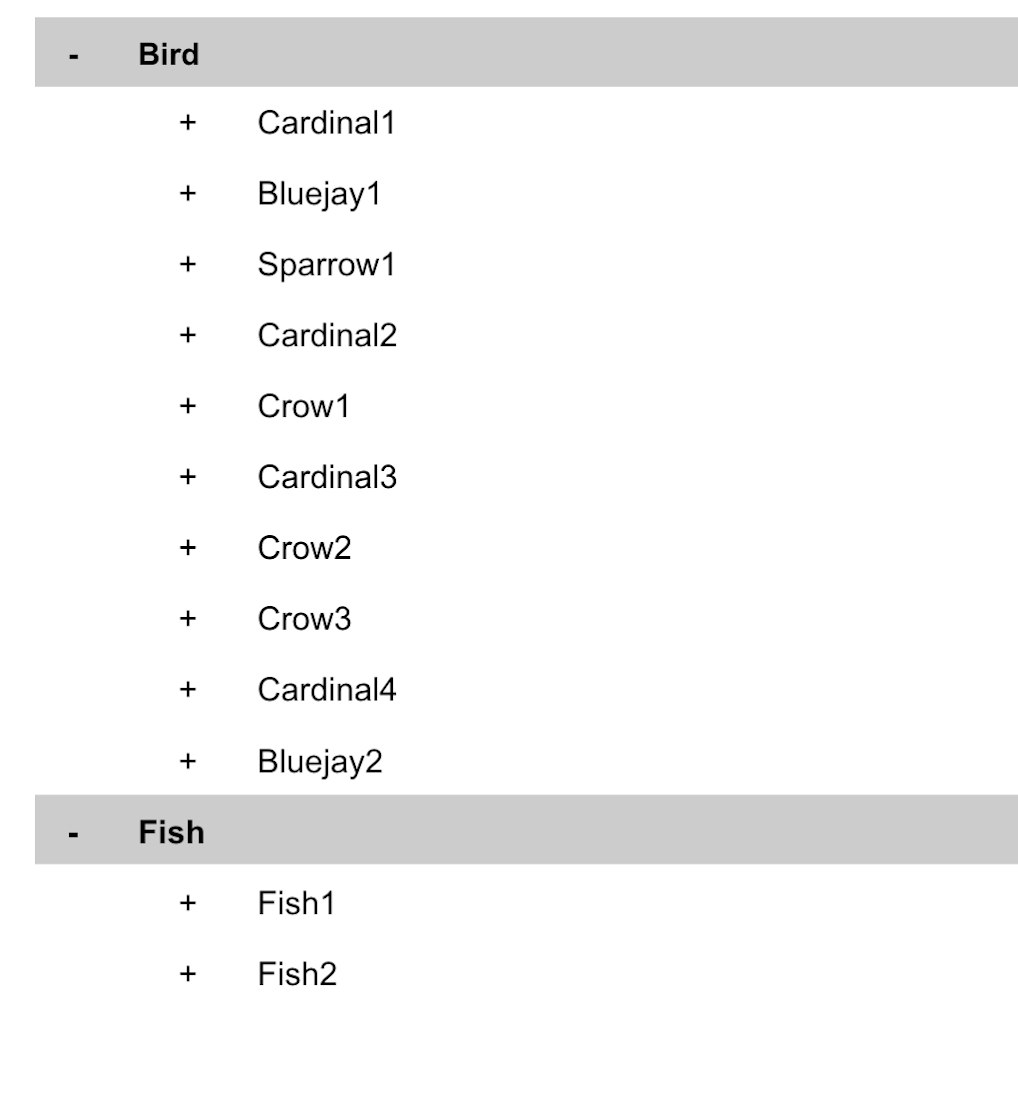
- Collections can be used to organize data. For example, if I decide that I want to collect data about birds and fish, the data about birds could be put in a birds collection, and the data about fish could be put in a Fish collection. ex:
- This is the unit of storage that Firestore uses. In our example, each bird is its own document. Documents reside in collections. This is what one document would contain:
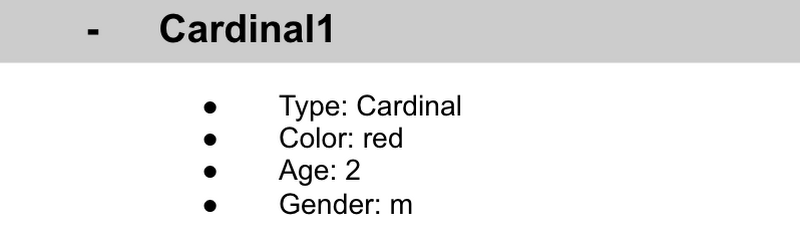
- Each Document corresponds to a row in the sheet. The following diagram demonstrates that each column header maps to a property name in the document and that each value in a row maps to a value in the document.
- Each document must be identified by a unique identifier. In our example, that is BirdID. Notice that the value for BirdID is stored at the top level of the list, so when the document is closed, you can only see Cardinal1 and Cardinal1 is not also stored within the document.
- All documents can be uniquely identified by their location. Let’s think through this in words first before we move to code. If I want to tell someone to get data about the sparrow from the drop down lists, I would need to tell them:
- In the bird drop down list, can you please get all the information under Sparrow1 and put it on a piece of paper called sparrow1Info?
- Now let’s try that again using Firestore terms.
- From the birds collection, can you please get the document for sparrow1 from the Firestore database (db) and save it as sparrow1Info?
- Now let’s try it in code.
- var sparrow1Info = db.collection(‘birds’).doc(‘sparrow1’);
- A subcollection is a collection associated with a document. Using our example of the drop down list, we can add a collection called sightings that stores documents about each sighting of the specific bird. This is what that would look like:
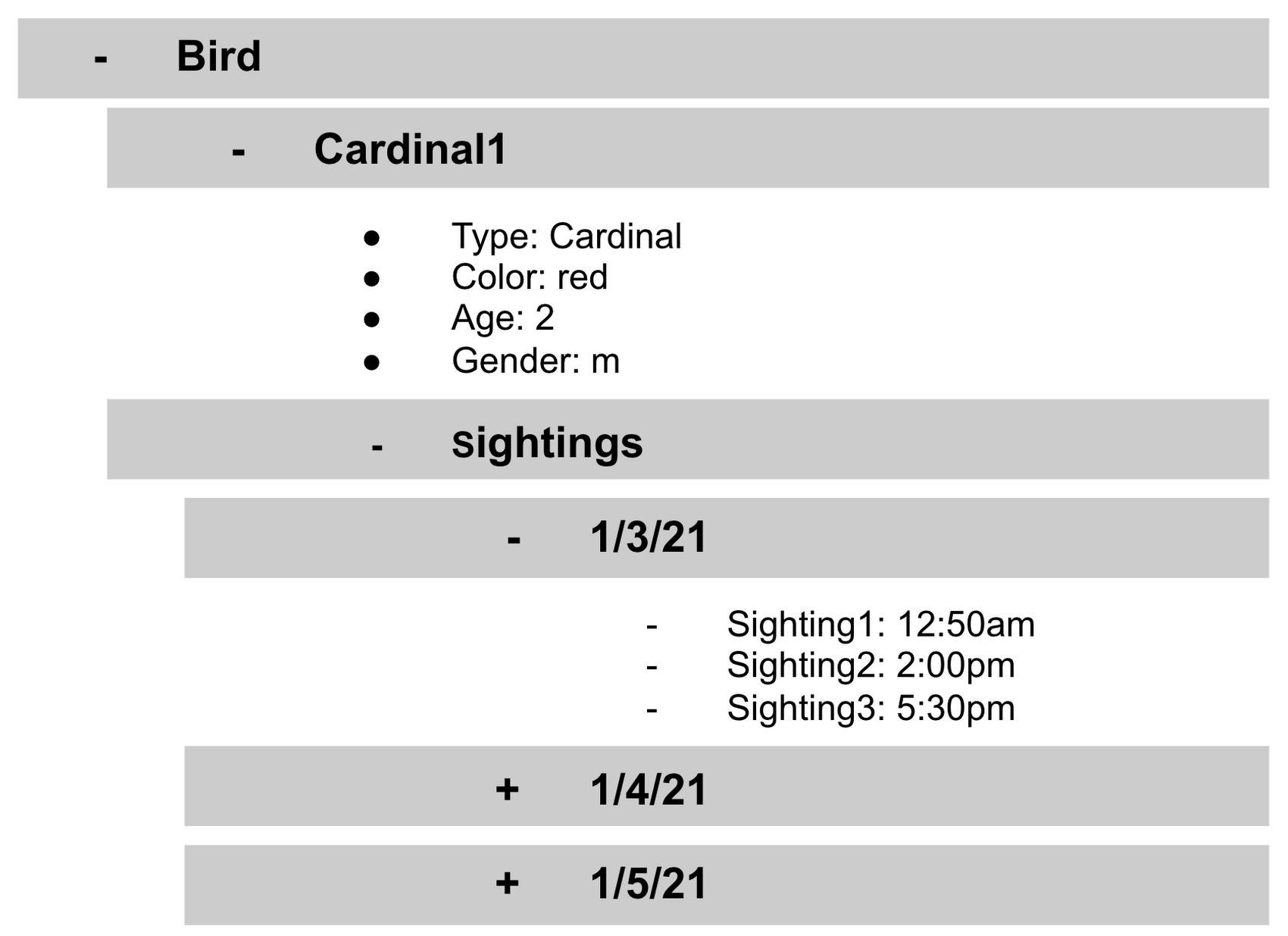
- It is important to note that you don’t need to have the same subcollections on all documents. For example, Cardinal1 can be the only document that has a subcollection of Sightings.
How to search on Google about Firestore
The hardest part of learning a new technology can often be knowing the right terms to put into Google search to get the answers you are looking for. Here are some key terms that can help you get started
Your question:
How should I arrange my data to store it in Firestore?
Search:
Document database implicit schema design
Your Question:
What other databases are similar to firestore?
Search:
What are some document databases
Your Question:
How do I get all documents in the Birds collection?
Search:
How to use wildcards in Firestore
What next?
Try this guide to get started building your first application that uses firestore: https://firebase.google.com/docs/firestore/quickstart

5504
Of your peers have already downloaded this article
1:30 Minutes
The most insightful time you'll spend today!
IDC recently examined the benefits of implementing BigQuery for SAP data. The findings reveal massive improvements to the SAP customers’ overall business results due to faster access to data insights, lower data warehouse operation cost, and increased productivity among the data warehouse and development teams. Download the report now!
Enhancing Data Governance through Automation with Dataplex and BigLake

2997
Of your peers have already read this article.
2:00 Minutes
The most insightful time you'll spend today!
Unlocking the full potential of data requires breaking down the silo between open-source data formats and data warehouses. At the same time, it is critical to enable data governance team to apply policies regardless of where the data happens, whether – on file or columnar storage.
Today, data governance teams have to become subject matter experts on each storage system the corporate data happens to reside on. Since February 2022, Dataplex has offered a unified place to apply policies, which are propagated across both lake storage and data warehouses in GCP. Rather than specifying policies in multiple places, bearing the cognitive load of translating policies from “what you want the storage system to do” to “how your data should behave” Dataplex offers a single point for unambiguous policy management. Now, we are making it easier for you to use BigLake.
Earlier this year, we launched BigLake into general availability, BigLake unifies data fabric between Data Lakes and Data Warehouses by extending BigQuery storage to open file formats. Today, we announce BigLake Integration with Dataplex (available in preview). This integration eliminates the configuration steps for the admin taking advantage of BigLake and managing policies across GCS and BigQuery from a unified console.
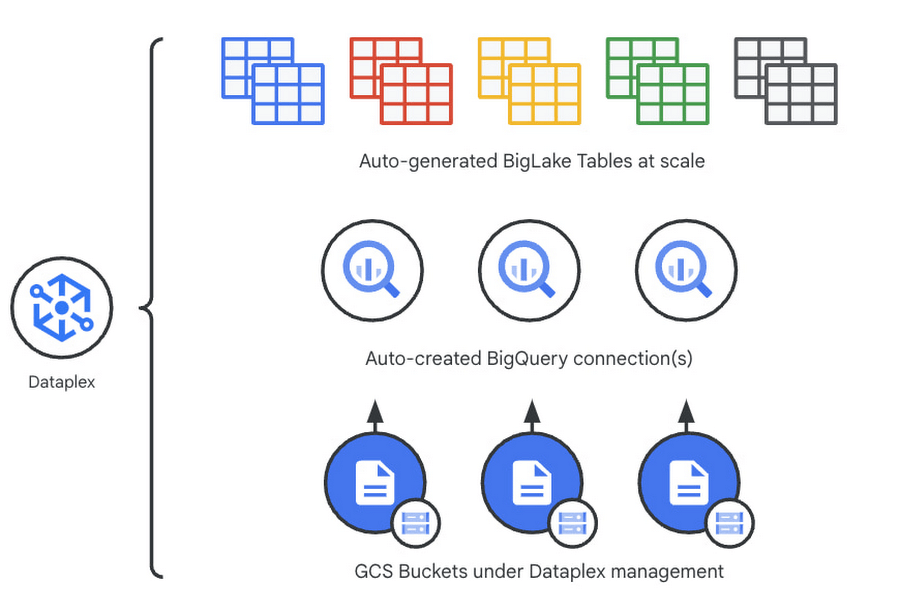
Previously, you could point Dataplex at a Google Cloud Storage (GCS) bucket, and Dataplex will discover and extract all metadata from the data lake and register this metadata in BigQuery (and Dataproc Metastore, Data Catalog) for analysis and search. With the BigLake integration capability, we are building on this capability by allowing an “upgrade” of a bucket asset, and instead of just creating external tables in BigQuery for analysis – Dataplex will create policy-capable BigLake tables!
The immediate implication is that admins can now assign column, row, and table policies to the BigLake tables auto-created by Dataplex, as with BigLake – the infrastructure (GCS) layer is separate from the analysis layer (BigQuery). Dataplex will handle the creation of a BigQuery connection and a BigQuery publishing dataset and ensure the BigQuery service account has the correct permissions on the bucket.
But wait – there’s more.
With this release of Dataplex, we are also introducing advanced logging called governance logs. Governance logs allow tracking the exact state of policy propagation to tables and columns – adding an additional level of detail going beyond the high-level “status” for the bucket and into fine-grained status and logs for tables, columns.
What’s next?
- We have updated our documentation for managing buckets and have additional detail regarding policy propagation and the upgrade process.
- Stay tuned for an exciting roadmap ahead, with more automation around policy management.
For more information, please visit:
Over 700 SaaS Companies Trust Google’s Data Cloud to Build Intelligent Apps!

3493
Of your peers have already read this article.
5:00 Minutes
The most insightful time you'll spend today!
Today, a typical enterprise uses over 100 SaaS applications while large organizations commonly use over 400 apps. These applications contain valuable data on customers, suppliers, employees, products and more, offering the potential for valuable insights and powerful workflows. However, in the past, this data has often remained siloed and underutilized, even within an application.
Customer demand is driving an unprecedented wave of innovation across the SaaS industry, with providers building intelligence into their applications through rich analytical and AI/ML capabilities, and enabling their customers’ data ecosystems through real time data sharing. The data cloud platform powering these applications is a critical factor in companies’ ability to innovate and optimize efficiency, while keeping its customer’s data secure.
Today, over 700 tech companies including Zoominfo, Equifax, Exabeam, Bloomreach, and Quantum Metric power their products and businesses using Google’s data cloud. This week at the Data Cloud Summit, we announced the Built with BigQuery initiative which helps ISVs get started building applications using data and machine learning products. By providing dedicated access to technology, expertise and go to market programs, this initiative allows tech companies to accelerate, optimize and amplify their success.
“Enabling customers to gain superior insights and intelligence from data is core to the ZoomInfo strategy,” ZoomInfo CEO Henry Schuck says. “We are excited about the innovation Google Cloud is bringing to market and how it is creating a differentiated ecosystem that allows customers to gain insights from their data securely, at scale, and without having to move data around. Working with the Built with BigQuery initiative team enables us to rapidly gain deep insight into the opportunities available and accelerate our speed to market.”
Building intelligent SaaS applications with a unified data platform
Google’s data cloud provides a complete platform for building data-driven applications, from simplified data ingestion, processing and storage to powerful analytics, AI/ML and data sharing capabilities, all seamlessly integrated with Google Cloud’s open, secure, sustainable platform. With a huge partner ecosystem and support for multicloud, open source tools and APIs, we provide technology companies the portability and extensibility they need to avoid data lock-in.
Through the Built with BigQuery initiative, we are helping tech companies to build the next-gen SaaS applications on Google’s data cloud with simplified access to technology, dedicated engineering support and joint go to market programs.
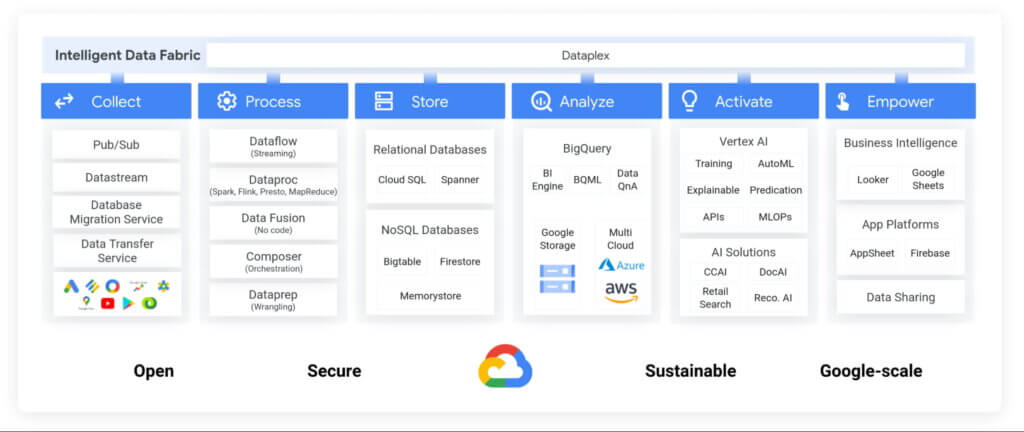
Exabeam, a next generation cybersecurity solution, is a great example. The company leverages Google’s data cloud to provide their customers with a “limitless-scale” cybersecurity solution.
“Built with Google’s data cloud, Exabeam’s limitless-scale cybersecurity platform helps enterprises respond to security threats faster and more accurately” said Sanjay Chaudhary, VP of Products at Exabeam. “We are able to ingest data from over 500 security vendors, convert unstructured data into security events, and create a common platform to store them in a cost effective way. The scale and power of Google’s data cloud enables our customers to search multi-year data and detect threats in seconds.”
Foster innovation and unlock new business models through data sharing
Data becomes even more valuable when shared. According to research, the global data monetization market size is growing at a CAGR of 47.9% and is projected to reach $11.7 Billion by 2026. It’s a compelling proposition for SaaS companies as it enables them to deliver increased value for their customers while expanding their own partner ecosystem, increasing stickiness and unlocking new revenue streams.
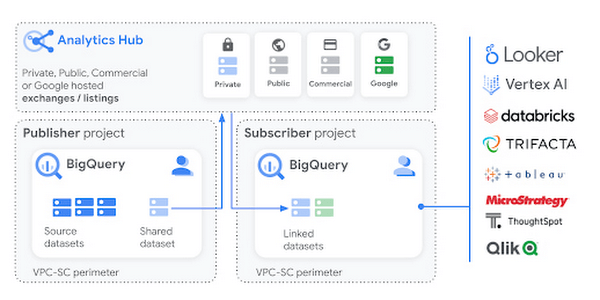
Google Cloud’s strategy for data sharing encompasses three key areas: secure data sharing in BigQuery, the ability to create private and public exchanges alongside commercial and public datasets in Analytics Hub, and a robust ecosystem of premier partner and Google data.
Through the real-time data sharing capabilities of BigQuery, SaaS companies are enabling their customers to combine their data with the customer’s own proprietary data, and other third-party data sources, to derive 360-degree insights. Over 4,500 organizations share more than 250 Petabytes of data weekly in BigQuery, not accounting for intra-organizational data sharing*.
For example, manufacturers can get real-time visibility into their entire supply chain by combining datasets from ISVs, such as supply chain innovator, Blume Global, and data publishers.
“Our partnership with Google Cloud is helping us achieve our mission to build the next-generation supply chain operating system. Blume Maps, our digital twin of the supply chain world built with Google’s data cloud, allows our customers to generate accurate lead times, real-time shipment location and ETAs” said Blume Global CEO Pervinder Johar. “We apply the power of Google Cloud’s data and analytics capabilities to our growing database of over 1.5 million global data points to feed our lead time and dynamic ETA engine. We are also able to create data twins of unique logistics data and share with users around the globe.”
Google Cloud’s Analytics Hub is a fully-managed service built on BigQuery that allows organizations to efficiently and securely exchange valuable data and analytics assets across any organizational boundary. With unique datasets that are always-synchronized and bi-directional sharing, you can create a rich and trusted data ecosystem between business units or partnerships–one in which everyone gains value immediately.
“As external data becomes more critical to organizations across industries, the need for a unified experience between data integration and analytics has never been more important. We are proud to be working with Google Cloud to power the launch of Analytics Hub, feeding hundreds of pre-engineered data pipelines from hundreds of external datasets,” said Dan Lynn, SVP Product at Crux. “The sharing capabilities that Analytics Hub delivers will significantly enhance the data mobility requirements of practitioners, and the Crux data integration platform stands ready to quickly integrate any external data source and deliver on behalf of Google Cloud and its clients.”
Innovate, optimize and amplify with Google Cloud
The Built with BigQuery initiative provides access to technology, expertise and go-to-market:.
- Access to Technology: Get started fast with a Google-funded, pre-configured sandbox. Access Cloud Credits to fund your, and your customer’s, POCs and apply for innovative pricing models designed for ISVs.
- Access to Expertise: Accelerate and optimize product design and architecture with access to designated experts in building data-driven SaaS applications from the ISV Center of Excellence, providing insight into key use cases, architectural patterns and best practices. Access experts from across Google to enable co-innovation with products such as Earth Engine and Google Marketing Platform.
- Access to Go-to-market: Amplify your success with joint marketing programs to drive awareness, generate demand and increase adoption.
Get Started
Start building your applications on Google Cloud with $300 in free credits or apply for the Built with BigQuery initiative.
*As of November, 2021, within a typical 7 day period in BigQuery, and not accounting for intra-organizational data sharing.
More Relevant Stories for Your Company




Uber’s Story of Scaling Their App with Millions of Concurrent Requests
Uber has millions of concurrent customers who use the platform to book rides and place food delivery orders, generating billions of database transactions per day. In just a click of a button, Uber captures users' intent which bases their fulfillment model to meet the customers' demand, and match it to

Migrating MySQL to Spanner? Here’s What You Need to Know
Since its initial release in 1995, MySQL has not only been the de-facto database for many data storage needs, but has gathered much attention over the years as one of the most well-recognized databases around when it comes to Relational Database Management Systems and transactional data processing. Any application in

Is it Cheaper to Run Oracle Workloads on Google Cloud Than On-Prem? Yes, By 78%
On-premises relational database management systems (RDBMS) are the traditional heart of many core business operations, but cloud-based relational databases provide the agility and scalability of the cloud while eliminating many of the onerous tasks associated with maintaining your own infrastructure. To find out how much more value cloud-based relational databases



How L&T Financial Services Processes 95% of Motorcycle Loans in Less Than Two Minutes
L&T Financial Services is one of the largest lenders in India. India’s demonetization policy in recent years has led to a shift from cash transactions to digital payments. In 2016, the government withdrew 500 and 1000 rupee notes from circulation and encouraged a heavily cash-based population to deposit their canceled notes
