





Google and Fervo Agreement to Shape-up Plans for 24/7 Carbon-free Energy by 2030

4817
Of your peers have already read this article.
1:30 Minutes
The most insightful time you'll spend today!
When Google announced our plan to go beyond purchasing renewable power for 100% of our energy usage and operate on 24/7 carbon-free energy by 2030, we noted that achieving this goal will require new transaction structures, advancements in clean energy policy, and innovative new technologies. Today, we’re pleased to announce that one of these new technologies—a first-of-its-kind, next-generation geothermal project—will soon begin adding carbon-free energy to the electric grid that serves our data centers and infrastructure throughout Nevada, including our Cloud region in Las Vegas.
Google and clean-energy startup Fervo have just signed the world’s first corporate agreement to develop a next-generation geothermal power project, which will provide an “always-on” carbon-free resource that can reduce our hourly reliance on fossil fuels. In 2022, Fervo will begin adding “firm” geothermal energy to the state’s electric grid system, where Google’s commitments already include one of the world’s largest corporate solar-plus-storage power purchase agreements.
Importantly, this collaboration also sets the stage for next-generation geothermal to play a role as a firm and flexible carbon-free energy source that can increasingly replace carbon-emitting fossil fuels—especially when aided by policies that expand and improve electricity markets; incentivize deployment of innovative technologies; and increase investments in clean energy research, development, and demonstration (RD&D).
Next-generation geothermal technology
Traditional geothermal already provides carbon-free baseload energy to a number of power grids. But because of cost and location constraints, it accounts for a very small percentage of global clean energy production.
That’s one reason this new approach is so exciting; by using advanced drilling, fiber-optic sensing, and analytics techniques, next-generation geothermal can unlock an entirely new class of resource. And the US Department of Energy has found that with advancements in policy, technology, and procurement, geothermal energy could provide up to 120 GW of firm, flexible generation capacity in the US by 2050.
As part of our agreement, Google is partnering with Fervo to develop AI and machine learning that could boost the productivity of next-generation geothermal and make it more effective at responding to demand, while also filling in the gaps left by variable renewable energy sources. Although this project is still in the early stages, it shows promise.
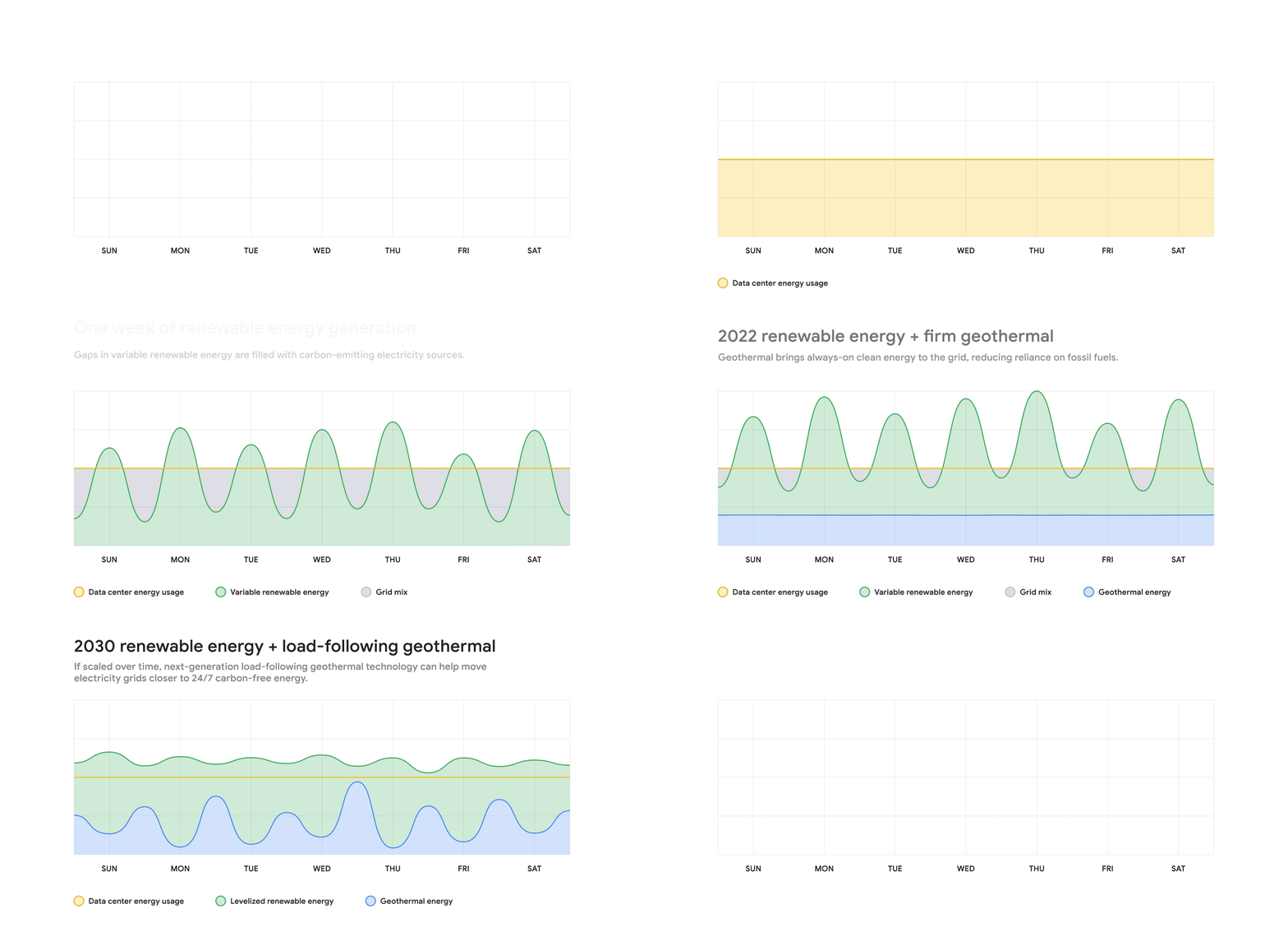
Using fiber-optic cables inside wells, Fervo can gather real-time data on flow, temperature, and performance of the geothermal resource. This data allows Fervo to identify precisely where the best resources exist, making it possible to control flow at various depths. Coupled with the AI and machine learning development outlined above, these capabilities can increase productivity and unlock flexible geothermal power in a range of new places.
This won’t be the first time that Google is applying software solutions to clean energy applications: we’ve just announced an update to our carbon-intelligent computing program that helps us reduce emissions associated with running applications at Google data centers. And other forms of AI and machine learning are currently being used to increase the value of wind energy.
Already this year, Google has taken significant strides toward sourcing 24/7 carbon-free energy for all our data centers, office campuses, and Cloud regions. On Earth Day, our CEO Sundar Pichai announced that for the first time, five of our global data center sites operated near or at 90% carbon-free energy in 2020.
Not only does this Fervo project bring our data centers in Nevada closer to round-the-clock clean energy, but it also acts as a proof-of-concept to show how firm clean energy sources such as next-generation geothermal could eventually help replace carbon-emitting power sources around the world.
Take a Look at 30 Eventrac Locations!

4942
Of your peers have already read this article.
2:00 Minutes
The most insightful time you'll spend today!
New locations in Eventarc
Back in August, we announced more Eventarc locations (17 new regions, as well as 6 new dual-region and multi-region locations to be precise). This takes the total number of locations in Eventarc to more than 30. You can see the full list in the Eventarc locations page or by running gcloud eventarc locations list .
What does location mean in Eventarc?
An Eventarc location usually refers to the single region that the Eventarc trigger gets created in. However, depending on the trigger type, the location can be more than a single region:
- Pub/Sub triggers only support single-region locations.
- Cloud Storage triggers support single-region, dual-region, and multi-region locations.
- Cloud Audit Logs triggers support single-region locations and the special
globalregion.
Before looking into trigger location in more detail, let’s look at other locations relevant in Eventarc.
What other locations are relevant in Eventarc?
Triggers connect event sources to event targets:
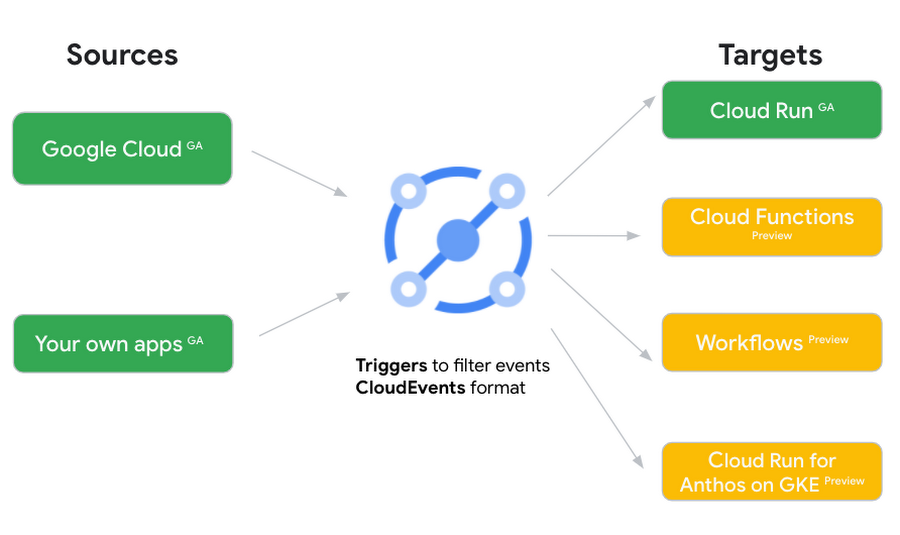
Each event source, event target, and trigger has its own location. Sometimes, these locations have to match and sometimes they can be different.
Here’s an example of a trigger connecting Cloud Storage events from a bucket in the europe-west1 region to a Cloud Run service in the us-central1 region with a trigger located in the europe-west1 region:
gcloud eventarc triggers create trigger-storage \--destination-run-service=hello \--destination-run-region=us-central1 \--location=europe-west1 \--event-filters="type=google.cloud.storage.object.v1.finalized" \--event-filters="bucket=my-bucket-in-europe-west1-region" \--service-account=$PROJECT_NUMBER-compute@developer.gserviceaccount.com
In many cases, you don’t have control over the location of the event source. In the example above, the Cloud Storage bucket is in the europe-west1 region. That’s the location that you need to work with and it has implications for the trigger location (which I’ll get to later).
The location of the event target is the region of the service where you want the events to go. You get to choose this from one of the supported regions when you deploy your Cloud Run service. You typically want this to be in the same region as your event source for latency and data locality reasons (but this is not strictly a requirement). In the example above, the event source (bucket) is in europe-west1 but the event target (Cloud Run service) is in us-central1 as specified by the --destination-run-region flag.
The location of the trigger is dictated by the event source location, but the trigger type also comes into play. It is specified by the –location flag. Let’s take a look at the trigger location for each trigger type in more detail.
Location in Pub/Sub triggers
In a Pub/Sub trigger, you connect a Pub/Sub topic to an event target. Pub/Sub topics are global and not tied to a single region. However, when you create a Pub/Sub trigger, you need to specify a region for it (because Eventarc triggers need to live in a region) with the --location flag as follows:
gcloud eventarc triggers create trigger-pubsub \--destination-run-service=hello \--destination-run-region=us-central1 \--location=us-central1 \--event-filters="type=google.cloud.pubsub.topic.v1.messagePublished" \--transport-topic=projects/your-projectid/topics/your-topic
By specifying a location, Eventarc automatically configures the geofencing feature in Pub/Sub such that events only persist in the specified location. As I noted above, you typically want to (but are not required to) choose the same region for the trigger and the Cloud Run service for lower latency and data locality. You can also use regional Pub/Sub service endpoints to publish to the topic to ensure that all of the data stays in a single region.
Location in Cloud Storage triggers
In a Cloud Storage trigger, you connect a Cloud Storage bucket to an event target. A Cloud Storage bucket can be in a single-region (e.g. europe-west1), dual-region (e.g. eur4), or multi-region (e.g. eu) location. The location of the bucket dictates the location of the trigger and they have to match. The earlier trigger example was for a bucket in the europe-west1 single-region location. Here’s another trigger connecting Cloud Storage events from a bucket in the eu multi-region location. Notice how the location flag matches the bucket region:
gcloud eventarc triggers create trigger-storage \--destination-run-service=hello \--destination-run-region=us-central1 \--location=eu \--event-filters="type=google.cloud.storage.object.v1.finalized" \--event-filters="bucket=my-bucket-in-eu-multi-region" \--service-account=$PROJECT_NUMBER-compute@developer.gserviceaccount.com
If the bucket region and the trigger region do not match, you’ll see an error:
ERROR: (gcloud.eventarc.triggers.create) INVALID_ARGUMENT: The request was invalid: Bucket "my-bucket-in-eu-multi-region" location "eu" does not match trigger location "europe-west1". Try again by creating the trigger in "eu".
Location in Cloud Audit Logs triggers
In a Cloud Audit Logs trigger, you connect any event source that emits Audit Logs to an event target. The location of the event source will dictate the trigger location. This is typically a single region but there is a special global region that’s necessary in some cases.
For example, if you want to read Cloud Storage events from a bucket in the europe-west1 region with an Audit Logs trigger, you will create the trigger with the same location. Note that this will match all buckets in the europe-west1 region as there’s no filter by bucket in Audit Logs:
gcloud eventarc triggers create trigger-auditlog \--destination-run-service=hello \--destination-run-region=us-central1 \--location=europe-west1 \--event-filters="type=google.cloud.audit.log.v1.written" \--event-filters="serviceName=storage.googleapis.com" \--event-filters="methodName=storage.objects.create" \--service-account=$PROJECT_NUMBER-compute@developer.gserviceaccount.com
On the other hand, if you want to match a dual-region or a multi-region bucket such as eu, you will create the trigger with the global location as Audit Logs triggers only support a single or global region. Note that this will match all buckets in all regions globally:
gcloud eventarc triggers create trigger-storage \--destination-run-service=hello \--destination-run-region=us-central1 \--location=global \--event-filters="type=google.cloud.storage.object.v1.finalized" \--event-filters="bucket=my-bucket-in-europe-west1-region" \--service-account=$PROJECT_NUMBER-compute@developer.gserviceaccount.com
As you can see from this example, if you want to read Cloud Storage events, the native Cloud Storage trigger is a much better option, but this example illustrates a typical case in which a global Audit Log trigger is necessary.
That wraps up this closer look at locations in Eventarc. Feel free to reach out to me on Twitter @meteatamel for any questions or feedback.
What Our Google Cloud Experts Say About Multi-cloud Journey

3447
Of your peers have already read this article.
1:30 Minutes
The most insightful time you'll spend today!
Do you want to fire up a bunch of techies? Talk about multicloud! There is no shortage of opinions. I figured we should tackle this hot topic head-on, so I recently talked to four smart folks—Corey Quinn of Duckbill Group, Armon Dadgar of Hashicorp, Tammy Bryant Butow of Gremlin, and James Watters of VMware—about what multicloud is all about, key considerations, and why you should (or shouldn’t!) do it.
Five important insights came out of these discussions. If you’re on a multicloud journey or considering one, keep reading.
Do: Choose to do multicloud for the right reasons
Don’t do multicloud because Gartner says so, implores Corey Quinn. Before embarking on a multicloud, define a “why” focused on business value journey, says Armon Dadger. For example, you might want to use services from each public cloud because of their differentiated services, according to Tammy Bryant Butow. Armon also calls out regulatory reasons, existing business relationships, and accommodating mergers and acquisitions. On the topic of M&A, Corey points out that if you acquire a company that uses another cloud, it’s usually expensive and difficult to consolidate. It can be smarter to stay put.
Don’t: Over-engineer for workload or data portability
Thinking that you’ll build a system that moves seamlessly among the various cloud providers? Hold up, says our group of experts. Armon points out that aspects of your toolchain or architecture may be multicloud—think of some of your workflows or global network routing—but that shifting workloads or data is far from simple. Corey says that trying to engineer for “write once, run anywhere” can slow you down, and ignores the inherent uniqueness that’s part of each platform. Specifically, Corey calls out the per-cloud stickiness of identity management, security features, and even network functionality. And data gravity is still a thing, says James, that causes some to dismiss multicloud outright.
If you’re using multiple public clouds, you take advantage of the distinct value each offers, Armon says. Use native cloud services where possible so that you see the benefits from useful innovations, built-in resilience, and baked-in best practices. The value from that cloud-infused workload may outweigh the benefits of seamless portability.
Do: Recognize different stakeholder interests and needs
James smartly points out that many multicloud debates happen because people are arguing from different perspectives. Context matters. If you’re an infrastructure engineer who invests heavily in a given cloud’s identity and access management model, multicloud looks tricky. Or if you’re a data engineer with petabytes of data homed in a particular cloud, multicloud may look unrealistic. James highlights that many developers default to multicloud because their local tools—where all the work happens—are multicloud. A developer’s IDE and preferred code framework(s) aren’t tied to any given cloud. Be aware that groups within your organization will come at multicloud from distinct directions. And this may impact your approach!
Don’t: Go it alone
Corey talks about the importance of asking others what worked, and what didn’t. Tammy offers her best practices around sharing results from experiments. It’s about sharing knowledge and tapping into it for community benefit. Others have probably tried what you’re trying, and can help you avoid common pitfalls. If you’ve just made an architectural choice that didn’t work out, share it, and help others avoid the pain.
Read research from analysts, go to conferences or watch videos to observe case studies, and join online communities that offer a safe place to share mistakes and learn from others.
Do: Experiment first using techniques like multi-region deployments
If you think you can operate systems across clouds, how about you first try doing it across regions in a specific cloud, suggests Corey. Getting a system to properly work across cloud regions isn’t trivial, he says, and that experience can help you uncover where you have architectural or operational constraints that will be even worse across cloud providers.
This is great guidance if your multicloud aspirations involve using multiple clouds to power one application—versus the more standard definition of multicloud where you use different clouds for different applications—but can also surface issues in your support process or toolchain that fail when faced with distributed systems. Start with muti-region deployments and chaos engineering experiments before aggressively jumping into multicloud architectures.
The Google Cloud take
Do the things above. It’s great advice. I’ll add three more things that we’ve learned from our customers.
- Don’t fear multicloud. You’re already doing it. You don’t single-source everything. As Corey mentioned, you probably already have one cloud for productivity tools, another for source code, another for cloud infrastructure. You’ll use software and application services from a mix of providers for a single app. You have that experience in your team and have been doing that for decades. What people do rightly worry about is using more than one infrastructure service beneath an application, as that can introduce latency, security, and logistical hurdles. Make sure you know which model your team is considering.
- Embrace the right foundational components, including Kubernetes. Will everything run on Kubernetes? Of course not. Don’t try to do that. But it also represents the closest thing we have to a multicloud API. Companies are using Kubernetes to stripe a consistent experience across clouds. And this isn’t just to orchestrate containers, but also to manage infrastructure and cloud-native services. Also, consider where you need other fundamental consistency across clouds, including areas like provisioning and identity federation.
- Use Google Cloud as your anchor. Here’s a fundamental question you have to decide for yourself: Are you going to bring your on-premises technology and practices to the cloud, or bring cloud technology and practices on-prem? We sincerely believe in the latter. Anchor to where you’re trying to get to. We offer Anthos as a way to build and run distributed Kubernetes fleets in Google Cloud and across clouds. By using a cloud-based backplane instead of an on-prem one, you’re offloading toil, leveraging managed services for scale and security, and introducing modern practices to the rest of your team.
We learned a lot about multicloud through these discussions, and it seems like others did too. That’s why we’re going to do a second round of interviews with a new crop of experts so that we can keep digging deeper into this topic. Stay tuned!
FNM Group Migrates SAP HANA to Google Cloud: Tips for CIOs

4776
Of your peers have already read this article.
2:30 Minutes
The most insightful time you'll spend today!
About FNM Group
FNM Group is the main private, integrated group in transportation and mobility in the North of Italy.

About Innext
Innext, one of Italy’s select Google Cloud Premier Partners, helps companies turn objectives into tangible actions, and change into a competitive advantage.
Google Cloud Results
- Builds an effective, scalable, adaptable enterprise platform with SAP HANA and SAP S/4HANA on Google Cloud Platform
- Reduces costs by only paying for resources it uses with flexible pricing from Google
- Mobilizes its workers with G Suite and SAP HANA and SAP S/4HANA on the cloud
Founded in 1877, the FNM Group is Italy’s second largest railway company, operating in the Lombardy region. With 700,000 passengers a day, the core business remains with railway operations, but in recent years the FNM Group has redefined itself as a mobility service provider rather than just a public transport operator, with transport solutions like car-sharing platforms in parts of the country disconnected from the main railway lines. As part of this evolution, in 2016, FNM Group initiated a new strategy to overhaul its technology and build a platform that could support its ambitious, new direction.
“We needed an IT system that could rapidly adapt to the new market requirements we are planning to address,” says Augusto de Castro, Director of Human Resources, Organization, and IT at FNM Group. “To achieve this goal, we decided to modernize our information system and move to a cloud-based infrastructure, so we started testing various solutions. For us, the best came from Google.”
Collaborative office productivity
Since 2005, the FNM Group had used SAP Business Suite for its platform, using on-premises servers to manage its technology and database solutions. By 2016, when the group expanded its horizons, the on-premises infrastructure was showing its age and limitations. In addition, FNM Group office productivity tools limited workers’ mobility and flexibility. The company decided that a cloud-based solution was the most economical and effective infrastructure for its new innovation-focused strategy, but also wanted to continue the high-quality service it received from SAP.
In April 2017, FNM Group teamed up with Innext, a leading Italian consultancy and Google Cloud Premier Partner, to help transition to the cloud. After taking the time to assess specific needs at FNM Group, Innext supported the company’s decision to start the project with a migration to G Suite, replacing the existing email and office productivity platform. With help from Innext, FNM Group provided its workers with new tools such as Gmail, cloud-based storage on Google Drive, and fast, effective collaboration with Google Hangouts. As well as technical help, Innext brought a whole change management program designed to help FMN workers take full advantage of the new platform. “One of our top goals in any project is the adoption of the G Suite platform,” says Andrea Servili, Co-founder and Partner at Innext.
Cloud-based enterprise solutions with SAP HANA and SAP S/4HANA
While defining the G Suite migration, Innext and FNM Group began looking for an infrastructure solution. The timing was perfect. Earlier in the year, Google announced that SAP HANA and SAP S/4HANA, the latest software from SAP, would be able to run on Google Cloud Platform (GCP). Running on Google Compute Engine instances, Google Cloud Storage for backups, and Google Virtual Private Cloud as a networking solution, FNM Group can continue to use the enterprise platform of its choice along with all the advantages of Google cloud technology. By July, 2018, FNM Group plans to have fully migrated to SAP HANA and SAP S/4HANA on GCP and have its 1,200 employees using G Suite.
“SAP HANA and SAP S/4HANA on Google Cloud Platform and G Suite will make our employees much more mobile,” says Augusto. “They can access the system through a web browser if they have to, so they’re not tied to a local physical interface.”
Building a platform to last
With Innext and SAP HANA and SAP S/4HANA on GCP, FNM Group is building an enterprise infrastructure that can handle the demands of its traditional public transport operations and adapt to the company’s more innovative activities, such as car-sharing or energy management. By the time the migration is complete in 2018, FNM Group will save on infrastructure costs by only paying for the resources it uses with flexible pricing from Google. G Suite lets the company’s workers stay mobile and effective, and with Google Compute Engine, FNM Group can easily scale its infrastructure up or down to meet whatever challenges it faces in the future. Meanwhile, Google Cloud Storage helps ensure that FNM Group will have a highly secure, reliable backup solution. Once the migration is complete, FNM Group can start exploring other ways in which Google can help its business, especially with data analytic products like Google BigQuery or Google Cloud AI machine learning tools. Whatever the challenge, FNM Group knows that it can rely on Innext and Google to provide the right solution.
“Our main priority is to shut down our on-premises infrastructure and take advantage of the benefits of the cloud,” says Augusto. “Google Cloud Platform and SAP HANA and SAP S/4HANA will help us reduce our maintenance costs and improve our flexibility. I think we will spend less time continually upgrading our infrastructure and more time improving our productivity.”
Google’s Research and Data Insights Solutions to Power Drug Development and Clinical Research

3717
Of your peers have already read this article.
1:30 Minutes
The most insightful time you'll spend today!
In order to be successful, research needs to be replicable, so scientists can build on past work and insights. However, an article in Nature warned that as much as 50% of published drug development research could not be reproduced in subsequent trials. As a result, promising drug candidates sometimes led to disappointment, as well as wasted time and money, when key findings could not be replicated.
The shift to cloud computing helps solve this problem because it allows researchers to use open-source tools that work across platforms. As demand for cloud computing rises, our customers have asked us for more ready-made solutions to assure reproducibility of results by their collaborators, regardless of the platform they are using. They asked for secure and effective collaboration tools as well as faster time-to-insight from any type of data.
We listened. Google’s new research and data insights solution includes three sets of functionalities to address these key challenges. Each can be activated on demand and may be eligible for subscription pricing. “HPC in a box” offers abstract complexity to run high performance computing (HPC) workloads by automatically managing your cluster in the most effective manner. It integrates seamlessly with some of the industry’s most-used schedulers like Slurm and PBS. It makes it easier than ever to answer bigger questions faster by accessing Google’s fast, powerful hardware like TPUs and GPUs, all for one predictable flat fee for eligible workloads. Healthcare Innovation Hub provides healthcare-specific functionality to help ingest, aggregate, and de-identify any type of healthcare data in its original format. It unlocks cross-modality analysis and collaboration and empowers researchers with harmonization tools to overcome healthcare interoperability issues. Google Cloud Real-World Insights (formerly FDA MyStudies) accelerates and streamlines drug development and clinical trials to address urgent medical challenges with reproducible results.
The solution enables researchers to ask new questions, get answers more quickly, and work more collaboratively–with no wait times or down times. Institutions can scale to more ambitious projects and generate actionable, real-time insights from any data source–all while staying within budget.
Many top research centers have already found it faster and more cost effective to shift from downloading and storing data on their own servers to storing and analyzing data on Google Cloud. Here are some of the real-world projects already yielding breakthroughs:
- Clemson analyzed 8,500 hours of traffic camera feeds with 2.1M vCPUs in three hours to improve evacuation routes for disaster planning.
- The Colorado Center for Personalized Medicine saved $2.9M by building their Compass data warehouse on Google Cloud rather than on on-prem.
- The Broad Institute slashed costs of genomic sequencing by 90% with Google Cloud.
Our partners, such as Atos, Burwood, Omnibond, Mavenwave, Quantiphi, and Deloitte, can help you first design and develop, then install and implement your own solution, including training. To assess your institution’s needs and develop a customized plan for your next-generation research solution with research and insights, contact our sales team.
Explore the Complete Startups’ Technical Guide on Google Cloud Tech Channel

3389
Of your peers have already read this article.
1:30 Minutes
The most insightful time you'll spend today!
Bootstrap your Startup with our technical guided series
At Google Cloud, we want to provide you with the access to all the tools you need to grow your business. Through the Google Cloud Technical Guides for Startups, leverage industry leading solutions with how-to video guides and resource handbooks curated for startups.
This multi-series contains 3 chapters: Start, Build and Grow, which matches your startup’s stage of growth:
- The Start Series: Begin by building, deploying and managing new applications on Google Cloud from start to finish.
- The Build Series: Optimize and scale existing deployments to reach your target audiences.
- The Grow Series: Grow and attain scale with deployments on Google Cloud.
Kick off with The Start Series
The Start Series is designed to help your startup begin building, deploying and managing new applications on Google Cloud from start to finish. The series contains 12 videos and is dedicated to those who are starting out their cloud journey with Google Cloud. From setting up your project, to choosing the right compute option, to configuring your networking to managing your databases, and understanding support and billing – the Start Series guides you at every step of the journey.
Check out our website and our Google Cloud Technical Guides for Startups full playlist.
Coming up next – The Build Series
Launch into the next part of the journey continuing from the Start Series, with the upcoming Build Series, where we will be focusing on the optimization and scaling of existing deployments to help your startups reach your target audiences.
Join us by checking out the video series on the Google Cloud Tech channel, and subscribe to stay up to date.
See you in the cloud!
More Relevant Stories for Your Company
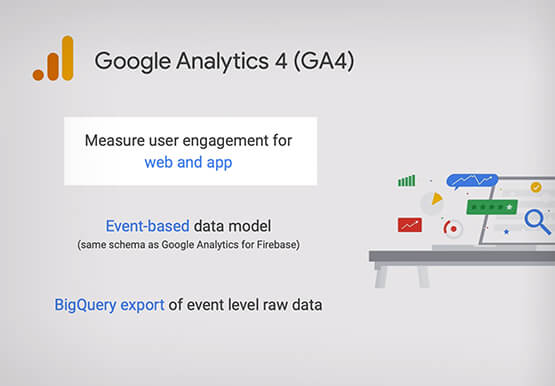
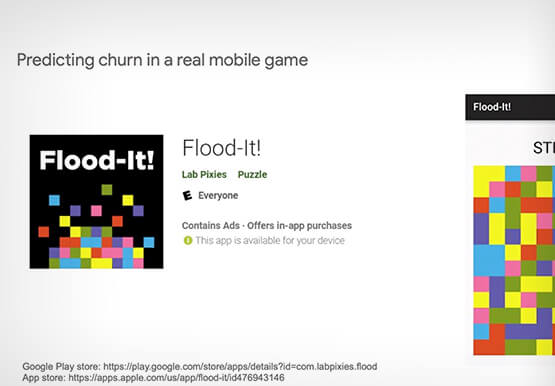

Predict User Churn on Gaming Apps with Google Analytics Data using BigQuery ML
User retention can be a major challenge for mobile game developers. According to the Mobile Gaming Industry Analysis in 2019, most mobile games only see a 25% retention rate for users after the first day. To retain a larger percentage of users after their first use of an app, developers can
Google Cloud Next ’22 to Commence in October: Block Your Calendar!
We’re excited to announce that Google Cloud Next returns on October 11–13, 2022. Join us for keynotes from industry luminaries and engage live with Google developers. Explore dynamic content across various learning levels, and dive deep into technologies and solutions spanning the Google Cloud and Google Workspace portfolios. Participate in breakout sessions,

Google Announces New Cloud Region in Israel to Meet Growing Customer Demands
Google has long looked to Israel for globally impactful technologies including popular Search features, Waze, Live Caption, Duplex and flood forecasting. At our Decode with Google 15RAEL event last week, we celebrated 15 years of Google innovation in Israel and our longstanding support of the country’s vibrant startup ecosystem. Over the years, we’ve expanded our enterprise

Application Modernization Made Easy
Modernizing apps on the cloud isn’t an “all or nothing” decision. Businesses want the option to modernize on-premises or choose multi-cloud solutions that meet their needs. That’s why we created a new solution for running apps anywhere – simply, flexibly, and securely. Embracing open standards, Anthos lets you run your applications, unmodified,
