





Create and Protect Admin Accounts

4872
Of your peers have already read this article.
1:30 Minutes
The most insightful time you'll spend today!
Setting up your new cloud infrastructure is scary. Extra scary when you realize that someone (is it gonna be you?) gets to have phenomenal cosmic power over the whole thing.
Yes, I’m talking about the admin account, and today we’ll dig into why they are important, dangerous and different.
When the team at pistach.io got their nuts-as-a-service business growing fruitfully, they knew they needed to think carefully about admin accounts. These people would have tremendous control over their use of Google Cloud, and they could potentially cause very big problems if any were compromised. Definitely resources that require a protective shell.

Early in pistach.io’s development, an employee named Walter Nutt wanted to play a prank by changing his co-worker’s profile photo from an almond to a peanut (pretty devious, since a peanut is actually a legume). He didn’t have access to his friend’s computer, but he did have access to the company’s Cloud Storage bucket. While searching for the profile photo in question, Wally inadvertently deleted the entire contents of the bucket!
As he searched for ways to restore its contents, Wally modified access to two other pistach.io buckets. The company was ground to a halt for a week while teams worked to crack through the permissions issues.
Time to rethink permissions a bit, so this couldn’t spoil their buttery smooth operations in the future.
Following the resource manager guide, the team made a super admin email address that wasn’t tied to a particular individual or Workspace account, and secured it with strong multi-factor authentication. This would be their backup in case an admin account were to be compromised, so they could recover and repair.
The team already uses Google Workspace, so they have an organization set up already. That creation process established initial super administrators, allowing them to create and modify all other resources inside the organization. As they looked toward using Google Cloud, the super administrators could:
- Give the admin role to people, for Cloud
- Act as a point of contact for account recovery
- Modify or delete the organization if needed
Making admin users for the organization allows other people to then flesh out the resources and policies for pistach.io, before they go nuts and give everyone all the permissions. While that would speed things up, it would make it easy for an attacker to crack through the security shell because any account compromise could give ousize access. Yikes!

Instead, the IT leads specified certain people to act as organization admins, and then gave them permissions to:
- Define Identity and Access Management policies
- Structure the Resource Hierarchy
- Delegate control of specific Cloud elements to others on the team
Once those organization admins were set up, they could give management and oversight of Compute, Storage, Networking and other resource types to the relevant leads, making sure each person had just the right amount of permission for the role they needed to perform. The organization admins don’t have permissions themselves to make these resources. They just delegate.
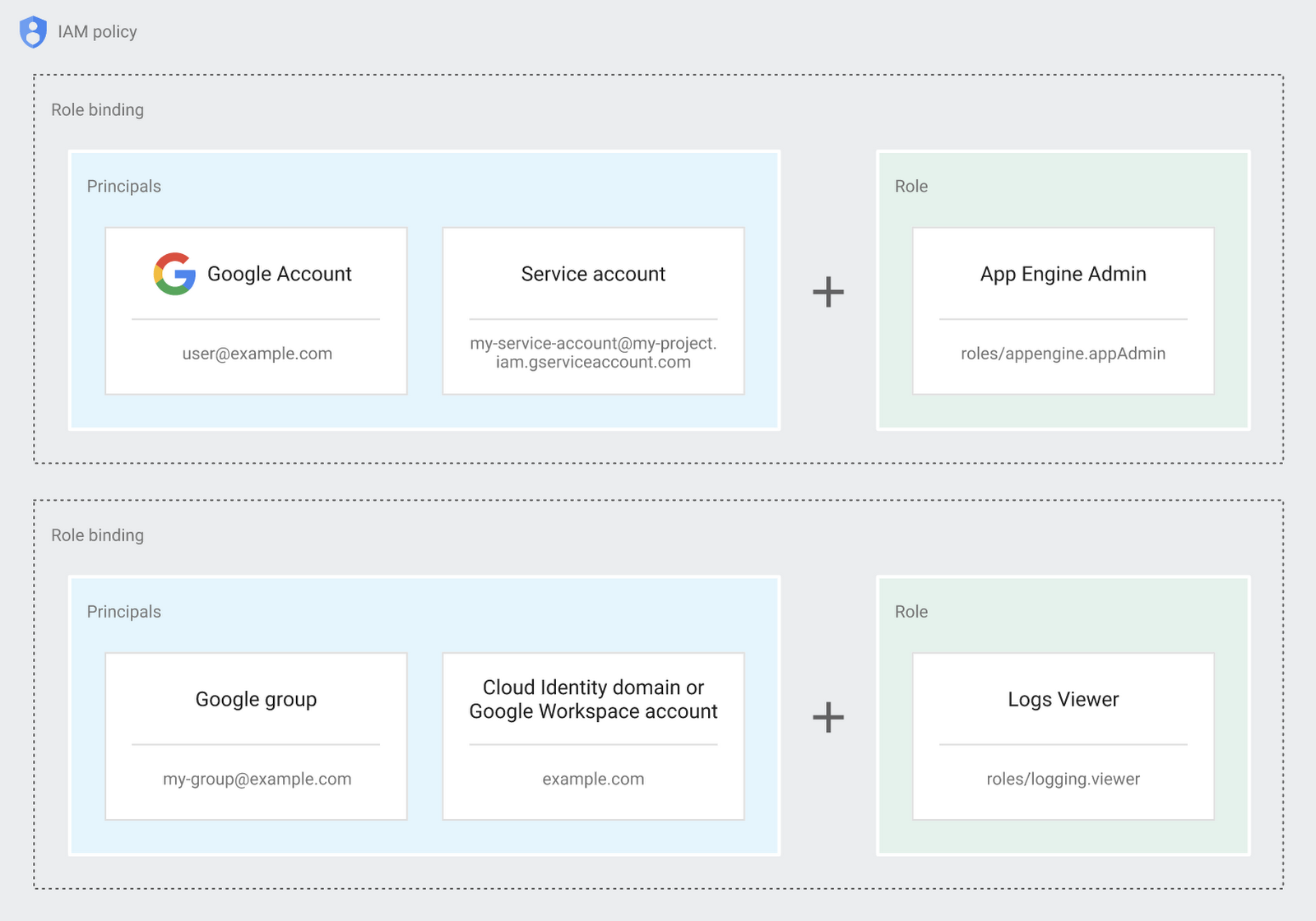
Now each person can accomplish the job they’re responsible for, but doesn’t have overly permissive access. Delegating like this keeps the entire organization safer, and limits the blast radius if someone does manage to break in.
You can go through these steps yourself with this tutorial.
By default the creation of an organization resource for the domain gives everyone the ability to create projects and billing accounts. Once they set up their Organization Admin at pistach.io they decided to remove some of these wide permissions and, in a nutshell, bring everything down to a much finer control. So people could get permissions for a folder or a project, but not the entire organization!
Remember to take care of your admin roles, as they have the power, and responsibility, to cause serious harm if not used safely. Be safe with your Identity and Access Management. And keep your data yours!
Next time we join you we’ll take a crack at creating and provisioning an app to run inside the policies and resource management frameworks created today.
Take a Look at 30 Eventrac Locations!

4936
Of your peers have already read this article.
2:00 Minutes
The most insightful time you'll spend today!
New locations in Eventarc
Back in August, we announced more Eventarc locations (17 new regions, as well as 6 new dual-region and multi-region locations to be precise). This takes the total number of locations in Eventarc to more than 30. You can see the full list in the Eventarc locations page or by running gcloud eventarc locations list .
What does location mean in Eventarc?
An Eventarc location usually refers to the single region that the Eventarc trigger gets created in. However, depending on the trigger type, the location can be more than a single region:
- Pub/Sub triggers only support single-region locations.
- Cloud Storage triggers support single-region, dual-region, and multi-region locations.
- Cloud Audit Logs triggers support single-region locations and the special
globalregion.
Before looking into trigger location in more detail, let’s look at other locations relevant in Eventarc.
What other locations are relevant in Eventarc?
Triggers connect event sources to event targets:
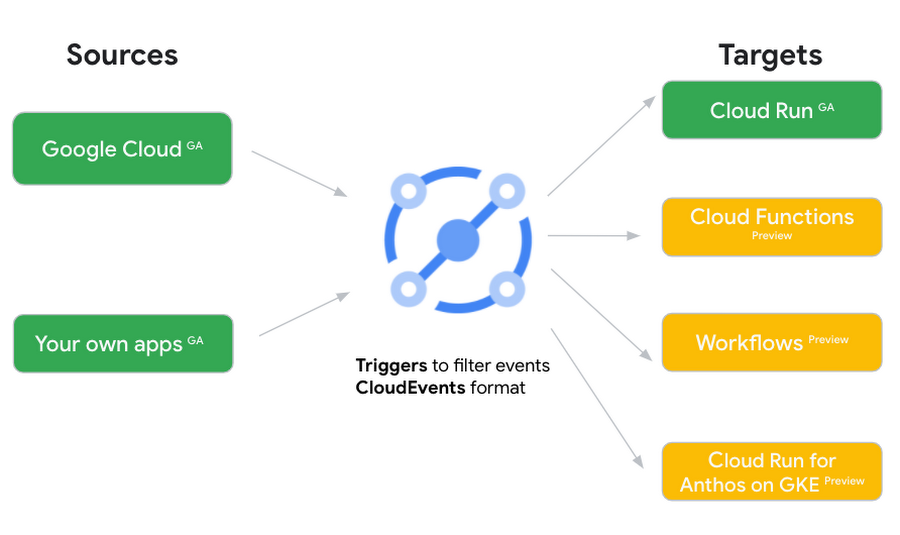
Each event source, event target, and trigger has its own location. Sometimes, these locations have to match and sometimes they can be different.
Here’s an example of a trigger connecting Cloud Storage events from a bucket in the europe-west1 region to a Cloud Run service in the us-central1 region with a trigger located in the europe-west1 region:
gcloud eventarc triggers create trigger-storage \--destination-run-service=hello \--destination-run-region=us-central1 \--location=europe-west1 \--event-filters="type=google.cloud.storage.object.v1.finalized" \--event-filters="bucket=my-bucket-in-europe-west1-region" \--service-account=$PROJECT_NUMBER-compute@developer.gserviceaccount.com
In many cases, you don’t have control over the location of the event source. In the example above, the Cloud Storage bucket is in the europe-west1 region. That’s the location that you need to work with and it has implications for the trigger location (which I’ll get to later).
The location of the event target is the region of the service where you want the events to go. You get to choose this from one of the supported regions when you deploy your Cloud Run service. You typically want this to be in the same region as your event source for latency and data locality reasons (but this is not strictly a requirement). In the example above, the event source (bucket) is in europe-west1 but the event target (Cloud Run service) is in us-central1 as specified by the --destination-run-region flag.
The location of the trigger is dictated by the event source location, but the trigger type also comes into play. It is specified by the –location flag. Let’s take a look at the trigger location for each trigger type in more detail.
Location in Pub/Sub triggers
In a Pub/Sub trigger, you connect a Pub/Sub topic to an event target. Pub/Sub topics are global and not tied to a single region. However, when you create a Pub/Sub trigger, you need to specify a region for it (because Eventarc triggers need to live in a region) with the --location flag as follows:
gcloud eventarc triggers create trigger-pubsub \--destination-run-service=hello \--destination-run-region=us-central1 \--location=us-central1 \--event-filters="type=google.cloud.pubsub.topic.v1.messagePublished" \--transport-topic=projects/your-projectid/topics/your-topic
By specifying a location, Eventarc automatically configures the geofencing feature in Pub/Sub such that events only persist in the specified location. As I noted above, you typically want to (but are not required to) choose the same region for the trigger and the Cloud Run service for lower latency and data locality. You can also use regional Pub/Sub service endpoints to publish to the topic to ensure that all of the data stays in a single region.
Location in Cloud Storage triggers
In a Cloud Storage trigger, you connect a Cloud Storage bucket to an event target. A Cloud Storage bucket can be in a single-region (e.g. europe-west1), dual-region (e.g. eur4), or multi-region (e.g. eu) location. The location of the bucket dictates the location of the trigger and they have to match. The earlier trigger example was for a bucket in the europe-west1 single-region location. Here’s another trigger connecting Cloud Storage events from a bucket in the eu multi-region location. Notice how the location flag matches the bucket region:
gcloud eventarc triggers create trigger-storage \--destination-run-service=hello \--destination-run-region=us-central1 \--location=eu \--event-filters="type=google.cloud.storage.object.v1.finalized" \--event-filters="bucket=my-bucket-in-eu-multi-region" \--service-account=$PROJECT_NUMBER-compute@developer.gserviceaccount.com
If the bucket region and the trigger region do not match, you’ll see an error:
ERROR: (gcloud.eventarc.triggers.create) INVALID_ARGUMENT: The request was invalid: Bucket "my-bucket-in-eu-multi-region" location "eu" does not match trigger location "europe-west1". Try again by creating the trigger in "eu".
Location in Cloud Audit Logs triggers
In a Cloud Audit Logs trigger, you connect any event source that emits Audit Logs to an event target. The location of the event source will dictate the trigger location. This is typically a single region but there is a special global region that’s necessary in some cases.
For example, if you want to read Cloud Storage events from a bucket in the europe-west1 region with an Audit Logs trigger, you will create the trigger with the same location. Note that this will match all buckets in the europe-west1 region as there’s no filter by bucket in Audit Logs:
gcloud eventarc triggers create trigger-auditlog \--destination-run-service=hello \--destination-run-region=us-central1 \--location=europe-west1 \--event-filters="type=google.cloud.audit.log.v1.written" \--event-filters="serviceName=storage.googleapis.com" \--event-filters="methodName=storage.objects.create" \--service-account=$PROJECT_NUMBER-compute@developer.gserviceaccount.com
On the other hand, if you want to match a dual-region or a multi-region bucket such as eu, you will create the trigger with the global location as Audit Logs triggers only support a single or global region. Note that this will match all buckets in all regions globally:
gcloud eventarc triggers create trigger-storage \--destination-run-service=hello \--destination-run-region=us-central1 \--location=global \--event-filters="type=google.cloud.storage.object.v1.finalized" \--event-filters="bucket=my-bucket-in-europe-west1-region" \--service-account=$PROJECT_NUMBER-compute@developer.gserviceaccount.com
As you can see from this example, if you want to read Cloud Storage events, the native Cloud Storage trigger is a much better option, but this example illustrates a typical case in which a global Audit Log trigger is necessary.
That wraps up this closer look at locations in Eventarc. Feel free to reach out to me on Twitter @meteatamel for any questions or feedback.
Google Unveils Topaz, the New Subsea Cable Connecting Asia and Canada

3327
Of your peers have already read this article.
3:00 Minutes
The most insightful time you'll spend today!
There’s a new subsea cable in town: Topaz, the first-ever fiber cable to connect Canada and Asia.
Once complete, Topaz will run from Vancouver to the small town of Port Alberni on the west coast of Vancouver Island in British Columbia, and across the Pacific Ocean to the prefectures of Mie and Ibaraki in Japan. We expect the cable to be ready for service in 2023, not only delivering low-latency access to Search, Gmail and YouTube, Google Cloud, and other Google services, but also increasing capacity to the region for a variety of network operators in both Japan and Canada.
Google is spearheading construction of the project, joined by a number of local partners in Japan and Canada to deliver the full Topaz subsea cable system. Other networks and internet service providers will be able to benefit from the cable’s additional capacity, whether for their own use or to provide to third parties. And, similar to other cables we’ve built, with Topaz we will exchange fiber pairs with partners who have systems along similar routes. This is a longstanding practice in the industry that strengthens the intercontinental network lattice for network operators, for Google, and for users around the world.
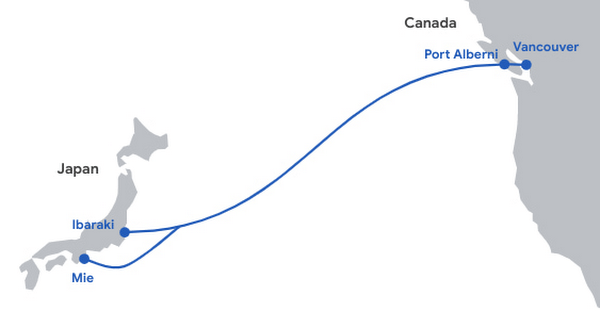
Network infrastructure investments like Topaz bring significant economic activity to the regions where they land. For example, according to a recent Analysys Mason study, Google’s historical and future network infrastructure investments in Japan are forecasted to enable an additional $303 billion (USD) in GDP cumulatively between 2022 and 2026.
The width of a garden hose, the Topaz cable will house 16 fiber pairs, for a total capacity of 240 Terabits per second (not to be confused with TSPs). It includes support for Wavelength Selective Switch (WSS), an efficient and software-defined way to carve up the spectrum on an optical fiber pair for flexibility in routing and advanced resilience. We’re proud to bring WSS to Topaz and to see the technology is being implemented widely across the submarine cable industry.
While Topaz is the first trans-Pacific fiber cable to land on the West Coast of Canada, it’s not the first communication cable to connect to Vancouver Island. In the 1960s, the Commonwealth Pacific Cable System (COMPAC) was a copper undersea cable linking Vancouver with Honolulu (United States), Sydney (Australia), and Auckland (New Zealand), expanding high-quality international phone connectivity. Today, COMPAC is no longer in service but its legacy lives on. The original cable landing station in Vancouver — the facility where COMPAC made landfall on Canadian soil — has been upgraded to fit the needs of modern fiber optics and will house the eastern end of the Topaz cable.
Traditional and treaty rights, and local communities, are deeply important to our infrastructure projects. The Topaz cable is built alongside the traditional territories of the Hupacasath, Maa-nulth, and Tseshaht, and we have consulted with and partnered with these First Nations every step of the way.
“Tseshaht is very proud of this collaboration and our partnership with Google, who has been very respectful and thoughtful in its engagement with our Nation. That’s how we carry ourselves and that’s how we want business to carry themselves in our territory.“ — Tseshaht First Nation – Elected Chief Councillor-Ken Watts
“The five First Nations of the Maa-nulth Treaty Society are pleased that we have concluded an agreement with Google Canada and have consented to the installation of a new, high-speed fiber optic cable through our traditional territories. This agreement, in which both Google Canada and our Nations benefit, is based on respect for our constitutionally protected treaty and aboriginal rights and enhances the process of reconciliation. We would also like to acknowledge the sensitivity that Google Canada expressed during our talks in regard to the pain and trauma experienced by our people as a result of residential school experience. We look forward to a long and mutually beneficial relationship with Google Canada.” —Chief Charlie Cootes, President of the Maa-nulth Treaty Society
“Google’s respect towards our Nation is appreciated and has good energy behind it.” —Hupacasath First Nation – Elected Chief Councilor – Brandy Lauder
With the addition of Topaz today, we have announced investments in 20 subsea cable projects. This includes Curie, Dunant, Equiano, Firmina and Grace Hopper, and consortium cables like Blue, Echo, Havfrue and Raman — all connecting 29 cloud regions, 88 zones, 146 network edge locations across more than 200 countries and territories. Learn about Google Cloud’s network and infrastructure on our website and in the below video.
4 Steps to a Successful Cloud Migration

3956
Of your peers have already read this article.
2:00 Minutes
The most insightful time you'll spend today!
Digital transformation and migration to the cloud are top priorities for a lot of enterprises. At Google Cloud, we’re working hard to make this journey easier. For example, we recently launched Migrate for Compute Engine and Migrate for Anthos to simplify cloud migration and modernization. These services have helped customers like Cardinal Health perform successful, large-scale migrations to GCP.
But we understand that the migration journey can be daunting. To make things easier, we developed a whitepaper on application migration featuring investigative processes and advice to help you design an effective migration and modernization strategy. This guide outlines the four basic steps you need to follow to migrate successfully and efficiently:
- Build an inventory of your applications and infrastructure: Understanding how many items, such as applications and hardware appliances, exist in your current environment is an important first step.
- Categorize your applications: Analyze the characteristics of all of your applications and evaluate them across two dimensions: migration to cloud, and modernization.
- Decide whether or not to migrate an application to the cloud: Not all applications should move to the cloud quite yet. The whitepaper lists the questions to ask to determine whether or not to migrate a given application.
- Pick your migration strategy: For the applications you decided to migrate, decide on your ideal strategy—pure lift and shift, containers, cloud managed services, or a combination thereof.
There’s a lot to consider when you start thinking about digital transformation, and every cloud modernization project has its nuances and unique considerations. The secret to success is understanding the advantages and disadvantages of the options at your disposal, and weighing them against what you want to transform and why. To learn how to migrate and modernize your applications with Google Cloud, download this whitepaper.
Manhattan Associates and Google Cloud: How the Partnership Accelerates Future of Digital Retail

4974
Of your peers have already read this article.
1:30 Minutes
The most insightful time you'll spend today!
While the shift to digital business and the cloud has been well under way for some years now, organizations today have a new sense of urgency due to COVID-19. Delivering digital transformation is no longer a ‘nice to have’ option, rather, it is an operational imperative. Taking advantage of the infrastructure, platform and solution gains that cloud and microservices architecture provide is a must for brands today.
At Google Cloud, we understand the pressures and challenges organizations of all sizes, across all industries are facing. The pandemic has dramatically impacted global commerce at-large, exposing (for many organizations across multiple sectors) gaps in omnichannel capabilities, business continuity and forecasting plans, not to mention spots in supply chain agility, resilience and responsiveness.
A rapidly evolving consumer-driven commerce landscape has put innovation squarely in the spotlight for supply chain teams all over the world, with the effects of the global pandemic making it increasingly difficult for manufacturers, wholesalers, third party logistics providers and retailers (in particular) to weather the perfect storm of fast-moving consumer trends and a need for ‘always on’ digital innovation.
These same effects have driven increasing interest and uptake of technology like the Manhattan Active® suite of solutions, as well as our own cloud platform; both of which afford organizations the levels of agility, flexibility and scalability needed to insulate their people, processes and long-term business strategies against unforeseen future obstacles such as global pandemics or international trade disputes.
An excellent example of this agility, flexibility and scalability in action is PVH’s response to the global pandemic. One of the most admired fashion and lifestyle companies with such iconic brands as Calvin Klein, TOMMY HILFIGER, Van Heusen, and IZOD, PVH was forced to temporarily close its physical stores and, as a result, experienced a sudden massive increase in online sales. The retailer was able to quickly pivot by adjusting its business rules in Manhattan Distributed Order Management (part of Manhattan Active Omni) to expose store inventory to online consumers and reroute its fulfillment processes. Thanks to Manhattan’s solution delivered through Google Cloud, in a matter of days, PVH was able to leverage both its distribution centers and vast store network to fulfill its online orders.
“The events of 2020 have accelerated retail and ecommerce operations forward,” said David Herridge, executive vice president of Global Value Chain Technologies for PVH. “With quick, creative thinking and the right partner, we were able to pivot operations, satisfy our customers and prepare for the future.”
Manhattan’s products have been recognized for their ability to solve real-world challenges through innovation, and used by many of the world’s top brands to solve some of their most complex commerce and supply chain challenges: the latest recognition is Manhattan’s position as sole leader in the 2021 Forrester Wave™ for Order Management Solutions.
Since December 2018, Google Cloud has been collaborating closely with the team at Manhattan and its ‘always on’, versionless approach to innovation. And, during the last two and a half years, Manhattan has significantly accelerated its cloud-first solutions and market adoption, resulting in tremendous growth in its overall cloud business efforts.
By building cloud native solutions on Google Cloud, the teams at Manhattan continue to deliver the high-performance, elastic, high-redundancy, secure solutions their customers rely on. Moreover, it means both Google Cloud and Manhattan continue to innovate and push the boundaries of what is possible in terms of the supply chain and omnichannel innovations that underpin global commerce – innovation that is needed more now than maybe ever before.
Our commitment to distributed cloud solutions and ongoing innovation, not to mention the fact Google Cloud operates a net carbon-neutral cloud, means that the working partnership between both industry leading teams continues to be a perfect match of brand values; not just from a technology perspective, but also a long-term sustainability and environmental one too.
More information on the partnership can be found here.
3249
Of your peers have already watched this video.
20:00 Minutes
The most insightful time you'll spend today!
The Transformative Journeys of Financial Firms on Google Cloud: Watch Video
The reliance on cloud-based architectures, high performance computing, big data and more are accelerating in the banking, capital, insurance and financial services industries. Google Cloud had a strong role in transforming many businesses especially in the pandemic to smoothly transition into the digital space and understand their customers. Two years since then, financial firms have been able to design better products based on intelligent, real-time insights and leverage many capabilities of Google Cloud to deliver tailored experiences. So, how big of an impact Google Cloud has on the future of the financial services? The answer is huge and endless.
Watch this video to dive into the state of global financial services companies that leveraged modern cloud architecture for their sensitive data, platforms, devices and products while they increase revenues, stay compliant and curb costs.
More Relevant Stories for Your Company

Five Ways Cloud Computing Helps Companies Optimize Operations and Lower IT Costs
There is no one way to recover. The past year has seen unprecedented challenges for business across the world, with social distancing and quarantine measures forcing many organizations to quickly adapt to remote working. A new report from BCG Platinion, titled “Finding a New Normal in the Cloud”, points out that while companies

Google Announced Leader in 2021 Gartner Magic Quadrant for Cloud Infrastructure and Platform Services
For the fourth consecutive year, Gartner has positioned Google as a Leader in the 2021 Gartner Magic Quadrant for Cloud Infrastructure and Platform Services (formerly titled as Magic Quadrant for Cloud Infrastructure as a Service upto 2014 Infrastructure as a Service, or (IaaS). With our customers and communities adjusting to new ways

Transform Your Business: Comprehensive Cloud Services and Tailored Pricing Plans
As the saying goes, “it’s hard to make predictions, especially about the future.” Some organizations find it challenging to predict what cloud resources they’ll need in months or years ahead. Every organization is on its own unique cloud journey. To help, we’re developing new ways for customers to consume and

A Guide to Maximize Business Value with Cloud FinOps
Any organization that has made a significant investments in Paas or IaaS capabilities requires a FinOps (financial operations) strategy. It involves linking their cloud migration business cases with value metrics, creating detailed cost visibility dashboards and having an automated expense control to ensure value realization from the cloud transformation journey.
