





Cloud Computing Boosts Productivity for Small Farms in India

2827
Of your peers have already read this article.
4:30 Minutes
The most insightful time you'll spend today!
About AgroStar
Launched as an on-premises ecommerce platform selling farm supplies in 2008, AgroStar turned to Google Cloud to expand its offering. Today one million small farmers in India use its mobile app to connect to a full-service platform that combines agronomy, data science, machine learning, and analytics to boost yields and improve income.

AgroStar launched a multilingual mobile app using Google Cloud that is helping to boost crop yields and increase income for small farmers in India.
Google Cloud results
- Enables technology modules to speed loan processing, identify crop diseases, and enhance supply chain logistics
- Delivers high rates of analytics processing to serve more customers while improving response times by 85%
- Streamlines deployments with no downtime to free time and resources for new verticals
- Supports knowledge center updates for 1 million mobile devices in near real time by implementing Firebase
An app to boost crop yields and raise income
AgroStar has launched a cloud-based mobile app that is helping to boost crop yields and encourage best practices for small farmers in India. Launched as an on-premises ecommerce platform selling farm tools in 2008, the firm turned to Google Cloud to expand its offering. It now uses cloud-based analytics and is deploying ML models to provide timely advice in five languages on everything from seed optimization, crop rotation, and soil nutrition to pest control.
A 2018 survey underscored the demand for agricultural planning for Indian farmers. While farming remains a dominant sector in India, employing half of its labor force, 70 percent of small farmers – those cultivating fewer than three acres – said their crops are damaged by unforeseen weather and pests. An even higher number – 74 percent – say they lack access to farming-related information.
Widening that gap is the relative lack of access to new, higher yield seeds and improved soil analyses for small farmers, who must otherwise rely on traditional methods. “It could take a few years for innovative information to trickle down from universities to small, grassroots farmers,” says Pritesh Gudge, AgroStar Software Engineer. “Today, just by clicking through our Android application, farmers learn about new, effective farming practices and receive advice customized to their crop and soil.”
Connecting a million farmers in the cloud
Operating in the Indian states of Gujarat, Maharashtra, Rajasthan, Orissa, Bihar, and Karnataka, AgroStar is closing the knowledge gap with a full-service, cloud-based SaaS solution – the only one of its kind in India. It combines agronomy, data science, and analytics to help farmers by providing a variety of resources.
AgroStar has reached over a million farmers through its Android app, the AgroStar Agri-Doctor. The mobile client is available as a web-based or full-featured native app. Both provide access to the firm’s knowledge base hosted on Google Cloud, a Q&A forum that connects farmers to each other to help understand and better solve problems and to learn about innovative practices and products. Farmers can also click through to follow local and national market trends that help forecast crop prices.
In addition to the self-service knowledge base, AgroStar provides access to agronomy experts who use cloud-based analytics tools and historical data to provide season-and locale-specific advice to each farmer. “We are now tracking thousands of calls in 5 languages each day,” says Pritesh.
The AgroStar app also provides links to purchase and then track the delivery of farm tools and supplies such as cultivators and fertilizers. An in-house platform manages fulfillment centers and a doorstep delivery network simplifies the supply chain while giving farmers what they need, when they need it. By procuring directly from the manufacturers and primary distributors of farm supplies, Agrostar is achieving cost savings, which it passes on to farmers.
Build fast, pivot faster
From the start, the human and environmental variables of farming in India, not to mention the volume of AgroStar’s few hundred thousand monthly active users, made a highly scalable cloud-based solution inevitable. Farmers rely on the firm’s Agri-Doctor app to provide advice in multiple languages on topics that range widely throughout three growing seasons, each with distinct crop nutrition and rotation cycles and farm implementation requirements.
Ending late-night deployments
The firm’s first cloud experience was with an AWS solution. At the time, AWS was the only cloud provider in India, but AgroStar wanted to find a solution that was easier to use and offered better integration with Android devices. “Deployment and processing costs were very high, and the developer tools and documentation were not as intuitive as we needed,” says Pritesh.
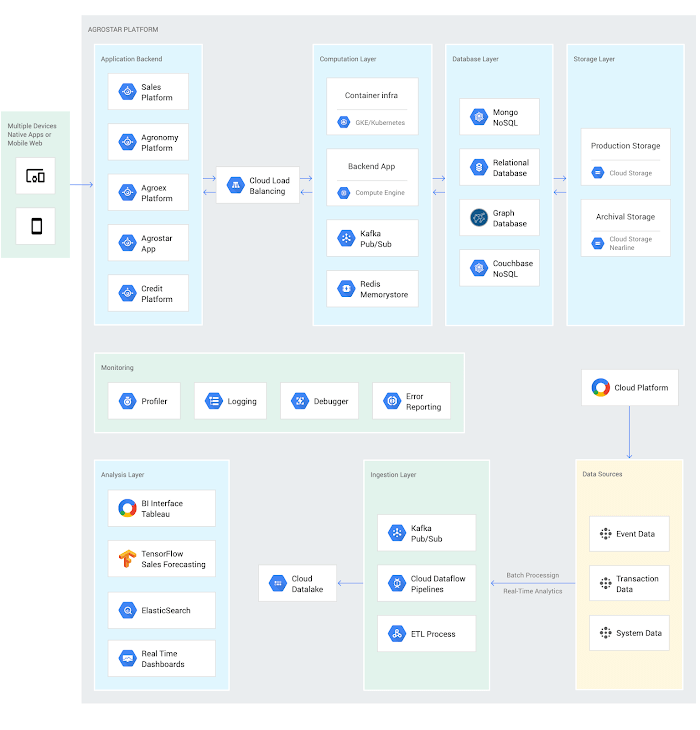
When Google Cloud service arrived in India in October 2017, AgroStar embarked on a platform re-implementation that made possible dramatic changes in the way it developed and deployed its solution. Using Google Kubernetes Engine (GKE) for crop advice management and Compute Engine for its production application services, the firm built the backend for the Agri-Doctor discussion forum in only three weeks. The platform’s microservice architecture is implemented in Python and Golang and deployed on Google Cloud.
AgroStar began to realize significant efficiencies in its build, deploy, and test cycles. “We previously needed to work overnight to deploy to production,” says Pritesh. “Now using Google for Kubernetes containers and a rolling update strategy, we can deploy during the day without any problems or interruptions to service.”
The move to Google Cloud streamlined AgroStar’s stack. “We were running 12 independent instances on AWS,” says Pritesh. “With Google Kubernetes Engine, we are deployed on a single cluster at a cost savings of $1,300 per month and growing.”
Improving customer response times by 85 percent
With a managed deployment capability, AgroStar can devote more time and resources to executing on its platform and Agri-Doctor app development plan. A strategic goal was managing customer response times as the firm grew its base. Google Cloud has helped the firm meet that goal, achieving an 85 percent improvement in customer response times even as traffic grew significantly.
“With our on-premises solution, we could handle around 100 customers daily, which took 30 to 50 minutes for each customer,” says Pritesh. “We now handle thousands of customers daily, taking only 4 to 5 minutes for each one.”
AgroStar used Firebase to implement its Agri-Doctor app. A real-time cloud database, Firebase provides an API that enables the Agri-Doctor advice forum to be synchronized across all its far-flung mobile clients, effectively sharing knowledge base updates with one million users in near real time.
Using cloud tools to manage and monitor
Cloud Pub/Sub, Kafka, and Cloud Dataflow manage data ingestion and queueing of event and transaction data to the analytics layer. BigQuery fetches and persists data to Cloud Storage. Cloud SQL and dashboards powered by Tableau deliver farmer crop and soil profiles within minutes.
Cloud IAM helps AgroStar control access to all its cloud resources. And Stackdriver, the integrated logging aggregation capability for Google Cloud, helps monitor and speed debugging on every tier of the AgroStar solution.
Machine learning to enhance yields
AgroStar is developing a variety of ML components to improve responsiveness and extend its platform offerings.
To speed up the diagnosis of and treatment for crop blight, AgroStar is building a deep learning pipeline using TensorFlow. The pipeline relies on GoogLeNet models that use multi-layered convolutional visual pattern recognition. It will assess uploaded images to support a disease-detection capability on the mobile app. Based on the commercially successful AI algorithms that automated postal code processing, GoogLeNet offers improved performance and computational efficiencies by using a creative layering technique that distinguishes them from older, sequential recognition engines.
To improve its customer search experience, AgroStar is developing an ML pipeline that shrinks fetch times by suggesting tags mapped to stored data. Processed using TPUs, Cloud Natural Language and Video AI, the tags provide a metadata layer that supports queries in any of the ten natural languages that AgroStar farmers can use.
The AgroStar search pipeline consists of Long Short-Term Memory (LSTM) models of Recurrent Neural Networks. Recurrent networks exhibit “memory” through iterative processing and are distinguished from feedforward networks by a feedback loop connected to their past decisions, ingesting their own outputs moment after moment as input.
Implementing a recommendation engine
The firm is also adapting the Random Forests TensorFlow AI model to develop a crop and product recommendation engine. The model is trained by consuming numerical (rainfall, humidity, water availability per acre) and categorical (soil type, water sources) parameters to suggest appropriate products by season, region, and locale.
To simplify the product suggestion experience, AgroStar developers are testing Cloud Dialogflow, the Google Cloud conversational interface, to build a chatbot capability into its mobile app. The bot will track a farmer’s crop schedules and answer simple questions by linking to the recommendation engine.
AgroStar is also extending its analytics platform with AI-powered sales planning and forecasting. Using linear regression models implemented in TensorFlow and powered by Cloud ML Engine, the capability will enhance supply chain logistics as the company scales its operations across India.
To provide a credit on-demand offering for a range of seed-to-harvest cycle products, AgroStar is attempting to use Vision API to create an AI model that will convert uploaded photos of customer application records into standard data formats. The firm’s credit policy features a grace period in which farmers begin paying back loans after harvested crops go to market.
A versatile and friendly development ecosystem
AgroStar credits the convivial tools and documentation that Google Cloud offers and its incremental, pay-as-you-go pricing model for both the firm’s success and its ability to manage growth.
“What Google Cloud offers is extremely good documentation and extremely simple-to-use tools and interfaces across all services,” says Pritesh. “It helped us initially deploy our platform and at every scale that we have required since then, and its cost effectiveness enabled us to staff up to meet new feature milestones.”
Contributors to this story
Pritesh Gudge: AgroStar Software Engineer. Pritesh was formerly a founder of Bauersafe, a farm protection solutions startup, and First Fit, a startup that focuses on mobility and functional techniques to promote general fitness and recovery. Pritesh earned a B.S. in Computer Science and Engineering at the Birla Institute of Technology and Science as well as degrees in Robotics and Deep Learning from Udacity.
Revamping Cloud Security: Google Introduces Attack Path Simulation to Security Command Center

1169
Of your peers have already read this article.
3:30 Minutes
The most insightful time you'll spend today!
To help secure increasingly complex and dynamic cloud environments, many security teams are turning to attack path analysis tools. These tools can enable them to better prioritize security findings and discover pathways that adversaries can exploit to access and compromise cloud assets such as virtual machines, databases, and storage buckets.
Other attack path tools rely on static, point-in-time snapshots of an organization’s cloud footprint, which often contain sensitive data about their environment, how it is configured, and where the most sensitive data resides.
At Google Cloud, we are taking a different approach. We are excited to announce today at the Google Cloud Security Summit that we are adding attack path simulation to Security Command Center, our built-in security and risk management solution for Google Cloud. This new risk management capability automatically analyzes a customer’s Google Cloud environment to pinpoint where and, importantly, how vulnerable resources may be attacked, so security teams can stay one step ahead of adversaries.
We expect attack path simulation capabilities to be available in Security Command Center Premium later this summer.
Unlike some third-party security products, Security Command Center continuously scans an organization’s cloud environment gathering near real-time data about cloud resources and security vulnerabilities. Our attack path simulation engine uses this information to automatically generate and render high-risk attack paths, without the hands-on toil of having to repeatedly run manual queries.
A different approach to attack path analysis
Other attack path analysis tools involve significant operational toil. The static, point-in-time snapshots that these tools generate have to be sent to an external provider, which can add risk. Then security teams have to follow up with complex queries before they can identify likely attack paths.
Google Cloud’s advanced attack simulation engine leverages our first-party, agentless visibility of Google Cloud assets, the relationships between assets, and the current state of defenses. Attack path simulation is fully automated with no need to manually run queries. Simulations run in the Google Cloud environment, and do not send snapshots outside your environment, avoiding exposure of sensitive information.
See what attackers can see
Effective attack path analysis should mimic how a real-world attacker can reach and compromise high value resources. This is why Security Command Center simulates how attackers try many different ways to infiltrate a cloud environment. SCC then generates attack path graphs to give defenders insight into how adversaries could exploit a single security weakness or various combinations of security vulnerabilities to access valuable assets. SCC also provides detailed information on how to remediate issues and shore up defenses based on its findings
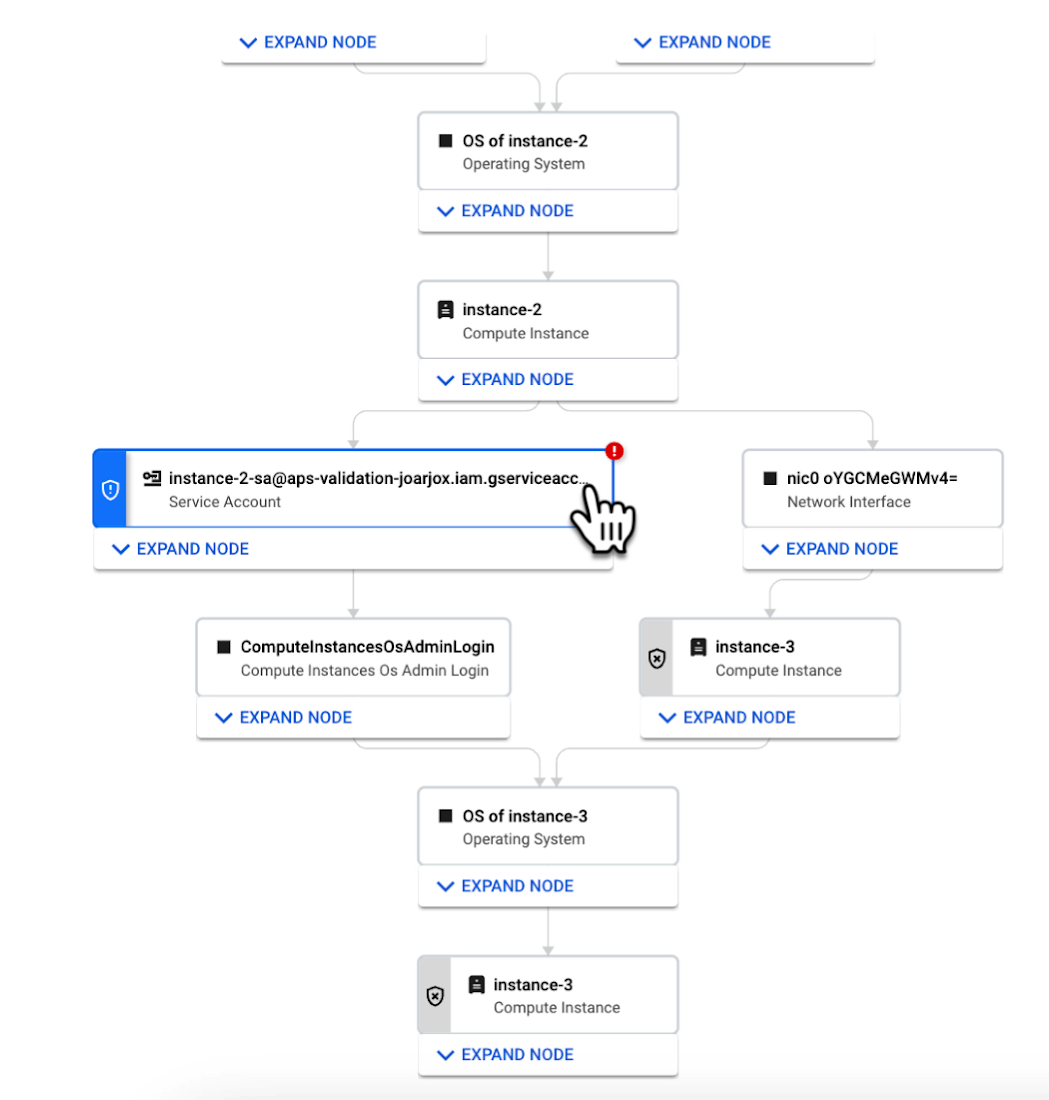
We are delivering combined attack path simulation and analysis as a managed service. There are no agents to install or manage. Results automatically reflect changes in your organization’s Google Cloud environment. Because our attack path simulations are conducted on models of an organization’s cloud resources, there is no performance or operational impact to the live production environment.
Better security prioritization
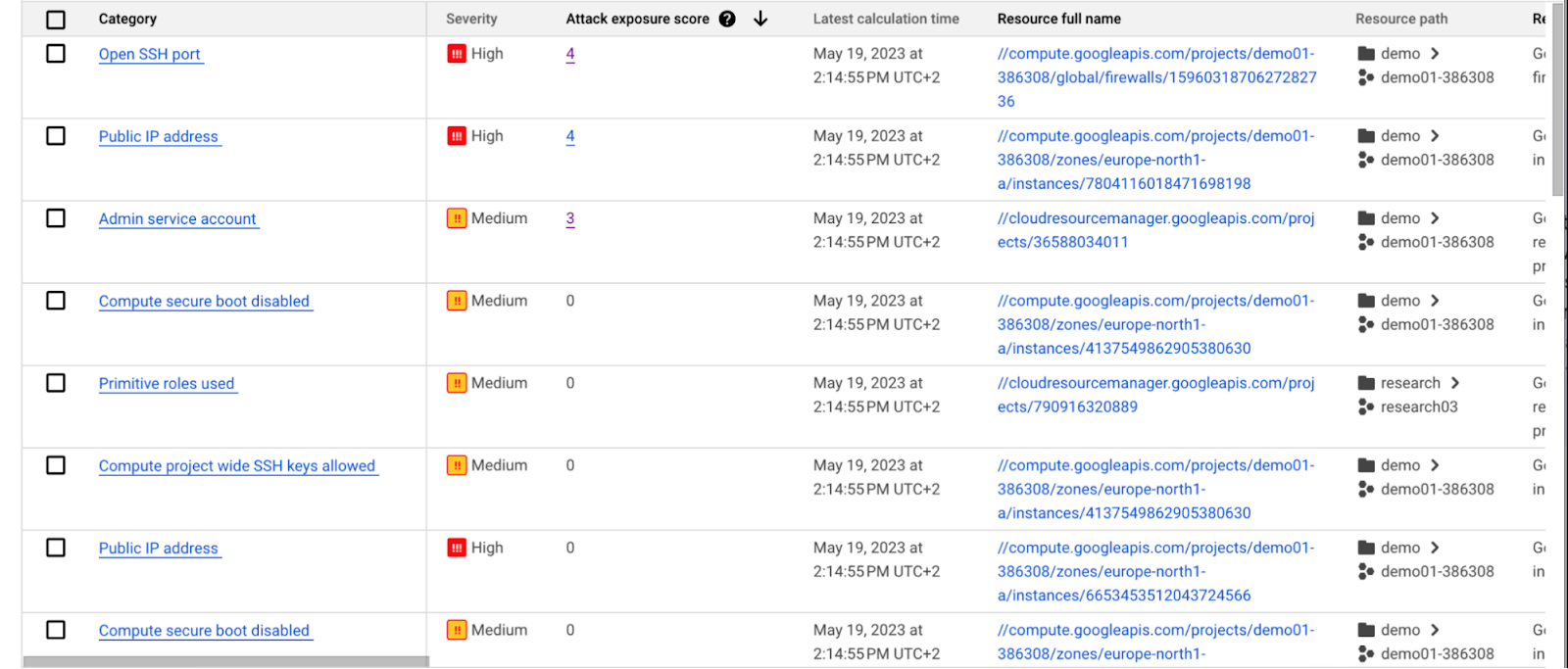
Security Command Center automatically computes an attack exposure score for misconfigurations and vulnerabilities that expose valuable resources to attackers. The score is a measure of cyber risk. It takes into account how exposed valued resources are, and the paths of least resistance for attackers to reach those resources.
Security teams can use these scores to prioritize remediation efforts and improve their overall risk posture.
How attack path analysis has already reduced risk for customers
Dozens of customers have already used our attack path capabilities in private Preview to improve their security posture and reduce their operational risk.
Security Command Center alerted one customer to a finding with a high attack exposure score. The finding was related to a service account whose keys were not being rotated. After reviewing the attack paths related to this finding, the cloud security manager discovered that even though the service account was named “test,” it provided access to storage buckets outside of the test environment.
If an attacker had been able to steal the credentials for this test account, they could have easily accessed production data. The security manager removed administrator privileges on the account. The attack path simulation enhanced their understanding of the severity of the finding, and helped convince them to make it a high-priority fix.
Another customer using attack path simulation needed to assess which security findings created the greatest risk. Two findings related to the same service account with high exposure scores rose to the top of the list. The attack paths revealed that the service account had access to more than 500 storage buckets. If an attacker were to gain access to this account they would be able to read, write, or delete data across any of those buckets, many of which contained sensitive business data and confidential customer information.
Using Security Command Center’s attack path results, the security team remediated the risk by limiting permissions to the storage buckets needed for that specific role.
Next steps
Attack path simulation capabilities are planned for availability later this summer. We expect forthcoming enhancements to use Security AI Workbench to translate complex attack graphs to human-readable explanations of attack exposure, including impacted assets and recommended mitigations.
You can learn more about Nordnet Bank’s experience using attack path simulation at our Security Summit session. To get started with Security Command Center today, please go to the Google Cloud console.
Stop Cribbing About Shadow IT and Start Taking Charge Now

3667
Of your peers have already read this article.
2:20 Minutes
The most insightful time you'll spend today!
Employees use tools at their disposal to get work done, but if these tools (often legacy) hamper collaboration or are inflexible, they’ll turn to less secure options for the sake of convenience. According to Gartner, a third of successful attacks experienced by enterprises will come from Shadow IT usage by 2020.
And this problem is not unknown. Eighty-three percent of IT professionals reported that employees stored company data in unsanctioned cloud services, a challenge especially apparent with file sync and share tools. When people work around their legacy systems to use tools like Google Drive, it’s often because they find their current systems to be clunky or that they can’t collaborate with others as easily. They’re unable to do three key things in legacy file sync and share systems (like Microsoft SharePoint):
1. Unable to work on their phones. By now, people expect to be able to work on the go—and this means not just opening an attachment, but actually making edits to and comments on work. It gives them freedom to work when it’s convenient for them and to help teammates anytime.
2. Unable to create workspaces independently and easily. This might sound counterintuitive, but if an employee needs to contact IT to have a new project folder made on a drive, the bar is too high. Employees need to be able to quickly, and independently, create documents that can be shared simply because of the changing nature of collaboration. Work happens ad-hoc, on the go (like we mentioned above), and with people inside and outside of your organization. If someone has to contact IT to create a new folder, they’re more likely to neglect the request or use a different tool altogether to get started.
3. Unable to make the data work for them. Traditional file storage is just that, storage. Like an attic, we store things in these systems, but at some point stuff gets stale and it’s hard to tell what we should keep or pitch. People need their storage systems to not only house their data, but to help them categorize and find information quicker so that they can make this data work better for them.
You have two choices when it comes to making a decision on file sync and share systems:
Option 1: Continue to let your employees work on unsanctioned products, some of which may open your business up to unintended security issues (and, in some instances, scary terms of service).
Option 2: Buy the tools that your users want to use because these tools are making them more productive.
If you want to create a more productive workforce, take cues from your employees. Your tools should not only meet the highest security standards for IT, but let people work the way they want to (and be intelligent enough to guide them along the way).
Imagine if your technology could flag that a file contains confidential information before an employee accidentally shares it. Or surface files as they’re needed to help people work faster. Google Drive does this.
Remember, if the technology doesn’t suit your employees, they’re just going to work around it anyway. Instead of investing time and resources on routine maintenance, shift this energy toward helping your employees stay productive in ways that work for both you and them.

The Many Risks of Ignoring the Impact of a Tighter Cloud Security Framework
DOWNLOAD WHITEPAPER3244
Of your peers have already downloaded this article
3:30 Minutes
The most insightful time you'll spend today!
The perimeter has disappeared and access to company data is no longer limited to your physical office or your employees. Instead, in today’s transformed workforce – increasingly connected, collaborative and in the cloud – the security perimeter has become dispersed and elastic, wrapped around each user and device.
Moreover, ‘users’ no longer refers to simply employees, but also vendors, partners, contractors, and customers. Each of these groups has its own requirements – access to different information and applications, from different locations and different devices. In this ever-evolving ecosystem of users, apps, and devices, traditional approaches to identity and access management aren’t ready for this new environment.
Time-consuming and complex, these approaches were built for the on-premise world (think cumbersome VPNs, limited device access and inconvenient authentication), instead of today’s cloud-first world.
Organizations are also facing increased pressure for digital transformation, higher compliance standards to prevent the loss of company data, and more sophisticated cyber-attacks – it’s no wonder organizations are grappling with these unprecedented pressures. Clearly, a new approach to identity management is needed.
That’s where Cloud Identity can help – an identity, access and device management (IAM/EMM) platform that helps organizations maximize user and IT efficiency, protect company data with Google-grade security, and transition to a digital workspace at their own pace.
Chrome OS’s Hybrid Work Model Powers Google’s Return to Work Strategy

7500
Of your peers have already read this article.
1:30 Minutes
The most insightful time you'll spend today!
The pandemic continues to deeply affect our lives around the globe. In some places, new cases are surging and returning to work is the last thing on people’s minds. In other areas, conditions are improving and companies are starting to think about transitioning their workforce back to the office.
Exactly when and how to do this remains complex and varies by country, industry, and company. What’s certain is that hybrid work will become an essential part of the business world moving forward. And finding solutions that bridge the gap between “in-person” and “somewhere else” are crucial.
At Google, we’ve been focused on what the hybrid transformation means for us. To prepare for hybrid work, using modern solutions is a key enabler.
Chrome OS: Supporting Google’s return to office strategy
At Google, we’ll move to a hybrid work week where most Googlers spend approximately three days in the office and two days wherever they work best. It’s no surprise that as the modern, secure, cloud-first platform, Chrome OS is playing a key role in our transition to a hybrid work model. Because Chrome OS devices can easily be shared, more flexible working models and spaces are now possible. And with user profiles stored in the cloud and collaboration solutions like Google Workspace, employees can log in to any Chrome OS device, access what they need and pick up where they left off.
Here are just a few ways we are using Chrome OS and its tools to support the return to the office:
- In select office locations, Googlers can reserve desks through an internal booking tool set up with a high-performance Chromebox, keyboard, mouse, and monitor. Employees can log in to the Chromebox which syncs their cloud profile, and start working with the same environment they have on all their Chrome OS devices.
- We’re announcing new docking stations that are designed for Chrome OS devices and allow employees to bring in their Chromebook from home, connect to the dock with one USB-C cable, and use a monitor, keyboard, and mouse for a full desktop experience.
- Every Chrome OS device enables a zero-trust security working model with BeyondCorp Enterprise providing our workforce with simple and secure access to applications while providing additional security controls for IT.
- We’ve deployed the new Chrome OS Readiness Tool to our extended workforce to identify employees that are able to switch to Chrome OS. This allows us to expand the latest security, deployment, and manageability benefits to more of the workforce.
Additional ways Chrome OS is helping organizations with return to office
We aren’t the only ones supporting our return to office and hybrid work strategy with Chrome OS. We’ve heard more ways our customers are using Chrome OS to make the transition as smooth as possible. These include:
- Streamlining deployment and management of Chrome OS devices using zero-touch enrollment which allows devices to automatically enroll into a corporate domain without IT configuration.
Grab & Go Chromebooks being used for frontline and hybrid information workers, allowing employees to grab a Chromebook from a cart and get to work right away. - Parallels Desktop for Chrome OS being deployed to allow employees to access Windows or legacy apps locally on their Chrome OS devices.
- Existing Windows and Mac devices being modernized and repurposed to run a Chrome OS experience using CloudReady. (Google is currently offering a CloudReady promotion. Learn more here.)
While the Chrome OS team has been working towards making remote working as seamless as possible for IT, we’ve also made advancements in supporting traditional technology that’s required in the office.
- In October, we announced Chrome Enterprise Recommended: a collection of identity, printing, productivity, communications, and virtualization solutions that are verified to run great on Chrome OS.
- With the increased usage of video conferencing on Chrome OS devices, we’ve made improvements to Google Meet and Zoom performance including camera and video improvements to reduce any unnecessary processing and features that intelligently adapt to your device, your network, and what you are working on.
- For improved access to Windows and legacy apps, VMware Horizon introduced multi-monitor support and USB redirection and Citrix Workspace released a tech preview with webcam enhancements and Microsoft Teams optimizations.
- We integrated with the Okta Workflows platform, so IT administrators can include Chrome OS in it’s access logic and deploy quickly without code. Recently, we’ve added the ability to require users to reauthenticate on their Chrome OS device once Okta has detected that the user has changed their password. Try out this new capability by signing up for our Trusted Tester program.
- We’ve increased our support for direct IP printing with additional printer models since the beginning of 2020. In addition, we have made improvements to management features, including support for multiple print servers and launched policy APIs to provide a better IT admin experience.
Join us for a digital event with Modern Computing Alliance and its newest member HP
Last year we announced the launch of the Modern Computing Alliance—a collaboration of industry leaders including Box, Chrome Enterprise, Citrix, Dell, Google Workspace, Imprivata, Intel, Okta, RingCentral, Slack, VMware, and Zoom aim to create the pioneering solutions that businesses need. We are thrilled to introduce HP, who brings their innovative hardware and enterprise hardware expertise to the Modern Computing Alliance and has been working closely with the alliance to ensure true silicon-to-cloud innovation.
As an alliance, we’ve been deeply engaged in the hybrid work shift. We invite you to join us for a digital event where we discuss questions about returning to work. Like how product design can encourage participation and collaboration regardless of where employees are, important security issues to keep in mind, and what factors businesses should consider to support a safe, working environment.
Home. Heading back. Hybrid.
Hear from the experts on hybrid work and return to office.
Date: May 20th, 2021
Register here.
If you are ready to try Chrome OS today, it’s easy to get started. You can contact us to get connected to a partner, sign up for a free 30-day trial of Chrome Enterprise Upgrade to start managing Chrome OS devices, or deploy the Chrome OS Readiness Tool to identify employees that are ready to switch to Chrome OS.POSTED IN:
Manage IAM permissions with the Google Cloud mobile app

1215
Of your peers have already read this article.
2:00 Minutes
The most insightful time you'll spend today!
What’s new with Permissions Management on the Cloud Mobile App
Identity and Access Management (IAM) is the foundation of a strong cloud security posture, ensuring that the right access and permissions for cloud resources are granted across your organization. The Google Cloud mobile app gives cloud administrators the ability to quickly and easily manage their organization’s cloud identities and access from the mobile platform of their choice.
Permissions management is one of the top user-requested features for the Cloud mobile app based on feedback we’ve received. The Permissions tab is used by more than half of our mobile users every month, highlighting the importance of easily managing permissions on-the-go.
We are excited to announce the availability of enhanced permissions management on the Google Cloud mobile app. This new capability enables you to easily view, assign and search for all the roles in your organization.
Manage permissions easily on-the-go
The Cloud mobile app has expanded beyond supporting the three basic roles of Owner, Editor, and Reader, to supporting all the roles in your organization. Administrators are not only able to see all the roles but also assign these roles across their organization:
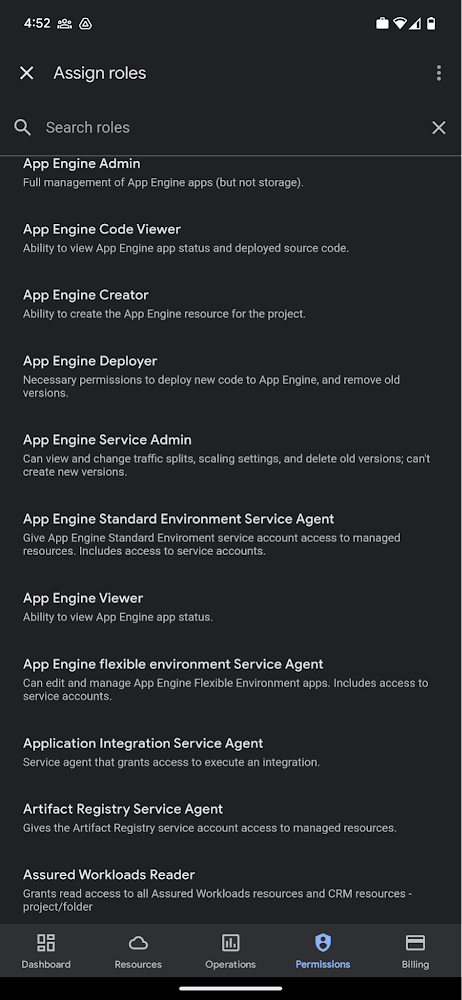
Administrators can also easily view a list of users, and click into each to see all the roles assigned to each user. On top of that, you can easily leverage the search capability to check if a role is assigned and modify its assignment. You can even assign multiple roles at the same time for easy editing. The app will show you a summary of changes before you will proceed.
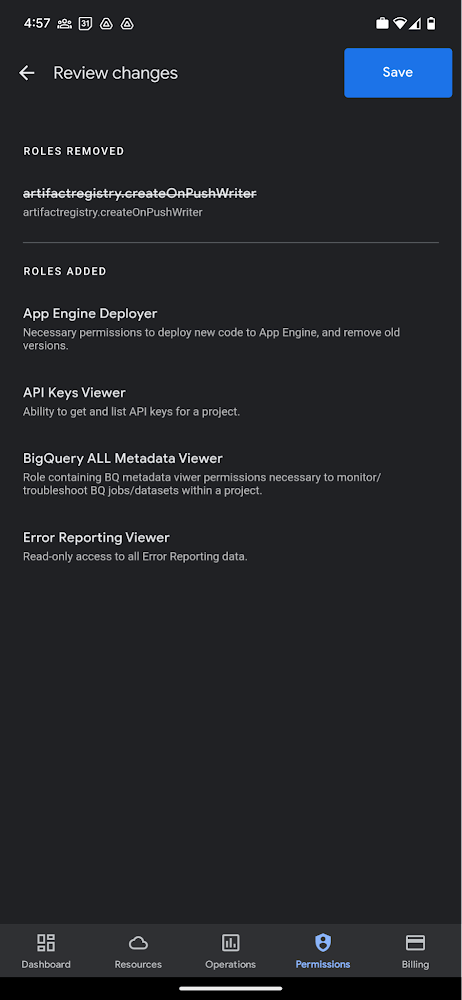
The layout is optimized for mobile, with the categories of information organized for easy viewing. Currently assigned roles are always displayed on the top of the screen so they are easily accessible. Basic roles appear below, followed by all other roles grouped by Google Cloud products.
Get started on the Google Cloud app today
To summarize we’ve enhanced permissions management on the Google Cloud mobile app with:
- Smoother navigation
- Support for all the roles in your organization
- Easy search for assigned roles
- Ability to review changes before applying
Give enhanced permission management a try and explore the possibilities by downloading the app today from Google Play or the Apple App Store. If you have any feedback, we would love to hear from you – simply click on the “send feedback” button in the app to share your experience.
More Relevant Stories for Your Company

Vodafone Leverages Google Cloud to Aid COVID-19 Frontline with Anonymized Insights on Population Mobility
Editor’s note: When Europe’s largest mobile communications company, Vodafone, was asked by the European Commission to help understand population movement across the European Union and the UK to help fight COVID-19, it was able to provide anonymized mobile network-based insights to answer the call. Here’s how Vodafone, with the support

The {$persona} Survival Guide: A Roadmap for Successful Transformation
Part of being a security leader whose organization is taking on a digital transformation is preparing for hard questions – and complex answers – on how to implement a transformation strategy. In our previous CISO Survival Guide blog, we discussed how financial services organizations can more securely move to the

Confidential Computing: Google Cloud Security, Project Zero and AMD Come Together to Secure Sensitive Workloads
At Google Cloud, we believe that the protection of our customers’ sensitive data is paramount, and encryption is a powerful mechanism to help achieve this goal. For years, we have supported encryption in transit when our customers ingest their data to bring it to the cloud. We’ve also long supported
Security in the Cloud: Google’s Answer
Protecting a global network against persistent and constantly evolving cyber threats is one of the most important challenges faced by Google Cloud. So, how does Google’s global network protects seven different global businesses, each with over 1 billion customers, including popular Google services such as Google Search, YouTube, Maps, and
