





CCAI Platform goes GA: Deliver World-class CX and Accelerating Time-to-value with AI

2787
Of your peers have already read this article.
2:30 Minutes
The most insightful time you'll spend today!
Customers reach out to contact centers for help in moments of urgent need, but due to increasing demands, new channels, peak times, and operational pressures, contact centers often struggle to provide timely help. To bridge this gap, enterprises are increasingly investing in AI-driven solutions that balance addressing customer expectations with operational efficiency.
But building and generating value from such solutions can be complicated and challenging. Google Cloud built Contact Center AI (CCAI) to streamline and shorten this time to value, and CCAI Platform, our newest addition, takes a crucial step in this effort by introducing end-to-end call center capabilities. After debuting these new capabilities in March, we are excited to announce that CCAI Platform is now generally available across the US, Canada, UK, Germany, France, Italy and Spain—with more markets soon to come.
Delivering world-class customer experiences and accelerating time-to-value with CCAI
CCAI encompasses a comprehensive set of offerings to address the top pain points of the three main user groups in the contact center: contact center owners, their agents, and the customers they serve.
Dialogflow lets the contact center manager scale their operations while balancing cost and customer satisfaction, including reducing painful, long waiting times endured by end users. Using Dialogflow, contact center managers can build complex chat and voice virtual agents—a proven, cost-effective way to scale contact centers while continuing to provide great customer experiences. Available 24/7, without any waiting queue, these virtual agents can converse naturally with customers, identify their issues, and address them effectively.
Agent Assist reduces overall handling time and coaches human agents to become more effective and helpful. The service uses AI to “listen” to the voice and chat conversations between the human representative and the customer, then provides real-time guidance and recommendations to the agent, based on historical conversations, knowledge bases, and best practices of experienced agents. It also automates post-call actions such as transcription and call summarization, saving significant time and overhead at the end of every call.
CCAI Insights stores and analyzes all the customer conversations in the contact center, whether with human or virtual agents, to provide leaders with real-time, actionable data points on customer queries, agent performance, sentiment trends, and opportunities for automation.
At the heart of these technologies is our conversational AI brain. It uses Google Research’s technology to talk, understand, and interact, enabling and orchestrating high-quality conversational experiences at scale.
CCAI Platform: a modern CCaaS and the shortest path to CCAI value
While the value of the CCAI offerings is clear to our customers, we also hear from them that integrating these solutions with legacy infrastructure takes too long.
To minimize these integration difficulties, accelerate time-to-value using the CCAI offerings, and help businesses provide outstanding customer experiences, we’re pleased to announce the general availability of CCAI Platform, the Contact Center as a Service (CCaaS) solution from Google Cloud built in partnership with UJET.
CCAI Platform is a modern, turnkey Contact Center as a service solution, designed with user-first, AI-first, and mobile-first principles. It offers:
- Turnkey core Contact Center capabilities out-of-the-box, for faster time to production, lower implementation overhead, and custom development needed
- AI-powered experiences, from routing to better handling customer interactions
- Deep integration with CCAI’s offerings, to provide a unified end-to-end experience for contact center transformation
- Mobile-first design that enables interactions in line with the way people expect to communicate across channels
- CRM-centered design with automated updates, so agents can focus on the customer
- Deployment flexibility, with customer data residing in their CRM and the flexibility to bring their own telephony carrier to minimize cost
All of this is available without the typical need to integrate complex technologies from multiple providers.
“With Google Cloud and CCAI Platform, we will quickly move our contact center to the cloud, supporting both our customers and agents with industry-leading CX innovations, all while streamlining operations through more efficient customer care operations,” said Dean Kontul, Division CIO of KeyBank.
For customers looking to change platforms for a cloud-native CCaaS with deep Google AI integrations, CCAI Platform offers end-to-end capabilities that accelerate call center transformations. We also remain strongly committed to customer choice, and customers will continue to have the option to integrate our latest and greatest CCAI offerings through our existing OEM partners.
The Contact Center conversation is just beginning
This launch is part of a broader effort to deliver more value, faster, to more CCAI customers. As companies replace interactive voice response (IVR) with intelligent virtual agents (IVA) and begin to collect and analyze data, use cases are likely to grow more sophisticated—which is one reason Google Cloud is continuing to invest in technologies to make our CCAI offerings even more useful, as well as best practices like the following:
- CCAI Agent Assist and Insights are a great first step in AI transformation. They let contact center owners enable call transcription and use Topic Modeling to identify conversation themes that demand attention. Human agents can automatically generate high-quality conversation summaries to reduce call wrap-up time, and the associated costs, while improving business insights. We are working to make these features available both in CCAI Platform and with our partner ISVs.
- Chat and call steering are the first step for IVA automation. Another area of broad impact is conversational chat or call steering, in which friction is reduced by routing customers to the correct virtual or live agent experience. Many call centers rely on IVR systems in which customers have to use a keypad to select an option. Enterprise leaders tell us that attrition is very high throughout this process: some customers angrily hang up without resolution and, just as bad, many simply pound a single key in hopes of reaching a human agent, leading to the customer reaching the wrong person because their issue was never correctly identified or routed. Using Dialogflow’s natural language understanding (NLU) capabilities can sweep away such problems, with the customer more likely to not only reach the appropriate resources, but also share conversational data from which insights can be gleaned. It’s an approach that can pay dividends right away, and a quick first step to IVA automation.
In coming months, we will continue to work on these and other capabilities that are targeted to deliver higher and quicker value to our customers. We plan to release pre-built components to help companies tackle call center use cases in specific industries, for example. We’ll also continue to partner with companies that share our vision of transforming customer experiences with AI, such as TTEC, a provider of customer experience technology and software.
“TTEC Digital and Google Cloud have a shared vision for transforming global CX delivery through artificial intelligence, digital innovation, and operational excellence,” said Sam Thepvongs, VP of TTEC Digital. “With CCAI Platform, we can offer our largest enterprise customers a strategic blueprint for moving to the cloud while adopting a leading, AI-powered contact center platform. We couldn’t be more excited about this evolution of Google Cloud’s groundbreaking CCAI portfolio, and the opportunity to help our customers digitally transform their CX through this partnership.”
To get started with CCAI Platform, visit our solutions page or checkout our new omni channel demo video—and don’t forget to join us at Google Cloud Next ’22, where I’ll be sharing exciting new updates for CCAI in my session, “Delight customers in every interaction with Contact Center AI.”
6562
Of your peers have already watched this video.
17:00 Minutes
The most insightful time you'll spend today!
Eli Lilly’s Custom-built Translation Service Leverages Google’s Translation Engine
Eli Lilly leverages Google Cloud’s machine translation to globalize content to serve their multilingual employees. Watch the video to learn how the healthcare company built an in-house solution powered by Google Cloud APIs to address the challenge of translating multilingual content at scale. Also explore Google’s innovations and investments into services for language translations produced for machine learning (also called as machine translation or neural machine translation) for safe and secure documents and text translation via an easy-to-use interface and API.
Use No-Cost Solutions To Bring ML Into Your Medical Research

2498
Of your peers have already read this article.
3:30 Minutes
The most insightful time you'll spend today!
There’s a lot we can learn from combining technology with science to help support the development of amazing discoveries. By using an AI system to predict protein shapes, we have the potential to accelerate research in every field of biology. Inside every cell in your body, billions of tiny molecular machines are hard at work. They are what allow your eyes to detect light, your neurons to fire, and the ‘instructions’ in your DNA to be read.
These intricate machines are known as proteins.
The protein folding puzzle
Protein folding is something that occurs naturally so that proteins become biologically functional, but it’s a complex process that sometimes fails. For decades, scientists have been trying to find a method to reliably predict a protein’s structure from its sequence of amino acids so we can better understand how proteins work.
The challenge? There are over 200 million known distinct proteins. Each one has a unique 3D shape that determines how it works and what it does. Because there are so many sequences and determining their 3-D structure experimentally is so time-consuming and expensive, scientists only know the exact structure of a tiny fraction of the proteins. And these experimental methods still fall far short of reliable statistical accuracy.
Deepmind’s gigantic leap
In 2020, Alphabet’s artificial intelligence research arm, DeepMind, made a massive breakthrough in predicting protein structures using a deep learning model called AlphaFold.
AlphaFold is trained on publicly available data consisting of about 170,000 protein structures, and is the first computational method that can regularly predict the 3D shape of a protein, at scale with a high degree of accuracy.
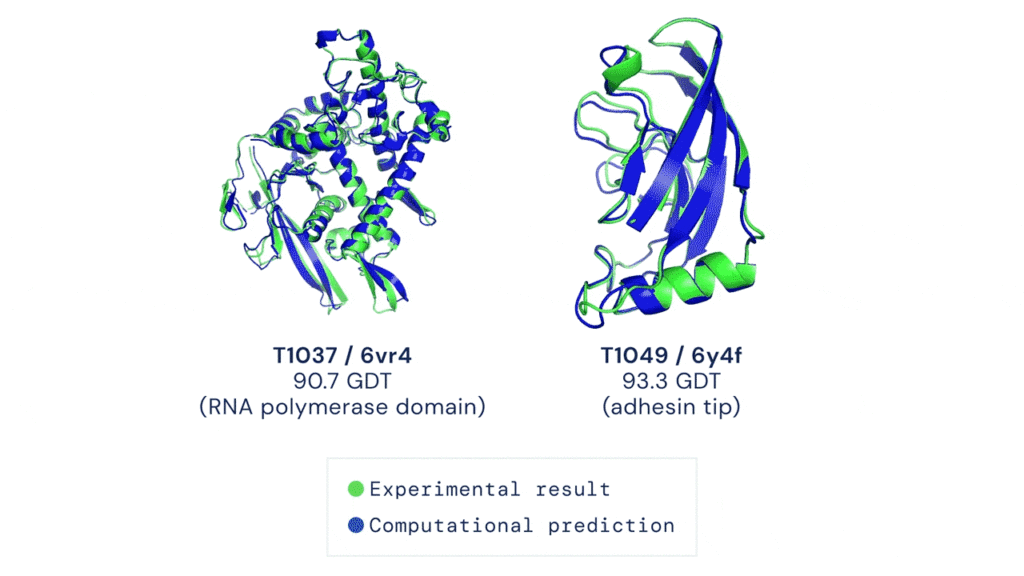
AlphaFold has already sent waves throughout the scientific community and has demonstrated the potential for AI to aid fundamental scientific discovery. Recently, Deepmind has made AlphaFold predictions available and open source to anyone. To date, more than 500,000 researchers from 190 countries have accessed the AlphaFold protein structure database to get closer to finding life-saving cures for diseases like Leishmaniasis and Chagas.
And now Deepmind has expanded the set of available predictions by more than 200 times (from nearly 1 million to nearly 214 million) to cover almost all cataloged proteins found in nature.
Open source predictions available on Google Cloud
Together, Google Cloud and Deepmind have released this dataset of predicted protein structures for plants, bacteria, animals, and other organisms as part of the Google Cloud Public Dataset program to enable bulk downloads at no cost. That means you can also create custom queries of the dataset using BigQuery!
Running AlphaFold on Google Cloud Vertex AI
Let’s say you want to run AlphaFold on your own in order to get protein structure predictions against your own set of data. There are a few challenges to keep in mind:
- You need to set up feature engineering against genetic sequence databases
- Preprocess data
- And run those inputs against pre-trained models
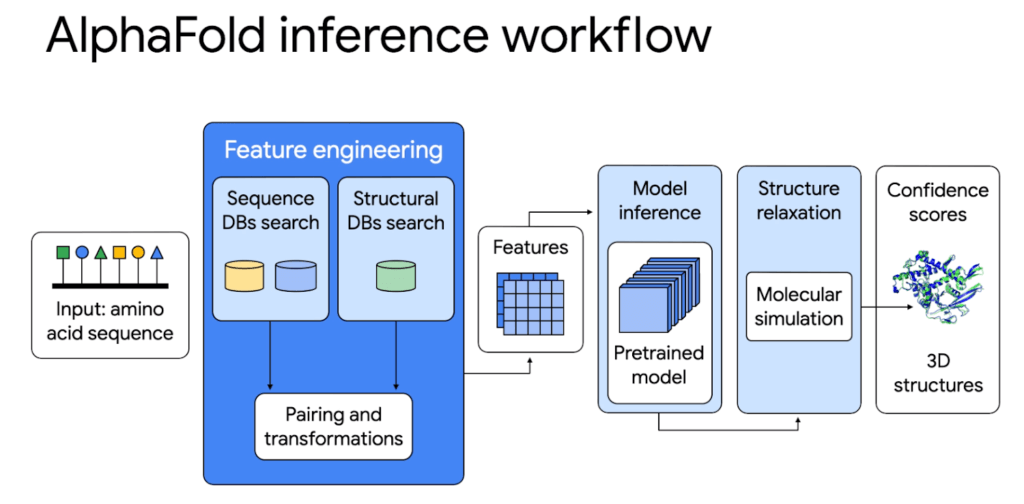
All of this requires allocating CPUs or GPUs, hosting a notebook environment, and scaling up for larger experiments. It’s hard to build and configure an on-premise system or cloud server to use AlphaFold whether you just want to try it out or run it at scale as a large organization.
That’s why we’re excited to share a deep integration between Google Cloud and Deepmind. On top of the Public Datasets program we have created end-to-end code samples for AlphaFold on Vertex AI, a managed end-to-end ML platform, to help address these challenges and speed up deployment. With AlphaFold on Vertex AI, you can manage a data science or machine learning workflow in a single development environment. You get access to pre-configured compute, storage, and end-to-end production notebooks. We have removed the heavy lifting needed to set up new ML environments, automate orchestration, and manage large clusters.
The AlphaFold inference workflow can be simplified with Vertex AI: from data preparation to feature engineering and deployment. Unlike the manual set up, the orchestrator makes it possible to parallelize steps, get predictions faster, and with better tracking.
Try it out first using Vertex AI Workbench
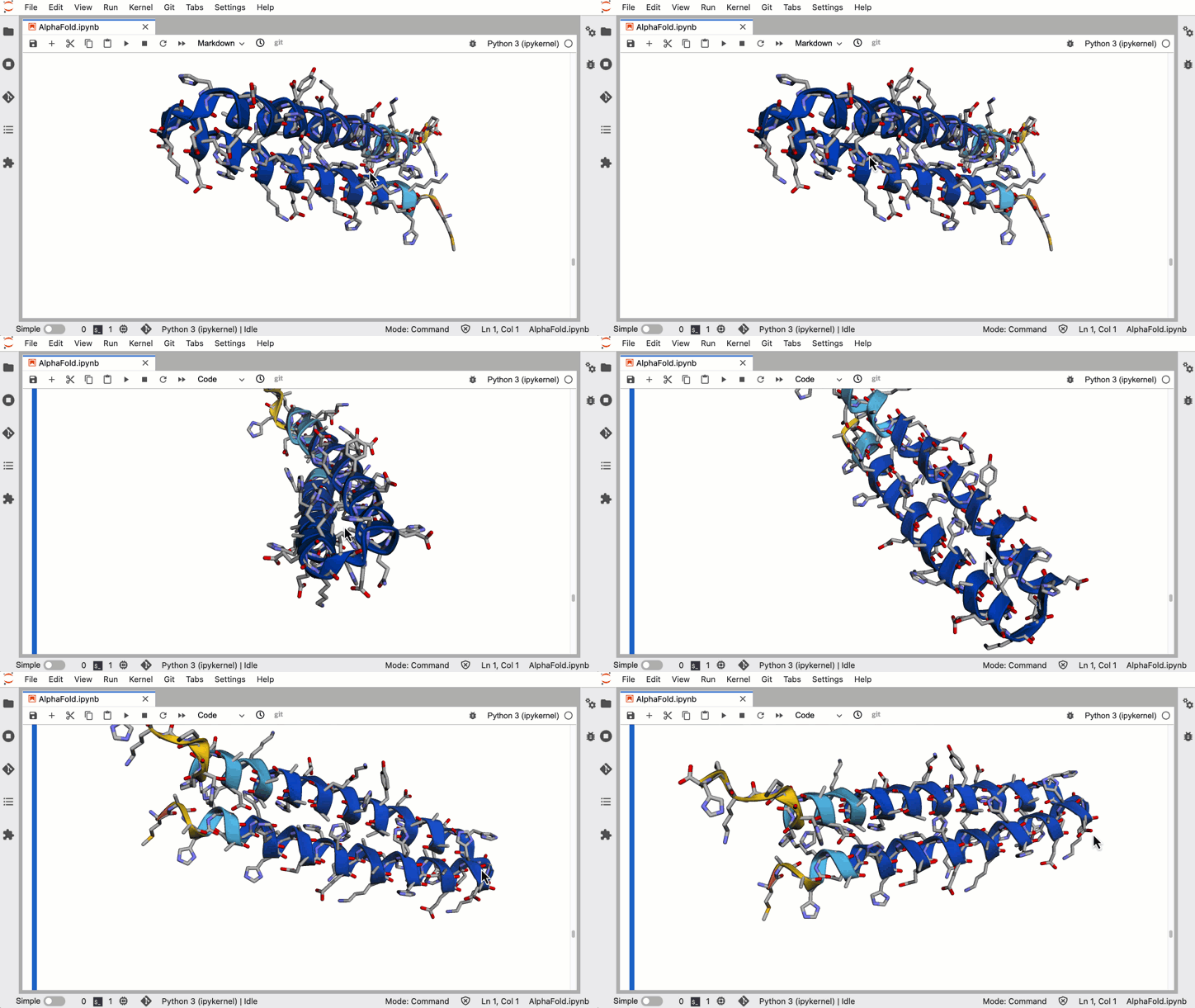
For those of you who want to try out a simplified version of AlphaFold, we have a Colab notebook that uses no templates (homologous structures) and a selected portion of the BFD database. You can deploy right on Vertex AI Workbench, which lets you specify a custom container image that we’ve already created for you. You’ll be able to:
- Configure access to genetic databases
- Configure GPU acceleration
- Search against genetic databases
- Use the pre-processed results as inputs to the AlphaFold model locally
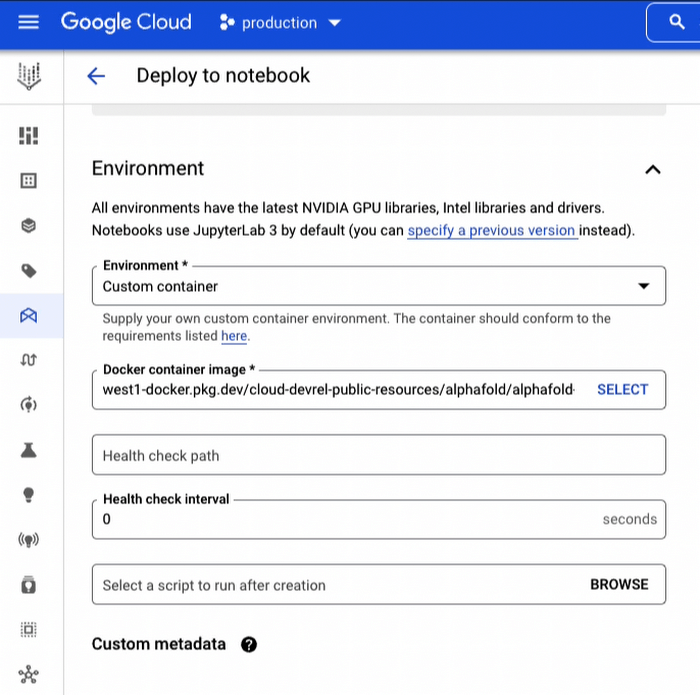
In a little over an hour you can harness the power of AlphaFold to generate 3-D protein structures from amino acid sequences.
Run hundreds of experiments reliably using Vertex AI Pipelines
For organizations that want to run a full blown version of AlphaFold for many protein folding experiments a week, you’ll want an ML pipeline orchestrator. The AlphaFold Batch Inference solution is a set of code samples that uses Vertex AI Pipelines to support hundreds of concurrent inference pipelines with higher throughput to help you run experiments at scale. The solution uses Vertex AI Pipelines as an orchestrator and runtime, Vertex ML Metadata for metadata and artifacts, and Cloud Filestore to manage databases.
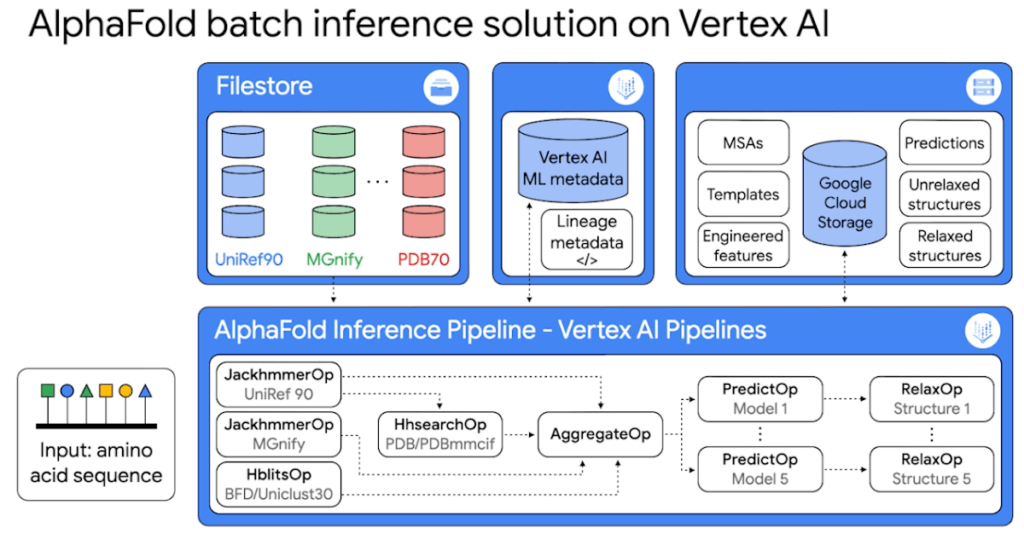
Because it’s built on Vertex AI Pipelines, you can automate, monitor, and experiment with interdependent parts of an ML workflow. The minimized inference elapsed times mean what normally would take you days, can now take you hours.
The solution includes two example pipelines:
1. The universal pipeline solution mirrors the exact logic in DeepMind’s open source inference script but decoupled into discrete tasks so you can run the same experiments faster, more efficiently, and with better tracking.
2. The customized pipeline solution shows you how to further optimize the inference workflow by parallelizing feature engineering steps so you can plug in your own database sources.
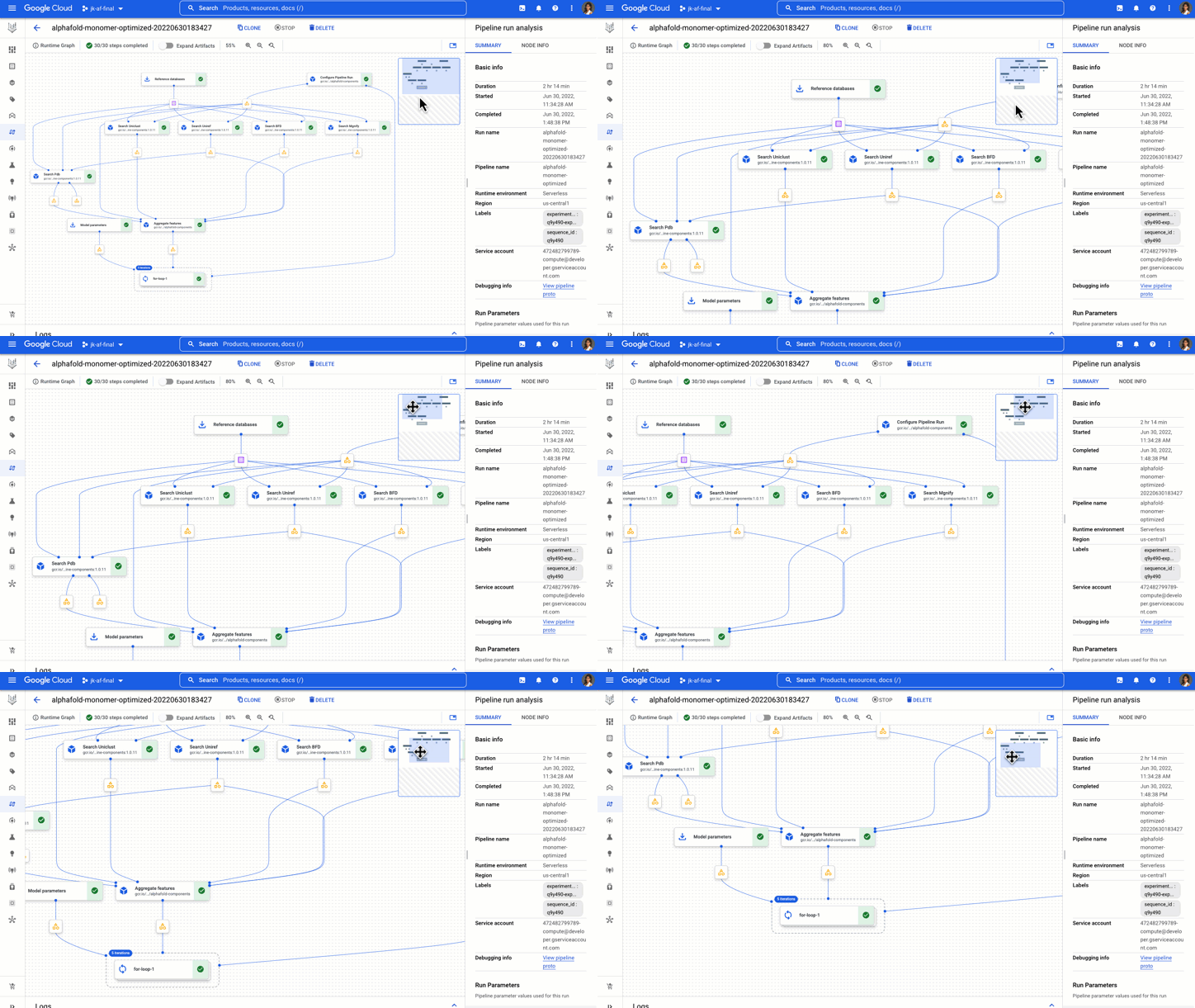
You get example components, pipelines, and notebooks to start, analyze, and recompile pipelines on different GPUs.
The AlphaFold Vertex AI Workbench solution is great for experimental use, while the AlphaFold Batch Inference solution on Vertex AI Pipelines is great for doing protein folding at scale with a strong process for reproducibility and tracking.
Now go forth and save the world!
Okay maybe that’s a bit hyperbolic, but this is inspiring stuff! What started as a 50 year challenge, to the discovery of AlphaFold, to being able to run it on Google Cloud, researchers, developers, and science enthusiasts now have access to one of the most pivotal advancements in the medical world. Even a non-specialist can easily use a Vertex AI notebook to exercise a simplified version of AlphaFold. The next answers to the mysteries of life and discovery of disease treatments have never felt more attainable. With these no-cost solutions to run AlphaFold on Vertex AI and the Public Dataset, you can help propel us in this worldwide endeavor.
Learn more about healthcare and life sciences solutions on Google Cloud here.
If you have feedback or want to share your experience with me, reach out to me at @stephr_wong.
Contact Center AI & Automation Anywhere Help Virtual Agents Deliver Next Level CX

3046
Of your peers have already read this article.
2:30 Minutes
The most insightful time you'll spend today!
With the advent of the pandemic, contact center traffic has increased by as much as 300%, taxing center capabilities. To help handle the surge, and keep up with heightened customer demands, many customer experience providers have deployed automation in the form of virtual agents that serve as the first—and, sometimes the last—line of customer support. How effective these virtual agents are in delivering timely, complete customer service depends in large part on the contact center’s infrastructure and the power of the automation solution.
Customer support providers can now start to reimagine customer experience with Conversational AI and take advantage of the Google Cloud-Automation Anywhere partnership to modernize their operations.
Bringing together the Google Cloud Contact Center AI (CCAI) solution and the Automation Anywhere cloud-native Automation 360 platform, the partnership helps contact centers remain competitive by improving their performance metrics and customer satisfaction to exceed the continuously growing expectations.
Information here, there, anywhere—with limited access
Over the years, many contact centers have accumulated a multitude of systems, often creating a disconnected infrastructure. As a result, both human and virtual agents alike are challenged to keep up with growing customers’ expectations for timely, accurate, and complete service. Without up-to-date software and infrastructure, human agents have to perform a “swivel-chair” maneuver, logging in to the different systems, sifting through records, copying the needed information, and deciding what the next action should be. This approach is not conducive to achieving lower average handle times (or AHT), reduced processing errors, or increased customer satisfaction.
In such a siloed environment, virtual agents may not connect to all the relevant data systems and applications. That also limits what they can do to support human agents. Typically, a virtual agent can handle basic customer requests, such as providing banking customers with their account balances. For more complex requests, such as applying for a line of credit, a virtual agent still must transfer customers to human agents, and the swivel-chair maneuver begins.
Enter the RPA-assisted AI-powered virtual agent
The combination of Google Cloud Contact Center AI and Automation Anywhere’s Automation 360 RPA platform can help contact centers get the maximum benefit from utilizing virtual agents, enriching customer engagements. Further, by integrating automation, opening up APIs, and creating new processes for virtual agents, customer experience teams can help streamline operations by enabling users to quickly access the information they require. This helps minimize the need for the “swivel-chair” maneuver.
Automation 360 makes it possible for the CCAI virtual agents to access all systems and applications in both legacy and modern infrastructure, helping resolve every case quickly and easily. Not only can the virtual agents respond faster with answers, but they can complete more complex end-to-end requests. With RPA, customers are reporting 66% improved efficiency of contact center operations while exceeding their AHT reduction goals.
This video illustrates how such automation can dramatically reduce the processing time of a customer service request, and you can read more about the details of contact center automation, as well.
Additionally, a comprehensive development platform, the Google Cloud CCAI Dialogflow, powers virtual agents—chatbots and voicebots—with Conversational AI to deliver lifelike customer experiences anytime a customer reaches out to a brand. CCAI Agent Assist helps human agents with turn-by-turn guidance, ready-to-deliver answers, and ready-to-send responses. CCAI Insights identifies key metrics such as call drivers and customer sentiment for workflow optimization.
Living up to their potential
TELUS International, a leading digital customer experience provider and long-time partner of both Google Cloud and Automation Anywhere, has been leveraging virtual agents to enhance the employee and customer experience.
“We are very proud of the enormous value that we can provide our clients through combining our expertise in customer experience and digital transformation alongside the innovative solutions of our technology partners,” Jim Radzicki, CTO of TELUS International, explains. “For instance, through leveraging Google Cloud Contact Center AI and Automation Anywhere’s RPA integration, we are able to expand the capabilities of virtual agents to process a wider variety of customer requests while allowing our team members to focus on the most critical conversations and creating a meaningful connection with every customer.”
With CCAI and Automation 360, virtual agents can help contact centers deliver 24/7, comprehensive, accurate service, all of which helps eliminate wait times—even with heavy traffic. And this is just the start.
With deeper integration planned between Automation 360 and CCAI, RPA can augment CCAI Agent Assist’s abilities to help human agents by bringing untapped case-sensitive information to their fingertips. Furthermore, Automation 360 Bot Insight can complement CCAI Insights’ as well as TELUS International’s Intelligent Insights, a tool-agnostic platform to monitor and manage RPA solutions and bots, with backend data access metrics.
At Google Cloud and Automation Anywhere, we’ll continue developing our contact center solution to extend automation capabilities for better customer service and greater customer satisfaction. Instead of constantly swiveling, agents can once again be at the center of the call center action, taking their work—and the experience of their customers—to the next level.
You Can Quantify and Maximize Value of Your Org’s AI/ML and Analytics Teams!

4432
Of your peers have already read this article.
1:30 Minutes
The most insightful time you'll spend today!
Investing in Artificial Intelligence (AI) can bring a competitive advantage to your organization. If you’re in charge of an AI or Data Science team, you’ll want to measure and maximize the value that you’re providing. Here is some advice from our years of experience in the field.
A checklist to embark on a project:
As you embark on projects we’ve found it’s good to have the following areas covered:
- Have a customer. It’s important to have a customer for your work, and that they agree with what you’re trying to achieve. Be sure to know what value you’re delivering to them.
- Have a business case. This will rely on estimates and assumptions, and may take no more than a few minute’s work. You should revise this, but always know what justifies your team’s effort, and what you (and your customer) expect to get in return.
- Know what process you will change or create. You’ll want to put your work in production, so you have to be clear about what business operations are changing or created around your work and who needs to be involved to make it happen
- Have a measurement plan. You’ll want to show that ongoing work is impacting some relevant business indicator. Measure and show incremental value. The goal of these measurements is to establish what has changed because of your project that would otherwise not have changed. Be sure to account for other factors like seasonality or other business changes that may affect your measurements.
- Use all the above to get your organization’s support for your team and your work.
What measures to use?
As you start the work, what measures and indicators can you use to show that your team’s work is useful for your organization?
How many decisions you make. A major function of ML is to automate and optimize decisions: which product to recommend, which route to follow, etc. Use logs to track how many decisions your systems are making.
Changes to revenue or costs. Better and quicker decisions often lead to increased revenue or savings. If possible, measure it directly, otherwise estimate it (for example fuel costs saved from less distance traveled, or increased purchases from personalized offers).
As an example, the Illinois Department of Employment Security is using Contact Center AI to rapidly deploy virtual agents to help more than 1 million citizens file unemployment claims. To measure success the team tracked the two outcomes: (1) the number of web inquiries and voice calls they were able to handle, and (2) the overall cost of the call center after the implementation. Post implementation, they were able to observe more than 140,000 phone and web inquiries per day and over 40,000 after-hours calls per night. They also anticipate an estimated annual cost savings of $100M based on an initial analysis of IDES’s virtual agent data (see more in the link to case study).
Implementation costs. The other side of increased revenue or savings, is to put your achievements in the context of how much they cost. Show the technology costs that your team incurs and, ideally, how you can deliver more value, more efficiently.
How much time was saved. If the team built a routing system then it saved travel time, if it built an email classifier then it saved reading time, etc. Quantify how many hours were given back to the organization thanks to the efficiency of your system.
In the medical field, quicker diagnostics matter. Johns Hopkins University’s Brain Injury Outcomes (BIOS) Division has focused on studying brain hemorrhage aiming to improve medical outcomes. The team identified the time to insights as a key metric in measuring business success. They experimented with a range of cloud computing solutions like Dataflow, Cloud Healthcare API, Compute Engine, and AI Platform for distributed training to accelerate iterations. As a result, in their recent work they were able to accelerate insights from scans from approximately 500 patients from 2,500 hours to 90 minutes.
How many applications your team supports. Some of your organization’s operations don’t use ML (say reconciling financial ledgers) but others do. Know how many parts of your organization benefit from the optimization and automation your team builds.
User experience. You may be able to measure your customer’s experience: fewer complaints, better reviews, reduced latency, more interactions, etc. This is valid both for internal and external stakeholders. At Google we measure usage and regularly ask for feedback on any internal system or process.
One of our customers, The City of Memphis, is using VisionAI and ML to tackle a common but very challenging issue: identifying and addressing potholes. The implementation team identified the percentage increase of potholes identified as one of the key metrics along with accuracy and cost savings. The solution captures video footage from it’s public vehicles and leverages Google Cloud capabilities like Compute Engine, AI Platform, and BigQuery to automate the review of videos. The project increased pothole detection by 75% with over 90% accuracy. By measuring and demonstrating these outcomes, the team proved the viability of a cost-effective, cloud-based machine learning model and is looking into new applications of AI and ML that will further improve city services and help it build a better future for its 652,000 residents.
Acknowledgements
Filipe and Payam would like to thank our colleague and co-author Mona Mona (AI/ML Customer Engineer, Healthcare and lifesciences) who contributed equally to the writing.
Unlocking the Power of Computer Vision: Vision AI Made Easy with Spring Boot and Java

1198
Of your peers have already read this article.
1:30 Minutes
The most insightful time you'll spend today!
In today’s era of data-driven applications, leveraging advanced machine learning and artificial intelligence services like computer vision has become increasingly important. One such service is the Vision API, which provides powerful image analysis capabilities. In this blog, we will explore how to create a Computer Vision application using Spring Boot and Java, enabling you to unlock the potential of image recognition and analysis in your projects. The application UI will accept as input, public URLs of images that contain written or printed text, extract the text, detect the language and if it is one of the supported languages, it will generate the English translation of that text.
Spring Boot and Google Cloud
Spring Boot is a powerful open-source framework for creating Spring-based applications. It simplifies development by providing auto-configuration, starter dependencies, and embedded servers. It also offers production-ready features like metrics and health checks. With Spring Boot, you can focus on writing code and deploying efficient applications without worrying about complex configuration or dependencies. Apart from the well-known features that make it an ideal choice for enterprise apps, a new exciting development is the official support for Native Image Builder using GraalVM, enabling the creation of native standalone executables without the need for a Java Runtime and are leaner and offer a super fast startup experience. Try Spring Native on Google Cloud.
The Spring Cloud GCP library makes it easy for Spring Boot applications to use Google Cloud services. It provides Spring Boot APIs for over a dozen Google Cloud services. This means you can take advantage of the benefits of Google Cloud services without having to learn separate Google Cloud client libraries. It is very easy to migrate or create a new Spring Boot application in Google Cloud. With just one command, you can bootstrap your production-ready Spring Boot project structure and start making code changes for your requirement. Refer to the documentation for a full list of features.
Prerequisites
Before diving into the development process, make sure you have the following prerequisites in place:
- A Google Cloud account with a project created and billing enabled
- Vision API, Translation, Cloud Run, and Artifact Registry APIs enabled
- Cloud Shell activated
- Cloud Storage API enabled with a bucket created and images with text or handwriting in local supported languages uploaded (or you can use the sample image links provided in this blog)
Refer to the documentation for steps on how to enable Google Cloud APIs.
Bootstrapping a Spring Boot project
To get started, create a new Spring Boot project using your preferred IDE or Spring Initializr. Include the necessary dependencies, such as Spring Web, Spring Cloud GCP, and Vision AI, in your project’s configuration. Alternatively, you can use Spring Initializr from Cloud Shell using the below steps to bootstrap your Spring Boot application easily:
1. Open a Cloud Shell terminal and make sure it is pointing to the correct project and that you are authorized (if not you can use the command below to set the right project):
gcloud config set project <PROJECT_ID>
2. Run the following command to create your Spring Boot project:
curl https://start.spring.io/starter.tgz -d packaging=jar -d dependencies=cloud-gcp,web,lombok -d baseDir=spring-vision -d type=maven-project -d bootVersion=3.0.1.RELEASE | tar -xzvf -spring-vision is the name of your project, change it per your requirement.
bootVersion is the version of Spring Boot, make sure to update it if required at the time of your implementation.
type is the version of project build tool type, you can change it to gradle if preferred.
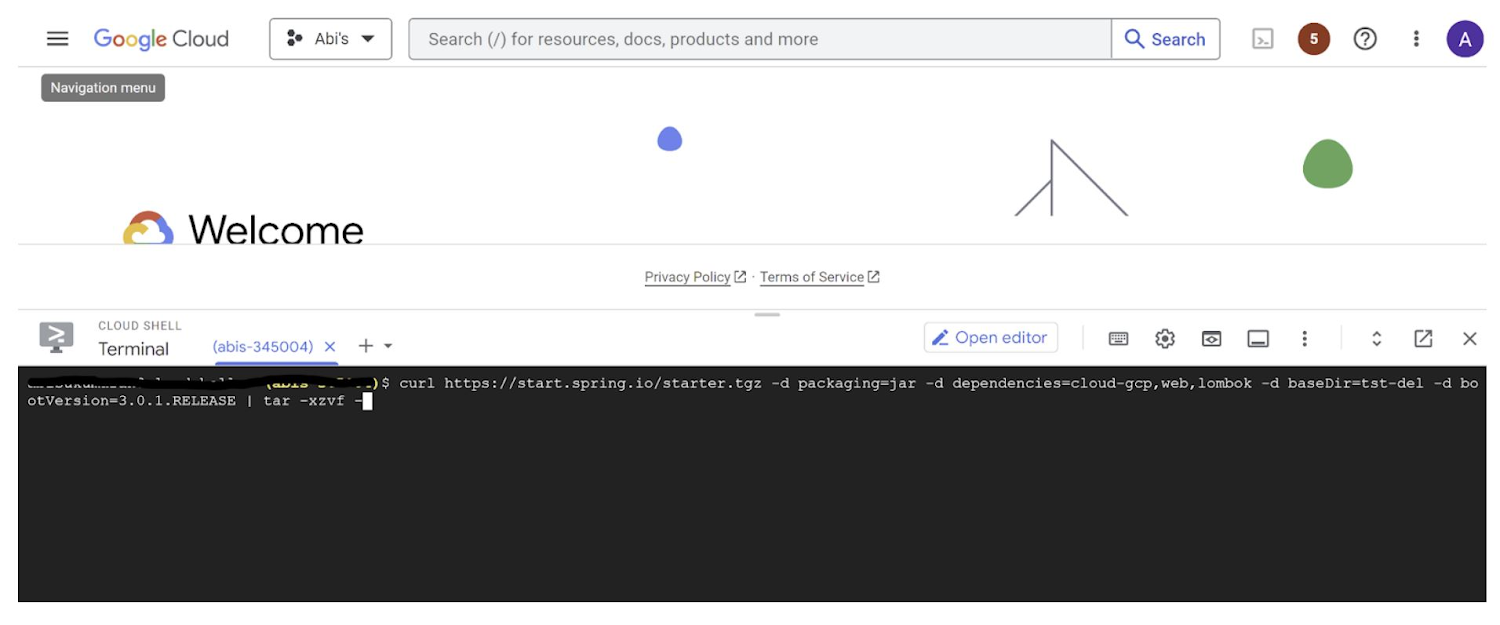
This creates a project structure under “spring-vision” as below:
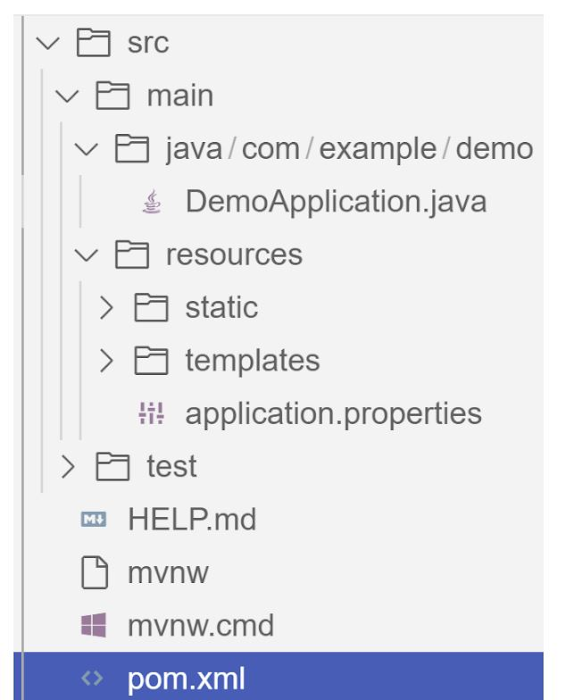
pom.xml contains all the dependencies for the project (dependencies you configured using this command are already added in your pom.xml).src/main/java/com/example/demo has the source classes .java files.resources contain the images, XML, text files and the static content the project uses that are maintained independently.application.properties enable you to maintain the admin features to define profile specific properties of the application.
Configuring the Vision API
Once you have the Vision API enabled, you have the option to configure the API credentials in your application. You can optionally use Application Default Credentials for setting up authentication. In this demo implementation however I have not implemented the use of credentials.
Implementing the vision and translation services
Create a service class that interacts with the Vision API. Inject the necessary dependencies and use the Vision API client to send image analysis requests. You can implement methods to perform tasks like image labeling, face detection, recognition, and more, based on your application’s requirements. In this demo, we will use handwriting extraction and translation methods. For this make sure you include the following dependencies in pom.xml
<dependency>
      <groupId>org.springframework.cloud</groupId>
      <artifactId>spring-cloud-gcp-starter-vision</artifactId>
</dependency>
<dependency>
<groupId>com.google.cloud</groupId>
<artifactId>google-cloud-translate</artifactId>
</dependency>Clone / Replace the following files from the repo and add them to the respective folders / path in the project structure:
Application.java(/src/main/java/com/example/demo)TranslateText.java(/src/main/java/com/example/demo)VisionController.java(/src/main/java/com/example/demo)index.html(/src/main/resources/static)result.html(/src/main/resources/templates)pom.xml
The method extractTextFromImage in the service org.springframework.cloud.gcp.vision.CloudVisionTemplate lets you extract text from your image input. The method getTranslatedText from the service com.google.cloud.translate.v3 lets you pass the extracted text from your image and get the translated text in the desired target language as response (if the source is in one of the supported languages list).
Building the REST API
Design and implement the REST endpoints that will expose the Vision API functionalities. Create controllers that handle incoming requests and utilize the Vision API service to process the images and return the analysis results.
In this demo, our VisionController class implements the endpoint, handles the incoming request, invokes the Vision API and Cloud Translation services and returns the result to the view layer. Implementation of the GET method for the REST endpoint is as follows:
@GetMapping("/extractText")
  public String extractText(String imageUrl) throws IOException {
    String textFromImage =
   this.cloudVisionTemplate.extractTextFromImage(this.resourceLoader.getResource(imageUrl));


    TranslateText translateText = new TranslateText();
    String result = translateText.translateText(textFromImage);
    return "Text from image translated: " + result;
  }
The TranslateText class in the above implementation has the method that invokes the Cloud Translation service:
String targetLanguage = "en";
 TranslateTextRequest request =
         TranslateTextRequest.newBuilder()
             .setParent(parent.toString())
             .setMimeType("text/plain")
             .setTargetLanguageCode(targetLanguage)
             .addContents(text)
             .build();
     TranslateTextResponse response = client.translateText(request);
     // Display the translation for each input text provided
     for (Translation translation : response.getTranslationsList()) {
       res = res + " ::: " + translation.getTranslatedText();
        System.out.printf("Translated text : %s\n", res);
     }
With the VisionController class, we have the GET method for the REST implemented.
Integrating Thymeleaf for frontend development
When building an application with Spring Boot, one popular choice for frontend development is to leverage the power of Thymeleaf. Thymeleaf is a server-side Java template engine that allows you to seamlessly integrate dynamic content into your HTML pages. Thymeleaf provides a smooth development experience by allowing you to create HTML templates with embedded server-side expressions. These expressions can be used to dynamically render data from your Spring Boot backend, making it easier to display the results of image analysis performed by the Vision API service.
To get started, ensure that you have the necessary dependencies for Thymeleaf in your Spring Boot project. You can include the Thymeleaf Starter dependency in your pom.xml:
<dependency>
<groupId>org.springframework.boot</groupId>
<artifactId>spring-boot-starter-thymeleaf</artifactId>
</dependency>
In your controller method, retrieve the analysis result from the Vision API service and add it to the model. The model represents the data that will be used by Thymeleaf to render the HTML template. Once the model is populated, return the name of the Thymeleaf template that you want to render. Thymeleaf will take care of processing the template, substituting the server-side expressions with the actual data, and generating the final HTML that will be sent to the client’s browser. Example:
return new ModelAndView("result", <<YOUR RESULT>>);In the case of the extractText method in VisionController, we have returned the result as a String to and not added to the model. But we have invoked the GET method extractText method on the index.html on page submit.
<form action="/extractText">

        Web URL of image to analyze:

        <input type="text"

               name="imageUrl"

               value=""

        <input type="submit" value="Read and Translate" />

</form>
With Thymeleaf, you can create a seamless user experience, where users can upload images, trigger Vision API analyses, and view the results in real-time. Unlock the full potential of your Vision AI application by harnessing the power of Thymeleaf for frontend development.
Deploying your Spring Boot application with Cloud Run
Write unit tests for your service and controller classes to ensure proper functionality under the /src/test/java/com/example folder. Once you’re confident in its stability, package it into a deployable artifact, such as a JAR file, and deploy it to Cloud Run, a serverless compute platform on Google Cloud. In this step, we will focus on deploying your containerized Spring Boot application using Cloud Run.
a. Package your application by executing the following steps from Cloud Shell(make sure the terminal is prompting at the project root folder)
Build:
./mvnw package
Once the build is successful, run locally to test:
./mvnw spring-boot:run
b. Containerize your Spring Boot Application with Jib:
Instead of manually creating a Dockerfile and building the container image, you can use the Jib utility to simplify the containerization process. Jib is a plugin that integrates directly with your build tool (such as Maven or Gradle) and allows you to build optimized container images without writing a Dockerfile. Before proceeding, you need to enable the Artifact Registry API (Use of Artifact Registry is encouraged over container registry). Then Run Jib to build a Docker image and publish to the Registry:
$ ./mvnw com.google.cloud.tools:jib-maven-plugin:3.1.1:build -Dimage=gcr.io/$GOOGLE_CLOUD_PROJECT/vision-jib
Note: In this experiment, we did not configure the Jib Maven plugin in pom.xml, but for advanced usage, it is possible to add it in pom.xml with more configuration options
c. Deploy the container (that we pushed to Artifact Registry in the previous step) to Cloud Run. This is again a one-command step:
gcloud run deploy vision-app --image gcr.io/$GOOGLE_CLOUD_PROJECT/vision-jib --platform managed --region us-central1 --allow-unauthenticated --update-env-vars
You can alternatively do this from the UI as well. Navigate to the Google Cloud Console and locate the Cloud Run service. Click on “Create Service” and follow the on-screen instructions. Specify the container image you previously pushed to the registry, configure the desired deployment settings (such as CPU allocation and autoscaling), and choose the appropriate region for deployment. You can set environment variables specific to your application. These variables can include authentication credentials (API keys etc.), database connection strings, or any other configuration needed for your Vision AI application to function correctly. When the deployment is completed successfully, you should get an endpoint to your application.
For our demo, the endpoint Cloud Run created for us is: https://vision-app-********-uc.a.run.app
Playing with your Vision AI app
For demo purposes, you can use the image URL below for your app to read and translate:
https://storage.googleapis.com/img_public_test/tamilwriting1.jfif
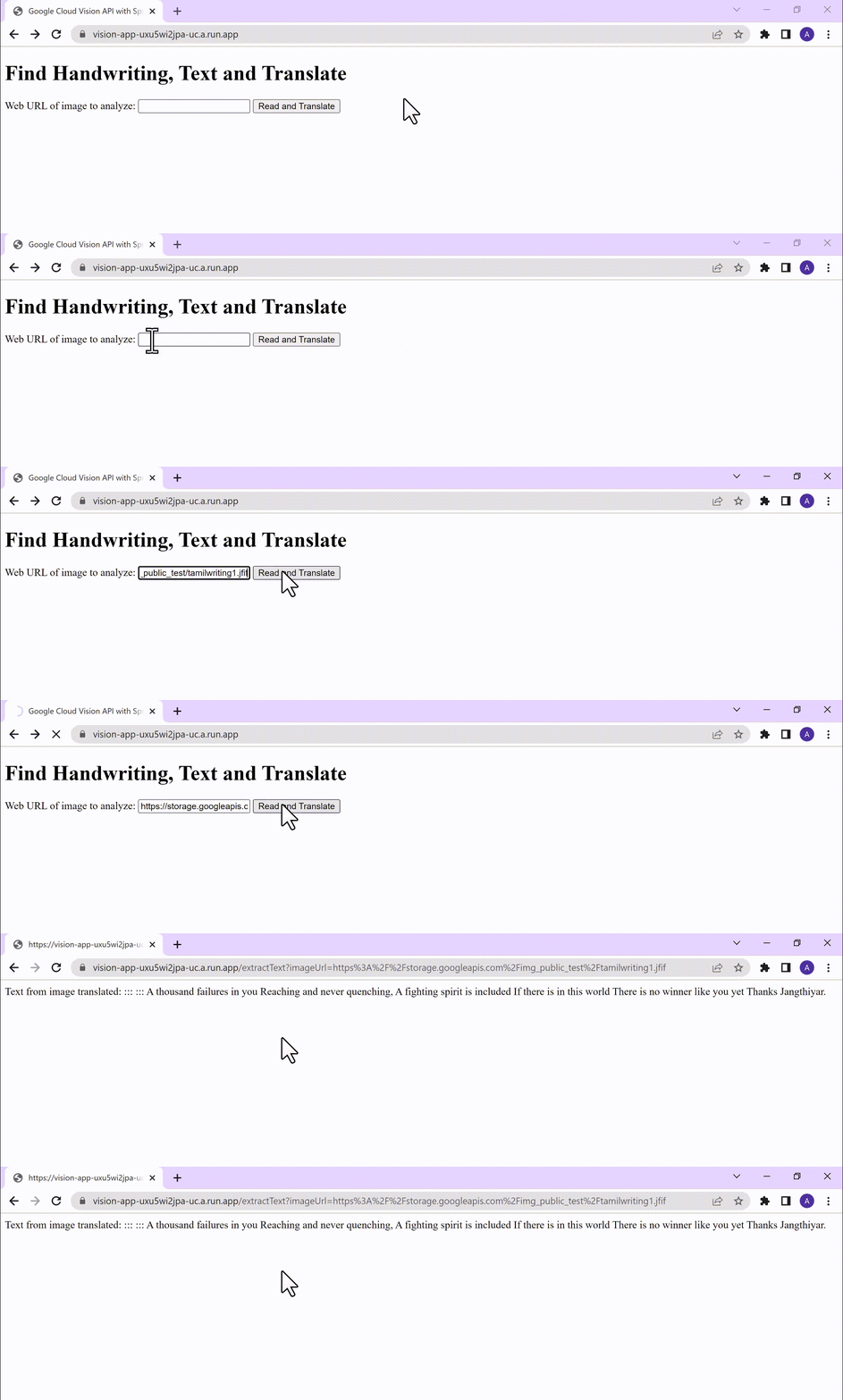
Conclusion
Congratulations! You have successfully created a Vision AI application using Spring Boot and Java. With the power of Vision AI, your application can now perform sophisticated image analysis, including labeling, face detection, and more. The integration of Spring Boot provides a solid foundation for building scalable and robust Google Cloud Native applications. Continue exploring the vast capabilities of Vision AI, Cloud Run, Cloud Translation and more to enhance your application with additional features and functionalities. To learn more, check out the Vision API, Cloud Translation, and GCP Spring docs. Try out the same experiment with the Spring Native option!! Also as a sneak-peak to Gen-AI world, checkout how this API shows up in Model Garden.
More Relevant Stories for Your Company

Transforming the Contact Center Experience with Artificial Intelligence
We meet daily with contact center owners and customer experience (CX) execs across all industries, geographies, and business sizes. Looking back at these conversations, it’s crystal clear that 2022 was a high-stakes year for call centers, with three primary challenges trending across all customers and continuing in 2023: Many organizations

Smart Reply: How the AI-augmented Chat Helps Scale Google’s Tech Support Operations
As Googlers transitioned to working from home during the pandemic, more and more turned to chat-based support to help them fix technical problems. Google's IT support team looked at many options to help us meet the increased demand for tech support quickly and efficiently. More staff? Not easy during a

Measuring Deforestation in Extractive Supply Chains With ML
Introduction In my experience, I have observed that it’s common in machine learning to surrender to the process of experimenting with many different algorithms in a trial and error fashion, until you get the desired result. My peers and I at Google have a People and Planet AI YouTube series

Architecting Data Pipelines Directly Improves Customer Experience at Universe.com
At Universe, we serve customers day and night and are always working to make sure they have a great experience, whether online or at one of our live events. Our technology has to make that possible, and our legacy systems weren’t cutting it anymore. What we needed was a consistent,
