





Attract Investor Funding by Harnessing the Power of Cloud Operations, Billing, and Customer Care

1392
Of your peers have already read this article.
4:30 Minutes
The most insightful time you'll spend today!
More and more startups are choosing to build their business on Google Cloud, and if yours is one of them — welcome! And even though Google Cloud is easy to use, there’s still a lot to learn, starting with how to create and activate your account, and how to create projects, folders, and organizations as part of Google Cloud’s resource hierarchy. If you prefer, you can also watch our video on how to get started with Google Cloud.
Once you’ve mastered those concepts, you’re ready to learn how to get the most out of your investment in Google Cloud. In this blog, we’ll show you how to manage and monitor your cloud resources with Google Cloud’s operations suite, administer your billing with Cloud Billing, and improve the support you receive with Google Cloud Customer Care. Whether you’re new to Google Cloud or an experienced user, these services will help improve your experience.
Let’s get started!
Improve the performance and reliability of your applications with the operations suite
Sometimes you want to check how your deployment is behaving, or if there is something happening with your server, database, or application that is affecting your customers. With so many tools to check, finding and solving the issue can become overwhelming very quickly. This is where Google Cloud’s operations suite comes in.
This suite of products for integrated monitoring, logging, and tracing managed services for applications and systems running on Google Cloud and beyond. It can help you visualize and monitor incidents with dashboards and Metrics Explorer, manage and analyze log data in real-time all in one place with Cloud Logging, visualize metrics at scale with Cloud Monitoring, manage latency with Cloud Trace, and perform performance and cost management with Cloud Profiler.
Learn more about the operations suite in the video below:
Manage budgets and alerts with Cloud Billing
Google Cloud billing management is easier than you might think. Google Cloud charges for compute resources monthly on a consumption basis, which is different from the traditional upfront purchase model. With the right tools and resources, you can more easily manage your costs and optimize your use of Google Cloud resources.
One of the most important things to do is to set up billing and alerts. This will help you avoid unexpected charges and ensure that you are only paying for the resources you use. You can also use budgets and alerts to track your costs and help ensure that you are staying within your budget.
You can also view your costs through console billing reports, monthly invoices or build customized dashboards on BigQuery, Google Data Studio, or a BI tool of your preference. This allows you to see where your costs come from and identify areas where you can save money. You can also use cost management to optimize your use of Google Cloud resources and get the most out of your investment.
Finally, Google Cloud offers a variety of discounts and optimization options. These can help you save money on your overall costs. For example, you can get a discount if you commit to using Google Cloud for a certain period of time. You can also save money by using preemptible VMs, which are VMs that are available at a lower price but can be terminated at any time.
Google Cloud Customer Care
To meet customer needs and deliver a better experience, we’ve reenvisioned our Customer Care portfolio, a scalable set of offerings built with your needs at the center, so you can simplify and streamline your support experience.
Choose from the core offerings:
- Basic – the support tier you receive when you sign up on Google Cloud. You can use this at no cost but support is offered for billing issues only.
- Standard – simple, flexible way to ensure that your workloads run smoothly on Google Cloud. Standard enables you to receive technical help from Google experts with a four hour response time and 8 hours response time during 5 days a week availability.
- Enhanced – rapid response times and additional services to boost your productivity and help you run in Google Cloud efficiently. There is both case and phone support for technical issues, with a one-hour response time. There is 24/5 availability overall with 24/7 for critical issues. You can also have add-ons or value-add services like Technical Account Adviser Service and Event management.
- Premium – the highest value support offering, supplying incredibly fast response times, a named Technical Account Manager, Customer Aware support and additional services. There is case and phone support for technical issues and also third-party technology support, with a 15-minute response time and a 24/5 availability overall with 24/7 for critical issues.
Watch the video to find out how to purchase support, create support cases and learn more about support.
Supercharge your growth with the Google for Startups Cloud Program
Growing a startup requires technology that can keep up with and enhance your ideas. The Google for Startups Cloud Program provides the tech you need to help develop better software and deliver innovative experiences with confidence. At the same time, you’ll help boost your team’s capabilities with expert cloud guidance, Google Cloud credits, training opportunities, and more.
The program has two tiers:
- Start: for pre-seed startups that have not yet received equity funding. Get up to $2,000 USD in Google Cloud credit that’s valid for two years toward Google Cloud services and even toward a Cloud Customer Care plan with unlimited access to technical support, networking opportunities with the global Google Cloud Startup Community, and more.
- Scale: for seed to series A startups with verified equity funding. Get Google Cloud and Firebase costs covered up to $100,000 USD a year for your first two years, unlimited access to technical support when credits are applied to a Cloud Customer Care plan, partnerships with Google Cloud Startup Customer Engineers and a dedicated Startup Success Manager, networking opportunities with the global Google Cloud Startup Community, co-marketing for select startups, and more.
Once enrolled, Google startup experts will recommend Google products and services that can help your startup grow in the cloud. Learn more about the Google for Startups program, eligibility criteria, credit usage and migration incentives in the our Startup Programs video linked down below.
That’s a wrap!
Let’s recap: The operations suite includes tools to monitor incidents, analyze log data in real-time, manage latency, and more. Cloud Billing offers billing management tools and resources to help you save costs and make the most of your resources. If you need help, Cloud Customer Care services are available to streamline your support experience. Also, if you’re a startup, don’t forget to check the Google for Startups Cloud Program!
The Google Cloud Technical Guides for Startups series has many detailed videos and handbooks to support you on all steps of your startup growth journey. Check out our full playlist on the Google Cloud Tech channel and website. Don’t forget to subscribe to stay up to date.
See you in the cloud!
3527
Of your peers have already watched this video.
3:30 Minutes
The most insightful time you'll spend today!
Relax: Support on Google Cloud is Easy and Efficient
To navigate the complexity of today’s cloud environment and to get the most out of your investment, you need robust support that is fast, efficient, and available at the time of need. Google Cloud Platform support checks all the boxes and helps you architect for the inevitable and quickly resolve any issues that might arise with your cloud investments.
Google Cloud offers two support options to address the needs in the cloud. While role-based support provides customizable roles and predictable pricing, the enterprise support offers fast incident response with personalized service.
Role-based support is designed to address the support needs for the development and production environments of organizations of different sizes. Organizations can customize their support entitlements by granting support access to the right individuals on their team depending on the organizational needs.
Enterprise support, on the other hand, is ideal for large organizations with business-critical needs and helps maximize business value and minimize risk. Companies can quickly build and execute a Google Cloud strategy by working directly with Technical Account Managers, who bring deep product knowledge and an understanding of cloud adoption best practices to guide you in your journey with monitored success metrics to keep you on track to grow your business with Google Cloud.
Watch this video to understand how GCP support escalation process works and how to use it.
3718
Of your peers have already watched this video.
1:26 Minutes
The most insightful time you'll spend today!
How Sri Lanka’s Largest Ride-hailing Company Fixed its App and Improved Business
PickMe is Sri Lanka’s largest ride-hailing company.
“(Almost) every Sri Lankan is our customer. We have passengers who use us on a daily basis. We have drivers who use the platform to make a living. So obviously, the ecosystem is pretty big,” says Jiffry Zulfe, Founder & CEO, PickMe.
Before the company used Google Cloud, it hosted in a local data center. That strategy caused problems.
The first was the local provider’s ability to keep up.
“We were a company that was growing very fast. So the number of customers, the number of drivers, the volumes, would double every couple of months. And that required computer power, which the local provider struggled to do.”
The company also faced reliability issues. It’s servers would go down sometimes, which would slow down some of the services and affected customer experience.
That’s when they decided to get on the Google Cloud Platform.
“By bringing GCP into our platform, we saw a huge improvement in our latency. And also, we have had great reliability. The customers have gained confidence that when you open that app, it works all the time,” says Mithila Somasiri, Chief Technology Officer at PickMe.
3572
Of your peers have already downloaded this article
1:30 Minutes
The most insightful time you'll spend today!
IDC’s research demonstrates the value of running SAP environments on Google Cloud. Customers interviewed by IDC described achieving strong value through improved agility, high performance, and cost and staff efficiencies.
The business and operational benefits of running SAP environments on Google Cloud range from lowering downtime to improving productivity to enhanced efficiency.
Download this IDC infographic to understand the business value of migrating SAP environments top Google Cloud.
Google’s Latest ‘Carbon Footprint’ can Flag Users about Carbon Emission Levels from their Cloud Usage

7093
Of your peers have already read this article.
4:00 Minutes
The most insightful time you'll spend today!
Google Cloud is proud to support our customers with the cleanest cloud in the industry. For the past four years, we’ve matched 100% of our electricity use with renewable energy purchases, and we were the first company of our size to commit going even further by running on carbon-free energy 24/7 by 2030. As we work to achieve 24/7 carbon-free energy, we help you take immediate action to decarbonize your digital applications and infrastructure. We’re also working with our customers across every industry to develop new solutions for the unique climate change challenges that organizations face. Today, we’re excited to expand our portfolio of carbon-free solutions and announce new partnerships that will help every company build a more sustainable future.
First, we’re launching Carbon Footprint, a new product that provides customers with the gross carbon emissions associated with their Google Cloud Platform usage. Now available to every GCP user for free in the Cloud Console, this tool helps you measure, track and report on the gross carbon emissions associated with the electricity of your cloud usage. Of course, the net operational emissions associated with your Google Cloud usage is still zero. With growing requirements for Environmental Social and Governance (ESG) reporting, companies are looking for ways to show their employees, boards and customers their progress against climate targets. Using Carbon Footprint, you have access to the gross energy related emissions data you need for internal carbon inventories and external carbon disclosures, with one click.
Built in collaboration with customers like Atos, Etsy, HSBC, L’Oréal, Salesforce, Thoughtworks and Twitter, our Carbon Footprint reporting introduces a new standard of transparency to support you in meeting your climate goals. You can monitor your gross cloud emissions over time, by project, by product and by region, giving IT teams and developers metrics that can help them reduce their carbon footprint. Our detailed calculation methodology is published so that auditors and reporting teams can verify that their cloud emissions data meets GHG Protocol guidance.

“The power of knowledge combined with the power of technology innovation plays a vital role in proactively responding to the climate crisis we are facing. With Google Carbon Footprint reporting, Atos feeds emissions data in our Decarbonization Data Platform, demonstrating potential emissions reductions from the Google Cloud Platform to our customers. This reporting opens up new levels of emissions transparency, trajectory planning, and data insight to support our customers in meeting, and potentially accelerating towards, their climate goals.”—Nourdine Bihmane, Head of Decarbonization Business Line, Atos
“The capability to measure and understand the environmental footprint of our Public Cloud usage is among the key axis of our sustainable tech roadmap. With Google Cloud Carbon Footprint, we are now able to directly follow the impact of our sustainable infrastructure approach and architecture principles.”—Hervé DUMAS, Sustainability IT Director, L’Oreal
While digital infrastructure emissions are just one part of your environmental footprint, accurately accounting for IT carbon emissions is necessary to measure progress against the carbon reduction targets required to avert the worst consequences of climate change. To help you account for emissions beyond our cloud and across your organization, we’re excited to partner with Salesforce Sustainability Cloud, integrating our Google Cloud Platform emissions data into their carbon accounting platform.
“As we face unprecedented climate challenges, companies across the globe need to embed sustainability into the core of their business in order to meet growing customer and stakeholder expectations, and reduce their environmental impact. Together, Google Cloud and Salesforce Sustainability Cloud can help our joint customers accelerate their path to Net Zero, leveraging data-driven insights and visualizations to track and reduce their carbon emissions to drive sustainable change.”—Ari Alexander, GM of Salesforce Sustainability Cloud.
From information to action
With the gross energy-related emissions footprint of data associated with your Google Cloud usage now available, we’re committed to providing tools to not only measure your carbon footprint, but help you reduce it. We recently launched low-carbon region icons to help you choose cleaner regions to locate your Google Cloud resources. New users who see the icons are over 50% more likely to choose clean regions over others, ensuring their applications emit less carbon over time.
For current Google Cloud users, we’re pleased to announce that Active Assist Recommender will include a new sustainability impact category, extending its original core pillars of cost, performance, security, and manageability. Starting with the Unattended Project Recommender, you’ll soon be able to estimate the gross carbon emissions you’ll save by removing your idle resources. Unattended Project Recommender uses machine learning to identify, with a high degree of confidence, projects that are likely abandoned based on API and networking activity, billing, usage of cloud services, and other signals, and provides actionable recommendations on how to remediate those abandoned projects. By deleting these projects, not only can you reduce costs and mitigate security risks, but you can also reduce your carbon emissions. In August, Active Assist analyzed the aggregate data from all customers across our platform, and over 600,000 gross kgCo2e was associated with projects that it recommended for cleanup or reclamation. If customers deleted these projects they would significantly reduce future gross carbon emissions. Check out this blog to learn more about Active Assist.

Solutions for climate resilience
Many of our customers face difficult questions about how their business impacts the natural environment today, and how it will be affected by climate change in the future. Answering these questions requires rich datasets about the planet, better analytics tools and smarter models to predict potential outcomes. For over a decade Google Earth Engine has supported scientists and developers with hyperscale computing power and the world’s largest catalog of satellite image data. Today, we are delighted to announce the preview of Earth Engine as part of Google Cloud Platform. Now, you can access Earth Engine and combine it with other geospatial-enabled products like BigQuery. By extending Earth Engine’s powerful platform to enterprises through Google Cloud, we are bringing the best of Google together.
Over the past year we’ve worked with a number of organizations to use Earth Engine technology with tools like BigQuery and the Cloud AI Platform to develop new solutions for responsible commodity sourcing, sustainable land management and carbon emissions reduction. Earth Engine enables companies to track, monitor and predict changes in the Earth’s surface due to extreme weather events or human-caused activities, thus helping them save on operational costs, mitigate and better manage risks, and become more resilient to climate change threats. This new offering will wrap the unique data, insights and functionality of Earth Engine with a fully-managed, enterprise-grade experience and reliability.
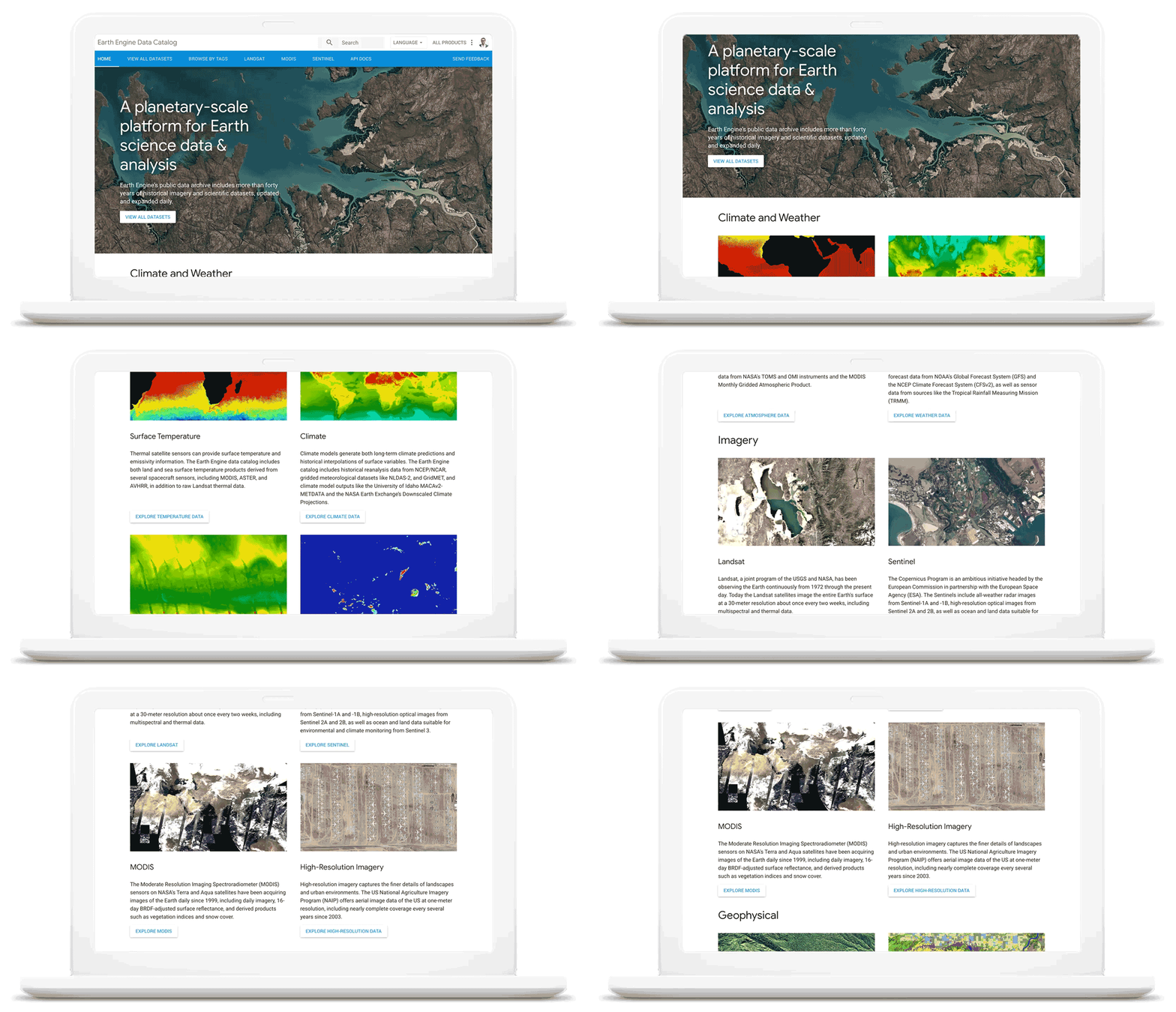
As we work with our customers to accelerate their sustainability initiatives, earth observation data is proving critical to effectively plan for the long-term impacts of climate change. To extend our geospatial and sustainability use cases we’re also expanding our partnerships with CARTO, Climate Engine, Geotab, NGIS, and Planet to bring their data and core applications to Google Cloud.
These partners will each make their existing platforms and datasets available globally on Google Cloud, giving you low-latency and reliable access to critical data and applications that will inform your sustainability initiatives. By integrating water availability, agricultural data, weather risks, and extensive daily satellite imagery into Earth Engine and BigQuery, you can achieve more ambitious goals for the sustainability of your business and our planet.
Committing to help you meet your climate goals
With each of these tools, we’re working to reduce the barriers you face in adopting more sustainable technology practices. We understand that building more sustainable applications and infrastructure is not easy. You face competing priorities, technical challenges, and the perception that climate action is costly.
It doesn’t have to be this way. Today, we are making a sustainability pledge to you: teams across Google Cloud are committing to eliminating the barriers you face in building a more sustainable digital future for your organization, and will help you take action today to realize your climate goals. We’ll do this in a number of ways:
- In digital transformation projects and workshops, sustainability teams will always have a seat at the planning table, so we can work together on using cloud technology to build a more sustainable future.
- We’re putting low-carbon signals natively into our products to help developers choose more sustainable options early in their application development.
- We’ll ensure carbon impact is measured consistently with other key performance indicators. Leveraging the social cost of carbon, the ROI models and value assessments you conduct with Google Cloud will project your emissions impact too.
- We’ll be transparent about our carbon impact, by publishing third-party reviewed reports and methodologies, so you can trust the data for your own reports and disclosures.
- We’ll continue to work with the industry on best practices, including educational resources like Sustainable IT – Decoded, a new masterclass created in partnership with Intel, that shares the expertise of sustainability thought leaders.
For the next decade we need to work together to avert the worst consequences of climate change. We’ve made tremendous progress in building technology that helps everyone do more for the planet, and we’re excited to see what you do with it. Visit this page to learn more about Google Cloud’s sustainability efforts.
Recapping Google Cloud VMware Engine’s Latest Milestones
3469
Of your peers have already read this article.
3:00 Minutes
The most insightful time you'll spend today!
We’ve made several updates to Google Cloud VMware Engine in recent weeks—today’s post provides a recap of our latest milestones. Google Cloud VMware Engine delivers an enterprise-grade VMware stack running natively in Google Cloud. This cloud service is one of the fastest paths to the cloud for VMware workloads without making changes to existing applications or operating models across a variety of use-cases. These include rapid data center exit, application lift and shift, disaster recovery, virtual desktop infrastructure, or modernization at your own pace.
In fact, Mitel, a global provider of unified communications-as-a-service to 70 million business users across 100 countries, migrated 1,000 VMware instances to Google Cloud VMware Engine in less than 90 days and improved its monthly operational output four times.
In our last update, we focused on several innovative capabilities around networking, reach, and scale. Let us take a look at the highlights we released since our last installment.
Fast provisioning of a dedicated, intrinsically secure VMware private cloud
With Google Cloud VMware Engine, you can spin up a VMware private cloud in about 30 minutes. You can also scale your VMware-based infrastructure on-demand with dedicated hosts located in secure Google data centers. Let us look at what’s new:
Autoscale: The ability to elastically and programmatically manage infrastructure resources to align with business needs or what is called “right-sizing” is a core capability of an IaaS platform. With autoscale, Google Cloud VMware Engine users can leverage policy-driven automation to scale the nodes needed to meet the compute demands of the VMware infrastructure.
Autoscale:
- Addresses seasonal spikes in demand, gradual increases of utilization, or new projects being onboarded or expanded due to disaster recovery events.
- Analyzes the CPU, memory, and storage utilization to give you the controls to scale Google Cloud VMware Engine nodes up or down.
- Ensures that storage consumption does not exceed the recommended limits for maintaining the Google Cloud VMware Engine service-level agreement.
- Reduces overhead on IT teams by automating capacity monitoring and enabling sufficient availability of resources based on thresholds. Note that safeguards for maintaining minimum capacity and maximum capacity can be configured to ensure there are boundaries to the automation.
Learn how to set up Autoscale.

Mumbai region availability
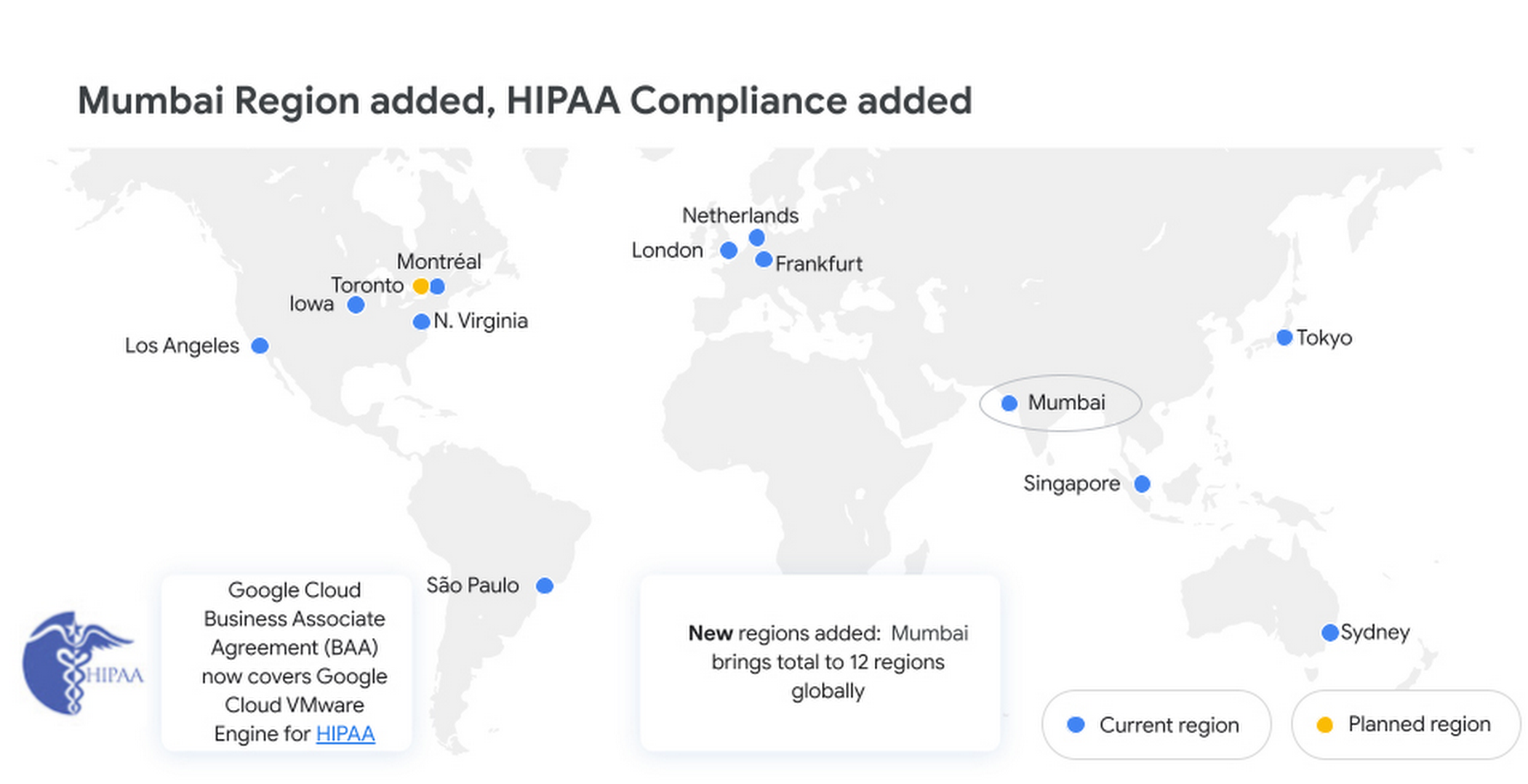
Google Cloud VMware Engine is now available in the Mumbai region. This brings the availability of the service to 12 regions globally, enabling our multi-national and regional customers to leverage a VMware-compatible infrastructure-as-a-service platform on Google Cloud. For more details, please read the press release.
Enterprise-grade infrastructure
With 99.99% availability for a cluster in a single zone, fully dedicated 100 Gbps east-west networking with no oversubscription, and all nonvolatile memory express storage, Google Cloud VMware Engine provides the highest performance required for the most demanding workloads. Let us look at what’s new:
Preview – Google Cloud KMS integration: You already have the ability to bring your own keys to encrypt your vSAN datastores. With this new capability, organizations that want to eliminate the overhead of managing external key providers can leverage a Google managed key provider, using Cloud KMS. This brings increased flexibility in securing workloads and data by enabling vSAN encryption by default for newly instantiated VMware Private Clouds. This feature is currently in Preview.
HIPAA compliance: Since April, Google Cloud VMware Engine is Health Insurance Portability and Accountability Act (HIPAA) compliant. This opens the service up to healthcare organizations, that can now migrate and run their HIPAA-compliant VMware workloads in a fully compatible VMware Cloud Verified stack running natively in Google Cloud with Google Cloud VMware Engine, without changes or re-architecture to tools, processes, or applications. Read more in this blog.
NSX-T support for Active Directory: With NSX-T support for Active Directory, you can now leverage your on-premises Active Directory as one of the lightweight directory access protocol identity sources for user authentication into NSX-T manager. This extends the theme of being able to leverage your on-premises tools with Google Cloud VMware Engine. For more information, read the documentation on how to set up identity sources.
vSAN TRIM/UNMAP support: For space-efficiency, vSAN allows creating thin-provisioned disks that grow gradually as they are filled with data. However, files that are deleted within the guest operating system (OS) do not result in vSAN freeing up space allocated. To increase space efficiency, guest OS file systems have the ability to reclaim capacity that is no longer used, using TRIM/UNMAP commands. vSAN is fully aware of these commands that are sent from the guest OS and enables reclamation of previously allocated storage as free space. We have enabled TRIM/UNMAP for vSan by default in Google Cloud VMware Engine.
Simplicity in experience and operations
With Google Cloud VMware Engine, you only need to worry about your workloads—not patching, upgrading, and updating the solution layer, for fewer interoperability issues and infrastructure maintenance. IIn addition, we have pre-built service accounts to enable your third-party VMware-supported tools and solutions to work seamlessly in VMware Engine. Access to Google services privately over local connections is also natively supported, enabling enrichment of existing applications and modernization over time. Finally, this service brings the power of Google Cloud Virtual Private Cloud (VPC) design by natively providing multi-VPC, multi-region networking that’s unique. Let’s look at what’s new:
Dashboards for Day 2 operations: To speed up cloud transformation and enable efficiency, Google Cloud VMware Engine administrators can take advantage of Cloud Operations dashboards for the solution. In addition, administrators can create custom policies through cloud alerting and enable notifications via channels of their choice (SMS, email, Slack, and more). For more details on how to set up cloud monitoring, please refer to Setting up Cloud Monitoring.
For the latest updates, bookmark Google Cloud VMware Engine release notes.
Thanks to Manish Lohani, Product Management, Google Cloud; Nargis Sakhibova, Product Management, Google Cloud; and Wade Holmes, Solutions Management, Google Cloud; for their contributions to this blog post.
More Relevant Stories for Your Company

Google Cloud Garners Highest Score in Forrester New Wave for Computer Vision Platforms
In Forrester's evaluation of the emerging market for computer vision platforms, it identified the 11 most significant providers in the category — Amazon Web Services, Chooch AI, Clarifai, Deepomatic, EdgeVerve, Google, Hive, IBM, Microsoft, Neurala, and SAS — and evaluated them. Its report details its findings about how well each

Three Typical Connectivity Use Cases to Pick the Right Option for Your Enterprise
Enterprises today have a very broad mix of networks — from SD-WANs, dedicated WANs such as MPLS, cloud interconnects, to VPNs. At the same time, they’re moving those WANs to the cloud to take advantage of faster turn-up, lower cost, and increased feature velocity. As workloads migrate to the cloud

Google Cloud: Lowering Migration Risks for Indian Firms
A common perception is that migrating existing workloads to the public cloud—especially those with a lot of data—is complex, time consuming, and risky. But with the right planning, organizations can rapidly establish the right practices to accelerate migrations, lower risk, and succeed in the cloud.




Pega Systems Migrates SAP Servers to Google Cloud in Just 9 Weeks!
Pega Systems' financial data on SAP environs were on a hosting platform that lacked agility. By moving nearly 30 SAP servers to Google Cloud in just 9 weeks, Pega Systems was able to unlock data and integrate BigQuery into SAP HANA to deliver personalization for clients and embark on an
