





Build Open Data Platform on GCP with Delta Lake, Presto and Dataproc

3404
Of your peers have already read this article.
5:00 Minutes
The most insightful time you'll spend today!
Organizations today build data lakes to process, manage and store large amounts of data that originate from different sources both on-premise and on cloud. As part of their data lake strategy, organizations want to leverage some of the leading OSS frameworks such as Apache Spark for data processing, Presto as a query engine and Open Formats for storing data such as Delta Lake for the flexibility to run anywhere and avoiding lock-ins.
Traditionally, some of the major challenges with building and deploying such an architecture were:
- Object Storage was not well suited for handling mutating data and engineering teams spent a lot of time in building workarounds for this
- Google Cloud provided the benefit of running Spark, Presto and other varieties of clusters with the Dataproc service, but one of the challenges with such deployments was the lack of a central Hive Metastore service which allowed for sharing of metadata across multiple clusters.
- Lack of integration and interoperability across different Open Source projects
To solve for these problems, Google Cloud and the Open Source community now offers:
- Native Delta Lake support in Dataproc, a managed OSS Big Data stack for building a data lake with Google Cloud Storage, an object storage that can handle mutations
- A managed Hive Metastore service called Dataproc Metastore which is natively integrated with Dataproc for common metadata management and discovery across different types of Dataproc clusters
- Spark 3.0 and Delta 0.7.0 now allows for registering Delta tables with the Hive Metastore which allows for a common metastore repository that can be accessed by different clusters.
Architecture
Here’s what a standard Open Cloud Datalake deployment on GCP might consist of:
- Apache Spark running on Dataproc with native Delta Lake Support
- Google Cloud Storage as the central data lake repository which stores data in Delta format
- Dataproc Metastore service acting as the central catalog that can be integrated with different Dataproc clusters
- Presto running on Dataproc for interactive queries
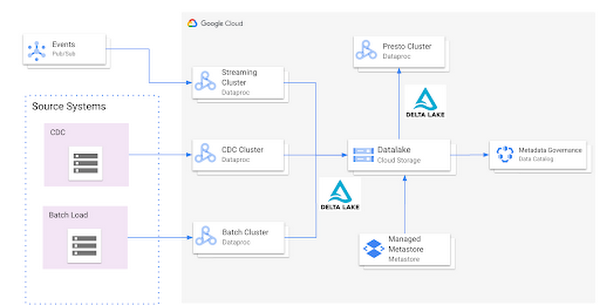
Such an integration provides several benefits:
- Managed Hive Metastore service
- Integration with Data Catalog for data governance
- Multiple ephemeral clusters with shared metadata
- Out of the box integration with open file formats and standards
Reference implementation
Below is a step by step guide for a reference implementation of setting up the infrastructure and running a sample application
Setup
The first thing we would need to do is set up 4 things:
- Google Cloud Storage bucket for storing our data
- Dataproc Metastore Service
- Delta Cluster to run a Spark Application that stores data in Delta format
- Presto Cluster which will be leveraged for interactive queries
Create a Google Cloud Storage bucket
Create a Google Cloud Storage bucket with the following command using a unique name.
gsutil mb gs://<your-bucket-name>
Create a Dataproc Metastore service
Create a Dataproc Metastore service with the name “demo-service” and with version 3.1.2. Choose a region such as us-central1. Set this and your project id as environment variables.
REGION=<your-region>PROJECT_ID=<your-project-id>gcloud metastore services create demo-service \--hive-metastore-version=3.1.2 \--location=${REGION}
Create a Dataproc cluster with Delta Lake
Create a Dataproc cluster which is connected to the Dataproc Metastore service created in the previous step and is in the same region. This cluster will be used to populate the data lake. The jars needed to use Delta Lake are available by default on Dataproc image version 1.5+
gcloud dataproc clusters create delta-cluster \--dataproc-metastore=projects/${PROJECT_ID}/locations/us-central1/services/demo-service \--region=${REGION} \--image-version=2.0.0-RC22-debian10
Create a Dataproc cluster with Presto
Create a Dataproc cluster in us-central1 region with the Presto Optional Component and connected to the Dataproc Metastore service.
gcloud dataproc clusters create presto-cluster \--dataproc-metastore=projects/${PROJECT_ID}/locations/us-central1/services/demo-service \--region=${REGION} \--image-version=2.0-debian10 \--optional-components=PRESTO \--enable-component-gateway
Spark Application
Once the clusters are created we can log into the Spark Shell by SSHing into the master node of our Dataproc cluster “delta-cluster”.. Once logged into the master node the next step is to start the Spark Shell with the delta jar files which are already available in the Dataproc cluster. The below command needs to be executed to start the Spark Shell. Then, generate some data.
spark-shell --jars /usr/lib/delta/jars/delta-core.jarimport io.delta.tables._import org.apache.spark.sql.functions._// Simulate application dataval orig_df = Seq((1L, 3.0), (2L, -1.0), (3L, 0.0)).toDF("x", "y")
# Write Initial Delta format to GCS
Write the data to GCS with the following command, replacing the project ID.
orig_df.write.mode("append").format("delta").save("gs://<your-bucket-name>/first-delta-table")
# Ensure that data is read properly from Spark
Confirm the data is written to GCS with the following command, replacing the project ID.
spark.read.format("delta").load("gs://<your-bucket-name>/first-delta-table").show()
Once the data has been written we need to generate the manifest files so that Presto can read the data once the table is created via the metastore service.
# Generate manifest files
val deltaTable = DeltaTable.forPath("gs://<your-bucket-name>/first-delta-table")deltaTable.generate("symlink_format_manifest")
With Spark 3.0 and Delta 0.7.0 we now have the ability to create a Delta table in Hive metastore. To create the table below command can be used. More details can be found here
# Create Table in Hive metastore
spark.sql("CREATE TABLE my_first_table (x bigint,y double) ROW FORMAT SERDE 'org.apache.hadoop.hive.ql.io.parquet.serde.ParquetHiveSerDe' STORED AS INPUTFORMAT 'org.apache.hadoop.hive.ql.io.SymlinkTextInputFormat' OUTPUTFORMAT 'org.apache.hadoop.hive.ql.io.HiveIgnoreKeyTextOutputFormat' LOCATION 'gs://<your-bucket-name>/first-delta-table/_symlink_format_manifest'")
Once the table is created in Spark, log into the Presto cluster in a new window and verify the data. The steps to log into the Presto cluster and start the Presto shell can be found here.
#Verify Data in Presto
presto:default> select * from hive.default.my_first_table;x | y----+------2 | -1.03 | 0.01 | 3.0
Once we verify that the data can be read via Presto the next step is to look at schema evolution. To test this feature out we create a new dataframe with an extra column called “z” as shown below:
# Schema Evolution in Spark
Switch back to your Delta cluster’s Spark shell and enable the automatic schema evolution flag
spark.sql("SET spark.databricks.delta.schema.autoMerge.enabled = true")
Once this flag has been enabled create a new dataframe that has a new set of rows to be inserted along with a new column
val merge_df = Seq((10L, 30.0, "a"), (20L, -10.0, "b"), (30L, 100.0, "c")).toDF("x", "y", "z")
Once the dataframe has been created we leverage the Delta Merge function to UPDATE existing data and INSERT new data
# Use Delta Merge Statement to handle automatic schema evolution and add new rows
deltaTable.alias("o").merge(merge_df.as("n"),"o.x = n.x").whenMatched.updateAll().whenNotMatched.insertAll().execute()
As a next step we would need to do two things for the data to reflect in Presto:
- Generate updated schema manifest files so that Presto is aware of the updated data
- Modify the table schema so that Presto is aware of the new column.
When the data in a Delta table is updated you must regenerate the manifests using either of the following approaches:
- Update explicitly: After all the data updates, you can run the generate operation to update the manifests.
- Update automatically: You can configure a Delta table so that all write operations on the table automatically update the manifests. To enable this automatic mode, you can set the corresponding table property using the following SQL command.
ALTER TABLE delta.<path-to-delta-table> SET TBLPROPERTIES(delta.compatibility.symlinkFormatManifest.enabled=true)
However, in this particular case we will use the explicit method to generate the manifest files again
deltaTable.generate("symlink_format_manifest")
Once the manifest file has been re-created the next step is to update the schema in Hive metastore for Presto to be aware of the new column. This can be done in multiple ways, one of the ways to do this is shown below:
# Promote Schema Changes via Delta to Presto
val schema_evolution = "ALTER TABLE my_first_table ADD COLUMN ( " + merge_df.schema.toDDL.replace(orig_df.schema.toDDL,"").substring(1) + ")"spark.sql(s"$schema_evolution")
Once these changes are done we can now verify the new data and new column in Presto as shown below:
# Verify changes in Presto
presto:default> select * hive.default.from my_first_table;x | y | z----+-------+------20 | -10.0 | b2 | -1.0 | NULL3 | 0.0 | NULL30 | 100.0 | c10 | 30.0 | a1 | 3.0 | NULL
In summary, this article demonstrated:
- Set up the Hive metastore service using Dataproc Metastore, spin up Spark with Delta lake and Presto clusters using Dataproc
- Integrate the Hive metastore service with the different Dataproc clusters
- Build an end to end application that can run on an OSS Datalake platform powered by different GCP services
Next steps
If you are interested in building an Open Data Platform on GCP please look at the Dataproc Metastore service for which the details are available here and for details around the Dataproc service please refer to the documentation available here. In addition, refer to this blog which explains in detail the different open storage formats such as Delta & Iceberg that are natively supported within the Dataproc service.
3368
Of your peers have already watched this video.
16:30 Minutes
The most insightful time you'll spend today!
Scaling Data-Driven Insights Across a Complex Global Organization with Looker and BigQuery
In this video, SpringML and Iron Mountain share how migrating data to Google Cloud not only saved hundreds of thousands of dollars in licensing consolidation but allows stakeholders across a complex global organization to:
- Consolidate 1,200 data management applications into one data lake
- Unify information governance practices across disparate corporate verticals and departments
- Provide a single view of operational and customer data for enhanced decision making across 43 countries and 200 acquisitions
- Unlock the power of data science and predictive analytics
Standardizing across varying systems and processes onto one platform took just a matter of weeks for a project that could have taken about a year.
SpringML and Iron Mountain share how this was done, lessons learned and next steps for their collaboration adopting Looker and BigQuery into Iron Mountain.
4813
Of your peers have already watched this video.
2:30 Minutes
The most insightful time you'll spend today!
Haaretz on Google Cloud Guarantees Faster, Reliable & Responsive Services to its Audience
Israeli centenarian newspaper, Haaretz relied on on-prem infrastructure to serve readers digitally. As the need for scalability, security and business intelligence grew alongside their readership, Haaretz was looking for more than just a cloud-based solution to replace their infrastructure. Inon Gershovitz, CTO, Haaretz takes us through the journey of recreating digital news experience, serving growing reader traffic and keeping up the editorial standards with Google Cloud.
Watch the video to hear from Haaretz’ leaders on delivering personalized content to readers with Google Cloud solutions!
This Diagnostic Company is Revolutionising Healthcare Delivery with AI
5391
Of your peers have already read this article.
5:30 Minutes
The most insightful time you'll spend today!
Dr. Elliot Smith cannot be accused of lacking ambition. A high achiever with a Ph.D. in Electrical Engineering and a specialist in magnetic resonance imaging (MRI) systems, Smith aims to deliver top quality healthcare to anyone in the world — regardless of their location or wealth.
Dr. Smith has already made strides on this journey with his Brisbane, Queensland-headquartered business, Maxwell MRI. “I saw there was a big gap in the market around automating the diagnosis of health conditions,” he says. “Existing processes were typically manual and involved a lot of people.”
Artificial intelligence (AI) and machine learning can remove a key obstacle to scaling out medicine and improve the efficiency and accuracy of diagnosing conditions, the healthcare entrepreneur believes.
“Our grand vision is to build an AI doctor that anyone can receive affordable support from and connect to in order to obtain results,” explains Dr. Smith.
Maxwell MRI presently enables clinicians to submit anonymised MRI scans to a machine learning enabled AI platform to help diagnose prostate cancer. The service is sold to clinicians who can then charge a per-session fee to clients. As well as obtaining results for individual cases, the MRI scans and associated information is used to ‘train’ the platform to deliver accurate diagnoses faster and in a more affordable way than existing systems do.
Dr. Smith and his team started by running a number of functions and processes on a single server with graphics processing units (GPUs) and sizable hard disk capacity. However, this infrastructure could not scale to support the planned growth of the business. Each case Maxwell MRI processes involves about 200MB of data in MRI scans alone. Once supplementary data, blood test result, pathology results and genetic information is included, this load can reach more than 1GB of data per patient.
The business aimed to process 150,000 cases by the end of 2018. This required a service that could deliver massive scale in data storage and compute, and could easily be accessed from any location. “We wanted to move from three GPUs to 30 GPUs without having to buy more servers or other associated equipment, so the cloud was the natural next step,” says Dr. Smith.
Maxwell MRI evaluated Google Cloud Platform (GCP) and determined that the managed services component of GCP would remove the burden of infrastructure deployment and administration. In addition, Google Cloud Machine Learning Engine would enable the business to scale to as many GPUs as needed to meet demand.
Maxwell MRI started with some small experiments to determine that GCP met all its requirements and completed its migration to the platform in February 2017. “We really started to scale up the data we had and consequently our computing requirements at that time,” Dr. Smith says.
The Maxwell MRI platform features an upload service that enables clinicians to upload imaging and associated data. This service triggers several different upload pipelines that clean and standardise data. They then write imaging data to Google Cloud Storage, and more structured data to a combination of Google Cloud Datastore and Google Cloud Spanner.
The platform then converts the information into records that can be used to ‘train’ new machine learning configurations or run evaluations through existing machine learning pipelines.
“The tasks we perform including segmenting various anatomical regions for analysis and sending those results back into Google Cloud Storage,” says Dr. Smith. “This then commences that repeated process of running Google Cloud Dataflow pipelines and machine learning algorithms, and presenting those outcomes back to the clinicians.”
Existing Literature Validated
The data processed and analysed to date has, Dr Smith says, enabled Maxwell MRI to help validate existing literature that indicates clinicians lack confidence in existing early-stage testing procedures for prostate cancer. This prompts them to move quickly to the biopsy stage to assure themselves their diagnosis is valid. “New technologies have a lot of potential to rectify this situation and guide treatment to be more accurate, specific and cost-effective,” he says.
Results Delivered in 10-15 Minutes
More specifically, using GCP has enabled Maxwell MRI to guarantee to clinicians that results will be delivered within minutes. “Clinicians are used to getting results back in two days to a week,” says Dr. Smith. “We’re saying that with our platform running on GCP we’ll deliver you results in 10 to 15 minutes, regardless of the number of patients coming in.”
Running on GCP has enabled the business to accelerate its development cycles, test new ideas easily on a subset of data, test in parallel and deliver new services considerably faster than in another environment. In addition, the flexible GCP charging model aligned with the ability to scale compute capabilities quickly and easily has enabled the fledgling business to control its costs.
Google technologies are poised to play an integral role in the business’s future. “With Google available, it doesn’t make sense for us to use our own infrastructure,” Dr. Smith says. “Our expertise in AI, machine learning and clinical engagement complements cloud platform specialties of infrastructure, managed services and ease of use. We see a bright future ahead in helping to transform healthcare globally.”

Google’s Lesson on Leveraging AI and More to Optimize Cloud Value for Innovation
DOWNLOAD EXPLAINER4833
Of your peers have already downloaded this article
1:30 Minutes
The most insightful time you'll spend today!
Google has managed to stay ahead of the curve and demonstrate its ‘growth while staying innovative’ approach using advanced open technologies, AI/ML based analytics solutions, as well as tools for team collaboration and skill development, automation and storage security. Businesses too can achieve the same by deriving maximum value from its people and technology by following Google’s simple guide to stay innovative. Download to learn more.
Rubin Observatory Leverages Google Cloud to Power Astronomical Research

6057
Of your peers have already read this article.
2:00 Minutes
The most insightful time you'll spend today!
This week, the Vera C. Rubin Observatory is launching the first preview of its new Rubin Science Platform (RSP) for an initial cohort of astronomers. The observatory, which is located in Chile but managed by the U.S. National Science Foundation’s NOIRLab in Tucson, AZ and SLAC in California, is jointly funded by the NSF and the U.S. Department of Energy. The platform provides an easy-to-use interface to store and analyze the massive datasets of the Legacy Survey of Space and Time (LSST), which will survey a third of the sky each night for ten years, detecting billions of stars and galaxies, and millions of supernovae, variable stars, and small bodies in our Solar System.
The LSST datasets are unprecedented in size and complexity, and will be far too large for scientists to download to their personal computers for analysis. Instead, scientists will use the RSP to process, query, visualize, and analyze the LSST data archives through a mixture of web portal, notebook, and other virtual data analysis services. An initial launch with simulated data, called Data Preview 0, builds on the Rubin Observatory’s three-year partnership with Google to develop an Interim Data Facility (IDF) on Google Cloud to prototype hosting of the massive LSST dataset. This agreement marks the first time a cloud-based data facility has been used for an astronomy application of this magnitude.
Bringing the stars to the cloud
For Data Preview 0, the IDF leverages Cloud Storage, Google Kubernetes Engine (GKE), and Compute Engine to provide the Rubin Observatory user community access to simulated LSST data in an early version of the RSP. The simulated data were developed over several years by the LSST Dark Energy Science Collaboration to imitate five years of an LSST-like survey over 300 square degrees of the sky (about 1,500 times the area of the moon). The resulting images are very realistic: they have the same instrumental characteristics, such as pixel size and sensitivity to photons, that are expected from the Rubin Observatory’s LSST Camera, and they were processed with an early version of the LSST Science Pipelines that will eventually be used to process LSST data. “This will be the first time that these workloads have ever been hosted in a cloud environment. Researchers will have an opportunity to explore an early version of this platform,” says Ranpal Gill, senior manager and head of communications at the Rubin Observatory.
Broadening access for more researchers
Over 200 scientists and students with Rubin Observatory data rights were selected to participate in Data Preview 0 from a pool of applicants that represents a wide range of demographic criteria, regions, and experience level. Participants will be supported with resources such as tutorials, seminars, communication channels, and networking opportunities—and they will be free to pursue their own science at their own pace using the data in the RSP.
“The revolutionary nature of the future LSST dataset requires a commensurately innovative system for data access and analysis paired with robust support for scientists,” says Melissa Graham, lead community scientist for the Rubin Observatory and research scientist in the astronomy department at the University of Washington. “I’m personally excited to enhance my own skills by using the RSP’s tools for big data analysis, while also helping others to learn and to pursue their LSST-related science goals during Data Preview 0.”
At the same time, the fact that the RSP is hosted in the cloud provides researchers at smaller institutions access to state-of-the-art astronomy infrastructure that is comparable to that of the largest national research centers.
The launch benefits the observatory too: the development team can learn what researchers are interested in while also testing and debugging the platform. Graham says that “the platform is still in active development so researchers using it will be able to follow along in the progress, and provide feedback on ways that we can optimize the development of the tools.”
Next steps
The LSST aims to begin the ten-year survey in 2023-24 and expects it to include 500 petabytes of data. Through the cloud, Google aims to help make this extraordinary project scalable and accessible to researchers everywhere. To learn more about Data Preview 0, watch this video.
Want to ramp up your own research in the cloud? We offer research credits to academics using Google Cloud for qualifying projects in eligible countries. You can find our application form on Google Cloud’s website or contact our sales team.
More Relevant Stories for Your Company


How to Manage Data Governance, at Scale, in a Multi-cloud World
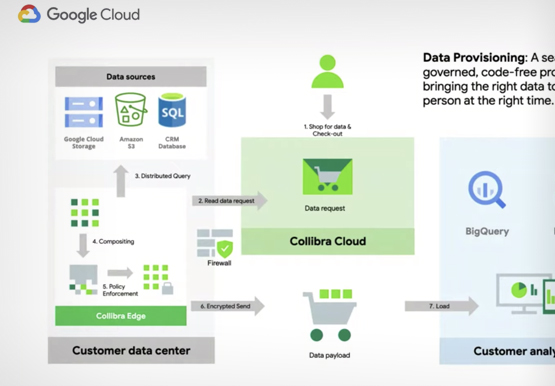
Fears around security, data loss and regulatory compliance are still some of the largest reasons holding back enterprises from embracing the cloud. In a hybrid or multi-cloud paradigm, how do you avoid data access bottlenecks, security blindspots, data leakage, or missed opportunities? Restricting access to data and tightening data security,

How to Modernize Your Data infrastructure and Analytics: Case Study
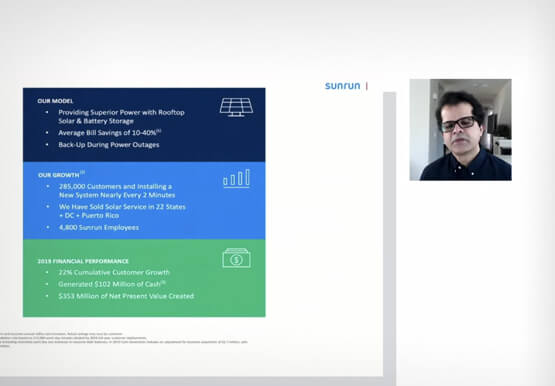
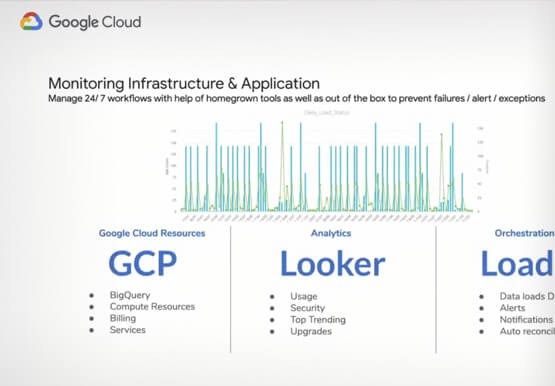
Data modernization is key to digital transformation. Legacy systems are slow, expensive and cannot keep up with changing requirements. Data teams often spend more time on data pipelines than they do on data analysis or data science.in this video, Harish Ramachandraiah, Director Eng. & Analytics, Sunrun, speaks with Joel Mckelvey,


An Overview of Google’s Data Cloud
Data access, management and privacy has been at the center of priorities for enterprises that are aiming to be more agile, reliable and data-driven. Google Cloud's technology innovations spanning products like BigQuery, Spanner, Looker and VertexAI help organizations navigate the complexities related to siloed data in large volumes sprawled across


What’s BigQuery and Why Should IT Managers Care?
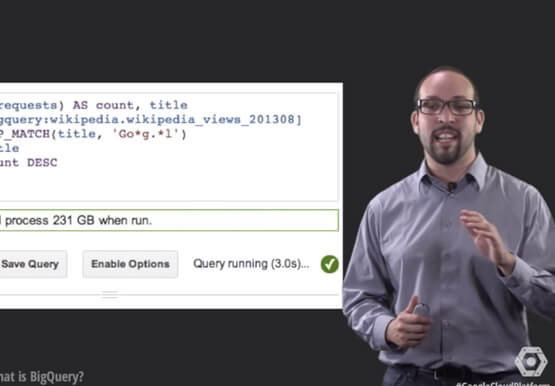
Today it’s impossible for anyone working in IT teams to have a day go by without a discussion about data, analytics, and big data. Often these conversations veer towards BigQuery. Many IT managers are unsure what BigQuery is and what it does. If you are one of them, you aren’t
