





Build A Movie Recommender System based on Reinforcement Learning (RL) with Vertex AI

3331
Of your peers have already read this article.
3:00 Minutes
The most insightful time you'll spend today!
Reinforcement learning (RL) is a form of machine learning whereby an agent takes actions in an environment to maximize a given objective (a reward) over this sequence of steps. Applications of RL include learning-based robotics, autonomous vehicles and content serving. The fundamental RL system includes many states, corresponding actions, and rewards to those actions. Translate that into a movie recommender system: The ‘state’ is the user, the ‘action’ is the movie to recommend to the user, and the ‘reward’ is the user rating of the movie. RL is a great framework for optimizing ML models, as mentioned by Spotify in the keynote in the Applied ML Summit 2021.
In this article, we’ll demonstrate an RL-based movie recommender system executed in Vertex AI and built with TF-Agents, a library for RL in TensorFlow. This demo has two parts: (1) a step-by-step guide leveraging Vertex Training, Hyperparameter Tuning, and Prediction services; (2) a MLOps guide to build end-to-end pipelines using Vertex Pipelines and other Vertex services.
TF-Agents meets Vertex AI
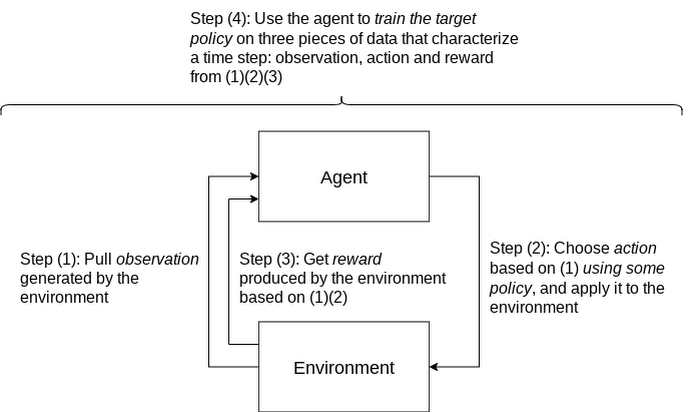
In reinforcement learning (RL), an agent takes a sequence of actions in a given environment according to some policy, with the goal of maximizing a given reward over this sequence of actions. TF-Agents is a powerful and flexible library enabling you to easily design, implement and test RL applications. It provides you with a comprehensive set of logical modules that support easy customization:
- Policy: A mapping from an environment observation to an action or a distribution over actions. It is the artifact produced from training, and the equivalent of a “Model” in a supervised learning setup.
- Action: A move or behavior that is outputted by some policy, and chosen and taken by an agent.
- Agent: An entity that encapsulates an algorithm to use one or more policies to choose and take actions, and trains the policy.
- Observations: A characterization of the environment state.
- Environment: Definition of the RL problem to solve. At each time step, the environment generates an observation, bears the effect of the agent action, and then given the action taken and the observation, the environment responds with a reward as feedback.
A typical RL training loop looks like the following:
A typical process to build, evaluate, and deploy RL applications would be:
- Frame the problem: While this blog post introduces a movie recommendation system, you can use RL to solve a wide range of problems. For instance, you can easily solve a typical classification problem with RL, where you can frame predicted classes as actions. One example would be digit classification: observations are digit images, actions are 0-9 predictions and rewards indicate whether the predictions match the ground truth digits.
- Design and implement RL simulated experiments: We will go into detail on simulated training data and prediction requests in the end-to-end pipeline demo.
- Evaluate performance of the offline experiments.
- Launch end-to-end production pipeline by replacing the simulation constituents with real-world interactions.
Now that you know how we’ll build a movie recommendation system with RL, let’s look at how we can use Vertex AI to run our RL application in the cloud. We’ll use the following Vertex AI products:
- Vertex AI training to train a RL policy (the counterpart of a model in supervised learning) at scale
- Vertex AI hyperparameter tuning to find the best hyperparameters
- Vertex AI prediction to serve trained policies at endpoints
- Vertex Pipelines to automate, monitor, and govern your RL systems by orchestrating your workflow in a serverless manner, and storing your workflow’s artifacts using Vertex ML Metadata.
Step-by-step RL demo
This step-by-step demo showcases how to build the MovieLens recommendation system using TF-Agents and Vertex AI services, primarily custom training and hyperparameter tuning, custom prediction and endpoint deployment. This demo is available on Github, including a step-by-step notebook and Python modules.
The demo first walks through the TF-Agents on-policy (which is covered in detail in the demo) training code of the RL system locally in the notebook environment. It then shows how to integrate the TF-Agents implementation with Vertex AI services: It packages the training (and hyperparameter tuning) logic in a custom training/hyperparameter tuning container and builds the container with Cloud Build. With this container, it executes remote training and hyperparameter tuning jobs using Vertex AI. It also illustrates how to utilize the best hyperparameters learned from the hyperparameter tuning job during training, as an optimization.
The demo also defines the prediction logic, which takes in observations (user vectors) from prediction requests and outputs predicted actions (movie items to recommend), in a custom prediction container and builds the container with Cloud Build. It deploys the trained policy to a Vertex AI endpoint, and uses the prediction container as the serving container for the policy at the Vertex AI endpoint.
End-to-end workflow with a closed feedback loop: Pipeline demo
Pipeline architecture
Building upon our RL demo, we’ll now show you how to scale this workflow using Vertex Pipelines. This pipeline demo showcases how to build an end-to-end MLOps pipeline for the MovieLens recommendation system, using Kubeflow Pipelines (KFP) for authoring and Vertex Pipelines for orchestration.
Highlights of this end-to-end demo include:
- RL-specific implementation that handles RL modules, training logic and trained policies as opposed to models
- Simulated training data, simulated environment for predictions and re-training
- Closing of the feedback loop from prediction results back to training
- Customizable and reproducible KFP components
An illustration of the pipeline structure is shown in the figure below.
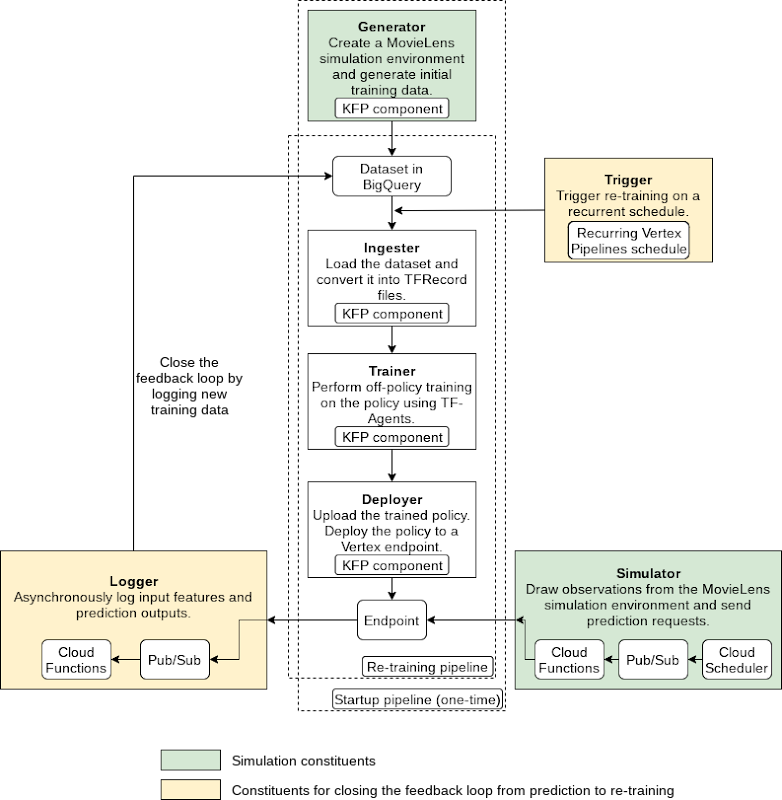
The pipeline consists of the following components:
- Generator: to generate MovieLens simulation data as the initial training dataset using a random data-collecting policy, and store in BigQuery [executed only once]
- Ingester: to ingest training data in BigQuery and output TFRecord files
- Trainer: to perform off-policy (which is covered in detail in the demo) training using the training dataset and output a trained RL policy
- Deployer: to upload the trained policy, create a Vertex AI endpoint and deploy the trained policy to the endpoint
In addition to the above pipeline, there are three components which utilize other GCP services (Cloud Functions, Cloud Scheduler, Pub/Sub):
- Simulator: to send recurring simulated MovieLens prediction requests to the endpoint
- Logger: to asynchronously log prediction inputs and results as new training data back to BigQuery, per prediction requests
- Trigger: to recurrently execute re-training on new training data
Pipeline construction with Kubeflow Pipelines (KFP)
You can author the pipeline using the individual components mentioned above:
@dsl.pipeline(pipeline_root=PIPELINE_ROOT,name=f"{PIPELINE_NAME}-startup")def pipeline(# Pipeline configsproject_id: str,raw_data_path: str,training_artifacts_dir: str,# BigQuery configsbigquery_dataset_id: str,bigquery_location: str,bigquery_table_id: str,bigquery_max_rows: int = 10000,# TF-Agents RL configsbatch_size: int = 8,rank_k: int = 20,num_actions: int = 20,driver_steps: int = 3,num_epochs: int = 5,tikhonov_weight: float = 0.01,agent_alpha: float = 10) -> None:"""Authors a RL pipeline for MovieLens movie recommendation system.Integrates the Generator, Ingester, Trainer and Deployer components. Thispipeline generates initial training data with a random policy and runs onceas the initiation of the system.Args:project_id: GCP project ID. This is required because otherwise the BigQueryclient will use the ID of the tenant GCP project created as a result ofKFP, which doesn't have proper access to BigQuery.raw_data_path: Path to MovieLens 100K's "u.data" file.training_artifacts_dir: Path to store the Trainer artifacts (trained policy).bigquery_dataset: A string of the BigQuery dataset ID in the format of"project.dataset".bigquery_location: A string of the BigQuery dataset location.bigquery_table_id: A string of the BigQuery table ID in the format of"project.dataset.table".bigquery_max_rows: Optional; maximum number of rows to ingest.batch_size: Optional; batch size of environment generated quantities eg.rewards.rank_k: Optional; rank for matrix factorization in the MovieLens environment;also the observation dimension.num_actions: Optional; number of actions (movie items) to choose from.driver_steps: Optional; number of steps to run per batch.num_epochs: Optional; number of training epochs.tikhonov_weight: Optional; LinUCB Tikhonov regularization weight of theTrainer.agent_alpha: Optional; LinUCB exploration parameter that multiplies theconfidence intervals of the Trainer."""# Run the Generator component.generate_op = create_component_from_func(func=generator_component.generate_movielens_dataset_for_bigquery,output_component_file=f"generator-{OUTPUT_COMPONENT_SPEC}",packages_to_install=["google-cloud-bigquery==2.20.0","tensorflow==2.5.0","tf-agents==0.8.0",])generate_task = generate_op(project_id=project_id,raw_data_path=raw_data_path,batch_size=batch_size,rank_k=rank_k,num_actions=num_actions,driver_steps=driver_steps,bigquery_tmp_file=BIGQUERY_TMP_FILE,bigquery_dataset_id=bigquery_dataset_id,bigquery_location=bigquery_location,bigquery_table_id=bigquery_table_id)# Run the Ingester component.ingest_op = create_component_from_func(func=ingester_component.ingest_bigquery_dataset_into_tfrecord,output_component_file=f"ingester-{OUTPUT_COMPONENT_SPEC}",packages_to_install=["google-cloud-bigquery==2.20.0","tensorflow==2.5.0",])ingest_task = ingest_op(project_id=project_id,bigquery_table_id=generate_task.outputs["bigquery_table_id"],bigquery_max_rows=bigquery_max_rows,tfrecord_file=TFRECORD_FILE)# Run the Trainer component and submit custom job to Vertex AI.train_op = create_component_from_func(func=trainer_component.training_op,output_component_file=f"trainer-{OUTPUT_COMPONENT_SPEC}",packages_to_install=["tensorflow==2.5.0","tf-agents==0.8.0",])train_task = train_op(training_artifacts_dir=training_artifacts_dir,tfrecord_file=ingest_task.outputs["tfrecord_file"],num_epochs=num_epochs,rank_k=rank_k,num_actions=num_actions,tikhonov_weight=tikhonov_weight,agent_alpha=agent_alpha)worker_pool_specs = [{"containerSpec": {"imageUri":train_task.container.image,},"replicaCount": TRAINING_REPLICA_COUNT,"machineSpec": {"machineType": TRAINING_MACHINE_TYPE,"acceleratorType": TRAINING_ACCELERATOR_TYPE,"acceleratorCount": TRAINING_ACCELERATOR_COUNT,},},]train_task.custom_job_spec = {"displayName": train_task.name,"jobSpec": {"workerPoolSpecs": worker_pool_specs,}}# Run the Deployer components.# Upload the trained policy as a model.model_upload_op = gcc_aip.ModelUploadOp(project=project_id,display_name=TRAINED_POLICY_DISPLAY_NAME,artifact_uri=training_artifacts_dir,serving_container_image_uri=f"gcr.io/{PROJECT_ID}/{PREDICTION_CONTAINER}:latest",)# Model uploading has to occur after training completes.model_upload_op.after(train_task)# Create a Vertex AI endpoint. (This operation can occur in parallel with# the Generator, Ingester, Trainer components.)endpoint_create_op = gcc_aip.EndpointCreateOp(project=project_id,display_name=ENDPOINT_DISPLAY_NAME)# Deploy the uploaded, trained policy to the created endpoint. (This operation# has to occur after both model uploading and endpoint creation complete.)model_deploy_op = gcc_aip.ModelDeployOp(project=project_id,endpoint=endpoint_create_op.outputs["endpoint"],model=model_upload_op.outputs["model"],deployed_model_display_name=TRAINED_POLICY_DISPLAY_NAME,machine_type=ENDPOINT_MACHINE_TYPE)
The execution graph of the pipeline looks like the following:
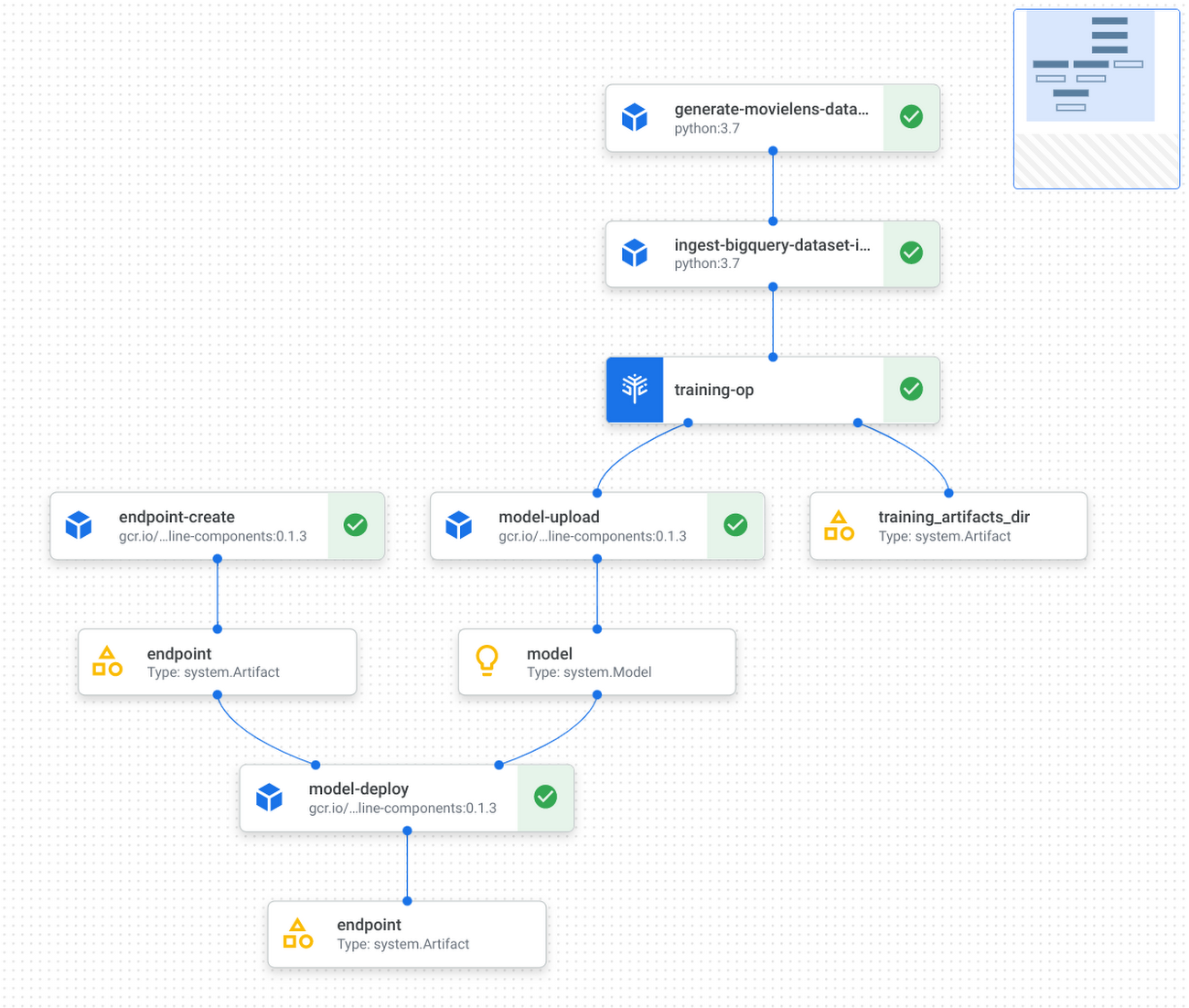
Refer to the GitHub repo for detailed instructions on how to implement and test KFP components, and how to run the pipeline with Vertex Pipelines.
Applying this demo to your own RL projects and production
You can replace the MovieLens simulation environment with a real-world environment where RL quantities like observations, actions and rewards capture relevant aspects of said real-world environment. Based on whether you can interact with the real world in real-time, you may choose either on-policy (showcased by the step-by-step demo) or off-policy (showcased by the pipeline demo) training and evaluation.
If you were to implement a real-world recommendation system, here’s what you’d do:
You would represent users as some user vectors. The individual entries in the user vectors may have actual meanings like age. Alternatively, they may be generated through a neural network as user embeddings. Similarly, you would define what an action is and what actions are possible, likely all items available on your platform; you would also define what the reward is, such as whether the user has tried the item, how long/much the user has spent on the item, user rating of the item, and so on. Again, you have the flexibility to decide on representations for framing the problem that maximize performance. During training or data pre-collection, you may randomly sample users (and build the corresponding user vectors) from the real world, use those vectors as observations to query some policy for items to recommend, and then apply that recommendation to users and obtain their feedback as rewards.
This RL demo can also be extended to ML applications other than recommendation system. For instance, if your use case is to build an image classification system, then you can frame an environment, where observations are the image pixels or embeddings, actions are the predicted classes, and rewards are feedback on the predictions’ correctness.
Conclusion
Congratulations! You have learned how to build reinforcement learning solutions using Vertex AI in a fully managed, modularized and reproducible way. There is so much you can achieve with RL, and you now have many Vertex AI as well as Google Cloud services in your toolbox to support you in your RL endeavors, be it production systems, research or cool personal projects.
Additional resources
- [Recap] step-by-step demo link: GitHub link
- [Recap] end-to-end pipeline demo: GitHub link
- TF-Agents tutorial on bandits: Introduction to Multi-Armed Bandits
- Vertex Pipelines tutorial: Intro to Vertex Pipelines
Dataplex: Google Cloud’s Intelligent Data Fabric to Manage Data and Analytics at Scale

4859
Of your peers have already read this article.
2:30 Minutes
The most insightful time you'll spend today!
Enterprises are struggling to make high quality data easily discoverable and accessible for analytics, across multiple silos, to a growing number of people and tools within their organization. They are often forced to make tradeoffs—to move and duplicate data across silos to enable diverse analytics use cases or leave their data distributed but limit the agility of decisions.
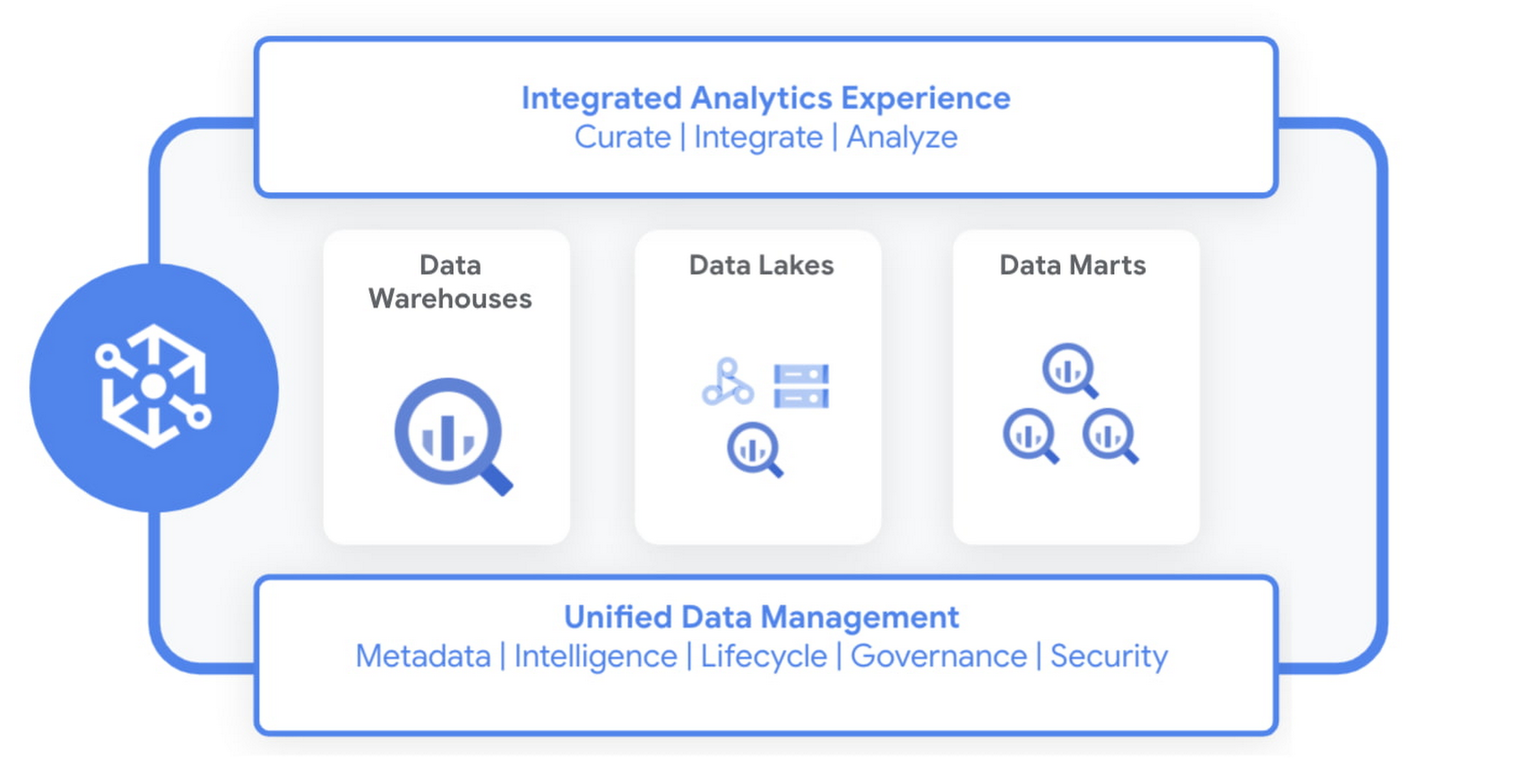
Today we are excited to announce Dataplex, an intelligent data fabric that provides a way to centrally manage, monitor, and govern your data across data lakes, data warehouses and data marts, and make this data securely accessible to a variety of analytics and data science tools.
Dataplex provides an integrated analytics experience, bringing together the best of Google Cloud and open source tools, so you can rapidly curate, secure, integrate, and analyze data at scale. With built-in data intelligence using Google Artificial Intelligence (AI) and machine learning (ML) capabilities and a flexible consumption model, you can now spend less time wrestling with infrastructure and more time focused on driving business outcomes.
Dataplex enables you to:
- Achieve freedom of choice to store data wherever you want for the right price/performance and choose the best analytics tools for the job, including Google Cloud and open source analytics technologies such as Apache Spark and Presto.
- Enforce consistent controls across your data to ensure unified security and governance
- Take advantage of the built-in data intelligence using Google’s best in class AI/ML capabilities to automate much of the manual toil around data management and get access to higher quality data.
Early customers like Equifax, Loblaw, and ANZ are excited about using Dataplex to address data management complexity.
“Dataplex will greatly simplify the existing analytics workflows within Equifax with its unified data fabric and single interface for policy management and governance across all our analytics data. Its built-in data discovery and data quality features will ensure that our data scientists and analysts always have access to high quality data that they can trust. Dataplex aligns well with our enterprise data strategy and we are excited to partner with Google Cloud on this.”
—Kumar Menon, SVP, Data Fabric & Decision Science Technology, Equifax.
“Loblaw is Canada’s food and pharmacy leader, and we are excited to be an early adopter of Dataplex. We could significantly benefit from Dataplex as it provides a single pane of glass for end-to-end data management and governance. We are particularly interested in improving platform resilience and data quality by detecting anomalies as early as possible in the data pipeline with the help of Dataplex.”
—Elton Martins, Senior Director of Data Insights & Analytics, Loblaw
“We are undergoing a major data transformation at ANZ, bringing together our various data assets and building a cohesive data ecosystem for customer benefit. Dataplex’s vision and capabilities align well with our current data strategy to build a unified data fabric for all our analytics and AI/ML use cases. We are excited to partner with GCP on Dataplex and test the product in private preview.”
—Ashish Shekhar, Head of Technology – Enterprise Analytics & Applied AI, ANZ
Dataplex is built for distributed data. We are starting with data stored in Google Cloud Storage and BigQuery, with support for other data sources coming soon. It provides a workflow-driven experience helping you build an open data platform and make data easily accessible to your end users while ensuring your policies and best practices are consistently enforced.
Organizing and curating your data
One of the core tenets of Dataplex is letting you organize and manage your data in a way that makes sense for your business, without data movement or duplication. For that, we are providing logical constructs like lakes, data zones and assets. Those constructs enable you to abstract away the underlying storage systems and become the foundation for setting policies around data access, security, lifecycle management, and so on.
For example, you can create a lake per department within your organization (Retail, Sales, Finance, etc.) and create data zones that map to data readiness and usage (landing, raw, curated_data_analytics, curated_data_science, etc.).
Once you have your lakes and zones setup, you can now attach data to these zones as assets. You can add data from different types of storage (e.g. GCS Bucket and BigQuery dataset) under the same zone. You can also attach data across multiple projects under the same zone.

You can ingest data into your lakes and zones using the tools of your choice including services such as Dataflow, Data Fusion, Dataproc, Pub/Sub or choose from one of our partner products. Dataplex provides built-in 1-click templates for common data management tasks.
Securing your data
Dataplex enables you to define and enforce consistent policies across your data, irrespective of where it physically resides. Data owners can easily set up policies for specific data domains based on business needs, without thinking about where the data is stored while data stewards get global visibility into governance policies and permissions across their data.
You can apply security and governance policies for your entire lake, a specific zone, or an asset. Dataplex maps the policies to the underlying storage and pushes down permissions to the storage layer to provide end-to-end secure data access. Additionally, you can secure not just data but also related artifacts like notebooks, scripts, and models using the same set of access policies.
Making high quality data available for analytics and data science
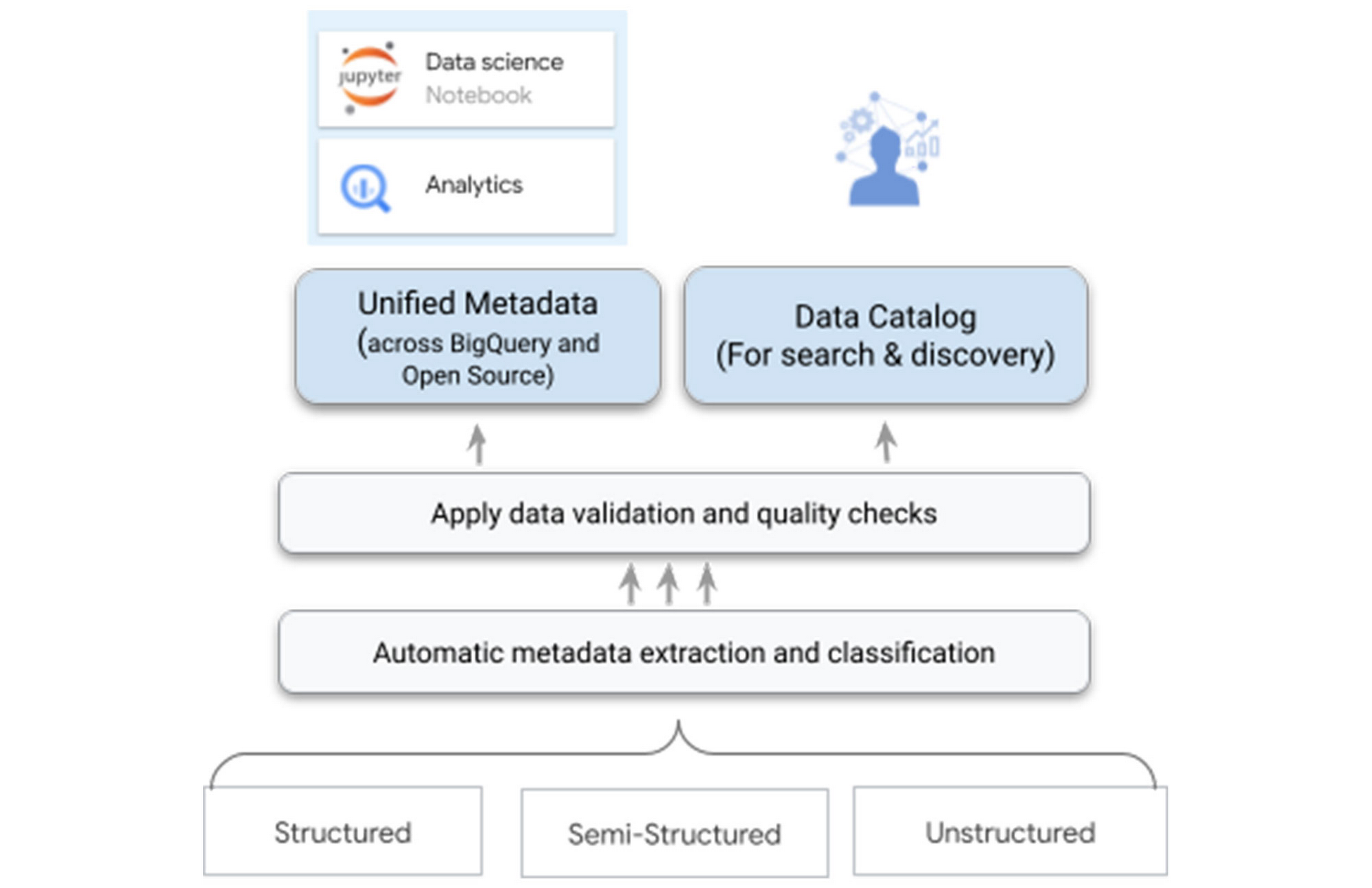
One of the biggest differentiators for Dataplex is our data intelligence capabilities using Google’s best in class AI/ML technologies. As you bring the data under management, Dataplex will automatically harvest the metadata for both structured and unstructured data, with built-in data quality checks. All of the metadata is automatically registered in a unified metastore, and made available for search and discovery. It is also published to Bigquery, Dataproc Metastore, and Data Catalog – ensuring that you have the same consistent data context and access across your tools.
For example, when you write parquet files to a Google Cloud Storage bucket – Dataplex will automatically extract metadata of these files, detect a tabular schema, including hive-style partitions, run data quality checks, and make this data queryable in BigQuery as an external table and from any open source or partner application – with the same consistent security and access policies you defined at the logical data layer.
Your data scientists and analysts now have secured access to this data that meets your quality bar and governance rules via the tools of their choice, without needing any additional processing.
One-click access to collaborative analytics
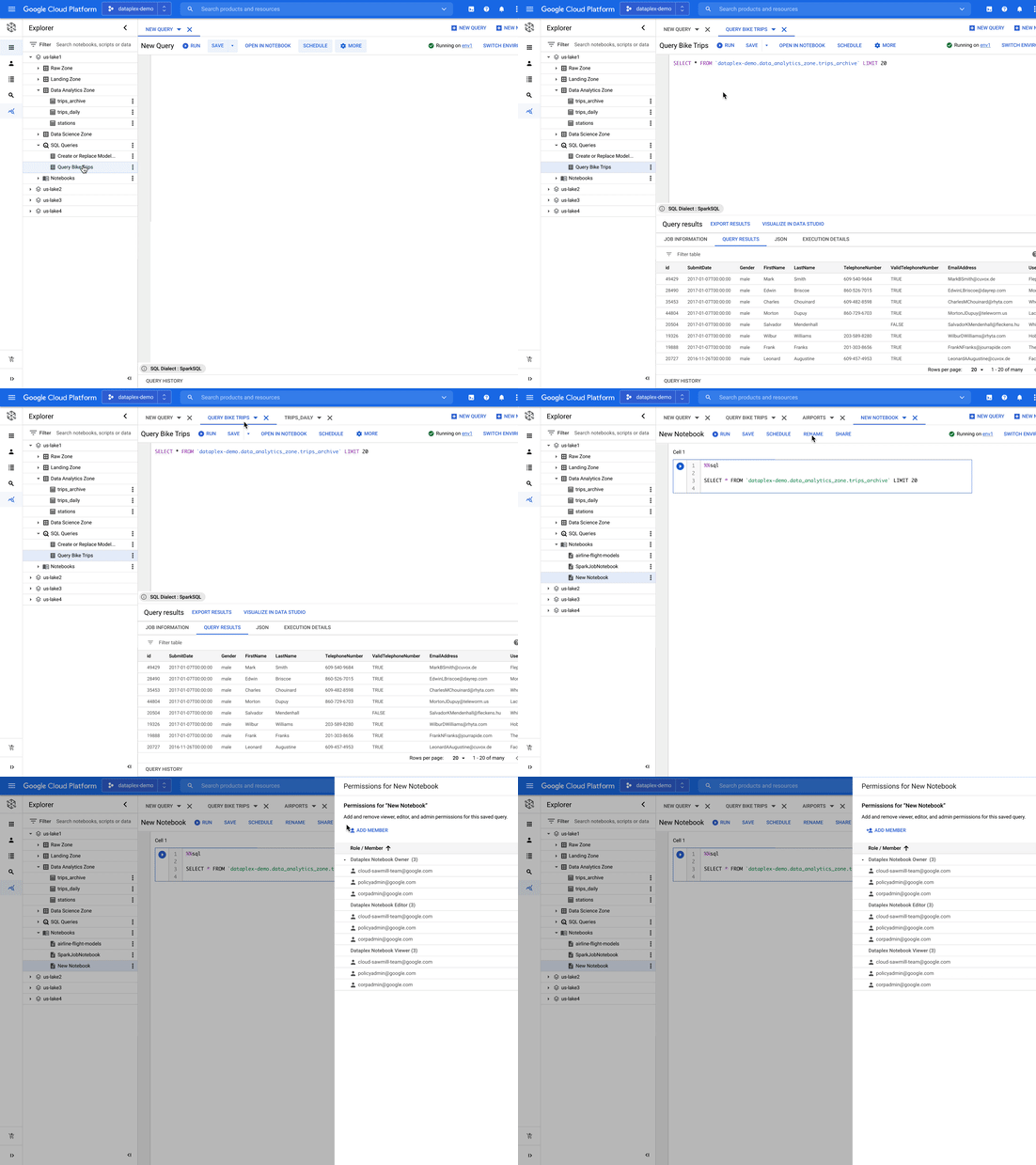
Dataplex provides fully managed, one-click analytics environments enabling you to use the power of Apache Spark and BigQuery with support for other engines coming in the future.
As data administrators, you now have the flexibility to pre-configure these environments with the right cost and financial governance measures without taking on the overhead of managing and maintaining the infrastructure required to power these environments. You can easily configure different environments for different types of workloads and share it with multiple users using their IAM credentials. Dataplex manages the provisioning, monitoring, scaling, and shutdown of these environments.
As data scientists, analysts, and engineers, you now have a turn-key experience to run your analysis using notebooks and a SQL workbench. You can search for notebooks and scripts alongside data, save and share your work with other users, and schedule your notebooks or scripts for recurring workloads – all using the same integrated experience within Dataplex.
Building an open platform with industry leaders
We are partnering with industry leaders such as Accenture, Collibra, Confluent, Informatica, HCL, Starburst, NVIDIA, Trifacta, and others to build an open platform to power analytics at scale. Our partners are excited about the capabilities that Dataplex will provide:
“Collibra is excited to partner with Dataplex to provide data governance and data quality for consistent controls across distributed data. Pairing Collibra’s multi-cloud and hybrid solution with Dataplex allows enterprises to securely open up access to more, higher quality data for users and analytics using a single unified view.”
—Jim Cushman, Chief Product Officer, Collibra
“Dataplex builds on Google Cloud’s commitment to open source by integrating with Apache Kafka®, a leading open source platform for event streaming. We at Confluent, the platform for data in motion that completes Apache Kafka® to be enterprise-ready, are excited to partner with Dataplex to enable customers to bring together distributed, real-time data and build a unified data fabric for end to end analytics.”
—Paul Mac Farland, VP, Head of Customer Solutions and Innovation, Confluent
“We are excited to partner with Google Cloud’s Dataplex team as we look to provide our joint customers an integrated and open data fabric for analytics at scale. Extending Dataplex’s data management and data quality capabilities with Starburst Enterprise will accelerate time to value for enterprises looking to connect distributed data without having to move data.”
—Justin Borgman, CEO and Co-founder, Starburst
Next Steps
Dataplex is now available in preview for a select number of customers. For more information, visit our website or watch the recording. If you would like to sign up, please click here.
The Real Drivers of Efficiency, Growth, and Customer Experience

5139
Of your peers have already read this article.
4:30 Minutes
The most insightful time you'll spend today!
The increasing adoption of technologies like connected devices, augmented reality, and machine learning has changed the way we shop, and retailers are evolving how they do business to meet the needs of their customers.
Retailers say it’s no longer enough to keep pace with shoppers’ growing expectations—they must get ahead of them. That’s why more and more are turning to the cloud. They’re using it to eliminate data silos and take advantage of cloud-based analytics. They’re tapping into machine learning to improve all aspects of the value chain. And they’re making use of reliable and secure cloud infrastructure to scale their businesses.
Although every retail customer is different, many of them share similar objectives. Here are three major ways retailers take advantage of the cloud.
Storing and Analyzing Data in the Cloud
Data presents both a challenge and an opportunity for retailers. Which is why Ulta Beauty, the largest beauty retailer in the US, is moving to Google Cloud Platform (GCP). Now, with the help of BigQuery, Ulta Beauty will be able to more efficiently predict and analyze outcomes and develop more meaningful data insights that can be leveraged to deliver a more personalized, relevant guest journey.
They are not alone. DSW has also chosen to use GCP to help relaunch their DSW VIP loyalty program for the first time in over 10 years. With more than 90% of transactions running through their loyalty program, DSW needed a flexible and scalable solution to deliver a real-time loyalty program for 26 million active members. They’ve already seen a 9% uptick in new customers and have improved their already strong retention rate.
Improving Customer Experiences with AI and Machine Learning
Once retailers are able to access these insights, they are turning to AI to help personalize the overall shopping experience. At first, retail companies leveraged AI tools such as machine learning for product recommendations.
Now, more retailers use AI to forecast trends, predict inventory needs and prevent
Just look at METRO AG, one of the largest B2B wholesalers globally. They’re using AI and machine learning to better serve their customers. For example, many of their customers are restaurant owners. With Google Cloud AI capabilities, they can create tools that identify when a restaurant is out of a particular ingredient and automatically order more.
Ocado is another great example. The world’s largest online-only grocery retailer drove a 3.5% increase in contact center efficiency by using Google Cloud machine learning technology to respond to customer emails four times faster.
To help businesses further accelerate their AI solutions, Google has developed the Advanced Solutions Lab (ASL), which gives businesses the opportunity to work side-by-side with Google’s AI and ML experts to solve high impact challenges.
Fast Retailing, the Japanese retailer behind Uniqlo, is working with Google Cloud and ASL to help them better analyze customer data to forecast demand and deeply understand what their customers want.
Carrefour, one of the world’s leading retailers, also announced last year that its engineers will be working side-by-side with our AI experts to co-create new consumer experiences. This is in addition to deploying G Suite to their employees to support the company’s digital transformation.
Scaling Infrastructure to Meet Demand
Of course, none of this innovation is possible without a reliable infrastructure that can scale instantly to meet surges in traffic.
And many have found the reliability and security they need with the cloud. That’s why global cosmetics brand Lush chose Google Cloud. They migrated their e-commerce platform to GCP to handle increased traffic without compromising stability.
This move that ultimately reduced infrastructure hosting costs by 40 percent.
L.L.Bean also modernized its IT infrastructure by moving capabilities from its on-premises systems to GCP, improving customer satisfaction and IT efficiency across multiple sales channels.
Leading Verve Group’s CX Innovation with Google Cloud Vertex AI

906
Of your peers have already read this article.
2:30 Minutes
The most insightful time you'll spend today!
Verve Group is an ecosystem of demand and supply technologies fusing data, media, and technology to deliver results and growth to both advertisers and publishers – no matter the screen or location, no matter who, what, or where a customer is. Classifying massive amounts of this unstructured data at scale is the first step in helping to surface relevant, high-quality content to users—and that’s where natural language processing (NLP) comes in.
Verve Group uses the NLP API from Google Cloud’s Vertex AI to fetch data for their internal content classification quality verification and as an additional source for building categorization models. By leveraging the NLP API’s Content Classification models, which are now generally available and offer Google’s latest large language model (LLM) technology, Verve Group powers classification through an updated and expanded training data set with over 1,000 labels and support for 11 languages (Chinese, French, German, Italian, Japanese, Korean, Portuguese, Russia, Spanish, and Dutch join previously-available English).
Verve Group has been using Google Cloud’s NLP API since day one, because of both the ease of implementation and the quality compared to competing NLP products. With documentation that is “comprehensive and self-explanatory,” the NLP API “allows for fast adoption and implementation, from test models all the way to production,” said Rami Alanko, GM of Verve Group.
Leveraging the NLP API has facilitated Verve Group’s fast go-to-market motions by enabling its customers to quickly discover and classify new content. “Operating on a global level with tens of different regions and languages, we have still been able to maintain high quality for our product and high retention rates with our clients,” Rami shared. “In a recent client case, we achieved 82% improvement in CTR when optimized with content quality measurements enabled by the API. In another client case, we drove brand safety risk down to 0.16% from 4% thanks to classification quality. Along with the new functionalities of the Google NLP, I can only see this trend continuing to strengthen.”
Verve Group is excited to further expand their NLP use cases by leveraging the new Content Classification models, which have already helped them expand their classification inventory, improve the quality and performance of their quality verification for customers, and unlock new use cases for NLP. “Our classification model accuracy improved 41% using Google NLP as a verification partner,” said Rami.
Additionally, Verve Group is now using the API for metadata analysis on a large image database. “We browse the database and run the image metadata via our classification. This flow enables us to classify images reliably aligned with our standard classification. We pretty much use the same data flow for our runtime in-app textual content analysis, therefore allowing for close to real-time consumer engagement,” Rami added.
To learn more about how companies are leveraging NLP API from Google Cloud Vertex AI, click here, and to learn more about Google Cloud’s work with foundation models and generative AI, read The Prompt on Transform with Google Cloud.
Google Introduces ML-based Predictive Autoscaling to Forecast Capacity and Match Scaling Demands

4990
Of your peers have already read this article.
3:00 Minutes
The most insightful time you'll spend today!
At Google Cloud, we believe you get most benefits from the cloud when you scale infrastructure based on changing demand. Compute Engine allows you to configure autoscaling to save costs during periods of low demand, and add capacity to support peak loads.
When you use a managed instance group (MIG), you can have an autoscaler automatically create or delete virtual machine (VM) instances based on increases or decreases in load. However, if your application takes several minutes to initialize, creating VMs in response to growing load might not increase your application’s capacity quickly enough. For example, if there’s a large increase in load (like when users first wake up in the morning), some users might experience delays while your application is initializing on new instances.
A good way to solve this problem would be to create VMs ahead of demand so that your application has enough time to initialize beforehand. This requires knowing upcoming demand. If only we could predict the future… Well, now we can!
Introducing predictive autoscaling
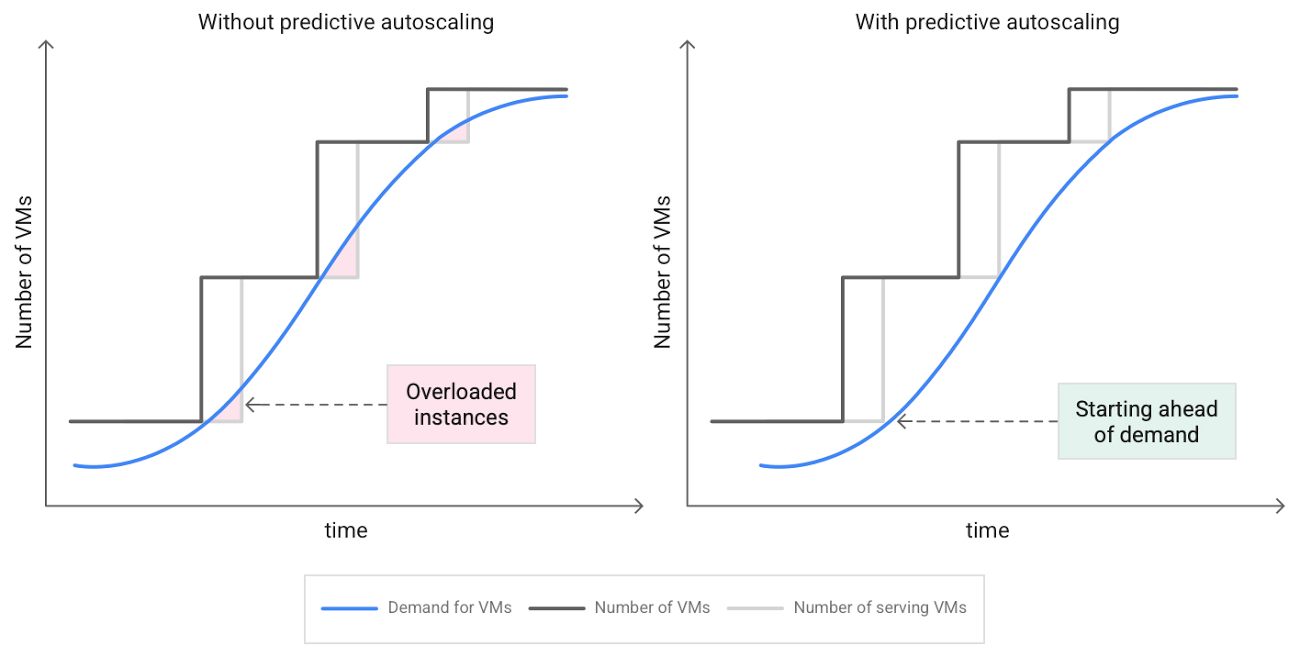
Predictive autoscaling uses Google Cloud’s machine learning capabilities to forecast capacity needs. It creates VMs ahead of growing demand allowing enough time for your application to initialize.
How does it work?
Predictive autoscaling uses your instance group’s CPU history to forecast future load and calculate how many VMs are needed to meet your target CPU utilization. Our machine learning adjusts the forecast based on recurring load patterns for each MIG.
You can specify how far in advance you want autoscaler to create new VMs by configuring the application initialization period. For example, if your app takes 5 minutes to initialize, autoscaler will create new instances 5 minutes ahead of the anticipated load increase. This allows you to keep your CPU utilization within the target and keep your application responsive even when there’s high growth in demand.
Many of our customers have different capacity needs during different times of the day or different days of the week. Our forecasting model understands weekly and daily patterns to cover for these differences. For example, if your app usually needs less capacity on the weekend our forecast will capture that. Or, if you have higher capacity needs during working hours, we also have you covered.
Why should you try it?
Predictive autoscaling continuously adapts forecasted capacity to best match upcoming demand. Autoscaler checks the forecast several times per minute and creates or deletes VMs to match its prediction. The forecast itself is updated every few minutes to match recent load trends so if your growth rate is higher or lower than usual we will adjust the forecast accordingly. This gives you capacity needed to cover peak load while saving on cost when demand goes down.
You can start using predictive autoscaling without worry as it’s fully compatible with the current autoscaler. Autoscaler will calculate enough VMs to cover both forecasted as well as real-time CPU load—whichever is higher. This works with other autoscaling features as well: you can scale based on schedule, your Load Balancer request target or Cloud Monitoring metrics. Autoscaler provides enough capacity to all of your configurations by taking the highest number of VMs needed to meet all your targets.
Getting started
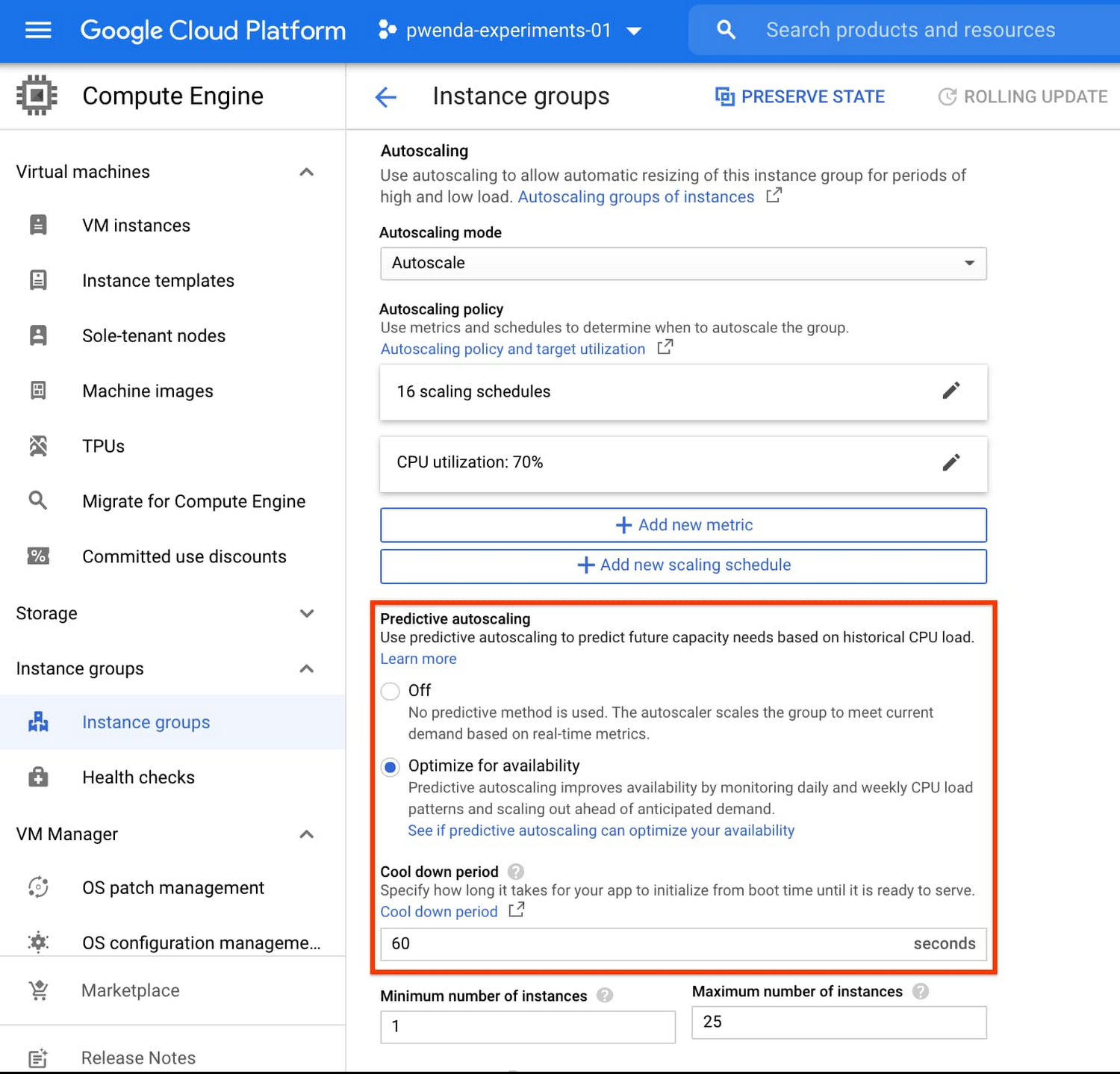
You can enable predictive autoscaling in the Google Cloud Console. Select an autoscaled MIG from the instance groups page and click Edit group. Change predictive autoscaling configuration from Off to Optimize for availability.
To better understand whether predictive autoscaling is good for your application, click the link See if predictive autoscaling can optimize your availability. This will show you a comparison of the last seven days with your current autoscaling configuration vs. with predictive autoscaling enabled.
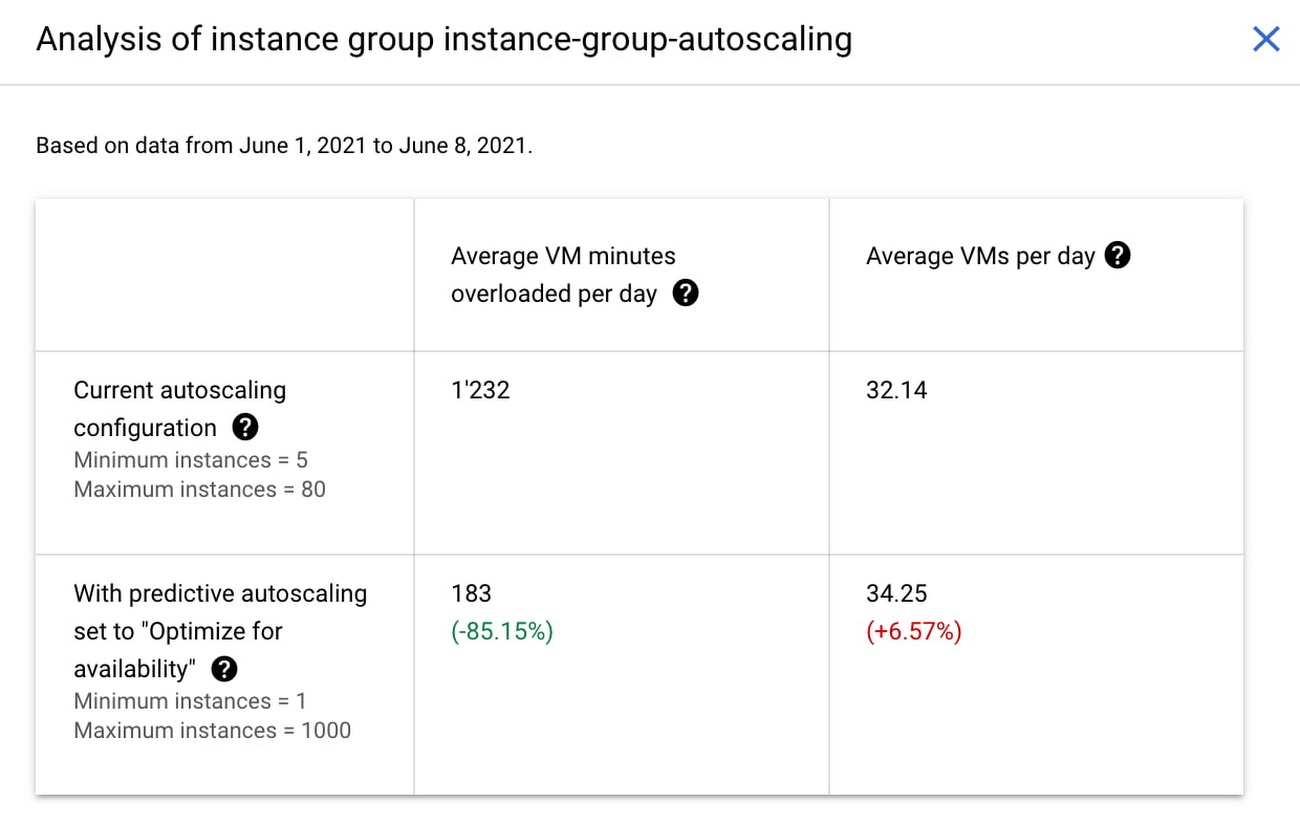
In the above chart,
- Average VM minutes overloaded per day shows how often your VMs exceed your CPU utilization target. This happens when demand is higher than available capacity. Predictive autoscaling can reduce this by starting VMs ahead of anticipated load.
- Average VMs per day is a proxy for cost. This shows how much additional VM capacity you need to keep your CPU utilization within the target you have set. You can optimize your cost by adjusting Minimum instances andCPU utilization as explained below.
Optimizing your configuration
Make sure your Cool down period reflects how long it takes for your application to initialize from VM boot time until it’s ready to serve the load. Predictive autoscaling will use this value to start VMs ahead of forecasted load. If you set it to 10 minutes (600 seconds) your VMs will start 10 minutes before the load is expected to increase.
Review your autoscaling CPU utilization target and Minimum number of instances. With predictive autoscaling you no longer need a buffer to compensate for the time it takes for a VM to start. If your application works best at 70% CPU utilization you don’t need to set target to a much lower value as predictive autoscaling will start VMs ahead of usual load. A higher CPU utilization and lower Minimum number of instances allows you to reduce the cost as you don’t need to pay for additional capacity to prepare for growing demand.
Try predictive autoscaling today
Predictive autoscaling is generally available across all Google Cloud regions. For more information on how to configure, simulate and monitor predictive autoscaling, consult the documentation.

3601
Of your peers have already downloaded this article
3:45 Minutes
The most insightful time you'll spend today!
Since 1994, IDOM, Japan’s leading buyer and retailer of used cars, has enjoyed success in the auto industry with a simple yet traditional business model: buy pre-owned vehicles directly from car owners and auction them to third-party dealers, or sell them to other consumers at retail stores.
In an increasingly frugal economy, Japanese consumers are buying fewer new cars. Most young urban workers take public transport, a cheap alternative for getting from point A to point B. Additionally, people who do own cars are keeping them longer: the average period of ownership is 7.5 to 10 years.
Although Japanese consumers are buying fewer new cars, used car sales are steadily on the uptick. Pre-owned car sales in Japan rose by 1.7% in 2015—the first big spike in three years. IDOM dominates this industry with about 40% market share, and it wanted to continue to take advantage of this growing market trend.
To do so, IDOM reinvented its marketing strategy, using Google’s machine-learning technology to make full use of its available customer data. The brand’s main goal was to attract more prospective car sellers to its physical stores because (1) that’s where they could close trade-in deals and (2) sourcing used cars efficiently is integral to the success of its business model.
Secondly, rather than measure marketing success solely on clicks, views, brand awareness, or favorability, IDOM relied on data to determine which advertising techniques—including phone calls and customized ads to prospective sellers—turned a real profit.
After successfully identifying and targeting existing car owners with a high chance of selling their car, it was only natural for IDOM to leverage this approach to identify and target potential customers with a higher chance of buying a car—key for the other side of its business as well. Thus, IDOM also showed customized ads to potential car buyers and prioritized follow-up phone calls to high-value potential car buyers.
Find out how IDOM increased the number of sellers and buyers visiting its stores by a whopping 25% and grew gross profits by 300% in a key market segment. Download now!
More Relevant Stories for Your Company



Chronicle Security Analytics: Key to Address Security Data Overload
Google Cloud's Chronicle is a security analytics platform built for modern use cases to combat modern threats. In today's world, enterprises have undergone significant changes in all aspects, and must adapt to their security needs to counter threats and attacks. Watch the video to learn Google Cloud's initiative to help

Revolutionizing Cloud Computing: Introducing G2 VMs with NVIDIA L4 GPUs
Organizations across industries are looking to AI to turn troves of data into intelligence, powered by the latest advances in generative AI. Yet for many organizations, there is a barrier to adopting the latest models because they can be costly to train or serve. A new class of cloud GPUs

How AI Has Helped Enterprises Adapt Quickly to Moments of Change
The pandemic has clearly caused a tremendous amount of rapid change for businesses across industries and regions. In this session, Michael Baldwin, Head of Product - Financial Services, Google Cloud speaks about ways that artificial intelligence has helped enterprises adapt to those changes. He will cover trends that Google Cloud

CCAI Platform goes GA: Deliver World-class CX and Accelerating Time-to-value with AI
Customers reach out to contact centers for help in moments of urgent need, but due to increasing demands, new channels, peak times, and operational pressures, contact centers often struggle to provide timely help. To bridge this gap, enterprises are increasingly investing in AI-driven solutions that balance addressing customer expectations with
