





BigQuery Omni: A Game-Changer for Cross-Cloud Data Analysis

3073
Of your peers have already read this article.
4:00 Minutes
The most insightful time you'll spend today!
Research shows that over 90% of large organizations already deploy multicloud architectures, and their data is distributed across several public cloud providers. Additionally, data is also increasingly split across various storage systems such as warehouses, operational and relational databases, object stores, etc. With the proliferation of new applications, data is serving many more use cases such as data sciences, business intelligence, analytics, streaming and the list goes on. With these data trends, customers are increasingly gravitating towards an open multicloud data lake. However, multicloud data lakes present several challenges such as data silos, data duplication, fragmented governance, complexity of tools, and increased costs.
With Google’s data cloud technologies, customers can leverage the unique combination of distributed cloud services. They can create an agile cross-cloud semantic business layer with Looker and manage data lakes and data warehouses across cloud environments at scale with BigQuery and capabilities like BigLake and BigQuery Omni.
BigLake is a storage engine that unifies data warehouses and lake houses by standardizing across different storage formats including BigQuery managed table and open file formats such as Parquet and Apache Iceberg on object storage. BigQuery Omni provides the compute engine that runs locally to the storage on AWS or Azure, which customers can use to query data in AWS or Azure seamlessly. This provides several key benefits such as:
- A single pane of glass to query your multicloud data lakes (across Google Cloud Platform, Amazon Web Services, and Microsoft Azure)
- Cross-cloud analytics by combining data across different platforms with little to no egress costs
- Unified governance and secure management of your data wherever it resides
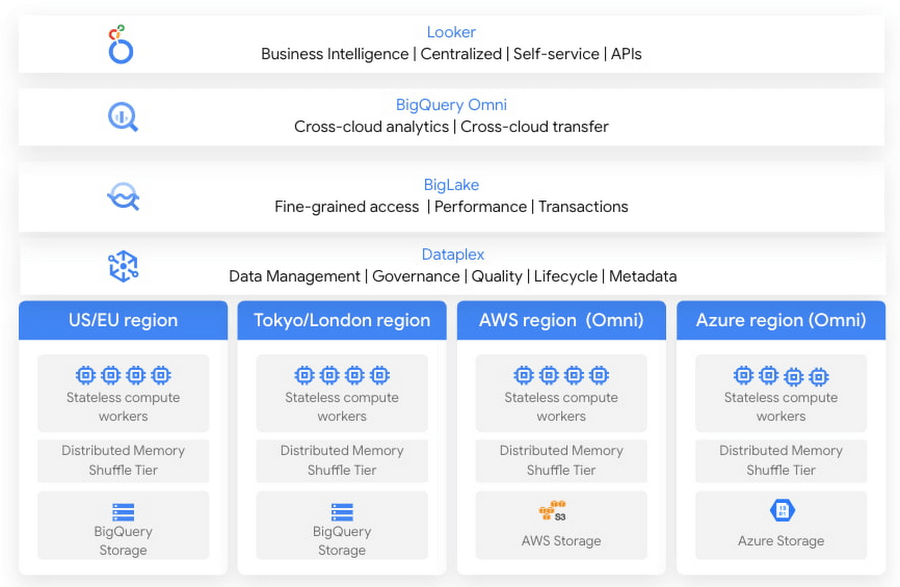
In this blog, we will share cross-cloud analytics use cases customers are solving with Google’s Data Cloud and the benefits they are realizing.
Unified marketing analytics for 360-degree insights
Organizations want to perform marketing analytics – ads optimization, inventory management, churn prediction, buyer propensity trends and many more such analytics. To do this before BigQuery Omni, customers had to use data from several different sources such as Google Analytics, public datasets and other proprietary information stored across cloud environments. This requires moving large amounts of data, managing duplicate copies and incremental costs to perform any cross-cloud analytics and derive actionable insights. With BigQuery Omni, organizations are able to greatly simplify this workflow. Using the familiar BigQuery interface, users can access data residing in AWS or Azure, discover and select just the relevant data that needs to be combined for further analysis. This subset of data can be moved to Google Cloud using Omni’s new Cross-Cloud Transfer capabilities. Customers can combine this data with other Google Cloud datasets and these consolidated tables can be made available to key business stakeholders through advanced analytics tools such as Looker and Looker Studio. Customers are also able to tie in this data now with world class AI models via Vertex AI.
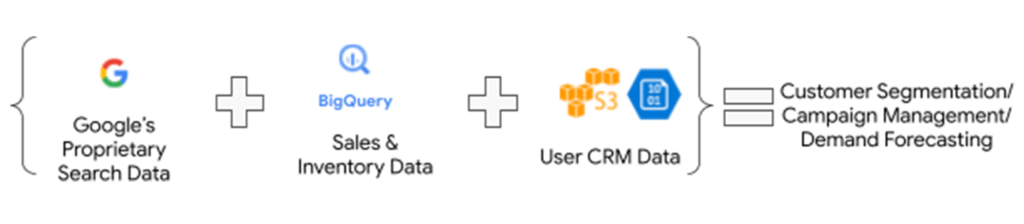
As an illustrative example, consider a retailer who has sales & inventory, user and search data spread across multiple data silos. Using BigQuery Omni they can seamlessly bring these datasets together and power several marketing analytics scenarios like customer segmentation, campaign management and demand forecasting etc.
“Interested in performing cross-cloud analytics, we tested BigQuery Omni and really liked the SQL support to easily get data from AWS S3. We have seen great potential and value in BigQuery Omni for adopting a multi-cloud data strategy.” — Florian Valeye, Staff Data Engineer, Back Market, a leading online marketplace for renewed technology based out of France
Data platform with consistent and unified cross-cloud governance
Another pattern is customers looking to analyze operational, transactional and business data across data silos in different clouds through a unified data platform. These data silos are a result of various factors such as merger and acquisitions, standardization of analytical tools, leveraging best of breed solutions in different clouds and diversification of data footprint across clouds. In addition to a single pane of glass for data access across silos, customers deeply desire consistent and uniform governance of their data across clouds.
“Achieve is looking to deliver a consistent analytics experience to all our customers and stakeholders. With our financial and credit report data distributed across clouds, accessing and getting insights holistically is difficult. Through our exploration with Omni, we are able to access datasets in different clouds using a single familiar BigQuery interface; we see its promise as one of the primary tools in our multi-cloud platform.” — James Simonson, Senior Data Engineer, Achieve
With BigLake and BigQuery Omni abstracting the storage and compute layers respectively, organizations can access and query their data in Google Cloud irrespective of where it resides. They can also set fine-grained row level and column access policies in BigQuery and consistently govern it across clouds. These building blocks enable data engineering teams to build a unified and governed data platform for their data users without having to deal with the complexity of building and managing complex data pipelines. Furthermore, with BigQuery Omni’s integration with Dataplex and Data Catalog, you can discover, search your data across clouds and enrich your data by adding relevant business context with business glossary and rich text.
“Several SADA customers use GCP to build and manage their data analytics platform. During many explorations and proofs of concepts, our customers have seen the great potential and value in BigQuery Omni. Enabling seamless cross-cloud data analytics has allowed them to realize the value of their data quicker while lowering the barrier to entry for BigQuery adoption in a low-risk fashion.” — Brian Suk, Associate Chief Technology Officer, SADA, one of the strategic partners of Google Cloud.
Simplified data sharing between data providers and their customers
A third emerging pattern in cross cloud analytics is data sharing. Several services have the business need to share information such as inventory data, subscriber data to their customers or users who in turn analyze or aggregate the data with their proprietary data and oftentimes share the results back with the service provider. In several cases, the two parties are on different cloud environments, requiring them to move data back and forth.
Consider a company operating in the customer data platform (CDP) space. CDPs were designed to help activate customer data, and a critical first step of that was unifying and managing that customer data. To enable this, many CDP vendors built their solution choosing one of the available cloud infrastructure technologies and copied data from the client’s systems.“Copying data from client applications and infrastructure has always been a requirement to deploy a CDP, but it doesn’t have to be anymore” — Justin DeBrabant, Senior Vice President of Product, ActionIQ.
While a small percentage of customers are fine with moving data across cloud environments, the majority are hesitant to onboard new services and would rather prefer providing governed access to their data sets.
“A new architectural pattern is emerging, allowing organizations to keep their data at one location and make it accessible, with the proper guardrails, to applications used by the rest of the organization’s stack” adds Justin at ActionIQ.
With BigQuery Omni, services in Google Cloud Platform can more easily access and share data with their customers and users in other cloud environments with limited data movement. One of UK’s largest statistics providers has explored Omni for their data sharing needs.
“We tested BigQuery Omni and really like the ability to get data from AWS directly into BQ. We’re excited about managing data sharing with different organizations without onboarding new clouds” – Simon Sandford-Taylor, Chief Information and Digital Officer, UK’s Office for National Statistics
With BigQuery Omni, customers are able to:
- Access and query data across clouds through a single user interface
- Reduce the need for data engineering before analyzing data
- Lower operational overhead and risks by deploying an application that runs across multiple clouds which leverages the same, consistent security controls
- Accelerate access to insights by significantly reducing the time for data processing and analysis
- Create consistent and predictable budgeting across multiple cloud footprints
- Enable long term agility and maximize the benefits every cloud investment
Over the last year, we’ve seen great momentum in customer adoption and added significant innovations to BigQuery Omni including improved performance and scalability for querying your data in AWS S3 or Azure Blob Storage, Iceberg support for Omni, Larger query result set size up to 20GB and Cross-cloud transfer that helps customers easily, securely, and cost effectively move just enough data across cloud environments for advanced analytics.
BigQuery Omni has launched several features to support unified governance of your data across multiple clouds – you can get fine-grained access to your multi-cloud data with row level and column level security. Building on this, we are excited to announce that BigQuery Omni now supports data masking. We’ve also made it easy for customers to try and see the benefits of BigQuery Omni through the limited time free trial available until March 30, 2023.
BigQuery Omni running on other public clouds outside of Google Cloud is available in AWS US East1 (N.Virginia) and Azure US East2 (US East) regions. We are also excited to share that we will be bringing BigQuery Omni to more regions in the future, starting with Asia Pacific (AWS Korea) coming soon.
Getting Started
Get started with a free trial to learn about Omni. Check out the documentation to learn more about BigQuery Omni. You can also leverage the self paced labs to learn how to set up BigQuery Omni easily.
Predictive Model Built on Google Cloud Helps You Get a 7-day Mosquito Forecast Report!
4771
Of your peers have already read this article.
3:00 Minutes
The most insightful time you'll spend today!
Mosquitoes aren’t just the peskiest creatures on Earth; they infect more than 700 million people a year with dangerous diseases like Zika, Malaria, Dengue Fever, and Yellow Fever. Prevention is the best protection, and stopping mosquito bites before they happen is a critical step.
SC Johnson—a leading developer and manufacturer of pest control products, consumer packaged goods, and other professional products—has an outsized impact in reducing the transmission of mosquito-borne diseases. That’s why Google Cloud was honored to team up with one of the company’s leading pest control brands, OFF!®, to develop a new publicly available, predictive model of when and where mosquito populations are emerging nationwide.
As the planet warms and weather changes, OFF! noticed month-to-month and year-to-year fluctuations in consumer habits at a regional level, due to changes in mosquito populations. Because of these rapid changes, it’s difficult for people to know when to protect themselves. The OFF!Cast Mosquito Forecast™, built on Google Cloud and available today, will predict mosquito outbreaks across the United States, helping communities protect themselves from both the nuisance of mosquitoes and the dangers of mosquito-borne diseases—with the goal of expanding to other markets, like Brazil and Mexico, in the near future.

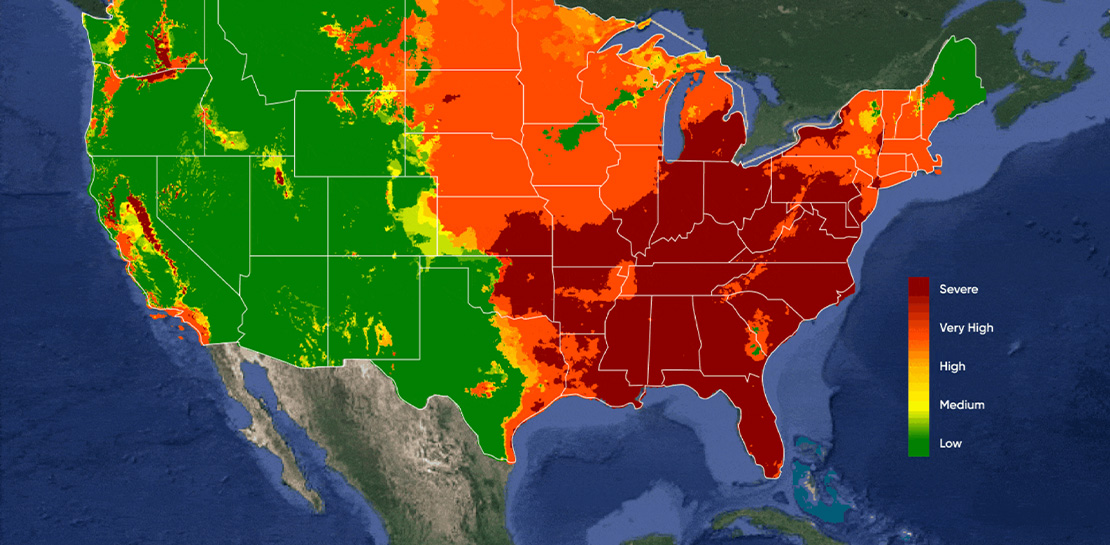
With the OFF!Cast Mosquito Forecast™, anyone can get their local mosquito prediction as easily as a daily weather update. Powered by Google Cloud’s geospatial and data analytics technologies, OFF!Cast Mosquito Forecast is the world’s first public technology platform that predicts and shares mosquito abundance information. By applying data that is informed by the science of mosquito biology, OFF!Cast accurately predicts mosquito behavior and mosquito populations in specific geographical locations.
Starting today, anyone can easily explore OFF!Cast on a desktop or mobile device and get their local seven-day mosquito forecast for any zip code in the continental United States. People can also sign up to receive a weekly forecast. To make this forecasting tool as helpful as possible, OFF! modeled its user interface after popular weather apps, a familiar frame of reference for consumers.

The technology behind the OFF!Cast Mosquito Forecast
To create this first-of-its-kind forecast, OFF! stood up a secure and production-scale Google Cloud Platform environment and tapped into Google Earth Engine, our cloud-based geospatial analysis platform that combines satellite imagery and geospatial data with powerful computing to help people and organizations understand how the planet is changing.
The OFF!Cast Mosquito Forecast is the result of multiple data sources coming together to provide consumers with an accurate view of mosquito activity. First, Google Earth Engine extracts billions of individual weather data points. Then, a scientific algorithm co-developed by the SC Johnson Center for Insect Science and Family Health and Climate Engine experts translates that weather data into relevant mosquito information. Finally, the collected information is put into the model and distilled into a color-coded, seven-day forecast of mosquito populations. The model is applied to the lifecycle of a mosquito, starting from when it lays eggs to when it could bite a human.
The SC Johnson Center for Insect Science and Family Health is one the world’s leading entomology research centers, studying advanced science of insect biology, insect-borne disease prevention and effective product solutions for consumer use. The science behind brands like OFF! is grounded in knowledge from world-class entomologists who have devoted their careers to SC Johnson’s mission of eradicating diseases like Malaria and Zika.
“We are putting the power in consumers’ hands in providing them with a tool to help predict their exposure and prevent mosquito bites,” said Maude Meier, SC Johnson entomologist. “It’s an exciting time to be working in the field of insect science as we find new opportunities to combine science and technology, like Google Earth Engine, to be a force for good in our mission to prevent the spread of insect-borne diseases.”
It takes an ecosystem to battle mosquitos
Over the past decade, academics, scientists and NGOs have used Google Earth Engine and its earth observation data to make meaningful progress on climate research, natural resource protection, carbon emissions reduction and other sustainability goals. It has made it possible for organizations to monitor global forest loss in near real-time and has helped more than 160 countries map and protect freshwater ecosystems. Google Earth Engine is now available in preview with Google Cloud for commercial use.
Our partner, Climate Engine, was a key player in helping make the OFF!Cast Mosquito Forecast a reality. Climate Engine is a scientist-led company that works with Google Cloud and our customers to accelerate and scale the use of Google Earth Engine, in addition to those of Google Cloud Storage and BigQuery, among other tools. With Climate Engine, OFF! integrated insect data from VectorBase, an organization that collects and counts mosquitoes and is funded by the U.S. National Institute of Allergy and Infectious Diseases.
The model powering the OFF!Cast Mosquito Forecast combines three inputs—knowledge of a mosquito’s lifecycle, detailed climate data inputs, and mosquito population counts from more than 5,000 locations provided by VectorBase. The model’s accuracy was validated against precise mosquito population data collected over six years from more than 33 million mosquitoes across 141 different species at more than 5,000 unique trapping locations.
A better understanding of entomology, especially things like degree days and how they affect mosquito populations, and helping communities take action is critically important to improving public health. Learn more about OFF!Cast Mosquito Forecast and see here to learn more about Google Earth Engine on Google Cloud.
Introducing Cloud Memorystore: A fully Managed In-memory Data Store Service for Redis

3924
Of your peers have already read this article.
4:40 Minutes
The most insightful time you'll spend today!
At Redisconf 2018 in San Francisco last month, we announced the public beta of Cloud Memorystore for Redis, a fully-managed in-memory data store service. Today, the public beta is available for everyone to try. Cloud Memorystore provides a scalable, more secure and highly available Redis service fully managed by Google. It’s fully compatible with open source Redis, letting you migrate your applications to Google Cloud Platform (GCP) with zero code changes.
As more and more applications need to process data in real-time, you may want a caching layer in your infrastructure to reduce latency for your applications. Redis delivers fast in-memory caching, support for powerful data structures and features like persistence, replication and pub-sub. For example, data structures like sorted sets make it easy to maintain counters and are widely used to implement gaming leaderboards. Whether it’s simple session caching, developing games played by millions of users or building fast analytical pipelines, developers want to leverage the power of Redis without having to worry about VMs, patches, upgrades, firewall rules, etc.
Early adopters of Cloud Memorystore have been using the service for the last few months and they are thrilled with the service.
Simple and flexible provisioning
How you choose to deploy Cloud Memorystore for Redis depends on the availability and performance needs of your application. You can deploy Redis as a standalone instance or with a replica to provide high availability. But while replicating a Redis instance provides only data redundancy, you still need to do the heavy lifting of health checking, electing of a primary, client connections on failover, etc. The Cloud Memorystore service takes away all this complexity and makes it easy for you deploy a Redis instance that meets your application’s needs.
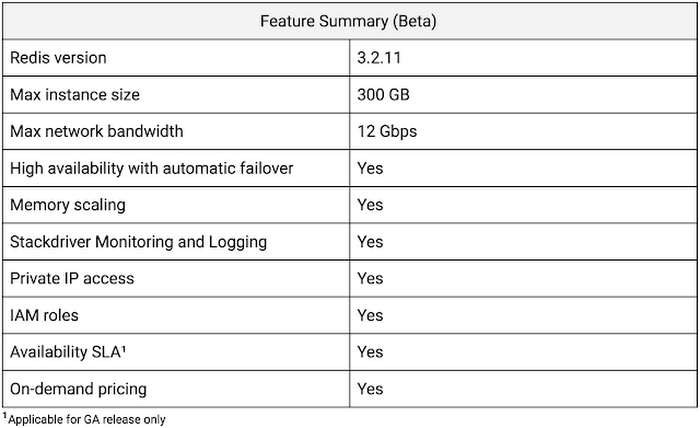
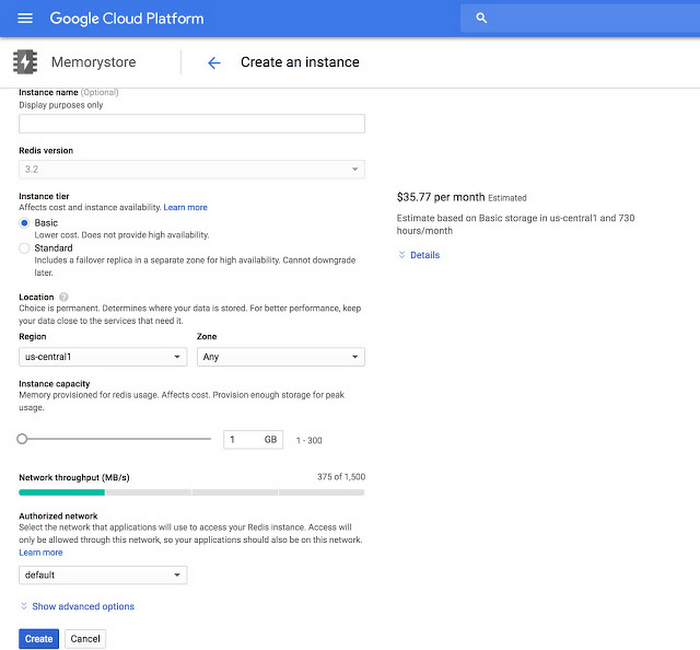
Cloud Memorystore provides two tiers of service, Basic and Standard, each with different availability characteristics. Regardless of the tier of service, you can provision a Redis instance as small as 1 GB up to 300 GB. With network throughput up to 12 Gbps, Cloud Memorystore supports applications with very high bandwidth needs.
Here is a summary of the capabilities of each tier:
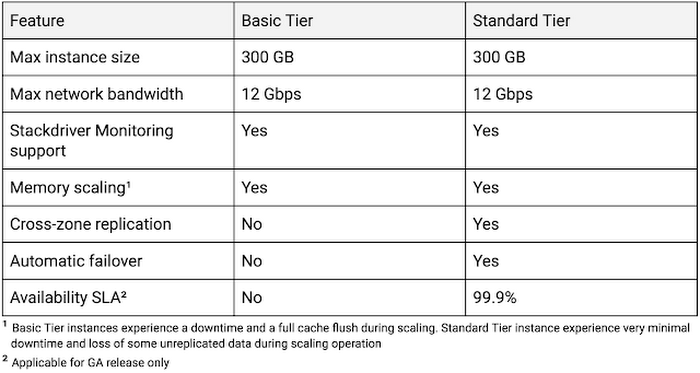
Provisioning a Cloud Memorystore instance is simple: just choose a tier, the size you need to support the instance availability and performance needs, and the region. Your Redis instance will be up and running within a few minutes.
“Lift and shift” applications
Once provisioned, using Cloud Memorystore is a breeze. You can connect to the Redis instance using any of the tools and libraries you commonly use in your environment. Cloud Memorystore clients makes use of IP addresses to connect to the instance. Applications always connect to one IP address and Cloud Memorystore ensures the traffic is directed to the primary in case there is a failover.
Other key features
Whether it’s provisioning, monitoring or scaling memory, Cloud Memorystore simplifies common management tasks.
Security
Open-source Redis has very minimal security, and as a developer or administrator, it can be challenging to ensure all Redis instances in your organization are protected. With Cloud Memorystore, Redis instances are deployed using a private IP address, which prevents the instance from being accessed from the internet. You can also use Cloud Identity & Access Management (IAM) roles to ensure granular access for managing the instance. Additionally, authorized networks ensure that the Redis instance is accessible only when connected to the authorized VPC network.
Stackdriver integration
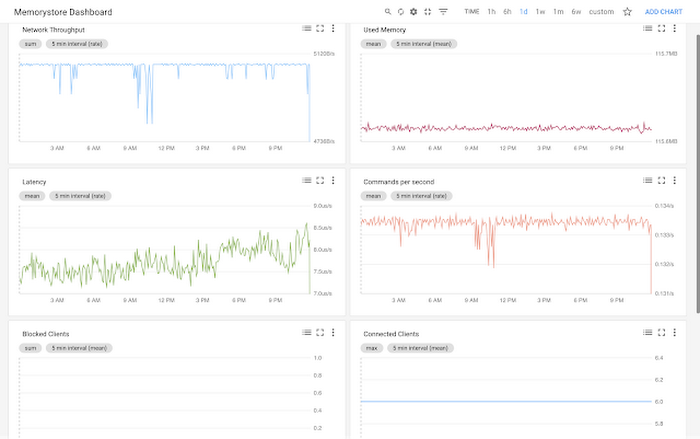
Cloud Memorystore instances publish all the key metrics into Stackdriver, Google Cloud’s monitoring and management suite. You can monitor all of your instances from the Stackdriver dashboard, and use Stackdriver Logging to get more insights about the Redis instances
Seamless memory scaling
When a mobile application goes viral, it may be necessary to provision a larger Redis instance to meet latency and throughput needs. With Cloud Memorystore you can scale up the instance with a few clicks, and the Standard High Availability tier lets you scale the instance with minimal disruption to the application.
On-demand pricing
Cloud Memorystore provides on-demand pricing with no upfront cost and has per second billing. Moreover, there is no charge for network traffic coming in and out of a Cloud Memorystore instance. For more information, refer to Cloud Memorystore pricing.
Coming soon to Cloud Memorystore
This Cloud Memorystore public beta release is just a starting point for us. Here is a preview of some of the features that are coming soon.
- New region support
- Import-Export of RDB files into a Google Cloud Storage bucket
- Support for Redis 4.0
- Support for Redis Cluster
We are excited about what is upcoming for Cloud Memorystore and we would love to hear your feedback! If you have any requests or suggestions, please let us know through Issue Tracker. You can also join the conversation at Cloud Memorystore discussion group.
Sign up for a $300 credit to try Cloud Memorystore and the rest of GCP. Start with a small Redis instance for testing and development, and then when you’re ready, scale up to serve performance-intensive applications.
Want to learn more? Register for the upcoming webinar on Tuesday, June 26th 9:00 am PT to hear all about Cloud Memorystore for Redis.
5 Best Practices for Cloud Cost Optimization

5796
Of your peers have already read this article.
3:30 Minutes
The most insightful time you'll spend today!
When customers migrate to Google Cloud Platform (GCP), their first step is often to adopt Compute Engine, which makes it easy to procure and set up virtual machines (VMs) in the cloud that provide large amounts of computing power. Launched in 2012, Compute Engine offers multiple machine types, many innovative features, and is available in 20 regions and 61 zones!
Compute Engine’s predefined and custom machine types make it easy to choose VMs closest to your on-premises infrastructure, accelerating the workload migration process cost effectively. Cloud allows you the pricing advantage of ‘pay as you go’ and also provides significant savings as you use more compute with Sustained Use Discounts.
As Technical Account Managers, we work with large enterprise customers to analyze their monthly spend and recommend optimization opportunities. In this blog, we will share the top recommendations that we’ve developed based on our collective experience working with GCP customers.
Getting ready to save
Before you get started, be sure to familiarize yourself with the VM instance pricing page—required reading for anyone who needs to understand the Compute Engine billing model and resource-based pricing. In addition to those topics, you’ll also find information about the various Compute Engine machine types, committed use discounts and how to view your usage, among other things.
Another important step to gain visibility into your Compute Engine cost is using Billing reports in the Google Cloud Console and customizing your views based on filtering and grouping by projects, labels and more. From there you can export Compute Engine usage details to BigQuery for more granular analysis. This allows you to query the datastore to understand your project’s vCPU usage trends and how many vCPUs can be reclaimed. If you have defined thresholds for the number of cores per project, usage trends can help you spot anomalies and take proactive actions. These actions could be rightsizing the VMs or reclaiming idle VMs.
Now, with these things under your belt, let’s go over the five ways you can optimize your Compute Engine resources that we believe will give you the most immediate benefit.
1. Apply Compute Engine rightsizing recommendations
Compute Engine’s rightsizing recommendations feature provides machine type recommendations that are generated automatically based on system metrics gathered by Stackdriver Monitoring over the past eight days. Use these recommendations to resize your instance’s machine type to more efficiently use the instance’s resources. It also recommends custom machine types when appropropriate. Compute Engine makes viewing, resizing and other actions easier right from the Cloud Console as shown below.
Recently, we expanded Compute Engine rightsizing capabilities from just individual instances to managed instance groups as well. Check out the documentation for more details.

For more precise recommendations, you can install the Stackdriver Monitoring agent which collects additional disk, CPU, network, and process metrics from your VM instances to better estimate your resource requirements. You can also leverage the Recommender API for managing recommendations at scale.
2. Purchase Commitments
Our customers have diverse workloads running on Google Cloud with differing availability requirements. Many customers follow a 70/30 rule when it comes to managing their VM fleet—they have constant year-round usage of ~70%, and a seasonal burst of ~30% during holidays or special events.
If this sounds like you, you are probably provisioning resources for peak capacity. However, after migrating to Google Cloud, you can baseline your usage and take advantage of deeper discounts for Compute workloads. Committed Use Discounts are ideal if you have a predictable steady-state workload as you can purchase a one or three year commitment in exchange for a substantial discount on your VM usage.
We recently released a Committed Use Discount analysis report in the Cloud Console that helps you understand and analyze the effectiveness of the commitments you’ve purchased. In addition to this, large enterprise customers can work with their Technical Account Managers who can help manage their commitment purchases and work proactively with them to increase Committed Use Discount coverage and utilization to maximize their savings.
3. Automate cost optimizations
The best way to make sure that your team is always following cost-optimization best practices is to automate them, reducing manual intervention.
Automation is greatly simplified using a label—a key-value pair applied to various Google Cloud services. For example, you could label instances that only developers use during business hours with “env: development.” You could then use Cloud Scheduler to schedule a serverless Cloud Function to shut them down over the weekend or after business hours and then restart them when needed. Here is an architecture diagram and code samples that you can use to do this yourself.
Using Cloud Functions to automate the cleanup of other Compute Engine resources can also save you a lot of time and money. For example, customers often forget about unattached (orphaned) persistent disk, or unused IP addresses. These accrue costs, even if they are not attached to a virtual machine instance. VMs with the “deletion rule” option set to “keep disk” retain persistent disks even after the VM is deleted. That’s great if you need to save the data on that disk for a later time, but those orphaned persistent disks can add up quickly and are often forgotten! There is a Google Cloud Solutions article that describes the architecture and sample code for using Cloud Functions, Cloud Scheduler, and Stackdriver to automatically look for these orphaned disks, take a snapshot of them, and remove them. This solution can be used as a blueprint for other cost automations such as cleaning up unused IP addresses, or stopping idle VMs.
4. Use preemptible VMs
If you have workloads that are fault tolerant, like HPC, big data, media transcoding, CI/CD pipelines or stateless web applications, using preemptible VMs to batch-process them can provide massive cost savings. In fact, customer Descartes Labs reduced their analysis costs by more than 70% by using preemptible VMs to process satellite imagery and help businesses and governments predict global food supplies.
Preemptible VMs are short lived— they can only run a maximum of 24 hours, and they may be shut down before the 24 hour mark as well. A 30-second preemption notice is sent to the instance when a VM needs to be reclaimed, and you can use a shutdown script to clean up in that 30-second period. Be sure to fully review the full list of stipulations when considering preemptible VMs for your workload. All machine types are available as preemptible VMs, and you can launch one simply by adding “-preemptible” to the gcloud command line or selecting the option from the Cloud Console.
Using preemptible VMs in your architecture is a great way to scale compute at a discounted rate, but you need to be sure that the workload can handle the potential interruptions if the VM needs to be reclaimed. One way to handle this is to ensure your application is checkpointing as it processes data, i.e., that it’s writing to storage outside the VM itself, like Google Cloud Storage or a database. As an example, we have sample code for using a shutdown script to write a checkpoint file into a Cloud Storage bucket. For web applications behind a load balancer, consider using the 30-second preemption notice to drain connections to that VM so the traffic can be shifted to another VM. Some customers also choose to automate the shutdown of preemptible VMs on a rolling basis before the 24-hour period is over, to avoid having multiple VMs shut down at the same time if they were launched together.
5. Try autoscaling
Another great way to save on costs is to run only as much capacity as you need, when you need it. As we mentioned earlier, typically around 70% of capacity is needed for steady-state usage, but when you need extra capacity, it’s critical to have it available. In an on-prem environment, you need to purchase that extra capacity ahead of time. In the cloud, you can leverage autoscaling to automatically flex to increased capacity only when you need it.
Compute Engine managed instance groups are what give you this autoscaling capability in Google Cloud. You can scale up gracefully to handle an increase in traffic, and then automatically scale down again when the need for instances is lowered (downscaling). You can scale based on CPU utilization, HTTP load balancing capacity, or Stackdriver Monitoring metrics. This gives you the flexibility to scale based on what matters most to your application.
High costs do not compute
As we’ve shown above, there are many ways to optimize your Compute Engine costs. Monitoring your environment and understanding your usage patterns is key to understanding the best options to start with, taking the time to model your baseline costs up front. Then, there are a wide variety of strategies to implement depending on your workload and current operating model.
For more on cost management, check out our cost management video playlist. And for more tips and tricks on saving money on other GCP services, check out our blog posts on Cloud Storage, Networking and BigQuery cost optimization strategies. We have additional blog posts coming soon, so stay tuned!
Dataplex: Google Cloud’s Intelligent Data Fabric to Manage Data and Analytics at Scale

4863
Of your peers have already read this article.
2:30 Minutes
The most insightful time you'll spend today!
Enterprises are struggling to make high quality data easily discoverable and accessible for analytics, across multiple silos, to a growing number of people and tools within their organization. They are often forced to make tradeoffs—to move and duplicate data across silos to enable diverse analytics use cases or leave their data distributed but limit the agility of decisions.
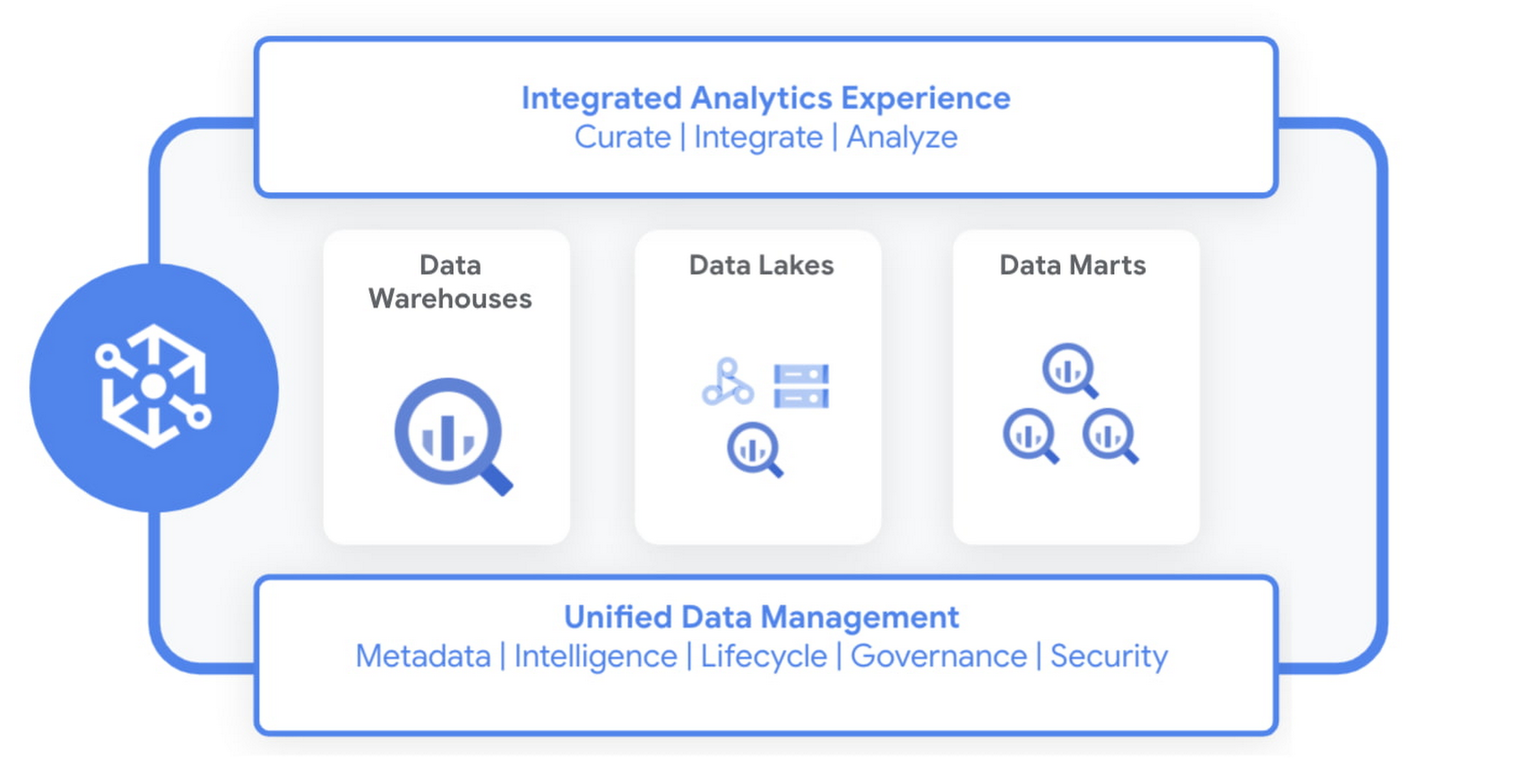
Today we are excited to announce Dataplex, an intelligent data fabric that provides a way to centrally manage, monitor, and govern your data across data lakes, data warehouses and data marts, and make this data securely accessible to a variety of analytics and data science tools.
Dataplex provides an integrated analytics experience, bringing together the best of Google Cloud and open source tools, so you can rapidly curate, secure, integrate, and analyze data at scale. With built-in data intelligence using Google Artificial Intelligence (AI) and machine learning (ML) capabilities and a flexible consumption model, you can now spend less time wrestling with infrastructure and more time focused on driving business outcomes.
Dataplex enables you to:
- Achieve freedom of choice to store data wherever you want for the right price/performance and choose the best analytics tools for the job, including Google Cloud and open source analytics technologies such as Apache Spark and Presto.
- Enforce consistent controls across your data to ensure unified security and governance
- Take advantage of the built-in data intelligence using Google’s best in class AI/ML capabilities to automate much of the manual toil around data management and get access to higher quality data.
Early customers like Equifax, Loblaw, and ANZ are excited about using Dataplex to address data management complexity.
“Dataplex will greatly simplify the existing analytics workflows within Equifax with its unified data fabric and single interface for policy management and governance across all our analytics data. Its built-in data discovery and data quality features will ensure that our data scientists and analysts always have access to high quality data that they can trust. Dataplex aligns well with our enterprise data strategy and we are excited to partner with Google Cloud on this.”
—Kumar Menon, SVP, Data Fabric & Decision Science Technology, Equifax.
“Loblaw is Canada’s food and pharmacy leader, and we are excited to be an early adopter of Dataplex. We could significantly benefit from Dataplex as it provides a single pane of glass for end-to-end data management and governance. We are particularly interested in improving platform resilience and data quality by detecting anomalies as early as possible in the data pipeline with the help of Dataplex.”
—Elton Martins, Senior Director of Data Insights & Analytics, Loblaw
“We are undergoing a major data transformation at ANZ, bringing together our various data assets and building a cohesive data ecosystem for customer benefit. Dataplex’s vision and capabilities align well with our current data strategy to build a unified data fabric for all our analytics and AI/ML use cases. We are excited to partner with GCP on Dataplex and test the product in private preview.”
—Ashish Shekhar, Head of Technology – Enterprise Analytics & Applied AI, ANZ
Dataplex is built for distributed data. We are starting with data stored in Google Cloud Storage and BigQuery, with support for other data sources coming soon. It provides a workflow-driven experience helping you build an open data platform and make data easily accessible to your end users while ensuring your policies and best practices are consistently enforced.
Organizing and curating your data
One of the core tenets of Dataplex is letting you organize and manage your data in a way that makes sense for your business, without data movement or duplication. For that, we are providing logical constructs like lakes, data zones and assets. Those constructs enable you to abstract away the underlying storage systems and become the foundation for setting policies around data access, security, lifecycle management, and so on.
For example, you can create a lake per department within your organization (Retail, Sales, Finance, etc.) and create data zones that map to data readiness and usage (landing, raw, curated_data_analytics, curated_data_science, etc.).
Once you have your lakes and zones setup, you can now attach data to these zones as assets. You can add data from different types of storage (e.g. GCS Bucket and BigQuery dataset) under the same zone. You can also attach data across multiple projects under the same zone.

You can ingest data into your lakes and zones using the tools of your choice including services such as Dataflow, Data Fusion, Dataproc, Pub/Sub or choose from one of our partner products. Dataplex provides built-in 1-click templates for common data management tasks.
Securing your data
Dataplex enables you to define and enforce consistent policies across your data, irrespective of where it physically resides. Data owners can easily set up policies for specific data domains based on business needs, without thinking about where the data is stored while data stewards get global visibility into governance policies and permissions across their data.
You can apply security and governance policies for your entire lake, a specific zone, or an asset. Dataplex maps the policies to the underlying storage and pushes down permissions to the storage layer to provide end-to-end secure data access. Additionally, you can secure not just data but also related artifacts like notebooks, scripts, and models using the same set of access policies.
Making high quality data available for analytics and data science
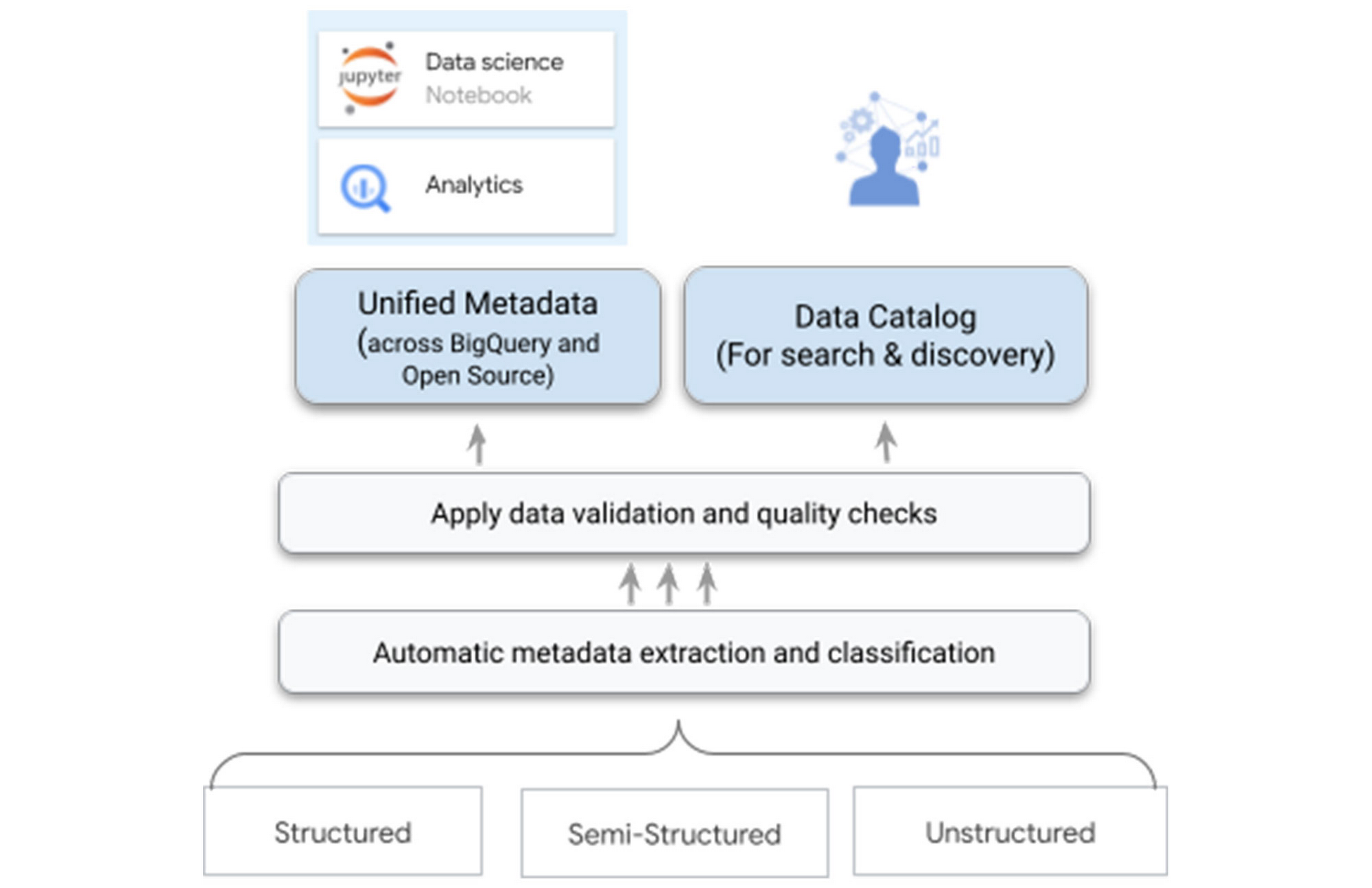
One of the biggest differentiators for Dataplex is our data intelligence capabilities using Google’s best in class AI/ML technologies. As you bring the data under management, Dataplex will automatically harvest the metadata for both structured and unstructured data, with built-in data quality checks. All of the metadata is automatically registered in a unified metastore, and made available for search and discovery. It is also published to Bigquery, Dataproc Metastore, and Data Catalog – ensuring that you have the same consistent data context and access across your tools.
For example, when you write parquet files to a Google Cloud Storage bucket – Dataplex will automatically extract metadata of these files, detect a tabular schema, including hive-style partitions, run data quality checks, and make this data queryable in BigQuery as an external table and from any open source or partner application – with the same consistent security and access policies you defined at the logical data layer.
Your data scientists and analysts now have secured access to this data that meets your quality bar and governance rules via the tools of their choice, without needing any additional processing.
One-click access to collaborative analytics
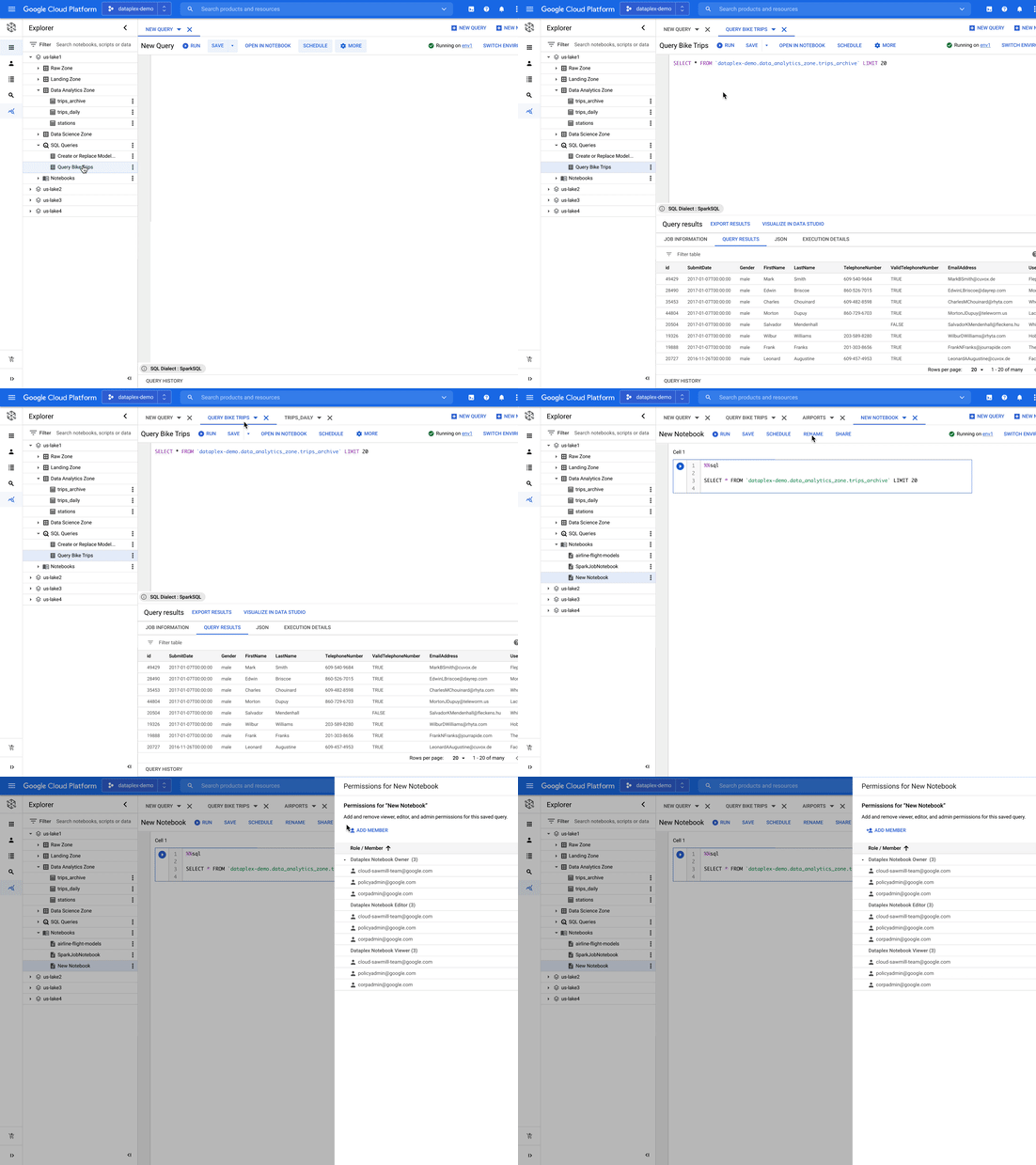
Dataplex provides fully managed, one-click analytics environments enabling you to use the power of Apache Spark and BigQuery with support for other engines coming in the future.
As data administrators, you now have the flexibility to pre-configure these environments with the right cost and financial governance measures without taking on the overhead of managing and maintaining the infrastructure required to power these environments. You can easily configure different environments for different types of workloads and share it with multiple users using their IAM credentials. Dataplex manages the provisioning, monitoring, scaling, and shutdown of these environments.
As data scientists, analysts, and engineers, you now have a turn-key experience to run your analysis using notebooks and a SQL workbench. You can search for notebooks and scripts alongside data, save and share your work with other users, and schedule your notebooks or scripts for recurring workloads – all using the same integrated experience within Dataplex.
Building an open platform with industry leaders
We are partnering with industry leaders such as Accenture, Collibra, Confluent, Informatica, HCL, Starburst, NVIDIA, Trifacta, and others to build an open platform to power analytics at scale. Our partners are excited about the capabilities that Dataplex will provide:
“Collibra is excited to partner with Dataplex to provide data governance and data quality for consistent controls across distributed data. Pairing Collibra’s multi-cloud and hybrid solution with Dataplex allows enterprises to securely open up access to more, higher quality data for users and analytics using a single unified view.”
—Jim Cushman, Chief Product Officer, Collibra
“Dataplex builds on Google Cloud’s commitment to open source by integrating with Apache Kafka®, a leading open source platform for event streaming. We at Confluent, the platform for data in motion that completes Apache Kafka® to be enterprise-ready, are excited to partner with Dataplex to enable customers to bring together distributed, real-time data and build a unified data fabric for end to end analytics.”
—Paul Mac Farland, VP, Head of Customer Solutions and Innovation, Confluent
“We are excited to partner with Google Cloud’s Dataplex team as we look to provide our joint customers an integrated and open data fabric for analytics at scale. Extending Dataplex’s data management and data quality capabilities with Starburst Enterprise will accelerate time to value for enterprises looking to connect distributed data without having to move data.”
—Justin Borgman, CEO and Co-founder, Starburst
Next Steps
Dataplex is now available in preview for a select number of customers. For more information, visit our website or watch the recording. If you would like to sign up, please click here.
4957
Of your peers have already watched this video.
49:30 Minutes
The most insightful time you'll spend today!
How to Migrate an Oracle Database to Google Cloud
As more enterprises migrate a growing number of workloads to the cloud, migrating databases, too, has become a key focus.
But migrating databases is also really tough. This is due to a number of different reasons.
The first one is that there’s a lot of proprietary technology and functionality that’s built into a lot of the legacy database technologies.
With Oracle, for example, that may be things like stored procedure, custom functions, Oracle RAC, so on and so forth.
This makes it really hard for database administrators to migrate to an equivalent cloud-native technology.
The second challenge is that historical on-prem databases are all quite monolithic.
These are humongous servers which don’t really fit into the cloud way of doing things.
So often, database administrators have to split these up into multiple servers in the cloud.
The third challenge, which a lot of companies underestimate, is the reliance of applications on databases.
Say, you are a company that’s been around for 10 to 15 years. As the business has grown, it’s added tens to hundreds of apps, both internal- and external-facing, that are all relying on the database.
So as you’re thinking about migration, it’s really important to consider the risks that are associated of migrating to different cloud technologies. Obviously, you would like to minimize your company’s exposure.
With that background, here are the steps, procedures, best practices, and how to solve the challenges associated with migrating on-premises Oracle databases to Google Cloud SQL PostgreSQL.
From source database migration assessment to schema conversion, data replication, and performance tuning, we will cover all of the basics required to get you started with your first Oracle to Cloud SQL migration project.
More Relevant Stories for Your Company

Optimizing Terabyte-scale PostgreSQL Migrations to Cloud SQL Using Searce
Google Cloud allows you to move your PostgreSQL databases to Cloud SQL with Database Migration Service (DMS). DMS gives you the ability to replicate data continuously to the destination database, while the source is live in production, enabling you to migrate with minimum downtime. However, terabyte-scale migrations can be complex.

ActivStat: Enhancing Live Sports Broadcast with Real-time Stats and Metrics
Millions of people annually view esports, as top players and teams compete in thrilling, fast-paced tests of reflexes, strategy, and teamwork. Fans are a diverse group, sharing a passion for action. A new, revolutionary project we’re working on with Call of Duty League just made that action a lot better.

Architecting Multi-region Database Disaster Recovery for MySQL
Enterprises expect extreme reliability of the database infrastructure that’s accessed by their applications. Despite your best intentions and careful engineering, database errors happen, whether that’s machine crashes or network partitioning. Good planning can help you stay ahead of problems and recover more quickly when issues do occur. This blog shows one approach

The Fantastic Story of How BMG Enables a Micropayments Strategy So Music Artists Get Paid
The music industry is rapidly changing. Only 20 years ago, the availability of music and the infrastructure that was required to make an album a sales success were incredibly complex and expensive. With the decline of physical sales and a fundamental shift to digital, music streaming now accounts for more
