





Announcing easier de-identification of Google Cloud Storage data

2879
Of your peers have already read this article.
2:30 Minutes
The most insightful time you'll spend today!
Many organizations require effective processes and techniques for removing or obfuscating certain sensitive information in the data they store. An important tool to achieve this goal is de-identification. Defined by NIST as a technique that “removes identifying information from a dataset so that individual data cannot be linked with specific individuals. De-identification can reduce the privacy risk associated with collecting, processing, archiving, distributing or publishing information.
Always striving to make data security easier, today we are happy to announce the availability of a de-identification action for our Cloud Storage inspection jobs. Now, you can de-identify Cloud Storage objects, folders, and buckets without needing to run your own pipeline or custom code. Additionally, we have enhanced our transforms by adding a new dictionary replacement method that can help you achieve stronger privacy protection – especially with unstructured data you might store like customer support chat logs.
The “De-identify findings” Action
The “de-identify findings” action for Cloud DLP inspection jobs is a fully managed feature that creates a de-identified copy of the data objects that are inspected. This means that you can inspect a Cloud Storage bucket for sensitive data like Personal Identifiable Information (PII) and then create a redacted copy of these objects all with a few clicks in the Console UI. No need to write custom code or manage complex pipelines and since it’s fully managed, it will auto-scale for you without you needing to manage quota.
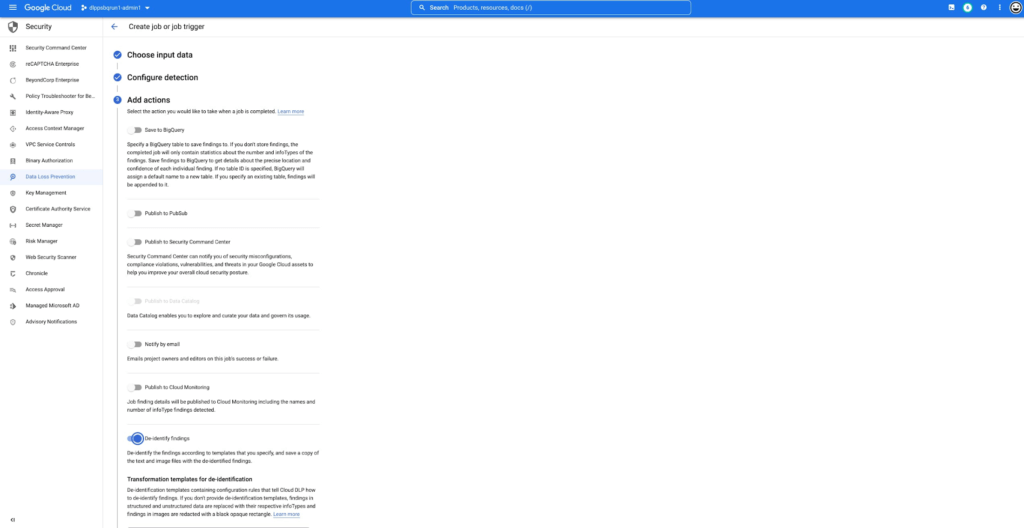
This new action supports the following data types:
- Text files
- Comma- or tab-separated values
- Images (see regional limitations)
Once enabled, the DLP job will perform an inspection of the data and produce a de-identified copy of all supported files into the output bucket or folder.
You can also use the new de-identify action on Job Triggers to automatically de-identify new content as it appears on a recurring schedule. This is useful for creating a workflow with a safe drop zone for incoming files that need to be de-identified before being made accessible.
What can automatic De-identification do?
Cloud DLP provides a set of transformation techniques to de-identify sensitive data while attempting to make the data still useful for your business. These techniques include:
- Redaction: Deletes all or part of a detected sensitive value.
- Replacement: Replaces a detected sensitive value with a specified surrogate value.
- Masking: Replaces a number of characters of a sensitive value with a specified surrogate character, such as a hash (#) or asterisk (*).
- Crypto-based tokenization: Encrypts the original sensitive data value using a cryptographic key. Cloud DLP supports several types of tokenization, including transformations that can be reversed, or “re-identified.”
- Bucketing: “Generalizes” a sensitive value by replacing it with a range of values. (For example, replacing a specific age with an age range, or temperatures with ranges corresponding to “Hot,” “Medium,” and “Cold.”)
- Date shifting: Shifts sensitive date values by a random amount of time.
- Time extraction: Extracts or preserves specified portions of date and time values.
New Dictionary Replace method
When a sensitive data element is found, dictionary replacement replaces it with a randomly selected value from a list of words that you provide. This transformation method is especially useful if you want the redacted output to have more realistic surrogate values.
Consider the following example: You collect customer support chat logs as part of providing service to your customers. These support chat logs contain various types of Personal Identifiable Information (PII) including people’s names and email addresses. Cloud DLP can find and de-identify the sensitive elements with static replacements such as “[REDACTED]” to help prevent someone from seeing this sensitive data.
With the new dictionary replacement method you can instead replace these findings with a randomly selected value from a dictionary. This dictionary replacement provides two key benefits over static replacement:
- The resulting output can look more realistic
- Because the output looks more realistic, it can help conceal any residual names (a privacy de-identification technique sometimes referred to as “hiding in plain sight”)
An example of this:
Input:
[Agent] Hi, my name is Jason, can I have your name?
[Customer] My name is Valeria
[Agent] In case we need to contact you, what is your email address?
[Customer] My email is v.racer@example.org
[Agent] Thank you. How can I help you?
De-identified Output:
[Agent] Hi, my name is Gavaia, can I have your name?
[Customer] My name is Bijal
[Agent] In case we need to contact you, what is your email address?
[Customer] My email is happy.elephant44@example.org
[Agent] Thank you. How can I help you?
As you can see in the output, the names and email addresses have been replaced with a random value that both protects the original sensitive information but also makes the output look more realistic. This can make the data more useful and help “hide” any residual PII.
Next Steps:
To learn more about De-Identification check out our Technical Docs, try De-identification of Storage in the Cloud Console and Watch a recent Google I/O talk on De-identification of data.
Building Effective Visibility into Technology Assets Used in Healthcare

3176
Of your peers have already read this article.
4:00 Minutes
The most insightful time you'll spend today!
When technology just works, it’s easy to trust. But too often, we place our trust in technology that doesn’t deserve it. When we do this with technology to provide healthcare, we put the safety of patients and the security and reliability of our global healthcare system at risk.
The institutions that make up our global healthcare system also place their trust in cybersecurity measures and technology to keep their systems running and repelling the unceasing wave of attacks they face. We often hear about the institutions that succumb to cyberattacks, but we don’t read much about the institutions that have been successful at defending their digital perimeter, and ultimately protected their ability to treat and protect patients.
Why were some institutions successful and others not as much? What cybersecurity capabilities made the healthcare institution resilient from these attacks? As we covered in our previous post on how healthcare can strengthen its cybersecurity resilience, establishing visibility and antifragility practices are necessary to repel attackers and build trust in the security and reliability of the technology our global healthcare system relies on.
As we continue our series on healthcare and cybersecurity, we’ll focus next on establishing sustainable visibility mechanisms so cybersecurity teams working in our global healthcare system can secure and preserve patient care and safety.
Visibility is akin to a patient taking 20 different medications but their doctor only knows about 10 of them. That’s the current state of many healthcare organizations’ relationship to the technology used on their networks and systems: They aren’t always aware of what technology is in use, whether it has vulnerabilities, how serious those vulnerabilities are, or how one weakness could lead to another or cascade out of control.
Visibility maps those technology assets (including the software, hardware, configurations, protections, who built it, and where the component parts come from) and help prioritize the importance of those assets in keeping systems and networks secure, no matter how complex the healthcare organization’s use of technology might be.
Building effective visibility
Building visibility into technology assets requires a structured approach. As mentioned in the first blog in this series, using a guide like the NIST Cybersecurity Framework (CSF) provides an important mental model we can use to get a clear picture of the strengths and weaknesses of an organization’s cybersecurity risk profile, and how it applies to the assets the organization seeks to protect.
Cybersecurity author and leader Sounil Yu’s book Cyber Defense Matrix provides an important interpretation of the NIST CSF framework that can help us better understand what visibility we have into technology assets and how they are protected. Visibility is about more than just seeing all assets we have all at once. It’s also about understanding which assets are mission-critical and must be protected at all costs versus which ones are perhaps important but less crucial overall. Without the right balance, we end up trying to protect everything while not protecting what matters enough. This is where structural awareness comes in.
Structural awareness, or the conscious understanding and state of an organization’s assets, is established as one implements controls captured in the NIST CSF functions Identify and Protect. These controls focus on identifying assets, their bill of materials, their creators, their dependencies on other assets, the protections and vulnerabilities they have, and the threats they face. While visibility helps create an accurate map of technology assets, structural awareness builds on that visibility and answers questions such as, “What are the ways the threat actor could compromise that asset? What could be lost? How would it most likely happen? Would I know?”
Yu says that structural awareness is efficiently achieved with the help of automation, and is not as people-intensive as many practitioners, decision-makers, and executives might think. If a cyberattack is like an explosion, cybersecurity teams’ structural awareness helps them understand how the explosion could happen before (or ‘left of’) it goes ‘boom’.
It’s also important to remember that while structural awareness is related to situational awareness in some ways, they are different concepts. Situational awareness refers to mechanisms that are used to detect and respond to an event. Structural awareness mechanisms are ‘left of boom,’ or mechanisms that protect your assets so that events don’t happen. The goal is to stay ‘left of boom’ and avoid being ‘right of boom’. Being proactive in your protections and being ready to respond in either case is really important, nonetheless.
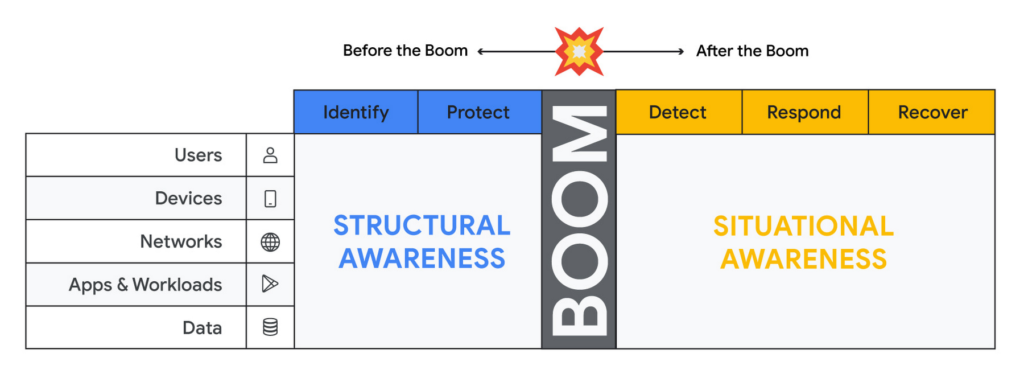
Thinking about assets in terms of users, devices, networks, applications and workloads and data (asset classes), and adopting mechanisms to discover assets of each type through visibility controls suggested by the NIST CSF, will lead to developing structural awareness. Structural awareness can help avoid the boom, but if the boom does happen, it can also help shape the situational awareness needed to react. The Cyber Defense Matrix is an ongoing project, and you can read more about it (and contribute to it) here.
Framing asset discovery for resilience
Cybersecurity teams must map out their organizations’ most critical healthcare services and systems that support them, but that’s easier said than done. Asset discovery can feel overwhelming. Trying to find, count, and audit the hardware, software, users, and data down to the component across even a small part of one’s technology footprint can feel like pushing a dead car up a steep hill. The way to make this easier is to prioritize this effort in the parts of the business where the impact of a quality or safety issue has the potential to create the most harm to the organization and those who depend on it.
A smart place to begin the process to find and evaluate the measurements that an institution uses to monitor those processes.
Healthcare providers: Start with the quality and safety measurements which must be submitted to various regulatory agencies in order to maintain licenses to operate.
- Health insurers: Look at the performance improvement metrics used to ensure subscriber benefits, quality requirements, and legal mandates are being met.
- Health IT services: Use service level agreements for measuring contract compliance with things like uptime, recovery time and point objectives, and response turnarounds.
- Life sciences organizations: Begin with the relevant Good Practice definitions and the metrics used to monitor quality and safety levels of products and services.
When analyzing the types of technology unique to healthcare – like network-connected medical devices such as infusion pumps, implantable pacemakers, ventilators, EKG equipment, and MRI machines – it’s important to ask what are the immediate safety hazards if there was a cyberattack. Not sure how to answer that question? The International Medical Device Regulators Forum produced a risk categorization model that could be helpful in framing that response. Operational technology, like blood bank and sample refrigerators, climate control, air handling, infection control and pneumatic tube systems, may also be used to identify and prioritize inventory efforts.
Once priorities have been set, teams can begin gathering data on critical services, the owners of those services, the systems those owners rely on, and the technology itself.
Inventory tactics on Google Cloud
Building service-technology mapping is not a one-time exercise. Organizations should take the time to automate inventory creation and maintenance, so they can maintain an up-to-date view of all the items in their environment at any given time. This is especially for organizations that have highly dynamic environments.
Google Cloud provides best practices on discovering and cataloging assets in its Cloud Architecture Center. Implement controls found in the Identity and Protect categories using the NIST Framework & Google Cloud technical paper. Automation is your friend when building and maintaining a complete and accurate inventory. Google Cloud Asset Inventory and Security Command Center can be used to inventory a variety of resources running in Google Cloud. Cloud Build, Google Cloud’s CI/CD platform, implements SLSA 1 and provides a trustworthy audit of software artifacts deployed through a managed pipeline. Cloud DLP inventories and labels data stored on Google Cloud Storage and services like BigQuery.
Meanwhile, a number of Google Cloud Marketplace partners have solutions that can help build a comprehensive inventory, and innovation continues to improve our technological options. One emerging field of security technology, called attack surface management, helps discover previously-unknown assets. Finally, our next blog on resilience discusses how to use a software bill of materials (also known by the breezy acronym SBOM) to gain visibility and structural awareness into applications.
It’s important to remember that when starting down this path, the goal is not to gain 100% visibility into every single component on every single device attached to every network supporting every service running. Success or failure is not achieved when the inventory process has reached an arbitrarily-determined ‘percentage complete.’ We want to prioritize expanding visibility and developing structural awareness on assets where safety and quality are at risk, so we can improve their resilience.
And finally, we feel it’s important to emphasize that in the past, healthcare industries have focused mainly on protecting the confidentiality of data. While that’s important, we must evolve security programs beyond protecting confidentiality as its primary (and some cases, only) focus.
To be resilient, we must design and build cybersecurity capabilities that deliver safety, integrity, and availability of the technology that cares for patients directly. As we gain visibility into the technology we depend on to keep us healthy, we improve our understanding about which parts of it we can trust, and which parts we can’t. Improving visibility is an important early step on our path to resilience.

3300
Of your peers have already downloaded this article
11:30 Minutes
The most insightful time you'll spend today!
Today’s security professionals face not only an ever-expanding list of threats, old and new, but also an excruciating choice of security approaches and tools.
Nearly 2000 security vendors are trying to sell to large enterprises and small businesses. Most organizations have already invested heavily in cybersecurity solutions. From firewalls to proxies and endpoint protection to DLP, the average firm has more than 40 types of security technologies in place, each generating telemetry that grows every year.
With employees, contractors, partners, and customers all accessing online business processes that were once hidden in a back office, corporate network traffic has also increased significantly. There is more noise than ever before, hiding more attacks than ever before — with greater impacts than ever before.
Security analytics promises to help analysts make sense of this data, to find useful signals in the noise before it’s too late.
For most organizations, however, an effective security analytics solution is an expensive and complex exercise in systems integration, with heavy IT operations support required simply to keep the system up and
running as it grows.
As CIOs migrate corporate IT to the cloud, CISOs roll out advanced threat protection such as EDR and network traffic analyzers to protect the pieces
that remain under their control.
In theory, a SIEM or centralized log management product consolidates and correlates all of this information, but in practice, SIEMs buckle under large data volumes.
Moreover, high-volume telemetry from EDR systems is rarely fed into a SIEM. If high volume telemetry is ingested, it’s typically only retained for a few weeks, if at all.
While it sounds counter-intuitive that we need another type of a tool, the world has changed dramatically and many existing security tools did not evolve fast enough to maintain relevance.
Today, organizations still operate legacy systems, have vast on-premise IT presence, but also a large cloud presence, often across multiple cloud providers. The types of security telemetry they collect expands,
and the volumes grow.
Best Kept Security Secrets: How to Resolve Cloud Trust Paradox with Cloud EKM

4625
Of your peers have already read this article.
2:30 Minutes
The most insightful time you'll spend today!
Whether driven by government policy, industry regulation, or geo-political considerations, the evolution of cloud computing has led organizations to want even more control over their data and more transparency from their cloud services. At Google Cloud, one of the best tools for achieving that level of control and transparency is a bit of technological magic we call Cloud External Key Manager (EKM).
Cloud EKM can help you protect your cloud data at rest with encryption keys which are stored and managed in a third-party key management system that’s outside Google Cloud’s infrastructure, and ultimately outside Google’s control. This can help you achieve full separation between your encryption keys and your data stored in the cloud. Cloud EKM works with symmetric and asymmetric encryption keys, and offers organization policies that allow for fine-grained control over what types of keys are used. Via Key Access Justification (KAJ) it also offers a way for clients to control each key use.
At their core, many cloud security and cloud computing discussions are about the kinds of trust that Cloud EKM specifically and encryption more broadly can help create. While the concept of digital trust is much bigger than cybersecurity and its tripartite components of security, privacy, and compliance, one of the most crucial themes of cloud computing is the cloud trust paradox. In order to trust the cloud more, you must be able to trust it less, and external control of keys and their use can help reduce concerns over unauthorized access to sensitive data.

How it works
From our Cloud EKM documentation, you can use keys that you manage within a supported external key management partner to protect data within Google Cloud. You can protect data at rest in services that support CMEK, or by calling the Cloud Key Management Service API directly.
Cloud EKM provides several benefits:
- Key provenance: You control the location and distribution of your externally-managed keys. Externally-managed keys are never cached or stored within Google Cloud. Google cannot see them. Instead, Cloud EKM communicates directly with the external key management device for each request.
- Access control: You manage access to your externally-managed keys. Before you can use an externally-managed key to encrypt or decrypt data in Google Cloud, you must grant the Google Cloud project access to use the key. You can revoke this access at any time.
- Centralized key management: You can manage your keys and access policies from a single location and user interface, whether the data they protect resides in the cloud or on your premises. The system that managed the keys is entirely outside Google control.
In all cases, the key resides on the external system, and is never sent to Google.
Here’s how it works:
- Create or use an existing key in a supported external key management partner system. This key has a unique URI.
- Grant your Google Cloud project access to use the key, in the external key management partner system.
- Create a Cloud EKM key in your Google Cloud project, using the URI for the externally-managed key.
The Cloud EKM key and the external key management partner key work together to protect your data. The external key is never exposed to Google and cannot be accessed by Google employees. Furthermore, Cloud EKM can be combined with Key Access Justifications (KAJ) to establish cryptographic control over data access.
KAJ with Cloud EKM can give customers the ability to deny Google Cloud administrators access to their data at rest for any reason, even in situations typically exempted from customer control, such as outages or responses to third-party data requests. KAJ does this by providing customers a clear reason why data is being decrypted, which they can use to programmatically decide whether to permit decryption and thus allow access to their data.
Previously, we’ve discussed three patterns where keeping the keys off the cloud may in fact be truly necessary or outweighs the benefits of cloud-based key management. Here’s a brief summary of those three scenarios where Cloud EKM can help solve these Hold Your Own Key dilemmas.
Scenario 1: The last data to go to the cloud
As organizations complete their digital transformations by migrating data processing workloads to the cloud, there is often a pool of data that can not be moved to the cloud. Perhaps it’s the most sensitive data, the most regulated data, or the data with the toughest internal security control requirements.
Finance, healthcare, manufacturing and other heavily-regulated organizations face myriad risk, compliance, and policy reasons that may make it challenging to send some of their data to a public cloud provider. However, the organization may be willing to migrate this data set to the cloud as long as it is encrypted and they have sole possession of the encryption keys.
Scenario 2: Regional regulations and concerns
Regional requirements are playing a larger role in how organizations migrate to and operate workloads in the public cloud.
Some organizations are already facing situations where they are based in one country and want to use a cloud provider based in a different country, but they aren’t comfortable with or legally allowed to give the provider access to encryption keys for their stored data. Here the situations are more varied, and can include an organization’s desire to stay ahead of evolving regulatory demands or industry-specific mandates.
Ultimately, this scenario allows organizations to utilize Google Cloud while keeping their encryption keys in the location of their choice, and under their physical and administrative control.
Scenario 3: Centralized encryption key control
The focus here is on operational efficiency. Keeping all the keys within one system to cover multiple cloud and on-premise environments can help reduce overhead and attack surface, thus helping to improve security. As Gartner researchers concluded in their report, “Develop an Enterprisewide Encryption Key Management Strategy or Lose the Data1,” organizations are motivated to reduce the number of key management tools.
“By minimizing the number of third-party encryption solutions being deployed within an environment, organizations can focus on establishing a cryptographic center of excellence,” Gartner researchers said
Given that few organizations are 100% cloud-based today for workloads that require encryption, keeping keys on-prem can streamline key management. Centralizing key management can give the cloud user a central location to enforce policies around access to keys and access to data-at-rest, while a single set of keys can help reduce management complexity. A properly implemented system with adequate security and redundancy outweighs the need to have multiple systems.
Do I need Cloud EKM?
Whether protecting highly sensitive data, retaining key control to address geopolitical and regional concerns, or supporting hybrid and multi-cloud architectures, Cloud EKM is best suited for those Google Cloud customers who must keep their encryption keys off of the cloud and always under their full control.
To learn more about Cloud EKM, please review these resources:
- Our research explaining why Google Cloud users can benefit from Cloud EKM
- The most recent updates to Cloud EKM
- Take a deeper dive into the cloud trust paradox
- Gartner, Develop an Enterprisewide Encryption Key Management Strategy or Lose the Data, David Mahdi, Brian Lowans, March 2022.
What Users and System Designers Must Learn from Google’s Best Practices for Password Management

5282
Of your peers have already read this article.
3:00 Minutes
The most insightful time you'll spend today!
Updated for 2021: This post includes updated best practices including the latest from Google’s Best Practices for Password Management whitepapers for both users and system designers.
Account management, authentication and password management can be tricky. Often, account management is a dark corner that isn’t a top priority for developers or product managers. The resulting experience often falls short of what some of your users would expect for data security and user experience.
Fortunately, Google Cloud brings several tools to help you make good decisions around the creation, secure handling and authentication of user accounts (in this context, anyone who identifies themselves to your system—customers or internal users). Whether you’re responsible for a website hosted in Google Kubernetes Engine, an API on Apigee, an app using Firebase, or other service with authenticated users, this post lays out the best practices to follow to ensure you have a safe, scalable, usable account authentication system.
1. Hash those passwords
My most important rule for account management is to safely store sensitive user information, including their password. You must treat this data as sacred and handle it appropriately.
Do not store plaintext passwords under any circumstances. Your service should instead store a cryptographically strong hash of the password that cannot be reversed—created with Argon2id, or Scrypt. The hash should be salted with a value unique to that specific login credential. Do not use deprecated hashing technologies such as MD5, SHA1 and under no circumstances should you use reversible encryption or try to invent your own hashing algorithm. Use a pepper that is not stored in the database to further protect the data in case of a breach. Consider the advantages of iteratively re-hashing the password multiple times.
Design your system assuming it will be compromised eventually. Ask yourself “If my database were exfiltrated today, would my users’ safety and security be in peril on my service or other services they use?” As well as “What can we do to mitigate the potential for damage in the event of a leak?”
Another point: If you could possibly produce a user’s password in plaintext at any time outside of immediately after them providing it to you, there’s a problem with your implementation.
If your system requires detection of near-duplicate passwords, such as changing “Password” to “pAssword1”, save the hashes of common variants you wish to ban with all letters normalized and converted to lowercase. This can be done when a password is created or upon successful login for pre-existing accounts. When the user creates a new password, generate the same type of variants and compare the hashes to those from the previous passwords. Use the same level of hashing security as with the actual password.
2. Allow for third-party identity providers if possible
Third-party identity providers enable you to rely on a trusted external service to authenticate a user’s identity. Google, Facebook, and Twitter are commonly used providers.
You can implement external identity providers alongside your existing internal authentication system using a platform such as Identity Platform. There are a number of benefits that come with Identity Platform, including simpler administration, a smaller attack surface, and a multi-platform SDK. We’ll touch on more benefits throughout this list.
3. Separate the concept of user identity and user account
Your users are not an email address. They’re not a phone number. They’re not even a unique username. Any of these authentication factors should be mutable without changing the content or personally identifiable information (PII) in the account. Your users are the multi-dimensional culmination of their unique, personalized data and experience within your service, not the sum of their credentials. A well-designed user management system has low coupling and high cohesion between different parts of a user’s profile.
Keeping the concepts of user account and credentials separate will greatly simplify the process of implementing third-party identity providers, allowing users to change their username, and linking multiple identities to a single user account. In practical terms, it may be helpful to have an abstract internal global identifier for every user and associate their profile and one or more sets of authentication datavia that ID as opposed to piling it all in a single record.
4. Allow multiple identities to link to a single user account
A user who authenticates to your service using their username and password one week might choose Google Sign-In the next without understanding that this could create a duplicate account. Similarly, a user may have very good reason to link multiple email addresses to your service. If you’ve properly separated user identity and authentication, it will be a simple process to link several authentication methods to a single user.
Your backend will need to account for the possibility that a user gets part or all the way through the signup process before they realize they’re using a new third-party identity not linked to their existing account in your system. This is most simply achieved by asking the user to provide a common identifying detail, such as email address, phone, or username. If that data matches an existing user in your system, require them to also authenticate with a known identity provider and link the new ID to their existing account.
5. Don’t block long or complex passwords
NIST publishes guidelines on password complexity and strength. Since you are (or will be very soon) using a strong cryptographic hash for password storage, a lot of problems are solved for you. Hashes will always produce a fixed-length output no matter the input length, so your users should be able to use passwords as long as they like. If you must cap password length, do so based on the limits of your infrastructure; often this is a matter of memory usage (memory used per login operation * potential concurrent logins per machine), or more likely—the maximum POST size allowable by your servers. We’re talking numbers from hundreds of KB to over 1MB. Seriously. Your application should already be hardened to prevent abuse from large inputs. This doesn’t create new opportunities for abuse if you employ controls to prevent credential stuffing and hash the input as soon as possible to free up memory.
Your hashed passwords will likely already consist of a small set of ASCII characters. If not, you can easily convert a binary hash to Base64. With that in mind, you should allow your users to use literally any characters they wish in their password. If someone wants a password made of Klingon, Emoji, and ASCII art with whitespace on both ends, you should have no technical reason to deny them. Just make sure to perform Unicode normalization to ensure cross-platform compatibility. See our system designers whitepaper (PDF) for more information on Unicode and supported characters in passwords.
Any user attempting to use an extreme password is probably following password best practices (PDF) including using a password manager, which allows the entry of complex passwords even on limited mobile device keyboards. If a user can input the string in the first place (i.e., the HTML specification for password input disallows line feed and carriage return), the password should be acceptable.
6. Don’t impose unreasonable rules for usernames
It’s not unreasonable for a site or service to require usernames longer than two or three characters, block hidden characters, and prevent whitespace at the beginning and end of a username. However, some sites go overboard with requirements such as a minimum length of eight characters or by blocking any characters outside of 7-bit ASCII letters and numbers.
A site with tight restrictions on usernames may offer some shortcuts to developers, but it does so at the expense of users and extreme cases will deter some users.
There are some cases where the best approach is to assign usernames. If that’s the case for your service, ensure the assigned username is user-friendly insofar as they need to recall and communicate it. Alphanumeric generated IDs should avoid visually ambiguous symbols such as “Il1O0.” You’re also advised to perform a dictionary scan on any randomly generated string to ensure there are no unintended messages embedded in the username. These same guidelines apply to auto-generated passwords.
7. Validate the user’s identity
If you ask a user for contact information, you should validate that contact as soon as possible. Send a validation code or link to the email address or phone number. Otherwise, users may make a typo in their contact info and then spend considerable time using your service only to find there is no account matching their info the next time they attempt login. These accounts are often orphaned and unrecoverable without manual intervention. Worse still, the contact info may belong to someone else, handing full control of the account to a third party.
8. Allow users to change their username
It’s surprisingly common in legacy systems or any platform that provides email accounts not to allow users to change their username. There are very good reasons not to automatically release usernames for reuse, but long-term users of your system will eventually come up with significant reasons to use a different username and they likely won’t want to create a new account.
You can honor your users’ desire to change their usernames by allowing aliases and letting your users choose the primary alias. You can apply any business rules you need on top of this functionality. Some orgs might limit the number of username changes per year or prevent a user from displaying or being contacted via anything but their primary username. Email address providers are advised to never re-issue email addresses, but they could alias an old email address to a new one. A progressive email address provider might even allow users to bring their own domain name and have any address they wish.
If you are working with a legacy architecture, this best practice can be very difficult to meet. Even companies like Google have technical hurdles that make this more difficult than it would seem. When designing new systems, make every effort to separate the concept of user identity and user account and allow multiple identities to link to a single user account and this will be a much smaller problem. Whether you are working on existing or greenfield code, choose the right rules for your organization with an emphasis on allowing your users to grow and change over time.
9. Let your users delete their accounts
A surprising number of services have no self-service means for a user to delete their account and associated PII. Depending on the nature of your service, this may or may not include public content they created such as posts and uploads. There are a number of good reasons for a user to close an account permanently and delete all their PII . These concerns need to be balanced against your user experience, security, and compliance needs. Many if not most systems operate under some sort of regulatory control (such as PCI or GDPR), which provides specific guidelines on data retention for at least some user data. A common solution to avoid compliance concerns and limit data breach potential is to let users schedule their account for automatic future deletion.
In some circumstances, you may be legally required to comply with a user’s request to delete their PII in a timely manner. You also greatly increase your exposure in the event of a data breach where the data from “closed” accounts is leaked.
10. Make a conscious decision on session length
An often overlooked aspect of security and authentication is session length. Google puts a lot of effort into ensuring users are who they say they are and will double-check based on certain events or behaviors. Users can take steps to increase their security even further.
Your service may have good reason to keep a session open indefinitely for non-critical analytics purposes, but there should be thresholds after which you ask for password, 2nd factor, or other user verification.
Consider how long a user should be able to be inactive before re-authenticating. Verify user identity in all active sessions if someone performs a password reset. Prompt for authentication or 2nd factor if a user changes core aspects of their profile or when they’re performing a sensitive action. Re-authenticate if the user’s location changes significantly in a short period of time. Consider whether it makes sense to disallow logging in from more than one device or location at a time.
When your service does expire a user session or requires re-authentication, prompt the user in real time or provide a mechanism to preserve any activity they have not saved since they were last authenticated. It’s very frustrating for a user to take a long time to fill out a form, only to find all their input has been lost and they must log in again.
11. Use 2-Step Verification
Consider the practical impact on a user of having their account stolen when choosing 2-Step Verification (also known as two-factor authentication, MFA, or 2FA) methods. Time-based one-time passwords (TOTP), email verification codes, or “magic links” are consumer-friendly and relatively secure. SMS 2FA auth has been deprecated by NIST due to multiple weaknesses, but it may be the most secure option your users will accept for what they consider a trivial service.
Offer the most secure 2FA auth you reasonably can. Hardware 2FA such as the Titan Security Key are ideal if feasible for your application. Even if a TOTP library is unavailable for your application, email verification or 2FA provided by third-party identity providers is a simple means to boost your security without great expense or effort. Just remember that your user accounts are only as secure as the weakest 2FA or account recovery method.
12. Make user IDs case-insensitive
Your users don’t care and may not even remember the exact case of their username. Usernames should be fully case-insensitive. It’s trivial to store usernames and email addresses in all lowercase and transform any input to lowercase before comparing. Make sure to specify a locale or employ Unicode normalization on any transformations.
Smartphones represent an ever-increasing percentage of user devices. Most of them offer autocorrect and automatic capitalization of plain-text fields. Preventing this behavior at the UI level might not be desirable or completely effective, and your service should be robust enough to handle an email address or username that was unintentionally auto-capitalized.
13. Build a secure auth system
If you’re using a service like Identity Platform, a lot of security concerns are handled for you automatically. However, your service will always need to be engineered properly to prevent abuse. Core considerations include implementing a password reset instead of password retrieval, detailed account activity logging, rate-limiting login attempts to prevent credential stuffing, locking out accounts after too many unsuccessful login attempts, and requiring two-factor authentication for unrecognized devices or accounts that have been idle for extended periods. There are many more aspects to a secure authentication system, so please see the further reading section below for links to more information.
Further reading
There are a number of excellent resources available to guide you through the process of developing, updating, or migrating your account and authentication management system. I recommend the following as a starting place:
- Our Modern Password Security for System Designers whitepaper (PDF)
- The related Modern password security for users whitepaper (PDF)
- NIST 800-063B covers Authentication and Lifecycle Management
- OWASP continually updates their Password Storage Cheat Sheet
- OWASP goes into even more detail with the Authentication Cheat Sheet
- Google Cloud Identity Platform is a multi-protocol customer identity and access management solution, with robust authentication features
- Google’s Firebase Authentication site has a rich library of guides, reference materials and sample code
Cloud on Europe’s Terms: How Google Sets to Deliver Cloud Services for Driving Digital Sovereignty

5163
Of your peers have already read this article.
1:30 Minutes
The most insightful time you'll spend today!
Cloud computing is globally recognized as the single most effective, agile and scalable path to digitally transform and drive value creation. It has been a critical catalyst for growth, allowing private organizations and governments to support consumers and citizens alike, delivering services quickly without prohibitive capital investment. European organizations—in both the public and private sectors—want a provider to deliver a cloud on their terms, one that meets their requirements for security, privacy, and digital sovereignty, without compromising on functionality or innovation.
Last year, we set out an ambitious vision of sovereignty along three distinct pillars: data sovereignty (including control over encryption and data access), operational sovereignty (visibility and control over provider operations), and software sovereignty (providing the ability to run and move cloud workloads without being locked-in to a particular provider, including in extraordinary situations such as stressed exits). After extensive dialogue with customers and policymakers, we are today unveiling ‘Cloud. On Europe’s Terms’. As part of this initiative, we will continue to demonstrate our commitment to deliver cloud services that provide the highest levels of digital sovereignty, all while enabling the next wave of growth and transformation for Europe’s businesses and organizations.
Google Cloud’s baseline controls and security features offer strong protections, meet current robust security and privacy requirements, and address many customer needs. Yet each country in Europe has its own characteristics and expectations. Certain customers in Europe may require more flexibility than current public and private cloud offerings may provide. We want to deliver a platform that allows customers to deploy workloads with the desired local control, without losing the transformational benefits of the public cloud.
We are now delivering on this new vision collaboratively with trusted local technology providers in Europe, starting with T-Systems in Germany. Today, together with T-Systems, we announced a partnership to build a Sovereign Cloud offering in Germany for private and public sector organizations. The offering will become available in mid 2022 with additional features being added over time.
In this new joint offering, T-Systems will manage sovereignty controls and measures, including encryption and identity management of the Google Cloud Platform. In addition, as part of their offering, T-Systems will operate and independently control key parts of the Google Cloud infrastructure for T-Systems Sovereign Cloud customers in Germany.
We are committed to building trust with European governments and enterprises with a cloud that meets their digital sovereignty, sustainability and economic objectives. We are starting with T-Systems today and will continue by partnering with trusted technology providers in selected markets across the region.
Customers in other markets across Europe will be able to use these trusted partner offerings or use Google Cloud’s controls to exercise autonomous control over data access and use; exercise choice over the infrastructure that is used to process that data; and avoid cloud vendor lock-in.
With Google Cloud, our customers also automatically benefit from sustainable business transformation on the cleanest cloud in the industry. Today, we are the largest annual corporate purchaser of renewable energy globally, and by 2030, we aim to operate entirely on 24/7 carbon-free energy in all of our cloud regions worldwide.
We’ll continue to listen to our customers and key stakeholders across Europe who are setting policy and helping shape requirements for customer control of data. Our goal is to make Google Cloud the best possible place for sustainable, digital transformation for European organizations on their terms—and there is much more to come.
More Relevant Stories for Your Company

Google Cloud’s Accountability and Transparency Adheres to EU’s Stringent Compliance Policies
Google Cloud's industry-leading controls, contractual commitments, and accountability tools have helped organizations across Europe meet stringent data protection regulatory requirements for years. This commitment to supporting the compliance efforts of European companies has earned us the trust of businesses like retailers, manufacturers and financial services providers. As part of our
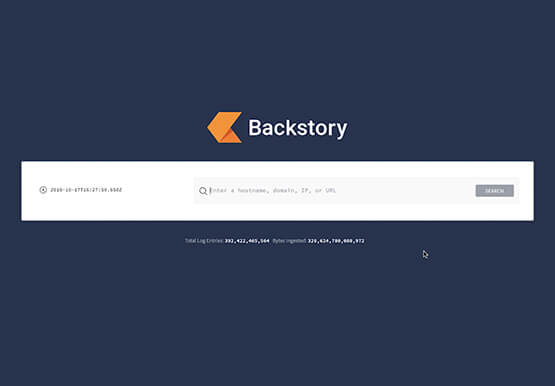

How to Retrace the Steps of a Potential Phishing Attack with Threat Analytics
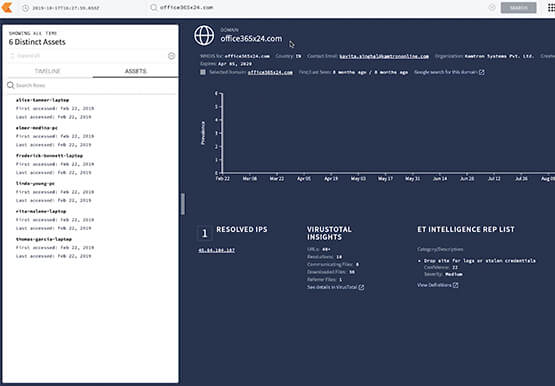
The majority of cyber attacks begin with phishing emails and websites. Attackers use many tricks, including by leveraging enterprise brand assets, such as company names and logos, to develop phishing websites that appear authentic and lure internet users to enter valuable information such as user names and passwords. Experts say

New Study Suggests Public Sector Firms Must Move Over Legacy Productivity Tools
Prior to joining Google Cloud, I spent 20 years in the public sector serving in various security roles, most recently as the head of the cybersecurity division at the newly established Cybersecurity and Infrastructure Security Agency (CISA). I was responsible for delivering services and capabilities to about 100 civilian agencies,

Stop Cribbing About Shadow IT and Start Taking Charge Now
Employees use tools at their disposal to get work done, but if these tools (often legacy) hamper collaboration or are inflexible, they’ll turn to less secure options for the sake of convenience. According to Gartner, a third of successful attacks experienced by enterprises will come from Shadow IT usage by 2020.
