





Accelerate Developer Productivity with Google Workspace

5769
Of your peers have already read this article.
3:30 Minutes
The most insightful time you'll spend today!
The software development process requires complex, cross-functional collaboration while continuously improving products and services. Our customers who build software say that they value Google Workspace for its ability to drive innovation and collaboration throughout the entire software development life cycle. Developers can hold standups and scrums in Google Chat, Meet, and Spaces, create and collaborate on requirements documentation in Google Docs and Sheets, build team presentations in Google Slides, and manage their focus time and availability with Google Calendar.
Development teams also use many other tools to get work done, like tracking issues and tasks in Atlassian’s Jira, managing workloads with Asana, and incident management in PagerDuty. One of the benefits of Google Workspace is that it’s an open platform tailored to improve the performance of your tools by seamlessly integrating them together. We’re constantly expanding our ecosystem and improving Google Workspace, giving you the power to push your software development even further.
Make software development more agile
Google Workspace gives you real-time visibility into project progress and decisions to help you ship quality code fast and stay connected with your stakeholders, all without switching tools and tabs. By leveraging applications from our partners, you can pull valuable information out of silos, making collaborating on requirements, code reviews, bug triage, deployment updates, and monitoring operations easy for the whole team. This allows your teams to stay focused on their priorities while keeping everyone aligned, ensuring collaborators are always in the loop.
Plan and execute together
When combined with integrations, Google Workspace makes the software development planning process more collaborative and efficient. For example, many organizations use Asana—a leading work management platform—to coordinate and manage everything from daily tasks to cross-functional strategic initiatives. To make the experience more seamless, Asana built integrations so users can always have access to their tasks and projects with Google Drive, Gmail, and Chat. With these integrations for Google Workspace, you can turn your conversations into action and create new tasks in Asana—all without leaving Google Workspace.
“We’ve seen exceptional, heavy adoption of tasks being created from within the Gmail add-on. Our customers and community have also shown very strong interest in future development work, which is something we’ll continue to prioritize.” Strand Sylvester, Product Manager, Asana
To date, users have installed the Asana for Gmail add-on over 2.5 million times, as well as over 3.8 million installs of the Asana for Google Workspace add-on for Google Drive.

Start coding quickly
Google Workspace makes it easy for product managers, UX designers, and engineers to agree on what they’re building and why. By bringing all stakeholders, decisions, and requirements into one place—whether it’s a Gmail or Google Chat conversation, or a document in Google Docs, Sheets, or Slides—Google Workspace removes friction, helping your teams finalize product specifications and get started right away.
Integrations like GitHub for Google Chat make the entire development process fit easily into a developer’s workflow. With this integration, teams can quickly push new commits, make pull requests, do code reviews, and provide real-time feedback that improves the quality of their code—all from Google Chat.

Speed up testing
Integrations like Jira for Google Chat accelerate the entire QA process in the development workflow. The app acts as a team member in the conversation, sending new issues and contextual updates as they are reported to improve the quality of your code and keep everyone informed on your Jira projects.

Ship code faster
Developers use Jenkins—a popular open-source continuous integration and continuous delivery tool—to build and test products continuously. Along with other cloud-native tools, Jenkins supports strong DevOps practices by letting you continuously integrate changes into the software build.
With Jenkins for Google Chat, development and operations teams can connect into their Jenkins pipeline and stay up to date by receiving software build notifications directly in Google Chat.

Proactively monitor your services
Improving the customer experience requires capturing and monitoring data sources to improve application and infrastructure observability. Google Workspace supports DevOps teams and organizations by helping stakeholders collaborate and troubleshoot more effectively. When you integrate Datadog with Google Chat, monitoring data becomes part of your team’s discussion, and you can efficiently collaborate to resolve issues as soon as they arise.
The integration makes it easy to start a discussion with all the relevant teams by sharing a snapshot of a graph in any of your Chat spaces. When an alert notification is triggered, it allows you to notify each Chat space independently, precisely targeting your communication to the right teams.

Improve service reliability
Orchestrating business-wide responses to interruptions is a cross-functional effort. When revenue and brand reputation depends on customer satisfaction, it’s important to proactively manage service-impacting events. Google Workspace supports response teams by ensuring that urgent alerts reach the right people by providing teams with a central space to discover incidents, find the root cause, and resolve them quickly.
PagerDuty for Google Chat empowers developers, DevOps, IT operations, and business leaders to prevent and resolve business-impacting incidents for an exceptional customer experience—all from Google Chat. See and share details with link previews, and perform actions by creating or updating incidents. By keeping all conversations in a central space, new responders can get up to speed and solve issues faster without interrupting others.

Accelerate developer productivity
Integrating your DevOps tools with Google Workspace allows your development teams to centralize their work, stay focused on what’s important—like managing their work—build code quickly, ship quality products, and communicate better during service impacting incidents. For more apps and solutions that help centralize your work so you and your teams can connect, create, and get things done, check out Google Workspace Marketplace, where you’ll find more than 5,300 public applications that integrate directly into Google Workspace.
Google Workspace Makes Hybrid Model Palatable for Teams of All Sizes

3809
Of your peers have already read this article.
4:00 Minutes
The most insightful time you'll spend today!
One of the hopeful signs of a return to normalcy is seeing many of our customers make plans to come back into their offices. And they’re asking for strategies that will make hybrid work a more equitable and productive experience for everyone. At Google, we’re also beginning our own transition to hybrid work in early April. As we gear up for that, it feels like a time of optimism for new ways of working together and the potential for hybrid models to become the sustainable norm. When designed well, a hybrid model gives employees the flexibility to deliver their best from anywhere, while bringing them together thoughtfully for the power of in-person collaboration.
Today, Google Workspace is announcing new features that can help teams of all sizes stay better connected and engaged, whether they’re working from home, the office, or anywhere in between.
More inclusive and secure hybrid meetings
For most companies working in a hybrid model, meetings typically include in-person and remote attendees, and it’s essential that each hybrid meeting experience is unified and productive for all. In light of this, we continue to make enhancements to Google Meet to help ensure that all video meetings are secure and inclusive no matter the location or device preference.
Coming next month, in-meeting reactions will let attendees visually express themselves with 👍 ❤️ 😆 and more, bringing energy into the meeting and giving immediate feedback to speakers and other attendees. These reactions will appear in a participant’s video tile, or overflow alongside their name if their video tile isn’t visible.

Being able to see and hear each other during hybrid collaboration is essential. To address this, we’re bringing Meet directly to Docs, Sheets, and Slides in the coming weeks. Users will be able to quickly start a meeting and bring it to a document, spreadsheet, or presentation, and they can present this content to all the meeting attendees. This enables everyone in the meeting to collaborate in real-time while having a conversation—all from the same tab.
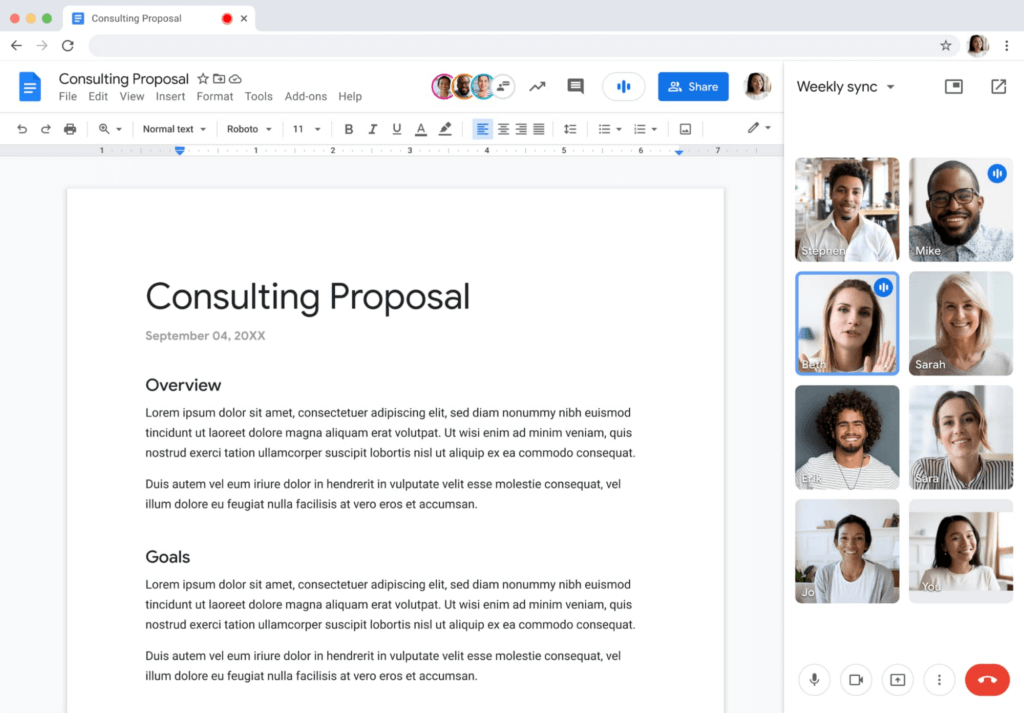
Additionally, to help presenters and multitaskers see their audience while navigating different tabs and windows, we’re bringing picture-in-picture to Meet running on Chrome browsers. Next month, you’ll be able to see up to four video tiles of meeting attendees in a floating window on top of other applications as you share content or send a message in Gmail. Clicking on picture-in-picture quickly takes you back to the full Meet session.

With our recent rollout of Companion mode for Meet, we gave in-room meeting attendees a way to stay engaged using their personal devices while leveraging in-room audio and video. To improve the in-room experience, we’ve started rolling out automatic noise cancellation on all Google Meet hardware, including Logitech, Acer and Asus hardware.* This will help remove background noises—from loud typing in a conference room to the neighbor’s lawn mower. In the coming months, people in conference rooms will also be able to add their own personal video tile from Companion mode and their laptop camera, making it easier for other attendees to see their expressions and gestures.

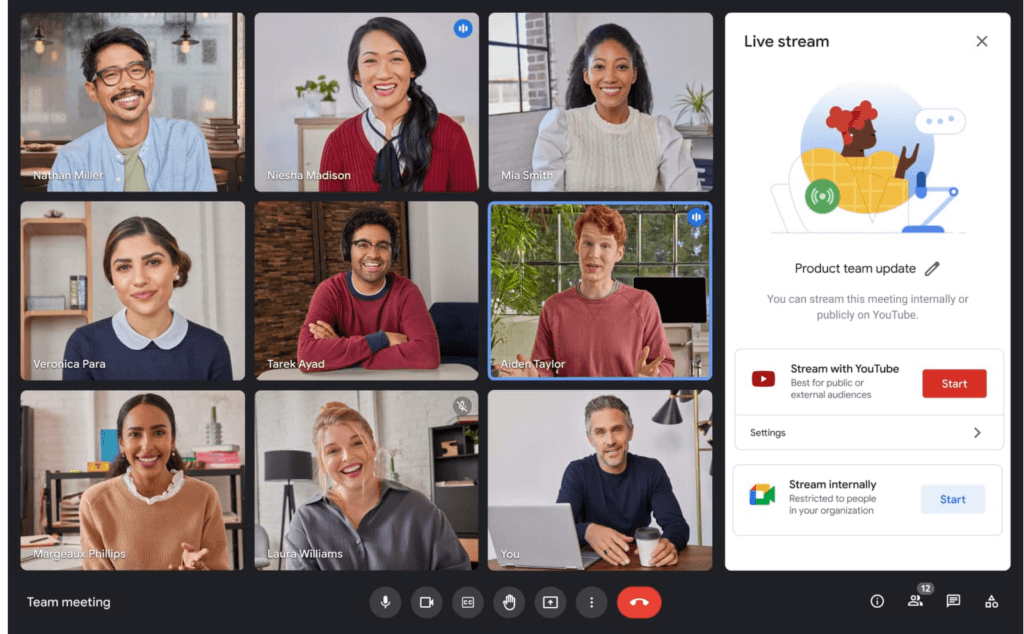
We’re also improving the livestream experience, strengthening an organization’s ability to broadcast a message and deepening its engagement with audiences. Today, Google Meet users can host meetings of up to 500 active attendees with the ability to livestream to audiences of up to 100,000 across trusted Google Workspace domains. Coming later this year, livestream attendees will be able to participate in Q&A and polls, matching the experience that Meet attendees enjoy today. Customers have also requested the ability to reach a broader audience by livestreaming through other platforms. Later this year we’ll enable meeting hosts to do just that by streaming meetings directly to YouTube from the Meet activities tab. Our integration with YouTube means a Google account can be used for authentication, simplifying the livestreaming process.
Lastly, to help keep your most sensitive communications protected and private, in May we’re rolling out optional client-side encryption in Google Meet (currently in beta). This feature gives our customers direct control of the encryption keys and identity provider used to access those keys. And later this year we’ll introduce optional end-to-end encryption for all meetings.
Together, these enhancements strengthen the foundation of security that help make secure, hybrid collaboration happen at scale.
Anytime collaboration for teams large and small
While live meetings can be a great way to collaborate and make decisions in real time as a team, most communication and information sharing doesn’t need to happen in real time. How do high performing teams stay connected with the right information, at the right time, without the need for the back-to-back meetings that were a hallmark for many during the pandemic?
Spaces in Google Workspace offers an integrated, effective solution for anytime collaboration, where teams can share ideas and knowledge, discuss topics, collaborate on documents, and manage tasks within a single, persistent location.
We are improving how conversations are displayed in Spaces with inline threading, a top request from enterprise customers. With inline threading, members of a space will be able to respond to specific comments and create side conversations, while keeping the dialogue organized and contextual. Every teammate can easily browse a space and catch up on topics that are important to them, at a time that works for their schedule.
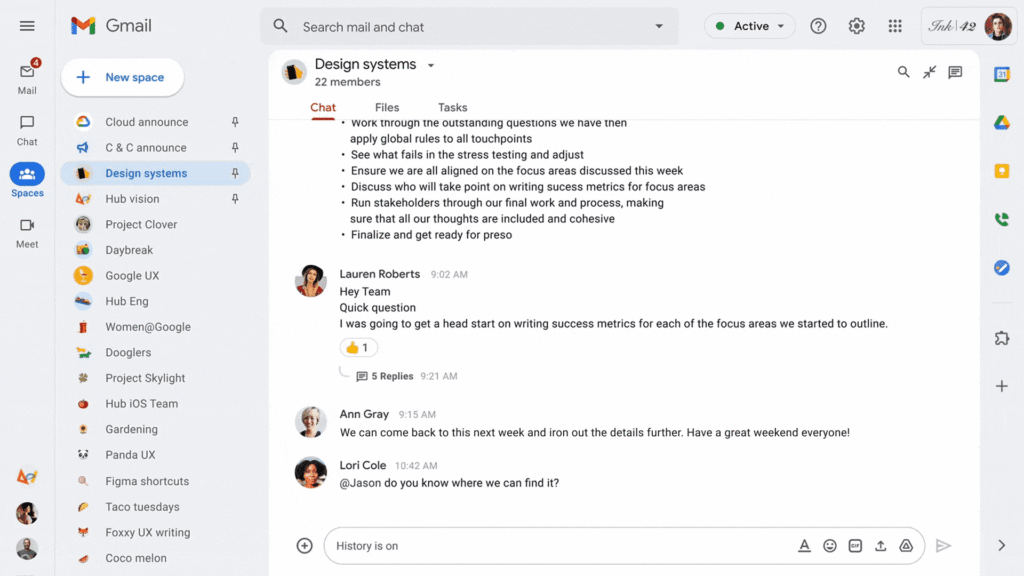
To further support collaboration and transparency, last week we enabled users to invite others to join a Space via a shared link, and later this year we will enable users to search and join Spaces across an organization. We’re also improving search within Chat and Spaces to surface the most relevant files and conversations, and bringing filter chips to chat search results later this year.
And to bring the power of Spaces to organizations of all sizes, we are increasing team size limits to 8,000, and we’ll increase this to 25,000 by the end of this year to support communities as they grow. This will improve knowledge sharing and collaboration in larger organizations and unlock key scenarios, including team, department and organizational announcements.
Strong team cultures are built on trust and psychological safety. That’s why we’re adding features that improve content moderation, the ability to designate managers and guidelines for specific Spaces, and new admin capabilities to delete Spaces.
Bringing Google Voice to more customers
With the move to a hybrid workplace, we’ve seen renewed interest in cloud-based phone systems that untether people from legacy deskphones. Google Voice keeps colleagues and customers connected with an intuitive calling experience across devices (web, mobile, and certified deskphones) while leveraging Google’s AI to help save time by blocking spam, transcribing voicemails, and guiding callers. Google Voice has over a decade of cloud telephony experience and seamlessly integrates with Google Workspace.
To help our European customers adopt Google Voice, we recently announced that calls from European Google Voice numbers to mobile and landline numbers in many European countries will be included in their Google Voice license. Later this year, we’ll introduce SIP link, which will allow customers to connect SIP trunks from their chosen telecommunications carrier via certified session border controllers from Audiocodes, Cisco, Oracle, and Ribbon. This will enable customers with operations outside our current coverage areas to move holistically to Google Voice. Admins will be able to easily manage these carrier-provided numbers alongside Google-provisioned numbers directly in the Google Admin Console.
We’ll also begin rolling out on-demand call recording to Google Voice Standard and Premier subscribers next month. Premier subscribers will have the additional benefit of automated call recordings, which is a top request from customers in regulated industries. We encourage you to learn more about Google Voice and talk with your Google account rep about trying it today.
Benefits of a modern hybrid work strategy
As work continues to evolve, Google Workspace will continuously look for ways to help your teams better connect, create, and collaborate, no matter where and how they work together. By bringing together Google Workspace innovations in voice, video meetings, and the collaboration spaces that support hybrid work, your organization can benefit from a strategy that removes friction, streamlines costs, and reduces the security risks associated with maintaining multiple platforms. With a unified approach to communications and collaboration, you can build a sustainable hybrid work model that gives employees the ability to deliver their best from anywhere.
Learn best practices from Google in our hybrid work handbook.
How Recommendation AI Helps Retailers Optimize Click-through and Conversion Rates

7066
Of your peers have already read this article.
3:00 Minutes
The most insightful time you'll spend today!
Time to go outside again, I guess. I’ll need a sun hat. Sunscreen. Maybe some new sandals? What else?
With the Recommendations AI service, I might be reminded to grab a reusable water bottle and a swimsuit. Or some after-sun aloe lotion. Good thing, cause I’ll need it.

Recommendations AI is a solution that uses machine learning to bring product recommendations to their shoppers across any catalog or client list. This service is part of our full suite of Retail solutions. When you integrate with the Retail API, you get the benefit of Google’s Product Discovery. Integrating once to reap the benefits over and over. Recommendations is the starting point, and you can easily extend into Retail Search and Vision Product Search in the upcoming future.
The Recommendations solution is fully managed, global-scale and powered by deep learning, so you can focus on a great shopping experience and let someone else worry about the infrastructure.
Compared to baseline recommendation systems used by customers, Recommendations AI showed double digit uplift in conversion and clickthrough rates in A/B experiments controlled by the customers. You can optimize for click-through, conversion or session revenue, and fine tune the models to make sure you omit out-of-stock items or duplicates, for example.

So how does it work, and how do you get started? Read on, and we’ll walk you through the pipeline, starting with the data you already have to placement in your online store.
Formula: Data -> Model -> Placement
You start with your catalog, the list of all the things (postcards, movies, pie recipes) that you want to show your customers. Then you ingest your PII-redacted user events -this is the historic event data like home page views, add to cart events and more along with real time user events. This user event is joined with the product catalog and items that allows us to construct the sequence of shoppers’ activity, thus being able to predict what the shopper has a high propensity to purchase next. The user events can come from both online activity across devices or offline store purchases
The recommendation model will return a list of products, which are the recommendations. The brains of the operation, if you will. This model is trained using all the data that you ingest, using the latest neural network models and techniques that Google has built expertise over the years in flagship products like Youtube and News, that allows us to uncover shopper intent, so it can best predict the right recommendations to show to the right people.
Every model outputs a list of product identifiers, but where do they go? They go into placements, the spots, panels, carousels on your customer’s journey interacting with your brand that you’ve set aside to highlight recommendations. A model can send recommendations to one or more placements, but each placement only receives information from one recommendation model. Your pages will then need to render the products with the right images, text or other metadata, using the product ID that is returned by the model.
What do recommendations look like?
Let’s start by browsing our postcard-selling website, where I’ve been buying some vintage California postcards already. The recommendations algorithm has caught on to my interest, showing me other potential cards to purchase based on my history:

Put your data to work
To get started we need to bring your data into the recommendation model, so it can understand your customers, your inventory, and your sales patterns.
The model takes in the product catalog you use, and metadata about those products to better understand nuances in assortment, pricing and variables like size and style. You might already have this data stored in BigQuery or Merchant Center, and hence we provide easy integrations that you can leverage to get started even faster.
As for the user events, don’t worry if you already have systems in place to capture web and mobile activity. We make it easy to bring in your real time event logs by providing seamless integrations with Google Tag Manager, Javascript pixel, or even historic events from Cloud Storage, BigQuery or using inline API or JSON, so you can immediately train the models on this imported data. All this allows you to kickstart integrating with Recommendations AI in a matter of days.
The models then construct a sequence of activities that the user went through and joins with the products that the user engaged with. Once your data is ready to go, it takes a few days to train the model. Next onto making the data work for you.
Quickly customize your model
Setting up your own recommendations project in the console gives you the ability to choose what sort of model to train (based on what recommendations you want to generate) and your objective. Are you optimizing for click-through rate–more people click on the recommendation links or products–or for conversion rate–more people choose or buy what was suggested or revenue ?
Different models can be optimized for different optimization goals.; the GCP console explains what each one can do and how you can choose to optimize it.

Let’s unpack some of this terminology real quick.
We’ve got three model types:
- Recommended for you – Means we think these are items you’ll want to buy, based on your history; this is usually used on a home page to showcase items.
- Others you may like – Means if you’re browsing the page of a water bottle, we will recommend alternative brands of water bottles that you may like as well as a backpack, based on your engagement history.
- Frequently bought together – Means that when anyone buys sunscreen, we notice that they often also buy aloe lotion, so we will surface those items when someone adds any one of them to their cart.
And then we have three business objectives that the models optimize for:
- Click-through rate – How frequently did somebody click on a recommended item?
- Conversion rate– How frequently did somebody add a recommended item to their cart?
- Revenue per session – How much money did the recommendations generate for you?
Deliver anywhere along the journey
Now that you’re all set up in the Retail AI console, you can test out the recommendations in the console, even before you deploy to production.

You can integrate Recommendations into your frontend by calling the Predict APIt. The placements of recommendations will report data back into the dashboard and you can analyze and measure success for future iterations.
On top of that you can use the recommendations for other parts of your customer’s journey. Email promotions, storefront kiosks, display ads or follow-up notifications can include recommendations based on past activity and cart contents. The model gives you useful product recommendations for a wide variety of touchpoints and steps in the purchasing process.
More best practices, and guides, are available inside our documentation.
How to get started
Training your own models can be tedious, time-consuming, and expensive. On top of that it requires deeper data science expertise to set up. Let us do it instead!
You can see how IKEA Retail uses Recommendations AI in this recent talk and blog from the Google Cloud Retail Summit..
To get started today you’ll need to make a Cloud project and enable the Retail API, which then allows you to access all the recommendation tools in one menu. Bring in your catalog and purchasing data, define a placement or two, and you can start putting recommendations on your site in a matter of days.
Discovery’s Massive Workspace Migration Fuels Innovation and Collaboration

3831
Of your peers have already read this article.
1:30 Minutes
The most insightful time you'll spend today!
In the past two decades, Discovery has moved from a purely cable business based in the U.S. to a global media and entertainment powerhouse. Like many other businesses in the industry, we’ve had to adjust to the unique shifts in people’s behaviors and preferences, almost all of which result from the rise in streaming.
We have always been consumer-obsessed at Discovery, with a corporate culture built on the desire to entertain and inspire people of all ages and backgrounds with exceptional content. As we’ve grown, we have also learned just how important it is to be staff-obsessed, giving our employees the best possible experiences so they can continue to innovate and deliver the world-class content our customers expect.
In 2019, we decided one way to fuel innovation and collaboration among employees was to bring in Google Workspace. Selected for its intuitive, easy-to-use, and constantly evolving tools, Google Workspace enables teams to seamlessly create, connect, and collaborate anywhere, anytime.
Given the scope of our ambitions, and recognizing the challenges of migrating 16,500 global employees to a new collaboration solution, we worked with Google Cloud premier partner SADA to get the job done.
Change management amid a massive migration
We began the move to Google Workspace by migrating our document storage system from a legacy cloud provider to Google Drive. This included 86 million items amounting to about two petabytes of data migrated with minimal disruptions. A few months later we completed our move to Google Workspace by migrating 1.2 million calendar invites and 20,800 mail accounts, including thousands of collaborative inboxes and delegated accounts.
In addition to the technical support and Google Workspace expertise that SADA provided, they also partnered with our project team on the change management strategy. Despite challenges presented by the COVID-19 pandemic, our training team and SADA were able to offer outstanding educational opportunities to assist our workforce in the transition and to get the most out of Google Workspace. This included collaborating on over 240 global webinars in seven languages.
Discovering the power of transformative tools
Discovery has many types of end users, from finance professionals and marketing teams to producers and content developers. The fact that Google Workspace has been well-received across the company is a testament to the power of the solution.
Many of our teams have taken advantage of collaborative Gmail accounts and shared drives, providing them with a centralized location to seamlessly communicate and work together on team-focused projects. Our internal communications team is especially happy with the real-time collaborative editing experience within Docs as they work on company-wide emails, announcements, and other projects.
These collaboration tools have allowed us to stay agile amid global lockdowns and will continue to do so as we adapt to a more flexible working environment.
The value of partnership
While we were comfortable with our legacy collaboration suite, one of the biggest benefits of switching to Google Workspace has been Google Cloud’s and SADA’s partnership. They provide us with regular updates on product roadmaps, upcoming features, and more.
This is just the beginning as we plan to grow, deliver new content, and lead the media and entertainment industry with the help of these two great partners and their solutions.
To learn more about Discovery’s journey with Google Workspace, read the full case study.
Arab Bank Accelerates its App Development and Testing Using Apigee and Anthos

6166
Of your peers have already read this article.
3:30 Minutes
The most insightful time you'll spend today!
Founded in 1930 and headquartered in Jordan, Arab Bank is one of the oldest banks in the Middle East. Operating out of 28 countries, we’ve earned our customers’ trust with a prudent approach to operations and respect for the cultures and customs in the region.
With a few exceptions where cloud providers have hosted their datacenter in a Middle Eastern or North African country, the banking sector, in general, in the region has been slow to adopt cloud technology for a number of reasons, including concern about data security, maturity and security controls of cloud services (PaaS and SaaS), and regulations in place. But on the other hand, we saw the opportunity to accelerate our development and testing using the cloud, as well as to partner with the fintech community and digital service providers to integrate their solution in the banking ecosystem. We needed more flexibility to connect with the outside world, and a more open architecture to help us drive our internal innovation at a faster rate with the help of the fintech industry. By collaborating with Google Cloud, we reached those goals and accelerated app development and testing through products like Apigee and Anthos. We’re now offering innovative apps and services to our customers and employees that leverage new technological capabilities to give more agility and flexibility, and to optimize our workloads.
Embracing the cloud in a regulated industry
To get started with the cloud, we needed to create internal awareness about cloud technology, the API layer, containers and their benefits amongst our leaders and staff. Google helped us educate and get buy-in from key functions by organizing open technology demonstration sessions and discussion panels. When considering potential cloud providers we had four decision criteria: maturity of security controls, ease of use, cost, and scalability / agility for new deployments and continuous innovation. This last factor was critical, and we were impressed by Google Cloud’s innovation roadmap, both via direct conversations and at Google’s Next conference, where we met a lot of people passionate about technology, innovation and building something new.
Going back to our journey, given the above-mentioned regional limitations, we started to develop a hybrid cloud approach. This helped us continue to operate on-premises for a number of services in production, particularly those that have personally identifiable information (PII) or other sensitive data attached, and to leverage the cloud for development, testing and production workloads that don’t contain customer data.
In the short term, we didn’t anticipate that our many jurisdictions would allow data to be transported to other countries. But cloud tools will allow us to tokenize or anonymize customer data while maintaining customer data on-premises. This applies to many digital journeys such as customer onboarding, credit facility online applications, or marketplace navigation. In the coming years, we predict our API integration with partners will accelerate and enrich the overall digital value proposition of our business segments, namely consumer banking, small and medium-size businesses and large corporate and institutional clients.
Building connections and cornerstones in the cloud
The first move in our digital transformation was to implement Apigee, Google Cloud’s API management platform, to connect to the world’s digital banking ecosystem. Apigee provides the security, sharing, mediation policies, and developer portal capabilities for us to successfully meet Open Banking standards while focusing on innovation.
On the back of the Apigee implementation, we created an accelerator program to incubate Fintech ideas that can, in turn, integrate into our digital platforms and be offered to our customers. We also developed various banking APIs, all designed and documented in accordance with PSD2 and Open Banking regulations, and made them available to our partners. These APIs exposed on our API development portal offer the needed code structure for fintech companies to design creative solutions around them.
Next, we adopted Anthos, Google Cloud’s managed application platform. Anthos has become a cornerstone of our operations because it works across hybrid cloud, offering integration of microservice containers and fueling collaborative opportunities with external parties. Our current Anthos infrastructure includes several hundreds of microservices now running on containers in Google Kubernetes Engine (GKE) and on-premises. We now use the cloud for collaboration, development and testing, but not for production, which is done on-premises.
Along the way, Google Cloud’s Professional Services Organization (PSO) helped us through the entire cloud setup process, and with the adoption of Anthos. We originally built on the cloud tools through an iterative process, learning from our successes and errors along the way. Now that we have a better sense of how Anthos operates, we’re building a fresh infrastructure atop a sound, stable, and resilient foundation that will let us scale easily as we work to transform Arab Bank into a digital-first enterprise, that is our ambition.
Currently products running on Anthos include customer acquisition and onboarding via mobile apps, and our Arabi-Pay app, which allows customers to instantly pay each other via WhatsApp or other messaging platforms. Leveraging Anthos, our instant loan service for Arab Bank salaried employees can grant and disburse loans up to $7,000 in less than seven minutes.
In addition, we’ve built a number of digital journeys for our Small and Medium Enterprise (SME) customers, such as our SME client digital onboarding process and paperless SME lending platform.
While some may think that digital adoption in this part of the world can be slow, as customer contact remains anchored in our customs, the recent COVID-19 pandemic has accelerated the adoption of digital banking services and electronic payments, inspiring more confidence to buy and pay online. Thanks to our rich and user-friendly banking app that relies on Apigee and Anthos for critical customer journeys, over 90% of new-to-bank customers are using our mobile apps. Within the next 18 months, we predict that number will be closer to 100%.
Of course, with higher customer adoption comes the challenge of potential service interruptions. A single moment of downtime can be highly visible to many digital customers. But Google Cloud’s Anthos and Apigee give us the flexibility to resume processes at a fast rate, so any interruptions are almost invisible to our customers. In fact, when the COVID-19 pandemic hit, though our branches could be open only for limited hours each day, our consumer clients in particular were able to take advantage of our digital services in a very self-sufficient manner. Being well positioned with Google Cloud, we could also keep our internal teams and external partners connected and productive. Without Google Cloud, continuing the digital transformation of the bank at the pace we wanted would have been a big challenge.
Collaborating across borders and time zones
With Google Cloud, our ability to collaborate and partner has transformed significantly. We operate 24/7 now because our developers are scattered across multiple geographies and different time zones. Because testing and deployment can run around the clock, including on weekends, we currently deploy a new digital journey in a few weeks, faster than ever before. This has given our organization a spirited mindset that prioritizes innovation, and raised the bar in terms of our operating model.
Another consideration about Google Cloud tools is the elimination of inefficient processes typically seen in a software development lifecycle. We now build in a completely agile manner, from design squads until deployment in production. Compared to where we were two years ago, when we had an annual maximum of two systems releases in production, we now have close to monthly releases of our digital packages. In addition, we also supplement those monthly releases with additional ad-hoc releases and fixes in between. As a result, we have removed internal silos and improved tremendously the collaboration between the product and sales teams, operations, IT Dev Factory and Infrastructure, as well as our supporting functions.
Through the agile process facilitated by APIs, we introduced Design Thinking workshops involving external customers and prospects early on to understand their true pain points better and emotions during the existing journeys and how to make new digital journeys frictionless. As a result, the relevance of our products for various customer personas has improved tremendously.
Transcending banking
With Google Cloud, we can offer our customers so much more than just banking. We’ve become more digitally relevant to their lives. For example, we recently launched a mortgage app that helps customers all the way from home selection through mortgage negotiations and closing, and even to getting the home decorated. It’s an end-to-end journey in which API integration with key regional players was a cornerstone to our success.
For other digital products, we have an extensive roadmap of lifestyle-based solutions relevant to each segment and age group. We’ve only scratched the surface of the services we can provide, and we see the cloud as the future for everything we want to do.
Read more about Google Cloud’s Open Banking solution to learn how you can simplify and accelerate the process of delivering open banking as required by PSD2. You can also view our video on Open Banking, powered by Apigee API Management.
4129
Of your peers have already watched this video.
23:18 Minutes
The most insightful time you'll spend today!
Securing Remote Workers with Google and Chrome Enterprise
With the proliferation of COVID-19 across the globe, the need for a remote working strategy has become paramount to keep businesses running.
A Gartner survey found that 88% of organizations have asked their employees to work remotely. And 97% of the organizations canceled work-related travel. However, only 10% of the organizations planned to reduce working hours. For us, this shows that despite the prevalence of coronavirus across the world, business demands require that work must go on.
Technologies such as Chromebooks, Chrome Browser, and SaaS applications have helped make this strategy a reality, providing access to critical data wherever employees may be working from during this challenging time.
However, this way of working has created new security challenges for IT departments, who may not be equipped to address these issues.
This session provides a walkthrough of many of Google’s solutions, such as Chrome devices, Chrome Enterprise Upgrade, BeyondCorp Remote Access, and Chrome Browser Cloud Management to ensure your business can keep secure, even in a remote working environment.
More Relevant Stories for Your Company

Quick Recap on Google Cloud: Latest News, Launches, Updates, Events and More
Want to know the latest from Google Cloud? Find it here in one handy location. Check back regularly for our newest updates, announcements, resources, events, learning opportunities, and more. Tip: Not sure where to find what you’re looking for on the Google Cloud blog? Start here: Google Cloud blog 101: Full list

Let Your Organization Thrive in Hybrid Work with Google Workspace
Flexible ways of working have become second nature for people everywhere, especially for the more than 8 million customers that use Google Workspace in their offices, homes, or on mobile devices. However, the rise of hybrid work has also demonstrated the importance of choice. People don’t want to be locked




PwC uses Connected Sheets to scale data insights
It’s important for teams across the business to understand customer adoption of products and services, whether it’s the product team tracking usage of a newly released feature or the support team trying to anticipate incoming service requests. Similarly, IT teams need to analyze the adoption of an organization’s internal applications

Google Dataflow Named Leader in The 2021 Forrester Wave™: Streaming Analytics
We are excited to announce that Google has been named a Leader in The Forrester Wave™: Streaming Analytics, Q2 2021 report. Thank you to our strong community of customers and partners for working with us to deliver a customer focused product. We believe Forrester’s recognition is an acknowledgement of our leadership
