





A Year of Going Carbon-free! Google’s Road to Sustainability Looks Promising
3742
Of your peers have already read this article.
2:00 Minutes
The most insightful time you'll spend today!
Last year, we announced our most ambitious sustainability goal yet: to operate everywhere on 24/7 carbon-free energy by 2030. We’ve set this goal to ensure that Google Cloud continues to be the cleanest cloud in the industry, and to show that full-scale decarbonization of electricity use is possible.
Since setting our target, we’ve made tremendous progress in how we track, buy, and use electricity; advocate for clean energy policies; and support the development of new technologies to help us reach this goal. And we’ve done it all while maintaining a commitment to transparency that we hope will make it easier for other organizations wishing to fully decarbonize their operations as well.
In the spirit of transparency, today we’re releasing the 2020 carbon-free energy percentages (CFE%) for all Google data centers, as well as overall progress on the road to our 2030 goal: In 2020, Google achieved 67% round-the-clock carbon free energy across all its data centers, up from 61% in 2019. In other words, of all the electricity consumed by Google data centers in 2020, two-thirds of it was matched with local, carbon-free sources on an hourly basis.
Though we saw a significant jump in global CFE% in 2020, we expect the numbers to vary from year to year. Ultimately, CFE% is dependent on the amount of new clean energy that comes online in a given year; we may even occasionally see short-term drops in the numbers. What’s most important is that we continue to maintain a long-term trajectory toward our 2030 goal. With meaningful progress in clean energy policy, technologies, and transactional models, we believe 24/7 carbon-free energy is achievable.
Tracking these numbers also allows us to give Google Cloud customers greater control in their own sustainability efforts. Earlier this year we announced Google Cloud Region Picker, a system that helps our customers assess factors like cost, speed, and CFE% as they choose where to run their applications.
To outline some of the events that have helped us get to 67% CFE%, we’ve developed an animation that shows every hour of electricity use in 2020, at all our Google data centers around the world.
Visualizing clean energy: every hour, every day, everywhere
Imagining what every hour in a year looks like is hard enough (there are 8,760 of them, in case you’re wondering). With 23 data centers and 25 cloud regions around the world, we’re aiming to source clean energy for over 200,000 operational hours each year.
https://youtube.com/watch?v=f9ecEokcFlk%3Fenablejsapi%3D1%26
The “A year in carbon-free energy” animation points out significant projects that came online in 2020 to bring our data centers closer to operating entirely on round-the-clock carbon-free energy. It also reflects an unparalleled level of transparency about our carbon-free energy data, showing hour-by-hour where we need to develop new clean energy projects, advocate for policy changes, and in some cases, look to new technologies that can help fill in the gaps left by variable renewable resources.
In the animation, you’ll notice sites with a lot of green at midday (e.g. in Chile or the U.S. Southeast) – a sign that solar is making a big contribution. Other data centers, such as our facilities in the U.S. Midwest, rely more heavily on wind power and are subject to seasonal fluctuations in wind speed.
Preventing the worst impacts of climate change will require decarbonizing the world’s electric grids, as fast as possible. Google is committed to doing as much as possible to clear a path for others and drive collective action to achieve this goal. We’re thrilled to be in good company as we move, together, toward a carbon-free future.

3959
Of your peers have already downloaded this article
4:30 Minutes
The most insightful time you'll spend today!
With a growing number of enterprises across industries making the move from on-premise infrastructure to on-demand cloud services, there has been a major shift from CapEx to OpEx spending. As a result, budgeting can no longer be a one-time operational process completed annually. Instead, spending must be monitored and controlled on an ongoing basis due to the dynamic nature of cloud use within organizations.
Hence, yesterday’s solutions for control and predictability of infrastructure expenditures don’t work well in this new era of cloud services. No wonder, a recent Google study on cloud financial governance among IT and Finance professionals found that lack of predictability is the single greatest cloud cost management pain point.
What is needed by organizations are cloud financial governance tools — that are easy to use and help uncover opportunities for optimizing costs and usage — to make cloud costs more predictable.
Download this handy guide on financial governance in the cloud to learn how you can get on the path to predictable cloud costs.
How TapClicks’ Google Cloud Migration Makes Life Easy for Marketers

8564
Of your peers have already read this article.
2:00 Minutes
The most insightful time you'll spend today!
Editor’s note: In this blog post we learn how TapClicks migrated to Google Cloud to offer their marketing customers a unified platform for data management, operations, insights, and analysis.
TapClicks is a smart marketing cloud, powered by data, that unifies our customer’s marketing. By choosing to migrate our core applications last year to Google Cloud, we cut costs, solved data-sharing concerns for our customers, and opened our stack up to a new ecosystem of possibilities.
The core problem that we’re solving for our customers is how to manage their marketing infrastructures data and operations. Life isn’t easy for marketers now. There are 7,000 different vendors servicing this space today – creating much complexity between digital agencies, media, and brands. Marketers face challenges in navigating all of these systems, logging in and out, understanding pacing goals, and managing the flow of marketing data so they can analyze and report internally as well as to their clients at scale.
We unify omnichannel campaign data (250 API connectors and 6000 Smart Connectors ™ ) from a plethora of marketing sources on an automated data warehousing solution, creating simplicity for organizations. Over 4,000 agencies, media companies, and brands use our Marketing Operations and Data Management Platform, which imports data at scale and creates an automatic data warehouse on Google Cloud. Teams can also leverage TapClicks, like our world class Facebook connector, to import data directly into Google Data Studios. Beyond importing and storing, we also provide data exporting to other Google solutions like Google Data Studio and Google Sheets. We also create interactive dashboards that let stakeholders and clients analyze their data, as well as automated, multi-channel reports that go out to clients at specified times. So channel comparisons, optimizations, attribution, and calculations are easily performed. Some of our customers are able to generate hundreds of thousands of individual reports and dashboards for their clients.
Although we may be best known for our reporting and analytics, we also empower teams managing the marketing operations workflow from customers and internal stakeholders, especially at scale. Our user-friendly, configurable system helps manage their orders and campaigns. Through automation of this process, we deliver tremendous amounts of efficiency, time saving, cost savings, and reduction of errors. The combination of these solutions makes up our unified platform, with additional capabilities like marketing intelligence that offers competitive and brand-level analysis. This is a disruptive solution in use by all leading media companies, agencies and many brands.
Partnering for possibilities
We faced a few challenges with our original tech stack, which included a mix of the leader in web services revenue, leaders in high performance data warehousing, as well as vendors on bare metal servers.
- One challenge was around costs, which were growing.
- Second, many of our customers work with multiple brands, and are very hesitant to share their data with the leader in web services, who’s often viewed as their competitor.
- Third, these vendors are more focused on their own revenue rather than a true long term partnership that would enable their customers to enjoy similar success as they have experienced.
When looking at other cloud providers, Google Cloud emerged for us as the front runner. They were competitive on costs, and their native Kubernetes support was superior— a big selling point for our DevOps team. There’s also a movement in the marketing and advertising industry away from AWS toward Google Cloud because of the data-sharing concern. Finally, most of our customers are already using Google Cloud tools, so there’s brand recognition and familiarity there, and easier integrations with their own systems.
Migrating to Google Cloud
Our migration, which took about five months, involved moving a significant chunk of our infrastructure, including our core applications, using Google Kubernetes Engine (GKE). In our legacy architecture, each of our clients was assigned to one of our virtual machines (VMs), and there was a lot of unused capacity because we had to provision for the max usage. We appreciated GKE’s cloud native capabilities, especially autoscaling, a huge benefit for our web application. We have varying usage patterns during the day, and though our application is mostly used during business hours, there are also days in the month of higher usage, and autoscaling saves us time and costs. GKE also makes deployments much easier, and we anticipate a lot of benefits there for our developer environments. We’ve moved some of our microservices into GKE and plan to move more in the future. All in all, we were able to migrate our core products and the bulk of our AWS spend successfully to Google Cloud.
We also moved from our other vendors Relational Database Service (RDS) to running MySQL on our own VMs on Google Cloud, which gives us more flexibility in terms of settings and fine tuning. We’re still trying to find the best mix as we’re modernizing our infrastructure, and we took this opportunity to migrate from MySQL 5.7 to 8.0.
Our next stage is exploring more of the capabilities and services of Google Cloud, including BigQuery, which we’re considering for our own data warehouse. The fact that we could also run Snowflake on Google Cloud, if needed, was another selling point for our migration.
We’re especially interested in BigQuery ML’s machine learning and natural language processing capabilities, which enabled better predictive insights. Our customers want insights from their campaigns— which are working, which are paying off, where should they invest next? Using our platform, they’re looking not only to generate reporting, but also identify opportunities to improve campaign performance. We plan to use AI and ML to improve those capabilities, so that our customers can seamlessly unlock insight and intelligence from their marketing data and campaigns.
Double-clicking on Google Cloud
For us, being able to deeply leverage and partner with Google Cloud to deliver those solutions on a single stack is critical, and we think our customers will love it. We see TapClicks and Google Cloud partnering at a level beyond what you typically see in a cloud provider relationship. Already, fifty percent of our company is working with various Google Cloud solutions, and we envision TapClicks and Google Cloud as extensions of each other, providing a single, powerful platform solution.
Google Cloud understands the partnership concept, and their team was able to shine a light on their services and what they could bring to the table. Compared to our previous experiences, dealing with the Google Cloud team has been a true pleasure. Now that we’ve migrated, we’re ready to take our next steps into the services available to us in the Google Cloud ecosystem, and the problems we’ll continue to solve for our customers. Learn more about TapClicks and BigQuery ML.
Google Cloud’s Role in Minimizing Memory Errors Impact for SAP Customers
3743
Of your peers have already read this article.
2:00 Minutes
The most insightful time you'll spend today!
Every cloud system begins with high-quality hardware infrastructure. Sometimes, however, hardware breaks — and when it happens, our most important goal is to minimize the impact on our customers and their cloud workloads.
Memory errors are the most common type of hardware failure, and they’re also one of the most challenging in terms of their impact on production workloads and system reliability. That’s why we’re excited to share what Google Cloud has been doing to minimize the impact of memory errors. If your business runs SAP HANA in the cloud, this is an important innovation — one that Google Cloud is proud to deliver to our customers.
Memory errors: A big problem with a long history
First things first: Memory errors are a high priority because they happen often. And when they happen, the disruption can have far-reaching effects on your customers and your business.
In 2009, Google Cloud published the first major study on memory reliability. We found an average error rate of over 8% per year in DIMM modules installed in production systems. Given that each generation of DDR RAM packs more capacity into smaller packages, it’s safe to think that memory hardware has become less reliable since then.
Memory error impacts: They could be worse, but they’re far from good
What happens when a system detects a bad segment in a DIMM module? While data loss or corruption from memory errors is not common, some errors are correctable but some are not, potentially resulting in a critical system failure..
Modern CPUs are equipped with error-correcting memory features and are very good at correcting simple errors with ECC (Error Correction Code). The challenge is that most of the software that runs on a host system — whether it’s a hypervisor, a virtual machine, an operating system, a database or an application — will crash instantly when it encounters an uncorrectable memory error. In a cloud environment, this kind of crash can take down cached data and even data saved to a local SSD. The crashed applications will recover, but the process means several minutes of downtime. The more data you have, the longer this process will take.
Sometimes, that’s merely an inconvenience. Other times, it’s a very big deal. A Google Cloud customer running business-critical SAP applications and an in-memory HANA database might measure downtime costs well over $10,000 per minute in lost revenue and other direct impacts. Many HANA databases load into terabytes of memory, and it can take an hour or longer to get everything restarted and back to normal after a crash. For SAP HANA, a fast recovery with up to 10 minutes of downtime requires a redundant replica provisioned all the time, doubling the cost.
And statistically speaking, when a HANA instance occupies almost all of the memory on a host system, it’s also the most likely application to stumble across a memory error. You can see why this would be a problem.
The ‘victim neighbor’ VM challenge
There’s a final problem to consider when a memory error takes out production applications: what we call the “victim neighbor” issue.
In any cloud, a single physical host is a multi-tenant environment that might run dozens of VMs, potentially owned by dozens of different customers. A memory error won’t just crash the VM actually using the bad section, it will crash every VM running on the system. That’s a standard VM response to memory errors on a host system, and it will happen to any VM architecture available on the market today to avoid memory corruption.
Overall, this “victim neighbor” effect accounts for more than 90% of the VMs that get knocked down by a memory error on a physical server. That’s a huge blast radius for such a common problem.
A practical solution to memory-error impacts
You can see why managing this problem is a big deal for Google Cloud. While we know that some failures are inevitable, we have developed another way to tackle the problem. Google Cloud already maintains some unique and valuable tools, such as Live Migration, that help our customers minimize unplanned downtime.When we integrate these tools with recent work that leverages error-handling capabilities built into CPUs (courtesy of Intel) and into certain applications (in particular, SAP HANA), we get a solution that dramatically reduces downtime and disruptions related to memory errors — in many cases, to the point where customers won’t even know there was a problem.
The Google Cloud solution: Memory poisoning recovery
At a big picture level, we refer to our solution as Memory Poisoning Recovery (MPR). It combines some existing Google Cloud capabilities, some new capabilities, and some important third-party capabilities at the CPU (Intel) and application (SAP HANA) levels. MPR can be broken down into two main processes:
Memory Error Isolation
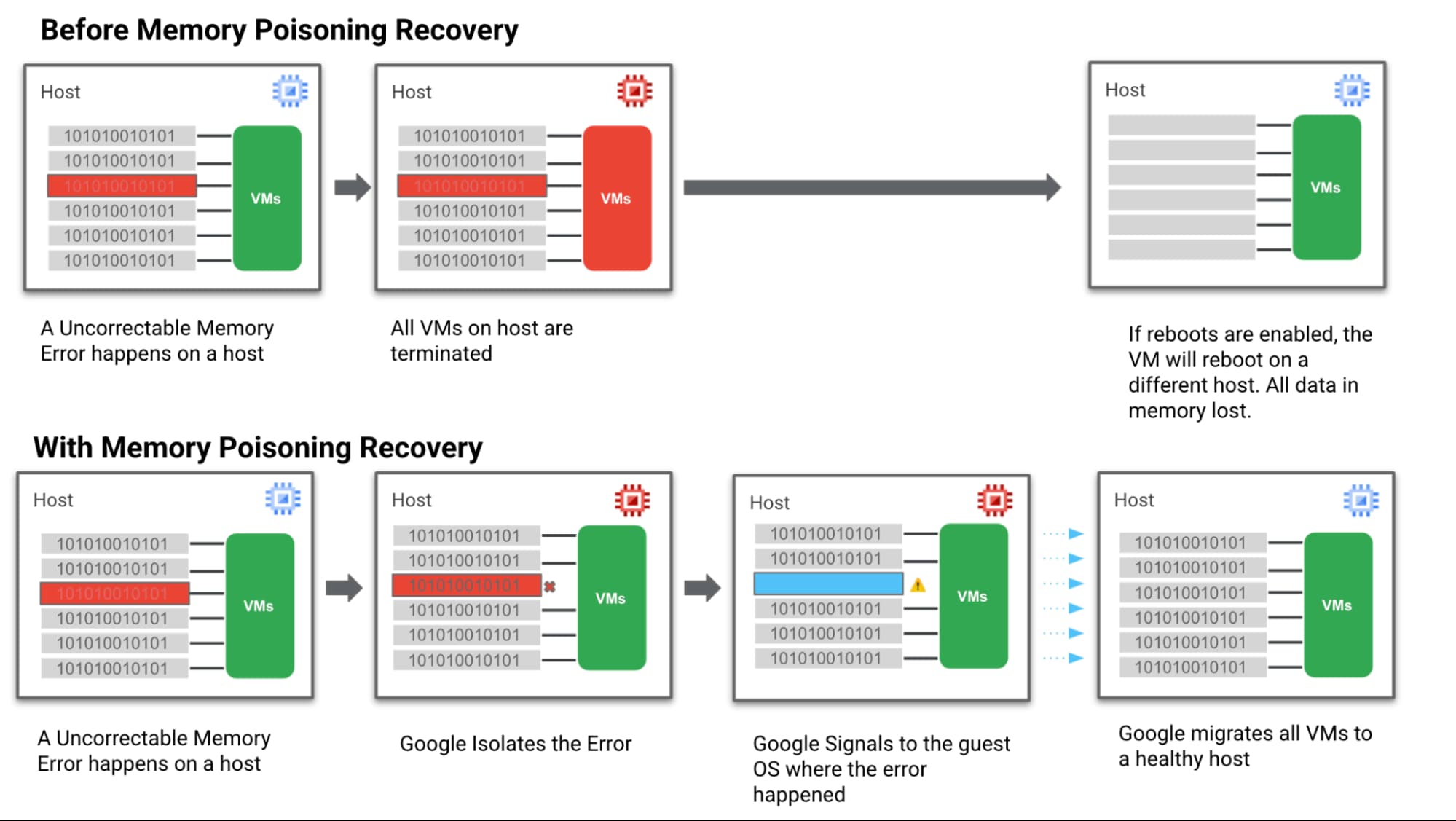
- Step 1: We hardened our VM technology to be more robust against memory errors. We intercept and analyse the memory error coming from the system. Then we flag the signaled region of a memory DIMM with an uncorrectable error as “poisoned”.
- Step 2: Then we trigger processes to keep track of these “poisoned” regions and the VMs they affect so they can’t affect data integrity.
Memory Error Recovery
- Step 3: Then we notify the Guest OS & the MCE-aware applications that a memory error has been recorded, in a manner that allows the applications to execute application relevant memory error handling.
- Step 4: At the same time we communicate with Google Cloud Live Migration to begin moving guest VMs off the affected host. This ensures customers are running on a healthy host which reduces the probability of more uncorrectable errors happening and avoids further downtime.
Below is a simple visual of how this all works:
How MPR makes life better for customers
Let’s look again at the different groups of Google Cloud customers involved in a memory error scenario and how we can help them achieve a happier ending after a crash — starting with the customer running the VM and application that actually triggered the memory error.
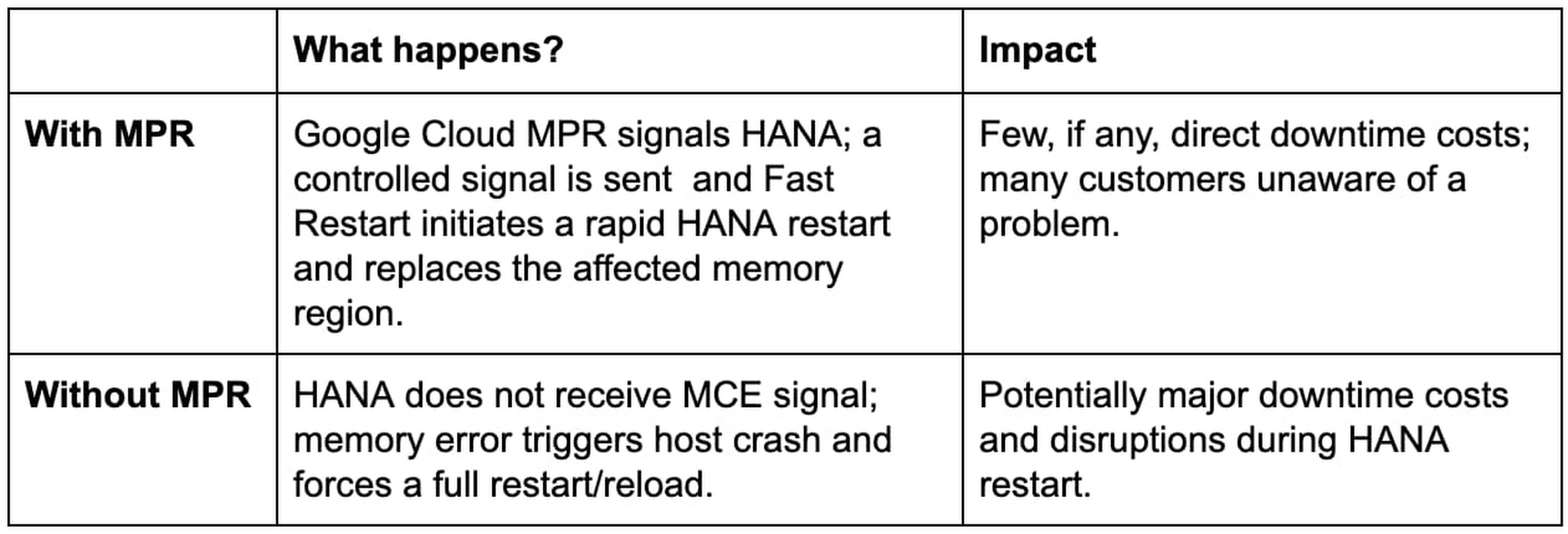
Customer Group: MCE-Aware SAP HANA with Fast Restart enabled on a VM directly affected by a memory error.
Customer Group: Customers running other, non MCE Aware applications on a VM directly affected by a memory error

Next, our “victim neighbors” group probably won’t even know there was a problem with the host system. Google Cloud Live Migration will move them to a new host, instantly and automatically, and avoid the crash-and-restart scenario.
Customer Group: Customers running other, any application on a VM not directly affected by a memory error
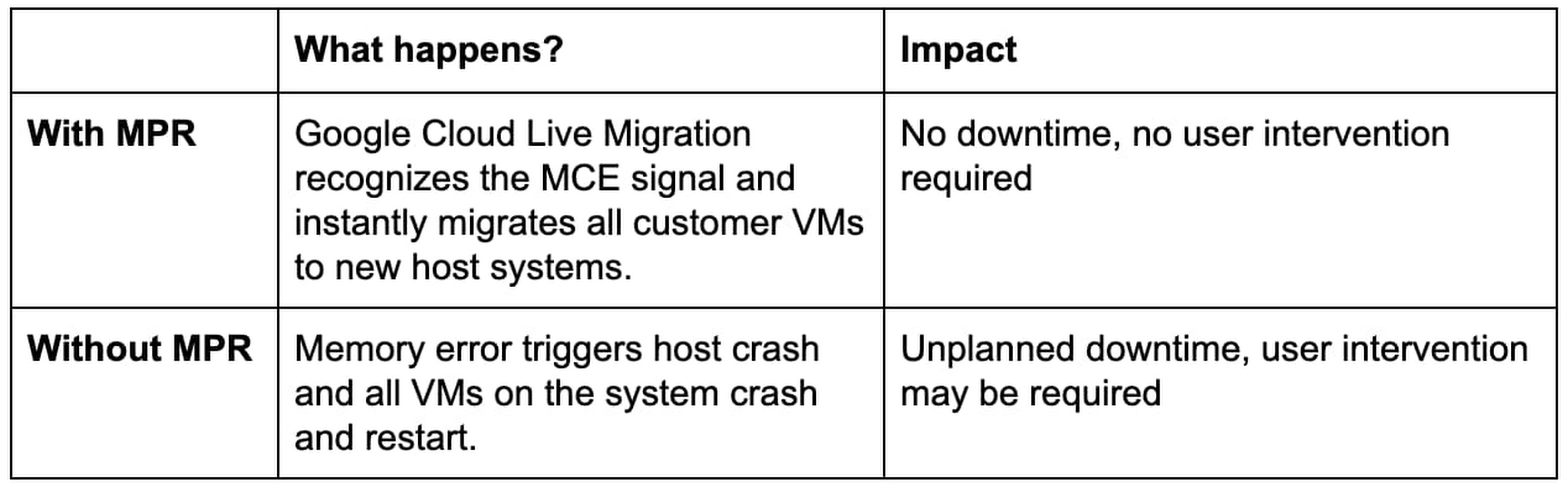
Simple steps for taking advantage of MPR
Our MPR capabilities will be available on our Google Cloud memory-optimized Compute Engine second generation instances in Q4 of 2021. We’ll continue to roll out the capability during the months ahead to additional instances and look for new ways to work with applications that adopt a MCE Aware architecture.
Most customers in the “victim neighbor” category will not need to lift a finger to experience the benefits. By marrying our Live Migration feature to some awareness of those MCE signals, we ensure that it hears the alarm first and gets a critical head start on the migration process before issues begin with the guest VMs. Our customers land safely on a new host, and their applications keep running.
For our SAP customers running HANA, MPR is all about protecting against loss. Unplanned downtime for a HANA environment is incredibly expensive, the recovery process from a hard crash is extremely long, and the business disruptions can be truly damaging to the business. Thanks to MPR, all of that cost and worry can get compressed almost to nothing — with Fast Restart reducing what can be an hour or more of downtime to a matter of seconds.
But our SAP customers have to take a critical first step to claim these benefits. Fast Restart is a crucial piece of the MPR solution, and it is not enabled by default. Configuring your SAP HANA instance for Fast Restart involves changing a few configuration settings; the process is fast, easy, and doesn’t involve risk.
Finally, if you’re not running your workloads — SAP or otherwise — on Google Cloud, consider the benefits of running on a cloud that mitigates a hardware reliability issue affecting businesses of every size and industry. And consider the value of tools like Live Migration that already help Google Cloud customers improve uptime and reduce risk.
Hardware failures happen, and they probably always will. But we’re proving how valuable it can be to avoid the bad things that usually happen when memory failures occur. Right now, only Google Cloud has a practical solution to this very difficult problem.
Learn more about Fast Restart for SAP HANA, Live Migration and other key Google Cloud capabilities for your SAP environment.
Two Ways to Deploy SAP HANA System on Google Cloud

7898
Of your peers have already read this article.
4:00 Minutes
The most insightful time you'll spend today!
Many of the world’s leading companies run on SAP—and deploying it on Google Cloud extends the benefits of SAP even further. Migrating your current SAP S/4HANA deployment to Google Cloud—whether it resides on your company’s on-premises servers or another cloud service—provides your organization with a flexible virtualized architecture that lets you scale your environment to match your workloads, so you pay only for the compute and storage capacity you need at any given moment. Google Cloud includes built-in features, such as Compute Engine live migration and automatic restart, that minimize downtime for infrastructure maintenance. And it allows you to integrate your SAP data with multiple data sources and process it using Google Cloud technology such as BigQuery to drive data analytics.
SAP server-side architecture consists of two layers: the SAP HANA database, and the Netweaver application layer. In this blog post, we’ll look at the options and steps for moving the database layer to Google Cloud as a lift and shift or rehost, a straightforward approach that entails moving your current SAP environment unchanged onto Google Cloud.
Deploying an SAP HANA system on Google Cloud
Google Cloud offers SAP-certified virtual machines (VMs) optimized for SAP products, including SAP HANA and SAP HANA Enterprise Cloud, as well as dedicated servers for SAP HANA for environments greater than 12TB. (For a complete list of VM and hardware options, visit the Certified and Supported SAP HANA Hardware Directory.)
Before proceeding with a rehost migration to Google Cloud, your current (source) environment and Google Cloud (target) environments should meet these specifications:
Prerequisites:
- The configuration of the Google Cloud environment (i.e., VM resources, SSD storage capacity) should be identical to that of the source environment. If the underlying hardware is different, however, you must use Option 2 for your migration, detailed below.
- Both environments should be running the same operating system (SUSE or RHEL Linux).
- The HANA version, instance number, and system ID (SID) should be identical.
- Schema names must remain the same.
- Establishing the network connection between the on-premises environment and Google Cloud will be required in this phase to support rehost of the SAP application.you can use Cloud VPN or Dedicated Interconnect. Learn more about Dedicated Interconnect and Cloud VPN.
Note: Depending on your internet connection and bandwidth requirements, we recommend using a Dedicated Interconnect over Cloud VPN for production environments.
We offer a number of automated processes to accelerate your cloud journey. To deploy the SAP HANA system on Google Cloud, you can use the Google Cloud Deployment manager or Terraform and Ansible scripts available on GitHub with configuration file templates to define your installation. For more details, see the Google Cloud SAP HANA Planning Guide.
Note: To deploy SAP HANA on Google Cloud machine types that are certified by SAP for production, please review the Certification for SAP HANA on Google Cloud page.
Moving an SAP HANA Database to Google Cloud
There are two different options you can use to rehost your SAP HANA database to Google Cloud, and each has pros and cons that you should consider when deciding on your approach.
Option 1: Asynchronous replication uses SAP’s built-in replication tool to provide continuous data replication from the source system (also known as the primary system) to the destination or secondary system—in this case residing on Google Cloud. It’s best for mission-critical applications for which minimum downtime is a high priority, and for large databases. In addition, the high level of automation means that the process requires less manual intervention. Here’s where you can learn more on HANA Asynchronous Replication.
Option 2: Backup and restore relies on SAP’s backup utility to create an image of the database that is then transferred to Google Cloud, where it is restored in the new environment. Downtime for this method varies by database size, so large databases may require more downtime via this method vs. asynchronous replication. It also involves more manual tasks. However, it requires fewer resources to perform, making it an attractive option for less urgent use cases. Here’s where you can learn more on SAP HANA database Backup and restore.

How to migrate the SAP HANA database to Google Cloud using Asynchronous Replication

- Create and configure Dedicated Interconnect or Cloud VPN between the current environment and Google Cloud.
- Set up SAP HANA asynchronous replication. You can configure system replication using SAP HANA Cockpit, SAP HANA Studio, or hdbnsutil. See Setting Up SAP HANA System Replication in the SAP HANA Administration Guide.
- Be sure to use the same instance number and HANA SID in the template as the primary instance.
- Configure the Google Cloud instance as the secondary node for using HANA Asynchronous replication.
- Perform data validation once full data replication is completed to the SAP HANA database in Google Cloud. To learn more: HANA System Replication overview.
- Perform an SAP HANA takeover on your standby database. This switches your active system from the current primary system onto the secondary system on Google Cloud. Once the takeover command runs, the system on Google Cloud becomes the new primary system.To learn more: HANA Takeover.
How to migrate the SAP HANA database to Google Cloud using Backup and Restore

- Create a full backup of your SAP HANA database in your current environment.
- Create a new storage bucket in your Google Cloud environment. Visit Creating Storage Buckets in the Google Cloud Storage documentation.
- Download and install gsutil onto the source environment and run it to upload the HANA backup to the Google Cloud storage bucket. To install gsutil utility on any computer or server, visit Install gsutil in the Google Cloud Storage documentation.
Note: You can run parallel multi thread/multi processing in gsutil to copy large files more quickly. - Recover the HANA database on Google Cloud using SAP’s RECOVER DATABASE statement. See RECOVER DATABASE Statement (Backup and Recovery) in the SAP HANA SQL Reference Guide for SAP HANA Platform.
Note: BackInt agent is an integrated SAP interface tool used for HANA database on Google Cloud.Backint agent for SAP HANA can be used to store and retrieve backups directly from Google Cloud Storage. It is supported and certified by SAP on Google Cloud. To learn more: SAP HANA Backint Agent on Google Cloud.
In summary, we recommend using Asynchronous Replication (Option 1) for mission-critical applications that require the lowest downtime window. For all other applications, we recommend Backup and Restore (Option 2), as this approach requires fewer resources. It’s also a great way to implement the backup and restore functionality on Google Cloud.
A rehost migration is the most straightforward path to getting your SAP on HANA system up and running on Google Cloud. And the sooner you migrate, the sooner you can take advantage of the many benefits Google Cloud brings to your SAP solution. For more information on the different migration options please review: SAP on Google Cloud: Migration strategies.
Learn more about deploying SAP on Google Cloud. Technical resources can be found here.
Google’s Research and Data Insights Solutions to Power Drug Development and Clinical Research

3713
Of your peers have already read this article.
1:30 Minutes
The most insightful time you'll spend today!
In order to be successful, research needs to be replicable, so scientists can build on past work and insights. However, an article in Nature warned that as much as 50% of published drug development research could not be reproduced in subsequent trials. As a result, promising drug candidates sometimes led to disappointment, as well as wasted time and money, when key findings could not be replicated.
The shift to cloud computing helps solve this problem because it allows researchers to use open-source tools that work across platforms. As demand for cloud computing rises, our customers have asked us for more ready-made solutions to assure reproducibility of results by their collaborators, regardless of the platform they are using. They asked for secure and effective collaboration tools as well as faster time-to-insight from any type of data.
We listened. Google’s new research and data insights solution includes three sets of functionalities to address these key challenges. Each can be activated on demand and may be eligible for subscription pricing. “HPC in a box” offers abstract complexity to run high performance computing (HPC) workloads by automatically managing your cluster in the most effective manner. It integrates seamlessly with some of the industry’s most-used schedulers like Slurm and PBS. It makes it easier than ever to answer bigger questions faster by accessing Google’s fast, powerful hardware like TPUs and GPUs, all for one predictable flat fee for eligible workloads. Healthcare Innovation Hub provides healthcare-specific functionality to help ingest, aggregate, and de-identify any type of healthcare data in its original format. It unlocks cross-modality analysis and collaboration and empowers researchers with harmonization tools to overcome healthcare interoperability issues. Google Cloud Real-World Insights (formerly FDA MyStudies) accelerates and streamlines drug development and clinical trials to address urgent medical challenges with reproducible results.
The solution enables researchers to ask new questions, get answers more quickly, and work more collaboratively–with no wait times or down times. Institutions can scale to more ambitious projects and generate actionable, real-time insights from any data source–all while staying within budget.
Many top research centers have already found it faster and more cost effective to shift from downloading and storing data on their own servers to storing and analyzing data on Google Cloud. Here are some of the real-world projects already yielding breakthroughs:
- Clemson analyzed 8,500 hours of traffic camera feeds with 2.1M vCPUs in three hours to improve evacuation routes for disaster planning.
- The Colorado Center for Personalized Medicine saved $2.9M by building their Compass data warehouse on Google Cloud rather than on on-prem.
- The Broad Institute slashed costs of genomic sequencing by 90% with Google Cloud.
Our partners, such as Atos, Burwood, Omnibond, Mavenwave, Quantiphi, and Deloitte, can help you first design and develop, then install and implement your own solution, including training. To assess your institution’s needs and develop a customized plan for your next-generation research solution with research and insights, contact our sales team.
More Relevant Stories for Your Company

ATB Financial Focuses on Customer Experience with the Speed it Gains in the Cloud
As senior vice president and head of technology enablement for ATB Financial, Barry Hensch has a mission: creating a seamless experience for the Alberta, Canada-based bank’s nearly 800,000 customers by leveraging the latest digital technology. ATB is a purpose-driven financial institution owned and operated by Alberta’s provincial government, with about

Google Unveils Topaz, the New Subsea Cable Connecting Asia and Canada
There’s a new subsea cable in town: Topaz, the first-ever fiber cable to connect Canada and Asia. Once complete, Topaz will run from Vancouver to the small town of Port Alberni on the west coast of Vancouver Island in British Columbia, and across the Pacific Ocean to the prefectures of

Google’s New Climate Innovation Challenge to Fight Energy Crisis and Build Climate Resilience
At Google, we believe that when it comes to solving a problem as big and urgent as climate change, we get more done when we collaborate. From beekeepers in Germany to urban foresters in Los Angeles, we support the work of nonprofits, scientists, and organizations that are working to mitigate

The Future of Cloud Computing: Choose Your Own Services and Payment Options
As the saying goes, “it’s hard to make predictions, especially about the future.” Some organizations find it challenging to predict what cloud resources they’ll need in months or years ahead. Every organization is on its own unique cloud journey. To help, we’re developing new ways for customers to consume and
