





Medical Data Breakthrough: Google Aids PicnicHealth’s Growth

4882
Of your peers have already read this article.
3:30 Minutes
The most insightful time you'll spend today!
In the fragmented world of U.S. healthcare, patients often have to wait in line or on hold, navigate multiple patient portals, and fill out numerous request forms—all in pursuit of their own medical history. Healthcare technology startup PicnicHealth is on a mission to put control back with the patient, where it belongs.
PicnicHealth’s growth, from closing successful venture rounds to winning machine learning (ML) competitions, speaks to not only improvements and opportunities in healthcare, but also how startups are leveraging Google Workspace and Google Cloud services to accelerate momentum.
The company does the heavy lifting of collecting records and leverages human-in-the-loop ML to transcribe and validate them with an abstraction team of medical professionals. The records are then structured into a complete medical history that patients can access and share with providers to get better care.
But PicnicHealth helps to improve patient health on more than one front. It allows patients to contribute their data to de-identified medical research, building high-quality, anonymized datasets that researchers and life sciences companies can use to better understand disease progression and treatment in the real world.
Google Workspace has been part of PicnicHealth from day one, helping the founders collaborate and shape the company’s vision using cloud-synced documents and spreadsheets to collaborate and model predictions. “I’ve had a Gmail account since 2006, and in college 100% of people worked out of Google Docs. Workspace continues to be the best choice for online collaboration, and that’s why it’s still the default standard for startups,” said Troy Astorino, CoFounder & CTO of PicnicHealth. “When we started PicnicHealth, my co-founder Noga Leviner was in San Francisco and I was in Southern California, and of course we used Workspace.”
Today, Google Workspace continues to play a central role in the company’s collaboration. “We create design documents in Google Docs, primarily for engineering and product changes, and get really healthy, vibrant discussions through comments,” noted Astorino. “This practice has grown beyond engineering and is used for everything from how the company operates to communication norms.”
Google Workspace offers everything the team needs to collaborate, no matter where employees are. PicnicHealth’s team has spread from San Francisco to being distributed across the country and around the world. Instant collaboration is crucial.
“We work in a complex domain where people need a lot of information to make good decisions,” said Astorino. “Google Workspace allows us to operate in a mode of default transparency, where people can easily get the information they need even if it wasn’t intentionally or directly shared with them. Whether it’s working in Docs or scheduling in Calendar, we can operate much more effectively than we could otherwise.”
By any measure, PicnicHealth’s trajectory is one of record success. The startup is a 2014 alumni of Y Combinator, a program that helped launch household names like Airbnb, DoorDash, and Dropbox. Three years later, the team went on to win the $1 million grand prize at Google’s Machine Learning Competition. And the momentum has continued— PicnicHealth has recently announced a $60 million Series C round, bringing the amount raised to date to over $100 million. With the Series C, PicnicHealth is investing in expanding its reach to more patients across over 30 diseases.
As a healthcare startup, PicnicHealth faced a very particular set of challenges, especially when working with and accessing data. Data fragmentation and interoperability are only some of the challenges of realizing the value of big data in the cloud. The healthcare industry is notoriously difficult to navigate due to sensitive data protection laws and regulations like the Health Insurance Portability and Accountability Act (HIPAA).
PicnicHealth started in the cloud on Amazon Web Services (AWS). However, after migrating over to Kubernetes and facing an expanding list of requirements for HIPAA compliance, the company started to explore alternatives.
“We needed to be HIPAA compliant, which was going to be painful on AWS, and we wanted to get away from managing and operating our own Kubernetes clusters,” recalled Astorino. “We had heard good things about GKE (Google Kubernetes Engine). And particularly valuable for us, — many technical requirements you need for HIPAA compliance are configured by default on Google Cloud.”
PicnicHealth would have had to implement a lot of changes and get specialized instance types to get their existing configuration to work. So, they began experimenting with Google Cloud and discovered a much smoother experience.
“It was a lot easier to manage in terms of product setup and developer experience,” said Astorino. “There is a sane product hierarchy of resources you can access and use through Google Cloud and the relationships between them, from coordinated IAM (identity and access management) to using Google Groups for granting permissions. Overall, it’s cleaner.”
Astorino added that the move has also opened the doors to taking advantage of other services in the Google Cloud ecosystem like Cloud SQL, BigQuery, and Cloud Composer. PicnicHealth also uses Security Command Center because it easily integrates with everything but also helps meet various compliance frameworks’ requirements, providing visibility, near-real-time asset discovery, and security information and event management.
But most importantly, the integrated ecosystem has simplified the work needed for PicnicHealth to create a secure environment for employees to use when working with sensitive medical records while still providing all the tools they need. For example, abstractors not only use Google Workspace but also have Chromebooks because they are easy to manage and secure.
Altogether, Google Cloud helps form a technology stack that has enabled the startup to build a massive labeled dataset containing over 100 million labeled medical data concepts. In turn, it accelerates PicnicHealth’s ability to generate highly-performant AI models and feed other ML pipelines, which has been vital for processing and reviewing data at scale.
To learn more about how Google Workspace and Google Cloud help startups like PicnicHealth accelerate their journey, visit our startups solutions pages for Google Workspace and Google Cloud.
5 Features IT Departments Love About Google Cloud

3652
Of your peers have already read this article.
5:30 Minutes
The most insightful time you'll spend today!
Throughout the past couple of years, I have helped a good number of companies, big and small, migrate their systems to the Google Cloud Platform (aka GCP). During the course of these migrations, there are always a few of those moments where people look at a specific Google Cloud feature and say, “now, that’s cool!”.
More often than not, it is because, coming from other platforms, they have gotten used to some features requiring multiple steps, or some operations being complicated, etc. And often they find out that in GCP you can do this specific operation in a couple of clicks, or by setting up a simple text-based configuration. Then you see that light bulb turning on in their head, and there you go… happy customer.
A few of these happen so often that I compiled them in a list to share with others who might also benefit from these “aha!” moments. You could say these are the five things I wish they told me when I started using Google Cloud.
Projects: Naturally Group Resources Together
A project is a namespace where resources live. Every resource you instantiate in GCP, from load balancers to Kubernetes clusters to virtual machines, belongs to a single project, and has no access (by default) to resources in other projects. User roles and authorisations can be defined per-project and trickle down to everything in it. This has two immediate benefits: you can group things that belong together in neat logical units, and things that don’t belong together are isolated from each other (and isolation is a Good Thing)
This is powerful and quite simple, but it often takes new users off-guard. I’ve had many clients call me and ask me “How can I make sure my developers cannot access the production machines? What’s the best way to create access policies? ”
The answer to this is actually super-simple:
- have a project for development where your developers have rights,
- have a project for production where they don’t.
- That’s it.
Every machine/other resource in the production project won’t be accessible to developers.
Of course there is a lot more to it, and you can refine roles and permissions to a much greater degree using Organizations, Folders, etc. Not to mention all the crazy things you can do with per-project billing. But at least you can say “hey, if it’s a machine in the staging environment then it can be found in the “staging” project”.
Global Virtual Networks Are *Truly* Global
Imagine you are using a Cloud provider and that you have servers in the US, and servers in Singapore, and that they need to communicate.
So you create a VPC (Virtual Private Cloud) network in the US data center, another one in the Singapore data center, and then you will connect them by setting up inter-region VPC peering or a VPN (Virtual Private Network) or a transit VPC or other routing magic.
Lots of work, right? And many moving parts, so lots of opportunities for things to break.
With GCP, however, what makes my clients go “aha!” is when they realize that in GCP a single VPC network covers the entire planet. Only subnets are attached to a geographic location, and virtual machines communicate between subnets on private IPs (good old RFC1918 addresses) — no extra routing needed.
So, to make your server communicate across continents on GCP, here are the steps:
- create a VPC network
- create a subnet in the US, put your US servers in it
- create a subnet in Singapore, put your Singapore servers in it
That’s all there is to it. Your VPC network spanning 2 continents is ready to use. Below is a screenshot of how it looks on my account, for a VPC network called ‘my-global-network’ with 2 subnets. The first column (“us-central1” and “asia-southeast1”) contains the name of the GCP regions (read: data centers). The second column is the subnet name that I picked when I created them.

A machine in the US (on the “us-central” subnet) with IP 10.0.0.5 can communicate directly with a machine in Singapore (on the “singapore”) subnet with IP 10.10.0.8.
Nothing else to set up.
And thanks to the way these networks work, the Google Cloud Load Balancer can present a single IP to the world, and forward traffic to the instances that are the closest to you geographically without having to setup a tedious DNS-based load balancing. But that’s worth an entire blog. I’ll save it for another day.
Firewalls with Tags and (Almost) No IP Addresses
There is no network security without a firewall so unsurprisingly GCP comes with one built-in.
Now, I don’t know about you, but nothing makes my brain hurt like a list of firewall rules displaying IP ranges and addresses and ‘Allow/Deny’ directives. It looks a bit like this:

If you imagine a normal network with a few dozen (hundred?) servers, you can quickly see how this can get out of control. You’d better have a solid printout of your network layout to refer to when you start adding and changing rules. And good luck debugging things!
Wouldn’t it be nice if, instead, you could just tell the firewall: “the HTTP traffic from outside can only reach the HTTP servers and the MySQL database is only reachable by the HTTP server(s) on the same network?”
Turns out it’s pretty simple on GCP by using a little thing called network tags. As the documentation says:
“Network tags are text attributes you can add to Compute Engine virtual machine (VM) instances. Tags allow you to make firewall rules and routes applicable to specific VM instances.”
So let’s see how it works. Firewall rules in GCP are defined in terms of source and target (the traffic flows from the source to the target). You can define filtering rules that apply to the source or the target, and in both cases you can use tags.
This is simpler shown with an example. The rule below states that on the default network, the traffic to the VMs with the tag mysql-server can come from the VMs with the tag http-appserver. Any other traffic is “Deny”-ed by default.

All you have to do is to tag your machines properly, and they will automatically be covered by the rule. You don’t need to enter their IP range.
That’s neat if you ask me. It makes it a lot simpler to grasp what’s happening.
Of course, there’s a TON more to firewalls in GCP. Tags also apply to routes and you can mix and match IP-based rules with tag-based rules. Not to mention that thing called service accounts, but I’ll leave those for another day.
The bottom line is that you can create most rules by just expressing a business need and not having to remember complicated network layouts. I have no hard stats, but I’m pretty sure this has saved me hours of work.
Console Access to VMs from the Browser
Easily access virtual machines (VMs) from the Google Cloud console was one of my first “aha!” moments when I started using GCP.
This is a screen capture of my Google Cloud console, with a virtual machine and its internal IP.

The last column has a header that says “Connect” and when you click on the word “SSH” a separate windows pops up. You wait for a few seconds, and… this is what you get. Your personal shell access — in a browser popup no less.

You are connected through ssh to the virtual machine of your choice. You did not have to download ssh keys and put them in the ~/.ssh directory, do the correct chmod command and run a long-winded ssh -i ~/.ssh/somekey me@<it-took-me-forever-to-copy-paste-the-address-here>
In addition, you have access to a few nifty features such as uploading and downloading files, changing the user etc. Just use the menu behind the cog icon at the top right.
In truth, you should not need to connect directly that often, but when you have to, this is a godsend.
Your Personal Jumphost from the Google Cloud Console
The Google Cloud console has a cool trick: you can actually connect to a virtual environment that is managed by the Google Cloud console itself. It serves a bit as a jump host. You can access most resources from the projects from it, and you can activate it directly from the top menu with, no particular setup on your side. It’s called the Cloud Shell.
This is how it looks at the top right of the console:

When you activate the Cloud Shell, the session opens at the bottom of the console. You get a command line prompt and it’s fully configured with the gcloud command line tool (the jack-of-all-trades of Google Cloud scripting).

You can do a great many things from there, and this even includes uploading and downloading files, editing code or deploying it, a web preview for your AppEngine application, and more.
So you can get access to a fully configured shell environment in your project from any laptop where you can connect with your credentials. On top of this, it persists between connections so you can fine-tune it to your needs and have these changes available the next time you re-connect.
This has saved me many times during my previous life as a traveling consultant!
Live migration
Did I say 5 “Aha!” moments ? Well, you’ve been patient reading all the way to here, so here’s one more for free.
Google Cloud has an amazing way to literally “teleport” a running virtual machine between physical hosts without stopping it. It’s called Live Migration. It allows Google to move your virtual machine away from a defective host, or a host that needs a patch or an upgrade, or for any other infrastructure related reason.
It’s all done in the background, and is totally transparent, so you never really see it happening. Unless you look VERY closely. I once did a demo to a client, where a machine was live migrated while he was simulating a solid network load — and we did not lose a single packet, with no noticeable degradation in latency.
And that’s a wrap!
So there you go. These are 5+1 things that made me go “Aha!” when I became more familiar with the Google Cloud Platform, and that still make my clients do the same.
There is a lot of depth to the platform, and my examples above only scratch the surface of our features. I encourage you to try it yourself. There is a generous free tier, and when you are ready to take the plunge and create that new company, please contact us at Google Cloud for Startups. We’ll get you up and running in no time.
Jerome is a Startup Architect at Google Cloud. Based in Singapore, he helps startups make the most of the Google Cloud Platform.
Cloud FinOps: Maximizing Business Value and Optimizing Cloud Spend

1182
Of your peers have already read this article.
6:30 Minutes
The most insightful time you'll spend today!
We’ve been saying it for years, the benefits and potential of the cloud abound.
And yet, more than 80% of respondents in a survey of 753 business leaders point to managing cloud spend as their top organizational challenge, and these same respondents estimate that nearly 1/3 of their cloud spend is inefficient or wasted (Flexera, 2023). Many organizations are new to optimizing cloud costs and ensuring resources are used efficiently.
As your organization digitally transforms you may be realizing what other organizations are realizing too: When it comes to business value, simply migrating to the cloud isn’t enough. Achieving the full benefits of cloud requires fundamental changes to both mindset and behaviors around existing financial-management practices. It requires changing the way your disparate teams work together.
Enter the Cloud FinOps Building Blocks
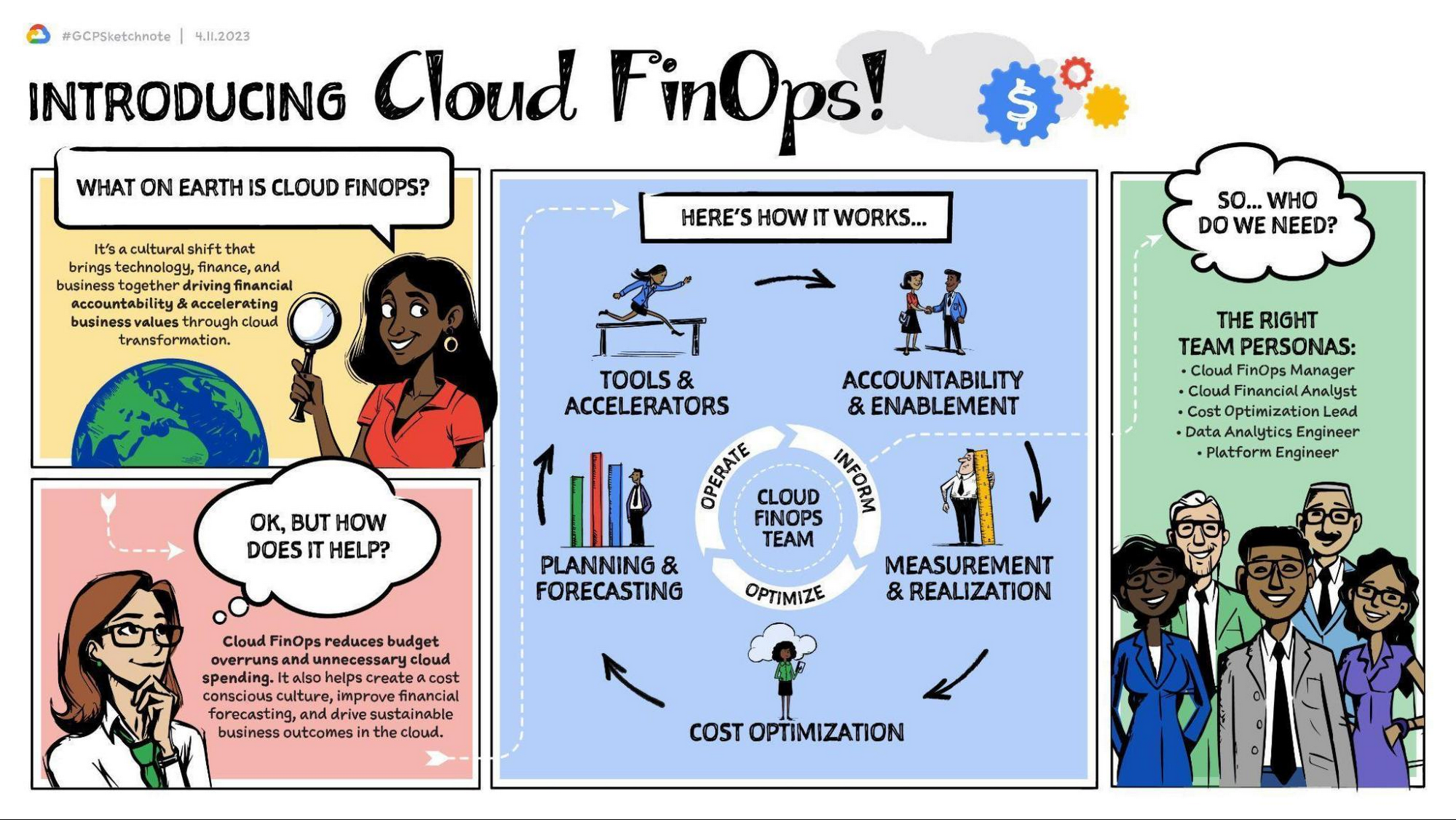
Cloud FinOps is a framework, discipline, and cultural shift combining people, processes, and technology to drive financial awareness and accountability. FinOps practices align engineering, finance, technology and business leaders and teams under a primary objective: to maximize business value from the cloud. With Cloud FinOps practices, every business stakeholder is charged not only to take responsibility for their spending and costs, but also to optimize them. These practices enable businesses to manage consumption and make sound, data-informed cloud-spend decisions. Cloud FinOps is comprised of five building blocks:
- Accountability and enablement
Establishing governance and policies to manage cloud spend and realize business value. - Measurement and realization
Driving financial accountability and value realization with a defined set of KPIs and success metrics. - Cost optimization
Providing financial visibility and recommendations of IT resource usage to optimize cloud spend. - Planning and forecasting
Modernizing budgeting, forecasting, and chargeback methods to allow for iterative, innovative and cost effective development practices. - Tools and accelerators
Deploying and integrating a set of cloud cost tooling to effectively manage and track cloud spend. Learn more here.
For a general overview of the Cloud FinOps framework and more on the five building blocks, check out these resources:
- Video | What is FinOps and 3 reasons why you should care about it.
This 5-minute video provides an overview of FinOps, the 5 building blocks, and how they can benefit your organization. - Podcast | FinOps with Joe Daly
In this podcast, Joe Daly of the FinOps Foundation shares about the key principles of FinOps, which he refers to as financial DevOps. Daly discusses how this framework is helping companies make better and more efficient financial decisions while taking advantage of the cloud. - Blog | Decoding Cloud FinOps to accelerate digital transformation
This blogpost discusses the critical role of FinOps in a successful digital transformation. It outlines key metrics to help measure and track business value and to increase visibility into the effects of digital transformation on top-line revenue. - Article | Cloud FinOps: The secret to unlocking the economic potential of public cloud
This Forbes article profiles OpenX, the first major advertising exchange platform to migrate entirely to the cloud. It details the 5 key pillars of the Cloud FinOps framework, which OpenX leveraged in their digital transformation strategy. In just 9 months, they reduced their per-unit costs by more than 60%.
Importantly, Cloud FinOps isn’t about saving money; it’s about making money. It’s about promoting a cost-conscious culture, financial accountability, and business agility in the cloud. Whatever stage of the cloud journey you’re at, cloud FinOps practices will help you get the most value out of Google Cloud. This framework can help to remove blockers, implement the building blocks, and empower your teams to make better business decisions.
The Cloud FinOps Journey
Implementing Cloud FinOps is neither a destination nor a box your organization will check then archive. Rather, Cloud FinOps is an ongoing journey and discipline. It’s inherently iterative. As such, growth and maturity across processes, capabilities, and domains requires action, repetition, and continuous learning.
Across the five FinOps building blocks, we’ve identified 50 subprocesses to best understand organizations’ FinOps proficiency, capabilities, practice domains, and blind spots. We scale them from 1 to 5 and categorize them in one of three phases of maturity: Crawl, Walk, or Run. Organizations in the Crawl phase tend to focus on technical problem solving and cloud-cost visibility. Organizations in the Walk phase emphasize strategic improvements such as employing cost visibility dashboards to realize better business value. And organizations in the Run phase are focused primarily on transformational change and strategic innovation, factoring cost considerations into both processes and cloud architecture.
Through this “crawl, walk, run” maturity model, we can evaluate proficiency, establish a benchmark, and recommend a targeted action plan for FinOps adoption. And whatever your level of maturity, your organization can take quick scalable action not only to foster improvement but also to evaluate outcomes and gain insights.
The key here is that regardless of your organization’s Cloud FinOps maturity level, you can take small steps now toward continuous improvement. Here are some common focus areas and several more resources organized by maturity level that you can access.
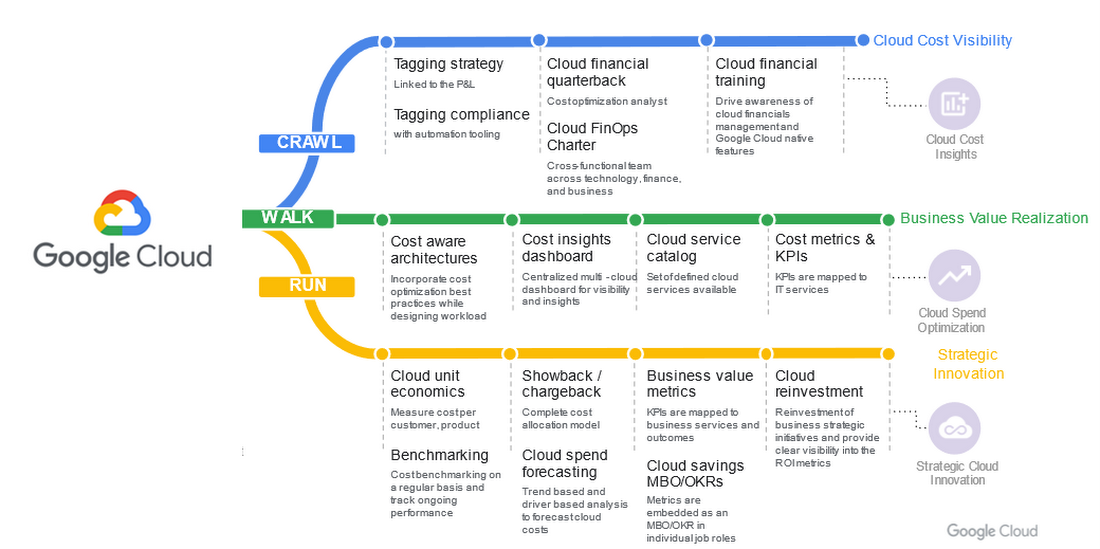
Crawl phase
Improve cloud-cost visibility.
- Whitepaper | Drive Cloud FinOps at scale with Google Cloud Tagging
Tags and labels can be useful and flexible tools to help your organization segment cloud spend and allocate costs. This whitepaper introduces Google Cloud Tags and best practices for implementing them. It differentiates tags, which offer reliable reporting and governance features, from labels, which can be prone to problems, including poor coverage and a lack of integrity in data labeling. - Whitepaper | Unlocking the value of Cloud FinOps with a new operating model
This white paper unpacks the details of the FinOps operating model, including roles, organizational alignment, and driving culture change. It details how to establish strong financial governance and a cost-conscious culture. - Whitepaper | Cloud FinOps: Shared services cost allocation
In this whitepaper, you’ll explore the elements of cost allocation as well as the complexities and challenges associated with shared-services cost allocation. While some of these concepts and models are interchangeable between legacy and cloud environments, this whitepaper focuses primarily on cloud computing and associated services.
Walk phase
Improve business-value realization.
- Blog | 5 key metrics to measure Cloud FinOps impact in your organization in 2022 and beyond
To drive business growth and topline revenue, business leaders must be able to connect cloud investments to business outcomes. As such, traditional IT metrics and KPIs must continue to evolve. In this blogpost, we’ll explore five key business-value metrics aligned to the five Cloud FinOps building blocks. - Whitepaper | Maximize business value with Cloud FinOps
The cloud introduces new complexity and challenges to traditional IT financial management. As such, it requires strategic financial governance, processes, and partnership across the organization. This whitepaper explains how Cloud FinOps helps enterprises that have invested in cloud to drive financial accountability and accelerate business value.
Run phase
Improve strategic cloud innovation.
- Whitepaper | Unit costing: The next frontier in cloud
In this whitepaper, you’ll explore the nature of and need for cloud unit costing, the standard by which FinOps practitioners obtain full business context for their cloud costs. It features examples from cloud-first organizations that have pioneered FinOps practices. Additionally, it examines several cloud forecasting and budgeting methods, ranging from least to most rigorous. - Blog | You get what you pay for: Principles for designing a chargeback process
Chargeback, a crucial Cloud FinOps capability, is the process of mapping cloud consumption to internal users within an organization. It provides transparency, facilitates accountability, enables recovery of cloud costs, and fosters a culture of fiscal responsibility. This blogpost will walk you through some best practices in designing an effective chargeback process in Google Cloud.
Success with Cloud FinOps
As global markets continue to face challenges, there’s never been a better time to increase the return on your cloud investments. Adopting and implementing FinOps practices will help. For some real-world examples of how organizations across a range of FinOps maturity levels have collectively saved millions of dollars on their overall cloud spend, check out these customers’ stories.
- Video | Next 2022: Top 10 ways to lower your costs on Google Cloud with General Mills
In this video, which highlights ten leading cloud cost optimization practices, hear how General Mills, which is on pace to increase their cloud footprint by 60%, has approached the discipline of cost savings and accelerated their adoption of Cloud FinOps to drive waste out of their cloud usage. - Video | How Nuro optimized their costs on Google Cloud
In this video, you’ll get an overview of the Google Cloud FinOps framework, a deep dive on cost-optimization best practices, and hear about how startup Nuro AI has adopted their own cost-savings discipline and Cloud FinOps practice. - Video | How OpenX reduce per unit costs by 60%
In this video, you’ll learn how to establish a cost center of excellence within your cloud practice, explore several cost-optimization recommendations, and hear from OpenX about how they reduced their costs on Google Cloud. - Case Study | How Sky saved millions with Google Cloud
In this case study, read how a few years into their cloud adoption journey, media and entertainment company, Sky Group discovered over $1.5 million in savings and optimized costs with BigQuery, Compute Engine, and Cloud Storage. - Case Study | Etsy: Doing more with less cost and infrastructure
In this case study, read how after migrating their data center and ecommerce platform to the cloud, Etsy realized more than 50% savings in compute energy and leveraged committed use discounts (CUDs) to reduce their compute costs by 42%.
It’s important to remember that FinOps success looks different for different organizations. It’s neither a one-time fix nor a destination reached by way of a single path. But for every organization, success requires small actions, refinement, and continuous improvement. As you leverage Google Cloud FinOps resources and tools, your organization can:
- Drive financial accountability and visibility.
- Optimize cloud usage and cost efficiency.
- Enable cross organizational trust and collaboration.
- Prevent cloud-spend sprawl.
- Break down departmental silos.
- Accelerate innovation.
Getting started with Cloud FinOps
At Google, we have a team of experts in leading FinOps practices dedicated to helping you create an actionable plan to optimize cloud spend and drive cost efficiency. We’ve created numerous resources to help you get started from any stage in the FinOps journey.
Whitepaper | Maximize Business Value with Cloud FinOps
This whitepaper outlines steps to help your organization implement FinOps. It details required teams and processes as well as the optimal behaviors, approaches, and outcomes to help maximize your investment on Google Cloud.
With Google Cloud FinOps, your organization can also accelerate business value in the cloud. To find out more, join us on the Google Cloud Twitter channel twice a month for open Twitter Spaces discussions or reach out to your Google Cloud Sales Representative for a 1:1 discussion.
Johnson & Johnson Increases it’s Ability to Find Highly Qualified Staffers for Business Critical Roles by 41% with Easy-to-Use AI

5121
Of your peers have already read this article.
3:30 Minutes
The most insightful time you'll spend today!
Job seekers can often feel lost or disconnected—like the right opportunity is out there, but they don’t know where or how to look. Employers face a similar challenge when trying to attract the right candidates. Many companies, especially large enterprises, face a talent shortage across a range of critical roles.
For global companies like Johnson & Johnson (J&J), their online career website is an important recruiting tool. It’s the “front door” for talent that could make a vital difference in the company’s future and drive innovation for years to come.
However, career sites are often underutilized. If a job seeker doesn’t find a good job match with a quick search, they will likely move on. Too often, that represents a lost opportunity for both the company and the job seeker that could have been avoided with better search results.
“Partnering with Jibe and using Cloud Talent Solution for our career site allows us to do a much better job matching opportunity to talent on a very large scale.”
—Sjoerd Gehring, Global VP of Talent Acquisition, Johnson & Johnson
While J&J receives approximately 1 million applications for 25,000 positions each year, the percent of applicants that were highly qualified for open positions was low.
Although the company always has a variety of open jobs on its career site, it noticed that even when strong matches existed between online job seekers and available positions, search results often didn’t highlight or even display the right opportunities. The user interface wasn’t intuitive enough, and job seekers couldn’t easily find their ideal positions.
As J&J began to reevaluate recruiting to take a more relationship-centric and digitally-driven approach, the company began working with Jibe, a career-site solutions provider.
Jibe introduced J&J to Cloud Talent Solution, which uses machine learning to better match job listings with job seekers’ interests and qualifications. Using Cloud Talent Solution, companies can build a compelling career-site search experience that helps candidates easily find the jobs most relevant to them. With smarter job searches and recommendations, J&J improved the effectiveness of its career site in just a few weeks.
“Jibe and Google make it easy for a large company to make a real difference in the candidate experience without investing a lot of time, money, or internal resources,” says Sjoerd Gehring, Global VP of Talent Acquisition at Johnson & Johnson. “Now that we’re using Cloud Talent Solution, our career site search results are exponentially better.”
Transforming job searches with better matches
Cloud Talent Solution better connects job seekers with jobs, because it understands the nuances of job titles, descriptions, industry jargon, and skills, matching job seeker preferences with relevant listings based on sophisticated classifications and relational models. It helps decipher job seeker queries and employer job postings, removing the manual effort of optimizing job content for search.
By using the Jibe platform to integrate Cloud Talent Solution with its career site, job seekers are more easily finding what they’re looking for and J&J is filling business critical roles more efficiently.
Since integrating Cloud Talent Solution, J&J has seen a 41% increase in high-quality job applicants per search and a nearly 45% increase in click-through rate on its career site.
“Partnering with Jibe and using Cloud Talent Solution for our career site allows us to do a much better job matching opportunity to talent on a very large scale,” adds Sjoerd. “We’re able to take a more personal approach and really connect with job seekers, which is a win.”
“Today’s job seekers expect a prospective employer’s career site to work like the other cloud services they use. Using Google’s machine learning and artificial intelligence, we can help customers like J&J get better search results and return jobs that candidates are more likely to apply to.”
—Joe Essenfeld, Founder & CEO, Jibe
Connecting people with opportunities
J&J is now offering job seekers experiences in line with what they have come to expect as consumers—searching for a job should be as easy as searching for flights, restaurants, products, and other services. Because candidates are familiar with the experience, their level of interaction and engagement goes up, creating a larger pipeline of qualified candidates and filling jobs faster.
“Today’s job seekers expect a prospective employer’s career site to work like the other cloud services they use,” says Joe Essenfeld, Founder & CEO at Jibe. “Using Google’s machine learning and artificial intelligence, we can help customers like J&J get better search results and return jobs that candidates are more likely to apply to.”
A new digital revolution for recruiting
J&J continues to work with Jibe and Google to offer new features which make its career site even more effective. By offering job seekers a transformative, engaging experience, J&J is a more attractive and visible employer, increasing the value of its brand. It’s also continuously improving its recruiting process with end-to-end visibility and feedback from interactions with a million people every year.
“Transforming our career site with Jibe and Cloud Talent Solution directly impacts our ability to attract high-quality talent and hire those candidates faster,” adds Sjoerd. “Lots of people are looking for their dream job, and if it’s here at J&J, we want them to find it quickly and easily.”
AI in Manufacturing Already A Mainstream: Google Cloud Study

5660
Of your peers have already read this article.
3:00 Minutes
The most insightful time you'll spend today!
While the promise of artificial intelligence transforming the manufacturing industry is not new, long-ongoing experimentation hasn’t yet led to widespread business benefits. Manufacturers remain in “pilot purgatory,” as Gartner reports that only 21% of companies in the industry have active AI initiatives in production.
However, new research from Google Cloud reveals that the COVID-19 pandemic may have spurred a significant increase in the use of AI and other digital enablers among manufacturers. According to our data—which polled more than 1,000 senior manufacturing executives across seven countries—76% have turned to digital enablers and disruptive technologies due to the pandemic such as data and analytics, cloud, and artificial intelligence (AI). And 66% of manufacturers who use AI in their day-to-day operations report that their reliance on AI is increasing.

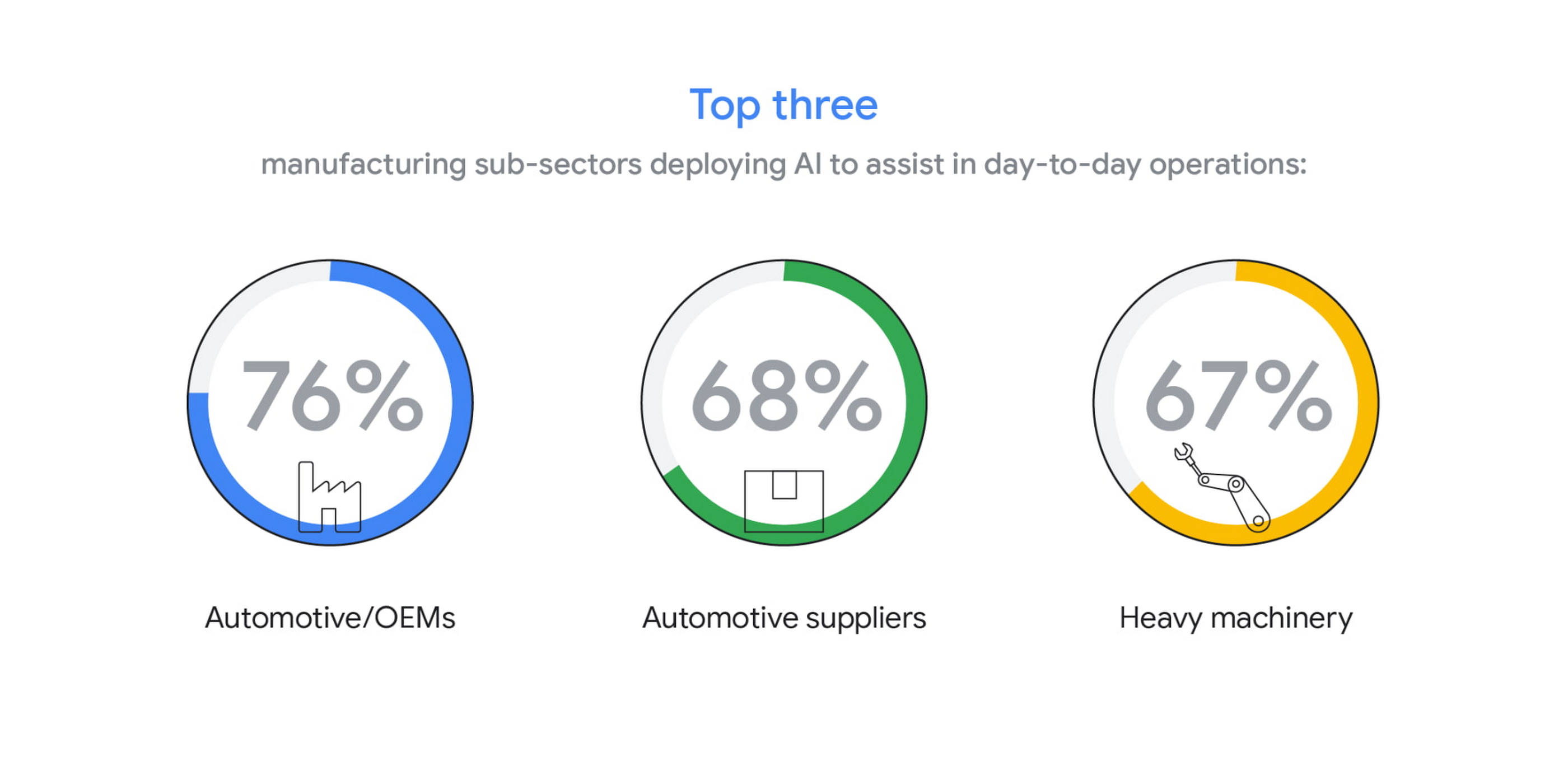
The top three sub-sectors deploying AI to assist in day-to-day operations are automotive/OEMs (76%), automotive suppliers (68%), and heavy machinery (67%).
In fact, Bryan Goodman, Director of Artificial Intelligence and Cloud, Ford Global Data & Insight and Analytics shares, “Our new relationship with Google will supercharge our efforts to democratize AI across our business, from the plant floor to vehicles to dealerships. We used to count the number of AI and machine learning projects at Ford. Now it’s so commonplace that it’s like asking how many people are using math. This includes an AI ecosystem that is fueled by data, and that powers a ‘digital network flywheel.’”
Moving from edge cases to mainstream business needs
Why are manufacturers now turning to AI in increasing numbers? Our research shows that companies who currently use AI in day-to-day operations are looking for assistance with business continuity (38%), helping make employees more efficient (38%), and to be helpful for employees overall (34%). It’s clear that AI/ML technology can augment manufacturing employees’ efforts, whether by providing prescriptive analytics like real-time guidance and training, flagging safety hazards, or detecting potential defects on the assembly line.

In terms of specific AI use cases called out by the research, two main areas emerged: quality control and supply chain optimization. In the quality control category, 39% of surveyed manufacturers who use AI in their day-to-day operations use it for quality inspection and 35% for product and/or production line quality checks. At Google Cloud, we often speak with manufacturers about AI for visual inspection of finished products. Using AI vision, production line workers can spend less time on repetitive product inspections and can instead focus on more complex tasks, such as root cause analysis.
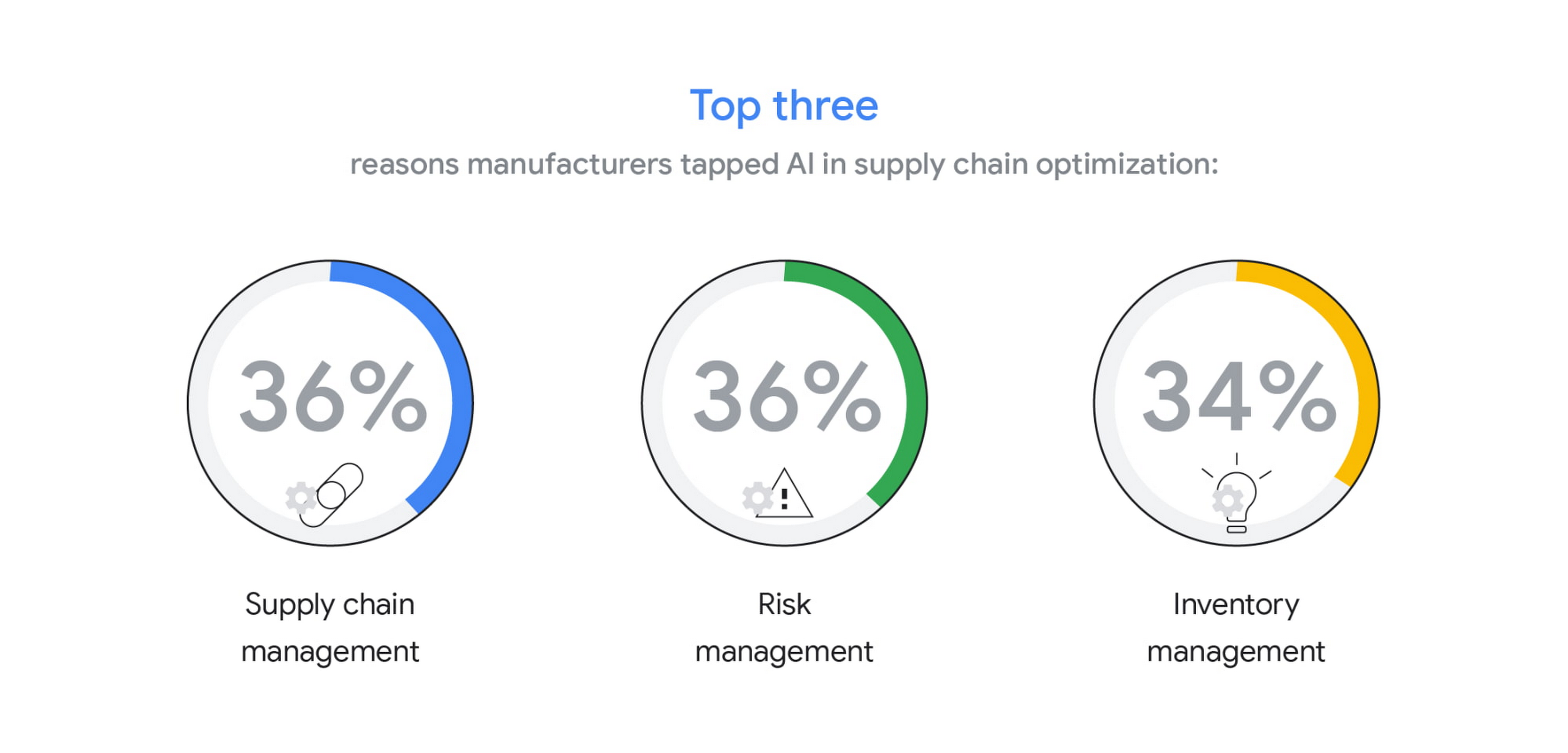
In the supply chain optimization category, manufacturers said they tapped AI for supply chain management (36%), risk management (36%), and inventory management (34%).
In our day-to-day work, we’re seeing many manufacturers rethink their supply chains and operating models to better accommodate for the increased volatility that has been brought about by the pandemic and support the secular trend of consumers asking for increasingly individualized products. We’ll share more on deglobalization in the third installment of our manufacturing insights series.
AI use differs by geography, but not for the reasons you may think
The extent to which AI is already being used today varies quite strongly between geographies, according to our research. While 80% and 79% of manufacturers in Italy and Germany respectively report using AI in day-to-day operations, that percentage plummets in the United States (64%), Japan (50%) and Korea (39%).

It’s tempting to state this disparity is due to an “AI talent gap.” Although the most common barrier, just a quarter (23%) of manufacturers surveyed believe they don’t have the talent to properly leverage AI. Cost, too, does not appear to be a roadblock (21% of those surveyed). Rather, from our observations, the missing link appears to be having the right technology platform and tools to manage a production-grade AI pipeline. This is obviously the focus of our efforts and others in the space, as we believe the cloud can truly help the industry make a step change.
Looking ahead: The Golden Age of AI for manufacturing
The key to widespread adoption of AI lies in its ease of deployment and use. As AI becomes more pervasive in solving real-world problems for manufacturers, we see the industry moving away from “pilot purgatory” to the “golden age of AI.” The manufacturing industry is no stranger to innovation, from the days of mass production, to lean manufacturing, six sigma and, more recently, enterprise resource planning. AI promises to bring even more innovation to the forefront.
To learn more about these findings and more, download our infographic here and our full report here.
Research methodology
The survey was conducted online by The Harris Poll on behalf of Google Cloud, from October 15 – November 4, 2020, among 1,154 senior manufacturing executives in France (n=150), Germany (n=200), Italy (n=154), Japan (n=150), South Korea (n=150), the UK (n=150), and the U.S. (n=200) who are employed full-time at a company with more than 500 employees, and who work in the manufacturing industry with a title of director level or higher. The data in each country were weighted by number of employees to bring them into line with actual company size proportions in the population. A global post-weight was applied to ensure equal weight of each country in the global total.
3627
Of your peers have already watched this video.
1:30 Minutes
The most insightful time you'll spend today!
How McKesson Gains Insights by Running SAP on Google Cloud
McKesson, a 185-yeal old, $200 billion, Fortune 6 pharmaceuticals and health information technology company, with over 80,000 employees migrated their SAP solution to Google Cloud for advanced healthcare analytics.
With changing consumer expectations, the company needed to change its architecture to be able to better serve its customers. And the old on-premise infrastructure was hindering the company from being able to meet those expectations.
Watch this video as Andrew Zitney, SVP and CTO at McKesson, explains how SAP on GCP helps the 180-year old company modernize and meet the changing expectations.
More Relevant Stories for Your Company

Synopsys & Google Cloud: Helping Semiconductor Companies Drive Electronic Design Automation Innovation
Google Cloud and Synopsys Inc are partnering to help semiconductor companies drive Electronic Design Automation (EDA) innovation in the cloud to accelerate time to market, and lower costs across the entire semiconductor product life cycle. Synopsys is the industry’s largest provider of EDA technology used in the design and verification

Reducing Data Costs by 80% with Google Cloud: Inshorts’ Success in the Indian Mobile News Market
Across India, hundreds of millions of people turn to their smartphones for news that will enhance their lives and help them achieve their goals. According to Professor Rasmus Kleis Nielsen, Director of the Reuters Institute for the Study of Journalism: “The past few years have seen explosive growth in mobile

HarbourBridge Schema Assistant Allows Quick, Bulk Migration to Cloud Spanner
Today we’re announcing the HarbourBridge Schema Assistant, which provides a guided schema-design workflow for migrating from MySQL or PostgreSQL to Spanner. HarbourBridge imports dump files (from mysqldump or pg_dump) or directly connects to your source database, and converts the source database schema to an equivalent Spanner schema. The new Schema Assistant

Customer Voices: How Firms from Across Industries Leverage Google Cloud
From powering everyday operations and accelerating application innovation, to providing tools for specific business needs and executing on big ideas, to advancing the security of technology solutions, companies from across industries have leveraged Google Cloud for business benefits. Companies from across industries have turned to Google Cloud for transforming their
