





5 Best Practices for Cloud Cost Optimization

5799
Of your peers have already read this article.
3:30 Minutes
The most insightful time you'll spend today!
When customers migrate to Google Cloud Platform (GCP), their first step is often to adopt Compute Engine, which makes it easy to procure and set up virtual machines (VMs) in the cloud that provide large amounts of computing power. Launched in 2012, Compute Engine offers multiple machine types, many innovative features, and is available in 20 regions and 61 zones!
Compute Engine’s predefined and custom machine types make it easy to choose VMs closest to your on-premises infrastructure, accelerating the workload migration process cost effectively. Cloud allows you the pricing advantage of ‘pay as you go’ and also provides significant savings as you use more compute with Sustained Use Discounts.
As Technical Account Managers, we work with large enterprise customers to analyze their monthly spend and recommend optimization opportunities. In this blog, we will share the top recommendations that we’ve developed based on our collective experience working with GCP customers.
Getting ready to save
Before you get started, be sure to familiarize yourself with the VM instance pricing page—required reading for anyone who needs to understand the Compute Engine billing model and resource-based pricing. In addition to those topics, you’ll also find information about the various Compute Engine machine types, committed use discounts and how to view your usage, among other things.
Another important step to gain visibility into your Compute Engine cost is using Billing reports in the Google Cloud Console and customizing your views based on filtering and grouping by projects, labels and more. From there you can export Compute Engine usage details to BigQuery for more granular analysis. This allows you to query the datastore to understand your project’s vCPU usage trends and how many vCPUs can be reclaimed. If you have defined thresholds for the number of cores per project, usage trends can help you spot anomalies and take proactive actions. These actions could be rightsizing the VMs or reclaiming idle VMs.
Now, with these things under your belt, let’s go over the five ways you can optimize your Compute Engine resources that we believe will give you the most immediate benefit.
1. Apply Compute Engine rightsizing recommendations
Compute Engine’s rightsizing recommendations feature provides machine type recommendations that are generated automatically based on system metrics gathered by Stackdriver Monitoring over the past eight days. Use these recommendations to resize your instance’s machine type to more efficiently use the instance’s resources. It also recommends custom machine types when appropropriate. Compute Engine makes viewing, resizing and other actions easier right from the Cloud Console as shown below.
Recently, we expanded Compute Engine rightsizing capabilities from just individual instances to managed instance groups as well. Check out the documentation for more details.

For more precise recommendations, you can install the Stackdriver Monitoring agent which collects additional disk, CPU, network, and process metrics from your VM instances to better estimate your resource requirements. You can also leverage the Recommender API for managing recommendations at scale.
2. Purchase Commitments
Our customers have diverse workloads running on Google Cloud with differing availability requirements. Many customers follow a 70/30 rule when it comes to managing their VM fleet—they have constant year-round usage of ~70%, and a seasonal burst of ~30% during holidays or special events.
If this sounds like you, you are probably provisioning resources for peak capacity. However, after migrating to Google Cloud, you can baseline your usage and take advantage of deeper discounts for Compute workloads. Committed Use Discounts are ideal if you have a predictable steady-state workload as you can purchase a one or three year commitment in exchange for a substantial discount on your VM usage.
We recently released a Committed Use Discount analysis report in the Cloud Console that helps you understand and analyze the effectiveness of the commitments you’ve purchased. In addition to this, large enterprise customers can work with their Technical Account Managers who can help manage their commitment purchases and work proactively with them to increase Committed Use Discount coverage and utilization to maximize their savings.
3. Automate cost optimizations
The best way to make sure that your team is always following cost-optimization best practices is to automate them, reducing manual intervention.
Automation is greatly simplified using a label—a key-value pair applied to various Google Cloud services. For example, you could label instances that only developers use during business hours with “env: development.” You could then use Cloud Scheduler to schedule a serverless Cloud Function to shut them down over the weekend or after business hours and then restart them when needed. Here is an architecture diagram and code samples that you can use to do this yourself.
Using Cloud Functions to automate the cleanup of other Compute Engine resources can also save you a lot of time and money. For example, customers often forget about unattached (orphaned) persistent disk, or unused IP addresses. These accrue costs, even if they are not attached to a virtual machine instance. VMs with the “deletion rule” option set to “keep disk” retain persistent disks even after the VM is deleted. That’s great if you need to save the data on that disk for a later time, but those orphaned persistent disks can add up quickly and are often forgotten! There is a Google Cloud Solutions article that describes the architecture and sample code for using Cloud Functions, Cloud Scheduler, and Stackdriver to automatically look for these orphaned disks, take a snapshot of them, and remove them. This solution can be used as a blueprint for other cost automations such as cleaning up unused IP addresses, or stopping idle VMs.
4. Use preemptible VMs
If you have workloads that are fault tolerant, like HPC, big data, media transcoding, CI/CD pipelines or stateless web applications, using preemptible VMs to batch-process them can provide massive cost savings. In fact, customer Descartes Labs reduced their analysis costs by more than 70% by using preemptible VMs to process satellite imagery and help businesses and governments predict global food supplies.
Preemptible VMs are short lived— they can only run a maximum of 24 hours, and they may be shut down before the 24 hour mark as well. A 30-second preemption notice is sent to the instance when a VM needs to be reclaimed, and you can use a shutdown script to clean up in that 30-second period. Be sure to fully review the full list of stipulations when considering preemptible VMs for your workload. All machine types are available as preemptible VMs, and you can launch one simply by adding “-preemptible” to the gcloud command line or selecting the option from the Cloud Console.
Using preemptible VMs in your architecture is a great way to scale compute at a discounted rate, but you need to be sure that the workload can handle the potential interruptions if the VM needs to be reclaimed. One way to handle this is to ensure your application is checkpointing as it processes data, i.e., that it’s writing to storage outside the VM itself, like Google Cloud Storage or a database. As an example, we have sample code for using a shutdown script to write a checkpoint file into a Cloud Storage bucket. For web applications behind a load balancer, consider using the 30-second preemption notice to drain connections to that VM so the traffic can be shifted to another VM. Some customers also choose to automate the shutdown of preemptible VMs on a rolling basis before the 24-hour period is over, to avoid having multiple VMs shut down at the same time if they were launched together.
5. Try autoscaling
Another great way to save on costs is to run only as much capacity as you need, when you need it. As we mentioned earlier, typically around 70% of capacity is needed for steady-state usage, but when you need extra capacity, it’s critical to have it available. In an on-prem environment, you need to purchase that extra capacity ahead of time. In the cloud, you can leverage autoscaling to automatically flex to increased capacity only when you need it.
Compute Engine managed instance groups are what give you this autoscaling capability in Google Cloud. You can scale up gracefully to handle an increase in traffic, and then automatically scale down again when the need for instances is lowered (downscaling). You can scale based on CPU utilization, HTTP load balancing capacity, or Stackdriver Monitoring metrics. This gives you the flexibility to scale based on what matters most to your application.
High costs do not compute
As we’ve shown above, there are many ways to optimize your Compute Engine costs. Monitoring your environment and understanding your usage patterns is key to understanding the best options to start with, taking the time to model your baseline costs up front. Then, there are a wide variety of strategies to implement depending on your workload and current operating model.
For more on cost management, check out our cost management video playlist. And for more tips and tricks on saving money on other GCP services, check out our blog posts on Cloud Storage, Networking and BigQuery cost optimization strategies. We have additional blog posts coming soon, so stay tuned!
How We Built a Brand New Bank on Google Cloud and Cloud Spanner: The First Scalable, Enterprise-grade, Database Service

6566
Of your peers have already read this article.
6:30 Minutes
The most insightful time you'll spend today!
Editor’s note: Technology today lets companies of any size take on entire industries simply with an innovative business model plus digital distribution. Take Shine, a French startup whose platform helps freelancers manage their finances — and their administrative commitments. Here, Raphael Simon, Shine’s CTO and co-founder, talks about why Shine built a new bank on Google Cloud Platform, and in particular Cloud Spanner.
More and more people are deciding to take the plunge and start a freelance career. Some of them by choice, others out of necessity. One of their biggest pain points is dealing with administrative tasks.
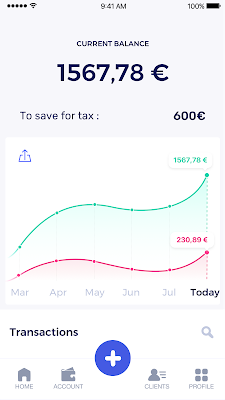
In some countries, especially in Europe, the administrative burden of being a freelancer is similar to what a company of 10 or more people deals with. A freelancer doesn’t necessarily have the time or skills to manage all this paperwork. So we are building a new bank for freelancers from the ground up that helps automate administrative tasks associated with their business.
Shine’s banking services and financial tools make it as easy to work as a freelancer as it is to work for a larger company. We deal with administrative tasks on behalf of the freelancer so that he or she can focus on their job: finding and wowing clients.

Building our infrastructure
As a new bank, we had the opportunity to build our infrastructure from the ground up. Designing an infrastructure and choosing a database presents tough decisions, especially in the financial services world. Financial institutions come under tremendous scrutiny to demonstrate stability and security. Even a tiny leak of banking data can have tremendous consequences both for the bank and its clients, and any service interruption can trigger a banking license to be suspended or a transaction to be declined.
At the same time, it’s vital for us to optimize our resources so we can maximize the time we spend developing user-facing features. In our first six months, we iterated and validated a prototype app using Firebase, and secured our seed funding round (one of the largest in Europe in 2017).
Based on our positive experience with Firebase, plus the ease-of-use and attractive pricing that Google Cloud offered, we decided to build our platform on Google Cloud Platform (GCP).
We were drawn to GCP because it has a simple, consistent interface that is easy to learn. We chose App Engine flexible environment with Google Cloud Endpoints for an auto-scaling microservices API. These helped us reduce the time, effort, and cost in terms of DevOps engineers, so we could invest more in developing features, while maintaining our agility.
We use Cloud Identity and Access Management (Cloud IAM) to help control developer access to critical parts of the application such as customer bank account data. It was quite a relief to lean on a reliable partner like Google Cloud for this.
Database decisions
Next came time to choose a database. Shine lives at the financial heart of our customers’ businesses and provides guidance on things like accounting and tax declaration. The app calculates the VAT for each invoice and forecasts the charges they must pay each quarter.
Due to the sensitivity of our customers’ data, the stakes are high. We pay careful attention to data integrity and availability and only a relational database with support for ACID transactions (Atomicity, Consistency, Isolation, Durability) can meet this requirement.
At the same time, we wanted to focus on the app and user experience, not on database administration or scalability issues. We’re trying to build the best possible product for our users, and administering a database has no direct value for our customers. In other words, we wanted a managed service.
Cloud Spanner combines a globally distributed relational database service with ACID transactions, industry-standard SQL semantics, horizontal scaling, and high availability. Cloud Spanner provided additional security, high-availability, and disaster recovery features out-of-the-box that would have taken months for us to implement on our own. Oh, and no need to worry about performance — Cloud Spanner is fast. Indeed, Cloud Spanner has been a real asset to the project, from the ease-of-use of creating an instance to scaling the database.
Cloud Spanner pro tips
We began working with Cloud Spanner and have learned a lot along the way. Here are some technical notes about our deployment and some best practices that may be useful to you down the road:
- Cloud Spanner allows us to change a schema in production without downtime. We always use a NOT NULL constraint, because we generally think that using NULL leads to more errors in application code. We always use a default value when we create an entity through our APIs and we use Cloud Dataflow to set values when we change a schema (e.g., adding a field to an entity).
- With microservices, it’s generally a good practice to make sure every service has its own database to ensure data isolation between the different services. However, we adopted a slightly different strategy to optimize our use of Cloud Spanner. We have an instance on which there are three databases — one for production, one for staging and one for testing our continuous integration (CI) pipeline. Each service has one or more interleaved tables that are isolated from others services’ tables (we do not use foreign-keys between tables from different services). This way our microservices data are not tightly “coupled”.
- We created an internal query service that performs read-only queries to Cloud Spanner to generate a dashboard or do complex queries for analytics. It is the only service where we allow joins between tables across services.
- We take advantage of Cloud Spanner’s scalability, and thus don’t delete any data that could one day be useful and/or profitable.
- We store all of our business logs on Cloud Spanner, for example connection attempts to the application. We append the ‘-Logs’ suffix to them.
- When possible, we always create an interleave.
In short, implementing Cloud Spanner has been a good choice for Shine:
- It’s saved us weeks, if not months, of coding.
- We feel we can rely on it since it’s been battle-tested by Google.
- We can focus on building a disruptive financial services product for freelancers and SMBs.
And because Cloud Spanner is fully managed and horizontally scalable, we don’t have to worry about hardware, security patches, scaling, database sharding, or the possibility of a long and risky database migration in the future. We are confident Cloud Spanner will grow with our business, particularly as we expand regionally and globally. I strongly recommend Cloud Spanner to any company looking for a complete database solution for business-critical, sensitive, and scalable data.
Casper on Google Cloud: Revolutionizing Web3 Development with Flexibility & Security

1438
Of your peers have already read this article.
1:30 Minutes
The most insightful time you'll spend today!
Casper Labs announced a collaboration with Google Cloud that will allow developers to launch public and/or private Casper nodes directly from Google Cloud. This enables a much more seamless and highly secure process for the millions of developers who want to build in blockchain environments without having to learn new, highly specialized programming languages. Additionally, Google Cloud will provide its scalable and reliable infrastructure to developers building on the Casper Protocol.
Blockchain technology is maturing
As blockchain technology matures, a growing number of businesses are embracing it as a key way to drive new efficiencies and realize cost savings.
According to a recent Casper Labs study, 87% of executives polled in the United States, United Kingdom and China reported plans to invest in a blockchain solution in 2023. This is due in no small part due to recent innovations that help organizations overcome the so-called Blockchain Adoption Trilemma, which previously held that it was impossible for any blockchain to be simultaneously a) decentralized, b) scalable, and c) secure.
Thanks to the rise of proof-of-stake blockchains like Casper, new models have emerged that enable a more scalable and secure architecture that no longer forces a compromise on decentralization.
Another trend facilitating these growing adoption rates is the rise of WebAssembly (WASM) as a baseline technology for newer blockchains, including Casper. WASM (created by W3C) makes application development in blockchain environments far more accessible and interoperable to the millions of developers worldwide who specialize in languages like Java, Javascript, C++ and Rust. Previously, any blockchain-based build required a high degree of specialized developer knowledge, which made it a much more challenging option for most organizations.
Meet Casper
Casper is a permissionless, decentralized public blockchain based on WASM that was built explicitly to foster enterprise adoption of blockchain technology. Beyond its more accessible model, Casper is the first and only blockchain to offer native upgradable smart contracts. This means that organizations can have the option to securely and consistently update software code even after it is running on Casper. This gives organizations the control and flexibility to use industry best practices, such as continuous deployment and continuous integration, which are already in use in their IT departments. Casper is also highly configurable and allows organizations to support public, private, and/or hybrid deployments.
Casper is also noteworthy for the presence of Casper Labs, a software development and professional services firm that supports organizations building on the Casper network. Unlike most blockchains that follow a more traditional open-source project, Casper Labs provides around-the-clock support and bespoke software development for enterprise organizations. Recently, Casper Labs helped patent management company IPwe execute the largest-ever blockchain deployment, featuring more than 25 million patents being added as custom NFTs to the Casper Blockchain.
How to get started with Casper on Google Cloud
Developers who want to start building on Casper can find a comprehensive series of tutorials here.
The Casper Association also recently announced a $25 million grant program to support projects and developers building on Casper. Interested participants can apply here.
How Rustomjee Increased speed, agility, and worker mobility with Google Cloud Platform

4223
Of your peers have already read this article.
6:30 Minutes
The most insightful time you'll spend today!
Operating for 23 years, Rustomjee has carved a niche for itself in the ever-growing real estate sector. Rustomjee’s portfolio includes 14.32 million square feet of completed projects; 12 million square feet of ongoing development; and another 28 million square feet of planned development. These projects span the best locations of the Mumbai Metropolitan Region. Rustomjee adds value to the lives of its homeowners through its core business, its corporate social responsibility initiatives, and its philanthropy. The business strives to ensure that every blueprint includes child-friendly spaces for parks, playgrounds, and learning rooms, encouraging families to spend quality time with each other.
In the 17 years Rustomjee’s Corporate Head of Information Systems, V M Samir, has worked with the business, it has grown from 100 employees to more than 800 employees – primarily professionals such as engineers, architects, lawyers, accountants, and regulatory consultants. The remainder work in marketing, sales, administration, security, human resources, and other associated areas.
Historically, Samir says, the real estate industry globally has lagged in embracing new workplace technologies, making building business cases, securing sponsorship, completing implementations, and encouraging adoption a difficult task.
G Suite powers cloud journey
Rustomjee started operations running an on-premises email service. However, the business wanted to upgrade its anti-spam capabilities and, in 2007, turned to G Suite. “There was no practical way I could build an anti-spam engine within that service that could match the power of the G Suite anti-spam engine and the intelligence held within its databases,” says Samir. “Our second key reason for moving was the lower cost of G Suite relative to an on-premises service that required us to spend on compute, backup, storage, and administration resources. Running G Suite would also help ensure users could still access their emails if their machines experienced an outage.”
Finally, G Suite enabled Rustomjee to access and compose emails from any location – a luxury for a real estate organization whose workers often attended construction projects with poor connectivity. “Finally, G Suite was the only service in those days that integrated calendar, meeting, and storage repositories through single sign-on. Google was so far ahead of the curve at that time and we saw the potential of G Suite to transform our communications and ultimately our business.”
“We did not have to shut down the business operations during the migration because Google Cloud Platform complemented every idea we had. And when my business users came to work on the Monday morning [after the final migration], everything was stable and the performance had improved. We told them our infrastructure had changed and they should start thanking Google Cloud!”
—V M Samir, Corporate Head, Information Systems, Rustomjee
The business started its cloud and IT modernization journey by decommissioning its on-premises email servers and using G Suite for Business. It began testing in March 2007 and went live with all production email services for 500 users in June 2008.
The intuitive nature and ease of use of G Suite made the transition seamless. “I did not have to undertake a large-scale change management exercise,” says Samir. “Users bought into the program and acquired the necessary knowledge quickly, meaning our adoption rate was extremely fast.”
With G Suite, email became the new norm to complete a range of tasks at Rustomjee. “We started exchanging CAD drawings, videos, high-resolution images, and other large files with our consultants,” says Samir. “These files had been difficult to store in on-premises environments.”
Rustomjee has improved collaboration and performance with G Suite, primarily due to four services. Gmail enables workers to communicate seamlessly externally and with each other, while Calendar enables them to set up and synchronize meetings. These meetings can be conducted through Hangouts Meet. “If a group of people internally need to discuss a work order or contract, they can coordinate calendars, sit at different locations within our organization, and collaborate using audio and video on a common service,” says Samir. “They can also work from and update a single document in Drive.”
With email and other collaboration applications running smoothly, Rustomjee saw an opportunity to enhance its technology infrastructure. The business had started operations running workplace applications on servers in small air-conditioned rooms. These servers ran databases and applications that sent data across a network to endpoints including desktops and laptops.
Expansion and the changing demands of workplace technology prompted Rustomjee to upgrade its capabilities, and the business commissioned a data center. However, Rustomjee’s continuously fast-growing compute and storage requirements, as well as the need to access new technologies to innovate and compete, quickly strained its technology model. “We required eight weeks each time we needed to add new compute and storage to our environment,” says Samir. “In addition, the heavy investments in our captive data center meant we were unable to easily leverage new technologies and decommission old technologies.”
Public cloud supports growth
Rustomjee reviewed its options and decided public cloud services could best meet its ongoing needs. “The rising cost of maintaining old hardware would force us to refresh data center technologies every five to seven years,” says Samir. “More broadly, a hardware-defined data center could not adapt quickly in the cloud-computing world, making it difficult to align compute with growth.”
The business started by moving its corporate website and microsites to a public cloud service to accommodate increased traffic delivered from a change in business strategy. “We saw an opportunity to shift our marketing and advertising from print advertising to digital platforms,” says Samir. “We wanted to be available to buyers from the point at which they start looking at properties online.”
However, Rustomjee’s digital marketing teams found it difficult to scale instances in line with demand, and work with complex user administration screens and control panels.
“With Google Cloud Platform, we’ve achieved a considerable reduction in timelines and simplified technology management and administration. All of our business users are delighted.”
—V M Samir, Corporate Head, Information Systems, Rustomjee
Google Cloud Platform presented an opportunity for Rustomjee to run its websites and microsites in a reliable, scalable, and responsive infrastructure. “Our evaluation confirmed Google Cloud Platform could support our growing demand for compute and storage,” says Samir. ‘In addition, because we undertake projects that are geographically distributed, networking – not only within the data center, but that could be accessed from any location – was very important. Only Google Cloud Platform had its own networking infrastructure.”
“More broadly, in a cloud environment, we could select any database we needed and start consuming operating systems as a service,” he adds. “In addition, we did not have to invest capital in licenses and hardware and we could always resize network bandwidth. Further, we could take advantage of pay-as-we-use cloud services, and link this to business growth.”
Google Cloud Platform also allowed Rustomjee to reduce the size of the teams needed to manage and operate its infrastructure. “When you have infrastructure running in the data center and in disaster recovery locations, you need to have a large pool of resources working around the clock to ensure constant uptime, sound backup, and good replication measures in place,” says Samir. “With the cloud, everything is simplified and we do not have to consider issues like how many hard drives have failed in on a particular morning.”
The business started testing and created its first virtual machine instance to Google Cloud Platform in April 2017. Because the Mumbai data center was not yet operating Rustomjee initially hosted its instances in the Google Cloud Platform Singapore Region. This initial move enabled the business to reduce the number of required virtual machine instances from six to one. After a year of running the website on Google Cloud Platform, the business found the simplicity of scaling compute resources meant its digital marketing teams were running more campaigns and servicing more leads, while compute spend had fallen by 56 percent. Furthermore, Rustomjee was not experiencing latency that impacted the user experience.
The opening of the Google Cloud Platform Region in Mumbai in late 2017 gave Rustomjee an opportunity to use compute, storage, and networking services located domestically. The business decided to go all-in on Google Cloud Platform and migrated a range of applications to the service.
These included an SAP enterprise resource planning system, running initially on Oracle but moved to the SAP HANA in-memory computing platform, with the assistance of advisory consultants from a leading firm. This system is integral to Rustomjee’s successful operations, meaning it has to be highly available and responsive. “All our financials are captured and stored in this system, as well as projects, materials management, order management, financial systems, and sales ordering systems, both procurement and supply-side,” says Samir. “In short, we cannot live without SAP ERP!”
Rustomjee turned to SAP specialist partner InfraBeat Technologies, a leading network implementation provider, and Google engineers to complete the migration successfully. “We were all in this together and collaborated closely to deliver the project successfully,” says Samir. “We were very impressed by the expertise and skills of everyone involved.”
A nine-day migration
With assistance from Google Cloud and the partners, Rustomjee moved all its SAP workloads, from sandbox to development, development to quality, and quality to production, in just nine calendar days, without impacting the business. “We did not have to shut down the business operations during the migration because Google Cloud Platform complemented every idea we had,” says Samir. “And when my business users came to work on the Monday morning [after the final migration], everything was stable and performance had improved. We told them our infrastructure had changed and they should start thanking Google Cloud!”
Moving to Google Cloud Platform enabled the business to complete certain customer invoicing workloads in just two hours, down from 13 hours previously. Backups of the SAP enterprise resource planning system that had taken up to six hours, were now being completed in six minutes.
“We have now fully embraced a cloud-first approach and have moved 100 percent of our workloads to the cloud. We depend totally on Google Cloud Platform to run our business.”
—V M Samir, Corporate Head, Information Systems, Rustomjee
Eight weeks down to 20 minutes
Rustomjee has also cut the eight-week cycles needed to set up the infrastructure and applications for a new real estate project, and integrate it into the SAP system, to just 20 minutes. “With Google Cloud Platform, we’ve achieved a considerable reduction in timelines and simplified management and administration,” says Samir. “All of our business users are delighted.”
With its website and enterprise resource planning system running successfully on Google Cloud Platform, the business decided to move its virtual application delivery environment into the service. “We decided to move all 800 of our employees into the cloud, so they could access applications through any endpoint, be it a mobile phone, tablet, thin client, desktop, or laptop,” says Samir.
The business decided to replace an existing application virtualization product with public images available on Compute Engine, with testing of Android, iOS and Windows operating systems across a range of devices proving highly successful. “Running the remote desktop service in Compute Engine and using public images enabled us to operate a leaner, simplified desktop as a service environment,” says Samir. “We have been able to deploy business function-specific virtual machine instances on the cloud and compartmentalize data to the business functions that need them. The business completed the move – including 8.1TB of data – in just six weeks. “The only workloads we did not move during that period were intensive workloads for visualization,” says Samir.
However, the four teams that did not use the remote desktop as a service environment – and that created visualization-intensive workloads – were working in traditional ways, compromising productivity and increasing risk. “They used to be given a desk in their respective offices and their workstations loaded with the applications,” says Samir. “There was no way of taking hourly backups of these devices and there was no recovery mechanism for the applications, because they were not in the data center.
“The other challenge was what happens to the data, because we operate out of multiple locations. The users in these four teams always had to come back to pre-assigned desks and continue working from there. This was counterproductive.”
The business subsequently implemented virtual machine instances with GPU access for visualization-intensive workloads. “We started evaluating Nvidia T4 (Tesla) GPUs in the Mumbai Region on 13 February and went live on 11 March in Mumbai,” says Samir. “By moving these 40 team members to Google Cloud Platform, we have enabled them to work with visualization workloads from any location, improving productivity and flexibility.”
Focus on core business
With Google Cloud Platform, Rustomjee can focus on running real estate projects and using technology to enable them. “I don’t have to refresh my technology every five to seven years, and I can leverage new technologies as they come on stream,” says Samir.
Reliable application access
With the flexibility and scalability of Google Cloud Platform, Rustomjee is now well-positioned to support further growth and operate in accordance with the time-limited nature of the real estate industry in India. “If we have promised to hand over the keys to a customer by a certain deadline and we fail to do so, we face a penalty of 10 percent of the cost of the project,” explains Samir. “The Indian Government introduced this regime in 2017 and business and technology have to align with its requirements.
“Google Cloud Platform is the right service to move us forward and enable us to overcome these challenges,” he adds. “We have now fully embraced a cloud-first approach and have moved 100 percent of our workloads to the cloud. We depend totally on Google Cloud Platform to run our business.”
EyecareLive Sees a Brighter Future in the Cloud with Enhanced Support

2952
Of your peers have already read this article.
3:30 Minutes
The most insightful time you'll spend today!
EyecareLive transforms the healthcare ecosystem with Enhanced Support, a support service from the Google Cloud Customer Care portfolio.
Telemedicine is now mainstream. It exploded during the COVID-19 pandemic. A 2022 survey by Jones Lang Lasalle (registration required) found that 38% of U.S. patients were using some form of telemedicine. This number is expected to grow as consumers are demanding more convenient and immediate access to care, and doctors are seeking efficiencies, cost savings, and to forge closer relationships with patients.
But because the eye-care field is so heavily regulated, optometrists and ophthalmologists face more technical hurdles to perform telemedicine than their peers in other medical practices.
To join the telemedicine revolution, a generic technology solution wouldn’t do. Eye-care professionals need a more carefully architected and rigorously secure platform – one that ensures a very high degree of compliance and privacy.
EyecareLive provides exactly that. Their comprehensive cloud-based solution was built specifically for eye-care telemedicine practices. They not only facilitate telemedicine visits with patients via video, but help providers stay in compliance with complex industry regulations.
What’s more, EyecareLive is the only platform in the industry that conducts vision screening using Food and Drug Administration (FDA)-registered tests to check a patient’s vision before connecting them to a doctor through a video call. The doctor can thus triage any issues immediately and quickly determine the right next steps for proper care. In addition, their platform digitally connects optometrists and ophthalmologists to the entire eye-care ecosystem, including other doctors for referrals, insurance companies, hospitals, pharmaceutical firms, pharmacies, and, of course, patients.
On top of all of this, the automated back office for their eye-care practices processes electronic health records (EHRs), clinical workflow, billing, coding, and more into one platform. EyecareLive streamlines operations and frees up doctors to focus on delivering the highest possible eye healthcare and on building stronger relationships with patients.
“Considering the number of plug-and-play services that Google has built into the Google Cloud Healthcare solutions, Google is basically supporting the entire healthcare industry from an infrastructure provider point of view.” — Raj Ramchandani, CEO, EyecareLive
Seeking greater agility, EyecareLive migrated to Google Cloud
EyecareLive is truly cloud first. They had operated entirely in the AWS cloud since opening their doors in 2017. Several years in, they decided to look for an additional cloud provider with broader support for digital health platforms. They specifically wanted to migrate to one they could rely on to deliver plug-and-play services, which would accelerate innovation of their platform. Rather than re-architecting for a new cloud, EyecareLive wanted a cloud platform that would offer compatible services they could use to meet their needs for reliability and availability.
“If we want to deploy a new conversational bot or build AI models that assist doctors to diagnose based on a retina image, Google Cloud provides these services which are reliable and tested by Google Cloud Healthcare solutions in many cases.” — Raj Ramchandani, CEO, EyecareLive
Versatility was another requirement. The EyecareLive platform must fulfill the demands of a variety of organizations — doctors, pharmaceutical companies, clinics, and others. EyecareLive also has an international deployment strategy that goes far beyond offering a domestic telehealth solution. Therefore EyecareLive needed a cloud functionality that extended into the broader global eye-care ecosystem.
EyecareLive chose Google Cloud. The most compelling reason was the deep industry expertise found in Google Cloud for healthcare and life sciences. This distinguished Google Cloud from all other possible cloud providers considered by EyecareLive. “We like Google Cloud because of the differentiations such as Google Cloud Healthcare solutions, computer vision, and AI models that can be used out of the box,” says Raj Ramchandani, CEO of EyecareLive. “We found these features more robust for our use cases on Google Cloud than any other.”
“Google is heavily into its Healthcare Cloud. That’s what differentiates it. We love that part because we can tap into innovative healthcare cloud functionality quickly.” — Raj Ramchandani, CEO, EyecareLive
Key to production deployment (and beyond): Google Cloud Enhanced Support
As a cloud-born company, EyecareLive had an exceedingly tech-savvy team. But the migration was a complex one that involved migrating third-party software and networking products that were tightly integrated into EyecareLive’s own code. The team knew it needed expert help with the migration. What’s more, doctors, patients, and other users required 24/7 access to the platform, and any interruptions to availability or infrastructure hiccups during the migration would disrupt their online experiences. However, the EyecareLive team was already stretched by continuing to grow and innovate the business, so they asked Google Cloud for help.
EyecareLive purchased Enhanced Support, a support service offered by the Google Cloud Customer Care portfolio. Specifically designed for small and midsized businesses (SMBs). Enhanced Support gave EyecareLive unlimited, fast access to expert support from a team of experienced Google Cloud engineers during the intricate, multifaceted migration.
“It was my top priority to engage Google Cloud Customer Care to help us keep the platform always available for our doctors and users,” says Ramchandani. “The level of detail to the answers, the clarifications of having the Enhanced Support experts tell us to do it a certain way has been enormously helpful.”
For example, one of the valuable features delivered by Enhanced Support is Third-Party Technology Support, which gives EyecareLive access to experts with specialized knowledge of third-party technologies, such as networking, MongoDB, and infrastructure. This meant all components in EyecareLive’s infrastructure could be seamlessly migrated to Google Cloud, and afterward EyecareLive could lean on Enhanced Support experts to continue to troubleshoot and mitigate issues as necessary.
“The response times to the questions and issues we had when going live was fantastic. It was the best experience with a tech vendor we’ve had in a long time.” — Raj Ramchandani, CEO, EyecareLive
With Enhanced Support at their side, EyecareLive was able to get up and running quickly in preparation for their international expansion by using Google Cloud’s prebuilt AI models, load balancers, and networking technologies that were designed to be easily deployed across multiple regions throughout the globe. “We know exactly how to implement data locality to scale our deployment into different regions and into different countries, because we’ve learned that from the Google Cloud support team.” — Raj Ramchandani, CEO, EyecareLive
EyecareLive then proceeded to rapidly scale their business, knowing that Google Cloud would ensure they could meet compliance standards in whatever country or region they expanded into.
“Since we’ve moved to Google Cloud and chose Enhanced Support, we’ve had 100% availability. That’s zero downtime, which is incredible.” — Raj Ramchandani, CEO, EyecareLive
Enhanced Support also provided the capabilities for EyecareLive to:
- Resolve issues and minimize any unplanned downtime to maintain a high-quality, secure experience for doctors and patients during and after migration
- Acquire fast responses to questions from technical support experts
- Learn from guidance from the Enhanced Support team beyond immediate technical issues
EyecareLive builds momentum toward their vision for eye-care telemedicine
By working closely with the Google Cloud Enhanced Support team, EyecareLive was able to successfully migrate their platform.
“If you ask any of my engineers which cloud provider they prefer, they’d all respond ‘Google Cloud,’” says Ramchandani. “The documentation is there, the sample code is there, everything that we need to get started is available.”
EyecareLive was then able to go on to grow and scale their business in the cloud in the following ways:
- Successfully managed a complex migration with minimal disruption and maximum availability, ensuring a consistent, secure, and compliant-ready experience for doctors and patients
- Gained the trust of both doctors and patients – they know that EyecareLive protects their sensitive medical data
- Kept EyecareLive agile and focused on innovating forward rather than building new features from scratch by supporting the team as they took advantage of Google’s tailored, plug-and-play technologies
- Analyzed performance over time to plan for future growth by partnering with Enhanced Support for the long term
“We know we can rely on Google Cloud from a security point of view. We love the fact that Google Cloud Healthcare solution is HIPAA compliant. Those are the things that make us trust Google to do the right thing.” — Raj Ramchandani, CEO, EyecareLive
With Enhanced Support, EyecareLive sees a bright future in the cloud
With the help of Enhanced Support, EyecareLive brings digital transformation to the eye-care in the healthcare industry by integrating the entire ecosystem of eye-care partners onto one platform making EyecareLive a leader in their industry.
Learn more about Google Cloud Customer Care services and sign up today.
LearningMate & Google Cloud Partnership to Aid Equitable Educational Opportunities

3449
Of your peers have already read this article.
1:30 Minutes
The most insightful time you'll spend today!
A “one size fits all” approach to education no longer works in today’s classrooms. Using cloud-based technologies, schools and educators can take a more personalized approach to education–one that suits each student’s unique learning style, abilities, and needs.
Taking the lead toward more equitable educational opportunities worldwide, education technology pioneer, LearningMate, is partnering with Google Cloud to offer intelligent, personalized learning via Google Cloud’s Student Success Services.
In a student survey by EDUCAUSE, a nonprofit association whose mission is to advance higher education through the use of information technology, nearly all respondents asked for more digital learning and study options. Given a list of educational material types, such as study guides and recorded lessons, 93 percent said they would like to have online access to at least two options and more than half (56 percent) chose seven or more.
The trend towards student choice challenges educators to reconsider how they teach and support learners. Students expect the same qualities in their lessons as they encounter in their other, non-school related digital experiences: personalization; user-friendliness; and engagement. Educators who are used to a more top-down education model can struggle to meet these new expectations.
Google Cloud created Student Success Services to help education institutions meet learners where they are—in the digital age. This suite of tools and services uses Google’s advanced artificial intelligence (AI) and analytic tools to:
- Engage with students via an AI-powered learning platform and interactive tutor
- Help educators and learners collaborate more effectively
- Provide current, actionable data on student progress
To bring our Student Success Services to more schools and organizations worldwide, we’re partnering with LearningMate — a global leader in digital learning infrastructure. LearningMate is a key go-to-market partner, helping schools design, launch, and maintain their own learning infrastructure. To start, LearningMate is adding Google’s AI-powered learning platform to its Frost platform, a popular content management for education.
As the education model continues to change and digital learning becomes the norm, disadvantaged students risk getting left behind. For these learners, the “digital divide” is very real, and stands to hinder them further–not only in school, but in society and the workplace in later life.
“The gap will only widen between those with digital advantages and those who struggle to gain access to devices and network necessities,” EDUCAUSE states. To meet all these challenges, schools need a diverse mix of tools, methods, and partnerships.
To help close the digital divide among students, digital tools need to be able to scale up or down so institutions and districts of any size and budget can use them. Google Cloud designed Student Success Services with this ability in mind. By offering these services, LearningMate aims to ensure that even schools with smaller teams and fewer resources can offer individualized learning experiences to their students.
With LearningMate and Google’s nearly 40 years of combined experience in education, this partnership aims to help educators better understand their students’ engagement, performance, and preferences. To learn more about Student Success Services and our collaboration with LearningMate, watch this session from our Government and Education Summit.
More Relevant Stories for Your Company

Vimeo Looks to Google Cloud for High-Quality Video Delivery Service
Vimeo is a video-sharing platform that’s home to imaginative video creators and hundreds of millions of viewers. Sixty million people create, host, and sell high-quality videos on Vimeo, including more than 800,000 who subscribe to the service’s premium tools. Over 240 million people in more than 150 countries watch videos
Google Cloud Migration Speeds Up The New York Times’ Journey to New Normal
Like virtually every business across the globe, The New York Times had to quickly adapt to the challenges of the coronavirus pandemic last year. Fortunately, our data system with Google Cloud positioned us to perform quickly and efficiently in the new normal. How we use data We have an end-to-end type of

IDC Retail Insights: The Digital Pulse of Retail
Google partnered with IDC Retail Insights to conduct a survey of retailers across the globe to assess the state of transformation and develop an index of digital maturity. Learn more about the changes in digital resilience over the last year and the areas of innovation over the next 12 months.

Why VMs Need to Be First-Class Citizens Across Hybrid IT and Multicloud Architectures
As enterprise apps migrate to public clouds, VM migration strategies need to align with business priorities and budgets, according to research firm IDC. This is because virtual servers continue to support mission-critical enterprise workloads. Mature VMware environments support a wide range of critical workloads in environments that have been fine-tuned
