





3 Important Factors to Consider for Moving Large-scale On-prem Data to Cloud with Storage Transfer Service

3521
Of your peers have already read this article.
1:30 Minutes
The most insightful time you'll spend today!
Organizations have been moving their on-premises data and applications to the cloud for the past several years, driven by reasons as varied as application modernization and content delivery to archival. In particular, we have seen migration momentum pick up in sectors like media and entertainment, where customers are rethinking how they monetize and store their valuable historical content, often while exploring Google Cloud’s many analytical and AI solutions.
Many of these customers are interested in moving their unstructured data from on-premises appliances to Google’s Cloud Storage. Over the past year, we’ve noticed an uptick in larger migrations, where customers move tens of petabytes or more of on-premises file data to Google’s flexible, secure object storage.
For customers like Telecom Italia/TIM Brasil, Google’s fully managed Storage Transfer Service played a key role in making this transformation possible by moving data from on-premises filesystems to extensible, low-cost Cloud Storage over the network.
“Storage Transfer Service helped us move petabyte-scale data from on-premises filesystem to Google Cloud in a highly performant and fully-managed way,” said Auana Mattar, CIO at Telecom Italia/TIM Brasil. “Setting up the transfer pipeline required performing some tests to figure out the ideal number of agents and networking settings in our on-prem environment. Once the initial setup was done, transferring data was seamless, and the service was able to saturate a 20 Gbps Partner Interconnect link.”
While large-scale cloud migrations can be intimidating, there are a number of actions that customers can take to ensure that a multi-petabyte data transfer goes as smoothly as possible. In the past, we’ve shared general architectural guidance for customers new to their cloud journey. And for customers looking for options, Google has multiple paths to move on-premises file data to the cloud, including our fully offline Transfer Appliance.
In this blog post, we’ll provide an updated perspective focused on how to use Storage Transfer Service to move data from on-prem to the cloud. Specifically, we’ll look at three different factors to consider prior to moving large amounts of data from your on-premises filesystem to Cloud Storage with our Storage Transfer Service.
Understanding the source files and filesystem
If you are moving data from an on-premises filesystem, you should be aware of how your source files, and your source filesystem, can impact transfer performance.
Each copy you make to Cloud Storage incurs some overhead from associated operations like metadata transfer, checksumming, and encryption. This means that, for a given amount of storage, transferring large numbers of very small files will take longer. As a rule of thumb, Storage Transfer Service will be most performant when moving files that are 16 MB or larger.
If you have a large number of smaller files, you may choose to batch them using tools like tar and upload as a single object. This will improve transfer performance but will limit how you can use those files in Cloud Storage. It’s an option best considered for use cases like archival storage, where the data transferred to Google Cloud may not be managed or accessed regularly. Our Nearline, Coldline, and Archive archival tiers offer excellent performance should you ever need to retrieve the archived data.
The source filesystem may also slow down transfer performance, particularly if the filesystem has limited read throughput. Tools like Fio can be used to test read throughput. We’ve included a command below to run a series of 1MB sequential read operations in Fio and to generate a report:
#Install fio> sudo apt install -y fio#Create a new directory fiotest> TEST_DIR=/mnt/mnt_dir/fiotest> sudo mkdir -p $TEST_DIR#Test read throughput> sudo fio --directory=$TEST_DIR --direct=1 --rw=randread --randrepeat=0 --ioengine=libaio --bs=1M --iodepth=8 --time_based=1 --runtime=180 --name=read_test --size=1G
Fio will then generate a report. The final line labeled ‘bw’ represents the total aggregate bandwidth of all threads, and it can be used as a proxy for read throughput. In general, you should strive for read throughput (‘bw’) that is 1.5x of your desired upload throughput or speed. (And one easy way to increase read throughput is to ensure that the filesystem itself is not imposing any limits on maximum throughput.)
Optimizing Storage Transfer Service resources
Within the Storage Transfer Service, there are a few settings that we can adjust ahead of time to ensure optimal performance for a larger workload.
First, we should ensure that we have the right number of transfer agents for our source data. We would advise that, for any transfer job larger than 1 GB, you start with at least three agents in separate VMs, with each agent assigned at least 4 vCPU and 8 GB of RAM. In addition to providing a foundation for performant data transfer, this architecture also ensures that the transfer is fault tolerant should one agent machine become unavailable.
Google Cloud supports up to 100 concurrent agents for a given Google Cloud project. To help you identify the right number of agents to support your workload, you should start your larger transfer first, then wait three minutes after adding each agent to ensure that throughput has stabilized.
In general, each agent can facilitate roughly 1 Gbps of throughput for up to 10 agents, at which point it may be necessary to add more agents for a very large amount of network bandwidth. For example, in one larger migration, a customer with 20 Gbps of dedicated network capacity ran ~30 agents at once. These numbers illustrate what was required at one enterprise data center. Across all of your environments, it is important to test and monitor your throughput via Cloud Monitoring to ensure you have the right configuration for your transfer goals.
Another area to optimize is where and how you install your agents. As we mentioned earlier, agents should be installed in separate VMs, and each host machine should dedicate at least 4 vCPUs and 8 GB of memory per agent. This is a starting off point, and larger, long-running transfers may require additional CPU or memory. For those longer jobs, we advise that you monitor CPU utilization and unused memory closely to ensure optimal performance. You should provision more CPUs when utilization exceeds 70%. Similarly, you should be ready to provision additional memory when the agent has less than 1GB of unused memory.
Preparing your network for large-scale data transfer
The third and final area to consider is your network connectivity. While it can be easy to reduce this to the bandwidth between the source filesystem and the Google Cloud bucket, the network includes two other components that can be easier to configure: first, the network interface from the on-premises agents to the WAN; and second, the agents’ connection to the on-premises filesystem.
For the first component, the network interface from the on-premises agents to the WAN, the general guidance is to not let this become a bottleneck. Specifically, you should ensure that this interface is greater than or equal to the bandwidth you require to read from the filesystem, plus the upload bandwidth to write to Google Cloud. In other words, if you plan on moving 10 Gbps of data from on-premises to Google Cloud, you will need 20 Gbps of bandwidth between the on-premises agents to the WAN: 10 Gbps to read from the networked filesystem, and 10 Gbps to transfer and write to Google Cloud.
On-premises filesystems, and on-premises networks, come in many flavors. For the second component, how the agents connect to an on-premises filesystem, our general rule is to be mindful of latency and to test regularly. It is essential to ensure that agents run on machines that can access a networked filesystem with very low latency.
Finally, if you are trying to maximize transfer performance, make sure you’ve configured your network to avoid bandwidth restrictions between on-premises filesystem and Google Cloud that might impact transfer speed. Storage Transfer Service will allow you to cap the bandwidth used by transfer, making it easy to minimize any impact on other production applications. Consider using tools like lperf3, tcpdump, and gsutil to measure the network bandwidth available to upload to Cloud Storage.
In particular, gsutil is worth some additional detail. Gsutil is a Python tool that can help you perform a number of object storage management tasks in Google Cloud, including checking your agent’s connection to the Cloud Storage APIs. It can be installed via the Google Cloud SDK, or separately. In this case, you should also ensure that gsutil is available in the same on-premises VM as the Storage Transfer Service agent.
If you’d like to use gsutil to test connectivity to Google Cloud, here’s the command:
gsutil cp test.txt gs://my-bucketReplace:my-bucket with the name of your Cloud Storage bucket.
CP is a copy command that lets you copy data from on-premises to the cloud. In this case, gsutil is copying a test document, test.txt, to ensure that you have a connection with the Google Cloud APIs. You will need to create a test document before running this command.
Test twice, transfer once
One overarching theme across all factors is that testing can help you understand performance. For many customers, a large-scale data transfer from an on-premises filesystem to Google Cloud is an unusual event. And as with any unusual event in enterprise IT, it is a great idea to make sure that each party – from network administrators to filesystem and storage experts to cloud architects – is able to test their domain multiple times, to ensure the event will proceed seamlessly.
As you fine tune your testing in advance of a data transfer, you may want to learn more about your options for obtaining more network bandwidth, orchestrating transfer from SMB filesystems, or even how to make the right choices to save money on object storage. And we plan to share more in our blog about how customers have used our transfer offerings in the months ahead. Advanced agent setup | Cloud Storage Transfer Service Documentation
For more information about Storage Transfer Service and how to get started, please take a look at our documentation or get started via the Google Cloud console.
New Capabilities in Cloud Asset Inventory Allow Better Visibility into Google Cloud Environments

4717
Of your peers have already read this article.
2:00 Minutes
The most insightful time you'll spend today!
Businesses that operate in complex cloud environments, large fleets, or sophisticated security operations all require visibility into their cloud assets in order to keep their teams nimble and their data secure. Cloud Asset Inventory (CAI) helps these teams understand their Google Cloud and Anthos environments by providing complete visibility, real-time monitoring, and powerful asset analysis capabilities. Today, Cloud Asset Inventory gets four new capabilities that help you understand your environment more clearly and easily than ever before.
New user interface eases asset and insight discovery
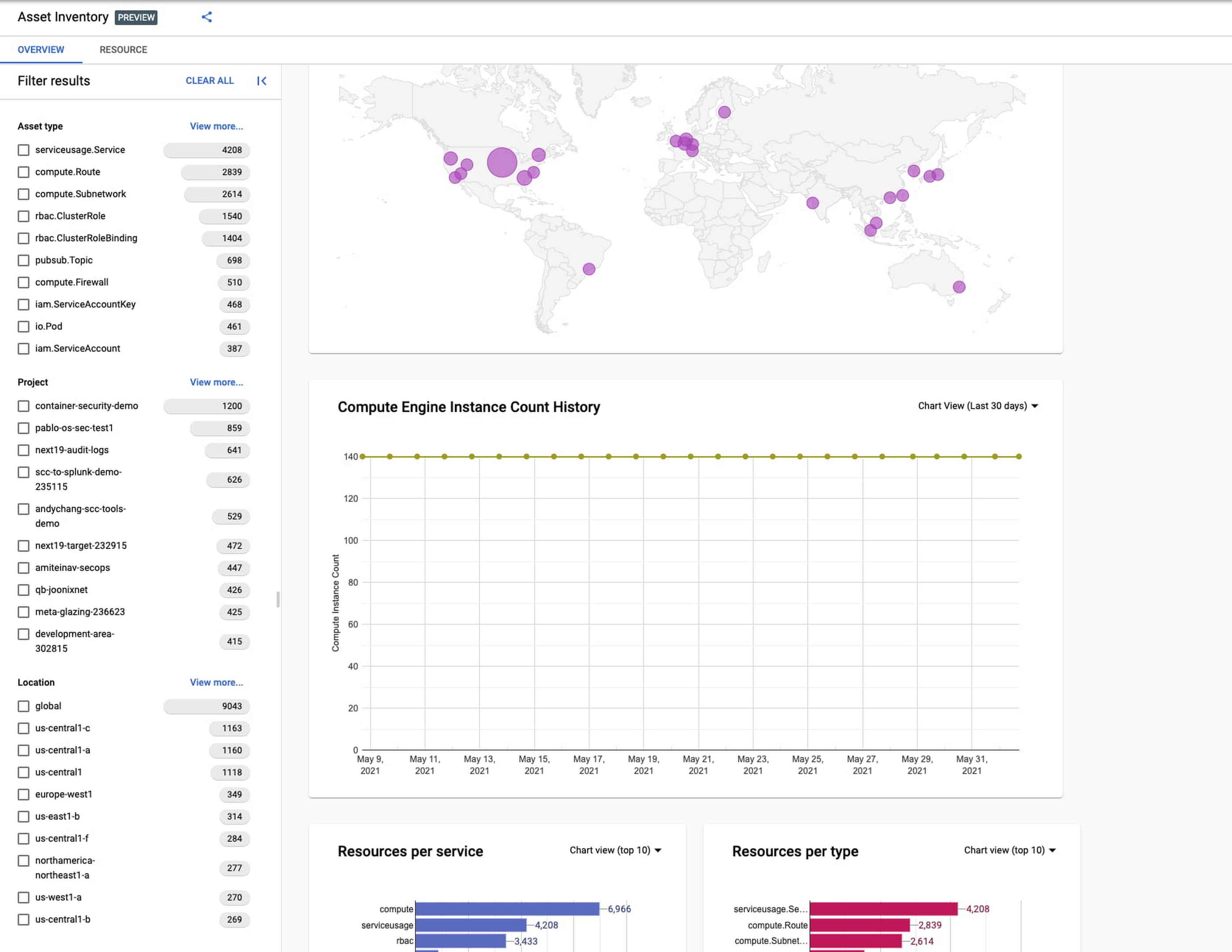
Cloud Asset Inventory console preview is now publicly available for GCP and Anthos customers. This preview provides insights into your cloud footprint, history and details of resource usage with powerful filtering and search capabilities. For example, you can view your global distribution of resources and policies, how your GCE VM footprint has been changing over time, as well as full metadata and change history for all your assets. The CAI console can be filtered at the organization, folder, or project-level, so each user can view the resources they have permissions for down to project level granularity.
Asset discovery and Datadog integration
A new asset list service in CAI provides quick and comprehensive asset discovery, including asset history, without needing to export the data to a storage destination. Datadog, a leading multi-cloud monitoring and security service provider, relies on deep integration with CAI for service and asset discovery. Datadog has been piloting and taking full advantage of the newly released asset list service. Datadog Product Manager, Steve Harrington, commented:
“Google’s new Cloud Asset Inventory API provides us with an immensely valuable, single source of truth for determining the resources present in a given GCP environment. Along with its rich metadata, this enables us to enhance multiple aspects of our integration with GCP, including streamlined metric collection and ingestion of custom labels. We plan to continue building around Cloud Asset Inventory in the future to improve existing features, and are envisioning ways it could help us provide entirely new insights to our customers.”
Answer “who can access what resources?”
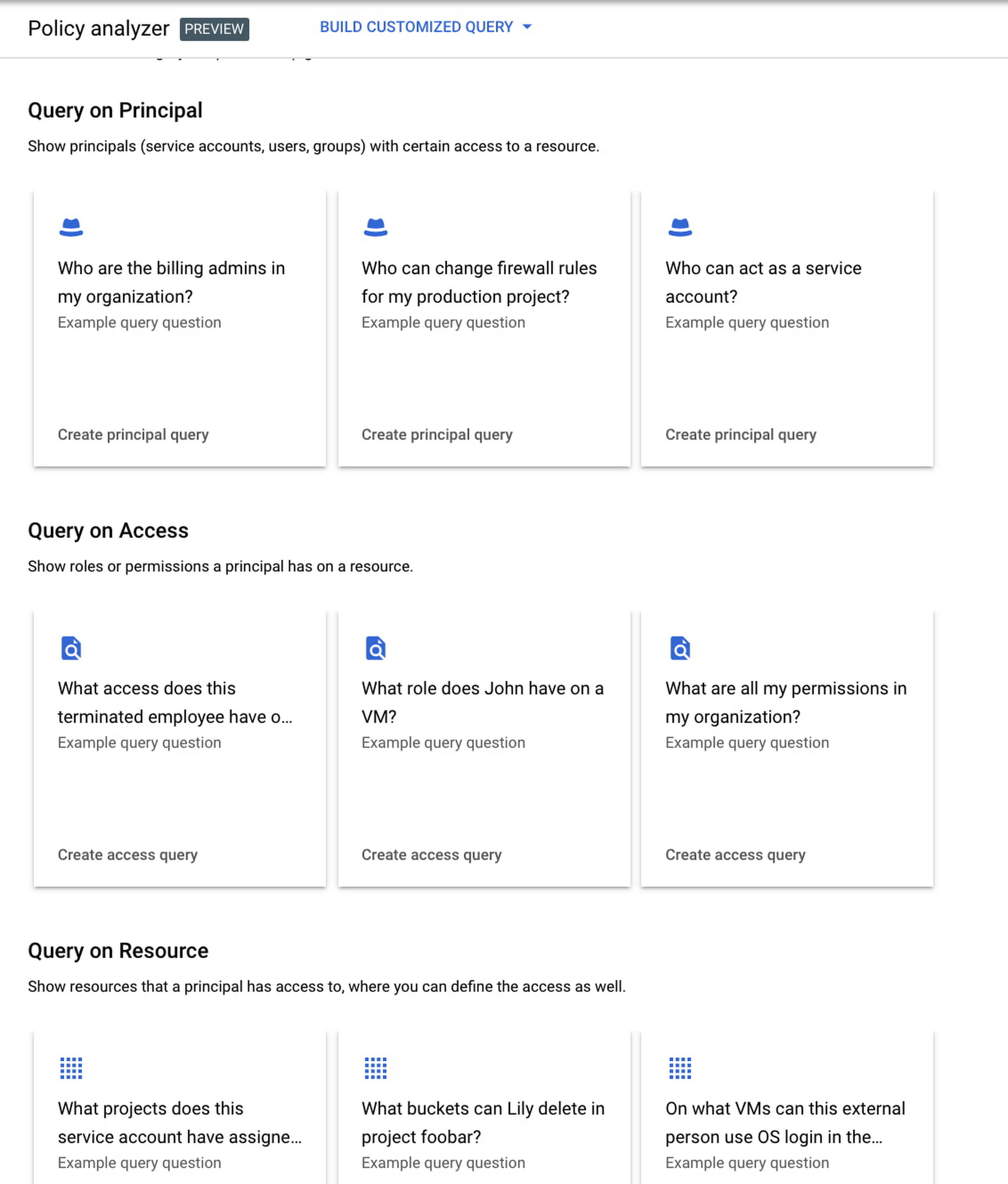
Determining authoritative answers to security-related questions like “Who can read data from my storage bucket that contains PII?” or “Does a terminated employee still have any remaining access to my system?” can be difficult and time consuming. This is why access management and identity certification is one of the top security priorities for enterprises running workloads in the cloud. To help alleviate this challenge, the new Policy Analyzer capability in CAI thoroughly analyzes the relationship between IAM policies and resources. The analysis includes powerful and efficient group expansion, service account impersonation, conditional access analysis, resource expansion, and more. You can even export the results to a BigQuery table or Cloud Storage bucket for further analysis and record keeping. CAI’s enhanced UI makes it even easier for you to build your own flexible queries and quickly get to a comprehensive answer.
Create asset posture visibility
Cloud Asset Inventory now provides seven types of Asset Insights through the Active Assist platform. These new asset insights help proactively detect anomalies within your organization’s IAM policies, which may be opportunities to improve your security posture. The insights can be aggregated at the Organization, Folder or Project level.
The seven new Asset Insights include:
- External members in IAM policies.
- External users that impersonate your service accounts.
- External members as policy editors.
- External users who can view cloud storage buckets.
- Terminated users/groups that are still in IAM policies
- IAM policies containing all users or all authenticated users.
- Projects with only terminated users as owners.
As a Google Cloud customer you can get started and use all the recently released capabilities and features immediately; check out our documentation to see how. We’d love to hear your feedback; email us with any questions or concerns!
Forrester and IDC’s Research Confirms Quantifiable Benefits of Running SAP on Google Cloud

3633
Of your peers have already read this article.
3:00 Minutes
The most insightful time you'll spend today!
Cloud migration is top of mind for most companies with SAP applications. While the advantages of the cloud for SAP customers is generally understood, the move itself can be complicated and disruptive. So what actually are the business benefits and cost savings? How long will it take to recoup such an investment? Two recently published reports from Forrester and IDC can help to quantify the benefits and ROI.
Getting answers to the million-dollar questions
Forrester and IDC bring different methodologies to the table; they asked somewhat different questions and used different models to calculate their financial KPIs. This allows you to get two different points of view on the same basic questions about value, risk, and ROI.
As it turns out, both reports found that customers who migrate their SAP environments to Google Cloud see an impressive return on their investments. From uptime and infrastructure to efficiency and productivity—both Forrester and IDC identified major benefits to companies that have made the move to Google Cloud.
Let’s walk through some of the highlights from both reports.
Forrester’s TEI model spotlights the power of uptime improvements
Based on in-depth conversations and quantitative research with six companies, here are the key findings from the Forrester Total Economic Impact (TEI) study for companies running SAP systems on Google Cloud:
- Direct cost savings. When they compare cloud subscription and related costs to what they spent on legacy systems and infrastructure, most IT leaders expect a cloud migration to deliver up-front savings. But according to Forrester, the companies interviewed reported average savings of more than $3 million a year, including eliminated hardware purchases, right-sized software licensing, staffing efficiencies, and other operational cost savings.
- Dramatically improved uptime. Customers told Forrester that migrating SAP to Google Cloud pretty much eliminates downtime—planned or unplanned—as a significant IT concern. According to Forrester, companies realized an average of $1.5 million in savings per year by avoiding the revenue and user productivity losses that had once been a fact of life for their IT teams.
- Significant efficiency gains. Because Google Cloud works to mitigate performance bottlenecks, infrastructure mishaps, network delays and more, the companies Forrester interviewed reported a yearly average of $500,000 in productivity gains for SAP business users and frontline workers.
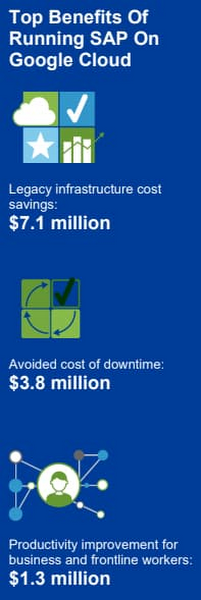
Companies also reported an annual average of $500,000 in additional IT efficiency gains after migrating SAP to Google Cloud. This quantifies what happens when IT practitioners no longer have to deal with the bottlenecks that come with legacy systems, and are able to spend their time on tasks that actually build value and help the business. Based on the Forrester analysis, the companies interviewed could expect average three-year net benefits of about $15.4 million.
“We benefit from any technical innovation in the infrastructure area because Google Cloud is doing that for us,” one customer told Forrester. “So, whenever there’s new hardware available or new processes or whatever, I don’t have to run the specific project to migrate from A to B.”
IDC finds that good things happen when SAP downtime is reduced
The IDC report highlights four areas where Google Cloud generates the most value for customers:
1. Cutting infrastructure costs. According to IDC, customers running SAP on Google Cloud spent 31% less on infrastructure each year, or an average of $233,000 less per company. The ability to scale SAP environments dynamically and to keep them right-sized was a major factor; so were the advantages of automated infrastructure monitoring and savings on software licenses once these companies could stop overprovisioning.
2. Giving a team better things to do. IDC found that the infrastructure, database, and security teams of the companies they interviewed reduced the time they need to maintain and manage SAP environments by an average of 66% per year, for a savings of $443,000, per company. As a result, these companies got the equivalent of a major staff expansion from their SAP migrations—giving them both the staff time and the expertise to focus on far more valuable activities.
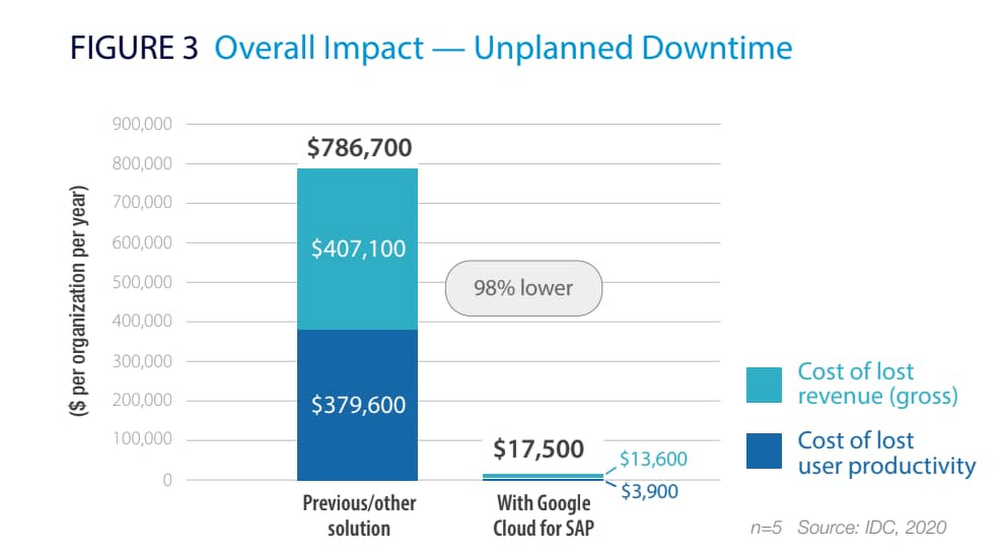
3. Limiting unplanned downtime. These companies reported to IDC an average 98% reduction in unplanned downtime. Migrating SAP to Google Cloud significantly reduces the threat of downtime and saves the business an average of nearly $770,000 per year in lost revenue and user productivity. For some firms, the downtime savings topped $1 million per year.
4. Making users more productive. The companies interviewed told IDC that by avoiding downtime and disruptions associated with upgrade and maintenance tasks for their legacy SAP systems, they saved an average of $363,000 annually in user productivity. But there’s an even more interesting under-the-hood stat contributing to these gains: These companies reduced the time required to deploy new SAP compute and storage resources from an average of 8.8 days to 1 hour.
When IDC added up these and other savings associated with running SAP on Google Cloud, it found an average three-year savings of more than $3.5 million and a five-month payback period.
“We acquired another company, so basically overnight we needed to be able to deal with that increase,” said one customer IDC spoke with. “We doubled our footprint overnight, and we had to take on hundreds of additional employees. We needed a platform that we could easily scale up if we required, and that’s the benefit of running SAP on Google Cloud for us.”
Explore the reports
There is a lot to think about when considering a move of SAP systems to the cloud. The cloud has many advantages, but migration can seem complicated and tricky; we appreciate that you are looking to understand the full picture. These papers are a great place to start.
Download the reports—Forrester’s “Total Economic Impact of SAP on Google Cloud” and IDC’s “Business Value of SAP for Google Cloud Environments.” Then, get in touch.
STAC-M3 Tick History Analytics in Google Cloud Benchmark Results Reveals it is 18X Faster than Previous Version

4755
Of your peers have already read this article.
5:00 Minutes
The most insightful time you'll spend today!
The Securities Technology Analysis Center (STAC®), an organization that improves technology discovery and assessment in the finance industry through dialog and research, recently audited the STAC-M3™ benchmark suite on Google Cloud (SUT ID KDB211210). These enterprise tick-analytics benchmarks assess the ability of a solution stack such as database software, servers, and storage, to perform a variety of I/O-intensive and compute-intensive operations on historical market data.
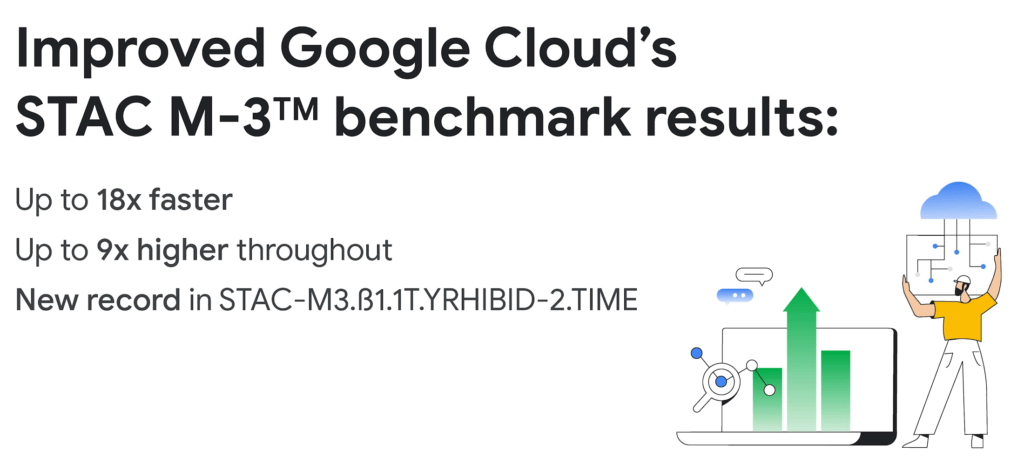
Following up on our previous STAC-M3 benchmark audit (SUT ID KDB181001), a redesigned Google Cloud architecture leveraged the most recent version of kdb+ 4.0, the time-series database from KX, and achieved significant improvements: 35 out of 41 benchmarks ran faster in the new cluster – by up to 18x faster than Google Cloud’s prior results. Key highlights include the following:
Compared to the previous STAC-M3 Antuco suite results on Google Cloud:
- Was faster in 13 of 17 mean response-time benchmarks
- Was 18x faster – a 94% reduction in run time – in the version of Year-High Bid that allows caching (STAC-M3.ß1.1T.YRHIBID-2.TIME), which also set an overall record for all published results
- Had 9x higher throughput in Year-High Bid (STAC-M3.ß1.1T.YRHIBID.MBPS)
Compared to the previous STAC-M3 Kanaga suite results on Google Cloud:
- Was faster in 22 of 24 mean response-time benchmarks
- Was over 10x faster in all four Market Snapshot workloads (STAC-M3.ß1.10T.YR[2,3,4,5]-MKTSNAP.TIME)
- Had 5x the throughput in Year-High Bid involving 2 years of data (STAC-M3.ß1.1T.2YRHIBID.MBPS)
“The STAC-M3 standard was designed by financial firms to reveal the performance of tick analytics stacks. Generational improvements like those exhibited by Google Cloud’s most recent STAC-M3 audit, are important data points for firms evaluating new architectures for performance and scale,” said Peter Nabicht, President of STAC.
These performance results may translate to real-world advantages that may be difficult for investment firms to achieve in static and costly on-premises environments: immediate answers in high data velocity markets, more thoroughly explored research theories by adding data or new quantitative approaches, and reduced costs by releasing cloud resources more quickly.
STAC-M3: High-speed tick analytics
Designing for record-breaking results
In our STAC-M3 audit, the stack under test (SUT) was designed to take advantage of horizontal scalability in the cloud by sharding data across independent compute nodes. The cluster of 12 Google Compute Engine N2 instances was powered by Intel Cascade Lake, with each node using 32 vCPUs, 160GiB of memory, and 9TiB of local NVMe SSDs. The full STAC-M3 Antuco and Kanaga data set was split across the cluster and kdb+ scripts distributed queries between nodes.
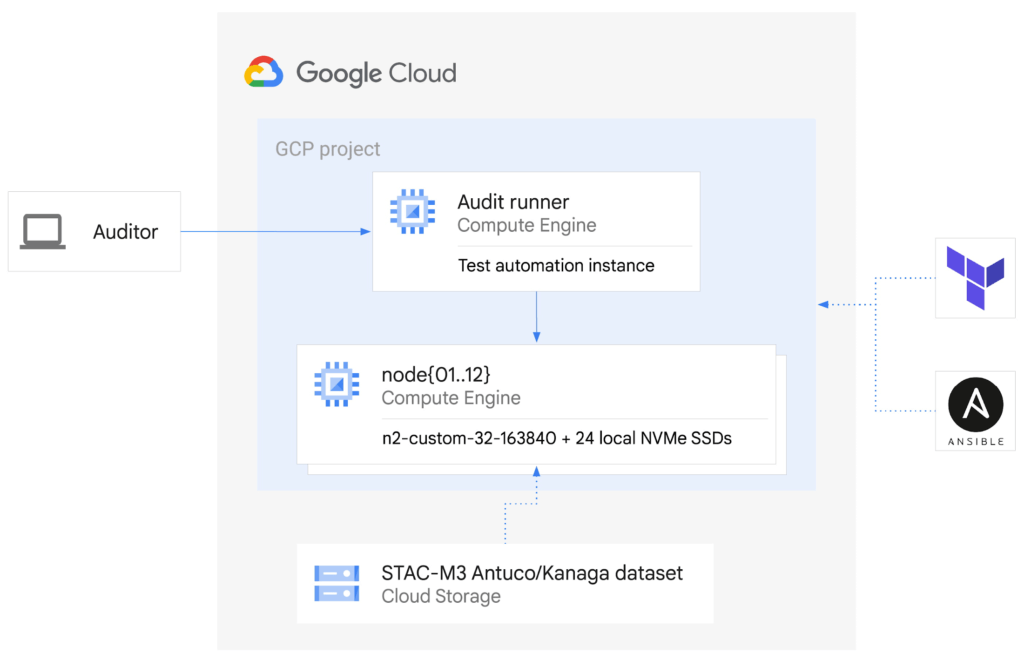
This configuration was the sweet spot for this particular workload, but this architecture does not need to be limited to 12 nodes for other workloads – the data sharding algorithm could scale to any number of nodes as required by workload demands. Since scaling out the cluster in this manner increases the total pool of available storage, this architecture can continue scaling out to petabytes of storage across hundreds of nodes.
The ability to spawn large clusters with hundreds of thousands of processors on demand at low cost, and to delete the resources when jobs complete, not only changes the economics of running computations on large financial data sets, it also opens up opportunities to explore solutions to new types of problems that were previously overlooked due to the constraints of fixed hardware on-premises. You can check the pricing of this VM configuration using the Google Cloud Pricing Calculator. The costs can be reduced even further by using preemptible VMs.
While the new cluster used a similar number of nodes, cores, and total memory as the previously-audited cluster, the redesigned architecture allowed us to harness the low latency and high throughput of Local NVMe SSDs.
Resources on demand
The cluster was created on demand using Terraform and Ansible during testing and auditing. The use of infrastructure as code (IaC) techniques ensured that the cluster, fully loaded with the STAC-M3 data set, could be created when needed and then removed when benchmarking was complete. It also meant that the cluster configuration was enforced by code on each deployment, eliminating configuration variance and drift. The full IaC definition to create the cluster can be retrieved from the report in the STAC Vault.
Each time the cluster was created, data was streamed to Local SSDs from Google Cloud Storage, our reliable and secure object storage, at up to the line rate of 32Gbps per node. The entire 57TiB STAC-M3 Antuco and Kanaga data was replicated from Cloud Storage to local storage in approximately 20 minutes.
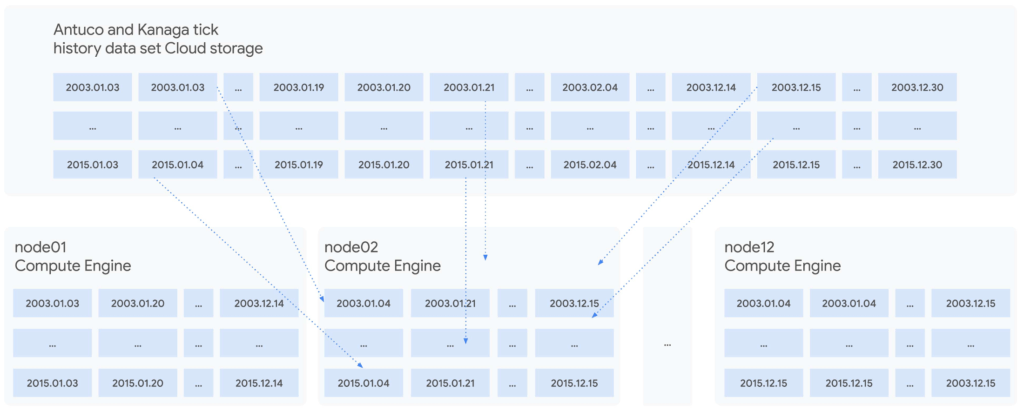
Since each node was independent and responsible for its own shard of data, doubling the cluster size would cut the synchronization time in half, or copy twice as much data in the same amount of time. Using higher bandwidth options of up to 100Gbps would triple the possible throughput for a relatively small incremental cost, trading an approximately 11%-23% price increase at current list prices for a 200% data synchronization performance increase. Taking advantage of fast networking to cache sharded data in parallel to a large cluster makes storing bulk data in Cloud Storage viable for even the largest workloads.
For quants working on vast data sets in sprawling compute clusters, the ability to fully describe infrastructure as declarative code, create elastic resources on demand, cache data quickly from cheap bulk storage, and turn resources off when computations complete is a dramatic change compared to waiting months to grow on-premises clusters – and a compelling reason to use cloud infrastructure.
To see how we designed and optimized the cluster for API-driven cloud resources, read our new whitepaper.
STAC-A2™: Calculating derivatives risk
In 2018, we showed that cloud instances can outperform bare metal when analyzing large tick history data sets in the demanding suite of STAC-M3 benchmarks. Last year, Google Cloud’s partner Appsbroker showed that the same was true for calculating derivatives risk in STAC-A2 on Google Cloud. You can read about how Appsbroker built its record-breaking STAC-A2 compute cluster on Google Cloud in its blog post, or access the STAC Report directly. Here are the highlights:
Compared to all other publicly reported solutions, this solution, based on a cluster of 10 virtual machines, had:
- The highest throughput (STAC-A2.β2.HPORTFOLIO.SPEED)
- The fastest cold time in the large problem size (STAC-A2.β2.GREEKS.10-100k-1260.TIME.COLD)
Compared to a solution involving an 8-node, on-premises cluster (SUT ID INTC181012), this 10-node, cloud-based solution:
- Had 5 times the maximum paths (STAC-A2.β2.GREEKS.MAX_PATHS)
- Had 10% greater throughput (STAC-A2.β2.HPORTFOLIO.SPEED)
- Was 18% faster in cold runs of the large problem size (STAC-A2.β2.GREEKS.10-100k-1260.TIME)
- Was 9% faster in cold runs of the baseline problem size (STAC-A2.β2.GREEKS.TIME.COLD)
Finding market advantages with Google Cloud
Across the investment management industry, every firm is seeking many of the same competitive advantages. However, finding unique opportunities and managing larger and larger data sets is becoming a major strain. Cloud is fundamentally changing how quants tackle the problem while empowering them to manage risk and generate higher returns.
Building on-premises computing clusters with tens or hundreds of thousands of cores and petabytes of storage requires huge up-front investments and lead time measured in months or years. Google Cloud makes the same scale available to its customers, provisioned on demand and paid per use. More importantly, the elasticity of cloud resources enables agility that is simply not available in a fixed data center cluster – the agility to explore, experiment, iterate, and respond to markets faster than before.
Scaling out to tens of thousands of cores in minutes and then removing the resources immediately not only changes the speed at which questions can be answered; it encourages different and more frequent questions, asked simultaneously on many independent clusters, free from the constraints of fixed on-premises hardware.
It is this flexibility and power that enables financial services firms to leverage larger data sets and get results, backtest, research, and analyze large amounts of data, faster and whenever they need it.
Download our whitepaper to learn more about our latest STAC-M3 tick history analytics benchmark results and how to optimize cloud infrastructure for high-speed market data analysis.
If You Run Your Country’s Largest Retail Franchise, How Do You Pull Together, in Sync?

6304
Of your peers have already read this article.
9:30 Minutes
The most insightful time you'll spend today!
In 1984, Mario Maio set up a small business manufacturing electrical transformers in his Johannesburg garage. Over the next two decades, the ACDC Dynamics company he created came to dominate manufacturing, import, and distribution in South Africa’s electrical goods sector. Then, in 2007, Mario’s son, Ricardo Maio, founded a retail arm to the business, ACDC Express. Today ACDC Express is South Africa’s largest electrical retail franchise, with 29 franchise stores across the country. Eight of those franchises joined in 2017 alone, and ACDC Express is experiencing quarter-on-quarter growth of 28% per year.
Rapid expansion increases the demands on the ACDC Express central administration, which provides each franchise with IT support and a full suite of marketing, operational, and bookkeeping functions. So when email server downtime became a frequent problem, Ricardo and his team chose G Suite to transform the way the franchise worked.
“We lost revenue when our email servers went down. When I researched Google’s SLA of 99.9% uptime and experimented with G Suite on my private Gmail account, I could see the difference this technology could create.”
Ricardo Maio, CEO, ACDC Express
“On consecutive occasions, our entire email server went down,” says Ricardo Maio, CEO at ACDC Express. “It would take more than one or two days to bring it back up. We had already highlighted software cost overhead as a potential thing to reduce, so when that happened several times within a short period, we knew it was time to make a change.”
Building a better franchise
Franchise businesses undergoing rapid expansion must respond quickly to the demands of new stores. At ACDC Express, 33 staff run the national franchise, delivering core services and support to 29 franchises across the country. Key tasks, such as updating the operations manual, were hampered by a reliance on paper forms and mail services, while email servers experienced repeat failures, which compromised communication. By implementing new, cloud-based productivity tools, ACDC Express looked to cut down on slow and expensive practises, and deliver an agile, reliable online communications platform.
To do that, ACDC Express migrated its franchise to G Suite with Opennetworks. “We lost revenue when our email servers went down,” says Ricardo. “When I researched Google’s SLA of 99.9% uptime and experimented with G Suite on my private Gmail account, I could see the difference this technology could create.”
Since moving to Gmail, ACDC Express reports that the problem of email server downtime “is no longer existent for us,” while with Google Drive, versioning problems have been resolved. Using surveys on Google Forms, ACDC Express quickly and easily collects data from stores and customers—whether they are in stores or on the road—and populates Google Sheets with the information.
“Our operations manual is a binding document, and it’s a living document that gets regularly updated. In the past, we would struggle to track which franchise had which version. With Google Drive, we can be sure that everyone is looking at the right one.”
Ricardo Maio, CEO, ACDC Express
With Google Data Studio, the managing team then consolidates that data on dashboards, creating snapshots of performance, complete with averages and simple comparisons, which make it easy to spot issues and outliers in need of attention. Individual businesses that do require help are then contacted over Google Hangouts Meet to assess what they need, part of a culture of sharing expertise, which Ricardo sees as key to the franchise mode.
“As a franchise, sharing knowledge is as important as maintaining control,” he says. “If there’s a new procedure or system that worked in one store, we can immediately update our manuals and documentation so that everyone has access to it. That’s been fantastic.”
“Our operations manual is a binding document, and it’s a living document, which gets regularly updated,” says Ricardo. “In the past, we would struggle to track which franchise had which version, and every time we had to make a change we would print out a version and send it to stores through an unreliable postal service. With Google Drive, we can be sure that everyone is looking at the right one.”
Remote training, rapid migration
Rolling out new IT tools across a franchise is often expensive, demanding extensive travel and numerous training sessions, which often repeat the same material. Instead, ACDC Express set up training on Google Hangouts that staff could drop into at their convenience, creating a cost-effective training schedule, which meant individual stores could plan their own learning process.
“When we moved to G Suite, we did it all at once, with every employee changing at the same time. We took a band-aid approach, switching to the new tools as rapidly as possible. After six months of training, there have been no reported problems with G Suite at all.”
Ricardo Maio, CEO, ACDC Express
“The whole benefit of franchising is that you can learn from your peers,” says Ricardo. “When we moved to G Suite, we did it all at once, with every employee changing at the same time. We took a band-aid approach, switching to the new tools as rapidly as possible. After six months of training, there have been no reported problems with G Suite at all.”
More mobile, more reliable
Today, ACDC Express operates 240 Google accounts, and information from the franchises’ marketing systems, research, operations, and accounting is fed back automatically to Google Sheets and Google Dashboard at the headquarters in Edenvale, Gauteng. By Ricardo’s estimation, the administrative team is now so effective with G Suite tools, it can achieve twice as much as it could without them.
Now, ACDC Express is looking to use Google Chromebooks in a new web-based point-of-sale system, and considering moving its ERP onto Google Cloud Platform for greater stability, in another project with Opennetworks.
“We’ve developed an in-house point of sale system that’s web-based and can use a functional touchscreen,” adds Ricardo. “We’re looking at rolling that out with Google Chromebooks. We really like how straightforward and simple the Google Chrome devices are, and because we’ve taken a lot of infrastructure into the cloud, we no longer actually need physical machines on our counters. We can work anywhere. That’s something that applies from our head office right down to our smallest franchise store.”
8402
Of your peers have already watched this video.
21:00 Minutes
The most insightful time you'll spend today!
Journey to Transformation and Modernization with Google’s Distributed Cloud
Google Cloud has been leading the way of helping businesses make most from their cloud investments to drive digital transformation through modern application platforms that cater to today’s customer needs. Watch the video from the Next ’21 to explore three areas where companies are supported by Google Cloud throughout their cloud evolution journey–cloud migration and modernization, extension of services and engineering practices to hybrid and multicloud environments, and delivery of high performance with planet scale distributed infrastructure. Also, learn how Google Cloud is equipped for more complex and unique use cases, from datacenter to the edge. Hear the strategies and customer stories that can help your business modernize people, processes, and applications to fully leverage Google’s distributed cloud!
More Relevant Stories for Your Company

Transform Your Business: Comprehensive Cloud Services and Tailored Pricing Plans
As the saying goes, “it’s hard to make predictions, especially about the future.” Some organizations find it challenging to predict what cloud resources they’ll need in months or years ahead. Every organization is on its own unique cloud journey. To help, we’re developing new ways for customers to consume and

How 20th Century Fox Uses Machine Learning to Gauge the Financial Performance of a Movie
Success in the movie industry relies on a studio’s ability to attract moviegoers—but that’s sometimes easier said than done. Moviegoers are a diverse group, with a wide variety of interests and preferences. Historically, movie studios have relied heavily on experience when deciding to invest in a particular script—but this can

The Tech Tightrope: How the U.S. State & Local Agencies Strive to Balance between Innovation and Budget
State and local government (SLG) agencies are reeling from a combination of unbudgeted COVID-related expenses and reduced tax revenue caused by unemployment and business closures. Any way you look at it, the situation is challenging. To understand how SLG agencies are coping, Google Cloud collaborated with MeriTalk to survey 200

Google Introduces BigQuery Connector for SAP to Power Customers’ Data Analytics Strategy
Google Cloud has a genuine passion for solving technology problems that make a difference for our customers. With the release of our BigQuery Connector for SAP, we're taking a another big step towards solving a major challenge for SAP customers with a quick, easy, and inexpensive way to integrate SAP data
