





2022’s First Cloud CISO Perspectives: Recap of the Megatrends, Releases and News

9348
Of your peers have already read this article.
3:00 Minutes
The most insightful time you'll spend today!
I’m excited to share our first Cloud CISO Perspectives post of 2022. It’s already shaping up to be an eventful year for our industry and we’re only in month one. There’s a lot to recap in this post, including the U.S. government’s recent efforts to address critical security issues, like open source software security and zero trust architectures. We’ve also released new resources from our Google Cybersecurity Action Team like the Cloud Security Megatrends and the Boards of Directors whitepaper on cloud risk governance.
Cloud Security Megatrends
We’re often asked if the cloud is more secure than on-prem (and why) so we shared our answer in a recent blog post. At Google Cloud, security by design is our priority. We’ve long adopted zero-trust principles for our baseline security architectures and built a global network that relies on defense in depth layers to protect against configuration errors and attacks. But security is always evolving and that is why we also take advantage of the following megatrends:
- Economy of scale: Decreasing the marginal cost of security raises the baseline level of security.
- Shared fate: A flywheel of increasing trust drives more transition to the cloud, which compels even higher security and even more skin-in-the-game from the cloud provider.
- Healthy competition: The race by deep-pocketed cloud providers to create and implement leading security technologies is the tip of the spear of innovation.
- Cloud as the digital immune system: Every security update the cloud gives the customer is informed by some threat, vulnerability, or new attack technique often identified by someone else’s experience. Enterprise IT leaders use this accelerating feedback loop to get better protection.
- Software-defined infrastructure: Cloud is software defined, so it can be dynamically configured without customers having to manage hardware placement or cope with administrative toil. From a security standpoint, that means specifying security policies as code, and continuously monitoring their effectiveness.
- Increasing deployment velocity: Because of cloud’s vast scale, providers have had to automate software deployments and updates, usually with automated continuous integration/continuous deployment (CI/CD) systems. That same automation delivers security enhancements, resulting in more frequent security updates.
- Simplicity: Cloud becomes an abstraction-generating machine for identifying, creating and deploying simpler default modes of operating securely and autonomically.
- Sovereignty meets sustainability: The cloud’s global scale and ability to operate in localized and distributed ways creates three pillars of sovereignty. This global scale can also be leveraged to improve energy efficiency.
If you’re an IT decision maker, pay attention to these megatrends that will continue to drive and reinforce cloud security and will outpace the security of on-prem infrastructure well into the future.
U.S. Federal government cybersecurity momentum
- Open source software security: Earlier this month, Google participated in the White House Summit on open source software security. The meeting came at a critical time for the industry following December’s Log4j vulnerabilities and was both a recognition of the challenge and an important first step towards addressing it. The open source software ecosystem is not homogenous, despite the fact that the industry often thinks of or treats it this way. Some of it, like Linux, is highly curated, while other critical software is supported through diffuse communities including technology companies and other stakeholders. There is also a long tail of many other critical projects driven by a dedicated community of maintainers around the world, including Googlers. In light of this reality, we welcomed the chance to share our recommendations to advance the future of open source software security. Some work we’ve done includes founding the Open Source Security Foundation, which has been instrumental already in making security improvements. We’ve also helped drive a number of key security initiatives within the open source community including security scorecards, the SLSA framework to improve the security and integrity of open source packages, and Secure Open Source Rewards to financially incentivize improvements to critical open source security projects.
- OMB’s Federal zero trust strategy: The publication of the Office of Management and Budget’s zero trust architecture strategy marks an important step for the U.S. federal government’s efforts to modernize under Executive Order 14028. Google Cloud supports this approach, which recognizes the immense security benefits offered by modern computing architectures. For the past decade, Google has successfully applied zero trust principles through our BeyondCorp and BeyondProd frameworks for providing end-user access and securing our cloud workloads. And we’ve brought these best practices from our own journey to global governments and businesses of any size through solutions like BeyondCorp Enterprise and capabilities like Binary Authorization and Anthos Service Mesh, which are embedded in Anthos, our managed application platform. For Federal agencies embarking on this zero trust journey, the Google Cybersecurity Action Team will offer our expertise by conducting Zero Trust Foundations strategy workshops, which can help organizations in the public and private sectors develop actionable and achievable strategies and plans for zero trust implementation.
Google Cybersecurity Action Team Highlights
Here are the latest updates, products, services and resources across our security teams this month:
Security
- Democratizing security operations: We recently announced that Siemplify, a leading security orchestration, automation and response (SOAR) provider, is joining Google Cloud to help companies better manage their threat response. Providing a proven SOAR capability with Chronicle’s approach to security analytics is an important step forward in our vision to advance invisible security and democratize security operations for every organization.
- Security by design: The Highmark Health security team is using “secure-by-design” techniques to address the security, privacy, and compliance aspects of its Living Health solution with Google Cloud’s Professional Services Organization (PSO). Google has long advocated for and followed security by design principles, which is why we’re continuously building enhanced security, controls, resiliency and more into our cloud products and services.
- Secure collaboration for hybrid work environments: The Google Workspace team shared its recommendations for businesses as they prepare for the future of work, where the hybrid/flexible work model is becoming standard practice and a new approach to security is essential.
- Anthos Policy Controller CIS Benchmark enforcement: A big part of our shared fate philosophy is to build secure products and not just security products. A recent example of this in action is embedding CIS benchmark policy conformance in the Anthos Policy Controller. We believe the more we embed approaches like this into our products, the more application and infrastructure teams can intrinsically embed security at the start and reduce toil for the security team.
- DevOps for technology-driven organizations and startups: A key success factor for many security programs is the partnership and integration with development teams, and there are some great resources and lessons in our DORA research.
- Security by design with Chrome OS: ABN AMRO’s Asia-Pacific region team recently shared how they are using Chrome OS and CloudReady to work securely in the cloud, reduce total cost of ownership, and add flexibility for employees. This is a great example of secure by design principles in the use of Chromium.
Risk & Compliance
- Boards of Directors summary guide to cloud risk governance: The latest whitepaper from the Google Cybersecurity Action Team outlines how boards of directors can prioritize safe, secure, and compliant adoption processes for cloud technologies within their organizations.
- TruSight Risk Assessment of Google Cloud: TruSight recently released a comprehensive
risk assessment report on Google Cloud. Our Enterprise Trust team collaborated on this robust assessment of Google Cloud services to validate the design and implementation of controls. TruSight’s risk assessment of our security controls will help customers accelerate and complete their risk management due diligence. - Data governance: Check out this new blog series on data governance where our teams explain the role of data governance, its importance, and the necessary processes to run an effective data governance program. Implementing data governance will help maximize value derived from business data, build user trust, and ensure compliance with required security measures.
Controls and Products
- Encrypting Data Fusion: To help meet the security, privacy and compliance requirements of customers in regulated industries like finance or public sector, we announced the general availability of Customer Managed Encryption Keys (CMEK) integration for Cloud Data Fusion, which enables encryption of both user data and metadata at rest with a key that customers can control through our Cloud Key Management Service (KMS).
Don’t forget to sign-up for our newsletter if you’d like to have our Cloud CISO Perspectives post delivered every month to your inbox. We’ll be back next month with more updates and security-related news.
Google Workspace Now has Adobe Add-on!
3862
Of your peers have already read this article.
2:00 Minutes
The most insightful time you'll spend today!
Every day, individual people and creative teams combine Google Workspace with Adobe Creative Cloud to bring their best ideas to life and delight their customers or friends, across photography, design, video, 3D design, and more. In fact, Adobe’s add-on for Google Workspace has had over a million installs and counting. By partnering with Adobe, we’re helping people boost creative collaboration wherever and however they work together. And they can benefit from a potential tenfold increase in productivity that results from things like shared libraries and styles across all the apps they use.
We started integrating Adobe apps with Google Workspace last year by introducing Adobe XD integration into Flutter, enabling developers to simplify the design-to-development workflow, and letting creative teams design apps in XD and convert those designs into Flutter code with the click of a button.
Next, we brought together Adobe Creative Cloud and Gmail to make it easier to share links to your creative assets with external teams and stakeholders through email. With this integration, you can search for your Creative Cloud assets and attach public links to synced files, libraries, and creations made on mobile devices without leaving Gmail. You can also save any attachments received in Gmail directly to Creative Cloud in a few clicks.
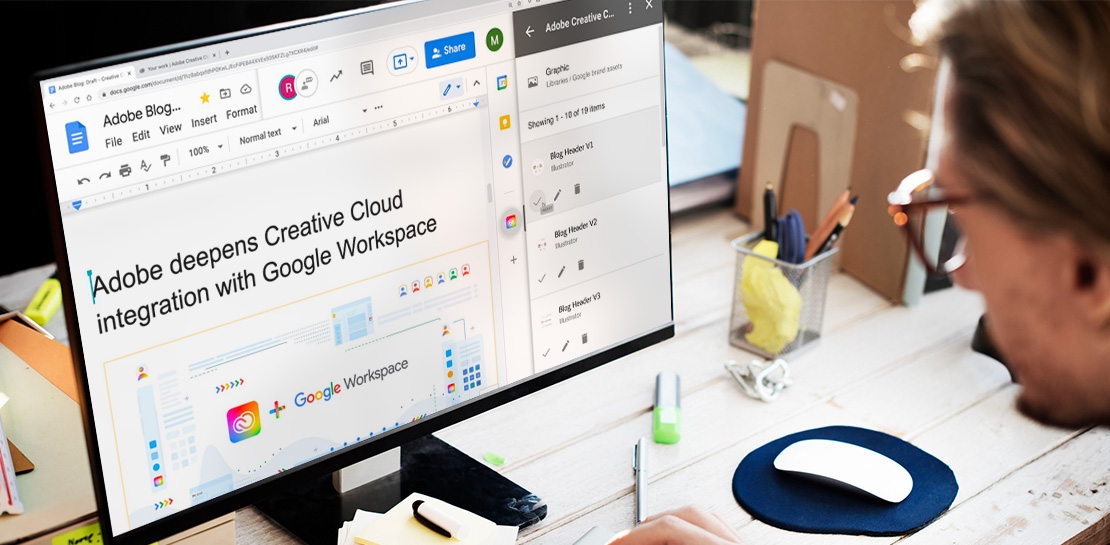
This year we are furthering our collaboration with Adobe with some exciting new capabilities. We’re integrating Adobe Creative Cloud with Docs and Slides, and launching Adobe Creative Cloud for Chrome.
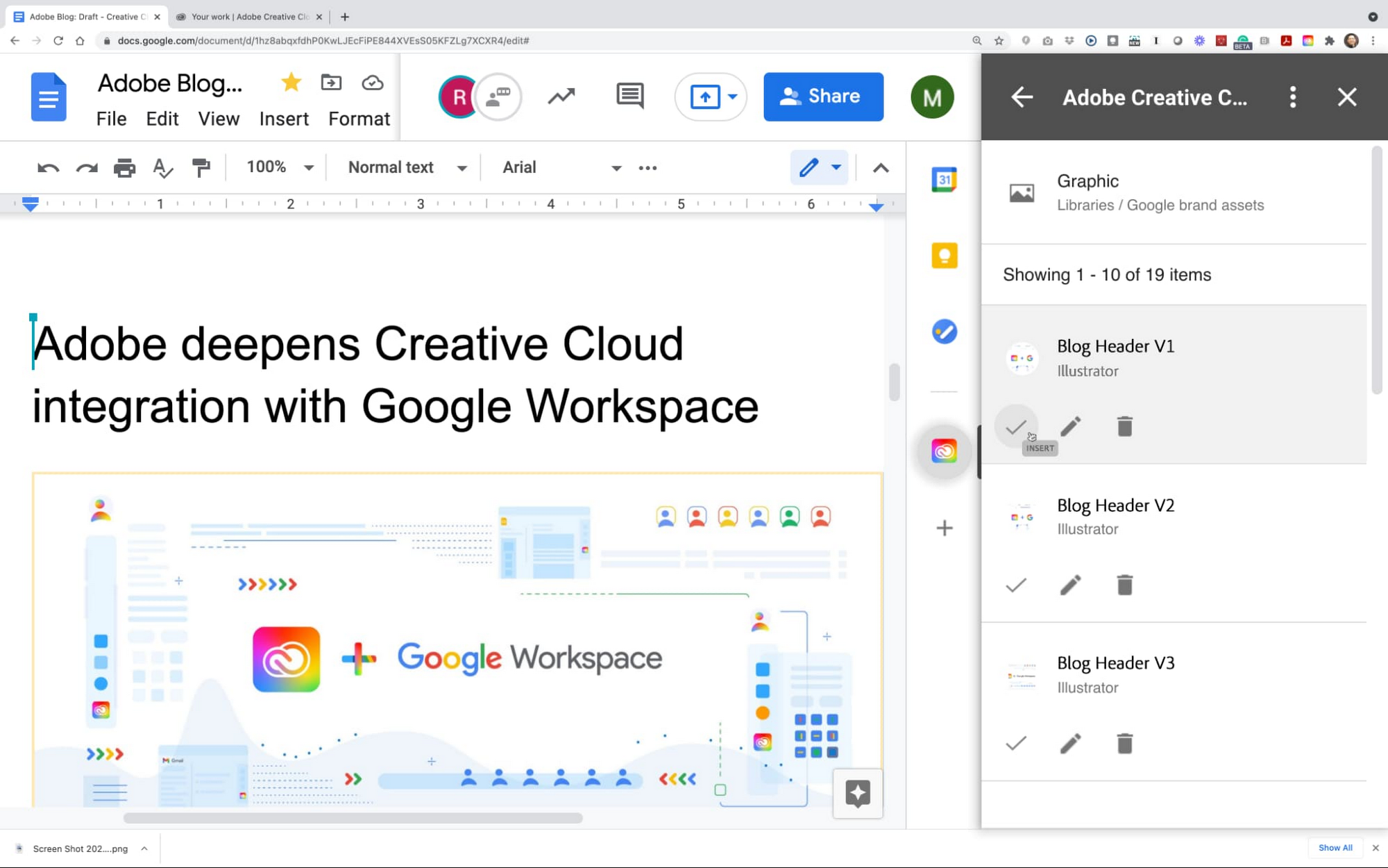
The integration of Adobe Creative Cloud with Docs and Slides will give creative and business stakeholders a single source of truth and a powerful new way to manage brand assets. With easy access to Creative Cloud Libraries inside both Adobe Creative Cloud (with apps like Photoshop, Illustrator, InDesign, XD, and more) and inside Google Workspace (with apps like Gmail, Docs, and Slides), marketing and product design teams can seamlessly share work, get feedback, and stay connected along the way. Learn more about this integration.
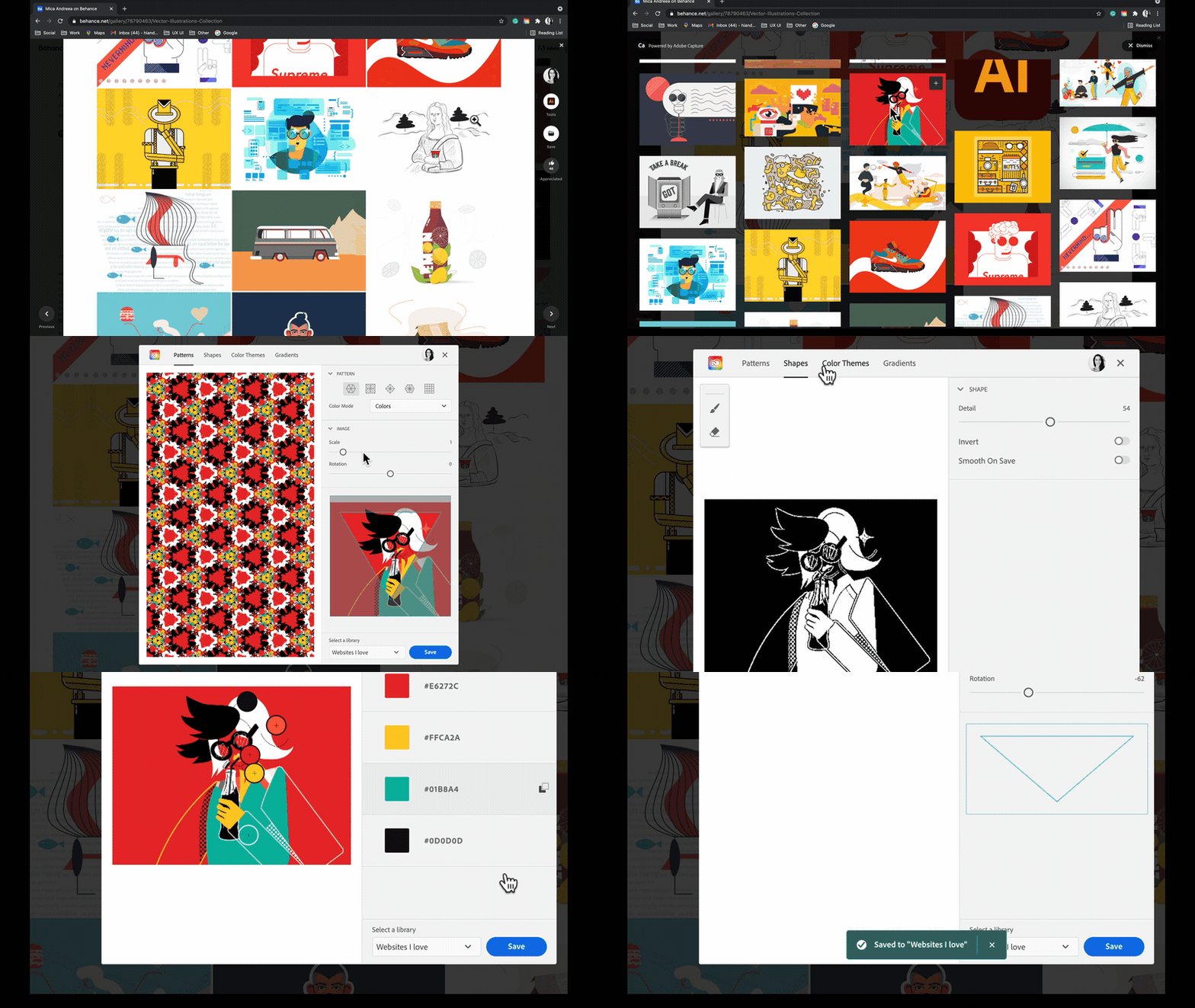
Adobe Creative Cloud for Chrome is a new extension that lets designers draw inspiration from the web’s most beautiful designs and artwork. Whether you’re looking for color combinations, patterns, vector shapes, or gradients extracted from images, the new Chrome extension helps you capture them from the source and apply them to your own design work. Adobe Capture features are available on mobile, on desktop for Photoshop and Creative Cloud Libraries, and now on the web, so wherever and whenever inspiration strikes, you’ll be ready to capture the moment. This feature became available in May. Learn more
These new integrations between Adobe Creative Cloud and Google Workspace and Google Chrome let creatives focus on what they do best: ideate, create, and innovate. Creative teams of 1 or 100 have fast, seamless access to the digital assets and editor tools that bring their work to life. And they’re ready to capture inspiration from the web whenever and wherever it strikes using Google Chrome. We’re committed to boosting creative collaboration in Google Workspace with Adobe as a trusted partner. Start using Google Workspace and Creative Cloud today.
Tips to Get Most of Google Workspace and Make Hybrid Work Efficient and Effective!

3740
Of your peers have already read this article.
1:30 Minutes
The most insightful time you'll spend today!
In response to the pandemic, an overwhelming 92% of the U.S. workforce is now interested in working in a hybrid or fully remote capacity1. All employers, including government leaders, are now critically focused on finding the right tools and techniques to foster engagement, improve productivity, and strengthen relationships – in-person and virtually – or risk losing and/or retaining top talent.
Creating a positive work environment starts with having the right technology that can provide a variety of meeting tools to make work easier and more productive from any location. Google Workspace enables agency leaders to support their workforce with capabilities to address a variety of needs, from virtual training and learning, to mobilizing emergency response and critical service delivery. Below we’ve highlighted some of our top tips for getting the most out of Google Workspace to make hybrid work more efficient and effective.
Capture meeting agendas in a Google Doc
Create more effective, engaging meetings by attaching an agenda doc to your Google Calendar event and invite your attendees in to comment and review ahead of time. Google Docs, Google Slides, and Google Sheets allow collaborators to leave color-coded comments that can be incorporated into a live video meeting or a face-to-face roundtable meeting.
Engage attendees with interactive features in Google Meet
We’ve added new features to make meetings more interactive and inclusive throughout 2022. New in-meeting reactions, livestream Q&A and polls, and streaming meetings directly to YouTube, and client-side encryption are all coming to Google Meet soon. We’re incorporating Meet directly into Docs, Sheets, and Slides to make it easier to coordinate on projects.
Knowing how to include everyone into a meeting, even while some folks are remote and some are in the office, will be critical to bringing cohesion to the work experience. Government leaders can foster a culture that helps workers be more productive, satisfied, and perhaps even happier with their work lives.
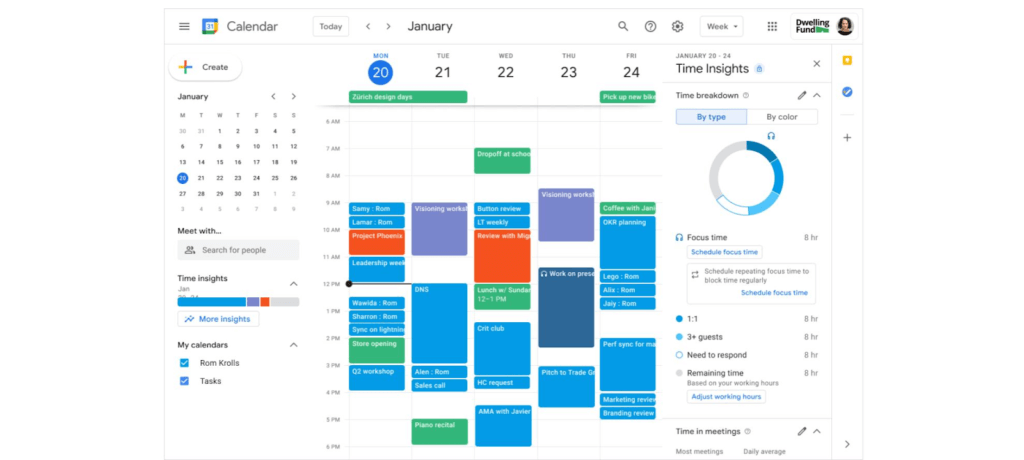
Add focus time to your calendar and see how time is spent
Google Workspace has also introduced product features to promote wellness. This includes focus time on Google Calendar, out of office and do not disturb statuses on Google Chat, or even backgrounds and noise cancellation on Google Meet that allow individuals to separate their home from work. Allowing employees to set boundaries or notify others of working times can help combat work fatigue. Time Insights in Calendar provide individuals with personalized analytics to see how time is spent across meetings and collaborators throughout a week. A secure cloud environment further brings these tools together to create systems of collaboration.
Creating positive outcomes with a culture focused on integrated work environments
The shift to hybrid work has already started leading to more meaningful engagements among all employees. Video calls have connected the new, tech savvy generation of workers with more experienced workers. In a Fedscoop Radio podcast on embracing hybrid-work strategies and tools, Gary Dannoff, Global Google Workspace Strategic Alliance Leader, noted that multigenerational teams with a 25-year age gap between team members are 75% more likely to have positive outcomes than teams with a smaller age span or none. As we return to the office, let’s engage with and support this new culture of cross-cultural, cross-generational, and cross-geographic collaborative environments created by the challenges we all adapted to during the pandemic.
Google Workspace supports a shift toward future-ready workplace cultures while providing the empathy and confidence needed for returning employees. Danoff also explains that to create a “future-proof” culture, you need to shift your mindset towards building a workplace that is future-ready. Using modern technology to foster collaboration in an evolving work environment helps organizations transform how work is done.
Collaborative technology facilitates productivity and constituent engagement
Agencies around the country are embracing the new era of hybrid work. The State of Arizona migrated 36,000 employees to Google Workspace with little disruption to the way people did their jobs. Now, Arizona is planning to expand their platform to support even more departments that require highly regulated data.
To help constituents get back to work, states like Rhode Island and Wisconsin have created Virtual Career Centers that leverage Google Cloud solutions, which includes Google Workspace, where constituents can schedule meetings and video conferences with career coaches, develop and collaborate on resumes using cloud-based document storage, communicate directly with job recruiters, attend virtual job fairs, and apply to open positions.
For more ideas on how to bring a collaborative, innovative culture into the workplace, catch up on content from the Google Workspace Summit.
1 Source: https://www.pwc.com/us/en/library/covid-19/us-remote-work-survey.html#content-free-1-0f39
Lucent Bio: Boosting collaboration and sustainability with Google Workspace

4679
Of your peers have already read this article.
2:30 Minutes
The most insightful time you'll spend today!
From electrifying transportation to shifting the grid to renewable energy, environmental sustainability is one of the greatest challenges of our generation. A critical but often forgotten goal is the development of sustainable agricultural practices, especially given increasing water shortages and soil degradation around the world.
Lucent Bio was born to solve some of these threats to humanity’s ability to feed itself. It delivers crop nutrition solutions that accelerate the transition to sustainable agriculture. Lucent Bio developed novel technology for bioactive crop nutrition products, including its flagship product—Soileos®—which boosts nutrient density in crops, regenerates soil, avoids polluting agro-ecosystems, and enables the circular economy. Soileos is a plant-based product that is made by upcycling food processing co-products such as lentil and pea hulls into bioactive nutrients that then create the next harvest.
As a start-up, Lucent Bio has used Google Workspace since day one to drive collaboration, streamline operations, and scale. As an organization, it is also closely aligned with Google’s sustainability goals. Google is carbon-neutral for its operations and has made a public commitment with detailed plans to run on carbon-free energy by 2030, meaning clean power every hour of every day.
Google Workspace has been an invaluable resource to fuel collaboration between the engineers at the Lucent Bio pilot plant, the scientists at the research lab and greenhouse, and on-field agronomists as they conduct trials on Soileos across North America. Without the use of Google Workspace during the COVID 19 pandemic, Lucent Bio would not have been able to achieve their current scale.
“In just 18 months, Lucent Bio has been able to scale manufacturing from 1 kg to 1,000 kg of product per day. This year, we’re poised to take the next big step to 20,000 kg per day. During this scale-up process, we went through several iterations of improvements, resulting in a completely zero-waste manufacturing process—a hugely difficult but impressive achievement in line with our mission to accelerate the transformation of agriculture to sustainability. Every step of the way, Google Workspace has been an essential part of our innovation and growth strategy.”
Michael Riedijk, CEO Lucent Bio
Google Workspace runs on the cleanest cloud in the industry. It helps teams of all sizes, and across all industries, connect, create, and collaborate from anywhere. Workspace recently launched AI-generated summaries in Spaces, which help distributed teams stay focused while quickly catching up on chat messages they might have missed. Innovations like these keep the scientists at Lucent Bio collaborating as they build a more sustainable future for agriculture.
You can find more about Google’s commitment to sustainability here, including our goal to become not just carbon-neutral, but carbon-free by 2030, efforts to combat deforestation, and how we’re supporting clean energy.
3967
Of your peers have already watched this video.
22:21 Minutes
The most insightful time you'll spend today!
Boosting Chrome OS adoption with effective change management
Can you remember the last time you asked a child to do something how did you convince them to do what you wanted? How many times did they ask you why probably more than once, right? So we know change is hard when we ask someone to make a change we’re asking a lot from them. Very often with IT projects we expect people to change, we don’t really think through the implications of this.
The purpose of this video is to guide you to migrate to Chromebooks and help you understand the reason why. When putting together your change management plan there’s a much larger chance of your project being able to deliver on its business objectives.
Introducing new technology into your organization is an exciting step. However, change management and workforce adoption of the new technology can be challenging. Get insights from Google’s Chrome Enterprise expert on change management strategies and best practices for increasing Chromebook adoption in your organization.
7 Tricks No One Will Tell You to Work Smarter and Grow Your Business Faster

7115
Of your peers have already read this article.
4:20 Minutes
The most insightful time you'll spend today!
We’re dedicated to creating products that are helpful for our users, including those in a business setting. G Suite helps companies of all sizes transform how they work by encouraging people to focus on what really matters, whether that be fostering a culture of collaboration like Iron Mountain or reducing IT and infrastructure costs like Nielsen.
Here’s how Google’s leading artificial intelligence (AI) can help people accomplish more in the workplace. First, Google Docs is packed with more assistive features to help you create high-quality work more quickly. In addition, the Google Assistant has been helping people get things done in their personal lives for the past few years. With remote working becoming the norm these days, Google Assistant has more features to help G Suite users work more efficiently and seamlessly.
Assistive writing features in Google Docs
AI-powered capabilities within Docs makes it faster and easier for people to create high-quality, error-free content.
- Write faster. Smart Compose in Google Docs uses Google AI to suggest complete sentences as they are created. Smart Compose has already saved people from typing more than 2 billion characters each week.
- Cut back on grammatical and spelling errors. To build on the intelligence, Docs is using cutting-edge, neural network technology to power grammar suggestions. The neural network approach has proven to help individuals catch even more errors in internal experiments. In addition, we’ve brought spelling autocorrect to Docs. Using the power of Google Search, this intelligent feature constantly learns new words or phrases that become part of the English language from search to inform spelling suggestions in documents, just as it does already in Gmail.
- Receive suggestions that are tailored to your business. Lastly, our machine-learning based spelling suggestions to recognize commonly used words from your business domain to inform recommendations is also a useful feature. For example, if your organization has an internal project name or acronym that’s commonly used, Docs will not only stop underlining such terms, but will also suggest corrections when these terms are misspelled.
Expanding the power of the Google Assistant for G Suite Businesses
You can accomplish more on the go with the Google Assistant when you’re logged into your G Suite account. We’ve also enabled remote workers with the Asus Hangouts Meet Hardware kit to respond to voice commands in meeting rooms.
- Manage your calendar while on the move. Whether you’re on your commute home or on the go between meetings, the Google Assistant can help you manage scheduling in Google Calendar. You can ask the Assistant to read your calendar, create events, cancel events, or even reschedule events.
- Send quick messages and dial into calls hands-free. Beyond managing your calendar, we know that sometimes you need to send messages and join calls on the go. You can say things like, “Hey Google, join my next meeting” or “Hey Google, send an email to my next meeting”.
- Have a more seamless meeting experience. Google Assistant is available in meeting rooms with Asus Hangouts Meet Hardware kit. Instead of clicking into meetings to join them, people can say voice commands to the Assistant to join a meeting, exit a meeting, or even make a phone call.
- Increase accessibility in meeting rooms. Another goal in bringing the Google Assistant into meeting rooms is to increase accessibility. People can say a voice command, like “Hey, Google, turn on spoken feedback,” to use accessibility features without having to find the button to turn them on.
More Relevant Stories for Your Company

15 Companies–from Korean Air to Salesforce–Share How G-Suite and Google Meet Help Them Battle COVID-19
More than a decade ago we introduced secure, easy-to-use business collaboration and productivity apps (now known as G Suite), and we envisioned a new way of working in the cloud. And although we always knew the value of cloud-based collaboration, it is more important than ever at a time like




Small Fish Farmer Shows Big Corporates How to Be More Efficient
Red Deer, Canada is known for a lot of things. It’s the first city in Canada, for example, to have had a court case to include female jurors. But, more recently, it’s made headlines for something on the outskirts of the city. Just 22 minutes out of Red Deer is

Jeni’s Splendid Ice Creams
At Jeni's Splendid Ice Creams, Jeni and her staff are all passionate about ice cream and sharing that passion with the world by creating ice creams that you can fall madly in love with. To do this every day, requires incredible teamwork and collaboration, and Google Workspace is helping support

How Google is Showing the Way to the Differently-abled: A Blind Program Manager’s Account
What does “accessibility” mean to businesses? It’s not just about making sure that your office or retail space is accessible to workers and customers who have mobility challenges, it’s also about making sure that your apps, digital tools and content are also more accessible to everyone. Our product teams work
